
CT9.3 - Treadmills Horizon Fitness - Free user manual and instructions
Find the device manual for free CT9.3 Horizon Fitness in PDF.


| Product Type | Treadmill |
| Brand | Horizon Fitness |
| Model | CT9.3 |
| Intended Use | Home (Residential) |
| Maximum Weight Capacity | 159 kg (350 lbs) |
| Power Supply | 110-120 V, 15 A, dedicated circuit |
| Plug Type | Grounded plug (3-prong) |
| Workout Programs | Manual, Speed Intervals, Endurance Intervals, Maximum Intervals, Cardio Burn, Muscle Toning, Strength Builder, 5 km, 10 km, Custom 1 and 2 |
| Display | Time, distance, calories, incline, speed, heart rate |
| Audio Connectivity | Audio input jack (3.5 mm), built-in speakers |
| Fan | Yes, adjustable |
| Safety Key | Yes, with tether clip |
| Folding | Yes, with locking pin |
| Mobility | Transport wheels (integrated) |
| Maintenance | Lubrication of deck with silicone, belt tension and tracking |
| Cleaning | Wipe with damp cloth and mild soap; do not use solvents |
| Frame Warranty | Lifetime (for original owner) |
| Motor Warranty | Lifetime (for original owner) |
| Electronics and Parts Warranty | 2 years |
| Labor Warranty | 1 year |
| Customer Support | Technical support by phone, email or website |
| Repairability | Service by authorized technician recommended |
Frequently Asked Questions - CT9.3 Horizon Fitness
User questions about CT9.3 Horizon Fitness
0 question about this device. Answer the ones you know or ask your own.
Ask a new question about this device
Download the instructions for your Treadmills in PDF format for free! Find your manual CT9.3 - Horizon Fitness and take your electronic device back in hand. On this page are published all the documents necessary for the use of your device. CT9.3 by Horizon Fitness.
USER MANUAL CT9.3 Horizon Fitness
Read the TREADMILL GUIDE before using this OWNER'S MANUAL.
SAVE THESE INSTRUCTIONS
When using an electrical product, basic precautions should always be followed, including the following: Read all instructions before using this treadmill. It is the responsibility of the owner to ensure that all users of this treadmill are adequately informed of all warnings and precautions. If you have any questions after reading this guide, contact Customer Tech Support at the number listed on the back panel of the OWNER'S MANUAL.
This treadmill is intended for in-home use only. Do not use this treadmill in any commercial, rental, school or institutional setting. Failure to comply will void the warranty.


DANGER
TO REDUCE THE RISK OF ELECTRICAL SHOCK:
Always unplug the treadmill from the electrical outlet immediately after using, before cleaning, performing maintenance and putting on or taking off parts.

WARNING
TO REDUCE THE RISK OF BURNS, FIRE, ELECTRICAL SHOCK OR INJURY TO PERSONS:
- Never use the treadmill before securing the safety tether clip to your clothing.
If you experience any kind of pain, including but not limited to chest pains, nausea, dizziness, or shortness of breath, stop exercising immediately and consult your physician before continuing. - When exercising, always maintain a comfortable pace.
- Do not wear clothes that might catch on any part of the treadmill.
- Always wear athletic shoes while using this equipment.
- Do not jump on the treadmill.
- At no time should more than one person be on treadmill while in operation.
- This treadmill should not be used by persons weighing more than specified in the OWNER'S MANUAL WARRANTY SECTION. Failure to comply will void the warranty.
- When lowering the treadmill deck, wait until rear feet are firmly on the floor before stepping on the deck.
- Disconnect all power before servicing or moving the equipment. To clean, wipe surfaces down with soap and slightly damp cloth only; never use solvents. (See MAINTENANCE)
- The treadmill should never be left unattended when plugged in. Unplug from outlet when not in use, and before putting on or taking off parts.
- Do not operate under blanket or pillow. Excessive heating can occur and cause fire, electric shock, or injury to persons.
- Connect this exercise product to a properly grounded outlet only.

WARNING
TO REDUCE THE RISK OF BURNS, FIRE, ELECTRICAL SHOCK OR INJURY TO PERSONS:
- At NO time should children under the age of 13 or pets be within 10 feet of the machine.
- At NO time should children under the age of 13 use the treadmill.
Children over the age of 13 or disabled persons should not use the treadmill without adult supervision. - Use the treadmill only for its intended use as described in the treadmill guide and owner's manual.
- Do not use other attachments that are not recommended by the manufacturer. Attachments may cause injury.
- Never operate the treadmill if it has a damaged cord or plug, if it is not working properly, if it has been dropped or damaged, or immersed in water. Contact tech support at the number on the back panel to schedule service.
- Keep power cord away from heated surfaces. Do not carry this unit by its supply cord or use the cord as a handle.
- Never operate the treadmill with the air opening blocked. Keep the air opening clean, free of lint, hair, and the like.
- To prevent electrical shock, never drop or insert any object into any opening.
- Do not operate where aerosol (spray) products are being used or when oxygen is being administered.
- To disconnect, turn all controls to the off position, then remove plug from outlet.
- Do not use treadmill in any location that is not temperature controlled, such as but not limited to garages, porches, pool rooms, bathrooms, car ports or outdoors. Failure to comply may void the warranty.
- This treadmill is intended for in-home use only. Do not use this treadmill in any commercial, rental, school or institutional setting. Failure to comply will void the warranty.
- Do not remove the console covers unless instructed by Customer Tech Support. Service should only be done by an authorized service technician
It is essential that your treadmill is used only indoors, in a climate controlled room. If your treadmill has been exposed to colder temperatures or high moisture climates, it is strongly recommended that the treadmill is warmed up to room temperature before first time use. Failure to do so may cause premature electronic failure.

WARNING
This product contains chemicals known to the State of California to cause cancer and birth defects or other reproductive harm.


GROUNDING INSTRUCTIONS
This product must be grounded. If a treadmill should malfunction or breakdown, grounding provides a path of least resistance for electrical current to reduce the risk of electrical shock. This product is equipped with a cord having an equipment-grounding conductor and a grounding plug. The plug must be plugged into an appropriate outlet that is properly installed and grounded in accordance with local codes and ordinances.

DANGER
Improper connection of the equipment-grounding conductor can result in a risk of electric shock. Check with a qualified electrician or serviceman if you are in doubt as to whether the product is properly grounded. Do not modify the plug provided with the product. If it will not fit the outlet, have a proper outlet installed by a qualified electrician.
This product is for use on a nominal 110-120 Volt circuit and has a grounding plug that looks like the plug in the illustration. Make sure that the product is connected to an outlet having the same configuration as the plug. No adapter should be used with this product.
This product must be used on a dedicated circuit. To determine if you are on a dedicated circuit, shut off the power to that circuit and observe if any other devices lose power. If so, move devices to a different circuit. Note: There are usually multiple outlets on one circuit. This treadmill should be used with a minimum 15-amp circuit.

ASSEMBLY
WARNING
There are several areas during the assembly process that special attention must be paid. It is very important to follow the assembly instructions correctly and to make sure all parts are firmly tightened. If the assembly instructions are not followed correctly, the treadmill could have parts that are not tightened and will seem loose and may cause irritating noises. To prevent damage to the treadmill, the assembly instructions must be reviewed and corrective actions should be taken.
Before proceeding, find your treadmill's serial number located on a white barcode sticker near the on/off power switch and power cord and enter it in the space provided below.
ENTER YOUR SERIAL NUMBER AND MODEL NAME IN THE BOXES BELOW:
SERIAL NUMBER:
TM
MODEL NAME: HORIZON
TREADMILL

SERIAL NUMBER LOCATION
» Refer to the SERIAL NUMBER and MODEL NAME when calling for service.

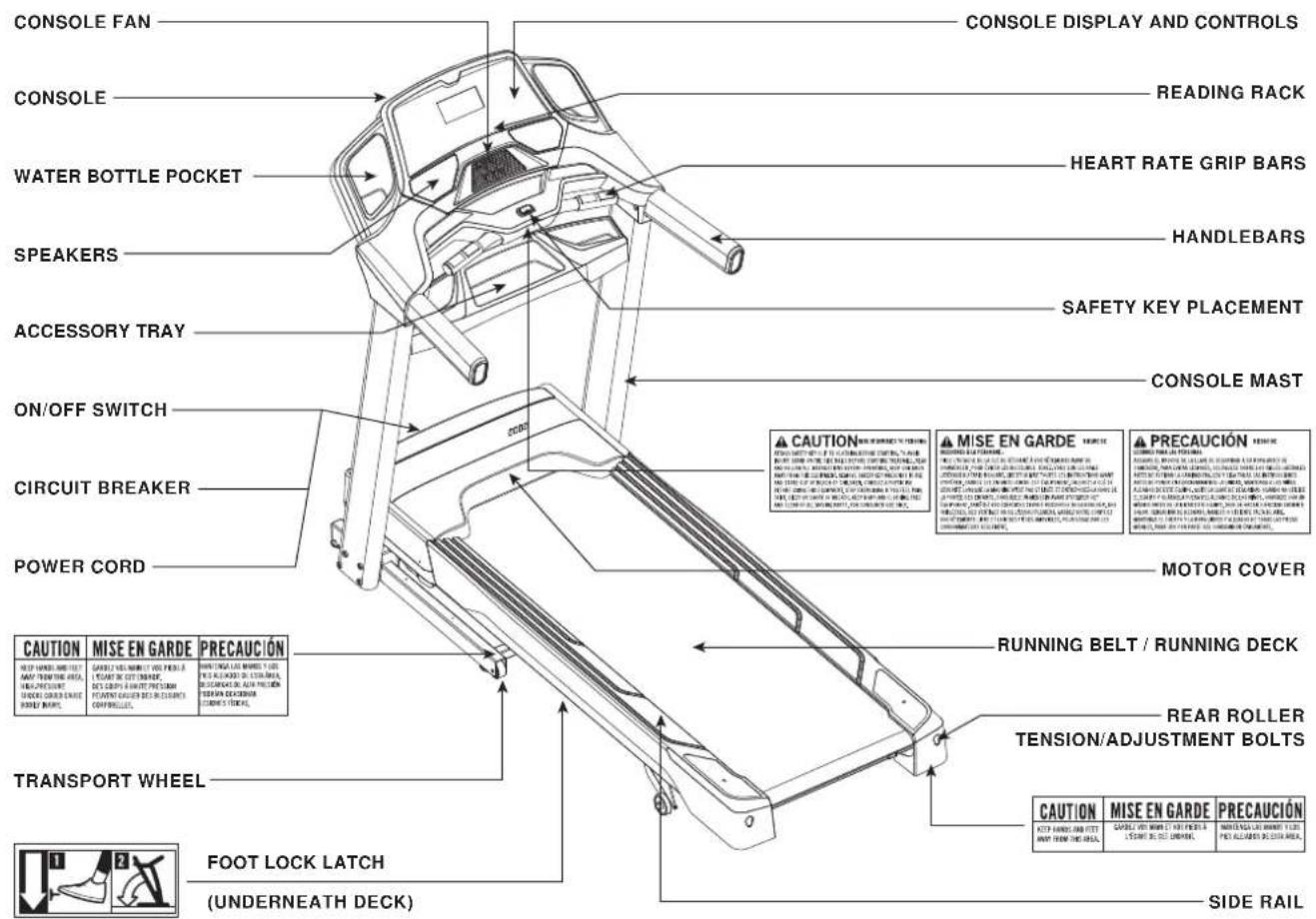
TOOLS REQUIRED:
6mmT-Wrench
5mmL-Wrench
Screwdriver (not included)
PARTS INCLUDED:
□2 Console Masts
□ 1 Console Assembly
2 Sets Console Mast Covers
1 Accessory Tray
2 Water Bottle Pockets
1 Hardware Kit
1 Safety Key
1 Power Cord
1 Audio Adapter Cable
1 Bottle of Silicone Lubricant
(for 2 applications)

NEED HELP?
If you have questions or if there are any missing parts, contact Customer Tech Support. Contact information is located on the back panel of this manual.
PRE ASSEMBLY
UNPACKING
Place the treadmill carton on a level flat surface. It is recommended that you place a protective covering on your floor. Take CAUTION when handling and transporting this unit. Never open box when it is on its side. Once the banding straps have been removed, do not lift or transport this unit unless it is fully assembled and in the upright folded position, with the lock latch secure. Unpack and assemble the unit where it will be used. The enclosed treadmill is equipped with high-pressure shocks and may spring open if mishandled. Never grab hold of any portion of the incline frame and attempt to lift or move the treadmill.

WARNING
DO NOT ATTEMPT TO LIFT THE TREADMILL! Do not move or lift treadmill from packaging until specified to do so in the assembly instructions. You may remove the plastic wrap from console masts.

WARNING
FAILURE TO FOLLOW THESE INSTRUCTIONS COULD RESULT IN INJURY!
NOTE:
- During each assembly step, ensure that ALL nuts and bolts are in place and partially threaded in before completely tightening any ONE bolt.
- A light application of grease may aid in the installation of hardware. Any grease, such as lithium bike grease is recommended.
- It is recommended that two people work together for ease and efficiency while assembling an treadmill.


ASSEMBLY STEP 1
HARDWARE FOR STEP 1:
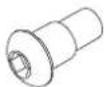
BOLT (A) 9 mm Oty:2
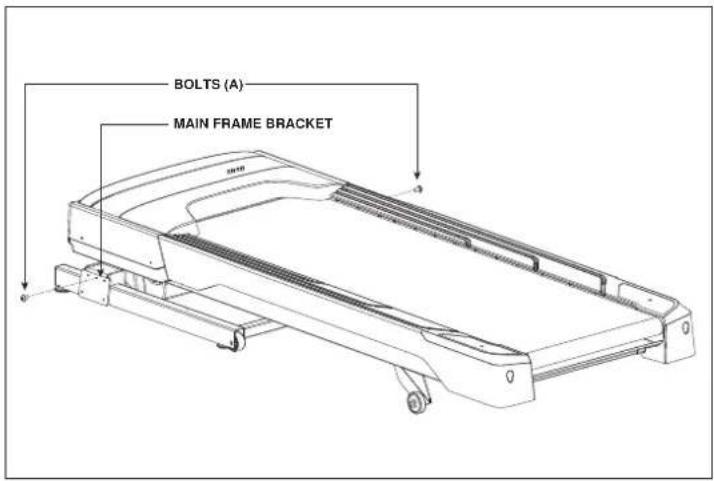
A Cut the yellow banding straps and lift the running deck upward to remove all contents from underneath the running deck.
B Open HARDWARE FOR STEP 1.
C Insert 2 BOLTS (A) into MAIN FRAME BRACKETS.
ASSEMBLY STEP 2
HARDWARE FOR STEP 2:

FLAT WASHER (B)
8 mm Qty: 8

SPRING WASHER (C)
8 mm Qty: 8
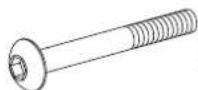
BOLT (D) 70 mm
Qty:8
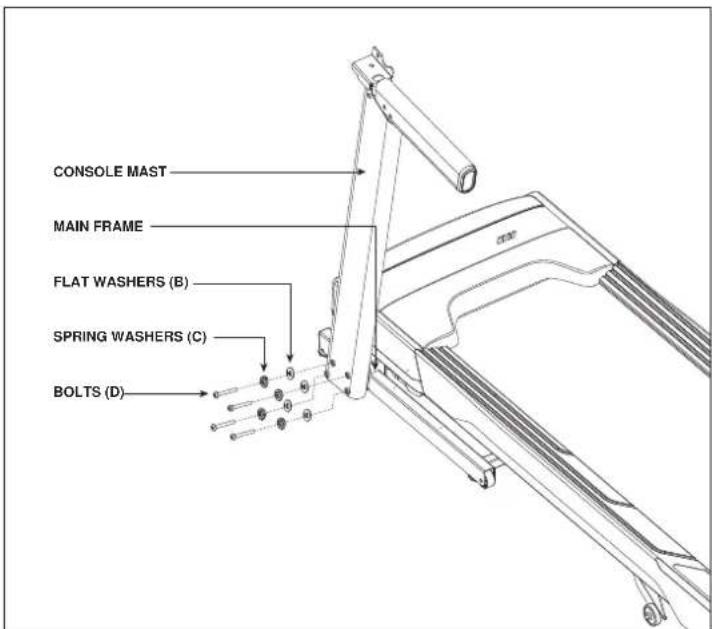
A Open HARDWARE FOR STEP 2.
B Attach LEFT CONSOLE MAST so that BOLT (A) sits on the NOTCHED HOLE in the bottom of the CONSOLE MAST.
C Attach LEFT CONSOLE MAST to MAIN FRAME BRACKET using 4 FLAT WASHERS (B), 4 SPRING WASHERS (C) and 4 BOLTS (D).


ASSEMBLY STEP 2 (continued)
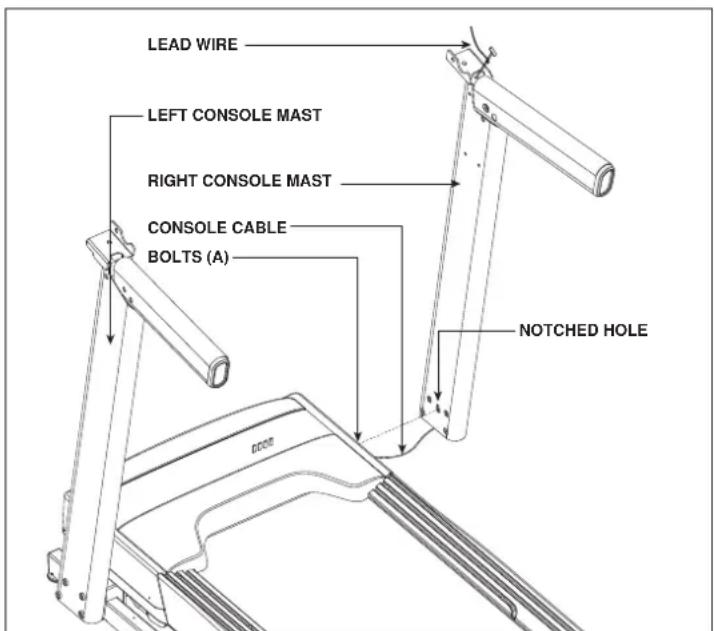
D Pull the CONSOLE CABLE out of the treadmill base frame using the LEAD WIRE. Attach CONSOLE CABLE to the CONSOLE CABLE in the bottom of the mast. The other end of the CONSOLE CABLE should be located at the top of the mast. Detach and discard LEAD WIRES.
E Align the RIGHT CONSOLE MAST so that BOLT (A) sits in the NOTCHED HOLE in the bottom of the CONSOLE MAST.
NOTE: Be careful not to pinch the console cable while attaching the right console mast.
F Attach CONSOLE MAST to MAIN FRAME BRACKET using 4 FLAT WASHERS (B), 4 SPRING WASHERS (C) and 4 BOLTS (D).
ASSEMBLY STEP 3
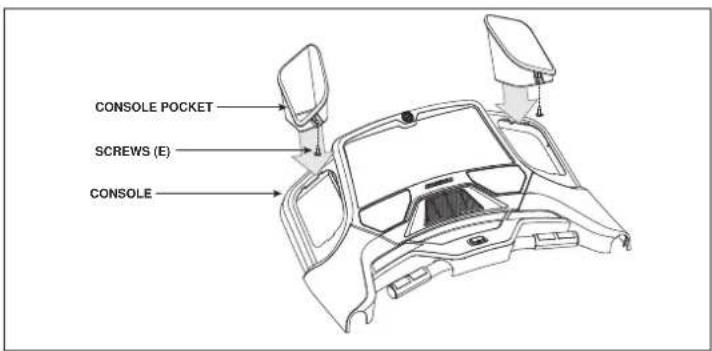

HARDWARE FOR STEP 3:

SCREW (E) 8 mm Qity:2

FLAT
WASHER 8 mm
Qty: 4

SPRING
WASHER (C)
8 mm
Qty: 4

BOLT (F) 15 mm Qty:4
A Open HARDWARE FOR STEP 3.
B Attach CONSOLE POCKETS to CONSOLE using 2 SCREWS (E).
C Gently place CONSOLE on top of CONSOLE MASTS.
NOTE: Be careful not to pinch the console cables while attaching the console.
D Connect the CONSOLE CABLES and tuck them inside the right CONSOLE MAST.
E Connect the CONSOLE to the right CONSOLE MAST using 2 BOLTS (F), 2 SPRING WASHERS (C) and 2 FLAT WASHERS (B).
F Repeat STEP E on other side.

ASSEMBLY STEP 4

HARDWARE FOR STEP 4:
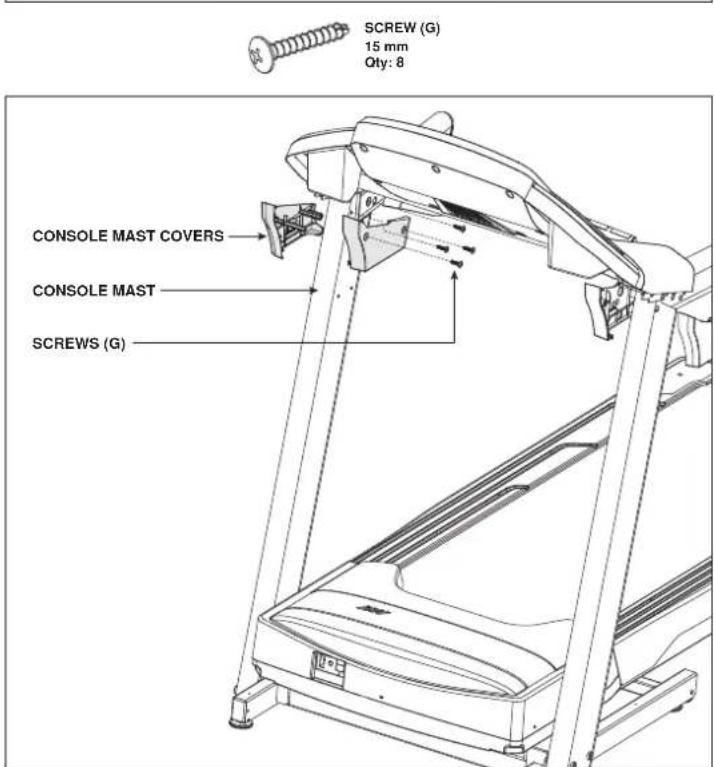
A Open HARDWARE FOR STEP 4.
B Attach the the LEFT OUTER CONSOLE MAST COVER with 2 SCREWS (G).
C Attach the LEFT INNER CONSOLE MAST COVER with 2 SCREWS (G).
D Repeat steps 2 and 3 to attach the RIGHT-SIDE CONSOLE MAST COVERS.
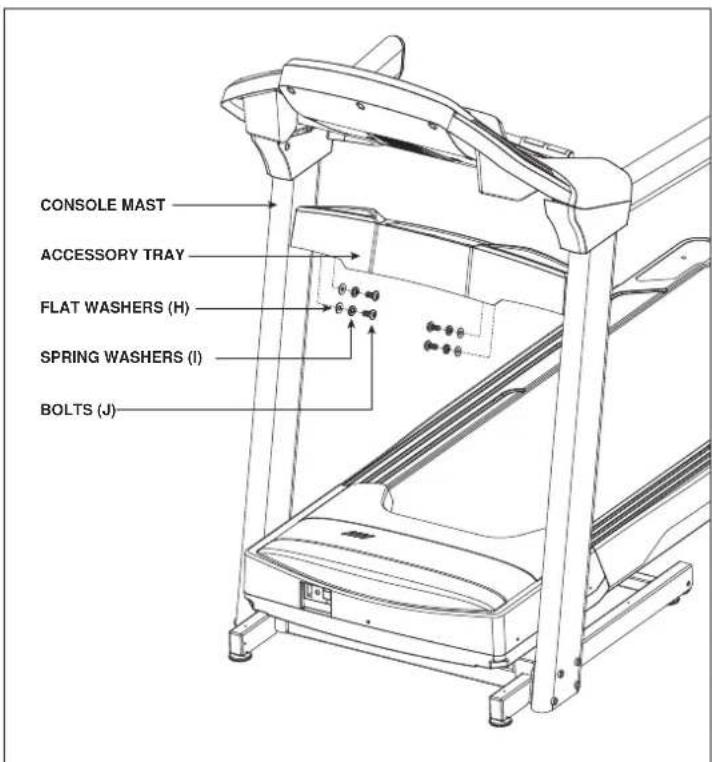
HARDWARE FOR STEP 5:

FLAT
WASHER (H)
6.2 mm
Qty: 4

BOLT (J) 15 mm Qty:4
A Open HARDWARE FOR STEP 5.
B Align the ACCESSORY TRAY between the CONSOLE MASTS.
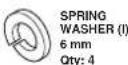
C Attach the ACCESSORY TRAY to the CONSOLE MASTS using 4 FLAT WASHERS (H), 4 SPRING WASHERS (I) and 4 BOLTS (J).
ASSEMBLY COMPLETE!
Before the first use, lubricate the treadmill deck by following the instructions in the MAINTENANCE section in the TREADMILL GUIDE.
TREADMILL OPERATION
This section explains how to use your treadmill's console and programming. The BASIC OPERATION section in the TREADMILL GUIDE has instructions for the following:
- LOCATION OF THE TREADMILL
- USING THE SAFETY KEY
FOLDING THE TREADMILL - MOVING THE TREADMILL
LEVELING THE TREADMILL
TENSIONING THE RUNNING BELT - CENTERING THE RUNNING BELT
- USING THE HEART RATE FUNCTION


CONSOLE OPERATION
Note: There is a thin protective sheet of clear plastic on the overlay of the console that should be removed before use.
A) LCD DISPLAY WINDOW: time, distance, speed, calories, incline, and heart rate.
B) PROGRAM KEYS: press to select workout.
C) CUSTOM 1 & 2 KEYS: press to select custom 1 or custom 2 program.
D) KEYS: Used to cycle through programs and Goal Center workout statistics.
E) ENTER: used to confirm selection.
F) VOLUME: used to adjust volume up or down.
G) INCLINE QUICK KEYS: used to reach desired incline quickly.
H) SPEED QUICK KEYS: used to reach desired speed quickly.
I) INCLINE V KEYS: used to adjust incline level.
J) GOAL CENTER: press to set or view your goal. See page 26 for more information.
K) START / PAUSE: used to start workout, pause workout, and restart after pause.
L) STOP / HOLD TO RESET: used to stop machine and also will reset machine when held down.
M) FAN KEY: press to turn fan on and off.
N) SPEED KEYS: used to adjust speed level.
O) AUDIO IN JACK: plug your CD / MP3 player into the console using the included audio adaptor cable.
P) SPEAKERS: play music through speakers when connected to your CD / MP3 device.
Q) STORAGE AREA: holds personal items, i.e. remote control, music player.
R) READING RACK: holds reading material.
S) WATER BOTTLE POCKETS: store your water bottle.
T) FAN: personal workout fan
U) SAFETY KEY: enables treadmill when safety key is inserted.


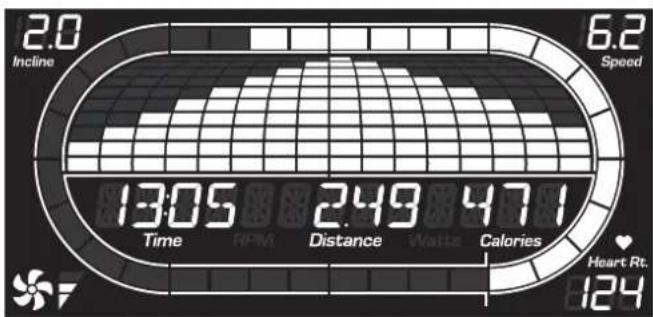
DISPLAYWINDOWS
- TIME: Shown as minutes : seconds. View the time remaining or the time elapsed in your workout.
- DISTANCE: Shown as miles. Indicates distance traveled or distance remaining during your workout.
- CALORIES: Total calories burned or calories remaining left to burn during your workout.
- INCLINE: Shown as percent. Indicates the incline of your walking or running surface.
- SPEED: Shown as MPH. Indicates how fast your walking or running surface is moving.
HEART RATE (HR): Shown as BPM (beats per minute). Used to monitor your heart rate (displayed when contact is made with both pulse grips).
- TRACK: Follows progress around a simulated track. Segments light up with every 12.5 meters completed. One lap around the track is 400 meters (1/4 mile).
FAN: Indicates when the fan is on and what level of strength it is on.
GETTING STARTED
1) Check to make sure no objects are placed on the belt that will hinder the movement of the treadmill.
2) Plug in the power cord and turn the treadmill ON. (The ON/OFF switch is next to the power cord.)
3) Stand on the side rails of the treadmill.
4) Attach the safety key clip to part of your clothing making sure that it is secure and will not become detached during operation.
5) Insert the safety key into the safety keyhole in the console.
6) Select USER 1, USER 2, or GUEST using √ and press ENTER.
7) Set weight using and press ENTER.
8) You have two options to start your workout:
A) QUICK START UP
Simply press START to begin working out. Time, distance, and calories will all count up from zero. OR...
B) SELECT PROGRAM
1) Press a program button to select a workout.
2) Set workout settings using and press ENTER.
3) Press START to begin workout. NOTE: You can also adjust the level during your workout.
When your workout is complete, the monitor display will scroll "FINISHED" and beep. Your workout information will stay displayed on the console for 30 seconds and then reset.
CHANGING YOUR PROGRAM MID-WORKOUT
Anytime during your workout, press any program button to select a new program. Press ENTER and a new workout will begin at the first segment. All workout statistics will roll over.
A new workout will begin at the first segment and all workout statistics will roll over.
NOTE: If you accidentally press a program button during a workout, do not press any other buttons for 5 seconds and the current workout will not change.
TO RESET THE CONSOLE
Hold STOP key for 3 seconds.
CLEAR CURRENT SELECTION
To clear the current program selection or screen, hold the STOP button for 3 seconds.


PROGRAM INFORMATION
MANUAL: Adjust your speed and incline manually during your workout.
| SPEED INTERVALS | ||||
| Segment Warm Up 1 2 Cool | Down | |||
| Time 4:00MIN | 90 SEC | 30 SEC | 4:00 MIN | |
| Level 1 | 10 1.5 2.0 4.0 1.5 | 1.0 | ||
| Level 2 | 10 1.5 2.0 4.5 1.5 | 1.0 | ||
| Level 3 | 10 1.9 2.5 5.0 1.9 | 1.3 | ||
| Level 4 | 10 1.9 2.5 5.5 1.9 | 1.3 | ||
| Level 5 | 10 2.3 3.0 6.0 2.3 | 1.5 | ||
| Level 6 | 10 2.3 3.0 6.5 2.3 | 1.5 | ||
| Level 7 | 10 2.6 3.5 7.0 2.6 | 1.8 | ||
| Level 8 | 10 2.6 3.5 7.5 2.6 | 1.8 | ||
| Level 9 | 10 2.0 3.0 4.0 8.0 3.0 | 2.0 | ||
| Level 10 | 10 2.0 3.0 4.0 8.5 3.0 | 2.0 | ||
| ENDURANCE INTERVALS - SPEED ONLY | |||||||||||
| Segment | Warm Up | 1 | 2 | 3 | 4 | 5 | 6 | 7 | 8 | Cool Down | |
| Time 4:00MIN | Each segment is 30 seconds | 4:00 MIN | |||||||||
| Level 1 | 1.0 | 1.5 | 2.0 | 2.5 | 3.0 | 3.5 | 4.0 | 3.5 | 3.0 | 2.5 | 2.3 |
| Level 2 | 1.3 | 1.9 | 2.5 | 3.0 | 3.5 | 4.0 | 4.5 | 4.0 | 3.5 | 3.0 | 2.6 |
| Level 3 | 1.5 | 2.3 | 3.0 | 3.5 | 4.0 | 4.5 | 5.0 | 4.5 | 4.0 | 3.5 | 3.0 |
| Level 4 | 1.8 | 2.6 | 3.5 | 4.0 | 4.5 | 5.0 | 5.5 | 5.0 | 4.5 | 4.0 | 3.4 |
| Level 5 | 2.0 | 3.0 | 4.0 | 4.5 | 5.0 | 5.5 | 6.0 | 5.5 | 5.0 | 4.5 | 3.8 |
| Level 6 | 2.3 | 3.4 | 4.5 | 5.0 | 5.5 | 6.0 | 6.5 | 6.0 | 5.5 | 5.0 | 4.1 |
| Level 7 | 2.5 | 3.8 | 5.0 | 5.5 | 6.0 | 6.5 | 7.0 | 6.5 | 6.0 | 5.5 | 4.5 |
| Level 8 | 2.8 | 4.1 | 5.5 | 6.0 | 6.5 | 7.0 | 7.5 | 7.0 | 6.5 | 6.0 | 4.9 |
| Level 9 | 3.0 | 4.5 | 6.0 | 6.5 | 7.0 | 7.5 | 8.0 | 7.5 | 7.0 | 6.5 | 5.3 |
| Level 10 | 3.3 | 4.9 | 6.5 | 7.0 | 7.5 | 8.0 | 8.5 | 8.0 | 7.5 | 7.0 | 5.6 |
| Level 11 | 3.0 | 4.5 | 7.0 | 7.5 | 8.0 | 8.5 | 9.0 | 8.5 | 8.0 | 7.5 | 5.3 |
| Level 12 | 3.3 | 4.9 | 7.5 | 8.0 | 8.5 | 9.0 | 9.5 | 9.0 | 8.5 | 8.0 | 5.6 |
INTERVAL WORKOUTS
SPEED INTERVALS: Improves your strength, speed and endurance by increasing and decreasing the speed throughout your workout to involve your heart and other muscles. Speed changes and segments repeat 90 seconds and 30 seconds.
ENDURANCE INTERVALS: Simulates running up and down hills to improve stamina, muscle tone, and promote weight loss. Speed changes and segments repeat every 30 seconds. Time based goal.
PEAK INTERVALS: Improves your strength, speed and endurance by increasing and decreasing the speed and incline throughout your workout to involve your heart and other muscles. Speed and Incline changes, segments repeat 90 seconds and 30 seconds.
| PEAK INTERVALS | ||||||
| Segment War#n | Up 1 2 Cool | Down | ||||
| Time | 4:00 MIN | 90 SFC | 30 SFC | 4:00 MIN | ||
| Level 1 | Speed | 1.0 | 1.5 | 2.0 | 4.0 | 1.5 |
| Incline | 1.0 | 1.5 | 0.5 | 1.5 | 1.5 | |
| Level 2 | Speed | 1.0 | 1.5 | 2.0 | 4.5 | 1.5 |
| Incline | 1.5 | 2.5 | 3.0 | 6.5 | 2.5 | |
| Level 3 | Speed | 1.3 | 1.9 | 2.5 | 5.0 | 1.9 |
| Incline | 2.0 | 3.0 | 4.0 | 7.5 | 3.0 | |
| Level 4 | Speed | 1.3 | 1.9 | 2.5 | 5.5 | 1.9 |
| Incline | 2.0 | 3.0 | 4.0 | 8.0 | 3.0 | |
| Level 5 | Speed | 1.5 | 2.3 | 3.0 | 6.0 | 2.3 |
| Incline | 2.5 | 3.5 | 4.5 | 8.5 | 3.5 | |
| Level 6 | Speed | 1.5 | 2.3 | 3.0 | 6.5 | 2.3 |
| Incline | 2.5 | 3.5 | 4.5 | 9.0 | 3.5 | |
| Level 7 | Speed | 1.8 | 2.6 | 3.5 | 7.0 | 2.6 |
| Incline | 2.5 | 4.0 | 5.5 | 9.5 | 4.0 | |
| Level 8 | Speed | 1.8 | 2.6 | 3.5 | 7.5 | 2.6 |
| Incline | 3.0 | 4.0 | 5.5 | 9.5 | 4.0 | |
| Level 9 | Speed | 2.0 | 3.0 | 4.0 | 8.0 | 3.0 |
| Incline | 3.0 | 4.5 | 6.0 | 10.0 | 5.0 | |
| Level 10 | Speed | 2.0 | 3.0 | 4.0 | 8.5 | 3.0 |
| Incline | 3.0 | 4.5 | 6.0 | 10.0 | 5.0 | |

WEIGHT LOSS WORKOUTS
CARDIO BURN: Promotes weight loss by increasing and decreasing the speed and incline, while keeping you in your fat burning zone. Speed and Incline changes, segments repeat every 30 seconds.
MUSCLE TONER: Tones muscles by adjusting incline gradually while keeping you in your fat burning zone. Segments change every 30 seconds. Time based goal with 10 difficulty levels to choose from.
STRENGTH BUILDER: Time segments vary from 30 to 90 segments long to challenge your stamina and strength. Time based goal with 10 difficulty levels to choose from.
| CARDIO BURN | ||||||||||||
| S e g | m | e | n | t | W | a | r | m | U | p | 1 | |
| Time | 4:00 MIN | Each segment is 30 seconds | 4:00 MIN | |||||||||
| Level 1 | Incline 0 | 0.5 | 1.5 | 1.5 | 1.0 | 0.5 | 0.5 | 1.0 | 1.5 | 0.5 | 0 | |
| Speed 1 | 1.0 | 2.0 | 2.5 | 3.0 | 3.5 | 4.0 | 3.5 | 3.0 | 2.5 | 1.5 | ||
| Level 2 | Incline 0 | 0.5 | 1.5 | 1.5 | 1.0 | 0.5 | 1.0 | 1.0 | 1.5 | 0.5 | 0 | |
| Speed 1 | 1.3 | 1.9 | 2.5 | 3 | 4.0 | 4.5 | 4.0 | 3.5 | 3.0 | 2.6 | 1.8 | |
| Level 3 | Incline 0 | 5.1 | 0.2 | 0.2 | 1.5 | 1.0 | 1.0 | 1.5 | 2.0 | 1.0 | 0.5 | |
| Speed 1 | 1.5 | 2.3 | 3.0 | 3.5 | 4.0 | 4.5 | 4.0 | 3.5 | 3.0 | 2.0 | ||
| Level 4 | Incline 0 | 5.1 | 0.2 | 0.2 | 1.5 | 1.0 | 1.0 | 1.5 | 2.0 | 1.0 | 0.5 | |
| Speed 1 | 1.8 | 2.6 | 3.5 | 4.0 | 4.5 | 5.0 | 5.0 | 4.5 | 4.0 | 3.4 | 2.3 | |
| Level 5 | Incline 1.0 | 1.0 | 1.5 | 2.5 | 2.0 | 1.5 | 1.5 | 2.0 | 2.5 | 1.5 | 1.0 | |
| Speed 2 | 2.0 | 3.0 | 4.0 | 4.5 | 5.0 | 5.5 | 6.0 | 5.0 | 4.5 | 3.8 | 2.5 | |
| Level 6 | Incline 1.0 | 1.0 | 1.5 | 2.5 | 2.0 | 1.5 | 1.5 | 2.0 | 2.5 | 1.5 | 1.0 | |
| Speed 2 | 2.3 | 3.4 | 4.5 | 5.0 | 5.5 | 6.0 | 6.5 | 6.0 | 5.5 | 4.1 | 2.8 | |
| Level 7 | Incline 1.5 | 1.5 | 2.0 | 3.0 | 3.0 | 2.0 | 2.0 | 2.0 | 2.5 | 3.0 | 2.0 | 1.5 |
| Speed 2 | 2.5 | 3.8 | 5.0 | 5.5 | 6.0 | 6.5 | 7.0 | 6.5 | 6.0 | 4.5 | 3.0 | |
| Level 8 | Incline 1.5 | 1.5 | 2.0 | 3.0 | 3.0 | 2.0 | 2.0 | 2.0 | 2.5 | 3.0 | 2.0 | 1.5 |
| Speed 2 | 2.8 | 4.1 | 5.5 | 6.0 | 6.5 | 6.5 | 7.0 | 7.5 | 7.0 | 6.5 | 4.0 | |
| Level 9 | Incline 2.0 | 2.5 | 3.5 | 3.3 | 5.0 | 2.5 | 2.5 | 3.0 | 3.5 | 2.5 | 2.0 | |
| Speed 2 | 3.0 | 4.5 | 6.0 | 6.5 | 7.0 | 7.5 | 7.5 | 8.0 | 7.5 | 6.5 | 5.3 | |
| Level 10 | Incline 2.0 | 2.5 | 3.5 | 3.3 | 5.0 | 2.5 | 2.5 | 3.0 | 3.5 | 2.5 | 2.0 | |
| Speed 2 | 3.3 | 4.9 | 6.5 | 7.0 | 7.5 | 8.0 | 8.5 | 8.5 | 8.0 | 7.5 | 5.6 | |

| MUSCLE TONER - INLINE ONLY | |||||||||||||||||||
| Segment | Warm Up | 1 | 2 | 3 | 4 | 5 | 6 | 7 | 8 | 9 | 10 | 11 | 12 | Cool Down | |||||
| Time | 4:00 | Each segment is 30 seconds | 4:00 | ||||||||||||||||
| 1 | 0 | 0 | 0 | 1 | 1 | 1 | 2 | 2 | 1 | 1 | 2 | 2 | 1 | 1 | 2 | 2 | 1 | 0 | 0 |
| 2 | 0 | 0 | 1 | 2 | 1 | 2 | 2 | 3 | 1 | 2 | 2 | 3 | 1 | 2 | 2 | 3 | 2 | 1 | 0 |
| 3 | 0 | 1 | 1 | 2 | 2 | 2 | 3 | 3 | 2 | 2 | 3 | 3 | 2 | 2 | 3 | 3 | 2 | 1 | 1 |
| 4 | 1 | 1 | 1 | 2 | 2 | 3 | 3 | 4 | 2 | 3 | 3 | 4 | 2 | 3 | 3 | 4 | 2 | 1 | 1 |
| 5 | 2 | 2 | 2 | 2 | 3 | 3 | 4 | 4 | 3 | 3 | 4 | 4 | 3 | 3 | 4 | 4 | 2 | 2 | 2 |
| 6 | 2 | 2 | 2 | 3 | 3 | 4 | 4 | 5 | 3 | 4 | 4 | 5 | 3 | 4 | 4 | 5 | 3 | 2 | 2 |
| 7 | 3 | 3 | 3 | 3 | 5 | 5 | 6 | 6 | 5 | 5 | 6 | 6 | 5 | 5 | 6 | 6 | 3 | 3 | 3 |
| 8 | 3 | 3 | 3 | 4 | 6 | 6 | 7 | 7 | 6 | 6 | 7 | 7 | 6 | 6 | 7 | 7 | 4 | 3 | 3 |
| 9 | 3 | 3 | 4 | 4 | 7 | 7 | 8 | 9 | 7 | 7 | 8 | 10 | 7 | 7 | 10 | 10 | 4 | 4 | 3 |
| 10 | 3 | 4 | 4 | 5 | 8 | 10 | 10 | 10 | 8 | 8 | 11 | 11 | 8 | 8 | 12 | 12 | 5 | 4 | 4 |
| STRENGTH BUILDER - INCLINE ONLY | ||||||||||||||||||
| Segment | Warm Up | 1 | 2 | 3 | 4 | 5 | 6 | 7 | 8 | 9 | 10 | 11 | 12 | Cool Down | ||||
| Seconds | 4:00 MIN | 30 | 60 | 90 | 60 | 90 | 45 | 60 | 45 | 90 | 90 | 30 | 30 | 4:00 MIN | ||||
| 1 | 1 | 1 | 2 | 2 | 2 | 2 | 1 | 2 | 2 | 1 | 2 | 2 | 1 | 2 | 2 | 2 | 1 | 1 |
| 2 | 1 | 1 | 2 | 3 | 2 | 3 | 2 | 2 | 3 | 2 | 2 | 3 | 2 | 2 | 3 | 2 | 1 | 1 |
| 3 | 1 | 1 | 2 | 4 | 3 | 4 | 2 | 3 | 4 | 2 | 3 | 4 | 2 | 3 | 4 | 2 | 1 | 1 |
| 4 | 1 | 1 | 2 | 5 | 4 | 5 | 3 | 4 | 5 | 3 | 4 | 5 | 3 | 4 | 5 | 2 | 1 | 1 |
| 5 | 1 | 2 | 2 | 5 | 5 | 5 | 4 | 5 | 5 | 4 | 5 | 5 | 4 | 5 | 5 | 2 | 2 | 2 |
| 6 | 1 | 2 | 2 | 6 | 5 | 6 | 5 | 5 | 6 | 5 | 5 | 6 | 5 | 5 | 6 | 3 | 2 | 2 |
| 7 | 1 | 2 | 2 | 7 | 6 | 7 | 5 | 6 | 7 | 5 | 6 | 7 | 5 | 6 | 7 | 3 | 2 | 2 |
| 8 | 1 | 1 | 2 | 9 | 8 | 9 | 8 | 8 | 9 | 8 | 8 | 9 | 8 | 8 | 9 | 2 | 1 | 1 |
| 9 | 2 | 2 | 2 | 11 | 10 | 11 | 9 | 10 | 11 | 9 | 10 | 11 | 9 | 10 | 11 | 2 | 1 | 1 |
| 10 | 2 | 3 | 4 | 5 | 12 | 12 | 12 | 11 | 12 | 12 | 11 | 12 | 12 | 11 | 12 | 3 | 2 | 2 |

PROGRAM INFORMATION

PERFORMANCE WORKOUTS
5K & 10K: Programs that allow you to set and work toward a distance goal. Treadmill automatically adjusts incline to simulate running on an actual course. Incline changes and all segments are 0.16KM .
| 5K / 10K - INCLINE CHANGES | ||||||||||||||||||
| Segment | Warm Up | 1 | 2 | 3 | 4 | 5 | 6 | 7 | 8 | 9 | 10 | 11 | 12 | 13 | 14 | 15 | Cool Down | |
| Incline | 4:00 _MIN | Each segment is 0.16 KM | 4:00 _MIN | |||||||||||||||
| Level 1 | 0.0 | 0.5 | 1.0 | 3.0 | 1.0 | 3.0 | 2.0 | 3.0 | 2.0 | 3.5 | 2.0 | 3.0 | 2.0 | 3.0 | 1.0 | 3.0 | 1.0 | 0.5 |
| Level 2 | 0.0 | 0.5 | 1.0 | 3.0 | 2.0 | 3.0 | 2.0 | 3.0 | 2.5 | 3.5 | 2.5 | 3.0 | 2.0 | 3.0 | 2.0 | 3.0 | 1.0 | 0.5 |
| Level 3 | 0.5 | 1.0 | 1.5 | 3.5 | 1.5 | 3.5 | 2.5 | 3.5 | 2.5 | 4.0 | 2.5 | 3.5 | 2.5 | 3.5 | 1.5 | 3.5 | 1.5 | 1.0 |
| Level 4 | 0.5 | 1.0 | 1.5 | 3.5 | 2.5 | 3.5 | 2.5 | 3.5 | 3.0 | 4.0 | 3.0 | 3.5 | 2.5 | 3.5 | 2.5 | 3.5 | 1.5 | 1.0 |
| Level 5 | 1.0 | 1.5 | 2.0 | 4.0 | 2.0 | 4.0 | 3.0 | 4.0 | 3.0 | 4.5 | 3.0 | 4.0 | 3.0 | 4.0 | 2.0 | 4.0 | 2.0 | 1.5 |
| Level 6 | 1.0 | 1.5 | 2.0 | 4.0 | 3.0 | 4.0 | 3.0 | 4.0 | 3.5 | 4.5 | 3.5 | 4.0 | 3.0 | 4.0 | 3.0 | 4.0 | 2.0 | 1.5 |
| Level 7 | 1.5 | 2.0 | 2.5 | 4.5 | 2.5 | 4.5 | 3.5 | 4.5 | 3.5 | 5.0 | 3.5 | 4.5 | 3.5 | 4.5 | 2.5 | 4.5 | 2.5 | 2.0 |
| Level 8 | 1.5 | 2.0 | 2.5 | 4.5 | 3.5 | 4.5 | 3.5 | 4.5 | 4.0 | 5.0 | 4.0 | 4.5 | 3.5 | 4.5 | 3.5 | 4.5 | 2.5 | 2.0 |
| Level 9 | 2.0 | 2.5 | 3.0 | 5.0 | 3.0 | 5.0 | 4.0 | 5.0 | 4.0 | 5.5 | 4.0 | 5.0 | 4.0 | 5.0 | 3.0 | 5.0 | 3.0 | 2.5 |
| Level 10 | 2.0 | 2.5 | 3.0 | 5.0 | 4.0 | 5.0 | 4.0 | 5.0 | 4.5 | 5.5 | 4.5 | 5.0 | 4.0 | 5.0 | 4.0 | 5.0 | 3.0 | 2.5 |
MOUNTAIN CLIMB: Experience
changing incline levels simulating an outdoor hiking experience. Helps tone muscles and build cardiovascular fitness. Time based goal with 10 difficulty levels to choose from.
| MOUNTAIN CLIMB - INCLINE CHANGES | |||||||||||||||||||||||
| Warm Up Program Segments - Repeat Cool Down | |||||||||||||||||||||||
| S e c | o | n | d | s | 6 | 0 | 6 | 0 | 6 | 0 | 3 | 0 | 6 | 0 | 6 | 0 | 3 | 0 | 6 | 0 | 3 | 0 | 6 |
| L e | v | e | I | 1 | 2 | 3 | 4 | 5 | 6 | 7 | 8 | 9 | 1 | 0 | 1 | 1 | 2 | 3 | |||||
| 1 | 1 | 1 | 1 | 2 | 3 | 5 | 5 | 6 | 6 | 6 | 6 | 6 | 6 | 6 | 6 | 7 | 7 | 7 | 7 | 3 | 2 | 1 | 1 |
| 2 | 1 | 1 | 1 | 2 | 4 | 5 | 6 | 6 | 6 | 6 | 6 | 6 | 7 | 7 | 7 | 8 | 8 | 8 | 8 | 4 | 2 | 1 | 1 |
| 3 | 1 | 1 | 1 | 1 | 1 | 6 | 6 | 6 | 7 | 8 | 8 | 8 | 7 | 8 | 8 | 7 | 8 | 7 | 8 | 1 | 1 | 1 | 1 |
| 4 | 1 | 1 | 1 | 1 | 1 | 6 | 6 | 6 | 6 | 7 | 8 | 8 | 9 | 9 | 9 | 9 | 9 | 9 | 9 | 1 | 1 | 1 | 1 |
| 5 | 1 | 1 | 1 | 1 | 2 | 5 | 6 | 6 | 6 | 7 | 8 | 9 | 9 | 9 | 9 | 9 | 1 | 0 | 1 | 0 | 1 | 2 | |
| 6 | 2 | 2 | 2 | 3 | 2 | 5 | 6 | 6 | 6 | 7 | 8 | 9 | 9 | 1 | 0 | 1 | 0 | 1 | 0 | 1 | 0 | 1 | |
| 7 | 2 | 3 | 3 | 4 | 4 | 6 | 6 | 6 | 6 | 7 | 7 | 8 | 9 | 9 | 9 | 1 | 0 | 1 | 1 | 1 | 1 | 2 | |
| 8 | 2 | 3 | 4 | 4 | 4 | 6 | 6 | 6 | 7 | 7 | 8 | 8 | 9 | 9 | 9 | 1 | 0 | 1 | 1 | 1 | 1 | 3 | |
| 9 | 2 | 4 | 4 | 5 | 7 | 7 | 7 | 7 | 8 | 8 | 9 | 9 | 9 | 1 | 0 | 1 | 1 | 1 | 1 | 2 | 1 | 2 | |
| 1 0 | 3 | 4 | 5 | 6 | 7 | 7 | 8 | 8 | 9 | 9 | 9 | 9 | 1 | 0 | 1 | 1 | 1 | 1 | 1 | 1 | 2 | ||
CUSTOM 1 & 2: Lets you create and reuse a perfect workout for you with specific speed, incline and time combination. The ultimate in personal programming. Time-based goal.
1) Press the CUSTOM 1 or 2 key to select a custom program. Press ENTER to confirm.
2) Set the workout time using and press ENTER.
3) Use to set the speed for each segment. Press ENTER to confirm speed for each segment of the workout.
4) Use to set the incline for each segment. Press ENTER to confirm incline for each segment of the workout.
5) Press START to begin workout.

USING YOUR CD / MP3 PLAYER

1) Connect the included AUDIO ADAPTOR CABLE to the AUDIO IN JACK above the left console speaker and the headphone jack on your CD / MP3 player.
2) Use your CD / MP3 player buttons to adjust song settings.
3) Remove the AUDIO ADAPTOR CABLE when not in use.

GOAL CENTER
Research shows that those who create and track their fitness goals, on average, achieve greater success than those who do not. Because your new treadmill is equipped with Horizon's exclusive GOAL CENTER Performance Tracker, you've taken an important step towards achieving your fitness goals. GOAL CENTER is innovative new software, integrated into your console, that will allow you to track your fitness goals over time, without the need for paper journals or logs.
GOAL CENTER™ SETUP
1) Press and hold the GOAL CENTER button for approximately five seconds.
2) Select a time, distance or calorie goal using . Press ENTER.
3) Use N select a goal value. Press ENTER.
4) Use v select the NUMBER OF DAYS to complete the goal.
5) Press ENTER again to exit GOAL CENTER setup.
NOTE: These steps can also be used to erase an existing goal and set a new one.
HOW TO SAVE WORKOUT STATS TO GOAL CENTER
At the end of your workout, the console will save your workout data towards your goal.
VIEWING GOAL PROGRESS
At any time during or before a workout, you can view your progress towards your goal by pressing the GOAL CENTER button. The console will scroll the remaining time, distance or calories, depending on the goal you set previously and will also scroll the time remaining to achieve your goal.
LIMITED HOME-USE WARRANTY


WEIGHT CAPACITY = 350 lbs (159 kilograms)
FRAME·LIFETIME
Horizon Fitness warrants the frame against defects in workmanship and materials for the lifetime of the original owner, so long as the device remains in the possession of the original owner. (The frame is defined as the welded metal base of the unit and does not include any parts that can be removed.)
MOTOR·LIFETIME
Horizon Fitness warrants the motor against defects in workmanship and materials for the lifetime of the original owner, so long as the device remains in the possession of the original owner. Labor or installation of motor is not covered under the motor warranty.
ELECTRONICS & PARTS·2 YEARS
Horizon Fitness warrants the electronic components, finish and all original parts for a period of two years from the date of original purchase, so long as the device remains in the possession of the original owner.
LABOR·1 YEAR
Horizon Fitness shall cover the labor cost for the repair of the device for a period of one year from the date of the original purchase, so long as the device remains in the possession of the original owner.
EXCLUSIONS AND LIMITATIONS
Who IS covered:
The original owner and is not transferable.
What IS covered:
- Repair or replacement of a defective motor, electronic component, or defective part and is the sole remedy of the warranty.
What IS NOT covered:
- Normal wear and tear, improper assembly or maintenance, or installation of parts or accessories not originally intended or compatible with the equipment as sold.
- Damage or failure due to accident, abuse, corrosion, discoloration of paint or plastic, neglect, theft, vandalism, fire, flood, wind, lightning, freezing, or other natural disasters of any kind, power reduction, fluctuation or failure from whatever cause, unusual atmospheric conditions, collision, introduction of foreign objects into the covered unit, or modifications that are unauthorized or not recommended by Horizon Fitness.
- Incidental or consequential damages. Horizon Fitness is not responsible or liable for indirect, special or consequential damages, economic loss, loss of property, or profits, loss of enjoyment or use, or other consequential damages of whatsoever nature in connection with the purchase, use, repair or maintenance of the equipment. Horizon Fitness does
not provide monetary or other compensation for any such repairs or replacement parts costs, including but not limited to gym membership fees, work time lost, diagnostic visits, maintenance visits or transportation.
- Equipment used for commercial purposes or any use other than a single family or Household, unless endorsed by Horizon Fitness for coverage.
Equipment owned or operated outside the US and Canada. - Delivery, assembly, installation, setup for original or replacement units or labor or other costs associated with removal or replacement of the covered unit.
- Any attempt to repair this equipment creates a risk of injury. Horizon Fitness is not responsible or liable for any damage, loss or liability arising from any personal injury incurred during the course of, or as a result of any repair or attempted repair of your fitness equipment by other than an authorized service technician. All repairs attempted by you on your fitness equipment are undertaken AT YOUR OWN RISK and Horizon Fitness shall have no liability for any injury to the person or property arising from such repairs.
- If you are out of the manufacturer's warranty but have an extended warranty, refer to your extended warranty contract for contact information regarding requests for extended warranty service or repair.
SERVICE/RETURNS
- In-home service is available within 150 miles of the nearest authorized Service Provider (Mileage beyond 150 miles from an authorized service center is the responsibility of the consumer).
- All returns must be pre-authorized by Horizon Fitness.
- Horizon Fitness' obligation under this warranty is limited to replacing or repairing, at Horizon Fitness' option, the same or comparable model.
- Horizon Fitness may request defective components be returned to Horizon Fitness upon completion of warranty service using a prepaid return shipping label. If you have been advised to return parts and did not receive a label, please contact Customer Tech Support.
- Replacement units, parts and electronic components reconditioned to as-new condition by Horizon Fitness or its vendors may sometimes be supplied as warranty replacement and constitute fulfillment of warranty terms.
- This warranty gives you specific legal rights, and your rights may vary from state to state.

FRANÇAIS
PRECAUTIONS IMPORTANTES
CONSERVEZ CES DIRECTIVES
ESCALADE DE MONTAGNE: You're living in the changing rooms of the hospital. The rooms are filled with a variety of equipment and fixtures. They include a computer, a TV, a radio, a television, a computer, a DVD player, a computer monitor, a computer monitor, a computer monitor, a computer monitor, a computer monitor, a computer monitor, a computer monitor, a computer monitor, a computer monitor, a computer monitor, a computer monitor, a computer monitor, a computer monitor, a computer monitor, a computer monitor, a computer monitor, a computer monitor, a computer monitor, a computer monitor, a computer monitor, a computer monitor, a computer monitor, a computer monitor, a computer monitor, a computer monitor, a computer monitoring system, a computer monitoring system, a computer monitoring system, a computer monitoring system, a computer monitoring system, a computer monitoring system, a computer monitoring system, a computer monitoring system, a computer monitoring system, a computer monitoring system, a computer monitoring system, a computer monitoring system, a computer monitoring system, a computer monitoring system, a computer monitoring system, a computer monitoring system, a computer monitoring system, a computer monitoring system, a computer monitoring system, a computer monitoring system, a computer monitoring systems, a computer monitoring systems, a computer monitoring systems, a computer monitoring systems, a computer monitoring systems, a computer monitoring systems, a computer monitoring systems, a computer monitoring systems, a computer monitoring systems, a computer monitoring systems, a computer monitoring systems, a computer monitoring systems, a computer monitoring systems, a computer monitoring systems, a computer monitoring systems, a computer monitoring systems, a computer monitoring systems, a computer monitoring systems, a computer monitoring systems, a computer monitoring systems, a computer monitoring system
| ESCALADE DE MONTAGNE- CHANGEMENT D'INCLINAISON | ||||||||||||||||||||||
| Réchauffement | Segments de programmes | -Répéter Récupération | ||||||||||||||||||||
| Secondes | 60 | 60 | 60 | 30 | 60 | 30 | 30 | 60 | 30 | 60 | 30 | 30 | 60 | 60 | 60 | 60 | 60 | 60 | ||||
| N | i | e | a | 1 | 2 | 3 | 4 | 5 | 6 | 7 | 8 | 9 | 1 | 0 | 1 | 1 | 1 | 1 | 2 | 1 | 3 | |
| 1 | 1 | 1 | 2 | 3 | 5 | 5 | 6 | 6 | 6 | 6 | 6 | 6 | 6 | 7 | 7 | 7 | 3 | 2 | 1 | 1 | ||
| 2 | 1 | 1 | 2 | 4 | 5 | 6 | 6 | 6 | 6 | 6 | 7 | 7 | 7 | 8 | 8 | 8 | 4 | 2 | 1 | 1 | ||
| 3 | 1 | 1 | 1 | 1 | 6 | 6 | 6 | 7 | 8 | 8 | 8 | 7 | 8 | 8 | 7 | 8 | 1 | 1 | 1 | 1 | ||
| 4 | 1 | 1 | 1 | 1 | 6 | 6 | 6 | 6 | 7 | 8 | 8 | 9 | 9 | 9 | 9 | 9 | 1 | 1 | 1 | 1 | ||
| 5 | 1 | 1 | 1 | 2 | 5 | 6 | 6 | 6 | 7 | 8 | 9 | 9 | 9 | 9 | 1 | 0 | 1 | 0 | 1 | 2 | ||
| 6 | 2 | 2 | 2 | 3 | 5 | 6 | 6 | 6 | 7 | 8 | 9 | 9 | 1 | 0 | 1 | 0 | 1 | 0 | 1 | 0 | ||
| 7 | 2 | 3 | 3 | 4 | 6 | 6 | 6 | 6 | 7 | 7 | 8 | 9 | 9 | 1 | 0 | 1 | 1 | 1 | 1 | 2 | ||
| 8 | 2 | 3 | 4 | 4 | 6 | 6 | 6 | 7 | 7 | 8 | 8 | 9 | 9 | 1 | 0 | 1 | 1 | 1 | 1 | 3 | ||
| 9 | 2 | 4 | 4 | 5 | 7 | 7 | 7 | 8 | 8 | 9 | 9 | 9 | 1 | 0 | 1 | 1 | 1 | 2 | 1 | 2 | ||
| 1 | 0 | 3 | 4 | 5 | 6 | 7 | 7 | 8 | 8 | 9 | 9 | 9 | 1 | 0 | 1 | 1 | 1 | 1 | 1 | 2 | ||
1
1
1
1
1
1
2
2
if you have any problems during assembly or if parts are missing.
For fast and friendly service, please contact one of our trained customer technicians via phone, email or our website.
We want to know if you have a problem and we want to have an opportunity to correct it for you.
NOTE: Please read the TROUBLESHOOTING section in the ELLIPTICAL GUIDE before contacting Customer Tech Support. Additional product information is available on our website.

SOUTIEN TECHNIQUE A LA CLIENTÉLE
comments@horizonfitness.com
www.horlzonfitness.com
Horizon Fitness
1600 Landmark Drive,
Cottage Grove WI, 53527
- SAVE THESE INSTRUCTIONS
- DANGER
- TO REDUCE THE RISK OF ELECTRICAL SHOCK
- WARNING
- TO REDUCE THE RISK OF BURNS, FIRE, ELECTRICAL SHOCK OR INJURY TO PERSONS
- GROUNDING INSTRUCTIONS
- ASSEMBLY
- TOOLS REQUIRED
- PARTS INCLUDED
- NEED HELP
- PRE ASSEMBLY
- UNPACKING
- NOTE
- ASSEMBLY STEP 1
- HARDWARE FOR STEP 1
- ASSEMBLY STEP 2
- HARDWARE FOR STEP 2
- ASSEMBLY STEP 2 (CONTINUED)
- ASSEMBLY STEP 3
- HARDWARE FOR STEP 3
- ASSEMBLY STEP 4
- HARDWARE FOR STEP 4
- HARDWARE FOR STEP 5
- ASSEMBLY COMPLETE
- TREADMILL OPERATION
- CONSOLE OPERATION
- DISPLAYWINDOWS
- GETTING STARTED
- QUICK START UP
- SELECT PROGRAM
- CHANGING YOUR PROGRAM MID-WORKOUT
- TO RESET THE CONSOLE
- CLEAR CURRENT SELECTION
- PROGRAM INFORMATION
- INTERVAL WORKOUTS
- WEIGHT LOSS WORKOUTS
- PERFORMANCE WORKOUTS
- MOUNTAIN CLIMB: EXPERIENCE
- USING YOUR CD / MP3 PLAYER
- GOAL CENTER
- GOAL CENTER™ SETUP
- HOW TO SAVE WORKOUT STATS TO GOAL CENTER
- VIEWING GOAL PROGRESS
- LIMITED HOME-USE WARRANTY
- WEIGHT CAPACITY = 350 LBS (159 KILOGRAMS)
- FRAME·LIFETIME
- MOTOR·LIFETIME
- ELECTRONICS & PARTS·2 YEARS
- LABOR·1 YEAR
- EXCLUSIONS AND LIMITATIONS
- SERVICE/RETURNS
- PRECAUTIONS IMPORTANTES
- CONSERVEZ CES DIRECTIVES
- SOUTIEN TECHNIQUE A LA CLIENTÉLE
Brand : Horizon Fitness
Model : CT9.3
Category : Treadmills