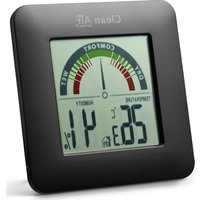
HT-01 - Measuring equipment Clean Air Optima - Free user manual and instructions
Find the device manual for free HT-01 Clean Air Optima in PDF.


| Product Type | Digital Thermo-Hygrometer |
| Brand | Clean Air Optima |
| Model | HT-01 |
| Dimensions (L × W × H) | 88 × 14 × 88 mm |
| Weight | Approx. 80 g (without batteries) |
| Power Supply | 2 Micro AAA batteries, IEC LR3, 1.5 V (not included) |
| Battery Life | Approx. 12 months |
| Indoor Temperature Measurement Range | 0 °C to 50 °C (resolution 0.1 °C) / 32 °F to 122 °F (resolution 0.2 °F) |
| Indoor Humidity Measurement Range | 20% RH to 95% RH |
| Reading Interval | Every 20 seconds (2 minutes if low battery) |
| Main Functions | Display indoor temperature and humidity, comfort indicator (DRY/WET), MIN/MAX memory, °C/°F switching, reset |
| Comfort Indicator | Color bar with levels: Dry (<34%), Comfortable (35-65%), Wet (>65%) |
| Usage | Indoor only, tabletop or wall-mounted |
| Maintenance and Cleaning | Clean with a soft, damp cloth, without solvents or abrasive products |
| Safety | Do not immerse, use indoors only, keep out of reach of children |
| Batteries | Alkaline only, observe polarity, replace all batteries at the same time, remove if unused for a long time |
| Error Display | "LL" or "HH" for out-of-range temperature, "--" for humidity if temperature out of range |
Frequently Asked Questions - HT-01 Clean Air Optima
User questions about HT-01 Clean Air Optima
0 question about this device. Answer the ones you know or ask your own.
Ask a new question about this device
Download the instructions for your Measuring equipment in PDF format for free! Find your manual HT-01 - Clean Air Optima and take your electronic device back in hand. On this page are published all the documents necessary for the use of your device. HT-01 by Clean Air Optima.
USER MANUAL HT-01 Clean Air Optima
Read these instructions carefully before you start using this Clean Air Optima device and keep the manual for future reference.
Copyright: Clean Air Optima

Clean Air.
Table of contents
English 3
German 7
Dutch 11
French 15
Clean Air Optima International B.V.
David Ricardostraat 9-7 / 9-9
This device may only be used in accordance with these safety instructions. Take the following steps to minimize the risk of personal injury caused by for example electric shocks or fire.
- This device can be used by children aged from 8 years and above and persons with reduced physical, sensory- or mental capabilities if they have been given supervision or instruction concerning use of the appliance in a safe way and understand the hazards involved.
- Children should not play with the device. Cleaning and user maintenance shall not be made by children without supervision.
- Do not use the device in rooms where inflammable liquids or gases are stored or close to heat sources like radiators, fire places or heat-generating devices like ceramic heaters.
- Do not immerse the device in water. Do not allow liquids to penetrate into the device.
- The device may only be used in dry surroundings and must not be used in the rain or at a relative humidity exceeding the operating conditions.
- Protect the device from permanent direct sunlight.
- Do not remove any safety signs, stickers or labels from the device. Keep all safety signs, stickers and labels in legible condition.
- Do not open the device.
- This main unit is intended to be used only indoors.
- Avoid contact with any corrosive materials.
- Do not dispose this unit in a fire as it may explode.
Clean Air
Batteries safety warnings:
- Use only alkaline batteries, not rechargeable batteries. 2. Install batteries correctly by matching the polarities (+/-).
- Always replace a complete set of batteries.
- Never mix used and new batteries.
- Remove exhausted batteries immediately.
- Remove batteries when not in use.
- Do not recharge and do not dispose of batteries in fire as the batteries may explode.
- Ensure batteries are stored away from metal objects as contact may cause a short circuit.
- Avoid exposing batteries to extreme temperature or humidity or direct sunlight.
- Keep all batteries out of reach from children. They are a choking hazard.
Use the product only for its intended purpose!
Features: Setting up (batteries not included):
- Indoor temperature in ^ C / ^ F Insert 2 x Micro AAA, IEC LR3, 1.5V battery into
- Indoor humidity in RH% – the battery compartment. All segments of the
MIN/MAX indication LCD will light up briefly. The indoor temperature, - Colored room comfort display - humidity data and the comfort level indicator
- Low battery indicator will be displayed.
- Wall mounting or table standing
Battery change:
It is recommended to replace the battery in the unit regularly to ensure optimum accuracy of this unit.
Function keys:
MIN/ MAX key: Press to view the MIN/MAX indoor temperature and humidity records.
Reset key: Press to reset MIN/MAX values.
°C/°F key: Toggle between degrees °C and °F.
Clean Air Optima
Comfort indication:
The indicator shows the comfort level of the surrounding environment based on the humidity data. A pointer marks the current ambient humidity conditions on the colored display from 'DRY' to 'WET':
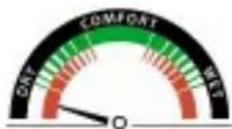
Red:Dry < 34%
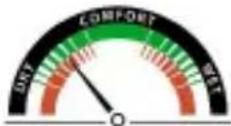
Red + Green 35-40%
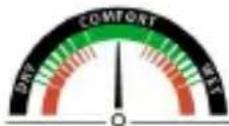
Green:41-55%
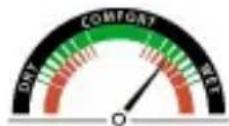
Red + Green 41-55%
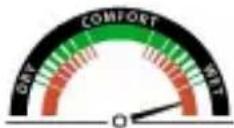
Red: Humid > 65%
Note: When the room temperature is outside the measurement range, the display shows "LL or HH".
Cleaning:
Clean the device with a soft, damp and lint-free cloth. Make sure that no moisture enters the housing. Do not use any sprays, solvents, alcohol-based cleaning agents or abrasive cleaners, but only clean water to moisten the cloth.
Repair:
Do not modify the device or install any spare parts. For repairs or device testing, contact the manufacturer.
Specifications:
Indoor temperature measuring range:
- 0^ C to 50^ C with 0.1^ C deviation
- 32^ F to 122^ F with 0.2^ F deviation (LL or.HH is displayed if outside this range)
Humidity measuring range:
- 20% - 95% ("-"is displayed for humidity if the indoor temperature is outside the temperature range; "LL" will be displayed if the value is lower than 20% ; "HH" will be displayed if the value is higher than 95% )
Clean Air
Temperature and humidity checking interval:
- Every 20 seconds (or every 2 minutes if the low battery icon is shown)
Power supply: 2 x Micro AAA, IEC LR3, 1.5V batteries (batteries not included)
Battery life: approximately 12 months
Dimensions: 88× 14× 88mm
Battery Disposal Regulation
Old batteries do not belong to domestic waste because they could cause damages of health and environment. You can bring used batteries free of charge to your dealer and collection points. As end user you are committed by law to bring back used batteries to distributors or to other collecting points!
Regulation disposal of electrical devices
This symbol means that you must dispose of electrical devices separated from the general household waste when it reaches the end of its useful life. Take your unit to your local waste collection point or recycling centre. This applies to all countries of the European Union, and to other European countries with a separate waste collection system.
Thank you for reading!

Share your feedback about the Clean Air Optima Hygrometer HT01-B/ HT-01W on: www.cleanairoptima.com

Download PDF instruction manual on: www.cleanairoptima.com/info/manuals

For frequently asked questions about the Hygrometer HT-01B/ HT-01W go to: http://www.hygrometer.com and search for www.youtube.com/HT-01B/ HT-01W

Watch all Clean Air Optima® Product animation video's on:
Clean Air
Digitales Thermohygmeter
Deutsch
De comfort indicator:
A guarantee for healthy indoor air quality!

Designed in Germany
More info:
www.cleanairoptima.com

© 2023 Clean Air Optima®, All rights reserved, Made in P.R.C.
Trademarks owned by: Clean Air Optima Germany GmbH, Enschedestraße 14, 48529 Nordhorn, Germany
- Clean Air.
- Table of contents
- Clean Air
- Batteries safety warnings:
- Use the product only for its intended purpose!
- Features: Setting up (batteries not included):
- Battery change:
- Function keys:
- Clean Air Optima
- Comfort indication:
- Cleaning:
- Repair:
- Specifications:
- Battery Disposal Regulation
- Regulation disposal of electrical devices
- Thank you for reading!
- Digitales Thermohygmeter
- Deutsch
- De comfort indicator:
- A guarantee for healthy indoor air quality!
Brand : Clean Air Optima
Model : HT-01
Category : Measuring equipment