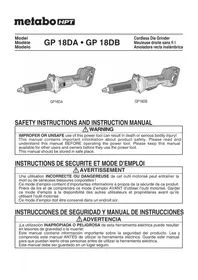
GP18DA - Grinder HiKOKI - Free user manual and instructions
Find the device manual for free GP18DA HiKOKI in PDF.


| Product Type | Cordless Die Grinder |
| Brand | HiKOKI |
| Model | GP18DA |
| Power Source | 18V lithium-ion battery (model BSL1830C) |
| No-load Speed | 7,000 – 29,000 /min (depending on mode) |
| Maximum Wheel Diameter | 2" (50 mm) |
| Collet Chuck Capacity | 1/4" (6.35 mm) |
| Weight (with battery) | 4.8 lbs (2.2 kg) |
| Operating Modes | Gear mode (5 speeds) and auto mode |
| Safety Features | Electric brake, overload protection, overheat protection, anti-kickback, restart prevention |
| Soft Start | Yes |
| Battery Type | Multi Volt / BSL18 series Li-ion |
| Compatible Charger | UC18YFSL (120V AC, 60Hz) |
| Charging Time (BSL1830C) | Approx. 45 minutes at 20°C |
| Routine Maintenance | Visual inspection of wheel, filter cleaning, terminal check |
| Included Accessories | 2 wrenches (17mm and 12mm) |
| Optional Accessories | Battery, charger, battery cover, 1/8" collet, side handle |
| Repairability | Authorized metabo HPT service center only |
Frequently Asked Questions - GP18DA HiKOKI
User questions about GP18DA HiKOKI
0 question about this device. Answer the ones you know or ask your own.
Ask a new question about this device
Download the instructions for your Grinder in PDF format for free! Find your manual GP18DA - HiKOKI and take your electronic device back in hand. On this page are published all the documents necessary for the use of your device. GP18DA by HiKOKI.
USER MANUAL GP18DA HiKOKI
natural_image
Technical line drawing of a mechanical tool assembly (no text or symbols visible)GP18DA
natural_image
Technical illustration of a mechanical tool with a cylindrical body and flanged base (no text or symbols)GP18DB
SAFETY INSTRUCTIONS AND INSTRUCTION MANUAL
WARNING
IMPROPER OR UNSAFE use of this power tool can result in death or serious bodily injury! This manual contains important information about product safety. Please read and understand this manual BEFORE operating the power tool. Please keep this manual available for other users and owners before they use the power tool.
This manual should be stored in safe place.
INSTRUCTIONS DE SECURITE ET MODE D'EMPLOI
⚠ AVERTISSEMENT
IMPORTANT SAFETY INSTRUCTIONS
Read and understand all of the safety precautions, warnings and operating instructions in the Instruction Manual before operating or maintaining this power tool.
Most accidents that result from power tool operation and maintenance are caused by the failure to observe basic safety rules or precautions. An accident can often be avoided by recognizing a potentially hazardous situation before it occurs, and by observing appropriate safety procedures.
Basic safety precautions are outlined in the "SAFETY" section of this Instruction Manual and in the sections which contain the operation and maintenance instructions.
Hazards that must be avoided to prevent bodily injury or machine damage are identified by WARNINGS on the power tool and in this Instruction Manual.
NEVER use this power tool in a manner that has not been specifically recommended by metabo HPT.
MEANINGS OF SIGNAL WORDS
WARNING indicates a potentially hazardous situations which, if ignored, could result in death or serious injury.
CAUTION indicates a potentially hazardous situations which, if not avoided, may result in minor or moderate injury, or may cause machine damage.
NOTE emphasizes essential information.
SAFETY
GENERAL POWER TOOL SAFETY WARNINGS

WARNING
Read all safety warnings and all instructions.
Failure to follow the warnings and instructions may result in electric shock, fire and/or serious injury.
Save all warnings and instructions for future reference.
The term “power tool” in the warnings refers to your mains-operated (corded) power tool or battery-operated (cordless) power tool.
1) Work area safety
a) Keep work area clean and well lit.
Cluttered or dark areas invite accidents.
b) Do not operate power tools in explosive atmospheres, such as in the presence of fl ammable liquids, gases or dust.
Power tools create sparks which may ignite the dust or fumes.
c) Keep children and bystanders away while operating a power tool.
Distractions can cause you to lose control.
2) Electrical safety
a) Power tool plugs must match the outlet.
Never modify the plug in any way.
Do not use any adapter plugs with earthed (grounded) power tools.
Unmodified plugs and matching outlets will reduce risk of electric shock.
b) Avoid body contact with earthed or grounded surfaces such as pipes, radiators, ranges and refrigerators.
There is an increased risk of electric shock if your body is earthed or grounded.
c) Do not expose power tools to rain or wet conditions.
Water entering a power tool will increase the risk of electric shock.
d) Do not abuse the cord. Never use the cord for carrying, pulling or unplugging the power tool.
Keep cord away from heat, oil, sharp edges or moving parts.
Damaged or entangled cords increase the risk of electric shock.
e) When operating a power tool outdoors, use an extension cord suitable for outdoor use.
Use of a cord suitable for outdoor use reduces the risk of electric shock.
f) If operating a power tool in a damp location is unavoidable, use a residual current device (RCD) protected supply.
Use of an RCD reduces the risk of electric shock.
Personal safety
a) Stay alert, watch what you are doing and use common sense when operating a power tool.
Do not use a power tool while you are tired or under the influence of drugs, alcohol or medication.
A moment of inattention while operating power tools may result in serious personal injury.
b) Use personal protective equipment. Always wear eye protection.
Protective equipment such as dust mask, non-skid safety shoes, hard hat, or hearing protection used for appropriate conditions will reduce personal injuries.
c) Prevent unintentional starting. Ensure the switch is in the off-position before connecting to power source and/or battery pack, picking up or carrying the tool.
Carrying power tools with your fi nger on the switch or energising power tools that have the switch on invites accidents.
d) Remove any adjusting key or wrench before turning the power tool on.
A wrench or a key left attached to a rotating part of the power tool may result in personal injury.
e) Do not overreach. Keep proper footing and balance at all times.
This enables better control of the power tool in unexpected situations.
f) Dress properly. Do not wear loose clothing or jewellery. Keep your hair, clothing and gloves away from moving parts. b
Loose clothes, jewellery or long hair can be caught in moving parts.
g) If devices are provided for the connection of dust extraction and collection facilities, ensure these are connected and properly used.
Use of dust collection can reduce dust-related hazards.
4) Power tool use and care
a) Do not force the power tool. Use the correct power tool for your application.
The correct power tool will do the job better and safer at the rate for which it was designed.
b) Do not use the power tool if the switch does not turn it on and off.
Any power tool that cannot be controlled with the switch is dangerous and must be repaired.
c) Disconnect the plug from the power source and/or the battery pack from the power tool before making any adjustments, changing accessories, or storing power tools.
Such preventive safety measures reduce the risk of starting the power tool accidentally.
d) Store idle power tools out of the reach of children and do not allow persons unfamiliar with the power tool or these instructions to operate the power tool.
Power tools are dangerous in the hands of untrained users.
e) Maintain power tools. Check for misalignment or binding of moving parts, breakage of parts and any other condition that may affect the power tools' operation.
If damaged, have the power tool repaired before use.
Many accidents are caused by poorly maintained power tools.
f) Keep cutting tools sharp and clean.
Properly maintained cutting tools with sharp cutting edges are less likely to bind and are easier to control.
g) Use the power tool, accessories and tool bits etc. in accordance with these instructions, taking into account the working conditions and the work to be performed.
Use of the power tool for operations different from those intended could result in a hazardous situation.
5) Battery tool use and care
a) Recharge only with the charger specified by the manufacturer.
A charger that is suitable for one type of battery pack may create a risk of fire when used with another battery pack.
b) Use power tools only with specifically designated battery packs.
Use of any other battery packs may create a risk of injury and fire.
c) When battery pack is not in use, keep it away from other metal objects, like paper clips, coins, keys, nails, screws or other small metal objects, that can make a connection from one terminal to another.
Shorting the battery terminals together may cause burns or a fire.
d) Under abusive conditions, liquid may be ejected from the battery; avoid contact. If contact accidentally occurs, flush with water. If liquid contacts eyes, additional seek medical help.
Liquid ejected from the battery may cause irritation or burns.
6) Service
a) Have your power tool serviced by a qualified repair person using only identical replacement parts.
This will ensure that the safety of the power tool is maintained.
SAFETY WARNINGS COMMON FOR GRINDING OPERATIONS
a) This power tool is intended to function grinder, sander, wire brush, polisher, carving or cut-off tool. Read all safety warnings, instructions, illustrations and specifications provided with this power tool. Failure to follow all instructions listed below may result in electric shock, fire and/or serious injury.
b) Operations such as grinding, sanding, wire brushing, polishing or cutting-off are not recommended to be performed with this power tool. Operations for which the power tool was not designed may create a hazard and cause personal injury.
c) Do not use accessories which are not specifically designed and recommended by the tool manufacturer. Just because the accessory can be attached to your power tool, it does not assure safe operation.
d) The RATED SPEED of the grinding accessories must be at least equal to the maximum speed marked on the power tool. Grinding accessories running faster than their RATED SPEED can break and fly apart.
e) The outside diameter and the thickness of your accessory must be within the capacity rating of your power tool. Incorrectly sized accessories cannot be adequately controlled.
f) The arbour size of wheels, sanding drums or any other accessory must properly fit the spindle or collet of the power tool. Accessories that do not match the mounting hardware of the power tool will run out of balance, vibrate excessively and may cause loss of control.
g) Mandrel MOUNTED WHEELS, sanding drums, cutters or other accessories must be fully inserted into the collet or chuck. If the mandrel is insufficiently held and/or the overhang of the wheel is too long, the MOUNTED WHEEL may become loose and be ejected at high velocity.
h) Do not use a damaged accessory. Before each use inspect the accessory such as abrasive wheels for chips and cracks, sanding drum for cracks, tear or excess wear, wire brush for loose or cracked wires. If power tool or accessory is dropped, inspect for damage or install an undamaged accessory. After inspecting and installing an accessory, position yourself and bystanders away from the plane of the rotating accessory and run the power tool at maximum no-load speed for one minute. Damaged accessories will normally break apart during this test time.
i) Wear personal protective equipment. Depending on application, use face shield, safety goggles or safety glasses. As appropriate, wear dust
as an mask, hearing protectors, gloves and workshop apron capable of stopping small abrasive or workpiece fragments. The eye protection must be capable of stopping fl ying debris generated by various operations. The dust mask or respirator must be capable of filtrating particles generated by your operation. Prolonged exposure to high intensity noise may cause hearing loss.
j) Keep bystanders a safe distance away from work area. Anyone entering the work area must wear personal protective equipment. Fragments of workpiece or of a broken accessory may fly away and cause injury beyond immediate area of operation.
k) Hold power tool by insulated gripping surfaces only, when performing an operation where the cutting accessory may contact hidden wiring. Cutting accessory contacting a "live" wire may make exposed metal parts of the power tool "live" and could give the operator an electric shock.
I) Always hold the tool firmly in your hand(s) during the start-up. The reaction torque of the motor, as it accelerates to full speed, can cause the tool to twist.
m) Use clamps to support workpiece whenever practical. Never hold a small workpiece in one hand and the tool in the other hand while in use. Clamping a small workpiece allows you to use your hand(s) to control the tool. Round material such as dowel rods, pipes or tubing have a tendency to roll while being cut, and may cause the bit to bind or jump toward you.
n) Never lay the power tool down until the accessory has come to a complete stop. The spinning accessory may grab the surface and pull the power tool out of your control.
o) After changing the bits or making any adjustments, make sure the collet nut, chuck or any other adjustment devices are securely tightened. Loose adjustment devices can unexpectedly shift, causing loss of control, loose rotating components will violently thrown.
p) Do not run the power tool while carrying it at your side. Accidental contact with the spinning accessory could snag your clothing, pulling the accessory into your body.
q) Regularly clean the power tool's air vents. The motor's fan will draw the dust inside the housing and excessive accumulation of powdered metal may cause electrical hazards.
r) Do not operate the power tool near flammable materials. Sparks could ignite these materials.
s) Do not use accessories that require liquid coolants. Using water or other liquid coolants may result in electrocution or shock.
KICKBACK AND RELATED WARNINGS
Kickback is a sudden reaction to a pinched or snagged rotating wheel, sanding band, brush or any other accessory. Pinching or snagging causes rapid stalling of the rotating accessory which in turn causes the uncontrolled power tool to be forced in the direction opposite of the accessory's rotation.
For example, if an abrasive wheel is snagged or pinched by the workpiece, the edge of the wheel that is entering into the pinch point can dig into the surface of the material causing the wheel to climb out or kick out. The wheel may either jump toward or away from the operator, depending on direction of the wheel's movement at the point of pinching. Abrasive wheels may also break under these conditions.
Kickback is the result of power tool misuse and/or incorrect operating procedures or conditions and can be avoided by taking proper precautions as given below.
a) Maintain a firm grip on the power tool and position your body and arm to allow you to resist kickback forces. The operator can control kickback forces, if proper precautions are taken.
b) Use special care when working corners, sharp edges etc. Avoid bouncing and snagging the accessory. Corners, sharp edges or bouncing have a tendency to snag the rotating accessory and cause loss of control or kickback.
c) Do not attach a toothed saw blade. Such blades create frequent kickback and loss of control.
d) Always feed the bit into the material in the same direction as the cutting edge is exiting from the material (which is the same direction as the chips are thrown). Feeding the tool in the wrong direction causes the cutting edge of the bit to climb out of the work and pull the tool in the direction of this feed.
e) When using rotary files, cut-off wheels, high-speed cutters or tungsten carbide cutters, always have the work securely clamped. These wheels will grab if they become slightly canted in the groove, and can kickback. When a cut-off wheel grabs, the wheel itself usually breaks. When a rotary file, high-speed cutter or tungsten carbide cutter grabs, it may jump from the groove and you could lose control of the tool.
SAFETY WARNINGS SPECIFIC FOR GRINDING OPERATIONS
a) Use only wheel types that are recommended for your power tool and only for recommended applications. For example: do not grind with the side of a cut-off wheel.
Abrasive cut-off wheels are intended for peripheral grinding, side forces applied to these wheels may cause them to shatter.
b) For threaded abrasive cones and plugs use only undamaged wheel mandrels with an unrelieved shoulder flange that are of correct size and length.
Proper mandrels will reduce the possibility of breakage.
c) Do not "jam" a cut-off wheel or apply excessive pressure. Do not attempt to make an excessive depth of cut.
Overstressing the wheel increases the loading and susceptibility to twisting or snagging of the wheel in the cut and the possibility of kickback or wheel breakage.
d) Do not position your hand in line with and behind the rotating wheel.
When the wheel, at the point of operation, is moving away from your hand, the possible kickback may propel the spinning wheel and the power tool directly at you.
e) When wheel is pinched, snagged or when interrupting a cut for any reason, switch off the power tool and hold the power tool motionless until the wheel comes to a complete stop. Never attempt to remove the cut-off wheel from the cut while the wheel is in motion otherwise kickback may occur.
Investigate and take corrective action to eliminate the cause of wheel pinching or snagging.
f) Do not restart the cutting operation in the workpiece. Let the wheel reach full speed and carefully re-enter the cut.
The wheel may bind, walk up or kickback if the power tool is restarted in the workpiece.
g) Support panels or any oversized workpiece to minimize the risk of wheel pinching and kickback. Large workpieces tend to sag under their own weight. Supports must be placed under the workpiece near the line of cut and near the edge of the workpiece on both sides of the wheel.
h) Use extra caution when making a "pocket cut" into existing walls or other blind areas.
The protruding wheel may cut gas or water pipes, electrical wiring or objects that can cause kickback.
GENERAL SAFETY INSTRUCTIONS FOR CORDLESS GRINDERS
- Check that speed marked on the wheel is equal to or greater than the rated speed of the grinder;
- Ensure that the wheel dimensions are compatible with the grinder;
- Abrasive wheels shall be stored and handled with care in accordance with manufacturer's instructions;
- Inspect the grinding wheel before use, do not use chipped, cracked or otherwise defective products;
- Ensure that mounted wheels and points are fitted in accordance with the manufacturer's instructions;
-
Ensure that blotters are used when they are provided with the bonded abrasive product and when they are required;
-
Ensure that the abrasive product is correctly mounted and tightened before use and run the tool at no-load for 30 s in a safe position, stop immediately if there is considerable vibration or if other defects are detected. If this condition occurs, check the machine to determine the cause;
- If a guard is equipped with the tool never use the tool without such a guard;
- Do not use separate reducing bushings or adapters to adapt large hole abrasive wheels;
- For tools intended to be fitted with threaded hole wheel, ensure that the thread in the wheel is long enough to accept the spindle length;
- Secure the workpiece and check that the workpiece is properly supported. A workpiece clamped with clamping devices or in a vice is held more secure than by hand;
- Do not use cutting off wheel for side grinding;
- Ensure that sparks resulting from use do not create a hazard e.g. do not hit persons, or ignite flammable substances;
- Ensure that ventilation openings are kept clear when working in dusty conditions, if it should become necessary to clear dust, first disconnect the tool from the mains supply (use non metallic objects) and avoid damaging internal parts;
- Always use eye and ear protection. Other personal protective equipment such as dust mask, gloves, helmet and apron should be worn;
- Pay attention to the wheel that continues to rotate after the tool is switched off.
- Do not allow foreign matter to enter the hole for connecting the rechargeable battery.
- Never disassemble the rechargeable battery and charger.
- Never short-circuit the rechargeable battery. Shortcircuting the battery will cause a great electric current and overheat. It results in burn or damage to the battery.
- Do not dispose of the battery in fire. If the battery is burnt, it may explode.
- Do not insert object into the air ventilation slots of the charger. Inserting metal objects or infl ammables into the charger air ventilation slots will result in electrical shock hazard or damaged charger.
- Bring the battery to the shop from which it was purchased as soon as the post-charging battery life becomes too short for practical use. Do not dispose of the exhausted battery.
SPECIFIC SAFETY RULES AND SYMBOLS
1. Accessories must be rated for at least the speed recommended on the tool warning label.
Wheels and other accessories running over rated speed can fly apart and cause injury.
2. Hold tools by insulated gripping surfaces when performing an operation where the cutting tool may contact hidden wiring.
Contact with a "live" wire will make exposed metal parts of the tool "live" and shock the operator.
3. ALWAYS wear ear protectors when using the tool for extended periods.
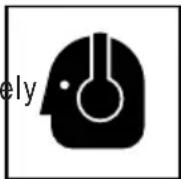
Prolonged exposure to high intensity noise can cause hearing loss.
4. Use only a wheel with a rated capacity which is GREATER than 29,000 /min.
Using any wheel a rated capacity LESS than 29,000 /min and/or an incorrect sized wheel (see "SPECIFICATIONS" at page 12) may result in wheel breakage, flying wheel fragments, and resulting in death or serious injury.
5. NEVER touch moving parts.
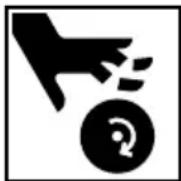
NEVER place your hands, fingers or other body parts near the tool's moving parts.
6. NEVER operate without all guards in place.
NEVER operate this tool without all guards or safety features in place and in proper working order. If maintenance or servicing requires the removal of a guard or safety feature, be sure to replace the guard or safety feature before resuming operation of the tool.
7. Use right tool.
Don't force small tool or attachment to do the job of a heavy-duty tool.
Don't use tool for purpose not intended – for example – don't use circular saw for cutting tree limbs or logs.
8. NEVER use a power tool for applications other than those specified.
NEVER use a power tool for applications other than those specified in the Instruction Manual.
9. Handle tool correctly.
Operate the tool according to the instructions provided herein. Do not drop or throw the tool.
NEVER allow the tool to be operated by children, individuals unfamiliar with its operation or unauthorized personnel.
10. Keep all screws, bolts and covers tightly in place.
Keep all screws, bolts, and plates tightly mounted.
Check their condition periodically.
- Do not use power tools if the plastic housing or handle is cracked.
Cracks in the tool's housing or handle can lead to electric shock. Such tools should not be repaired.
- Blades and accessories must be securely mounted to the tool.
Prevent potential injuries to yourself or others. Blades, cutting implements and accessories which have been mounted to the tool should be secure and tight.
- Keep motor air vent clean.
The tool's motor air vent must be kept clean so that air can freely flow at all times. Check for dust build-up frequently.
- NEVER use a tool which is defective or operating abnormally.
If the tool appears to be operating unusually, making strange noises, or otherwise appears defective, stop using it immediately and arrange for repairs by a metabo HPT authorized service center.
- NEVER leave tool running unattended. Turn power off.
Don't leave tool until it comes to a complete stop.
- Carefully handle power tools.
Should a power tool be dropped or struck against hard materials inadvertently, it may be deformed, cracked, or damaged.
- Do not wipe plastic parts with solvent.
Solvents such as gasoline, thinner benzine, carbon tetrachloride, and alcohol may damage and crack plastic parts. Do not wipe them with such solvents.
Wipe plastic parts with a soft cloth lightly dampened with soapy water and dry thoroughly.
-
NEVER use a wheel which is cracked or deformed or worn away (see the "MAINTENANCE AND INSPECTION" section on page 19).
-
NEVER use the grinder in places where the sparks generated by the grinder can cause explosion, such as where fl ammable materials or gases are present.
-
ALWAYS wear eye protection that meets the requirement of the latest revision of ANSI Standard Z87.1.
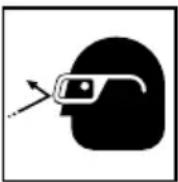
-
ALWAYS wear a mask or respirator to protect yourself from dust or potentially harmful particles generated during the grinding operation.
-
ALWAYS firmly grip the body handle and front cover while operating the grinder.
-
ALWAYS have a trial run before grinding commence.
-
ALWAYS follow the instructions contained manual when replacing the wheel.
-
ALWAYS be careful with buried object such as a underground wiring.
Touching these active wiring or electric cable with this until, you may receive an electric shock.
Confir rm if there are any buried object such as electric cable within the wall, floor or ceiling where you are going to operate here after.
- Be careful of brake kickback.
This cordless die grinder features an electric brake that functions when the switch is released. As there is some kickback when the brake functions, be sure to hold the main body securely.
- Do not use the product if the tool or the battery terminals (battery mount) are deformed.
Installing the battery could cause a short circuit that could result in smoke emission or ignition.
- Keep the tool's terminals (battery mount) free of swarf and dust.
Prior to use, make sure that swarf and dust have not collected in the area of the terminals.
During use, try to avoid swarf or dust on the tool from falling on the battery.
When suspending operation or after use, do not leave the tool in an area where it may be exposed to falling swarf or dust.
Doing so could cause a short circuit that could result in smoke emission or ignition.
- Definitions for symbols used on this tool
V.....volts
Death or serious bodily injury could result from improper or unsafe use of battery chargers. To avoid these risks, follow these basic safety instructions:
READ ALL INSTRUCTIONS
- This manual contains important safety and operating instructions for battery charger Model UC18YFSL.
- Before using battery charger, read all instructions and cautionary markings on (1) battery charger, (2) battery, and (3) product using battery.
-
To reduce risk of injury, charge metabo HPT in this rechargeable battery models of the multi volt series and the BSL18 series. Other models of batteries may burst causing personal injury and damage.
-
Use of an attachment not recommended or sold by the battery charger manufacturer may result in a risk of fire, electric shock, or injury to persons.
- To reduce risk of damage to electric plug and cordIf pull by plug when disconnecting battery charger.
-
Make sure cord is located so that it will not be stepped on, tripped over, or otherwise subjected to damage or stress.
-
An extension cord should not be used unless absolutely necessary. Use of improper extension cord could result in a risk of fire and electric shock.
a. That blades of extension cord are the same number, size, and shape as those of plug on battery charger:
b. That extension cord is properly wired and in good electrical condition; and
c. That wire size is large enough for AC ampere rating of battery charger as specified in Table 1.
xtension cord must be used make sure:
Table 1
RECOMMENDED MINIMUM AWG SIZE FOR EXTENSION CORDS FOR BATTERY CHARGERS
| AC Input Rating Amperes* AWG Size of Cord | ||
| Equal to or greater than | but less than | Length of Cord, Feet (Meter)25 (7.5) 50 (15) 100 (30) 150 (45) |
| 0 2 18 18 18 16 | ||
| 2 3 18 18 16 14 | ||
| 3 4 18 18 16 14 | ||
* If the input rating of a battery charger is given in watts rather than in amperes, the corresponding ampere rating is to be determined by dividing the wattage rating by the voltage rating—for example:
$$ \frac {1 , 2 5 0 \text { watts }}{1 2 5 \text { volts }} = 1 0 \text { amperes } $$
- Do not operate battery charger with damaged cord or plug-replace them immediately.
- Do not operate battery charger if it has received a sharp blow, been dropped, or otherwise damaged in any way; take it to a qualified serviceman.
- Do not disassemble battery charger; take it to a qualified serviceman when service or repair is required. Incorrect reassembly may result in a risk of electric shock or fire.
- To reduce risk of electric shock, unplug charger from receptacle before attempting any maintenance or cleaning. Removing the battery will not reduce this risk.
IMPORTANT SAFETY INSTRUCTIONS FOR USE OF THE BATTERY AND BATTERY CHARGER
You must charge the battery before you can use the power tool. Before using the model UC18YFSL battery charger, be sure to read all instructions and cautionary statements on it, the battery and in this manual.
REMEMBER: USE ONLY metabo HPT BATTERY MODELS OF THE BSL18 SERIES. OTHER MODELS OF BATTERIES MAY BURST AND CAUSE INJURY!
Follow these instructions to avoid the risk of injury:

WARNING
Improper use of the battery or battery charger can lead to serious injury. To avoid these injuries:
- NEVER disassemble the battery.
- NEVER incinerate the battery, even if it is damaged or is completely worn out. The battery can explode in a fire.
- NEVER short-circuit the battery.
- NEVER insert any objects into the battery charger's air vents. Electric shock or damage to the battery charger may result.
- NEVER charge outdoors. Keep the battery away from direct sunlight and use only where there is low humidity and good ventilation.
-
NEVER charge when the temperature is below 32^ F ( 0^ C) or above 104^ F ( 40^ C).
-
NEVER connect two battery chargers together.
- NEVER insert foreign objects into the hole for the battery or the battery charger.
- NEVER use a booster transformer when charging.
- NEVER use DC power to charge.
- NEVER store the battery or battery charger in places where the temperature may reach or exceed 104^ F ( 40^ C) such as inside metal box or car.
- NEVER expose the battery or battery charger to rain or wet conditions.
- ALWAYS operate charger on standard household electrical power (120 volts). Using the charger on any other voltage may overheat and damage the charger.
- ALWAYS wait at least 15 minutes between charges to avoid overheating the charger.
- ALWAYS disconnect the power cord from its receptacle when the charger is not in use.
CAUTION ON LITHIUM-ION BATTERY
To extend the lifetime, the lithium-ion battery equips with the protection function to stop the output.
In the cases of 1 to 3 described below, when using this product, even if you are pulling the switch, the motor may stop. This is not the trouble but the result of protection function.
- When the battery power remaining runs out, the motor stops.
In such case, charge it up immediately.
- If the tool is overloaded, the motor may stop. In this case, release the switch of tool and eliminate causes of overloading. After that, you can use it again.
- If the battery is overheated under overload work, the battery power may stop.
In this case, stop using the battery and let the battery cool. After that, you can use it again.
Furthermore, please heed the following warning and caution.
WARNING
In order to prevent any battery leakage, heat generation, smoke emission, explosion and ignition beforehand, please be sure to heed the following precautions.
- Make sure that swarf and dust do not collect on the battery.
During work make sure that swarf and dust do not fall on the battery.
○ Make sure that any swarf and dust falling on the power tool during work do not collect on the battery.
Do not store an unused battery in a location exposed to swarf and dust.
Before storing a battery, remove any swarf and dust that may adhere to it and do not store it together with metal parts (screws, nails, etc.). -
Do not pierce battery with a sharp object such as a nail, strike with a hammer, step on, throw or subject the battery to severe physical shock.
-
Do not use an apparently damaged or deformed battery.
- Do not use the battery in reverse polarity.
- Do not connect directly to an electrical outlets or car cigarette lighter sockets.
- Do not use the battery for a purpose other than those specified.
- If the battery charging fails to complete even when a specified recharging time has elapsed, immediately stop further recharging.
- Do not put or subject the battery to high temperatures or high pressure such as into a microwave oven, dryer, or high pressure container.
- Keep away from fire immediately when leakage or foul odor are detected.
- Do not use in a location where strong static electricity generates.
- If there is battery leakage, foul odor, heat generated, discolored or deformed, or in any way appears abnormal during use, recharging or storage, immediately remove it from the equipment or battery charger, and stop use.
- Do not immerse the battery or allow any fluids to flow inside. Conductive liquid ingress, such as water, can cause damage resulting in fire or explosion. Store your battery in a cool, dry place, away from combustible and flammable items. Corrosive gas atmospheres must be avoided.
CAUTION
- If liquid leaking from the battery gets into your eyes, do not rub your eyes and wash them well with fresh clean water such as tap water and contact a doctor immediately.
If left untreated, the liquid may cause eye-problems. - If liquid leaks onto your skin or clothes, wash well with clean water such as tap water immediately. There is a possibility that this can cause skin irritation
- If you find rust, foul odor, overheating, discolor, deformation, and/or other irregularities when using the battery for the first time, do not use and return it to your supplier or vendor.
WARNING
If an electrically conductive foreign object enters the terminals of the lithium ion battery, a short-circuit may occur resulting in the risk of fire. Please observe the following matters when storing the battery.
Do not place electrically conductive cuttings, nails, steel wire, copper wire or other wire in the storage case.
○ Either install the battery in the power tool or store by securely pressing into the battery cover until the ventilation holes are concealed to prevent short-circuits (See Fig. 3).
REGARDING LITHIUM-ION BATTERY TRANSPORTATION
When transporting a lithium-ion battery, please observe the following precautions.
WARNING
Notify the transporting company that a package contains a lithium-ion battery, inform the company of its power output and follow the instructions of the transportation company when arranging transport.
● Lithium-ion batteries that exceed a power output of 100 Wh are considered to be in the freight classification of Dangerous Goods and will require special application procedures.
- For transportation abroad, you must comply with international law and the rules and regulations of the destination country.
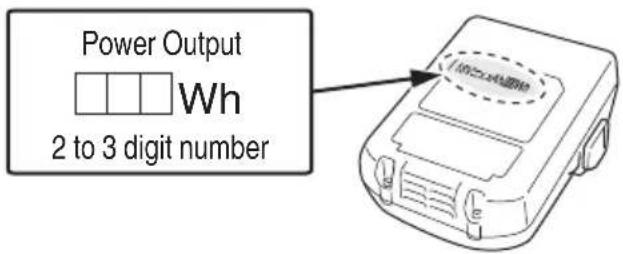
Fig. 1
SAVE THESE INSTRUCTIONS
AND
MAKE THEM AVAILABLE TO OTHER USERS
AND
OWNERS OF THIS TOOL!
FUNCTIONAL DESCRIPTION
NOTE
The information contained in this Instruction Manual is designed to assist you in the safe operation and maintenance of the power tool.
NEVER operate, or attempt any maintenance on the tool unless you have first read and understood all safety instructions contained in this manual.
Some illustrations in this Instruction Manual may show details or attachments that differ from those on your own power tool.
NAME OF PARTS
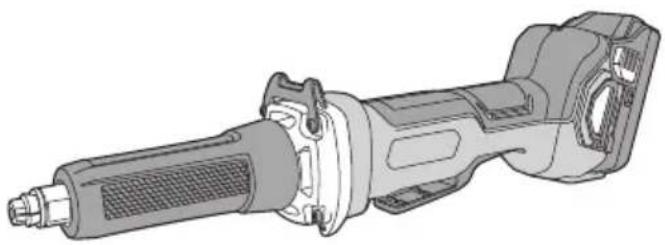
1. Cordless die grinder
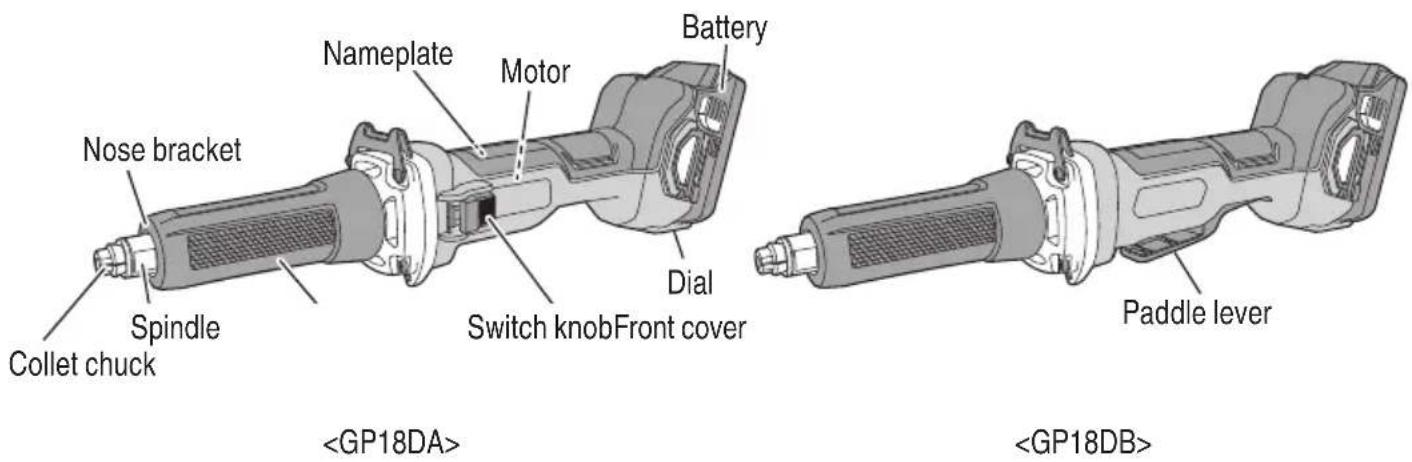
Fig. 2
2. Battery
(optional accessories...sold separately)
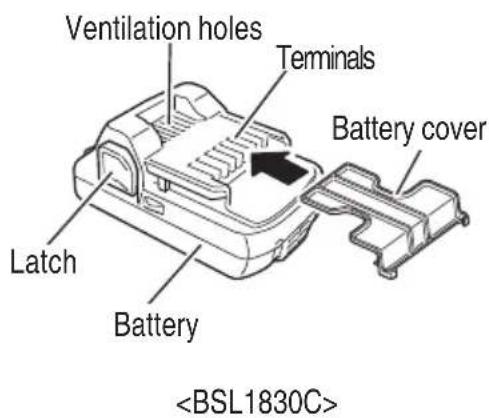
Fig. 3
3. Battery Charger
(optional accessories...sold separately)
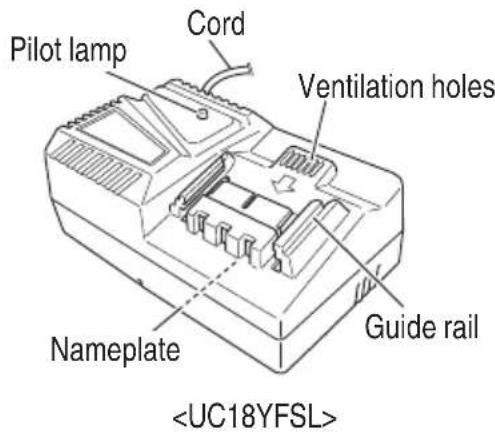
Fig. 4
SPECIFICATIONS
1. Cordless die grinder
| Model GP18DA GP18DB | |||
| Motor DC brushless motor | |||
| Rated speed 7,000–29,000 /min | |||
| Max. Wheel Diam. 2" (50 mm) | |||
| Collet Chuck Capacity 1/4" (6.35 mm) | |||
| Battery | Type Li-ion battery Model BSL1830C | ||
| Voltage DC 18 V | |||
| Weight 4.8 lbs (2.2 kg) (BSL1830C attached) | |||
2. Battery Charger
| Model | UC18YFSL |
| Input power source | Single phase: AC 120 V 60 Hz |
| Charging time (At a temperature of 68°F (20°C)) | BSL1830C: Approx. 45 min |
| Charging voltage DC 14.4–18 V | |
| Charging current | DC 3.5 A |
| Weight | 1.1 lbs. (0.5 kg) |
NOTE: The charging time may vary according to temperature and power source voltage.
WARNING
NEVER use an abrasive wheel, cutting wheel, or any wheel greater than 2" in diameter. Using such wheels can result in wheel breakage, and will otherwise increase the risk of bodily injury from contact with the wheel or wheel fragments.
Electric control
○ Soft-start
○ Overload protection
This protection feature cuts off the power to the motor in the event of overloading of motor or a conspicuous reduction in rotational speed during operation.
When the overload protection feature has been activated, the motor may stop.
In this case, release the tool switch and eliminate causes of overloading.
After that you can use it again.
○ Overheat protection
This protection feature cuts off the power to the motor and stops the power tool in the event of overheating of motor during operation.
When the overheat protection feature has been activated, the motor may stop.
In this case, release the tool switch and cool it down in a few minutes.
After that you can use it again.
○ Restart prevention function
When the power is still switched on, the tool will not restart when a battery is installed. This function can be canceled once the tool is switched off.
○ Braking Function
Brake is activated when the switch is turned off, stopping the motor's rotation.
○ Kickback Protection
The kickback protection feature cuts off the power to the motor and stops the power tool in the event of a sudden drop in the rotational speed of the wheel during operation (for example, if the wheel locks during cutting operation, etc.).
ASSEMBLY AND OPERATION
APPLICATIONS
○ Finishing of dies for press working, die casting and moulding.
○ Finishing of thread cutting dies, tools and other small parts.
○ Internal grinding of tools and machine parts.
○ Burr removal for ceramic ware, tile, and synthetic resin, fi nish grinding.

WARNING
To avoid the risk of serious injury, NEVER use this grinder with abrasive wheels, cut-off wheels and/or saw blades.
Use only with mandrel mounted abrasive stones.
REMOVAL AND INSTALLATION METHOD OF BATTERY
○ How to install the battery.
Align the battery with the groove in tool and slip it into place.
Always insert it all the way until it locks in place with a little click, If not, it may accidentally fall out of the tool, causing injury to you or someone around you (Fig. 5).
○ How to remove the battery.
Withdraw battery from the tool while pressing the latch (2 pcs) of the battery (Fig. 5).
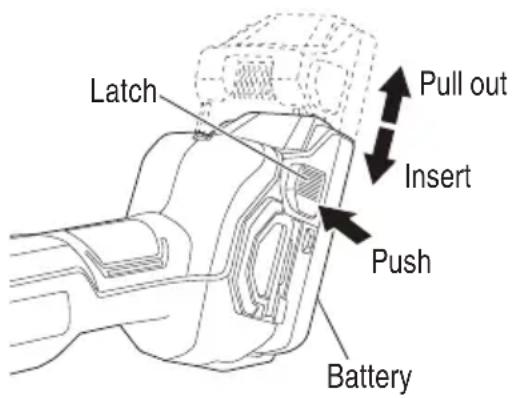
Fig. 5
CHARGING METHOD
NOTE
Before plugging into the receptacle, make sure the following points.
○ The power source voltage is stated on the nameplate.
○ The cord is not damaged.

WARNING
Do not charge at voltage higher than indicated on the nameplate.
If charged at voltage higher than indicated on the nameplate, the charger will burn out.
- Connect the charger's power cord to a receptacle. When the power cord is connected, the charge indicator lamp will blink in red. (At 1-second intervals)


WARNING
Do not use the electrical cord if damaged. Have it repaired immediately.
- Insert the battery to the battery charger.
Firmly Insert the battery into the battery charger as shown in Fig. 6.
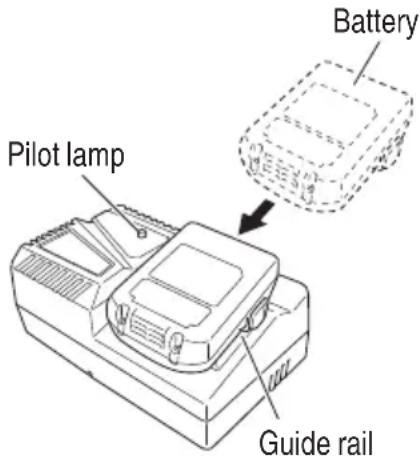
Fig. 6
- Charging
When inserting a battery in the charger, the pilot lamp will light up continuously in red. When the battery becomes fully recharged, the pilot lamp will blink in red. (At 1-second intervals.) (See Table 2)
(1) Lamp indication
The indications of the pilot lamp will be as shown in Table 2, according to the condition of the battery charger or the battery.
Table 2
| Indications of the pilot lamp | ||||
| Pilot lamp(red) | Beforecharging | Blinks | Lights for 0.5 seconds. Does not light for 0.5 seconds. (off for 0.5 seconds) | |
| Whilecharging | Lights | Lights continuously | ||
| Chargingcomplete | Blinks | Lights for 0.5 seconds. Does not light for 0.5 seconds. (off for 0.5 seconds) | ||
| Overheatstandby | Blinks | Lights for 1 second. Does not light for 0.5 seconds. (off for 0.5 seconds) | Battery overheated.Unable to charge.(Charging will commence when battery cools) | |
| Chargingimpossible | Flickers | Lights for 0.1 seconds. Does not light for 0.1 seconds. (off for 0.1 seconds) | Malfunction in the battery or the charger | |
(2) Regarding the temperature of the rechargeable battery.
The temperatures for rechargeable batteries are as shown in the Table 3, and batteries that have become hot should be cooled for a while before being recharged.
Table 3
| Rechargeable batteries | Temperatures at which the battery can be recharged |
| BSL1830C | 32^-122^ (0^-50^) |
(3) Regarding recharging time (At 68°F (20°C))
Table 4 Charging time
| Battery\Charger | UC18YFSL |
| BSL1830C Approx. 45 min | |
NOTE
The recharging time may vary according to the ambient temperature.
- Disconnect battery charger from the receptacle.
CAUTION
Do not pull the plug out of the receptacle by pulling on the cord.
Make sure to grasp the plug when removing from receptacle to avoid damaging cord.
- Remove the battery from the battery charger.
Supporting the battery charger with hand, pull out the battery from the battery charger.
NOTE
Be sure to pull out the battery from the battery charger after use, and then keep it.
Regarding electric discharge in case of new batteries, etc.
As the internal chemical substance of new batteries and batteries that have not been used for an extended period is not activated, the electric discharge might be low when using them the first and second time. This is a temporary phenomenon, and normal time required for recharging will be restored by recharging the batteries 2–3 times.
How to make the batteries perform longer
(1) Recharge the batteries before they become completely exhausted.
When you feel that the power of the tool becomes weaker, stop using the tool and recharge its battery. If you continue to use the tool and exhaust the electric current, the battery may be damaged and its life will become shorter.
(2) Avoid recharging at high temperatures.
A rechargeable battery will be hot immediately after use. If such a battery is recharged immediately after use, its internal chemical substance will deteriorate, and the battery life will be shortened. Leave the battery and recharge it after it has cooled for a while.
CAUTION
- When the battery charger has been continuously used, the battery charger will be heated, thus constituting the cause of the failures. Once the charging has been completed, give 15 minutes rest until the next charging.
- If the battery is charged while it is heated because it has been left for a long time in a location subject to direct sunlight or because the battery has just been used, the pilot lamp of the charger lights for 1 second, does not light for 0.5 seconds (off for 0.5 seconds).
The battery will not be recharged. In such a case, let the battery cool before charging. - When the pilot lamp flickers (at 0.2-second intervals), check for and take out any foreign objects in the charger's battery connector. If there are no foreign objects, it is probable that the battery or charger is malfunctioning. Take it to your authorized Service Center.
PRIOR TO OPERATION
WARNING
To avoid serious accident, ensure the switch is in the OFF position, and pull out the battery.
- Check the work site and surrounding area
Be sure that the work area has been thorough checked and prepared to avoid any unsafe conditions. Review the SAFETY section of this manual.
- Installing a wheel
WARNING
USING A WRONG SIZED WHEEL OR A WRONG RATED ROTATION SPEED WHEEL CAN CAUSE WHEEL BREAKAGE AND RESULTING SERIOUS INJURY.
In order to avoid this hazard, refer to the following rated rotation speed wheel and the following illustration to determine the proper dimensions(s) of your wheel. Some guidelines:
(a) Use only wheels rated at 29,000 /min or more. Using wheel rated less can lead to wheel disintegration during operation and cause serious bodily injury.
(b) Dimension should always be less than 1/2" (13 mm). Longer lengths can result in excess vibration, wheel breakage, and the chance for serious injury.
(c) When dimension d is 1/4" (6.35 mm), the diameter of the wheel (dimension D) should be less (50 mm). NEVER use a longer diameter wheel.
(d) When dimension d is 1/8" (3.175 mm), the diameter of the wheel (dimension D) should be less than 3/8" (10 mm).
(e) Dimension L varies according to the dimension D. Dimension L can be longer as dimension D increase. (Table 5)
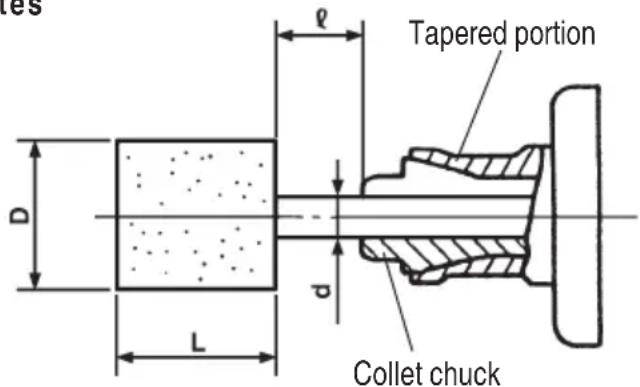
Fig. 7
Table 5 (When = 1/2'' (13 mm))
| d | D | L |
| 1/8" (3.175 mm) | 3/16" (5 mm) | 1/2" (13 mm) |
| 1/4" (6 mm) | 3/4" (20 mm) | |
| 5/16" (8 mm) | 3/4" (20 mm) | |
| 3/8" (10 mm) | 3/4" (20 mm) | |
| 1y | 1/2" (13 mm) | 1-1/2" (38 mm) |
| 5/8" (16 mm) | 1" (25 mm) | |
| 3/4" (20 mm) | 1" (25 mm) | |
| 1" (25 mm) | 3/4" (20 mm) | |
| 1/4" (6.35 mm) | 1-1/4" (32 mm) | 1/2" (13 mm) |
| 1-1/2" (38 mm) | 9/32" (7 mm) |
Wheels can be simply attached and detached by using two wrenches. (Fig. 8)
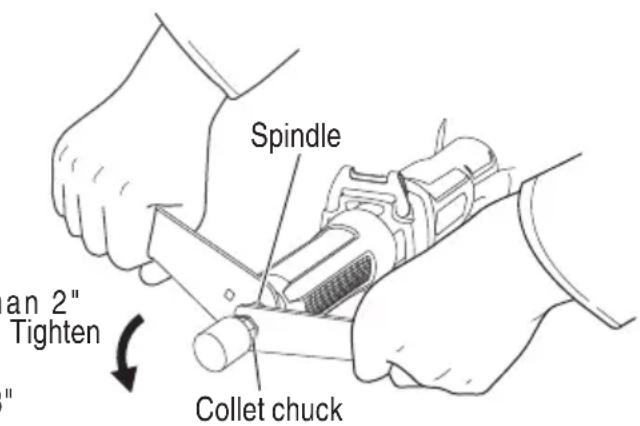
Fig. 8
NOTE
Do not tighten the collet chuck by inserting a shaft thinner than the regular shaft diameter (1/4" (6.35mm)) in the chuck or in an empty condition. This pract will damage the collet chuck.
○ When using a shaft (3 mm), switch to a collet chuck for 3 mm shaft (sold separately).
When installing a wheel with shaft, tighten the collet chuck after applying a small quantity of spindle oil (or sewing machine oil) to the tapered portion indicated in Fig. 7.
- Using the side handle (Fig. 9, 10) (sold separately)
Attach the side handle to the machine as follows.
(1) Remove the front cover.
Detach the protrusion on the interior of the front cover from the hollow in the main unit and pull to remove. If the protrusion is difficult to detach, use a flat-head screwdriver or similar tool.
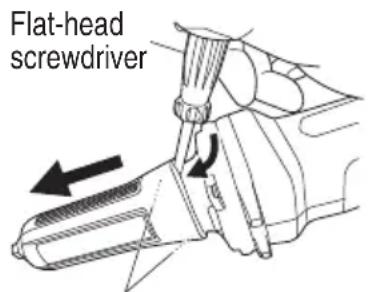
Interior protrusions (2 locations)
Fig. 9
(2) Loosen the side handle grip and insert the side handle to the nose bracket part of the machine from the flange part of the side handle sleeve.
(3) Set the side handle to a position that is suited to the operation and then securely tighten the side handle grip.
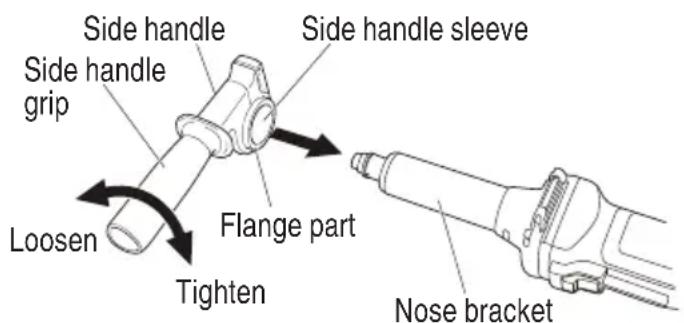
Fig. 10
OPERATION
WARNING
We wear eye protection when operating this tool.
- Keep your hands, face and other body parts away from the wheel and any other rotating parts, while operating the tool.
CAUTION
To extend the lifetime, the lithium-ion battery equips with the protection function to stop the output. Therefore, if the tool is overloaded, the motor may stop. However, this is not the trouble but the result of protection function. In this case, release the switch of tool and eliminate the causes of overloading.
NOTE
To prevent injuries, this product has a function that prevents unexpected motor rotation when the battery is inserted. The motor will not run if the battery is inserter while the switch is still ON. After installing the battery, turn the switch off and then back on again.
☐ The GP18DA and GP18DB models are equipped with a protection function that will shut down the tool in the event of an overload.
Should the tool shut down due to an overload, turn the power off and then turn it back on again.
An overload that stops tool operation and lasts more than 10 seconds may not be released by turning the power off and on. Should this happen, remove the battery from the tool and reinstall it before turning on the power switch.
- Switch operation
Turn the grinder "ON"
While holding the grinder firmly, slide the switch to the "ON" position with one finger to turn on the tool. Releasing the switch will turn off the tool.
For continued operation, slide the switch to the "ON" position and press down the "ON" position of the switch to lock it in place.
Turn the grinder "OFF"
Press the "OFF" position of the switch to release the lock and turn the grinder off.
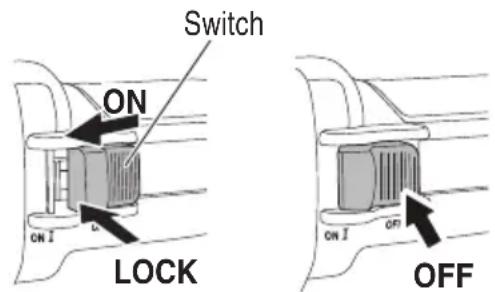
Fig. 11
To switch on, slide the off-lock lever in the direction of Ⓐ and press the paddle lever in the direction of Ⓑ as shown in Fig. 12. Release the paddle lever to switch off.
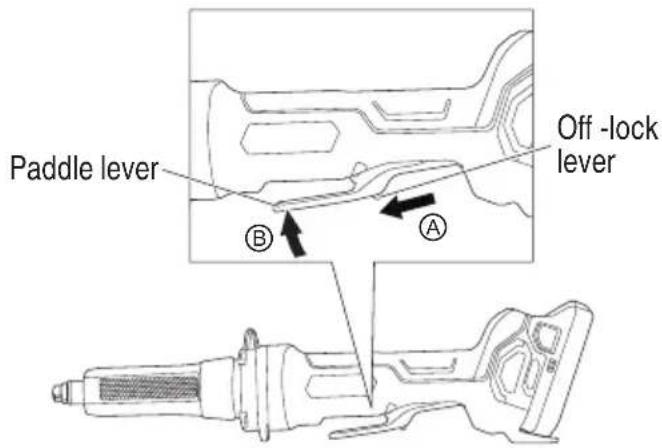
Fig. 12
- About the mode change function
The unit has "Transmission mode" and "Auto mode".
With Transmission mode, the grinder's number of revolutions can be set at one of five stages.
When operating in Transmission mode, the set number of revolutions will be maintained regardless of changes in load.
With Auto mode, you can lower noise and vibration by lowering the maximum number of revolutions while in a no-load state.
While in Auto mode, the number of revolutions will be raised if the load becomes greater during operation.
On the other hand, the number of revolutions will be lowered if the load decreases during operation. (Table 6)
○ Set the mode and dial according to work application.
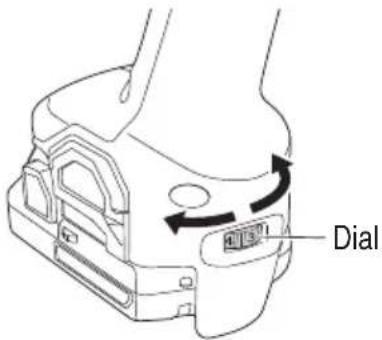
Fig. 13
Table 6
| Mode Status | Number of Revolutions (/min) | Use | ||
| Transmission | Dial Settings | 1 | 7,000 | Polishing/finishing |
| 2 | 13,800 | Paint removal | ||
| 3 | 16,600 | Rust removal | ||
| 4 | 24,400 | Burr removal | ||
| 5 | 29,000 | Grinding | ||
| Auto | A | 15,000 | Work on standby | |
| 29,000 | Grinding | |||
CAUTION
- When using the grinder in the immediate vicinity of welding equipment, the rotational speed may become unstable. Do not use the grinder near welding equipment.
- When using the tool at any value except the full speed (Dial scale 5), the motor cannot be sufficiently cooled due to the decreased number of revolution. This could resu risk of burning and damaging the motor before an overload protective mechanism starts to function. Make sure that you use the tool by lightly applying it to the surface of material when you use it at any value except the full speed (Dial scale 5).
WARNING
Do not press the grinder forcibly against the surface to be ground. Heavy pressure can result in wheel breakage and serious injury. It can also damage the surface being ground or damage the grinder's motor.
3. Wheel selecting method
Types of wheels are varied according to the materials to be ground. Select a wheel appropriate for the material to be ground.
The following table is an outline of wheels and materials to be ground.
| Materials to be ground Grain Grading | Bonding degree | Structure Bonding agent | ||
| Mild steel, hard steel, forged steel | WA 60–80 P | m | V | |
| Cast iron | C | 36 | M–O | m V |
| Brass, bronze, aluminium | C | 36 | J–K | m V |
| Ceramic | WA | 60–80 | M | m V |
| Synthetic resin | C | 36 | K–M | m V |
Small-scaled wheels with shaft are prepared for grinding small surfaces.
Since wheel shaft diameter is 3 mm, use the collet chuck for 3 mm shaft sold separately by your metabo HPT dealer as an optional accessory.
4. Grinding operation
(1) Lightly press the wheel to the material to be ground when grinding materials, high-speed revolution is necessary. Use a die grinder with high-speed revolution, minimizing the pressing force.
(2) Dressing the wheel After attaching a wheel, adjust deflection of the wheel center by using a dresser.
If the wheel center is eccentric, not only precise finishing cannot be achieved but also grinder vibration increases, lowering grinder accuracy and durability. A clogged or worn wheel will soil the finishing surface or lower grinding efficiency. Occasionally dress the wheel by applying the dresser.
(3) Thoroughly check that the wheel is free of cracks, splits and other abnormalities before mounting. Make sure it is firmly clamped and has been properly mounted.
(4) Test the die grinder before using.
Before actually beginning the grinding work, test the die grinder by first clearing the area of all other personnel. Make sure you are wearing eye protection. Turn the die grinder "on", and make sure the die grinder runs smoothly and shows no abnormalities.
Duration of the trial run is as follows:
When depressed center wheel is replaced ...... 3 minutes or more When starting daily work .....1 minute or more
(5) Use only properly rated wheels.
Use only depressed center wheels rated at 29,000 /min or more.
Using a wheel rated less can lead to wheel disintegration during operation and cause serious bodily injury.
CAUTION
The revolving wheel will create air turbulence. Do no lay the die grinder down in areas of dust or dirt until it has come to a complete stop.
MAINTENANCE AND INSPECTION
WARNING
-
Be sure to turn off the switch and pull out the battery before doing any inspection or maintenance.
● Using cracked, deformed or damaged wheels can lead to wheel breakage and resulting serious injury. -
Inspecting the wheel Ensure that the wheel is free of cracks and surface defects.
-
Inspecting the mounting screws Regularly inspect all mounting screws and ensure that they are properly tightened. Should any of the screws be loose, retighten them immediately.
WARNING
Using this die grinder with loosened screws is extremely dangerous.
3. Maintenance of the motor
The motor unit winding is the very “heart” of the power tool. Exercise due care to ensure the winding does not become damaged and/or wet with oil or water.
4. Check for Dust
Dust may be removed with a soft cloth or a cloth dampened with soapy water.
Do not use bleach, chlorine, gasoline or thinner, for they may damage the plastics.
5. Inspection of terminals (tool and battery)
Check to make sure that swarf and dust have not collected on the terminals.
On occasion check prior, during and after operation.
CAUTION
Remove any swarf or dust which may have collected on the terminals.
Failure to do so may result in malfunction.
6. Disposal of the exhausted battery
WARNING
Do not dispose of the exhausted battery. The battery must explode if it is incinerate battery is recyclable. At the end of it's useful life, under various state and local laws, it may be illegal to dispose of this battery into the municipal waste stream. Check with your local solid waste offi cials for details in your area for recycling options or proper disposal.
7. Cleaning the filter
After use, detach the filter and remove any grime or dust from the screen with an airgun or other tool. (Fig. 14)
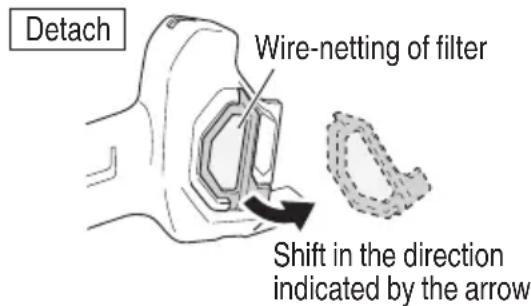
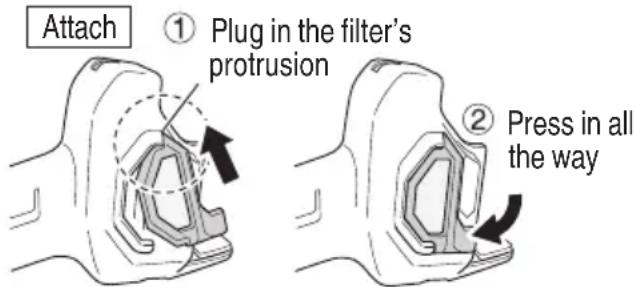
Fig. 14
NOTE
To clear the unit of grime or dust, periodically run the motor in a no-load state and blow dry air into the ventilation hole with the filter removed.
Accumulation of grime or dust accumulates in the motor can cause damage.
○ After cleaning, make sure to securely attach the filter.
8. Storage
Storing in a place below 104^ F ( 40^ C) and out of the reach of children.
NOTE
Storing lithium-ion batteries
Make sure the lithium-ion batteries have been fully charged before storing them.
Prolonged storage (3 months or more) of batteries with a low charge may result in performance deterioration, significantly reducing battery usage time or rendering the batteries incapable of holding a charge.
The batteries inappable of working a charger. However, significantly reduced battery usage time may be recovered by repeatedly charging and using the batteries two to five times.
If the battery usage time is extremely short despite repeated charging and use, consider the batteries dead and purchase new batteries.
9. Service and repairs
All quality power tools will eventually require servicing or replacement of parts because of wear from normal use. To assure that only authorized replacement parts will be used, all service and repairs must be performed by a metabo HPT AUTHORIZED SERVICE CENTER, ONLY.
CAUTION
In the operation and maintenance of power tools, the safety regulations and standards prescribed in each country must be observed.
Important notice on the batteries for the metabo HPT cordless power tools
Please always use one of our designated genuine batteries. We cannot guarantee the safety and performance of our cordless power tool when used with batteries other than these designated by us, or when the battery is disassembled and modified (such as disassembly and replacement of cells or other internal parts).
ACCESSORIES
WARNING
ALWAYS use Only authorized metabo HPT replacement parts and accessories. Never use replacement parts or accessories which are not intended for use with this tool. Contact metabo HPT if you are not sure whether it is safe to use a particular replacement part or accessory with your tool.
The use of any other attachment or accessory can be dangerous and could cause injury or mechanical damage.
NOTE
Accessories are subject to change without any obligation on the part of the metabo HPT.
STANDARD ACCESSORIES
| GP18DAGP18DB(NN) | (1) Wrench (43/64" (17 mm)) (Code No. 936638)......1(2) Wrench (15/32" (12 mm)) (Code No. 936553)......1Battery, Battery charger and Battery cover are not contained. |
OPTIONAL ACCESSORIES...sold separately
(1) Battery (BSL1830C)
(2) Battery charger (UC18YFSL)
(3) Battery cover (Code No. 329897)
(4) Collet chuck (for 1/8" (3.175 mm) shaft)
Dimensions and handling methods other than the shaft hole are the same as those for the 1/4"(6 mm) collet chuck.
(5) Side Handle (Code No. 329758)
NOTE
Specifications are subject to change without any obligation on the part of the metabo HPT.
CONSIGNES DE SÉCURITÉ IMPORTANTES
| d | D | L |
| 1/8" (3,175 mm) | 3/16" (5 mm) 1/2" (13 mm) | |
| 1/4" (6 mm) 3/4" (20 mm) | ||
| 5/16" (8 mm) 3/4" (20 mm) | ||
| 3/8" (10 mm) 3/4" (20 mm) | ||
| 1/4" (6,35 mm) | 1/2" (13 mm) 1-1/2" (38 mm) | |
| 5/8" (16 mm) 1" (25 mm) | ||
| 3/4" (20 mm) 1" (25 mm) | ||
| 1" (25 mm) 3/4" (20 mm) | ||
| 1-1/4" (32 mm) 1/2" (13 mm) | ||
| 1-1/2" (38 mm) 9/32" (7 mm) | ||
| d | D | L |
| 1/8" (3.175 mm) | 3/16" (5 mm) 1/2" (13 mm) | |
| 1/4" (6 mm) 3/4" (20 mm) | ||
| 5/16" (8 mm) 3/4" (20 mm) | ||
| 3/8" (10 mm) 3/4" (20 mm) | ||
| 1/4" (6.35 mm) | 1/2" (13 mm) 1-1/2" (38 mm) | |
| 5/8" (16 mm) | 1" (25 mm) | |
| 3/4" (20 mm) | 1" (25 mm) | |
| 1" (25 mm) | 3/4" (20 mm) | |
| 1-1/4" (32 mm) 1/2" (13 mm) | ||
| 1-1/2" (38 mm) 9/32" (7 mm) | ||
natural_image
Line drawing of a quill pen with inkwell (no text or symbols)WARNING:
Some dust created by power sanding, sawing, grinding, drilling, and other construction activities contains chemicals known to the State of California to cause cancer, birth defects or other reproductive harm. Some examples of these chemicals are:
- Lead from lead-based paints,
- Crystalline silica from bricks and cement and other masonry products, and
- Arsenic and chromium from chemically-treated lumber.
Your risk from these exposures varies, depending on how often you do this type of work. To reduce your exposure to these chemicals: work in a well ventilated area, and work with approved safety equipment, such as those dust masks that are specially designed to filter out microscopic particles.
AVERTISSEMENT:
Please contact Koki Holdings America Ltd. at 1-800-59-TOOLS (toll free), or metabo HPT AUTHORIZED POWER TOOL SERVICE CENTER regarding COLLECTION.
Pour le RAMASSAGE, contacter Koki Holdings America Ltd. au 1-800-59-TOOLS (appel gratuit), ou UN SERVICE APRÈS-VENTE D'OUTILS ÉLECTRIQUE AGRÉÉ PAR metabo HPT.
Minato-ku, Tokyo 108-6020, Japan
Distributed by
Koki Holdings America Ltd.
1111 Broadway Ave,
Braselton, Georgia, 30517
Koki Holdings America Ltd. Canadian Branch
3405 American Drive, Units 9-10,
Mississauga, ON, L4V 1T6
102
Code No. C99742561 G
Printed in China


- SAFETY INSTRUCTIONS AND INSTRUCTION MANUAL
- WARNING
- INSTRUCTIONS DE SECURITE ET MODE D'EMPLOI
- ⚠ AVERTISSEMENT
- IMPORTANT SAFETY INSTRUCTIONS
- MEANINGS OF SIGNAL WORDS
- SAFETY
- GENERAL POWER TOOL SAFETY WARNINGS
- SAFETY WARNINGS COMMON FOR GRINDING OPERATIONS
- KICKBACK AND RELATED WARNINGS
- SAFETY WARNINGS SPECIFIC FOR GRINDING OPERATIONS
- GENERAL SAFETY INSTRUCTIONS FOR CORDLESS GRINDERS
- SPECIFIC SAFETY RULES AND SYMBOLS
- Accessories must be rated for at least the speed recommended on the tool warning label.
- Hold tools by insulated gripping surfaces when performing an operation where the cutting tool may contact hidden wiring.
- ALWAYS wear ear protectors when using the tool for extended periods.
- Use only a wheel with a rated capacity which is GREATER than 29,000 /min.
- NEVER touch moving parts.
- NEVER operate without all guards in place.
- Use right tool.
- NEVER use a power tool for applications other than those specified.
- Handle tool correctly.
- Keep all screws, bolts and covers tightly in place.
- READ ALL INSTRUCTIONS
- IMPORTANT SAFETY INSTRUCTIONS FOR USE OF THE BATTERY AND BATTERY CHARGER
- CAUTION ON LITHIUM-ION BATTERY
- CAUTION
- REGARDING LITHIUM-ION BATTERY TRANSPORTATION
- SAVE THESE INSTRUCTIONS
- AND
- MAKE THEM AVAILABLE TO OTHER USERS
- OWNERS OF THIS TOOL!
- FUNCTIONAL DESCRIPTION
- NOTE
- NAME OF PARTS
- Cordless die grinder
- Battery
- Battery Charger
- SPECIFICATIONS
- Battery Charger
- Electric control
- ASSEMBLY AND OPERATION
- APPLICATIONS
- REMOVAL AND INSTALLATION METHOD OF BATTERY
- CHARGING METHOD
- Regarding electric discharge in case of new batteries, etc.
- How to make the batteries perform longer
- PRIOR TO OPERATION
- OPERATION
- Wheel selecting method
- Grinding operation
- MAINTENANCE AND INSPECTION
- Maintenance of the motor
- Check for Dust
- Inspection of terminals (tool and battery)
- Disposal of the exhausted battery
- Cleaning the filter
- Storage
- Service and repairs
- Important notice on the batteries for the metabo HPT cordless power tools
- ACCESSORIES
- OPTIONAL ACCESSORIES...sold separately
- CONSIGNES DE SÉCURITÉ IMPORTANTES
- WARNING:
- AVERTISSEMENT:
- Koki Holdings America Ltd.
- Koki Holdings America Ltd. Canadian Branch
Brand : HiKOKI
Model : GP18DA
Category : Grinder