SJ-XG640M-BK - Fridge SHARP - Free user manual and instructions
Find the device manual for free SJ-XG640M-BK SHARP in PDF.


User questions about SJ-XG640M-BK SHARP
0 question about this device. Answer the ones you know or ask your own.
Ask a new question about this device
Download the instructions for your Fridge in PDF format for free! Find your manual SJ-XG640M-BK - SHARP and take your electronic device back in hand. On this page are published all the documents necessary for the use of your device. SJ-XG640M-BK by SHARP.
USER MANUAL SJ-XG640M-BK SHARP
SJ-XG640M SJ-XG690G SJ-XG690M SJ-XG740G SJ-XG740M

"Plasmacluster" and "Device of a cluster of grapes" are trademarks of Sharp Corporation.
natural_image
Exterior view of a modern office building (no signage)SJ-XG690G SJ-XG740G
natural_image
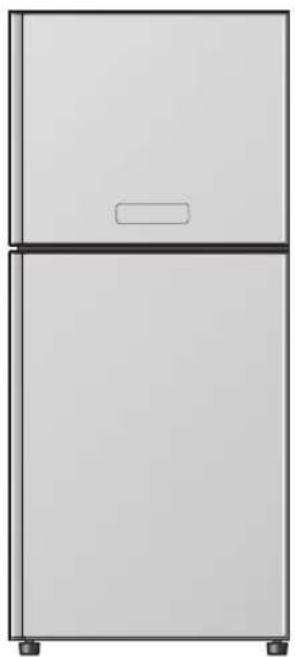
Simple line drawing of a two-tier refrigerator with no text or symbolsSJ-XG640M SJ-XG690M SJ-XG740M
EN Refrigerator-Freezer Operation manual ....EN-1 – EN-14
ES Frigorifico-Congelador
Manual de manejo ......ES-1 – ES-14
Refrigerateur-Congelateur
Mode d'emploi ....FR-1 - FR-14
PT Frigorífico-Congelador
Funcionamento manual.... PT-1 – PT-14
EL Ψυγειο - Καταψυκτης
Εγχειρίδιο λειτουργιας ...... EL-1 – EL-14
DE Kühlschrank mit Tiefkühlfach Bedienungsanleitung ...... DE-1 – DE-14
NL Koelkast-Vriezer
Gebruiksaanwijzing....NL-1 – NL-14
PL Chłodziarko - Zamrażarka
Instrukcja obsługi....PL-1 – PL-14
HU Hütőszekrény-Fagyasztó
Használati utasítás....HU-1 – HU-14
RO Frigider-Congelator Manual de utilizare ...... RO-1 – RO-14
CS Chladnička-Mrazák
Návod k obsluze CS-1 – CS-14
SK Chladnička-Mraznička
Návod na obsluhu ...... SK-1 – SK-14
LT Šaldytuvas - Šaldiklis
Eksploatavimo instrukcija ..... LT-1 – LT-14
LV Ledusskapis – Saldētājkamera
Rokasgrāmata ....LV-1 – LV-14
ET K ü lmik-S ü gavk ü lmik Kasutusjuhend....ET-1 - ET-14
Hladilnik-Zamrzovalnik
SL Priročnik z navodili za delovanje ....SL-1 – SL-14
UK
Холодильник-Морозильник
Інструкція з експлуатації ......UK-1 – UK-14
BG
Хладилник – Фризер
Ръководство за работа......BG-1 – BG-14
EN Contents
- Safety information......EN-1
- Installation ......EN-2
• Description......EN-3
- Useful modes......EN-5
• Control panel (SJ-XG690G, SJ-XG740G) ...... EN-6
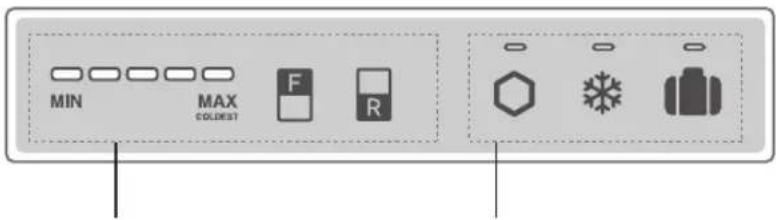
• Control panel (SJ-XG640M, SJ-XG690M, SJ-XG740M) ...... EN-8
- Storing food......EN-10
• Care and cleaning ...... EN-11
• Before you call for service ...... EN-12
- Product FICHE ......EN-13
- Indicator of temperature ...... EN-13
ES Contenido
- Panel de control (SJ-XG640M, SJ-XG690M, SJ-XG740M) ...... ES-8
• Bedienfeld (SJ-XG640M, SJ-XG690M, SJ-XG740M)......DE-8
- Bedieningspaneel (SJ-XG640M, SJ-XG690M, SJ-XG740M)....NL-8
- Panel sterowania (SJ-XG690G, SJ-XG740G)....PL-6
- Panel sterowania (SJ-XG640M, SJ-XG690M, SJ-XG740M)....PL-8
Thank you very much for buying this SHARP product. Before using your SHARP refrigerator, please read this operation manual to ensure that you gain the maximum benefit from it.
- This refrigerator is intended for making ice cubes, refrigerating and freezing food.
- This refrigerator is for household use only, with ambient temperature indicated in the table. The climate class is specified on the rating plate. If the refrigerator operates out of range (ambient temperature range) of the climate class which is rated for that model, it may not be able to maintain satisfactory internal temperatures. If the refrigerator is used at colder temperatures, the refrigerator will not be damaged up to a temperature of +5^ .
- The refrigerator should not be subjected to temperatures of -10^ or below for a long period of time.
| Household use only | |
| Climate class | Acceptable range of ambient temperature |
| SN +10°C to 32°C | |
| N +16°C to 32°C | |
| ST +16°C to 38°C | |
| T +16°C to 43°C | |
Safety information

WARNING This means that there are high risks of death or serious injury.

CAUTION This means that there are high risks of material damage or personal injury.

WARNING
Refrigerant
This refrigerator contains flammable refrigerant (R600a: isobutane) and insulation blowing gas (cyclopentane). Observe the following rules to prevent ignition and explosion.
■ Do not allow any pointed objects to have contact with the refrigeration system. The refrigeration system behind and inside the refrigerator contains refrigerant.
■ Do not use mechanical devices or other means to accelerate the defrosting process. (This refrigerator has adopted automatic defrosting system.)
■ Do not use electrical appliances inside the refrigerator.
■ Do not block the space around the refrigerator.
■ Do not use flammable sprays, such as spray paint near the refrigerator.
■ Do not store flammable sprays, such as spray paint in the refrigerator.
In the case of failure of the refrigeration system, do not touch the wall socket and use open flames. Open the window and let out the air from the room. Then ask a service agent approved by SHARP for service.
Installation
■ Do not install the refrigerator in a damp or wet location. It may cause the damage to the insulation or electrical leak. Dew may also appear on the outer cabinet and it causes rust.
■ The refrigerator should be installed flatly and firmly on the floor.
Power cord, Plug, Socket
Read carefully the following rules to prevent electric shock or fire.
■ Connect the power plug into the wall socket firmly and directly. Do not use an extension cord or adapter plug.
■ Connect the power plug to the socket with the required rated voltage.
■ Connect the earth pin to the earth terminal properly.
■ Make sure to protect the power cord from being damaged during installation or moving. If the power plug or cord is loose, do not insert the power plug.
■ Do not touch the power plug with wet hands.
■ Disconnect from the main electricity supply by removing the main plug from the socket. Do not remove by pulling the power cord.
■ Dust deposited on the power plug may cause fire. Wipe it off carefully.
■ Pull out the plug if the refrigerator is not used for a long time.
■ If the flexible supply cord is damaged, it must be replaced by service agent approved by SHARP because special cord is required.
In use
■ Do not store volatile and flammable materials such as ether, petrol, propane gas, aerosol cans, adhesive agents and pure alcohol etc. These materials are easy to explode.
■ Do not store temperature-sensitive products such as pharmaceutical products in the refrigerator. There are high risks of changes in product quality.
■ Do not attempt to change or modify this refrigerator. This may result in fire, electric shock or injury.
■ Do not place any object on the top of refrigerator. If the object falls down from the top, it may cause injury.
■ Do not hit the glass doors hard. Otherwise, they may break and cause physical injury.
■ This appliance can be used by children aged from 8 years or above and persons with reduced physical, sensory or mental capabilities or lack of experience and knowledge if they have been given supervision or instruction concerning use of the appliance in a safe way or understanding the hazards involved. Children shall not play with the appliance. Cleaning and user maintenance shall not be done by children without supervision.
Care and Cleaning
■ Unplug the refrigerator first to prevent electric shock.
- Do not splash water directly on the outer cabinet or the interior. This may lead to rusting and deterioration of the electrical insulation.
Trouble
■ If you smell something burning, pull out the power plug immediately. Then ask a service agent approved by SHARP for service.
■ In case of gas leak, ventilate the area by opening window. Do not touch the refrigerator or the power socket.
Disposal
■ Ensure that the refrigerator presents no danger to children while being stored until disposal. (e.g. remove the door to prevent child entrapment.)
■ This refrigerator should be disposed appropriately. Take the refrigerator to a professional recycling plant for flammable refrigerant and insulation blowing gases.
CAUTION
Transportation
■ When you install or move your refrigerator, use curing mat to protect the floor from being damaged.
- Carry the refrigerator by holding the handles located on the rear and bottom side. If you lift up the refrigerator improperly, it may cause injury.
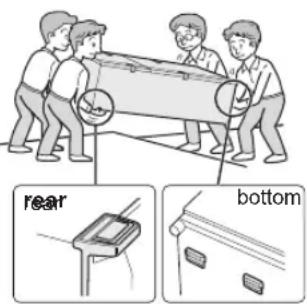
text_image
rear bottomInstallation
Free standing type
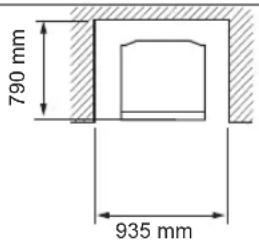
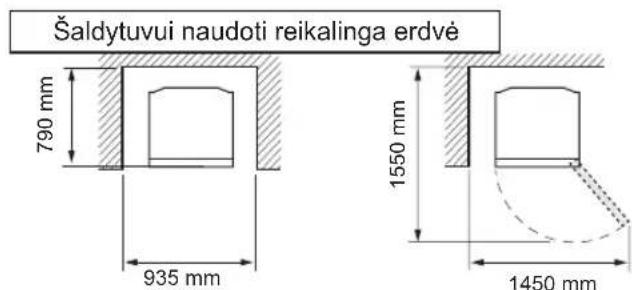
1 Keep adequate ventilation space around the refrigerator.
- The picture shows the minimum required space for installing the refrigerator. The measurement condition of energy consumption is conducted under a different space dimension.
- By keeping greater space, the refrigerator may consume a less amount of power consumption.
- If use the refrigerator in the smaller space dimension than pictured below, it may cause temperature rise in the unit, loud noise and failure.
- The space between the rear of the refrigerator and the wall should be 50mm or more, and less than 75mm. If the space is wider than 75mm, you may get injured by touching compressor and its peripheral parts which are extremely hot during the operation.
Overall space required in use
text_image
790 mm 935 mm
text_image
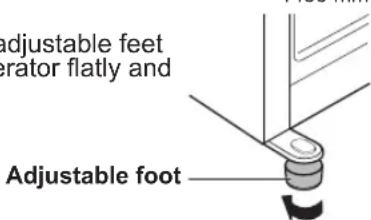
1550 mm 1450 mm2 Use the two front adjustable feet to place the refrigerator flatly and firmly on the floor.
text_image
adjustable feet erator flatly and Adjustable footIn use
■ Do not touch the compressor unit or its peripheral parts, as they become extremely hot during operation and the metal edges may cause injury.
■ Do not touch foods or metal containers in the freezer compartment with wet hands. This may cause frostbite.
- Do not place bottled drinks and cans in the freezer compartment.
Especially “Express cool” is in operation, there is a high risk that glass bottles may burst.
■ Do not use other than potable water to make ice cubes.
■ Do not open or close the door when somebody put a hand near the door. There is a risk that the other people may catch their fingers in the door.
■ Do not put oversized object in the pockets of the door. If the object falls down from the pockets, it may cause injury.
■ Make sure to handle the glass shelves with care to install or uninstall. If you drop the glass shelves, it may break or cause injury.
3 Connect the appliance via a correctly installed socket.
Note
- Place your refrigerator to access the plug.
- Keep your refrigerator out of direct sunlight and do not place next to heat generating appliance.
- Do not place your refrigerator directly on the ground. Insert suitable stand such as wooden board under the refrigerator.
- When you insert the power plug with the door opened, door alarm sounds but it is normal. This sound stops after closing the door.
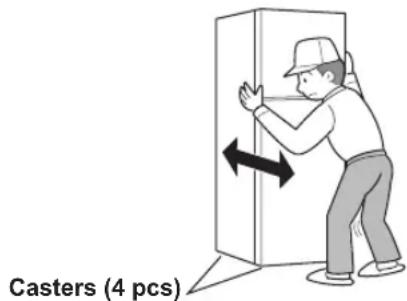
Casters are located on the bottom of the refrigerator
- The casters allow the refrigerator to move back and forth.
text_image
Casters (4 pcs)Before using your refrigerator
- Clean the inside parts with a cloth soaked in warm water.
- If you use soapy water to clean, wipe it off thoroughly with water.
text_image
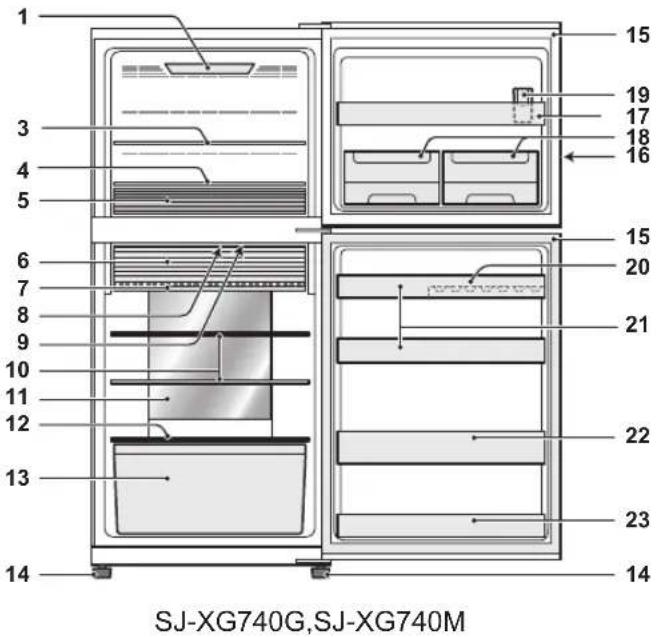
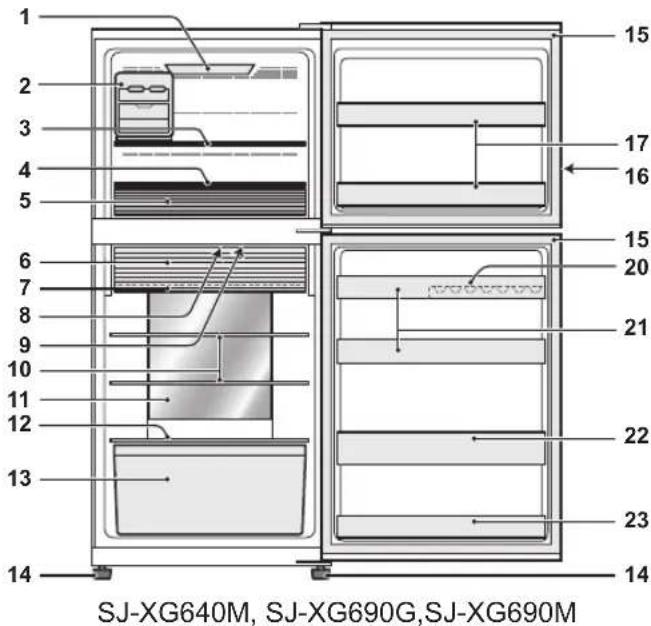
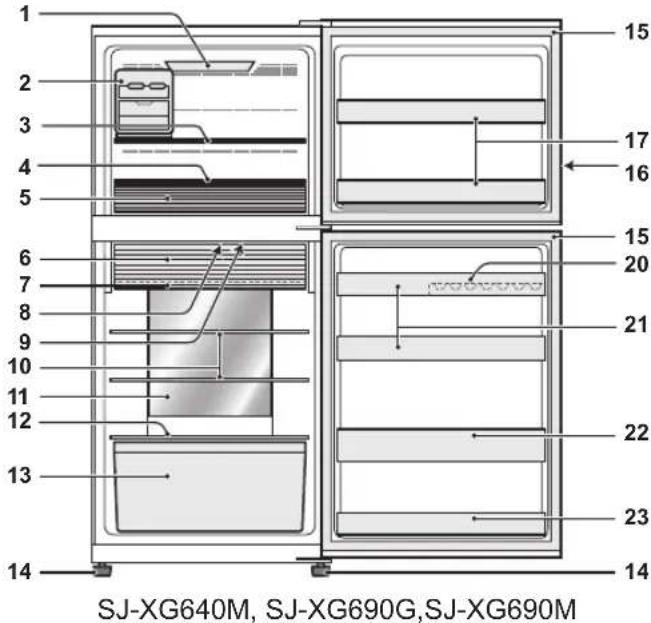
SJ-XG740G,SJ-XG740M- Freezer light
- Movable ice maker
- Freezer shelf (Upper)
- Freezer shelf (Bottom)
- Freezer case Move the partition to fit the size of food.
- Two-way fresh room door
- Fresh shelf
- Deodorizing unit
Deodorizing catalyst is installed on the routes of cold air. There is no need to operate and clean.
- Refrigerator light
- Refrigerator shelf
- Hybrid cooling panel
The panel cools the refrigerator compartment indirectly from the rear. In this way, food is cooled gently without being exposed to cold air flow.
- Fruit and vegetable shelf
- Fruit and vegetable crisper
- Adjustable foot
- Magnetic door seal
- Control panel
text_image
1 2 3 4 5 6 7 8 9 10 11 12 13 14 15 16 17 15 20 21 22 23 14 SJ-XG640M, SJ-XG690G,SJ-XG690M- Freezer door pocket
- In-door ice maker
(This ice maker is packed inside the freezer compartment. Refer to the next page "After cleaning" to install.) - Water cup
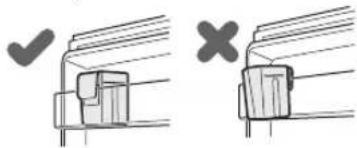
(The water cup is packed inside the freezer case. Make sure to put the cup on the position indicated in the picture above to use.)
natural_image
Two diagrams showing a mechanical assembly with checkmark and cross symbols (no text or labels)- Egg pocket
- Refrigerator pocket (Upper)
- Bottle pocket
- Refrigerator pocket (Bottom)
If you wish to store large items within your refrigerator
- You may remove any shelves or any pockets numbered 2,3,5,6,7,10,13,17, 18, 19, 20, 21, 22, 23 in the picture above.
• Cooling performance is not influenced even if you use the refrigerator in the above situation.
Two-way fresh room door
Open Close
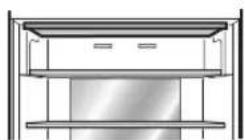
Use the space as refrigerator room.
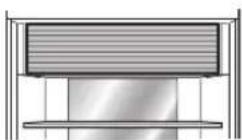
Use the space as fresh room.
How to open the two-way fresh room door
1) Lift up the door.
2) Insert the door into the frame and push it back to the stopper. It is locked properly.
natural_image
Illustration of a hand using a tool to interact with a striped object (no text or symbols visible)In-door ice maker (SJ-XG740G,SJ-XG740M)
Making ice cubes
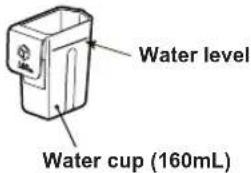
1) Use the water cup to measure amount of water.
text_image
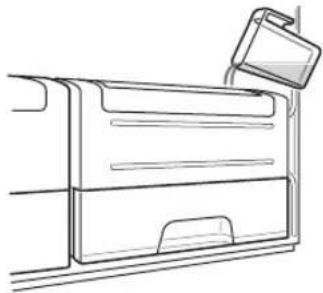
Water level Water cup (160mL)2) Pour water into In-door ice maker by the water cup.
natural_image
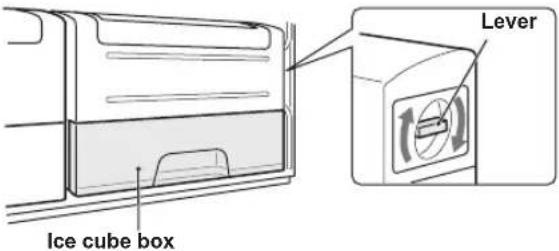
Line drawing of a vehicle door frame with a handle attachment (no text or symbols)3) When ice cubes are made, turn the lever clockwise to put the ice into the ice cube box.
4) Pull the ice cube box to take out the ice cubes.
text_image
Ice cube box LeverNote
- To prevent the ice cube box from being damaged, do not pour oil into it or make ice in it.
- Do not open the freezer door as much as possible during ice making.
Cleaning In-door ice maker
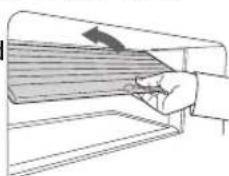
- Empty the ice cube box in advance. 1) Pull upward the In-door ice maker to remove.
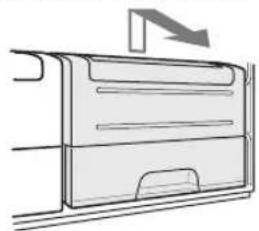
natural_image
Diagram of a vehicle door frame with an arrow indicating direction (no text or symbols)2) Remove ice cube tray. 3) Remove ice cube box. 4) Push the protrusion to disassemble In-door ice maker.
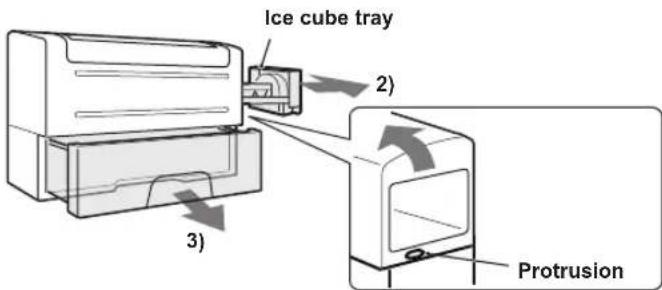
text_image
Ice cube tray 2) 3) ProtrusionNote
- Do not put the ice cube tray in a dishwasher. Otherwise, the packings are damaged.
After cleaning
1) Assemble the In-door ice maker. (Reverse procedure to disassemble.) 2) Install the In-door ice maker securely.
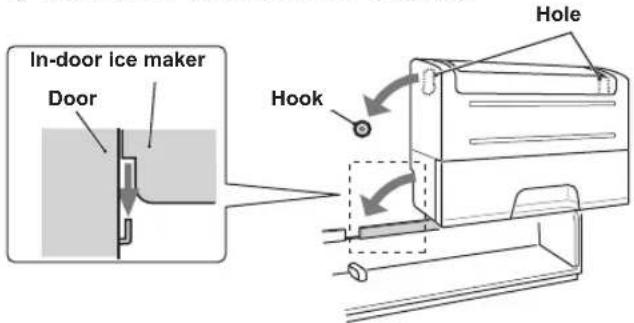
text_image
In-door ice maker Door Hook Hole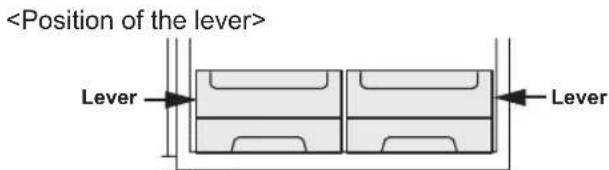
text_image
Movable ice maker (SJ-XG640M, SJ-XG690G, SJ-XG690M)
It is highly recommended to use the ice maker as shown in the picture of "Description". You can put the ice maker anywhere in the freezer compartment.
1) Do not overfill the tray with water. Otherwise the ice cubes will join together when frozen.
2) When ice cubes are made, turn the lever clockwise to put the ice into the ice cube box.

text_image
Lever Ice cube boxNote
- Make sure to place the ice maker flatly not to spill out the water from the ice tray.
- To prevent the ice cube box from being damaged, do not pour oil into it or make ice in it.

Extra cool

Express freezing

Express cool
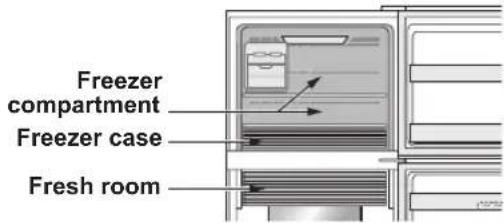
text_image
Freezer compartment Freezer case Fresh room| Extra cool Express | press freezing Express cool | ||
| Feature This mode is to cool beverages or foods to ice-cold.Note: Food with high-moisture may freeze. | This mode speeds up the time to freeze food or make ice. | This mode is to cool beverages or foods quickly. | |
| Point of use Fresh room Freezer case Freezer compartment | CAUTION: Do not place glass bottles. There is a high risk that they may burst. | ||
| Operating time 6 hours *1 | 2 hours *1 | 30 minutes | |
| This mode ends automatically.The alarm does not sound. | This mode ends automatically.The alarm sounds.To stop the alarm *2Press enter  press "Express press "Express  key.or freezing" button. key.or freezing" button. | ||
| After the operation completed | There is no need for taking beverages or foods out. | Be sure to take the beverages and foods out when the alarm sounds.If the beverages and foods are left in the freezer compartment over approximately 30 minutes, they may freeze. | |
| At the time of power failure during the operation | This mode is automatically cancelled. This mode is automatically restarted from the previous state at the time of re-power. | ||
*1 It may take more time to complete if the operation overlaps with defrosting. This mode starts after defrosting is completed.
*2 If you do not stop the alarm, it sounds 30 minutes continuously.
Note
- Extra cool, Express freezing and Express cool are not available at the same time while one of the modes is in operation.
- Avoid opening the door as much as possible during the operations of these modes.

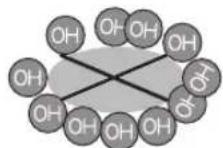
Plasmacluster
Use this feature when you want to keep the inside of the refrigerator clean.
The Plasmacluster automatically starts operating when the refrigerator is powered on.
The ionizer inside your refrigerator releases clusters of ions, which are collective masses of positive and negative ions, into the refrigerator compartment.
These ion clusters inactivate airborne mold fungus.


Note
There may be a slight odor in the refrigerator. This is the smell of ozone generated by the ionizer. The amount of ozone is minimum and quickly disappears in the refrigerator.

Vacation mode
- Use this mode when going on a trip or leaving the house for a long time.
- The temperature inside the refrigerator compartment is adjusted to approx. 10^ .
Note
- Food storage period in the refrigerator compartment becomes approx. 1/2-1/3 of normal operation. Use this mode only when there is no perishable food.
- Temperature of refrigerator compartment cannot be modified.
Control panel (SJ-XG690G, SJ-XG740G)


Operation keys
Controlling temperature icons
| Icon | Meaning | Default setting |
| Freezer compartment | -18°C | |
| Refrigerator compartment | 3°C |
Useful modes icons Additional modes
| Icon | Meaning | Default setting |
| Extra cool | OFF | |
| Express freezing | ||
| Express cool | ||
| Plasmacluster | ||
| Vacation mode |
| Indicator | Meaning | Default setting |
| Door alarm | ON | |
| Sound of key operation |
Note
- When you press one of the keys, all icons flash once and show the standby display.
- Mode icons or indicators in operation light up on the standby display.
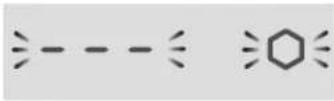
When Express cool is in operation, the icon flashes on the standby display.
Turn-on state
- When there is no operation for approximately 1 minute, the display returns to the standby display automatically. The standby display turns off if there is no operation for another 1 minute.
- If the refrigerator stops because of power failure, the modes except for Extra cool, Express freezing and Express cool function the same way as before at the time of re-power.
Operations of useful modes
1
Select the mode icon.

Current setting (This indication shows OFF.)
2
or
Select on/off.
ON/OFF switches in the order by pressing the key.

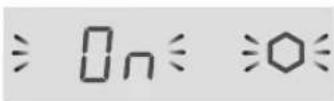
The setting is changed.

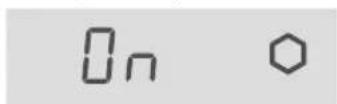
When press 📄 button, the icons change in the order shown as below.

flowchart
graph LR
    A["Start"] --> B["F"]
    B --> C["R"]
    C --> D["Hexagon"]
    D --> E["Star"]
    E --> F["Bar"]
    F --> G["End"]
    style A fill:#f9f,stroke:#333
    style G fill:#bbf,stroke:#333
"Express cool" only
3 Complete the setting by pressing for 3 seconds or more.
(Beep, Beep, Beep)
3
Complete the setting.
Operations of additional modes
Door alarm
- When the refrigerator door is left open for over 1 minute, door alarm sounds once, and again after 1 minute.
- If the door is left open for approx. 3 minutes, the alarm sounds continuously.
• The alarm stops after close the door.
Turn off operation
Press and simultaneously for 3 seconds or more. (Beep, beep, beep)
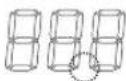
The indicator turns off.
Sound of button operation
• The electric sound is operated when touching each keys.
Turn off operation
Press and simultaneously for 3 seconds or more. (Beep, beep, beep) The indicator
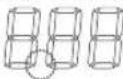
The indicator turns off.
Note
When you want to turn on the additional mode, follow the same step again. (The indicator turns on.)
Controlling temperature
The refrigerator controls its temperature automatically. However, you can adjust the temperature as below.
How to check the current temperature setting
1
Select For icon.
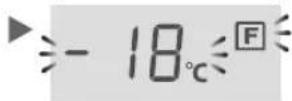
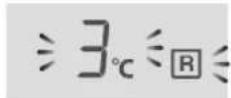
Setting of Freezer/Refrigerator compartment
1
Select for icBn.
2

Select the temperature
The setting is changed.
When press 📄 button, the icons change in the order shown as below.

flowchart
graph LR
    A["→"] --> B["F"]
    B --> C["R"]
    C --> D["Cyclohexane"]
    D --> E["Star"]
    E --> F["Ion"]
    F --> G["Product"]
    H["Standbay display"] --> I["←"]
Freezer compartment
: Adjustable between -13°C and -21°C in step of 1°C
Refrigerator compartment
: Adjustable between 0°C and 6°C in step of 1°C
3
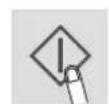
Complete the setting.

Advanced setting of Freezer/Refrigerator compartment
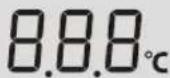
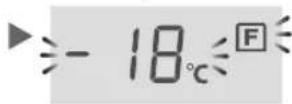
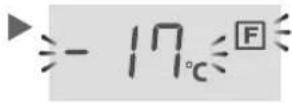
The temperature of freezer compartment and refrigerator compartment can be adjusted in step of 0.5 °C by following the steps a to c.
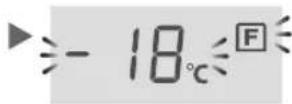
a. After the step 1 of "Basic operations", press 3 seconds or more. (Beep, beep, beep) The current preset temperature returns to "Default setting". (The display is indicated as the picture on the right.)
b. Press ▲ or and set the temperature.
C. Complete the setting.
(Same as the step 3 of "Basic operations".)
Follow the steps a to c again if you want to adjust the temperature in step of 1^ C.
Freezer compartment
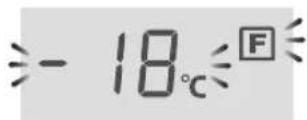

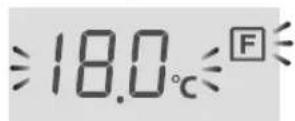
Refrigerator compartment
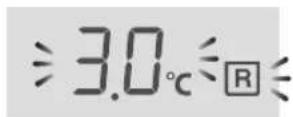
text_image
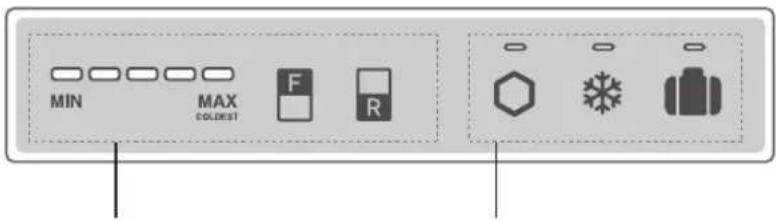
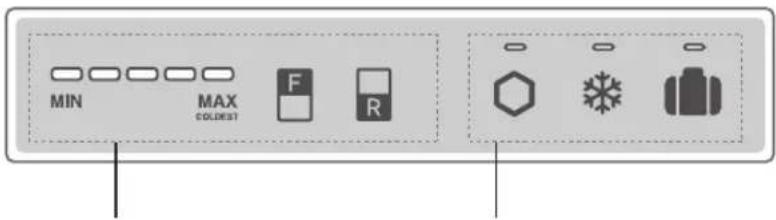
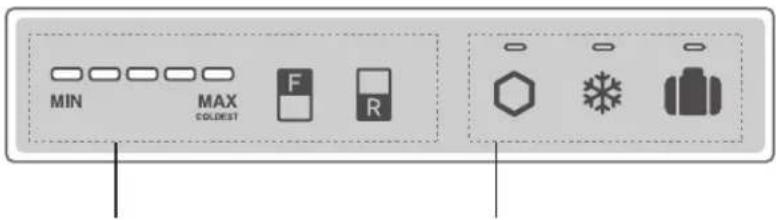
MIN MAX COLOREST F RControlling temperature icons Useful modes icons
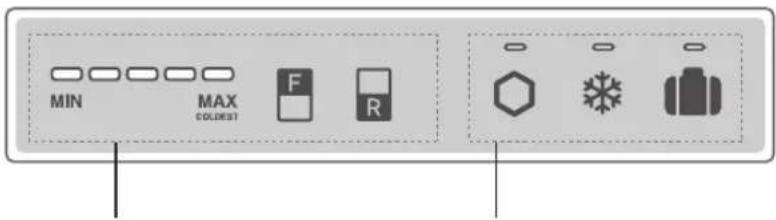
| Button Meaning Default setting | ||
| [2276] | Controlling temperature of Freezer compartment |   [SW27]COLDEST [SW27]COLDEST |
| [CC/XS] | Controlling temperature of Refrigerator compartment | |
Note
- All mode are off initially. When you press one of the keys, control panel is active after the beep sound.
- When you press one of the keys, mode indicator in operation lights up. When Express cool is in operation, the indicator flashes.
- If you want to light up the temperature indicator, press "F" or "R" button while the control panel is active.
| Button Meaning Default setting | |||
 | Extra cool | OFF | |
 | Express freezing | ||
| Express cool | |||
 | Vacation mode | ||
| —— | Plasmacluster ON* | ||
*The Plasmacluster operates automatically when the refrigerator is powered on.
There is no need to switch on/off.
- When there is no operation for approximately 1 minute, the display turns off automatically.
- If the refrigerator stops because of power failure, the modes except for Extra cool, Express freezing and Express cool function the same way as before at the time of re-power.
Operations of useful modes
| Start operation | Cancel operation | |||||||
| Extra coolExpressfreezingVacation mode | Press the mode button.(Beep) 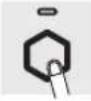 | Lighting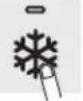 | 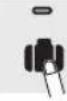 | Press the mode button.(Beep) 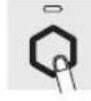 | Turn off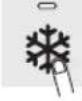 | —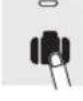 | ||
| Express cool Press | Press the mode button for 3 seconds or more.(Beep, beep, beep) | Flashing Turn off | Press the mode button.(Beep) | |||||
Door Alarm
- When the refrigerator door is left open for over 1 minute, door alarm sounds once, and again after 1 minute.
- If the door is left open for approx. 3 minutes, the alarm sounds continuously.
• The alarm stops after closing the door.
If the door alarm does not stop
If the door alarm does not stop after closing all doors, it is a defect.
Contact the SHARP service center for service.
Method of stopping the door alarm temporarily
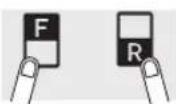
- Press "F" button and "R" button simultaneously and continuously for 3 seconds or more. (Beep, beep, beep)
• The door alarm sounds again after approximately 2 days.
Controlling temperature
The refrigerator controls its temperature automatically. However, you can adjust the temperature as below.
How to check the current temperature setting
The indicator lights up to show the current temperature level by pressing "F" or "R" button.
Freezer compartment : Press "F" button.
Refrigerator compartment : Press "R" button.
Setting of Freezer/Refrigerator compartment Freezer compartment
- Press "F" button.
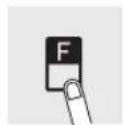
- Press "F" button to change the temperature level.
Refrigerator compartment
- Press "R" button.
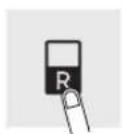
- Press "R" button to change the temperature level.
- Temperature indicator changes as the picture below (3→4→5→1→2→3) by pressing "F" or "R" button.
| Level | Indicator |
| 1 | MIN MAXCOLDEST |
| 2 | MIN MAXCOLDEST |
| 3Default setting | MIN MAXCOLDEST |
| 4 | MIN MAXCOLDEST |
| 5 | MIN MAXCOLDEST |
Note
After adjusting the temperature level, the indicator turns off approximately 5 seconds later.
Advanced setting of Freezer/Refrigerator compartment
The temperature of freezer compartment and refrigerator compartment can be adjusted in 9 levels (level 1 \~ 9) by following the steps a to b.
Freezer compartment
a. Press "F" button first.
Hold down "F" button and then press "Express freezing" button
for 3 seconds or more.
(Beep, beep, beep)
The indicator returns to "Default setting".
b. Press "F" button to change the temperature level.
Follow the steps a to b if you want to adjust the temperature in 5 levels.
Refrigerator compartment
a. Press "R" button first.
Hold down "R" button and then press "Express freezing" button for 3 seconds or more.
(Beep, beep, beep)
The indicator returns to "Default setting".
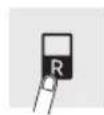
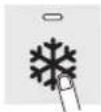
b. Press "R" button to change the temperature level.
Follow the steps a to b if you want to adjust the temperature in 5 levels.
- Temperature indicator changes as the picture below (5→6→7→8→9→1→2→3→4→5) by pressing "F" or "R" button.
$$ \circ \dots \text { OFF } \quad - \dots \text { Lighting } \quad {- } \dots \text { Flashing } $$
| Level | Indicator |
| 1 | |
| 2 | |
| 3 | |
| 4 | |
| 5Default setting | |
| 6 | |
| 7 | |
| 8 | |
| 9 |
- Ensure that the food is of the freshest possible quality to maximize the storage life of perishable food. The following is a general guide to help promote longer food storage.
- Food has a limited storage life. Make sure not to exceed use-by date indicated by manufacturer.
Freezer
- Freeze small quantities of food at a time in order to freeze them quickly.
- Food should be properly sealed tightly or covered.
- Place foods in the freezer evenly.
- Label bags or containers to keep an inventory of freezing food.
Refrigerator
Fruit / Vegetables
- Fruit and vegetables should be loosely enclosed in a plastic material e.g. wrap, bags (do not seal) and placed in the fruit and vegetable crisper to minimize moisture loss.
- Fruits and vegetables which are easily effected by low temperature should be stored in a cool place except for the refrigerator.
Dairy Products & Eggs
- Most dairy products have their best-before date on the outer packaging which informs the recommended temperature and shelf life of the foods.
- Eggs should be stored in the egg pocket.
Meats / Fish / Poultry
- Place on a plate or a dish and cover with paper or plastic wrap.
- For larger cuts of meat, fish, or poultry, place to the rear of the shelves.
- Ensure all cooked food is wrapped securely or placed in an airtight container.
- Fresh food (securely wrapped) should be stored in limited time to prevent spoilage and badly affecting other stored foods.
Advice for preventing dew or frost inside the refrigerator
- Keep the door securely closed. If the food falls down, it may cause a gap between the cabinet and the door. Move it back to the shelf or the pocket.
- Open and close the door quickly as much as possible. Dew or frost may appear if the door is left open for a long period of time or opening and closing of the door is very often.
- Stored items should be packed or sealed with such as food containers or plastic wraps. (Especially food with high-moisture)
Advice for storing food
- Evenly place the food on the shelves to allow the cooling air to circulate efficiently.
- Hot food should be cooled before storing. Storing hot food increases the temperature in the unit and the risk of food spoilage.
- Do not block the outlet and inlet of the cool air circulating circuit with food or containers; otherwise the food is not be evenly cooled throughout the refrigerator.
- Do not place food directly in front of cold air outlet. This may lead to the food freezing.
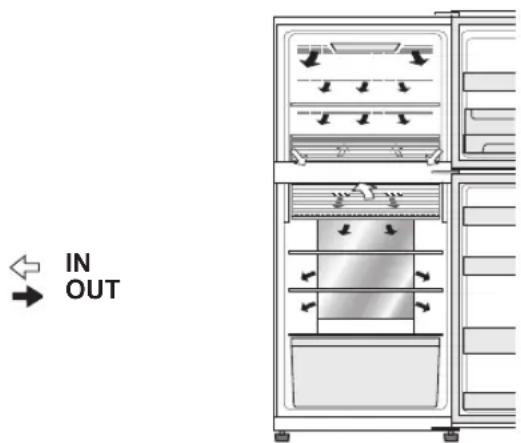
text_image
IN OUTTips for saving energy
• Install the refrigerator in a well-ventilated area and keep the space to ventilate.
- Keep your refrigerator out of direct sunlight and do not place it next to heat generating appliance.
- Avoid opening the door as much as possible.
- Hot food should be cooled before storing.
- Place the food evenly on the shelves to allow the cool air to circulate efficiently.
- The amount of energy consumption of this model is measured as shown in the picture below.
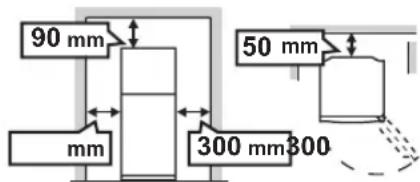
text_image
90 mm mm 50 mm 300 mm300Important
Follow the tips below to prevent cracks on the inner surfaces and plastic components
- Wipe out food oil adhered to plastic parts.
- Some household chemicals may cause damage, so use only diluted washing-up liquid (soapy water).
- If undiluted detergent is used or soapy water is not wiped off thoroughly, it may result in cracks of plastic parts.
Cleaning
- Remove the accessories (e.g. shelves) from the cabinet and the door. Wash them by warm soapy dishwashing water. After that, rinse them in clean water and dry. (Only fruit and vegetable shelf is not removable)
- Clean the inside with a cloth soaked in warm soapy dishwashing water. Then, use cold water to wipe off soapy water thoroughly.
- Wipe the exterior with a soft cloth each time it gets dirty.
- Clean the magnetic door seal with a toothbrush and warm soapy dishwashing water.
- Wipe the control panel with a dry cloth.
Note
- Do not use heavy-duty cleansers or solvents (lacquer, paint, polishing powder, benzine, boiled water, etc.) which may cause damages.
- If you pull out the power plug once, wait 5 minutes at least before connecting the power plug again.
- The glass shelves weigh approximately 3 kg each. Hold them firmly when remove from the cabinet and carry.
- Do not drop objects inside the refrigerator or strike the inner wall. This may cause cracks to inner surface.
Before transporting
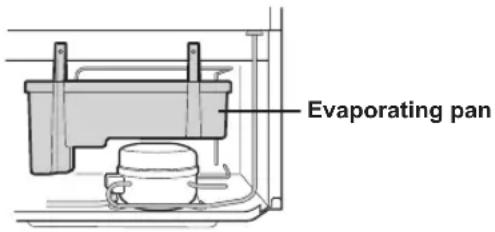
Wipe up water in the evaporating pan. Before wiping up the water, wait more than 1 hour after pulling out the plug because refrigeration cycle equipment is extremely hot. (The evaporating pan is located on the rear of the product.)
text_image
Evaporating panDefrosting of the cooling unit
Defrosting is automatically operated by a unique energy saving system. (Approx. once a day.) Ice making takes time because the temperature inside becomes slightly higher than usual during the defrosting.
When the compartment light is blown
Contact the service agent approved by SHARP to replace the light. The light is not to be replaced other than by qualified service personnel.
Switching off your refrigerator
If the refrigerator needs to be switched off for an extended period, the following steps should be taken to reduce the growth of mold
- Remove all food.
- Remove the power plug from the socket.
- Clean and dry the interior thoroughly.
- Keep all the doors open slightly for a few days to dry.
Before you call for service
Before calling for service, check the following points.
| Problem Solution | ||
| The outside of the cabinet is hot when touched. | It is normal. This is because of the hot pipe in the cabinet in order to prevent dew generation. | |
| Refrigerator makes loud noise. | Following sounds are normal.The compressor makes loud noise when its operation starts.-- Sound becomes quieter after a while.The compressor makes loud noise once a day.-- Operating sound is made immediately after automatic defrost operation of the cooling unit.Sound of flowing fluid (gurgling sound, fizzing sound)-- It is caused by refrigerant flowing in pipes (sound may become louder from time to time).Cracking or crunching sound, squeaking sound-- It is caused by expansion and contraction of inner walls and internal parts during cooling. | |
| Frost or dew appears inside or outside the refrigerator. | This may occur in one of the following cases. Use a wet cloth for wiping frost and a dry cloth for wiping dew.When the ambient humidity is high.When the door is frequently opened and closed.When food containing plenty of moisture are stored. (Wrapping is required.)This phenomenon will appear more or less depending on the season (rainy season, season), habits of usage and environmental conditions of each house. | |
| The food in the refrigerator compartment are frozen. | SJ-XG690G,SJ-XG740G | Is the refrigerator operated for a long time with refrigerator temperature control set at 0°C?-- Change the temperature control back to around 3°C.Is the refrigerator operated for a long time with freezer temperature control set at -21°C?-- Change the temperature control back to around -18°C.If ambient temperature is low, foods may freeze even if the refrigerator compartment is set at 6°C. |
| SJ-XG640M,SJ-XG690M,SJ-XG740M | Is the refrigerator operated for a long time with refrigerator temperature control set MAX COLDEST?-- Change the temperature control to the other setting.Is the refrigerator operated for a long time with freezer temperature control set MAX COLDEST?-- Change the temperature control to the other setting.If ambient temperature is low, food may freeze even if the refrigerator compartment is set MIN. | |
| Odors in the compartment. • Wrapping is required for the food with strong odors.Deodorizing unit cannot remove all odors.Clean the inside periodically. | ||
| The control panel does not work. | This may occur in one of the following cases.The panel or your finger is soiled with dripping, oil and etc.When you touch the panel with gloved hand, adhesive bandage on your finger,nail or objects.Sticker or tape is affixed on the keys.Touch position is slightly off from the keys.Operate time is not enough for the keys to work. | |
| The compartment lights turn off even if the doors are left open. | The light switch is to turn on and off the compartment lights.When the angles of the doors are the same, the lights turns off even if the doors are left open but it is normal.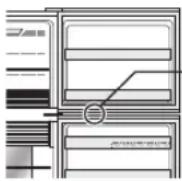 Light switch— Light switch— 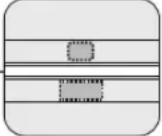 | |
If you still require service
Refer to your nearest service agent approved by SHARP.
Product fiche
| ANNEX III(EU) Regulation No.1060/2010 | ||||
| A | Trade mark | SHARP | ||
| B | Model name | SJ-XG640M | SJ-XG690GSJ-XG690M | SJ-XG740GSJ-XG740M |
| C | Category 7 | |||
| D | Energy efficiency class A | ++ | ||
| E | EU Ecolabel award — | |||
| F | Annual energy consumption *1 [KWh/year] | 320 | ||
| G | Storage volume of all compartments that do not merit a star rating [L] | 354 394 420 | ||
| H | Storage volume of all frozen-foodstorage compartments that merit a star rating [L] | *** 162 176 | *** | |
| I | The design temperature of “other compartment” warmer than +14°C | — | ||
| J | Frost free | YES | ||
| K | Temperature rise time [h] 19 | |||
| L | Freezing capacity [Kg/24h] 7.3 8.1 | |||
| M | Climate class T | |||
| N | Airborne acoustic noise emission [dB(A)] 38 | |||
| O | Built-in appliance No (Free-standing type) | |||
*1 Energy consumption "XYZ" kWh per year, based on standard test results for 24 hours. Actual energy consumption will depend on how the appliance is used and where it is located.
Indicator of temperature
This refrigerator is provided with an indicator of temperature in the refrigerator compartment to allow you to control the average temperature in the coldest zone.
Coldest zone
The symbol indicates the coldest zone in the refrigerator compartment. (The door pocket positioned at the same height isn't the coldest zone.)
Symbol

Checking the temperature in the coldest zone
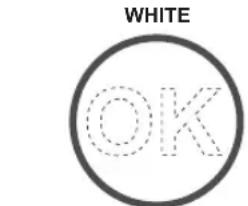
You can carry out regular checks to ensure the temperature in the coldest zone is correct and, if necessary, adjust the refrigerator temp. control. To maintain a correct temperature inside the appliance, check that the indicator of temperature is always BLUE. If the indicator of temperature turns WHITE, the temperature is too high; in this case, increase the refrigerator temp. control setting and wait for 6 hours before checking the indicator of temperature again.

Correct settings
text_image
WHITE OKTemperature too high, adjust the refrigerator temp. control.
Note
- The internal temperature of the refrigerator depends on various factors such as the ambient temperature of the room, the amount of food stored and the frequency of door opening.
- When fresh food has been introduced or the door has been left open for some time, it is normal for the indicator of temperature to turn WHITE.
Information on the Disposal of this Equipment
IF YOU WISH TO DISPOSE OF THIS EQUIPMENT, DO NOT USE THE ORDINARY WASTE BIN, AND DO NOT PUT THEM INTO A FIREPLACE!
Used electrical and electronic equipment should always be collected and treated SEPARATELY in accordance with local law.
Separate collection promotes an environment-friendly treatment, recycling of materials, and minimizing final disposal of waste. IMPROPER DISPOSAL can be harmful to human health and the environment due to certain substances! Take USED EQUIPMENT to a local, usually municipal, collection facility, where available.
If in doubt about disposal, contact your local authorities or dealer and ask for the correct method of disposal.
ONLY FOR USERS IN THE EUROPEAN UNION, AND SOME OTHER COUNTRIES; FOR INSTANCE NORWAY AND SWITZERLAND: Your participation in separate collection is requested by law.
The symbol shown above appears on electrical and electronic equipment (or the packaging) to remind the users of this.
Users from PRIVATE HOUSEHOLDS are requested to use existing return facilities for used equipment. Return is free of charge.
natural_image
Illustration of four people pulling a large cylindrical object (no text or symbols visible)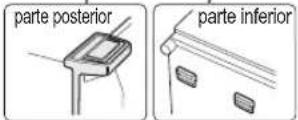
Instalación
Tipo independiente
natural_image
Pure mechanical diagram showing a lever and pivot point without any text or symbolsEn uso
text_image
SJ-XG740G,SJ-XG740Mnatural_image
Two mechanical assembly diagrams showing check and cross symbols (no text or labels)- Compartimento para huevos
- Compartimento del refrigerador (superior)
- Compartimento para botellas
- Compartimento del refrigeración (inferior)
natural_image
Illustration of a hand holding a wooden board with a triangular pointer (no text or symbols)Dispensador de hielos interior (SJ-XG740G,SJ-XG740M)
natural_image
Line drawing of a vehicle door frame with a bucket attachment (no text or symbols)natural_image
Diagram of a vehicle door frame with an arrow indicating direction (no text or symbols)natural_image
Diagram of a refrigerator interior showing airflow direction arrows (no text or labels)Panel de control (SJ-XG690G, SJ-XG740G)
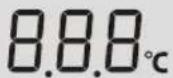


Panel de control (SJ-XG640M, SJ-XG690M, SJ-XG740M)
text_image
MIN MAX COLOREST F Rnatural_image
Diagram of an refrigerator interior showing airflow and ventilation patterns (no text or labels)text_image
Illustration showing workers installing a large panel with a device, alongside two labeled diagrams (bre and bas) illustrating the process.Installation
natural_image
Pure mechanical diagram showing a lever and pivot point without any text, numbers, or symbolsUtilisation
text_image
SJ-XG740G,SJ-XG740Mnatural_image
Two technical diagrams showing a mechanical assembly with checkmark and cross symbols (no text or labels)natural_image
Illustration of a hand holding a tray with a diagonal arrow, no text or symbols presentnatural_image
Line drawing of a car front panel with a handle attachment (no text or symbols)natural_image
Diagram of a vehicle door frame with an arrow indicating direction (no text or symbols)natural_image
Diagram of an refrigerator interior showing airflow and ventilation patterns (no text or labels)text_image
freestra baseInstalação
Tipo independente
text_image
SJ-XG740G,SJ-XG740Mnatural_image
Two diagrams showing a mechanical assembly with checkmark and cross symbols (no text or labels)- Compartimento de ovos
- Compartimento do frigorífico (superior)
- Compartimento de garrafas
- Compartimento do frigorífico (inferior)
Se desejar armazenar produtos grandes no frigorífico
natural_image
Illustration of a hand using a tool to interact with a wooden panel or tray (no text or symbols visible)natural_image
Line drawing of a vehicle front panel with a handle attachment (no text or symbols)natural_image
Diagram of a vehicle door frame with an arrow indicating direction (no text or symbols)natural_image
Diagram of a refrigerator interior showing airflow direction arrows (no text or labels)natural_image
Diagram of an oven with internal compartments and airflow indicators (no text or symbols)
ENTRA
SAI
natural_image
Pure mechanical diagram showing a lever and pivot point without any text, numbers, or symbolsΚατά τη χρήση
text_image
SJ-XG740G,SJ-XG740Mnatural_image
Two mechanical assembly diagrams showing check and cross states (no text or symbols)natural_image
Illustration of a hand using a tool to adjust or install a rectangular object (no text or symbols visible)natural_image
Line drawing of a vehicle door frame with a handle attachment (no text or symbols)natural_image
Diagram of a vehicle door frame with an arrow indicating direction (no text or symbols)text_image
MIN MAX COLEST F Rnatural_image
Diagram of an refrigerator interior showing airflow and ventilation system (no text or labels)
ΜΕΣΑ
ΕΞΩ
natural_image
Pure mechanical diagram showing a lever and pivot point without any text, numbers, or symbolsBei der Verwendung
text_image
SJ-XG740G,SJ-XG740Mnatural_image
Two technical diagrams showing a mechanical assembly with checkmark and cross symbols (no text or labels)natural_image
Illustration of a hand holding a tray with a striped surface and an arrow indicating direction (no text or symbols)natural_image
Line drawing of a vehicle door frame with a handle attachment (no text or symbols)natural_image
Diagram of a vehicle door frame with an arrow indicating direction (no text or symbols)natural_image
Diagram of a refrigerator interior showing airflow direction arrows (no text or labels)Bedienfeld (SJ-XG640M, SJ-XG690M, SJ-XG740M)
text_image
MIN MAX COLODEST F Rnatural_image
Diagram of an refrigerator interior showing airflow patterns and ventilation system (no text or labels)Energiespartipps
natural_image
Pure mechanical diagram showing a lever and pivot point without any text or symbolsIn gebruik
text_image
SJ-XG740G,SJ-XG740Mnatural_image
Two technical diagrams showing a mechanical assembly with checkmark and cross symbols (no text or labels)natural_image
Line drawing of a hand holding a tray over a surface, with no text or symbols presentIjsmaker in de deur (SJ-XG740G,SJ-XG740M)
Ijsklontjes maken
natural_image
Line drawing of a vehicle door frame with a handle attachment (no text or symbols)natural_image
Diagram of a vehicle door frame with an arrow indicating direction (no text or symbols)text_image
Hendel Hendeltext_image
Vriezer Vriesvak VersvakBedieningspaneel (SJ-XG640M, SJ-XG690M, SJ-XG740M)

text_image
MIN MAX COLDEST F Rnatural_image
Diagram of a refrigerator interior showing airflow patterns and ventilation system (no text or labels)natural_image
Pure mechanical diagram showing a lever and pivot point without any text, numbers, or symbolsZasady użytkowania
text_image
SJ-XG740G,SJ-XG740Mnatural_image
Two diagrams showing a mechanical assembly with checkmark and cross symbols (no text or labels)natural_image
Line drawing of a hand holding a tray with a small object above it, no text or symbols presentnatural_image
Line drawing of a vehicle door frame with a handle attachment (no text or symbols)natural_image
Diagram of a vehicle door frame with an arrow indicating direction (no text or symbols)Panel sterowania (SJ-XG640M, SJ-XG690M, SJ-XG740M)
text_image
MIN MAX COLOREST F Rnatural_image
Diagram of an refrigerator interior showing airflow and ventilation system (no text or labels)text_image
SJ-XG740G,SJ-XG740Mnatural_image
Two mechanical assembly diagrams showing check and cross symbols (no text or labels)natural_image
Illustration of a hand holding a tray with a striped surface and an arrow pointing to it (no text or symbols)natural_image
Line drawing of a vehicle door frame with a bucket pouring into the top compartment (no text or symbols)natural_image
Diagram of a vehicle door frame with an arrow indicating direction (no text or symbols)The image contains no text or mathematical content. It displays a simple graphic of two overlapping squares, one outlined and one filled with a square. There is no OCR-able text content to extract.

▲

Kezelő gombok
natural_image
Diagram of a refrigerator interior showing airflow and ventilation system (no text or labels)
BE
KI
natural_image
Pure mechanical diagram showing a lever and pivot point without any text, numbers, or symbolstext_image
SJ-XG740G,SJ-XG740Mnatural_image
Two diagrams showing a mechanical assembly with checkmark and cross symbols (no text or labels)natural_image
Illustration of a hand holding a tray with a striped surface and an arrow indicating direction (no text or symbols)natural_image
Line drawing of a vehicle's front compartment with a hand pouring liquid into the hood (no text or symbols)natural_image
Diagram of a vehicle door frame with an arrow indicating direction (no text or symbols)natural_image
Diagram of a refrigerator interior showing airflow direction arrows (no text or labels)text_image
MIN MAX COLEST F Rnatural_image
Diagram of an open refrigerator with internal compartments and airflow indicators (no text or symbols)
ÎNĂUNTRU
AFARĂ
text_image
poorni doleInstalace
Volně stojící typ
natural_image
Pure mechanical diagram showing a lever and pivot point without any text, numbers, or symbolsPři použití
text_image
SJ-XG740G,SJ-XG740Mnatural_image
Two diagrams showing a mechanical assembly with checkmark and cross symbols (no text or labels)natural_image
Illustration of a hand using a tool to interact with a wooden panel or tray (no text or symbols visible)natural_image
Line drawing of a vehicle door frame with a handle attachment (no text or symbols)natural_image
Diagram of a vehicle door frame with an arrow indicating direction (no text or symbols)natural_image
Diagram of a refrigerator interior showing airflow direction arrows (no text or labels)natural_image
Pure mechanical diagram showing a lever and pivot point without any text, numbers, or symbolsPri použití
text_image
SJ-XG740G,SJ-XG740M- Svetlo v mrazničke
- Presúvatelný výrobník l'adu
- Polička v mrazničke (horná)
- Polička v mrazničke (dolná)
- Box do mrazničky Presuňte oddiel tak, aby zodpovedal vel'kosti potravín.
- Dvojsmerné dvere na čerstvé potraviny
- Polička na čerstvé potraviny
- Jednotka na odstraňovanie zápachu V rozvode chladného vzduchu je inštalovaný katalyzátor na odstraňovanie zápachu. Nie je potrebná obsluha ani čistenie.
- Svetlo v chladničke
- Polica v chladničke
- Hybridný chladiaci panel Panel ochladzuje priestor chladničky priamo zo zadnej strany. Potraviny sú tak chladené šetrne bez toho, aby boli vystavené prúdeniu chladného vzduchu.
- Polička na ovocie a zeleninu
- Kontajner na ovocie a zeleninu
- Nastavitelná noha
text_image
1 2 3 4 5 6 7 8 9 10 11 12 13 14 15 16 17 15 20 21 22 23 14 SJ-XG640M, SJ-XG690G,SJ-XG690Mnatural_image
Two diagrams showing a mechanical assembly with checkmark and cross symbols (no text or labels)natural_image
Illustration of a hand using a tool to adjust or install a flat panel (no text or symbols visible)natural_image
Line drawing of a vehicle's front compartment with a hand holding the hood (no text or symbols)natural_image
Diagram of a vehicle door frame with an arrow indicating direction (no text or symbols)text_image
MIN MAX COLEST F Rnatural_image
Diagram of a refrigerator interior showing airflow patterns and ventilation system (no text or labels)Tipy na šetrenie energie
flowchart
graph TD
    A["900mamba daugiau"] --> B["600mamba daugiau"]
    B --> C["800mamba daugiau"]
    C --> D["800mamba daugiau"]
natural_image
Pure mechanical diagram showing a lever and pivot point without any text, numbers, or symbolsNaudojant prietaisą
SJ-XG640M, SJ-XG690G, SJ-XG690M
natural_image
Two diagrams showing a mechanical component with checkmark and cross symbols, no text or labels present.natural_image
Illustration of a hand using a tool to cut or spread a striped surface on a curved surface (no text or symbols)Ledo gaminimo įtaisas durelėse (SJ-XG740G,SJ-XG740M)
natural_image
Line drawing of a vehicle door frame with a handle attachment (no text or symbols)natural_image
Diagram of a vehicle door frame with an arrow indicating direction (no text or symbols)text_image
MIN MAX COLEST F Rnatural_image
Diagram of a refrigerator interior showing airflow patterns and internal compartments (no text or symbols)natural_image
Pure mechanical diagram showing a lever and pivot point without any text, numbers, or symbolsTiek lietots
SJ-XG640M, SJ-XG690G, SJ-XG690M
natural_image
Two mechanical assembly diagrams showing check and cross symbols (no text or labels)- Olu kabata
- Ledusskapja kabata (augšējā)
- Pudeju kabata
- Ledusskapja kabata (apakšējā)
natural_image
Illustration of a hand holding a flat object over a wooden surface (no text or symbols)natural_image
Line drawing of a vehicle's front compartment with a door handle and adjacent vehicle (no text or symbols)natural_image
Diagram of a vehicle door frame with an arrow indicating direction (no text or symbols)Vadibas panelis (SJ-XG640M, SJ-XG690M, SJ-XG740M)
text_image
MIN MAX COLOREST F Rnatural_image
Diagram of a refrigerator interior showing airflow patterns and ventilation system (no text or labels)natural_image
Technical line drawing of a mechanical or electrical component with no visible text or symbolsSJ-XG640M, SJ-XG690G, SJ-XG690M
natural_image
Two technical diagrams showing a mechanical assembly with checkmark and cross symbols (no text or labels)- Munahoidik
- Külmiku uksetasku (ülemine)
- Pudelitasku
- Külmiku uksetasku (alumine)
natural_image
Illustration of a hand holding a tray with a striped surface and a small object above it (no text or symbols)natural_image
Line drawing of a vehicle door frame with a bucket pouring into the top compartment (no text or symbols)natural_image
Diagram of a vehicle door frame with an arrow indicating direction (no text or symbols)natural_image
Diagram of a refrigerator interior showing airflow direction arrows (no text or labels)natural_image
Diagram of a refrigerator interior showing airflow patterns and ventilation system (no text or labels)text_image
Kolesca (4)text_image
SJ-XG740G,SJ-XG740Mnatural_image
Two mechanical assembly diagrams showing check and cross symbols (no text or labels)natural_image
Illustration of a hand holding a flat object with a triangular pointer above it, no text or symbols presentNotranji izdelovalec ledu (SJ-XG740G,SJ-XG740M)
natural_image
Line drawing of a vehicle's front compartment with a hand pouring liquid into the hood (no text or symbols)3) Ko se ustvarjajo ledene kocke, obrnite ročico v smeri urnega kazalca in vstavite led v posodo za shranjevanju ledu.
natural_image
Diagram of a vehicle door frame with an arrow indicating direction (no text or symbols)Izberite ikono £ali . R
text_image
MIN MAX COLEST F RIkone za upravljanje temperature Ikone za uporabne načine
| Gumb Pomen Privzeta | nastavitev | |
 _ _ | Upravljanje temperature predela zamrzovalnika | MIN MAX COLODEST |
 | Upravljanje temperature predela hladilnika | |
Opomba
natural_image
Pure mechanical diagram showing a lever and pivot point without any text, numbers, or symbolsSJ-XG640M, SJ-XG690G, SJ-XG690M
natural_image
Two mechanical assembly diagrams showing check and cross symbols (no text or labels)natural_image
Line drawing of a hand holding a tray with a flag, no text or symbols presentnatural_image
Line drawing of a vehicle door frame with a handle attachment (no text or symbols)natural_image
Diagram of a vehicle door frame with an arrow indicating direction (no text or symbols)text_image
MIN MAX COLEST F Rnatural_image
Diagram of an refrigerator interior showing airflow patterns and ventilation system (no text or labels)natural_image
Technical line drawing of a mechanical component with no visible text or symbolsnatural_image
Illustration of four people pushing a large cylindrical object on a table (no text or symbols visible)
Монтаж
Свободностоящ тип
natural_image
Pure mechanical diagram showing a lever and pivot point without any text, numbers, or symbolsПри употреба
SJ-XG640M, SJ-XG690G, SJ-XG690M
natural_image
Two technical diagrams showing a mechanical assembly with checkmark and cross symbols (no text or labels)natural_image
Illustration of a hand holding a tray with a striped pattern, no text or symbols presentnatural_image
Line drawing of a vehicle front panel with a door handle attachment (no text or symbols)natural_image
Diagram of a vehicle door with an arrow indicating direction (no text or symbols)text_image
MIN MAX COLENT F Rnatural_image
Diagram of a refrigerator interior showing airflow patterns and structural components (no text or labels)Manufacturer of this product is SHARP CORPORATION, 1 Takumi-cho, Sakai-ku, Sakai-shi, Osaka 590-8522, Japan and is in Europe represented by Sharp Electronics Europe Ltd., 4 Furzeground Way, Stockley Park Uxbridge, Middlesex, UB11 1EZ, UK.
Importer of this product into the European Economic Area, except for Italy, is VESTEL UK, Waterside Drive, Langley, Berkshire, SL3 6EZ, Great Britain.
In all cases of requests market surveillance authorities should contact Sharp Electronics Europe Ltd.
Printed in Thailand


