SJ-TE435H4I-EU - Fridge SHARP - Free user manual and instructions
Find the device manual for free SJ-TE435H4I-EU SHARP in PDF.


User questions about SJ-TE435H4I-EU SHARP
0 question about this device. Answer the ones you know or ask your own.
Ask a new question about this device
Download the instructions for your Fridge in PDF format for free! Find your manual SJ-TE435H4I-EU - SHARP and take your electronic device back in hand. On this page are published all the documents necessary for the use of your device. SJ-TE435H4I-EU by SHARP.
USER MANUAL SJ-TE435H4I-EU SHARP
Your fridge freezer conforms to current safety requirements. Inappropriate use can lead to personal injury and damage to property. To avoid the risk of damage, read this manual carefully before using your fridge freezer for the first time. It contains important safety information on the installation, safety, use and maintenance of your fridge freezer. Retain this manual for future use.
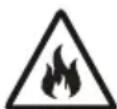
FIRE
Warning; Risk of fire / flammable materials
CHAPTER -1: GENERAL WARNINGS

WARNING: Keep the ventilation openings of the Fridge clear from obstruction.

WARNING: Do not use mechanical devices or other means to accelerate the defrosting process.

WARNING: Do not use other electrical appliances inside the Fridge.

WARNING: Do not damage the refrigerant circuit.

WARNING: When positioning the appliance, ensure the supply cord is not trapped or damaged.

WARNING: Do not locate multiple portable socket-outlets or portable power supplies at the rear of the appliance.

WARNING: To avoid personal injury or damage this appliance must be installed in accordance with the manufacturer instructions.

The small quantity of refrigerant used in this fridge is eco-friendly R600a (an isobutene) and is flammable and osive if ignited in enclosed conditions.
* While carrying and positioning the fridge, do not damage the cooler gas circuit.
* Do not store any containers with flammable materials, such as spray cans or fire extinguisher refill cartridges in the vicinity of the fridge.
* This appliance is intended to be used in household and similar applications such as;
- staff kitchen areas in shops, offices and other working environments which can be equated with ordinary household
- farm houses and by clients in hotels, motels and other residential type environments which can be equated with ordinary household
- bed and breakfast type environments which can be equated with ordinary household
- catering and similar non-retail applications which can be equated with ordinary household
* Your fridge requires a 220-240V, 50Hz mains supply. Do not use any other supply. Before connecting your fridge, ensure that the information on the data plate (voltage and connected load) matches the mains electricity supply. If in doubt, consult a qualified electrician)
* This appliance can be used by children aged from 8 years and above and persons with reduced physical, sensory or mental capabilities or lack of experience and knowledge if they have been given supervision or instruction concerning use of the appliance in a safe way and understand the hazard involved. Children shall not play with the appliance. Cleaning and user maintenance, shall not be made by children without supervision.
* Children aged from 3 to 8 years are allowed to load and unload refrigerating appliances. Children are not expected to perform cleaning or user maintenance of the appliance, very young children (0-3 years old) are not expected to use appliances, young children (3-8 years old) are not expected to use appliances safely unless continuous supervision is given, older children (8-14 years old) and vulnerable people can use appliances safely after they have been given appropriate supervision or instruction concerning use of the appliance. Very vulnerable people are not expected to use appliances safely unless continuous supervision is given.
* A damaged power cord /plug can cause fire or give you an electric shock. When damaged it must be replaced, this should only be done by qualified personnel.
* This appliance is not intended for use at altitudes exceeding 2000 m.
To avoid contamination of food, please respect the following instructions:
* Opening the door for long periods can cause a significant increase of the temperature in the compartments of the appliance.
* Clean regularly surfaces that can come in contact with food and accessible drainage systems.
* Store raw meat and fish in suitable containers in the refrigerator, so that it is not in contact with or drip onto other food.
* Two-star frozen-food compartments are suitable for storing pre-frozen food, storing or making ice cream and making ice cubes.
* One-, two- and three-star compartments are not suitable for the freezing of fresh food.
* If the refrigerating appliance is left empty for long periods, switch off, defrost, clean, dry, and leave the door open to prevent mould developing within the appliance.
Disposal
- All packaging and materials used are environmentally friendly and recyclable. Please dispose of any packaging in an environmentally friendly manner. Consult your local council for further details.
- When the appliance is ready to be scrapped, cut off the electrical supply cable and destroy the plug and cable. Disable the door catch in order to prevent children getting trapped inside.
- A cut-off plug inserted into a 16 amp socket is a serious safety (shock) hazard. Please ensure the cut-off plug is disposed of safely.
For Denmark products:
The appliance is equipped with a plug approved in the EU (EU-Schuko Plug) and can be used in Finland, Norway and Sweden. In Denmark, the appliance is only approved for use with a wall outlet type E or type CEE7 // 7-S with a ground leg. If there is only wall outlet type K at the connection point, Replacing EU-Schuko plug with the Danish plug must be performed by only an authorized service personnel. Alternatively, connect a suitable and approved power adapter to transition between Schuko plug and Danish earth system. This adapter (min. 10 amps and up to max. 13 amps) can be ordered via at well assorted whitegoods dealer or authorized electrician. Only with one of these methods it can be ensured that the appliance is the correct safety ground. In the absence of earthing installation, an authorised electrician should carry out an earthing installation. In the case of use without earthing installed, we will not be responsible for any loss of use that may occur.
Disposal of your old appliance
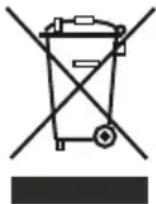
This symbol on the product or package shows that the product should not be treated as domestic waste. Instead, it should be taken to applicable waste collection sites that recycle electrical and electronic equipment. Recycling materials will help preserve our natural resources. For more detailed information regarding recycling this product, please contact your local authority, domestic waste disposal service, or the shop where you purchased the product.
Please ask your local authority about the disposal of WEEE for reuse, recycle and recovery purposes.
Notes:
- Please read the instruction manual carefully before installing and using your appliance. We are not responsible for damage resulting from misuse.
- Follow all instructions for your appliance, and keep this manual handy in order to resolve any problems that may occur in the future.
- This appliance is produced to be used in homes and can only be used in domestic environments and for the specified purposes. It is not suitable for commercial use. Such use will nullify the warranty and our company will not be responsible for any losses that occur.
- This appliance is produced for home use and it is only suitable for cooling / storing foods. It is not suitable for commercial or use and / or for storing any substances except for food. Our company is not responsible for any losses due to improper use.

Safety warnings
- Do not connect your Fridge Freezer to the mains electricity supply using an extension lead.
- A damaged power cord / plug can cause fire or give you and electric shock. When damaged it must be replaced, this should only be done by qualified personnel.
- Never bend the power cord excessively.
- Never touch the power cord / plug with wet hands as this could cause a short circuit electric shock.
- Do not place glass bottles or beverage cans in the freezer department. Bottles or cans may explode.
- When taking ice made in the freezer department, do not touch it, ice may cause ice burns and/or cuts.
- Do not remove items from the freezer if your hands are damp or wet. Tis could cause skin abrasions or frost / freezer burns.
- Do not refreeze food once it has thawed out.
Installation Information
Before unpacking and manoeuvring your fridge freezer please take some time to familiarise yourself with the following points.
- Position your fridge freezer out of direct sunlight and away from any heat source such as a radiator.
- Your appliance should be at least 50 cm away from stoves, gas ovens and heater cores, and should be at least 5 cm away from electrical ovens.
- Do not expose your fridge freezer to moisture or rain.
- Your fridge freezer should be positioned at least 20mm away from another freezer.
- Clearance of at least 150 mm is required at the top of your appliance. Do not place anything on top of your appliance.
- For safe operation, it is important that your fridge freezer is seated securely and balanced. The adjustable feet are used to level your fridge freezer. Make sure that your appliance is level before placing any foodstuffs inside it.
- We recommend that you wipe all shelving and trays with a cloth soaked in warm water mixed with a teaspoon of bicarbonate of soda before use. After cleaning, rinse with warm water and dry.
CHAPTER -1: GENERAL WARNINGS
- When the product is running, high temperature can be noticed on the side panels. This situation is normal.
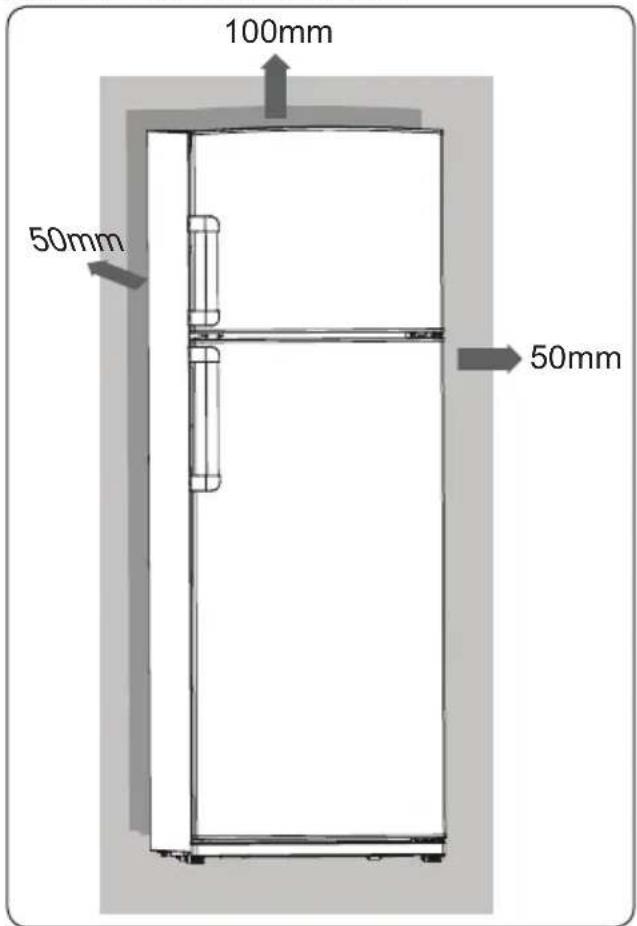
- In order for the product to work efficiently, there must be some gap around it for air circulation. If you are going to place the product in a recessed area on the wall, make sure that the gap should be 100 mm between top surface and ceiling, 50 mm between walls and side panels.
text_image
100mm 50mm 50mm 50mm- Refrigerator should be placed against a wall with a free distance not exceeding 75 mm.
Before using your fridge freezer

- Before setting up your fridge freezer, check for any visible damage. Do not install or use your fridge freezer if it is damaged
- When using your fridge freezer for the first time, keep it in an upright position for at least 3 hours before plugging into the mains. This will allow efficient operation and prevent damage to the compressor.
- You may notice a light odour when using your fridge freezer for the first time. This is perfectly normal and will fade away as the fridge starts to cool.
Information about new-generation cooling technology
Fridge freezers with new-generation cooling technology have a different working system than static fridge freezers. In normal fridge freezers, humid air entering the freezer and the water vapour emanating from the foods, turns into frost in the freezer compartment. In order to melt this frost, in other words defrost, the fridge has to be unplugged. In order to keep foods cold during the defrosting period, the user must store the food elsewhere and the user must clear the remaining ice and accumulated frost.
The situation is completely different in freezer compartments equipped with new-generation cooling technology. With the aid of fan, cold and dry air is blown throughout the freezer compartment. As a result of the cold air that is blown easily throughout the compartment – even in the spaces between shelves – foods are frozen equally and properly. And there will be no frost.
The configuration in the refrigerator compartment will be nearly same as the freezer compartment. Air emitted by the fan located at the top of refrigerator compartment is cooled while passing through the gap behind the air duct. At the same time, air is blown out through the holes on the air duct so that cooling process is successfully completed in the refrigerator compartment. Holes on the air duct are designed for even air distribution throughout the compartment.
Since no air passes between the freezer and refrigerator compartment, odours will not mix. As a result, your fridge with new-generation cooling technology is easy to use and it offers you an access to a huge volume and aesthetic appearance.
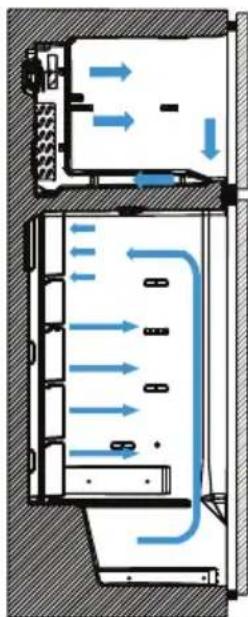
flowchart
graph TD
    A["Top Section"] --> B["Flow Out"]
    B --> C["Bottom Section"]
    C --> D["Flow Up"]
    D --> E["Return Flow"]
    style A fill:#f9f,stroke:#333
    style B fill:#ccf,stroke:#333
    style C fill:#cfc,stroke:#333
    style D fill:#fcc,stroke:#333
    style E fill:#ffc,stroke:#333
CHAPTER -2: YOUR FRIDGE FREEZER
This appliance is not intended to be used as a built-in appliance.
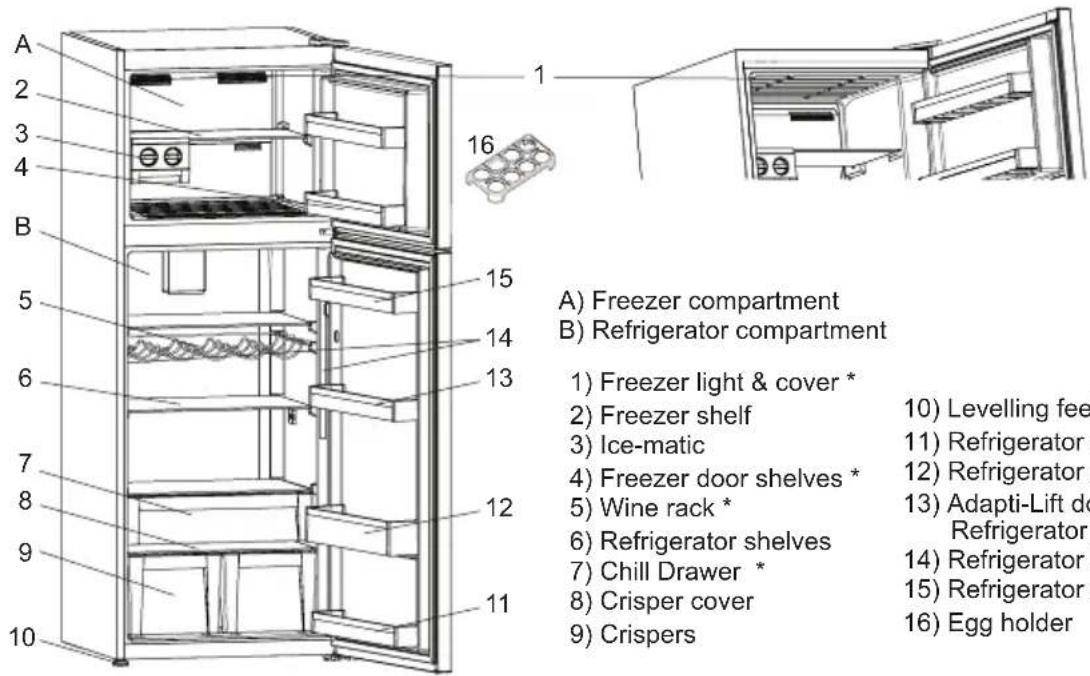
text_image
A 2 3 4 B 5 6 7 8 9 10 11 12 13 14 15 16 1 A) Freezer compartment B) Refrigerator compartment 1) Freezer light & cover * 2) Freezer shelf 3) Ice-matic 4) Freezer door shelves * 5) Wine rack * 6) Refrigerator shelves 7) Chill Drawer * 8) Crisper cover 9) Crispers 10) Levelling fee 11) Refrigerator 12) Refrigerator 13) Adapti-Lift door Refrigerator 14) Refrigerator 15) Refrigerator 16) Egg holder* In some models
This figure has been drawn for information purposes to show the various parts and accessories in the appliance. Parts may vary according to the model of the appliance.
General notes:
Fresh Food Compartment (Fridge): Most efficient use of energy is ensured in the configuration with the drawers in the bottom part of the appliance, and shelves evenly distributed, position of door bins does not affect energy consumption.
Freezer Compartment (Freezer): Most Efficient use of energy is ensured in the configuration with the drawers and bins are on stock position.
Display and Control Panel
Using the Control Panel
- Freezer temperature setting.
- Super Freeze mode indicator
- Fridge temperature setting
- Super Cooling mode indicator
- Holiday mode indicator
- Eco mode indicator
- Alarm indicator
- Child Lock mode indicator
- Screen selector
- Decrease value
- Increase value
- Mode Selector
- Child Lock Selector
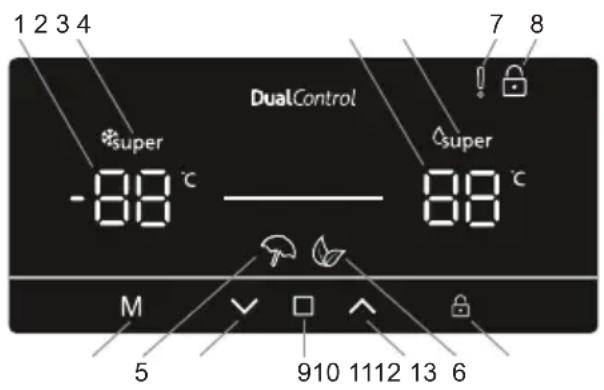
text_image
1 2 3 4 DualControl super -88 °C super 88 °C M 5 910 1112 13 6 7 8Operating your fridge freezer
Lighting (If available)
When the product is plugged in for the first time, the interior lights may turn on 1 minute late due to opening tests.
Super Freeze Mode
Purpose
- To freeze a large quantity of food that cannot fit on the fast freeze shelf.
- To freeze prepared foods.
- To freeze fresh food quickly to retain freshness.
How to use
- Press ☐ (#9 on control panel diagram), until the 'Freezer temperature setting' is selected (#1).
- Once Freezer temperature setting is selected, the temperature will flash.
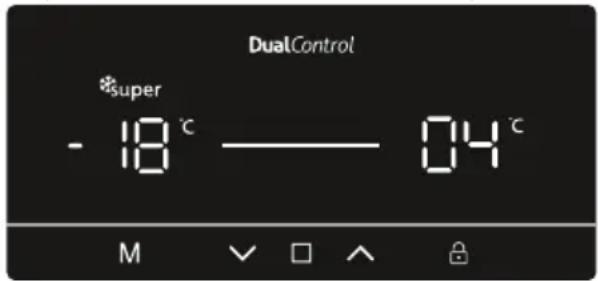
text_image
DualControl *super - 18 °C —— 04 °C M √ □ ∧ ⏱- Press the icon (#10) repeatedly until the 'Super Freeze logo appears' *super in the top left corner (#2)
- Once the Super Freeze mode has been set, the machine will beep to confirm the mode has been switched on.
- After the beep the original temperature of the freezer will appear on screen.
- Mode can be cancelled by repeating the above instructions from the beginning.
During this mode:
• Temperature of the fridge compartment may be adjusted, this will not impact Super Freeze Mode.
- Economy and holiday mode cannot be selected whilst Super Freeze is active.
Super Cool Mode
Purpose
- To cool and store a large quantity of food in the fridge compartment.
• To quickly cool drinks.
How to use
- Press ☐ in (#9 on control panel diagram), until the 'Fridge temperature setting' is selected (#1). - Once fridge temperature setting is selected, the temperature will flash.
text_image
DualControl -24 °C —— 04 °C △super M √ □ ∧ ⏱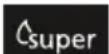
- Press the icon (#10) repeatedly until the 'Super Cool logo appears' in the top right corner (#4)
- Once the Super Cool mode has been set, the machine will beep to confirm the mode has been switched on.
• After the beep the last temperature of the fridge will appear on screen. - Mode can be cancelled by repeating the above instructions from the beginning.
During this mode:
• Temperature of the freezer compartment may be adjusted, this will not impact Super Cool Mode.
- Economy and holiday mode cannot be selected whilst Super Cool is active.
CHAPTER -3: USING YOUR FRIDGE FREEZER
Economy Mode
Purpose
Energy savings. During periods of less frequent use (door opening) or absence from home, such as a holiday, Eco program can provide optimum temperature whilst saving power.
How to Use
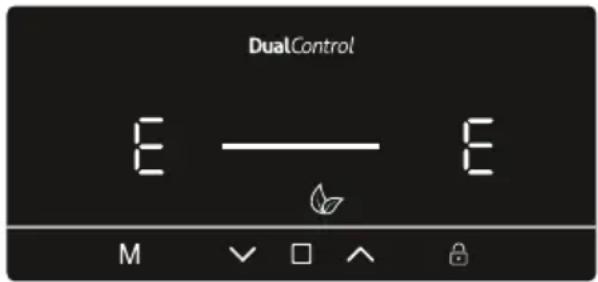
- Press M n (#12 on control panel diagram), until the
'Eco Mode' icon appears (#6).
- Once the 'Eco mode' has been set, the machine will beep to confirm the mode has been switched on.
- After the beep the both the fridge and freezer temperature setting (#1 and #3) will display an 'E'.
- Eco Mode can be cancelled by pressing the M (#12).
text_image
DualControl E — E M √ □ ∧During this mode:
- The freezer and fridge temperature may be adjusted however the adjustment will not be made until Eco Mode is cancelled. When economy mode is cancelled, the selected setting values will be activated and the temperature(s) will be adjusted.
- Super Cool or Super Freeze mode can be selected, however by selecting either modes Eco Mode is cancelled immediately.
- Holiday mode can only be selected after cancelling the economy mode.
Holiday Mode
Purpose
Holiday mode is to be used if the device is to be left for an extended period. During Holiday mode only the freezer compartment remains active.
How to Use
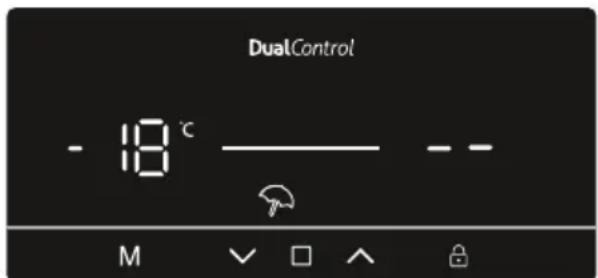
- Press M ( #12 on control panel diagram), until the
'Holiday Mode' icon appears (#5).
- Once the ‘Holiday mode’ has been set, the machine will beep to confirm the mode has been switched on.
- After the beep the fridge will display ‘--’ and the freezer will display the -18 °C set temperature.
text_image
DualControl - 18 °C — — M √ □ ∧ Ⓗ- Holiday Mode can be cancelled by pressing the M (#12).
During this mode:
- Freezer and fridge temperature may be adjusted however the adjustment will not be made until Holiday Mode is cancelled. When Holiday mode is cancelled, the selected setting values will be activated and the temperature(s) will be adjusted.
- Super Cool or Super Freeze mode can be selected, however by selecting either modes Holiday Mode is cancelled immediately.
- Eco Mode can only be selected after Holiday mode has been cancelled.
Drink Cool Mode
Purpose
This mode is used to cool drinks within an adjustable time frame.
How to Use
- Press Icon (#12) and (#9) Icons simultaneously for five seconds.
- The cooler temperature set indicator will start showing '05'. This value will flash on screen
- Users can either press or buttons to adjust the time period (05, 10, 15, 20, 25 or 30 minutes)
- When you select the time the numbers will blink 3 times on screen and sound beep beep. If the user do not press any button within 2 seconds the time will be set.
- The machine will then set the time, the remaining time will be shown on screen
- Once the total time has elapsed, an alarm will sound

text_image
DualControl + - 20 M √ □ ∧ ⏱CHAPTER -3: USING YOUR FRIDGE FREEZER
- Cool Drink Mode can be cancelled by following pressing the M icon (#12) and □ (#9) icons simultaneously for five seconds.
During this mode:
- When drink cool and child lock modes are active, the child lock mode must be cancelled in order to stop the alarm sound
- While using this mode, you must regularly check the temperature of the bottles. When the bottles are cool enough, you must take them out of the appliance.
- Bottles can explode if left in the appliance for too long with drink cool mode active.
Screen Saver Mode
Purpose
This mode saves energy by switching off all control panel lighting when the panel is left inactive.
How to Use
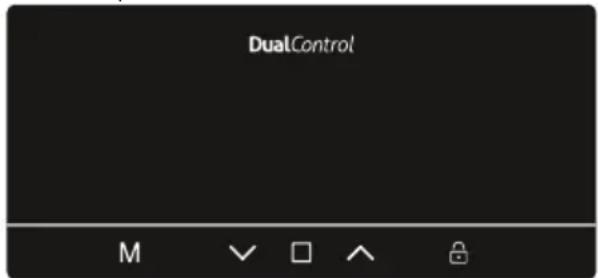
- Screen saver mode will be activated automatically after 30 seconds.
- If you press any key while the lighting of the control panel is off, the current machine settings will reappear on the display to let you make any change you wish.
- If you do not cancel the screen saving mode or press any key for 30 seconds, control panel will remain off.
text_image
DualControl M √ □ ∧ ⏱To deactivate the screen saving mode,
- To cancel the screen saving mode, first of all, you need to press any key to activate the keys and then press and hold the Mode button "M" (12) for 3 seconds.
- To reactivate screen saving mode, press and hold the mode button "M" (#12) for 3 seconds.
The Child Lock Function
Purpose
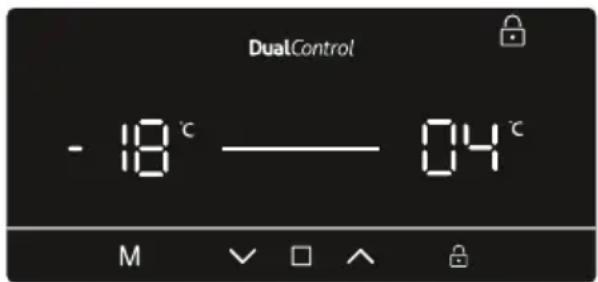
Child lock can be activated to prevent any accidental or unintentional changes being made to the appliance settings.
Activating Child Lock
Press and hold child lock button (3) for 5 seconds.
Cancelling Child Lock
Press and child lock button (W-3) for 5 seconds.
text_image
DualControl - 18 °C —— 04 °C M √ □ ∧ ⓄDoor Open Alarm Function
If either the fridge or freezer door is left open for more than 2 minutes, the appliance will beep.
Temperature Settings
Freezer Temperature Settings
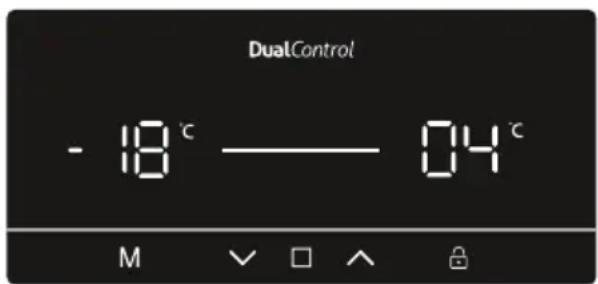
- Press ☐ in (#9 on control panel diagram), until the 'Freezer temperature setting' is selected (#1).
- Once Freezer temperature setting is selected, the temperature will flash.
- Users can then use the up or down arrow ( ) to set the temperature (-16, -18, -20, -22, -24°C and Super Freeze Mode).
- If Super Freeze mode or Eco mode is activated, the temperature will not change until the mode is cancelled.
text_image
DualControl - 18 °C —— 04 °C M √ □ ∧ ⏱Cooler Temperature Settings
- Press icon (#9 on control panel diagram), until the 'Fridge temperature setting' is selected (#1).
- Once Fridge temperature setting is selected, the temperature will flash.
- Users can then use the up or down arrow ( / ) to set the temperature (8, 6, 5, 4, 2°C and Super Cool Mode).
- If Super Freeze mode or Eco mode is activated, the temperature will not change until the mode is cancelled.
CHAPTER -3: USING YOUR FRIDGE FREEZER
Warnings About Temperature Adjustments
- It is not recommended that you operate your fridge in environments colder than 10^ .
- Temperature adjustments should be made according to the frequency of door openings, the quantity of food kept inside the fridge and ambient temperature of the placement of your fridge.
- Your fridge should be operated up to 24 hours according to the ambient temperature without interruption after being plugged in, this is so it is completely cooled. Do not open the doors of your fridge and do not place food inside it during this period.
- A 5 minute delay function is applied to prevent damage to the compressor of your fridge, when you take the plug out and then plug it back in again after an energy breakdown has occurred. Your fridge will start to operate normally after 5 minutes.
- Your fridge is designed to operate in the ambient temperature intervals stated in the standards, according to the climate class stated in the information label. We do not recommend operating your fridge out of the stated temperatures value limits in terms of cooling effectiveness.
- This appliance is designed for use at an ambient temperature within the 10^ - 43^ range.
Climate class and meaning:
T (tropical): This refrigerating appliance is intended to be used at ambient temperatures ranging from 16 °C to 43 °C.
ST (subtropical): This refrigerating appliance is intended to be used at ambient temperatures ranging from 16 °C to 38 °C.
N (temperate): This refrigerating appliance is intended to be used at ambient temperatures ranging from 16 °C to 32 °C.
SN (extended temperate): This refrigerating appliance is intended to be used at ambient temperatures ranging from 10 °C to 32 °C.
Temperature indicator
In order to help you better set your refrigerator, we have equipped it with a temperature indicator located in the coldest area.
To better store the food in your refrigerator, especially in the coldest area, make sure the message "OK" appears on the temperature indicator. If "OK" does not appear, this means that the temperature setting has not been done properly.
Since “OK” appears in black, it will be difficult to see this indication if the temperature indicator is badly lit. To be able to see this indication properly, there should be enough light.
Each time the temperature setting device is changed, wait for the stabilisation of the temperature inside the appliance before proceeding, if necessary, with a new temperature setting. Please change the position of the temperature setting device progressively and wait at least 12 hours before starting a new check and potential change.
NOTE: Following repeated openings (or prolonged opening) of the door or after putting fresh food into the appliance, it is normal for the indication "OK" not to appear in the temperature setting indicator. If there is an abnormal ice crystals build-up (bottom wall of the appliance) on the refrigerator compartment evaporator (overloaded appliance, high room temperature, frequent door openings), set the temperature setting device to a lower position until compressor o periods are obtained again.
Putting food in the coldest area of the refrigerator
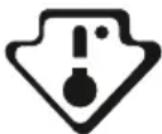
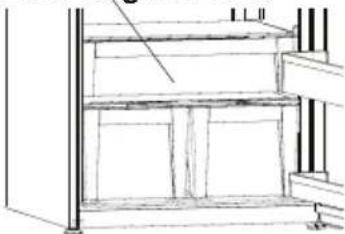
Your foods will be better stored if you put them in the most appropriate cooling area. The coldest area is just above the crisper.
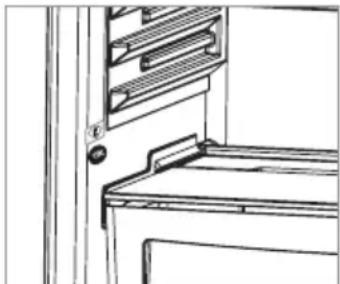
The following symbol indicates the coldest area of your refrigerator. To ensure a low temperature in this area, make sure the shelf is located at the same level as this symbol, as shown in the illustration.
The upper limit of the coldest area is indicated by the lower side of the sticker (head of the arrow). The coldest area upper shelf must be at the same level with the arrow head. The coldest area is below this level.
As these shelves are removable, make sure they are always at the same level with these zone limits described on the stickers, in order to guarantee temperatures in this area.
natural_image
Line drawing of a cabinet or rack with a door and shelf, no text or symbols presentCHAPTER -3: USING YOUR FRIDGE FREEZER
Accessories
Icematic (In some models)
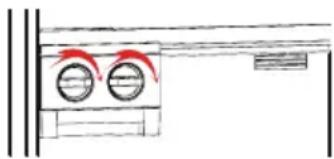
• Take out the ice making tray
- Fill the water to the line.
- Place the ice making tray in its original position
- When ice cubes are formed, twist the lever to drop ice cubes into the icebox.
natural_image
Simple line drawing of a room with two circular fixtures and red curved arrows indicating motion (no text or symbols)Note:
- Do not fill the icebox with water in order to make ice. It may be broken.
- The movement of the ice maker may be difficult while the refrigerator is running. In such a case, it should be cleaned after removing the glass shelves.
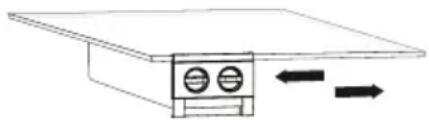
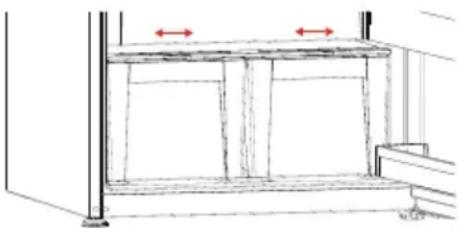
Removing the ice maker
• Take out the glass shelves of freezer compartment
- Remove the icemaker by moving it to left or right on the shelf.
You can remove the icemaker to create a larger volume of the freezer compartment.
natural_image
Simple line drawing of a device with two circular ports and directional arrows indicating flow or movement (no text or symbols)Zero Degree Zone (In some models)
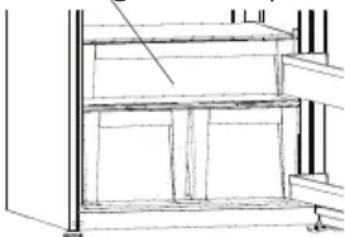
natural_image
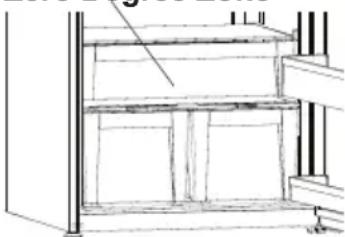
Architectural line drawing of a two-story building facade with structural beams and windows (no text or symbols)Keeping food in the Chill Drawer instead of the freezer or refrigerator compartment allows food retain freshness and flavour longer while preserving its fresh appearance. If the Chill Drawer tray becomes dirty, remove it and wash with water. (Water freezes at 0 °C , but foods containing salt or sugar require lowered temperatures to freeze) Normally people use the Chill Drawer for raw fish, rice, etc... Do not put foods you want to freeze or ice trays in order to make ice.
Removing the Chill Drawer
Pull the Chill Drawer out toward you by sliding it on rails.
- Pull the Chill Drawer up from the rail to remove.
After the Chill Drawer has been removed, it can support a maximum 20 kg load.
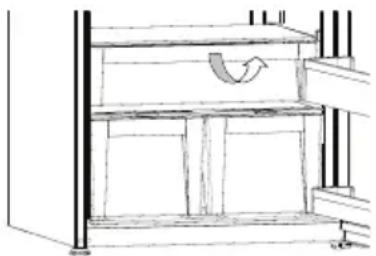
natural_image
Technical line drawing of a mechanical assembly with shelves and supports (no text or symbols)Fresh dial
If you want to keep your vegetables longer in that compartment, you have to change the humidity controller that is located at the front of the crisper, to closed position. With the aid of this function, humidity level in the crisper compartment, will stay constant and vegetables will last longer.
If you want to keep your vegetables colder in that compartment, you have to change the humidity controller to open position. By doing this change, you will allow the cold air to enter the crisper compartment. As a result of this, your vegetables will be colder.
natural_image
Technical line drawing of a cabinet or shelf with two red arrows indicating measurement or alignment points (no text or symbols present)If you see any condensation on the glass shelf that is located at the top of crisper, you can change the humidity controller to open position.
CHAPTER -3: USING YOUR FRIDGE FREEZER
Adapti-Lift door shelf (In some models)
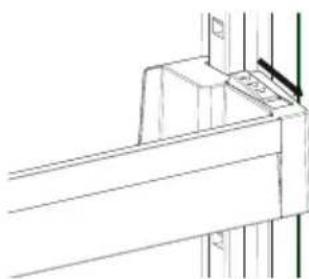
natural_image
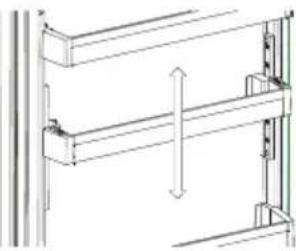
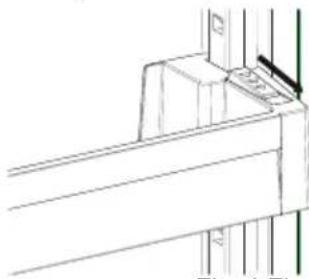
Technical line drawing of a structural joint or bracket (no text or symbols)Six different height adjustments can be made to provide storage areas that you need by Adapti-Lift.
To change the position of Adapti-Lift ;
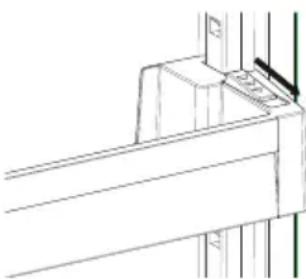
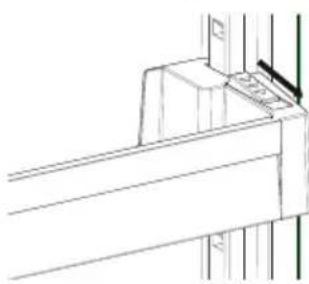
Hold the bottom of the shelf and pull the buttons on the side of the door shelf direction of arrow (Fig.1)
Position door shelf the height you need by moving up and down. After you get the position that you want the door shelf, release the buttons on the side of the door shelf (Fig.2) Before releasing the door shelf, move up down and make sure the door shelf is fixed
natural_image
Technical line drawing of a structural frame with vertical and horizontal arrows indicating direction (no text or symbols)Fig.2
Fig.1
Note: Before moving door shelf is loaded, you must hold the shelf by supporting the bottom. Otherwise, door shelf could fall off the rails due to the weight. So damage may occur on the door shelf or rails.
Visual and text descriptions on the accessories section may vary according to the model.
Cleaning
• Make sure to unplug the fridge before cleaning.
- Do not wash your fridge by pouring water
• You can wipe the inner and outer sides with a soft cloth or a sponge using warm and soapy water.
- Remove the parts individually and clean with soapy water. Do not wash in washing machine.
- Never use flammable, explosive or corrosive material like thinner, gas, acid for cleaning.
- You should clean the condenser with broom at least once a year in order to provide energy saving and increase the productivity.
Make sure that your fridge is unplugged while cleaning.
Replacing The LED (if an LED is used as lighting)
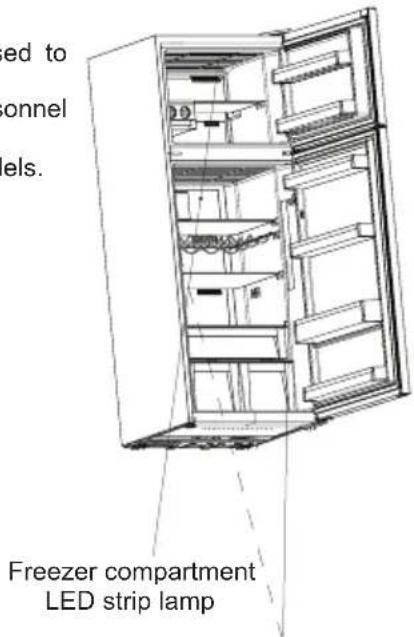
1 LED strip in freezer compartment and 2 LED strips in cooler compartment are used to illuminate your appliance.
Please contact the Sharp help desk as this should be changed by authorized personnel only.
Note: Numbers and location of LED strips may change according to different models.
text_image
ed to onnel els. Freezer compartment LED strip lampRefrigerator compartment LED strip lamp
Refrigerator compartment
• To reduce frost build up never place liquids with unsealed containers in the fridge compartment.
- Allow warn or hot food to cool down before storing. This helps reduce power consumption.
- To avoid frost build-up ensure that nothing is stored touching the back wall.
- The coldest area of the refrigerator is at the bottom. We recommend to use this area to store food that will perish easily, such as fish, ready meals, baked goods or dairy products. The warmest area is the top shelf of the door. We recommend you store butter or cheese here.
- For normal working conditions, it will be sufficient to adjust the temperature setting of your refrigerator to +4^ .
- The temperature of the fridge compartment should be in the range of 0-8 °C, fresh foods below 0 °C are iced and rotted, bacterial load increases above 8 °C, and spoils.
- Do not put hot food in the refrigerator immediately, wait for the temperature to pass outside. Hot foods increase the degree of your refrigerator and cause food poisoning and unnecessary spoiling of the food.
- Meat, fish, etc. should be store in the chiller compartment of the food, and the vegetable compartment is preferred for vegetables. (if available)
• To prevent cross contamination, meat products and fruit vegetables are not stored together.
- Foods should be placed in the refrigerator in closed containers or covered to prevent moisture and odors.
Important Note:
- Cover any finished dishes when you put them in the fridge. Place them in the fridge when they are cool, otherwise temperature/humidity inside the fridge increases and this causes the fridge to operate more. Covering food and beverages also preserves their flavour and aroma.
- Potatoes, onion and garlic shouldn't be kept in the fridge.
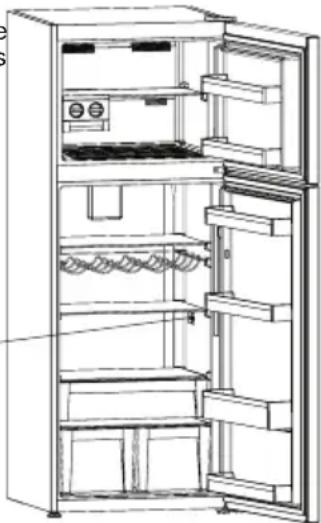
- Please avoid the foods from touching to temperature sensor which is located at refrigerator compartment. In order to keep optimum preservation temperature in refrigerator compartment, foods mustn't contact with the sensor.
Temperature sensor area
natural_image
Line drawing of an open refrigerator with doors, shelves, and a washing machine (no text or symbols)Freezer compartment
- Use the freezer to store frozen foods for long periods of time and make ice cubes.
- To freeze fresh food - ensure that as much of the surface of food to be frozen is in contact with the cooling surface.
- Do not put fresh food on either side of frozen food as it can thaw it.
- While freezing fresh foods(i.e meat,fish and mincemeat),divide into portion sizes.
- Once the unit has been defrosted replace the foods into freezer and remember to consume them in a short period of time.
- Never place warm food in the freezer compartment.
- The instructions shown on frozen food packages should always be followed carefully and if no information is provided food should not be stored for more than 3 months from the purchased date.
- When buying frozen foods ensure that these have been frozen at suitable temperatures and that the packing is intact.
- Frozen foods should be transported in appropriate containers to maintain the quality of the food and should be stored in the freezer as soon as possible.
- If a package of frozen food shows signs of humidity and abnormal swelling it has been previously stored at an unsuitable temperature and that the contents have deteriorated.
- The storage life of frozen foods depends on the room temperature, thermostat setting, how often the door is opened, the type of food and the length of time required to transport the product from the shop to your home. Always follow the instructions printed on the package and never exceed the maximum storage life indicated.
That; If you decide to open the freezer door again immediately after closing, it may be difficult to re-open. This is normal and after the freezer has reached an equilibrium condition the door will open easily.
Important note:
- Frozen foods, when thawed, should be cooked just like fresh foods. If they are not cooked after being thawed they must NEVER be re-frozen.
- The taste of some spices found in cooked dishes (anise, basilica, watercress, vinegar, assorted spices, ginger, garlic, onion, mustard, thyme, marjoram, black pepper, etc.) changes and they assume a strong taste when they are stored for a long period. Therefore, only add a small amount of spice if planning to freeze, or the desired spice should be added after the food has been thawed.
- The storage period of food is dependent on the oil used. The suitable oils are margarine, calf fat, olive oil and butter and the unsuitable oils are peanut oil and pig fat.
- The food in liquid form should be frozen in plastic cups and the other food should be frozen in plastic folios or bags.
CHAPTER -4: FOOD STORAGE GUIDANCE
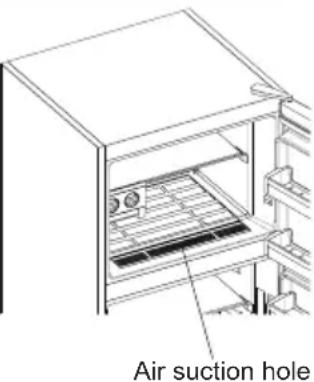
With putting the foods onto the air suction hole by extracting the the lower shelf located at freezer door, will affect the performance of the fridge, negatively. Therefore, please be careful while loading the freezer compartment in order not to close down the air suction hole.
text_image
Air suction holeCHAPTER -5: DOOR REVERSAL
Repositioning the door
- It depends on which fridge freezer you have as to whether it is possible the reverse the doors.
- It is not possible where handles are attached at the front of the appliance.
- If your model does not have handles it is possible to reverse the doors, but this needs to be completed by authorised personnel. Please call Sharp service.
CHAPTER -6: TROUBLESHOOTING
Check Warnings;
Your fridge warns you if the temperatures for cooler and freezer are in improper levels or when a problem occurs in the appliance. Warning codes are displayed in the Freezer and Cooler Indicators.
| ERROR TYPE MEANING WHY WHAT TO DO | |||
| E01 Sensor warning | Contact the Sharp help desk as soon as possible. | ||
| E02 Sensor warning | Contact the Sharp help desk as soon as possible. | ||
| E03 Sensor warning | Contact the Sharp help desk as soon as possible. | ||
| E06 Sensor warning | Contact the Sharp help desk as soon as possible. | ||
| E07 Sensor warning | Contact the Sharp help desk as soon as possible. | ||
| E08 Low Voltage Warning | Power supply to the device has dropped to below 170W. | - This is not a device failure, this error helps to prevent damages to the compressor.- The voltage needs to be increased back to required levelsIf this warning continues, contact the Sharp help desk as soon as possible. | |
ERROR TYPE MEANING WHY WHAT TO DO
| E09 | Freezer compartment is not cold enough | Likely to occur after long term power failure. | 1. Set the freezer temperature to a colder value or set Super Freeze. This should remove the error code once the required temperature has been reached. Keep doors closed to improve time taken to reach the correct temperature.2. Remove any products which have thawed/defrosted during this error. They can be used within a short period of time.3. Do not add any fresh produce to the freezer compartment until the correct temperature has been reached and the error is no longer.If this warning continues, contact the Sharp help desk as soon as possible. |
| E10 | Fridge compartment is not cold enough | Likely to occur after:- Long term power failure.- Hot food has been left in the fridge. | 1. Set the fridge temperature to a colder value or set Super Cool. This should remove the error code once the required temperature has been reached. Keep doors closed to improve time taken to reach the correct temperature.2. Please empty the location at the front area of air duct channel holes and avoid putting food close to the sensor.If this warning continues, contact the Sharp help desk as soon as possible. |
| E11 | Fridge compartment is too cold | Various | 1. Check is Super Cool mode is activated2. Reduce the fridge compartment temperature3. Check to see if vents are clear and not cloggedIf this warning continues, contact the Sharp help desk as soon as possible. |
If your fridge is not operating;
• Is there a power failure?
- Is the plug connected to the socket correctly?
- Is the fuse of the socket to which the plug is connected or the main fuse blown?
- Is there any failure at the socket? To check this, plug your refrigerator into a known working socket.
If your fridge is not cooling enough;
• Is the temperature adjustment right?
- Is the door of your fridge opened frequently and left open for a long while?
• Is the door of fridge closed properly?
- Did you put a dish or food on your fridge so that it contacts the rear wall of your fridge so as to prevent the air circulation?
• Is your fridge filled excessively?
- Is there adequate distance between your fridge and the rear and side walls?
- Is the ambient temperature within the range of values specified in the operating manual?
If the food in your refrigerator compartment is over cooled
• Is the temperature adjustment right?
- Are there many food recently put inside the freezer compartment? If so, your fridge may over cool the food inside the refrigerator compartment as it will operate longer to cool these food.
CHAPTER -6: TROUBLESHOOTING
If your fridge is operating too loudly;
To maintain the set cooling level, compressor may be activated from time to time. Noises from your fridge at this time are normal and due to its function. When the required cooling level is reached, noises will be decreased automatically. If the noises persist;
- Is your appliance stable? Are the legs adjusted?
• Is there anything behind your fridge? - Are the shelves or dishes on the shelves vibrating? Re-place the shelves and/or dishes if this is the case.
- Are the items placed on your fridge vibrating?
Normal Noises;
Cracking (Ice cracking) Noise:
• During automatic defrosting.
- When the appliance is cooled or warmed (due to expansion of appliance material).
Short cracking: Heard when the thermostat switches the compressor on/off.
Compressor noise (Normal motor noise): This noise means that the compressor operates normally Compressor may cause more noise for a short time when it is activated.
Bubbling noise and splash: This noise is caused by the flow of the refrigerant in the tubes of the system.
Water flow noise: Normal flow noise of water flowing to the evaporation container during defrosting. This noise can be heard during defrosting.
Air Blowing Noise (Normal fan noise): This noise can be heard in No-Frost fridge during normal operation of the system due to the circulation of air.
If humidity builds up inside the fridge;
- Has the food been properly packaged? Have the containers been well dried before they were put into the refrigerator?
- Are the doors of the refrigerator opened very frequently? When the door is opened, the humidity found in the air in the room enters the refrigerator. Especially if the humidity rate in the room is too high, the more frequently the door is opened the faster will be the humidification.
- It is normal to have water drops formed on the back wall following the automatic defrosting process. (In Static Models)
If the doors are not opened and closed properly;
- Do the food packages prevent closing of the door?
- Are the door compartments, shelves and drawers placed properly?
- Are door gaskets broken or torn?
• Is your fridge on a level surface?
If the edges of fridge cabinet that the door joint contact are warm;
Especially in summer (hot weather), the surfaces that the joint contact may get warmer during the operation of the compressor, this is normal.
IMPORTANT NOTES:
- The compressor protection thermal fuse will cutout after sudden power breakdowns or after unplugging the appliance, because the gas in the cooling system is not stabilised. This is quite normal, and the fridge will restart after 4 or 5 minutes.
- The cooling unit of your refrigerator is hidden in the rear wall. Therefore, water droplets or ice may occur on the rear surface of your fridge due to the operation of the compressor in specified intervals. This is normal. There is no need to perform a defrosting operation unless the ice is excessive.
- If you will not use your fridge for a long time (e.g. in summer holidays) unplug it. Clean your fridge according to Part 4 and leave the door open to prevent humidity and smell.
- The appliance you have purchased is designed for home type use and can be used only at home and for the stated purposes. It is not suitable for commercial or common use. If the consumer use the appliance in a way that does not comply with these features, we emphasise that the producer and the dealer shall not be responsible for any repair and failure within the guarantee period.
- If the problem persists after you have followed all the instructions above, please consult an authorised service provider.
CHAPTER -7: TIPS FOR SAVING ENERGY
- Always allow foodstuffs to cool before storing in the appliance.
- Thaw food in the fridge compartment; this helps save energy.
CHAPTER -8: TECHNICAL DATA
The technical information is situated in the rating plate on the internal side of the appliance and on the energy label.
The QR code on the energy label supplied with the appliance provides a web link to the information related to the performance of the appliance in the EU EPREL database.
Keep the energy label for reference together with the user manual and all other documents provided with this appliance.
It is also possible to find the same information in EPREL using the link https://eprel.ec.europa.eu and the model name and product number that you find on the rating plate of the appliance.
See the link www.theenergylabel.eu for detailed information about the energy label.
CHAPTER -9: CUSTOMER CARE AND SERVICE
Always use original spare parts.
When contacting our Authorised Service Centre, ensure that you have the following data available: Model, Serial Number and Service Index.
The information can be found on the rating plate. You can find the rating label inside the fridge zone on the left lower side.
The original spare parts for some specific components are available for a minimum of 7 or 10 years, based on the type of component, from the placing on the market of the last unit of the model.
Visit our website to:
www.sharphomeappliances.com
Inhalt
Symbol [theint (#6).
text_image
DualControl E —— E M √ □ ∧ ⏻text_image
DualControl M √ □ ∧ ⏻natural_image
Line drawing of a refrigerator interior showing front and side views (no text or symbols)Zubehör
natural_image
Simple line drawing of a room with two circular windows and red rings, no text or symbols present.Hinweis:
natural_image
Simple line drawing of a rectangular device with two circular ports and directional arrows indicating flow or movement (no text or symbols)natural_image
Architectural line drawing of a staircase with shelves and legs (no text or symbols)natural_image
Line drawing of a multi-level cabinet or rack structure with a curved arrow indicating rotation (no text or symbols)Frischewahlscheibe
natural_image
Technical line drawing of a cabinet or enclosure with two red arrows indicating measurement or alignment points (no text or symbols present)natural_image
Technical line drawing of a structural joint or bracket (no text or symbols)natural_image
Technical line drawing of a structural frame with vertical dimension arrows (no text or symbols)Abb.2
Abb.1
natural_image
Line drawing of an open refrigerator with doors, shelves, and a cooling unit (no text or symbols)natural_image
Pure diagram of a vertical structure with two arrows pointing outward, no text or symbols presentwww.sharphomeappliances.com
Sommaire
CHAPITRE -1 : AVERTISSEMENTS GÉNÉRAUX....38
CHAPITRE -2 : VOTRE COMPARTIMENT CONGÉLATEUR....43
CHAPITRE -3 : UTILISER VOTRE RÉFRIGÉRATEUR CONGÉLATEUR....44
CHAPITRE -4 : CONSEILS DE STOCKAGE DES ALIMENTS ....51
CHAPITRE -5 : INVERSION DU SENS D'OUVERTURE DE LA PORTE....52
CHAPITRE -6 : AVANT D'APPELER LE SERVICE APRÈS-VENTE....52
CHAPITRE -7 : CONSEILS POUR ÉCONOMISER DE L'ÉNERGIE ....55
CHAPITRE -8: DONNÉES TECHNIQUES ....55
CHAPITRE -9: SERVICE ET ASSISTANCE À LA CLIENTÈLE .....55
Mode Super Congélation
Objectif
text_image
DualControl E —— E M √ □ ∧ ⏱
Pendant ce mode :
text_image
DualControl M √ □ ∧ ⏱natural_image
Technical line drawing of a cabinet or rack with a door and shelf, no visible text or symbolsnatural_image
Simple line drawing of a room with two circular fixtures and a wall-mounted unit (no text or symbols)Note :
natural_image
Simple line drawing of a device with two circular ports and directional arrows indicating movement (no text or symbols)natural_image
Architectural line drawing of a multi-level building structure with no text or symbolsnatural_image
Technical line drawing of a mechanical assembly with a curved component and vertical supports (no text or symbols)Cadran de fraicheur
natural_image
Technical line drawing of a cabinet or shelf with two red arrows indicating measurement or alignment (no text or symbols present)natural_image
Pure technical line drawing of a structural joint or bracket (no text or symbols)natural_image
Technical line drawing of a structural frame with vertical dimension arrows (no text or symbols)Fig.2
Fig.1
natural_image
Line drawing of an open refrigerator with doors, shelves, and appliances (no text or symbols)natural_image
Pure diagram of a vertical structure with two arrows pointing outward, no text or symbols presentnatural_image
Line drawing of an open refrigerator with internal shelves and a door, showing no text or symbolsHOOFDSTUK 1: ALGEMENE WAARSCHUWINGEN
HOOFDSTUK 1: ALGEMENE WAARSCHUWINGEN
Verwijdering
HOOFDSTUK 1: ALGEMENE WAARSCHUWINGEN
text_image
DualControl E —— E M √ □ ∧ Ⓗ
In deze stand:
text_image
DualControl M √ □ ∧ ⏱Screensaverstand deactiveren
natural_image
Line drawing of a cabinet or rack with a door and handle (no text or symbols)HOOFDSTUK 3: UW KOELKAST MET FREEZER IN GEBRUIK NEMEN
Accessoires
Icematic
natural_image
Simple line drawing of a room with two circular windows and red arrows indicating directions (no text or symbols)Opmerking:
natural_image
Simple line drawing of a device with two circular ports and directional arrows indicating movement (no text or symbols)natural_image
Architectural line drawing of a multi-level building facade with structural beams and windows (no text or symbols)natural_image
Line drawing of a multi-level storage cabinet or rack unit with a curved arrow indicating a flow or movement (no text or symbols present)natural_image
Technical line drawing of a mechanical assembly with two red arrows indicating measurement or alignment points (no text or symbols present)Adapti-Lift deurschap
natural_image
Technical line drawing of a structural joint or bracket (no text or symbols)natural_image
Technical line drawing of a structural frame with vertical dimension arrows (no text or symbols)text_image
Vriescompartment LED-lamp Koelcompartment LED-lampHOOFDSTUK 4: HANDLEIDING VOOR OPSLAG VAN LEVENSMIDDELEN
Koelcompartiment
natural_image
Line drawing of an open refrigerator with doors, shelves, and appliances (no text or symbols)HOOFDSTUK 4: HANDLEIDING VOOR OPSLAG VAN LEVENSMIDDELEN
Belangrijk:
natural_image
Pure diagram of a vertical structure with two arrows pointing to its edges (no text or symbols)HOOFDSTUK 6: PROBLEEMOPLOSSING
HOOFDSTUK 6: PROBLEEMOPLOSSING
www.sharphomeappliances.com
Índice
text_image
DualControl E — E M √ □ ∧ ⏻Durante este modo:
text_image
DualControl M √ □ ∧ 🔒natural_image
Line drawing of a cabinet or rack with a door and shelf, no text or symbols presentCAPÍTULO -3: USO DEL FRIGORÍFICO CONGELADOR
Accesorios
natural_image
Simple line drawing of a room with two circular windows and red arrows indicating directions (no text or symbols)Nota:
natural_image
Simple line drawing of a device with two circular ports and directional arrows indicating movement (no text or symbols)natural_image
Architectural line drawing of a staircase with shelves and legs (no text or symbols)natural_image
Technical line drawing of a multi-level shelving unit with a curved arrow indicating rotation (no text or symbols)natural_image
Simple line drawing of a wooden shelf with two red arrows indicating measurement or alignment, no text or symbols present.Selector de alimentos frescos
natural_image
Technical line drawing of a structural joint or bracket (no text or symbols)natural_image
Technical line drawing of a structural frame with vertical dimension arrows (no text or symbols)Fig.2
Fig.1
natural_image
Line drawing of an open refrigerator with doors, shelves, and appliances (no text or symbols)Compartimento del congelador
natural_image
Pure diagram of a vertical line with two arrows pointing downward, no text or symbols presentnatural_image
Technical line drawing of an open refrigerator with internal compartments and ventilation slots (no text or symbols)www.sharphomeappliances.com
Conteúdos
CAPÍTULO 1: AVISOS GERAIS....94
CAPÍTULO 2: O SEU FRIGIRÍFICO CONGELADOR....99
CAPÍTULO 3: UTILIZAÇÃO DO FRIGIRÍFICO CONGELADOR....100
CAPÍTULO 4: GUIA DO ARMAZENAMENTO DE ALIMENTOS .....107
CAPÍTULO 5: INVERSÃO DA PORTA....108
CAPÍTULO 6: RESOLUÇÃO DE PROBLEMAS....108
CAPÍTULO 7: DICAS PARA POUPAR ENERGIA....111
CAPÍTULO 8: DADOS TÉCNICOS ....111
CAPÍTULO 9:SERVIÇO E ASSISTÊNCIA AO CONSUMIDOR ....111
text_image
DualControl E — E M √ □ ∧ ⏱Durante este modo:
text_image
DualControl M √ □ ∧ ⏱natural_image
Line drawing of a cabinet or rack with a door and shelf, no text or symbols presentAcessórios
Gelo automático
natural_image
Simple line drawing of a washing machine with two circular gauges and red arrows indicating motion (no text or symbols)Nota:
natural_image
Simple line drawing of a device with two circular ports and directional arrows indicating movement (no text or symbols)natural_image
Architectural line drawing of a two-story building facade with stairs and windows (no text or symbols)natural_image
Technical line drawing of a mechanical assembly with no visible text or symbolsCAPÍTULO 3: UTILIZAÇÃO DO FRIGIRÍFICO CONGELADOR
natural_image
Simple line drawing of a wooden table with vertical supports and a horizontal beam, no text or symbols present.Prateleira de porta Adapti-Lift
natural_image
Technical line drawing of a structural joint or bracket (no text or symbols)natural_image
Technical line drawing of a structural frame with vertical dimension arrows (no text or symbols)Fig.1 Fig.2
natural_image
Line drawing of an open refrigerator with doors, shelves, and a door handle (no text or symbols)Zona do sensor de temperatura
natural_image
Pure diagram of a vertical line with two arrows pointing downward, no text or symbols presentnatural_image
Technical line drawing of an open refrigerator with internal shelves and doorways (no text or symbols)Visite o nosso website para: www.sharphoneappliances.com
Indhold
KAPITEL 1: GENERELLE ADVARSLER....113
KAPITEL 2: DIT K∅LEFRYSESKAB....118
KAPITEL 3: SÅDAN ANVENDES DIT K∅LEFRYSESKAB ...... 118
KAPITEL 4: GUIDE TIL OPBEVARING AF MADVARER....125
KAPITEL 5: VENDING AF D∅R....126
KAPITEL 6: FEJLFINDING ....126
KAPITEL 7: TIP TIL ENERGIBESPARELSE ......128
KAPITEL 8: TEKNISKE DATA ....129
KAPITEL 9: KUNDEPLEJE OG -SERVICE ....129
text_image
DualControl E —— E M √ □ ∧ ⏱I denne tilstand:
text_image
DualControl M √ □ ∧ ⏱natural_image
Line drawing of a cabinet or rack with a door and ladder, no text or symbols presentTilbehør
Icematic
- Tag isbakken ud
natural_image
Simple line drawing of a room with two circular fixtures and a window (no text or symbols)Bemærk:
natural_image
Simple line drawing of a device with two circular ports and directional arrows indicating flow or movement (no text or symbols)Zero Degree Zone
natural_image
Architectural line drawing of a staircase with shelves and legs (no text or symbols)natural_image
Technical line drawing of a mechanical assembly with shelves and supports (no text or symbols)KAPITEL 3: SÅDAN ANVENDES DIT K∅LEFRYSESKAB
Frisk-hjulet
natural_image
Line drawing of a wooden shelf with two red arrows indicating measurement or alignment points (no text or symbols present)natural_image
Pure technical line drawing of a structural joint or bracket (no text or symbols)natural_image
Technical line drawing of a structural frame with vertical dimension lines (no text or symbols)natural_image
Line drawing of a refrigerator interior showing open doors, shelves, and appliances (no text or symbols)Fryseafdelingen
natural_image
Pure diagram of a vertical line with two arrows pointing downward, no text or symbols presenttext_image
DualControl E —— E M √ □ ∧ ⏱text_image
DualControl M √ □ ∧ ⏱natural_image
Line drawing of a cabinet or rack with a door and shelf, no text or symbols presentTilbehør
Icematic
natural_image
Simple line drawing of a washing machine with two circular gauges and a handle (no text or symbols)Merk:
natural_image
Simple line drawing of a device with two circular ports and directional arrows indicating movement (no text or symbols)Zero Degree Zone
natural_image
Architectural line drawing of a two-story building facade with stairs and windows (no text or symbols)Hvis maten holdes i chiller i stedet for fryser eller kjøleskap, vil maten beholde friskhet og smak for en lengre periode og vil samtidig bevare friskt utseende. Hvis skuffen blir skitten, fjerne den og vaske den med vann.
natural_image
Technical line drawing of a multi-level shelving unit with a curved arrow indicating rotation (no text or symbols)KAPITTEL 3: BRUKE KOMBISKAPET DITT
Fresh dial
natural_image
Simple line drawing of a wooden shelf with two red arrows indicating measurement or alignment, no text or symbols present.Dørhyllen Adapti-Lift
natural_image
Technical line drawing of a structural joint or bracket (no text or symbols)natural_image
Technical line drawing of a structural frame with a vertical double-headed arrow indicating rotation (no text or symbols)natural_image
Line drawing of an open refrigerator with doors, shelves, and appliances (no text or symbols)Fryseseksjon
natural_image
Pure diagram of a vertical line with arrows indicating direction, no text or symbols presentwww.sharphomeappliances.com
text_image
CE
Service & Support
Visit Our Website
sharphomeappliances.com