
SJ-WM322TWH - Refrigerator SHARP - Free user manual and instructions
Find the device manual for free SJ-WM322TWH SHARP in PDF.


| Product Type | Refrigerator-Freezer with Top Freezer |
| Brand | Sharp |
| Model | SJ-WM322TWH |
| Total Gross Capacity | 322 liters |
| Refrigerator Capacity | 238 liters |
| Freezer Capacity | 84 liters |
| Dimensions (H x W x D) | 1700 x 600 x 650 mm |
| Weight | 60 kg |
| Power Supply | 220-240 V, 50 Hz |
| Energy Class | A+ |
| Annual Energy Consumption | 280 kWh |
| Climate Class | N/ST |
| Noise Level | 40 dB |
| Cooling System | Static with auto defrost |
| Number of Shelves | 4 adjustable glass shelves |
| Crisper Drawers | 1 vegetable drawer |
| Door Racks | 3 door racks |
| Freezer Drawers | 3 drawers |
| Temperature Control | Mechanical thermostat |
| Defrost Method | Automatic refrigerator, manual freezer |
| Refrigerant | R600a |
| Maximum Ambient Temperature | 38°C |
| Door Reversal | Possible (see manual) |
| Spare Parts Availability | Available from Sharp service centers |
| Warranty | 2 years (depending on region) |
Frequently Asked Questions - SJ-WM322TWH SHARP
User questions about SJ-WM322TWH SHARP
0 question about this device. Answer the ones you know or ask your own.
Ask a new question about this device
Download the instructions for your Refrigerator in PDF format for free! Find your manual SJ-WM322TWH - SHARP and take your electronic device back in hand. On this page are published all the documents necessary for the use of your device. SJ-WM322TWH by SHARP.
USER MANUAL SJ-WM322TWH SHARP
natural_image
Line drawing of a double door with handles and a central button (no text or symbols)
Device of this mark is a trademark of Sharp Corporation.
Plasmacluster is a registered trademark or a trademark of Sharp Corporation.
SJ-WM322T
SJ-WM362T
GB REFRIGERATOR-FREEZER OPERATION MANUAL 4
ΨΥΓΕΙΟ - ΚΑΤΑΨΥΚΤΗΣ
ΕΓΧΕΙΡΙΔΙΟ ΛΕΙΤΟΥΡΓΙΑΣ ...... 14
PL CHŁODZIARKO - ZAMRAŻARKA INSTRUKCJA OBSŁUGI 24
HÜTÖSZEKRÉNY-FAGYASZTÓ HASZNÁLATI UTASÍTÁS 34
RO FRIGIDER-CONGELATOR MANUAL DE UTILIZARE 44
CZ CHLADNIČKA-MRAZÁK
NÁVOD K OBSLUZE 54
SK CHLADNIČKA-MRAZNIČKA
NÁVOD NA OBSLUHU 64
LT ŠALDYTUVAS - ŠALDIKLIS
EKSPLOATAVIMO INSTRUKCIJA ..... 74
LV LEDUSSKAPIS – SALDĚTĀJKAMERA
ROKASGRĀMATA 84
KÜLMIK-SÜGAVKÜLMIK
KASUTUSJUHEND 94
SLO HLADILNIK-ZAMRZOVALNIK PRIROČNIK Z NAVODILI ZA DELOVANJE. . 104
BG ХЛАДИЛНИК – ФРИЗЕР
РЪКОВОДСТВО ЗА РАБОТА. 114
UA
ХОЛОДИЛЬНИК-МОРОЗИЛЬНИК
ІНСТРУКЦІЯ З ЕКСПЛУАТАЦІЇ ..... 124
BY
ХАЛАДЗІЛЬНІК-ЛЯДОЎНЯ
ІНСТРУКЦЫЯ ПА ЭКСПЛУАТАЦЫІ. . . . . . 134
GB CONTENTS
DUAL SWING DOOR• 4
- WARNING 5
- CAUTION 5
• INSTALLATION 6 - DESCRIPTION 7
• OPERATION 8
• STORING FOOD 12
• CARE AND CLEANING.... 13 - BEFORE YOU CALL FOR SERVICE.... 13
GR ΠΕΡΙΕΧΟΜΕΝΑ
The door can be opened from the right and the left. Freezer door is the same.
Hold the handle to open or close the door.

natural_image
Diagram showing two identical mechanical or architectural frame setups with hands holding arrows indicating rotation (no text or symbols)When closing the door
Push the door securely to ensure that it is completely closed because the door does not have self-closing function. If you release your hand from the handle halfway, the door may remain half-opened. The half-open door may cause cool air leakage.
Unless the door has been closed completely, it cannot be opened from the opposite side.

WARNING
Under the following conditions, do not open or close ■ the door forcibly. Freezer door is the same.
The door may fall and it may cause injury.
- When some objects get stuck around the door. (parts)
- When the door is hard to open.
Open the door from opposite side and check whether any object has got stuck or not.

Do not put your hands or feet under the open door. ■ Especially, be careful around the mechanical section.
(Danger of injury to your fingers or to your foot being caught in these sections.)

Mechanical section
Mechanical section
(The same applies when opened from the left hand side.)
NOTE
Do not put your hand on the opposite side to open the door. Your fingers may be caught in the door.
Do not pull the both handles at the same time.
The handles may get broken.
Do not hurt or put the objects on the mechanical section installed on the cabinet and doors. It will cause problem in opening or closing the door.

natural_image
Simple line drawing of a cabinet with a handle and decorative elements (no text or symbols)Do not put the objects on the roller holder. The door cannot be closed.
Do not fill the oil to the mechanical section of the cabinet • and doors, rollers and roller holders.
Depending on the kind of oils, cracking of plastic parts can be caused.
Do not step on the roller holder of the freezer compartment. The refrigerator may fall to the front or transformation may happen on the roller holder.
The damaged roller holder leads to difficulty in opening or closing the door.

natural_image
Illustration of a foot pressing down on a wall-mounted panel (no text or symbols visible)Structure
Body mechanisms
(Installed at four corners of each compartment)
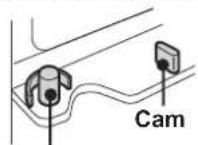
Hinge pin

Door mechanisms
(Installed at four corners of each door)

Roller & Roller holder
For smooth opening and closing of the door.
WARNING CAUTION
■ Do not store highly volatile and flammable materials such as ether, petrol, propane gas, aerosol cans, adhesive agents and pure alcohol etc.
These materials are liable to explode.
■ Dust deposited on the power plug may cause fire. Wipe it off carefully.
■ Do not attempt to change or modify this refrigerator. This may result in fire, electric shock or injury.
■ Ensure that the refrigerator presents no danger to children while being stored for disposal. (e.g. remove the magnetic door seals to prevent child entrapment.)
■ This refrigerator should be disposed appropriately. Take the refrigerator to a recycling plant for flammable insulation blowing gases.
■ Do not touch the compressor unit or its peripheral parts, as they become extremely hot during operation and the metal edges may cause injury.
■ Do not touch foods or metal containers in the freezer compartment with your wet hands. This may cause frostbite.
■ Do not use an extension cord or adapter plug.
■ Do not place bottled and canned drinks in the freezer as they may crack when frozen.
■ Make sure that the power cord has not been damaged during installation or moving. If the power plug or cord is loose, do not insert the power plug. There is a risk of electric shock or fire.
■ Disconnect from the mains electricity supply by removing the mains plug from the electricity supply socket. Do not remove by pulling the mains lead. This may cause electric shock or fire.
■ The refrigeration system behind and inside the refrigerator contains refrigerant. Do not allow any sharp objects to come into contact with the refrigeration system.
■ Should the flexible supply cord be damaged, it must be replaced by service agent approved by SHARP as a special cord is required.
■ In case of gas leak, ventilate the area by opening a window, etc. Do not touch the refrigerator or the power outlet.
■ Do not place objects containing liquid or unsteady objects on top of refrigerator.
■ This refrigerator is not intended for use by persons (including children) with reduced physical, sensory or mental capabilities, or lack of experience and knowledge, unless they have been given supervision or instruction concerning use of the refrigerator by a person responsible for their safety. Young children should be supervised to ensure that they do not play with the refrigerator.
Information on Disposal for Users (private households)
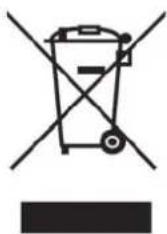
natural_image
Symbol of a trash bin crossed out by two diagonal lines, with no text or labels present.Attention:
Your product is marked with this symbol. It means that used electrical and electronic products should not be mixed with general household waste. There is a separate collection system for these products.
1. In the European Union
Attention: If you want to dispose of this equipment, please do not use the ordinary dust bin! Used electrical and electronic equipment must be treated separately and in accordance with legislation that requires proper treatment, recovery and recycling of used electrical and electronic equipment.
Following the implementation by member states private households within the EU states may return their used electrical and electronic equipment to designated collection facilities free of charge*. In some countries* your local retailer may also take back your old product free of charge if you purchase a similar new one.
*) Please contact your local authority for further details.
If your used electrical or electronic equipment has batteries or accumulators, please dispose of these separately beforehand according to local requirements.
By disposing of this product correctly you will help ensure that the waste undergoes the necessary treatment, recovery and recycling and thus prevent potential negative effects on the environment and human health which could otherwise arise due to inappropriate waste handling.
2. In other Countries outside the EU
If you wish to discard this product, please contact your local authorities and ask for the correct method of disposal.
For Switzerland: Used electrical or electronic equipment can be returned free of charge to the dealer, even if you don't purchase a new product. Further collection facilities are listed on the homepage of www.swico.ch or www.sens.ch.
WARNING
Do not install the refrigerator in a damp or wet location ■ as this may cause damage to the insulation and a leakage. Condensation may also build on the outer cabinet and cause rust.
In order to prevent possible electric shock, connect ■ the receptacle of earth to the earth terminal properly.
1 Keep adequate ventilation space around the refrigerator.
- The figure shows the minimum required space for installing the refrigerator. The measurement condition of power consumption is conducted under a different space dimension.
- By keeping greater space, the refrigerator may be operated under a less amount of power consumption.
- If using the refrigerator in the smaller space dimension than the below figure, it may cause the temperature rise in the unit, loud noise and failure.

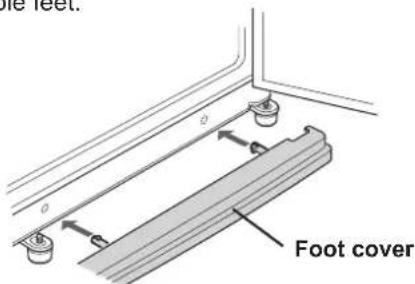
2 Use the two front adjustable feet, to ensure that the refrigerator is positioned firmly and flat on the floor.

3 Clip the foot cover (supplied inside the refrigerator compartment) in the position on the front of the two adjustable feet.
NOTE
Position your refrigerator so that the plug is accessible. • Keep your refrigerator out of direct sunlight. • Do not place next to heat generating appliance.
- Do not place directly on the ground. Provide suitable stand.
Before using your refrigerator
Clean the inside parts with a cloth soaked in warm water. If soapy water is used, wipe it off thoroughly with water.
Before transporting
- Wipe up water in the evaporating pan. Before wiping up the water, wait more than 1 hour after pulling out the plug because the refrigeration cycle equipment is extremely hot. (The evaporating pan is located on the rear of the product.)

NOTE
Do not bend or damage the ductwork located on the inside of the evaporating pan. It may cause failure.
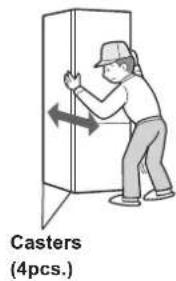
When transporting
- The casters allow the refrigerator to move back and forth. - Carry the refrigerator by holding the handles located on the rear and the bottom.

When the door is heavy to open
When one side door is heavy
- When the left side is heavy, lower the right side adjustable foot. (Until the opposite side adjustable foot is slightly off-ground.)

- When the right side is heavy, lower the left side adjustable foot.
When both sides are heavy
- When the refrigerator is tilted backwards, insert a wooden board (with relatively large width), etc. between the rear of the refrigerator and the floor to adjust the tilting.


- LED lights
- Hybrid cooling panel (Aluminum panel)
The panel is cooled from the rear, thus indirectly cools the refrigerator compartment. In this way, food is refrigerated gently, without exposing it to cold air flow.
- Refrigerator shelves
(SJ-WM322T : 2 pcs. SJ-WM362T : 3 pcs.)
- Fruit & vegetable shelf
The airflow to the vegetable crisper can be controlled by moving the vent hole lever to the right or left.

natural_image
Diagram of a device with a top panel and internal ports, showing directional arrow (no text or symbols)- Fruit & vegetable crisper
- Divider
- Shelf
- Chilled case
- Control panel
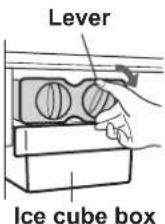
- Ice cube maker
1) Do not over fill the ice cube trays; otherwise the ice cubes will be joined together when frozen.
2) When the ice cubes are made, turn the lever clockwise to empty the ice into the ice cube box.
NOTE
To prevent damage to the ice cube box, do not make ice in the ice cube box or pour oil into it.
- Ice cube box
- Freezer case (top)
- Freezer case (middle)
- Freezer case (bottom)
- Freezer shelf
- Foot cover
- Casters (4 pcs.)
- Adjustable feet (2 pcs.)
- Utility pocket cover
- Utility pocket
- Egg holder
- Door pockets (2 pcs.)
- Bottle stopper / Tube stand Prevents bottles etc. from falling. Stick-type food products stored inside
- Bottle pocket
- Magnetic door seals (2 pcs.)

Deodorizing unit
Deodorizing catalyst is installed on the routes of cold air. No operation and cleaning are required.
More foods can be stored by removing the following accessories as indicated in the figure below.
Chilled case, Ice cube maker, Ice cube box, Freezer case (top & middle)
- If the refrigerator is operated with these accessories taken out, it will work under the most energy-efficient condition.
- Please do not remove Freezer case (bottom).

natural_image
Illustration of a refrigerator with doors, shelves, and storage compartments (no text or symbols)OPERATION
Control panel
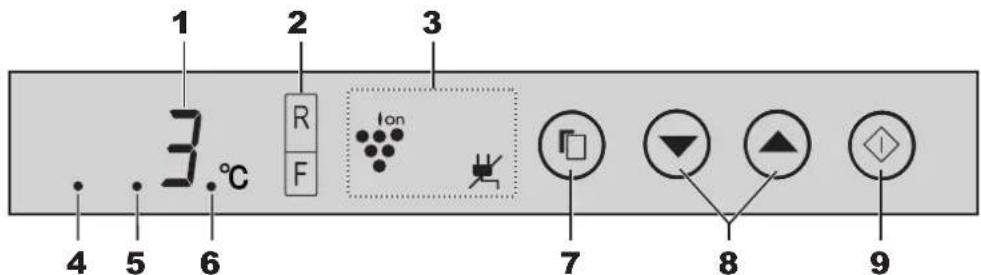
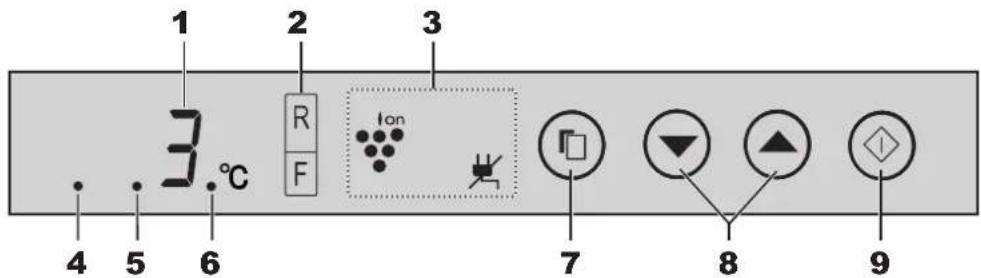
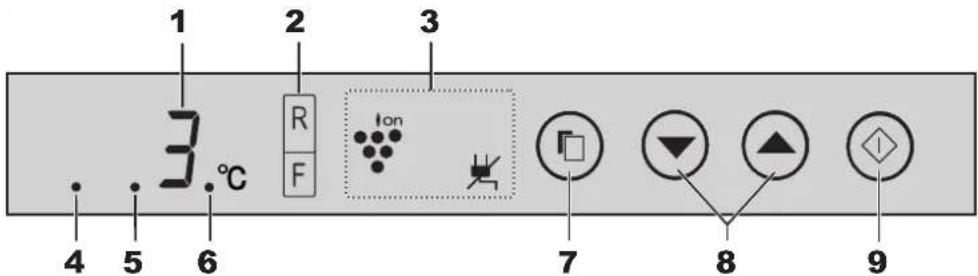
1. Display for temperature setting
The preset temperature of selected compartment is displayed. It is not the actual temperature in the compartment.
2. Display for controlling temperature
The temperature of refrigerator and freezer can be selected. The indicator of the temperature will light when the compartment is selected to change its temperature.
3. Display for feature icon
Icons of features in operation are displayed.

Plasmacluster

Power failure
4. Energy saving indication
This indication shows energy saving "ON".
5. Sound ON/OFF indication
This indication shows sound "OFF".
6. Door alarm indication
This indication shows door alarm "ON".
(Door alarm is only for the refrigerator compartment.)
7. Select button
Press to select feature icon and door alarm signal.
8. ▼ button
Press to select feature ON/OFF or temperature setting.
9. ◇(Enter) button
Finalize the setting.
NOTE
Features start automatically like right figure when inserting the power plug. (The initial content is only Door alarm "ON".)
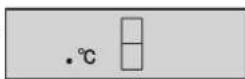
When there is no operation for 1 minute, the display will automatically return to the initial content. Additionally, the display will be turned off when there is no operation for 1 minute.
When either of the button is pressed, the display will blink • once and show the initial content.
When the refrigerator stops with power failure, the display shows similarly as before having a power failure at the time of re-power distribution.

Plasmacluster
The ionizer inside your refrigerator releases clusters of ions, which are collective masses of positive and negative ions, into the refrigerator compartment.
These ion clusters inactivate airborne mold fungus.


chemical
Chemical reaction showing molecular transformation of a mold fungus to form a cross-shaped organic molecule with hydroxyl groups1 Press the Select button and select Plasmacluster icon.

2 Press the ▲utton. [ :ON, :OF]

3 Press the ◆ button.
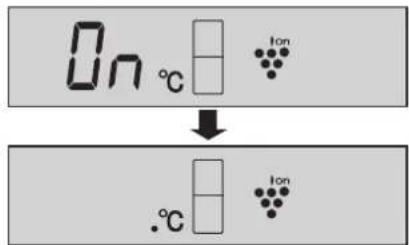
To cancel operation
It is the same method as starting operation. Press the ▼ button in step 2.

NOTE
- There may be a slight odor in the refrigerator. This is the smell of ozone generated by the ionizer. The amount of ozone is minimal, and quickly decomposes in the refrigerator.
Controlling Temperature
The refrigerator controls its temperature automatically. However, if needed, adjust the temperature as follows.

GB
Refrigerator compartment
Adjustable between 0°C and 6°C in steps of 1°C.
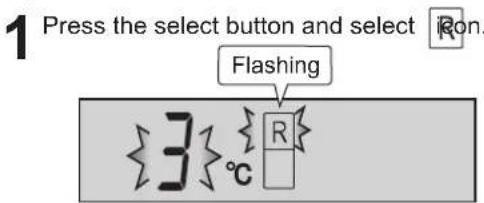
2 Press the ▲ button and set the temperature. [▲: increase, ▼ decrease]

2 Press the button.

Freezer compartment
Adjustable between -13^ and -21^ in steps of 1^ .

2 Press the ▲ ▼ button and set the temperature. [▲: increase, ▼ decrease]
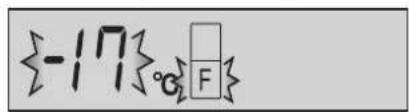
3 Press the ◆ button.

Advanced Setting of Refrigerator compartment
The temperature of refrigerator compartment can be adjusted in steps of 0.5^ C by following steps ① to ③ below.
① Select ☐ Ron.
② Press button continuously for 3 seconds or more.
③ Adjust the temperature in the same way as steps 2 to 3 above.
Follow steps ① to ② again if you want to adjust the temperature in steps of 1°C.
Beep beep beep


Power Failure
While this feature is operating, it will indicate the rise of inside temperature caused by power failure or something.
1 Press the select button and select the power failure icon. (The icon is orange.)

![2 Press the ▲utton. [ ▲ : ON, ▼OFF ] {On}c {#}](/content/2026/05/1003153/images/31c4bb7a3ba3be3dbdd6a312587d33850e92aaef0abed9c08ae08391058a470c.jpg)
3 Press the ◊ button.
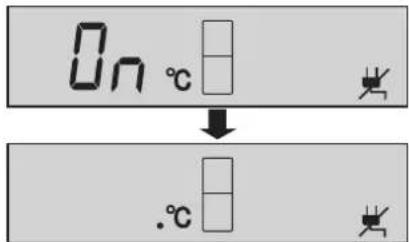
To cancel operation
It is the same method as starting operation. Press the ▼ button in step 2.

Indication of power failure
- At the time of repower, if the inside temperature of the refrigerator and freezer compartment becomes as follows, R: more than 7°C, F: more than -10°C, power failure icon will blink slowly.
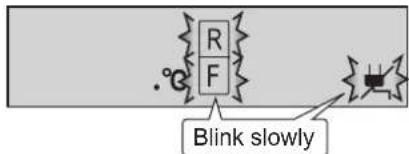
- Check the quality of food before you eat.
How to cancel the indicator blink
Press the ◆ button while the icons are blinking.
Door Alarm
- When the refrigerator door is left open, the door alarm will sound.
- The door alarm will sound in 1 minute after opening the door and again after 1 minute (once in each case).
- If the door is left open for approx. 3 minutes, the alarm will sound continuously.
- At first, door alarm is set "ON".
To cancel operation
1 Press the select button and select the door alarm indication like the below figure.

![2 Press the ▼button. [ ▲ : ON, ▼OFF ] OFF](/content/2026/05/1003153/images/b25c4981c931eba8ad1f983f72e4ac0be738044a1272a4bb4a87a35bdc191a71.jpg)
To start operation
It is the same method as canceling operation. Press the ▲ button in step 2.

Sound ON/OFF
Use this feature to turn off the sound of key operation.

GB
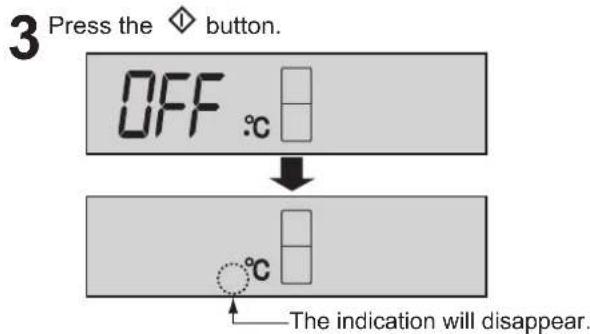
1 Press the ▼ button and ◊ button simultaneously and continuously for 3 seconds or more.


It shows the sound "OFF". The indication will disappear.
To set sound "ON"
Press the ▼ button and ◆ button simultaneously and continuously for 3 seconds or more again.

Energy Saving
Use this feature when you want to switch the appliance to energy-saving operation.
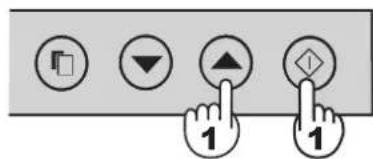
1 Press the ▲ button and ◇ button simultaneously and continuously for 3 seconds or more.

To cancel operation
Press the ▲ button and button simultaneously and continuously for 3 seconds or more again.

NOTE
While this feature is operating, the inside temperature of the refrigerator and freezer compartment will be higher than the preset temperature as follows; R: about 1°C, F: about 2°C. (If the preset temperature is set at R: 3°C, F: -18°C.) The displayed temperature will not be changed.
The efficiency of power saving depends on the usage environment (controlling temperature, ambient temperature, frequency of opening or closing the door, amount of food).
Cancel this feature when you feel the beverages are not cooled enough or ice making takes time.
Tips for saving energy
- Keep the ventilation space as much as possible around the refrigerator.
- Keep your refrigerator out of direct sunlight, and do not place next to heat generating appliance.
■ Open your refrigerator door as briefly as possible.
■ Hot foods should be cooled before storing.
■ Place the food evenly on the shelves to allow the cooling air to circulate efficiently.
The amount of power consumption of this model is measured according to the international standard of the refrigerator performance.
• The amount of power consumption of this model is measured under the space dimensions on the right figure.
- The amount of power consumption of this model is measured with some accessories taken out as indicated in the right figure.


natural_image
Illustration of a double-door refrigerator with shelves and doors (no text or symbols)STORING FOOD

Refrigeration reduces the rate of food spoilage. To maximize the shelf life of perishable food products, ensure that the food is the freshest possible quality. The following is a general guide to help promote longer food storage.
Fruit / Vegetables
To minimize moisture loss, fruit and vegetables should be loosely enclosed in a plastic material e.g. wrap, bags (do not seal) and place in the vegetable crisper.
Dairy Products & Eggs
- Most dairy products have a use by date on the outer packaging which informs the recommended temperature and shelf life of the product.
- Eggs should be stored in the Egg holder.
Meats / Fish / Poultry
- Place on a plate or dish and cover with paper or plastic wrap.
- For larger cuts of meat, fish, or poultry, place to the rear of the shelves.
- Ensure all cooked food is wrapped securely or placed in an airtight container.
NOTE
Evenly place the food on the • shelves to allow the cooling air to circulate efficiently. Hot foods should be cooled • before storing. Storing hot foods increases the temperature in the unit and increases the risk of food spoilage.
Do not block the outlet and inlet of the cool air circulating circuit with foods or containers; otherwise the foods will not be evenly cooled throughout the refrigerator. Keep the door securely closed.

Do not place food directly in front of cold air outlet. This may lead to the food freezing.
For best freezing
• Quality of foods should be fresh.
- Freeze small quantities of food at a time to freeze them quickly.
- Food should be properly sealed, sealed tightly or covered.
• Evenly place the food in the freezer.
- Label bags or containers to keep an inventory of freezing food.
CARE AND CLEANING
GB
WARNING
Unplug the refrigerator first to prevent electric shock. ■ Do not splash water directly on the outer cabinet or ■ the interior. This may lead to rusting and deterioration of the electrical insulation.
IMPORTANT
To prevent cracking on inside surfaces and plastic components, follow these tips.
- Wipe any food oils adhered to plastic components.
- Some household chemicals may cause damage, so use only diluted washing-up liquid (soapy water).
- If undiluted detergent is used or soapy water is not wiped off thoroughly, cracking of plastic parts can result.
1 Remove the accessories e.g. shelves from the cabinet and door. Wash them in warm soapy dishwashing water; rinse in clean water and dry.
2 Clean the inside with a cloth soaked in warm soapy dishwashing water. Then, use cold water to wipe off soapy water.
3 Wipe the exterior with a soft cloth each time it is soiled.
4 Clean the magnetic door seal with a toothbrush and warm soapy dishwashing water.
5 Wipe the control panel with the dry cloth.
NOTE
To prevent damage to your refrigerator, do not use heavy duty cleansers or solvents (lacquer, paint, polishing powder, benzine, boiled water, etc.) If the power supply is disconnected, please wait for at least 5 minutes before re-connecting power. The glass shelves weigh approximately 2kg each. Hold firmly when removing from the cabinet or carrying. When dropped the juice and the like near the control panel, wipe off directly. It becomes cause of failure of the control panel. Do not drop objects inside the refrigerator or strike the inner wall. This may cause the inner surface to crack.
Defrosting
Defrosting is fully automatic due to a unique energy saving system.
When the compartment light is blown
Contact the service agent approved by SHARP to request a replacement compartment light. The compartment light is not to be removed other than by qualified service personnel.
Switching off your refrigerator
If you switch your refrigerator off when you are going away for an extended period, remove all food, clean the interior thoroughly. Remove the power cord plug from the power socket and leave all doors open.
BEFORE YOU CALL FOR SERVICE
Before you call for service, check the following points.
| Problem Solution | |
| The outside of the cabinet is hot when touched. | It is normal. The hot pipe is in the cabinet in order to prevent dew generation. |
| When there is refrigerator noise. It is normal for the refrigerator to produce the following sounds.Loud noise produced by the compressor when operation starts --- Sound becomes quieter after a while.Loud noise produced once a day by the compressor --- Operating sound produced immediately after automatic defrost operation.Sound of flowing fluid (gurgling sound, fizzing sound) --- Sound of refrigerant flowing in pipes (sound may become louder from time to time).Cracking or crunching sound, squeaking sound--- Sound produced by expansion and contraction of inner walls and internal parts during cooling. | |
| Frosting or dew generation occurs inside or outside the refrigerator. | This may occur in one of the following cases. Use a wet cloth for wiping frost and a dry cloth for wiping dew.When the ambient humidity is high.·When the door is frequently opened and closed.When foods containing plenty of moisture are stored. (Wrapping is required.) |
| The foods in the refrigerator compartment freeze. | ·Is the refrigerator operated for a long time with refrigerator temp. control set at 0°C?·Is the refrigerator operated for a long time with freezer temp. control set at -21°C?·Low ambient temperature may cause placed foods to freeze even if refrigerator temp. control is set to 6°C. |
| It smells in the compartment. | ·Wrapping is required for the foods with strong smell.·Deodorizing unit cannot remove all of the smell. |
IF YOU STILL REQUIRE SERVICE
Refer to your nearest service agent approved by SHARP.
natural_image
Diagram showing two identical views of a folding cabinet with hands holding arrows indicating rotation (no text or symbols)natural_image
Simple line drawing of a cabinet with arrows indicating motion or force (no text or symbols)natural_image
Illustration of a human foot pressing down on a wall-mounted panel (no text or symbols visible)Δομή
Μηχανισμοί σώματος
natural_image
Symbol of a trash bin crossed out by two crossed lines, with a solid black rectangle below (no text or labels)natural_image
Diagram of a mechanical device with a central component and directional arrows, no visible text or symbolsnatural_image
Illustration of a refrigerator with open door, shelves, and drawer (no text or symbols)ΛΕΙΤΟΥΡΓΙΑ
Πίνακας ελέγχου

chemical
Chemical reaction diagram showing molecular interaction between μύκητας and μούχλας with a central reaction arrow
ΣΗΜΕΙΩΣΗ
natural_image
Diagram showing two mechanical or architectural components with directional arrows indicating movement, no text or symbols present.Zamykanie drzwi
natural_image
Simple line drawing of a door with a handle and decorative elements, no text or symbols present.natural_image
Illustration of a person's foot pressing down on a mechanical component (no text or symbols visible)Struktura
Mechanizmy korpusu
natural_image
Symbol of a trash bin crossed out by two crossed lines, with a solid black rectangle below (no text or labels)UWAGA
natural_image
Diagram of a mechanical device with a central shaft and directional arrow, no text or symbols presentnatural_image
Line drawing of a refrigerator with doors, shelves, and drawers (no text or symbols)OBSŁUGA
Panel sterujący

chemical
Chemical reaction diagram showing molecular transformation from 'pleśń' to a cross-shaped structure with multiple OH groupsWyłączenie funkcji
natural_image
Illustration of a refrigerator with doors open, showing internal compartments and storage areas (no text or symbols)
natural_image
Diagram showing two identical mechanical or architectural frame setups with hands holding arrows indicating rotation (no text or symbols)natural_image
Illustration of a foot pressing down on a wall-mounted panel (no text or symbols visible)Szerkezet
natural_image
Symbol of a trash bin with crossed lines indicating no waste or discharge, and a solid black rectangle below (no text or labels)Figyelem:
natural_image
Diagram of a device with a switch and internal components, no visible text or symbolsnatural_image
Line drawing of a refrigerator with doors, shelves, and drawers (no text or symbols)MÜKÖDTETÉS
Vezérlőpanel

chemical
Chemical reaction diagram showing penészgomba reacting with a molecular structure
Áramszünet
MEGJEGYZÉS
ÉLELMISZER-TÁROLÁS

natural_image
Diagram showing two identical mechanical or architectural views with hands holding arrows, no text or symbols present.La închiderea uşii
natural_image
Simple line drawing of a door with a handle and decorative elements, no text or symbols present.
natural_image
Illustration of a person's foot stepping on a wall-mounted panel, showing mechanical components and alignment (no text or symbols)Structură
Mecanisme corp
natural_image
Symbol of a trash bin crossed out by two crossed lines, with a solid black rectangle below (no text or labels)Atentie:
Produsul
natural_image
Diagram of a medical or laboratory setup with a monitor and device, no visible text or symbolsnatural_image
Illustration of a refrigerator with open door, shelves, and drawer compartments (no text or symbols)chemical
Chemical reaction diagram showing clupercl de micegal reacting with a molecular structure
Pană de curent
NOTĂ

natural_image
Illustration of a refrigerator with open doors and internal compartments (no text or symbols)PĂSTRAREA ALIMENTELOR

natural_image
Diagram of a door frame with a hand inserting a valve, showing no text or symbols
natural_image
Diagram of a door frame with an arrow indicating left-hand rule (no text or symbols)
Při zavírání dveří
natural_image
Illustration of a human foot pressing down on a mechanical component (no text or symbols visible)Struktura
Tělo mechanismu
natural_image
Symbol of a trash bin crossed out by two crossed lines, with a solid black rectangle below (no text or labels)Upozornění:
natural_image
Diagram of a desk and computer monitor with directional arrows indicating movement (no text or symbols)natural_image
Illustration of a refrigerator interior showing front and side views (no text or symbols)OBSLUHA
Ovládací panel

chemical
Chemical reaction showing houbovitá pliseň reacting to form a cross-linked molecular structure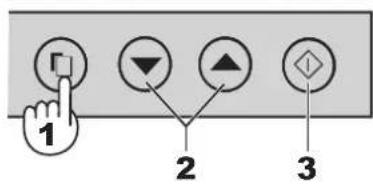
Zrušení operace
ULOŽENÍ POTRAVIN


natural_image
Diagram showing two identical mechanical or architectural views with arrows indicating rotation, no text or symbols present.Pri zatváraní dverí
natural_image
Diagram showing a foot pressing down on a metal bracket with an arrow indicating force direction (no text or symbols)natural_image
Simple line drawing of a cabinet with a handle and arm, no text or symbols presentNedávajte predmety na držiak valčekov. Dvere sa nebudú dat zatvorit.
natural_image
Line drawing of a person's foot pressing down on a wall-mounted panel (no text or symbols)Konštrukcia
natural_image
Symbol of a trash bin crossed with no text or labels, accompanied by a black rectangular block below (no readable text or symbols)Pozor:
natural_image
Diagram of a mechanical device with a lever and directional arrow, no visible text or symbolsZásuvka na ovocie a zeleninu5.
Deliaca doska6.
Polica7.
Priehradka na chladenie8.
Ovládací panel9.
Výrobník l'adu10.
natural_image
Illustration of a refrigerator with shelves and doors, no text or symbols presentPREVÁDZKA
Ovládací panel

chemical
Chemical reaction diagram showing molecular transformation from plesen to a cyclic structure with hydroxyl groups1 Stlačte tlačidlo vol'by a vyberte ikonu Plasmacluster.

2 Stlačte tlačidlo ▲ [ ▲: ON (ZAP), ▼: OFF (VYP) ]

Zrušit' činnost'
natural_image
Diagram showing two identical mechanical or architectural frame setups with hands holding arrows indicating rotation (no text or symbols)Uždarydami duris
natural_image
Illustration of a person's foot stepping on a wall-mounted panel with a spring, no text or symbols presentStruktūra
natural_image
Symbol of a trash bin crossed out by two crossed lines, with a solid black rectangle below (no text or labels)Dèmesio:
Šviesos diodu ekrano lemputės1.
Hibridinis šaldymo skydelis (aliuminio skydelis)2.
natural_image
Diagram of a mechanical device with a table and control panel, no visible text or symbolsnatural_image
Diagram of a refrigerator with open door, shelves, and drawer (no text or labels)APTARNAVIMAS
Valdymo pultas

chemical
Chemical reaction diagram showing pelleisinin-grybelis reacting with a triphosphate bond to form a cyclic compound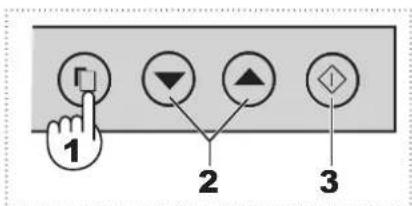
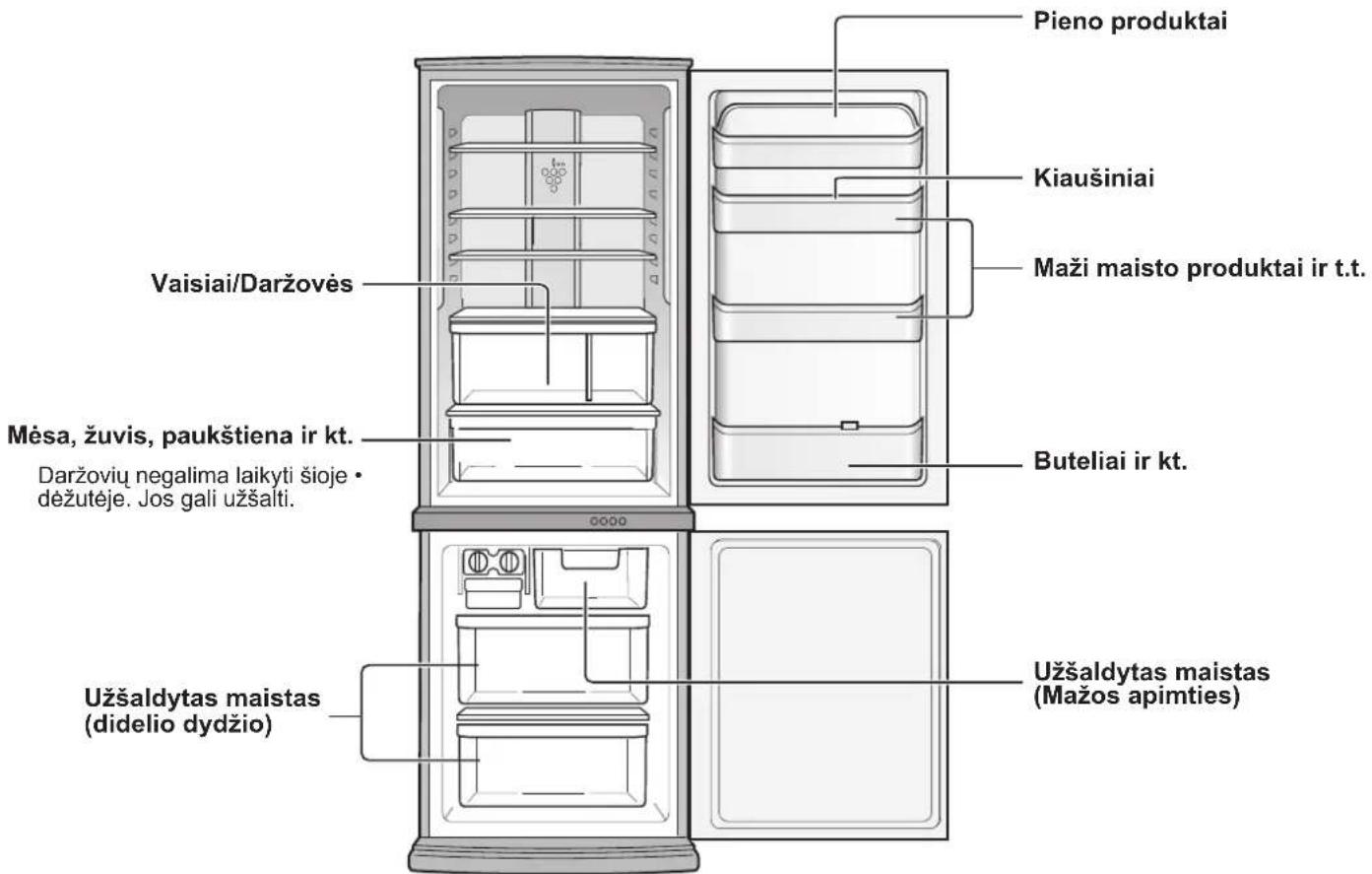
MAISTO LAIKYMAS
natural_image
Diagram showing two identical views of a refrigerator with hands holding arrows indicating rotation (no text or symbols)Durvju aizvēršana
natural_image
Illustration of a foot pressing down on a wall-mounted bracket (no text or symbols)Uzbüve
Korpusa mehānisms
natural_image
Symbol of a trash bin crossed with no text or labels, accompanied by a black rectangular block below (no readable text or symbols)Uzmanību!
natural_image
Diagram of a device with a table and control panel, showing no text or symbolsAuglu un dârzenu nodalijums5
Sadalītājs6.
Plaukts7.
natural_image
Diagram of a refrigerator with doors open, showing internal compartments and storage areas (no text or labels)DARBİBA
Vadības panelis
chemical
Chemical reaction diagram showing reagent 'rauga sēnites' transforming into a cross-shaped structure with multiple OH groups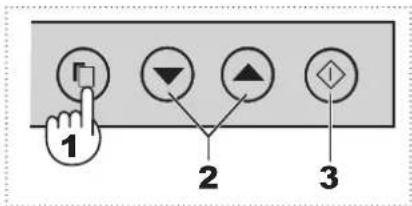

natural_image
Diagram of a door frame with a hand pulling an arrow, no text or symbols present
natural_image
Diagram of a door with an arrow indicating left-hand rule, no text or symbols present
Ukse sulgemine
natural_image
Line drawing of a person's foot pressing down on a wooden panel (no text or symbols)Ehitus
Põhiosa mehhanismid
natural_image
Symbol of a trash bin crossed out by two crossed lines, with a solid black rectangle below (no text or labels)Tähelepanu:
natural_image
Illustration of five workers in hard hats pulling a large cylindrical object (no text or symbols visible)
natural_image
Diagram showing a table and a directional arrow between two boxes (no text or symbols)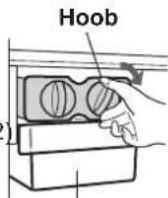
Jääkuubikukarp
MÄRKUS
natural_image
Illustration of a double-door refrigerator with shelves, drawers, and doors (no text or symbols)chemical
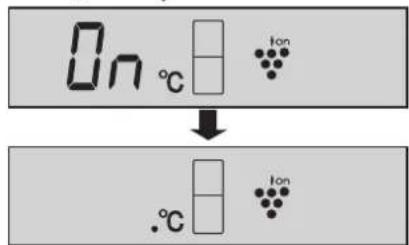
Chemical reaction diagram showing transformation of 'hallitusseen' molecules into a larger structure with multiple OH groups2 Vajutage ▲nuppu. [▲: ON (SEES), ▼OFF (VÄLJAS)]

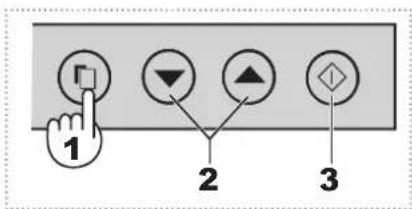
3 Vajutage -nappu.
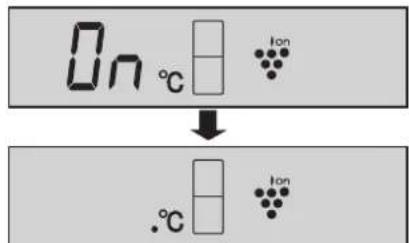
2 Vajutage ▲nuppu. [ : ON(SEES), : OFF(VÄLJAS) ]

3 Vajutage -nuppu.
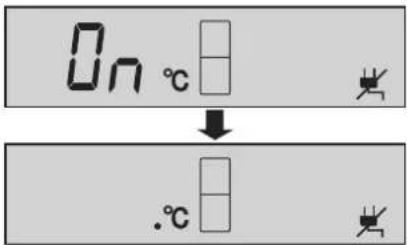

natural_image
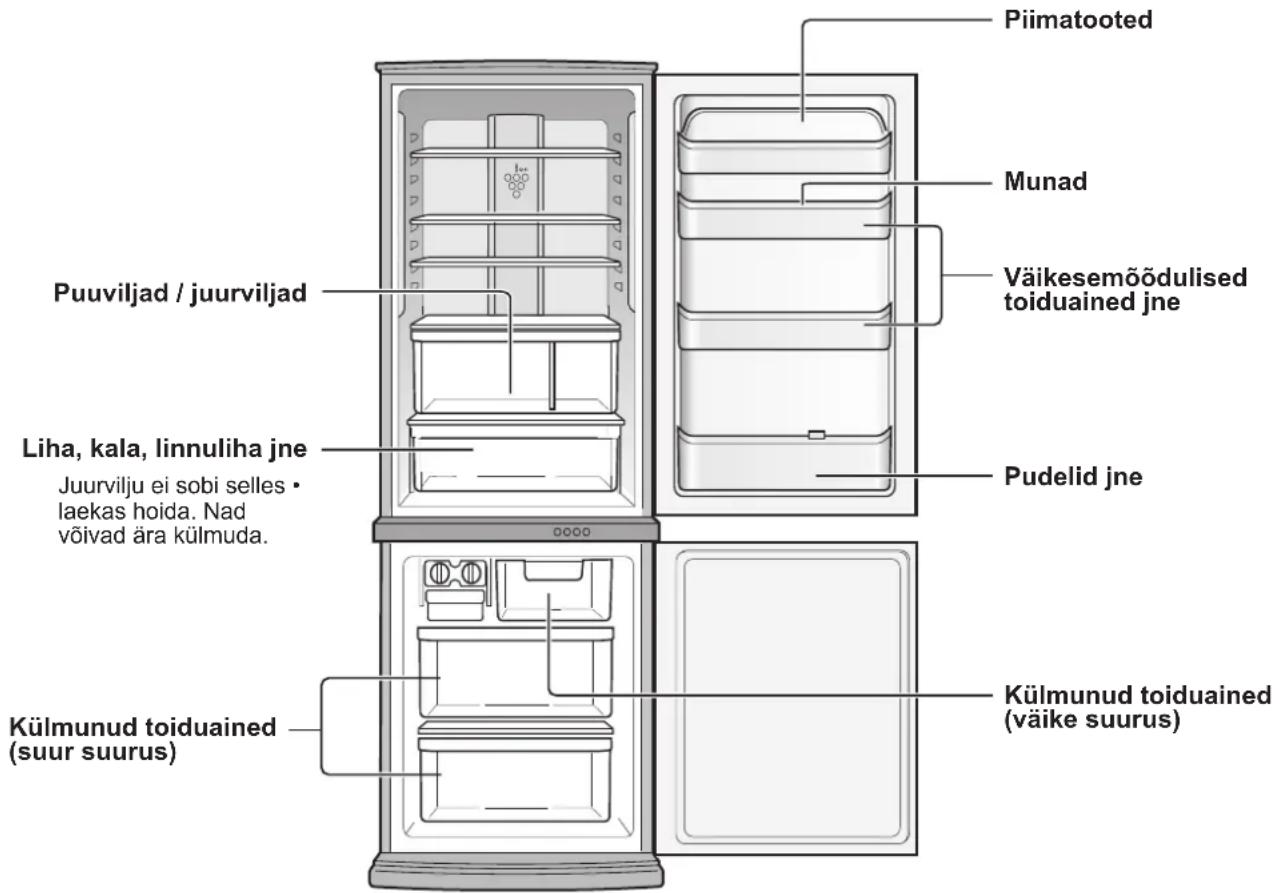
Illustration of a refrigerator with open door and side compartments (no text or symbols)TOIDUAINETE HOIDMINE
natural_image
Diagram showing two identical mechanical or architectural frame setups with hands holding arrows indicating rotation (no text or symbols)Zapiranje vrat
natural_image
Illustration of a person's foot pressing down on a mechanical component (no text or symbols visible)Tehnični sestav
Mehanizem na ohišju
natural_image
Symbol of a trash bin crossed out by two crossed lines, with a solid black rectangle below (no text or labels)Pozor:
natural_image
Diagram of a mechanical device with a central component and an arrow indicating direction (no text or symbols)OPOMBA
natural_image
Line drawing of a refrigerator interior showing front and side views (no text or symbols)DELOVANJE
Nadzorna plošča

Prikaz za nastavljanje temperature1.
Prikazana je prednastavljena temperatura izbranega predela. To ni dejanska temperatura v predelu.
Prikaz za nadzor temperature2.
chemical
Chemical reaction showing Plesniva goba reacting with a molecular structure, resulting in a cross-linked product.1 Pritisnite gumb za izbiro in izberite ikono Plasmacluster.

2 Pritisnite gumb ▲: ON(VKLOP), : OFF(IZKLOP)]


3 Pritisnite gumb ◆.

SHRANJEVANJE HRANE


natural_image
Two identical diagrams showing a door frame with arrows indicating rotation, no text or symbols present.natural_image
Illustration of a hand pressing down on a mechanical component (no text or symbols visible)Конструкция
(SJ-WM322T:26p. SJ-WM362T:36p.)
natural_image
Diagram of a mechanical device with a table and control panel, no visible text or symbolsnatural_image
Illustration of a refrigerator with doors, shelves, and storage compartments (no text or symbols)РАБОТА
Контролен панел

Дисплей за зададена температура 1.
chemical
Chemical reaction showing phosphorus ion (плесен) transforming into a triatomic molecule with hydroxyl groups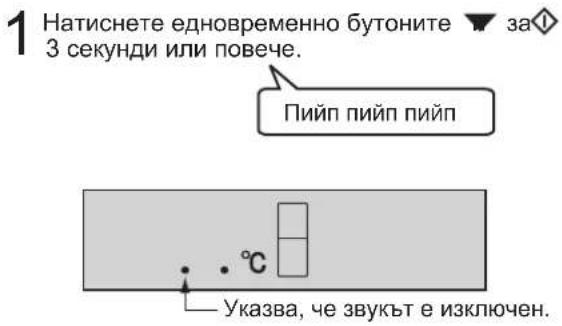

НАВЪТРЕ

НАВЪН
natural_image
Diagram showing two identical mechanical or architectural views with hands holding arrows, no text or symbols present.Закривання дверей
natural_image
Illustration of a human foot stepping on a wall-mounted device with a spring mechanism (no text or symbols)Будова
natural_image
Symbol of a trash bin crossed out by two crossed lines, with a solid black rectangle below (no text or labels)Увага:
Ваш прилад
позначений
даним символом.
Цим символом
позначається
електричне та
електронне
обладнання, яке не
natural_image
Illustration of five workers in hard hats pulling a large cylindrical object (no text or symbols visible)
natural_image
Line drawing of a refrigerator front view showing front panels, side shelves, and door (no text or symbols)ЕКСПЛУАТАЦІЯ
Панель керування
chemical
Chemical reaction showing Plesnevii gribbi reacting with a trioxide intermediatenatural_image
Diagram showing two identical views of a refrigerator with hands holding arrows indicating rotation (no text or symbols)natural_image
Simple line drawing of a cabinet with a handle and arm, no text or symbols presentnatural_image
Illustration of a foot pressing down on a wall-mounted panel (no text or symbols visible)Структура
Механізмы корпуса
natural_image
Symbol of a trash bin crossed out by two crossed lines, with a solid black rectangle below (no text or labels)Увага:
Гэты прадукт
маркіраваны
дадзеным сімвалам.
Гэта азначае,
што электрычные
і электронныя
вырабы не павінны
ўтылізавацца са
звычайнымі бытавымі
адходами. Існуе
natural_image
Simple line drawing of a cabinet with a lid and drawer, no text or symbols presentВыпарная чаша
УВАГА
natural_image
Illustration of five workers in hard hats pulling a large cylindrical object (no text or symbols visible)
natural_image
Pure technical diagram of a mechanical or structural component with no visible text, numbers, or symbolsЗадняя сценка
natural_image
Diagram of a device with a table and control panel, no visible text or symbolsnatural_image
Illustration of a refrigerator with open doors and internal compartments (no text or symbols)KIPABAHHE
Панэль кіравання

chemical
Chemical reaction diagram showing transformation of a hydrocarbon molecule with vinyl groups to form a cyclic structure
Адмена аперацыі
Federal Republic of Germany
Printed in Thailand
- GB CONTENTS
- GR ΠΕΡΙΕΧΟΜΕΝΑ
- When closing the door
- WARNING
- NOTE
- Structure
- WARNING CAUTION
- Information on Disposal for Users (private households)
- Attention:
- In the European Union
- In other Countries outside the EU
- Before using your refrigerator
- Before transporting
- When transporting
- When the door is heavy to open
- When one side door is heavy
- When both sides are heavy
- Deodorizing unit
- More foods can be stored by removing the following accessories as indicated in the figure below.
- OPERATION
- Control panel
- Display for temperature setting
- Display for controlling temperature
- Display for feature icon
- Energy saving indication
- Sound ON/OFF indication
- Door alarm indication
- Select button
- ▼ button
- ◇(Enter) button
- Plasmacluster
- Press the Select button and select Plasmacluster icon.
- Press the ▲utton. [ :ON, :OF]
- Press the ◆ button.
- To cancel operation
- Controlling Temperature
- Refrigerator compartment
- Freezer compartment
- Advanced Setting of Refrigerator compartment
- Power Failure
- Indication of power failure
- How to cancel the indicator blink
- Door Alarm
- To start operation
- Sound ON/OFF
- To set sound "ON"
- Energy Saving
- Tips for saving energy
- STORING FOOD
- Fruit / Vegetables
- Dairy Products & Eggs
- Meats / Fish / Poultry
- For best freezing
- CARE AND CLEANING
- IMPORTANT
- Defrosting
- When the compartment light is blown
- Switching off your refrigerator
- BEFORE YOU CALL FOR SERVICE
- IF YOU STILL REQUIRE SERVICE
- Δομή
- ΛΕΙΤΟΥΡΓΙΑ
- Πίνακας ελέγχου
- ΣΗΜΕΙΩΣΗ
- Zamykanie drzwi
- Struktura
- UWAGA
- OBSŁUGA
- Panel sterujący
- Wyłączenie funkcji
- Szerkezet
- MÜKÖDTETÉS
- Vezérlőpanel
- Áramszünet
- MEGJEGYZÉS
- ÉLELMISZER-TÁROLÁS
- La închiderea uşii
- Structură
- Atentie:
- Pană de curent
- NOTĂ
- PĂSTRAREA ALIMENTELOR
- Při zavírání dveří
- OBSLUHA
- Ovládací panel
- Zrušení operace
- ULOŽENÍ POTRAVIN
- Pri zatváraní dverí
- Konštrukcia
- Pozor:
- Zásuvka na ovocie a zeleninu5.
- Deliaca doska6.
- Polica7.
- Priehradka na chladenie8.
- Ovládací panel9.
- Výrobník l'adu10.
- PREVÁDZKA
- Zrušit' činnost'
- Uždarydami duris
- Struktūra
- APTARNAVIMAS
- Valdymo pultas
- MAISTO LAIKYMAS
- Durvju aizvēršana
- Uzbüve
- Korpusa mehānisms
- Uzmanību!
- Auglu un dârzenu nodalijums5
- Sadalītājs6.
- Plaukts7.
- DARBİBA
- Vadības panelis
- Ukse sulgemine
- Ehitus
- Tähelepanu:
- Vajutage ▲nuppu. [▲: ON (SEES), ▼OFF (VÄLJAS)]
- Vajutage -nappu.
- TOIDUAINETE HOIDMINE
- Zapiranje vrat
- Tehnični sestav
- OPOMBA
- DELOVANJE
- Nadzorna plošča
- Prikaz za nastavljanje temperature1.
- Prikaz za nadzor temperature2.
- Pritisnite gumb za izbiro in izberite ikono Plasmacluster.
- Pritisnite gumb ▲: ON(VKLOP), : OFF(IZKLOP)]
- Pritisnite gumb ◆.
- SHRANJEVANJE HRANE
- Конструкция
- РАБОТА
- Контролен панел
- Дисплей за зададена температура 1.
- Закривання дверей
- Будова
- ЕКСПЛУАТАЦІЯ
- Панель керування
- Структура
- УВАГА
- KIPABAHHE
- Панэль кіравання
- Адмена аперацыі
Brand : SHARP
Model : SJ-WM322TWH
Category : Refrigerator