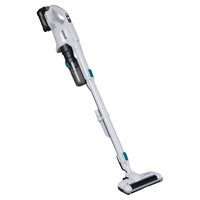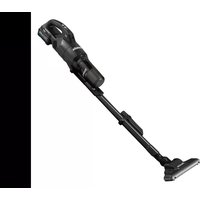
CL003G - Vacuum Cleaner MAKITA - Free user manual and instructions
Find the device manual for free CL003G MAKITA in PDF.


User questions about CL003G MAKITA
0 question about this device. Answer the ones you know or ask your own.
Ask a new question about this device
Download the instructions for your Vacuum Cleaner in PDF format for free! Find your manual CL003G - MAKITA and take your electronic device back in hand. On this page are published all the documents necessary for the use of your device. CL003G by MAKITA.
USER MANUAL CL003G MAKITA
natural_image
Line drawing of a handheld vacuum cleaner with attached lever mechanism (no text or symbols)
natural_image
Illustration of a hand holding a device with an arrow pointing to it, labeled 'Fig.1' (no text or symbols on the diagram itself)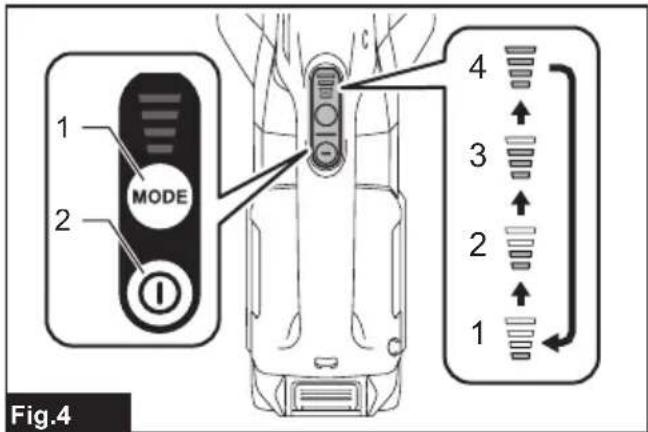
text_image
MODE 1 2 4 3 2 1 Fig.4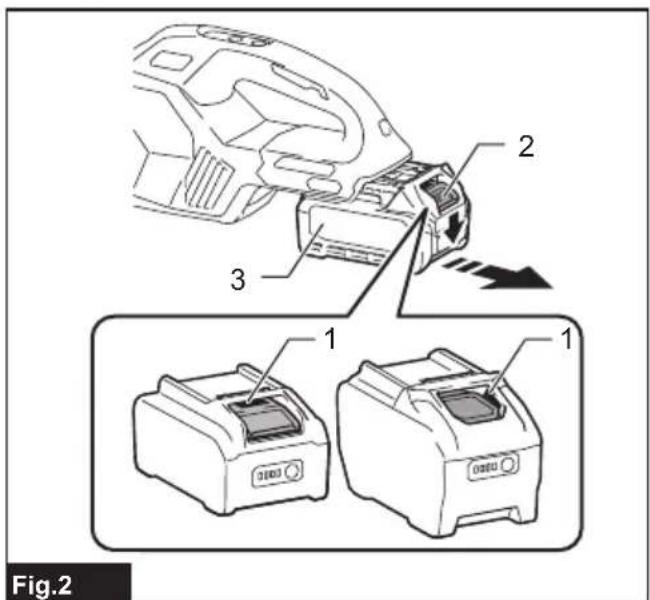
text_image
Fig.2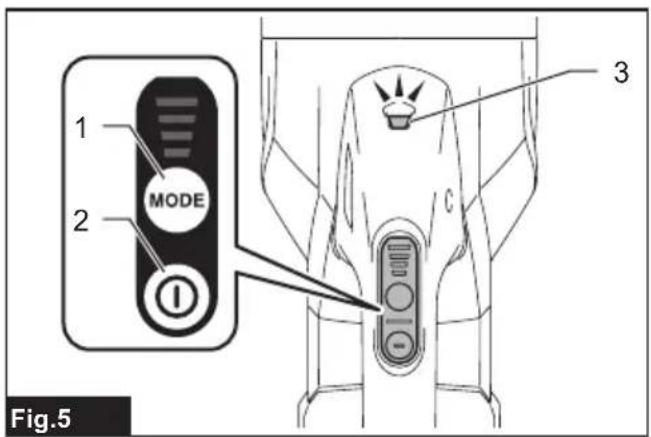
text_image
1 2 MODE 3 Fig.5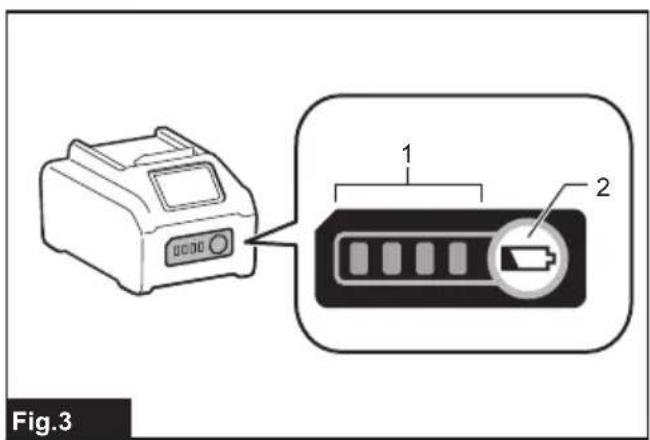
text_image
Fig.3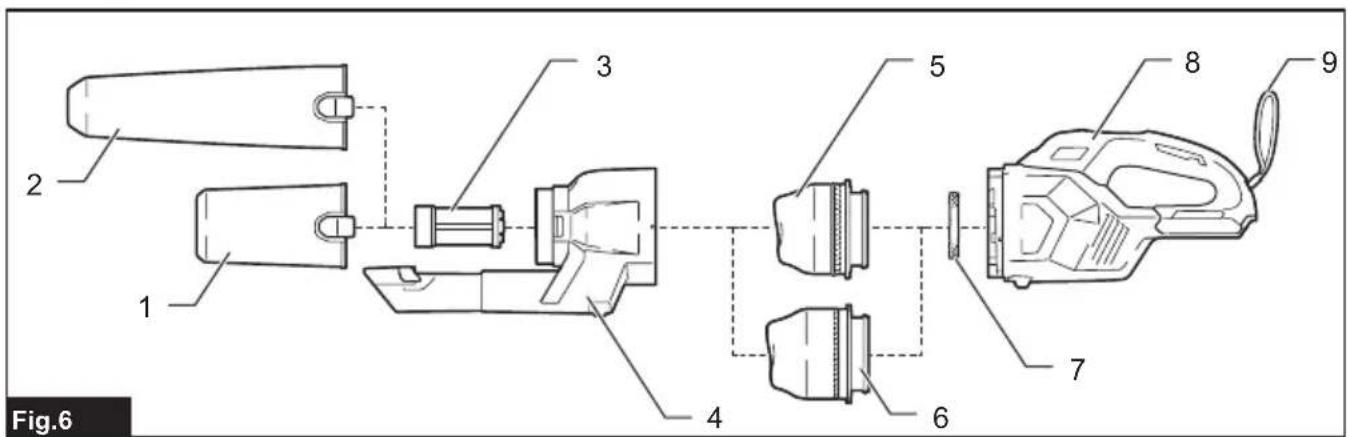
text_image
Fig.6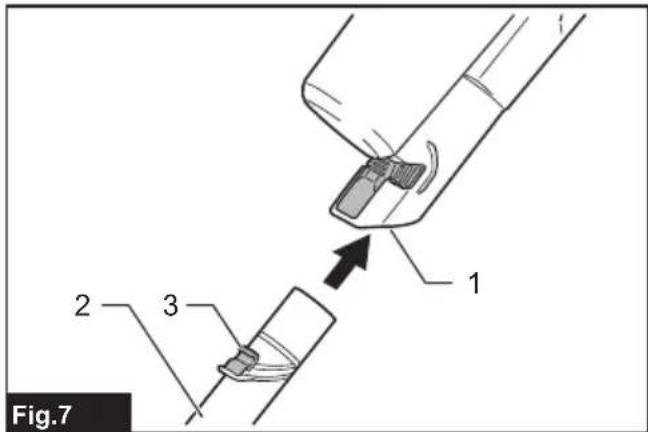
text_image
Fig.7 1 2 3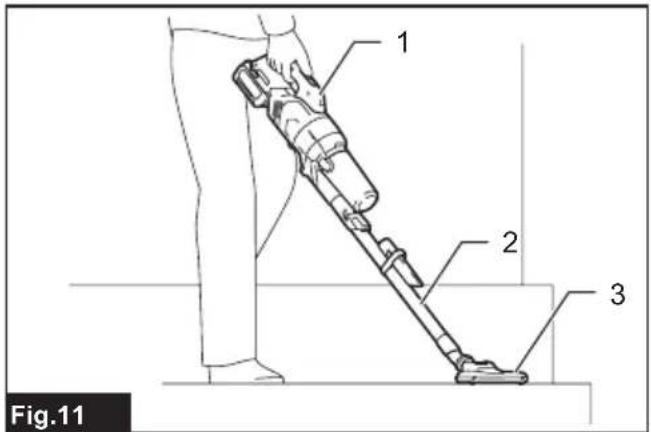
text_image
1 2 3 Fig.11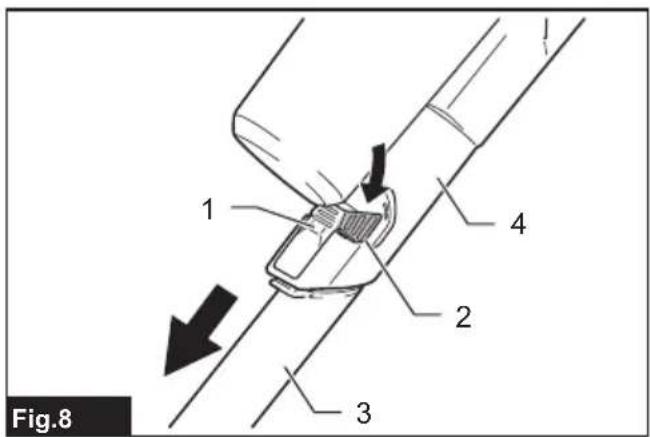
text_image
Fig.8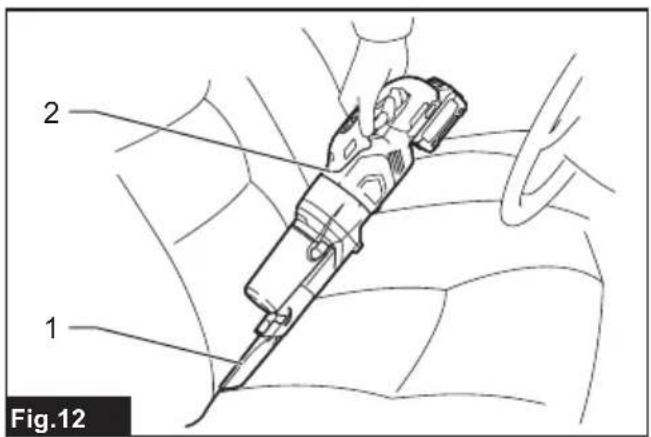
text_image
2 1 Fig.12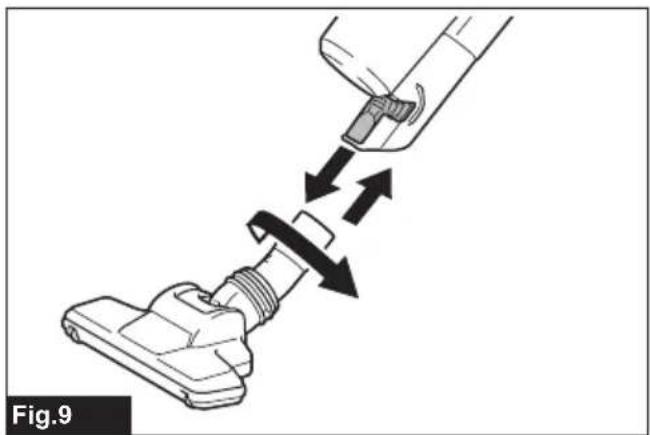
natural_image
Diagram of a vacuum cleaner's seat assembly with arrows indicating fastening (no text or symbols)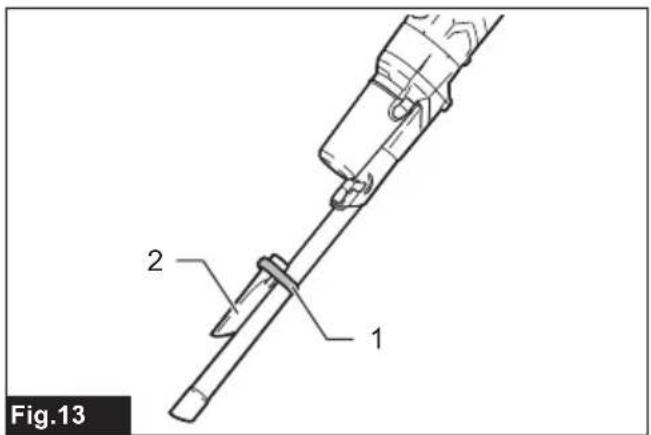
text_image
Fig.13 1 2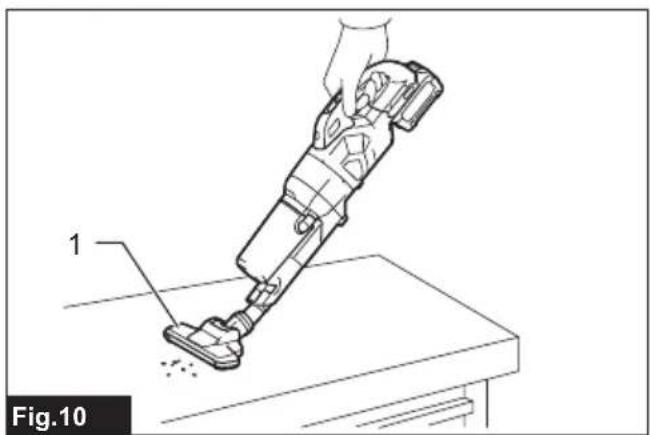
natural_image
Line drawing of a robotic vacuum cleaner on a workbench, labeled with component number 1 (no text or symbols beyond label)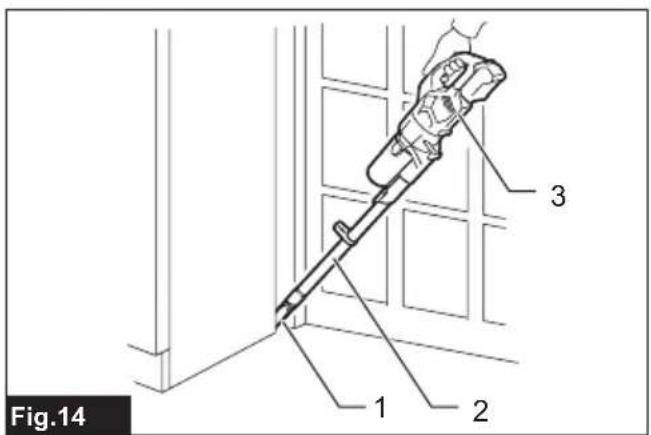
text_image
Fig.14 1 2 3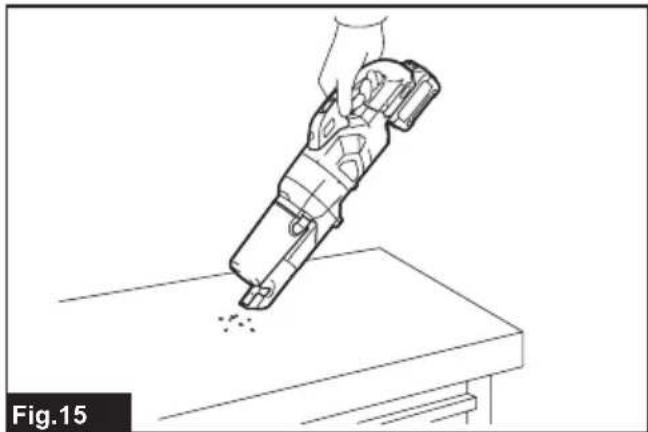
natural_image
Line drawing of a hand holding a handheld device above a workbench, with no visible text or symbols.
text_image
1 2 3 Fig.19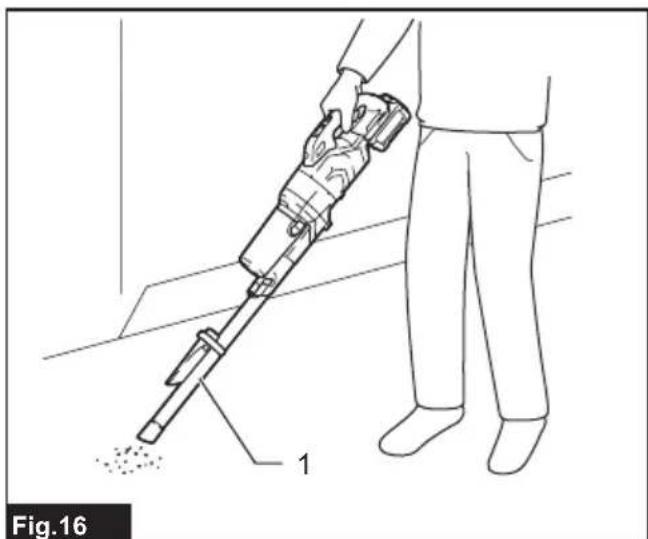
natural_image
Line drawing of a person using a handheld vacuum cleaner to clean or exhaust particles (no text or symbols)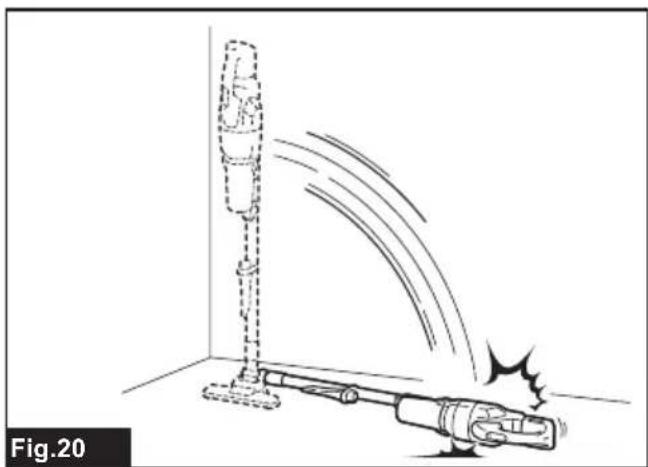
natural_image
Diagram of a robotic vacuum cleaner emitting exhaust smoke, labeled Fig.20 (no text or symbols on the diagram itself)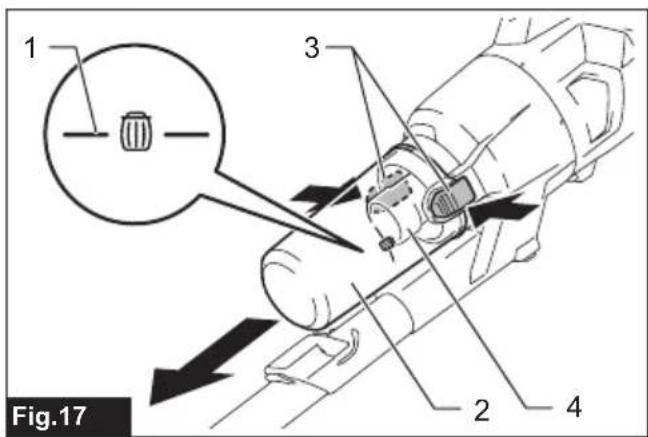
text_image
1 3 2 4 Fig.17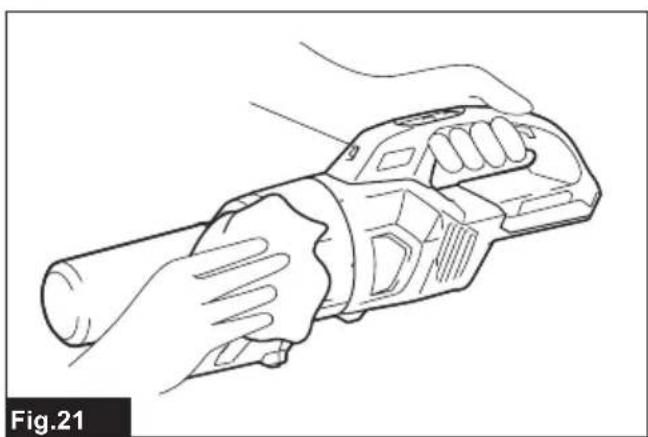
natural_image
Line drawing of a hand holding a cylindrical device (no text or symbols)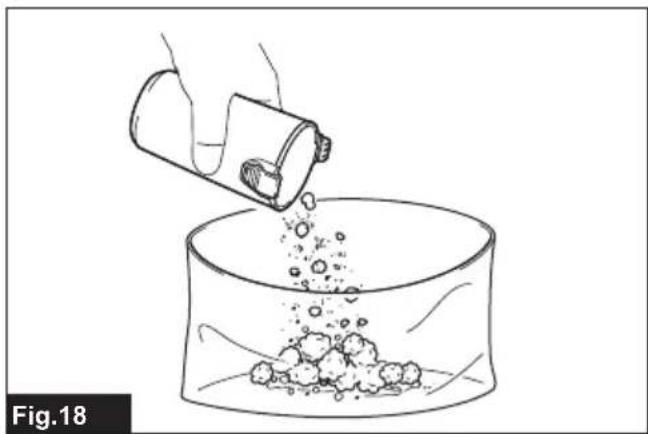
natural_image
Illustration of a hand pouring liquid from a container into a beaker filled with granular material (no text or symbols)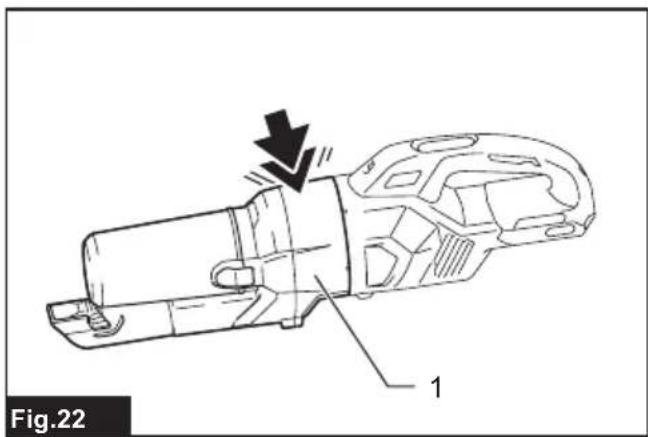
natural_image
Technical line drawing of a mechanical component with labeled parts (no text or symbols beyond label)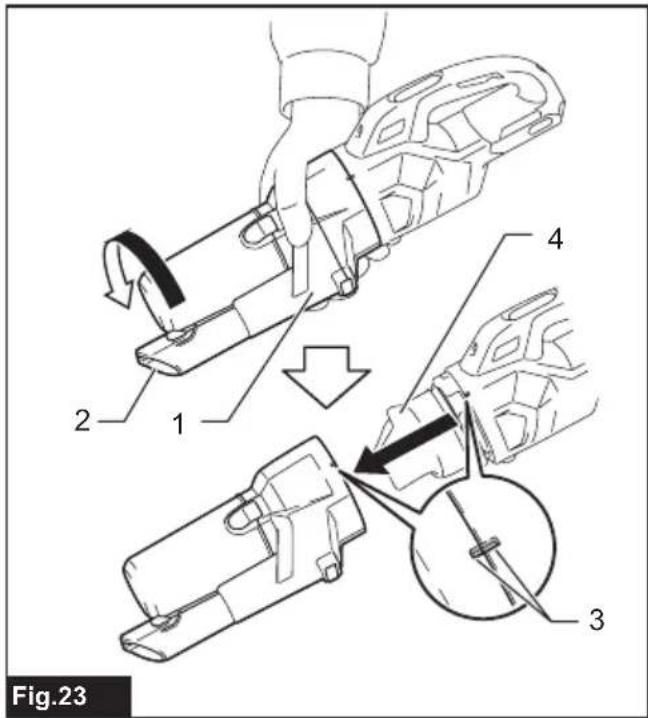
text_image
Fig.23
natural_image
Line drawing of a hand pouring liquid from a bottle into a beaker (no text or symbols)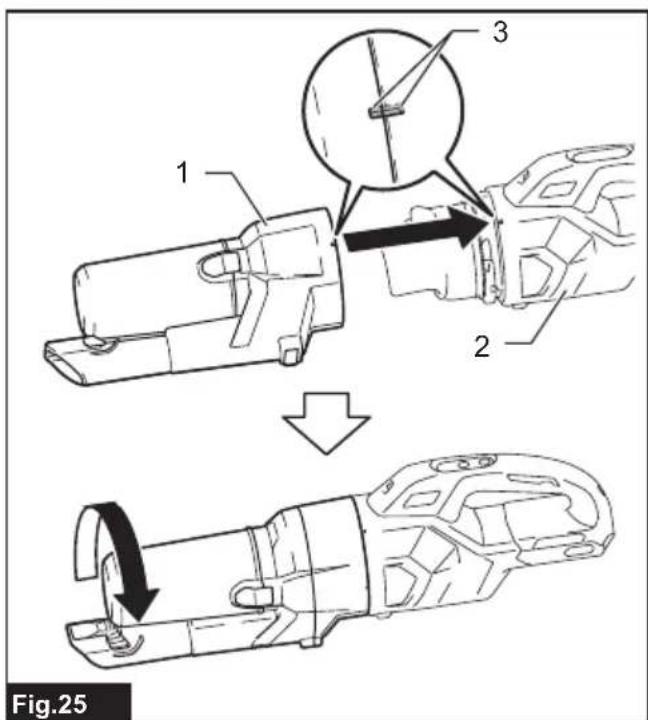
text_image
1 2 3 Fig.25
text_image
Fig.26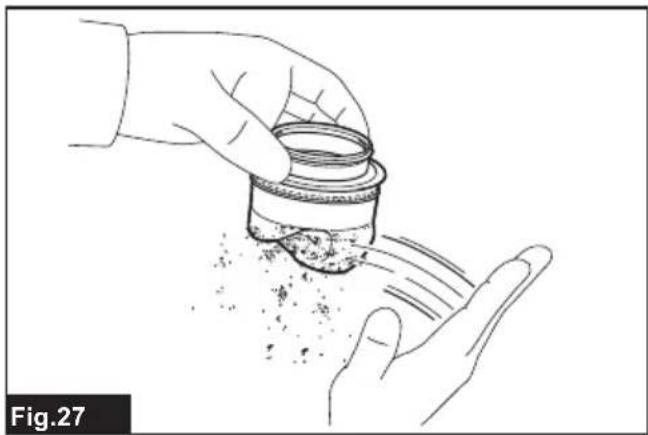
natural_image
Line drawing of two hands exchanging a container with granular substance, no text or symbols present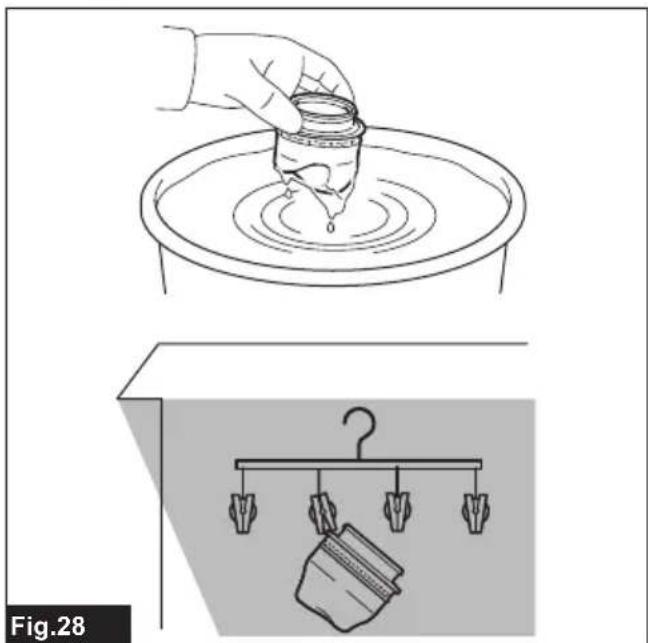
natural_image
Illustration showing a hand pouring liquid into a container on a rotating platform and a hanging container with a hook (no text or symbols)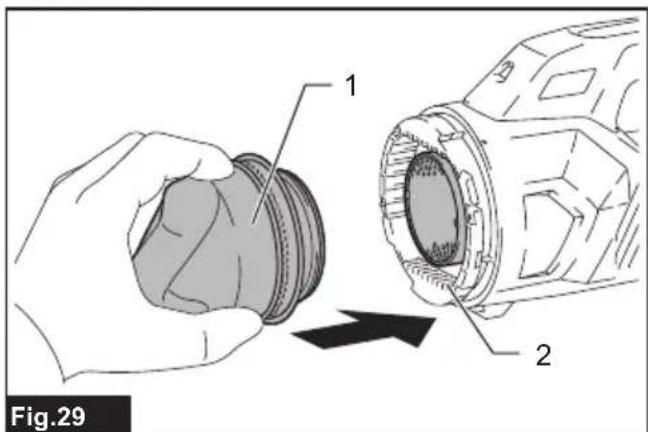
text_image
Fig.29 1 2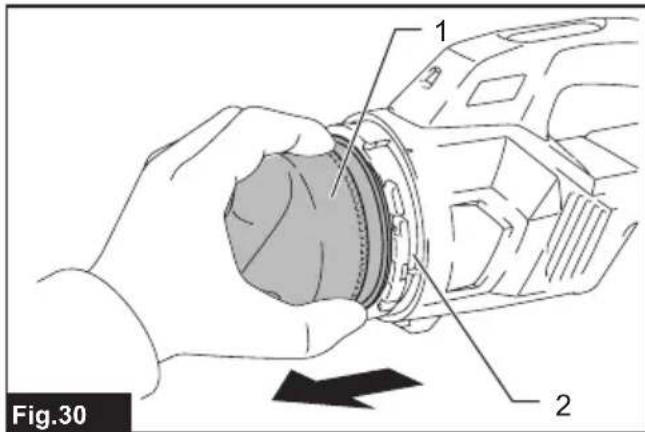
text_image
Fig.30 1 2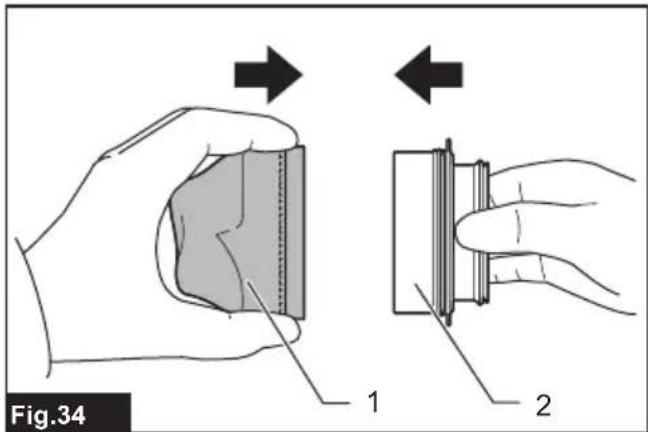
text_image
Fig.34 1 2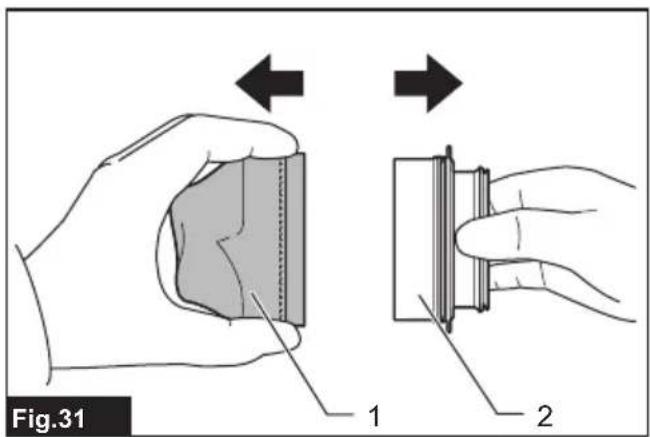
text_image
Fig.31 1 2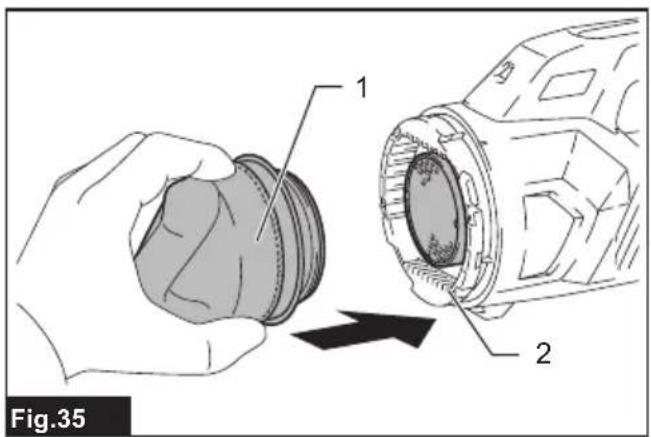
text_image
Fig.35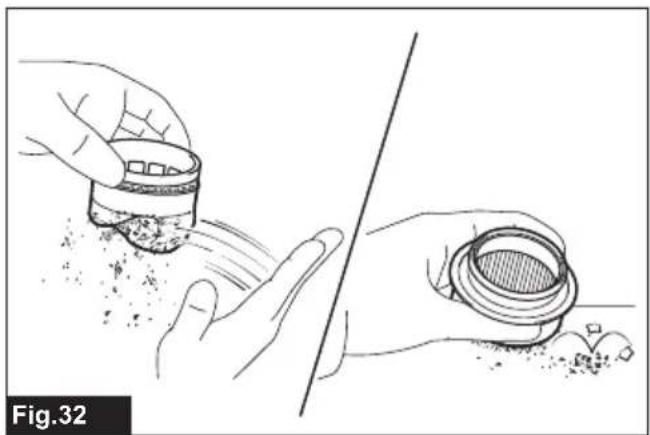
natural_image
Illustration of hands handling a container with granular material, separated by a diagonal line (no text or symbols)
text_image
Fig.36 1 2
natural_image
Illustration showing two containers on a platform above and a hanging clothes rack below, labeled Fig.33 (no text or symbols on the objects themselves)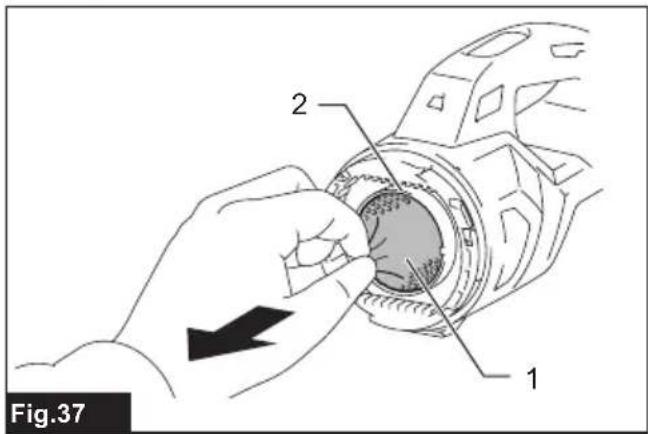
text_image
Fig.37 1 2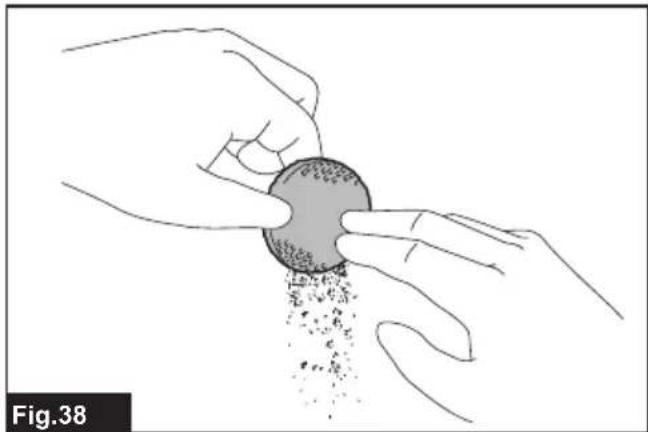
natural_image
Illustration of hands exchanging a circular object with granular powder, labeled Fig.38 (no text or symbols on the object itself)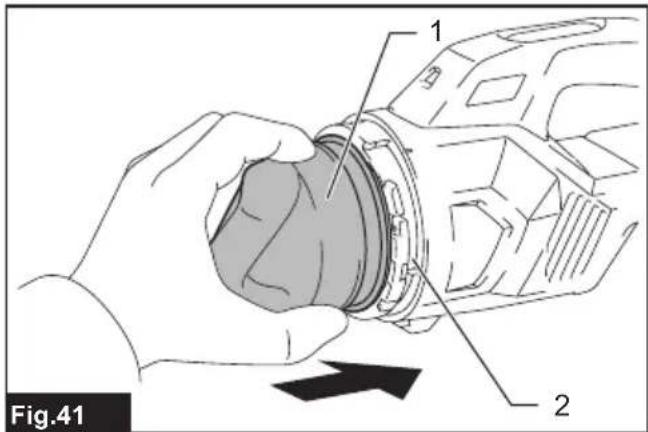
text_image
Fig.41 1 2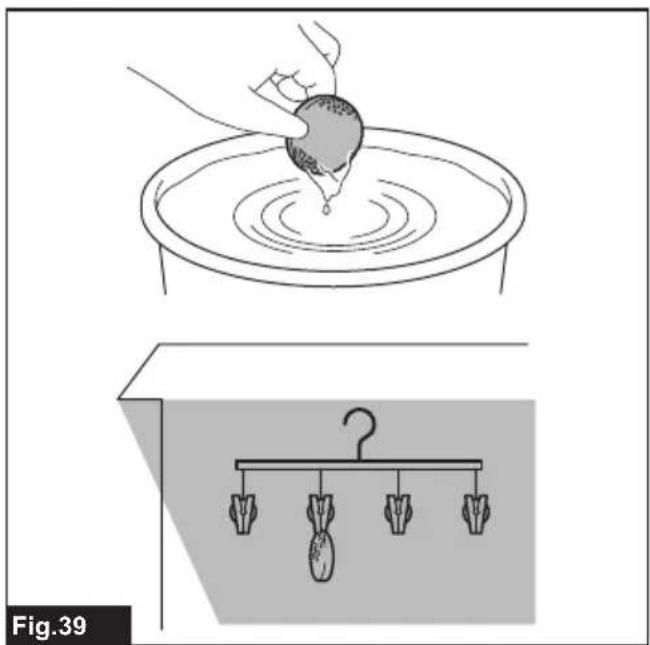
text_image
Fig.39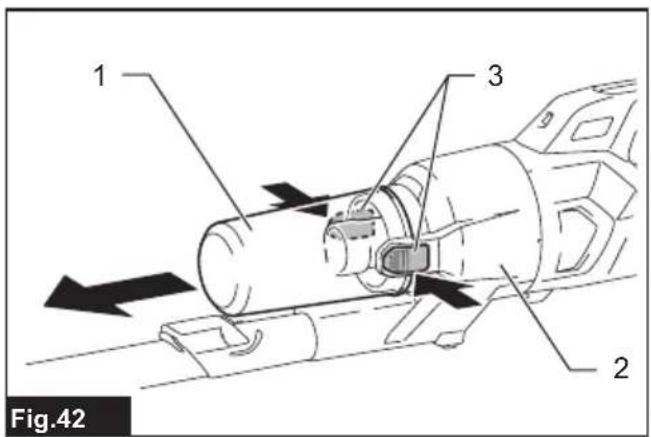
text_image
1 3 2 Fig.42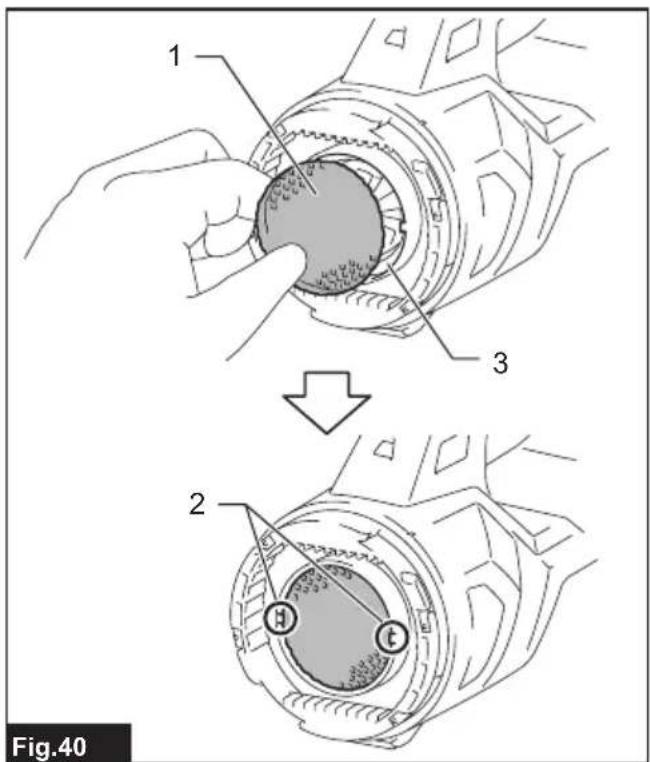
text_image
1 2 3 Fig.40
text_image
Fig.43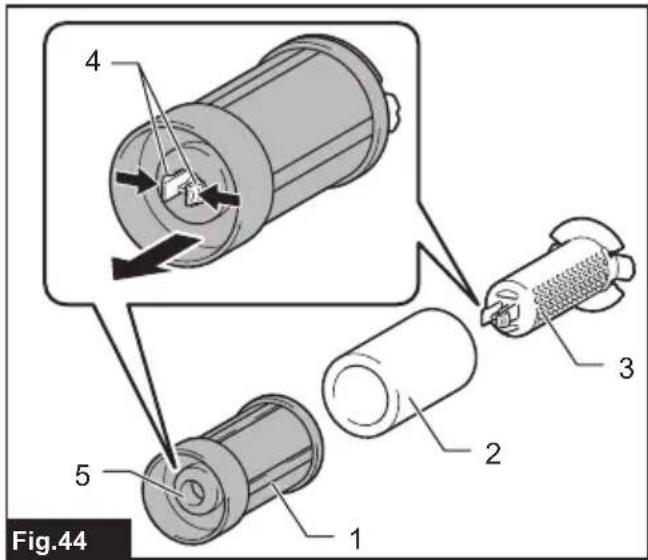
text_image
Fig.44 1 2 3 4 5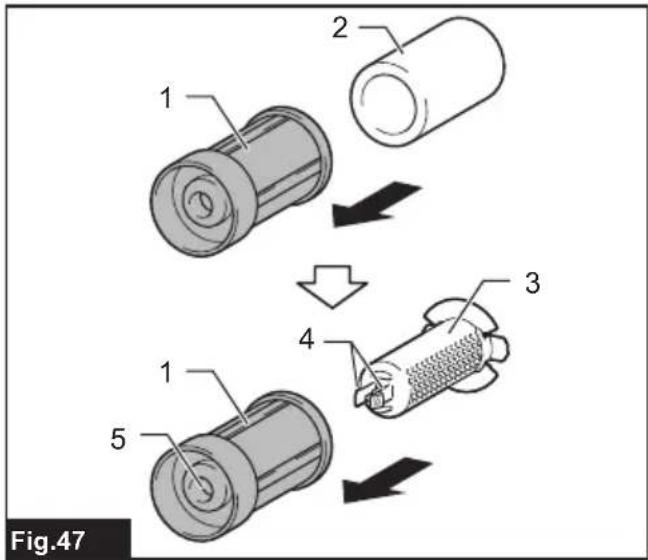
text_image
Fig.47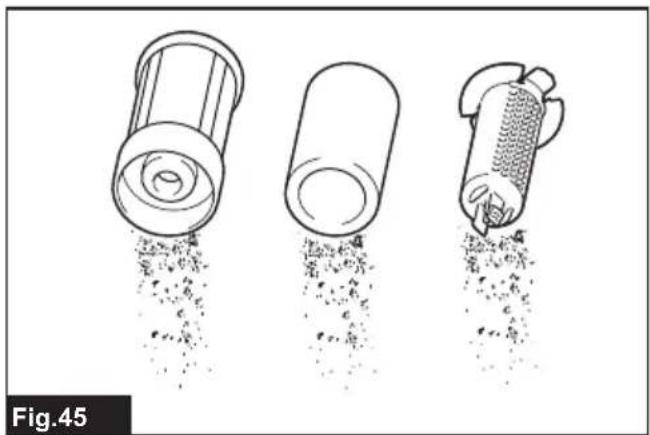
natural_image
Three line drawings of a mechanical device with particles, showing different shapes and flow patterns (no text or symbols)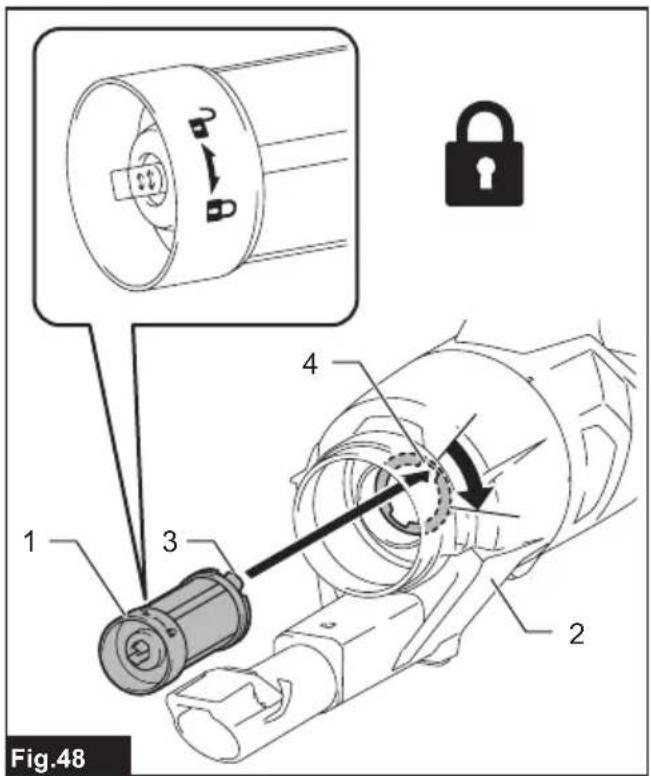
text_image
Fig.48 1 2 3 4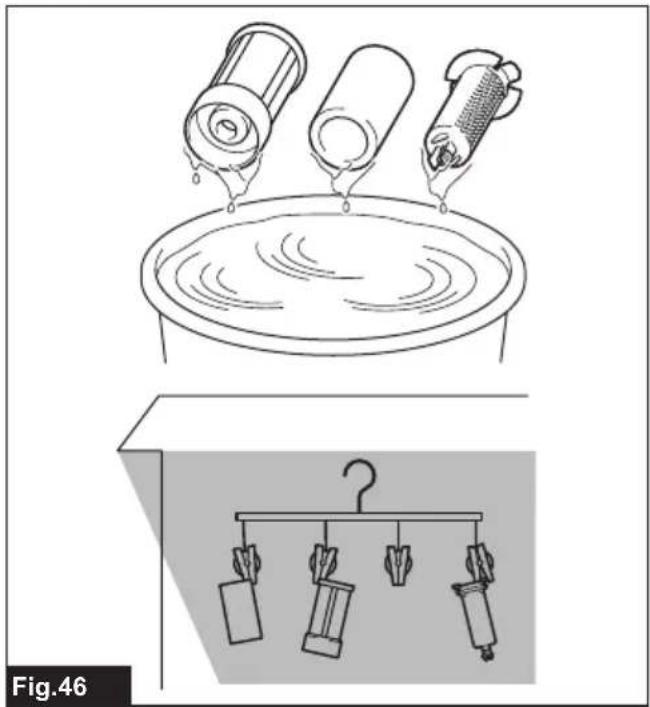
natural_image
Illustration of a cleaning or cleaning process with three cylindrical containers on a platform above and a hanging rack system below (no text or symbols)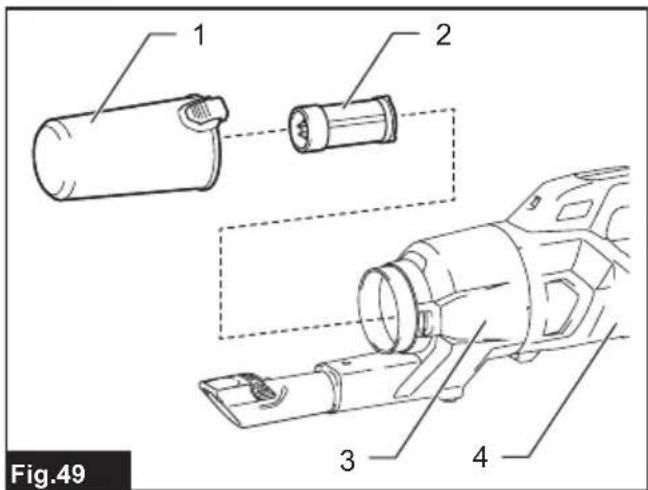
text_image
1 2 3 4 Fig.49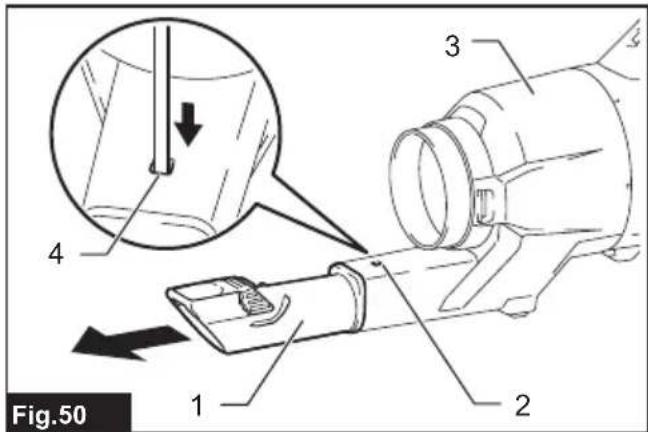
text_image
Fig.50 1 2 3 4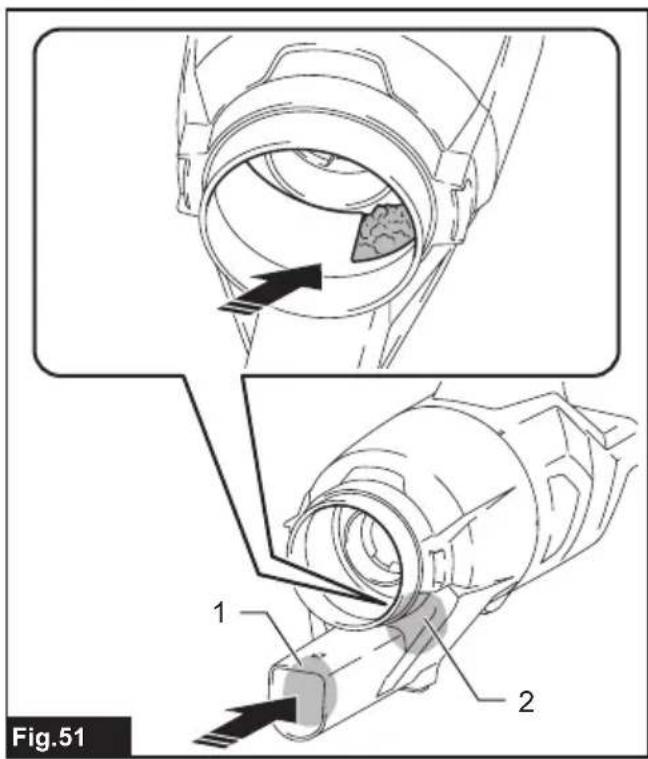
text_image
Fig.51 1 2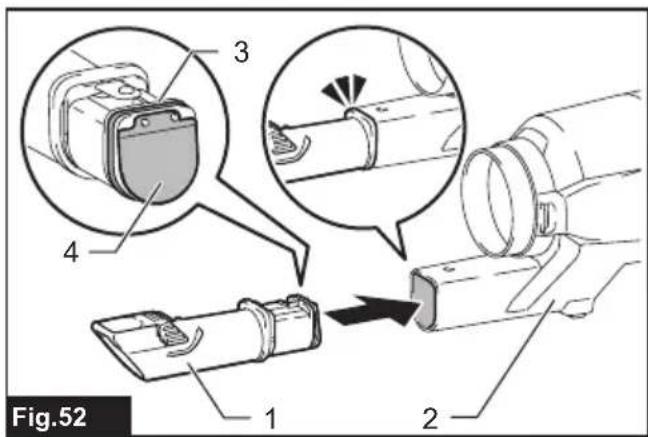
text_image
Fig.52 1 2 3 4WARNING
- For users in Europe: This appliance can be used by children aged from 8 years and above and persons with reduced physical, sensory or mental capabilities or lack of experience and knowledge if they have been given supervision or instruction concerning use of the appliance in a safe way and understand the hazards involved. Children shall not play with the appliance. Cleaning and user maintenance shall not be made by children without supervision.
- For users in areas other than Europe: This appliance is not intended for use by persons (including children) with reduced physical, sensory or mental capabilities, or lack of experience and knowledge, unless they have been given supervision or instruction concerning use of the appliance by a person responsible for your safety.
- Children must be supervised to ensure that they do not play with the appliance.
- CAUTION: Before carrying out any maintenance operation, disconnect the appliance from the power supply. Perform maintenance on the appliance periodically.
- Rechargeable batteries must be removed from the device before charging.
- To remove or install the battery, slide the cartridge out of the tool while pressing the button on the front of the cartridge.
- Exhausted batteries must be removed from the device and disposed of safely. Follow local regulations regarding battery disposal.
- If the device is to be stored unused for a long period, the batteries should be removed.
- The power terminals must not be short-circuited.
Applicable battery cartridge and charger
| Battery cartridge BL4020* / BL4025* / BL4040* / BL4040F* / BL4050F | *: Recommended battery |
| Charger DC40RA / DC40RB / DC40RC / DC40WA / BCC01 / BCC02 |
- Some of the battery cartridges and chargers listed above may not be available depending on your region of residence.
WARNING: Only use the battery cartridges and chargers listed above. Use of any other battery cartridges and chargers may cause injury and/or fire.
SPECIFICATIONS
| Model: CL003G | ||
| Capacity 250 mL / 400 mL (country specific) | ||
| Continuous use (with battery BL4025) | 1 (Quiet mode) Approx. 80 min | |
| 2 (Normal speed mode) Approx. | 40 min | |
| 3 (High speed mode) Approx. 25 min | ||
| 4 (Max speed mode) Approx. 16 min | ||
| Overall length (with pipe, nozzle, and battery BL4025) 1,106 mm | ||
| Rated voltage D.C. 36 V - 40 V max | ||
| Net weight 1.9 - 2.6 kg | ||
- Due to our continuing program of research and development, the specifications herein are subject to change without notice.
- Specifications may differ from country to country.
- The weight does not include accessories but battery cartridge(s). The lightest and heaviest combination weight of the appliance and battery cartridge(s) are shown in the table.
Symbols
The followings show the symbols which may be used for the equipment. Be sure that you understand their meaning before use.

Read the instruction manual.

A representative battery applicable to this product.

Ni-MH Li-ion
Only for EU countries
Due to the presence of hazardous components in the equipment, waste electrical and electronic equipment, accumulators and batteries may have a negative impact on the environment and human health. Do not dispose of electrical and electronic appliances or batteries with household waste!
In accordance with the European Directive on waste electrical and electronic equipment and on accumulators and batteries and waste accumulators and batteries, as well as their adaptation to national law, waste electrical equipment, batteries and accumulators should be stored separately and delivered to a separate collection point for municipal waste, operating in accordance with the regulations on environmental protection.
This is indicated by the symbol of the crossed-out wheeled bin placed on the equipment.
Intended use
The tool is intended for collecting dry dust.
SAFETY WARNINGS
Cordless cleaner safety warnings
WARNING: IMPORTANT! READ CAREFULLY all safety warnings and all instructions BEFORE USE. Failure to follow the warnings and instructions may result in electric shock, fire and/or serious injury
- Do not expose to rain. Store indoors.
- Do not allow to be used as a toy. Close attention is necessary when used by or near children.
- Use only as described in this manual. Use only manufacturer's recommended attachments.
-
Do not use with damaged battery. If appliance is not working as it should, has been dropped, damaged, left outdoors, or dropped into water, return it to a service center.
-
Do not handle appliance with wet hands.
-
Do not put any object into openings. Do not use with any opening blocked; keep free of dust, lint, hair, and anything that may reduce air flow.
-
Keep hair, loose clothing, fingers, and all parts of body away from openings and moving parts.
-
Turn off all controls before removing the battery.
-
Use extra care when cleaning on stairs.
-
Do not use to pick up flammable or combustible liquids, such as gasoline, or use in areas where they may be present.
-
Use only the charger supplied by the manufacturer to recharge.
-
Do not pick up anything that is burning or smoking, such as cigarettes, matches, or hot ashes.
-
Do not use without dust bag and/or filters in place.
-
Do not charge the battery outdoors.
-
Recharge only with the charger specified by the manufacturer. A charger that is suitable for one type of battery pack may create a risk of fire when used with another battery pack.
-
Use appliances only with specifically designated battery packs. Use of any other battery packs may create a risk of injury and fire.
-
When (the) battery pack is not in use, keep it away from other metal objects, like paper clips, coins, keys, nails, screws or other small metal objects, that can make a connection from one terminal to another.
-
Under abusive conditions, liquid may be ejected from the battery; avoid contact. If contact accidentally occurs, flush with water.
-
Do not use a battery pack or appliance that is damaged or modified. Damaged or modified batteries may exhibit unpredictable behaviour resulting in fire, explosion or risk of injury.
-
Do not expose a battery pack or appliance to fire or excessive temperature. Exposure to fire or temperature above 130 °C may cause explosion.
-
Follow all charging instructions and do not charge the battery pack or appliance outside the temperature range specified in the instructions. Charging improperly or at temperatures outside the specified range may damage the battery and increase the risk of fire.
-
Do not let familiarity gained from frequent use of tools allow you to become complacent and ignore tool safety principles. A careless action can cause severe injury within a fraction of a second.
SAVE THESE INSTRUCTIONS.
ADDITIONAL SAFETY RULES
This appliance is intended for household use.
-
Read this instruction manual and the charger instruction manual carefully before use.
-
Do not pick up the following materials:
— Hot materials such as lit cigarettes or spark/metal dust generated by grinding/cutting metal
— Flammable materials such as gasoline, thinner, benzine, kerosene or paint
— Explosive materials like nitroglycerin
— Ignitable materials such as Aluminum, zinc, magnesium, titanium, phosphorus or celluloid
— Wet dirt, water, oil or the like
— Hard pieces with sharp edges, such as wood chips, metals, stones, glasses, nails, pins or razors
— Powder to clot such as cement or toner
— Conductive dust such as metal or carbon
— Fine particle like concrete dust
Such action may cause fire, injury and/or property damage.
- Stop operation immediately if you notice anything abnormal.
- If you drop or strike the cleaner, check it carefully for cracks or damage before operation.
- Do not bring close to stoves or other heat sources.
- Do not block the intake hole or vent holes.
SAVE THESE INSTRUCTIONS.
Important safety instructions for battery cartridge
- Before using battery cartridge, read all instructions and cautionary markings on (1) battery charger, (2) battery, and (3) product using battery.
- Do not disassemble or tamper with the battery cartridge. It may result in a fire, excessive heat, or explosion.
- If operating time has become excessively shorter, stop operating immediately. It may result in a risk of overheating, possible burns and even an explosion.
-
If electrolyte gets into your eyes, rinse them out with clear water and seek medical attention right away. It may result in loss of your eyesight.
-
Do not short the battery cartridge:
(1) Do not touch the terminals with any conductive material.
(2) Avoid storing battery cartridge in a container with other metal objects such as nails, coins, etc.
(3) Do not expose battery cartridge to water or rain.
A battery short can cause a large current flow, overheating, possible burns and even a breakdown.
- Do not store and use the tool and battery cartridge in locations where the temperature may reach or exceed 50 °C (122 °F).
- Do not incinerate the battery cartridge even if it is severely damaged or is completely worn out. The battery cartridge can explode in a fire.
- Do not nail, cut, crush, throw, drop the battery cartridge, or hit against a hard object to the battery cartridge. Such conduct may result in a fire, excessive heat, or explosion.
- Do not use a damaged battery.
- The contained lithium-ion batteries are subject to the Dangerous Goods Legislation requirements.
For commercial transports e.g. by third parties, forwarding agents, special requirement on packaging and labeling must be observed. For preparation of the item being shipped, consulting an expert for hazardous material is required. Please also observe possibly more detailed
national regulations.
Tape or mask off open contacts and pack up the battery in such a manner that it cannot move around in the packaging.
- When disposing the battery cartridge, remove it from the tool and dispose of it in a safe place. Follow your local regulations relating to disposal of battery.
- Use the batteries only with the products specified by Makita. Installing the batteries to non-compliant products may result in a fire, excessive heat, explosion, or leak of electrolyte.
- If the tool is not used for a long period of time, the battery must be removed from the tool.
- During and after use, the battery cartridge may take on heat which can cause burns or low temperature burns. Pay attention to the handling of hot battery cartridges.
- Do not touch the terminal of the tool immediately after use as it may get hot enough to cause burns.
- Do not allow chips, dust, or soil stuck into the terminals, holes, and grooves of the battery cartridge. It may cause heating, catching fire, burst and malfunction of the tool or battery cartridge, resulting in burns or personal injury.
- Unless the tool supports the use near high-voltage electrical power lines, do not use the battery cartridge near high-voltage electrical power lines. It may result in a malfunction or breakdown of the tool or battery cartridge.
- Keep the battery away from children.
SAVE THESE INSTRUCTIONS.
⚠️ CAUTION: Only use genuine Makita batteries. Use of non-genuine Makita batteries, or batteries that have been altered, may result in the battery bursting causing fires, personal injury and damage. It will also void the Makita warranty for the Makita tool and charger.
Tips for maintaining maximum battery life
- Charge the battery cartridge before completely discharged. Always stop tool operation and charge the battery cartridge when you notice less tool power.
- Never recharge a fully charged battery cartridge. Overcharging shortens the battery service life.
- Charge the battery cartridge with room temperature at 10 °C - 40 °C ( 50 °F - 104 °F ). Let a hot battery cartridge cool down before charging it.
- When not using the battery cartridge, remove it from the tool or the charger.
- Charge the battery cartridge if you do not use it for a long period (more than six months).
FUNCTIONAL DESCRIPTION
⚠️CAUTION: Always be sure that the tool is switched off and the battery cartridge is removed before adjusting or checking function on the tool.
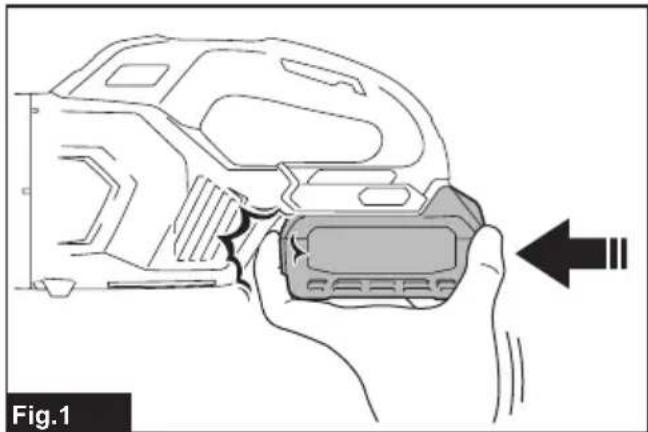
⚠CAUTION: Take care not to trap finger(s) between cleaner and battery as shown in diagram when loading battery. Trapping finger(s) may cause injury.
▶ Fig.1
Installing or removing battery cartridge
⚠️CAUTION: Always switch off the tool before installing or removing of the battery cartridge.
⚠️CAUTION: Hold the tool and the battery cartridge firmly when installing or removing battery cartridge. Failure to hold the tool and the battery cartridge firmly may cause them to slip off your hands and result in damage to the tool and battery cartridge and a personal injury.
To install the battery cartridge, align the tongue on the battery cartridge with the groove in the housing and slip it into place. Insert it all the way until it locks in place with a little click. If you can see the red indicator as shown in the figure, it is not locked completely.
To remove the battery cartridge, slide it from the tool while sliding the button on the front of the cartridge.
▶ Fig.2: 1. Red indicator 2. Button 3. Battery cartridge
⚠CAUTION: Always install the battery cartridge fully until the red indicator cannot be seen. If not, it may accidentally fall out of the tool, causing injury to you or someone around you.
⚠️CAUTION: Do not install the battery cartridge forcibly. If the cartridge does not slide in easily, it is not being inserted correctly.
Battery protection system
The tool is equipped with tool/battery protection system. This system automatically cuts off power to the motor to extend tool and battery life. The tool will automatically stop during operation if the tool or battery is placed under one of the following conditions.
Overloaded:
The tool/battery is operated in a manner that causes it to draw an abnormally high current. In this situation, turn the tool off and stop the application that caused the tool to become overloaded. Then turn the tool on to restart. If the tool does not start, the tool/battery is overheated. In this situation, let the tool/battery cool before turning the tool on again.
Low battery voltage:
The remaining battery capacity is too low and the tool will not operate. In this situation, remove and recharge
the battery.
Protections against other causes:
Protection system is also designed for other causes that could damage the tool and allows the tool to stop automatically. Take all the following steps to clear the causes, when the tool has been brought to a temporary halt or stop in operation.
- Turn the tool off, and then turn it on again to restart.
- Charge the battery(ies) or replace it/them with recharged battery(ies).
- Let the tool and battery(ies) cool down.
If no improvement can be found by restoring protection system, then contact your local Makita Service Center.
Indicating the remaining battery capacity
Press the check button on the battery cartridge to indicate the remaining battery capacity. The indicator lamps light up for a few seconds.
▶ Fig.3: 1. Indicator lamps 2. Check button
| Indicator lamps Remaining | capacity | ||
| Lighted Off | Blinking | ||
| 75% to 100% | |||
| 50% to 75% | |||
| 25% to 50% | |||
| 0% to 25% | |||
| Charge the battery. | |||
| The battery may have malfunctioned. | |||
NOTE: Depending on the conditions of use and the ambient temperature, the indication may differ slightly from the actual capacity.
NOTE: The first (far left) indicator lamp will blink when the battery protection system works.
Switch action
▶ Fig.4: 1. Suction power change button 2. ON/OFF button
To start the cleaner, simply push the ON/OFF button. To switch off, push the ON/OFF button again. You can change the suction power of the cleaner in four steps by pushing the suction power change button. Each push on this button repeats the Quiet/Normal/High/Max mode in a cycle.
| Level Indication Mode | ||
| 1 | Quiet mode | |
| 2 | Normal speed mode | |
| 3 | High speed mode | |
| 4 | Max speed mode | |
NOTE: You can change the suction power before turning on the cleaner.
NOTE: The cleaner starts the operation with the same suction power as the last operation.
Lighting up the lamp

CAUTION: Do not look in the light or see the source of light directly.
To turn on the lamp, push the suction power change button. The lamp goes off in approximately 10 seconds. While the cleaner is running, the lamp turns on.
The lamp goes out approximately 10 seconds after stopping operation.
NOTE: When the remaining battery capacity gets low, the lamp starts blinking. The timing, at which the lamp starts blinking depends on the temperature at work place and the battery cartridge conditions.
▶ Fig.5: 1. Suction power change button 2. ON/OFF button 3. Lamp
PARTS DESCRIPTION
Country specific
▶ Fig.6
| 1 250 mL dust case(Optional accessory) | 2 400 mL dust case(Optional accessory) | 3 Mesh filter 4 Cyclone body | ||
| 5 High performancefilter (Filter frame ingray color) (Optionalaccessory) | 6 HEPA filter (Filter framein white color) (Optionalaccessory) | 7 Sponge sheet 8 Cleaner body | ||
| 9 Hand strap (Countryspecific) | --- --- |
ASSEMBLY
⚠️CAUTION: Always be sure that the tool is switched off and the battery cartridge is removed before carrying out any work on the tool.
⚠️CAUTION: Be sure to attach filters to the cleaner properly. Filters with holes or those not properly attached may allow dust to enter the motor housing. This may cause motor failure or fires.
NOTICE: Make sure all the attachments and components are secured in place properly before use.
Installing and removing cleaner attachments
⚠️CAUTION: After installing attachments, check if they are securely installed. If the attachments are installed imperfectly, they may come off and cause personal injury.
CAUTION: Be careful not to hit your hand on the wall etc. when removing the attachments.
When using attachment with lock function
To install attachment, insert it to the suction inlet of the cleaner until it clicks. Make sure that the attachment is locked.
▶ Fig.7: 1. Suction inlet 2. Attachment with lock function 3. Hook
NOTICE: When installing the attachment with lock function, be sure to align the release button on the cleaner with the hook on the attachment. If they are not aligned, the attachment will not be locked and may come off from the cleaner.
To remove attachment, pull it off the cleaner while pressing and holding the arms of the release button.
▶ Fig.8: 1. Release button 2. Arm of release button 3. Attachment with lock function 4. Suction inlet
When using attachment without lock function
NOTICE: To install attachment without lock function, insert it into the suction inlet of the cleaner by twisting it as shown in the figure. To detach attachment, release it from the cleaner by twisting it as shown in the figure. Avoid twisting the attachment in the direction opposite to the arrow in the figure as it may loosen the cyclone unit.
▶ Fig.9
OPERATION
⚠️CAUTION: Do not move your face close to the air vent when operating the cleaner. If foreign objects are blown into eyes, it may result in personal injury.
NOTICE: Avoid using the cleaner in a horizontal or upward facing position. It may otherwise cause the mesh filter to become clogged.
NOTICE: Always use the cleaner with filters installed. Using the cleaner without filters may result in a motor malfunction.
NOTICE: Empty the dust case in the cyclone unit when dust has accumulated. Continued use will result in weakened suction force.
The cyclone unit helps reduce the amount of dust that enters into the cleaner, enhancing the suction performance with simple and easy dust disposing.
Cleaning (Suction)
Nozzle
With 250 mL dust case only
Attach the nozzle to clean off tables, desks, furniture, etc. The nozzle slips on easily.
▶ Fig.10: 1. Nozzle
Nozzle + Extension wand (Straight pipe)
The extension wand fits in between the nozzle and the cleaner itself. This arrangement is convenient for cleaning a floor in a standing position.
▶ Fig.11: 1. Cleaner body 2. Extension wand 3. Nozzle
Corner nozzle
Fit on the corner nozzle for cleaning corners and crevices of a car or furniture.
▶ Fig.12: 1. Corner nozzle 2. Cleaner body
You can store the corner nozzle in the nozzle holder.
▶ Fig.13: 1. Nozzle holder 2. Corner nozzle
CAUTION: Be careful not to trap finger(s) between the corner nozzle and the nozzle holder. Trapping finger(s) may cause injury.
Corner nozzle + Extension wand (Straight pipe)
In tight quarters where the cleaner itself cannot squeeze in, or in high places hard to reach, use this arrangement.
▶ Fig.14: 1. Corner nozzle 2. Extension wand 3. Cleaner body
Cleaning without nozzle
With 250 mL dust case only
You can pick up powder and dust without nozzle.
▶ Fig.15
For picking up dust on a floor in a standing position, it is convenient to attach the extension wand (straight pipe) to the cleaner.
▶ Fig.16: 1. Extension wand
Disposing of dust
CAUTION: Empty the dust case before it becomes too full, or the suction force weakens.
⚠️ CAUTION: Be careful not to trap finger(s) between the dust case and cyclone body when reassembling.
Dispose of accumulated dust as follows before it exceeds the dust disposal line.
- Point the cleaner head downwards, hold the dust case firmly, and then pull it apart from the cyclone body while pressing and holding the release buttons on both sides of the dust case.
▶ Fig.17: 1. Dust disposal line 2. Dust case 3. Release buttons 4. Mesh filter
- Empty the dust case and clean the adhered dust off the mesh filter.
▶ Fig.18
- Place the dust case back onto the cyclone body to secure it in place with clicks.
▶ Fig.19: 1. Dust case 2. Release buttons 3. Cyclone body
CAUTION: The dust may fly up when disposed out of the dust case. Be careful not to let the dust get into your eyes.
NOTICE: When the dust case becomes dirty, remove and wash it with water. Dry the dust case thoroughly before reassembly and use.
NOTICE: Make sure all the attachments and components are secured in place properly before use.
NOTICE: If the suction force does not recover even after disposing of the dust and cleaning the mesh filter, check whether dust has accumulated inside the cyclone body or clogging has occurred.
MAINTENANCE
⚠️CAUTION: Always be sure that the tool is switched off and the battery cartridge is removed before attempting to perform inspection or maintenance.
⚠CAUTION: Be sure to attach filters to the cleaner properly. Filters with holes or those not properly attached may allow dust to enter the motor housing. This may cause motor failure or fires.
NOTICE: Never use gasoline, benzine, thinner, alcohol or the like. Discoloration, deformation or cracks may result.
To maintain product SAFETY and RELIABILITY, repairs, any other maintenance or adjustment should be performed by Makita Authorized or Factory Service Centers, always using Makita replacement parts.
After use
CAUTION: Putting the cleaner against the wall without any other support may cause the cleaner to fall down, resulting in personal injury or damage to the cleaner.
▶ Fig.20
Regular maintenance
NOTICE: Clean the filters in the cyclone unit when they become clogged. Continued use in the clogged condition may result in heating or motor malfunction.
NOTICE: Do not blow dust sticking on the cleaner and filters by air duster. It brings dust into the housing and causes failure.
Routine maintenance is required to restore normal operating conditions.
Cleaner body
Wipe off the outside (cleaner body) of the cleaner using a cloth dampened in soapy water, and clean out the suction openings.
▶ Fig.21
Cyclone unit and filters
NOTICE: Dust off and clean out inside the cyclone unit and filters, when suction performance becomes less effective regardless of the amount of dust collected in the dust case.
NOTICE: After washing filters, dry them thoroughly before use. Insufficiently dried filters may cause poor suction and shorten the service life of the motor.
NOTICE: After cleaning filters and sponge sheet, be sure to re-install them before use. If you use the cleaner without filters and sponge sheet, dust comes into the motor housing and causes malfunction.
Cyclone unit
- Tap the cyclone unit several times with your hand to remove dust adhering to the inner surface of the cyclone unit and filter.
▶ Fig.22: 1. Cyclone unit - With the suction inlet pointing downwards, turn the cyclone unit as shown in the figure aligning the pointer on the cyclone unit with that on the cleaner body to disengage the lock. Then detach the cyclone unit from the cleaner body slowly and straightly.
▶ Fig.23: 1. Cyclone unit 2. Suction inlet 3. Pointers 4. Filter
NOTE: Dust may fly out when the cyclone unit is disassembled. It is recommended to place a garbage bag underneath the cyclone unit.
- Dust off inside the cyclone unit and filter.
▶ Fig.24 - Place the cyclone unit back onto the cleaner body, aligning the pointer on the cyclone unit with that on the cleaner body. Then turn the cyclone unit as shown in the figure until it is secured in place.
▶ Fig.25: 1. Cyclone unit 2. Cleaner body 3. Pointers
High performance filter
Optional accessory
- Disassemble the cyclone unit from the cleaner body.
- Hold the mounting end of high performance filter and pull it apart from the cleaner body.
▶ Fig.26: 1. High performance filter 2. Cleaner body
- Wipe and shake dust off the high performance filter by hand.
▶ Fig.27 - Wash the high performance filter in soapy water when it is clogged with dust and dirt. Dry it out thoroughly in the shade before use.
▶ Fig.28
NOTE: Avoid fastening the attachment end (rubber sealing ring) of high performance filter when hanging it up for drying.
- Hold the mounting end of high performance filter and squeeze it back into the cleaner body.
▶ Fig.29: 1. High performance filter 2. Cleaner body
HEPA filter
Optional accessory
NOTICE: Do not rub or scratch the HEPA filter with hard objects such as a brush and a paddle.
- Disassemble the cyclone unit from the cleaner body.
- Hold the mounting end of HEPA filter (covered with high performance prefilter) and pull it apart from the cleaner body.
▶ Fig.30: 1. HEPA filter (covered with high performance prefilter) 2. Cleaner body - Disassemble the high performance prefilter from the HEPA filter by hand twisting.
▶ Fig.31: 1. High performance prefilter 2. HEPA filter
- Wipe and shake dust off the high performance prefilter and HEPA filter by hand.
▶ Fig.32
- Wash the high performance prefilter and HEPA filter in soapy water. Rinse and dry them thoroughly in the shade before use.
▶ Fig.33
NOTE: Avoid fastening the attachment end (rubber sealing ring) of HEPA filter when hanging it up for drying.
- Attach the high performance prefilter onto the HEPA filter.
▶ Fig.34: 1. High performance prefilter 2. HEPA filter
- Hold the mounting end of HEPA filter (covered with high performance prefilter) and squeeze it back into the cleaner body.
▶ Fig.35: 1. HEPA filter (covered with the high performance prefilter) 2. Cleaner body
Sponge sheet
-
Disassemble the cyclone unit from the cleaner body.
-
Hold the mounting end of filter and pull it apart from the cleaner body.
▶ Fig.36: 1. Filter 2. Cleaner body
- Pull the sponge sheet off from the suction opening.
▶ Fig.37: 1. Sponge sheet 2. Suction opening
- Wipe and shake dust off the sponge sheet by hand.
▶ Fig.38
- Wash the sponge sheet in soapy water when it is clogged with dust and dirt. Dry it out thoroughly in the shade before use.
▶ Fig.39
- Place the sponge sheet back in the original position. Make sure that the left and right edges of the sponge sheet are secured with stoppers and no gap between the sponge sheet and suction opening.
▶ Fig.40: 1. Sponge sheet 2. Stopper 3. Suction opening
- Hold the mounting end of filter and squeeze it back into the cleaner body.
▶ Fig.41: 1. Filter 2. Cleaner body
Condition-based maintenance
NOTICE: Clean the mesh filter in the cyclone unit when they become clogged. Continued use in the clogged condition may result in heating or motor malfunction.
Deep and spot cleaning needs to be carried out according to your tool performance.
Mesh filter
Clean up the mesh filter placed in the cyclone unit when no suggested improvement on suction performance has been found after completing regular maintenance.
- Hold the dust case firmly and pull it apart from the cyclone body while pressing and holding the release buttons on both sides of the dust case.
▶ Fig.42: 1. Dust case 2. Cyclone body 3. Release buttons
- Turn the mesh filter as shown in the figure to disengage the lock. Then detach it from the cyclone body.
▶ Fig.43: 1. Mesh filter
- Disassemble the mesh filter into three components: prefilter, tubular sponge filter and mesh pipe.
i Squeeze the guide stoppers on top of the mesh pipe together.
ii Pass the guide stoppers down through the guide hole on top of the prefilter.
iii Pull the prefilter along the tubular sponge filter and mesh pipe.
iv Remove the tubular sponge filter from the mesh pipe.
▶ Fig.44: 1. Prefilter 2. Tubular sponge filter 3. Mesh pipe 4. Guide stoppers 5. Guide hole
- Wipe and shake dust off the filters and mesh pipe by hand.
▶ Fig.45
- Wash the filters and mesh pipe in soapy water when they are clogged with dust and dirt. Dry them out thoroughly in the shade before use.
▶ Fig.46
- Reassemble the mesh filter.
i Insert the tubular sponge filter into the prefilter.
ii Insert the mesh pipe into the tubular sponge filter and prefilter, passing the guide stoppers on top of the mesh pipe through the guide hole on top of the prefilter.
iii Push the mesh pipe through the tubular sponge filter and prefilter until it lock in place with a click.
▶ Fig.47: 1. Prefilter 2. Tubular sponge filter 3. Mesh pipe 4. Guide stoppers 5. Guide hole
- Attach the mesh filter back into the cyclone body aligning the hooks on the mesh filter with the ports on the suction outlet of the cyclone body. Turn the mesh filter as shown in the figure until the hooks are locked with a click. Make sure that the mesh filter is installed securely.
▶ Fig.48: 1. Mesh filter 2. Cyclone body 3. Hook 4. Port
Air channels in cyclone unit
Incoming foreign substance may block the air channels in the cyclone unit and laden air flows. Remove any obstacles in the air path if the suction performance is being affected remarkably.
- Disassemble the cyclone unit into three components: dust case, mesh filter and cyclone body.
▶ Fig.49: 1. Dust case 2. Mesh filter 3. Cyclone body 4. Cleaner body
- Press and hold the guide stopper on the inlet pipe down through the locking hole on the cyclone body using the hand tool with a point. Then detach the inlet pipe from the cyclone body.
▶ Fig.50: 1. Inlet pipe 2. Guide stopper 3. Cyclone body 4. Locking hole
- Clean off any substance found in the air channels.
Foreign substance is likely to get stuck around an incoming air port.
▶ Fig.51: 1. Suction inlet 2. Incoming air port
- Insert the inlet pipe back in place until it is securely locked.
▶ Fig.52: 1. Inlet pipe 2. Cyclone body 3. O-ring 4. Flap valve
NOTICE: Be sure that the O-ring and flap valve are securely in place before reassembly. Suction performance can be affected if the cyclone unit is operated without the O-ring and flap valve in place.
- Reassemble the cyclone unit, and attach it onto the cleaner body.
Troubleshooting
Before asking for repairs, check the following points.
| Symptom Area to be investigated | Fixing method | |
| Weak suction power Is dust case | or inside cyclone unit full of dust? | Empty dust case or inside cyclone unit. |
| Are filters clogged? Dust down or wash high performance filter/HEPA filter/sponge sheet/mesh filter. | ||
| Anything to block incoming air channels? Clean any dust and objects out of air openings and channels. | ||
| Is battery cartridge discharged? Charge battery cartridge. | ||
| Not working Is battery cartridge discharged? Charge battery cartridge. | ||
| Noise and vibration Are filters clogged? Dust down or wash high performance filter/HEPA filter/sponge sheet/mesh filter. | ||
⚠️CAUTION: Do not attempt to repair the cleaner by yourself.
OPTIONAL ACCESSORIES
⚠️CAUTION: These accessories or attachments are recommended for use with your Makita tool specified in this manual. The use of any other accessories or attachments might present a risk of injury to persons. Only use accessory or attachment for its stated purpose.
If you need any assistance for more details regarding these accessories, ask your local Makita Service Center.
- Extension wand (Straight pipe)
- Nozzle
- Nozzle for carpet
- Shelf brush
- Corner nozzle
- Round brush
- Flexible hose
• High performance filter - HEPA filter
- Seat nozzle
- Crevice nozzle
- Tool bag
- Makita genuine battery and charger
NOTE: Some items in the list may be included in the tool package as standard accessories. They may differ from country to country.
AVERTISSEMENT
Nettoyage (aspiration)
Suceur
▶ Fig.16: 1. Tube prolongateur