905302 - Fridge Exquisit - Free user manual and instructions
Find the device manual for free 905302 Exquisit in PDF.


User questions about 905302 Exquisit
0 question about this device. Answer the ones you know or ask your own.
Ask a new question about this device
Download the instructions for your Fridge in PDF format for free! Find your manual 905302 - Exquisit and take your electronic device back in hand. On this page are published all the documents necessary for the use of your device. 905302 by Exquisit.
USER MANUAL 905302 Exquisit
domestic and professional appliances
natural_image
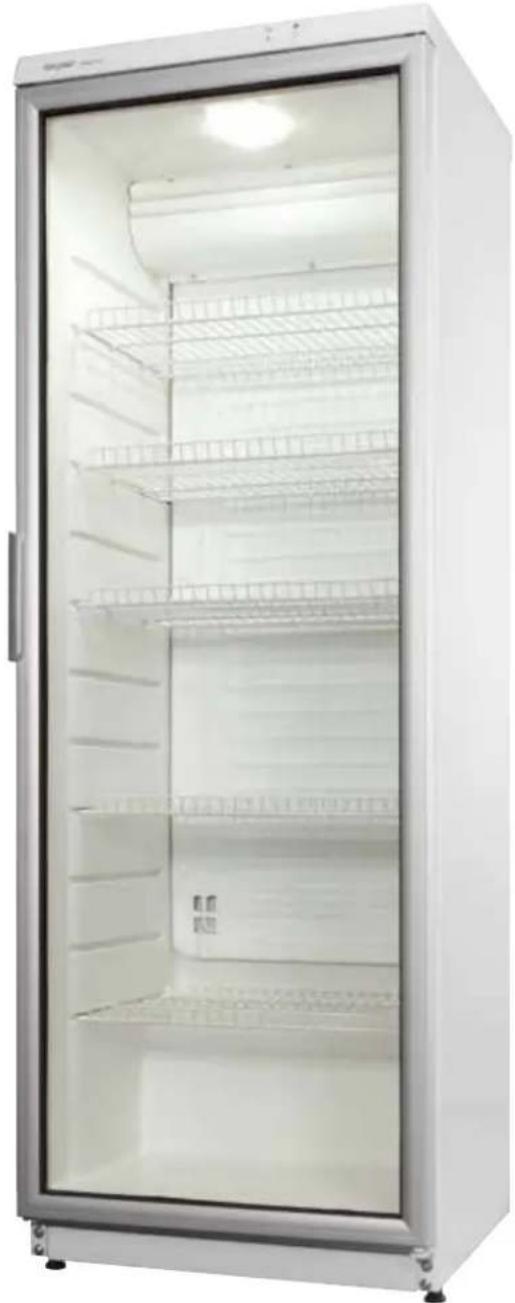
Front view of a white stainless steel refrigerator with closed doors and visible shelves (no text or symbols)\*905.302
KOELKAST - REFRIGERATOR
RÉFRIGÉRATEUR - KÜHLSCHRANK
350 LITER
text_image
1 2 42
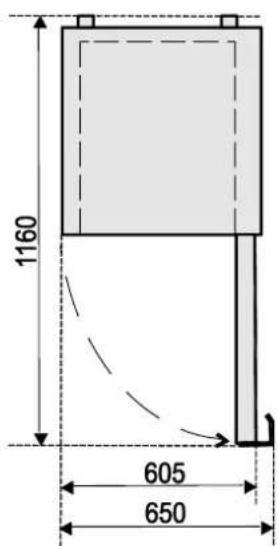
text_image
1160 605 650
NOTE. Direction of door is not changeable in refrigerators with lockable doors.

IMPORTANT USE AND SAFETY INSTRUCTIONS
CAREFULLY READ THE INSTRUCTION MANUAL. If instructions are not followed, there is a risk of injury, damage of the appliance and loss of the right to free warranty service.
The Manufacturer shall not be held liable for damage arising from the failure to observe the instructions contained in this manual.
We recommend to keep the Instruction manual the whole time you have the appliance.
When you sell the appliance pass the Instruction manual to the new owner of the appliance.
GENERAL INFORMATION:
The appliance is a vertical display cooler with glass doors and with a fan and is designed for storage of foodstuffs and for chilling of drinks and for a short-term storage of them.
This appliance is intended for commercial use!
The models CD350-1313, CD350-311. The appliances is a refrigerators with glass doors and is designed for storage and chilling of wine. The appliances may be used in cafes, bars and etc.
SAFETY INSTRUCTIONS:
- Do not cover the ventilation holes at the top and on the sides of the appliance.
- Do not use electrical appliances inside the food storage compartments of the appliance, unless they are of the type recommended by the manufacturer.
- If the supply cord is damaged it must be replaced by the manufacturer, manufacturer service agent or a similarly qualified person, in order to avoid a hazard.
– Disposal of the appliance should be according to national rules. -
Do not damage the appliance refrigeration system. It contains the refrigerant gas R600a. If the refrigeration system is damaged:
-
Do not use any open flame.
- Avoid sparks — do not turn on any electrical appliances or lighting fixtures.
- Immediately ventilate the room: air the room in which the appliance is placed for a few minutes (the size of the room for a product containing isobuthane / R600a must be at least 4m^3 ) to avoid damage to the cooling system.
- Once the appliance is unpacked, make sure that it is complete, that the body and the electrical cord aren't damaged. It is forbidden to use a technically damaged appliance.
CONNECTION TO THE MAINS
- The appliance should only be connected to an earthed socket installed in accordance with the regulations. Make sure that the supply voltage corresponds
with the voltage marked on the rating label. This product complies with all binding CE labelling directives. The earthed electrical socket by which the appliance is connected to the mains should be in an accessible place. It is a legal requirement that the appliance is properly earthed. The manufacturer will not be held liable for any damage or injury which may result from the failure to fulfil this requirement.
- To avoid the exposure to danger, always have faulty cable be replaced only by the manufacturer, by our customer service or by qualified person and with a cable of the same type.
- DO NOT USE extension cords or connectors (adapters), or hubs.
- The frequency and power of the electricity supply must conform to the general data parameters of the appliance as it is shown in the product label.
- When positioning the appliance, be careful that the electrical cord isn't squeezed in order to avoid its damage. Do not store heavy objects such as cooling devices, furniture or other devices next the appliance in such a way that they could squeeze and damage the electrical cord. This can cause a short circuit and a fire.
- Make sure that the plug of the electrical cord is not squeezed by the back wall of the appliance or otherwise damaged. A damaged plug can be the cause of a fire!
- CAUTION! If the installed interior lighting diode (LED) lamp for the cooling device is not functioning, contact the maintenance and repair representative for replacements. LAMPS CAN BE REPLACED ONLY BY THE MAINTENANCE AND REPAIR REPRESENTATIVE.

If the appliance is out of order and it is not possible to repair it by means of given recommendations, unplug it, open the doors and call the service expert. Only a service representative can remedy all technical or construction faults.
- If the appliance is unplugged (for cleaning, moving to another place, etc.), IT MAY BE REPEATEDLY SWITCHED ON AFTER 15 MIN.
- The appliance should be used only for storing foodstuffs.
- This appliance is not designed for the storage of explosive substances such as aerosol cans with a flammable propellant.
- It is prohibited to store petrol and other flammable liquids near the appliance.
- The appliance can't be disposed of by burning.
- Do not place any switched on electrical devices (such as microwave ovens, hair dryers, irons, electric kettles or other electrical devices) on top of the appliance because this may cause ignition of plastic parts.
- Do not place any dishes with liquids on top of the appliance and do not keep flowers in vases or other liquid-filled vessels on the appliance.
- Do not climb on or sit on the appliance, do not lean on or hang on the appliance doors.

The appliance should be transported only in the vertical position. The manufacturer will not be responsible for any damage of the appliance that results from non-compliance with the instructions for transportation.

The manufacturer guarantees reliable operation of the refrigerator when the ambient temperature is +16 to +32 degrees celsius and the relative air humidity not greater than 60 per cent.
The models CD350-1313, CD350-311: the manufacturer guarantees reliable operation of the refrigerator when the ambient temperature is +16 to +32 degrees celsius and the relative air humidity not greater than 70 per cent
POSITIONING
- Place the appliance in a dry, well ventilated room.

WARNING! The appliance should not be operated in an unheated room or porch. Place the appliance away from heat sources such as kitchen stove/oven, radiators, or direct sunlight. The appliance must not touch any pipes for heating, gas or water supply or any other electrical devices.
- Do not cover the ventilation holes at the top of the appliances – it must be a good air circulation around the appliance. There should be a gap of at least 10 cm between the top of the appliance body and any furniture that may be above it. If this requirement is not followed, the appliance consumes more electrical energy and its compressor may overheat.
- If the appliance is placed in a corner, a gap of at least 1 cm must be left between the appliance body and the wall (see fig. 2, page 2).
- The appliance must stand on a level surface and must not touch the wall. If necessary, regulate the height of the appliance by adjusting the levelling feet: by turning them clockwise – the front of the appliance rises, by turning them counter clockwise – it comes down. If the appliance is tilted slightly backward – the doors will close by themselves.
PREPARING THE APPLIANCE FOR OPERATION
It is recommended to prepare the appliance for operation with a helper.
- Remove package. Lift the appliance away from foamed polystyrene base. Therefore take out adhesive tapes from sides and simply lift the appliance up and take out the board. Strip adhesive tapes off and open the door. Remove the spacer above the door.
- When positioning the appliance in chosen location, it will move more easily into position if you lift the front a little and incline it backward allowing it to roll on its casters. When placing, moving, lifting the appliance, do not hold the door handles, do not pull the condenser at the rear part of the refrigerator and do not touch the compressor unit.
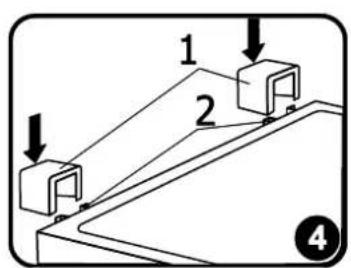
- Take two supports from the bag (see fig. 4, page 2) and insert them into the guides at the top back part of the appliance.

Wait at least 4 hours before connecting the appliance to the power supply. If this is not done, the appliance compressor may fail.

The appliance should not be connected to the mains until all packing and transport materials aren't removed. Suitably dispose the packaging material.
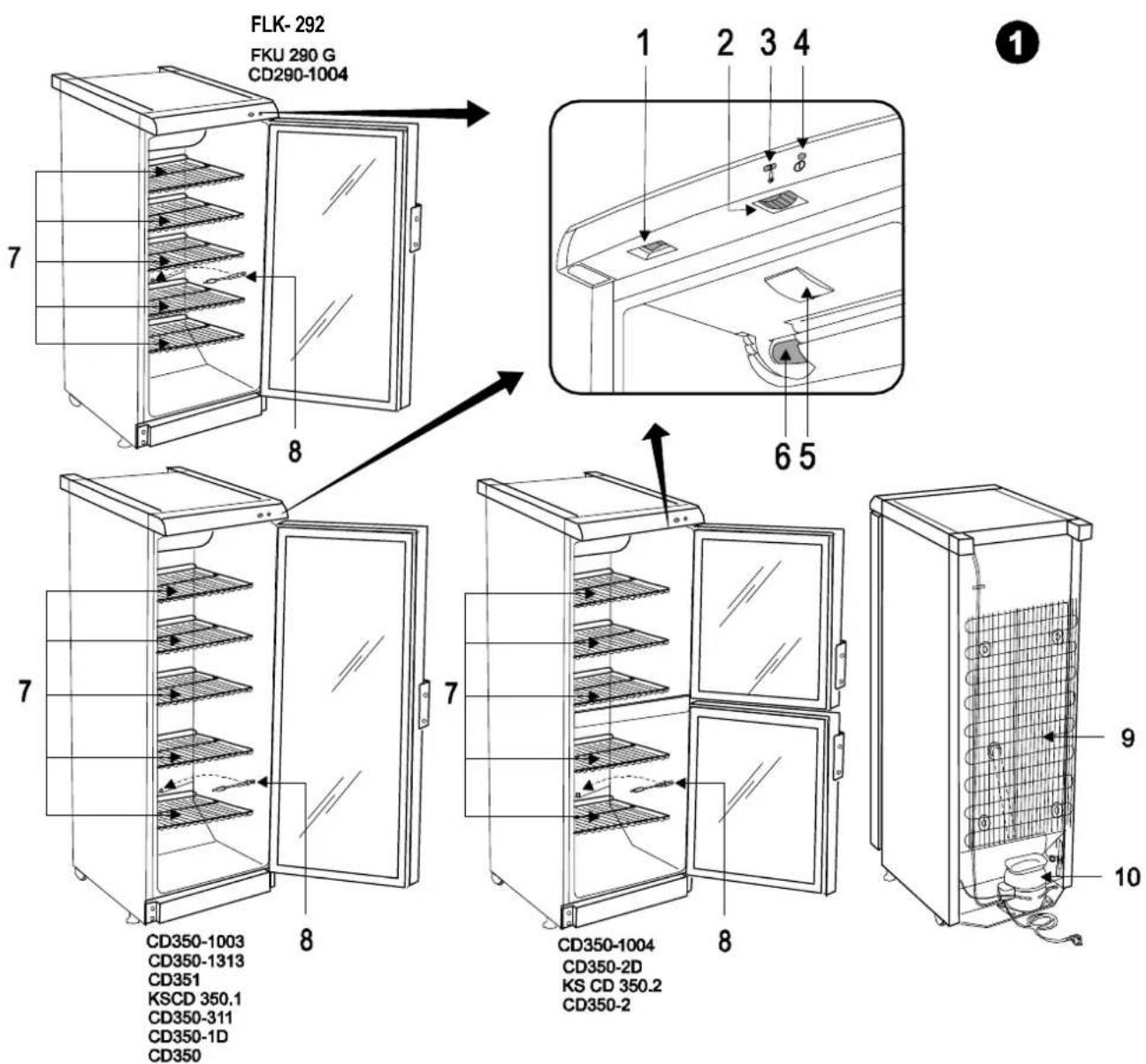
DESCRIPTION OF THE APPLIANCE, BASIC PARTS
See fig. 1, page 1
| 1 | Switch -(ON/OFF) | 6 | Fan* (CD350-1313 - no) |
| 2 | Thermostat knob | 7 | Shelf |
| 3 | Thermostat indicator | 8 | Cleaner |
| 4 | Electricity supply indicator | 9 | Condenser |
| 5 | Interior light block (LED) | 10 | Compressor |
1 — ON / OFF SWITCH FOR INTERIOR LIGHT. On / off switch for interior light I -(ON) O -(OFF)
2 — THERMOSTAT KNOB. The thermostat is off when there is a zero (0) in the thermostat indicator space. Turning the thermostat knob clockwise the temperature in the compartment lowers.
*WARNING! The fan switches on and continuously operates!
TEMPERATURE REGULATION
The temperature in the refrigerator compartment is controlled using the thermostat knob 2 (see fig. 1) by turning it to one side or the other. The temperature indication in digits is shown beside the thermostat knob. When the door is closed, the temperature setting can be seen on the thermostat indicator display 3 (fig. 1).
The temperature is regulated on the scale of five digits.
0 = Compressor is switched off. WARNING! Electric current is not switched off.
1 = highest temperature (lowest cooling)
5 = lowest temperature (highest cooling)

IF THE ROOM IS COOL, THE APPLIANCE COOLS LESS. THE TEMPERATURE IN THE APPLIANCE MAY THEREFORE RISE. Use the thermostat wheel to set a lower temperature.
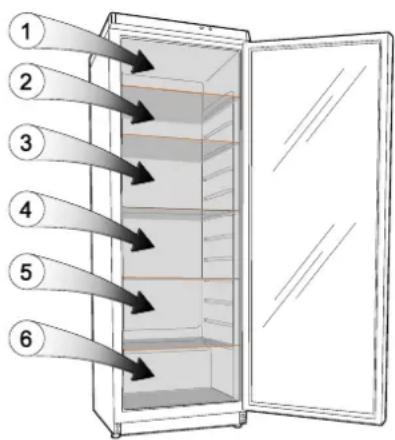
The models CD350-1313, CD350-311: Temperature in the storage compartment depends on the ambient temperature, on the position of the thermostat knob. Thermostat knob position is set according to the table.
text_image
Diagram of a refrigerator with six numbered arrows indicating flow or placement from the top to the side panel.Wine temperature, °C
| Zone designation | Position of the thermostat(ambient temperature +25 °C) | ||||
| 1 | 2 | 3 | 4 | 5 | |
| 1 zone | 12 – 14 | 12 – 14 | 12 - 14 | 10 – 12 | 8 – 10 |
| 2 zone | 10 – 12 | 10 – 12 | 9 – 11 | 8 – 10 | 6 – 8 |
| 3 zone | 8 – 10 | 8 – 10 | 8 – 10 | 6 – 8 | 4 – 6 |
| 4 zone | 8 – 10 | 8 – 10 | 6 – 8 | 4 – 6 | 4 – 6 |
| 5 zone | 8 – 10 | 8 – 10 | 4 – 6 | 2 – 4 | 2 – 4 |
| 6 zone | 6 – 8 | 6 – 8 | 4 – 6 | 2 – 4 | 1 – 3 |
DEFROSTING, CLEANING AND CARE
THE REFRIGERATOR COMPARTMENT DEFROSTS AUTOMATICALLY. Drops of ice that form on the back wall of the refrigerator compartment thaw during the time the compressor is not working and the thaw water runs down the thaw water runoff channel to the tray on top of the compressor, where it evaporates.
REGULARLY CLEAN THE APPLIANCE.
Remember that before cleaning you must disconnect the appliance from the electrical energy supply socket by pulling the plug out of the electricity outlet.
natural_image
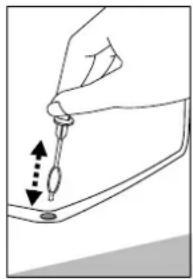
Illustration of a hand holding a tool with an arrow indicating direction, no text or symbols present- Protect the appliance inner surfaces and plastic parts from fats, acids and sauces. In case of accidental spills – immediately clean with warm soapy water or dishwashing detergent. Wipe dry.
- Regularly clean the hermetic gaskets of the doors. Wipe dry.
- REGULARLY CLEAN THE THAW WATER CHANNEL SPACE WITH A SPECIAL CLEANER 8 FOR THAT PURPOSE (Fig. 1).
- At least once a year clean dust away from the back part of the appliance body and the compressor. A soft brush, electrostatic cloth or vacuum cleaner may be used for cleaning.
- DO NOT use detergents containing abrasive particles, acid, alcohol or benzene for cleaning the appliance inner and outer surfaces. DO NOT use for cleaning cloths or sponges that have coarse surfaces intended for scrubbing. Outer of the doors – glass – clean with agents intended for glass cleaning.
- If the appliance is to be left switched off for an extended period, leave its doors open.
CHANGING THE OPENING DIRECTION OF THE DOORS
It is recommended that changing the opening direction of the doors should be done with a helper. You will need two spanners No. 8 and No. 10 and a Philips head screwdriver.
When changing the opening direction of the doors YOU CAN NOT lay the refrigerator horizontally! Do the actions below in the order they are listed:
FOR THE MODELS WITH ONE DOOR (see fig. 3, page 2):
- Turn off the appliance and pull the plug out of the electricity supply socket
- Unscrew two screws 7 and remove the bottom bracket 8 together with the set of washers 6 on the axle and the spacer 5.
- Unscrew two screws 7 and remove the bracket 11. Remove the door 4.
- Unscrew the axle 2 together with the nut 1 and washers 3 from the upper bracket and screw all this set on the reverse side of the door;
- Before hanging the door, turn the door over by 180 ^0 and insert the upper axle in the door.
- Unscrew fixing screws 12 from doors, remove handles 13 and fix them screwing in free holes on the same side. Plate 10 remains in its place.
- Before screwing the bottom bracket 8 together with the set of washers and spacers on the reverse side of a cabinet, insert the bracket axle to the door.
- Screw the bracket 11 on the reverse side of a cabinet.
FOR THE MODELS WITH TWO DOORS (see fig. 3, page 2):
- Turn off the appliance and pull the plug out of the electricity supply socket.
- Unscrew two screws 12 and remove the bottom bracket 13 together with the set of washers 11 on the axle and the spacer 10.
- Unscrew two screws 12 and remove the bracket 15. Remove the bottom door 9.
- Unscrew fixing screws 7 of the middle bracket. Remove the middle bracket 6 together with washers on the axle and the spacer 5. Remove the top door 4.
- Unscrew the axle 2 together with the nut 1 and washers 3 from the upper bracket and screw all this set on the reverse side of the door.
- Take out the plugs 18 in the crossbar zone and displace them on the reverse side.
- Before hanging the upper door, turn the door over by 180 ^0 and insert the upper axle in the door. Before screwing the middle bracket 6 with the set of washers and spacers on the reverse side of the cabinet, insert the bracket axle into the upper door;
- Before hanging the bottom door on the middle bracket axle, turn them over by 180 °.
- Unscrew fixing screws 16 from both of door, remove handles 17 and fix them screwing in free holes on the same side. Plate 14 remains in its place.
- Before screwing the bottom bracket 13 together with the set of washers and spacers on the reverse side of a cabinet, insert the bracket axle to the door.
- Screw the bracket 15 on the reverse side of a cabinet.
Operation problems and their solutions (troubleshooting). What if ...
- The appliance is plugged in to the mains but it does not work and the electricity supply voltage indicator is not illuminated. Check that your house electricity supply installations are in order. Check that the plug is correctly inserted into the electricity supply socket.
- The noise has become louder. Check that the appliance is standing stable, on a level place. To make it level, regulate the front feet. Check if the appliance is not touching any furniture, and that no part of the refrigeration system at the back part of the appliance body is touching the wall. Pull the appliance away from any furniture or walls. Check that the cause of increased noise isn't due to bottles, cans or dishes in the appliance that might be touching each other.
- Water has appeared at the bottom of the refrigerator compartment. Check whether a thaw water channel space isn't blocked. Clean the thaw water channel space with a cleaner intended for that purpose.
- Water has appeared under the appliance. The thaw water collection tray has slipped off the compressor. Place the tray on top of the compressor.
- When the appliance door is opened, the rubber sealing gasket pulls out. The gasket is smeared with sticky foodstuffs (fat, syrup). Clean the sealing gasket and the groove for it with warm water containing soap or dishwashing detergent and wipe dry. Put the rubber sealing gasket back into the place.
- High temperature in appliance, the compressor operation pauses are short. Ascertain whether the appliance door/doors are shutting tightly, whether the door wasn't kept open longer than necessary when taking out or putting in foodstuffs or whether a large amount of warm food was placed in the appliance.
- The top of the appliance has condensation on it. The ambient relative air humidity is above 60 %. Ventilate the room where the appliance stands and if possible remove the cause of the humidity.

Remarks on the appliance operating noise. As the appliance operates and goes through the freezing cycle, various noises will be emitted. This is normal and is not a sign of any malfunction.
As the refrigerant circulates around the refrigeration system, it causes sounds like murmuring, bubbling, or rustling. Louder sounds like popping or clicking may be heard for a short time as the refrigerator compressor switches on.
ENVIRONMENTAL PROTECTION INFORMATION
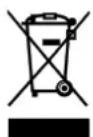
If the appliance is no longer in use, cut the connecting cable off the used equipment before its scrapping. Also, remove the appliance lock or render it useless so that the appliance presents no danger to children while being stored for di- sposal. This appliance is marked with a symbol of the crossed out waste container in conformance with the European Directive 2002/96/EC. Such marking informs that the equipment may not be kept together with other waste coming from the household after the period of its use. The user is obliged to dispose of the appliance at the waste collection point. The local waste collection points, shops and communal units form an appropriate system enabling the disposal of the equipment.
Handling the used electrical and electronic equipment properly contributes to the avoidance of consequences harmful to the human health and natural environment, resulting from the presence of hazardous substances and improper storage and processing of such equipment.
WARRANTY SERVICE
IF YOUR APPLIANCE IS NOT WORKING PROPERLY, ASCERTAIN WHETHER YOU CAN REMEDY THE CAUSE OF THE FAULTY FUNCTIONING OF THE APPLIANCE YOURSELF. If you cannot solve the problem yourself, contact the nearest refrigerator service representative by telephone or in writing. When making contact necessarily indicate the refrigerator model and number. You will find this data on the product label, which is glued to the wall.
Product data sheet
| Model | CD290-1004, CD290.1004, FKU 290 G, FLK-292 | CD350-1003 CD350.1003 KS CD 350.1 CD350 | CD350-1004 KS CD 350.2 CD350-2D CD350-2 | ||
| Refrigerator total gross volume, L | 290 | 350 | |||
| Refrigerator net volume, L | 275 | 320 | |||
| Dimensions (H x W x D), cm | 145 x 60 x 60 | 173 x 60 x 60 | |||
| Shelf area, dm2 | 115 | 115 | |||
| Weight, kg | 55 | 65 | |||
| Climate class | 3 (+16 to +32) | ||||
| Product temperature class | S | ||||
| Products temperature ranges, °C (In accordance with EU standard ISO 23953-2:2015, p .4.2.2) | from -2 to +14 | ||||
| Door opening area, m2 | 0,66 | 0,80 | |||
| General product exposure area, m2 | 0,51 | 0,62 / 0,58 | |||
| Loading of the refrigerator quantity of bottles, pcs. | 0,33 l cans | 287 | 322 | ||
| 0,5 l PET | 126 | 154 | |||
| Maximum loading of one shelf, kg | 40 | 50 | |||
| Energy consumption at ambient temperature +25 °C: kWh/year | At switched on lighting | At switched off lighting | At switched on lighting | At switched off lighting | |
| 748 | 737 | 781 | 756 | ||
| Electrical Data: see in the product label | |||||
| A-weighted sound pressure level below 70db(A) | |||||
| Models | CD350-1313, CD350-311 | |
| Refrigerator total gross volume, L | 350 | |
| Refrigerator net volume, L | 330 | |
| Dimensions (H x W x D), cm | 173 x 60 x 60 | |
| Shelf area, dm2 | 120 | |
| climate class | N | |
| Average air temperature inside the refrigerator, °C | from +4 to +14 | |
| Weight, kg | 67 | |
| Door opening area, m2 | 0,80 | |
| General product exposure area, m2 | 0,62 | |
| Loading of the refrigerator (quantity of bottles) 0,75 l | 105 pcs. | |
| Maximum loading of one shelf, kg | 50 | |
| Energy efficiency classification | D | A |
| Energy consumption at ambient temperature +25 °C, kWh/year | 321 | 161 |
| Nominal imput of luminaire, W | 3 | |
| Acoustical noise emissions, dB(A) re1 pW | 43 | |
| Electrical Data: see in the product label | ||
NOTE. The manufacturer reserves the right to make future changes to technical parameters and specifications.
NL
natural_image
Line drawing of a hand holding a pipette over a surface with a downward arrow indicating direction (no text or symbols)text_image
Diagram of a refrigerator with numbered arrows indicating storage or ventilation direction, showing open door and shelves.| Die Bezeichnung der Zone | Die Lage der Thermoreglers (Bei Umgebungstemperatur +25 °C) | ||||
| 1 | 2 | 3 | 4 | 5 | |
| 1 zone | 12 – 14 | 12 – 14 | 12 - 14 | 10 – 12 | 8 – 10 |
| 2 zone | 10 – 12 | 10 – 12 | 9 – 11 | 8 – 10 | 6 – 8 |
| 3 zone | 8 – 10 | 8 – 10 | 8 – 10 | 6 – 8 | 4 – 6 |
| 4 zone | 8 – 10 | 8 – 10 | 6 – 8 | 4 – 6 | 4 – 6 |
| 5 zone | 8 – 10 | 8 – 10 | 4 – 6 | 2 – 4 | 2 – 4 |
| 6 zone | 6 – 8 | 6 – 8 | 4 – 6 | 2 – 4 | 1 – 3 |