
XR-77A80K - Television SONY - Free user manual and instructions
Find the device manual for free XR-77A80K SONY in PDF.
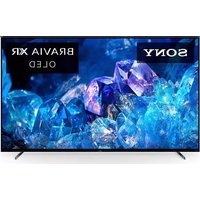


| Product Type | OLED TV |
| Brand | Sony |
| Model | XR-77A80K |
| Screen Size (Diagonal) | 194.7 cm (77 inches) |
| Display Resolution | 3840 × 2160 pixels (4K UHD) |
| Dimensions with Stand (W × H × D) | 172.2 × 102.4 × 38.9 cm |
| Dimensions without Stand (W × H × D) | 172.2 × 99.3 × 5.3 cm |
| Weight with Stand | 37 kg |
| Weight without Stand | 34.8 kg |
| Power Supply | 220-240 V AC, 50 Hz |
| Power Consumption (Standard Mode) | 169 W |
| Power Consumption (Standby) | 0.5 W |
| Panel Type | OLED (Organic Light Emitting Diode) |
| TV Standards | Analog B/G, D/K, I; Digital DVB-T/C/T2; Satellite |
| Connectivity | 4 HDMI inputs (HDCP 2.3), 2 USB ports, Optical Digital Output, Ethernet, Wi-Fi |
| Audio Features | Dolby Atmos, Dolby Audio, DTS, built-in speakers (20W+10W+10W+10W+10W) |
| Voice Assistant | Integrated Google Assistant |
| Screen Protection Features | Panel refresh, pixel shift, automatic brightness reduction |
| Maintenance and Cleaning | Use a soft, dry cloth. Do not use chemicals. Turn off and unplug before cleaning. |
| Safety | Install on stable surface, prevent tipping, do not apply pressure to the screen |
| Spare Parts and Accessories | Wall mount SU-WL850/SU-WL450, remote control, cables, batteries |
| General Information | Manual available in PDF. Regular software updates recommended. |
Frequently Asked Questions - XR-77A80K SONY
User questions about XR-77A80K SONY
0 question about this device. Answer the ones you know or ask your own.
Ask a new question about this device
Download the instructions for your Television in PDF format for free! Find your manual XR-77A80K - SONY and take your electronic device back in hand. On this page are published all the documents necessary for the use of your device. XR-77A80K by SONY.
USER MANUAL XR-77A80K SONY
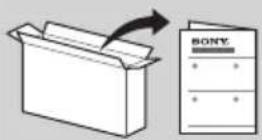
This TV comes with the following manuals. Please retain the manuals for future reference.
Setup Guide
- TV installation and setup.
Reference Guide (this manual) / Safety Documentation
- Safety information, remote control, troubleshooting, wall-mount installation, specification, etc.
Help Guide (On screen Manual)
- Settings, functions, Internet connection, troubleshooting, etc.
- To open it, press input select) on the remote control and select [Help]. If [Help] does not exist, select [Edit] and add [Help].
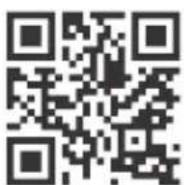
- You can refer to the Help Guide with your smartphone.
https://rd1.sony.net/help /tv/jaep1/h_aep/
IMPORTANT - Read the End User Software Licence
Agreement before using your Sony product. Using your product indicates your acceptance of the End User Software Licence Agreement. The software licence agreement between you and Sony is available online at Sony website (https:// www.sony.net/tv-software-licenses/) or on your product screen. Press (Quick Settings) on the remote control and select [Settings] → [System] → [About] → [Legal information] → [Notices and licences].
Note
- Before operating the TV, please read the "Safety Information".
- Read the supplied safety documentation for additional safety information. Images and illustrations used in the Setup Guide and this manual are for reference only and may differ from the actual product. The "x"/"xx" that appears in the model name corresponds to a numeric digit, related to design, colour or TV system.
- Setting menus are subject to change without notice due to
software updates.
For latest information, visit Sony support website.
Location of the identification label
Labels for the TV Model No., Production Date (year/month)* and Power Supply rating are located on the rear of the TV or package.
- Only for limited region/country/model.
Safety Information
Installation/Set-up
Install and use the TV set in accordance with the instructions below in order to avoid any risk of fire, electric shock or damage and/or injuries.
Installation
- The TV set should be installed near an easily accessible mains socket.
- Place the TV set on a stable, level surface to prevent it from falling over and causing personal injury or property damage. Install the TV where it cannot be pulled, pushed, or knocked over.
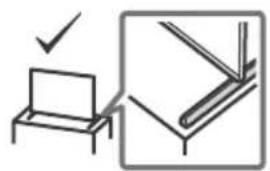
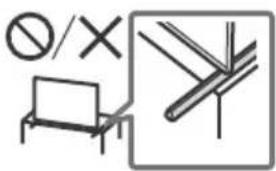
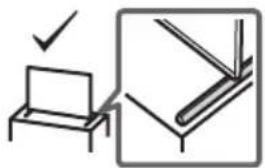
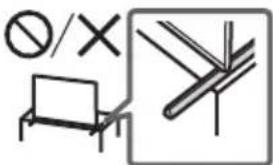
- Install the TV so that the TV's Table-Top Stand does not protrude out from the TV stand (not supplied). If the Table-Top Stand protrudes out from the TV stand, it may cause the TV set to topple over, fall down, and cause personal injury or damage to the TV.
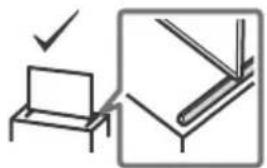
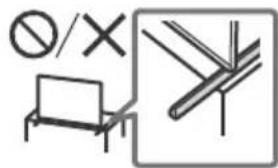
Transporting
- Before transporting the TV set, disconnect all cables.
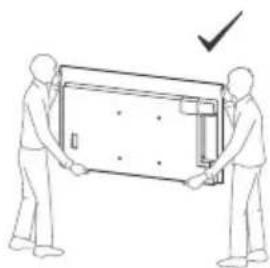
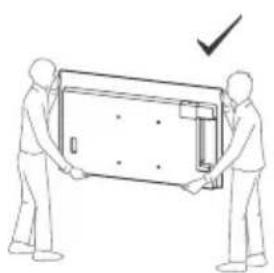
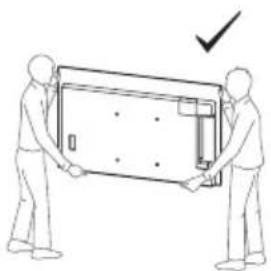
- Two or more persons are needed to transport a large TV set.
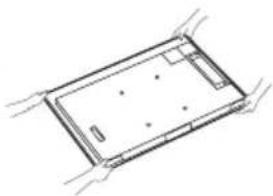
- When transporting the TV set by hand, hold it as shown below.
Do not put stress on the panel and the frame around the screen.

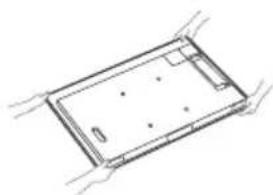
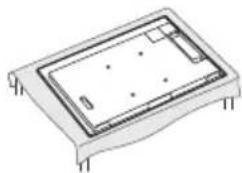
- When handling or mounting the TV set, do not lay down the TV (except XR-55A8xK).
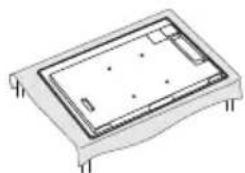
- When transporting the TV set, do not subject it to jolts or excessive vibration.
- When transporting the TV set for repairs or when moving, pack it using the original carton and packing material.
Topple prevention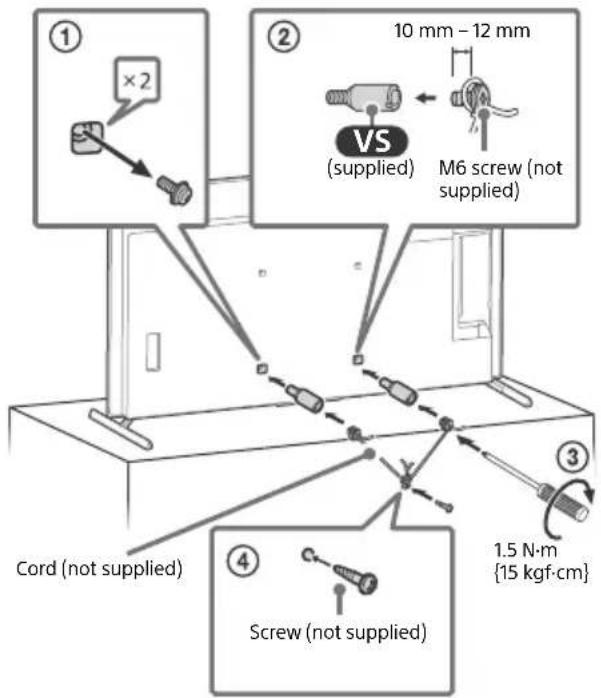
Protecting the TV Screen (OLED TV)
Precautions to Protect the Screen from Damage
Image retention
OLED TVs are susceptible to image retention (burn-in) due to the characteristics of the materials used. Image retention may occur if images are displayed in the same location on the screen repeatedly or over extended periods of time. This is not a malfunction of the TV. Avoid displaying images that may cause image retention.
The following are examples of images that may cause image retention:
Content with black bars either on the top and bottom and/or the left and right sides of the screen (for example, letterboxed, 4:3 screen, standard definition). Static images such as photos. On-screen menus, programme guides, channel logos, etc. Static content from applications. On-screen tickers, such as those used for news and headlines.
To reduce the risk of image retention:
- Sony recommends that you turn off the TV normally by pressing the power button on the remote control or the TV.
- Fill the screen by changing [Wide mode] to eliminate the black bars. Select [Wide mode] other than [Normal].
- Turn off the OSD (On Screen Display) by pressing the control menu button and select [Info], and turn off the menus from connected equipment.
- Avoid displaying static images with bright colours (including white), clocks, or logos on any portion of the screen.
- Set the picture settings based on the ambient conditions. The Standard Picture is recommended for home use and when viewing content that often displays station logos, etc.
The TV has the following features to help reduce/prevent image retention.
Panel refresh
A panel refresh will adjust the panel uniformity. Panel refresh can be performed and should only be used when image retention is very noticeable.
Caution:
- The Panel refresh function may affect the panel. Do not perform Panel refresh more than once a year as it may affect the usable life of the panel.
- Panel refresh takes about ten minutes to complete. The effectiveness of a panel refresh may vary depending on the image retention condition.
Pixel shift
Automatically moves the image on the screen to prevent image retention.
Other feature
The screen brightness is automatically reduced when displaying still images, clocks, bright colours or logos etc.
GB
Using TV as Part of Audio System
Note
- Before connecting cables, disconnect the mains lead of both TV and AV receiver. Refer to the instruction manual of the Audio system with S-CENTER OUT terminal for detail.
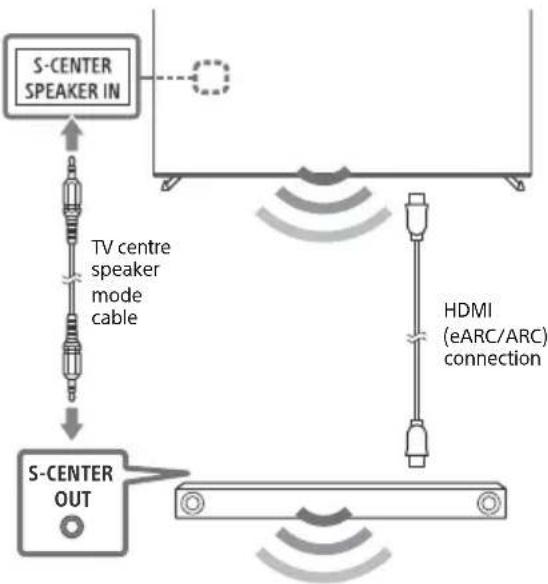
Remote Control and TV
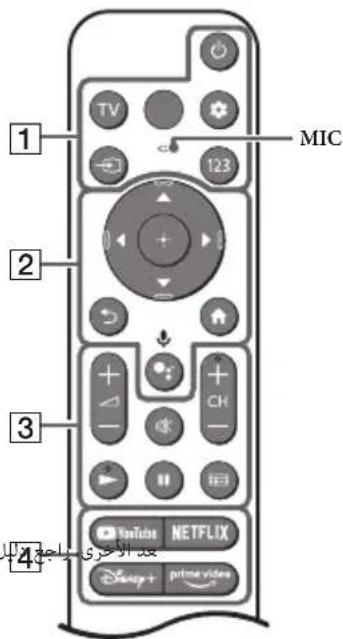
The remote control shape, layout, availability and function of remote control buttons may vary depending on your region/country/TV model/TV settings*1.
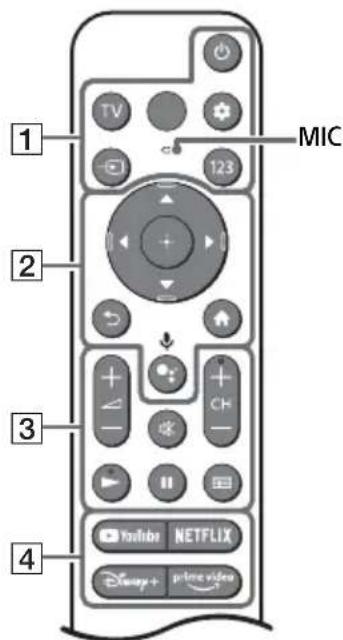
1 (Power)
TV: Display TV channel list or switch to input.
Quick settings):Display Quick Settings. → Input select):Display and select the input source, etc.
123(Control menu): Display the Control menu.
2 / / / / : On screen menu navigation and selection.
Back) Home
● (Google Assistant)/ Microphone): Use Google Assistant*2*3 or voice search*3.
3 +1-(Volume) (Mute)*4 CH+/-(Channel)
(Guide): Display the digital programme guide of TV or TV box.
4 App buttons
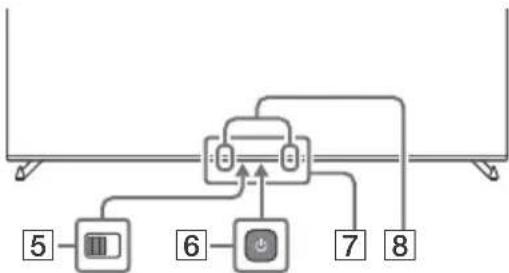
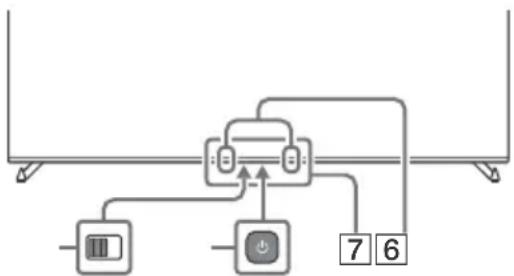
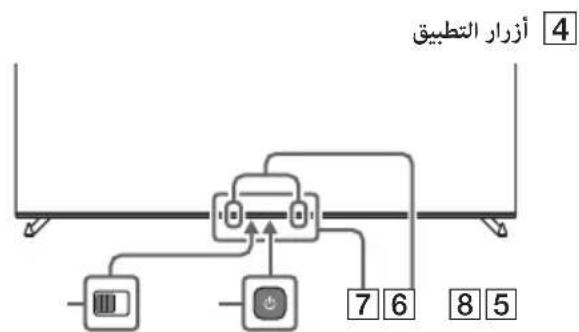
6 (Power)
5 BUILT-IN MIC SWITCH: Turn on/off the built-in MIC. Remote Control sensor / Light sensor / LED Built-in MIC 2 3: To enable the built-in MIC, press the Google Assistant/ microphone button on the remote control and follow the on-screen instructions. 1 For other remote control models, refer to the online Help Guide for details. 2 Only for limited region/country/model/language. 3 Google Assistant or voice search requires an Internet connection. 4 Accessibility shortcut is available by pressing and holding (Mute). 5 [TV box setup] setting is required. 6 Power consumption will increase when the built-in MIC is enabled as it is always listening.

For more information, refer to the Help Guide. Press input select) on the remote control and select [Help]. If [Help] does not exist, select [Edit] and add [Help].
Installing the TV to the Wall
Using the optional Wall-Mount Bracket (SU-WL850 or SU-WL450)* (not supplied)
To Customers:
For product protection and safety reasons, Sony strongly recommends that installation of your TV be performed by Sony dealers or licensed contractors. Do not attempt to install it yourself.
To Sony Dealers and Contractors:
Provide full attention to safety during the installation, periodic maintenance and examination of this product.
Wall-Mount Bracket Installation Information
For instructions on Wall-Mount Bracket installation, see the Installation Information (Wall-Mount Bracket) on the product page for your TV model.
https://www.sony.eu/support
- Follow the instruction guide provided with the Wall-Mount Bracket for your model. Sufficient expertise is required in installing this TV, especially to determine the strength of the wall for withstanding the TV's weight.
- Sony is not liable for any damage or injury caused by mishandling or improper installation.
- Only qualified service personnel should carry out wall-mount installations.
- For safety reasons, it is strongly recommended that you use Sony accessories, including:
- Wall-Mount Bracket SU-WL850
- Wall-Mount Bracket SU-WL450
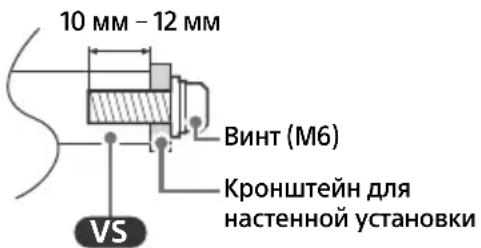
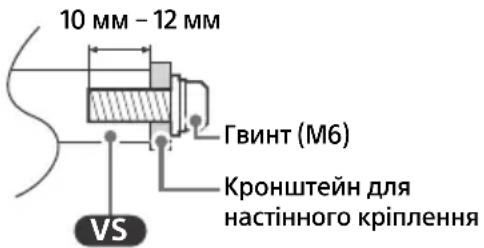
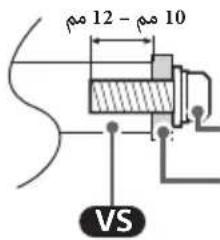
- Be sure to use the screws supplied with the Wall-Mount Bracket when attaching the Wall-Mount Bracket to the TV set. The supplied screws are designed as indicated by illustration when measured from the attaching surface of the Wall-Mount Bracket.
The diameter and length of the screws differ depending on the Wall-Mount Bracket model. Use of screws other than those supplied may result in internal damage to the TV set or cause it to fall, etc.
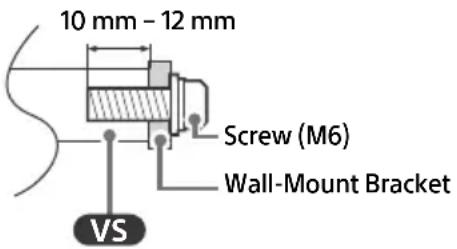
- Be sure to store the unused screws and Table-Top Stand in a safe place until you are ready to attach the Table-Top Stand. Keep the screws away from small children.
- Only for limited region/country/model.
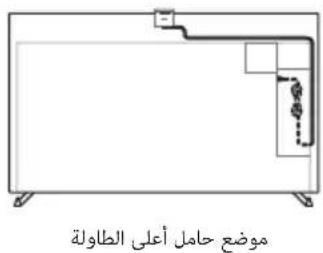
Optional Camera and Microphone Unit (not supplied) Cable Management
Table-Top Stand position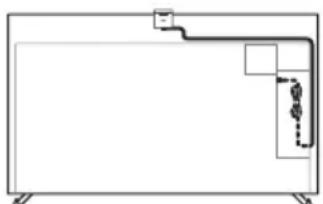
Wall-mount position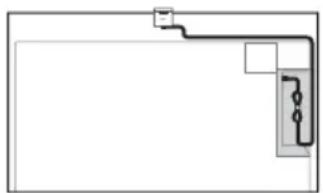
Troubleshooting
General troubleshooting for issues like: black screen, no sound, frozen picture, TV does not respond, or network is lost, do the following steps.
1 Restart your TV by pressing the power button on the remote control for about five seconds. The TV will restart. If the TV does not recover, try unplugging the mains lead then press the power button on the TV and release it. Wait for two minutes, and plug in the mains lead. Or, press the power button on the TV for about 40 seconds until the TV turns off. 2 Refer to the Help menu shown below. 3 Connect your TV to the Internet and perform a software update. Sony recommends you to keep your TV software updated. Software updates provide new features and performance improvements. 4 Visit Sony support website (information provided at the end of this manual).
When you plug in the TV, the TV may not be able to turn on for a while even if you press the power button on the remote control or the TV.
It takes time to initialize the system. Wait for about one minute, then operate it again.
The remote control does not function.
- Replace the batteries.
The parental lock password has been forgotten. - Enter 9999 for the PIN and enter the new PIN.
The screen becomes darker while watching TV.
- If the whole image or part of the image remains still, the screen brightness will be gradually reduced to prevent image retention. This is not a malfunction of the TV.
You are concerned about image retention.
If the same image is displayed repeatedly or for long periods of time, image retention may occur. To reduce image retention, we recommend that you turn off the TV normally by pressing the power button on the remote control or the TV.
Note
- Perform Panel refresh only when image retention is particularly noticeable. Avoid performing Panel refresh more than once a year because it may affect the usable life of the panel.
- Images that include clocks, logos and bright colours (including white) easily cause image retention. Avoid displaying these types of images for long periods of time, otherwise image retention may occur.
The message [Panel refresh did not finish...] is displayed.
When i) the TV is turned on or ii) the mains lead is unplugged during the Panel refresh, the Panel refresh is not completed. Please avoid the above two conditions during the Panel refresh.

For more information on troubleshooting, refer to the Help Guide.
Press Input select) on the remote control and select [Help]. If [Help] does not exist, select [Edit] and add [Help].
Specifications
System
Panel system: OLED (Organic Light Emitting Diode) Panel
TV system: Depend on your country/area selection/TV model
Analogue: B/G, D/K, I
Digital: DVB-T/DVB-C/DVB-T2
Satellite: DVB-S/DVB-S2
Colour system: PAL/SECAM/NTSC3.58 (Video only)/NTSC4.43 (Video only)
Channel coverage: Depend on your country/ area selection/TV model
Analogue: UHF/VHF/Cable
Digital: UHF/VHF/Cable
Satellite: Intermediate Frequency
950-2150 MHz
Sound output
XR-77A8xK: 20 W + 10 W + 10 W + 10 W + 10 W
XR-65A8xK / 55A8xK: 10 W + 10 W + 10 W +
10 W + 10 W
Wireless technology
Protocol IEEE 802.11a/b/g/n/ac
Bluetooth® Version 4.2
Input/Output jacks
Antenna (aerial)/cable
75 ohm external terminal for VHF/UHF
Satellite antenna
Female F Type Connector, 75 ohm.
DiSEqC 1.0, LNB 13 V/18 V & 22 kHz tone, Single
Cable Distribution EN50494.

/AYIN/S-CENTER SPEAKER IN
Video/Audio input (mini jack)
S-center speaker input (mini jack)
HDMI IN 1/2/3/4 (HDCP 2.3-compatible)
Video:
4096×2160p (50, 60 Hz)*1*2, 4096×2160p
(24 Hz)*1, 3840×2160p (50, 60 Hz)*2, 3840×
2160p (24, 25, 30 Hz), 1080p (30, 50, 60, 100,
120 Hz), 1080/24p, 1080i (50, 60 Hz), 720p
(30, 50, 60 Hz), 720/24p, 576p, 480p, PC
formats*3
3840×2160p (100, 120 Hz) 2 4
Audio:
In eARC (Enhanced Audio Return Channel)
mode
Refer to the online Help Guide for details.
Except eARC mode
5.1 channel linear PCM: 32/44.1/48/88.2/
96/176.4/192 kHz 16/20/24 bits, Dolby
Audio, Dolby Atmos, DTS
eARC/ARC (Enhanced Audio Return Channel/Audio Return Channel) (HDMI IN 3 only)*5
In eARC mode
Refer to the online Help Guide for details.
In ARC mode
Two channel linear PCM: 48 kHz 16 bits,
Dolby Audio, Dolby Atmos, DTS

DIGITAL AUDIO OUT (OPTICAL)
Digital optical jack (Two channel linear PCM:
48 kHz 16 bits, Dolby Audio, DTS)
1.2(HDDREC)
USB device port (2 USB HDD devices for REC feature)
USB port 1 supports High Speed USB (USB 2.0)
USB port 2 supports Super Speed USB (USB 3.2 Gen 1)
CAM (Conditional Access Module) slot
10BASE-T/100BASE-TX connector (Depending on the operating environment of the network, connection speed may differ. The communication rate and quality are not guaranteed.)
Power, Product Fiche and others
Power requirements
220V-240VAC, 50Hz
Energy Efficiency Class*
(Except Egypt)
XR-77A8xK: A+
XR-65A8xK: A
XR-55A8xK: A
(For Egypt only)
XR-77A80K: C
XR-65A80K: C
XR-55A80K: D
Screen size (measured diagonally) (Approx.) (Except Egypt)
XR-77A8xK: 194.7 cm / 77 inches
XR-65A8xK: 163.9 cm / 65 inches
XR-55A8xK: 138.8 cm / 55 inches
(For Egypt only)
XR-77A80K: 77 inches / 194.7 cm
XR-65A80K: 65 inches / 163.9 cm
XR-55A80K: 55 inches / 138.8 cm
Power consumption*6 In [Standard] mode
(Except Egypt)
XR-77A8xK: 169 W
XR-65A8xK: 127 W
XR-55A8xK: 104 W
(For Egypt only)
XR-77A80K: 167.4 W
XR-65A80K: 123.9 W
XR-55A80K: 102.3 W
Annual energy consumption*6 (Except Egypt)*7
XR-77A8xK: 234 kWh per year
XR-65A8xK: 176 kWh per year
Europe: 0.50 W (30 W in software/EPG update mode), Jordan/UAE/Egypt: 0.50 W, Others: 0.5 W
Display resolution (horizontal × vertical) (pixels): 3840 × 2160
Output rating
500 mA (for USB 1), 900 mA (for USB 2)
Dimensions (Approx.) (w × h × d) (cm)
with Table-Top Stand
Standard position:
XR-77A8xK: 172.2 × 102.4 × 38.9
XR-65A8xK: 144.8 × 86.2 × 33.0
XR-55A8xK: 122.7 × 73.8 × 33.0
Narrow position:
XR-77A8xK: 172.2 × 102.4 × 38.9
XR-65A8xK: 144.8 × 86.2 × 33.0
XR-55A8xK: 122.7 × 73.8 × 33.0
Soundbar position:
XR-77A8xK: 172.2 × 106.6 × 38.9
XR-65A8xK: 144.8 × 90.4 × 33.0
XR-55A8xK: 122.7 × 78.0 × 33.0
without Table-Top Stand
XR-77A8xK: 172.2 × 99.8 × 5.4
XR-65A8xK: 144.8 × 83.6 × 5.3
XR-55A8xK: 122.7 × 71.2 × 5.3
Stand width (Approx.) (cm)
Standard position:
XR-77A8xK:140.9
XR-65A8xK/55A8xK:118.4
Narrow position:
XR-77A8xK:61.9
XR-65A8xK/55A8xK:84.7
Soundbar position:
XR-77A8xK:140.9
XR-65A8xK/55A8xK:118.4
Mass (Approx.) (kg)
with Table-Top Stand
XR-77A8xK:37
XR-65A8xK:24.6
XR-55A8xK: 19.5
without Table-Top Stand
XR-77A8xK: 34.8
XR-65A8xK: 23
XR-55A8xK: 17.9
Others
Optional accessories: Wall-Mount Bracket: SU-WL850 / SU-WL450; Camera and Microphone Unit: CMU-BC1
Operating temperature: 0°C - 40°C; Operating humidity: 10% - 80% RH (non-condensing)
1 When 4096 × 2160p is input and [Wide mode] is set to [Normal], the resolution is displayed as 3840 × 2160p. To display 4096 × 2160p, set [Wide mode] setting to [Full 1] or [Full 2]. 2 Refer to the on-screen menu to set [HDMI signal format]. 3 Refer to the online Help Guide for details. 4 HDMI IN 3 & 4 only. Use the Ultra High Speed HDMI Cable to connect. 5 Connect your audio system to the HDMI IN 3 to route TV audio to your audio system. 6 This information is for EU and other countries whose relevant regulation is based on EU energy labelling regulation. 7 Energy consumption in kWh per year, based on the power consumption of the television operating 4 hours per day for 365 days. The actual energy consumption will depend on how the television is used. 8 Energy consumption in kWh per year, based on the power consumption of the television operating 8 hours per day for 365 days. The actual energy consumption will depend on how the television is used. 9 Specified standby power is reached after the TV finishes necessary internal processes. 10 Standby power consumption will increase when your TV is connected to the network.
Note
- Optional accessories availability depends on countries/region/TV model/stock.
- Design and specifications are subject to change without notice.
- Subscriptions for services and applications may be required and additional terms, conditions and/or charges may apply when using Google Assistant.
Notes on Digital TV function
- Digital TV (DVB terrestrial, satellite and cable), interactive services and network functions may not be available in all countries or areas. Some functions might not be enabled or might not operate correctly with some providers and network environments. Some TV service providers may charge a fee for their services.
- This TV supports digital broadcasting using MPEG-2, H.264/MPEG-4 AVC and H.265/HEVC CODECs, but compatibility with all operator/service signals, which may change over time, cannot be guaranteed.
Trademark Information
- The terms HDMI, HDMI High-Definition Multimedia Interface, and the HDMI Logo are trademarks or registered trademarks of HDMI Licensing Administrator, Inc.
- Dolby, Dolby Vision, Dolby Atmos, Dolby Audio, and the double-D symbol are trademarks of Dolby Laboratories Licensing Corporation. Manufactured under license from Dolby Laboratories. Confidential unpublished works. Copyright © 1992-2021 Dolby Laboratories. All rights reserved.
- Gracenote, the Gracenote logo and logotype, "Powered by Gracenote" logo are either registered trademarks or trademarks of Gracenote, Inc. in the United States and/or other countries.
- Google, Google TV and related logos are trademarks of Google LLC.
- For DTS patents, see http://patents.dts.com. Manufactured under license from DTS, Inc. DTS, Digital Surround, and the DTS logo are registered trademarks or trademarks of DTS, Inc. in the United States and other countries. © 2020 DTS, Inc. ALL RIGHTS RESERVED.
- Netflix is a registered trademark of Netflix, Inc.
- DiSEqCTM is a trademark of EUTELSAT. This TV supports DiSEqC 1.0. This TV is not intended for controlling motorized antennas.
- TUXERA is a registered trademark of Tuxera Inc. in the US and other countries.
- All other trademarks are the property of their respective owners.
https://rd1.sony.net/help /tv/jaep1/h_aep/
Satellite: DVB-S/DVB-S2
Analogue: UHF/VHF/Cable
XR-65A8xK/55A8xK: 10W+10W+10W+
10W+10W
Wireless technology
IEEE 802.11a/b/g/n/ac protocol
Bluetooth® Version 4.2
2160p (24, 25, 30 Hz), 1080p (30, 50, 60, 100,
120 Hz), 1080/24p, 1080i (50, 60 Hz), 720p
(30, 50, 60 Hz), 720/24p, 576p, 480p,
PC formats*3
3840 × 2160p (100, 120Hz) 2 4
Audio:
In eARC (Enhanced Audio Return Channel) mode
eARC/ARC (Enhanced Audio Return Channel/
Audio Return Channel) (HDMI IN 3
only)*5
In eARC mode
DIGITAL AUDIO OUT (OPTICAL)
XR-55A8xK: 122.7 × 73.8 × 33.0
Narrow position:
XR-77A8xK: 172.2 × 102.4 × 38.9
XR-65A8xK: 144.8 × 86.2 × 33.0
XR-55A8xK: 122.7 × 73.8 × 33.0
XR-65A8xK: 144.8 × 90.4 × 33.0
XR-55A8xK: 122.7 × 78.0 × 33.0
Without table stand
XR-77A8xK: 172.2 × 99.8 × 5.4
XR-65A8xK: 144.8 × 83.6 × 5.3
XR-55A8xK: 122.7 × 71.2 × 5.3
Camera Microphone: CMU-BC1
https://rd1.sony.net/help/tv/jaep1/h_aep/
Country of origin is indicated on the product and packaging.
Country of origin is indicated on the product and packaging.
XR-77A80K / XR-65A80K / XR-55A80K

Importer to the territory of the Customs Union: JSC, Russia, 123103, Moscow, Karamyshevsky proezd, 6
Organization authorized to accept claims from consumers on the territory of Kazakhstan
JSC "Sony Electronics"
Representative office in Kazakhstan, 050010, Republic
Kazakhstan, Almaty, Dostyk Ave., 117/7
Safety
Installation/Connection
To avoid fire, electric shock, damage to the TV, or injury, perform installation and operation of the TV in accordance with the following instructions.
Installation
The TV should be installed near an easily accessible power outlet. To avoid tipping over or damage to the TV, or injury, install the TV on a stable surface. Install the TV in a place where it cannot be pulled or tipped over. - Install the TV so that the tabletop stand does not protrude beyond the TV stand (not included). If the tabletop stand protrudes beyond the TV stand, the TV may tip over and fall, which could result in injury or damage to the TV.
Moving
- Before moving the TV, disconnect all cables from it. - For large-sized TVs, two or more people are required for moving. - When carrying the TV by hand, hold it as shown below. Do not apply force to the panel or the screen frame.
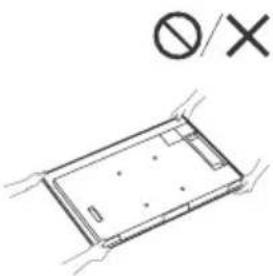
When installing the TV, do not place it near the screen (except for XR-55A8xK models).
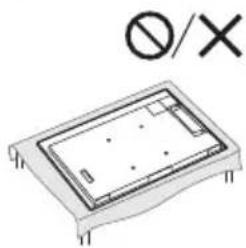
- When transporting, protect the TV from shocks and strong vibrations.
- If it is necessary to deliver the TV to a repair shop or transport it to another place, pack it in the original carton and packing materials in which it was delivered.
Preventing tipping over
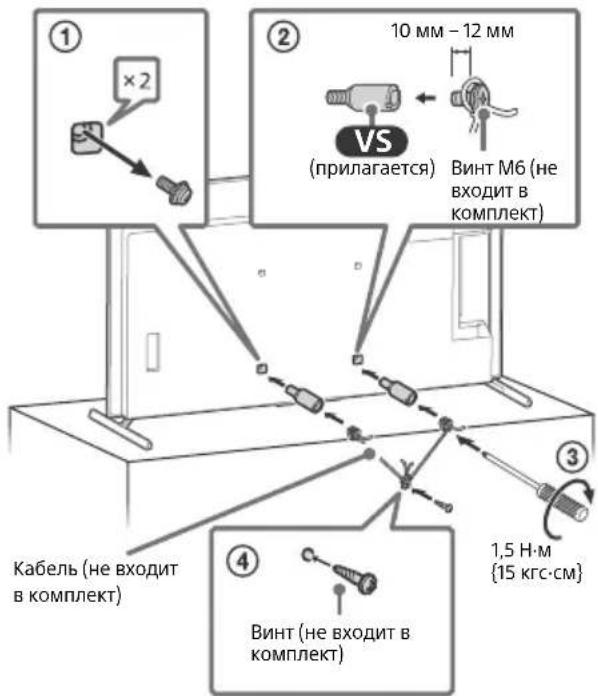
Protecting the TV screen (OLED TV)
Precautions for protecting the screen from damage
Afterimage effect
Due to the properties of the materials used in OLED TVs, an afterimage effect (image retention) may occur on the screen. The afterimage effect may occur if the same image is displayed repeatedly or for a long time. This is not a malfunction of the TV. Do not display images that can cause the afterimage effect.
Below are examples of images that can cause the afterimage effect:
- Content with gray bands at the top and bottom and/or left and right on the screen. (For example, letterboxed format, 4:3 at standard resolution)
- Static images, such as photographs. -Screen menus, TV programs, channel logos, etc.
- Static content in apps. -Screen tickers, for example in news headlines.
To reduce the occurrence of the afterimage effect:
- Sony recommends turning off the TV in the usual way by pressing the power button on the remote control or on the TV. Fill the screen by selecting [Wide screen mode] to eliminate black bars. Select [Wide screen mode] instead of [4:3].
- Turn off the OSD (on-screen display) by pressing the MENU button and selecting [Information], and also turn off the menu on the connected equipment. Try not to display static images with bright colors (including white), clocks, or logos in one place on the screen.
- Set the image settings according to the ambient conditions for comfortable viewing, and also for viewing content with static logos or similar. It is recommended to use the standard image settings.
The TV provides the following functions to reduce or prevent the afterimage effect.
Panel Refresh
Panel refresh is performed to correct the uniformity of the screen. You can perform the panel refresh; however, this option should be used only when noticeable signs of the afterimage effect appear.
Caution:
The panel refresh function may affect the panel. Do not perform the panel refresh more than once a day, as it may shorten the panel's lifespan. - The panel refresh takes approximately 10 minutes. The effectiveness of the panel refresh procedure depends on the degree of the afterimage effect.
Pixel Shift
Automatically shifts the image on the screen to prevent the afterimage effect.
Brightness
The screen brightness decreases automatically when displaying still images, clocks, bright lights, or logos, etc.
For customers:
To ensure the safety of the product and for safety reasons, Sony strongly recommends that only qualified or licensed Sony dealers perform the TV installation. Do not attempt to install it yourself.
For Sony dealers and dealers:
Pay special attention to safety during installation, periodic maintenance, and inspection of this product.
Use the supplied bracket for wall mounting.
https://www.sony.eu/support
Follow the instructions for wall mounting bracket installation carefully. Proper installation of the TV requires sufficient strength, especially when determining whether the wall can support the weight of the TV. Sony is not responsible for any damage or injury caused by improper handling or installation. Wall mounting of the TV should be performed only by qualified service personnel. For safety reasons, it is strongly recommended to use Sony accessories, including: - Wall-mount bracket SU-WL850 - Wall-mount bracket SU-WL450
- Be sure to use the screws supplied with the wall-mount bracket when attaching the wall-mount bracket to the TV. The supplied screws are designed as shown in the illustration, for measuring the mounting surface thickness. The diameter and length of the screws vary depending on the model and wall-mount bracket. Using screws other than those supplied may cause damage to the TV or cause it to fall, etc.
Store unused screws and the table-top stand in a safe place until you are ready to attach the table-top stand. Keep screws out of reach of children. *Only for certain regions/countries/models.
Cable organizer for the camera/microphone block (not supplied)
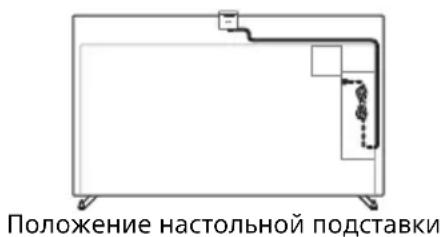
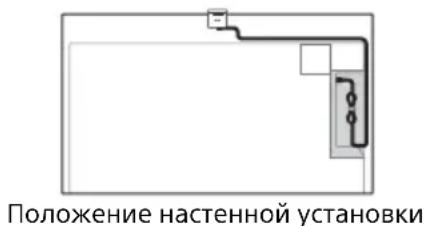
TROUBLESHOOTING
Basic troubleshooting for the following problems: blank screen, no sound, frozen frames, no response to button presses, power loss. If these problems occur, perform the following actions.
1 Restart the TV by pressing the power button on the remote control for about five seconds. The TV restarts. If the TV does not return to the previous mode, try unplugging the power cord, then press the power button on the TV and hold it for a few seconds. Wait for two minutes, then plug the power cord back in.
Press and hold the power button on the TV for about 40 seconds until the TV turns off.
2 See the Help menu below. 3 Connect the TV to the internet and perform a software update. Sony recommends updating the TV software regularly. Software updates improve the TV's performance and add new features. 4 Visit the Sony support website (information provided at the end of this manual).
The remote control does not work.
- Replace the batteries.
Forgot the password for the "Parental Lock" function.
Enter 9999 as the PIN code and enter the new PIN code.
The screen darkens while watching TV.
- If the entire image or part of it is stationary, the screen brightness gradually decreases to prevent the afterimage effect. This is not a malfunction of the TV.
You are concerned about the afterimage effect.
If the same image is repeated or remains on the screen for a long time, an afterimage effect may occur. To reduce the afterimage effect, we recommend turning off the TV in the standard way by pressing the power button on the TV.
Solution
- Perform the panel refresh only if the afterimage effect is strongly noticeable. Do not perform the panel refresh more than once a year, as this may affect the panel's lifespan.
- Images containing bright colors or bright parts (including white) can quickly lead to the afterimage effect. Do not allow prolonged display of such images, otherwise the afterimage effect may occur.
The message [Panel refresh not completed...] is displayed.
If you (i) turn off the TV or (ii) disconnect the power cable during the panel refresh process, the process will not be completed. Avoid the above two conditions during the panel refresh.
![SONY XR-77A80K - The message [Panel refresh not completed...] is displayed. - 1](/content/2026/04/693683/images/a1c9a17e56546d4ce55681a85dc3d2706bdbb7c2aecb9f1d5127309840c8ced3.jpg)
Depending on the selected country/region/model of the TV
Analog: UHF/VHF/cable
UHF/VHF/cable
Satellite: Intermediate frequency 950-2150 MHz
Audio output
XR-77A8xK: 20 BT + 10 BT + 10 BT + 10 BT + 10 BT
Input/output connectors
Antenna/cable
75 ohm connector for VHF/UHF
Satellite antenna
F-type connector, 75 ohm.
DiSEqC 1.0, LNB 13 V/18 V, 22 kHz tone, control via cable EN50494.

AVIN/S-CENTER SPEAKER IN
Video/audio input (minijack type connector) Input connector for center speaker
S-Centre Speaker (minijack type connector)
HDMI IN 1/2/3/4 (with HDCP 2.3 support)
Video:
4096 × 2160p (50, 60 Hz)*4*2, 4096 × 2160p
(24 Hz)*1 3840 × 2160p (50, 60 Hz)*2, 3840 ×
2160p (24, 25, 30 Hz), 1080p (30, 50, 60, 100,
120 Hz, 1080/24p, 1080i (50, 60 Hz), 720p
(30, 50, 60 Hz), 720/24p, 576p, 480p,
Formats PC*3
3840 × 2160p (100, 120 Hz)
Audio:
In eARC (Enhanced Audio Return Channel) mode
For detailed information, see the Interactive Reference Guide.
Except for eARC mode
5.1-channel linear PCM: 32/44.1/
48/88.2/96/176.4/192 kHz 16/20/24 bit
Dolby Audio, Dolby Atmos, DTS
eARC/ARC (Enhanced Audio Return Channel/Audio Return Channel) (only HDMI IN 3)*5
eARC mode
For detailed information, see the Interactive Reference Guide.
eARC mode
Audio output: 48 kHz, 16 bit, Dolby Audio, Dolby Atmos, DTS
DIGITAL AUDIO OUT (OPTICAL)
Optical digital output
Audio output: PCM: 48 kHz, 16 bit, Dolby Audio, DTS
1, 2 (HDD REC)
USB device port (hard disk 2 USB for recording function)
USB port 1 supports high-speed USB connection (USB 2.0)
USB port 2 supports super-speed USB connection (USB 3.2 Gen 1)

CI slot (limited access module)
LAN
10BASE-T/100BASE-TX connector (connection speed depends on the network environment. Speed and data transmission quality are not guaranteed.)
Power supply, reference sheet of technical data of the device, and other
Power requirements
220V-240V AC, 50 Hz
Energy efficiency class
XR-77A8xK:A+
XR-65A8xK:A
XR-55A8xK:A
Screen size (diagonal) (approx.)
XR-77A8xK: 194.7 cm / 77 inches
XR-65A8xK: 163.9 cm / 65 inches
XR-55A8xK: 138.8 cm / 55 inches
Power consumption in standby mode
[Standard]
XR-77A8xK: 10.5 mW/cm²
XR-65A8xK: 11.1 mW/cm²
XR-55A8xK: 12.7 mW/cm²
Energy consumption
Annual [Standard]
XR-77A8xK: 169 W
XR-65A8xK:127BT
XR-55A8xK:104BT
ExeroaHoe 3nepronotpe6JeHne*
XR-77A8xK:234B KBT-у 3a roD
XR-65A8xK:176B KBT-43a roD
XR-55A8xK:144B KBT-у 3a roД.
MoHocb,notpe6JMaB DexKypHom peKmE*7*8
0,50 Bt (30 Bt B pexnme o6HOBJeHn nporpaMMHoro o6ecneueHn n daHHbIX EPG)
Pazpeшени Крана (no ropnizHTaInx noBepTnKaIn) (ToyeK)
3840 × 2160
BbIXoHbIe npaMeTpbl
500MA(ДЛЯUSB1),900MA(ДЛЯUSB2)
Pa3mepbI (npn6n.) (× × ) (cM)
CHaTcToJIbHOI NOcTaBKOJ
Ctanhapthoe noJoxehne:
XR-77A8xK: 172.2 × 102.4 × 38.9
XR-65A8xK: 144.8 × 86.2 × 33.0
XR-55A8xK: 122.7 × 73.8 × 33.0
Position of the speaker:
XR-77A8xK: 172.2 × 102.4 × 38.9
XR-65A8xK: 144.8 × 86.2 × 33.0
XR-55A8xK: 122.7 × 73.8 × 33.0
Position of the sound bar:
XR-55A8xK: 122.7 × 78.0 × 33.0
Without tabletop stand
XR-77A8xK: 172.2 × 99.8 × 5.4
https://rd1.sony.net/help/tv/jaep1/h_aep/
IMPORTANT - Please read the software license agreement before using the Sony product.
By using this product, you accept the license agreement for the software. The license agreement for the software is available on the Sony website (https://www.sony.net/tv-software-licenses/) or on the screen of your product. Press the (Settings) button on the remote control and select [Settings] → [System] → [About] → [Legal information] → [Notices and licenses].
Ppumitka
Read the safety instructions before using the product. Familiarize yourself with the documentation on safe operation. For additional safety information, contact the manufacturer. The appearance of the product may differ from the images and illustrations in the manual and in the manual itself. Such images in the manual are considered illustrative only. - The designation \(\text{工} \times \text{工} /\text{工} \times \text{工}\) in the name may correspond to the raw designation of the product configuration, which is used in the television system. The settings may be changed without prior notice as a result of software updates. To obtain the latest information, visit the support website of Sony.
Location of the identification label
Labels indicating the model, date of manufacture (year/month) * and electrical parameters are located on the rear panel or on the packaging. *This may be limited by region/country/model.
The date of manufacture is indicated on the label and packaging with a QR code in the following format: YYYY/MM, where YYYY is the year, MM is the month of manufacture.
IMPORTANT NOTE
Product name: Television
Sony Corporation hereby declares that the Sony televisions XR-77A80K / XR-65A80K / XR-55A80K comply with the radio equipment regulations; the full text of the declaration of conformity is available at the following address: http://www.compliance.oryu/.
Radio equipment may be used in Ukraine without restrictions on radio frequency spectrum.
Manufacturer: Sony Corporation, 1-7-1 Konan Minato-ku Tokyo, 108-0075 Japan
Made in Slovakia.
Country of manufacture is indicated on the product and packaging.

Safety information
Installation / Setup
Install and use the television in accordance with the instructions below to prevent the risk of fire, electric shock, and/or injury.
Installation
The TV must be installed on an easily accessible electrical outlet. Place the TV on a flat surface to prevent it from falling and being damaged or causing injury. - Place the TV on a flat surface.
- Install the TV in such a way that the base of the TV does not protrude beyond the edge of the TV (it is not included in the delivery set). If the base protrudes beyond the edge of the TV, this can lead to the TV tipping over or falling, and to damage or injury.
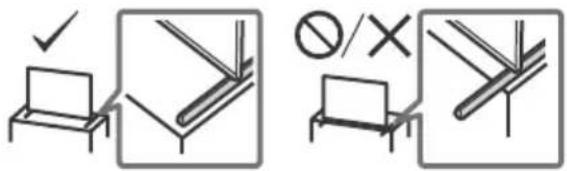
Transportation
Disconnect all cables. To transport a large TV, two or more people are needed. When transporting the TV by hand, hold it as shown in the figure. Do not press on the panel and the frame around the screen.
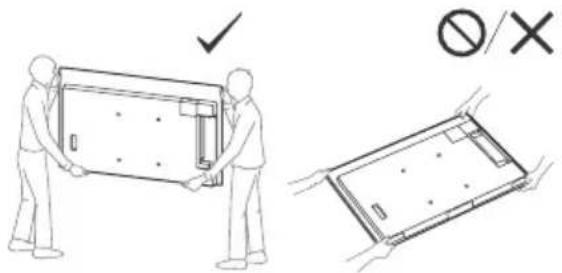
Do not place the TV on its side during unpacking, loading, and installation (except for models XR-55A8XK).
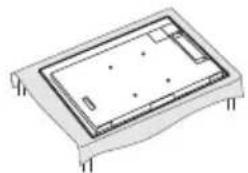
- When moving the TV, hold it by the bottom and top edges.
- When transporting the TV to a service center or when moving, pack it in the box using the original packaging materials.
Damage prevention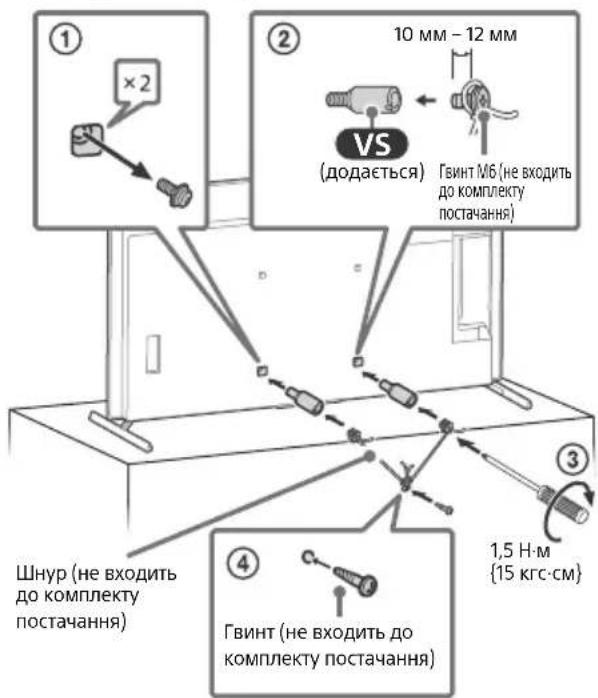
Protecting the OLED screen of the TV
Measures to prevent screen damage
Screen burn-in effect
Due to the characteristics of the materials from which the OLED screen is made, a screen burn-in effect may occur. It can also occur in images that have been displayed in the same places on the screen for a long time. This is not a sign of a TV malfunction. Avoid displaying static images, after which a screen burn-in effect may occur.
Below are examples of images:
Images with black bars at the top and bottom, and/or on the left and right sides of the screen. (For example, widescreen video on a standard TV with a 4:3 screen, or standard definition images). Static images such as photos, screen menus, electronic program guides, etc. - Static images in program logos. Screen menus with moving elements, which are used in games and news.
To reduce the risk of the burn-in effect
Image retention:
Sony recommends that you turn off the TV according to the instructions in the Owner's Manual. - To reduce screen burn, fill the entire screen by selecting [Wide Screen Mode] instead of [Normal]. Turn on the on-screen display (OSD) by pressing the MENU button, select [Settings], and turn on all menus of connected devices. Avoid displaying static images with bright colors (including white), as well as logos or subtitles in the bottom part of the screen. Adjust the picture settings according to the ambient lighting conditions. The Standard Picture mode (standard picture format) is recommended for viewing static content, such as news or sports.
The TV has functions that help reduce the effect of image retention.
Panel Refresh function
Panel Refresh uses the uniformity of the panel's lighting. The panel can only be refreshed when certain effects of image retention are present.
Precautions: - The refresh function may affect the panel's operation. Do not refresh the panel more than once a year, otherwise it may negatively affect the panel's lifespan. - The refresh process takes about one hour. - The effectiveness of the refresh varies depending on the effect of image retention.
Pixel Shift function
This function automatically moves the image on the screen to reduce the effect of image retention.
Other functions
The screen brightness automatically decreases when displaying static images, logos, screen savers, or subtitles.
Using the TV as a center speaker
Preparation
- Before connecting, disconnect all cables from the TV and the AV receiver from the mains. - For details, refer to the operating instructions of the audio system with the S-CENTER OUT jack.
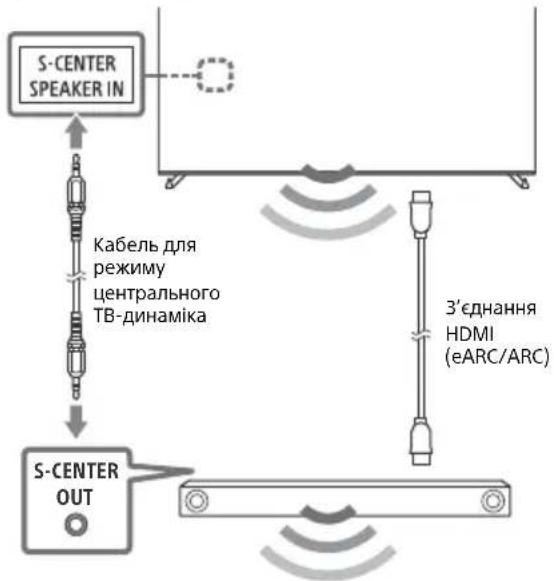
Remote control and TV
The shape of the remote control, its buttons, their availability and functions may vary depending on the region/country/model of the TV.
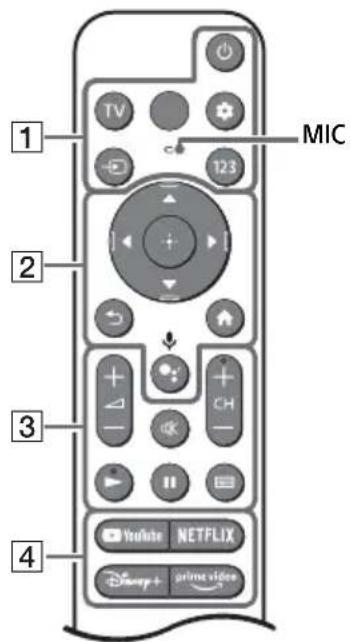
1 (KnBneHna)
TV: Display of the picture on the screen or switching to the input. (Fast input): Display of fast inputs. (Input channel selection):
Display and selection of the input signal source.
123 (Control menu): Display of the control menu.
2 ▲/▼/▲/▶/ ⊙: Screen menu navigation and selection.
(Back) (Home screen) (Google Assistant) / (Microphone):
Use Google Assistant*2*3 or voice search*3.
3- (Volume)
(Mute)*4
CH+/- (Channel)
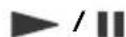
(Program list):
Display of digital program list of the broadcaster or TV provider*5.
4 Program buttons
Installing the TV on a stand
Use the stand for tabletop installation (sold separately) (SU-WL850 or SU-WL450)* (Not included in the delivery package)
For safety, Sony recommends that the TV installation be performed by qualified Sony dealers or licensed contractors. Do not attempt to install it yourself.
https://www.roy.eu/support
Follow the instructions provided with the wall-mount bracket for your specific model. To install the TV, especially to determine the strength of the wall, it is necessary to have sufficient experience. Sony is not liable for any damage or injury caused by improper installation or handling. The TV installation must be performed only by qualified service center personnel. For safety, it is recommended to use optional Sony mounting accessories, including:
Wall-mount bracket for partial mounting: SU-WL850
Wall-mount bracket for partial mounting: SU-WL450
When attaching the TV to the wall-mount bracket, use the screws supplied with the wall-mount bracket. The parameters of the screws shown in the illustrations are provided for the condition of attachment to the mounting surface of the wall-mount bracket.
The diameter and length of the screws vary depending on the model of the wall-mount bracket. Use of any other screws, other than those supplied, may cause internal damage to the TV or cause it to fall.
Be sure to store the unused partial support in a safe place until you need it. Keep screws away from small children. * [Unintelligible text]
Cable management for the optional camera and microphone (not included in the package)
Positioning of the partial support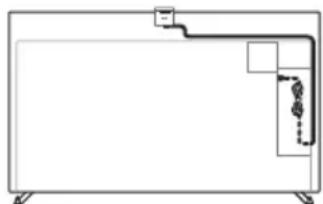
Positioning of the partial mounting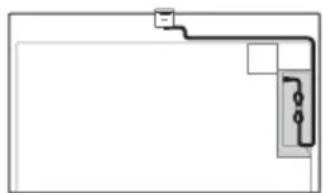
When you press the power button on the TV, the TV may not turn on immediately after the remote control or the TV's power button is pressed.
The system initialization takes a few seconds. Wait about one minute, then press the button again.
The remote control does not work.
Enter the password to unlock the "Parental Lock" function.
- Enter 9999 for the PIN code and enter the new PIN code.
Are you experiencing the image retention effect?
If the same image is displayed on the screen constantly, or for a long period of time, the image retention effect may appear. To reduce this effect, it is recommended to turn off the TV for a few minutes after using the remote control or on the TV.
Precautions
Perform the panel refresh function only if the image retention effect is very noticeable. Do not refresh the panel frequently, only once a year, otherwise it may negatively affect the panel's lifespan. Images with bright colors (including white) may cause the image retention effect. Avoid displaying such images for a long time. In this case, the image retention effect may appear.
The message [Panel refresh is not completed...] is not displayed on the screen.
If during the panel refresh, i) the TV is turned off or ii) the power cord is disconnected, the refresh will not be completed. Try to perform the panel refresh under the conditions mentioned above.
![SONY XR-77A80K - The message [Panel refresh is not completed...] is not displayed on the screen. - 1](/content/2026/04/693683/images/e83777f0bce765df2fe1c09e6743b96729bedd24cddf210064fe5f6efafc2ba7.jpg)
For initial information on troubleshooting, refer to the help. Press the Source button on the remote control and select [Troubleshooting]. If [Troubleshooting] is not available, select [Settings] and then [Troubleshooting].
Technical specifications
System
Panel system: OLED (Organic Light Emitting Diode) panel
TV system: Depending on the screen, region, or TV model
Analog: B/G, D/K, I
Tuner: DVB-T/DVB-C/DVB-T2
Satellite: DVB-S/DVB-S2
Color system: PAL/SECAM/NTSC3.58 (video only)/NTSC4.43 (video only)
Recommendation: depends on country, region, or TV model
Analog: UHF/VHF/cable
Digital: UHF/VHF/cable
Satellite: IF frequency 950-2150 MHz
Video output
XR-77A8xK: 20 W + 10 W + 10 W + 10 W + 10 W
XR-65A8xK / 55A8xK: 10 W + 10 W + 10 W + 10 W + 10 W
Wireless technology
Protocol IEEE 802.11a/b/g/n/ac
Bluetooth® 4.2
TV:
Input and output jacks
Antenna cable
External connection to a 75 Ohm antenna for VHF/UHF
Satellite antenna
F-type connector, 75 Ohm.
DiSEqC 1.0, LNB 13 V/18 V, 22 kHz tone,
EN50494 cable converter.
- / - AV IN / S-CENTER SPEAKER IN
Video/Audio input (mini jack type connector)
S-center speaker input (mini jack type connector)
HDMI IN 1/2/3/4 (compatible with HDCP 2.3)
Video:
4096 × 2160p (50, 60 Hz)*1*2, 4096 × 2160p
(24 Hz)*1, 3840 x 2160p (50, 60 Hz)*2, 3840 x
2160p (24, 25, 30 Hz), 1080p (30, 50, 60, 100,
120 Hz), 1080/24p, 1080i (50, 60 Hz), 720p
(30, 50, 60 Hz), 720/24p, 576p, 480p, format*3
3840 × 2160 p (100, 120 Hz)*2*4
Audio:
Y pejimi eARC (Enhanced Audio Return Channel)
For detailed information, see the online guide.
In eARC mode
5.1-channel linear PCM
eARC/ARC (Enhanced Audio Return Channel/
Audio Return Channel) (only HDMI IN 3)*5
In eARC mode
For detailed information, see the online guide.
In ARC mode
Two-channel linear PCM: 48 kHz 16 bits, Dolby Audio, Dolby Atmos, DTS
DIGITAL AUDIO OUT (OPTICAL)
Digital optical jack (two-channel linear PCM: 48 kHz 16 bits, Dolby Audio, DTS)
1, 2 (HDD REC)
USB port (2) USB ports
HDD for REC function
USB port 1 supports High Speed USB (USB 2.0) standard
USB port 2 supports Super Speed USB (USB 3.2 Gen 1) standard

HDMI (for ordinary access)
LAN
10BASE-T/100BASE-TX connector (may be connected to wired network. Speed and data transmission quality are not guaranteed.)
Buttons, technical data, and other
Power supply requirements
220V-240V AC, 50
Energy efficiency class
XR-77A8xK: A+
XR-65A8xK: A
XR-55A8xK: A
Diagonal screen size of the TV, centimeters and inches:
XR-77A8xK: 194.7 cm / 77 inches
XR-65A8xK: 163.9 cm / 65 inches
XR-55A8xK: 138.8 cm / 55 inches
Power consumption of the TV in "ON" mode
XR-77A8xK: 169 W
XR-65A8xK: 127 W
XR-55A8xK: 104 W
Annual energy consumption*6
XR-77A8xK: 234 kWh per year
XR-65A8xK: 176 kWh per year
XR-55A8xK: 144 kWh per year
Power consumption of the TV in "Standby" and/or "OFF" mode7*8
0.50 W (30 W in software update mode/electronic program guide)
Screen resolution of the TV in horizontal and vertical pixels:
3840 pixels (horizontal) × 2160 pixels (vertical)
Power consumption
500 mA (for USB 1), 900 mA (for USB 2)
Dimensions (approx.) (W × H × D) (cm)
Standard position:
XR-55A8xK: 122.7 × 73.8 × 33.0
Narrow position:
XR-77A8xK: 172.2 × 102.4 × 38.9
XR-65A8xK: 144.8 × 86.2 × 33.0
XR-55A8xK: 122.7 × 73.8 × 33.0
XR-55A8xK: 122.7 × 78.0 × 33.0
Standard position:
XR-77A8xK: 140.9
XR-65A8xK/55A8xK: 118.4
By3bKe nOIOXeHHa:
XR-77A8xK:61,9
XR-65A8xK/55A8xK:84,7
KpoHwTeHn DnHaCTiHHoro KpinHeHHa:
SU-WL850 / SU-WL450
HDMI Licensing Administrator, Inc.
U
Dolby Audio, Dolby Atmos, Dolby Vision, Dolby
a5yao aoyoo oolc yocgdoD j0g
J .Dolby JdL Licensing Corporation
jllg jlll.0jgno jjJolal.Dolby Jolso
.1bga 2021-1992
jg jg Gracenote ggracenote
aJzIe I aIe JzIe I e "Powered by Gracenote"
. 1JgUg/ gOgAol UyUgI Gracenote, Inc.
Google LLC
DTS, Inc.
DTS Digital Surround DTS
DTS, Inc.
Netflix, Inc. 45
Tuxera Inc. 452345467890 TUXERA
ylo 100
38.9 x 106.6 x 172.2: XR-77A8xK
33.0 x 90.4 x 144.8: XR-65A8xK
33.0 x 78.0 x 122.7: XR-55A8xK
5.4 x 99.8 x 172.2: XR-77A8xK
5.3 x 83.6 x 144.8: XR-65A8xK
5.3 x 71.2 x 122.7: XR-55A8xK
140.9: XR-77A8xK
118.4: XR-65A8xK/55A8xK
61.9: XR-77A8xK
84.7: XR-65A8xK/55A8xK
140.9: XR-77A8xK
118.4: XR-65A8xK/55A8xK
37: XR-77A8xK
24.6: XR-65A8xK
19.5: XR-55A8xK
34.8: XR-77A8xK
23: XR-65A8xK
17.9: XR-55A8xK
SU-WL850/SU-WL450:
CMU-BC1: __SUPPRIMER__
2160p×4096
2160p×4096, 2160p×3840
3 [1 JolS]
.
y 1
gall 365 4 1
jzjzalil plusl a5 1a 1
8
yall yll l 365 000 8 jg j
jaiuui
19
77/ω194.7:XR-77A8xK
65/ω163.9:XR-65A8xK
55/ω138.8:XR-55A8xK
194.7/品0出77:XR-77A80K
163.9/品0出65:XR-65A80K
138.8/a55:XR-55A80K
169:XR-77A8xK
127:XR-65A8xK
19 104 :XR-55A8xK
(baa)
167.4:XR-77A80K
123.9:XR-65A80K
102.3:XR-55A80K
6+ gsiilaiiialy
品 _ 出 (20
gssdcllglg234:XR-77A8xK
gssaclllglg176:XR-65A8xK
gssdaclllglgS 144:XR-55A8xK
8* (baa)
ginaecllglg465:XR-77A80K
gssd aLJ g 344:XR-65A80K
gssaclllglg284XR-55A80K
104 8
480p, 576p, 720/24p (60, 50, 30), 720p (60
3.4
442 (120, 100), 2160p x 3840
:
eARC (Enhanced Audio Return Channel)
eARC
/96/88.2/48/44.1/32: PCM 5.1
Dolby Audio 24/20/16 192/176.4
DTS, Dolby Atmos
eARC/ARC (Enhanced Audio Return Channel/Audio Return
5 HDMI IN 3) Channel
eARC
ARC
16j8g48:PCM aagglg jsslaalb jn
DTS. Dolby Atmos. Dolby Audio
DIGITAL AUDIO OUT (OPTICAL)
:PCM aaii 5juiolai joiuui
(DTS.Dolby Audio 16 j4
(HDDREC)2 1
+1g10+1g10+1g10XR-65A8xK/55A8xK
10
aLULU a
IEEE 802.11a/b/g/n/ac §g3
Bluetooth*4.2
1/11/11
(Uy)y
UHF/VHF 75
1Jg jg 22 a 18/1g 13 LNB.DiSEqC1.0
.EN50494
S-CENTER SPEAKER IN / AV IN
(gag)gagall/gaJd
(yo S-centre yuall yso Jld
40x0!gJ#
p 10000000000000000000000000000000000000000000000000000000000
Jz jz jz jz jz jz jz jz jz jz jz jz jz jz jz jz jz jz jz jz jz jz jz jz jz jz jz jz jz jz jz jz jz jz jz jz jz jz jz jz jz jz jz jz jz jz jz jz jz jz jz
ofo go lo s oololl aol 2
3 3
4 J 10000000000000000000000000000000000000000000000000000000000000000000000000000000
Jn Jn Jn Jn Jn Jn Jn Jn Jn Jn Jn Jn Jn Jn Jn Jn Jn Jn Jn Jn Jn Jn Jn Jn Jn Jn Jn Jn Jn Jn Jn Jn Jn Jn Jn Jn Jn Jn Jn Jn Jn Jn Jn Jn Jn Jn Jn Jn Jn Jn Jn
Jgjzalll OdaLia 1aLai qao JaaLaiE gba a j0 J5 bIg0g IgsOgall CbB 13 gJyJyJl iJy0g0rgall Lgogdolss
.8gall aagl 1 j 2 ggl Jy Jyj yj yj yj yj yj yj yj yj yj yj yj yj yj yj yj yj yj yj yj yj yj yj yj yj yj yj yj yj yj yj yj yj yj yj yj yj yj yj yj yj yj yj yj yj yj yj yj yj yj yj
As above
100 100 100 100 100 100 100 100 100 100 100 100 100 100 100 100 100 100 100 100 100 100 100
(j(aLlUa)abLulglaolalglallgall S· (aIgblagbaojclalgsallgglgagaaell
15 jg p jy yjll 200000000000000000000000000000000000000000000000000000000000000000000000000000
juegeall
:JySny 1s
J-WL850 Z Z
J-WL450d
a.sbsuic
gssssssssssssssssssssssssssssssssssssssssssssssssssssssssssssssssssssssssssssssssssssssss
j. a j 111111111111111111111111111111111111111111
(M6)
·j5u
Jlaljll Jg jgl 100000000000000000000000000000
.
. ( y 1 + 1) ( y 2 + 1) ( y 3 + 1) ( y 1) y( y 2) y( y 3)
a 15
[eslaill] jS 15. [selaill] jIg 16. Jg S
[foed] [foj] 000

J 1
SU-WL850) a
(SU-WL450
:sUaUd
Seyy
. 4uSj Jgloy y jaojol jglaoj Sory
:log.iagiog Sony gejgo
aagg aeg gaiyallg yjll Jyao Lokll plaaal
.
https://www.sony.eu/support
1 1
(山)
11111111111111111111111
1.25 Lpag Cllaaal 1jlaa d jai Gsao
aall gai/lae jll aill aill jll lal y
2011
15] 1304 1204 1204 1204 1204 1204 1204
https://rd1.sony.net/help/tv/jaep1/h_aep/
Jai
(XR-55A8xK stw)
(https://www.sony.net/ty-software-licenses/
The quadrilateral AOBC is a square.
Therefore a = 2 α + β = 2.
HOMI
HIGH-DEFINITION MULTIMEDIA INTERFACE
Dolby
VISION·ATMOS

gracenote
ANIELSEN COMPANY
dtss
DiSEgC 1.0
TUXERA

Support/Assistance/Support/Support/
https://www.maintenance.eu/support
- SETUP GUIDE
- REFERENCE GUIDE (THIS MANUAL) / SAFETY DOCUMENTATION
- HELP GUIDE (ON SCREEN MANUAL)
- IMPORTANT - READ THE END USER SOFTWARE LICENCE
- NOTE
- LOCATION OF THE IDENTIFICATION LABEL
- SAFETY INFORMATION
- INSTALLATION/SET-UP
- INSTALLATION
- TRANSPORTING
- PROTECTING THE TV SCREEN (OLED TV)
- PRECAUTIONS TO PROTECT THE SCREEN FROM DAMAGE
- IMAGE RETENTION
- THE FOLLOWING ARE EXAMPLES OF IMAGES THAT MAY CAUSE IMAGE RETENTION
- TO REDUCE THE RISK OF IMAGE RETENTION
- PANEL REFRESH
- CAUTION
- PIXEL SHIFT
- OTHER FEATURE
- USING TV AS PART OF AUDIO SYSTEM
- REMOTE CONTROL AND TV
- (POWER)
- APP BUTTONS
- INSTALLING THE TV TO THE WALL
- USING THE OPTIONAL WALL-MOUNT BRACKET (SU-WL850 OR SU-WL450)* (NOT SUPPLIED)
- TO CUSTOMERS
- TO SONY DEALERS AND CONTRACTORS
- WALL-MOUNT BRACKET INSTALLATION INFORMATION
- OPTIONAL CAMERA AND MICROPHONE UNIT (NOT SUPPLIED) CABLE MANAGEMENT
- TROUBLESHOOTING
- SPECIFICATIONS
- POWER, PRODUCT FICHE AND OTHERS
- DIMENSIONS (APPROX.) (W × H × D) (CM)
- STAND WIDTH (APPROX.) (CM)
- MASS (APPROX.) (KG)
- OTHERS
- NOTES ON DIGITAL TV FUNCTION
- TRADEMARK INFORMATION
- XR-77A80K / XR-65A80K / XR-55A80K
- SAFETY
- INSTALLATION/CONNECTION
- MOVING
- PREVENTING TIPPING OVER
- PRECAUTIONS FOR PROTECTING THE SCREEN FROM DAMAGE
- AFTERIMAGE EFFECT
- BELOW ARE EXAMPLES OF IMAGES THAT CAN CAUSE THE AFTERIMAGE EFFECT
- TO REDUCE THE OCCURRENCE OF THE AFTERIMAGE EFFECT
- BRIGHTNESS
- CABLE ORGANIZER FOR THE CAMERA/MICROPHONE BLOCK (NOT SUPPLIED)
- THE REMOTE CONTROL DOES NOT WORK
- FORGOT THE PASSWORD FOR THE "PARENTAL LOCK" FUNCTION
- THE SCREEN DARKENS WHILE WATCHING TV
- YOU ARE CONCERNED ABOUT THE AFTERIMAGE EFFECT
- SOLUTION
- THE MESSAGE [PANEL REFRESH NOT COMPLETED...] IS DISPLAYED
- INPUT/OUTPUT CONNECTORS
- POWER SUPPLY, REFERENCE SHEET OF TECHNICAL DATA OF THE DEVICE, AND OTHER
- PA3MEPBI (NPN6N.) (× × ) (CM)
- PPUMITKA
- IMPORTANT NOTE
- PRODUCT NAME: TELEVISION
- INSTALLATION / SETUP
- TRANSPORTATION
- PROTECTING THE OLED SCREEN OF THE TV
- MEASURES TO PREVENT SCREEN DAMAGE
- SCREEN BURN-IN EFFECT
- BELOW ARE EXAMPLES OF IMAGES
- TO REDUCE THE RISK OF THE BURN-IN EFFECT
- PANEL REFRESH FUNCTION
- PIXEL SHIFT FUNCTION
- OTHER FUNCTIONS
- USING THE TV AS A CENTER SPEAKER
- PREPARATION
- INSTALLING THE TV ON A STAND
- USE THE STAND FOR TABLETOP INSTALLATION (SOLD SEPARATELY) (SU-WL850 OR SU-WL450)* (NOT INCLUDED IN THE DELIVERY PACKAGE)
- CABLE MANAGEMENT FOR THE OPTIONAL CAMERA AND MICROPHONE (NOT INCLUDED IN THE PACKAGE)
- ARE YOU EXPERIENCING THE IMAGE RETENTION EFFECT
- PRECAUTIONS
- THE MESSAGE [PANEL REFRESH IS NOT COMPLETED...] IS NOT DISPLAYED ON THE SCREEN
- TECHNICAL SPECIFICATIONS
- SYSTEM
- INPUT AND OUTPUT JACKS
- BUTTONS, TECHNICAL DATA, AND OTHER
- X0!GJ
- AS ABOVE
- J
- (HTTPS://WWW.SONY.NET/TY-SOFTWARE-LICENSES
- THE QUADRILATERAL AOBC IS A SQUARE
Brand : SONY
Model : XR-77A80K
Category : Television