562010 - Smart Home Intellinet - Free user manual and instructions
Find the device manual for free 562010 Intellinet in PDF.

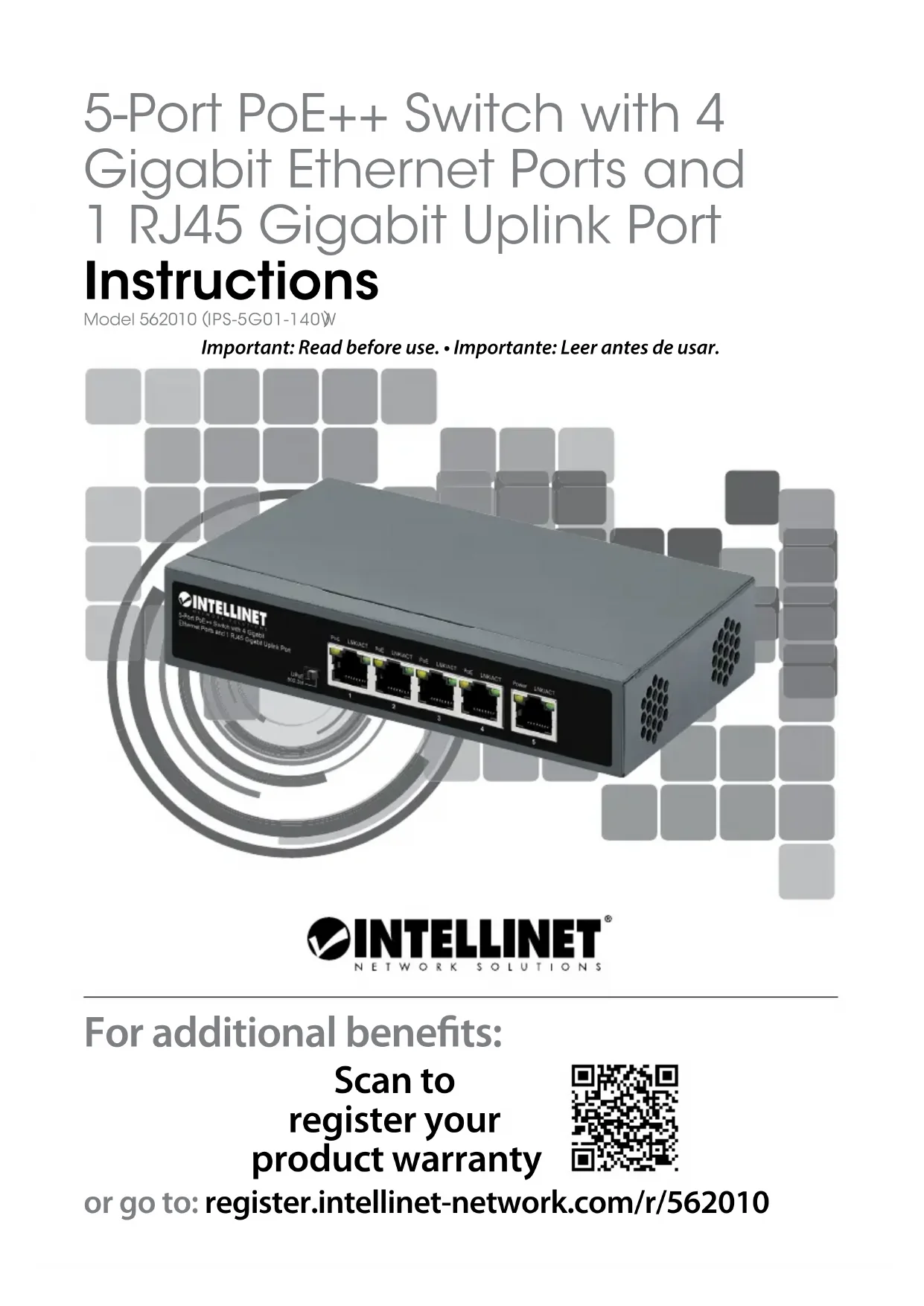

| Product Type | Unmanaged Gigabit Ethernet PoE++ Switch |
| Brand | Intellinet |
| Model | 562010 |
| Number of Ports | 5 RJ45 Gigabit Ethernet ports (10/100/1000 Mbit/s) |
| PoE Ports | 4 ports (1-4) with PoE++ (802.3bt/at/af) and UPoE |
| Non-PoE Port | 1 Gigabit uplink port (port 5) |
| Maximum PoE Power | Up to 90 W per port, total 140 W |
| External Power Supply | 54 V DC, 2.8 A power adapter |
| Compatible PoE Standards | 802.3bt (PoE++), 802.3at (PoE+), 802.3af (PoE), UPoE (Cisco) |
| Installation | Desktop or wall mount |
| Grounding Connector | Yes (chassis screw) |
| Ventilation | At least 25 mm clearance around the device |
| Operating Temperature | 0°C to 40°C (estimated) |
| Operating Humidity | 10% to 90% non-condensing (estimated) |
| Dimensions (approx.) | Approximately 150 x 100 x 30 mm (estimated) |
| Weight (approx.) | Approximately 0.6 kg (estimated) |
| Indicator LEDs | Power (green), LNK/ACT (green), PoE (orange) per port |
| Auto Speed Detection | Yes, per port |
| Store-and-Forward Switching | Yes (standard) |
| Recommended Cables | Cat5e/6/6a/8.x UTP/STP |
| Maintenance and Cleaning | Disconnect the device before cleaning; use a dry, lint-free cloth. Do not use abrasive products. |
| Safety | Use only the provided adapter. Do not expose to water or moisture. Disconnect during thunderstorms. |
| Spare Parts and Repairability | Power adapter available from customer service. No user-serviceable parts; contact a professional for any intervention. |
Frequently Asked Questions - 562010 Intellinet
User questions about 562010 Intellinet
0 question about this device. Answer the ones you know or ask your own.
Ask a new question about this device
Download the instructions for your Smart Home in PDF format for free! Find your manual 562010 - Intellinet and take your electronic device back in hand. On this page are published all the documents necessary for the use of your device. 562010 by Intellinet.
USER MANUAL 562010 Intellinet
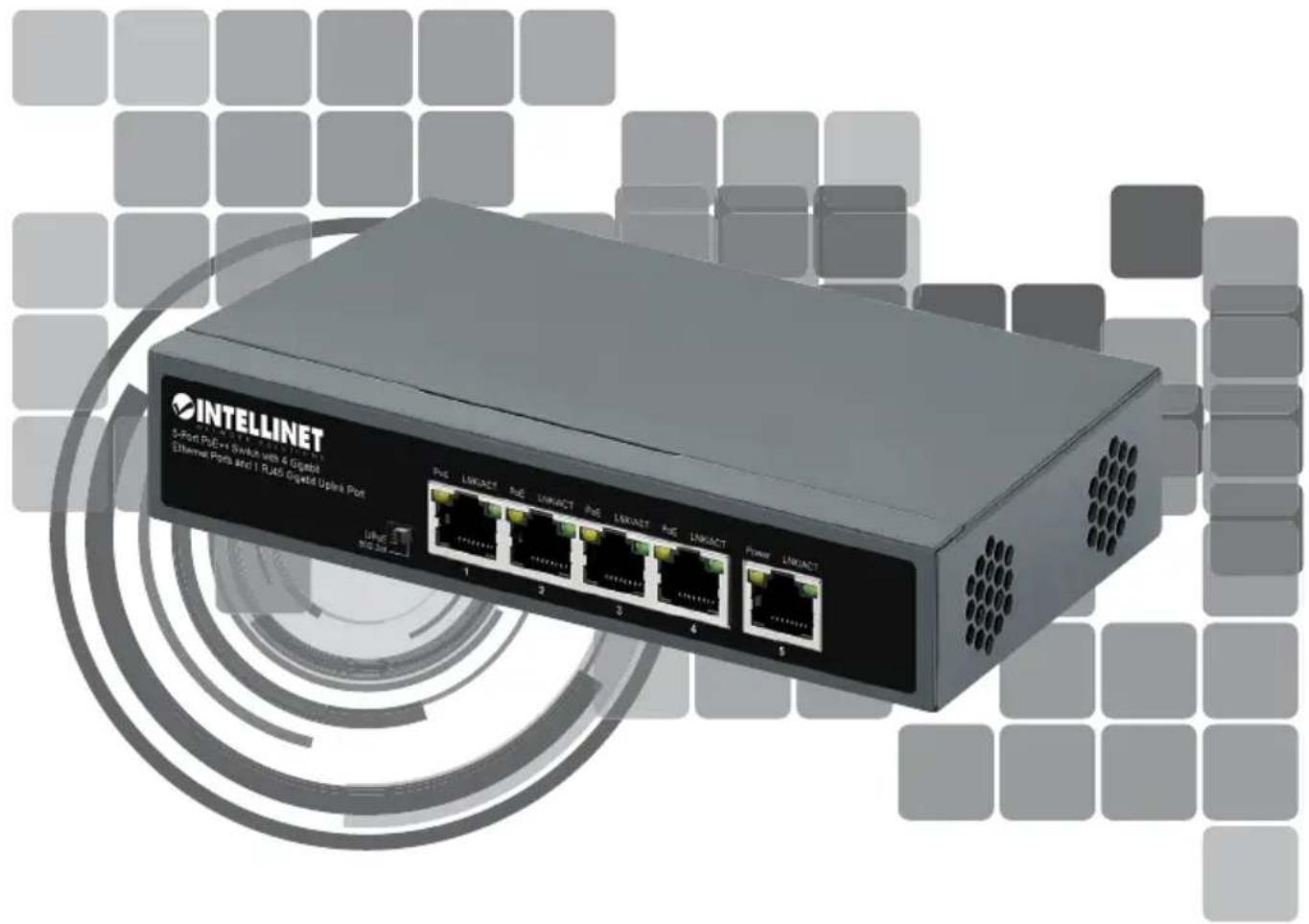
5-Port PoE++ Switch with 4 Gigabit Ethernet Ports and 1 RJ45 Gigabit Uplink Port
Instructions
Model 562010 (IPS-5G01-140W)
Important: Read before use. • Importante: Leer antes de usar.
natural_image
Exterior view of a INTELLINET Ethernet port with 6 Ethernet ports and network ports (no signage or text overlays)
INTELLINET®
NETWORK SOLUTIONS
For additional benefits:
Scan to register your product warranty

or go to: register.intellinet-network.com/r/562010
The Intellinet Network Solutions 5-Port PoE++ Switch with 4 Gigabit Ethernet Ports and 1 RJ45 Gigabit Uplink Port offers an array of time-saving, cost-effective features while providing superior network throughput. No configuration is required and installation is plug and play. Each of the ports automatically senses the link speed of the connected network device and adjusts to 10, 100 or 1000 Mbps for compatibility and maximum performance. This PoE switch is designed to provide compatible devices with enough power when needed. It offers up to 90 watts of power per port on ports 1 - 4 until its power budget of 140 watts is reached. The switch also includes a gigabit non-PoE uplink port to connect to the network's backbone, a server or your video recording solution (NVR).
For specifications, visit intellinetnetwork.com. Register your product at register.intellinet-network.com/r/562010 or scan the QR code on the cover.

Front Panel

| LED COLOR STATUS STATUS DESCRIPTION | ||
| Power Green | Off Power Off | |
| On Power On | ||
| LNK/ACT (1-5) | Off No device is connected to the port. | |
| On A device is connected to the port. | ||
| Flashing Sending or receiving data | ||
| PoE (1-4) | Orange | Off No powered device (PD) is connected to the port. |
| On The connected device is receiving power. | ||
| Flashing Abnormal power supply | ||
Cat5e/6/6a/8.x UTP/STP cables provide optimal performance; if a status LED doesn't indicate a link or activity, check the corresponding device for proper setup and operation.
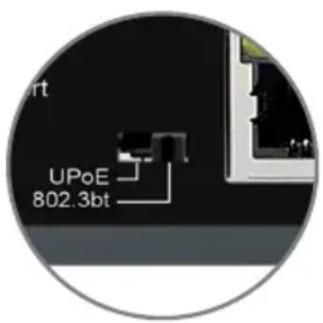
Slide Switch
Select the PoE standard of the connected PD:
• 802.3bt: for fully compliant 802.3bt/at/af PDs;
- UPoE: for PDs that support the maximum power from PSE over four pairs, regardless of the PD class, including Cisco Universal Power over Ethernet.
* NOTE: if unsure as to the standard you require, it is safe to try each setting.

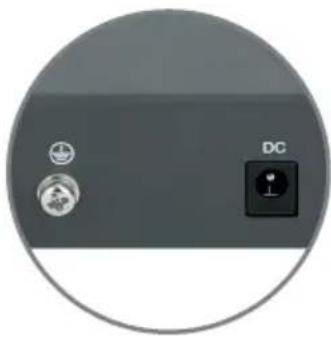
Rear Panel
natural_image
Close-up of a device panel with two circular icons and a DC button, no visible text or symbols.Power
The device is compatible with DC 54V, 2.8A. Plug the provided power adapter into the designated DC interface on the switch.
Chassis Ground Column
Located on the side of the power supply connector, a grounding terminal connector is used to provide proper grounding for your Intellinet Network Solutions switch. If you use the chassis grounding screw, it should be wired to an object that provides earth ground. In rackmount installations, grounding is typically provided by the metal frame of the mounting rack.

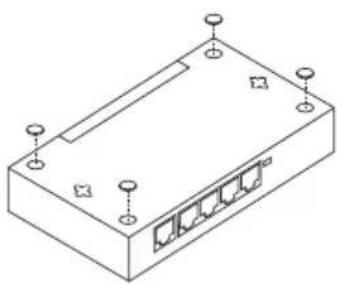
Placement
natural_image
Isometric line drawing of a rectangular electronic device with multiple ports and mounting points (no text or symbols)Desktop Installation
Prior to use, it is recommended that the switch be placed/positioned:
- on a level surface that can support the weight of the switch (and possibly other objects) with at least 25 mm (approx. 1") of clearance for ventilation;
• away from sources of electrical noise (radios, transmitters, broadband amplifiers); - and within 100 m (approx. 328') of network devices it's to be connected to.
natural_image
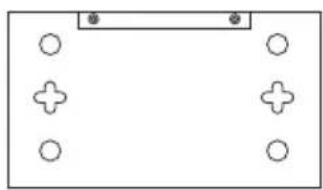
Simple diagram with four circles arranged around a rectangular frame, no text or symbols present.Wall Mounting
Install two screws into the wall at the distance of the spaces on the back of the switch. Place the switch over them and adjust until secure.
natural_image
Circular icon showing two circular icons with symbols, one labeled 'DC' and the other containing a plus sign (no readable text or numbers)Strom
natural_image
Isometric line drawing of a rectangular electronic device with five ports and mounting points (no text or symbols)Desktop-Installation
natural_image
Simple diagram with four circles and a rectangular block, no text or symbols presentWandmontage
natural_image
Circular icon showing two circular icons with a central 'DC' button, no text or symbols present.Alimentación
natural_image
Isometric line drawing of a rectangular electronic device with multiple ports and mounting holes (no text or symbols)natural_image
Simple diagram with circles and plus signs arranged in a rectangular layout (no text or symbols)Montaje en la pared
natural_image
Close-up of a device panel with two icons and a DC button, no visible text or symbolsAlimentation
natural_image
Isometric line drawing of a rectangular electronic device with five ports and mounting points (no text or symbols)natural_image
Simple diagram with four circles arranged around a central plus symbol, no text or labels present.Montage mural
natural_image
Close-up of a device control panel with two icons and a DC button, no visible text or symbolsZasilanie
natural_image
Isometric line drawing of a rectangular electronic device with five ports and mounting points (no text or symbols)Instalacja pulpitu
natural_image
Simple diagram with four circles arranged around a rectangular frame, no text or symbols present.Montaż ścienny
natural_image
Close-up of a device control panel with icons for battery, sensor, and DC button (no text or symbols beyond labels)Alimentazione
natural_image
Isometric line drawing of a rectangular electronic device with five ports and mounting points (no text or symbols)natural_image
Simple diagram with four circles arranged around a central rectangle, no text or symbols present.Montaggio a parete
(Applicable In The European Union And Other European Countries With Separate Collection Systems)
ENGLISH: This symbol on the product or its packaging means that this product must not be treated as unsorted household waste. In accordance with EU Directive 2012/19/EU on Waste Electrical and Electronic Equipment (WEEE), this electrical product must be disposed of in accordance with the user's local regulations for electrical or electronic waste. Please dispose of this product by returning it to your local point of sale or recycling pickup point in your municipality. DEUTSCH: Dieses auf dem Produkt oder der Verpackung angebrachte Symbol zeigt an, dass dieses Produkt nicht mit dem Hausmüll entsorgtwerden darf. In Übereinstimmung mit der Richtlinie 2012/19/EU des Europäischen Parlaments und des Rates über Elektro- und Elektronik-Altgeräte (WEEE) darf dieses Elektrogerät nicht im normalen Hausmüll oder dem Gelben Sack entsorgt werden. Wenn Sie dieses Produkt entsorgen möchten, bringen Sie es bitte zur Verkaufsstelle zurück oder zum Recycling-Sammelpunkt Ihrer Gemeinde. ESPAÑOL: Este símbolo en el producto o su embalaje indica que el producto no debe tratarse como residuo doméstico. De conformidad con la Directiva 2012/19/EU de la UE sobre residuos de aparatos eléctricos y electrónicos (RAEE), este producto eléctrico no puede desecharse se con el resto de residuos no clasificados. Deshágase de este producto devolviéndolo a su punto de venta o a un punto de recolección municipal para su reciclaje. FRANÇAIS: Ce symbole sur le produit ou son emballage signifie que ce produit ne doit pas être traité comme un déchet ménager. Conformément à la Directive 2012/19/EU sur les déchets d'équipements électriques et électroniques (DEEE), ce produit électrique ne doit en aucun cas être mis au rebut sous forme de déchet municipal non trié. Veuillez vous débarrasser de ce produit en le renvoyant à son point de vente ou au point de ramassage local dans votre municipalité, à des fins de recyclage.
This equipment has been tested and found to comply with the limits for a Class A digital device, pursuant to Part 15 of the Federal Communications Commission (FCC) Rules. These limits are designed to provide reasonable protection against harmful interference when the equipment is operated in a commercial environment. This equipment generates, uses and can radiate radio frequency energy, and if not installed and used in accordance with the instruction manual may cause harmful interference to radio communications. Operation of this equipment in a residential area is likely to cause harmful interference, in which case the user will be required to correct the interference at his own expense. Any changes or modifications made to this equipment without the approval of the manufacturer could result in the product not meeting the Class A limits, in which case the FCC could void the user's authority to operate the equipment.
CE/UKCA
ENGLISH : This device complies with the requirements of CE 2014/30/EU (UKCA Electromagnetic Compatibility Regulations 2016) and / or 2014/35/EU (UKCA Electrical Equipment [Safety] Regulations 2016). The Declaration of Conformity for is available at:
support.intellinet-network.com/barcode/562010

North America
IC Intracom America
550 Commerce Blvd.
Oldsmar, FL 34677 USA

Asia & Africa
IC Intracom Asia
4-F, No. 77, Sec. 1, Xintai 5th Rd.
Xizhi Dist., New Taipei City 221, Taiwan


Europe
IC Intracom Europe
Löhbacher Str. 7, D-58553
Halver, Germany
All trademarks and trade names are the property of their respective owners.
All trademarks and trade names are the property of their respective owners. © IC Intracom. All rights reserved. Intellinet Network Solutions is a trademark of IC Intracom, registered in the U.S. and other countries.
- 5-Port PoE++ Switch with 4 Gigabit Ethernet Ports and 1 RJ45 Gigabit Uplink Port
- Instructions
- Front Panel
- Slide Switch
- Rear Panel
- Power
- Chassis Ground Column
- Placement
- Desktop Installation
- Wall Mounting
- Strom
- Desktop-Installation
- Wandmontage
- Alimentación
- Montaje en la pared
- Alimentation
- Montage mural
- Zasilanie
- Instalacja pulpitu
- Montaż ścienny
- Alimentazione
- Montaggio a parete
- CE/UKCA
- North America
- Asia & Africa
- Europe
Brand : Intellinet
Model : 562010
Category : Smart Home