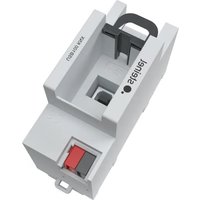
USB100 KNX - USB Interface STEINEL - Free user manual and instructions
Find the device manual for free USB100 KNX STEINEL in PDF.


| Product type | USB KNX Interface |
| Brand | Steinel |
| Model | USB100 KNX |
| Dimensions (width) | 36 mm (2 modules on DIN EN 60715 hat rail) |
| Weight | Approx. 100 g |
| Power supply | Via USB port (5V) and KNX bus (21-32 V DC SELV) |
| Power consumption | Low, depends on KNX bus and USB |
| KNX bus type | TP256 (Twisted Pair 256 kbps) |
| USB version | USB 2.0, Type B female connector |
| Maximum USB cable length | 5 m |
| Main functions | PC coupling to KNX installation, physical addressing, ETS programming, diagnostics, Long Frame support |
| Compatibility | Data-Secure KNX products, ETS5 software |
| Installation | Mounting on hat rail by a qualified electrician, connection terminals facing downwards |
| Protection | Protection class II, galvanic isolation between KNX and USB |
| Ambient temperature | -5 to +45 °C |
| Storage/transport temperature | -25 to +70 °C |
| Maintenance and cleaning | Clean with a dry cloth; do not use abrasive products |
| Safety | Comply with SELV standards; installation and connection reserved for qualified electricians; read instructions thoroughly |
| Spare parts and repairability | Optional USB connection cable; no specific spare parts; software update via ETS database |
| General information | User manual included; available in several languages; manufactured by STEINEL GmbH, Germany |
Frequently Asked Questions - USB100 KNX STEINEL
User questions about USB100 KNX STEINEL
0 question about this device. Answer the ones you know or ask your own.
Ask a new question about this device
Download the instructions for your USB Interface in PDF format for free! Find your manual USB100 KNX - STEINEL and take your electronic device back in hand. On this page are published all the documents necessary for the use of your device. USB100 KNX by STEINEL.
USER MANUAL USB100 KNX STEINEL
Operating instructions
USB Interface USB100 KNX
Art. no. 085674
Table of contents
1 Safety instructions .... 3
2 Function.... 3
3 Information for electrically skilled persons 4
4 Technical data .... 5
1 Safety instructions

Electrical devices may be mounted and connected only by electrically skilled persons.
Danger of electric shock. During installation and cable routing, comply with the regulations and standards which apply for SELV circuits.
Serious injuries, fire or property damage are possible. Please read and follow the manual fully.
These instructions are an integral part of the product, and must remain with the end customer.

Further information about this device can be found in the operation manual on our website.
2 Function
System information
This device is a product of the KNX system and complies with the KNX directives. Detailed technical knowledge obtained in KNX training courses is a prerequisite to proper understanding.
The function of this device depends upon the software. Detailed information on loadable software and attainable functionality as well as the software itself can be obtained from the manufacturer's product database. Planning, installation and commissioning of the device are carried out with the aid of KNX-certified software. The latest versions of product database and the technical descriptions are available on our website.
Intended use
- Connecting PCs to KNX systems
– Addressing, programming and diagnostics of KNX devices - Compatible with KNX Data-Secure products
– Support of long frames for ETS5 - Installation in small distributors on DIN rail according to EN 60715
Product characteristics
- Connection with device connection terminal
– Electrical separation of KNX and USB
– Temporary operation in unmounted condition permissible - The firmware in the USB data interface can be updated via the ETS product database
– Power supply exclusively via the USB port

Without a PC or USB hub connected, the device cannot be found via the bus.
3 Information for electrically skilled persons

DANGER!
Electric shock when live parts are touched.
Electric shocks can be fatal.
Cover up live parts in the installation environment.
Mounting and connecting the RMD device
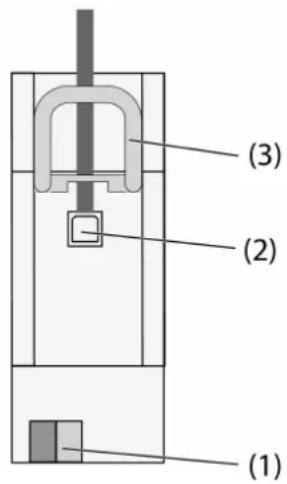
Figure 1
(1) KNX connection
(2) USB socket
(3) Slide
The slide fixes the USB connection cable in place and ensures that the required installation height in the distributor is maintained.
■ Mount device on DIN rail with the terminals facing downwards.facing downwards.
■ Connect bus line with device connection terminal (1).
Optionally connect the USB connection cable permanently:
■ Unlock the slide (3) by pulling the end of the bow forwards. Pull out slide.
■ Insert the USB connection cable into the socket (2).
■ Re-insert slide (3) until it engages noticeably.
Programming the physical address
The USB data interfaces are exclusively programmed locally with the physical address via a connected PC and therefore do not have a programming button or programming LED. The physical address must match the KNX line to which it is connected.
■ Connect PC with the device.
■ Programming the physical address.
■ Write the physical address on the device label.
4 Technical data
KNX
Nennspannung KNX DC 21 ... 32 V SELV
KNX medium TP256
Protection class II