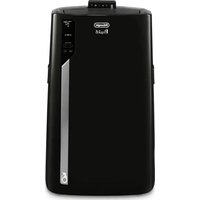
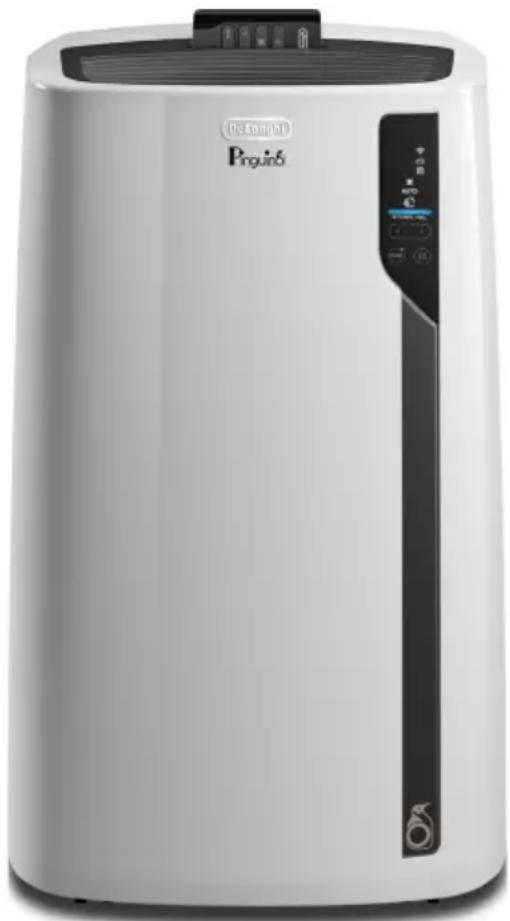
Pinguino Deluxe - Air Conditioning DELONGHI - Free user manual and instructions
Find the device manual for free Pinguino Deluxe DELONGHI in PDF.


| Product type | Portable air conditioner with heating function (on select models) |
| Brand | DeLonghi |
| Model | Pinguino Deluxe |
| Power supply | 115 V ~ 60 Hz |
| Refrigerant | R32 |
| Operating modes | Cooling, Dehumidification, Fan, Heating (on select models) |
| Control | Touch panel and remote control |
| Connectivity | Wi-Fi compatible with Pinguino app |
| Special function | ECO REAL FEEL for optimal comfort |
| Condensation drainage | Automatic evaporation in cooling/dehumidification mode |
| Air filter | Washable, clean weekly |
| Timer | App programming (delayed start/stop) |
| Safety | Anti-frost, overheating protection, automatic restart after 3 min |
| Installation | Wall or window with exhaust hose included |
| Included accessories | Exhaust hose, wall flange, window bracket, remote control, drain hose |
| Certifications | FCC Class B, IC, NMB-003 |
| Self-diagnosis | Error messages (Lt, Ht, PF, HL) to facilitate troubleshooting |
Frequently Asked Questions - Pinguino Deluxe DELONGHI
User questions about Pinguino Deluxe DELONGHI
0 question about this device. Answer the ones you know or ask your own.
Ask a new question about this device
Download the instructions for your Air Conditioning in PDF format for free! Find your manual Pinguino Deluxe - DELONGHI and take your electronic device back in hand. On this page are published all the documents necessary for the use of your device. Pinguino Deluxe by DELONGHI.
USER MANUAL Pinguino Deluxe DELONGHI
PORTABLE AIR CONDITIONER
Instructions for use. Keep these instructions
Visit www.delonghi.com for a list of service
centers near you.
ELECTRIC CHARACTERISTICS
115 V\~60 Hz
natural_image
White Pinguino air purifier with control panel and digital display (no visible text or symbols)CONDITIONNEUR D'AIR PORTATIF
natural_image
Simple line drawing of an open book with multiple pages (no text or symbols)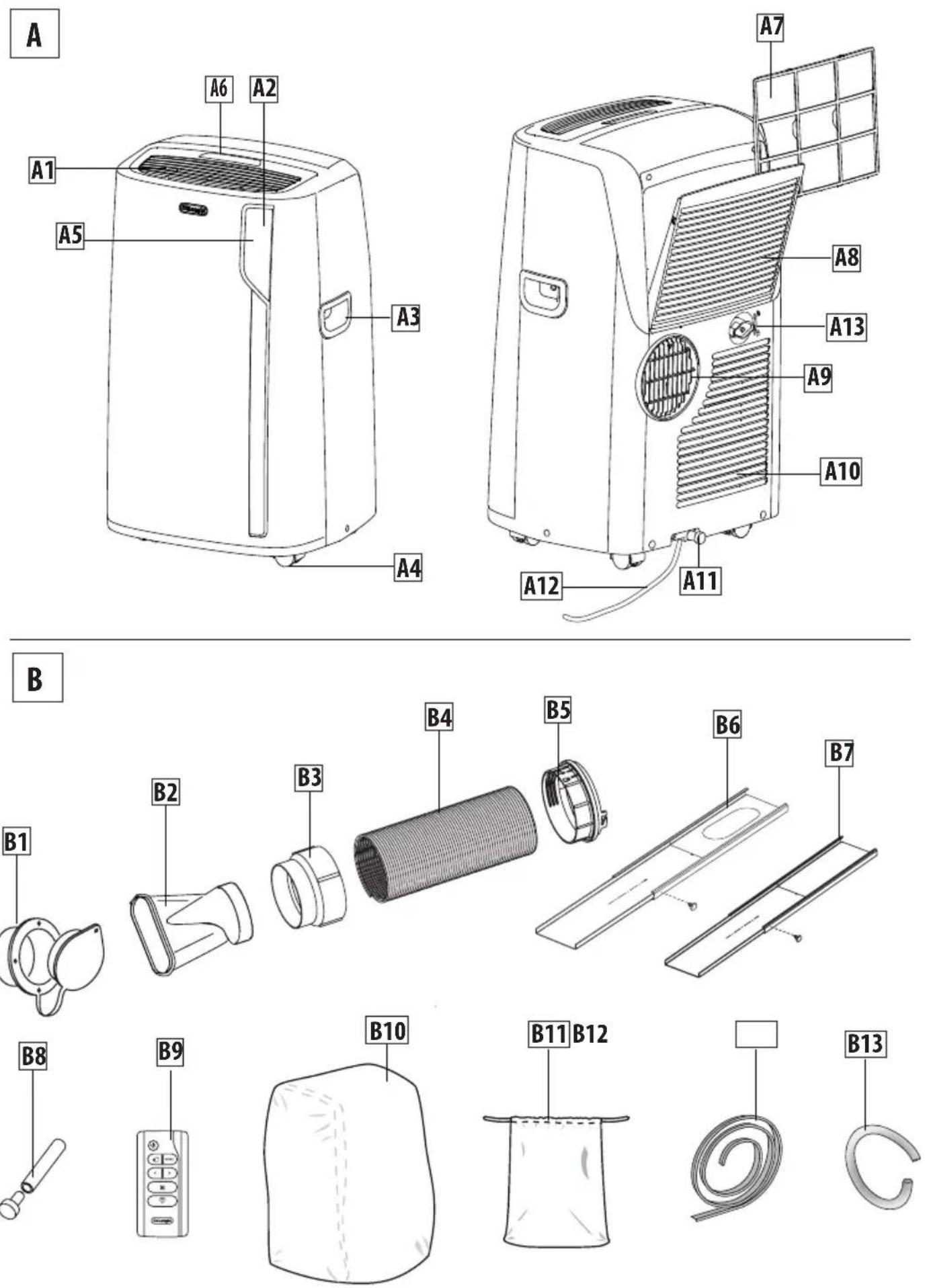
Important safeguard
- The appliance is not intended for use by persons (including children) with reduced physical, sensory or mental capabilities, or lack of experience and knowledge, unless they have been given supervision or instruction concerning use of the appliance by a person responsible for their safety.
• Children should be supervised to ensure that they do not play with the appliance. - If the SUPPLY CORD is damaged, it must be replaced by the manufacturer, its service agent or similarly qualified persons in order to avoid a hazard.
- The appliance shall be installed in accordance with national wiring regulations.
As the appliance is powered by electricity, the possibility of electrical shock cannot be excluded. The following safety precautions must therefore be followed:
• After removing the packaging, check the condition of the appliance. If in doubt, do not use the appliance and contact professionally qualified personnel.
- Before use, always check the condition of the power cord.
- It is dangerous to modify or alter the characteristics of the appliance in any way.
- This appliance must be connected to an efficient "grounding" system. Have the electrical system checked by a qualified electrician.
- Before each cleaning or maintenance operation, always disconnect the plug from the power outlet.
- Never submerge the appliance in water.
- Do not use the appliance outdoors.
- Do not obstruct the entrances and exits of air.
- When the appliance is connected to the mains, keep the following safety rules in mind:
- Do not touch the appliance with wet or damp hands;
- Do not use the appliance with bare or wet feet;
- Do not pull on the power cord or appliance to detach the plug from the power outlet;
- Do not move the appliance by pulling the power cable.
- keep the appliance far from the reach of children;
- Do not insert foreign bodies into the appliance;
- Do not insert metal objects into the apertures.
Danger! Rotating parts; contact with the internal fan could cause electric shock or injury. - do not leave the appliance exposed to atmospheric agents;
- If you wish to permanently eliminate the appliance, after disconnecting the plug from the power outlet it is recommended to make it unusable by severing the power cord.
- In the event of a fault and/or malfunction, turn the appliance off without tampering with it. For all repairs, contact an authorized technical service center only and request the use of original spare parts and accessories.
- Avoid the use of power cord extensions.
Designated use
This appliance must be used exclusively in domestic environment and for the intended purpose for which it was designed. All other uses are considered improper and therefore hazardous. The manufacturer shall not be held liable for any damage caused by improper, erroneous and irresponsible use, and/or due to repairs made by unqualified personnel.
Installing the appliance
- The appliance must be installed in compliance with national standards regulating electrical systems.
- Do not operate your air conditioner in a wet room such as a bathroom or laundry room.
- Do not install the appliance in rooms containing gas, oil or sulphur or near sources of heat.
- Do not use the appliance on sloping surfaces.
- Keep the appliance at least 20" (52cm) away from flammable substances (alcohol, etc.) or pressurized containers (e.g. aerosol cans).
- Do not rest objects on top of the appliance.
-
When transporting, the appliance must be kept upright. If this is not possible secure the unit at
-
an angle, do not lie it horizontally.
- Before transporting the unit, drain the unit.
• After transportation, wait at least 6 hours before switching the unit on.
Environmental information
- The materials used for packaging can be recycled. You are therefore recommended to dispose of them in special differentiated waste collection containers.

Specific information regarding appliances with R32 refrigerant gas
• Thoroughly read all of the warnings.
- When defrosting and cleaning the appliance, do not use any tools other than those recommended by the manufacturing company.
- The appliance shall be stored in a well-ventilated area;
- The appliance shall be stored in a room without continuously operating open flames (for example an operating gas appliance) and ignition sources (for example an operating electric heater).
- Do not burn any part of the appliance.
• Refrigerant gases can be odorless.
- This appliance contains R32 refrigerant gas. (For more details on the refrigerant, see back cover).
- Do not puncture any part of the refrigerant circuit.
- The servicing shall be performed only as recommended by the manufacturer.
- The appliance must be stored in a safe place in order to prevent damage to the unit.
- Individuals who operate or work on the refrigerant circuit must have the appropriate certification issued by an accredited organization that ensures competence in handling refrigerants according to a specific evaluation recognized by associations in the industry.
- Repairs must be performed based on the recommendations from the manufacturing company. Maintenance and repairs that require the assistance of other qualified personnel
must be performed under the supervision of an individual specified in the use of flammable refrigerants.
1. GENERAL INFORMATION
1.1 Instruction for Use
Read all the Instruction for Use carefully before using the appliance. Failure to follow this Instruction for Use may result in burns or damage to the appliance. The manufacturer is not liable for damage deriving from failure to respect this Instruction for Use.
WARNING: Changes or modifications not expressly approved by the party responsible for compliance could void the user's authority to operate the equipment.
Please note:
These safety warnings are valid for all De'Longhi air conditioners.
If the appliance is passed to other persons, they must also be provided with this Instruction for Use.
This appliance is fitted with a special safety device. When the compressor switches off, this device prevents it from switching on again for at least 3 minutes.
2. BEFORE USE
Important!
Store the packaging material (plastic bags, styrofoam) far from the reach of children.
CHOKING HAZARD. The appliance might contain small parts. Some of those small parts might be required to get disassembled during cleaning and maintenance operations. Handle with care and keep small parts out of reach of children.
2.1 Checking the appliance
After removing the packaging, make sure the product is complete and undamaged and that all accessories are present. Do not use the appliance if it is visibly damaged. Contact De'Longhi Customer Service.
Save these instructions
This product is for household use only
INTRODUCTION
Thank you for choosing a De'Longhi product. Please take a few moments to read the instructions to avoid risks or damage to the appliance.
Download the App!

natural_image
Icon of a refrigerator with snowflake and text 'DE'LONGHI' below (no other readable text or symbols)
This appliance can be used also with the APP named "Pinguino" that can be downloaded from the App Store® or from Google Play. To gain access to all functions you need a local net (Home WLAN) with access to Internet. Further check there are no obstacles to the Internet access, such as Firewall, Proxy, authentications, etc.,
DESCRIPTION
Description of the appliance (See page 3 - A)
A1 Air outlet grid
A2 Control panel
A3 Handles
A4 Wheels
A5 Remote control signal receiver
A6 Remote control storage
A7 Filter
A8 Air intake grille
A9 Air exhaust hose housing
A10 Air intake grille
A11 Lower drainage hose with cap
A12 Power supply cable
A13 Upper drainage hose with cap
Description of accessories (See page 3 - B)
B1 Wall flange with cap
B2 Window outlet vent
B3 Hose adapter to wall flange/window outlet vent
B4 Air exhaust hose
B5 Hose adapter to unit
B6 Window bracket with locking pin
B7 Additional window bracket with locking pin
B8 Water drain tube with cap
B9 Remote control
B10 End of season dust cover (on some models only)
B11 End of season accessories bag (on some models only)
B12 Foam stripping
B13 Upper water drain tube
Electrical connection
Before plugging the appliance into the outlet, check that:
•Theoutlet'spowersupplycorrespondstothevalue indicated on the rating label on the back of the appliance;
- The outlet and electrical circuit are adequate for the appliance;
- The outlet is a 3-hole grounded outlet. If this is not the case, you must choose another outlet. Failure to follow these important safety instructions absolves the manufacturer of all liability.
If it becomes necessary, the power cable must be replaced by a qualified professional only.
The instructions below will enable you to prepare your air conditioner for operation as efficiently as possible. Before use, make sure the air intake and outlet grilles are unobstructed.
USE
Note: This appliance features an auto evaporative function to remove excess condensate water during cooling and dehumidifying modes.
AIR CONDITIONING WITH WALL INSTALLATION
For optimal results set up your appliance in this way:
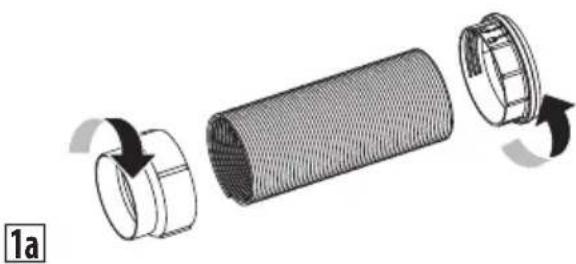
- Screw the hose adaptor B3 and B5 to the hose's end B4 as shown in figure 1a.
- Fit the assembled air exhaust hose adapter B5 in the housing at the back of the appliance. Align the open lock symbol on the adapter (B5) with the arrow on the back of the unit. Turn adapter counter clockwise until the closed lock symbol is aligned with the arrow, as shown in figure 1b.
natural_image
Exploded view diagram of a cylindrical mechanical component with internal mesh structure (no text or symbols)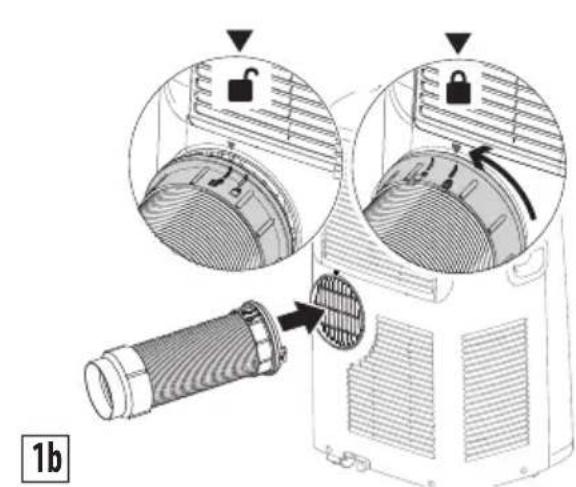
- Respect the minimum distances given in figure 2 below.
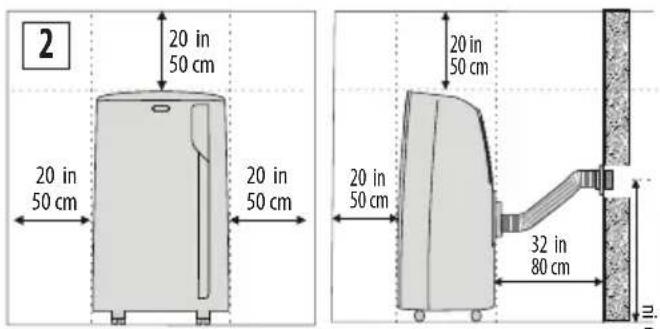
Proceed as follows:
- Drill a hole ∅ 5,25 inches (134 mm) in an outside wall or through a wooden kickboard. Respect the dimensions and height of the hole given in figure 2 and 3.
3
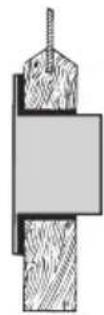
in the wooden kickboard of a French window or panel
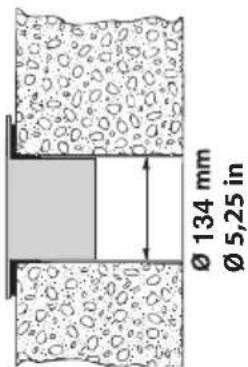
in the wall: you are recommended to insulate the section of wall using suitable insulation
• Fit the wall flange B1 into the hole.
• Fit the assembled hose B3-B4-B5 into the wall flange B1.
- When the air hose B4 is not connected, the drilled hole can be closed with the flange cap B1.
- When installing the air conditioner, you should leave a door slightly open little as 1/2"(1 cm) to guarantee correct ventilation and room pressure.
- Keep the air hoses as short and free of curves as possible to avoid constrictions.
Note:
As special tools are required for this type of installation, we suggest you have the appliance installed by specialized personnel.
AIR CONDITIONING WITH WINDOW INSTALLATION You can also set up in a double-hung window:
- Place the window bracket in the window sill, extend the bracket fully within the window frame, fix the bracket in place using the locking pin. Attach the provided foam stripping B12 to the top of the window bracket and then lower the window onto the bracket. (Should the window bracket be too large for the window, the plastic can be cut with a saw by a qualified professional.)
- Fit the air exhaust hose B4 in the relevant housing located on the rear side of the appliance using hose adapter B5. Align the open lock symbol on the adapter B5 with the arrow on the back of the unit. Turn adapter counter clockwise until the closed lock symbol is aligned with the arrow, as shown in figure 1b.
- Connect the window outlet vent B2 to the other end of the exhaust hose using hose adapter B3.
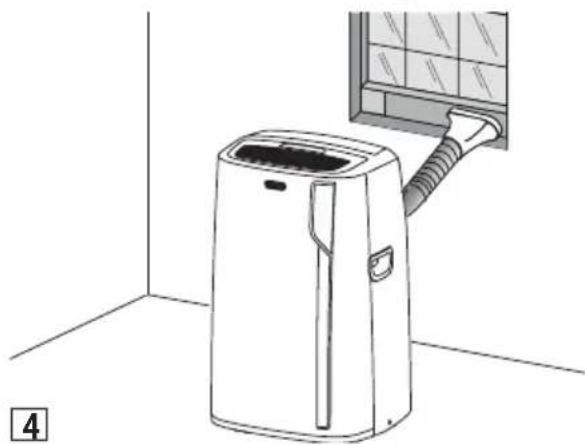
- Insert the window outlet vent B2 of the exhaust hose into the slot of the window bracket (fig. 4).
natural_image
Line drawing of a small air conditioner unit with a hose inserted into a window (no text or symbols)Other set-up methods:
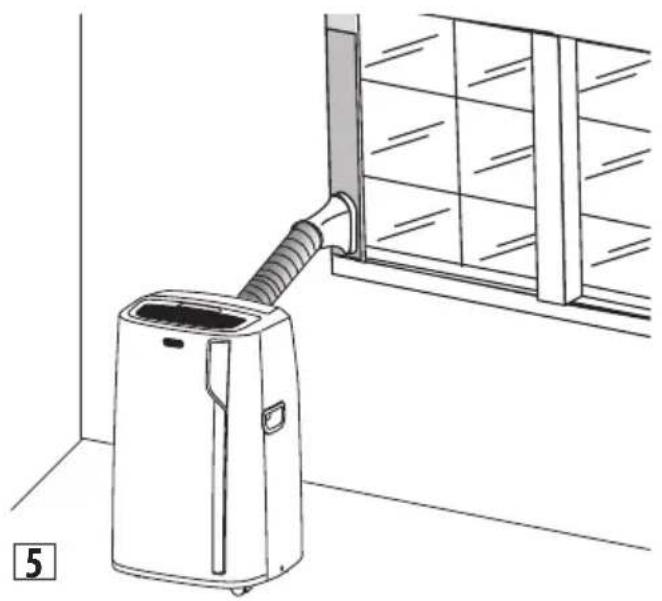
- Thanks to the locking pins, it's possible to use the window bracket also for sliding windows. Position the hole of the bracket so to allow a correct installation of the exhaust hose (see fig. 5).
natural_image
Line drawing of a small air conditioner unit connected to a window, with no text or symbols present.- If you have a casement window (figure 6) proceed as follows:
Fit the assembled air exhaust hose B4 in the relevant housing located on the rear side of the appliance, using hose adapter B5. Align the open lock symbol on the adapter B5 with the arrow on the back of the unit. Turn adapter counter clockwise until the closed lock symbol is aligned with the arrow, as shown in figure 1b. Then, apply the window outlet B2 to the air exhaust hose B4 and place it outside the window to exhaust the hot air.
natural_image
Line drawing of a car air conditioner with a coiled hose and fan (no text or symbols)For help with installation, operation, and for all accessories and spare/replacement parts, please contact our toll free customer service call center at:
1-800-322-3848 [US only]
1-888-335-6644 [Canada only]
or log onto our website at www.delonghi.com
DESCRIPTION OF THE CONTROL PANEL (C)
C1. ON/STAND-BY (on/off) key
C2. MODE selection key (air conditioning, dehumidifying, fan, heating, ON-OFF WiFi - reset WLAN settings)
C3. Increase key
C4. Decrease key
C5. Temperature indicator
C6. Air conditioning symbol
C7. WiFi symbol
C8. App indicator
C9. App timer/calendar
C10. Air flow indicator
C11. Auto indicator
C12. ECO REAL FEEL symbol (the function is available only from remote control and app)
C13. ECO REAL FEEL indicator
C14. Heating symbol
C15. Fan symbol
C16. Dehumidifying symbol
C17. Alarm symbol
C18. Set temperature values
TURNING THE APPLIANCE ON/OFF
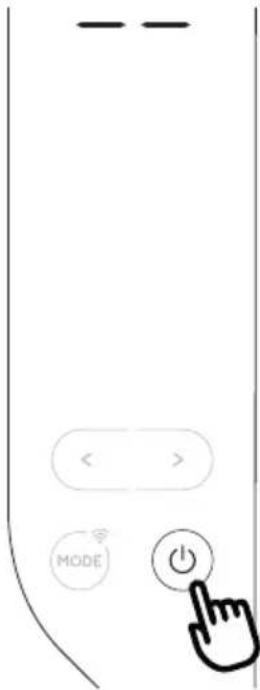
Before plugging in the appliance, check the caps on back of the unit are correctly inserted on drainage hose A11 and A13.
Insert the plug in the socket.
Twodashesappearonthedisplay indicating that the appliance is in stand-by. Touch the (C) key to turn on the appliance. When the appliance comes on, the last function set before it was shut off is activated.
NOTE: After a few seconds of inactivity, the brightness of the control panel will be automatically reduced and in the next few minutes it will be further reduced. To turn the appliance off, touch the key.
Note: Never turn off the air conditioner by simply pulling the plug. Touch the key in order to put your air conditioner in stand-by and wait a few minutes before pulling the plug. In this manner, the appliance can perform operating status checks.
MODE SELECTION
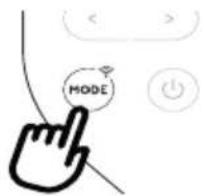
To select the desired operating mode, touch repeatedly the MODE key until the desired function is selected.
WiFi FUNCTION
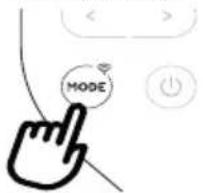
To select or deselect the Wifi function, keep touching the MODE key for 3 seconds.

AIR CONDITIONING MODE
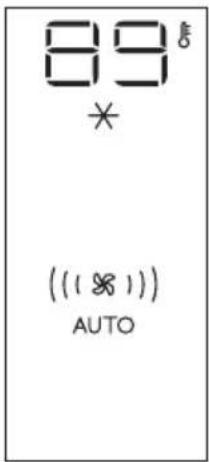
This is ideal for hot and humid weather when the room needs to be both cooled and dehumidified.
To correctly set this mode:
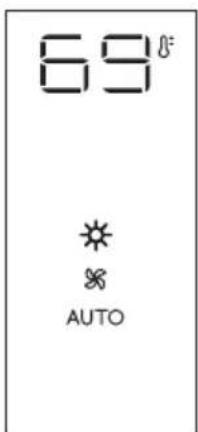
- Touch repeatedly the MODE key until the air conditioning symbol appears. The display will show the symbol ✕
- To change to the desired temperature, touch the < or > key.
Note: The most suitable temperatures, during the summer range from 75 to 81°F. However, setting the temperature significantly lower than the outdoor
temperature is not recommended. In air conditioning mode, the air flow can be selected only from the remote control.

DEHUMIDIFYING MODE
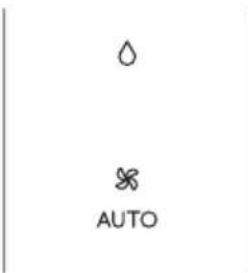
This is ideal for reducing humidity in the room (spring and autumn, damp rooms, rainy periods, etc). For this type of use, the appliance must be set up same as in the air conditioning mode. That is, the air exhaust hose B4 must be fitted to
the appliance to allow the humidity to be discharged outside. To correctly set this mode:
- Touch repeatedly the MODE key until the dehumidifying symbol △ appears.
• The appliance automatically chooses the best air flow.
Note:
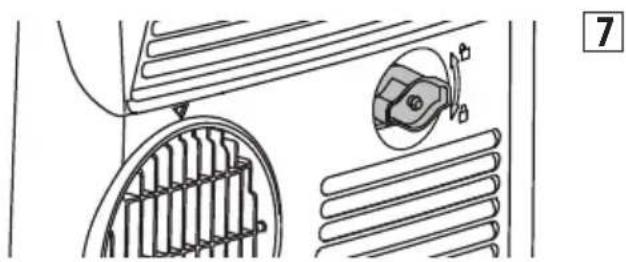
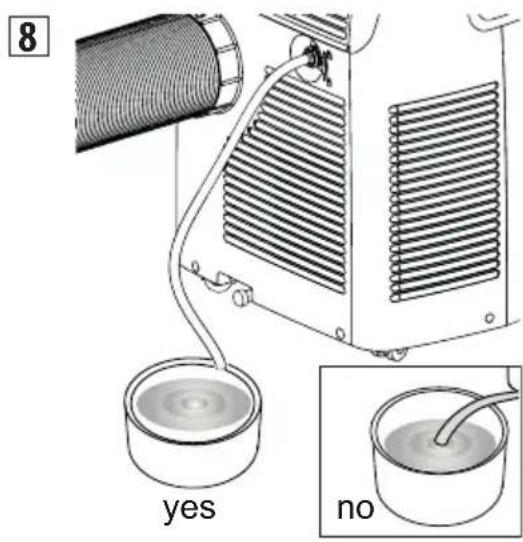
In case of high ambient humidity, it is possible to drain the condensation continuously by applying the tube supplied B13 to the upper drainage hose A13 (fig. 7) thus allowing the water to flow into a container.
natural_image
Technical line drawing of a car interior showing structural elements and a magnified inset (no text or symbols)Unscrew the cap by following the directions of the arrow and inserting the tube. Pay attention that water does not overflow onto the floor (fig. 8). If the connector is not in use, to avoid overflow onto the floor, remember to screw the cap back into place.

FAN MODE
When using this mode, the air exhaust hose B4 does not need to be attached to the appliance To correctly set this mode:
- Touch repeatedly the MODE key until the fan appears.
- Select the desired air flow by touching the increase or decrease <4 buttons.

The air flows available are:
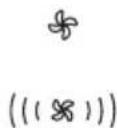
( ) Minimum air flow: when maximum quiet operation is desired.
((※)) Medium air flow: when the noise level needs to be low but with a good comfort level.
(( ( Ⓧ )) ) Maximum air flow: for maximum performance.
MEATING MODE (on some models only)
This is ideal in spring and autumn when outdoor temperatures are not particularly severe. For this mode, the appliance should be prepared in the same way as for air conditioning, with the air exhaust hose B4 attached.
To set this mode:
- Touch repeatedly the MODE button until the heating symbol is displayed.
- Touch increase >C3 or decrease ◀4 buttons to adjust the desired
temperature.
Notes:
- In this mode, the air flow is selected automatically by the
appliance and cannot be set manually.
- When operating in very cold rooms, the appliance defrosts automatically, momentarily interrupting normal operation. In this case, "Lt" appears on the display. During this operation, it is normal for the noise made by the appliance to change.
- In this mode, you may have to wait a few minutes before the appliance starts providing warm air.
- In this mode, the fan may operate for short periods, even though the set temperature has already been reached.
- If the display comes on and shows the "HL" alarm, empty the internal tray following the instructions in the Section "End of Season operations". Then, touch again the button to restore the heating function.
SELECT THE TEMPERATURE SCALE
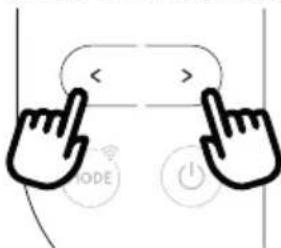
The temperature can be displayed in °C or °F.
To change the temperature unit of measure touch both the increase/decrease keys >and for about 10 seconds.
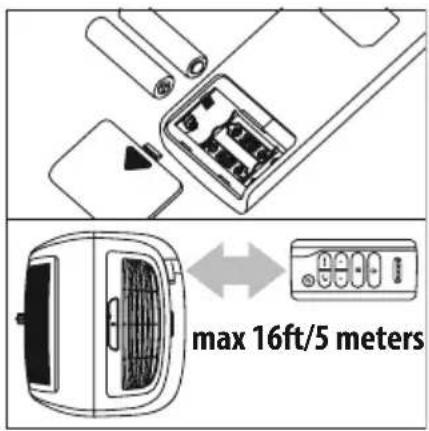
- Remove the cover on the rear of the remote control;
- Insert or replace the batteries with two new LR03 "AAA" 1.5V batteries, inserting them correctly (see the directions inside the battery compartment);
- Replace the cover.
Please note: If the remote control unit is replaced or discarded, the batteries must be removed and disposed of in accordance with current legislation as they are harmful to the environment. Do not mix old and new batteries. Do not mix alkaline, standard (carbon-zinc) or rechargeable (nickel-cadmium) batteries. Do not dispose of batteries in fire. Batteries may explode or leak. If the remote control is not be used for a certain length of time, remove the batteries.
USING THE REMOTE CONTROL
- Point the remote control at the receiver A5 on the air conditioner. The remote control must be no more than 16ft/5 meters away from the appliance (without obstacles between the remote control and the receiver).
- The remote control must be handled with care. Do not drop it or expose it to direct sunlight or sources of heat.
Please note: The remote control can be safely stored in the appropriate compartment A6.
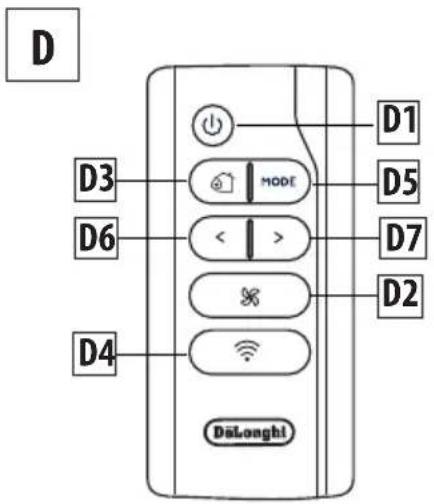
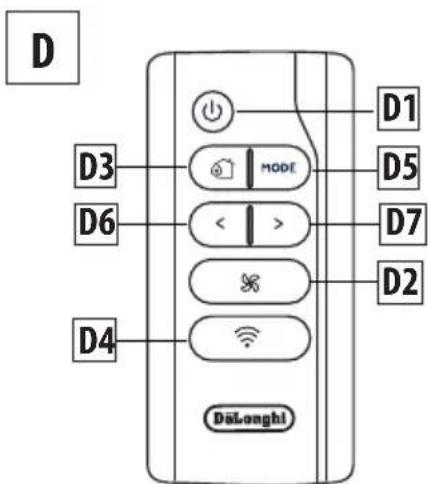
DESCRIPTION OF THE REMOTE CONTROL
D1) ON/STAND-BY button
D2) Air flow selection button
D3) ECO REAL FEEL button
D4) WiFi button
D5) MODE button
D6-D7) Decrease/ Increase button
TURNING THE APPLIANCE ON/OFF
- Plug into the outlet.
- Press the button D1 to turn the appliance on (when turned on, the air conditioner starts operating in the same mode as when it was turned off).
• To switch the appliance off, press button D1. Note: Never switch the appliance off by removing the plug. Always switch it off by pushing the button and waiting a few minutes before removing the plug. Only in this way will the appliance be able to perform its standard checks.
Most of the commands available on the remote control correspond to those on the appliance control panel C (See diagram on page 8).
SELECTING THE TEMPERATURES
In air conditioning and heating modes, press increase/decrease keys to select the desired temperature.
SELECTING THE AIR FLOW
In air conditioning and fan modes, press air flow selection button D2 on remote control to select the desired air flow.
The air flow available are:
( ) Minimum air flow: when maximum quiet operation is desired.
((※)) Medium air flow: when the noise level needs to be low but with a good comfort level.
((18)) Maximum air flow: for maximum performance.
The appliance automatically chooses the air flow based on the temperature selected and the environmental conditions (This is available only in the air conditioning mode).
ECO REAL FEEL FUNCTION
(available only from remote control)
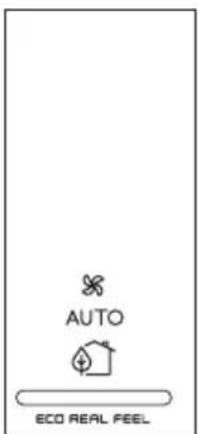
ECO REAL FEEL is the innovative De'Longhi technology that works simultaneously on temperature reduction and humidity control, securing the best comfort level. With traditional systems, during working time, optimal comfort conditions may be reached but not secured over time. With ECO REAL FEEL, once optimal comfort is reached, the portable air conditioner automatically modulates the compressor and air flow, to keep it over time. To activate the function, press the Eco Real Feel button D3 on the remote control. The ECO REAL FEELsymbol C12 appears.
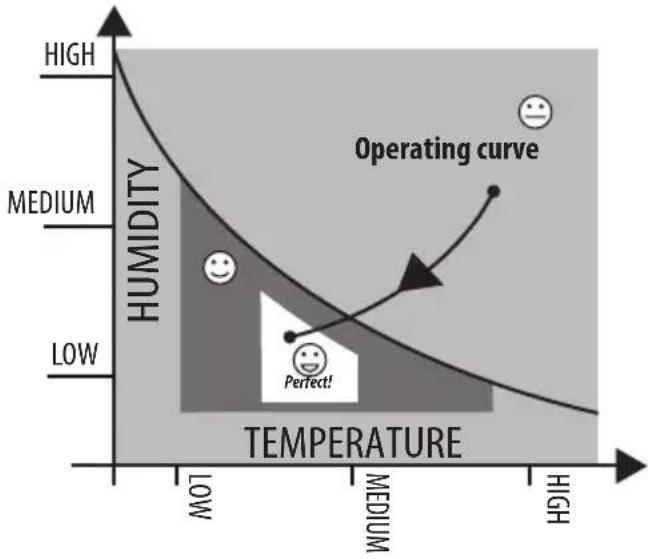
After approx. 1 minute, the ECO REAL FEEL indicator C13 turns on. It changes color when approaching the best comfort level (see following diagram).
Please note: For this type of use, the appliance must be set up same as in the air conditioning mode with the air exhaust hose connected.
line
| Temperature | Humidity | | ----------- | -------- | | Low | Medium | | Medium | Low | | High | High |
ORANGE LIGHT: Room conditions far from optimal level.

GREEN LIGHT: Most people feel good room conditions, near optimal level.

BLUE LIGHT: Best comfort level.
Perfect!
The well-being feeling is a subjective condition: for this reason, different people may judge differently the same environmental conditions. In particularly severe environmental conditions (high temperature or humidity outside, poor insulation, too many people, high heat in the room, strong exposure to the sun, etc...) this device may not be able to reach the best comfort level.

WIFI FUNCTION
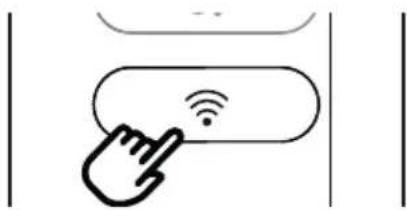
To activate or deactivate the WiFi function, keep touching the WiFi button on the remote control for a few seconds until the emission of a double beep.
Once the WiFi icon is displayed it means that the WiFi features are available.
SYMBOL WIFI FIXED
it means that the WiFi features are active AND the "Home WLAN" has been found.
SLOW FLASHING
it means that the appliance is searching for the "Home WLAN".
FAST FLASHING
it means that the "Home WLAN" has not been found or has not been set yet.
"APP CONTROL " ICON
When the APP CONTROL icon appears it means that the last command has been received via app.
If the memorized "Home WLAN" settings needs to be changed, proceed as follows:
a) keep touching for about 20 seconds the MODE button C2 on the control panel until a prolonged beep is emitted;
b) use the app to enter the new WLAN settings into the unit.
SETTING THE TIMER
Timer programming is an exclusive function of the app: thanks to the many possibilities of timer programming, you can prevent wasting electricity by optimizing the operating period, setting delayed start up or shut down of the appliance.
FCC AND CANADA EMC COMPLIANCE INFORMATION
This device complies with Part 15 of the FCC Rules. Operation is subject to the following two conditions:
(1) This device may not cause harmful interference, and
(2) This device must accept any interference received, including interference that may cause undesired operation.
NOTE: This equipment has been tested and found to comply with the limits for a Class B digital device, pursuant to part 15 of the FCC Rules. These limits are designed to provide reasonable protection against harmful interference in a residential installation. This equipment generates, uses and can radiate radio frequency energy and, if not installed and used in accordance with the instructions, may cause harmful interference to radio communications. However, there is no guarantee that interference will not occur in a particular installation. If this equipment does cause harmful interference to radio or television reception, which can be determined by turning the equipment off and on, the user is encouraged to try to correct the interference by one or more of the following measures:
• Reorient or relocate the receiving antenna.
- Increase the separation between the equipment and receiver.
- Connect the equipment into an outlet on a circuit different
from that to which the receiver is connected.
- Consult the dealer or an experienced radio/TV technician for help.
Approved under the certification provision of FCC Part 15 as a Class B Digital Device.
Caution: Changes or modifications not expressly approved by the manufacturer could void the user's authority to operate this device.
Caution: To comply with the limits of the Class B digital device, pursuant to Part 15 of the FCC Rules, this device is to comply with Class B limits. All peripherals must be shielded and grounded. Operation with non-certified peripherals or non-shielded cables my result in interference to radio or reception.
This Class B digital apparatus complies with Canadian ICES-003. CAN ICES-3 (B)/NMB-3(B)
The term "IC:" before the radio certification number only signifies that Industry Canada technical specifications were met.
This device complies with Industry Canada's licence-exempt RSSs. Operation is subject to the following two conditions:
(1) This device may not cause interference; and
(2) This device must accept any interference, including interference that may cause undesired operation of the device.
Le présent appareil est conforme aux CNR d'Industrie Canada applicables aux appareils radio exempts de licence. L'exploitation est autorisée aux deux conditions suivantes :
This equipment complies with FCC and IC radiation exposure limits set forth for an uncontrolled environment.
This equipment should be installed and operated with minimum distance 20cm between the radiator and your body.
This transmitter must not be co-located or operating in conjunction with any other antenna or transmitter.
This equipment complies with FCC/IC RSS-102 radiation exposure limits set forth for an uncontrolled environment.
This equipment should be installed and operated with minimum distance 20cm between the radiator & your body.
Host device Labeling
This device includes the following module.
Contains FCC ID:
2ANDL3-TYWE1S
Host device Labeling
This device includes the following module.
Contains IC:
23243-TYWE1S
The appliance has a self diagnosis system to identify a number of warning/malfunctions.
Error messages are displayed on the appliance display.
IF ... IS DISPLAYED,

"Low Temperature" (frost prevention)
..WHAT SHOULD I DO?
The appliance is fitted with a frost protection device to avoid excessive formation of ice. The appliance starts up again automatically when the defrosting process is completed.
IF ... IS DISPLAYED,
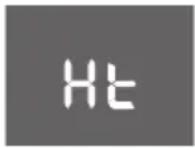
"High Temperature" (Overheating protection)
..WHAT SHOULD I DO?
The appliance is fitted with an overheating device which in case of operating conditions with excessive room temperature for a long period, will switch the appliance to ventilate only. The appliance will be automatically restored as soon as the temperature will be close to the operating limit conditions.
IF ... IS DISPLAYED,
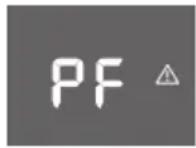
"Probe Failure" (Probe damaged)
..WHAT SHOULD I DO?
If this is displayed, contact our toll free customer service number.
IF ... IS DISPLAYED,
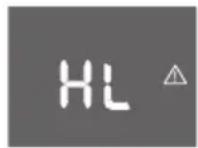
"High Level" (Internal tray full)
..WHAT SHOULD I DO?
Empty the internal safety tank following the instructions in the section "End of season operations".
TIPS FOR CORRECT USE
To ensure optimal results from your air conditioner, follow these recommendations:
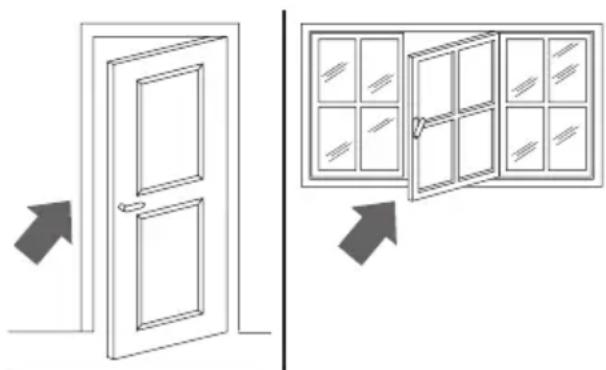
- Close the windows and doors in the room to be air conditioned. When installing the air conditioner semi-permanently, you should leave a door slightly open (as little as 1/2" inch. (1 cm)) to guarantee proper ventilation.
natural_image
Diagram showing two door opening scenarios with arrows indicating direction (no text or symbols)Close doors and windows
- Never use the appliance in very damp rooms (laundries for example).
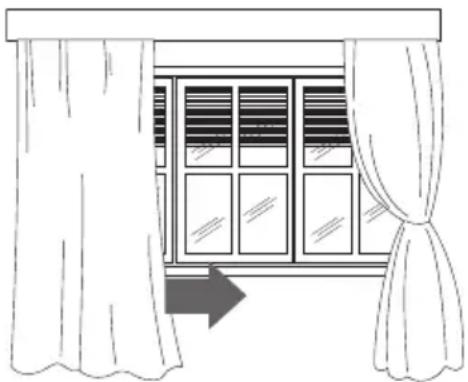
- Protect the room from direct exposure to the sun by partially closing curtains and/or blinds to make the appliance much more economical to run.
natural_image
Line drawing of a window with curtains and sheer curtains, no text or symbols presentClose blinds or curtains
- Never use the appliance outdoors.
• Make sure there are no heat sources in the room. - Make sure the air conditioner is standing on a level surface.
natural_image
Simple line drawing of a device with a cross mark symbol (no text or labels)do not cover the appliance
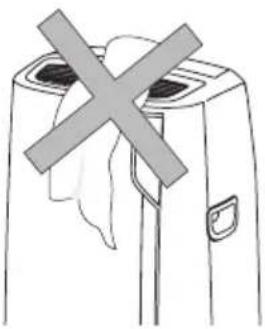
- Never rest objects of any kind on the air conditioner.
- Never obstruct the air intake or outlet grilles.
CLEANING
Before cleaning or maintenance, turn the appliance off by using the button, then unplug from the outlet.
CLEANING THE CABINET
You should clean the appliance with a slightly damp cloth then dry with a dry cloth. For safety reasons, never wash the air conditioner with water.
Precautions
Never use petrol, alcohol or solvents to clean the appliance. Never spray insecticide liquids or similar.
CLEANING THE AIR FILTER
If the filter is dirty, air circulation is compromised and the efficiency of the appliance decreases.
It is therefore good practice to clean the filter at regular intervals. The frequency depends on the duration and conditions of operation. If the unit is used constantly or systematically, you are recommended to clean the filter once a week.
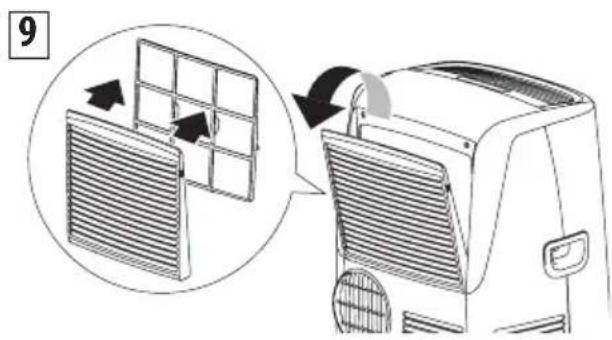
The filter is housed in the intake grille.
Remove the grille to access the filter. To clean the filter, it will need to be extracted as shown in fig. 9.
Use a vacuum cleaner to remove any dust deposited on the filter. If it is very dirty, submerge it into warm water and rinse it several times. The water temperature must be kept below 104^ F ( 40^ C).
Afterwashingthefilter, allowittodrycompletely before repositioning it.
CHECKS AT THE START OF THE SEASON
Make sure the power cable and socket are in perfect condition and make sure the grounding system is sufficient. Comply strictly with the installation standards.
END OF SEASON OPERATIONS
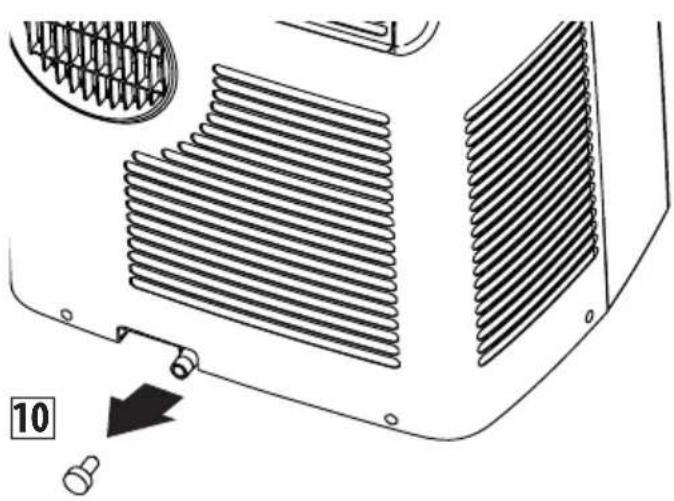
To drain all water from the circuit, remove the cap A11 from the drainage on the back of the appliance and allow the water to drain out into a basin (fig. 10).
To facilitate this operation, at the start of the season, it's possible to apply the water drain hose with cap B8.
In order to properly storage the appliance at the end of the season, we suggest you cover it with the supplied end of season dust cover B10 and you put the accessories in the relevant end of season accessories bag B11.
natural_image
Technical diagram of a car air conditioning unit showing heat exchangers and cooling fins (no text or labels)When the appliance is empty, replace the cap.
Clean the filter and dry thoroughly before putting back. Unit should be stored in large, well ventilated area.
TECHNICAL SPECIFICATIONS
| Power supply voltage | see rating label |
| Max. absorbed power during air conditioning | “ |
| Refrigerant | “ |
| Cooling capacity | “ |
LIMIT CONDITIONS
Room temperature for
air conditioning 64 - 95°F (18° - 35°C)
Room temperature for
heating (on some models only) 50 - 77°F (10 - 25°C)
Maximum relative humidity : 80% RH
Transport, filling, cleaning, recovery and disposal of refrigerant should be performed by a technical service center appointed by the manufacturer only.
The appliance should be disposed of by a specialized center appointed by your municipality.
TO AVOID DAMAGE TO THE UNIT:
NEVER TRANSPORT OR TURN THE APPLIANCE UPSIDE DOWN OR ON ITS SIDE. IF THIS OCCURS, WAIT 6 HOURS BEFORE TURNING THE APPLIANCE ON, 24 HOURS IS RECOMMENDED. After the unit has been on its side, oil needs to return to the compressor to ensure proper function. Without allowing the unit this time (6-24 hours) the unit may function for only a short time, and then the compressor will break down from lack of oil.
ELECTRICAL CONNECTION
This appliance is equipped with a 3 prong grounded plug. The plug must be connected into an outlet that is properly installed and grounded in the accordance with all local codes and ordinances. Do not modify the plug provided with the appliance. If it will not fit the outlet, have a proper outlet installed by a qualified electrician or relocate the unit to a proper outlet. If the household electrical supply does not meet the above specifications, or if you are not sure your home has an effective electrical ground, have a qualified electrician or your local electrical utility company check it and correct any problems.
SAFETY PLUG
The appliance is fitted with a safety plug to protect the power cable. If power is cut off, unplug from the outlet and make sure the power cable is undamaged. If the cable is damaged, call the service center immediately. If power cuts off frequently and the power cable is undamaged, contact a qualified electrician.
If the safety device incorporated in the plug trips and cuts off the power supply, check that the power cable and plug are not damaged. If the power cable is undamaged, to restore operation press the "RESET" button. To verify correct operation of the plug, press the "TEST" button periodically and make sure the appliance disconnects. If this is not the case, contact the service center. To restore operation, press the "RESET" button.
Please check the following points before calling the toll-free customer service number.
| PROBLEMS CAUSES SOLUTIONS | ||
| The air conditioner does not turn on It is not plugged in plug it in | ||
| there is no power wait for at least 3 minutes and try again | ||
| the internal protection device was triggered call the help center | ||
| The air conditioner works for a short period of time | the air exhaust hose is obstructed or bent correctly position the air exhaust hose, limiting the length and curves as much as possible and avoiding any obstructions | |
| an obstruction is impeding air exhaust outside identify and remove the obstacles that impede air exhaust outside | ||
| The air conditioner runs but does not cool the room | windows, doors, drapes open close the windows, doors and drapes, keeping in mind the “recommendations for proper use” | |
| there is some heat source in the room (i.e. oven, etc.) | eliminate the heat source | |
| the air exhaust hose is disconnected from the appliance | attach the air exhaust hose to the housing on the back of the appliance (fig.1b) | |
| dust filters clogged clean or replace the filters as previously described | ||
| During operation there is an unpleasant odor in the room | dust filters clogged clean or replace the filters as previously described | |
| The air conditioner does not work for about 3 minutes from restart | to protect the compressor there is an internal device that delays startup for about 3 minutes from restart | wait the recommended time and try again |
| The internal tank is full high ambient humidity apply the water drain tube supplied (B-3) to the upper drainage hose (A13), thus allowing the water to flow into a container. Pay attention the water does not overflow on to the floor. | ||
| One of the following messages is displayed: Lt/Ht/PF/HL | the appliance has a self-diagnosis system that identifies some operating errors | refer to the SELF-DIAGNOSIS chapter |
Précautions importantes
natural_image
Exploded view diagram of a cylindrical mechanical component with internal mesh structure (no text or symbols)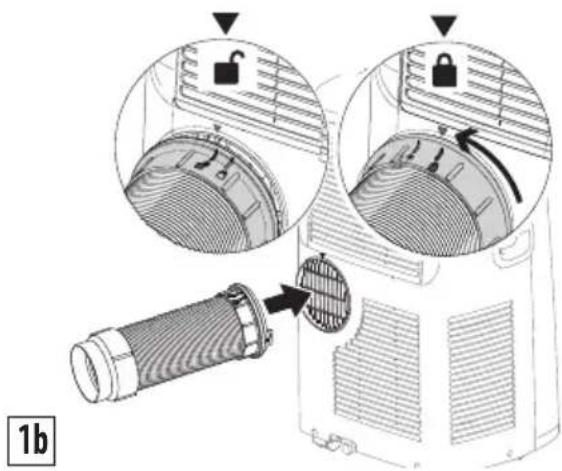
natural_image
Line drawing of a small air conditioner unit with a wall-mounted connector, placed in a corner (no text or symbols)natural_image
Line drawing of a small air conditioner unit connected to a window, with no text or symbols present.natural_image
Line drawing of a car air conditioner with a coiled hose inserted into a fan (no text or symbols)natural_image
Technical line drawing of a mechanical component with internal parts and a magnified inset showing a gear mechanism (no text or symbols)DESCRIPTION DE LA TÉLÉCOMMANDE
D1) Touche ON/STAND-BY
D2) Touche de sélection de débit d'air
D3) Touche ECO REAL FEEL
D4) Touche WiFi
D5) Touche MODE
D6-D7) Touche de diminution/ augmentation
MISE EN MARCHE/ARRÊT DE L'APPAREIL
natural_image
Diagram showing two door opening scenarios with arrows indicating direction (no text or symbols)natural_image
Line drawing of a window with curtains and a double bar, no text or symbols presentnatural_image
Simple line drawing of a device with a cross mark and handle, no text or symbols presentnatural_image
Technical diagram of a car air conditioning unit showing heat exchangers and cooling fins (no text or symbols)natural_image
Exploded view diagram of a cylindrical mechanical component with internal mesh structure (no text or symbols)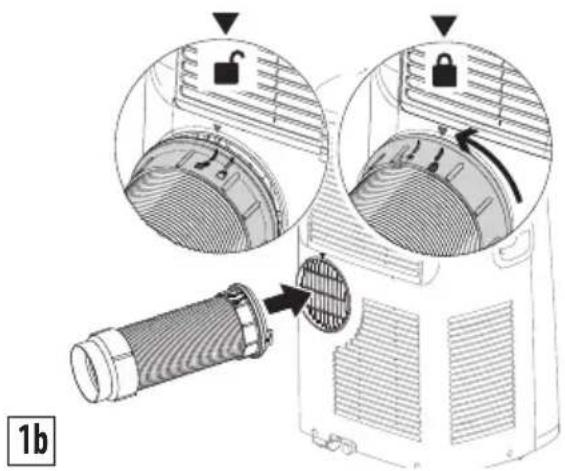
Proceda como sigue:
natural_image
Line drawing of a small air conditioner unit with a wall-mounted connector, placed in a corner (no text or symbols)natural_image
Line drawing of an air conditioner unit attached to a window, with no text or symbols present.natural_image
Line drawing of a car air conditioner with a coiled hose inserted into a fan (no text or symbols)C1. Tecla ON/STAND-BY (on/off)
natural_image
Technical line drawing of a mechanical component with internal parts and a magnified inset showing a gear-like feature (no text or symbols)natural_image
Diagram showing two door opening scenarios with arrows indicating direction (no text or symbols)natural_image
Line drawing of a window with curtains and sheer curtains, no text or symbols presentCierre persianas o cortinas
natural_image
Technical diagram of a heat exchanger or radiator component with cooling fins and a numbered arrow indicating part number 10 (no text or symbols on the diagram itself)
natural_image
Simple line drawing of an open book with no text or symbols visiblewww.delonghi.com