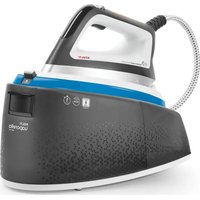
Vaporella Instant VI50.40 - Iron POLTI - Free user manual and instructions
Find the device manual for free Vaporella Instant VI50.40 POLTI in PDF.


User questions about Vaporella Instant VI50.40 POLTI
0 question about this device. Answer the ones you know or ask your own.
Ask a new question about this device
Download the instructions for your Iron in PDF format for free! Find your manual Vaporella Instant VI50.40 - POLTI and take your electronic device back in hand. On this page are published all the documents necessary for the use of your device. Vaporella Instant VI50.40 by POLTI.
USER MANUAL Vaporella Instant VI50.40 POLTI
MANUAL DE INSTRUÇÕES
POLTI VAPORELLA INSTANT VI50.50
POLTI VAPORELLA INSTANT VI50.40
POLTI VAPORELLA INSTANT VI50.30
POLTI VAPORELLA INSTANT VI50.20
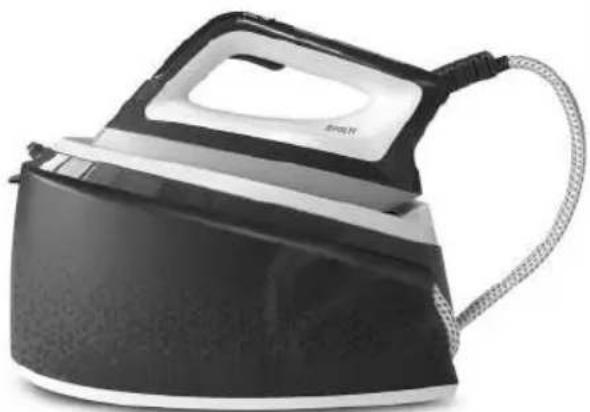
natural_image
Black and white image of a steam iron with a cord, no visible text or symbols
1 FILTRO ANTICALCARE INCLUSO
1 LIMESCALE FILTER INCLUDED
1 FILTRE ANTI-CALCAIRE INCLUS
1 FILTRO ANTICAL INCLUIDO
1 KALKFILTER INBEGRIFFEN
1 FILTRO ANTICALCÁRIO INCLUIDO
ONLY FOR MODELS V150.50/V150.40
natural_image
Close-up of a hand holding a small object next to a black kettle (no visible text or symbols)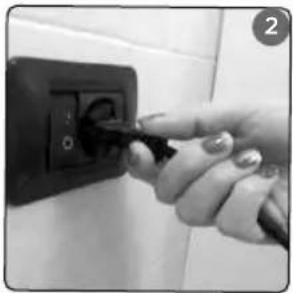
natural_image
Hand inserting a plug into a black electrical outlet (no visible text or symbols)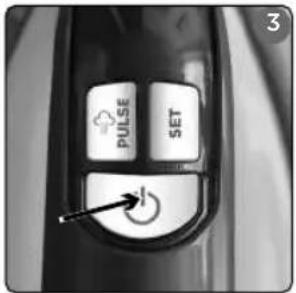
text_image
3 PULSE SET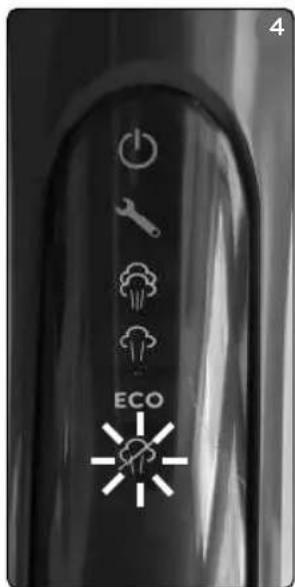
text_image
4 ECO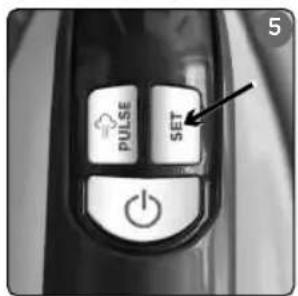
text_image
PULSE SET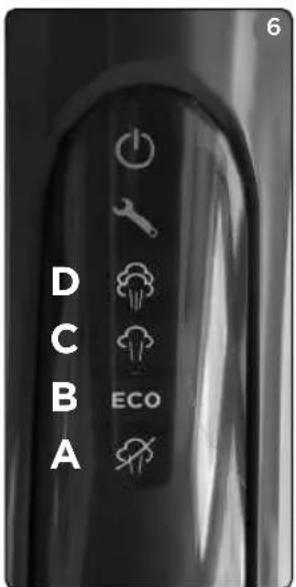
text_image
D C B A ECO 6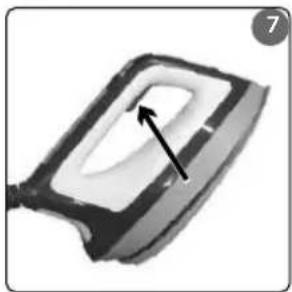
natural_image
Close-up of a mechanical component with a black arrow pointing to a white rectangular cutout (no text or symbols visible)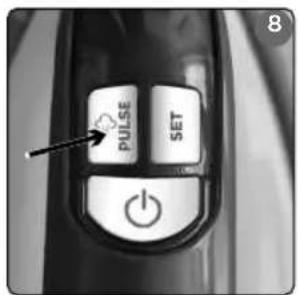
text_image
PULSE SET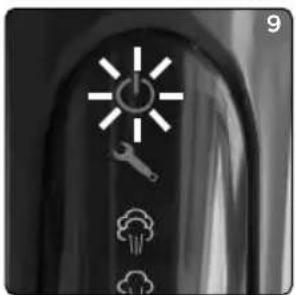
natural_image
Black-and-white icon set showing a lightning bolt, wrench, cloud, and smoke (no text or symbols)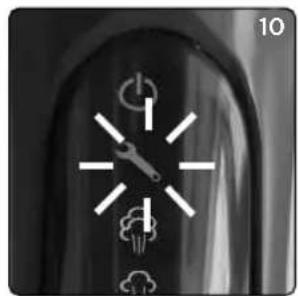
natural_image
Close-up of a dark, curved surface with white geometric symbols and numbers 10 in the corner (no readable text or labels)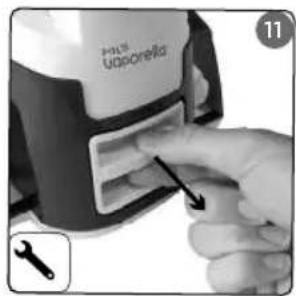
text_image
Puls Utoporella 11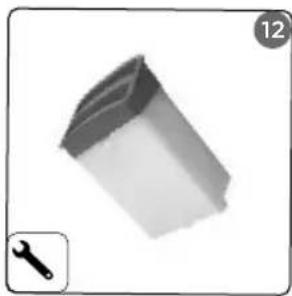
natural_image
3D rendered mechanical part with a wrench icon, no text or symbols present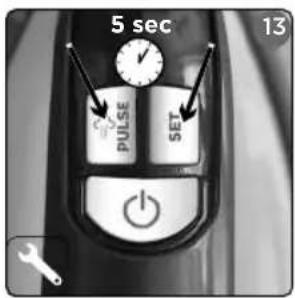
text_image
5 sec 13 PULSE SET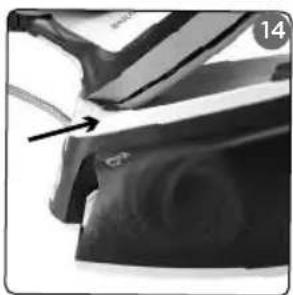
natural_image
Close-up of a car's front wheel and side panel, showing a black arrow pointing to a specific part (no text or symbols visible)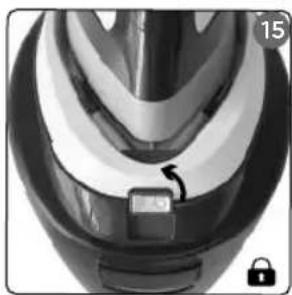
natural_image
Close-up of a helmet with a lock and adjustment knob (no visible text or symbols)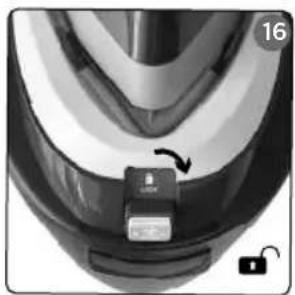
natural_image
Close-up of a car tire head with a black button and a lock icon, no visible text or symbols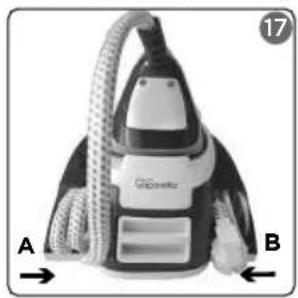
natural_image
Black and white photo of a vacuum cleaner with labeled parts A and B, no visible text or symbols on the device itself.OPTIONAL
| FPAS0001 | POLTI VAPORELLA ASSE DA STIRO POLTI VAPORELLA IRONING BOARD POLTI VAPORELLA TABLE DE REPASSAGE POLTI VAPORELLA TABLA DE PLANCHADO POLTI VAPORELLA BÜGELTISCH POLTI VAPORELLA TÁBUA DE ENGOMAR | |
| FPAS0044 | POLTI VAPORELLA ASSE DA STIRO ESSENTIAL POLTI VAPORELLA IRONING BOARD ESSENTIAL POLTI VAPORELLA TABLE DE REPASSAGE ESSENTIAL POLTI VAPORELLA TABLA DE PLANCHADO ESSENTIAL POLTI VAPORELLA BÜGELTISCH ESSENTIAL POLTI VAPORELLA TÁBUA DE ENGOMAR ESSENTIAL | |
| PAEU0202 | TELO UNIVERSALE UNIVERSAL CLOTH HOUSSE UNIVERSELLE FUNDA UNIVERSAL UNIVERSAL-BÜGELTISCHBEZUG COBERTURA UNIVERSAL | |
| PAEU0339 | TELO XL PER POLTI VAPORELLA ASSE DA STIRO TOP XL COVER FOR POLTI VAPORELLA IRONING BOARD TOP HOUSSE XL POUR POLTI VAPORELLA TABLE DE REPASSAGE TOP FUNDA XL PARA POLTI VAPORELLA TABLA DE PLANCHADO TOP XL-BÜGELTISCHBEZUG FÜR POLTI VAPORELLA BÜGELTISCH TOP COBERTURA XL PARA TÁBUA VAPORELLA TOP | |
| PAEU0404 | KIT 2 FILTRI ANTI-CALCARE KIT OF 2 LIMESCALE FILTERS KIT 2 FILTRES ANTI-CALCAIRE KIT 2 FILTROS ANTICAL SET 2 KALKFILTER KIT 2 FILTROS ANTICALCÁRIO |
The optional accessories are on sale at all the best domestic appliance retailers, an Authorised Polti Service Centre or online at www.polti.com.
natural_image
Silhouette of a briefcase with handle and straps (no text or symbols)ACCESSORI PER TUTTE LE ESIGENZE
natural_image
Silhouette of a briefcase with handle and straps (no text or symbols)ACCESSORIES FOR ALL YOUR NEEDS
Visiting www.polti.com or in any of the top household appliance stores, you will find a vast range of accessories to enhance the performance and convenience of your appliance and make household tasks even easier.
To check compatibility with your appliance, look for the code PAEUXXXX/FPASXXXX next to each accessory listed on page 4. If the code of the accessory you want to buy is not included in this manual, please contact Customer Care for more information.

REGISTER
YOUR PRODUCT
Visit www.polti.com or call Customer Care to register your product. You can benefit from a special welcome offer, in participating countries, and keep up-to-date on all the latest Polti news, as well as buy accessories and consumables.
To register your product, in addition to your personal information, you must enter the serial number (SN), which you will find on the label, located on the box and on the appliance.
To save time and have your serial number to hand, write it in the space provided on the back cover of this manual.
Do you want to know more? Visit our official channel:
www.youtube.com/poltispa.
We will demonstrate the effectiveness of the natural and ecological power of steam for ironing and cleaning, with many videos of the Polti Vaporella and all the other products from the world of Polti.
Register on the channel so you are always up-to-date on our video content!
ATTENTION: Safety warnings are found only in this manual.
CORRECT USE OF THE PRODUCT
Polti Vaporella Instant is intended for domestic use as a steam iron, with separate tank in accordance with the descriptions and instructions contained in this manual. Please read these instructions carefully and keep them. If this manual is lost, it can be viewed and/or downloaded from www.polti.com.
POLTI S.p.A. reserves the right to make the aesthetic, technical and construction changes it deems necessary, without prior notice.
Before leaving our factory, all our products are rigorously tested. Therefore, Polti Vaporella Instant may already contain some residual water in the tank.
Only usage as detailed in this instruction manual constitutes correct usage. Any other use may damage the appliance and invalidate the warranty.
WHICH WATER TO USE
Polti Vaporella Instant is designed to function with normal medium-hardness tap water between 8°f and 20°f. If the tap water contains a lot of calcium carbonate, use a mix composed of 50% tap water and 50% widely available demineralised water.
Warning: check the hardness of the water at the technical office of your local council or the local water supplier.
Periodically replace the limescale filter as shown in Chapter 8.
Never use distilled water, rain water or water containing additives (e.g. starch, perfumes), or water produced by other domestic appliances, water softeners and filter jugs.
Do not add chemicals, natural, detergent, or limescale removing substances, etc.
1. PREPARING FOR USE
Remove the appliance from the packaging, checking that the product is intact and that all the parts are included.
Place Polti Vaporella Instant on a stable, flat, heat-resistant surface.
Fill the tank with water (1) up to the MAX line.
Do not add other substances or additives to the tank.
This step must always be carried out with the power cord unplugged from the mains.
Release the iron (16), insert the plug on the other end of the power cord into a suitable socket (2) with an earth connection and check that the cords are entirely unwound.
To switch on the appliance, press the key with the symbol on the handle of the iron (3): the light will flash (4).
2. IRONING MODE
ATTENTION: Before ironing a garment, always check the symbols on the label.
Polti Vaporella Instant has a smart plate with a temperature suitable for ironing all types of fabrics and also features four settings that can be selected using the skewy (5):
DRY MODE For ironing natural fabrics such as silk and wool that could be damaged by steam (6A).
ECO MODE EGO Enables ironing while saving energy and water and with optimal performance even for more resistant fabrics (cotton, denim and linen) (6B).
MEDIUM MODE For easy ironing of all types of fabrics (6C).
MAX MODE For easy ironing even with heavier fabrics (6D).
Press the steam button under the grip on the iron (7) to activate dispensing steam from the holes on the plate. When first switched on and once the water runs out in the tank, press and hold the steam button until steam is dispensed. Start ironing. The flow stops when the steam button (7) is released.
When first using the steam, there may be some drops of water leaking out of the plate. This is due to thermal stabilization. It is recommended that the first jets of steam are not directed onto the fabric that needs ironing.
The sound heard periodically during use is due to the water reloading system.
ATTENTION: Do not leave the hot iron on any surface. Polti Vaporella Instant has a built-in iron rest with non-slip pads designed to resist high temperatures.
3. THE STEAM BOOST FUNCTION
The STEAM BOOST function can be activated for quick and easy ironing by double-clicking the steam button under the grip on the iron (7). A powerful blast of steam will allow you to speed up and improve ironing, even with heavy fabrics, and to remove the most difficult creases. Wait 10 seconds before using this function again.
4. STEAM PULSE FUNCTION
For quicker and easier ironing, the STEAM PULSE FUNCTION can be activated, by pressing the key with the symbol (8) on the handle of the iron. The intermittent steam
penetrates further into the fabric, speeding up and improving the ironing. With this mode, the iron will automatically begin alternating, dispensing steam for 1 second and then stopping for 1 second.
To deactivate this function, press the button again, or press the steam button. To reactivate, repeat the procedure from the beginning.
ATTENTION: Do not rest the iron on the iron rest with the STEAM-PULSE FUNCTION activated.
5. VERTICAL IRONING
The iron may be used in the vertical position to remove creases from fabrics and/or to refresh fibres, eliminating any residual odours. Hold the iron in a vertical position, press the steam button under the grip of the iron (7), and where possible, depending on the type of fabric, touch it lightly with the plate.
6. AUTOMATIC SHUT-DOWN FUNCTION
Automatic shut-down will activate if the appliance is unused for 10 minutes, and this will be indicated by the ⏻ight (9). To reactivate the appliance, press the steam button under the grip of the iron (7).
7. OUT OF WATER
The water level is always visible from the tank. When the water inside the tank has been used up, steam will stop coming out. To resume use, simply switch off the appliance and fill the tank with water (1) up to the MAX line on the tank. This step must always be carried out with the power cord unplugged from the mains.
Press and hold the button until steam is comes out.
8. REPLACEMENT OF THE LIMESCALE FILTER
The light on the iron's display (10) indicates that the limescale filter needs replacing.
To replace it, proceed as follows:
- Turn off the appliance by pressing the key with the ⏻ symbol (3) and unplug it from the mains electricity.
- Remove the filter (11) and replace it with a new, original one (12).
- Plug it into the mains electricity (2).
- Switch on the appliance by pressing the key with the symbol (3).
- Hold the pull and keys (13) for 5 seconds to activate the Reset function, which enables the system to fill the new filter and continuation of ironing.
Replace the filter every time the light comes on (10).
Continuing to iron and postponing replacement of the filter will compromise the reliability and life of the product.
9. GENERAL MAINTENANCE
Before carrying out any maintenance on the device, always unplug it from the mains electricity, making sure that the product has cooled down before proceeding.
To clean the body of the appliance, only use a damp cloth.
Do not use detergents of any kind.
Clean the plate when completely cool with a damp cloth or non-abrasive sponge.
10. STORAGE
Hold the iron above the iron rest, inserting the back first (14) and then the point, locking it in place with the locking switch ⏻ (15). To release the iron, move the locking switch ⏻ (16). Turn off the appliance by pressing the key with the ⏻ symbol (3) and unplug it from the mains electricity. Insert the iron cord in the holder on the left (17-A) and the power cord in the holder on the right of the appliance (17-B). Wait for the appliance to cool completely before replacing it.
- TROUBLESHOOTING
| PROBLEM POSSIBLE CAUSE SOLUTION | ||
| Steam does not come out of the iron. | No power/switched off | Make sure that the appliance is connected to the mains and the switch is on. |
| Water reservoir empty. Fill the | water tank. | |
| The appliance is new, and the tube that feeds water to the iron is still empty. | Press and hold the steam control until it is filled. | |
| Little steam comes out of the iron. | The steam is dry and not very visible, but present and effective. | This is a normal phenomenon seen in certain environmental conditions. |
| You have not pressed and held the steam button under the grip on the iron. | Keep the steam button under the grip on the iron pressed in while ironing. | |
| You are ironing in Eco mode. | For a more powerful jet of steam, deactivate Eco mode and activate Max mode. | |
| Water comes out of the iron instead of steam. | First use. Dispense onto a cloth | th until steam comes out of the holes in the plate (see section 2). |
| You have just replaced the li-mescale filter. | Dry the iron with a cloth and resume normal ironing. | |
| Traces of water remain on the garments. | The ironing-board lining is impregnated with water. | Check that the ironing board is suitable (a board with a grill that prevents condensation). |
| On first start-up or after filling the tank, no steam is dispensed. | The tube that feeds water to the iron is still empty. | Press and hold the steam control until it is filled. |
| Should the problem persist or if it is not in the table, contact an Authorised Polti Service Centre (see www.polti.com for the up-to-date list) or Customer Care. | ||
WARRANTY
This appliance is for domestic and household use only.
It is covered by a legal warranty against defects existing at the time of delivery for two years from the date of purchase, as provided for by European law, unless otherwise specified by conditions (expiry and remedies) in force in the country in which the warranty is requested. The date of purchase must be confirmed with a document valid for tax purposes issued by the seller.
To activate the warranty and for further information, visit www.polti.com
For repairs, the appliance must be accompanied by proof of purchase.
This warranty does not affect the consumer rights deriving from European Directive 99/44/EC as regards some aspects of sale and warranty of consumer goods, rights which the consumer should uphold with respect to the seller.
This warranty is valid in the countries which adhere to European Directive 99/44/EC. For other countries, local regulations on warranties apply.
WHAT THE WARRANTY COVERS
During the warranty, Polti guarantees free repair of a product with a manufacturing or factory defect, and therefore, the client is not liable to pay for any work or materials.
In case of irreparable defects, Polti may replace the product free of charge.
To take advantage of the warranty, the customer should visit one of the Polti Authorised Care Centres with proof of purchase from the seller valid for tax purposes and bearing the date of purchase of the product. Without proof of purchase and the relative date of purchase, the work will require payment. Store the proof of purchase document safely for the whole duration of the warranty.
WHAT THE WARRANTY DOES NOT COVER
- Any defect or damage not deriving from a manufacturing defect.
- Any damage due to improper use or use other than that indicated in the instruction booklet, an integral part of the product sales contract.
- Any damage resulting from force majeure (fires, short circuits) or caused by third parties (tampering);
- Damage caused by the use of non-original Polti parts and repairs or modifications performed by staff or service centres not authorised by Polti;
• Damage caused by the customer;
- Parts (filter, brush, hose, batteries, etc.) damaged by use (consumable goods) or normal wear and tear.
• Any damage caused by limescale;
- Defects resulting from a lack of maintenance/cleaning in accordance with manufacturer's instructions and/or using water/substances other than those specifically indicated (see the WHICH WATER TO USE chapter).
- Attachment of non-original Polti accessories or accessories which have been modified or are unsuitable for the appliance.
Inappropriate use and/or use not compliant with the instructions for use and any other warnings or indications contained in this manual invalidates the warranty.
Polti takes no responsibility for any direct or indirect damage to people, objects or animals caused by non-compliance with the instructions indicated in this instruction booklet regarding warnings for use and product maintenance.
To see the up-to-date list of the Polti Authorised Service Centres, visit www.polti.com.
BIENVENUE DANS LE MONDE DE POLTI VAPORELLA
POLTI VAPORELLA INSTANT : LA PREMIÈRE CENTRALE VAPEUR DOTÉE DE LA TECHNOLOGIE INNOVANTE INSTANT STEAM QUI PERMET UNE SORTIE DE VAPEUR SOUS PRESSION PUISSANTE ET IMMÉDIATE, POUR UN REPASSAGE EFFICACE ET RAPIDE.

natural_image
Silhouette of a briefcase with handle and straps (no text or symbols)DES ACCESSOIRES POUR TOUS LES BESOINS
UTILISATION CORRECTE DU PRODUIT
natural_image
Silhouette of a briefcase with handle and straps (no text or symbols)ACCESORIOS PARA TODAS LAS NECESIDADES
USO CORRECTO DEL PRODUCTO
natural_image
Silhouette of a briefcase with handle and straps (no text or symbols)ZUBEHÖR FÜR ALLE BEDÜRFNISSE
natural_image
Silhouette of a briefcase with handle and straps (no text or symbols)ACESSÓRIOS PARA TODAS AS NECESSIDADES