300419 - Bluetooth USB Drive CSL - Free user manual and instructions
Find the device manual for free 300419 CSL in PDF.


| Product type | Bluetooth USB adapter |
| Brand | CSL |
| Model | 300419 |
| Interface | USB 2.0 (compatible with previous versions) |
| Bluetooth standard | Bluetooth 4.0 (compatible with previous versions) |
| Maximum data rate | 3 Mbit/s |
| Supported operating systems | Windows, macOS, Linux (Plug and Play) |
| Package contents | Bluetooth USB adapter, installation CD, quick start guide |
| Dimensions (approx.) | 2 x 1,5 x 0,5 cm |
| Weight (approx.) | 5 g |
| Power supply | Via USB port |
| Key features | Connect Bluetooth devices, audio streaming, file transfer |
| Care instructions | Protect from moisture, shocks, and high temperatures |
| Safety instructions | Do not open or modify the device; use only indoors |
| Recycling | WEEE Directive 2012/19/EU, registration DE 94495668 |
| Manufacturer | CSL Computer GmbH & Co. KG, Hanover, Germany |
Frequently Asked Questions - 300419 CSL
User questions about 300419 CSL
0 question about this device. Answer the ones you know or ask your own.
Ask a new question about this device
Download the instructions for your Bluetooth USB Drive in PDF format for free! Find your manual 300419 - CSL and take your electronic device back in hand. On this page are published all the documents necessary for the use of your device. 300419 by CSL.
USER MANUAL 300419 CSL
natural_image
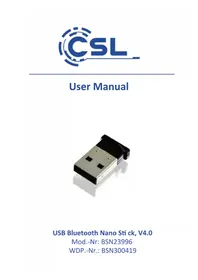
Close-up of a black and silver USB flash drive with metallic casing (no text or symbols visible)USB Bluetooth Nano Stick, V4.0
Thank you for having chosen this product from CSL and for placing your trust in our company. Before using it for the first time, please read this manual carefully to ensure your long-term enjoyment of this product. For future reference, please keep this manual.
1 Scope of delivery
- USB Bluetooth stick
- Installati on CD
- User manual
2 Technical specifi cati ons
| Interface USB 2.0 (backwards compatible) | |
| Bluetooth standard Version 4.0 (backwards compatible) | |
| Data rate Up to 3 Mbit/s | |
| Features | • Bluetooth 4.0 low energy, connecti on establishment, supports A2DP |
| Tested operating systems | Microsoft Windows XP / Vista / 7 / 8 / 8.1 / 10 |
3 Getti ng started
Please plug the Bluetooth stick into a free USB port of your computer. The system automati cally detects the USB Bluetooth stick by „Plug and Play” and installs all system drivers by itself. Aft erwards the basic functi ons of the device can already be used with the Bluetooth symbol in the task bar next to the system lock. If you wish to use the whole range of functi ons, please follow the instructi ons of the driver installati on.
For this, insert the driver CD into your CD-ROM drive. Aft er that, the automatic playback opens. Please click „autorun.exe“ below to reach the installati on menu.
Answer the security questi on with "Yes", to confirm that you want to start the installation.
In the next window, select the desired language and click „OK“, to confirm your choice. In the next dialog click the „Next“ butt on.
Now, accept the licensing terms and click „Next“ to proceed with the installation.
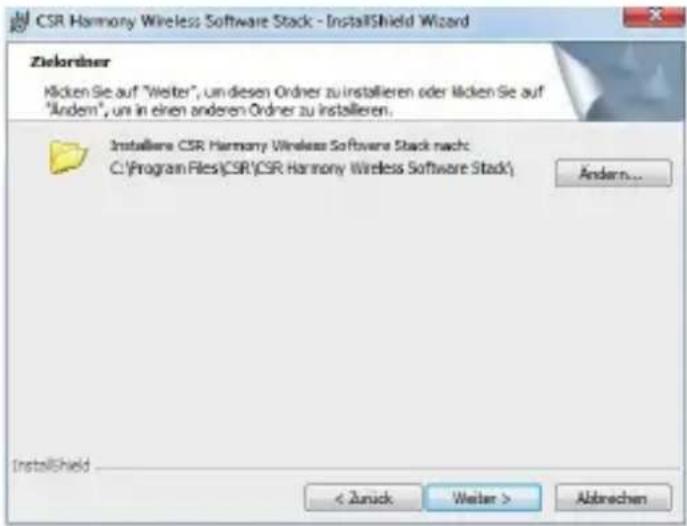
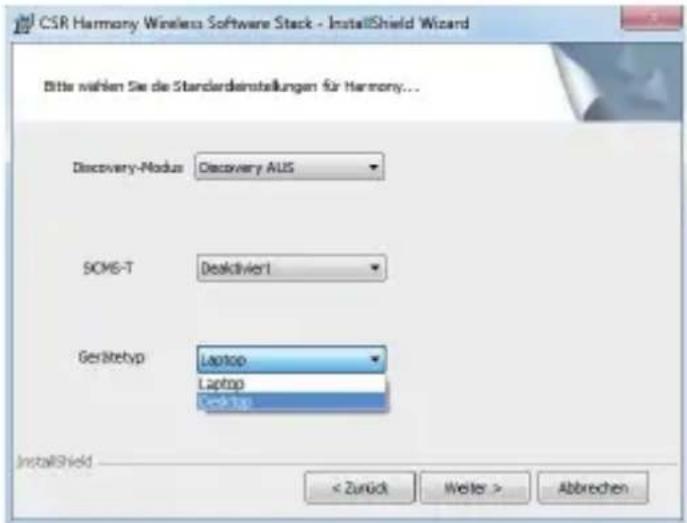
Check if the standard settings are suitable for your needs and continue with „Next“.
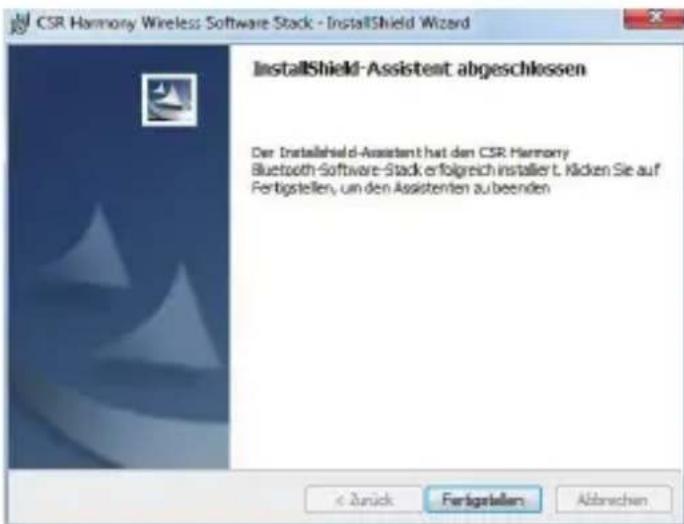
Now click the „Install“ butt on, in order to start the installati on and subsequently on the „Finish“ butt on. The full functi onality of the Bluetooth stick is achieved after reboot.
Do not attempt to service this product by yourself as opening or removing covers may result in fire, electric shock or equipment damage. Please avoid any contact to the electric current. This product is only licensed for indoor use and dry areas. Please protect it from water, rain, snow or high humidity and keep it away from high temperatures and direct sunlight.
Do not expose this product to extreme and sudden changes of temperature or heavy vibrations; this may lead to damage of the internal electronic part of this unit.
Check this product for signs of damage before putting it in operation.
In case the device received any damage, it should not be used. Please contact our customer support.
Please observe the relevant national provisions and legal restrictions.
Do not use this product for anything other than intended and as described in the manual.
Any attempt of repairs or alterations by someone other than the original supplier will invalidate the guarantee and result in refusal of warranty claims.
Persons who are familiar with the operating manual and the applicable regulations concerning working safety and accident prevention on may only use the Bluetooth stick.
This unit is not intended to be used by persons (including children) with limited physical, sensory or mental apti tude or lack of experience and/or knowledge unless they are supervised by a person responsible for their safety or have received instructions as to how the device is used properly. The technical specifications of this product may change without prior notice.
5 Disposal Instructions
The European Directi ve (WEEE) requires that old electrical and electronic appliances shall be disposed of separately from normal household garbage for opti mal recycling. The component parts must be separated, collected and sent for recycling or disposal in an environment-friendly manner. Otherwise, toxic and dangerous substances could cause enduring damage to the environment if disposed of incorrectly.
As a consumer you are legally obligated (Electrical and Electronic Equipment Act-ElektroG) to return electronic equipment at the end of its lifeti me to their manufacturer, point of sale, public collecti on points or importer free of charge. The relevant local laws apply here. The symbol on the product, in the instructi ons or on its packing indicates these regulati ons. The reuse or recycling of materials and old units makes an important contributi on towards protecti ng the environ- ment.
WEEE guideline: 2012/19/EU WEEE register number.: DE 94495668
CSL Computer GmbH & Co. KG, herewith declares that this product BSN23996 conforms to the principle requirements and other relevant sti pulati ons of Directi ve 1999/5/EG. The complete Declaration of Conformity can be obtained from: CSL Computer GmbH & Co. KG, Sokelantstraße 35, 30165 Hannover
Brand : CSL
Model : 300419
Category : Bluetooth USB Drive