304017 - Thermostat Bearware - Free user manual and instructions
Find the device manual for free 304017 Bearware in PDF.


| Product type | Programmable thermostat plug |
| Brand | Bearware |
| Model | 304017 |
| Category | Thermostat |
| Power supply | 230 V / 50 Hz |
| Maximum output power (resistive) | 3680 W / 16 A |
| Maximum output power (inductive) | 9 A |
| Adjustable temperature range | 5 °C - 30 °C |
| Measurement accuracy | ± 0.5 °C |
| Standby power consumption | < 0.3 W |
| Protection class | IP20 |
| Internal battery type | 3.6 V 40 mAh NiMh |
| Internal sensor | NTC (temperature sensor) |
| Operating modes | Heating and cooling |
| Additional functions | Child lock, ambient temperature display, °C/°F switching, RESET button |
| Cleaning | With a dry cloth, device turned off and unplugged |
| Safety instructions | Do not open, do not use near water, keep out of reach of children |
| Package contents | Thermostat plug, user manual |
| Reset | RESET button for factory settings |
Frequently Asked Questions - 304017 Bearware
User questions about 304017 Bearware
0 question about this device. Answer the ones you know or ask your own.
Ask a new question about this device
Download the instructions for your Thermostat in PDF format for free! Find your manual 304017 - Bearware and take your electronic device back in hand. On this page are published all the documents necessary for the use of your device. 304017 by Bearware.
USER MANUAL 304017 Bearware
natural_image
Red stylized graphic of a bear and a pig (no text or symbols)BEARWARE
Usage and safety instructions
- Please read the user manual completely and thoroughly before using the product for the rst me. The manual contains important information for your safety as well as for using the product.
- Keep the user manual for future reference and pass it on when giving the product to others.
- Note all the additional warnings on the product and in this user manual.
- Use the product only for the intended purpose as described in this user manual. Improper use could lead to hazards.
- If you do not use the device as intended or use it incorrectly, no liability can be accepted for any resulting damage.
- Remove the packaging material and
check if the device is in proper working condition before using it.
- This product should not be used near water, such as a bathtub, washbasin, swimming pool, etc., where there is a risk of immersion or splashing.
- Children should be supervised to ensure that they do not play with the product.
- Warning! In the interest of child safety, do not leave any packaging components (plastic bags, cardboard, polystyrene, etc.) lying around. Danger of suffocation!
- Check the product for damage each time before use.
- If the product is visibly damaged, it must be checked, repaired or replaced by a qualified technician and disposed of in accordance with the applicable directives.
- Never continue to use a damaged or defective product!
- This device conforms to the technical standards and relevant safety instructions for electrical devices.
Thank you for choosing a BEARWARE product. Please read the following user manual carefully so as to be able to get the most from the product you have purchased. Before using the product, first check that the delivered item is complete, accurate and undamaged.
1. Scope of delivery
- Socket thermostat
- User manual
2. Technical data
| Power supply 230 V / 50 Hz | |
| Output power 3680 W / 16 A (resistive) / 9 A (inductive) | |
| Adjustable temperature range 5°C to 30°C | |
| Measurement accuracy ± 0.5°C | |
| Stand-by consumption < 0.3 W | |
| Protection class IP20 | |
| Battery type 3.6V 40 mAh NiMh battery (internal) | |
| Functional properties | - Internal temperature sensor (NTC)- Simple operation (3 keys)- Heating/cooling function- Room temperature display- In-built child safety |

3. Additional information about this device
- Do not operate in covered condition!
- Do not connect in series!
- Use this product only in dry and covered areas. Ensure that the device is not damaged and does not come into contact with water or other liquids.
-
To ensure safety at all times, please read the safety instructions carefully!
-
Details
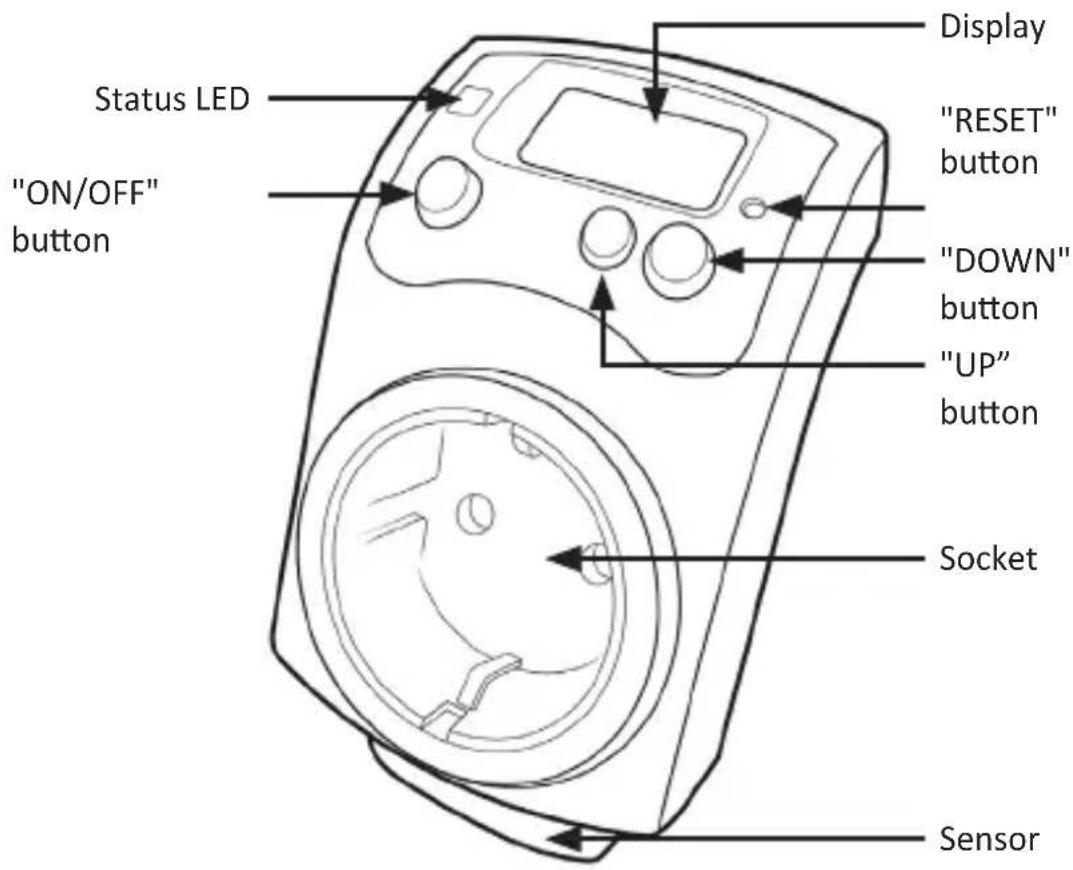
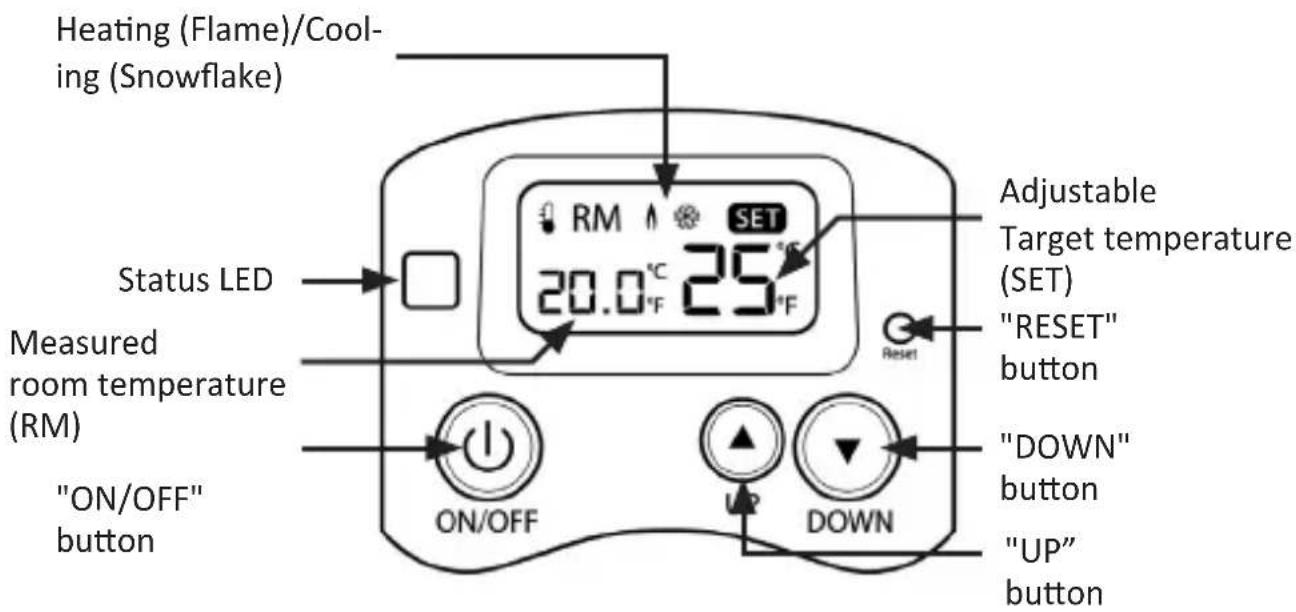
5. Functional scope
The programmable socket thermostat is suitable for controlling the room temperature using heating and cooling devices such as electric heaters, radiators or air conditioners, thanks to an exact-degree switching.
The device is a temperature-dependent switching socket, which measures the actual room temperature and regulates it up to the individually adjustable setpoint value.
6. Initial use
Take the device out of the package and remove all the packaging material. Check that the product and the components are intact and that the device is working properly when using it for the first time Connect the thermostat to a properly installed socket. The device is now ready for use.
6.1 Status LEDs
| Status LED Description | |
| Off Thermostat is switched off | |
| Red Thermostat is in standby (socket not active) | |
| Green | Thermostat is active (heating or cooling mode switched on/socket is active) |
7. Basic settings
7.1 Changing between °C / °F

The device should not be active when changing the temperature unit. The LED must be switched off and the target temperature should not be displayed.
To change between °C and °F, press and hold the "UP" and "DOWN" buttons simultaneously for about 3 seconds. The corresponding temperature unit now changes in the display.
7.2 Changing between heating and cooling mode

The device should not be active when changing the mode. The LED must be switched off and the target temperature should not be displayed.
Proceed as follows to change between the heating mode (flame symbol) and cooling mode (snowflake symbol):
- First press and hold the "UP" button and then press and hold the "ON/OFF" button for about 4 seconds.
- The heating/cooling symbol changes in the display.
- Repeat the process until the desired symbol appears in the display.
| Heating mode (e.g., for heaters) | |
| Cooling mode (e.g., for air conditioners) |
8. Modes of operation (heating and cooling mode)
8.1 Heating mode
- Select the heating mode as described in section 7.2.
- Press the "ON/OFF" button to switch on the device.
- Set the desired target temperature (SET) using the "UP" and "DOWN" buttons.
- The thermostat switches on when the room temperature (RM) is below the set target temperature (SET). The LED changes from red to green after about 1-3 minutes. This means that the thermostat is active (heating mode is switched on/socket is active).
- Once the room temperature (RM) reaches the target temperature (SET), the thermostat switches off and the status LED changes back to red.
8.2 Cooling mode
- Select the cooling mode as described in section 7.2.
- Press the "ON/OFF" button to switch on the device.
- Set the desired target temperature (SET) using the "UP" and "DOWN" buttons.
- The thermostat switches on when the room temperature (RM) is above the set target temperature (SET). The LED changes from red to green after about 1-3 minutes. This means that the thermostat is active (cooling mode is switched on/socket is active).
- Once the room temperature (RM) reaches the target temperature (SET), the thermostat switches off and the status LED changes back to red.
9. Factory settings
To reset the device to factory settings, press the "RESET" button at the top of the device.
10. Cleaning Instructions
Clean the thermostat with a dry cotton cloth. Make sure that the product is switched off and completely disconnected from the mains. Never use any chemical cleaning agents. Never use liquids which could damage the surface of the product such as scouring milk.

11. Safety instructions and disclaimer
Never try to open the device to repair or make modifications. Avoid contact with the mains voltage. Do not short-circuit the product. The device is not waterproof, hence please use it only in dry surroundings. Protect it from high humidity, water and snow. Do not expose the device to high temperatures. Do not expose the device to sudden changes in temperature or strong vibrations, as this could damage the electronic components. Check the device for any damage before using it. The device should not be used if it was subject to impact or has been damaged in some other manner. Please comply with the local regulations and restrictions. Do
not use the device for purposes other than those described in the user manual. This product is not a toy. Keep it out of the reach of children or mentally disabled persons. Any repair or modification to the device, which is not carried out by the original supplier, will void any warranty and guarantee claims. The device should only be used by those who have read and understood this user manual. The specifications of the device may be changed without prior notice.

12. Disposal instructions
In line with the European WEEE directive, electrical and electronic devices should not be disposed of along with domestic waste. Their components have to be separately sent for recycling or disposal, because improper disposal of toxic and dangerous components may permanently damage the environment. According to the electrical and electronic equipment act (ElektroG), you are obliged (as a consumer) to return (free of charge) electrical and electronic devices to the manufacturer, the point of sale or public collection points at the end of their service life. The relevant local laws regulate the details in this regard. The symbol displayed on the product, in the user manual or/and on the packaging refers to these regulations. With this manner of sorting, recycling and disposal of used devices, you make an important contribution towards protecting our environment.

The symbol of the crossed-out dustbin means that the battery may not be disposed of in household waste.

WEEE directive 2012/19/EU WEEE Register no.: DE 67896761
The company WD Plus GmbH hereby certifies that the device 304017 / 20191112HK015 complies with the fundamental requirements and the other relevant stipulations of the directive. A complete conformity statement can be obtained from: http://www.ganzeinfach.de, WD Plus GmbH, Wohlenbergstraße 16, 30179 Hannover

DOWNLOADS & MANUALS
- BEARWARE
- Usage and safety instructions
- Scope of delivery
- Technical data
- Additional information about this device
- Functional scope
- Initial use
- Status LEDs
- Basic settings
- Changing between °C / °F
- Changing between heating and cooling mode
- Modes of operation (heating and cooling mode)
- Heating mode
- Cooling mode
- Factory settings
- Cleaning Instructions
- Safety instructions and disclaimer
- Disposal instructions
Brand : Bearware
Model : 304017
Category : Thermostat