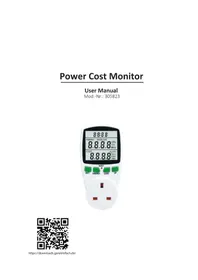
305823 - Energy meter Arendo - Free user manual and instructions
Find the device manual for free 305823 Arendo in PDF.


| Brand | Arendo |
| Model | 305823 |
| Product type | Energy meter (power consumption measuring plug) |
| Supply voltage | 230 V AC, 50 Hz |
| Maximum current | 16 A |
| Maximum power | 3680 W |
| Backup power | 2 LR44 batteries (included) |
| Ambient temperature | 0 to 40 °C |
| Relative humidity | 80% max at 30°C, 50% max from 30 to 40°C |
| Maximum altitude | 2000 m |
| Overvoltage category | CAT II |
| Display | Time, energy (V, A, Hz, power, power factor), cost (kWh, CO2, days) |
| Functions | Consumption measurement, cost calculation, overload limit, CO2 emissions, Set/UP/Energy/Cost/Reset buttons |
| Package contents | Measuring device, instruction manual |
| Warranty | 2 years (manufacturing and materials) |
| Usage | Indoor use only, do not daisy chain |
| Recycling | Follow WEEE and battery disposal regulations |
Frequently Asked Questions - 305823 Arendo
User questions about 305823 Arendo
0 question about this device. Answer the ones you know or ask your own.
Ask a new question about this device
Download the instructions for your Energy meter in PDF format for free! Find your manual 305823 - Arendo and take your electronic device back in hand. On this page are published all the documents necessary for the use of your device. 305823 by Arendo.
USER MANUAL 305823 Arendo
https://downloads.ganzeinfach.de/
Table of contents
- English .... 3
- Deutsch 10
- Français 17
- Italiano 25
- Español....32
Thank you for choosing this product. Please read this manual carefully to ensure your long-term enjoyment of this product. For future reference, please keep this manual. Before using the delivered product, check that it is complete, faultless and undamaged.
1. Scope of delivery
- Energy cost meter
- User manual
2. Technical specifications
| Electrical voltage 230V AC 50 Hz | |
| Maximum current 16 amperes | |
| Maximum power 3680 Watt | |
| Power supply data storage 2 batteries type LR44 (included with delivery) | |
| Data storage Battery operated in case of power failure | |
| Ambient temperature 0-40°C | |
3. Getting started
When the device is put into operation for the first time, check the intactness of the product or components and their function again. Remove the product from the packing and remove the plastic strip, which is protruding out of the battery compartment on the back side of the energy cost meter. Then connect the electrical devices, whose energy consumption has to be recorded, to the meter. Then plug power cost monitor meter into a properly earthed wall socket. The meter is now ready to be used. Detailed information on the operation and the setting options are given in the following sections of this quick start guide.
Attention! The time measurement stops when the value is below 2 W.
4. Displays and controls
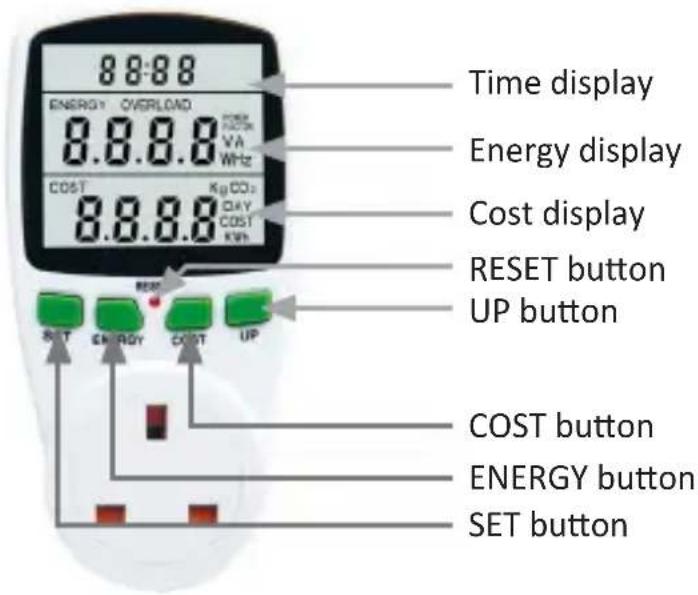
4.1 Time display
The time display shows the duration in which the power was consumed. The following points should be noted:
- if the measured time is less than an hour, then the time is displayed in the "minutes: seconds" format.
- If the measured time is more than an hour, then the time is displayed in the "hours: minutes" format.
- The display resets itself after 24 hours. The "Day" value of the COST display is incremented by 1 in this case.
- The power consumption of the connected device should be at least 2W for the time measurement to continue.
- Press the "SET "+"ENERGY" keys to reset the time.
Press the "SET "+"ENERGY" keys to reset the time.
4.2 Energy display
The energy display provides a wide range of information. The table below gives an overview of the various values:
| Display displayed value | |
| V Electrical voltage | |
| A Current | |
| Hz Frequency | |
| POWER FACTOR Power factor | |
| OVERLOAD + W Overload limit in W | |
| W Power | |
If the energy consumption exceeds the overload limit, then this is indicated by a flashing "OVERLOAD".
4.3 Cost display
The cost display provides a wide range of information. The table below gives an overview of the various values:
| Display displayed value | |
| kWh Kilowatt hours | |
| COST + kWh Price per kilowatt hour | |
| Day | Time (in days), during which the energy was consumed; the value is incremented by 1 once the time display counts 24 hours |
| KgCO2 CO2 emission | (1 kWh corresponds to 0.998 kg of CO2) |
| COST Energy costs | (kilowatt hours x price per kilowatt-hour) |
Press the “SET” and “COST” buttons simultaneously to reset the registered energy cost values.
4.4 Buttons
The following table provides an overview of the button functions:
| SET | Changing the information displayed in Energy and Cost displaySelecting the digit to be changed when setting the energy price or overload limit |
| ENERGY | Changing the information displayed at the Energy displayThe overload limit can be adjusted by pressing it for 3 seconds |
| COST | Changing the information displayed at the Cost displayThe energy price can be adjusted by pressing it for 3 seconds |
| UP | Changing the selected digit when setting the energy price or overload limit |
| RESET | Resets the power cost monitor if the display is incorrect or if the meter does not respond to the pressing of buttons |
5. Adjusting the energy price
- If the energy cost meter cannot be started, then press the reset button for a few seconds.
- The internal rechargeable battery will discharge if the timer switch is not used for longer periods of time. Plug the energy cost meter into a mains plug for approx. 24 hours every 3 months to charge the internal rechargeable battery.
- Press and hold the cost button for approx. 3 seconds in order to enter your current energy price per kilowatt-hour. The display flashes Cost/KWh.
- Use the set button to select the digit you would like to enter.
- Set the desired value using the Up buttons.
- Press the cost button to save the entered value and leave input mode.
5.1 Adjusting the overload limit
Note: The energy cost meter is designed for a maximum power of 3680 watts. Do not set the overload limit above this value and do not connect any devices whose energy consumption is more than 3680 watts.
If the energy consumption exceeds the overload limit, then this is indicated by a flashing “OVERLOAD” in the energy display.
6. Ambient conditions
| Altitude up to 2000 m | |
| Temperature 5°C to 40°C | |
| Relative humidity | • up to 30°C: maximum 80%• 30°C - 40°C: maximum 50% |
| Transient power surge CAT II | |
| Degree of soiling 2 |
7. Warranty declaration
The manufacturer provides a warranty of 2 years for this product with respect to workmanship and material. Warranty repairs should only be carried out by an authorized customer service centre. The original sales document should be enclosed as proof.
The following are excluded from warranty: normal wear and tear, modifications, reworks, damage caused by carelessness, external influences, applications for which the product was not designed or products dismantled completely or partially.

CAREFUL!
8. Important tips
- The meter is only suitable for indoor use.
-
Please do not connect in series.
-
Disconnect only when the plug is removed.
- Use the meter only in dry conditions.
- The specified maximum electric power should not be exceeded.
- There are no special ventilation requirements for this product.
For reasons of safety, ensure that the product is not covered by a blanket or similar items when being used. - If the device is not used for a longer period of time or if the measured values are incorrect, the batteries may be flat. In this case, replace them.

CAUTION!
9. Safety instructions and liability disclaimer
Never try to open the device to carry out repairs or conversions. Avoid contact with mains voltages. Do not short-circuit the product. The device is not certified for use in the open air; only use it in dry conditions. Protect it from high humidity, water and snow. Keep it away from high temperatures. Do not subject the device to sudden changes in temperature or heavy vibration as this might damage electronic components. Examine the device for damage before using it. The unit should not be used if it has received an impact or has been damaged in any other way. Please observe national regulations and restrictions. Do not use the device for purposes other than those described in the instructions. This product is not a toy. Keep it out of the reach of children or mentally impaired persons. Any repair or alteration to the device not carried out by the original supplier, will invalidate the warranty or guarantee. The product may only be used by persons who have read and understood these instructions. The device specifications may change without any separate prior notice to this effect.

10. Disposal instructions
Electrical and electronic devices may only be disposed of in accordance with the European WEEE Directive and not with household rubbish. Components must be disposed of or recycled separately as dangerous, toxic elements can inflict sustained damage on the environment if they are disposed of incorrectly. As a consumer, you are bound by the Electrical and Electronic Devices Act (ElektroG) to
return electrical and electronic goods free of charge at the end of their useful life to the manufacturer, the place of purchase or to specially set up, public collection points. The details in each case are governed by national law. The symbol on the product, the operating instructions and/or the packaging refers to these regulations. By separating materials in this way, recycling and disposing of old devices, you are making an important contribution towards protecting our environment.

11. Instructions on the disposal of batteries
With regard to the sale of batteries or the supply of devices containing batteries, the supplier is obliged to draw the customer's attention to the following: As the end user, the customer has a statutory obligation to return used batteries. He can return old batteries stocked or previously stocked by the supplier in the form of new batteries to the supplier's despatch warehouse (despatch address) free of charge. The symbols shown on the batteries have the following meanings: Pb = battery contains more than 0.004 percent by mass of lead, Cd = battery contains more than 0.002 percent by mass of cadmium, Hg = battery contains more than 0.0005 percent by mass of quicksilver.

The symbol of the rubbish bin with a cross through it indicates that the battery may not be put in household waste.

WEEE guideline: 2012/19/EU
WEEE register number: DE 67896761
WD Plus GmbH, herewith declares that this product 305823 conforms to the principle requirements and other relevant stipulations. The complete Declaration of Conformity can be obtained from: WD Plus GmbH, Wohlenbergstraße 16, 30179 Hanover
MON-FRI 9:30am - 18pm CET
WD Plus GmbH
Wohlenbergstraße 16
D-30179 Hannover
V1.1
- Table of contents
- Scope of delivery
- Technical specifications
- Getting started
- Displays and controls
- Time display
- Energy display
- Cost display
- Buttons
- Adjusting the energy price
- Adjusting the overload limit
- Ambient conditions
- Warranty declaration
- CAREFUL!
- Important tips
- CAUTION!
- Safety instructions and liability disclaimer
- Disposal instructions
- Instructions on the disposal of batteries
Brand : Arendo
Model : 305823
Category : Energy meter