302523 - HDMI switch Primewire - Free user manual and instructions
Find the device manual for free 302523 Primewire in PDF.


User questions about 302523 Primewire
0 question about this device. Answer the ones you know or ask your own.
Ask a new question about this device
Download the instructions for your HDMI switch in PDF format for free! Find your manual 302523 - Primewire and take your electronic device back in hand. On this page are published all the documents necessary for the use of your device. 302523 by Primewire.
USER MANUAL 302523 Primewire
3-Port HDMI UHD Switch with Remote Control
Thank you for having chosen this primewire product and for placing your trust in our company. Please read this manual carefully before installation to ensure your long-term enjoyment of this product. For future reference, please keep this manual.
1. Scope of delivery
- 3 port HDMI switch with remote control
- 5V DC hollow plug power
- Infrared receiver
Remote control - User manual
2. Technical data
| Input 3x HDMI socket | |
| Output 1x HDMI socket | |
| Supported standards 3D, HDCP, CEC, ARC, 30/36Bit Deep Color, DTS-HD/DolbytrueHD, LPCM7.1, DTS, Dolby-AC3, DSD | |
| Maximal resolution 2160p @ 30Hz | |
| Supported data rate up to 2.25 Gbps | |
| Power supply 5V DC (DC hollow plug power 3.5mm/1.5mm) | |
| Features • remote control (requires button cell CR2025, included in scope of delivery) • Infrared receiver with cable • automatic and manal switching on the HDMI switch • LED display shows selected input | |
3. Attributes
With this HDMI switch you can connect up to three devices to an HDMI port. The switch detects if a connected device is turned on and switches automatically to the appropriate channel. Optionally, you can also switch manually between three channels by using the button on the top of the device or the remote control.
4. Initial startup
Please take the HDMI switch and infrared receiver out of the package. Then connect the cable of the infrared receiver with the "IR" socket on the HDMI switch.
Unpack the remote control and remove the strip that sticks sticking out of the battery compartment on the backside. Turn off all devices you want to connect and connect then with an appropriate HDMI cable with the switch.
Devices which are built for the European market, should always provide a 5 volt power supply according to the HDMI specifications. However, some devices are not able to provide this energy.
In this case, there is a DC hollow plug power on the HDMI switch where can feed voltage (5V DC). So it is easy to establish a connection with the help of the included DC hollow plug power. You only have to plug it into a properly wired outlet and connect the DC hollow plug power with the HDMI switch.
5. Auto-Select function
The HDMI switch will automatically select the active port. It has the following priority: Input 1 > Input 2 > Input 3.
6. Safety instructions and liability disclaimer
Never try to open the device to carry out repairs or conversions. Avoid contact with mains voltages. Do not short-circuit the product. The device is not certified for use in the open air; only use it in dry conditions. Protect it from high humidity, water and snow. Keep it away from high temperatures. Do not subject the device to sudden changes in temperature or heavy vibration as this might damage electronic components. Examine the device for damage before using it. The unit should not be used if it has received an impact or has been damaged in any other way. Please observe national regulations and restrictions. Do not use the device
for purposes other than those described in the instructions. This product is not a toy. Keep it out of the reach of children or mentally impaired persons. Any repair or alteration to the device not carried out by the original supplier, will invalidate the warranty or guarantee. The product may only be used by persons who have read and understood these instructions. The device specifications may change without any separate prior notice to this effect.
7. Disposal instructions
Electrical and electronic devices may only be disposed of in accordance with the European WEEE Directive and not with household rubbish. Components must be disposed of or recycled separately as dangerous, toxic elements can inflict sustained damage on the environment if they are disposed of incorrectly.
As a consumer, you are bound by the Electrical and Electronic Devices Act (ElektroG) to return electrical and electronic goods free of charge at the end of their useful life to the manufacturer, the place of purchase or to specially set up, public collection points. The details in each case are governed by national law. The symbol on the product, the operating instructions and/or the packaging refers to these regulations. By separating materials in this way, recycling and disposing of old devices, you are making an important contribution towards protecting our environment.
8. Instructions on the disposal of batteries
With regard to the sale of batteries or the supply of devices containing batteries, the supplier is obliged to draw the customer's attention to the following: As the end user, the customer has a statutory obligation to return used batteries. He can return old batteries stocked or previously stocked by the supplier in the form of new batteries to the supplier's despatch warehouse (despatch address) free of charge. The symbols shown on the batteries have the following meanings: Pb = battery contains more than 0.004 percent by mass of lead, Cd = battery contains more than 0.002 percent by mass of cadmium, Hg = battery contains more than 0.0005 percent by mass of quicksilver.
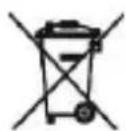
The symbol of the rubbish bin with a cross through it indicates that the battery may not be put in household waste.

WEEE guideline: 2012/19/EU
WEEE register number: DE 67896761
WD Plus GmbH, herewith declares that this product 302523/20200319SZ114 conforms to the principle requirements and other relevant stipulations. The complete Declaration of Conformity can be obtained from: WD Plus GmbH, Wohlenbergstraße 16, 30179 Hanover