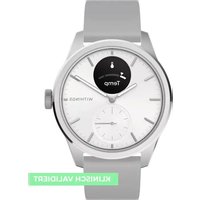
USER MANUAL ScanWatch 2 WITHINGS
This guide explains how to use your Withings ScanWatch 2.
WITHINGS, 2 rue Maurice Hartmann,
92130 Issy-les-Moulineaux, FRANCE +33141460460
Important notice
Before using Withings ScanWatch 2, review the information in this guide. You may also find this guide online at: https://www.withings.com/guides.
This product should not be used to diagnose or treat any medical conditions.
DO NOT use the Scanwatch 2 if you have a cardiac pacemaker, ICD, or other implanted electronic devices.
For information on how to use the Withings ScanMonitor with your Withings ScanWatch 2, please refer to the Withings Scan Monitor Instructions for Use, available at: https://www.withings.com/guides.
Retain this documentation for future reference. Please contact Withings if you need assistance, setting up, using or maintaining the device or need to report unexpected operations or events. Any serious incident that has occurred when using Withings ScanWatch 2 should be reported to Withings and appropriate authorities in your country of residence.
Disclaimer: Information in this guide may change without notice.
Getting started Warranty
Box Content

natural_image
Line drawing of a wristwatch with dual dials and strap (no text or symbols)
ScanWatch 2
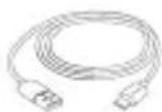

Charger and cable
Note: To recharge the battery, use the provided power cord.
Withings two (2) year Limited Warranty - Withings ScanWatch 2
Withings, 2 rue Maurice Hartmann, 92130 Issy-les-Moulineaux, FRANCE ("Withings") warrants the Withings-branded hardware product ("Withings Product") against defects related to materials and workmanship when used normally in accordance with Withings' published guidelines for a period of TWO (2) YEARS from the date of original retail purchase by the end-user purchaser ("Warranty Period"). Withings' published guidelines include, but are not limited to, information contained in technical specifications, safety instructions and Quick Start Guide. Withings does not warrant that the operation of the Withings product will be uninterrupted or error-free. Withings is not responsible for damage arising from failure to follow instructions relating to the product's use.
AU - Our goods come with guarantees that cannot be excluded under the Australian Consumer Law. You are entitled to a replacement or refund for a major failure and compensation for any other reasonably foreseeable loss or damage. You are also entitled to have the goods repaired or replaced if the goods fail to be of acceptable quality and the failure does not amount to a major failure.
Installation instructions: Installation instructions are available in the Quick Start Guide provided with this user guide.
Supported devices & minimum requirements
In order to install and use your ScanWatch 2, you will need a smartphone or tablet operating on iOS (15.0 or higher) or Android (9.0 and higher). Thereafter, the product can be used without your mobile device close by, thanks to Bluetooth connectivity. You will need your device to synchronize your results and view them in the Withings app.
Materials
List of materials that will potentially come into contact with the skin during usage: Fluoelastomer, leather, sapphire glass, stainless-steel, rose gold and titanium. Note that your wristband should be cleaned regularly. For cleaning instructions, please visit withings.com/support/scanwatch-2
In case of skin irritation, we advise you that you contact a dermatologist before you resume wearing your ScanWatch 2.
Skin reactions can also be caused by:
- An allergic reaction to the materials used in the back casing of the watch.
- A photosensitizing medication.
Note that ScanWatch 2 is in compliance with the photobiological lamps standards (IEC EN 62471).

Need help?
→ https://support.withings.com/
Security
Withings recommends that you add a passcode (personal identification number [PIN]), Face ID or Touch ID (fingerprint) to your mobile device as an added layer of security. It is important to secure your mobile device since it will be storing personal health information. Users will also receive additional update notifications on the Withings app. Updates are delivered wirelessly, encouraging rapid adoption of the latest security fixes. Users are able to see the currently installed software version in the Withings app, under Devices > ScanWatch 2 > About > More Information. This tab also indicates if an update is available. Do not install your ScanWatch 2 on a device that you do not own. Do not use a public Wi-Fi network you are unfamiliar with. Use a trusted Wi-Fi network with your personal device. Withings also recommends upgrading your Withings app when an upgrade is available. The Withings app is not intended to be used on a computer. No anti-virus software is needed. Only use official app stores to download the Withings companion app. If in doubt, use the link go.withings.com.
Withings hereby declares that the device Withings ScanWatch 2 is in conformity with the essential requirements of applicable EU Directives. Moreover, this product complies with all relevant and effective UK legislations. The declarations of conformity can be found at: withings.com/compliance.
Disposal
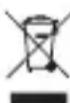
Actuation of European directive 2012/19/EU, for reduction in use of dangerous substances in electric/electronic devices and in garbage disposal. The symbol applied on the device or its packaging means that at the end of its useful life, the product must not be disposed of with domestic waste. At the end of the device's useful life, the user must deliver it to a collection center for electric/electronic garbage, or return it to the retailer when purchasing a new device. Disposing of the product separately prevents possible negative environmental and health consequences related to inadequate disposal. It also allows for the recovery of materials to save energy and resources as well as to avoid negative effects on the environment. In case of incorrect disposal of devices by the user, administrative endorsements will be applied in compliance with current standards. The device and its parts must be disposed of as deemed appropriate, in accordance with national or regional regulations.
Frequency Range : 2402.0 - 2480.0 MHZ
Maximum output power : -0.8 dBm



IP22


For regulatory information about ScanWatch 2, go to Devices > Additional Regulatory Information
GUIDE D'UTILISATION
FRANÇAIS
natural_image
Line drawings of a wristwatch, cable, and camera case (no text or symbols)
→ https://support.withings.com/
Sécurité
natural_image
Line drawings of a wristwatch, cable, and connector (no text or symbols)
→ https://support.withings.com/
Sicherheit
DE
Additional languages
Find this guide in the following languages here:

text_image
SVN DAITF CSPTE PLRO
HUE ELSKI VLTB TRNO LHR

AW_PRODUCT GUIDE HWA10_INT_A
WITHINGS
Withings ScanWatch 2 © 2023 Withings. All rights reserved. June 2023 support.withings.com - 2 rue Maurice Hartmann, 92130 Issy-les-Moulineaux, FRANCE