
RW3N122GSLF - Wine cellar HISENSE - Free user manual and instructions
Find the device manual for free RW3N122GSLF HISENSE in PDF.
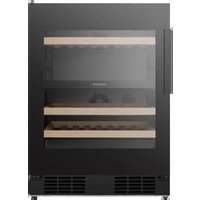


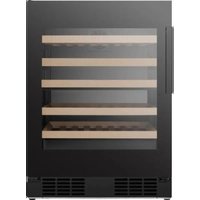
| Product type | Wine cellar |
| Brand | Hisense |
| Model | RW3N122GSLF |
| Capacity (standard 750 ml bottles) | 46 |
| Height (mm) | 820 |
| Width (mm) | 625 |
| Depth (mm) | 595 |
| Weight (kg) | 40 (estimate) |
| Power supply | 220-240 V, 50 Hz, single phase |
| Adjustable temperature range | 5°C to 20°C |
| Display and controls | Digital touch screen, adjustment buttons, auto-lock |
| Interior lighting | LED with dimming (high, medium, low) |
| Connectivity | Wi-Fi 2.4 GHz via ConnectLife app |
| Alarms | Door open, overtemperature, filter replacement |
| Sabbath mode | Yes (80 hours, disables controls and alarms) |
| Charcoal filter | Yes, replacement recommended every 6 months |
| Refrigerant | R600a (isobutane, flammable) |
| Door reversal | Possible (right to left) |
| Shelf material | Wood (4 sliding shelves + 1 fixed) |
| Door | Double-glazed UV protection |
| Recommended interior cleaning | Warm water and baking soda |
| Recommended exterior cleaning | Soft cloth and mild detergent |
| Safety precautions | Grounding required, do not use extension cord, keep children away |
| Spare parts available | Filter, handle, hinges, shelves, LED bulb (replacement by professional) |
Frequently Asked Questions - RW3N122GSLF HISENSE
User questions about RW3N122GSLF HISENSE
0 question about this device. Answer the ones you know or ask your own.
Ask a new question about this device
Download the instructions for your Wine cellar in PDF format for free! Find your manual RW3N122GSLF - HISENSE and take your electronic device back in hand. On this page are published all the documents necessary for the use of your device. RW3N122GSLF by HISENSE.
USER MANUAL RW3N122GSLF HISENSE
Before operating this unit, please read this manual thoroughly, and retain for future reference
EN
English
Contents
Thank you for choosing Hisense. We are sure you will find your new wine cooler a pleasure to use. However, before you use the appliance, we recommend that you carefully read the instructions, which provide details about installing and using the product. Please keep this manual for future reference.
Brief introduction.... 01
Wine cooler battle capacity.... 02
Safety and warning information.... 03
Installing your new appliance 17
Description of the appliance.... 19
Display controls.... 20
Connecting your wine cooler to Wi-Fi.... 24
Using your appliance.... 26
Cleaning and care.... 32
Troubleshooting.... 34
Disposal of the appliance.... 36
Brief Introduction
Thank you for choosing Hisense. We hope you find your new appliance a pleasure to use. Before you use the appliance, we recommend that you read through these instructions carefully, which provide details about its usage and functions.
Please ensure that all people using this appliance are familiar with its operations and safety features. It is important that you install the appliance correctly and pay attention to the safety instructions carefully.
We recommend that you keep this user's manual with the appliance for future reference and for any future users.
This appliance is intended to be used in household and similar applications such as:
- Kitchen- areas in shops, offices and other working environments;
- Suites in hotels, motels and other residential types of environment;
• Bed and breakfast environments. - Catering and similar non-retail applications. If you feel that the appliance is not operating correctly, please check the Troubleshooting page for assistance. If still in doubt contact the Hisense customer service help line for assistance or to arrange a call out by an authorized service technician.
Wine cooler bottle capacity
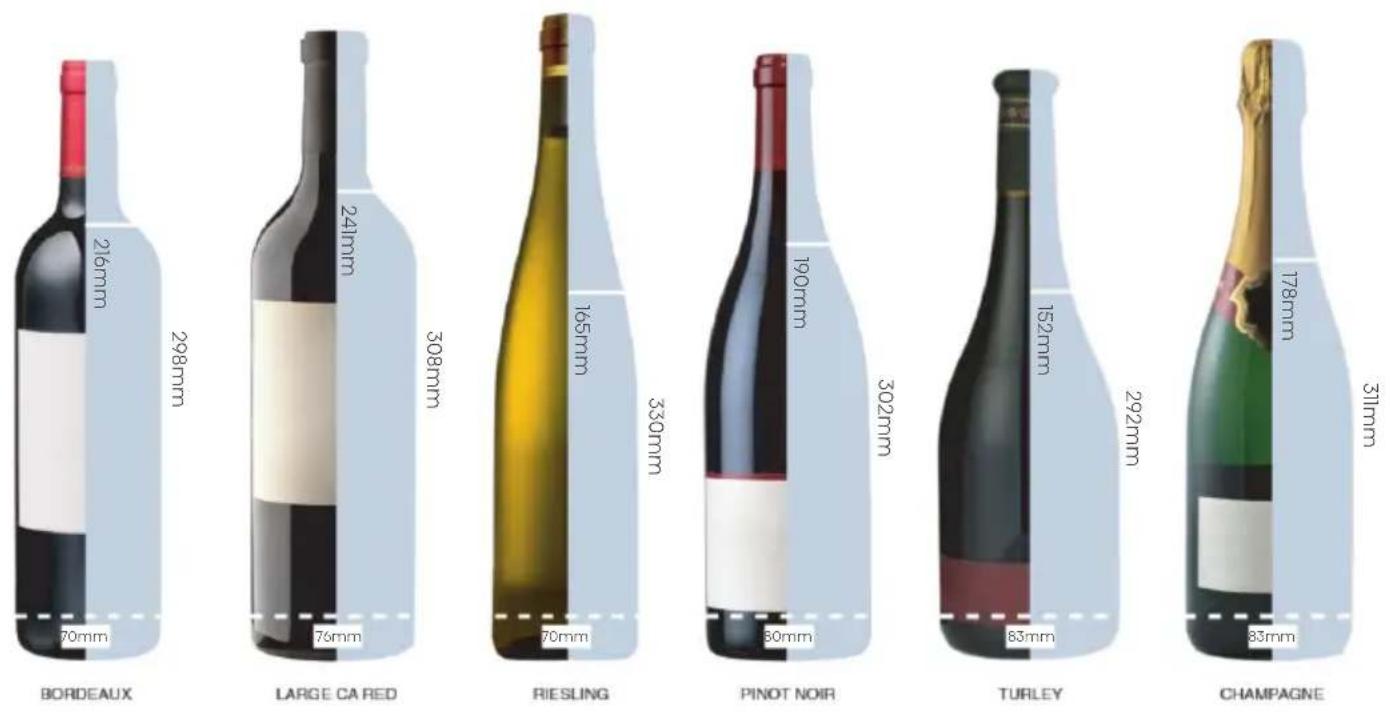
This chart is provided as a general guide to bottle size. Everyone's collection is different and there are many different bottle size and shapes on the market. The bottle capacity listed for wine coolers is for standard Bordeaux 750ml bottles (including champagne and sparkling wine bottles) will decrease the number of bottles you are able to store in your wine cooler.
Safety and warning information

General safety and daily use
The appliance is intended to be used exclusively for the storage of wine as explained in this instruction booklet.
WARNING
The WARNING alert means a potentially hazardous situation. Serious injury or death may occur if not avoided.
DANGER
The DANGER alert means an imminently hazardous situation. Serious injury or death may occur if not avoided.
CAUTION
The CAUTION alert means a potentially hazardous situation. Moderate or minor injury may occur if not avoided.
Safety and warning information

General safety and daily use
WARNING
•This appliance is not intended for use by persons (including children) with reduced physical, sensory or mental capabilities, or lack of experience and knowledge, unless they have been given supervision or instruction concerning use of the appliance by a person responsible for their safety. Children should be supervised to ensure that they do not play with the appliance.
- It is dangerous to alter the specifications or modify this product in any way.
- Before any cleaning or maintenance work is carried out, be sure to switch off and unplug the appliance.
•This appliance is heavy. Care should be taken when moving it.
• Take utmost care when handling your appliance so as not to cause any damage to the cooling unit with consequent possible fluid leakages.
Safety and warning information

General safety and daily use
WARNING
• The appliance must not be located close to radiators or gas cookers.
- Avoid prolonged exposure of the appliance to direct sunlight.
• There must be adequate ventilation around the appliance and any damage to the refrigerant circuit must be avoided.
- Do not use other electrical appliances inside of the appliance.
- Do not store explosive substances such as aerosol cans with a flammable propellant in this appliance.
- Keep burning candles, lamps and other items with flames away from the appliance so that they do not set the appliance on fire.
- Do not use extension cords or ungrounded (two prong) adapters;
Safety and warning information

General safety and daily use
WARNING
- If the cord is damaged, it must be replaced by the manufacturer, its service agent or similar qualified person in order to avoid hazard.
- Do not store explosive substances such as aerosol cans with a flammable propellant in this appliance.
WARNING
- Keep ventilation openings, in the appliance enclosure or in the built-in structure, clear of obstruction.
WARNING
- Do not use mechanical devices or other means to accelerate the defrosting process, other than those recommended by the manufacturer.
WARNING
- Do not damage the refrigerant circuit.
Safety and warning information

General safety and daily use
WARNING
Do not use electrical appliances inside the appliance, unless they are of the type recommended by the manufacturer.
WARNING
Risk of child entrapment. Before you throw away your old wine cooler or freezer:
• Take off the doors.
- Leave the shelves in place so that children may not easily climb inside.
WARNING
When positioning the appliance, ensure the supply cord is not trapped or damaged.
WARNING
Do not locate multiple portable socket-outlets or portable power supplies at the rear of the appliance.
Safety and warning information

General safety and daily use
WARNING
This appliance can be used by children aged from 8 years and above and persons with reduced physical, sensory or mental capabilities or lack of experience and knowledge if they have been given supervision or instruction concerning use of the appliance in a safe way and understand the hazards involved. Children shall not play with the appliance. Cleaning and user maintenance shall not be made by children without supervision.
WARNING
Children aged from 3 to 8 years are allowed to load and unload refrigerating appliances.
Safety and warning information
Service/Repair
- Any electrical work required to install this appliance should be carried out by a qualified electrician or competent person. This product should be serviced by an authorized Service Center, and only genuine spare parts should be used.
• Under no circumstances should you attempt to repair the appliance yourself. Repairs carried out by inexperienced persons may cause injury or more serious malfunctioning. Refer to your local Service Center, and always insist on genuine Hisense spare parts.
- This appliance contains hydrocarbons in its cooling unit; maintenance and recharging must therefore only be carried out by authorized technicians.
Service Note
This appliance employs Hydrocarbon Refrigerant type R600a. It is hazardous for anyone other than an Authorized Service Person to service this appliance.
Safety and warning information
Use
- The wine cabinet is designed to be used specifically for the storage of potable wine only.
- Best performance is obtained with ambient temperature as follows:
Ambient Temperature Range
+ 1 0 ^ ° C (5 0 ^ ° F) to + 4 3 ^ ° C (1 0 9 ^ ° F)
The class of your appliance is shown on its rating plate. Note: If the ambient temperature is higher or lower than the above listed, the energy consumption will be affected accordingly.
- Do not store flammable gas and liquid in the appliance, because they may explode.
- Do not place wine directly against the rear wall of compartment.
- The appliance manufacturer's storage recommendations should be strictly adhered to.
• Refer to using your appliance.
Safety and warning information
•The inner lining of the appliance has channels through which the refrigerant passes. Should the channels be punctured the unit could become damaged beyond repair. DO NOT USE SHARP INSTRUMENTS to scrape off frost or ice. Frost may be removed by using a scraper period. Under no circumstances should solid ice be forced off the liner. Solid ice should be allowed to thaw by defrosting the appliance.
Installation
Important: For electrical connection carefully follow the instructions given in specific paragraphs.
- Unpack the appliance and check if there is any damage to it. Do not connect the appliance if it is damaged. Report possible damage immediately to the place of purchase. In this case retain all packing materials.
- During normal operation, the compressor and/or condenser at the back of the appliance heat up considerably. For safety reasons, minimum ventilation must be as shown in the instructions.
Safety and warning information
- Transmitting frequency band(s) and max allowed transmitting power in the operating frequency band(s): 2400-2483.5MHz, less than or equal to 20dbm.
- This equipment should be installed and operated with minimum distance 20cm between the radiator & your body.
Attention
Keep ventilation openings clear of obstruction.
- Care must be taken to ensure that the appliance does not stand on the electrical supply cable. Important: if the power cord is damaged, it must be replaced by a special cord or assembly available from the manufacture or its service agent.
- Do not use extension cords or ungrounded (two prong) adapters.
- If the appliance is transported horizontally, it is possible that the oil contained in the compressor flows in the refrigerant circuit. It is advisable to wait at least two hours before connecting the appliance to allow the oil to flow back in the compressor.
Safety and warning information
- There are working parts in this product which heat up. Always ensure that there is adequate ventilation as a failure to do this will result in component failure and possible loss. See installation instructions.
- Parts which heat up should not be exposed.
- Wherever possible the back of the product should be near the wall.
To avoid contamination of food, please respect the following instructions:
- Opening the door for long periods can cause a significant increase of the temperature in the compartments of the appliance.
-Clean regularly surfaces that can come in contact with food and accessible drainage systems.
-If the refrigerating appliance is left empty for long periods, switch off, defrost, clean, dry, and leave the door open to prevent mould developing within the appliance.
Safety and warning information
Electrical Connection
- The appliance requires a single phase
220V\~240V/50Hz power supply. It has a power cord that has a 2-prong grounding plug that minimizes the possibility of electrical shock. This appliance must be grounded. Do not remove the grounding prong or modify the power plug. - Do not modify the power plug. The power plug must be accessible when the appliance is installed.
- The appliance should not be turned off with a switch or other device.
- Make sure that the plug is not squashed or damaged. Otherwise, it may cause short circuit, electric shock or overheat and even cause a fire.
- Do no insert the power plug if the socket is loose, there is a risk of electric shock or fire.
- Switch off the appliance and disconnect it from the main power before you clean or move it.
- Never unplug the appliance by pulling on the electrical cord. Always grip the plug firmly and pull straight out from the socket to prevent damaging the power cord.
Safety and warning information
- Do not operate the appliance without the cover over the interior lighting.
- Any electrical component must be replaced or repaired by a qualified electrician or Hisense authorized service technician. Only genuine replacement parts should be used.
- To avoid eye injury, do not look direct into the LEDlight located in the wine cooler compartment. If it is not functioning correctly, consult a qualified, registered electrician or replace it in accordance with the “cleaning and care” chapter.
Environment Protection
This appliance does not contain gasses which could damage the ozone layer, in either its refrigerant circuit or insulation materials. The appliance should not be discarded together with your local city refuse and rubbish. The insulation foam contains flammable gasses. The appliance should be disposed of according to the applicable regulations of your local government. Avoid damaging the cooling unit, especially at the rear near the heat exchanger. The materials used on this appliance marked by the symbol are recyclable.
Safety and warning information
Cleaning the interior
Before using the appliance for the first time, wash the interior and all internal accessories with lukewarm water and some neutral soap so as to remove the typical smell of a brand-new product, and then dry naturally and thoroughly.
NOTE: Do not use detergents or abrasive powders, as these will damage the finish.
Refrigerant
The refrigerant isobutane(R600a) is contained within the refrigerant circuit of the appliance. During transportation and installation of the appliance, ensure that none of the components of the refrigerant circuit becomes damaged.

WARNING

Risk of fire/ flammable materials
The symbol is a warning and indicates the refrigerant and insulation blowing gas are flammable.
Installing your new appliance
Before using the appliance for the first time, you should be informed of the following tips.

Ventilation of appliance
In order to improve efficiency of the cooling system and save energy, it is necessary to maintain good ventilation around the appliance for the dissipation of heat. For this reason, sufficient clear space should be available around the product.
Suggest:
It is advisable for there to be at least 35mm of space from the back to the wall, at least 35mm from its top, and at least 35mm from its side to the wall. As shown in the following diagrams.
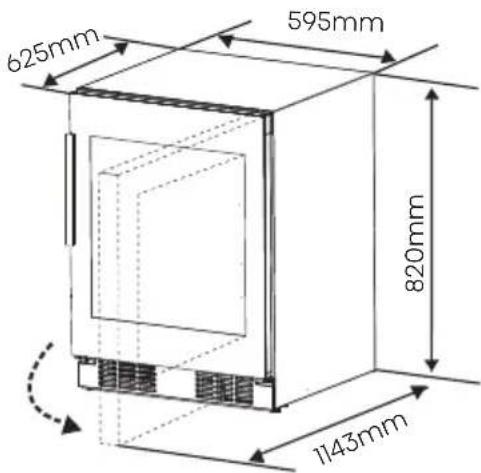
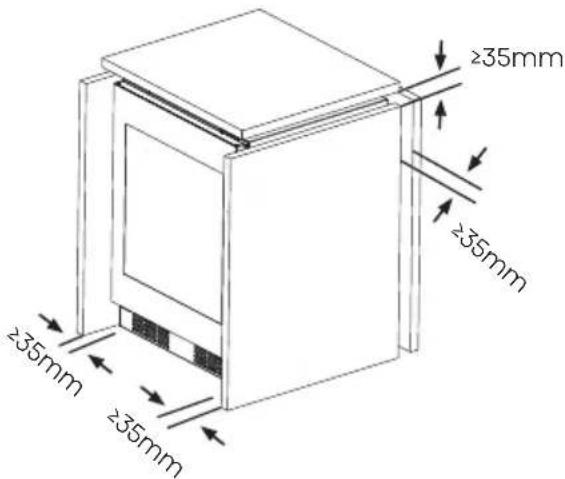
Position your appliance in a dry place to avoid high moisture.
If the product is installed with an external handle, the product can be mounted on cabinet or a similar counter, and the product need to fix for preventing falling. The effective space requirements of the cabinet are as follows:

Installing your new appliance
NOTE
- Avoid locating the appliance in damp areas. Too much moisture in the air will cause frost to form quickly on the evaporator.
- Keep the appliance out of direct sunlight, rain or frost. Position the product away from heat sources such as stoves, fires or heaters.
Leveling Of Appliance
The appliance should be level in order to eliminate vibration. We recommend that you level the appliance by the following steps.
- Put the wine cooler into the right place.
- Turn the cabinet leg (with your fingers or a suitable screw driver) until they touch the floor.
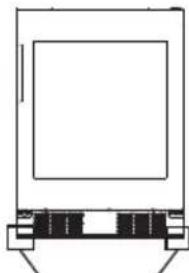
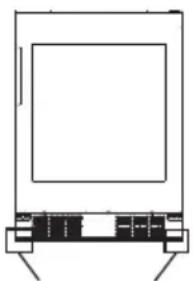
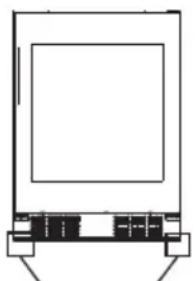
- Tilt back the top backwards for about 10-15mm or 1° by turn the adjustable feet. This will allow the door to self-close providing a consistent closed seal.
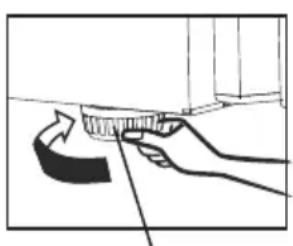
Cabinet leg
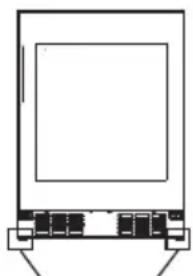
Cabinet leg
Electrical Connection
Caution! Any electrical work required to install this appliance should be carried out by a qualified person or authorized service technician.

WARNING
This appliance must be grounded. The manufacturer declines any liability should these safety measures not be observed.
Description of the appliance
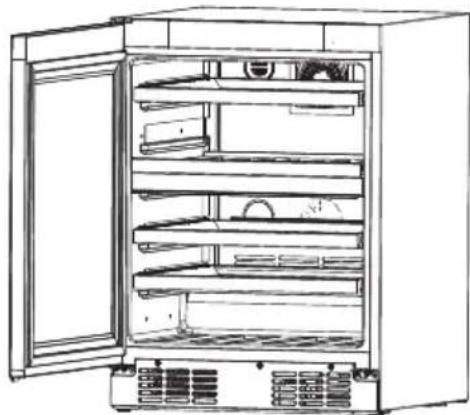
Description of the appliance equipped with wooden shelves
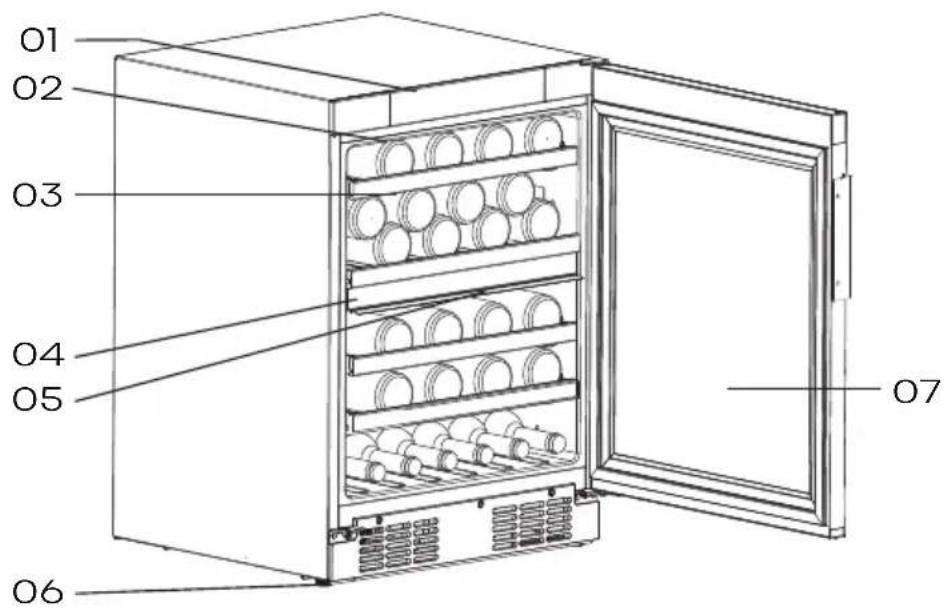
-
Control panel 05. LED light
-
LED light 06. Cabinet leg
-
Shelves 07. Door
-
Separator plate

NOTE
•The appliance can keep 46 bottles of wine at the same time, please place the wine bottles as shown above.
- Bottle capacities, mentioned in this manual are based on standard BORDEAUX 750ml bottles and standard shelving.
Display controls
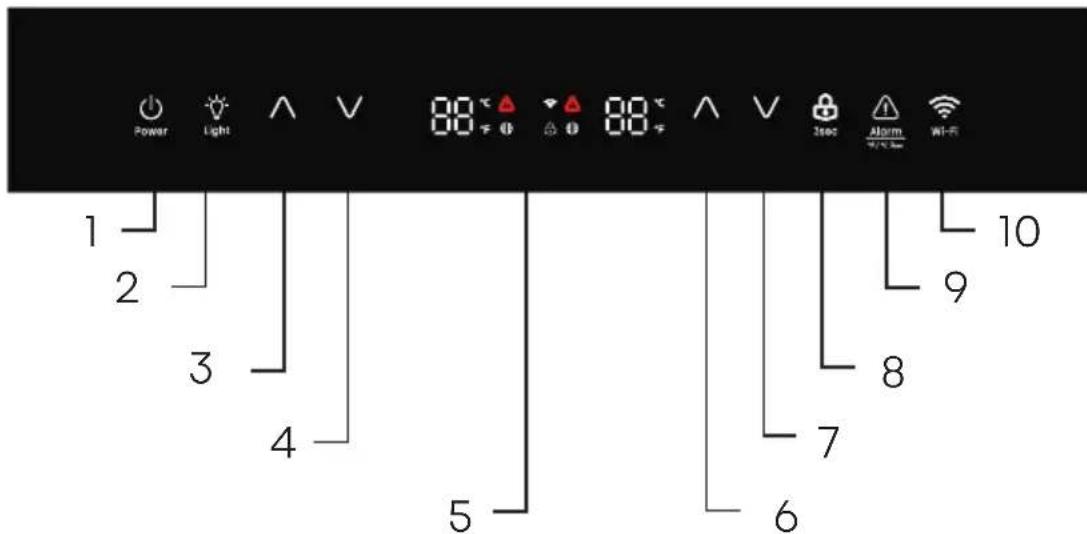
- Standby key
- Light key
- Upper compartment: Temperature control key -Up
- Upper compartment: Temperature control key -Down
5.Temperature Indicator
Unlock
All the keys are locked if the icon “ 🎨️ is illuminated, touch the “ 🔊” key for approximately 3 seconds to unlock them. And it will be locked itself after 20 seconds if no touching any key.
Display
The control panel, shown above, is at the top of the wine storage appliance.
- Lower compartment: Temperature control key - Up
- Lower compartment: Temperature control key - Down
- Lock and unlock key
- Cancel alarm key
- Wi-Fi key
• Each time the power turns on, the display panel will light everything for 3 seconds, and then enter the normal display status.
•The display will activate the screen saver when the door is closed for 60 seconds with the display on.
- Open door action will exit the screen saver.
Display controls
• Each valid button press emits a short sound.
- The corresponding temperature setting is reflected in the display, and the setting takes effect and is stored after 10 seconds of operation without touch the key.
Standby Mode
When you do not plan to use this appliance for a period of time, you can save energy by entering the standby state.
• To enter standby mode, Touch and hold the standby key for more than 3 seconds in the unlock sate. The buzzer will beep and the display board will show "--".
• To exit standby mode, Touch and hold the standby key for more than 3 seconds in the unlock sate. The buzzer rings will beep.
NOTE:
In standby mode, cooling will stop. If you do not to use the appliance for a long time, take out the wine, and unplug the unit.
Light key
- When the door opened, the lighting automatically lights up. The door closed, and the lighting is delayed for 30 seconds to turn off.
• After the door is opened, the lighting can be turned on or off by touch the light key.
• The brightness of the light can be adjusted. Touch the light key for approximately 3 seconds. to enter the light brightness adjustment mode, with 2 beeps. Touch the light key to adjust the brightness of the lighting according to the cycle of high, medium, and low. Touch the light key for approximately 3 seconds, or after 10 seconds of keyless operation, or touch any key except for the light key, will exit the light brightness adjustment mode.
NOTE:
When the door remains open, the light will automatically turn off after a maximum of 10 minutes of illumination.
Display controls
Temperature Measure Change
You can change the temperature display setting from Celsius to Fahrenheit degrees by touch the “ ”key for 3 seconds, and vice versa.
Temperature regulation
You can set the temperature you desire by touch the key " ∧ or "
The temperature will increase 1° C or 1°F each time you touch the UP key and will decrease 1° C or 1° F each time you touch the DOWN key.
NOTE:
- The appliance doesn't work properly if the set temperature is higher than the ambient temperature.
• The temperature range is from 5° C( 41° F) to 20° C( 68° F). - When you set a temperature, you set an average temperature for the whole cabinet. There may be a2°C (3.6°F) to 3°C (5.4°F) variance between the top and bottom shelves of the appliance.
Sabbath mode
In the unlocked state, touch and hold the " √" key that is on the right side of control panel and the"

key for
more than 3 seconds to enter the Sabbath mode, the control panel is off, the key does not respond, the buzzer does not respond, until it automatically quit for 80 hours or long press the key combination again.
Filter expiration alarm
When the filter exceeds the set time, the" icon is steady on. Long press the "▲"key that is on the right side of control panel and the " key for 3 seconds to reset the filter time.

After the reset, the filter icon will be off. The alarm time is six month and can be set through the ConnectLife app.
Over Temperature Alarm
In order to avoid a the temperature problem that could affect the quality of the wine, the appliance has an over temperature alarm function. When an over temperature alarm occurs, cancel the alarm by pressing
Display controls
the Cancel Alarm Key and take out the wine, and contact customer service.
NOTE:
In the over temperature alarm state, press the Cancel Alarm Key to exit the over temperature alarm, once the appliance cools to the required temperature.
Door Alarm
The door alarm will sound once the fridge door is open over 1 minute. In case of door alarm, the buzzer will sound 3 times per minute and will stop automatically 9 minutes later. Closing the door will also clear the door alarm. To save energy, don't keep the door open for a long time when using wine cooler.

WARNING
If the LED light is broken, please do not change it yourself!
Changing the light yourself may
cause injury or serious
malfunctioning. It must be
replaced by a qualified service
technician in order to avoid a
hazard. Contact your local
Service Center for help. Before
changing the LED light, switch off
the appliance and unplug it, or
pull the fuse or the circuit breaker.
Connecting your wine cooler to Wi-Fi
ConnectLife app
ConnectLife is a smart home app that allows you to communicate with your smart appliances using a smartphone or tablet.
Installation
-
Open the Apple App Store (iOS) or the Google Play Store (Android) on your smart phone.
-
Search for the "ConnectLife" app. You will see an app with the following icon:
- Download and install the ConnectLife app provided by ConnectLife, LLC. Alternatively, you can scan the following QR code with your smartphone or tablet to find the ConnectLife app:
NOTE:
- The distance between your appliance and the Wi-Fi router can impact the performance. If they are too far apart, pairing your appliance might fail or take longer.
- The appliance supports 2.4GHz Wi-Fi networks only. The Wi-Fi network SSID must be visible.
•The surrounding wireless environment (other connected devices) can affect the performance of your network. - Your appliance Wi-Fi connection may experience interruptions due to external factors such as your home network environment or Internet service provider.
Connecting your Wine Cooler
After installing the ConnectLife app, sign in or create an account and follow these steps:
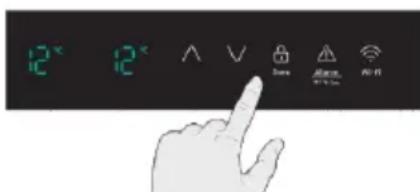
- Ensure the appliance is powered on and the control panel is active. You will know it is ready when the lights that indicate temperature are on.
Connecting your wine cooler to Wi-Fi
- Put the wine cooler in pairing mode by holding the Wi-Fi key for 3 seconds. You will hear a beep and see the Wi-Fi light flashing after it is constantly on for a few seconds.
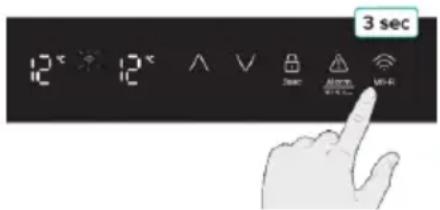
- Ensure bluetooth is enabled on your phone and open the ConnectLife app. Look for the pop-up indicating that a new appliance has been found. Tap the button on the pop-up and follow the instructions to proceed.
- If a pop-up doesn't appear, tap the button called "Add appliance" or "+" in the app.
- Locate "Wine Climate Cabinet" in the device list and select it.
- Follow the instruction in the app to connect your Wine Cooler. Once the setup is complete, your Wine Cooler will appear on your home screen.
NOTE:
•The appliance will remain in pairing mode for a maximum of 5 minutes.
- To factory reset your network settings, press and hold the Wi-Fi key for 6 seconds. You will hear two beeps once the appliance is reset.
• After resetting, the appliance will automatically go into pairing mode. - A solid Wi-Fi light indicates the appliance is successfully connected to the home network.
Using your appliance
This section tells you how to use most of the useful features. We recommend that you read through them carefully before using the appliance.
Installation The Handle
The tools you will need :
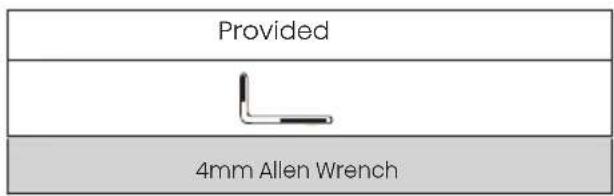
The parts you will need:
| Provided | |
| Handle | Screws |
Using a 4mm allen wrench to fix the handle as below.

Placement Of Bottles
Appliance is equipped with 4 shelves with 8 slots each.
The fixed shelf on the separator plate can hold 16 bottles as shown below.
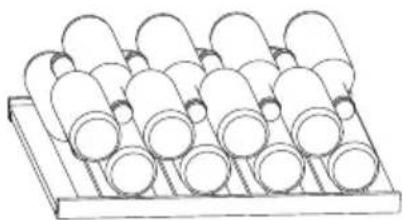
The shelves on the guide rail can hold 8 bottles as shown below.
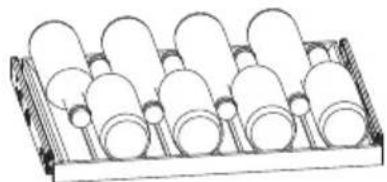
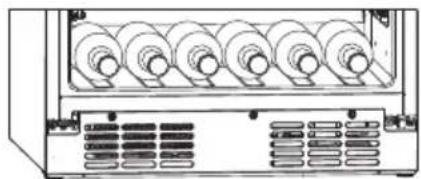
You can also place bottles in the 6 slots which are located at the bottom of the wine cooler.
Using your appliance

WARNING
• To prevent the bottles from rolling down and being broken, there should not be more than 6 bottles placed at the bottom of the refrigerate room as showed above.
- The maximum loading of the shelf on the guide rail is 15kg.
- The maximum loading of the fixed shelf is 25kg.
Tips For Keeping The Wine
- Keep the wine in the dark. The door is in anti - UV darkened double glass to protect the wine from the light in case the wine cooler is located in well-lit place.
- Lay the bottles down in such a way that the corks do not dry.
- Avoid switching the appliance light on too often or for too long. Wine keeps better in dark.
• To avoid agitating the wine, handle the bottles with care. - Follow the recommendations and advice at the time of purchase or given in the technical
documentation regarding the quality, duration and optimum storage temperature of the wine. The proper storage of wine depends on its age, type of grapes, alcoholic content and level of fructose and tannin contained in it. At the time of purchase, check if the wine is already aged or if it will improve over time.
Reversing The Door
The side at which the door opens can be changed, from the right side (as supplied) to the left side, if required.

WARNING
When reversing the door, the appliance must not be connected to power. Ensure that the plug is removed from the power socket
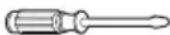
The tools you will need(Not provided):
| Not provided | |
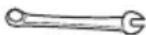 |  |
| 8mm wrench | Thin-blade screwdriver |
 | 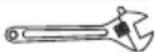 |
| Phillips head screwdriver | Adjustable wrench |
Using your appliance
The parts you will need(provided):
| Provided | |
 |  |
| Left upper cover | Right upper cover |
| 1 | 1 |
 |  |
| 4mm Allen WrenchUpper | |
| 1 | 1 |
NOTE: If required you may lay the wine cooler on its back in order to gain access to the base, you should rest it on soft foam packaging or similar material to avoid damaging the backboard of the wine cooler. To reverse the door, the following steps are generally recommended.
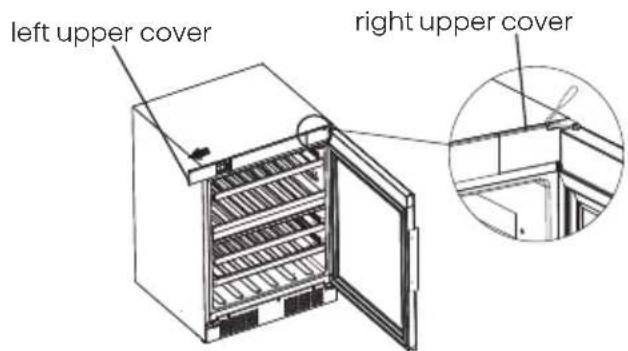
- Stand the wine cooler upright, open the door, use a thin-blade screwdriver to pry off the right upper cover, then push the left upper cover out to the left.
NOTE: you should need to pad the pry area with cloth towel to avoid scratching the top of the wine cooler.
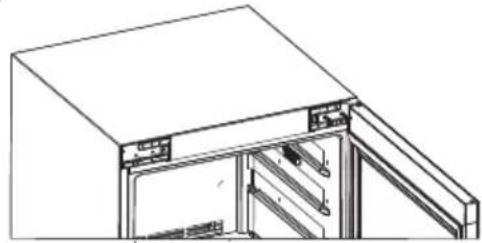
- Using a Phillips head screwdriver, remove the two screws on the left side. Then use the 4mm Allen Wrench to remove the two screws on the right side that hold the upper right hinge in place. (Please support the door when you doing it.)
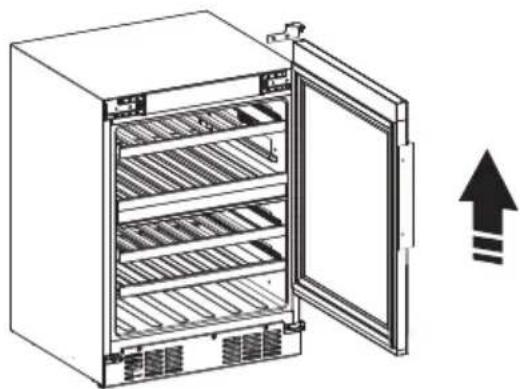
- Move the door from the down hinge by carefully lifting the door straight up.
NOTE: When removing the door, watch for washer(s) between the hinge and the bottom of the upper door that may stick to the door. Do not lose these washers.
Using your appliance
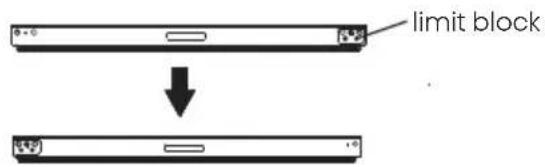
- Lay the door flat and use a Phillips head screwdriver to remove the screw holding the limit block at the bottom of the door and replace the limit block to the left position, then reattach the screw.
- Use a Phillips head screwdriver to remove the three screws from the air deflector, then remove the air deflector.
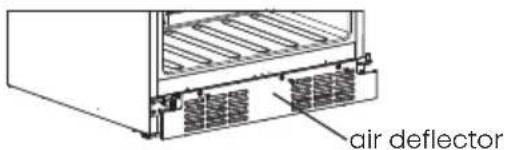
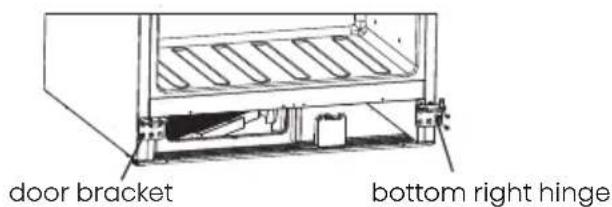
- Transform the bottom hinge from right to left and remove the door bracket a s following:
6.1 Unscrew the bottom right hinge screws and the bottom left door bracket screws.
NOTE: Keep the hinge for the future use.
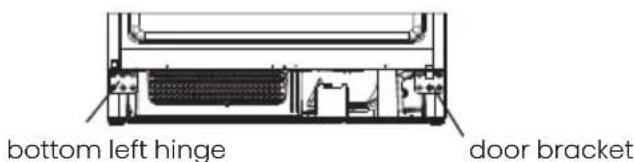
6.2 Transform the bottom right hinge into bottom left hinge, relax the axis of the hinge and install it on the left hole, screw up the axis.
![graph TD A["Top Component"] --> B["Down Arrow"] B --> C["Bottom Component"] C --> D["Right Arrow"] D --> E["Left Arrow"]](/content/2026/04/684636/images/c68578db1c3546d853ce90bea9c25b62713c1ee5c0c0cb195f4fe802d68cbb52.jpg)
- Secure the lower hinge to the left and use the 4mm Allen Wrench to tighten the three screws, then secure the door bracket to the right, again tightening the three screws.
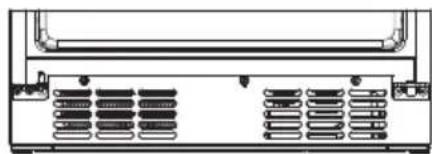
- Reinstall the air deflector and secure the three screws using a Phillips screwdriver.
Using your appliance
- Reattach the right two screws, then attach the door to the lower hinge and upper left hinge to the top of the door, then use two screws to secure the upper left hinge (Please hold the door when you doing it).

- Reattach the left upper cover and upper right cover.
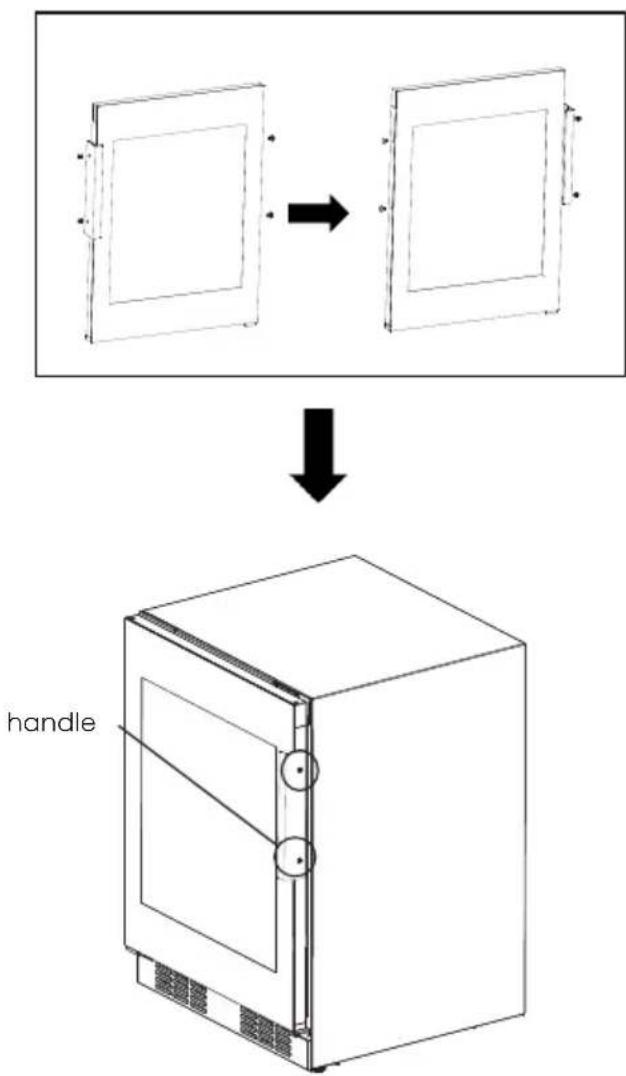
- If the handle is already on the left side of the door, it needs to be removed and secured as below.
Using your appliance
Wine Serving Temperature Chart
The wine cooler should be placed where the proper ambient temperature is between 17° C to 43° C. If the ambient temperature is above or below this range, the performance of the unit may be affected. For example, placing your unit in extreme cold or hot conditions may cause in interior temperatures to fluctuate.
The zone temperature may have a difference of +/- 3°C (5°F) from the setting depending on loading and ambient conditions.
| Types of wine | Recommended storage temperature | Recommended setting temperature |
| Red wines | 15°C~18°C(59°F~65°F) | 16°C(61°F) |
| Dry/White wines | 10°C~14°C(50°F~57°F) | 12°C(53°F) |
| Rose wines | 9°C~11°C(48°F~52°F) | 10°C(50°F) |
| Sparking wines, Champagne | 5°C~8°C(41°F~47°F) | 8°C(46°F) |
NOTE: At low ambient temperatures,
if the user stores two different kinds of wine and does not use the product at the recommended temperature, the actual temperature in the upper and lower temperature zones will be affected.

WARNING
When disposing of your appliance, use an approved disposal site. Remove the plug and ensure that any locks or catches are removed, to prevent young children being t rapped inside.
Cleaning and care
For hygienic reasons the appliance (including exterior and interior accessories) should be cleaned regularly.

WARNING
Before cleaning, the appliance must be powered off and unplugged. Danger of electrical shock!
Exterior Cleaning
To maintain good appearance of your appliance, you should clean it regularly.
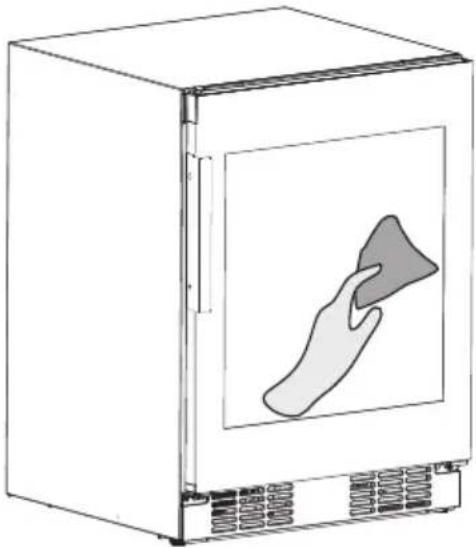
- Spray water onto the cleaning cloth instead of spraying directly on the surface of the appliance. This helps ensure an even distribution of moisture to the surface.
- Clean the door with a mild detergent and then wipe it dry with a soft cloth.

CAUTION
- Don't use sharp objects as they are likely to scratch the surface.
- Don't use Thinner, Car detergent, Clorox, oils, abrasive cleansers or organic solvents such as Benzene for cleaning. They may damage the surface of the appliance and d may cause fire.
Cleaning and care
Cleaning The Wine Cooler
To clean the wine cooler, you should follow these steps: Unplug the appliance and remove the bottles.
-Wash the inside with a warm water and baking soda solution. The solution should be about 2 tablespoons of baking soda to 4 cups of water.
-Wash the shelves with a mild detergent solution.
-It may also be necessary to periodically wipe the bottom part of the storage are, as the wine wine cooler is designed to retain humidity, and condensation may collect there.

Changing the filter
The way in which wines continue to age depends on the ambient conditions.
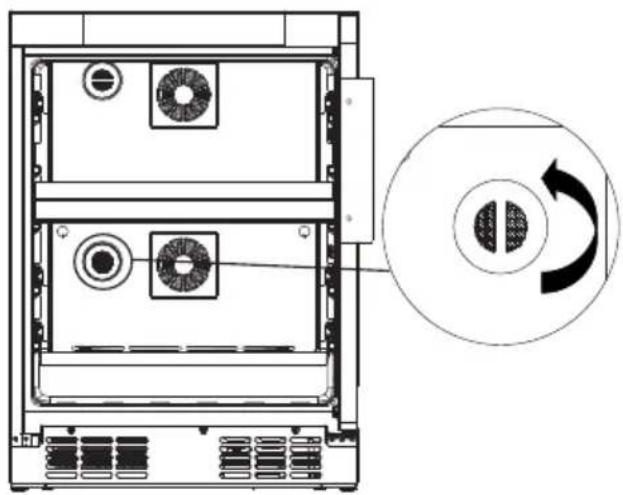
The quality of the air is therefore decisive for preserving the wine. We recommend that you replace the filter when the “ ” icon is on. Filters can be obtained from your dealer. You can replace the filter by following these steps: Turn the filter 90 degrees counterclockwise, then remove the filter outwards, and install the new filter on.
Troubleshooting
If you experience a problem with your appliance or are concerned that the appliance is not functioning correctly, you can carry out some easy checks before calling for service, please see below.

WARNING
Don't try to repair the appliance yourself. If the problem persists after you have made the checks mentioned below, contact a qualified electrician, authorized service technician or the store where you purchased the product.
| Problem | Possible cause & Solution |
| The wine is too warm. | 1. Temperature is not properly adjusted.2. Door was open for an extended period.3. The appliance is near a heat source. |
| 1. Please look in the "Display controls" section.2. Open the door only as long as necessary.3. Please refer to the "Installing your new appliance" section. | |
| Heavy build up of frost, possibly alsoonthe door seal. | Door seal is not air tight(possibly after changing over the hinges). |
| Carefully warm the leaking sections of the door seal with a hair dryer (not hotter than approx 50 °C). At the same time shape the warmed door seal by hand such that it sits correctly. | |
| Water on the floor. | Water drain hole is blocked. |
| Please refer to the "Cleaning and care" section. |
Troubleshooting
| Problem | Possible cause & Solution |
| Unusual noises. | 1. Appliance is not level.2. The appliance is touching the wall or other objects.3. A component,e.g. a pipe,on rear of the appliance is touching another part of the appliance or the wall. |
| 1. Readjust the feet.2. Move the appliance slightly.3. If necessary, bend the component out of the way carefully. | |
| The compressor does not start immediately after changing the temperature etting. | 1.This is normal, no error has occurred.2.The setting temperature is higher than the ambient temperature. |
| 1.The compressor starts after a period of time.2.Set the temperature lower than the ambient temperature as you want. | |
| Unable to connect appliance to Wi-Fi network | 1.The password for home Wi-Fi network was entered incorrectly.2.The home Wi-Fi router frequency is not 2.4GHz.3.The router and appliance kept far apart causing the poor network. |
| 1. Make sure the password is correct and connect again.2. The appliance only supports 2.4GHz radio frequency. Set up a dedicated 2.4GHz Wi-Fi SSID and connect the appliance to it.3. Consider either moving the router closer to the appliance or purchasing Wi-Fi range extender and installing it. |
Disposal of the appliance
It is prohibited to dispose of this appliance as house hold waste. Please check for with your local government for proper disposal procedures.
Packaging Materia
Packaging materials with the recycle symbol are recyclable. Dispose of the packaging into a suitable waste collection container to recycle it.
Before Disposal Of The Appliance
- Pull out the power cord from the power socket.
- Cut off the power cord and discard.

WARNING
Refrigerators contain refrigerant and gases in the insulation. Refrigerant and gases must be disposed of professionally as they may cause eye injuries or ignition. Ensure that tubing of the refrigerant circuit is not damaged prior to proper disposal.
Disposal of the appliance
| Correct Disposal of this product | |
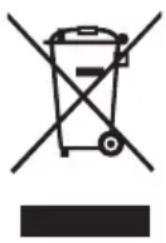 | This symbol on the product or in its packing indicates that this product may not be treated as household waste. Instead, it should be taken to the appropriate waste collection point for the recycling of electrical and electronic equipment. By ensuring this product is disposed of correctly, you will help prevent potential negative consequences for the environment and human health, which could otherwise be caused by the inappropriate waste handling of this product. For more detailed information about the recycling of this product, please contact your local council your household waste disposal service, or the shop where you purchased the product. |
Hisense
life reimagined
BEDIENUNGSANLEITUNG
Schrankbein
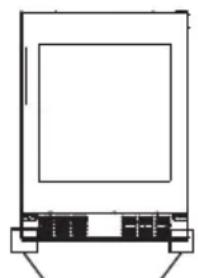
Schrankbein
Hinweis
Ihr Gerät verwenden

Warnung
Ihr Gerät verwenden
Ihr Gerät verwenden

VORSICHT
Filter austauschen
Fehlerbehebung
Pied de l'armoire
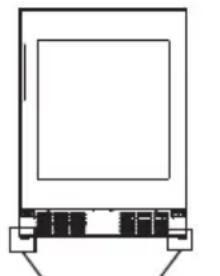
Pied de l'armoire
Remarque
déflecteur d'air

ATTENTION
Dépannage
Kastpoot
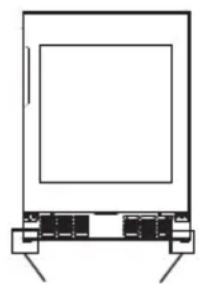
Kastpoot
Opmerking
linkerkant met een
deurbeugel
onderste rechter scharnier

LET OP
Probleemoplossing
Nota

CUIDADO
Mudar o filtro
Patas del gabinete
Patas del gabinete
Conexión Eléctrica
Nota
Uso del aparato

Advertencia
Uso del aparato
Uso del aparato

PRECAUCIÓN
Gamba del mobile
Gamba del mobile
Nota

ATTENZIONE

- CONTENTS
- BRIEF INTRODUCTION
- WINE COOLER BOTTLE CAPACITY
- SAFETY AND WARNING INFORMATION
- GENERAL SAFETY AND DAILY USE
- WARNING
- DANGER
- CAUTION
- SERVICE/REPAIR
- SERVICE NOTE
- USE
- AMBIENT TEMPERATURE RANGE
- INSTALLATION
- ATTENTION
- TO AVOID CONTAMINATION OF FOOD, PLEASE RESPECT THE FOLLOWING INSTRUCTIONS
- ELECTRICAL CONNECTION
- ENVIRONMENT PROTECTION
- CLEANING THE INTERIOR
- REFRIGERANT
- INSTALLING YOUR NEW APPLIANCE
- VENTILATION OF APPLIANCE
- SUGGEST
- NOTE
- LEVELING OF APPLIANCE
- DESCRIPTION OF THE APPLIANCE
- DISPLAY CONTROLS
- UNLOCK
- DISPLAY
- STANDBY MODE
- LIGHT KEY
- TEMPERATURE MEASURE CHANGE
- TEMPERATURE REGULATION
- SABBATH MODE
- FILTER EXPIRATION ALARM
- OVER TEMPERATURE ALARM
- DOOR ALARM
- CONNECTING YOUR WINE COOLER TO WI-FI
- CONNECTLIFE APP
- CONNECTING YOUR WINE COOLER
- USING YOUR APPLIANCE
- INSTALLATION THE HANDLE
- PLACEMENT OF BOTTLES
- TIPS FOR KEEPING THE WINE
- REVERSING THE DOOR
- WINE SERVING TEMPERATURE CHART
- CLEANING AND CARE
- EXTERIOR CLEANING
- CLEANING THE WINE COOLER
- CHANGING THE FILTER
- TROUBLESHOOTING
- DISPOSAL OF THE APPLIANCE
- PACKAGING MATERIA
- BEFORE DISPOSAL OF THE APPLIANCE
- HISENSE
- BEDIENUNGSANLEITUNG
- HINWEIS
- IHR GERÄT VERWENDEN
- WARNUNG
- VORSICHT
- FILTER AUSTAUSCHEN
- FEHLERBEHEBUNG
- REMARQUE
- DÉPANNAGE
- OPMERKING
- LET OP
- PROBLEEMOPLOSSING
- NOTA
- CUIDADO
- MUDAR O FILTRO
- CONEXIÓN ELÉCTRICA
- USO DEL APARATO
- ADVERTENCIA
- PRECAUCIÓN
- ATTENZIONE
Brand : HISENSE
Model : RW3N122GSLF
Category : Wine cellar