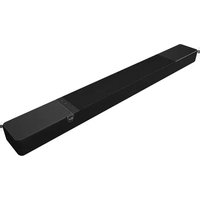
Flexus Core 200 - Speaker KLIPSCH - Free user manual and instructions
Find the device manual for free Flexus Core 200 KLIPSCH in PDF.


| Product Type | Speaker (Soundbar) |
| Brand | KLIPSCH |
| Model | Flexus Core 200 |
| Power supply | Mains via power cord |
| Main functions | Bluetooth, IR control, wall mount |
| Maintenance | Clean with a dry cloth |
| Safety | Do not expose to water, do not block ventilation openings, do not open |
| Warranty | 2 years |
| Compliance | CE, FCC, RoHS, WEEE |
| Included accessories | Wall mounting template, brackets, screws, power cord, batteries |
| Battery type | Not specified (probably for remote control) |
| Max ambient temperature | 45 °C |
| Electrical class | Class II (double insulation) |
| Safe distance for RF exposure | 20 cm |
| Bluetooth reset | Press for 10 seconds |
| History clearing | Press for 10 seconds (clears Bluetooth pairing history and IR commands) |
| Important instructions | Read, keep, heed, and follow all instructions |
Frequently Asked Questions - Flexus Core 200 KLIPSCH
User questions about Flexus Core 200 KLIPSCH
0 question about this device. Answer the ones you know or ask your own.
Ask a new question about this device
Download the instructions for your Speaker in PDF format for free! Find your manual Flexus Core 200 - KLIPSCH and take your electronic device back in hand. On this page are published all the documents necessary for the use of your device. Flexus Core 200 by KLIPSCH.
USER MANUAL Flexus Core 200 KLIPSCH
Scan the QR code for enhanced functionality.
Scannez le code QR pour une fonctionnalité améliorée. Escancee el código QR para obtener una funcionalidad mejorada. Scannen Sie den QR-Code für erweiterte Funktionalität. Scansiona il codice QR per funzionalità avanzate. Digitalize o código QR para funcionalidade aprimorada. 扫描二维码以获取增强功能。掃描二维码以取得增强功能。拡張機能については QR コードをスキャンしてください。향상된 기능을 보려면 QR 코드를 ス캔하세요.
natural_image
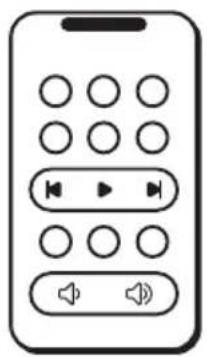
Line drawing of a mobile phone control panel with circular buttons and playback controls (no text or symbols)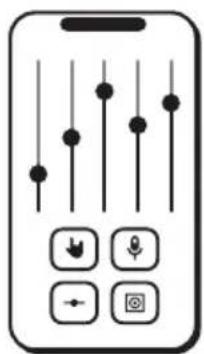

natural_image
Simple line drawing of a smartphone with three circular buttons on the screen (no text or symbols)
EQUALIZERVIRTUAL REMOTE CHANNEL CONTROL SUPPORT
| Virtual RemoteTélécommande virtuelleControl remoto virtualVirtuelle FernbedienungTelecomando virtualeRemoto virtual虚拟遥控器虚擬遥控器仮 想リモ ート가상 원격 | EqualizerÉgaliseurIgualadaEqualizerEqualizzatoreEqualizador均衡器均衡器イコライザ평형 장치 | Channel ControlContrôle des chaînesControl de canalesKanalsteuerungControllo del canaleControle de canal通道控制通道控制チャンネル制 御채널 제어 | SupportSoutienApoyoUnterstützungSupportoApoiar支持幫助サポート 지원하다 |
ADD TO YOUR SYSTEM
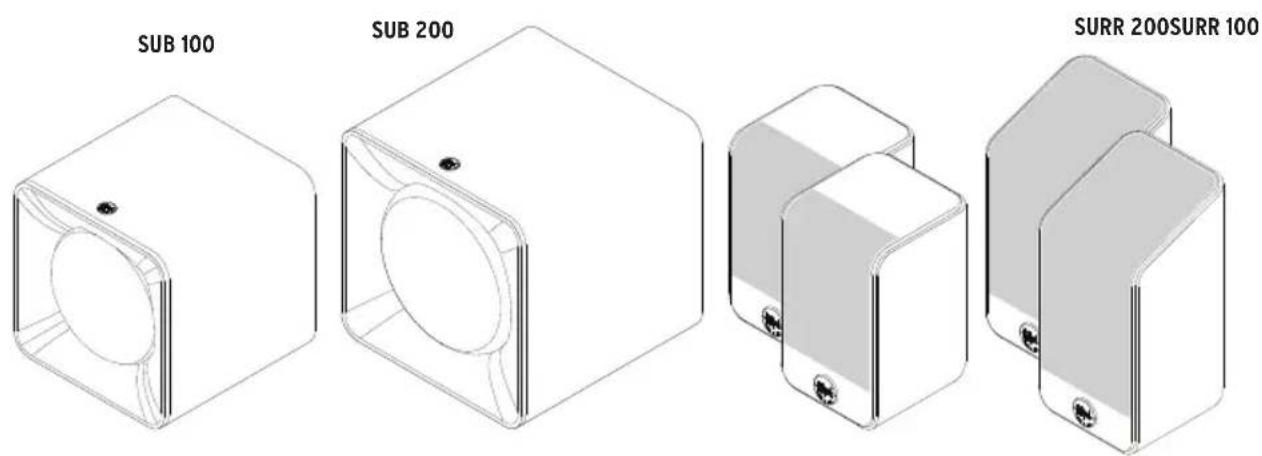
Flexus Sound System is built to grow with you. Add up to two wireless subwoofers and two wireless surround speakers to create a home theater.
For more information, please visit: klipsch.com/flexus-get-started
INSIDE
natural_image
Simple horizontal line with a small circular mark at the top (no text or symbols)Sound Bar

Wall-Mount Template
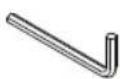
Wrench
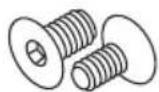
Wall Mount Screws (2)
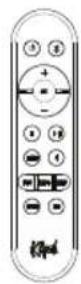
Flexus Remote 100
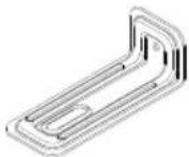
Wall Mount Brackets (2)
natural_image
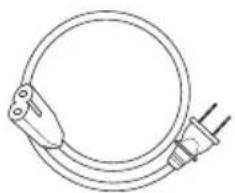
Simple line drawing of a coiled cable with two connectors (no text or symbols)Power Cord
natural_image
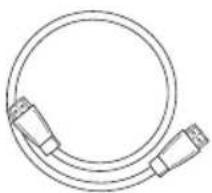
Line drawing of a coaxial cable with two connectors (no text or symbols)HDMI Cable
Sound Bar
Barre de son
Barra de sonido
Sound Bar
Sound Bar
Barra sonora
条形音箱
條形音箱
サウンドバー
사운드바
Wall-Mount Template
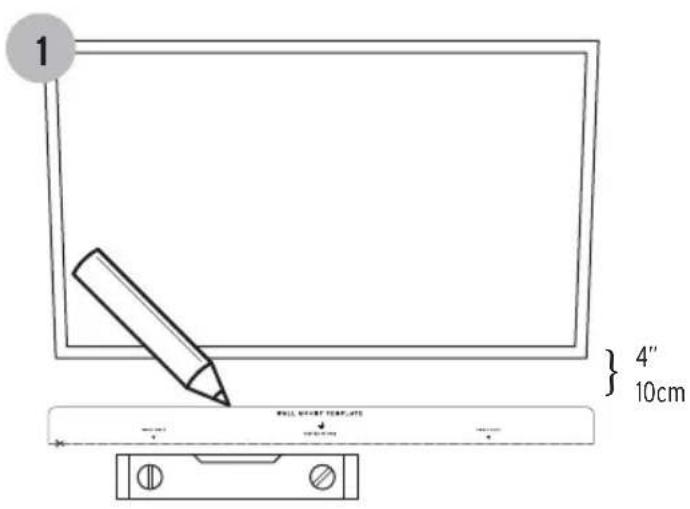
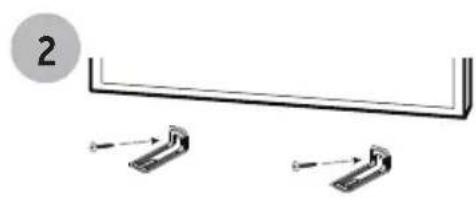
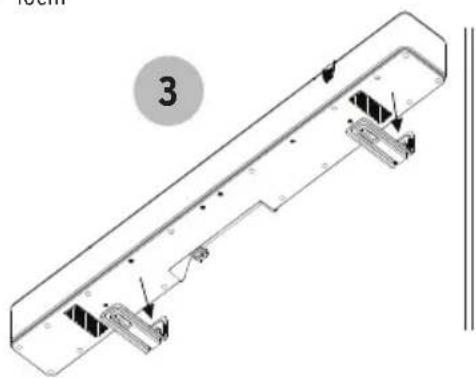
DIRECT WALL MOUNTING
MONTAGE MURAL DIRECT • MONTAJE DIRECTO EN LA PARED • DIREKTE WANDBEFESTIGUNG • MONTAGGIO DIRETTO A PARETE • MONTAGEM DIRETA NA PAREDE 直接墙上安装 • 直接牆壁安装 • 壁への直接取付け • 留접 蚴 堅착
natural_image
Simple line drawing of a U-shaped metal bracket with two side supports, no text or symbols present*Mounting hardware not included.

natural_image
Pure electrical circuit lines without any symbolsCONNECTING TO POWER
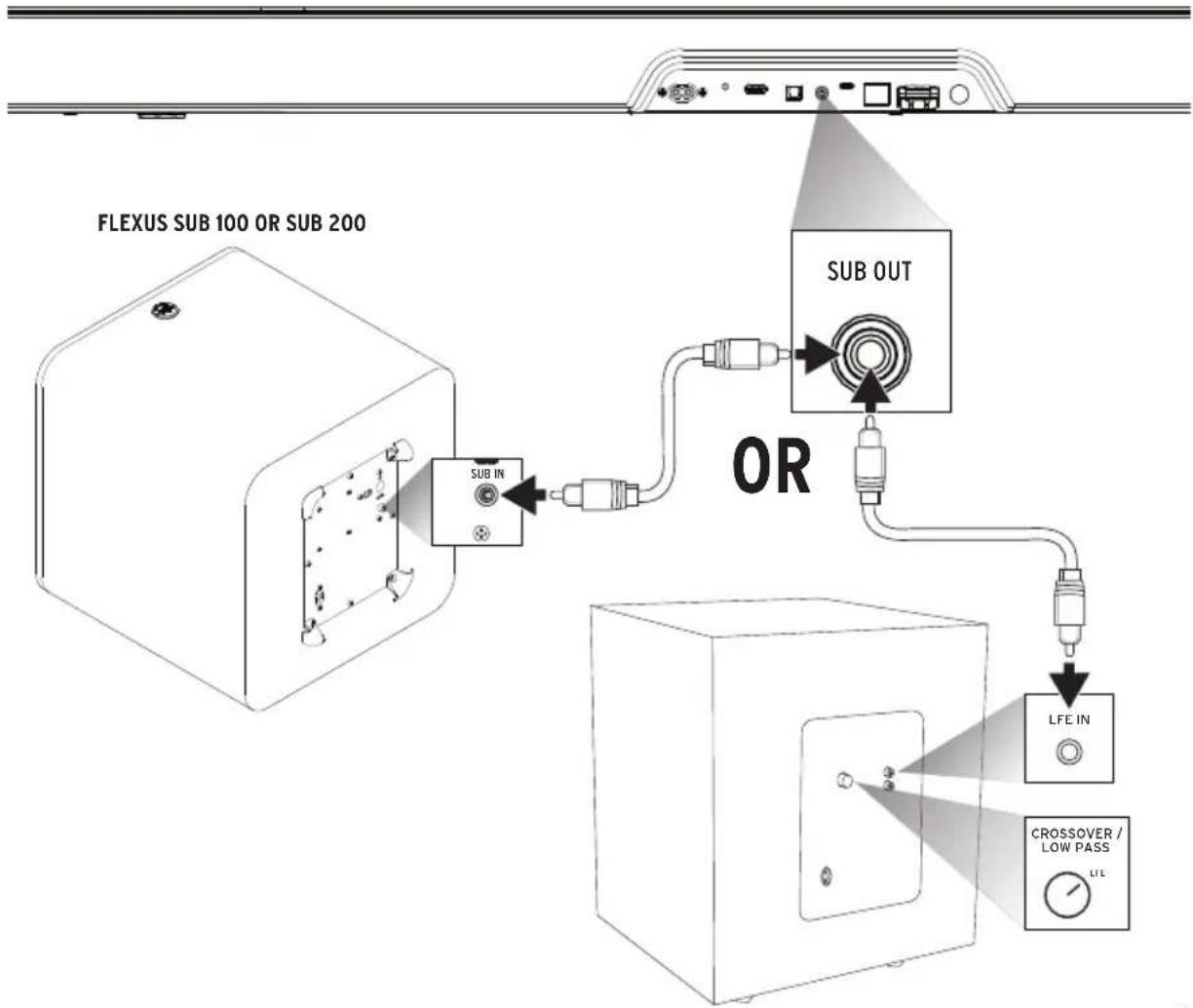
CONNECTING WIRED SUBWOOFER
CONNEXION CÂBLÉE DU CAISSON DE GRAVES • CONEXIÓN DE SUBWOOFER DE CABLE • KABELANSCHLUSS EINES SUBWOOFERS • COLLEGAMENTO A UN SUB-WOOFER CABLATO • CONEXÃO DO SUBWOOFER COM FIO • 连接有线低音炮 • 連接有線重低音喇叭 • 有線サブウーファーの接続 유선 서브 우퍼 연결하기
flowchart
graph TD
    A["FLEXUS SUB 100 OR SUB 200"] --> B["SUB IN"]
    B --> C["OR"]
    C --> D["SUB OUT"]
    D --> E["LFE IN"]
    E --> F["CROSSOVER / LOW PASS"]
    F --> G["LTL"]
LED BRIGHTNESS
LUMINOSITÉ DES LED • BRILLO DEL LED • LED-HELLIGKEIT • LUMINOSITÀ DEL LED • BRILHO DO LED • LED亮度 • LED亮度 • LEDの明るさ • LED 밝기
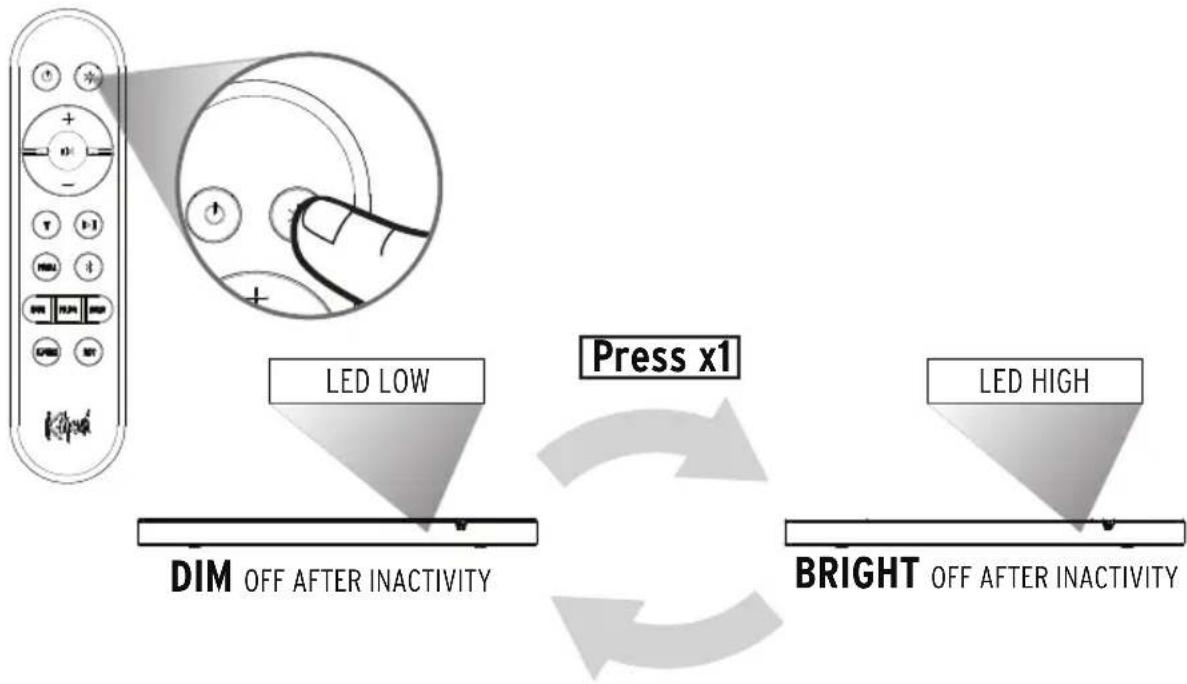
flowchart
graph TD
    A["Red Box"] --> B["LED LOW"]
    B --> C["DIM OFF AFTER INACTIVITY"]
    C --> D["Press x1"]
    D --> E["BRIGHT OFF AFTER INACTIVITY"]
    E --> F["LED HIGH"]
Press x1
| Press x1Appuyer 1 foisOprima 1 vez1x drückenPremere 1 voltaPressionar uma vez按 1 次按×1X1 を押します1번 누르기 | BRIGHTLumineuxBrillanteHellLuminosoBrilhante明亮明亮的明るい밝은 | DIMSombreOscuroDunkelAttenuatoEsmaecido昏暗暗淡暗い어둑한 | OFF AFTER INACTIVITYArrêt après inactivitéApagado después de inactividadNach Inaktivität ausSpento dopo un certo periodo di inattivitàApagado depois de inatividade无操作后关闭不活動後結束非アクティブ後にオフ비활성 후 꺼짐 |
FLEXUS REMOTE 100
TÉLÉCOMMANDE • CONTROL REMOTO • FERNBEDIENUNG • TELECOMANDO • CONTROLE REMOTO • 遥控器 • 遥控 • リモート • 원격
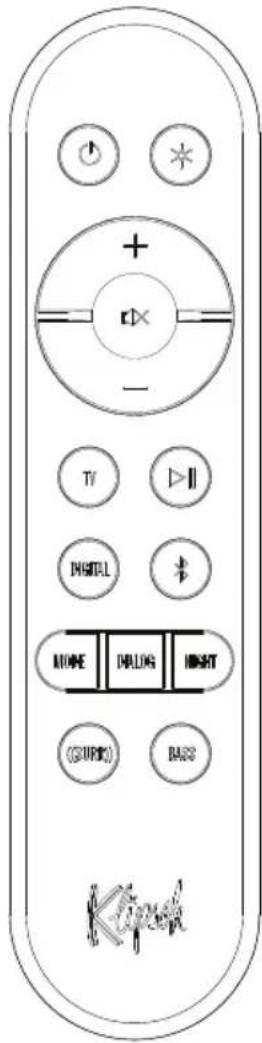

On/Off

LEDs High/Low

Source Select Selects HDMI eARC Input

Play/Pause

Source Select Selects Optical Input

Bluetooth® Source Select Long press to enter Bluetooth pairing mode

Surround Level Cycles available surround channels.

Bass Level Adjusts Bass equalizer value.
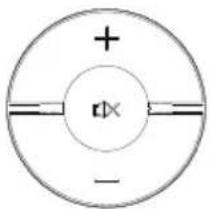
Increase Volume
Mute
Decrease Volume
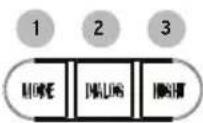
1 Sound Mode Cycles through available Sound Modes. Movie/Music
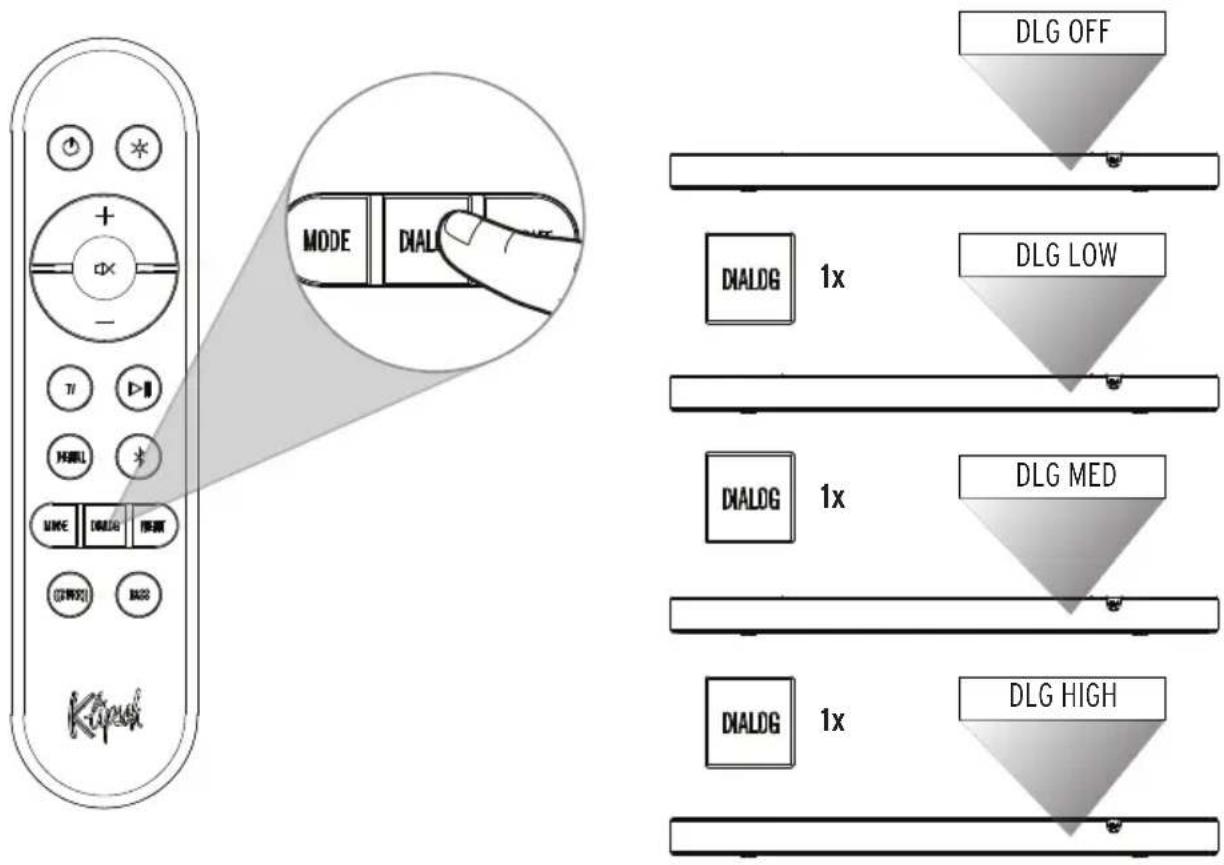
2 Dialog Boost Toggles through Off, Low, Medium, High
3 Night Mode Enables/disables Night Mode.
Advanced Functionality

(Long Press): Sets Dialog Boost to OFF.

(Long Press): Exits Surround adjust mode.

(Long Press): Enters remote pairing mode.
CONNECTIONS - HDMI eARC
CONNEXIONS - HDMI EARC • CONEXIONES - HDMI EARC • ANSCHLÜSSE - HDMI EARC • CONNESSIONI - HDMI EARC • CONEXÕES - HDMI EARC 连接 - HDMI EARC • 連接 - HDMI EARC • 接続 - HDMI EARC • 연결 - HDMI EARC
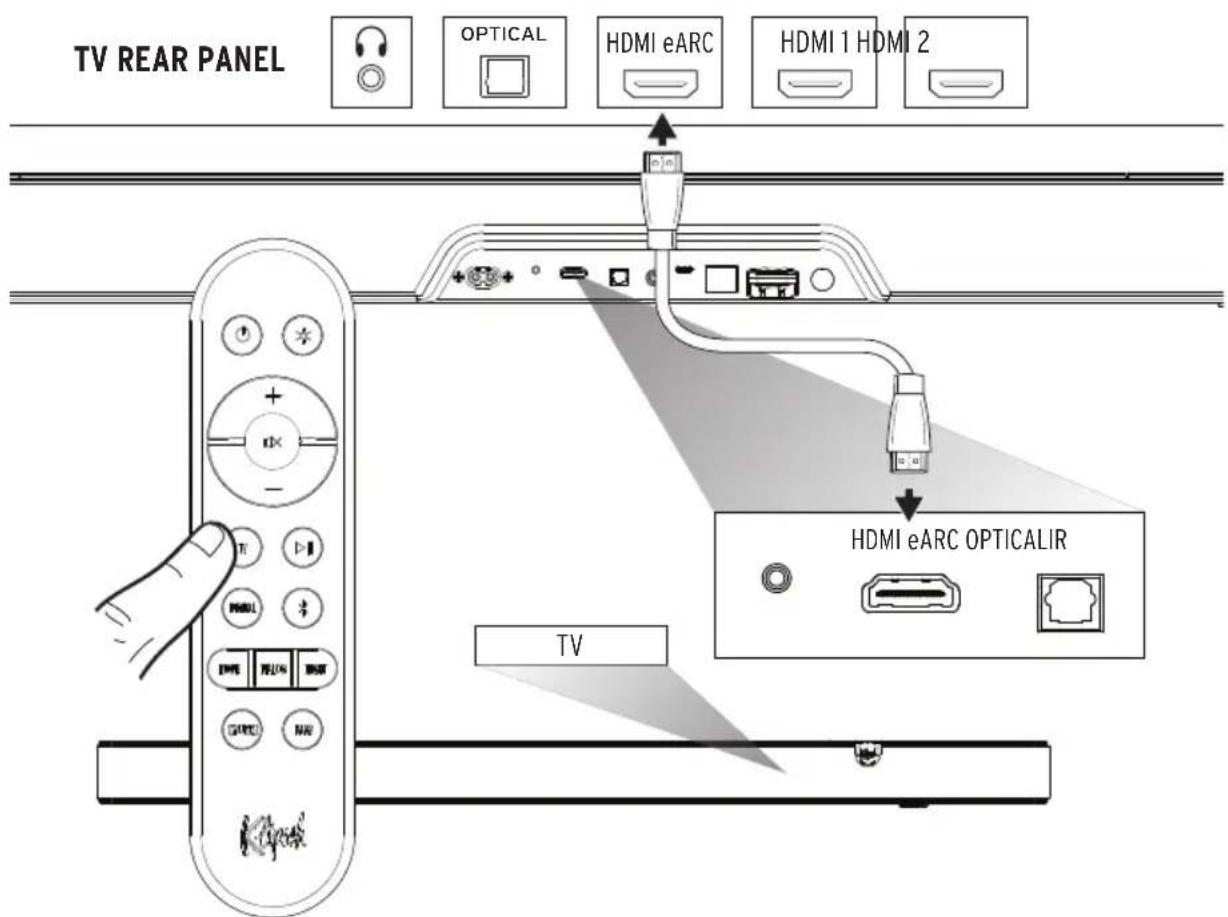
CONNECTIONS - DIGITAL OPTICAL
CONEXÕES - ÓTICA DIGITAL (SE A TV NÃO TIVER SAÍDA ÓTICA, CONSULTE A PRÓXIMA PÁGINA) • CONEXIONES - DIGITAL ÓPTICA (SI EL TELEVISOR NO TIENE SALIDA ÓPTICA, VEA LA PÁGINA SIGUIENTE.) • ANSCHLÜSSE - DIGITAL-OPTISCH (WENN TV KEINEN OPTISCHEN AUSGANG HAT, SIEHE NÄCHSTE SEITE) CONNESSIONI - OTTICA DIGITALE (SE IL TELEVISORE NON HA UN'USCITA OTTICA, VEDERE ALLA PAGINA SUCCESSIVA) • CONEXÕES - ÓTICA DIGITAL (SE A TV NÃO TIVER SAÍDA ÓTICA, CONSULTE A PRÓXIMA PÁGINA) • 连接 - 数字光学(如果电视没有光学输出,请参见下一页) • 連接 - 數位光學接続 - 光デジタル出力(TV側に光出力端子がない場合は、次のページを参照) • 연결 - ピ지털 광학
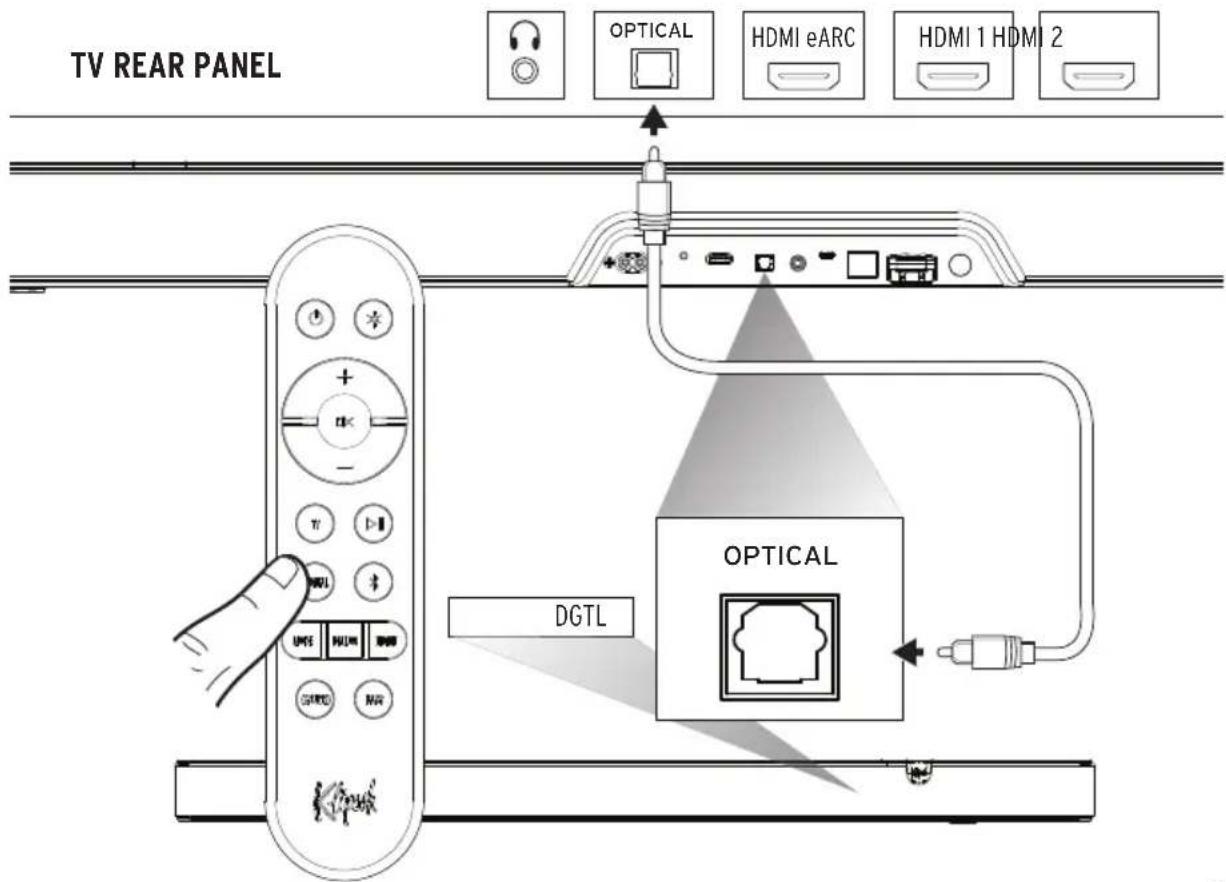
CONNECTIONS - EXTERNAL HDMI SOURCE THROUGH TV
CONNEXIONS - SOURCE HDMI EXTERNE PAR LA TÉLÉVISION • CONEXIONES - FUENTE EXTERNA DE HDMI A TRAVÉS DE TV • ANSCHLÜSSE - EXTERNE HDMI-QUELLE VIA FERNSEHER • CONNESSIONI - SORGENTE AUDIO HDMI ESTERNA ATTRAVERSO UN TELEVISORE • CONEXÕES - FONTE HDMI EXTERNA ATRAVÉS DA TV • 连接-通过电视的外部HDMI信号源 • 連接 - 透過電視連接外部 HDMI 來源 • 接続 - TVから外部HDMIソース • 當결 - TV를 통한 외부 HDMI 소스
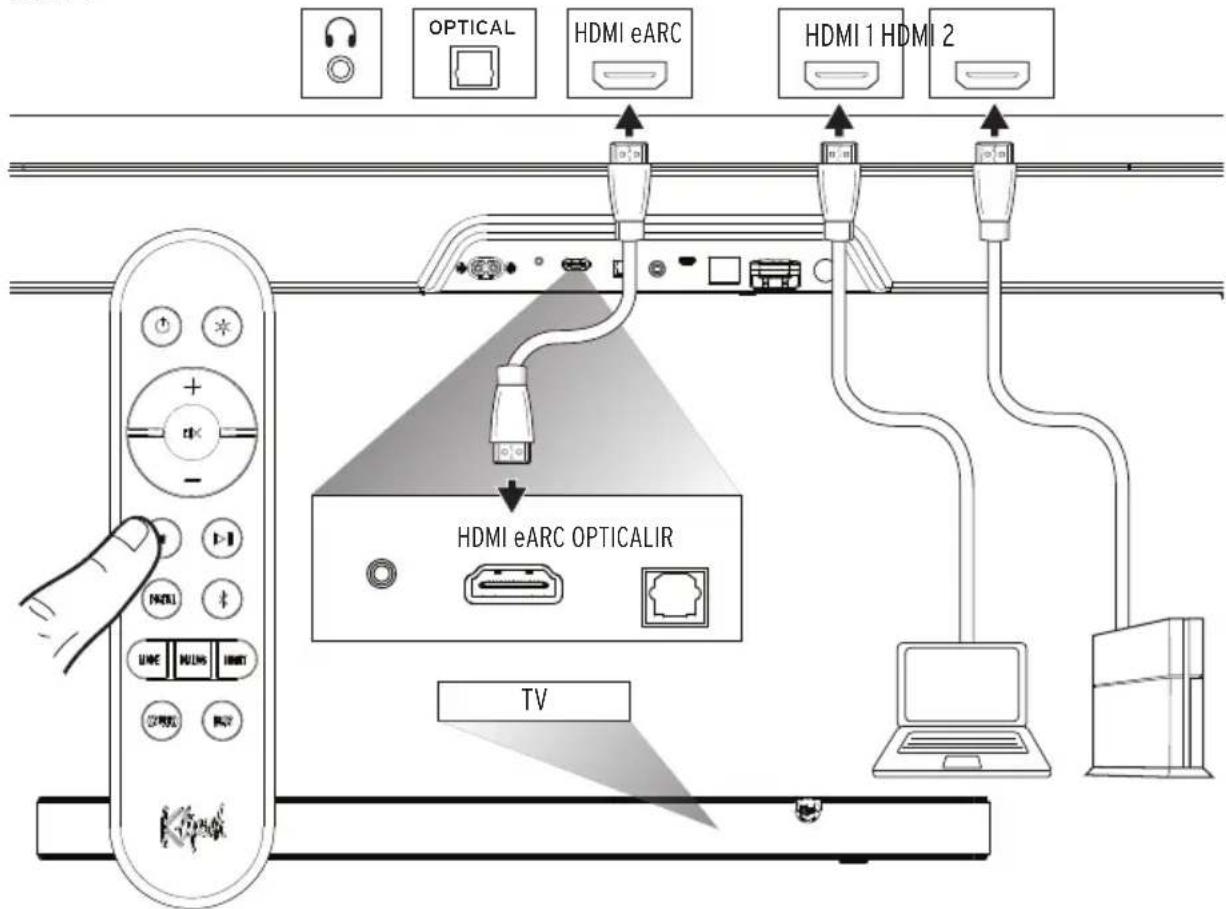
Use this connection method when using external HDMI sources (Streaming boxes, Blu-Ray Players, gaming consoles, etc) to play audio/video content, and want to use TV as the source switch.
Note: This connection method will only support Dolby Atmos playback if your TV supports HDMI eARC. Check your TV owner's manual for compatibility. Dolby Atmos playback also requires Dolby Atmos content and Dolby Atmos compatible playback hardware.
CONNECTIONS - EXTERNAL AUDIO VIA DIGITAL OPTICAL
CONNEXIONS - AUDIO EXTERNE VIA OPTIQUE NUMÉRIQUE • CONEXIONES - AUDIO EXTERNO POR VÍA DIGITAL ÓPTICA • ANSCHLÜSSE - EXTERNES AUDIO VIA DIGITAL-OPTISCH • CONNESSIONI - AUDIO ESTERNO ATTRAVERSO INGRESSO OTTICO DIGITALE • CONEXÕES - ÁUDIO EXTERNO VIA LIGAÇÃO ÓPTICA DIGITAL 连接-通过数字光纤的外部音频 • 連接 - 透過數位光纖連接外部音頻 • 接続 - 光デジタルケーブルから外部オーディオ • 練결 - 디지털광학을 통한 외부 오디오
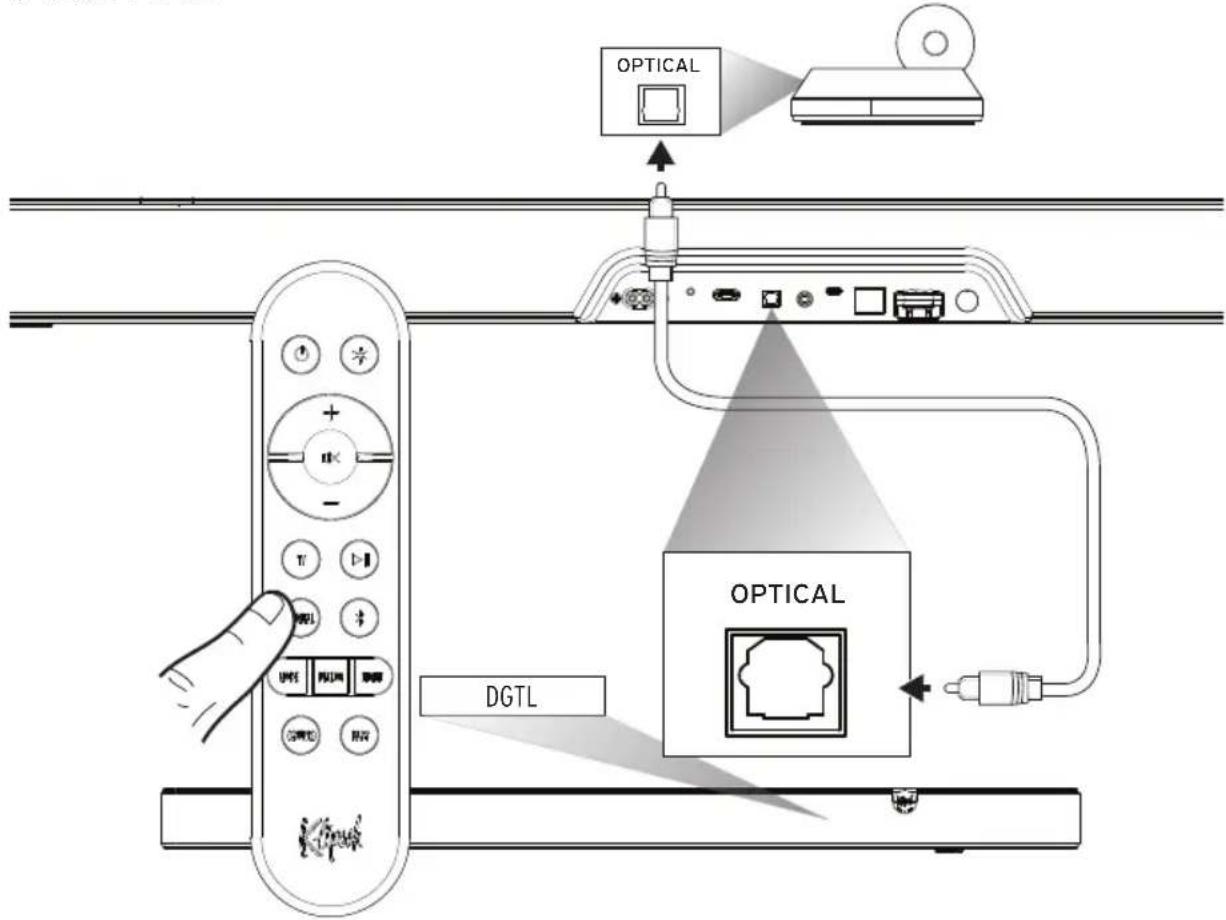
flowchart
graph TD
    A["Remote Control Panel"] --> B["Optical Port"]
    B --> C["Optical Interface"]
    C --> D["DGTL Interface"]
    D --> E["Signal Flow Arrow"]
    style A fill:#f9f,stroke:#333
    style B fill:#ccf,stroke:#333
    style C fill:#cfc,stroke:#333
    style D fill:#fcc,stroke:#333
    style E fill:#ffc,stroke:#333
Use this connection method when connecting audio sources with a digital optical output, such as CD Players, PC audio servers, or streaming audio players.
Note: Digital connection only supports Dolby Audio-Dolby Digital Decoding, not Dolby Atmos.
TURN OFF TV SPEAKERS
MISE HORS TENSION DES HAUT-PARLEURS DU TÉLÉVISEUR • APAGADO DE LOS ALTAVOCES DEL TELEVISOR • TV-LAUTSPRECHER DEAKTIVIEREN • SPEGNIMENTO DEGLI ALTOPARLANTI DEL TELEVISORE • DESLIGUE OS ALTO-FALANTES DA TV • 关闭电视机扬声器 • 關閉電視揚聲器 • TVスピーカー電源オフ • TV 스피커 끄기
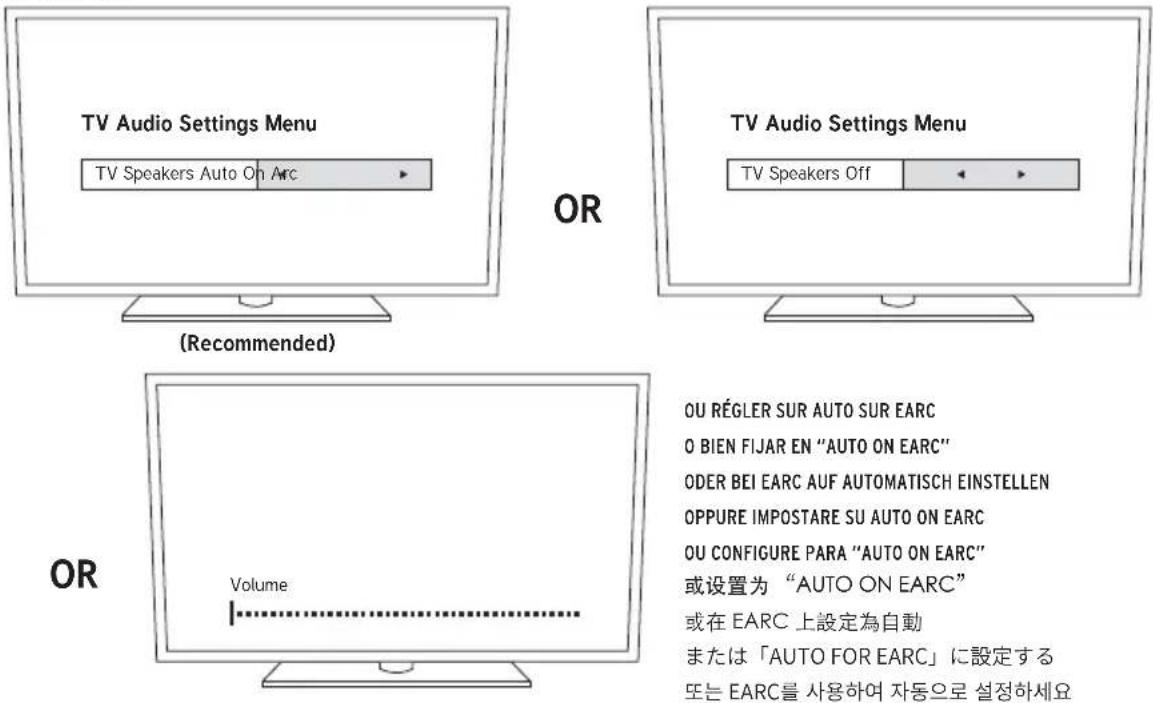
ADJUSTING BASS LEVEL
AJUSTEMENT DU NIVEAU DU CAISSON DE GRAVES • AJUSTE DEL VOLUMEN DEL SUBWOOFER • SUBWOOFER-LAUTSTÄRKE EINSTELLEN • REGOLAZIONE DEL LIVELLO DEL SUBWOOFER • AJUSTE DO NÍVEL DO SUBWOOFER • 調整低音炮水平 • 調整低音電平 • サブウーファーレベルの調整 • ベ이스 레벨 조정
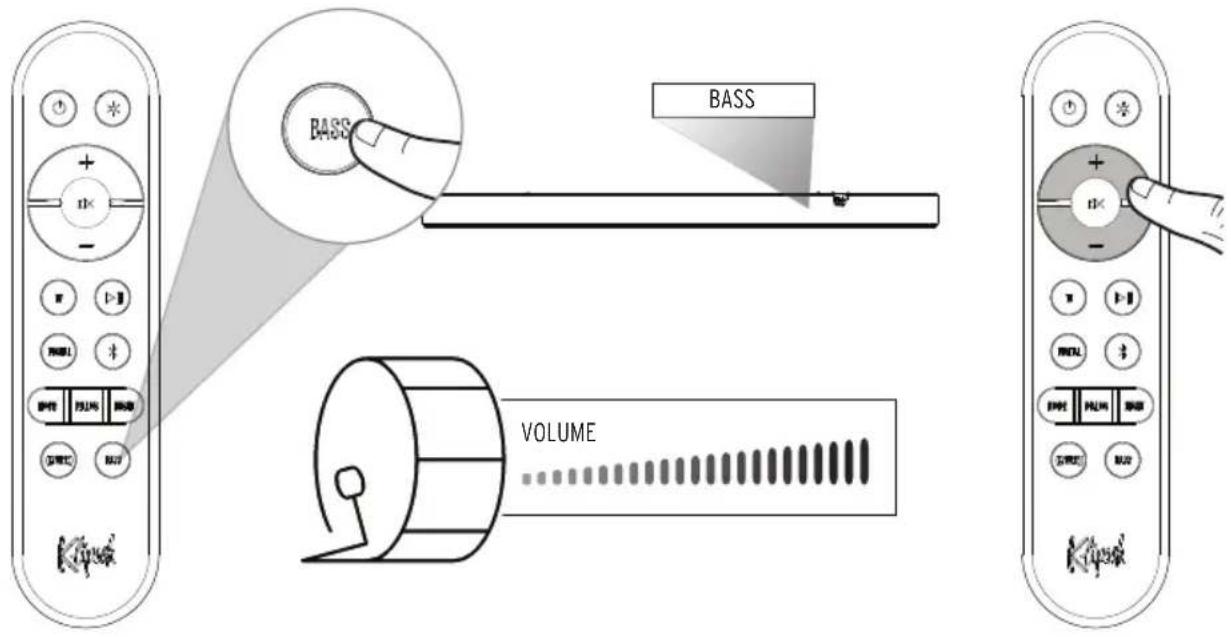
Full dynamic range with full bass
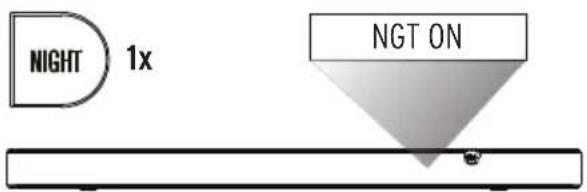
NIGHT ENABLED
Reduced dynamic range with compressed bass for low volume listening
DIALOGUE MODE
MODE DIALOGUE • MODALIDAD DE DIÁLOGO • DIALOGMODUS • MODALITÀ DIALOGO • MODO DIÁLOGO • 对话模式 • 對話模式 • ダイアログモード 대화 모드
BLUETOOTH® PAIRING MODE
MODE DE COUPLAGE BLUETOOTH® • MODO DE EMPAREJAMIENTO BLUETOOTH® • BLUETOOTH®-KOPPLUNGSMODUS • MODALITÀ DI ABBINAMENTO BLUETOOTH® MODO DE EMPARELHAMENTO BLUETOOTH® • BLUETOOTH® 配对模式 • BLUETOOTH® 配對模式 • BLUETOOTH®ペアリングモード BLUETOOTH® ペeer링 모드
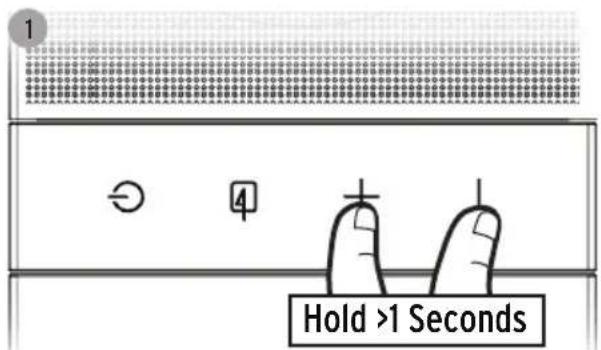
Hold >1 Seconds (Flexus Core)
* Example only. Your device may differ.
- À titre d'exemple seulement. Votre appareil peut être différent.
- Este es solo un ejemplo. Es posible que su dispositivo sea diferente.
- Nur als Beispiel. Ihr Gerät kann anders aussehen
- Solo a titolo esemplificativo. Lo specifico dispositivo può essere diverso.
- Apenas para exemplo. O dispositivo pode ser diferente.
·仅为示例。实际设备可能有所不同
・例のみ:デバイスによって異なります
·*僅供參考。您的設備可能有所不同。
* * 예입니다. 제품마다 다를 수 있습니다.
FACTORY RESET
RÉINITIALISATION • RESTABLECIMIENTO DE FÁBRICA • RÜCKSETZUNG AUF WERKSEINSTELLUNG • RIPRISTINO IMPOSTAZIONI DI FABBRICA RESTABELECIMENTO DAS CONFIGURAÇÕES DE FÁBRICA • 恢复出厂设置 • 恢復出廠設定 • ファクトリーリセット • 公장 초기화
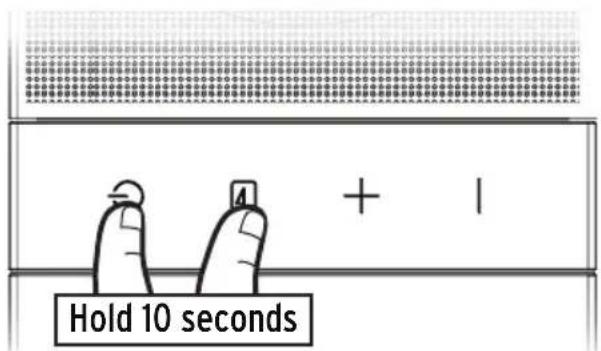
Hold 10 Seconds
Clears Bluetooth® pairing history and user programmed IR commands
Flexus Core 200 comes equipped with several user selectable playback modes. Depending on which playback mode the user has selected, the system will decode the surround sound signal. The following chart shows which playback modes will result in which type of surround sound from the system, along with the recommended uses for each mode. For more information on decoding and TV compatibility, visit support.klipsch.com
| USER SELECTED INPUT MODE | OUTPUT FORMAT RECOMMENDED FOR: | |
| MOVIE (DEFAULT) | Dolby Atmos mixed to 5.1.4 | The most immersive and complete system tuning for everyday use. Perfect for shows and movies, Movie mode upmixes all signals into all available channels and virtualizes a wide soundstage. Movie mode boosts surround effects and increases dialog clarity. |
| MUSIC | Dolby Atmos mixed to 5.1.4 | Optimized to keep music sounding like the artist intended, Music mode disables virtualization, dialog enhancement, and boosted surround experience while maintaining upmixing stereo sources to all available channels. |
LED DISPLAY
| DISPLAY BAR STATUS | ||
| INPUTS | BT Bluetooth Input | Selected |
| DIGITAL Digital (Optical) input Selected | ||
| TV HDMI-eARC input | Selected | |
| USB USB Thumb Drive Input | ||
| SOUND MODES | MOVIE (Default) | Movie Mode ON |
| MUSIC Music Mode | ON | |
| DIALOG MODE | DLG OFF Dialog Boost Off | |
| DLG LOW Dialog Boost Low | ||
| DLG MED Dialog Boost Medium | ||
| DLG HIGH Dialog Boost High | ||
| NIGHT MODE | NGT OFF Night Mode OFF | |
| NGT ON Night Mode ON | ||
| DISPLAY BAR STATUS | ||
| LEVEL ADJUST | [SOURCE] XX System | Volume Setting [0] - [50] |
| MUTE System Muted / Volume Set To Minimum | ||
| [SOURCE] MAX System | Volume Set To Max | |
| BASS [XX] | Bass equalizer volume [-6] - [+6] | |
| CEC TOGGLE | CEC [XXX] | CEC Protocol Turned [On] or [Off] |
| DECODING | DOLBY SURROUND | Dolby Audio (supporting Dolby Digital, Dolby Digital Plus, Dolby TrueHD) |
| DOLBY ATMOS | Dolby Atmos Input | |
| PCM PCM or LPCM | Input | |
| OTHER | BT PAIRING | Pairing Bluetooth |
| BT PAIRED Bluetooth Paired | ||
| LED HI | LED high brightness | |
| LED LOW | LED low brightness | |
POWER CONSUMPTION
| INFORMATION OF POWER CONSUMPTION | |
| STANDBY MODE | Power consumption is lower than 0.5W at this mode. |
| BLUETOOTH MODE | In this mode, when there is no signal output, the idle power consumption is lower than 0.5W after 15 minutes. |
| HDMI MODE | In this mode, when there is no signal output, the idle power consumption is lower than 0.5W after 15 minutes. |
| OPTICAL MODE | In this mode, when there is no signal output, the idle power consumption is lower than 0.5W after 15 minutes. |
| USB MODE | In this mode, when there is no signal output, the idle power consumption is lower than 0.5W after 15 minutes. |

"The Bluetooth® word mark and logos are registered trademarks owned by the Bluetooth SIG, Inc. and any use of such marks by Klipsch Group, Inc. is under license. Other trademarks and trade names are those of their respective owners."
Dolby Atmos
Dolby Audio
Dolby, Dolby Audio, Dolby Atmos, and the double-D symbol are registered trademarks of Dolby Laboratories Licensing Corporation. Manufactured under license from Dolby Laboratories. Confidential unpublished works. Copyright © 2012-2021 Dolby Laboratories. All rights reserved.
HDMI ^TM
HIGH-DEFINITION MULTIMEDIA INTERFACE
The Adopted Trademarks HDMI, HDMI High-Definition Multimedia Interface, HDMI trade dress and the HDMI logos are trademarks or registered trademarks of HDMI Licensing Administrator, Inc. in the United States and other countries.
IMPORTANT SAFETY INSTRUCTIONS!
- READ these instructions.
- KEEP these instructions.
- HEED all warnings.
- FOLLOW all instructions.
- DO NOT use this apparatus near water.
- CLEAN ONLY with dry cloth.
- DO NOT block any ventilation openings. Install in accordance with the manufacturer's instructions.
- DO NOT install near any heat sources such as radiators, heat registers, stoves, or other apparatus (including amplifiers) that produce heat.
- DO NOT defeat the safety purpose of the polarized or grounding type plug. A polarized plug has two blades with one wider than the other. A grounding type plug has two blades and a third grounding prong. The wider blade or the third prong are provided for your safety. If the provided plug does not fit into your outlet, consult an electrician for replacement of the obsolete outlet.
- PROTECT the power cord from being walked on or pinched, particularly at plugs, convenience receptacles, and the point where they exit from the apparatus.
- ONLY USE attachments/accessories specified by the manufacturer.
- USE ONLY with the cart, stand, tripod, bracket, or table specified by the manufacturer, or sold with the apparatus. When a cart is used, use caution when moving the cart/ apparatus combination to avoid injury from tip-over.
- UNPLUG this apparatus during lightning storms or when unused for long periods of time.
- REFER all servicing to qualified service personnel. Servicing is required when the apparatus has been damaged in any way, such as power-supply cord or plug is damaged, liquid has been spilled or objects have fallen into the apparatus, the apparatus has been exposed to rain or moisture, does not operate normally, or has been dropped.
- DO NOT expose this apparatus to dripping or splashing and ensure that no objects filled with liquids, such as vases, are placed on the apparatus.
- To completely disconnect this apparatus from the AC Mains, disconnect the power supply cord plug from the AC receptacle.
- The mains plug/appliance coupler is used as disconnect device, the disconnect device shall remain readily operable.
- DO NOT overload wall outlets or extension cords beyond their rated capacity as this can cause electric shock or fire.
- The equipment shall be used at maximum 113^ F / 45^ C ambient temperature.

The exclamation point, within an equilateral triangle, is intended to alert the user to the presence of important operating and maintenance (servicing) instructions in the literature accompanying the product.

The lightning flash with arrowhead symbol within an equilateral triangle is intended to alert the user to the presence of uninsulated "dangerous voltage" within the product's enclosure that may be of sufficient magnitude to constitute a risk of electrical shock to persons.
WARNING: To reduce the risk of fire or electrical shock, do not expose this apparatus to rain or moisture.
WARNING: To prevent injury, this apparatus must be securely attached to the floor/wall in accordance
with the installation instruction.
WARNING: No naked flame sources - such as candles - should be placed on the product.
WARNING: This equipment is a Class II or double insulated electrical appliance. It has been designed in such a way that it does not require a safety connection to electrical earth.
WARNING: Do not place batteries in mouth or ingest. Chemical burn hazard. Keep new and used batteries out of reach of children and pets. If swallowed, it can cause severe internal burns in just 2 hours and can lead to death.

If you think batteries might have been swallowed or placed inside any part of the body, seek immediate medical attention.
WARNING: If battery compartment does not close securely, stop using the product and keep it away from children and pets.
WARNING: Do not handle leaking or damaged Lithium batteries.
WARNING: Risk of leakage. Only use the specified type of batteries. Never mix new and used batteries. Observe correct polarity. Remove batteries from products that are not in use for extended periods of time. Store batteries in a dry place.
WARNING: Batteries (battery pack or batteries installed) shall not be exposed to excessive heat such as sunshine, fire or the like.
WARNING: Danger of explosion if battery is incorrectly replaced. Replace only with the same or equivalent type.
WARNING: Do not recharge non-rechargeable batteries.
WARNING: Avoid exposure to extreme heat or cold.
Please dispose of any used batteries properly, following any local regulations. Do not incinerate.
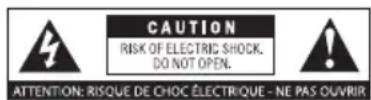
WARNING: Do Not Open! Risk of Electrical Shock. Voltages in this equipment are hazardous to life. No user-serviceable parts inside. Refer all servicing to qualified service personnel.
Place the equipment near a main power supply outlet and make sure that you can easily access the power breaker switch.
WARNING: This product is intended to be operated ONLY from the AC Voltages listed on the back panel or included power supply of the product. Operation from other voltages other than those
indicated may cause irreversible damage to the product and void the products warranty. The use of AC Plug Adapters is cautioned because it can allow the product to be plugged into voltages in which the product was not designed to operate. If the product is equipped with a detachable power cord, use only the type provided with your product or by your local distributor and/or retailer. If you are unsure of the correct operational voltage, please contact your local distributor and/or retailer.
EU COMPLIANCE INFORMATION
Eligible to bear the CE mark; Conforms to European Union Low Voltage Directive 2014/35/EU; European Union EMC Directive 2014/30/EU; European Union Restriction of Hazardous Substances Recast (RoHS2) Directive 2011/65/EU; European Union WEEE Directive 2012/19/EU; European Union Eco-Design Directive 2009/125/EC; European Union Registration, Evaluation, Authorization and Restriction of Chemicals (REACH) Directive 2006/121/EC; European Union Radio Equipment Directive (RED) 2014/53/EU.
This product contains batteries that are covered under the 2006/66/EC European Directive, which cannot be disposed of with normal household waste. Please follow local regulations.
You may obtain a free copy of the Declaration of Conformity by contacting your dealer, distributor, or Klipsch Group, Inc.'s worldwide headquarters. Contact information can be found here: http://www.klipsch.com/Contact-Us
WEEE NOTICE
Note: This mark applies only to countries within the European Union (EU) and Norway.

This appliance is labeled in accordance with European Directive 2012/19/EU concerning waste of electrical and electronic equipment (WEEE). This label indicates that this product should not be disposed of with household waste. It should be deposited at an appropriate facility to enable recovery and recycling.
FCC AND CANADA EMC COMPLIANCE INFORMATION
This device complies with Part 15 of the FCC Rules. Operation is subject to the following two conditions: (1) This device may not cause harmful interference, and
(2) This device must accept any interference received, including interference that may cause undesired operation.
NOTE: This equipment has been tested and found to comply with the limits for a Class B digital device, pursuant to part 15 of the FCC Rules. These limits are designed to provide reasonable protection against harmful interference in a residential installation. This equipment generates, uses and can radiate radio frequency energy and, if not installed and used in accordance with the instructions, may cause harmful interference to radio communications. However, there is no guarantee that interference will not occur in a particular installation. If this equipment does cause harmful interference to radio or television reception, which can be determined by turning the equipment off and on, the user is encouraged to try to correct the interference by one or more of the following measures:
- Reorient or relocate the receiving antenna.
- Increase the separation between the equipment and receiver.
- Connect the equipment into an outlet on a circuit different from that to which the receiver is connected.
- Consult the dealer or an experienced radio/TV technician for help.
Approved under the verification provision of FCC Part 15 as a Class B Digital Device.
Caution: Changes or modifications not expressly approved by the manufacturer could void the user's authority to operate this device.
Caution: To comply with the limits of the Class B digital device, pursuant to Part 15 of the FCC Rules, this device is to comply with Class B limits. All peripherals must be shielded and grounded. Operation with non-certified peripherals or non-shielded cables my result in interference to radio or reception.
WIRELESS TRANSMITTER COMPLIANCE INFORMATION
Radiation Exposure Statement:
This equipment complies with FCC radiation exposure limits set forth for an uncontrolled environment. This equipment should be installed and operated with minimum distance 20cm between the radiator & your body.
Industry Canada statement:
This device complies with Industry Canada's licence-exempt RSSs. Operation is subject to the following two conditions:
(1) This device may not cause interference; and
(2) This device must accept any interference, including interference that may cause undesired operation of the device.
Radiation Exposure Statement:
This equipment complies with ISED radiation exposure limits set forth for an uncontrolled environment. This equipment should be installed and operated with minimum distance 20cm between the radiator & your body.
CONSIGNES DE SÉCURITÉ IMPORTANTES !
INFORMATIONS DE CONFORMITÉ UE
INFORMATIONS DE CONFORMITÉ FCC ET CEM CANADA
Radiation Exposure Statement:
This equipment complies with FCC radiation exposure limits set forth for an uncontrolled environment. This equipment should be installed and operated with minimum distance 20cm between the radiator & your body.
Industry Canada statement
Radiation Exposure Statement:
This equipment complies with ISED radiation exposure limits set forth for an uncontrolled environment. This equipment should be installed and operated with minimum distance 20cm between the radiator & your body.
Radiation Exposure Statement:
This equipment complies with FCC radiation exposure limits set forth for an uncontrolled environment. This equipment should be installed and operated with minimum distance 20cm between the radiator & your body.
Industry Canada statement
Radiation Exposure Statement:
This equipment complies with ISED radiation exposure limits set forth for an uncontrolled environment. This equipment should be installed and operated with minimum distance 20cm between the radiator & your body.
ISTRUZIONI IMPORTANTI DI SICUREZZA
Eligible to bear the CE mark; Conforms to European Union Low Voltage Directive 2006/95/EC; European Union EMC Directive 2004/108/EC, European Union Restriction of Hazardous Substances Recast (RoHS2) Directive 2011/65/EC, European Union IEEE Directive 2002/96/EC, European Union Eco-Design Directive 2009/125/EC; European Union Registration, Evaluation, Authorization and Restriction of Chemicals (REACH) Directive 2006/121/EC; European Union Radio and Telecommunications Terminal Equipment (RSTTE) Directive 2014/53/EU.
Radiation Exposure Statement:
This equipment complies with FCC radiation exposure limits set forth for an uncontrolled environment. This equipment should be installed and operated with minimum distance 20cm between the radiator & your body.
Industry Canada statement:
Radiation Exposure Statement:
This equipment complies with ISED radiation exposure limits set forth for an uncontrolled environment. This equipment should be installed and operated with minimum distance 20cm between the radiator & your body.
INSTRUÇÕES DE SEGURANÇA IMPORTANTESI
Radiation Exposure Statement:
This equipment complies with FCC radiation exposure limits set forth for an uncontrolled environment. This equipment should be installed and operated with minimum distance 20cm between the radiator & your body.
Industry Canada statement:
Radiation Exposure Statement
This equipment complies with ISED radiation exposure limits set forth for an uncontrolled environment. This equipment should be installed and operated with minimum distance 20cm between the radiator & your body.
重要安全说明!

ENGLISH - WARRANTY - U.S.
Klipsch Group, Inc., (KGI), 3502 Woodview Trace, Suite 200, Indianapolis, Indiana (USA) 46268, warrants to the original retail purchaser that this product will be free from defective materials and workmanship for two (2) years from the date of purchase, subject to the limitations below. This warranty period is not extended if we repair or replace the product. Except as limited below, if this product proves defective in either material or workmanship, KGI, at its option, will (a) repair the product, or (b) replace the product, at no charge for parts or labor. If the product model is no longer available and cannot be repaired effectively or replaced with an identical model, KGI at its sole option may replace the unit with a current model of equal or greater value. In some cases, modification to the mounting surface may be required where a new model is substituted. KGI assumes no responsibility or liability for such modification. To obtain a repair or replacement under the terms of this warranty, you must return the product to the dealer from which it was purchased with your original receipt. If return of the product to the dealer from which it was purchased is impossible, you must contact our warranty service number at 1-800-554-7724 to arrange for return of the product to us or in-field destruction of the product at our option, as well as provision of your original receipt to us. Return, repair, and replacement shipping, liability, and cost is the responsibility of the original retail purchaser.
Limitations:
- This limited warranty does not cover failure of the product arising, in whole or in part, from improper installation, storage, transportation, misuse, abuse, accident, neglect, mishandling, unauthorized repair, modification, or wear from ordinary use or environmental deterioration.
- This limited warranty does not cover cosmetic damage, including paint damage, or consequential damage to other components or premises which may result for any reason from the failure of the product.
- This limited warranty is null and void for products not used in accordance with KGI's instructions.
- This limited warranty is null and void for products with altered or missing serial numbers and for products not purchased from Klipsch Group, Inc. or an authorized dealer (See: www.klipsch.com/dealers).
- This limited warranty terminates if the original retail purchaser sells or otherwise transfers this product.
- This limited warranty is null and void for defects or damage caused by installation or repair performed by any person or entity other than a Klipsch authorized installer or dealer.
THIS WARRANTY GIVES YOU SPECIFIC LEGAL RIGHTS, AND YOU MAY ALSO HAVE OTHER RIGHTS WHICH VARY FROM STATE TO STATE, JURISDICTION TO JURISDICTION OR COUNTRY TO COUNTRY. ALL EXPRESS AND IMPLIED WARRANTIES FOR THE PRODUCT, INCLUDING BUT NOT LIMITED TO ANY IMPLIED WARRANTIES OF MERCHANTABILITY AND FITNESS FOR A PARTICULAR PURPOSE, ARE LIMITED IN TIME TO THE TERM OF THIS WARRANTY. SOME STATES, JURISDICTIONS OR COUNTRIES DO NOT ALLOW THE EXCLUSION OF CERTAIN IMPLIED WARRANTIES OR CONDITIONS, OR LIMITATIONS ON HOW LONG AN IMPLIED WARRANTY OR CONDITION LASTS, SO THIS LIMITATION MAY NOT APPLY TO YOU. KGI'S RESPONSIBILITY FOR MALFUNCTIONS AND DEFECTS IN HARDWARE IS LIMITED TO REPLACEMENT OR REPAIR AS SET FORTH IN THIS WARRANTY STATEMENT. KGI DOES NOT ACCEPT LIABILITY FOR SPECIAL, PUNITIVE, CONSEQUENTIAL OR INCIDENTAL DAMAGES OR LOSSES, WHETHER DIRECT OR INDIRECT, INCLUDING WITHOUT LIMITATION, ANY LIABILITY FOR THIRD PARTY CLAIMS AGAINST YOU FOR DAMAGES OR LOSSES OR FOR PRODUCTS NOT BEING AVAILABLE FOR USE. THE MAXIMUM LIABILITY FOR WHICH KGI MAY BE RESPONSIBLE WILL BE NO MORE THAN THE AMOUNT YOU PAID FOR THE PRODUCT THAT IS THE SUBJECT OF THE CLAIM. SOME STATES, JURISDICTIONS OR COUNTRIES DO NOT ALLOW THE EXCLUSION OR LIMITATION OF SPECIAL, INDIRECT, INCIDENTAL OR CONSEQUENTIAL DAMAGES, SO THE ABOVE LIMITATION OR EXCLUSION MAY NOT APPLY TO YOU.
WARRANTY OUTSIDE THE U.S.
The Warranty on this product shall comply with applicable law when sold to a consumer outside of the United States. To obtain any applicable warranty service, please contact the dealer from which you purchased this product, or the distributor that supplied this product.
FRENCH - GARANTIE - ÉTATS-UNIS
KEEPERS OF THE SOUND
3502 WOODVIEW TRACE, INDIANAPOLIS, IN, USA KLIPSCH.COM
©2024, Klipsch Group, Inc. Klipsch Group, Inc. is a wholly-owned subsidiary of Vox International Corporation. Klipsch and Keepers of the Sound are trademarks of Klipsch Group, Inc., registered in the United States and other countries. The Bluetooth® word mark is a registered trademark owned by Bluetooth SIG, Inc. and any use of such mark by Klipsch Group, Inc. is under license.
V01-240122