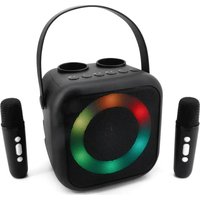
BT2024 - Receiver Soundmaster - Free user manual and instructions
Find the device manual for free BT2024 Soundmaster in PDF.


| Product Type | Portable speaker with Bluetooth receiver and wireless microphones |
| Brand | Soundmaster |
| Model | BT2024 |
| Power | Rechargeable battery via USB-C port (cable included) |
| Connectivity | Bluetooth, USB-A, AUX 3.5 mm, wireless microphones (2 included) |
| Main Functions | Bluetooth, USB, AUX playback; wireless microphone with voice effects; karaoke (voice suppression); LED lighting effects; equalizer |
| Controls | On/off, volume, mode, skip, LED, EQ, microphone buttons |
| Microphone | On/off, volume, voice effects (child/man/woman/monster/normal), echo adjustment |
| Protection Class | Indoor use only, dry location |
| Care and Cleaning | Clean with a dry cloth; do not use detergents or abrasives |
| Safety | Do not open (risk of electric shock); do not expose to moisture, direct heat or flames; do not place objects filled with liquid on the device |
| Recycling | Do not dispose of with household waste; take to collection point for electrical devices |
| Battery and Cells | Rechargeable internal battery; microphone batteries not specified (recycling indicator for batteries) |
| Environmental Protection Rating | Compliant with Directive 2014/53/EU |
| Package Contents | Main unit, instruction manual, 2 wireless microphones, USB-C cable |
Frequently Asked Questions - BT2024 Soundmaster
User questions about BT2024 Soundmaster
0 question about this device. Answer the ones you know or ask your own.
Ask a new question about this device
Download the instructions for your Receiver in PDF format for free! Find your manual BT2024 - Soundmaster and take your electronic device back in hand. On this page are published all the documents necessary for the use of your device. BT2024 by Soundmaster.
USER MANUAL BT2024 Soundmaster
natural_image
Black portable electronic device with two microphones, one open and one closed, against a white background (no text or symbols visible)DEUTSCH
ENGLISH
FRANÇAIS
NEDERLANDS
ITALIANO
SVENSKA
NORSK
SLOVENSKÝ
ČEŠTINA
Do not dispose of this product with the normal household waste at the end of its life cycle. Return it to a collection point for the recycling of electrical and electronic devices. This is indicated by the symbol on the product, user manual or packaging
The materials are recyclable according to their labeling. By reusing materials or other forms of recycling old devices and packaging, you are making an important contribution to protecting our environment. If necessary, remove batteries and personal data before disposal free of charge and ask your local authority about the responsible disposal point
| WARNING | ! | |
| Risk of electric shockDo not open! |
Caution: To reduce the risk of electric shock, do not remove the cover (or back). There are no user serviceable parts inside. Refer servicing to qualified service personnel.
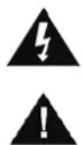
This symbol indicates the presence of dangerous voltage inside the enclosure, sufficient enough to cause electric shock.
This symbol indicates the presence of important operating and maintenance instructions for the device
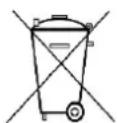
Used batteries are hazardous waste and NOT to be disposed of with the household waste! As a consumer you are legally obligated to return all batteries for environmentally responsible recycling – no matter whether or not the batteries contain harmful substances*)
Return batteries free of charge to public collection points in your community or shops selling batteries of the respective kind. Only return fully discharged batteries ^* marked Cd = cadmium, Hg = mercury, Pb = lead
- Only use mercury and cadmium-free batteries.
- Used batteries are hazardous waste and NOT to be disposed of with the household waste!!!
- Keep batteries away from children. Children might swallow batteries.
- Contact a physician immediately if a battery was swallowed.
- Check your batteries regularly to avoid battery leakage.
- Batteries shall not be exposed to excessive heat such as sunshine, fire or the like.
- CAUTION: Danger of explosion if battery is incorrectly replaced
- Replace only with the same or equivalent type

WARNING
DO NOT INGEST BATTERY, CHEMICAL BURN HAZARD
This product contains a coin/button cell battery. If the coin/button cell battery is swallowed, it can cause severe internal burns in just 2 hours and can lead to death. Keep new and used batteries away from children. If the battery compartment does not close securely, stop using the product and keep it away from children.
If you think batteries might have been swallowed or placed inside any part of the body, seek immediate medical attention.
Safety, Environmental and Setup Instructions
- Use the device in dry indoor environments only.
- Protect the device from humidity.
- This apparatus is for moderate climates areas use, not suitable for use in tropical climates countries.
- No objects filled with liquids, such as vases, shall be placed on the apparatus.
- The mains plug or an appliance coupler is used as the disconnect device, the disconnect devices shall remain readily operable.
- Connect this device to a properly installed and earthed wall outlet only. Make sure the mains voltage corresponds with the specifications on the rating plate.
- Make sure the mains cable stays dry during operation. Do not pinch or damage the mains cable in any way.
- A damaged mains cable or plug must immediately be replaced by an authorized service center.
- In case of lightning, immediately disconnect the device from the mains supply.
- Children should be supervised by parents when using the device.
- Clean the device with a dry cloth only.
- Do NOT use CLEANING AGENTS or ABRASIVE CLOTHS!
- Do not expose the device to direct sunlight or other heat sources.
• Install the device at a location with sufficient ventilation in order to prevent heat accumulation.
- Do not cover the ventilation openings!
- Install the device at a safe and vibration-free location.
- Install the device as far away as possible from computers and microwave units; otherwise radio reception may be disturbed.
- Do not open or repair the enclosure. It is not safe to do so and will void your warranty. Repairs only by authorized service/ customer center.
- No naked flame sources, such as lighted candles, should be placed on the unit.
- When you are necessary to ship the unit store it in its original package. Save the package for this purpose.
- In case of malfunction due to electrostatic discharge or fast transient (burst), remove and reconnect the power supply.
- If the unit is not using for a long period of time, disconnect it from the power supply by unplugging the power plug. This is to avoid the risk of fire.
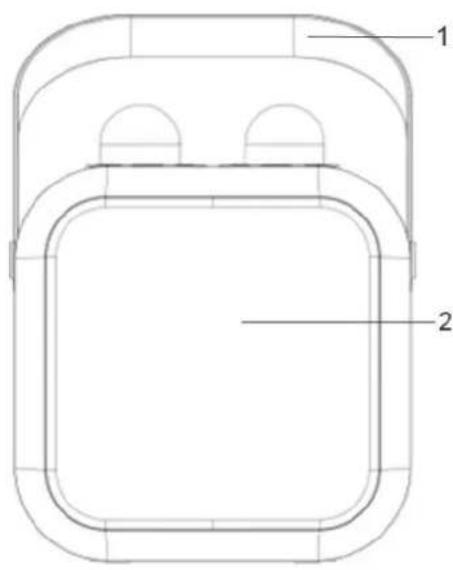
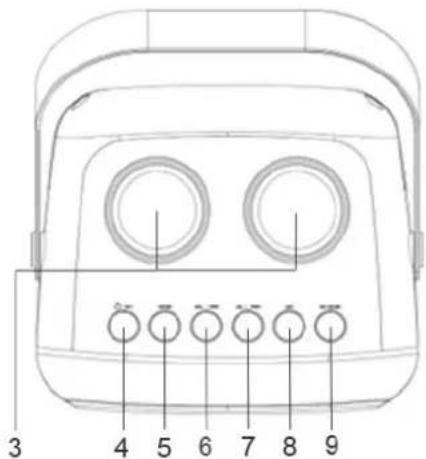
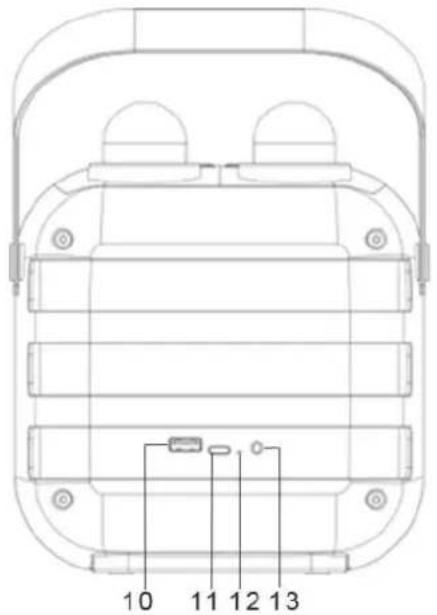
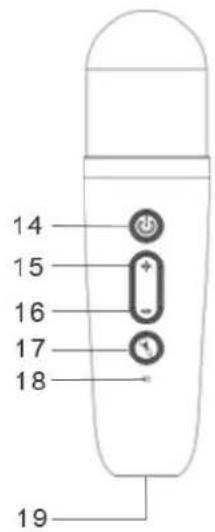
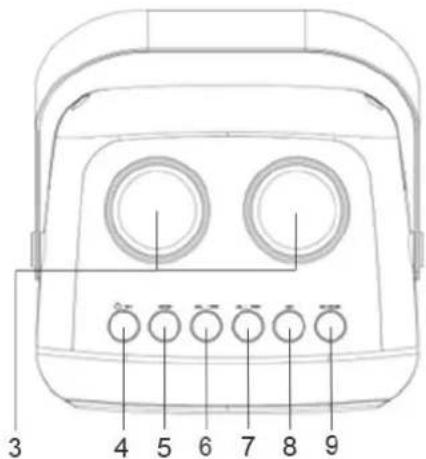
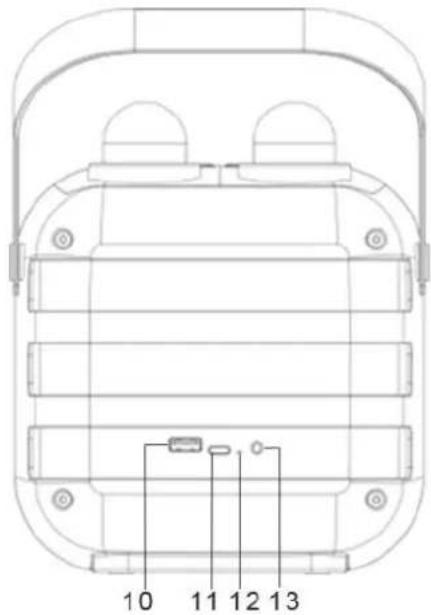
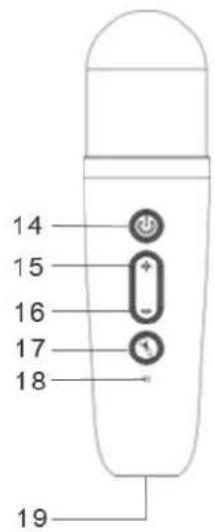
LOCATION OF CONTROLS
1 Handle
2 Speaker
3 Microphone stand
4 On/off – play/pause
5 MODE - Function
6 VOL-/Volume-Skip backward
VOL+/Volume+Skip forward
8 LED
Light effects
9 EQ / MUSIC
Sound effects
10 USB-jack for playback
11 USB-C for charging
12 LED charge & Bluetooth indicator
13 AUX IN jack
14 ⏻ Microphone & voice canceling on/off
15 + Microphone volume +
16 - Microphone volume -
17 Mic sound effects
18 LED charging indicator
19 MIC-USB-C charging jack
INSTALLATION
CONTENT OF DELIVERY
Main unit
Instruction manual
2 x Wireless Microphone
USB-C cable
CONNECTING THE USB CHARGING CABLE
Connect the plug of the USB-C charging cable to the DC IN connection of the speaker or microphone.
Plug the USB connector into a suitable USB port/adaptor (not supplied).
The LED INDICATOR at the back side will light up (red) while charging and light off when fully charged.
Note: If you do not need to use the device for a relatively long time, disconnect it from the power. To do so, unplug the USB cable.
BASIC OPERATIONS
MAIN UNIT
POWER ON/OFF & PLAY / PAUSE
Press and hold "☐" to turn on/off the speaker.
Briefly press “/” to interrupt and resume playback.
MODE
Press repeatedly "MODE" to switch between the modes - BLUETOOTH / AUX-IN. Plug in USB drive to switch to USB playback
VOLUME CONTROL AND TITLE SELECTION
Briefly press "VOL.+ / ▶▶" or "VOL.- / ◀◀" to adjust the music volume.
Press and hold "VOL.+ / ▶▶" or "VOL.- / ◀◀" to select the track forwards/backwards.
LIGHT EFFECTS
Repeatedly press "LED" to change the LED disco light effect.
Press and hold "LED" to switch LED disco light effect off/on
SOUND EFFECTS
Briefly press "EQ/MUSIC" to remove vocals from a song and keep the background music.
Press and hold "EQ/MUSIC" to choose your desired EQ - CLASSIC / ROCK / POP / JAZZ / NORMAL
MICROPHONE
MICROPHONE ON / OFF
Press and hold "to turn on/off the microphone.
Briefly press “to remove vocals from a song and keep the background music.
MICROPHONE VOLUME
Briefly press “+” or “-” to adjust the microphone volume.
Repeatedly press “💡” to switch between the microphone voice you can choose child / male / female / monster / normal.
The selected voice effect will be confirmed by voice prompt: CHILD / MALE / FEMALE / MONSTER / NORMAL - VOICE.
MICROPHONE ECHO CONTROL
Press and hold “” to enter the echo effect adjustment, and then press “+” or “-” to adjust your desired echo effect.
BLUETOOTH®
- Ensure, that the Bluetooth function is activated in your player (e.g. mobile phone). For this, refer to the operation manual of your player.
- Repeatedly press "MODE" until the unit occurs the sound - "BLUETOOTH MODE".
- Choose the Bluetooth menu in your player and register the device in your player. For this, refer to the operation manual of your player. The device "BT2024SW" will show in your player as a selection.
For the further procedure, please refer to the user manual of the playback unit. If possible, adjust the volume of the external unit to a comfortable level.
USB
- Insert a USB storage medium directly into the corresponding connection.
- The unit will occur the sound - "PLAY BY USB DRIVE".
- Playback will start automatically from the first track.
AUX-IN
- Repeatedly press "MODE" until the unit occurs the sound - "AUX MODE".
- Please connect the external device via 3.5 mm plug jack to the AUX-IN jack.
REMOVE VOCALS
- Press "EQ / MUSIC" on the speaker or "💡" on the microphone to remove vocals from a song and keep the background music.
- By using this function you can easily make karaoke tracks (i.e. remove vocals) from any song containing mixed instrumentals and vocals.
Technical changes and misprints reserved.
The current version of the manual can be downloaded from www.soundmaster.de
Copyright by Woerlein GmbH, 90556 Cadolzburg, www.soundmaster.de
Duplication only with the permission of Woerlein GmbH
PROTECTION DE L'ENVIRONNEMENT

INSTALLATIE
LEVEROMVANG
Hoofdeenheid
Gebruiksaanwijzing
*) markerade Cd = kadmium, Hg = kvicksilver, Pb = bly

WARNING
SVÄLJ INTE BATTERI, KEMISKA BRÄNNSKADOR
KOBLE TIL USB-LADEKABELEN
D 90556 Cadolzburg, Germany
Hereby, Wörlein GmbH declares that this device is in compliance with the essential requirements and other relevant provisions of Directive 2014/53/EU.
A copy of the declaration of conformity can be obtained from the above address.


- WARNING
- DO NOT INGEST BATTERY, CHEMICAL BURN HAZARD
- LOCATION OF CONTROLS
- INSTALLATION
- CONTENT OF DELIVERY
- CONNECTING THE USB CHARGING CABLE
- BASIC OPERATIONS
- MAIN UNIT
- POWER ON/OFF & PLAY / PAUSE
- MODE
- VOLUME CONTROL AND TITLE SELECTION
- LIGHT EFFECTS
- SOUND EFFECTS
- MICROPHONE
- MICROPHONE ON / OFF
- MICROPHONE VOLUME
- MICROPHONE ECHO CONTROL
- BLUETOOTH®
- USB
- AUX-IN
- REMOVE VOCALS
- PROTECTION DE L'ENVIRONNEMENT
- INSTALLATIE
- LEVEROMVANG
- SVÄLJ INTE BATTERI, KEMISKA BRÄNNSKADOR
- KOBLE TIL USB-LADEKABELEN
Brand : Soundmaster
Model : BT2024
Category : Receiver