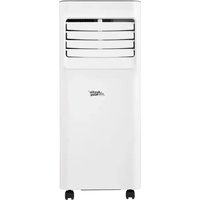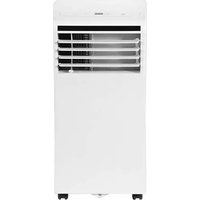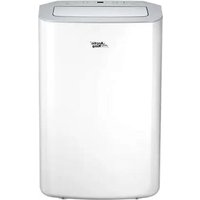
AP08SEWBA1RCM - Air Conditioning MIDEA - Free user manual and instructions
Find the device manual for free AP08SEWBA1RCM MIDEA in PDF.


User questions about AP08SEWBA1RCM MIDEA
0 question about this device. Answer the ones you know or ask your own.
Ask a new question about this device
Download the instructions for your Air Conditioning in PDF format for free! Find your manual AP08SEWBA1RCM - MIDEA and take your electronic device back in hand. On this page are published all the documents necessary for the use of your device. AP08SEWBA1RCM by MIDEA.
USER MANUAL AP08SEWBA1RCM MIDEA
Item No. 888150 SKU No. 21615022 Model NO. AP08SEWBA1RCM Item No. 8 Model NO. AP10SEWBA1RCM SKU No.88151 21615023
natural_image
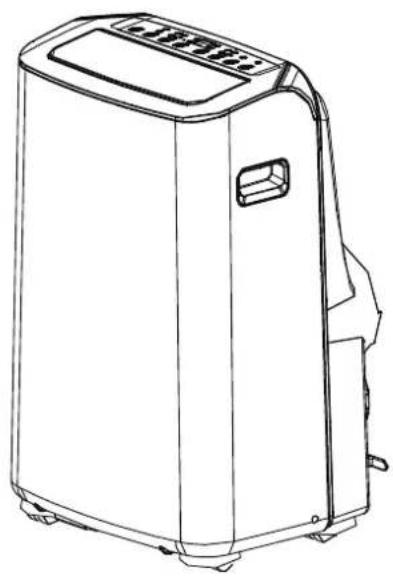
Line drawing of a portable air conditioner unit (no text or symbols)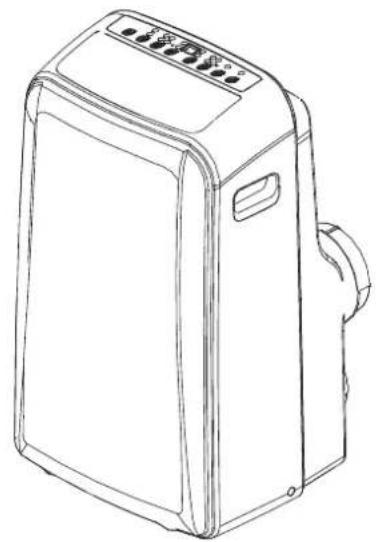
natural_image
Line drawing of a portable air conditioner unit with control panel and buttons (no text or symbols)PORTABLE AIR CONDITIONER Owner's Manual

text_image
Free 3 months extension of the original limited warranty period!" Simply text a picture of your proof of purchase to: 1-844-224-1614 "The warranty extension is for the three months immediate by showing the parcel on the product's original currently period. Individuals do not need to register the product order to get all the nights and exercises of night and clothes under the original item and maintenance.
text_image
Limited Warranty 1 year an Garantie LimitéeOur customer service staff is available to help you. For any problem with your purchase, or to receive further information about this product, please call our toll-free number.
SAVE THIS MANUAL
Keep this manual and the original sales invoice in a safe, dry place for future reference.
Safety Precautions....3
Installation....13
Operation....16
Maintenance....21
Faults Diagnosis....22
Design and Compliance Notes....23
Remote Controller Illustration....24
Air Conditioner Limited Warranty 37
text_image
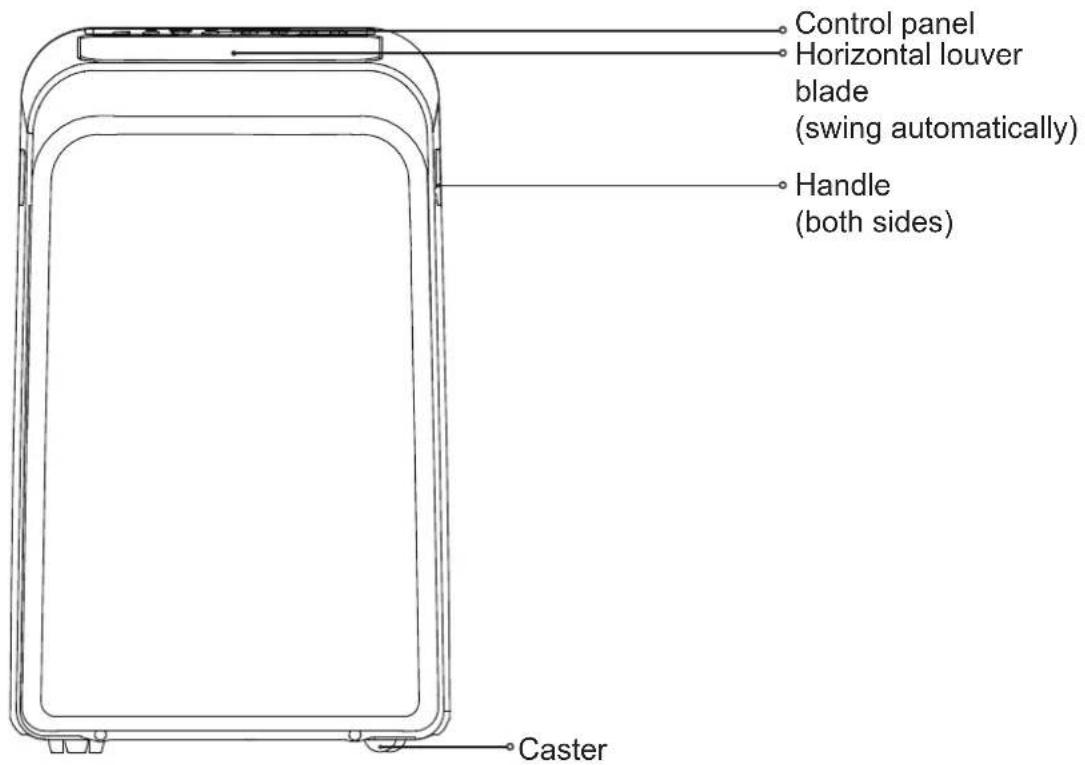
Control panel Horizontal louver blade (swing automatically) Handle (both sides) CasterFront
text_image
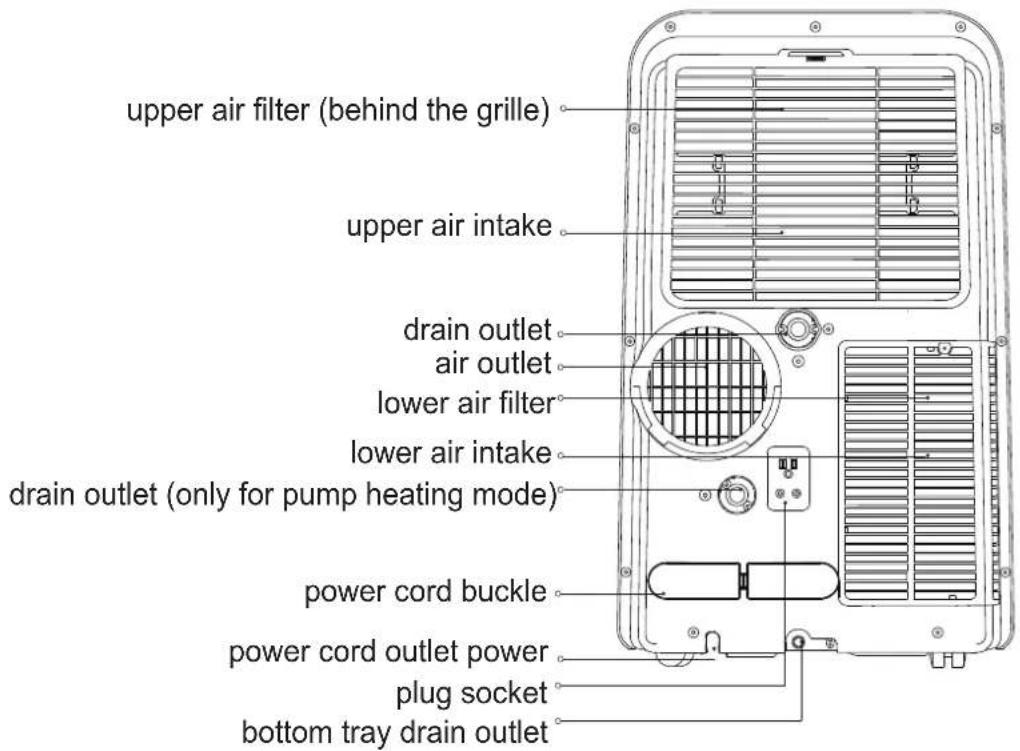
upper air filter (behind the grille) upper air intake drain outlet air outlet lower air filter lower air intake drain outlet (only for pump heating mode) power cord buckle power cord outlet power plug socket bottom tray drain outletrear
Please read through these instructions before you start the installation process. Improper installation can cause damage to the unit, your personal property, and also poses a personal safety hazard.
-Installation must be performed according to the installation instructions. Improper installation can cause water leakage, electrical shock, or fire.
-Use only the included accessories and parts, and specified tools for the installation. Using non-standard parts can cause water leakage, electrical shock, fire, and injury or property damage.
-Make sure that the outlet you are using is grounded and has the appropriate voltage. The power cord is equipped with a three-prong grounding plug to protect against shock. Voltage information can be found on the side of the unit, behind the grille.
-Install the unit on a flat and sturdy surface. Failure to do so could result in damage or excessive noise and vibration.
-The unit must be kept free from obstruction to ensure proper function and to mitigate safety hazards.
-DO NOT modify the length of the power cord or use an extension cord to power the unit.
-DO NOT share a single outlet with other electrical appliances. Improper power supply can cause fire or electrical shock.
-DO NOT install your air conditioner in a wet room such as a bathroom or laundry room. Excessive exposure to water can cause electrical components to short circuit.
-DO NOT install the unit in a location that may be exposed to combustible gas, as this could cause fire.
-The unit has wheels to facilitate moving. Make sure not to use the wheels on thick carpet or to roll over objects, as these could cause tipping.
-DO NOT operate a unit that has been dropped or damaged.
-Only use the included accessories and specified parts for installation. Using nonstandard parts can cause water leakage, electrical shock, fire, and injury or property damage.
-The unit must be kept free from obstruction to ensure proper function.
-DO NOT allow children to play with the air conditioner. Children must be supervised around the unit at all times.
-If the air conditioner is knocked over during use, turn off the unit and unplug it from the main power supply immediately. Visually inspect the unit to ensure there is no damage. If you suspect the unit has been damaged, contact a technician or customer service for assistance.
-In a thunderstorm, the power must be cut off to avoid damage to the machine due to lightning.
-This appliance can be used by children aged from 8 years and above and persons with reduced physical, sensory, or mental capabilities or lack of experience and knowledge if they have been given supervision or instruction concerning the use of the appliance in a safe way and understand the hazards involved. Children shall not play with the appliance. Cleaning and user maintenance shall not be made by children without supervision applicable for European countries.
-This appliance is not intended for use by persons (including children) with reduced physical, sensory or mental capabilities or lack of experience and knowledge, unless they have been given supervision or instruction concerning us these of the appliance by a person responsible for their safety applicable for other countries, except European countries.
-Children should be supervised to ensure that they do not play with the appliance.
-If the supply cord is damaged, it must be replaced by the manufacturer, its service agent, or similarly qualified persons in order to avoid a hazard.
-Prior to cleaning or any other maintenance, the appliance must be disconnected from the supply mains.
-Do not install the appliance in a location that may be exposed to combustible gas.
-If combustible gas accumulates around the unit, it may cause fire.
-Do not run the cord under carpeting. Do not cover the cord with throw rugs, runners, or similar coverings.
-Do not route the cord under furniture or appliances. Arrange the cord away from traffic areas and where it will not be tripped over.
-Do not operate the unit with a damaged cord or plug. Discard the unit or return it to an authorized service facility for examination and/or repair.
-To reduce the risk of fire or electric shock, do not use this fan with any solid-state speed control device.
-The appliance shall be installed in accordance with the national wiring regulations.
-Contact the authorised service technician for repair or maintenance of this unit.
-Contact the authorized installer to install this unit.
-If the function description in the OPERATOR'S MANUAL and "Remote Controller Illustration" is significantly different, the description in the OPERATOR'S MANUAL shall prevail.
-Do not operate your air conditioner in a wet room such as a bathroom or laundry room.

WARNING (for using R32 refrigerant only)
- Do not use means to accelerate the defrosting process or to clean, other than those recommended by the manufacturer.
- The appliance shall be stored in a room without continuously operating ignition sources (for example: open flames, an operating gas appliance) and ignition sourceor (for example: an operating electric heater) close to the appliance. The appliance shall be stored in a room without continuously operating ignition sources (for example: open flames, an operating gas appliance or an operating electric heater).
- Do not pierce or burn.
- Be aware that the refrigerants may not contain an odour.
- Compliance with national gas regulations shall be observed.
- Keep ventilation openings clear of obstruction.
- The appliance shall be stored so as to prevent mechanical damage from occurring.
- A warning that the appliance shall be stored in a well-ventilated area where the room size corresponds to the room area as specified for operation.
- Any person who is involved with working on or breaking into a refrigerant circuit should hold a current valid certificate from an industry-accredited assessment authority, which authorises their competence to handle refrigerants safely in accordance with an industry recognised assessment specification.
- Servicing shall only be performed as recommended by the equipment manufacturer. Maintenance and repair requiring the assistance of other skilled personnel shall be carried out under the supervision of the person competent in the use of flammable refrigerants.
- DO NOT modify the length of the power cord or use an extension cord to power the unit. DO NOT share a single outlet with other electrical appliances. Improper power supply can cause fire or electrical shock.
- Please follow the instruction carefully to handle, install, clear, service the air conditioner to avoid any damage or hazard. Flammable Refrigerant R32 is used within air conditioner. When maintaining or disposing the air conditioner, the refrigerant (R32) shall be recovered properly, shall not discharge to air directly.
- No any open fire or device like switch which may generate spark/arcing shall be around air conditioner to avoid causing ignition of the flammable refrigerant used. Please follow the instruction carefully to store or maintain the air conditioner to prevent mechanical damage from occurring.
- Flammable refrigerant -R32 is used in air conditioner. Please follow the instruction carefully to avoid any hazard. For specific information on the type of gas and the amount, please refer to the relevant label on the unit itself.
natural_image
Warning sign depicting a flame inside a triangle (no text or symbols)Caution: Risk of fire/ flammable materials (Required for R32 units only)

natural_image
Simple line icon of an open book (no text or symbols)IMPORTANT NOTE: Read this manual carefully before installing or operating your new air conditioning unit. Make sure to save this manual for future reference.
Explanation of symbols displayed on the unit(For the unit adopts R32 Refrigerant only):
 | WARNING | This symbol shows that this appliance used a flammable refrigerant. If the refrigerant is leaked and exposed to an external ignition source, there is a risk of fire. |
 | CAUTION | This symbol shows that the operation manual should be read carefully. |
 | CAUTION | This symbol shows that a service personnel should be handling this equipment with reference to the installation manual. |
 | CAUTION | This symbol shows that information is available such as the operating manual or installation manual. |

WARNINGS (for using R32 refrigerant only)
- Transport of equipment containing flammable refrigerants. See transport regulations.
- Marking of equipment using signs. See local regulations.
- Disposal of equipment using flammable refrigerants. See national regulations.
- Storage of equipment/appliances. The storage of equipment should be in accordance with the manufacturer's instructions.
- Storage of packed (unsold) equipment. Storage package protection should be constructed such that mechanical damage to the equipment inside the package will not cause a leak of the refrigerant charge. The maximum number of pieces of equipment permitted to be stored together will be determined by local regulations.
• Information on servicing.
1) Checks to the area Prior to beginning work on systems containing flammable refrigerants, safety checks are necessary to ensure that the risk of ignition is minimised. For repair to the refrigerating system, the following precautions shall be complied with prior to conducting work on the system.
2) Work procedure Work shall be undertaken under a controlled procedure so as to minimise the risk of a flammable gas or vapour being present while the work is being performed. 3) General work area
All maintenance staff and others working in the local area shall be instructed on the nature of work being carried out. Work in confined spaces shall be avoided. The area around the workspace shall be sectioned off. Ensure that the conditions within the area have been made safe by control of flammable material.
4) Checking for presence of refrigerant The area shall be checked with an appropriate refrigerant detector prior to and during work, to ensure the technician is aware of potentially flammable atmospheres. Ensure that the leak detection equipment being used is suitable for use with flammable refrigerants, i.e. non-sparking, adequately sealed or intrinsically safe. 5) Presence of fire extinguisher
If any hot work is to be conducted on the refrigeration equipment or any associated parts, appropriate fire extinguishing equipment shall be available to hand. Have a dry powder or CO2 fire extinguisher adjacent to the charging area.

WARNINGS (for using R32 refrigerant only)
6) No ignition sources
No person carrying out work in relation to a refrigeration system which involves exposing any pipe work that contains or has contained flammable refrigerant shall use any sources of ignition in such a manner that it may lead to the risk of fire or explosion. All possible ignition sources, including cigarette smoking, should be kept sufficiently far away from the site of installation, repairing, removing and disposal, during which flammable refrigerant can possibly be released to the surrounding space. Prior to work taking place, the area around the equipment is to be surveyed to make sure that there are no flammable hazards or ignition risks. No Smoking signs shall be displayed.
7) Ventilated area
Ensure that the area is in the open or that it is adequately ventilated before breaking into the system or conducting any hot work. A degree of ventilation shall continue during the period that the work is carried out. The ventilation should safely disperse any released refrigerant and preferably expel it externally into the atmosphere.
8) Checks to the refrigeration equipment
Where electrical components are being chaged, they shall be fit for the purpose and to the correct specification. At all times the manufactures's maintenance and service guidelines shall be followed. If in doubt consult the manufacturer's technical department for assistance.
The following checks shall be applied to installations using flammable refrigerants:
The charge size is in accordance with the room size within which the refrigerant containing parts are installed;
The ventilation machinery and outlets are operating adequately and are not obstructed; If an indirect refrigerating circuit is being used, the secondary circuit shall be checked for the presence of refrigerant;
Marking to the equipment continues to be visible and legible. Markings and signs that are illegible shall be corrected;
Refrigeration pipe or components are installed in a position where they are unlikely to be exposed to any substance which may corrode refrigerant containing components, unless the components are constructed of materials which are inherently resistant to being corroded or are suitably protected against being so corroded.
9) Checks to electrical devices
Repair and maintenance to electrical components shall include initial safety checks and component inspection procedures. If a fault exists that could compromise safety, then no electrical supply shall be connected to the circuit until it is satisfactorily dealt with. If the fault cannot be corrected immediately but it is necessary to continue operation, an adequate temporary solution shall be used. This shall be reported to the owner of the equipment so all parties are advised.
Initial safety checks shall include:
That capacitors are discharged: this shall be done in a safe manner to avoid possibility of sparking;
That there no live electrical components and wiring are exposed while charging, recovering or purging the system;
That there is continuity of earth bonding.
• Repairs to sealed components
1) During repairs to sealed components, all electrical supplies shall be disconnected from the equipment being worked upon prior to any removal of sealed covers, etc. If it is absolutely necessary to have an electrical supply to equipment during servicing, then a permanently operating form of leak detection shall be located at the most critical point to warn of a potentially hazardous situation.

WARNINGS (for using R32 refrigerant only)
2) Particular attention shall be paid to the following to ensure that by working on electrical components, the casing is not altered in such a way that the level of protection is affected.
This shall include damage to cables, excessive number of connections, terminals not made to original specification, damage to seals, incorrect fitting of glands, etc. Ensure that apparatus is mounted securely.
Ensure that seals or sealing materials have not degraded such that they no longer serve the purpose of preventing the ingress of flammable atmospheres. Replacement parts shall be in accordance with the manufacturer's specifications.
NOTE: The use of silicon sealant may inhibit the effectiveness of some types of leak detection equipment. Intrinsically safe components do not have to be isolated prior to working on them.
- Repair to intrinsically safe components
Do not apply any permanent inductive or capacitance loads to the circuit without ensuring that this will not exceed the permissible voltage and current permitted for the equipment in use.
Intrinsically safe components are the only types that can be worked on while live in the presence of a flammable atmosphere. The test apparatus shall be at the correct rating. Replace components only with parts specified by the manufacturer. Other parts may result in the ignition of refrigerant in the atmosphere from a leak.
- Cabling
Check that cabling will not be subject to wear, corrosion, excessive pressure, vibration, sharp edges or any other adverse environmental effects. The check shall also take into account the effects of aging or continual vibration from sources such as compressors or fans.
• Detection of flammable refrigerants
Under no circumstances shall potential sources of ignition be used in the searching for or detection of refrigerant leaks. A halide torch (or any other detector using a naked flame) shall not be used.
- Leak detection methods
The following leak detection methods are deemed acceptable for systems containing flammable refrigerants. Electronic leak detectors shall be used to detect flammable refrigerants, but the sensitivity may not be adequate, or may need re-calibration. (Detection equipment shall be calibrated in a refrigerant-free area.) Ensure that the detector is not a potential source of ignition and is suitable for the refrigerant used. Leak detection equipment shall be set at a percentage of the LFL of the refrigerant and shall be calibrated to the refrigerant employed and the appropriate percentage of gas (25 % maximum) is confirmed. Leak detection fluids are suitable for use with most refrigerants but the use of detergents containing chlorine shall be avoided as the chlorine may react with the refrigerant and corrode the copper pipe-work. If a leak is suspected, all naked flames shall be removed/ extinguished. If a leakage of refrigerant is found which requires brazing, all of the refrigerant shall be recovered from the system, or isolated (by means of shut off valves) in a part of the system remote from the leak. Oxygen free nitrogen (OFN) shall then be purged through the system both before and during the brazing process.

WARNINGS (for using R32 refrigerant only)
Removal and evacuation
When breaking into the refrigerant circuit to make repairs or for any other purpose conventional procedures shall be used. However, it is important that best practice is followed since flammability is a consideration. Opening of the refrigeration systems shall not be done by brazing.
The following procedure shall be adhered to:
Remove refrigerant;
Purge the circuit with inert gas;
Evacuate;
Purge again with inert gas;
Open the circuit by cutting or brazing.
The refrigerant charge shall be recovered into the correct recovery cylinders. The system shall be flushed with OFN to render the unit safe. This process may need to be repeated several times. Compressed air or oxygen shall not be used for this task. Flushing shall be achieved by breaking the vacuum in the system with OFN and continuing to fill until the working pressure is achieved, then venting to atmosphere, and finally pulling down to a vacuum. This process shall be repeated until no refrigerant is within the system. When the final OFN charge is used, the system shall be vented down to atmospheric pressure to enable work to take place. This operation is absolutely vital if brazing operations on the pipe-work are to take place.
Ensure that the outlet for the vacuum pump is not close to any ignition sources and there is ventilation available.
- Charging procedures
In addition to conventional charging procedures, the following requirements shall be followed. Ensure that contamination of different refrigerants does not occur when using charging equipment. Hoses or lines shall be as short as possible to minimise the amount of refrigerant contained in them.
Cylinders shall be kept upright.
Ensure that the refrigeration system is earthed prior to charging the system with refrigerant. Label the system when charging is complete (if not already).
Extreme care shall be taken not to overfill the refrigeration system.
Prior to recharging the system it shall be pressure tested with OFN. The system shall be leak tested on completion of charging but prior to commissioning. A follow up leak test shall be carried out prior to leaving the site.
- Decommissioning
Before carrying out this procedure, it is essential that the technician is completely familiar with the equipment and all its detail. It is recommended good practice that all refrigerants are recovered safely. Prior to the task being carried out, an oil and refrigerant sample shall be taken in case analysis is required prior to re-use of reclaimed refrigerant. It is essential that electrical power is available before the task is commenced.
a) Become familiar with the equipment and its operation.
b) Isolate system electrically.
c) Before attempting the procedure ensure that:
Mechanical handling equipment is available, if required, for handling refrigerant cylinders;
All personal protective equipment is available and being used correctly;
The recovery process is supervised at all times by a competent person;
Recovery equipment and cylinders conform to the appropriate standards.

WARNINGS (for using R32 refrigerant only)
d) Pump down refrigerant system, if possible.
e) If a vacuum is not possible, make a manifold so that refrigerant can be removed from various parts of the system.
f) Make sure that cylinder is situated on the scales before recovery takes place.
g) Start the recovery machine and operate in accordance with manufacturer's instructions.
h) Do not overfill cylinders. (No more than 80 % volume liquid charge).
i) Do not exceed the maximum working pressure of the cylinder, even temporarily.
j) When the cylinders have been filled correctly and the process completed, make sure that the cylinders and the equipment are removed from site promptly and all isolation valves on the equipment are closed off.
iless
it has been cleaned and checked.
- Labelling
Equipment shall be labelled stating that it has been de-commissioned and emptied of refrigerant. The label shall be dated and signed. Ensure that there are labels on the equipment stating the equipment contains flammable refrigerant.
- Recovery
When removing refrigerant from a system, either for servicing or decommissioning, it is recommended good practice that all refrigerants are removed safely.
When transferring refrigerant into cylinders, ensure that only appropriate refrigerant recovery cylinders are employed. Ensure that the correct number of cylinders for holding the total system charge is available. All cylinders to be used are designated for the recovered refrigerant and labelled for that refrigerant (i.e. special cylinders for the recovery of refrigerant). Cylinders shall be complete with pressure relief valve and associated shut-off valves in good working order. Empty recovery cylinders are evacuated and, if possible, cooled before recovery occurs.
The recovery equipment shall be in good working order with a set of instructions concerning the equipment that is at hand and shall be suitable for the recovery of flammable refrigerants. In addition, a set of calibrated weighing scales shall be available and in good working order. Hoses shall be complete with leak-free disconnect couplings and in good condition. Before using the recovery machine, check that it is in satisfactory working order, has been properly maintained and that any associated electrical components are sealed to prevent ignition in the event of a refrigerant release. Consult manufacturer if in doubt.
The recovered refrigerant shall be returned to the refrigerant supplier in the correct recovery cylinder, and the relevant Waste Transfer Note arranged. Do not mix refrigerants in recovery units and especially not in cylinders. If compressors or compressor oils are to be removed, ensure that they have been evacuated to an acceptable level to make certain that flammable refrigerant does not remain within the lubricant. The evacuation process shall be carried out prior to returning the compressor to the suppliers. Only electric heating to the compressor body shall be employed to accelerate this process. When oil is drained from a system, it shall be carried out safely.
Design Notice
In order to ensure the optimal performance of our products, the design specifications of the unit and remote control are subject to change without prior notice.
Ambient Temperature Range For Unit Operating
| MODE | Temperature Range |
| Cool | 17-35°C (62-95°F) |
| Dry | 13-35°C (55-95°F) |
Exhaust Hose Installation
The exhaust hose and adaptor must be installed or removed in accordance with the usage mode. For COOL,HEAT(heat pump type) or AUTO mode must be installed exhaust hose. For FAN, DRY or HEAT (electrical heat type) mode must be removed exhaust hose.
Choosing The Right Location
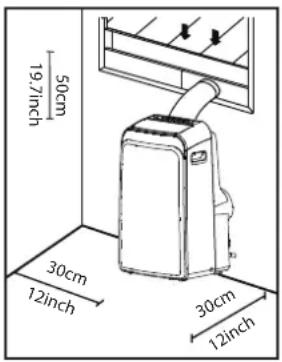
text_image
50cm 19.7 inch 30cm 12 inch 30cm 12 inchYour installation location should meet the following requirements:
-Make sure that you install your unit on an even surface to minimize noise and vibration.
-The unit must be installed near a grounded plug, and the Collection Tray Drain (found on the back of the unit) must be accessible.
-The unit should be located at least 30cm (12") from the nearest wall to ensure proper air conditioning. The horizontal louver blade should be at least 50cm
(19.7") away from obstacles.
-DO NOT cover the Intakes, Outlets or Remote Signal Receptor of the unit, as this could cause damage to the unit.
Recommend Installation
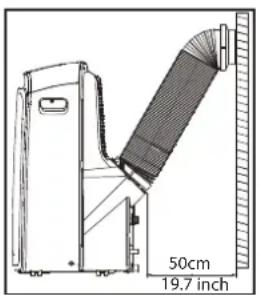
natural_image
Technical line drawing of a mechanical device with a 50cm height dimension and 19.7 inch label (no readable text or symbols beyond measurement annotations)Energy Rating Information
The energy rating and noise information for this unit is based on the standard installation using an un-extended exhaust duct (Diameter:150mm, Length:1.5m) without window slider adaptor or wall exhaust adaptor A.
The unit with 3 meters extended exhaust duct is running by using 2 exhaust ducts (Diameter:150mm, Length:1.5m + Diameter: 130mm, Length: 1.5m). The Energy rating and noise information for unit with 3 meters extended exhaust duct is not assessed.(For some models)
NOTE:
We recommend that operating the unit at room temperature below 35^ C. Since there is a risk that the unit with 3 meters extended exhaust duct would not work at room temperature above 35^ C under some extreme conditions, such as the lower air intake be blocked for 50%.
How to Stay Cool with a New Portable Air Conditioner(For the models comply with the requirements of Department Of Energy in US)
Because of a new federal test procedure for Portable Air Conditioners, you may notice that the cooling capacity claims on portable air conditioner packaging are significantly lower than that of models produced prior to 2017. This is due to changes in the test procedure, not to the portable air conditioners themselves.
What should I look for first when purchasing a portable air conditioner?
The right air conditioner helps you cool a room efficiently. An undersized unit won't cool adequately while one that's too large will not remove enough humidity, leaving the air feeling damp. To find the proper air conditioner, determine the square footage of the room you want to cool by multiplying the room length by its width. You also need to know the air conditioner's BTU (British Thermal Unit) rating, which indicates the amount of heat it can remove from a room. A higher number means more cooling power for a larger room. (Be sure you are comparing only newer models to each other- older models may appear to have a higher capacity, but are actually the same). Be sure to “size up” if your portable air conditioner will be placed in a very sunny room, in a kitchen, or in a room with high ceilings. After you've found the right cooling capacity or your room, you can look at other features.
Why is the cooling capacity lower on newer models than on older units?
Federal regulations require manufacturers to calculate cooling capacity based on a specific test procedure, which was changed just this year. Models manufactured before 2017 were tested under a different procedure and cooling capacity is measured differently than in prior years' models. So, while the BTUs may be lower, the actual cooling capacity of the air conditioners has not changed.
What is SACC?
SACC is the representative value of Seasonally Adjusted Cooling Capacity, in Btu/h, as determined in accordance with the DOE test procedure at title 10 Code of Federal Regulations (CFR) 430, subpart B, appendix CC and applicable sampling plans.
Tools Needed
-Medium Philips screwdriver; -Tape measure or ruler; -Knife or scissors; -Saw (optional to shorten the window adaptor for narrow windows).
Accessories
Your window installation kit fits windows from 67.5-123 cm(26.5-48") and can be shortened for smaller windows.
| Part | Description | Quantity |
| Unit adaptor | 1 pc | |
| Exhaust hose | 1 pc | |
| Window slider adaptor | 1 pc | |
 | Bolt | 2 pc |
| Window slider A | 1 pc | |
| Window slider B and C | 1 pc | |
| Foam seal A (adhesive) | 4 pc | |
| Foam seal B (adhesive) | 2 pc | |
| Foam seal C (non-adhesive) | 2 pc | |
| Security bracket and 2 screws | 1 set | |
 | Drain hose | 1 pc |
| Drain hose adaptor(only for heat pump mode) | 1 pc | |
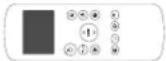  | Remote controller and battery (for remote control models only) | 1 set |
Window Installation Kit Step 1 : Preparing the Exhaust Hose Assembly
Press the exhaust hose into the window slider adaptor and unit adaptor, and clamp automatically using the elastic buckles of the adaptors.
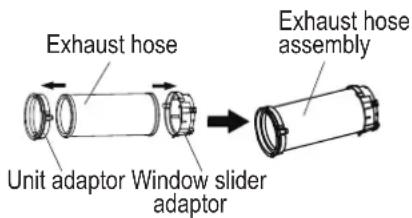
text_image
Exhaust hose Unit adaptor Window slider adaptor Exhaust hose assemblyStep 2: Installing the Exhaust Hose Assembly to the Unit
Insert the unit adaptor of the exhaust hose assembly into the lower groove of the air outlet of the unit while the adaptor hook is aligned with the hole seat of the air outlet, and slide down the exhaust hose assembly along the arrow direction for installation.
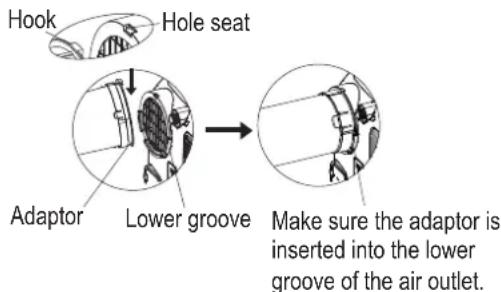
text_image
Hook Hole seat Adaptor Lower groove Make sure the adaptor is inserted into the lower groove of the air outlet.Step 3: Preparing the Adjustable Window Slider
- Depending on the size of your window, adjust the size of the window slider.
- If the length of the window requires two window sliders, use the bolt to fasten the window sliders once they are adjusted to the proper length.
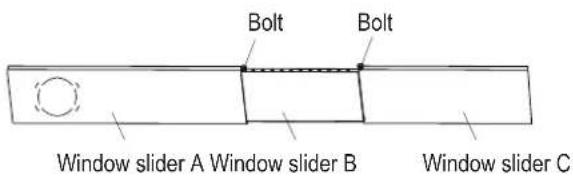
text_image
Bolt Bolt Window slider A Window slider B Window slider CNote: Once the exhaust eose assembly and adjustable window slider are prepared, choose from one of the following installation methods.
Type 1: Hung Window Installation
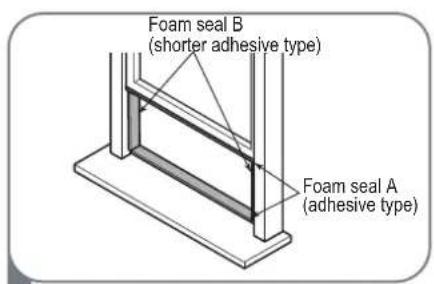
text_image
Foam seal A (adhesive type) Foam seal B (shorter adhesive type)1 Cut the adhesive foam seal A and B strips to the proper lengths and attach them to the window sash and frame as shown.
text_image
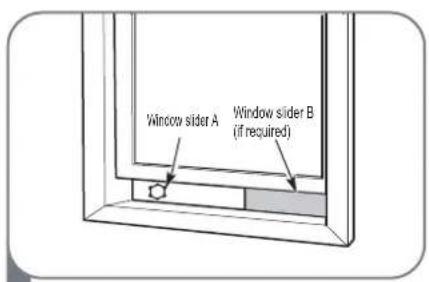
Window slider A Window slider B (if required)2 Insert the window slider assembly into the window opening.
text_image
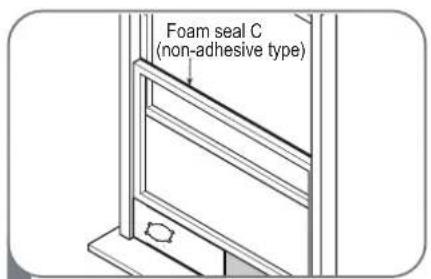
Foam seal C (non-adhesive type)3 Cut the non-adhesive foam seal C strip to match the width of the window. Insert the seal between the glass and the window frame to prevent air and insects from getting into the room.
text_image
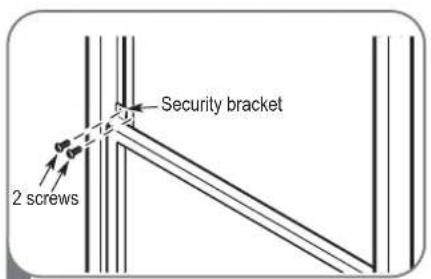
Security bracket 2 screws4 If desired, install the security bracket with 2 screws as shown.
natural_image
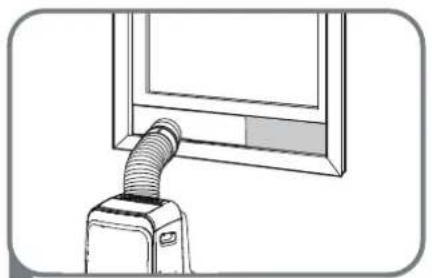
Line drawing of a vacuum cleaner emitting a hose near a window (no text or symbols)5 Insert the window slider adaptor into the hole of the window slider.
Type 2: Sliding Window Installation
text_image
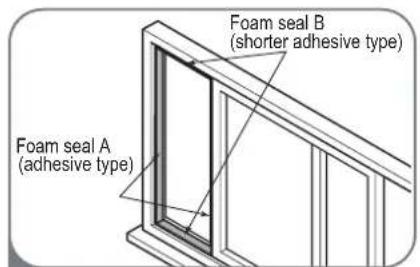
Foam seal A (adhesive type) Foam seal B (shorter adhesive type)1 Cut the adhesive foam seal A and B strips to the proper lengths and attach them to the window sash and frame as shown.
text_image
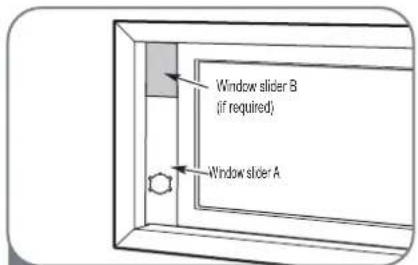
Window slider B (if required) Window slider A2 Insert the window slider assembly into the window opening.
text_image
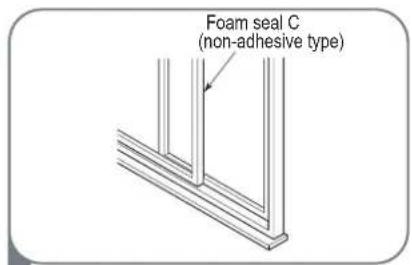
Foam seal C (non-adhesive type)3 Cut the non-adhesive foam seal C strip to match the window height. Insert the foam seal between the glass and the window frame to prevent air and insects from getting into the room.
text_image
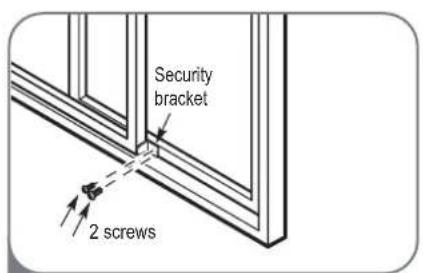
Security bracket 2 screws4 If desired, install the security bracket with 2 screws as shown.
natural_image
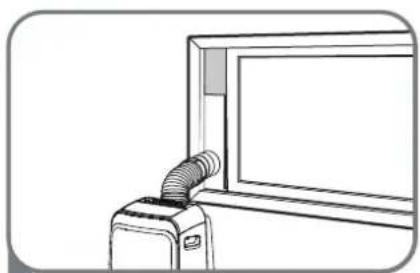
Line drawing of a device with a coiled cable or hose inserted into a window (no text or symbols)5 Insert the window slider adaptor into the hole of the window slider.
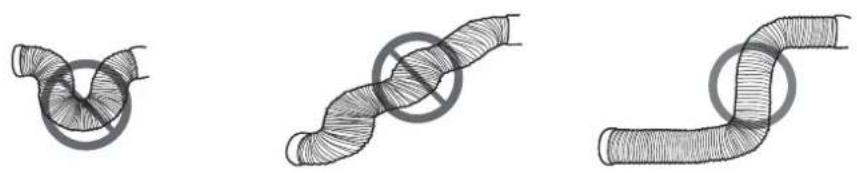
Note: To ensure proper function, DO NOT overextend or bend the hose. Make sure that there is no obstacle around the air outlet of the exhaust hose (in the range of 500 mm) to ensure that the exhaust system works properly. All the illustrations in this manual are for explanation purposes only. Your air conditioner may be slightly different. The actual shape shall prevail.
text_image
MODE CONSTANT (TAX) (Pens. 16) CONSTANT (Pens. 16) CONSTANT (Pens. 16) CONSTANT (Pens. 16) CONSTANT (Pens. 16) CONSTANT (Pens. 16)
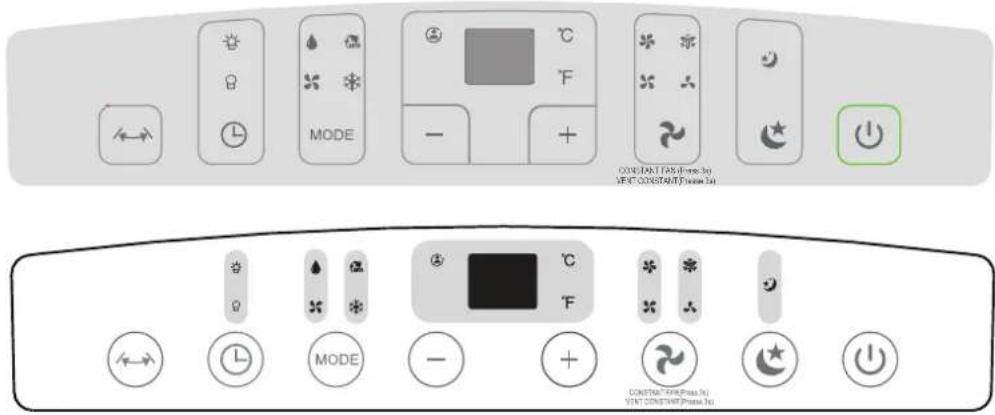
Swing Button (Optional)
Used to initiate the auto-swing feature(for models with the auto swing feature only). When the unit is ON, pressing the SWING button can stop the louver at the desired angle.

Timer Button
Used to initiate the AUTO ON start time and AUTO OFF stop time program, in conjunction with the + & - buttons. The timer ON/OFF indicator light illuminates under the timer ON/OFF settings.

Mode Button
Selects the appropriate operating mode. Whe pressing the button, a mode is selected in a sequence that goes from AUTO, COOL, DRY, FAN, and HEAT (for models without cooling only). The mode indicator light illuminates under the different mode settings.

Sleep/Eco Button
Used to initiate the SLEEP/ECO function.
Up (+) and Down (-) Buttons
Used to adjust (increasing/decreasing) temperature settings in 1^ C/ 1^ F increments in a range of 17^ C/ 62^ F to 30^ C/ 86^ F or the TIMER setting in a range of 0\~24 hrs.
NOTE: The control is capable of displaying temperature in degrees Fahrenheit or degrees Celsius. To convert from one to the other, press and hold the Up and Down buttons at the same time for 3 seconds.

Fan/Ion Button
Fan/Constant fan(On some models) button Control the fan speed. Press to select the fan speed in four steps-LOW, MED, HIGH and AUTO. The fan speed indicator light illuminates under different fan settings. When select AUTO fan speed, all the fan indicator lights turn dark. On some models, when select AUTO fan speed, all the fan indicator lights illuminante.
NOTE: In cooling or Dry mode, press the button for 3 seconds to turn on or off the constant fan function. When the function is turned on, the constant fan light will illuminate, identifying the fan continuous run for cooling. When the function is turned off, the constant fan light will go out, identifying the fan cycle run with compressor stop.

Power Button
Power switch on/off.
LED Display
Shows the set temperature in °C or °F and the "Auto timer" settings.
While on DRY and FAN modes, it shows the room temperature.
Shows error and protection codes :
E1-Room temperature sensor error.
E2-Evaporator temperature sensor error.
E3-Condenser temperature sensor error (on some models).
E4-Display panel communication error.
P1-Bottom tray is full-Connect the drain hose and drain the collected water away. If the protection repeats, call for service.
Note: When one of the above malfunctions occurs, turn off the unit and check for any obstructions. Restart the unit and if the malfunction is still present, turn off the unit and unplug the power cord. Contact the manufacturer or its service agents, or a similar qualified person for service.
Operation Instructions
COOL Operation
-Press the MODE button until the COOL indicator light comes on.
-Press the ADJUST buttons "+" or "-" to select your desired room temperature. The temperature can be set within a range of 17°C\~30°C/62°F\~86°F.
-Press the FAN SPEED button to choose the fan speed.
HEAT operation(for models with heat only)
-Press the MODE button until the HEAT indicator light comes on.
-Press the ADJUST buttons "+" or "-" to select your desired room temperature. The temperature can be set within a range of 17°C\~30°C/62°F\~86°F.
-Press the FAN SPEED button to choose the fan speed. For some models, the fan speed can not be adjusted under HEAT mode.
DRY Operation
-Press the MODE button until the DRY indicator light comes on.
-Under this mode, you cannot select a fan speed or adjust the temperature. The fan motor operates at LOW speed.
-Keep windows and doors closed for best dehumidifying results.
-Do not put the duct to the window.
AUTO Operation
-When setting the air conditioner in AUTO mode, it will automatically select cooling, heating (for models without cooling only), or fan only operation depending on the selected temperature and room temperature.
-The air conditioner automatically will control the room temperature a round the temperature point that you set.
-The fan speed cannot be selected under AUTO mode.
FAN Operation
-Press the MODE button until the FAN indicator light comes on.
-Press the FAN SPEED button to choose the fan speed. The temperature cannot be adjusted in the FAN SPEED mode.
-Do not put the duct to the window.
TIMER Operation
-When the unit is on, pressing the TIMER button initiates the "Auto-off stop" program and the TIMER OFF indicator light illuminates. Press the UP or DOWN button to select the desired time. Press the TIMER button again after 5 secondsto initiate the "Auto-on start" program. And the TIMER ON indicator light illuminates. Press the UP or DOWN button to select the desired "Auto-on start" time.
-When the unit is off, press the TIMER button to initiate the "Auto-on start" program, press it again after 5 seconds to initiate the "Auto-off stop" program.
-Press or hold the UP or DOWN button to change the Auto time by 0.5-hour increments, up to 10 hours, then at 1-hour increments up to 24 hours. The control will count down the remaining time until start.
-The system will automatically revert back to display the previous temperature setting if there is no operation in a 5-second period.
-Turn the unit ON or OFF at any time or reset the timer to 0.0 to cancel the "Auto Start/Stop timer" program.
-If a the malfunction occurs, the Auto "Start/Stop timer" program will also be cancelled.
SLEEP/ECO Operation
-Press this button, to increase (cooling) or decrease (heating) the selected temperature by 1^ C/ 1^ F 30 minutes. The temperature will then increase (cooling) or decrease (heating) by another 1^ C/ 1^ F after an additional 30 minutes. This new temperature will be maintained for 7 hours before it returns to the originally selected temperature. This ends the "Sleep/Eco" mode and the unit will continue to operate as originally programmed.
NOTE: This feature is unavailable under FAN or DRY mode.
Other Features
FOLLOW ME/TEMP SENSING Feature
NOTE: This feature can be activated from the remote controller ONLY. The remote controller serves as a remote thermostat allowing for precise temperature control at its location. To activate the "Follow Me/Temp Sensing" feature, point the remote controller towards the unit and press the "Follow Me/Temp Sensing" button. The remote controller displays the actual temperature at its location. The remote controller will send this signal to the air conditioner at 3-minute intervals until the "Follow Me/Temp Sensing" button is pressed again. If the unit does not receive the "Follow Me/Temp Sensing" signal within a 7-minute interval, the unit will beep to indicate the end of the "Follow Me/Temp Sensing" mode.
AUTO-RESTART
If the unit breaks off unexpectedly due to power outage, it will automatically restart with the previous function settings when the power resumes.
WAIT 3 MINUTES BEFORE RESUMING OPERATION
After the unit has stopped, do not restart in the first 3 minutes. This is to protect the unit. Operation will automatically resume after 3 minutes.
AIR FLOW DIRECTION ADJUSTMENT
The louver can be adjusted automatically. Adjust the air flow direction automatically (NOTE: The louver on some models can be only adjusted manually):
-When the power is ON, the louver opens fully.
-Press the SWING button on the panel or remote controller to initiate the Auto swing feature. The louver will swing up and down automatically.
-Please do not adjust the louver manually.
Water Drainage
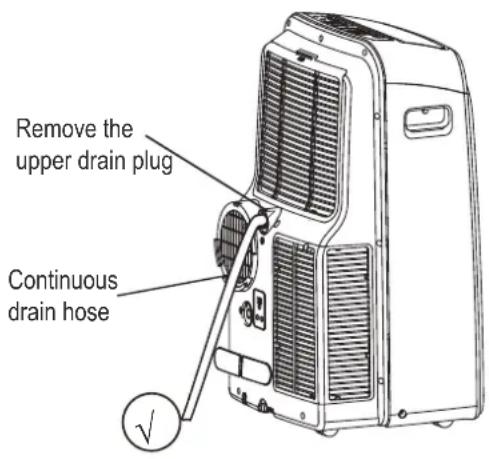
-During dehumidifying modes, remove the upper drain plug from the back of the unit and install the drain connector (5/8" universal female mender) with a 3/4" hose (locally purchased). For models without a drain connector, just attach the drain hose to the hole. Place the open end of the hose directly over the drain area in your basement floor.
text_image
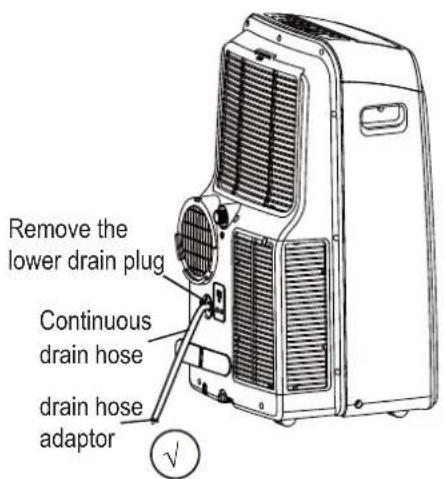
Remove the upper drain plug Continuous drain hose-Under heating pump mode, remove the lower drain plug from the back of the unit and install the drain connector (5/8" universal female mender) with a 3/4" hose (locally purchased). For models without a drain connector, simply attach the drain hose to the hole. Place the open end of the hose adaptor directly over the drain area in your basement floor.
NOTE: Make sure the hose is secure so there are no leaks. Direct the hose toward the drain, making sure that there are no kinks that will stop the water flowing. Place the end of the hose into the drain and make sure the end of the hose is down to let the water flow smoothly (see Figures with √×Never let it up. (see Figures with ○). When the continuous drain hose is not used, ensure that the corresponding drain plug and knob are installed firmly to prevent leakage.
text_image
Remove the lower drain plug Continuous drain hose drain hose adaptor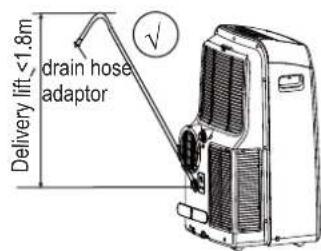
text_image
Delivery lift <1.8m drain hose adaptor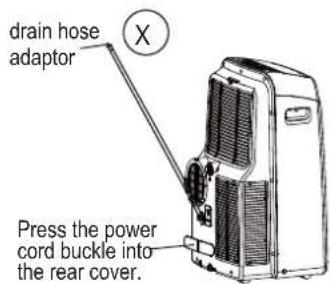
text_image
drain hose adaptor Press the power cord buckle into the rear cover.-When the water level of the bottom tray reaches a predetermined level, the unit beeps 8 times and the digital display area shows P1. At this time, the air conditioning/dehumidification process will immediately stop. However, the fan motor will continue to operate (this is normal). Carefully move the unit to a drain location, remove the bottom drain plug, and let the water drain away. Reinstall the bottom drain plug and restart the machine until the P1 symbol disappears. If the error repeats, call for service.
NOTE: Be sure to reinstall the bottom drain plug firmly to prevent leakage before using the unit.
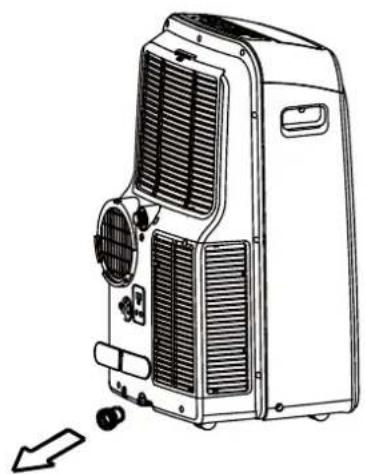
natural_image
Line drawing of a portable air conditioner unit with cooling fan and ventilation slots (no text or symbols)Safety Precautions
-Always unplug the unit before cleaning or servicing.
-DO NOT use flammable liquids or chemicals to clean the unit.
-DO NOT wash the unit under running water. This may cause an electrical danger.
-DO NOT operate the machine if the power supply was damaged during cleaning. A damaged power cord must be replaced with a new cord from the manufacturer.
Cleaning the Air Filter
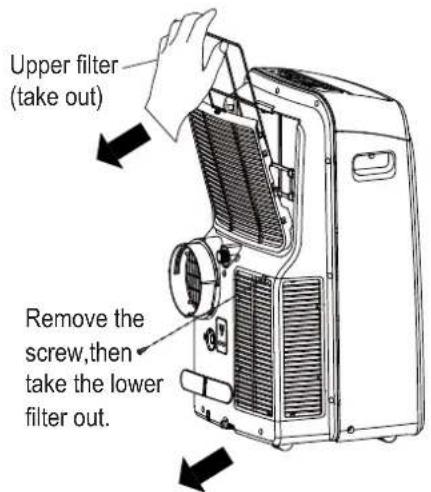
text_image
Upper filter (take out) Remove the screw,then take the lower filter out.Remove the air filter
Maintenance Tips
-Be sure to clean the air filter every 2 weeks for optimal performance.
-The water collection tray should be drained immediately after the P1 error occurs and before storage to prevent mold.
-In households with animals, you wipe down
the grille periodically to prevent airflow obstruction due to animal hair.
Cleaning the unit
Clean the unit using a damp, lint-free cloth and mild detergent. Dry the unit with a dry, lint-free cloth.
Storing the Unit when not in Use
-Drain the unit's water collection tray according to the instructions in the following section.
-Run the appliance on FAN mode for 12 hours in a warm room to dry it and prevent mold.
-Turn off the appliance and unplug it. Press Enter (new bullet)-Clean the air filter according to the instructions in the previous section. Press Enter (new bullet) Reinstall the clean, dry filter before storing.
-Remove the batteries from the remote controller.
Be sure to store the unit in a cool, dark place. Exposure to direct sunlight or extreme heat can shorten the lifespan of the unit.
Please check the unit using the following form before asking for maintenance:
| Problem Possible Cause Troubleshooting | ||
| The unit does not turn on when pressing the ON/OFF button | P1 error code. | The water collection tray is full.Turn off the unit, drain the water from the water collection tray, and restart the unit. |
| In COOL mode: the room temperature is lower than the set temperature. | Reset the temperature. | |
| The unit does not cool well | The air filter is blocked with dust or animal hair. | Turn off the unit and clean the filter according to instructions. |
| The exhaust hose is not connected or is blocked. | Turn off the unit, disconnect the hose, check for obstructions, and reconnect the hose. | |
| The unit is low on refrigerant. | Call a service technician to inspect the unit and top off refrigerant. | |
| Teh temperature setting is too high. | Decrease the set temperature. | |
| Windows and doors in the room are open. | Make sure all windows and doors are closed. | |
| The room area is too large. | Double-check the cooling area. | |
| There are heat sources inside the room. | Remove heat sources if possible. | |
| The unit is noisy and vibrates too much | The ground is not level. | Place the unit on a flat, level surface. |
| The air filter is blocked with dust or animal hair | Turn off the unit and clean thefilter according to instructions. | |
| The unit makes a gurgling sound | This sound is caused by the flow of refrigerant inside the unit. | This is normal. |
Design Notice
In order to ensure the optimal performance of our products, the design specifications of the unit and remote controller are subject to change without prior notice.
Energy Rating Information
The energy rating for this unit is based on an installation using an un-extended exhaust duct without adapters A or B (as shown in the Installation section of this manual).
Unit Temperature Range
| Mode Temperature Range | |
| Cool 17-35°C (62-95°F) | |
| Dry | 13-35°C (55-95°F) |
| Heat (pump heat mode) | 5-30°C (41-86°F) |
| Heat (electrical heat mode) | ≤30°C (86°F) |
Remote Control Specifications
| Model | RG57H4(B)/BG(C)EF |
| Rated voltage | 3.0 V (dry batteries R03/LR03×2) |
| Signal receiving range | 8 m |
| Environment | -5°C~60 C (23 F~140 F) |
CAUTION:
INGESTION HAZARD - Contains small batteries, Keep out of reach of small children. If swallowed, seek immediate medical attention.
Function Buttons
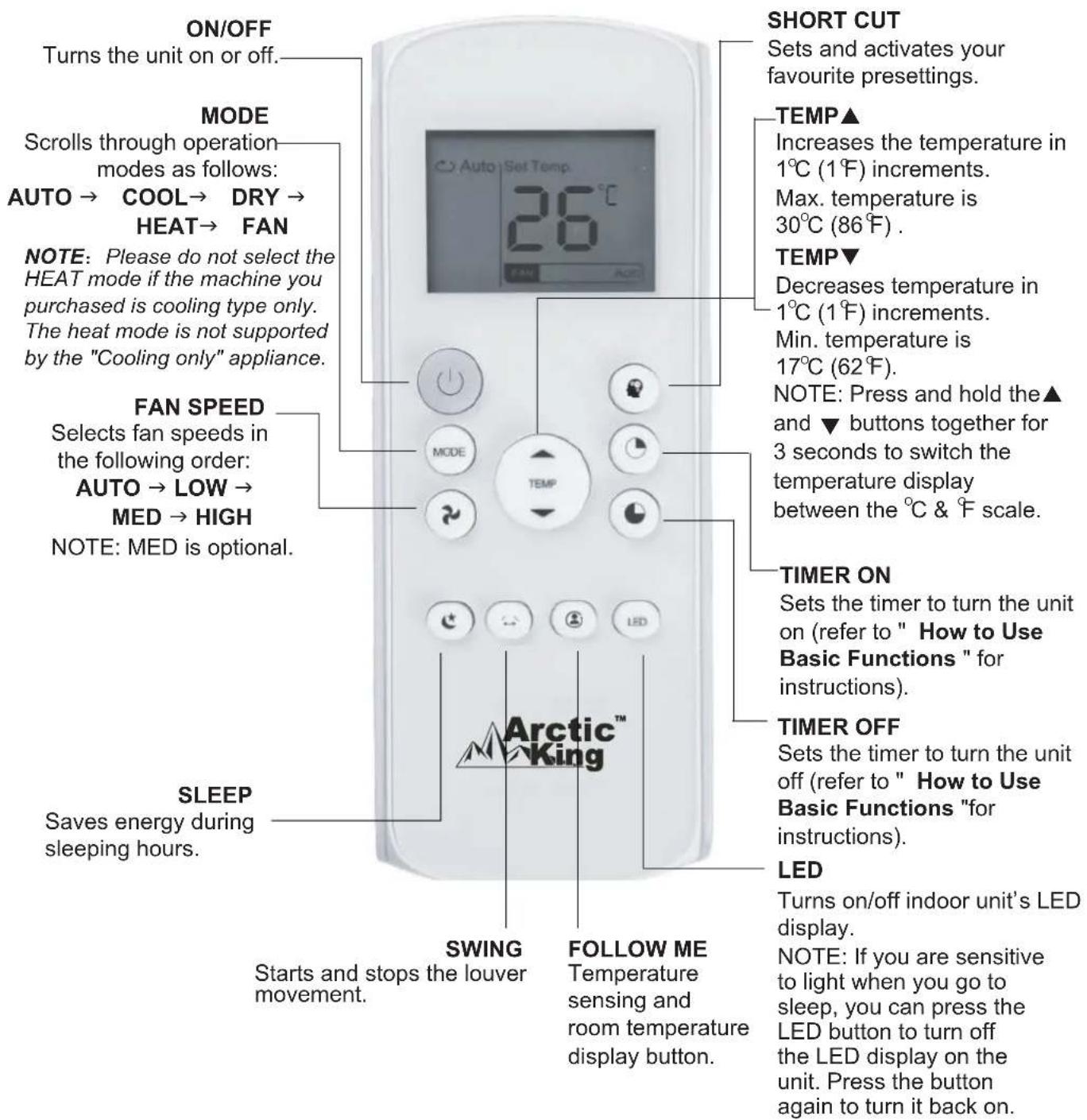
Before using your new air conditioner, make sure to familiarize yourself with the remote controller. The following is a brief introduction to the remote controller. For instructions on how to operate your air conditioner, refer to the "How to Use the Basic Functions" section of this manual.
text_image
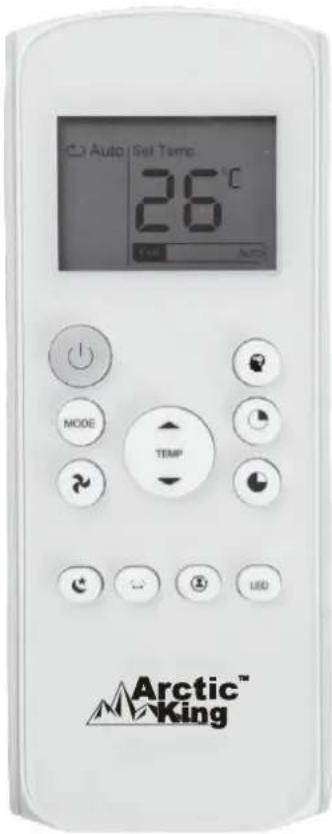
ON/OFF Turns the unit on or off. MODE Scrolls through operation modes as follows: AUTO → COOL → DRY → HEAT → FAN NOTE: Please do not select the HEAT mode if the machine you purchased is cooling type only. The heat mode is not supported by the "Cooling only" appliance. FAN SPEED Selects fan speeds in the following order: AUTO → LOW → MED → HIGH NOTE: MED is optional. SLEEP Saves energy during sleeping hours. SHORT CUT Sets and activates your favourite presettings. TEMP▲ Increases the temperature in 1°C (1°F) increments. Max. temperature is 30°C (86°F) . TEMP▼ Decreases temperature in 1°C (1°F) increments. Min. temperature is 17°C (62°F). NOTE: Press and hold the▲ and ▼ buttons together for 3 seconds to switch the temperature display between the °C & °F scale. TIMER ON Sets the timer to turn the unit on (refer to " How to Use Basic Functions " for instructions). TIMER OFF Sets the timer to turn the unit off (refer to " How to Use Basic Functions "for instructions). LED Turns on/off indoor unit's LED display. NOTE: If you are sensitive to light when you go to sleep, you can press the LED button to turn off the LED display on the unit. Press the button again to turn it back on. SWING Starts and stops the louver movement. FOLLOW ME Temperature sensing and room temperature display button.Handling the Remote Controller
UNSURE ABOUT A FUNCTION
Refer to the "How to Use Basic Functions" and "How to Use Advanced Functions" sections of this manual for a detailed description of how to use your air conditioner.
SPECIAL NOTE
- Button designs on your unit may differ slightly from the example shown.
- If the unit does not have a particular function, pressing that function button on the remote controller will have no effect.
- If the function description in the OPERATOR'S MANUAL and "Remote Controller Illustration" is significantly different, the description in the OPERATOR'S MANUAL shall prevail.
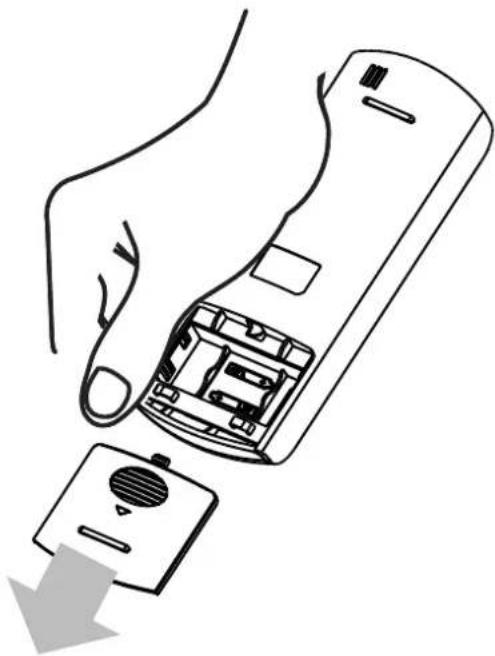
Inserting and Replacing Batteries
Your air conditioning unit comes with two AAA batteries. Put the batteries in the remote controller before use.
- Slide the back cover from the remote controller downward, to expose the battery compartment.
- Insert the batteries, making sure to match up the (+) and (-) ends of the batteries with the symbols inside the battery compartment.
- Slide the battery cover back into place.

BATTERY NOTES
For optimum product performance:
- Do not mix old and new batteries, or batteries of different makes.
- Do not leave batteries in the remote controller if not planning to use device for more than 2 months.

BATTERY DISPOSAL
Do not dispose of batteries as unsorted municipal waste. Refer to local laws for proper disposal of batteries.
TIPS FOR USING THE REMOTE CONTROLLER
- The remote controller must be used within 8 meters of the unit.
- The unit will beep when the remote signal is received.
- Curtains, other materials, and direct sunlight can interfere with the infrared signal receiver.
- Remove batteries if the remote will not be used for more than 2 months.
natural_image
Line drawing of a hand holding a remote control device with a button, showing internal components and a downward arrow (no text or symbols)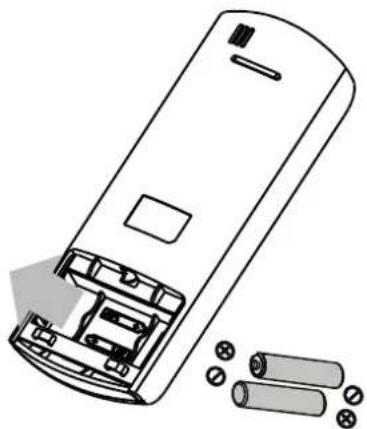
natural_image
Line drawing of a remote control casing with battery pack and external components (no text or symbols)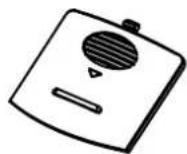
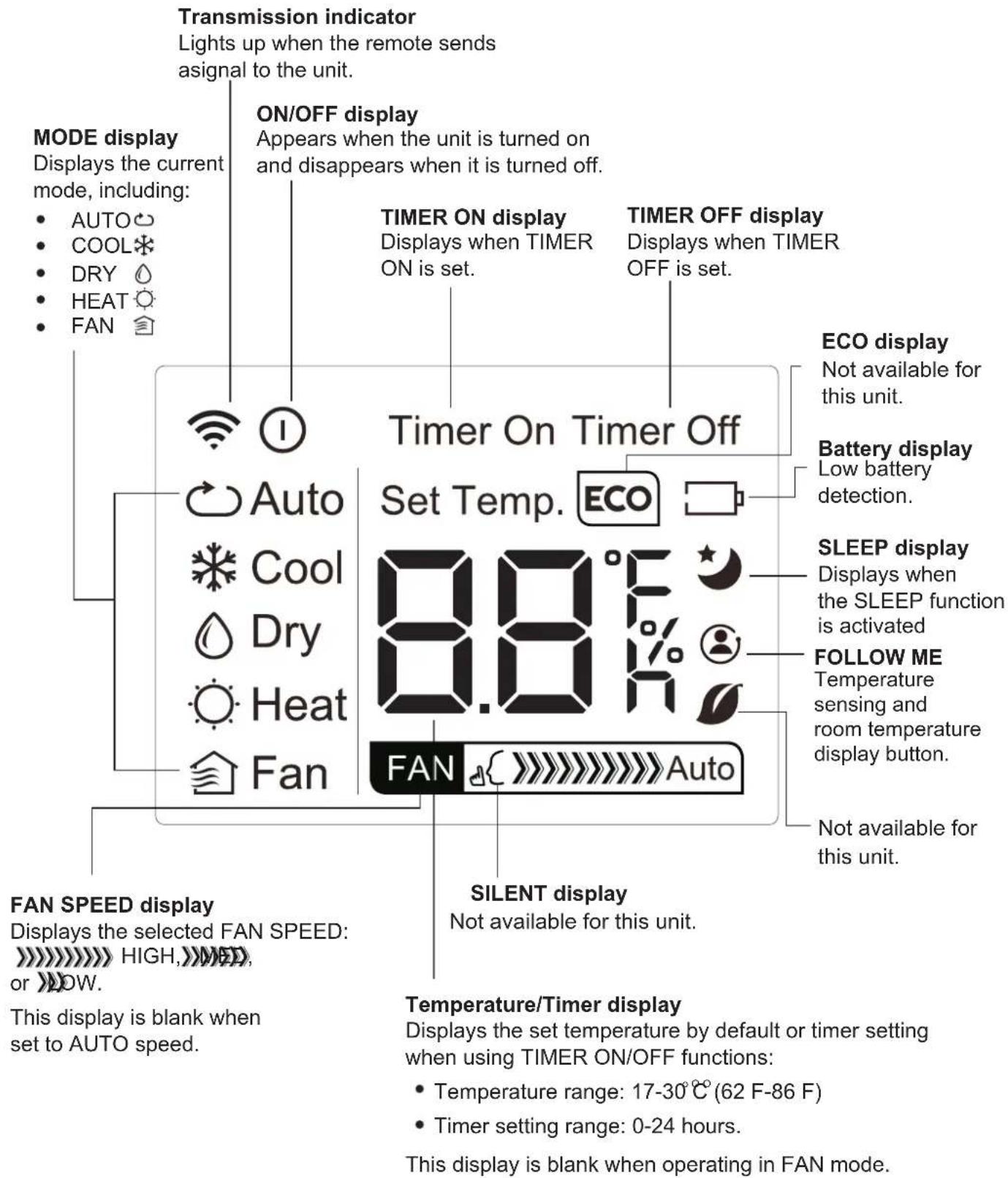
Remote LED Screen Indicators
text_image
Transmission indicator Lights up when the remote sends asignal to the unit. MODE display Displays the current mode, including: • AUTO • COOL • DRY • HEAT • FAN ON/OFF display Appears when the unit is turned on and disappears when it is turned off. TIMER ON display Displays when TIMER ON is set. TIMER OFF display Displays when TIMER OFF is set. Timer On Timer Off Set Temp. ECO ECO display Not available for this unit. Battery display Low battery detection. SLEEP display Displays when the SLEEP function is activated FOLLOW ME Temperature sensing and room temperature display button. FAN SPEED display Displays the selected FAN SPEED: HIGH, MAX, or MAX SILENT display Not available for this unit. Temperature/Timer display Displays the set temperature by default or timer setting when using TIMER ON/OFF functions: • Temperature range: 17-30°C (62 F-86 F) • Timer setting range: 0-24 hours. This display is blank when set to AUTO speed.How to Use the Basic Functions
text_image
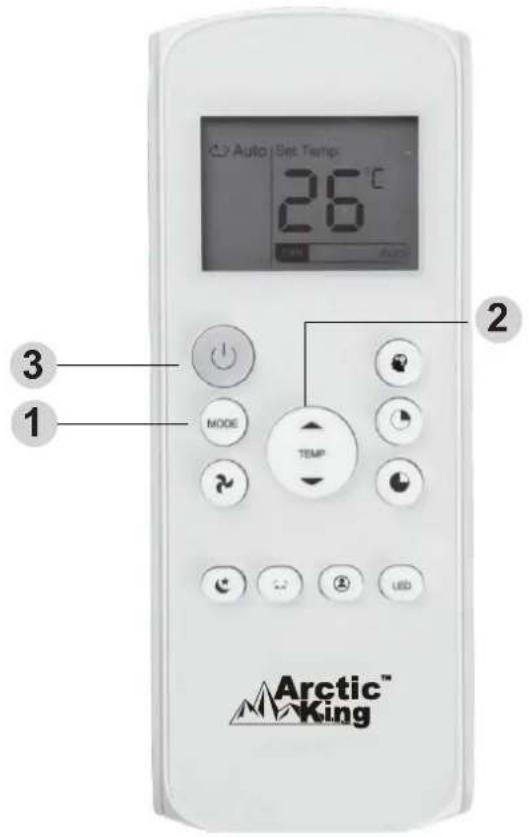
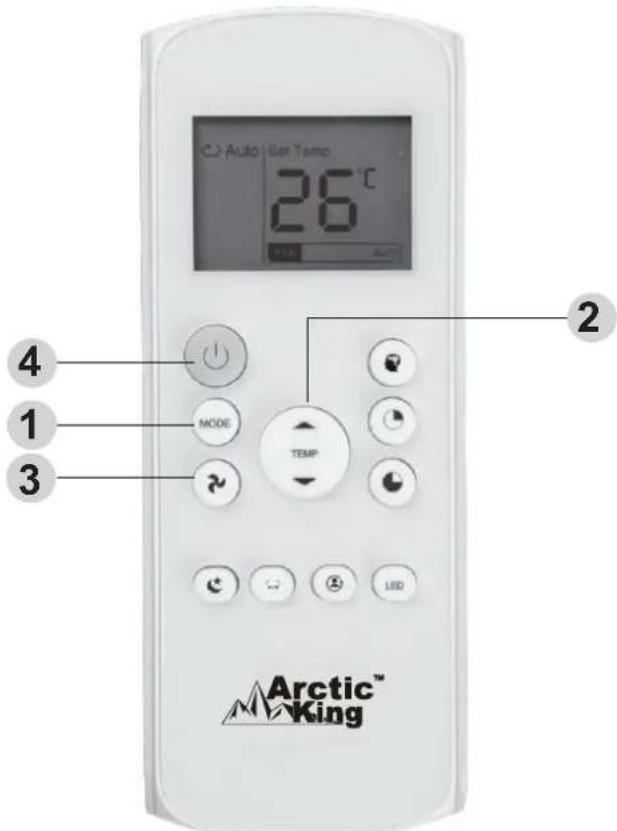
Auto | Set Temp 26°C 3 1 MODE TEMP 2 Arctic™ KingSETTING THE TEMPERATURE
The operating temperature range for units is 17-30 °C (62 F-86 F). You can increase or decrease the set temperature in 1 C (1 F)° increments.
AUTO Operation
In Auto mode, the unit will automatically select the COOL, FAN, HEAT, or DRY mode based on the set temperature.
- Press the MODE button to select Auto THE mode.
- Set your desired temperature using the Temp ▲ or Temp ▼button.
- Press the ON/OFF button to start the unit.
NOTE: FAN SPEED cannot be set in Auto mode.
COOL Operation
- Press the MODE button to select the COOL mode.
- Set your desired temperature using the Temp ▲ or Temp ▼ button.
- Press the FAN button to select the fan speed: AUTO, LOW, MED, or HIGH.
- Press the ON/OFF button to start the unit.
text_image
Auto Set Temp 26°C 20 MODE TEMP LED Arctic™ KingHow to Use the Basic Functions
text_image
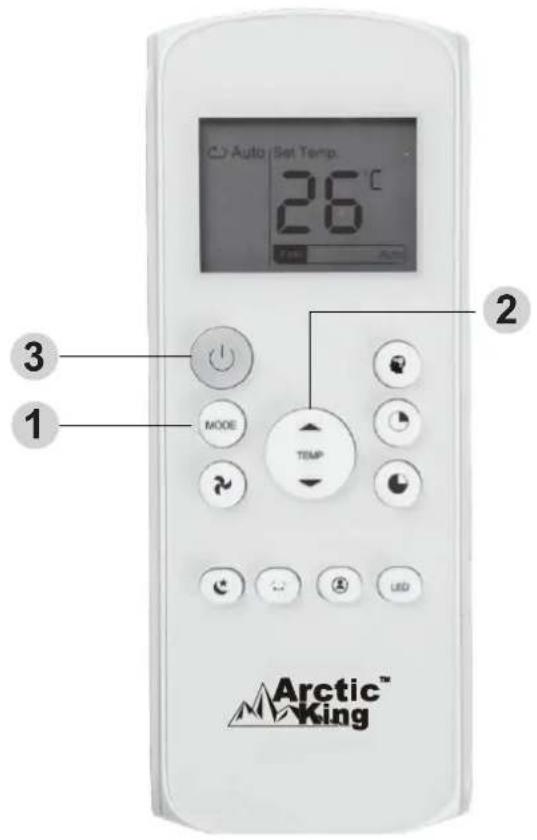
Auto Set Temp 26°C 3 MODE TEMP 1 2 Arctic™ KingFAN Operation
- Press the MODE button to select the FAN mode.
- Press the FAN button to select the fan speed: AUTO, LOW, MED, or HIGH.
- Press the ON/OFF button to start the unit.
NOTE: The temperature cannot be set in FAN mode. As a result, your remote controller's LCD screen will not display the temperature.
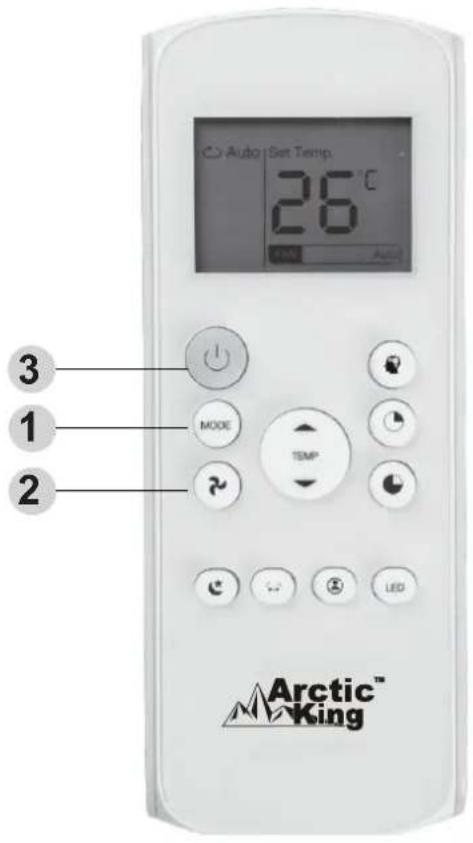
DRY Operation (dehumidifying)
- Press the MODE button to select the DRY mode.
- Set your desired temperature using the Temp ▲ or Temp ▼ button.
- Press the ON/OFF button to start the unit.
NOTE: FAN SPEED cannot be changed in DRY mode.
text_image
Auto Set Temp. 26°C 3 1 2 MODE TEMP Arctic™ KingHow to Use the Basic Functions
text_image
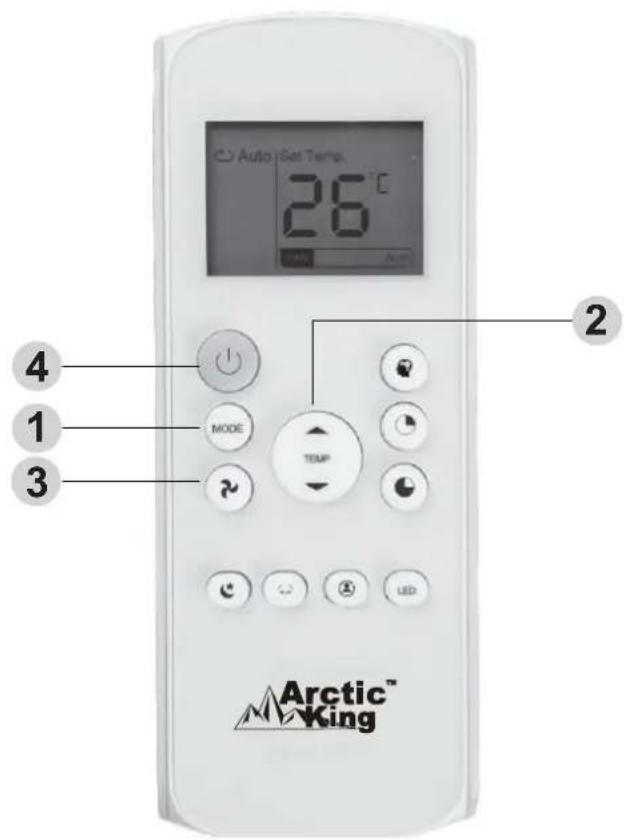
Auto Set Temp 26°C Mode TEMP Arctic™ KingHEAT Operation
- Press the MODE button to select the HEAT mode.
- Set your desired temperature using the Temp ▲ or Temp ▼button.
- Press the FAN button to select the fan speed: AUTO, LOW, MED, or HIGH.
- Press the ON/OFF button to start the unit.
NOTE: As outdoor temperature drops, the performance of your unit s HEAT function may be affected. In such instances, we recommend using this air conditioner in conjunction with other heating appliances.
Setting the TIMER Function
Your air conditioning unit has two timer-related functions:
TIM ER ON- sets the amount of time after which the unit will automatically turn on.
TIMER OFF- sets the amount of time after which the unit will automatically turn off.
TIMER ON Function
The TIMER ON function allows you to set a period of time after which the unit will automatically turn on, for instance when you come home from work.
-
Press the TIMER ON button. By default, the last time period that you set and an "h" (indicating hours) will appear on the display.
Note: This number indicates the amount of time after the current time that you want the unit to turn on.
For example, if you set TIMER ON for 2 hours (2.0 h) will appear on the screen and the unit will turn on after 2 hours. -
Press the TIMER ON button repeatedly to set the time when you want the unit to turn on.
-
Wait 2 seconds, then the TIMER ON function will be activated. Your remote controller digital display will then go back to the temperature display.
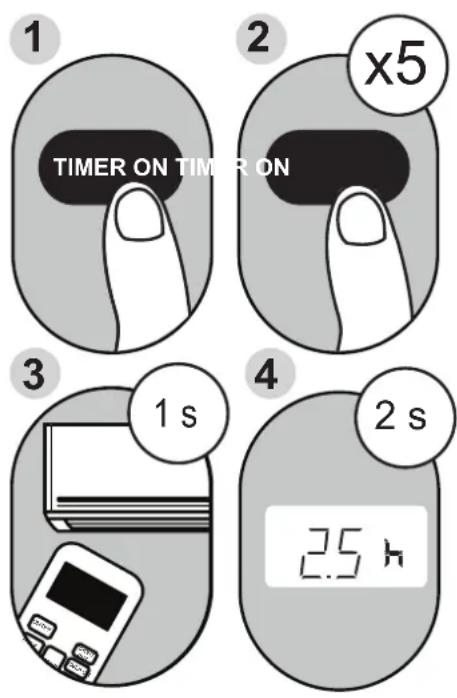
Example: Unit set to turn on after 2.5 hours.
TIMER OFF Function
The TIMER OFF function allows you to set a period of time after which the unit will automatically turn off for instance when you wake up.
- Press the TIMER OFF button. By default, the last time period that you set and an "h" (indicating hours) will appear on the display.
Note: This number indicates the amount of time after the current time that you want the unit to turn off. For example, if you set TIMER OFF for 2 hours (2.0 h) will appear on the screen and the unit will turn off after 2 hours. - Press the TIMER OFF button repeatedly to set the time when you want the unit to turn off.
- Wait 2 seconds, then the TIMER OFF function will be activated. Your remote controller digital display will then go back to the temperature display.
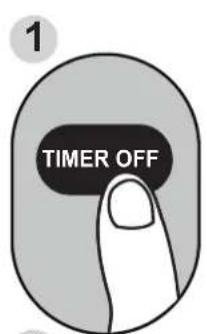
text_image
1 TIMER OFF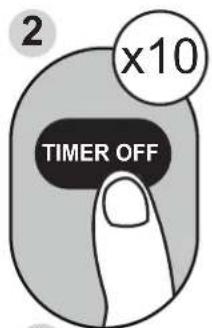
text_image
2 x10 TIMER OFF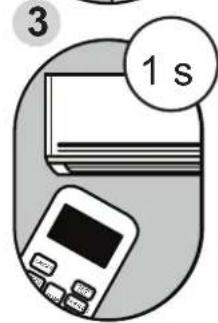
text_image
3 1 s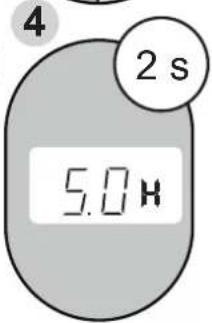
text_image
4 2 s 5.0 HExample: Unit set to turn off after 5 hours.
NOTE: When setting the TIMER ON or TIMER OFF functions up to 10 hours, the time will increase in 30-minute increments with each press. After 10 hours and up to 24 hours, it will increase in 1-hour increments. The timer will revert to zero after 24 hours. You can turn off either function by setting the timer to 0.0h.
text_image
Auto | Set Temp 26°C MODE TEMP LED Arctic™ KingContinue to press TIMER ON or TIMER OFF until the desired time is reached.
Setting TIMER ON and TIMER OFF at the Same Time
Keep in mind that the time periods you set for both functions refer to hours after the current time. For example, if the current time is 1:00 PM and you want the unit to turn on automatically at 7 PM, operate for 2 hours, and automatically turn off at 9 PM, do the following:
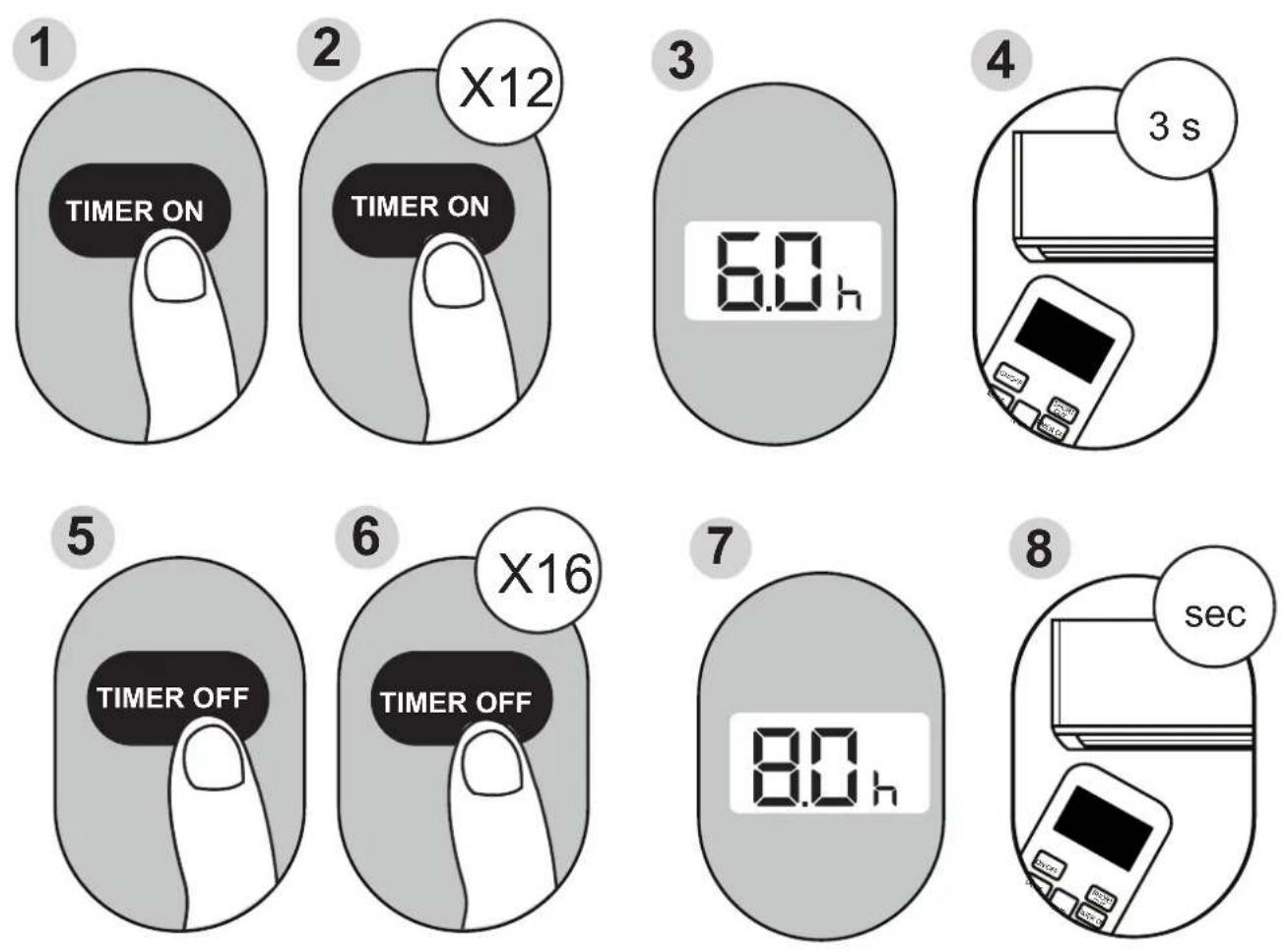
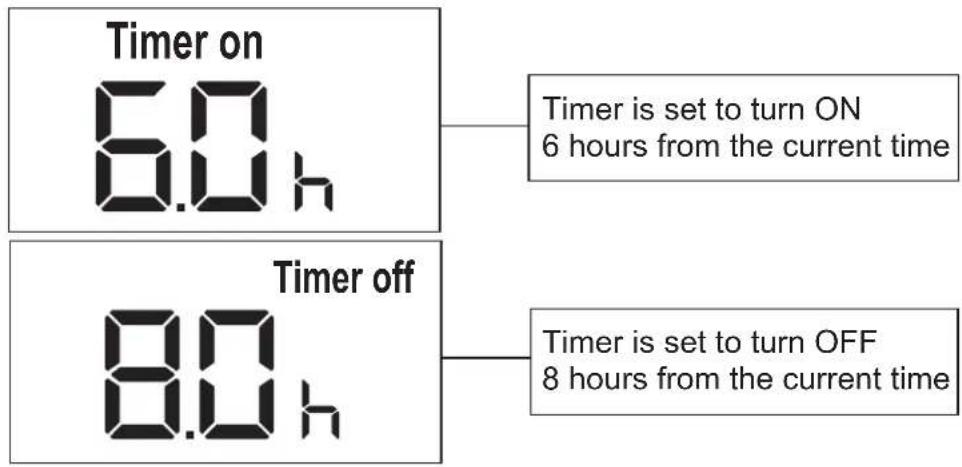
Example: Setting the unit to turn on after 6 hours, operate for 2 hours, then turn off (see the figure below).
Your remote display
text_image
Timer on 6.0 h Timer is set to turn ON 6 hours from the current time Timer off 8.0 h Timer is set to turn OFF 8 hours from the current time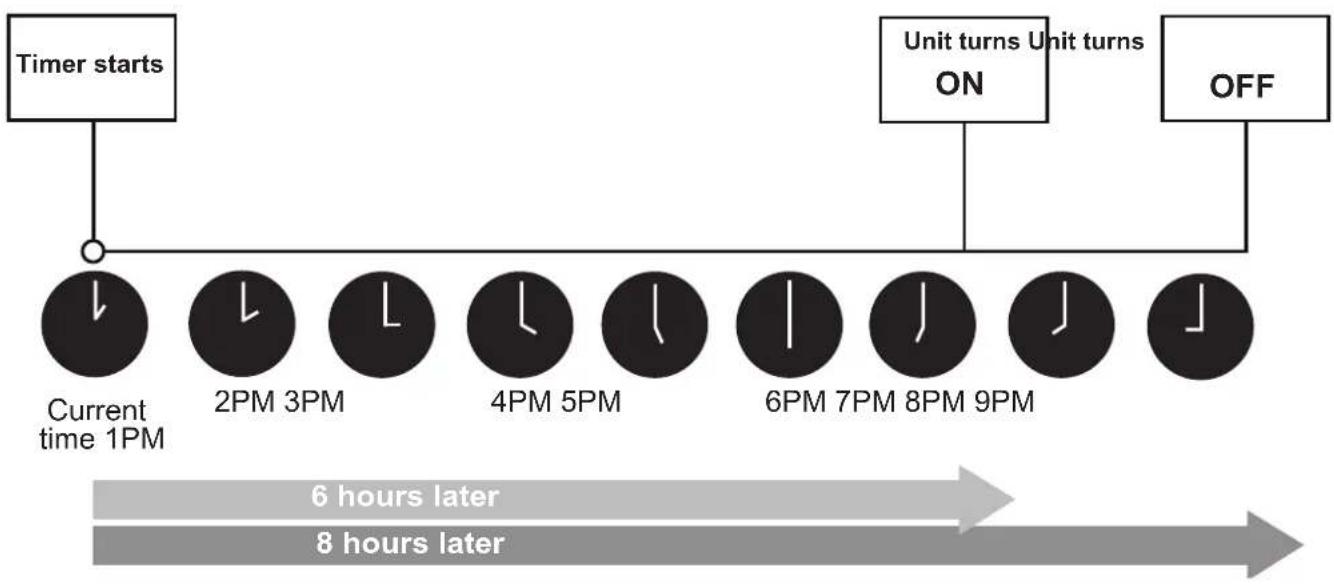
flowchart
graph TD
    A["Timer starts"] --> B["Current time 1PM"]
    B --> C["2PM 3PM"]
    C --> D["4PM 5PM"]
    D --> E["6PM 7PM 8PM 9PM"]
    E --> F["OFF"]
    G["Unit turns ON"] --> H["Unit turns ON"]
    I["6 hours later"] --> J["8 hours later"]
How to Use the Advanced Functions
SLEEP Function
The SLEEP function is used to decrease energy use while you sleep (and don't need the same temperature settings to stay comfortable). This function can only be activated via remote control.
Note: The SLEEP function is not available in FAN or DRY mode.
SWING Function
Used to stop or start louver movement and set the desired up/down air flow direction. The louver changes 6 degrees in angle for each press(some models without). If keep pushing more than 2 seconds, the louver auto swing feature is activated.
FOLLOW ME function
The FOLLOW ME function enables the remote control to measure the temperature at its current location. When using AUTO, COOL, or HEAT functions, measuring ambient temperature from the remote control (instead of from the indoor unit itself) will enable the air conditioner to optimize the temperature around you and ensure maximum comfort.
- Press FOLLOW ME button to activate function. The remote control will send temperature signal to the unit every three minutes.
- Press FOLLOW ME button again to turn off this function.
text_image
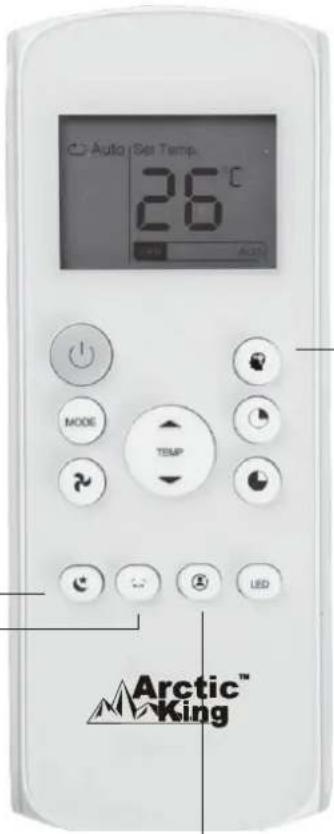
Auto Set Temp. 26°C MODE TEMP LED Arctic™ KingSHORTCUT function
- Used to restore the current settings or resume previous settings.
- Push this button when remote controller is on, the system will automatically revert back to the previous settings including operating mode, setting temperature, fan speed level and sleep feature (if activated).
- If pushing more than 2 seconds, the system will automatically restore the current operation settings including operating mode, setting temperature, fan speed level and sleep feature(if activated).
NOTE:
-Buttons design is based on a typical model and may be slightly different from the actual unit you purchased. In such case, actual unit buttons shall prevail.
-All the functions described are accomplished by the unit. Inoperative features on the unit.
-If the function description in the OPERATOR'S MANUAL and "Remote Controller Illustration" is significantly different, the description in the OPERATOR'S MANUAL shall prevail.
-The device complies with the local national regulations. In Canada, it complies with CAN ICES-3(B)/NMB-3(B). In the USA, it complies with part 15 of the FCC Rules. Operation is subject to the following two conditions: (1) This device may not cause harmful interference and (2) this device must accept any interference received, including interference that may cause undesired operation.
-This equipment has been tested and meets the limits for a Class-B digital device, pursuant to part 15 of the FCC Rules. These limits are designed to provide reasonable protection against harmful interference in a residential installation. This equipment generates, uses, and can radiate radio frequency energy and, if not installed and used in accordance with the instructions, may cause harmful interference to radio communications. However, there is no guarantee that interference will not occur in a particular installation. If this equipment does cause harmful interference to radio or television reception, which can be determined by turning the equipment off and on, the user is encouraged to try to correct the interference by one or more of the following measures:
- Reorient or relocate the receiving antenna.
- Increase the distance between the equipment and receiver.
- Connect the equipment into an outlet on a circuit different from the receiver to which it is connected.
- Consult the dealer or an experienced radio/TV technician for help. Changes or modifications not approved by the compliance party may void the suer's authority to operate the equipment.
These products have been made to quality standards and are guaranteed for domestic use against manufacturing faults.
One (1) year full warranty from original purchase date and limited 2nd through 5th year sealed system warranty if used for normal domestic purposes.
This warranty does not affect your statutory rights. In case of any malfunction of your product (failure, missing part, etc.), please contact one of our service technicians at our toll-free service line at 1-866-646-4332 from 8 AM to 6 PM EST, Monday to Friday, and 8 AM to 4 PM EST, Saturday. Midea reserves the right to repair or replace the defective product, at its discretion.
Any warranty is invalid if the product has been overloaded or subject to neglect, improper use or an attempted repair other than by an authorized agent. Heavy-duty or daily professional/commercial usage are not guaranteed. Due to continuous product improvement, we reserve the right to change product specifications without prior notice.
For instructions on how to properly drain Freon, please contact our customer service at 1-866-646-4332. Thank you.
Arctic™ King
No. d'article 888150
No. d'article
Réf. 21615022
Réf. 21615023
natural_image
Line drawing of a portable air conditioner unit (no text or symbols)
natural_image
Line drawing of a portable air conditioner unit with control panel and buttons (no text or symbols)CLIMATISEUR PORTATIF
Our Customer service staff is available to help you. For any problem with your purchase, or to receive further information about this product, please call our toll-free number.
SAVE THIS MANUAL
Keep this manual and the original sales invoice in a safe, dry place for future reference.
text_image
Warning sign depicting a flame symbol in a triangular shape, indicating hazard or hazardous status.natural_image
Simple line drawing of an open book with no text or symbols visiblenatural_image
Technical line drawing of a mechanical device with a 50cm height and 19.7 inch dimension label (no text or symbols beyond measurement annotations)natural_image
Line drawing of a vacuum cleaner emitting a hose near a window (no text or symbols)natural_image
Line drawing of a device emitting a coiled cable or hose, next to a screen (no text or symbols)text_image
Control panel interface with icons for mode, function, and power button
text_image
Control panel interface with labeled buttons and icons including temperature, mode, and function icons
Interrupteur d'alimentation (On/Off).

natural_image
Line drawing of an air conditioning unit with cooling fan and buttons, showing internal components and a downward arrow indicating motion (no text or symbols)natural_image
Line drawing of a hand holding a remote control device with an open lid and a downward arrow indicating action (no text or symbols)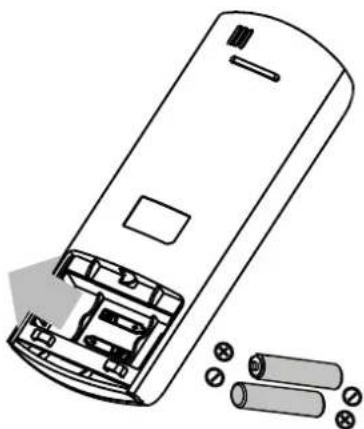
natural_image
Diagram of a remote control casing with battery pack and external components (no text or symbols)