
FW-75BZ35L - Monitor SONY - Free user manual and instructions
Find the device manual for free FW-75BZ35L SONY in PDF.
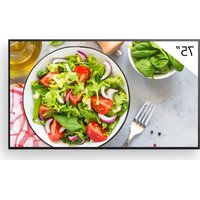


| Product Type | Professional LCD Monitor |
| Brand | Sony |
| Model | FW-75BZ35L |
| Screen Size (diagonal) | 75 inches (189.3 cm) |
| Display Resolution | 3840 × 2160 (4K UHD) |
| Backlight Type | LED |
| Dimensions with Stand (W × H × D) | 1686 × 1045 × 410 mm |
| Dimensions without Stand (W × H × D) | 1686 × 969 × 72 mm |
| Weight with Stand | Approximately 45 kg (reasonable estimate, not exactly specified) |
| Weight without Stand | Approximately 43 kg (reasonable estimate) |
| Power Supply | 220-240 V AC, 50/60 Hz |
| Power Consumption (Standby) | 0.5 W |
| HDMI Inputs | 4 (HDMI IN 1/2/3/4, HDCP 2.3, HDMI 3 with eARC/ARC) |
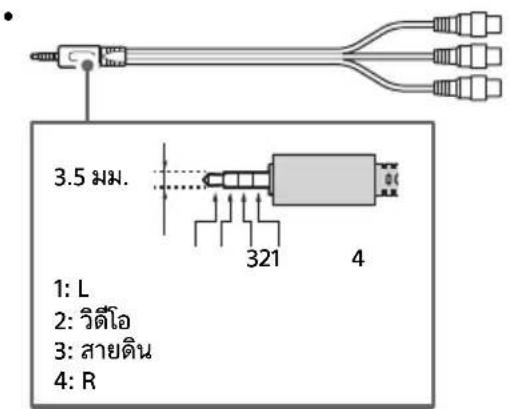
| Composite Audio/Video Input | 1 (mini jack AV IN) |
| Digital Audio Output | 1 optical (DIGITAL AUDIO OUT) |
| USB Ports | 2 (USB 1: USB 2.0, USB 2: USB 3.2 Gen 1) |
| Network Port | 1 Ethernet 10BASE-T/100BASE-TX |
| Remote Control | RS-232C (3.5 mm mini jack) and IP (REST API, IRCC-IP, Simple Control IP) |
| Pro Mode Function | Professional settings: auto startup, input restriction, PIN lock, etc. |
| Compatible Wall Mount | Optional Sony SU-WL850 or SU-WL450 brackets |
| Operating Temperature | 0 °C to 40 °C |
| Cleaning | Use a soft, dry cloth. Do not use abrasive products. |
| Safety | Safety instructions included: avoid falls, stable installation, transport by multiple people. |
| Spare Parts and Repairability | Contact a Sony authorized installer. Wall mounting screws are specific. |
Frequently Asked Questions - FW-75BZ35L SONY
User questions about FW-75BZ35L SONY
0 question about this device. Answer the ones you know or ask your own.
Ask a new question about this device
Download the instructions for your Monitor in PDF format for free! Find your manual FW-75BZ35L - SONY and take your electronic device back in hand. On this page are published all the documents necessary for the use of your device. FW-75BZ35L by SONY.
USER MANUAL FW-75BZ35L SONY
Using LCD Monitor as Part of
Audio System. 7
Remote Control and LCD Monitor. . . .7
Settings. 9
Pro mode. 9
Control functions 11
RS-232C 11
IP 12
Installing the LCD Monitor to
the Wall. 14
Troubleshooting. 15
Specifications. 15
About Manuals
This LCD Monitor comes with the following manuals. Please retain the manuals for future reference.
Setup Guide
- LCD Monitor installation and setup.
Reference Guide (this manual) / Safety Information
- Safety information, remote control, troubleshooting, wall-mount installation, specification, etc.
Help
Find more troubleshooting and other useful information directly from your LCD Monitor. Press HELP on the remote control to display a list of topics.
Setting menus are subject to change without notice.
IMPORTANT - Read the End User Software Licence Agreement before using your Sony product. Using your product indicates your acceptance of the End User Software Licence Agreement. The software licence agreement between you and Sony is available online at Sony website (https://www.sony.net/tv-software-licenses/) or on your product screen. Go to [Settings] → [System] → [About] → [Legal information] → [Notices and licences].
Note
Before operating the LCD Monitor, please read the "Safety Information". - Read the supplied safety documentation for additional safety information. - Instructions about "Installing the LCD Monitor to the Wall" are included within this LCD Monitor's instruction manual. - Images and illustrations used in the Setup Guide and this manual are for reference only and may differ from the actual product.
Location of the identification label
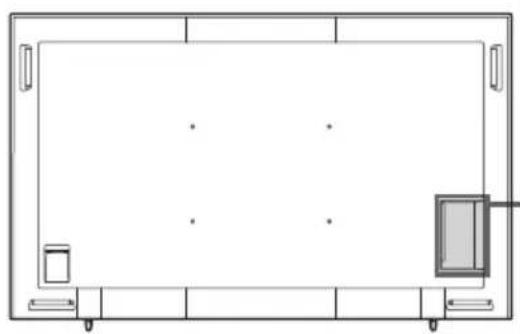
Labels for the LCD Monitor Model No. and Power Supply rating are located on the rear of the LCD Monitor.
Safety Information
Installation/Set-up
Install and use the LCD Monitor in accordance with the instructions below in order to avoid any risk of fire, electric shock or damage and/or injuries.
Installation
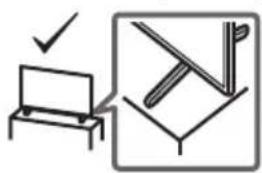
The LCD Monitor should be installed near an easily accessible AC power outlet (mains socket). Place the LCD Monitor on a stable, level surface to prevent it from falling over and causing personal injury or property damage. Install the LCD Monitor where it cannot be pulled, pushed, or knocked over. Install the LCD Monitor so that the LCD Monitor's Table-Top Stand does not protrude out from the LCD Monitor stand (not supplied). If the Table-Top Stand protrudes out from the LCD Monitor stand, it may cause the LCD Monitor set to topple over, fall down, and cause personal injury or damage to the LCD Monitor.
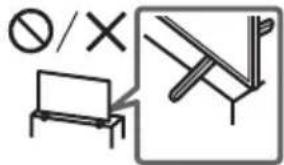
Transporting
- Before transporting the LCD Monitor, disconnect all cables.
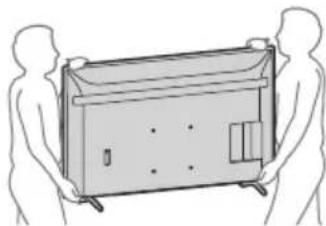
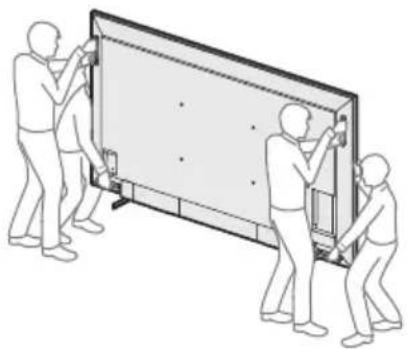
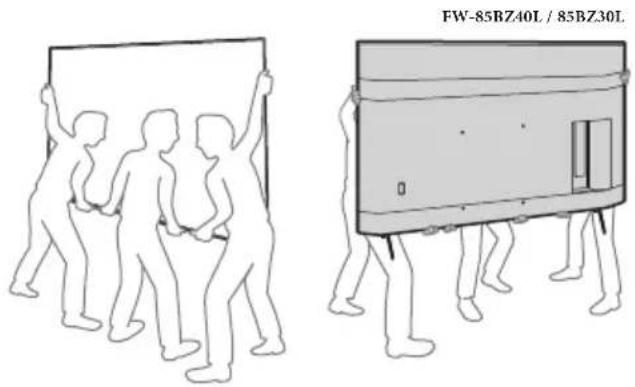
- Two or more persons (three or more persons for 214.8 cm (85 inches), four or more persons for 247.7 cm (98 inches) and above LCD Monitor) are needed to transport a large LCD Monitor.
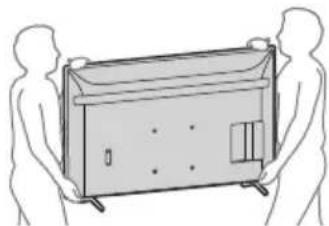
- When transporting the LCD Monitor by hand, hold it as shown below. Do not put stress on the LCD panel and the frame around the screen.
- When lifting or moving the LCD Monitor, hold it firmly from the bottom.
FW-98BZ53L/98BZ50L/98BZ30L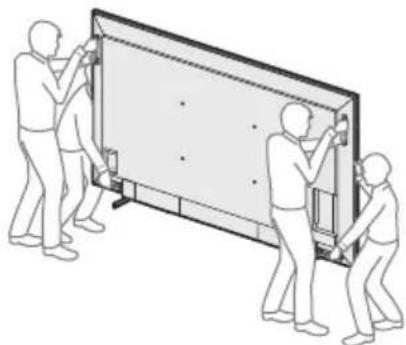
FW-85BZ40L/85BZ30L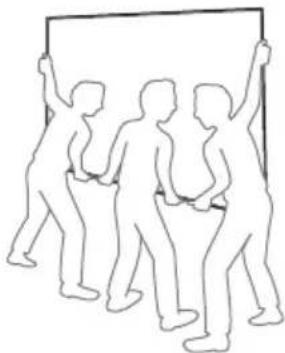
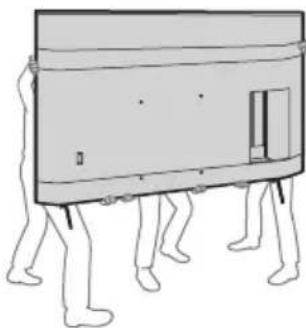
FW-75BZ40L / 75BZ35L / 75BZ30L / 65BZ40L / 65BZ35L / 65BZ30L / 55BZ40L / 55BZ35L / 55BZ30L / 50BZ30L / 43BZ30L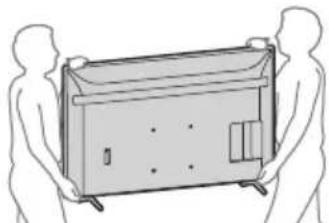
- When transporting the LCD Monitor, do not subject it to jolts or excessive vibration.
- When transporting the LCD Monitor for repairs or when moving, pack it using the original carton and packing material.
- When handling or mounting the LCD Monitor set, do not lay down the LCD Monitor (for applicable LCD Monitor model only).
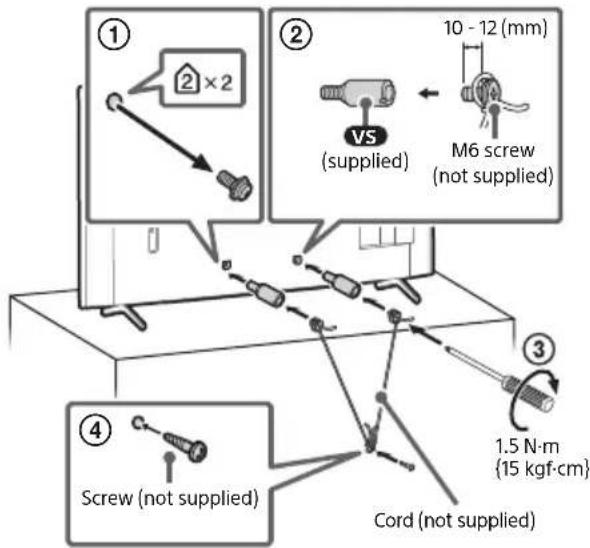
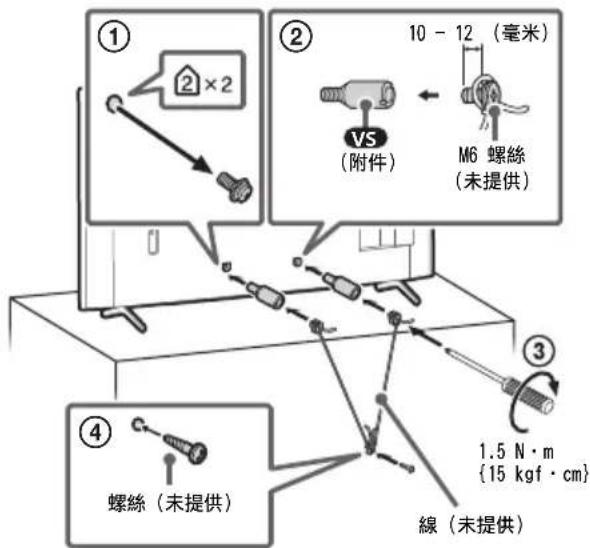
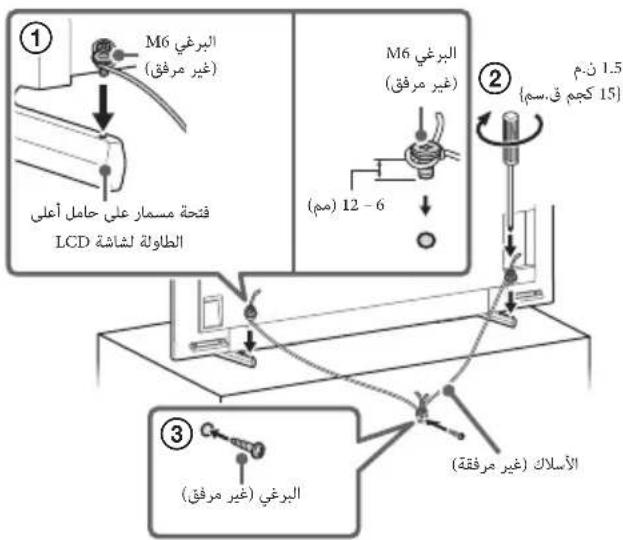
Topple prevention
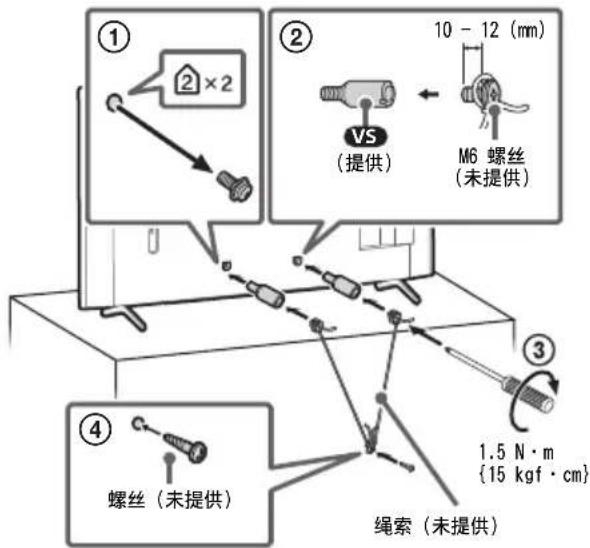
(Models with supplied support belt kit)
Refer to the Setup Guide on top of the cushion.
The supplied wood screw is only for affixing to a solid object made of wood.
(Except models with supplied support belt kit)
FW-98BZ53L/98BZ50L/98BZ30L FW-85BZ40L / 85BZ30L / 75BZ40L / 75BZ35L / 75BZ30L / 65BZ40L / 65BZ35L / 65BZ30L / 55BZ40L / 55BZ35L / 55BZ30L / 50BZ30L / 43BZ30L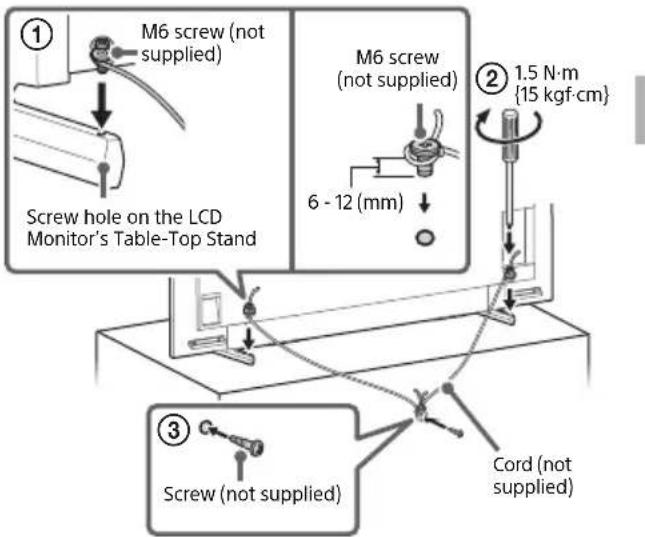
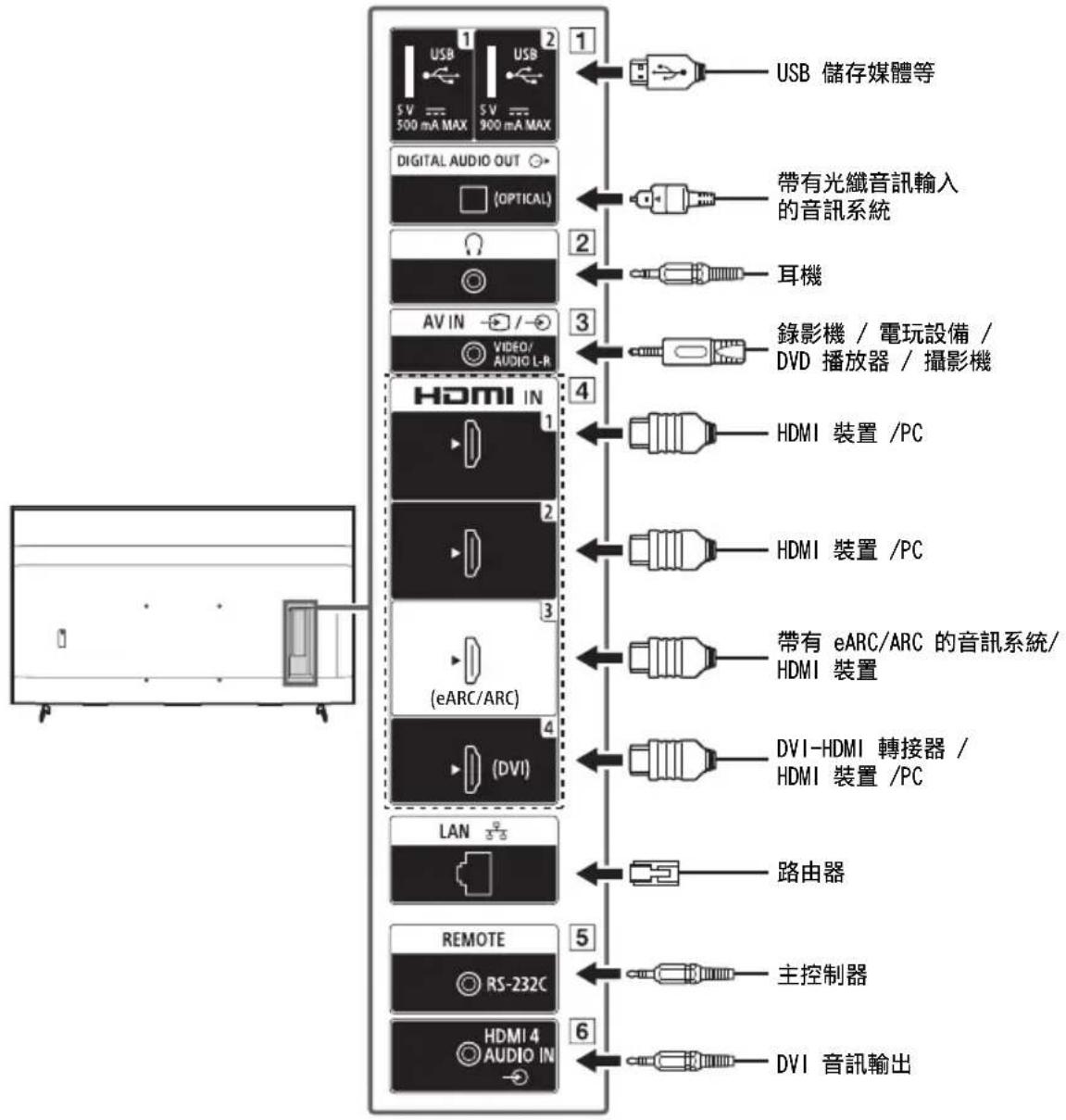
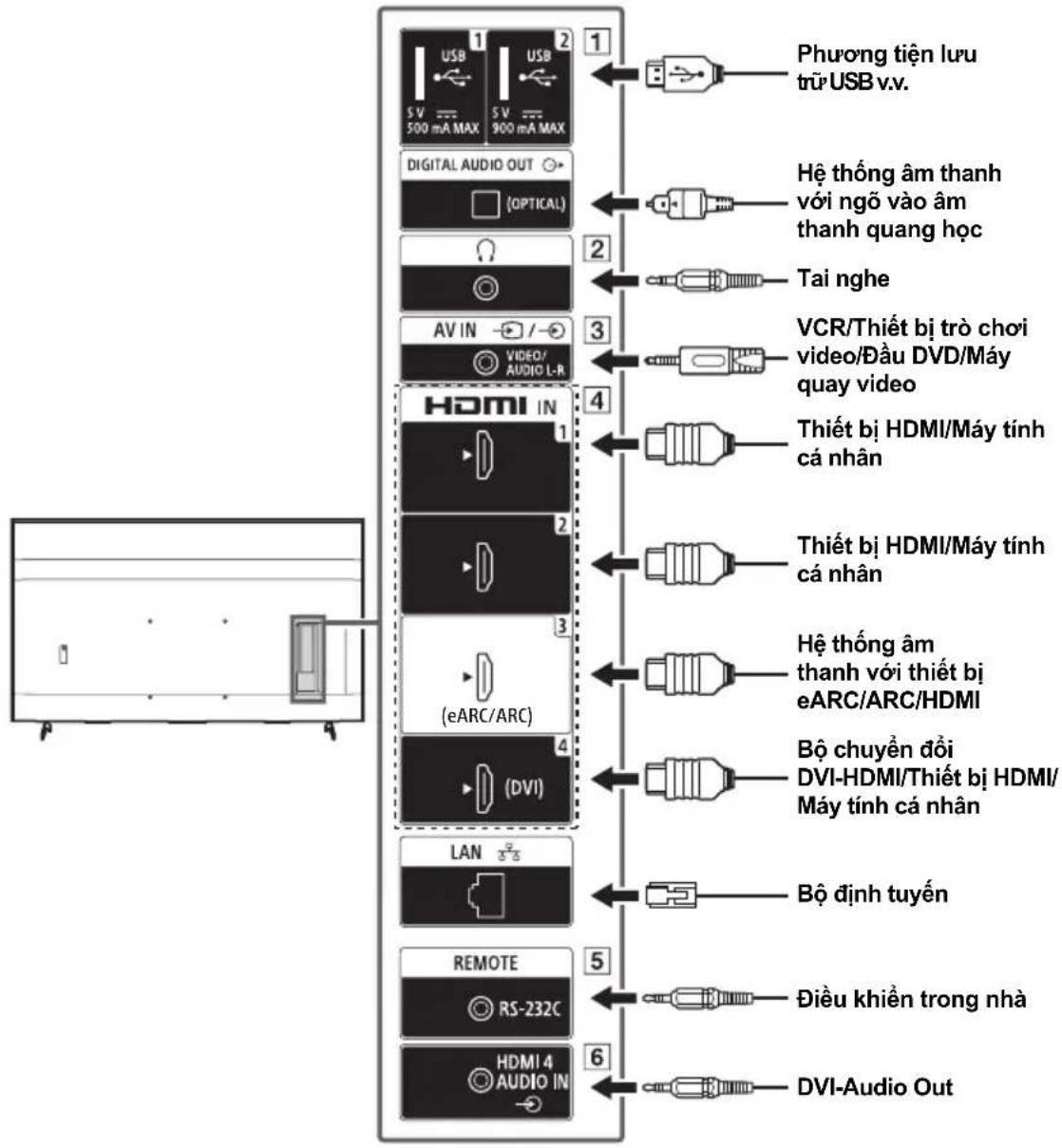
Connection Diagram
Note
- Terminals and labels may vary depending on region/country/LCD Monitor model.
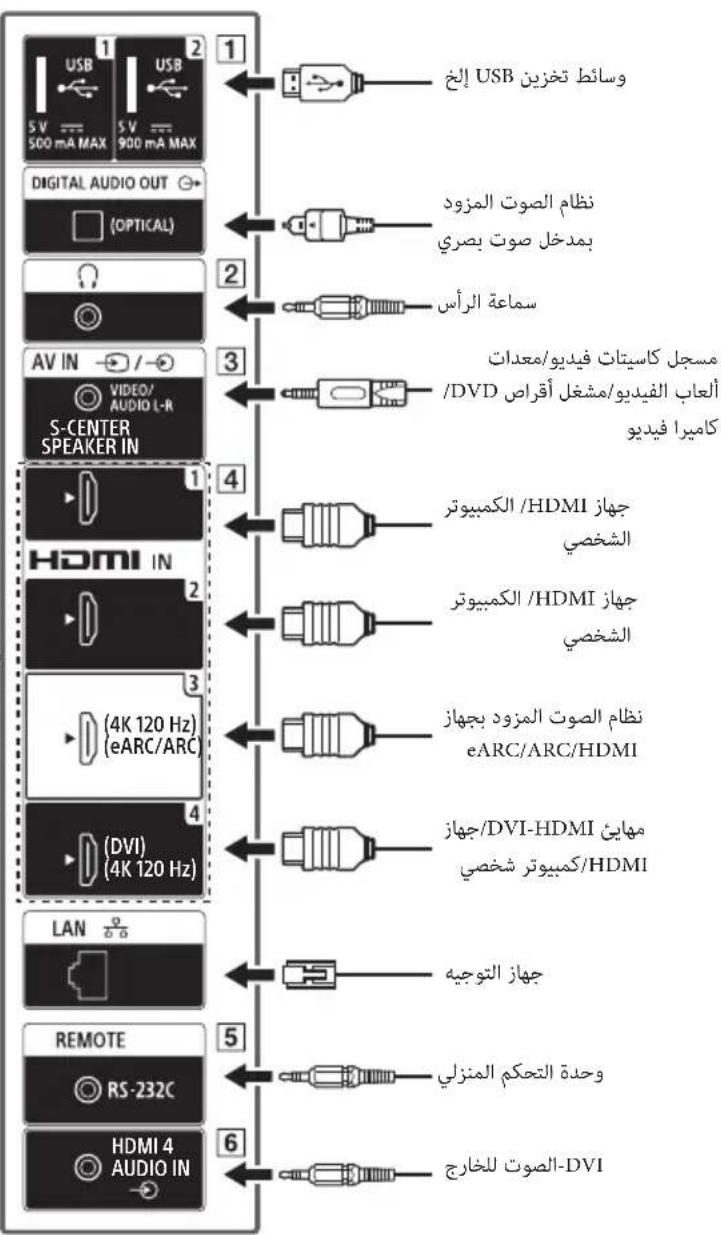
FW-98BZ53L / 98BZ50L / 98BZ30L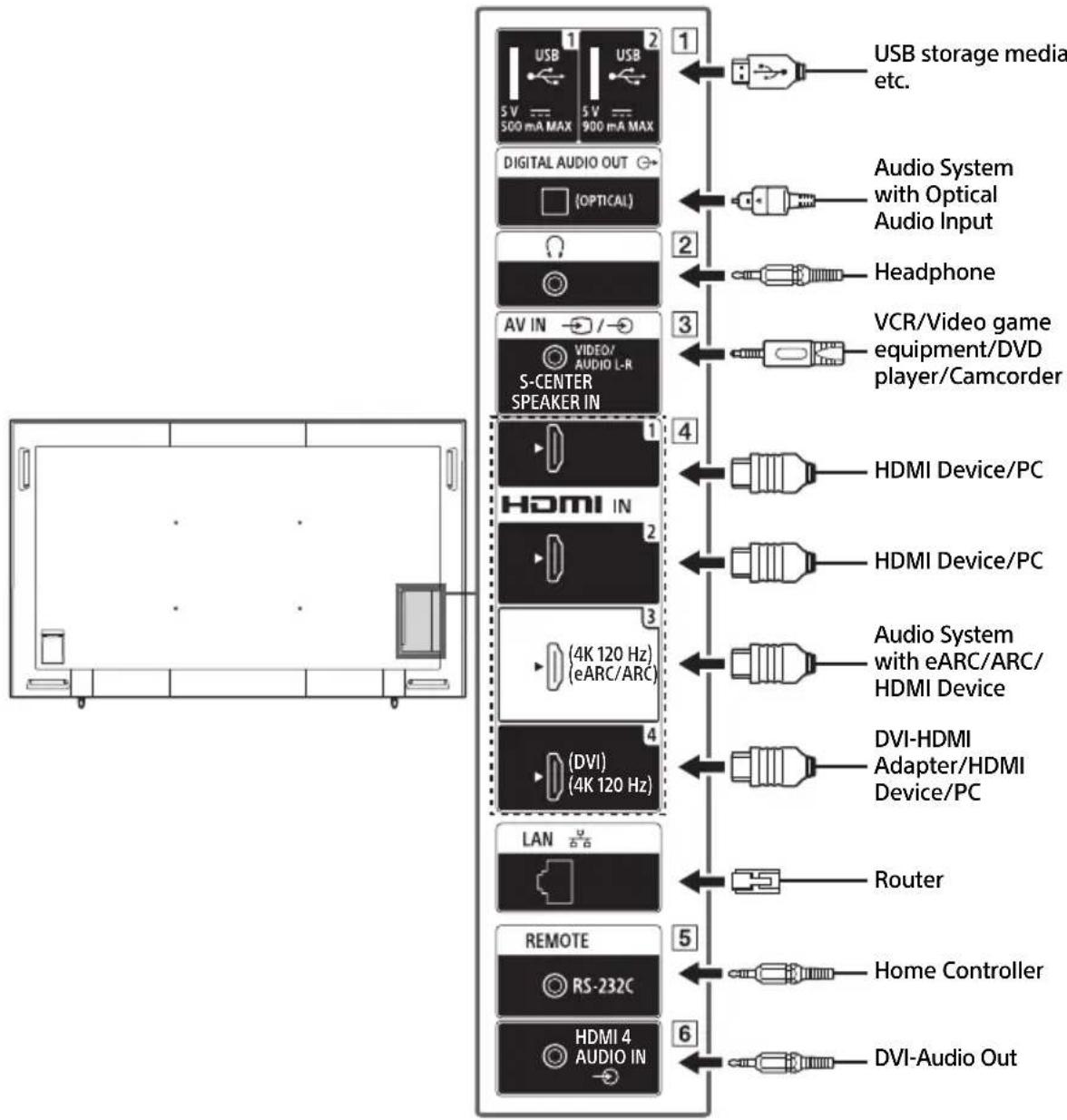

EN
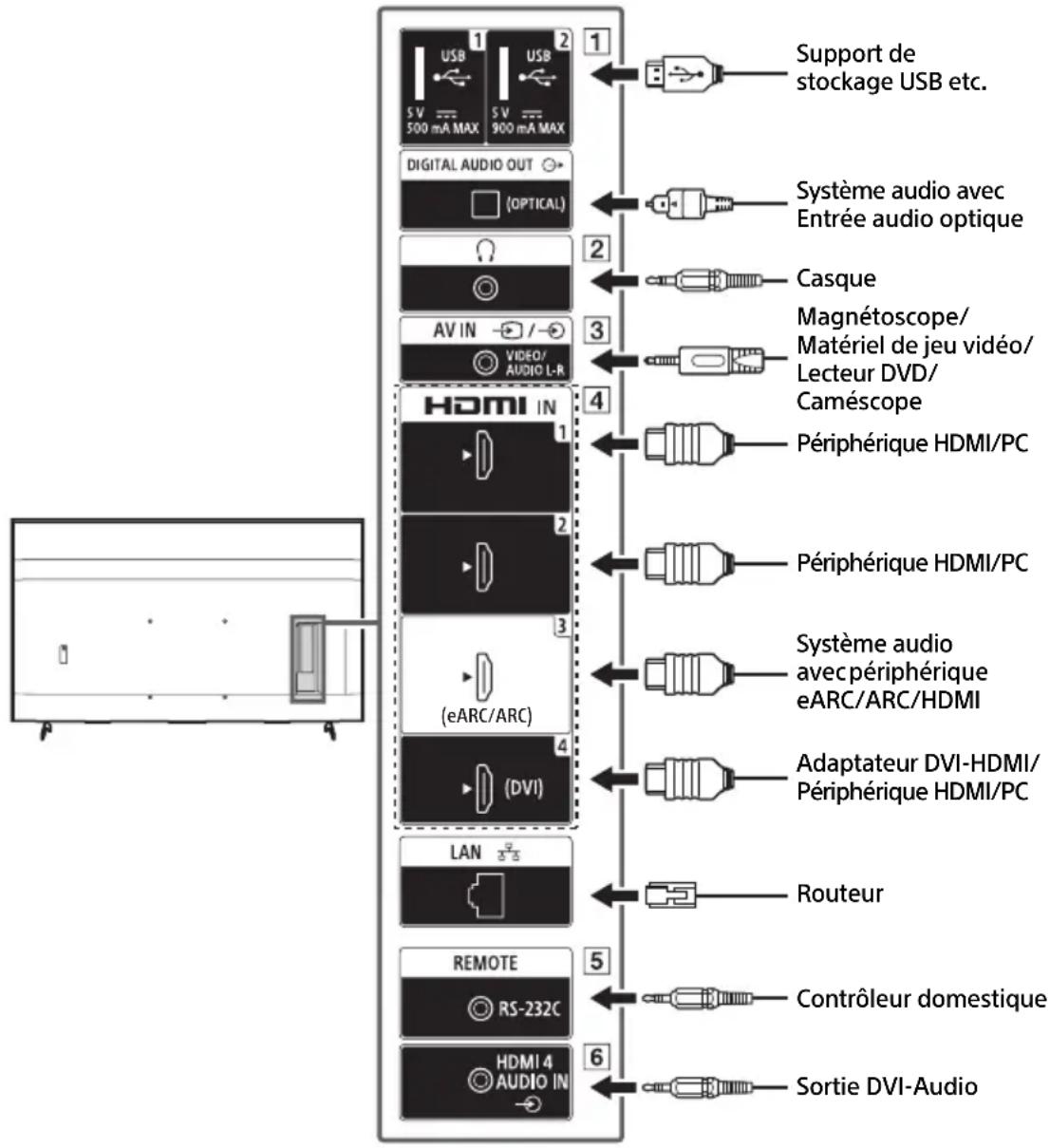
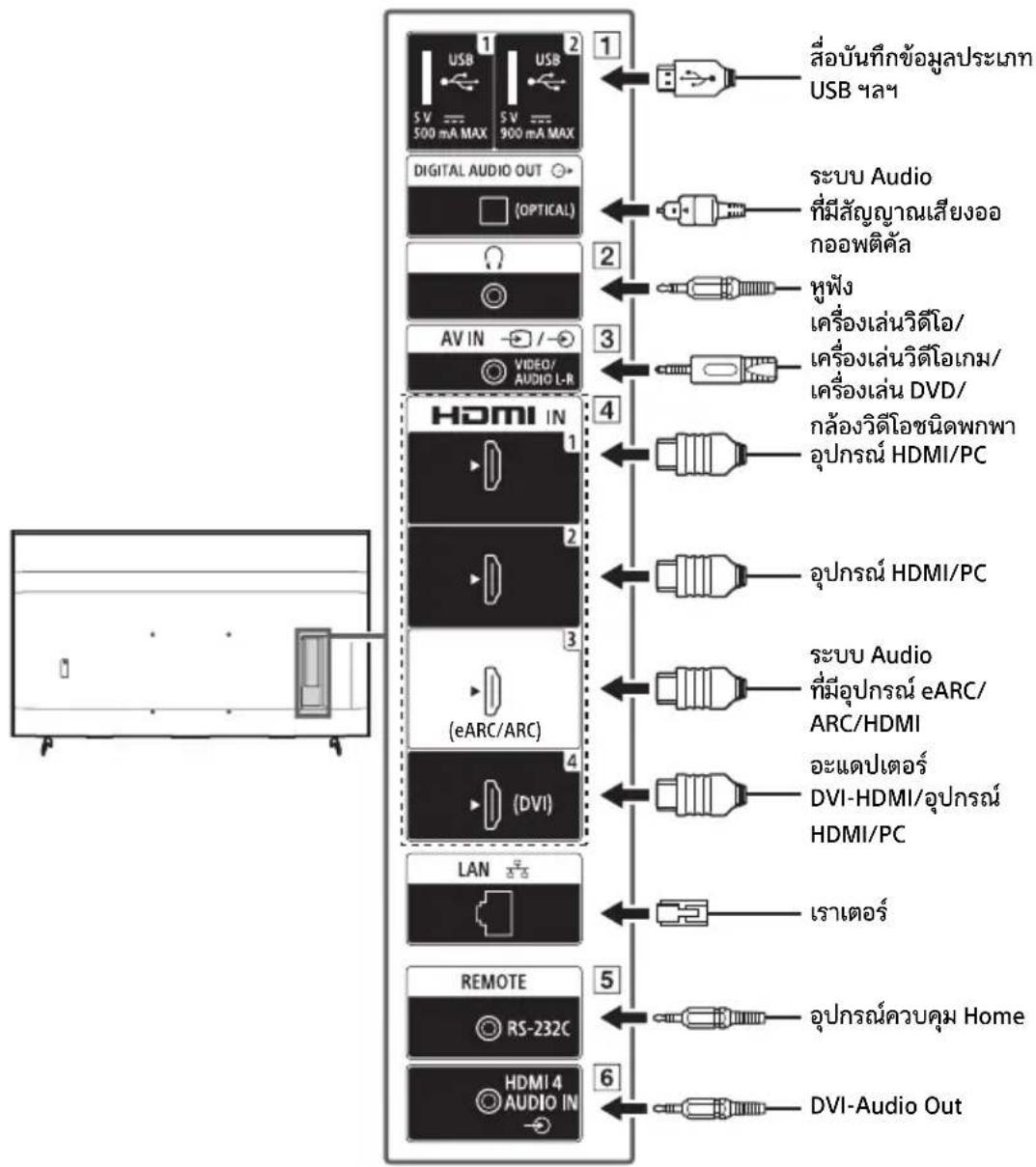
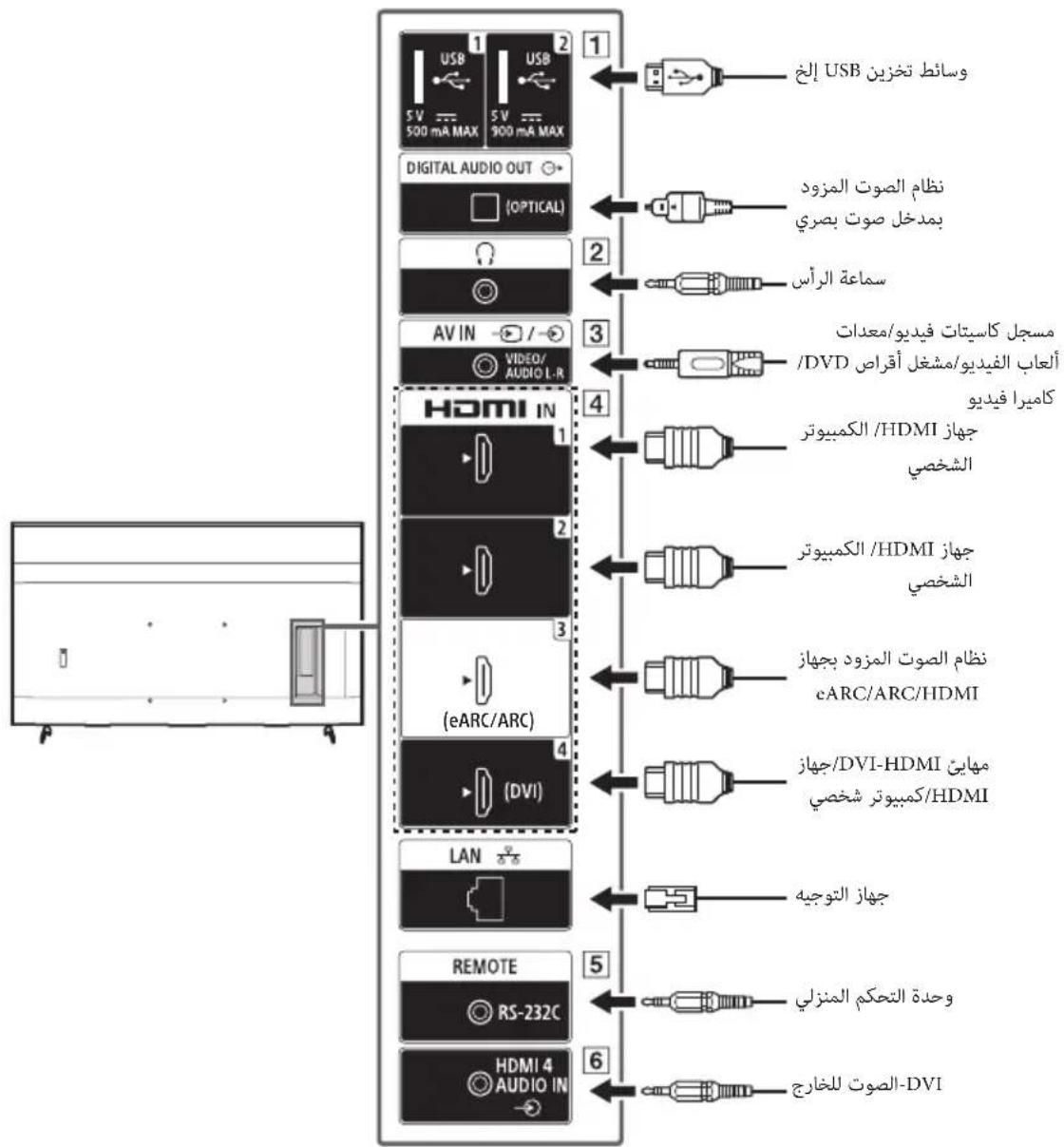
1 USB 1 USB 2
- Connecting a large USB device may interfere with other connected devices beside it.
2 (Headphone)
Supports 3-pole stereo mini jack only. - You cannot output sound from both the headphone and the LCD Monitor speakers at the same time.
3 V IN
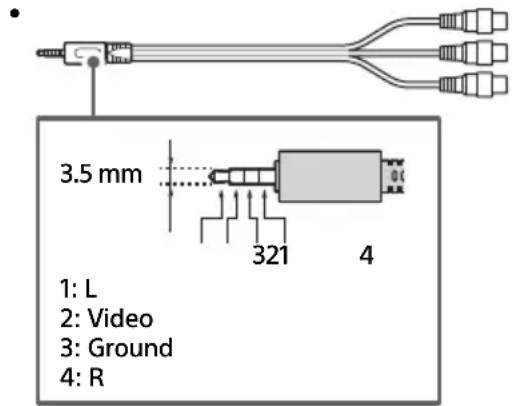
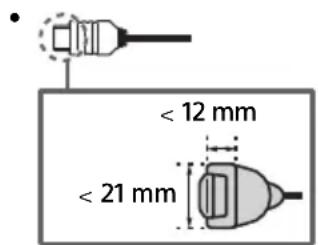
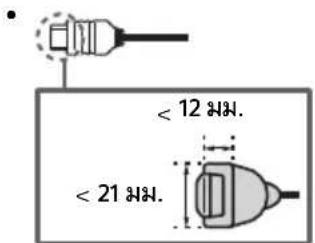
- For a composite connection, use an Analogue Extension Cable (not supplied).
HDMI IN 1/2/3/4
- HDMI interface can transfer the digital video and audio on a single cable.
- If the device has a DVI jack, connect it to HDMI IN 4 through a DVI - HDMI adaptor interface (not supplied), and connect the device's audio out jack to HDMI 4 AUDIO IN.
- HDMI IN 3 eARC/ARC (Enhanced Audio Return Channel/Audio Return Channel) Connect your audio system to the HDMI IN 3 to route LCD Monitor audio to your audio system. An audio system that supports HDMI eARC/ARC can send video to the LCD Monitor, and receive audio from the LCD Monitor via the same HDMI cable. If your audio system does not support HDMI eARC/ARC, an additional connection with DIGITAL AUDIO OUT (OPTICAL) is necessary.
- Use the HDMI cable with Ethernet to connect audio system with eARC.
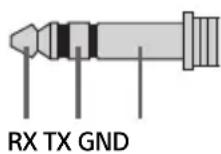
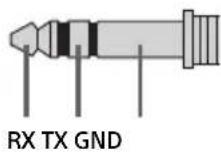
5 REMOTE RS-232C
- Terminal for serial communication. For details, see "Control functions".
6 HDMI4AUDIOIN
- If the device has a DVI jack, connect it to HDMI IN 4 through a DVI - HDMI adaptor interface (not supplied), and connect the device's audio out jack to HDMI 4 AUDIO IN.
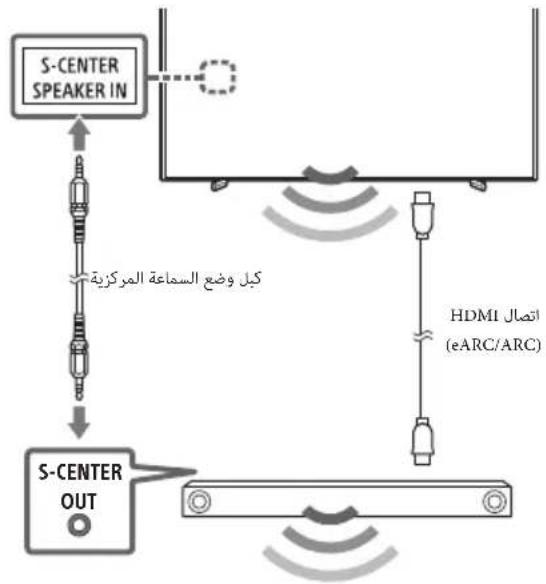
Using LCD Monitor as Part of Audio System
(FW-98BZ53L / 98BZ50L / 98BZ30L only)
Note
- Before connecting cables, disconnect the AC power cord (mains lead) of both LCD Monitor and AV receiver. Refer to the instruction manual of the Audio system with S-CENTER OUT terminal for detail.

Remote Control and LCD Monitor
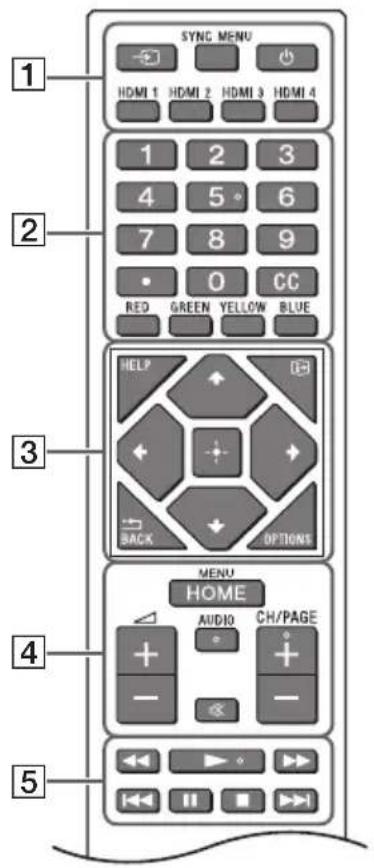
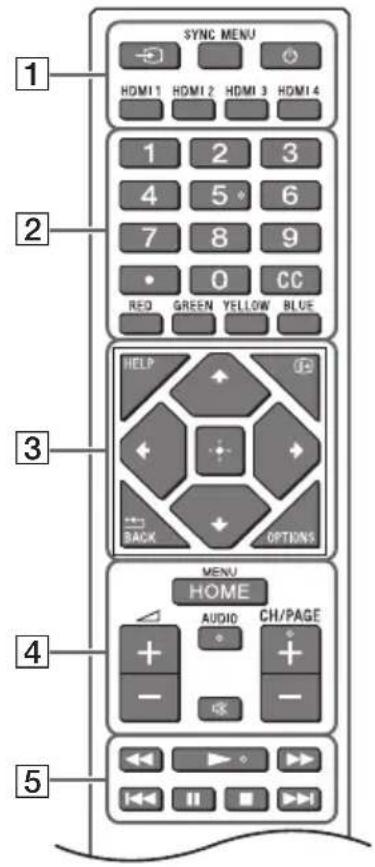
The remote control shape, layout, availability and function of remote control buttons may vary depending on your region/country/LCD Monitor model/LCD Monitor settings.
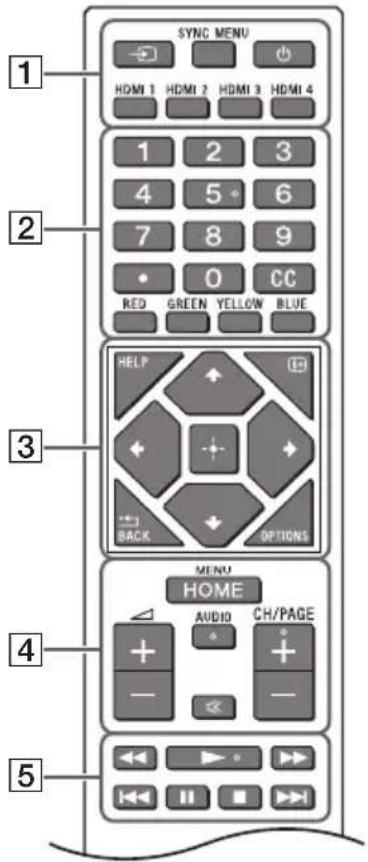
Input select): Display and select the input source, etc.
SYNC MENU: Display the BRAVIA Sync Menu.
(Power)
HDMI 1/2/3/4
2 Number buttons
(dot)
CC
Colour buttons
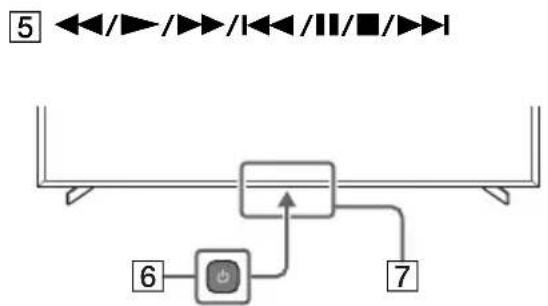
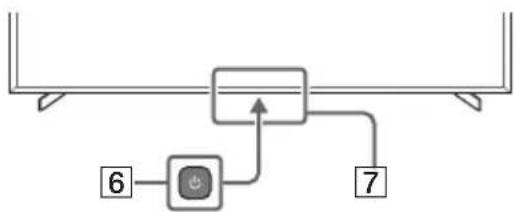
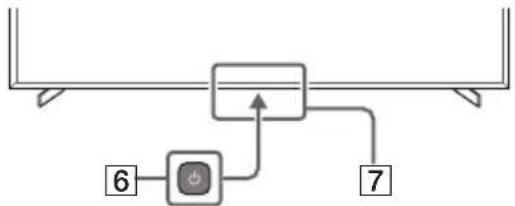
3 HELP: Display the Help menu. (Screen display): Display information. BACK OPTIONS: Displays a list of functions that can be used at that time. (Navigation D-Pad): On screen menu navigation and selection. 4 HOME/MENU (Volume) AUDIO: Select the sound of multilingual source or dual sound (depend on programme source). (Mute) CH/PAGE 6 (Power) Remote Control sensor / Light sensor / LED Accessibility shortcut is available by pressing and holding (Mute).
Settings
Pro mode
In [Pro mode], you can use various convenient functions for professional use. Here, we introduce how to change to [Pro mode] and typical functions of [Pro mode].
Pro mode
Normal mode: This is the default mode. [Pro mode] functions are not available in this mode.
Pro settings mode: This mode allows you to set various settings of [Pro mode] functions.
Pro mode: This is the operation mode for professional use where you can use the [Pro mode] functions.
How to change the mode
When the Monitor is in Normal mode
- Go to [Home] → [Apps] → [Pro settings], then select [Pro settings mode].
When the Monitor is in Pro settings mode
- Go to [Home] → [Apps] → [Pro settings], then select [Start Pro mode].
When the Monitor is in the Pro mode
- Press the activation keys described below on the remote control in order within a one second interval.
After restarting the Monitor, the mode changes to [Pro settings mode].
Activation key: (Screen display) / ※ (Mute) / Δ + / - (Volume +) / HOME/MENU
*Initially you cannot change the mode from [Pro settings] in [Pro mode]. If you want to change the mode from [Pro settings], go to [Pro settings] → [Function restrictions] → [Apps] and change [Pro settings] to [Enable] in [Pro settings mode].
Introduction of the Pro mode functions
In [Pro mode], you can use various convenient functions. Typical [Pro mode] functions are introduced below.
- Setting Monitor operation when turning the AC power on
You can set the operation of the Monitor when unplugging and reinserting the AC power plug.
- Optimized display of the PC input screen
The screen displays the PC input screen with optimum size according to the PC format.
Automatic wake up and input switching by HDMI signal detection
Automatically turn on the Monitor and switch to connected HDMI input when the HDMI device is connected.
- Settings of the displaying menu when pressing the HOME/MENU button
You can select the menu displayed when pressing the HOME/MENU button on the remote control.
- Initial input source designation when starting the Monitor
You can designate the initial input source when starting the Monitor.
Pro mode lock
You can protect the settings of [Pro mode] by using a PIN.
- Initial/maximum volume setting
You can set the initial and maximum volume of the Monitor.
- Restriction of the Monitor operation on the remote control
You can restrict the Monitor operation using the remote control.
- Restriction of external inputs
You can restrict the use of external inputs.
- Restriction of using applications
You can restrict the use of Monitor applications.
How to set Pro mode functions
Go to [Home] → [Settings] → [Pro settings] when the Monitor is in [Pro settings mode].*
*Varies depending on the version of the OS.
Control functions
RS-232C
You can control the Monitor from an external service via RS-232C. The RS-232C connection is briefly explained in this page.
Interface
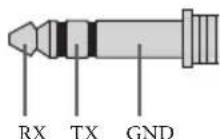
Establish the RS-232C connection to the Monitor by using a 3.5 mm stereo mini plug.
When establishing the RS-232C connection, make connection settings as below.
| Baud rate 9600 bps |
| Data 8 bit |
| Parity None |
| Start bit 1 bit |
| Stop bit 1 bit |
| Flow control None |
Data format
We introduce the data format for the RS-232C communication below.
(a) Requests from the controller to the Monitor
| No. Item Value | |||||||
| 1 | H | e | a | d | e | r | 0 |
| 2 | Category | 0x00 | (fixed) | ||||
| 3 | Function | 0xxx | |||||
| 4 | Length | 0xxx | (=Data X+1 byte) | ||||
| 5 | Data 1 | 0xxx | |||||
| : | : | 0xxx | |||||
| : | : | 0xxx | |||||
| X+4 | Data X | 0xxx | |||||
| X+5 | Check Sum | 0xxx | |||||
(b) Responses from the Monitor to the controller
| No. Item Value | |||||||
| 1 | H | e | a | d | e | r | 0 |
| 2 Answer 0x00 Completed (Normal End) | |||||||
| 0x01 : Limit Over (Abnormal End-Exceed maximum value) | |||||||
| 0x02 : Limit Over (Abnormal End-Exceed minimum value) | |||||||
| 0x03 : Command Canceled (Abnormal end) | |||||||
| 0x04 : Parse Error (Data Format Error) | |||||||
| 3 | C | h | e | c | k | S | u |
Command example
Examples of RS-232C communication command are explained below.
| Control | Head | Category | Function | Length | Data 1 | Data X | Checksum |
| Power on/off | 0x8C | 0x00 | 0x00 | 0x02 | 0x00 (off) | - | 0x8E |
| 0x01 (on) | - | 0x8F | |||||
| HDMI input selection | 0x8C | 0x00 | 0x02 | 0x03 | 0x04 (HDMI) | 0x01 (#1) | 0x96 |
| 0x02 (#2) | 0x97 | ||||||
| 0x03 (#3) | 0x98 | ||||||
| 0x04 (#4) | 0x99 |
For more details on RS-232C, please contact your sales representative.
IP
You can control the Monitor via IP from an HTML5/Android application on the Monitor or on the external device. You can manage and monitor information of input/power, start and terminate applications, control the display such as input source and volume. You can also restrict commands by the authentication function.
Supported IP protocol
| Protocol name | Layer | Format | Authentication | Explanation |
| REST API | HTTP | JSON-RPC | Yes | The APIs whose purpose is device control. |
| IRCC-IP | HTTP | SOAP | Yes | Infrared Compatible Control over Internet Protocol. The technology and formats to transmit remote control commands via the Internet. |
| Simple IP control | TCP | Byte stream | N/A | Only typical functions are supported. |
Monitor settings
When using [IP control], set the Monitor as follows first.
Go to [Settings] → [Network and Internet] → [Local network setup] → [IP control].
For REST API and IRCC-IP,
- Select [Authentication].
- Set [Pre-Shared Key] if needed. For Simple IP control,
- Enable [Simple IP control].
Example of HTTP request and response for REST API
Here is the example of a request and response to acquire the power status to the Monitor (IP address: 192.168.0.1 Pre-shared Key "1234").
URL
http://192.168.0.1/sony/system
Request
POST /sony/system HTTP/1.1 Host: 192.168.0.1 Content-Type: application/json; charset=UTF-8 Content-Length: 70 X-Auth-PSK: 1234 {"method": "getPowerStatus", "params": [], "id": 50, "version": "1.0"}
Response
HTTP/1.1 200 OK
Content-Type: application/json; charset=UTF-8
Content-Length: 44
{"result": ["status": "active"], "id": 50}
For more details on [IP control], please contact your sales representative.
Installing the LCD Monitor to the Wall
Using the optional Wall-Mount Bracket (SU-WL850 or SU-WL450)* (not supplied)
To Customers:
For product protection and safety reasons, Sony strongly recommends that installation of your LCD Monitor be performed by Sony dealers or licensed contractors. Do not attempt to install it yourself.
To Sony Dealers and Contractors:
Provide full attention to safety during the installation, periodic maintenance and examination of this product.
Wall-Mount Bracket Installation Information
For instructions on Wall-Mount Bracket installation, see the Installation Information (Wall-Mount Bracket) on the product page for your LCD Monitor model. https://www.sony-asia.com/support
- Follow the instruction guide provided with the Wall-Mount Bracket for your model. Sufficient expertise is required in installing this LCD Monitor, especially to determine the strength of the wall for withstanding the LCD Monitor's weight.
- Sony is not liable for any damage or injury caused by mishandling or improper installation.
- Only qualified service personnel should carry out wall-mount installations.
- For safety reasons, it is strongly recommended that you use Sony accessories, including:
- Wall-Mount Bracket SU-WL850
- Wall-Mount Bracket SU-WL450
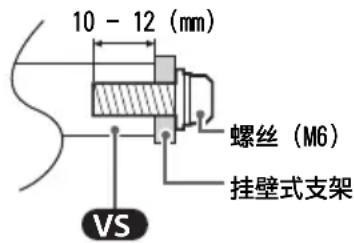
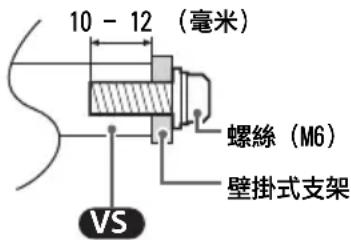
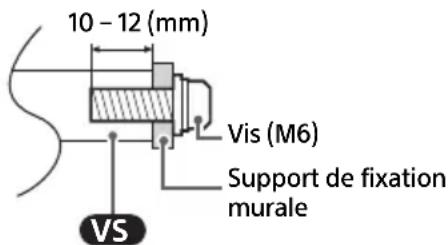
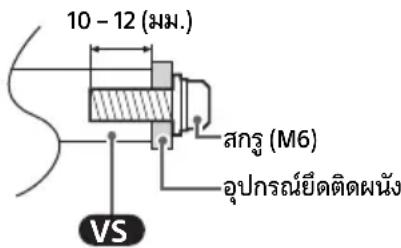
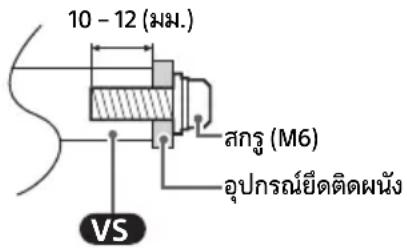
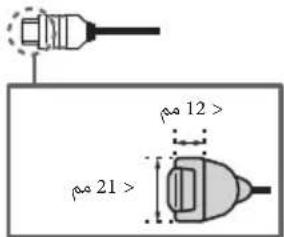
- Be sure to use the screws supplied with the Wall-Mount Bracket when attaching the Wall-Mount Bracket to the LCD Monitor. The supplied screws are designed as indicated by illustration when measured from the attaching surface of the Wall-Mount Bracket. The diameter and length of the screws differ depending on the Wall-Mount Bracket model. Use of screws other than those supplied may result in internal damage to the LCD Monitor or cause it to fall, etc.
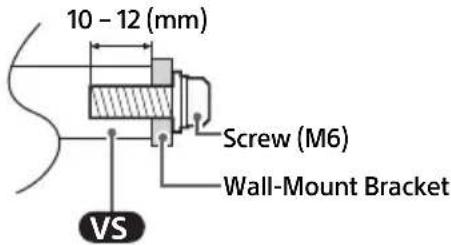
- Be sure to store the unused screws and Table-Top Stand in a safe place until you are ready to attach the Table-Top Stand. Keep the screws away from small children.
- Only for limited region/country/model.
Using the optional Wall-Mount Bracket (except SU-WL850 or SU-WL450) (not supplied)
This LCD Monitor's instruction manual only provides the steps to prepare the LCD Monitor for Wall-Mount installation before it is installed on the wall.
Your LCD Monitor can be mounted to a wall using a suitable Wall-Mount Bracket (not supplied). If the Table-Top Stand is attached to the LCD Monitor, the LCD Monitor may require detaching the Table-Top Stand. Prepare the LCD Monitor for the Wall-Mount Bracket before making cable connections.
For product protection and safety reasons, Sony strongly recommends that installation of your LCD Monitor on the wall be performed by qualified professionals. Do not attempt to install it yourself.
- Follow the instruction guide provided with the Wall-Mount Bracket for your model. Sufficient expertise is required in installing this LCD Monitor, especially to determine the strength of the wall for withstanding the LCD Monitor's weight.
- The screws for installing the Wall-Mount Bracket to the LCD Monitor are not supplied.
- The length of the screw for Wall-Mount Bracket differs depending on the Wall-Mount Bracket thickness. Please refer to below illustration.
FW-98BZ53L/98BZ50L/98BZ30L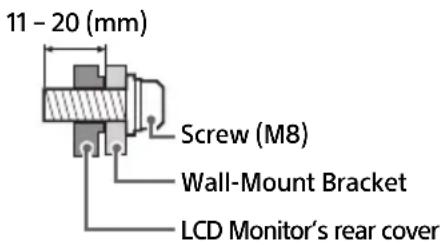
FW-85BZ40L / 85BZ30L / 75BZ40L / 75BZ35L / 75BZ30L / 65BZ40L / 65BZ35L / 65BZ30L / 55BZ40L / 55BZ35L / 55BZ30L / 50BZ30L / 43BZ30L
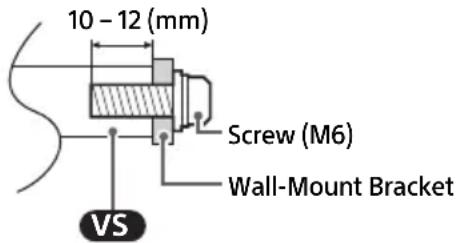
Troubleshooting
General troubleshooting for issues like: black screen, no sound, frozen picture, LCD Monitor does not respond, or network is lost, do the following steps.
1 Restart your LCD Monitor by pressing the power button on the remote control for about five seconds and select [Restart]. The LCD Monitor will restart. If the LCD Monitor does not recover, try unplugging the AC power cord (mains lead) then press the power button on the LCD Monitor and release it. Wait for two minutes, and plug in the AC power cord (mains lead). Or, press the power button on the LCD Monitor for about 40 seconds until the LCD Monitor turns off. 2 Refer to the Help menu by pressing HELP on the remote control. 3 Connect your LCD Monitor to the Internet and perform a software update. Sony recommends you to keep your LCD Monitor software updated. Software updates provide new features and performance improvements.
When you plug in the LCD Monitor, the LCD Monitor may not be able to turn on for a while even if you press the power button on the remote control or the LCD Monitor. It takes time to initialize the system. Wait for about one minute, then operate it again.
The remote control does not function.
- Replace the batteries.
Specifications
System
Panel system
LCD (Liquid Crystal Display) Panel, LED
Backlight
Sound output (W)
FW-98BZ53L/98BZ50L/98BZ30L:
10 + 10 + 10 + 10
FW-85BZ40L / 85BZ30L / 75BZ40L / 75BZ35L /
75BZ30L / 65BZ40L / 65BZ35L / 65BZ30L /
55BZ40L / 55BZ35L / 55BZ30L / 50BZ30L /
43BZ30L: 10 + 10
Wireless technology
Protocol IEEE 802.11a/b/g/n/ac
Bluetooth® Version 4.2
Input/Output jacks
AV IN
Video/Audio input (mini jack)
S-CENTER SPEAKER IN (FW-98BZ53L / 98BZ50L /
98BZ30L only)
S-centre speaker input (mini jack)
HDMI IN 1/2/3/4 (HDCP 2.3-compatible)
Video (FW-98BZ53L / 98BZ50L / 98BZ30L
only):
4096×2160p (50, 60 Hz) *1*2, 4096×2160p
(24 Hz) *1, 3840×2160p (50, 60 Hz) *2, 3840×
2160p (24, 25, 30 Hz), 1080p (24, 30, 50, 60,
100, 120 Hz), 1080i (50, 60 Hz), 720p (24, 30,
50, 60 Hz), 576p, 480p, PC Formats
3840×2160p (100, 120 Hz) *2*3
Video (FW-85BZ40L / 85BZ30L / 75BZ40L /
75BZ35L / 75BZ30L / 65BZ40L / 65BZ35L /
65BZ30L / 55BZ40L / 55BZ35L / 55BZ30L /
50BZ30L / 43BZ30L only):
4096×2160p (50, 60 Hz) *1*2, 4096×2160p
(24 Hz) *1, 3840×2160p (50, 60 Hz) *2, 3840×
2160p (24, 25, 30 Hz), 1080p (24, 30, 50,
60 Hz), 1080i (50, 60 Hz), 720p (24, 30, 50,
60 Hz), 576p, 480p, PC Formats
Audio:
In eARC (Enhanced Audio Return Channel) mode
7.1 channel linear PCM: 32/44.1/48 kHz
16 bits, Dolby Digital, Dolby Digital Plus,
DTS, Dolby TrueHD, DTS-HD MA, Dolby
Atmos, DTS:X Master Audio
Except eARC mode
5.1 channel linear PCM: 32/44.1/48/88.2/
96/176.4/192 kHz 16/20/24 bits, Dolby
Audio, Dolby Atmos, DTS
eARC/ARC (Enhanced Audio Return Channel/
Audio Return Channel) (HDMI IN 3 only)*4
In eARC mode
7.1 channel linear PCM: 32/44.1/48 kHz
16 bits, Dolby Digital, Dolby Digital Plus, DTS,
Dolby TrueHD, DTS-HD MA, Dolby Atmos,
DTS:X Master Audio
In ARC mode
Two channel linear PCM: 48 kHz 16 bits,
Dolby Audio, Dolby Atmos, DTS
DIGITAL AUDIO OUT (OPTICAL)
Digital optical jack (Two channel linear PCM):
kHz 16 bits, Dolby Audio, DTS)
HDMI 4 AUDIO IN
USB port 1 supports High Speed USB (USB 2.0)
USB port 2 supports Super Speed USB (USB 3.2
Gen1)
LAN
10BASE-T/100BASE-TX connector (Depending on the operating environment of the network, connection speed may differ. The
communication rate and quality are not guaranteed.)
REMOTE
RS-232C, mini jack
This jack is for receiving the external control signal.
Power and others
Power requirements
110 V AC, 60 Hz (Taiwan only)
220 V - 240 V AC, 50/60 Hz (except Taiwan)
Screen size (measured diagonally) (Approx.)
(inches/cm)
FW-98BZ53L / 98BZ50L / 98BZ30L: 98 / 247.7
FW-85BZ40L / 85BZ30L: 85 / 214.8
FW-75BZ40L/75BZ35L/75BZ30L:75/189.3
FW-65BZ40L / 65BZ35L / 65BZ30L: 65 / 163.9
FW-55BZ40L / 55BZ35L / 55BZ30L: 55 / 138.8
FW-50BZ30L: 50 / 125.7
FW-43BZ30L: 43 / 108.0
Power consumption
Indicated on the rear of the LCD Monitor
Standby power consumption*5*6
Jordan/UAE/Egypt: 0.50 W, Others: 0.5 W
Display resolution (horizontal × vertical) (pixels)
3840 × 2160
Output Rating
500 mA (for USB 1), 900 mA (for USB 2)
Dimensions (Approx.) (w × h × d) (mm)
with Table-Top Stand
FW-98BZ53L: 2199 × 1305 × 465
FW-98BZ50L: 2199 × 1305 × 465
FW-98BZ30L: 2199 × 1305 × 465
FW-85BZ40L: 1899 × 1176 × 456
FW-85BZ30L: 1899 × 1176 × 456
FW-75BZ40L: 1686 × 1045 × 410
FW-75BZ35L: 1686 × 1045 × 410
FW-75BZ30L: 1686 × 1045 × 410
FW-65BZ40L: 1462 × 912 × 338
FW-65BZ35L: 1462 × 912 × 338
FW-65BZ30L: 1462 × 912 × 338
FW-55BZ40L: 1243 × 787 × 338
FW-55BZ35L: 1243 x 787 x 338
FW-55BZ30L: 1243 x 787 x 338
FW-50BZ30L: 1126 x 718 x 286
FW-43BZ30L: 972 x 632 x 286
without Table-Top Stand
FW-98BZ53L: 2199 x 1255 x 85
FW-98BZ50L: 2199 x 1255 x 85
FW-98BZ30L: 2199 x 1255 x 85
FW-85BZ40L: 1899 x 1089 x 71
FW-85BZ30L: 1899 x 1089 x 71
FW-75BZ40L: 1686 x 969 x 72
FW-75BZ35L: 1686 x 969 x 72
FW-75BZ30L: 1686 x 969 x 72
FW-65BZ40L: 1462 x 842 x 71
FW-65BZ35L: 1462 x 842 x 71
FW-65BZ30L: 1462 x 842 x 71
FW-55BZ40L: 1243 x 721 x 71
FW-55BZ35L: 1243 x 721 x 71
FW-55BZ30L: 1243 x 721 x 71
FW-50BZ30L: 1126 x 653 x 70
FW-43BZ30L: 972 x 567 x 70
Mass (Approx.) (kg)
with Table-Top Stand
FW-98BZ53L: 68.9
FW-98BZ50L: 68.9
FW-98BZ30L: 68.9
FW-85BZ40L: 46
FW-85BZ30L: 46
FW-75BZ40L: 32.7
FW-75BZ35L: 32.7
FW-75BZ30L: 32.9
FW-65BZ40L: 22.3
FW-65BZ35L: 22.1
FW-65BZ30L: 22.1
FW-55BZ40L: 16.7
FW-55BZ35L: 16.6
FW-55BZ30L: 16.6
FW-50BZ30L: 12.9
FW-43BZ30L: 10.5
without Table-Top Stand
FW-98BZ53L: 67.2
FW-98BZ50L: 67.2
FW-98BZ30L: 67.2
FW-85BZ40L: 44.5
FW-85BZ30L: 44.5
FW-75BZ40L:31.5
FW-75BZ35L: 31.5
FW-75BZ30L: 31.7
FW-65BZ40L: 21.4
FW-65BZ35L:21.2
FW-65BZ30L: 21.2
FW-55BZ40L:15.8
FW-55BZ35L:15.7
FW-55BZ30L: 15.7
FW-50BZ30L: 12.3
FW-43BZ30L:10
Others
Optional accessories
Wall-Mount Bracket: SU-WL850 (except
FW-98BZ53L / 98BZ50L / 98BZ30L / 85BZ40L /
85BZ30L / 50BZ30L / 43BZ30L), SU-WL450
(except FW-98BZ53L / 98BZ50L / 98BZ30L)
USB Clock Unit: FWA-UB100AT
USB Anti-Theft Cover: FWA-AT100
Operating temperature: 0°C - 40°C
1 When 4096 × 2160p is input and [Wide mode] is set to [Normal], the resolution is displayed as 3840 × 2160p. To display 4096 × 2160p, set [Wide mode] setting to [Full 1] or [Full 2]. 2 Refer to the on-screen menu to set [HDMI signal format]. 3 HDMI IN 3 and 4 only. Use the Ultra High Speed HDMI Cable to connect. 4 Connect your audio system to the HDMI IN 3 to route LCD Monitor audio to your audio system. 5 Specified standby power is reached after the LCD Monitor finishes necessary internal processes. 6 Standby power consumption will increase when your LCD Monitor is connected to the network.
Note
- Support belt kit FB not supplied to Philippines.
- Optional accessories availability depends on countries/region/LCD Monitor model/stock.
- Design and specifications are subject to change without notice.
- Some of the on-screen instructions may not apply to your LCD Monitor model.
Trademark Information
- The terms HDMI, HDMI High-Definition Multimedia Interface, HDMI Trade dress and the HDMI Logos are trademarks or registered trademarks of HDMI Licensing Administrator, Inc.
- Dolby, Dolby Vision, Dolby Atmos, Dolby Audio, and the double-D symbol are trademarks of Dolby Laboratories Licensing Corporation. Manufactured under license from Dolby Laboratories. Confidential unpublished works. Copyright © 1992-2022 Dolby Laboratories. All rights reserved.
- Vewd® Core. Copyright 1995-2023 Vewd Software AS. All rights reserved.
- Google, YouTube and Android TV are trademarks of Google LLC.
- Wi-Fi®, Wi-Fi Alliance® and Wi-Fi Direct® are registered trademarks of Wi-Fi Alliance.
- Wi-Fi CERTIFIED™ and Wi-Fi CERTIFIED 6™ logos are certification marks of Wi-Fi Alliance.
- For DTS patents, see http://patents.dts.com. Manufactured under license from DTS, Inc. DTS, Digital Surround, and the DTS logo are registered trademarks or trademarks of DTS, Inc. in the United States and other countries. © 2020 DTS, Inc. ALL RIGHTS RESERVED.
- The Bluetooth® word mark and logos are registered trademarks owned by Bluetooth SIG, Inc. and any use of such marks by Sony Group Corporation and its subsidiaries is under license.
- TUXERA is a registered trademark of Tuxera Inc. in the US and other countries.
- Apple, Apple Home, AirPlay and HomeKit are trademarks of Apple Inc., registered in the U.S. and other countries and regions. To use AirPlay and Apple HomeKit with this TV, the latest version of iOS, iPadOS, or macOS is recommended. Covered by one or more claims of the HEVC patents listed at patentlist.accessadvance.com.
- All other trademarks are the property of their respective owners.
Table of Contents
Safety Information 2
Connection Diagram 4
Using the LCD Monitor as Part of an Audio System
7
Remote Control and LCD Monitor 7
Settings 9
Pro Mode 9
Control Functions 11
RS-232C 11
IP 12
Mounting the LCD Monitor to a Wall 14
Troubleshooting 15
Specifications 15
About the Manual
FW-75BZ40L / 75BZ35L / 75BZ30L / 65BZ40L / 65BZ35L /
65BZ30L / 55BZ40L / 55BZ35L / 55BZ30L / 50BZ30L / 43BZ30L
FW-85BZ40L / 85BZ30L / 75BZ40L / 75BZ35L / 75BZ30L / 65BZ40L / 65BZ35L / 65BZ30L / 55BZ40L / 55BZ35L / 55BZ30L / 50BZ30L / 43BZ30L
Connection Diagram
Note
http://192.168.0.1/sony/system
Request
POST /sony/system HTTP/1.1
Host: 192.168.0.1
Content-Type: application/json; charset=UTF-8
Content-Length: 70
X-Auth-PSK: 1234
{"method": "getPowerStatus", "params": [], "id": 50, "version": "1.0"}
Response
HTTP/1.1 200 OK
Content-Type: application/json; charset=UTF-8
Content-Length: 44
{"result": ["status": "active"], "id": 50}
FW-85BZ40L / 85BZ30L / 75BZ40L / 75BZ35L / 75BZ30L / 65BZ40L / 65BZ35L / 65BZ30L / 55BZ40L / 55BZ35L / 55BZ30L / 50BZ30L / 43BZ30L
Troubleshooting
75BZ30L / 65BZ40L / 65BZ35L / 65BZ30L /
55BZ40L / 55BZ35L / 55BZ30L / 50BZ30L /
43BZ30L:10+10
Wireless Technology
IEEE 802.11a/b/g/n/ac protocol
Bluetooth® version 4.2
Input/Output jacks
AVIN
Video/Audio input (mini jack)
S-CENTER SPEAKER IN (only for FW-98BZ53L/
98BZ50L / 98BZ30L)
S-center speaker input (mini jack)
HDMI IN 1/2/3/4 (compatible with HDCP 2.3) Video (only for FW-98BZ53L / 98BZ50L / 98BZ30L): 4096 × 2160p (50, 60 Hz) *1*2, 4096 × 2160p (24 Hz) *1, 3840 × 2160p (50, 60 Hz) *2, 3840 × 2160p (24, 25, 30 Hz), 1080p (24, 30, 50, 60, 100, 120 Hz), 1080i (50, 60 Hz), 720p (24, 30, 50, 60 Hz), 576p, 480p, PC formats 3840 × 2160p (100, 120 Hz) *2*3 Video (only for FW-85BZ40L / 85BZ30L / 75BZ40L / 75BZ35L / 75BZ30L / 65BZ40L / 65BZ35L / 65BZ30L / 55BZ40L / 55BZ35L / 55BZ30L / 50BZ30L / 43BZ30L): 4096 × 2160p (50, 60 Hz) *1*2, 4096 × 2160p (24 Hz) *1, 3840 × 2160p (50, 60 Hz) *2, 3840 × 2160p (24, 25, 30 Hz), 1080p (24, 30, 50, 60 Hz), 1080i (50, 60 Hz), 720p (24, 30, 50, 60 Hz), 576p, 480p, PC formats
Audio:
In eARC (Enhanced Audio Return Channel) mode
7.1 channel linear PCM: 32/44.1/48 kHz 16-bit,
Dolby Digital, Dolby Digital Plus,
DTS, Dolby TrueHD, DTS-HD MA, Dolby
Atmos, DTS:X Master Audio
Except in eARC mode
5.1 channel linear PCM: 32/44.1/48/88.2/96/
176.4/192 kHz 16/20/24-bit, Dolby
Audio, Dolby Atmos, DTS
eARC/ARC (Enhanced Audio Return Channel/
Audio Return Channel) (only on HDMI IN 3)
In eARC mode
DIGITAL AUDIO OUT (OPTICAL)
FW-75BZ40L / 75BZ35L / 75BZ30L: 75 / 189.3
FW-65BZ40L / 65BZ35L / 65BZ30L: 65 / 163.9
FW-55BZ40L / 55BZ35L / 55BZ30L: 55 / 138.8
FW-50BZ30L: 50 / 125.7
FW-43BZ30L: 43 / 108.0
Power consumption
Displayed on the back of the LCD monitor
Standby power consumption *5*6
FW-65BZ35L: 1462 × 912 × 338
FW-65BZ30L: 1462 × 912 × 338
FW-55BZ40L: 1243 × 787 × 338
FW-55BZ35L: 1243 × 787 × 338
FW-55BZ30L: 1243 × 787 × 338
FW-50BZ30L: 1126 × 718 × 286
FW-43BZ30L: 972 × 632 × 286
Without tabletop stand
FW-98BZ53L: 2199 × 1255 × 85
FW-98BZ50L: 2199 × 1255 × 85
FW-98BZ30L: 2199 × 1255 × 85
FW-85BZ40L: 1899 × 1089 × 71
FW-85BZ30L: 1899 × 1089 × 71
FW-75BZ40L: 1686 × 969 × 72
FW-75BZ35L: 1686 × 969 × 72
FW-75BZ30L: 1686 × 969 × 72
FW-65BZ40L: 1462 × 842 × 71
FW-65BZ35L: 1462 × 842 × 71
FW-65BZ30L: 1462 × 842 × 71
FW-55BZ40L: 1243 × 721 × 71
FW-55BZ35L: 1243 × 721 × 71
FW-55BZ30L: 1243 × 721 × 71
FW-50BZ30L: 1126 × 653 × 70
FW-43BZ30L: 972 × 567 × 70
Mass (approx.) (kg)
With tabletop stand
FW-98BZ53L: 68.9
FW-98BZ50L: 68.9
FW-98BZ30L: 68.9
FW-85BZ40L: 46
FW-85BZ30L: 46
FW-75BZ40L: 32.7
FW-75BZ35L: 32.7
FW-75BZ30L: 32.9
FW-65BZ40L: 22.3
FW-65BZ35L:22.1
FW-65BZ30L:22.1
FW-55BZ40L: 16.7
FW-55BZ35L:16.6
FW-55BZ30L: 16.6
FW-50BZ30L: 12.9
FW-43BZ30L: 10.5
Without tabletop stand
FW-98BZ53L:67.2
FW-98BZ50L:67.2
FW-98BZ30L:67.2
FW-85BZ40L: 44.5
FW-85BZ30L:44.5
FW-75BZ40L:31.5
FW-75BZ35L: 31.5
FW-75BZ30L: 31.7
FW-65BZ40L: 21.4
FW-65BZ35L: 21.2
FW-65BZ30L: 21.2
FW-55BZ40L: 15.8
FW-55BZ35L: 15.7
FW-55BZ30L: 15.7
FW-50BZ30L: 12.3
FW-43BZ30L: 10
Others
Optional Accessories
Wall-Mount Bracket: SU-WL850 (FW-98BZ53L/98BZ50L/
98BZ30L / 85BZ40L / 85BZ30L / 50BZ30L /
FW-75BZ40L / 75BZ35L / 75BZ30L / 65BZ40L / 65BZ35L / 65BZ30L / 55BZ40L / 55BZ35L / 55BZ30L / 50BZ30L / 43BZ30L
FW-85BZ40L / 85BZ30L / 75BZ40L / 75BZ35L / 75BZ30L / 65BZ40L / 65BZ35L / 65BZ30L / 55BZ40L / 55BZ35L / 55BZ30L / 50BZ30L / 43BZ30L
CT
Connection Diagram
Note
FW-85BZ40L / 85BZ30L / 75BZ40L / 75BZ35L / 75BZ30L / 65BZ40L / 65BZ35L / 65BZ30L / 55BZ40L / 55BZ35L / 55BZ30L / 50BZ30L / 43BZ30L
1 USB 1, USB-2
http://192.168.0.1/sony/system
Request
POST /sony/system HTTP/1.1
Host: 192.168.0.1
Content-Type: application/json; charset=UTF-8
Content-Length: 70
X-Auth-PSK: 1234
{"method": "getPowerStatus", "params": [], "id": 50, "version": "1.0"}
Response
HTTP/1.1 200 OK
Content-Type: application/json; charset=UTF-8
Content-Length: 44
{"result": ["status": "active"], "id": 50}
75BZ30L / 65BZ40L / 65BZ35L / 65BZ30L /
55BZ40L / 55BZ35L / 55BZ30L / 50BZ30L /
43BZ30L
Troubleshooting
75BZ30L / 65BZ40L / 65BZ35L / 65BZ30L /
55BZ40L / 55BZ35L / 55BZ30L / 50BZ30L /
43BZ30L:10+10
Wireless technology
IEEE 802.11a/b/g/n/ac protocol
Bluetooth version 4.2
Input/Output jacks
AV IN
Video/audio input (mini jack)
S-CENTER SPEAKER IN (only for FW-98BZ53L/
98BZ50L / 98BZ30L)
S-center speaker input (mini jack)
eARC/ARC (Enhanced Audio Return Channel/
Audio Return Channel) (only for HDMI IN 34
eARC mode
7.1-channel linear PCM: 32/44.1/48 kHz 16-bit, Dolby Digital, Dolby Digital Plus, DTS, Dolby TrueHD, DTS-HD MA, Dolby Atmos, DTS:X Master Audio
ARC mode
DIGITAL AUDIO OUT (OPTICAL)
FW-75BZ40L / 75BZ35L / 75BZ30L: 75 / 189.3
FW-65BZ40L / 65BZ35L / 65BZ30L: 65 / 163.9
FW-55BZ40L / 55BZ35L / 55BZ30L: 55 / 138.8
FW-50BZ30L: 50 / 125.7
FW-43BZ30L: 43 / 108.0
Power consumption
Indicated on the back of the LCD display
Standby power consumption*5*6
FW-65BZ35L: 1462 × 912 × 338
FW-65BZ30L: 1462 × 912 × 338
FW-55BZ40L: 1243 × 787 × 338
FW-55BZ35L: 1243 × 787 × 338
FW-55BZ30L: 1243 × 787 × 338
FW-50BZ30L: 1126 × 718 × 286
FW-43BZ30L: 972 × 632 × 286
Without display stand
FW-98BZ53L: 2199 × 1255 × 85
FW-98BZ50L: 2199 × 1255 × 85
FW-98BZ30L: 2199 × 1255 × 85
FW-85BZ40L: 1899 × 1089 × 71
FW-85BZ30L: 1899 × 1089 × 71
FW-75BZ40L: 1686 × 969 × 72
FW-75BZ35L: 1686 × 969 × 72
FW-75BZ30L: 1686 × 969 × 72
FW-65BZ40L: 1462 × 842 × 71
FW-65BZ35L: 1462 × 842 × 71
FW-65BZ30L: 1462 × 842 × 71
FW-55BZ40L: 1243 × 721 × 71
FW-55BZ35L: 1243 × 721 × 71
FW-55BZ30L: 1243 × 721 × 71
FW-50BZ30L: 1126 × 653 × 70
FW-43BZ30L: 972 × 567 × 70
Weight (approx.) (kg)
With display stand
FW-98BZ53L: 68.9
FW-98BZ50L: 68.9
FW-98BZ30L: 68.9
FW-85BZ40L: 46
FW-85BZ30L: 46
FW-75BZ40L: 32.7
FW-75BZ35L: 32.7
FW-75BZ30L: 32.9
FW-65BZ40L: 22.3
FW-65BZ35L: 22.1
FW-65BZ30L: 22.1
FW-55BZ40L: 16.7
FW-55BZ35L: 16.6
FW-55BZ30L: 16.6
FW-50BZ30L: 12.9
FW-43BZ30L: 10.5
Excluding display stand
FW-98BZ53L: 67.2
FW-98BZ50L: 67.2
FW-98BZ30L: 67.2
FW-85BZ40L: 44.5
FW-85BZ30L: 44.5
FW-75BZ40L: 31.5
FW-75BZ35L: 31.5
FW-75BZ30L: 31.7
FW-65BZ40L: 21.4
FW-65BZ35L:21.2
FW-65BZ30L:21.2
FW-55BZ40L: 15.8
FW-55BZ35L: 15.7
FW-55BZ30L: 15.7
FW-50BZ30L: 12.3
FW-43BZ30L:10
Others
Optional accessories
FW-75BZ40L/75BZ35L/75BZ30L/65BZ40L/65BZ35L/ 65BZ30L/55BZ40L/55BZ35L/55BZ30L/50BZ30L/43BZ30L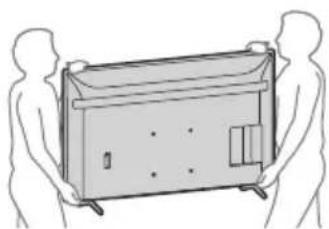
When transporting the LCD screen, do not let it be dropped or shaken excessively. When moving or carrying the LCD screen for repair, it should be placed in the LCD screen's carton and packed carefully. - When handling or installing the LCD screen, do not lay the LCD screen down (only applicable to certain LCD screen models).
Prevent falling (Models with supplied cable)
Refer to the Installation Guide on the cushion. The supplied screws are for fixing into solid wood.
(Except models with supplied cable)
FW-98BZ53L/98BZ50L/98BZ30L FW-85BZ40L / 85BZ30L / 75BZ40L / 75BZ35L / 75BZ30L / 65BZ40L / 65BZ35L / 65BZ30L / 55BZ40L / 55BZ35L / 55BZ30L / 50BZ30L / 43BZ30L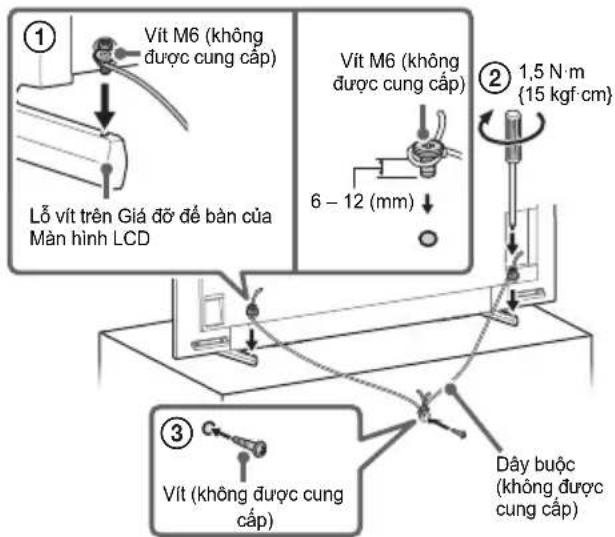
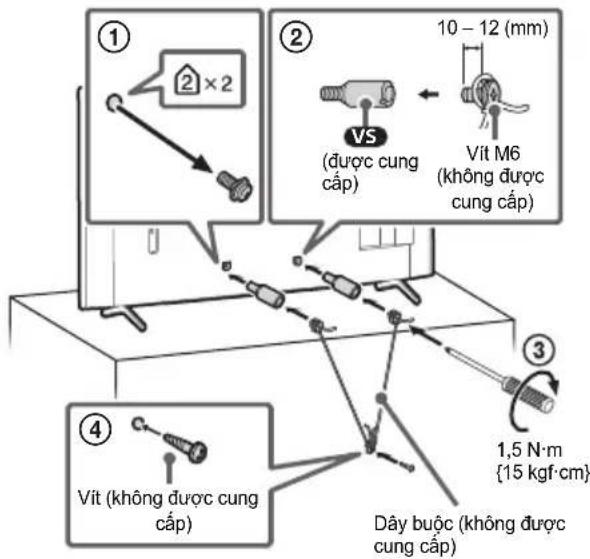
FW-85BZ40L / 85BZ30L / 75BZ40L / 75BZ35L / 75BZ30L / 65BZ40L / 65BZ35L / 65BZ30L / 55BZ40L / 55BZ35L / 55BZ30L / 50BZ30L / 43BZ30L
1 USB1, USB2
Display priority on external input PC
http://192.168.0.1/sony/system
Request
POST /sony/system HTTP/1.1
Host: 192.168.0.1
Content-Type: application/json; charset=UTF-8
Content-Length: 70
X-Auth-PSK:1234
{"method": "getPowerStatus", "params": [], "id": 50, "version": "1.0"}
Response
HTTP/1.1 200 OK
Content-Type: application/json; charset=UTF-8
Content-Length: 44
{"result": ["status": "active"], "id": 50}
For more detailed information about [IP Control], please contact your dealer.
Mounting the LCD Monitor on a Wall
Using an optional Wall-Mount Bracket (SU-WL850 or SU-WL450)* (not supplied)
For customers:
For safety and product protection, Sony strongly recommends that the LCD Monitor be installed by your Sony dealer or licensed contractor. Do not attempt to install the product yourself.
https://www.sony-asia.com/support
Follow the instructions provided with the Wall-Mount Bracket for your model. Sufficient expertise is required when installing this LCD Monitor, especially to determine the strength of the wall that can support the weight of the LCD Monitor. - Sony will not be held liable for any damage or injury caused by improper installation or installation that does not conform to standards. - Only qualified service personnel should perform wall mounting. For safety reasons, we strongly recommend that you use Sony accessories when installing, including:
- Wall-Mount Bracket SU-WL850
- Wall-Mount Bracket SU-WL450
- Be sure to use the screws supplied with the Wall-Mount Bracket when attaching the Wall-Mount Bracket to the LCD Monitor. The supplied screws are designed as indicated in the illustration when measured from the mounting surface of the Wall-Mount Bracket.
The diameter and length of the screws vary depending on the Wall-Mount Bracket model. Using screws not supplied by the manufacturer may cause damage inside the LCD Monitor or cause the LCD Monitor to fall, etc.
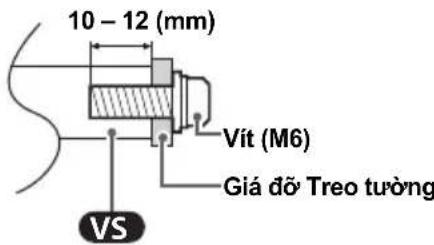
- Be sure to store the unused screws and the tabletop stand in a safe place until you are ready to attach the tabletop stand. Keep screws away from small children.
- Only for use in certain countries/regions/models.
Use the optional Wall-Mount Bracket (except SU-WL850 or SU-WL450) (not supplied).
This LCD Monitor Operating Instructions only provides the steps to prepare the LCD Monitor for wall mounting before it is installed on the wall.
You can attach the LCD Monitor to the wall using a Wall-Mount Bracket (not supplied). If you are attaching a Table-Top Stand to the LCD Monitor, you may need to remove the Table-Top Stand from the LCD Monitor. Prepare the LCD Monitor for mounting on the Wall-Mount Bracket before connecting cables.
For safety and product protection, Sony strongly recommends that the LCD Monitor be installed on the wall by qualified professionals. Do not attempt to install the product yourself.
Follow the instructions supplied with the Wall-Mount Bracket for your model. Sufficient expertise is required when installing this LCD Monitor, especially to determine the wall's strength to withstand the LCD Monitor's weight. - Screws for attaching the Wall-Mount Bracket to the LCD Monitor are not supplied.
- The length of the screws for attaching the Wall-Mount Bracket varies depending on the thickness of the Wall-Mount Bracket. Please refer to the illustration below.
FW-98BZ53L/98BZ50L/98BZ30L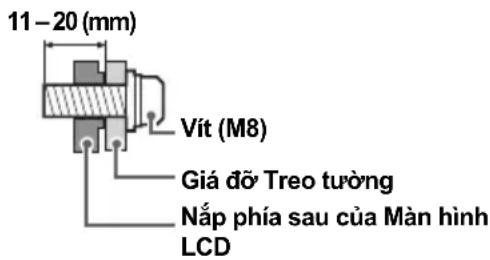
FW-85BZ40L / 85BZ30L / 75BZ40L / 75BZ35L / 75BZ30L / 65BZ40L / 65BZ35L / 65BZ30L / 55BZ40L / 55BZ35L / 55BZ30L / 50BZ30L / 43BZ30L
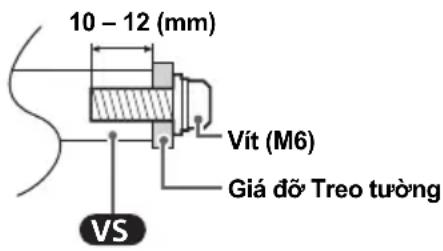
Troubleshooting
Perform the following steps to troubleshoot problems such as: blank screen, no sound, frozen image, LCD Monitor not responding, or lost network connection.
1 Restart the LCD Monitor by pressing the power button on the remote control for about five seconds and select [Restart]. The LCD Monitor will restart. If the LCD Monitor does not restart, try unplugging the AC power cord, then press the power button on the LCD Monitor and release. Wait two minutes and plug in the AC power cord. Or press the power button on the LCD Monitor for about 40 seconds until the LCD Monitor turns off.
2 Refer to the Help menu by pressing HELP on the remote control. 3 Connect the LCD Monitor to the internet and update the software. Sony recommends that you always update the LCD Monitor software. Software updates bring new features and enhance performance.
75BZ30L / 65BZ40L / 65BZ35L / 65BZ30L /
55BZ40L / 55BZ35L / 55BZ30L / 50BZ30L /
43BZ30L: 10 + 10
Wireless technology
IEEE 802.11a/b/g/n/ac protocol
2160p (24, 25, 30 Hz), 1080p (24, 30, 50, 60,
100, 120 Hz), 1080i (50, 60 Hz), 720p (24, 30,
50, 60 Hz), 576p, 480p, PC formats
3840 × 2160p (100, 120 Hz)*2*3
Video (only for FW-85BZ40L / 85BZ30L /
75BZ40L / 75BZ35L / 75BZ30L / 65BZ40L /
65BZ35L / 65BZ30L / 55BZ40L / 55BZ35L /
55BZ30L / 50BZ30L / 43BZ30L):
4096 × 2160p (50, 60 Hz)*1*2, 4096 × 2160p
(24 Hz)*1, 3840 × 2160p (50, 60 Hz)*2, 3840 ×
2160p (24, 25, 30 Hz), 1080p (24, 30, 50,
60 Hz), 1080i (50, 60 Hz), 720p (24, 30, 50,
60 Hz), 576p, 480p, PC format
Audio:
In eARC (Enhanced Audio Return
Channel) mode
Linear PCM 7.1 channels: 32/44.1/48 kHz
16 bit, Dolby Digital, Dolby Digital Plus, DTS,
Dolby TrueHD, DTS-HD MA, Dolby Atmos,
DTS:X Master Audio
Except eARC mode
Linear PCM 5.1 channels: 32/44.1/48/88.2/
96/176.4/192 kHz 16/20/24 bit, Dolby Audio,
Dolby Atmos, DTS
eARC/ARC (Enhanced Audio Return Channel/
Audio Return Channel (only for HDMI IN 3)4
In eARC mode
PCM linear channel 7.1: 32/44.1/48 kHz
16 bit, Dolby Digital, Dolby Digital Plus, DTS,
Dolby TrueHD, DTS-HD MA, Dolby Atmos,
DTS:X Master Audio
In ARC mode
PCM two-channel linear: 48 kHz 16 bit, Dolby
Audio, Dolby Atmos, DTS
DIGITAL AUDIO OUT (OPTICAL)
Optical digital connector (PCM two-channel linear
48 kHz 16 bit, Dolby Audio, DTS)
HDMI 4 AUDIO IN
Analog audio input (mini stereo jack)
Mini stereo jack)
Headphones
1,2
From USB 1 to USB high-speed (USB 2.0)
From USB 2 to USB super-speed (USB 3.2
Gen 1)
LAN
FW-65BZ40L / 65BZ35L / 65BZ30L: 65 / 163.9
FW-55BZ40L / 55BZ35L / 55BZ30L: 55 / 138.8
FW-50BZ30L: 50 / 125.7
FW-43BZ30L: 43 / 108.0
Power consumption
Noted on the back of the LCD screen
Power consumption in standby mode 5 6
Jordan/UAE/Egypt: 0.50 W, Other countries:
0.5W
Screen resolution (horizontal × vertical)
(pixels)
3.840 × 2.160
Power consumption
500 mA (for USB 1), 900 mA (for USB 2)
Dimensions (Approx.) (W x H x D) (mm)
With Table Top Stand
FW-98BZ53L: 2.199 × 1.305 × 465
FW-98BZ50L: 2.199 × 1.305 × 465
FW-98BZ30L: 2.199 × 1.305 × 465
FW-85BZ40L: 1.899 × 1.176 × 456
FW-85BZ30L: 1.899 × 1.176 × 456
FW-75BZ40L: 1.686 × 1.045 × 410
FW-75BZ35L: 1.686 × 1.045 × 410
FW-75BZ30L: 1.686 × 1.045 × 410
FW-65BZ40L: 1.462 × 912 × 338
FW-65BZ35L: 1.462 × 912 × 338
FW-65BZ30L: 1462 x 912 x 338
FW-55BZ40L: 1243 x 787 x 338
FW-55BZ35L: 1243 x 787 x 338
FW-55BZ30L: 1243 x 787 x 338
FW-50BZ30L: 1126 x 718 x 286
FW-43BZ30L: 972 x 632 x 286
No table stand
FW-98BZ53L: 2199 x 1255 x 85
FW-98BZ50L: 2199 x 1255 x 85
FW-98BZ30L: 2199 x 1255 x 85
FW-85BZ40L: 1899 x 1089 x 71
FW-85BZ30L: 1899 x 1089 x 71
FW-75BZ40L: 1686 x 969 x 72
FW-75BZ35L: 1686 x 969 x 72
FW-75BZ30L: 1686 x 969 x 72
FW-65BZ40L: 1.462 × 842 × 71
FW-65BZ35L: 1.462 × 842 × 71
FW-65BZ30L: 1.462 × 842 × 71
FW-55BZ40L: 1.243 × 721 × 71
FW-55BZ35L: 1.243 × 721 × 71
FW-55BZ30L: 1.243 × 721 × 71
FW-50BZ30L: 1.126 × 653 × 70
FW-43BZ30L: 972 × 567 × 70
Weight (Approx.) (kg)
With stand
FW-98BZ53L: 68.9
FW-98BZ50L: 68.9
FW-98BZ30L: 68.9
FW-85BZ40L: 46
FW-85BZ30L: 46
FW-75BZ40L:32.7
FW-75BZ35L:32.7
FW-75BZ30L:32.9
FW-65BZ40L:22.3
FW-65BZ35L:22.1
FW-65BZ30L:22.1
FW-55BZ40L:16.7
FW-55BZ35L:16.6
FW-55BZ30L:16.6
FW-50BZ30L:12.9
FW-43BZ30L:10.5
No table stand
FW-98BZ53L:67.2
FW-98BZ50L:67.2
FW-98BZ30L:67.2
FW-85BZ40L:44.5
FW-85BZ30L:44.5
FW-75BZ40L:31.5
FW-75BZ35L:31.5
FW-75BZ30L:31.7
FW-65BZ40L:21.4
FW-65BZ35L:21.2
FW-65BZ30L:21.2
FW-55BZ40L:15.8
FW-55BZ35L:15.7
FW-55BZ30L:15.7
FW-50BZ30L:12.3
FW-43BZ30L:10
Other specifications
Optional accessories
Wall mount bracket: SU-WL850 (except FW-98BZ53L / 98BZ50L / 98BZ30L / 85BZ40L / 85BZ30L / 50BZ30L / 43BZ30L), SU-WL450 (except FW-98BZ53L / 98BZ50L / 98BZ30L). USB hub: FWA-UB100AT. USB anti-theft lock: FWA-AT100.
Operating temperature: 0°C - 40°C
1 When inputting 4096 × 2160p and setting [Wide mode] to [Normal], the display resolution is 3840 × 2160p. To display 4096 × 2160p, set [Wide mode] to [Full 1] or [Full 2]. 2 Refer to the on-screen menu to set [HDMI signal format]. 3 Only for HDMI IN 3 and 4. Use an Ultra High Speed HDMI Cable for connection. 4 Connect the audio system to HDMI IN 3 for audio output from the LCD display to the audio system. 5 Power consumption in standby mode after the LCD display completes necessary internal processes. 6 Power consumption in standby mode if the LCD display is connected to the network.
Note
The optional accessories may vary depending on the country/region/model of the LCD display/stock. - Design and specifications are subject to change without notice. - Some on-screen instructions may not apply to your LCD display model.
Brand information
FW-75BZ40L / 75BZ35L / 75BZ30L / 65BZ40L / 65BZ35L / 65BZ30L / 55BZ40L / 55BZ35L / 55BZ30L / 50BZ30L / 43BZ30L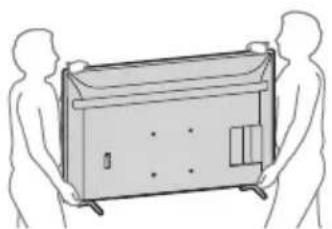
FW-85BZ40L / 85BZ30L / 75BZ40L / 75BZ35L / 75BZ30L / 65BZ40L / 65BZ35L / 65BZ30L / 55BZ40L / 55BZ35L / 55BZ30L / 50BZ30L / 43BZ30L
1 USB 1 USB 2
http://192.168.0.1/sony/system
Request
POST /sony/system HTTP/1.1
Host: 192.168.0.1
Content-Type: application/json; charset=UTF-8
Content-Length: 70
X-Auth-PSK: 1234
{"method": "getPowerStatus", "params": [], "id": 50, "version": "1.0"}
Response
HTTP/1.1 200 OK
Content-Type: application/json; charset=UTF-8
Content-Length: 44
{"result": ["status": "active}], "id": 50}
FW-85BZ40L / 85BZ30L / 75BZ40L / 75BZ35L / 75BZ30L / 65BZ40L / 65BZ35L / 65BZ30L / 55BZ40L / 55BZ35L / 55BZ30L / 50BZ30L / 43BZ30L
Troubleshooting
75BZ30L / 65BZ40L / 65BZ35L / 65BZ30L /
55BZ40L / 55BZ35L / 55BZ30L / 50BZ30L /
43BZ30L:10+10
Wireless technology
Protocol IEEE 802.11a/b/g/n/ac
Bluetooth® Version 4.2
Video (FW-98BZ53L / 98BZ50L / 98BZ30L
only):
4096 × 2160p (50, 60 Hz)*1, 4096 × 2160p
(24 Hz)*1, 3840 × 2160p (50, 60 Hz)*2, 3840 ×
2160p (24, 25, 30 Hz), 1080p (24, 30, 50, 60,
100, 120 Hz), 1080i (50, 60 Hz), 720p (24, 30,
50, 60 Hz), 576p, 480p, PC formats
3840 × 2160p (100, 120 Hz)*2*3
Video (FW-85BZ40L / 85BZ30L / 75BZ40L /
75BZ35L / 75BZ30L / 65BZ40L / 65BZ35L /
65BZ30L / 55BZ40L / 55BZ35L / 55BZ30L /
50BZ30L / 43BZ30L only):
4096 × 2160p (50, 60 Hz)*1*2, 4096 × 2160p
(24 Hz)*1, 3840 × 2160p (50, 60 Hz)*2, 3840 ×
2160p (24, 25, 30 Hz), 1080p (24, 30, 50,
60 Hz), 1080i (50, 60 Hz), 720p (24, 30, 50,
60 Hz), 576p, 480p, PC formats
Audio:
In eARC (Enhanced Audio Return Channel) mode
eARC/ARC (Enhanced Audio Return Channel/
Audio Return Channel) (HDMI IN 3
only)*4
In eARC mode
110 V AC, 60 Hz (Taiwan only)
220 V - 240 V AC, 50/60 Hz (except Taiwan)
With table stand FW-98BZ53L:68.9 FW-98BZ50L:68.9 FW-98BZ30L:68.9 FW-85BZ40L:46 FW-85BZ30L:46 FW-75BZ40L:32.7 FW-75BZ35L:32.7 FW-75BZ30L:32.9 FW-65BZ40L:22.3 FW-65BZ35L:22.1 FW-65BZ30L:22.1 FW-55BZ40L:16.7 FW-55BZ35L:16.6 FW-55BZ30L:16.6
FW-50BZ30L:12.9 FW-43BZ30L:10.5
Without table stand FW-98BZ53L:67.2 FW-98BZ50L:67.2 FW-98BZ30L:67.2 FW-85BZ40L:44.5 FW-85BZ30L:44.5 FW-75BZ40L:31.5 FW-75BZ35L:31.5 FW-75BZ30L:31.7 FW-65BZ40L:21.4 FW-65BZ35L:21.2 FW-65BZ30L:21.2 FW-55BZ40L:15.8 FW-55BZ35L:15.7 FW-55BZ30L:15.7 FW-50BZ30L:12.3 FW-43BZ30L:10
Others
Optional accessories Wall-mount bracket: SU-WL850 (except FW-98BZ53L / 98BZ50L / 98BZ30L / 85BZ40L / 85BZ30L / 50BZ30L / 43BZ30L), SU-WL450 (except FW-98BZ53L / 98BZ50L / 98BZ30L) USB clock: FWA-UB100AT USB anti-theft cover: FWA-AT100
FW-75BZ40L / 75BZ35L / 75BZ30L / 65BZ40L / 65BZ35L / 65BZ30L / 55BZ40L / 55BZ35L / 55BZ30L / 50BZ30L / 43BZ30L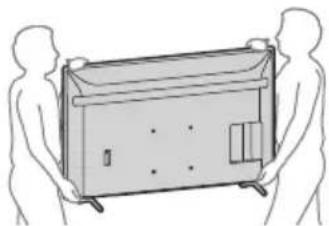
FW-85BZ40L / 85BZ30L / 75BZ40L / 75BZ35L / 75BZ30L / 65BZ40L / 65BZ35L / 65BZ30L / 55BZ40L / 55BZ35L / 55BZ30L / 50BZ30L / 43BZ30L
1 USB 1 USB 2
3 A V I N
HDMI IN 1/2/3/4
HDMI IN 4 (DVI-HDMI) HDMI 4 AUDIO IN
HDMI IN 3 eARC/ARC (Enhanced Audio Return Channel/Audio Return Channel) HDMI IN 3 eARC/ARC LCD eARC/ARC LCD LCD HDMI HDMI HDMI HDMI HDMI HDMI HDMI HDMI HDMI HDMI HDMI HDMI HDMI HDMI HDMI HDMI HDMI HDMI HDMI HDMI HDMI HDMI HDMI HDMI HDMI HDMI HDMI HDMI HDMI HDMI HDMI HDMI HDMI HDMI HDMI
5 REMOTE RS-232C
·
6 HDMI 4 AUDIO IN
HDMI IN 4 HDMI (nnnnnn) HDMI 4 AUDIO IN
nlaLCD
(FW-98BZ53L/98BZ50L/98BZ30L mnu)
HNTU
1 (aonuvaanuun) SYNC MENU: BRAVIA Sync HDMI 1/2/3/4 2 u 10 () CC J 3 HELP: uanwnuynnna (uaawannnu): uanwnyana /BACK OPTIONS: uanwovwovwovwovwuvnu D-Pad)
4 HOME/MENU
AUDIO:
Δ + / - (subscript _ 1) 叹 ( U A B U)* CH / PAGE + / -

| ยงzewpiresparagus | ยง | ยงugu捱 | ยงywständิตยง | ย诗句句 |
| REST API | HTTP | JSON-RPC | ย诗句 | API ย诗句 http://www.nprnph.com/ |
| IRCC-IP | HTTP | SOAP | ย诗句 | ย诗句 http://www.nprnph.com/Internet Protocol http://www.nprnph.com/Internet Protocol http://www.nprnph.com/Internet Protocol |
| ย诗句 ย诗句 IP | TCP | Byte stream | ย诗句 | ย诗句 http://www.nprnph.com/ |
| ย诗句 ย诗句 IP |
RESTAPIIRCC-IP
URL
http://192.168.0.1/sony/system
#
POST /sony/system HTTP/1.1
Host: 192.168.0.1
Content-Type: application/json; charset=UTF-8
Content-Length: 70
X-Auth-PSK: 1234
{"method": "getPowerStatus", "params": [], "id": 50, "version": "1.0"}
HTTP/1.1 200 OK
Content-Type: application/json; charset=UTF-8
Content-Length: 44
{"result": ["status": "active"}], "id": 50}
LCD uwwu
SU-WL850 / SU-WL450 *
Warning:
For customers using Sony LCD TV
Sony
- Sony 254567890123456789012345678901234567890123456789012345678901234567890123456789012345678901234567890123456789012
75BZ30L / 65BZ40L / 65BZ35L / 65BZ30L /
55BZ40L / 55BZ35L / 55BZ30L / 50BZ30L /
43BZ30L
SU-WL850
SU-WL450: 0n,
1 1 LCD / [ ]LCD]LCD/ 70LCD 70AC 70AC 70AC 70AC 70AC 70AC 70AC 70AC 70AC 70AC 70AC 2 uonovnnnuuauauauuauuauuauuauuauuauuuuauu 3 3 3 LCD uuuuauuuuuuuuuu uuuu uuuu uuuu uuuu uuuu uuuu uuuu uuuu uuuu uuuu uuuu uuuu uuuu uuuu uuuu uuuu uuuu uuuu uuuu uuuu uuuu uuuu uuuu uuuu uuuu uuuu uuuu uuuu uuuu uuuu uuuu uuuu uuuu uUU
LCD (Liquid Crystal Display) panel with LED backlight. Power consumption (W) FW-98BZ53L/98BZ50L/98BZ30L: 10+10+10+10 FW-85BZ40L/85BZ30L/75BZ40L/75BZ35L/ 75BZ30L/65BZ40L/65BZ35L/65BZ30L/ 55BZ40L/55BZ35L/55BZ30L/50BZ30L/ 43BZ30L:10+10. Wireless LAN IEEE 802.11a/b/g/n/ac, Bluetooth® 4.2
Audio output / headphone jack
→ / → AV IN
Optical audio output / audio output (optical audio output)
S-CENTER SPEAKER IN (FW-98BZ53L / 98BZ50L / 98BZ30L)
S-VIDEO input (video input)
HDMI IN 1/2/3/4 (supports HDCP 2.3
(4096×2160p (50, 60 Hz)*1², 4096×2160p
(24 Hz)*1 3840×2160p (50, 60 Hz)*2, 3840 ×
2160p (24, 25, 30 Hz), 1080p (24, 30, 50, 60, 100,
120 Hz), 1080i (50, 60 Hz), 720p (24, 30, 50,
60 Hz), 576p, 480p, PC
3840 x 2160p (100, 120 Hz)*23
(FW-85BZ40L / 85BZ30L / 75BZ40L /
75BZ35L / 75BZ30L / 65BZ40L / 65BZ35L /
65BZ30L / 55BZ40L / 55BZ35L / 55BZ30L /
50BZ30L/43BZ30L
4096 x 2160p (50, 60 Hz)*1*2, 4096 x 2160p
(24 Hz)*1 3840 x 2160p (50, 60 Hz)*2, 3840 x
2160p (24, 25, 30 Hz), 1080p (24, 30, 50, 60 Hz),
1080i (50, 60 Hz), 720p (24, 30, 50, 60 Hz), 576p,
480p, PC
B
eARC (Enhanced Audio Return Channel)
PCM 7.1 channel:
32/44.1/48 kHz 16-bit, Dolby Digital, Dolby
Digital Plus, DTS, Dolby TrueHD, DTS-HD MA,
Dolby Atmos, DTS:X Master Audio
eARC
PCM 5.1
Sampling rates: 32/44.1/48/88.2/96/176.4/192 kHz
16/20/24-bit, Dolby Audio, Dolby Atmos, DTS
eARC/ARC (Enhanced Audio Return Channel/Audio Return Channel) (HDMI IN 3)*4
eARC
PCM 7.1 channel:
32/44.1/48 kHz 16-bit, Dolby Digital, Dolby
Digital Plus, DTS, Dolby TrueHD, DTS-HD MA,
Dolby Atmos, DTS:X Master Audio
ARC
PCM 48 kHz 16-bit, Dolby
Audio, Dolby Atmos, DTS
→ DIGITAL AUDIO OUT (OPTICAL)
PCM
48 kHz 16-bit, Dolby Audio, DTS)
HDMI 4 AUDIO IN
HDMI
HDMI
W
1, 2
USB 1, USB (USB 2.0)
USB 2.0, USB (USB 3.2
Gen 1)
LAN
10BASE-T/100BASE-TX
FW-75BZ40L/75BZ35L/75BZ30L: 75/189.3
FW-65BZ40L/65BZ35L/65BZ30L: 65/163.9
FW-55BZ40L/55BZ35L/55BZ30L: 55/138.8
FW-50BZ30L: 50/125.7
FW-43BZ30L: 43/108.0
3,840× 2,160
500 mA (SNR USB 1), 900 mA (SNR USB 2)
FW-98BZ53L: 2,199 × 1,305 × 465
FW-98BZ50L: 2,199 × 1,305 × 465
FW-98BZ30L: 2,199 × 1,305 × 465
FW-85BZ40L: 1,899 × 1,176 × 456
FW-85BZ30L: 1,899 × 1,176 × 456
FW-75BZ40L: 1,686 × 1,045 × 410
FW-75BZ35L: 1,686 × 1,045 × 410
FW-75BZ30L: 1,686 × 1,045 × 410
FW-65BZ40L: 1,462 × 912 × 338
FW-65BZ35L: 1,462 × 912 × 338
FW-65BZ30L: 1,462 × 912 × 338
FW-55BZ40L: 1,243 × 787 × 338 FW-55BZ35L: 1,243 × 787 × 338 FW-55BZ30L: 1,243 × 787 × 338 FW-50BZ30L: 1,126 × 718 × 286 FW-43BZ30L: 972 × 632 × 286
FW-98BZ53L: 2,199 × 1,255 × 85 FW-98BZ50L: 2,199 × 1,255 × 85 FW-98BZ30L: 2,199 × 1,255 × 85 FW-85BZ40L: 1,899 × 1,089 × 71 FW-85BZ30L: 1,899 × 1,089 × 71 FW-75BZ40L: 1,686 × 969 × 72 FW-75BZ35L: 1,686 × 969 × 72 FW-75BZ30L: 1,686 × 969 × 72 FW-65BZ40L: 1,462 × 842 × 71 FW-65BZ35L: 1,462 × 842 × 71 FW-65BZ30L: 1,462 × 842 × 71 FW-55BZ40L: 1,243 × 721 × 71 FW-55BZ35L: 1,243 × 721 × 71 FW-55BZ30L: 1,243 × 721 × 71 FW-50BZ30L: 1,126 × 653 × 70 FW-43BZ30L: 972 × 567 × 70
nun (usan) (nn.)
2
FW-98BZ53L:68.9 FW-98BZ50L: 68.9 FW-98BZ30L: 68.9 FW-85BZ40L: 46 FW-85BZ30L:46 FW-75BZ40L: 32.7 FW-75BZ35L: 32.7 FW-75BZ30L: 32.9 FW-65BZ40L: 22.3 FW-65BZ35L:22.1 FW-65BZ30L: 22.1 FW-55BZ40L: 16.7 FW-55BZ35L:16.6 FW-55BZ30L:16.6 FW-50BZ30L: 12.9 FW-43BZ30L: 10.5
i
FW-98BZ53L: 67.2 FW-98BZ50L: 67.2 FW-98BZ30L: 67.2 FW-85BZ40L: 44.5 FW-85BZ30L:44.5 FW-75BZ40L:31.5
FW-75BZ35L: 31.5 FW-75BZ30L: 31.7 FW-65BZ40L: 21.4 FW-65BZ35L:21.2 FW-65BZ30L: 21.2 FW-55BZ40L: 15.8 FW-55BZ35L: 15.7 FW-55BZ30L: 15.7 FW-50BZ30L: 12.3 FW-43BZ30L:10
duq
ununua
SUNSHENYI:SU-WL850(uni)
FW-98BZ53L / 98BZ50L / 98BZ30L / 85BZ40L /
85BZ30L/50BZ30L/43BZ30L),SU-WL450(wn)
FW-98BZ53L / 98BZ50L / 98BZ30L)
mwn USB:FWA-UB100AT
WANJUOONJUNIUSUB:FWA-AT100
2000-00:00 C-40C
*1 4096x2160 pixels [input] [output] 3840x2160 pixels [input] [output] 4096x2160 pixels [input 1] [input 2] 2 HDMI IN 3 [input] 4 [input] Ultra High Speed HDMI Cable *4 500000000000000000000000000000000000000000000000000000000000000000000000000
l
*5 LCD
HDMI, HDMI High-Definition Multimedia Interface, HDMI Trade dress HDMI Dolby, Dolby Vision, Dolby Atmos, Dolby Audio Dolby Laboratories Licensing Corporation Dolby Laboratories - Vewd® Core. Copyright 1995-2023 Vewd Software AS. All rights reserved. Google, YouTube Android TV Wi-Fi, Wi-Fi Alliance Wi-Fi Direct Wi-Fi Alliance - Wi-Fi CERTIFIED™ Wi-Fi CERTIFIED 6™ Wi-Fi Alliance - DTS http://patents.dts.com DTS, Inc. DTS, Digital Surround DTS Bluetooth Bluetooth Bluetooth SIG, Inc. Sony Group Corporation TUXERA Tuxera Inc. Apple, Apple Home, AirPlay HomeKit Apple Inc. AirPlay Apple HomeKit iOS, iPadOS macOS -
.HDMI Licensing Administrator, Inc. 25
Dolby Audio, Dolby Atmos, Dolby Vision, Dolby
a5gao aajao cooLd Goo
Dolby Licensee Licensing Corporation
jglg jllg.ogjg jyJolal.Dolby Jolo
.1abg2022-1992
Vewd® Core. Copyright 1995-2023
Vewd Software AS. All rights reserved.
Google Android TV YouTube Google
.LLC
Wi-Fi Direct Wi-Fi Alliance Wi-Fi CERTIFIED™ Wi-Fi CERTIFIED 6™
Wi-Fi Alliance
Wi-Fi CERTIFIED 6 and Wi-Fi CERTIFIED
Wi-Fi Alliance
For patents, see http://patents.dts.com. DTS and Digital Surround are trademarks of DTS, Inc.
DTS, Inc.
All rights reserved.
2020
DTS, Inc.
The Bluetooth word mark and logos are registered trademarks owned by Bluetooth SIG, Inc.
All other trademarks are the property of their respective owners.
Sony Group Corporation
Tuxera Inc. 25
All rights reserved.
Apple Home, AirPlay, and HomeKit are trademarks of Apple Inc.
Apple Inc.
Apple HomeKit AirPlay
. macOS, iPadOS, iOS
. patentlist.accessadvance.com
12.9: FW-50BZ30L
10.5: FW-43BZ30L
[20g] 2160p×4096, 0.2160p×3840
[2 Jol5] g1 [Jol5]
*2. [HDMI δJL
HDMI 43 HDMIN
LCD HDMI IN 3 Jy
.12
3 j 5
ab = 10
LCD 10000000000000000000000000000000
465× 1305× 2199:FW - 98BZ53L
465× 1305× 2199:FW - 98BZ50L
465× 1305× 2199:FW - 98BZ30L
456× 1176× 1899:FW - 85BZ40L
456× 1176× 1899:FW - 85BZ30L
410× 1045× 1686:FW - 75BZ40L
410 x 1045 x 1686: FW-75BZ35L
410 x 1045 x 1686: FW-75BZ30L
338 x 912 x 1462: FW-65BZ40L
338 x 912 x 1462: FW-65BZ35L
338 x 912 x 1462: FW-65BZ30L
338 x 787 x 1243: FW-55BZ40L
338 x 787 x 1243: FW-55BZ35L
338 x 787 x 1243: FW-55BZ30L
286 x 718 x 1126: FW-50BZ30L
286 x 632 x 972: FW-43BZ30L
85 x 1255 x 2199: FW-98BZ53L
85 x 1255 x 2199: FW-98BZ50L
85 x 1255 x 2199: FW-98BZ30L
71 x 1089 x 1899: FW-85BZ40L
71 x 1089 x 1899 : FW-85BZ30L
72 x 969 x 1686 : FW-75BZ40L
72 x 969 x 1686 : FW-75BZ35L
72 x 969 x 1686 : FW-75BZ30L
71 x 842 x 1462 : FW-65BZ40L
71 x 842 x 1462 : FW-65BZ35L
71 x 842 x 1462 : FW-65BZ30L
71 x 721 x 1243 : FW-55BZ40L
71 x 721 x 1243 : FW-55BZ35L
71 x 721 x 1243 : FW-55BZ30L
70 x 653 x 1126 : FW-50BZ30L
70 x 567 x 972 : FW-43BZ30L
68.9 : FW-98BZ53L
68.9:FW-98BZ50L
68.9:FW-98BZ30L
46:FW-85BZ40L
46:FW-85BZ30L
32.7:FW-75BZA0L
32.7:FW-75BZ35L
32.9:FW-75BZ30L
22.3:FW-65BZ40L
22.1:FW-65BZ35L
22.1:FW-65BZ30L
16.7:FW-55BZ40L
16.6:FW-55BZ35L
16.6:FW-55BZ30L
eARC/ARC (Enhanced Audio Return Channel/
4* (HDMI IN 3) (Audio Return Channel
44.1/32:PCM
Dolby Digital Plus Dolby Digital 16/48
Dolby Atmos DTS-HD MA Dolby TrueHD DTS
DTS:X Master Audio
ARC
48:PCM 5.1
DTS Dolby Atmos Dolby Audio 16
DIGITAL AUDIO OUT (OPTICAL)
:PCM 2ch 48
(DTS, Dolby Audio 16 48
HDMI 4 AUDIO IN
2.1
USB (USB 2.0) port 1
USB (USB 3.2 Gen 1) port 2
LAN
3.2
100BASE-TX/10BASE-T
.
REMOTE
RS-232C
Connector for external control
Lg 2g a b
aBbU
() 60.110
(jg21 LcL) 60/50 300000000000000000000000000000000000000000000000000000000000
189.3/75:FW-75BZ40L/75BZ35L/75BZ30L
163.9/65:FW-65BZ40L/65BZ35L/65BZ30L
138.8/55:FW-55BZ40L/55BZ35L/55BZ30L
125.7/50:FW-50BZ30L
108.0/43:FW-43BZ30L
aLg 1
LCD 1
6.5.aablaa11 aalb11 y
b1g 0.5:sj1,b1g 0.50:000/000000000000000000000
()()()
2160 × 3840
jol
(USB2J)m900.(USB1J)500mA
aai 1
p12
(a.u.l) a.o.u.l p
LED
C
10 + 10 + 10 + 10:FW - 98BZ53L / 98BZ50L / 98BZ30L
FW-85BZ40L / 85BZ30L / 75BZ40L / 75BZ35L / 75BZ30L /
65BZ40L / 65BZ35L / 65BZ30L / 55BZ40L / 55BZ35L / 55BZ30L /
10 + 10:50BZ30L / 43BZ30L
aLwUa
IEEE 802.11a/b/g/n/ac Jg
Bluetooth*4.2J
1
AVIN → /
(gao)gall/gai
FW-98BZ53L / 98BZ50L / 98BZ30L) S-CENTER SPEAKER IN
(b)
()S-centre ()
(HDCP 2.3) HDMI IN 1/2/3/4
75BZ30L / 65BZ40L / 65BZ35L / 65BZ30L / 55BZ40L /
55BZ35L/55BZ30L/50BZ30L/43BZ30L
2160p x 4096 (24, 30) 2160p x 4096 (60, 50)
2160p x 3840 (24, 25) 2160p x 3840 (60, 50)
1080i (60, 50) 1080p (60, 50, 30, 24) 1080p (30
480p, 576p, 720p (60, 50, 30, 24)
eARC (Enhanced Audio Return Channel)
PCM 7.1 (32/44.1/48)
Dolby Digital, Dolby Digital Plus (48/16)
Dolby Atmos, Dolby TrueHD, DTS
DTS-HD MA, DTS:X Master Audio
eARC
/88.2/48/44.1/32: PCM 5.1
. Dolby Audio 24/20/16 192/176.4/96
DTS: Dolby Atmos
401019 1
g 1000000000000000000000000000000000000000
dLCC 1 LCD dLw yolg o g o
.
1
65BZ40L / 65BZ35L / 65BZ30L / 55BZ40L / 55BZ35L / 55BZ30L /
50BZ30L/43BZ30L

JLCD
SU-WL850) 1
(SU-WL450
:shuaW auij
aJglal Cwlll aS Jclogdeo
LCD
https://www.sony-asia.com/support
SU-WL850
SU-WL450
Therefore, b2 = 3.
[IP SOS] gets [Aj SOS] gets [Aj SOS] gets [Aj SOS]
IRCC-IP 3 REST API
IP 50
. [IP 1
REST API psswai jd ayayy HTTP 1
.1234" 192.168.0.1:IP jge) aaii jie ai iiaai
URL
http://192.168.0.1/sony/system
1
POST /sony/system HTTP/1.1
Host:192.168.0.1
Content-Type: application/json; charset=UTF-8
Content-Length: 70
X-Auth-PSK: 1234
{"method": "getPowerStatus", "params": [], "id": 50, "version": "1.0"}
HTTP/1.1 200 OK
Content-Type: application/json; charset=UTF-8
| X | Y | ||||||
| 0x8E | - | (↓) | 0x00 | 0x02 | 0x00 | 0x8C | 1 |
| 0x8F | - | (↓) | 0x00 | ||||
| 0x01 (#1)0x96 | 0x04(HDMI) | 0x03 | 0x02 | 0x00 | 0x8C | 1 | |
| 0x02(#2)0x97 | |||||||
| 0x03(#3)0x98 | |||||||
| 0x04(#4)0x99 |
100 1/100 100 100 100 100 100 100 100 100 100 100 100 100 100 100 100 100 100 100 100 100 100 100 100 100 100
[Pro gog jzai w] o. [Pro uolai] ← [ulalill] ← [auijll aeiall] 1
Pro g0gJ gawwJn
.6dolg a jit gioj dolz yllgl 1e 2e jSsill d0g o olil lal Jlaal Baaill qulas 1e bdo
.[Pro]
MENU/HOME /(c+)-/+/(g+)×/(dalj)
[alab] [Pro 15u] [Pro u] [Pro g] [Pro u]
.[Pro] [Jzg] [] [P]
Pro goggl aibglaa
[Pro g] [Pro g]
一
.0000 1
一
JSSJ 10000000000000000000000000000000000000
HDMI
.HDMI jLoguoguiue LaiHDMI Jds
MENU/HOME jj 1
SsKoJIHJ 500g HMOH JG 10000000000000000000000000000000000000000000
aaii i 1
ailll lalil 111
g
.PIN 85 J6o Jo [Prog]dla
( g = 1) - 1 + Δ
(AU)

(1)
6
LED / egd jyjy
7
(gall)
LCD aaiw g 8g
J 1 J 1 J 1 J 1 J 1 J 1 J 1 J 1 J 1 J 1 J 1 J 1 J 1 J 1 J 1 J 1 J 1 J 1 J 1 J 1 J 1 J 1 J 1 J 1 J 1 J 1 J 1 J 1 J 1 J 1 J 1 J 1 J 1 J 1 J
Gglln s LCD
(b) FW-98BZ53L/98BZ50L/98BZ30L)
gallLCD 150
y
S-CENT
1
BRAVIA Sync: SYNC MENU
(1)
HDMI 1/2/3/4
1
(ab)

CC
a#
HELP
i+
BACK
OPTIONS
.
D-Pad
Laaagai 1
REMOTE RS-232C
5
eXbI 10olai dJzal .Lulwll Jwai W jB. ..
HDMI 4 AUDIO IN
HDMI IN 4. DVI Jg GdI JdDVI - HDMI UGL .HDMI 4 AUDIO IN Jg
USB2-USB1
aalaoaioojfo 100
.0Jg
(wJlaeaw) 2
2
LCD aLw aclawg aclawll no J no o gall 1 k y L .
AVIN 3
-

HDMI IN 1/2/3/4
HDMI 19
HDMI IN 4. DVI
Enhanced Audio Return) HDMI IN 3 eARC/ARC (Channel/Audio Return Channel
HDMI IN 3. If you connect a device that is compatible with the eARC/ARC (Enhanced Audio Return Channel/Audio Return Channel) function, you can output audio from the TV to the connected device. For details, refer to the eARC/ARC section. Digital AUDIO OUT (OPTICAL) is also available.
.eARC
blawy zio
(ogai jao ayaoal pabj ojojol 1yogjol)
aalll aai gaaagall aai
aall jgeiaalll aal paaal l 10000000000000000000
(bgawj no ayaoal pab oogajl uogai atwly)
FW-98BZ53L/98BZ50L/98BZ30L
FW-85BZ40L/85BZ30L/75BZ40L/75BZ35L/75BZ30L/65BZ40L/65BZ35L/ 65BZ30L/55BZ40L/55BZ35L/55BZ30L/50BZ30L/43BZ30L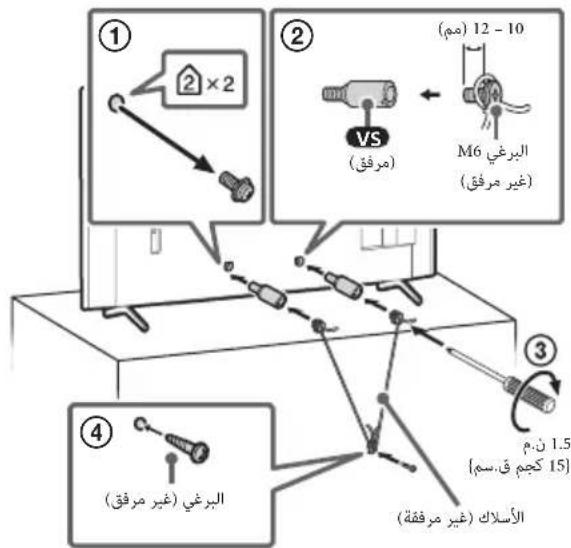
FW-98BZ53L/98BZ50L/98BZ30L
FW-75BZ40L/75BZ35L/75BZ30L/65BZA0L/65BZ35L/65BZ30L/55BZA0L/ 55BZ35L/55BZ30L/50BZ30L/43BZ30L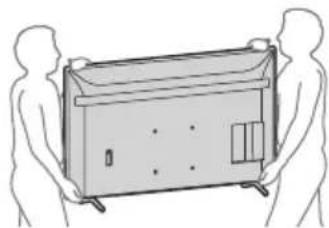
.aaaijaiai j
(https://www.sony.net/tv-software-licenses/)

- ABOUT MANUALS
- SETUP GUIDE
- REFERENCE GUIDE (THIS MANUAL) / SAFETY INFORMATION
- HELP
- NOTE
- LOCATION OF THE IDENTIFICATION LABEL
- SAFETY INFORMATION
- INSTALLATION/SET-UP
- INSTALLATION
- TRANSPORTING
- TOPPLE PREVENTION
- (MODELS WITH SUPPLIED SUPPORT BELT KIT)
- (EXCEPT MODELS WITH SUPPLIED SUPPORT BELT KIT)
- CONNECTION DIAGRAM
- USING LCD MONITOR AS PART OF AUDIO SYSTEM
- REMOTE CONTROL AND LCD MONITOR
- SETTINGS
- PRO MODE
- HOW TO CHANGE THE MODE
- WHEN THE MONITOR IS IN NORMAL MODE
- WHEN THE MONITOR IS IN PRO SETTINGS MODE
- WHEN THE MONITOR IS IN THE PRO MODE
- INTRODUCTION OF THE PRO MODE FUNCTIONS
- HOW TO SET PRO MODE FUNCTIONS
- CONTROL FUNCTIONS
- RS-232C
- INTERFACE
- DATA FORMAT
- COMMAND EXAMPLE
- IP
- MONITOR SETTINGS
- EXAMPLE OF HTTP REQUEST AND RESPONSE FOR REST API
- URL
- REQUEST
- RESPONSE
- INSTALLING THE LCD MONITOR TO THE WALL
- USING THE OPTIONAL WALL-MOUNT BRACKET (SU-WL850 OR SU-WL450)* (NOT SUPPLIED)
- TO CUSTOMERS
- TO SONY DEALERS AND CONTRACTORS
- WALL-MOUNT BRACKET INSTALLATION INFORMATION
- USING THE OPTIONAL WALL-MOUNT BRACKET (EXCEPT SU-WL850 OR SU-WL450) (NOT SUPPLIED)
- FOR PRODUCT PROTECTION AND SAFETY REASONS, SONY STRONGLY RECOMMENDS THAT INSTALLATION OF YOUR LCD MONITOR ON THE WALL BE PERFORMED BY QUALIFIED PROFESSIONALS. DO NOT ATTEMPT TO INSTALL IT YOURSELF
- TROUBLESHOOTING
- SPECIFICATIONS
- SYSTEM
- INPUT/OUTPUT JACKS
- POWER AND OTHERS
- DIMENSIONS (APPROX.) (W × H × D) (MM)
- MASS (APPROX.) (KG)
- OTHERS
- TRADEMARK INFORMATION
- TABLE OF CONTENTS
- ABOUT THE MANUAL
- WEIGHT (APPROX.) (KG)
- OPTIONAL ACCESSORIES
- PREVENT FALLING (MODELS WITH SUPPLIED CABLE)
- DISPLAY PRIORITY ON EXTERNAL INPUT PC
- MOUNTING THE LCD MONITOR ON A WALL
- USING AN OPTIONAL WALL-MOUNT BRACKET (SU-WL850 OR SU-WL450)* (NOT SUPPLIED)
- FOR CUSTOMERS
- USE THE OPTIONAL WALL-MOUNT BRACKET (EXCEPT SU-WL850 OR SU-WL450) (NOT SUPPLIED)
- FOR SAFETY AND PRODUCT PROTECTION, SONY STRONGLY RECOMMENDS THAT THE LCD MONITOR BE INSTALLED ON THE WALL BY QUALIFIED PROFESSIONALS. DO NOT ATTEMPT TO INSTALL THE PRODUCT YOURSELF
- DIMENSIONS (APPROX.) (W X H X D) (MM)
- OTHER SPECIFICATIONS
- BRAND INFORMATION
- NLALCD
- LCD UWWU
- SU-WL850 / SU-WL
- WARNING
- SONY
- SU-WL
- AUDIO OUTPUT / HEADPHONE JACK
- NUN (USAN) (NN.)
- DUQ
- AAI
- JLCD
- REST API PSSWAI JD AYAYY HTTP
- REMOTE RS-232C
- HDMI 4 AUDIO IN
- USB2-USB
- HDMI IN
- ENHANCED AUDIO RETURN) HDMI IN 3 EARC/ARC (CHANNEL/AUDIO RETURN CHANNEL
- BLAWY ZIO
Brand : SONY
Model : FW-75BZ35L
Category : Monitor