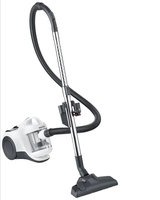
BC 7103 - Vacuum Cleaner SEVERIN - Free user manual and instructions
Find the device manual for free BC 7103 SEVERIN in PDF.


| Product Type | Cyclonic bagless vacuum cleaner |
| Brand | Severin |
| Model | BC 7103 |
| Suction hose | With auxiliary air regulator |
| Telescopic tube | Yes, adjustable |
| Combination brush | Premium Eco, switchable (carpet/hard floor) |
| Crevice tool | For joints and narrow spaces |
| Upholstery nozzle | For upholstery |
| Accessory holder | Attachable to telescopic tube |
| Dust container | Removable, transparent, with Max mark |
| Motor filter | Washable motor pre-filter (mesh filter + lamella filter) |
| HEPA filter | Not washable, replace every 6 months |
| Cyclonic system | Yes, bagless |
| Overheat protection | Integrated automatic shut-off |
| Cable rewind | Rewind button |
| On/Off button | On the housing |
| Usage | Dry floors, carpets, rugs, upholstered furniture |
| Dust container cleaning | Washable with water, dry completely before reassembling |
| Motor pre-filter cleaning | Washable at 40°C, drying 24h for the mesh, 3 days for the lamella filter |
| Available spare parts | Dust container, pre-filter, HEPA filter, parquet brush, turbo, crevice nozzle, XXL nozzle |
| Disposal | Electronic device to be recycled separately |
Frequently Asked Questions - BC 7103 SEVERIN
User questions about BC 7103 SEVERIN
0 question about this device. Answer the ones you know or ask your own.
Ask a new question about this device
Download the instructions for your Vacuum Cleaner in PDF format for free! Find your manual BC 7103 - SEVERIN and take your electronic device back in hand. On this page are published all the documents necessary for the use of your device. BC 7103 by SEVERIN.
USER MANUAL BC 7103 SEVERIN
natural_image
Black and white photo of a vacuum cleaner with coiled hose and base mount (no visible text or symbols)ART.-NO. CY 7103
GB Instructions for use
FR Mode d'emploi
Bagless cyclone cylinder vacuum cleaner 11
flowchart
graph TD
    A["Step 1: Car Seat Replacement"] --> B["Image Icon"]
    C["Step 2: Car Seat Replacement"] --> D["Image Icon with Stripes"]
natural_image
3D rendered image of a gray elongated object with a curved top surface (no text or symbols)natural_image
3D rendered mechanical part with a Y-shaped cutout (no text or symbols)natural_image
Diagram of a hand adjusting a cable or grip with an arrow indicating direction (no text or symbols)Bagless cyclone cylinder vacuum cleaner
Dear Customers,
About this instruction manual
This instruction manual includes important tips for your safety and the use of the appliance. Failure to observe the instruction manual can result in injuries to people or damage to the appliance. Keep the instruction manual safe. When passing the appliance on to somebody else, the instruction manual must also be passed on. Read the instruction manual completely before using the appliance for the first time.
Structure and scope of delivery
- Suction hose
- Secondary air regulator
- Telescopic tube
- Accessory bracket with a crevice tool and upholstery nozzle
- Premium eco floor nozzle
- Main unit
- Dust container with filter insert
- Mains plug with power cable
- EPA filter cover
- Park hook holder
- Power cable retraction button
- Power button
- Button for removing the dust container
- Handle for removing the dust container
- Handle for removing the dust container
- Button to open the dust container
- Dust bin flap
Not illustrated:
1 instructions manual
Safety Instructions
Connecting the appliance
Since the appliance is operated with electrical current, there is a danger of electric shock. Therefore:
- Only connect and start up the vacuum cleaner according to the de-tails on the name plate (underside of the appliance).
- Check the appliance and power cable for possible damage beforeuse. Never operate a defective appliance or an appliance with a defective power cable.
- Never try to repair the appliance or its power cable yourself. To prevent hazards, repairs to the appliance and the power cable may only be made by our customer service. Give a defective appliance to a dealer or make contact with SEVERIN customer service.
- Do not immerse appliance in water or other liquids or treat it with liq-uids. Do not operate the appliance outdoors or in rooms with high humidity. Do not handle the plug with wet hands.
- Caution: the power cable must only be pulled out from the appliance as far as the first mark.
- Make sure that the power cable is not kinked, crushed or run over and that it does not come into contact with sources of heat, humidity and sharp edges. Make sure that the power cable does not become a stumbling hazard.
- Do not pull or transport the appliance using the power cable. Whenunplugging the plug from the outlet, always pull directly on the plug.
- If possible, do not use an extension cable. If this is unavoidable, only use GS-tested, simple extension cables (no multi-outlet adapters) that are designed for the appliance's power consumption.
- Before cleaning or maintaining the appliance, as well as before changing accessories, switch off the appliance and unplug the plug from the outlet.
Safety of particular groups of people
- This appliance may only be used by children over the age of 8 and by persons with reduced physical, sensory or mental capacities or a lack of experience and/or knowledge when they are supervised or if they have been instructed about the safe use of the appliance and have understood the risks resulting from the use of the appliance.
- Children may not play with the appliance or stand or sit on the appliance. Cleaning and user maintenance may not be performed by children without supervision.
- Keep children younger than 8 away from the appliance and power cable.
- Keep packaging materials out of the reach of children and dispose of them. Otherwise they present a suffocation risk.
Intended use
The appliance may only be used in households. Only vacuum dry, normally-soiled floors or, depending on the accessories, also furniture and upholstery. Any other use is improper and is forbidden.
In order to prevent injuries, fires and damage, the appliance may not be used to vacuum:
- People, animals and plants. Always keep nozzles and vacuum open-ings away from all body parts, hair and clothing. Do not vacuum near your head.
- Glowing or burning particles (such as ash, coals, charcoal, ciga-rettes, matches).
- Explosively or flammable materials or toner.
- Water and other liquids, e.g. damp carpet cleaners.
- Pointy objects such as glass splinters, needles or constructionwaste.
- Fine dust, such as plaster, cement, fine drilling dust, powder.
CE Marking
This device is compliant with the mandatory EU directives for CE marking.
Using the appliance
Assembly and first use
- Remove any remaining packaging or inserts from the appliance.
- Only assemble appliance parts when the plug has been disconnected from the mains socket.
- Assemble the appliance as shown below and check that the dust container (7) and filters are fitted correctly (also see the sections "Emptying the dust container" and "Cleaning or replacing the motor pre-filter").
- If necessary, insert the dust container (7) into the device until it clicks into place.
- Push the suction hose (1) onto the appliance and turn it clockwise until it clicks into place.
- Attach the telescopic tube (3) to the suction hose (1) and set the desired length.
- Select and attach the nozzle depending on the surface to be vacuumed. All nozzles can be used with or without a telescopic tube.
- Never use a damaged nozzle. A damaged nozzle could cause scratching of surfaces.
- Pull out the power cable up to the yellow mark. If the red mark is exposed, use the cable rewind button to retract the power cable to the yellow mark. Otherwise, the power cable may be overstressed and damaged.
Select nozzle
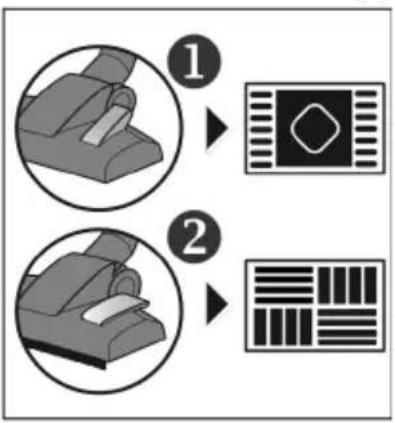
1. Premium Eco Floor Nozzle (5)
flowchart
graph TD
    A["Step 1: Seat Replacement"] --> B["Visual Diagram"]
    C["Step 2: Seat Replacement"] --> D["Visual Diagram"]
The switchable Premium Eco Floor Nozzle (5) has 2 setting options:
Position 1 is excellently suited to cleaning dirt and fibres from carpets, rugs etc. and for deep cleaning of these surfaces.
Position 2 is ideal for all kinds of smooth hard floors.
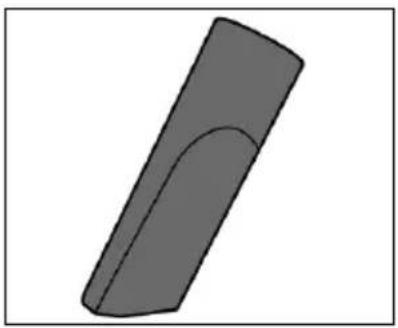
2. Crevice tool
natural_image
3D rendered image of a gray curved object with a smooth curved top surface (no text or symbols)The crevice nozzle is suitable for cleaning joints, sofa cracks and other spaces that are difficult to access.
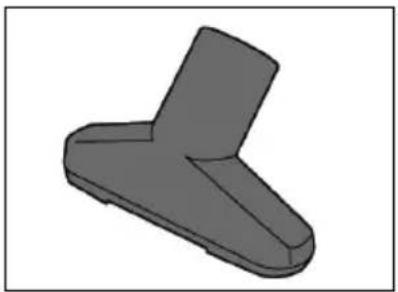
3. Upholstery nozzle
natural_image
3D rendered mechanical part with a Y-shaped cutout (no text or symbols)The upholstery nozzle is suitable for vacuuming armchairs, sofas or other upholstery fabrics.
4. Accessory bracket
• To always have the accessory to hand, clip the accessory bracket to the telescopic tube (3).
- Attach the crevice tool and upholstery nozzle.
Vacuum cleaning
- Especially when vacuuming stairs, make sure that you are always above the appliance. Other-Vacuum cleaning wise the appliance may fall down and cause injuries.
- When using of a brush with rotating bristles, keep it away from people, animals, plants, cables and lines at all times.
- Only use the appliance if the dust container and the filters have been correctly inserted.
- Assemble the appliance, plug into mains power and switch on the appliance.
- Follow the cleaning and maintenance instructions of the floor covering, carpet or furniture manufacturer!
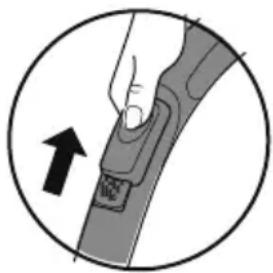
natural_image
Diagram of a hand holding a cable buckle with an arrow indicating direction (no text or symbols)- If curtains or other objects are accidentally suctioned, quickly open the slide vent to release the objects again.
• Always ensure you are using the right tool or nozzle for the surface to be cleaned.
• After using the appliance, switch it off and unplug from mains power. - Press the power cable retraction button (11) and guide the power cable with one hand.
- Ensure the power cable does not move around in an uncontrolled way with a risk of injuring those nearby, causing a tripping hazard or damaging objects.
Maintaining and cleaning
Before carrying out any maintenance or cleaning of your appliance, switch it off and unplug it from the mains power socket!
Emptying the dust container
It is best to empty the dust container after each use.
However, then empty at the latest:
- when the Max mark is reached,
- If suction power is lower than it should be
-
before longer storage or
• before sending to the service centre. -
Detach the suction hose (1) by turning it anticlockwise, press the black button (13) and remove the dust container (7).
- Press the button (16) on the bottom of the dust container (see image), open the door and empty the contents of the dust container.
- The contents of the dust container can be disposed of in normal household garbage unless it contains dirt that is forbidden in the household garbage.
- Close the dust container and insert it into the device.
Cleaning the dust container
- Clean the dust container regularly, particularly under the following conditions:
- if the suction power seems to be reduced
- before storing the appliance for an extended period
-
before sending the appliance to the service centre.
-
Remove the dust container and empty it as indicated above. Close the ap again.
- Turn the dust container lid by its handle (14) until ▼ and 🔒 are aligned. Take off the lid.
- While holding the dust container lid by its handle (14), turn the motor pre- liter at the base towards and remove it necessary, clean the motor pre- liter as indicated under “Cleaning or replacing the motor pre-filter”.
- Rinse the dust container with water (add a mild detergent, if necessary).
- Thoroughly dry the dust container and allow it to air dry before reassembling. Do not use the appliance unless the dust container is completely dry.
Cleaning or replacing the motor pre-filter
- Clean the iter regularly, particularly under the following conditions:
- If suction power is lower than it should be
- before storing the appliance for an extended period, or
• before sending to the service centre.
- When normally used for household purposes, the – iter should be replaced every 6 months.
- The motor pre- lter consists of two parts:
-
Strainer
· Pleated lter -
Remove the motor pre- lter as described under “Cleaning the dust container”.
· Pull the strainer off the pleated lter and tap it out. - First, tap out the pleated - lter and then brush it out with a brush. Then tap out any loosened dust residues again.
- Both liters are washable (max. 40 °C), but neither dishwasher nor washing machine safe. Rinse the liters thorough under running water.
-
After cleaning, leave the strainer to dry at room temperature for approx. 24 hours and only replace it when it is completely dry.
-
Let the pleated filter dry for about 3 days.
- When the parts are completely dry, place the strainer onto the pleated filter. ▲ on the strainer and ▼ on the pleated filter must be aligned. Check that they are firmly seated.
Assemble the dust container
- While holding the dust container lid by its handle (14), place the motor pre-filter on the bottom of the lid, turn the base towards and lock it in place.
- Replace the dust container lid on the dust container (ensure ▼ is aligned with 🔒), then turn the handle (14) towards 🔒 and lock it in place.
- Fit the dust container (7) into the appliance and lock it in place.
EPA filter:
- Clean the filter regularly, particularly under the following conditions:
- if the suction power seems to be reduced
- before storing the appliance for an extended period, or
- before sending to the service centre.
- When normally used for household purposes, the filter should be replaced every 6 months.
- Open the EPA filter cover (9) and take the filter out.
- First tap out the filter and then brush it out. Then tap out any loosened dust residues again.
- The EPA filter is not washable.
- Put the filter back in and close the cover.
Cleaning
- The housing and power cable may not be handled with liquids or immersed in liquids for reasons of electrical safety. Rub housing with a slightly damp cloth and then dry.
- For cleaning, do not use any sharp or scouring cleansers or hard brushes.
Storing the appliance
- When not in use, the floor nozzle can be hooked into the park hook holder (10) above the cover of the EPA filter.
Troubleshooting by yourself
- To avoid any problems, it is important to empty the dust container regularly and to take this opportunity to check the filters and clean or replace them depending on how dirty they are.
- Before contacting our customer service, check with the help of below table whether you can correct the problem yourself.
| Problem Solution | |
| The appliance stops suddenly | The integrated overheating protection has responded (possibly due to an overfilled dust container or similar) In this case, proceed as follows:1. Switch off the appliance.2. Pull plug from main socket.3. Eliminate the cause of overheating (either the dust container needs emptying - see the section on “Emptying the dust container”, or the filters need cleaning - see the section on "Cleaning or replacing the motor pre-filter" or there is a blockage somewhere, which needs to be removed).4. Include the suction hose, nozzle, and tube and search for the cause of the overheating.5. Close the cover and re-fit all accessory.6. Wait another 45 minutes.After the appliance has cooled off, you may switch it on again. |
| The appliance hardly picks up any dust and/or the suction power drops | The dust container needs to be emptied (see the section on “Emptying/cleaning the dust container”).It is advisable to take this opportunity to clean the filters at the same time (see “Cleaning or replacing the motor pre-filter”). |
| With the switchable floor nozzle attached, the switch is not in a position appropriate to the type of floor.Select the correct position for the switch. | |
| Odours spread or even dust escapes from the appliance | It is likely that parts of the dust container or vacuum cleaner accessories that were dismantled to clean the filter or change accessories were not properly reinstalled or closed. Check that all parts are correctly and firmly in place. |
• If this does not help, please contact our customer service.
Spare parts and disposal
| 0157-048:1 dust container set(1 motor pre-filter + 1 EPA filter) | 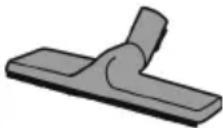 | PB7217:1 parquet brush |
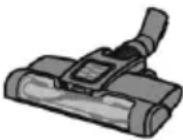 TB7216:1 Jet Drive turbo brush TB7216:1 Jet Drive turbo brush | 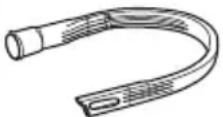 | ZB7214:1 long, flexible crevice nozzle |
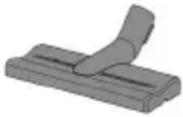 PB7210:1 XXL Upholstery Nozzle PB7210:1 XXL Upholstery Nozzle | 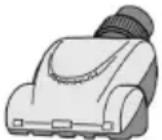 | TB7215:1 Mini Turbo Nozzle |
Disposal

Devices marked with this symbol must be disposed of separately from your household waste, as they contain valuable materials which can be recycled. Proper disposal protects the environment and human health. Your local authority or retailer can provide information on the matter.
Chère cliente, Cher client,
natural_image
3D rendered image of a gray rectangular object with a curved top edge, resembling a stylized tool or component (no text or symbols)natural_image
3D rendered mechanical part with a Y-shaped cutout (no text or symbols)natural_image
Diagram of a hand holding a cable with a padlock, enclosed in a circle (no text or symbols)flowchart
graph TD
    A["Step 1: Chair with handle"] --> B["Step 2: Device icon with diamond"]
    B --> C["Step 2: Bar pattern with horizontal stripes"]
natural_image
3D rendered image of a gray elongated object with a curved top surface (no text or symbols)natural_image
3D rendered model of a gray Y-shaped mechanical component (no text or symbols)natural_image
Diagram of a hand holding a cable buckle with an arrow indicating direction (no text or symbols)natural_image
3D rendered image of a gray rectangular object with a curved top edge, resembling a stylized tool or component (no text or symbols)natural_image
3D rendered model of a gray Y-shaped mechanical part (no text or symbols)natural_image
Diagram of a hand holding a device with an arrow indicating direction (no text or symbols present)natural_image
3D rendered image of a gray curved object with a smooth curved top surface (no text or symbols)natural_image
3D rendered mechanical part with a Y-shaped cutout (no text or symbols)natural_image
Diagram of a hand holding a button on a device, with an arrow indicating direction (no text or symbols present)flowchart
graph TD
    A["1: Initial Seat Replacement"] --> B["2: Assembly"]
    B --> C["Image: Column with diagonal line"]
    C --> D["Barcode Pattern: Horizontal bars on right"]
natural_image
3D rendered image of a gray curved object with a smooth curved top surface (no text or symbols)natural_image
3D rendered image of a gray Y-shaped mechanical component (no text or symbols)natural_image
Diagram of a hand adjusting a cable buckle with an arrow indicating direction (no text or symbols)natural_image
3D rendered image of a gray rectangular object with a curved top edge, resembling a stylized tool or component (no text or symbols)natural_image
3D rendered mechanical part with a Y-shaped cutout (no text or symbols)natural_image
Illustration of a hand adjusting a cable buckle with an arrow indicating direction (no text or symbols)flowchart
graph TD
    A["Step 1: Foot Position"] --> B["Image with diamond shape"]
    C["Step 2: Mask/Charcoal"] --> D["Image with grid pattern"]
natural_image
3D rendered image of a gray curved object with a smooth curved top surface (no text or symbols)natural_image
3D rendered mechanical part with a Y-shaped cutout (no text or symbols)natural_image
Diagram of a hand adjusting a cable buckle, showing a circular arrow and no text or symbolsnatural_image
3D rendered image of a gray curved object with a smooth curved top surface (no text or symbols)natural_image
3D rendered image of a gray mechanical component with no visible text or symbolsnatural_image
Diagram of a hand holding a cable buckle with an arrow indicating direction (no text or symbols)flowchart
graph TD
    A["Step 1: Foot Position"] --> B["Image with diamond shape"]
    C["Step 2: Mask/Charcoal"] --> D["Image with grid pattern"]
natural_image
3D rendered image of a gray rectangular object with a curved top edge, resembling a stylized tool or component (no text or symbols)natural_image
3D rendered mechanical part with a Y-shaped cutout (no text or symbols)natural_image
Diagram of a hand adjusting a cable buckle with an arrow indicating direction (no text or symbols)flowchart
graph TD
    A["Step 1: Device with lever"] --> B["Arrow to Category 1"]
    C["Step 2: Assembly with lever"] --> D["Arrow to Category 2"]