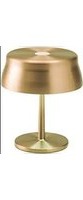
Sister Light Mini - Lamp Zafferano - Free user manual and instructions
Find the device manual for free Sister Light Mini Zafferano in PDF.


| Product Type | Rechargeable portable lamp with dimmer and adjustable color temperature |
| Brand | Zafferano |
| Model | Sister Light Mini |
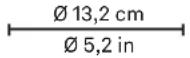
| Dimensions (diameter x height) | 13.2 x 15 cm |
| Weight | Approx. 0.5 kg (estimation) |
| Power Supply | DC 5 V, max 2 A (USB-C cable included) |
| Battery Type | Built-in rechargeable lithium |
| Battery Life | 8 h at 100% brightness, up to 58 h at 6% |
| LED Power | 3 W |
| Luminous Flux | 250 lm (2700K), 260 lm (3150K), 270 lm (4000K) |
| Color Temperature | 2700K (warm white), 3150K, 4000K (neutral white) |
| Color Rendering Index (CRI) | ≥ 90 |
| Protection Rating | IP65 (dust and water jet resistant) |
| Electrical Class | III (very low voltage) |
| Salt Mist Resistance | 1500 hours according to UNI EN ISO 9227 |
| Main Functions | Touch on/off, cyclic dimmer, last level memory, color temperature selection (long press when off) |
| Battery Charging | Via USB-C cable and standard adapter (2A recommended) |
| Low Battery Indicator | Three white flashes when charge reaches 1% |
| Care and Cleaning | Soft dry cloth |
| Usage Precautions | Do not tilt the lamp more than 15°, avoid heavy mechanical loads |
| Magnetic Mounting | Possible with optional kit (ref. LD0340RA) |
| Available Spare Parts | Replacement battery (BAT04705506701900), LED board (KIT00012007000200), multi charging station (8xUSB) |
| Warranty | See full manual |
Frequently Asked Questions - Sister Light Mini Zafferano
User questions about Sister Light Mini Zafferano
0 question about this device. Answer the ones you know or ask your own.
Ask a new question about this device
Download the instructions for your Lamp in PDF format for free! Find your manual Sister Light Mini - Zafferano and take your electronic device back in hand. On this page are published all the documents necessary for the use of your device. Sister Light Mini by Zafferano.
USER MANUAL Sister Light Mini Zafferano
natural_image
Silhouette of a table lamp with a curved top and stem (no text or symbols)sister light mini
Design Federico de Majo
Lampada da tavolo ricaricabile • Rechargeable table lamp • Aufladbare Tischlamp • Lampe de table rechargeable • Lámpara de mesa recargable
⑪ ISTRUZIONI D'USO p 1
UK INSTRUCTIONS FOR USE p 4
TEMPERATURA COLORE
0 - 5 sec 5 - 10 sec 10 - 15 sec
2700K 3150K 4000K
LED DI SEGNALAZIONE
natural_image
Illustration of four household lighting items: a lamp, batteries, and a lamp with a red indicator light (no text or symbols)LED ROSSO FISSO
LED BLU FISSO
natural_image
Simple line drawing of a table lamp connected to a wall-mounted device and a hand gesture (no text or symbols)natural_image
Simple line drawing of a lamp connected to a wall-mounted device and a hand gesture (no text or symbols)natural_image
Simple line drawing of a lamp with a pointer and a circular button, connected to a hand gesture (no text or symbols)Rechargeable table lamp
| LD0306O3 nodized goldLD0306R3 anodized copperLD0306V3 anodized green | LED DIMMER3W • 250lm - 260lm - 270lm2700K - 3150K - 4000KIP65 • CRI>90 • 5Vdc max 2A∅ 13,2 x h 15 cm / ∅ 5,2 x h 5,9 in | ||||||
 | |||||||
| INCLUDED | NOT INCLUDED | ||||||
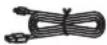 | Charging cable with USB Type C input |  | LD0300UCDual USB port power charger | ||||
 |  | [Magnetic fixing kit] | 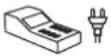 | LD0340RAMulti-socket USB charger (8xUSB) | |||
 | |||||||
 | BAT04705506701900Replacement battery pack | ||||||
 |  |  |  | 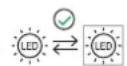 |  |  | KIT00012007000200Replacement LED board |
INCLUDED
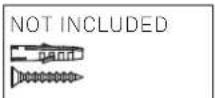
NOT INCLUDED
1. Tips for use:
This product is exclusively for lighting purposes and:
A) It must not be exposed to heavy mechanical loads or contamination; B) It can be installed and used only after checking the state of the product; check that is not dirty and has not been damaged during storage; C) Installation and maintenance must be carried out when the appliance is switched off; D) Any alterations to the product, any tampering and any failure to comply with the instructions provided may make the appliance hazardous; E) Products with IP65 protection are suitable for outdoor use; F) All metal and plastic surfaces should be cleaned with a soft dry cloth; G) The company Zafferano shall not be held liable for any damage caused due to its products being assembled in any manner that does not comply with the instructions provided.
2. Technical data:
- Power: 3 W
- Volt: DC 5 V
- Lumen lamp: 2700K 250 lm - 3150K 260 lm - 4000K 270 lm
- LED: HONGLITRONIC 2835 /(8+42 pz) 3 STEP MAC ADAM
- Lithium battery pack included (see section accessories included); for instructions about how to replace the battery pack, please consult the website: www.zafferanoitalia.com. We recommend using an original battery pack as a replacement.
- Standard charge: 1A - 2A (max 2A)
- Charge: 2A 5 h - 1A 10 h
- Battery life: 100% 8 h - 60% 13 h - 30% 28 h - 6% 58 h
- Class: III
- Protection rating: IP65
- CRI≥90
- With reference to the UNI EN ISO 9227 standard, the lamp is guaranteed to resist exposure to neutral salt spray (NSS) for 1,500 hours.
3. Charger:
- You can use a charger with Standard-A USB to charge this product.
- Dual USB port power charger NOT INCLUDED: INPUT 100-240 V AC - 50/60Hz; OUTPUT DC 5V - 2.1 A.
-To correctly charge the lamp, we recommend that you: 1-Connect the USB cable to the adaptor; 2-Connect the USB cable to the lamp; 3-Put the plug into the electrical socket; 4-When fully charged, disconnect the plug from the electrical socket and remove the USB cable.
- The lamp also operates properly when connected to the mains power supply.
- We recommend using an optional charger and the original cable provided. Alternatively, use a certified cable and a 2A charger.
4. Manufacturer's configuration:
100% LUMINOSITY - 2700K - DIMMER ON - MECHANICAL FIXING
5. Important!
- The support surface for the lamp must not exceed a 15^ tilt or it will fall.
- The battery is provided with the following protection functions: short circuit, over discharge, over charge, over current, over voltage.
- To preserve the integrity of the battery, we recommend keeping the charge between minimum 20% and maximum 80%; if the lamp is not used for long periods, it is advisable to regularly charge/discharge the product.
- Please refer to local laws for the proper disposal and recycling of the battery.
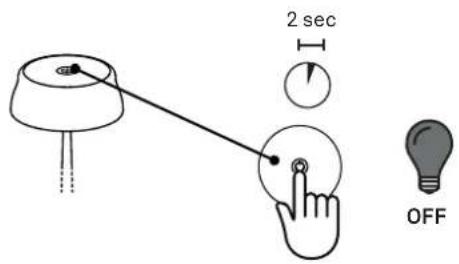
SWITCHING ON / DIMMING / SWITCHING OFF
Quick taps to:
- turn on
- change the brightness
- turn off the lamp
The steps are repeated in a cycle.
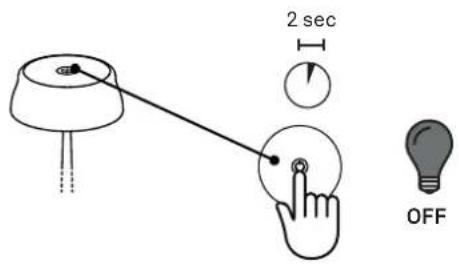
When you press and hold the touch button for two seconds, the lamp turns off, memorising the current dimmer setting and proposing it again the next time the lamp is turned on.
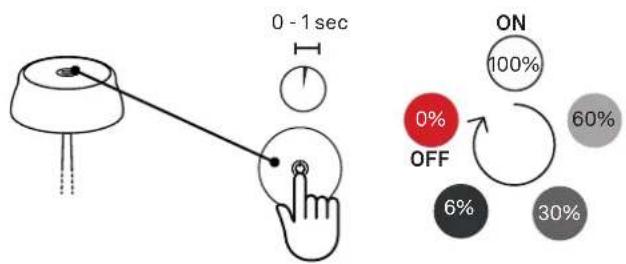
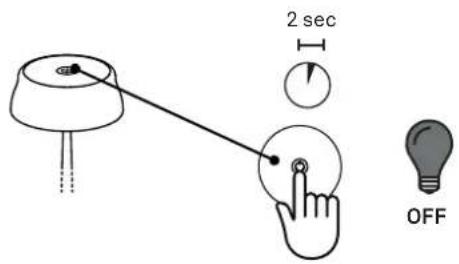
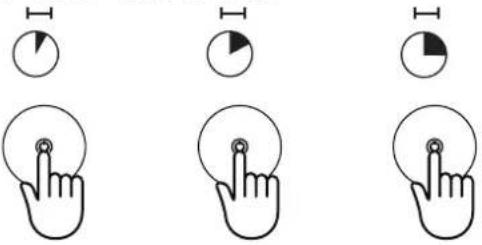
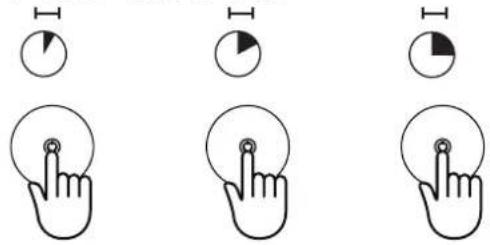
COLOR TEMPERATURE
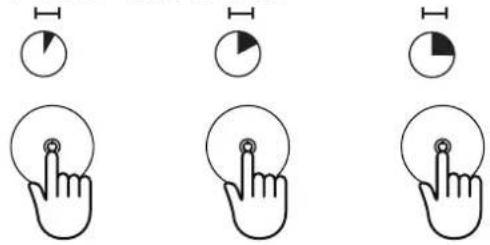
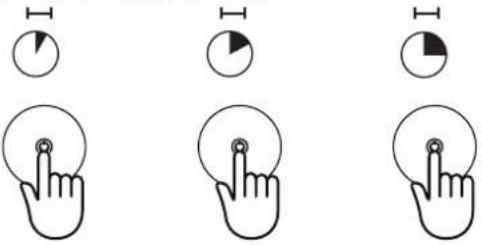
When the lamp is turned off, press and hold the touch button:
- after 5 seconds it turns on at 2700K
- after 10 seconds it switches to 3150K
- after 15 seconds it switches to 4000K
The steps are repeated in a cycle.
If you release your touch during one of the steps, the lamp memorises the setting of the current step.
0 - 5 sec 5 - 10 sec 10 - 15 sec
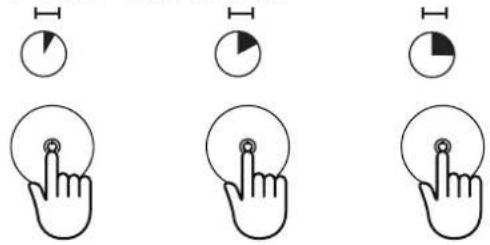
2700K 3150K 4000K
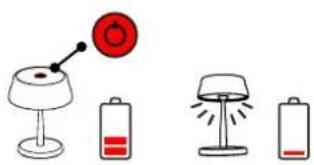
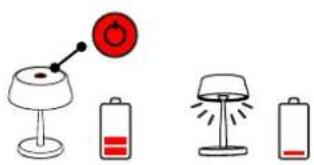
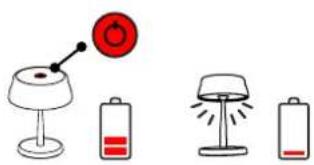
INDICATOR LEDS
natural_image
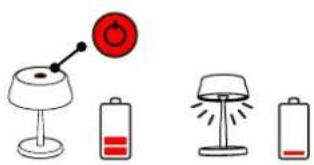
Illustration of four different household appliances: a lamp, two batteries, and a lamp with a red indicator light (no text or symbols)PERMANENT RED LED
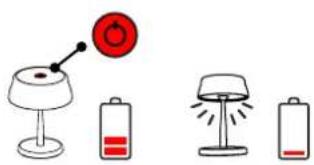
the battery charge is lower than 20%, charging is recommended.
When the charge is depleted (1%), the lamp does not switch on but emits three white flashes as an alert to charge
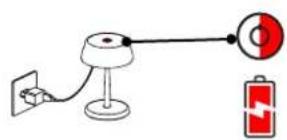
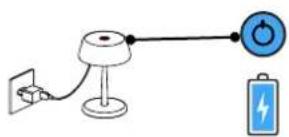
FLASHING RED LED
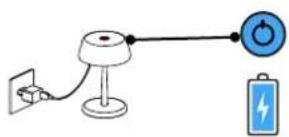
charging in progress
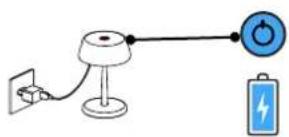
PERMANENT BLUE LED
the battery is 100% charged, disconnection from the power charger is recommended
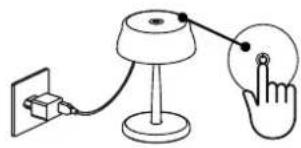
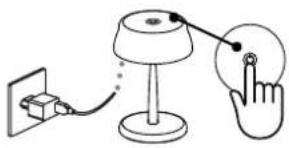
Reset settings > FACTORY RESET
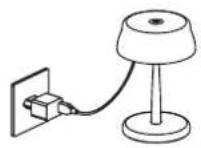
1
Plug the lamp into the electric socket.
natural_image
Simple line drawing of a table lamp connected to a wall-mounted device and a hand gesture (no text or symbols)2 Place a finger on the touch sensor and keep it pressed down.
natural_image
Simple line drawing of a lamp connected to a wall-mounted power source and a hand gesture (no text or symbols)3 Unplug the lamp from the electric socket.
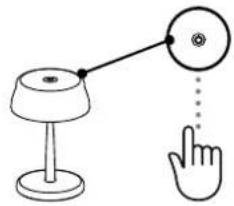
natural_image
Simple line drawing of a lamp connected to a circular button and a hand gesture (no text or symbols)4 Remove your finger from the touch sensor.
Assembly instructions > MAGNETIC FIXING
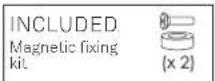
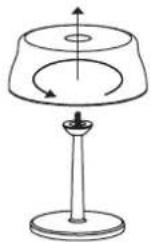
1
Unscrew the top of the lamp from the threaded pin.
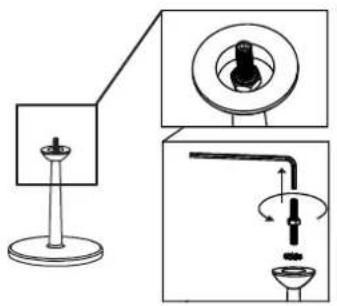
2 Unscrew the threaded pin.
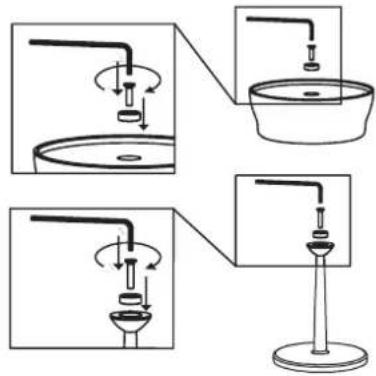
3 Screw in the magnets and reposition the head on the stem.
Assembly instructions > FIXING KIT TO THE TABLE
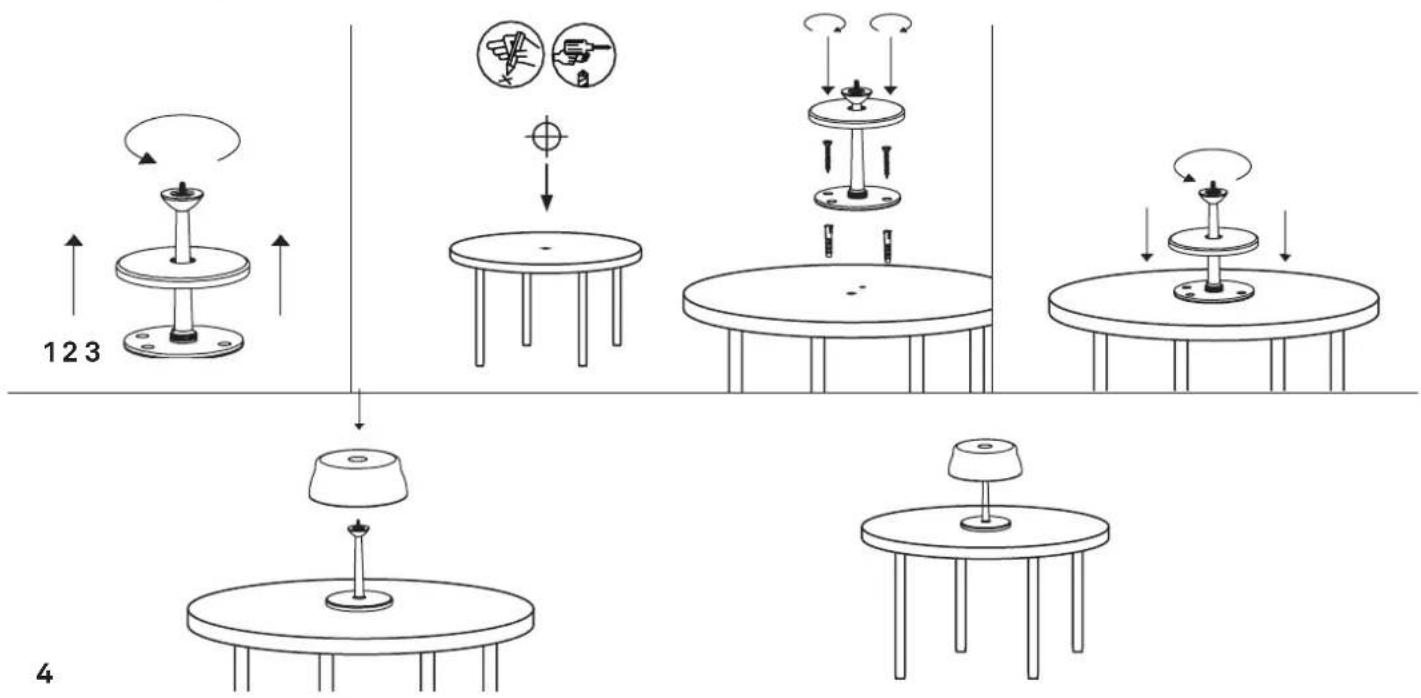
sister light mini
FARBTEMPERATUR
0 - 5 sec 5 - 10 sec 10 - 15 sec
2700K 3150K 4000K
LEDANZEIGE
natural_image
Illustration of four different household appliances: a lamp, two batteries, and a lamp with a red indicator light (no text or symbols)LED LEUCHTET ROT
LED BLINKT ROT
Wird aufgeladen.
LED LEUCHTET BLAU
natural_image
Simple line drawing of a table lamp connected to a wall-mounted device and a hand gesture (no text or symbols)natural_image
Simple line drawing of a lamp connected to a wall-mounted power source and a hand gesture (no text or symbols)natural_image
Simple line drawing of a lamp and a hand gesture (no text or symbols)- Standard recharge: 1A - 2A (max 2A)
- Recharge: 5 h 2A - 10 h 1A
0 - 5 sec 5 - 10 sec 10 - 15 sec
2700K 3150K 4000K
LED DE SIGNALISATION
natural_image
Illustration of four household appliances: a lamp, two batteries, and a lamp with a red indicator light (no text or symbols)LED ROUGE FIXE
LED ROUGE CLIGNOTANTE recharge en cours.
LED BLEUE FIXE
natural_image
Simple line drawing of a table lamp connected to a wall-mounted device and a hand gesture (no text or symbols)natural_image
Simple line drawing of a lamp connected to a wall-mounted power source and a hand gesture (no text or symbols)natural_image
Simple line drawing of a lamp and a hand gesture (no text or symbols)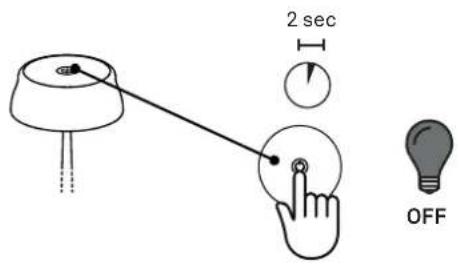
TEMPERATURA DEL COLOR
0 - 5 sec 5 - 10 sec 10 - 15 sec
2700K 3150K 4000K
LED DE SEÑALIZACIÓN
natural_image
Illustration of four different household appliances: a lamp, two batteries, and a lamp with a red indicator light (no text or symbols)LED ROJO FIJO
LED AZUL FIJO
natural_image
Simple line drawing of a table lamp connected to a wall-mounted device and a hand gesture (no text or symbols)natural_image
Simple line drawing of a desk lamp connected to a hand gesture (no text or symbols)natural_image
Simple line drawing of a lamp connected to a circular button and a pointing hand (no text or symbols)Scan the QR code to see how to replace the exhausted batteries of your lamp.
Scan the QR code to see how to replace the LED board of your lamp.
- sister light mini
- TEMPERATURA COLORE
- LED DI SEGNALAZIONE
- INCLUDED
- NOT INCLUDED
- Tips for use:
- Technical data:
- Charger:
- Manufacturer's configuration:
- Important!
- SWITCHING ON / DIMMING / SWITCHING OFF
- COLOR TEMPERATURE
- INDICATOR LEDS
- Reset settings > FACTORY RESET
- Assembly instructions > MAGNETIC FIXING
- Assembly instructions > FIXING KIT TO THE TABLE
- FARBTEMPERATUR
- LEDANZEIGE
- LED DE SIGNALISATION
- LED ROUGE FIXE
- LED BLEUE FIXE
- TEMPERATURA DEL COLOR
- LED DE SEÑALIZACIÓN
Brand : Zafferano
Model : Sister Light Mini
Category : Lamp