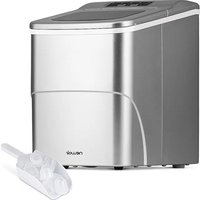
NIM026MS00 - Ice Maker NewAir - Free user manual and instructions
Find the device manual for free NIM026MS00 NewAir in PDF.


| Product Type | Countertop Nugget Ice Maker |
| Brand | NewAir |
| Model | NIM026MS00 |
| Production Capacity | 30 lb (13.6 kg) per day |
| Dimensions (Depth x Width x Height) | 24.6 x 44.8 x 43.0 cm (9.69 x 17.64 x 16.93 in) |
| Net Weight | 15.5 kg (34.2 lb) |
| Power Supply | 120 V, 60 Hz |
| Rated Power | 170 W |
| Refrigerant | R600a, 20 g |
| Foaming Agent | C5H10 |
| Production Cycle | Approximately 20 to 30 minutes per cycle |
| Ice Basket Capacity | Approximately 1.5 kg (estimate) |
| Auto Shut-off | Yes, when the basket is full or water is low |
| Cleaning Function | 8-minute automatic cleaning cycle |
| Automatic Water Connection | Possible via 1/4 in PE hose (not included) |
| LED Indicators | Power, cleaning, low water, basket full, defrost |
| Housing Material | Stainless steel and plastic |
| Drain | Rear drain hose with cap |
| Usage | Indoor only, on a flat and stable surface |
| Warranty | 1-year limited (parts and labor) |
Frequently Asked Questions - NIM026MS00 NewAir
User questions about NIM026MS00 NewAir
0 question about this device. Answer the ones you know or ask your own.
Ask a new question about this device
Download the instructions for your Ice Maker in PDF format for free! Find your manual NIM026MS00 - NewAir and take your electronic device back in hand. On this page are published all the documents necessary for the use of your device. NIM026MS00 by NewAir.
USER MANUAL NIM026MS00 NewAir
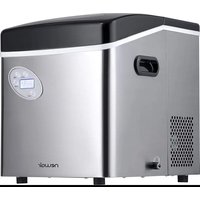
30 lb. Countertop Nugget Ice Maker
natural_image
Line drawing of a portable radio or washing machine with control panel and buttons (no text or symbols)OWNER'S MANUAL
A Name You Can Trust
Trust should be earned and we will earn yours. Customer happiness is the focus of our business.
From the factory to the warehouse, from the sales floor to your home, the whole Newair family promises to provide you with innovative products, exceptional service, and support when you need it the most.
Count on Newair
As a proud Newair owner, welcome to our family. There are no robots here, real people shipped your product and real people are here to help you.
Contact Us
Please reach out to our customer service team before making a return to your store of purchase. We are happy to help with any questions or concerns!
Mon-Fri from 8-4 PST at:
Call: 1-855-963-9247
Email: support@newair.com
Online: www.newair.com
A team member will respond to you within 24 hours.
Follow Us:

Facebook.com/newairusa

Instagram.com/newairusa

YouTube.com/newairusa

Twitter.com/newairusa
READ AND SAVE THESE INSTRUCTIONS
TABLE OF CONTENTS
Specifications 5
Register Your Product Online....6
Safety Information & Warnings 7
Parts List....9
Operating Instructions....10
Control Panel 10
Before First Use.... 10
Using Your Ice Maker 12
Installing The Automatic Water Line....14
Cleaning & Maintenance....16
Troubleshooting....17
Limited Manufacturer's Warranty 18
SPECIFICATIONS
| MODEL NO. | NIM030SS00 |
| POWER SOURCE: | 120V/60Hz |
| RATED POWER: | 170W |
| REFRIGERANT/REFRIGERANT AMOUNT: | R600a / 20g |
| FOAMING AGENT: | C5H10 |
| NET WEIGHT: | 34.2 LBS |
| UNIT SIZE (W×D×H): | 9.69” W × 17.64” D × 16.93” H |
REGISTER YOUR PRODUCT ONLINE
Register Your Newair Product Online Today!
Take advantage of all the benefits product registration has to offer:

Service and Support
Diagnose troubleshooting and service issues faster and more accurately

Recall Notifications
Stay up to date for safety, system updates and recall notifications

Special Promotions
Opt-in for Newair promotions and offers
Registering your product information online is safe & secure and takes less than 2 minutes to complete:
newair.com/register
Alternatively, we recommend you attach a copy of your sales receipt below and record the following information, located on the manufacturer's nameplate on the rear of the unit. You will need this information if it becomes necessary to contact the manufacturer for service inquiries.
Date of Purchase: ____
Serial Number: ____
Model Number: ____
SAFETY INFORMATION & WARNINGS

To reduce the risk of fire, explosion, electric shock, or injury when using your ice maker, follow these important safety instructions:
- Before using check that the voltage power corresponds to the one shown on the appliance nameplate.
- Do not remove any safety, warning, or product information labels from your ice maker.
- Plug the ice maker into an exclusive grounded outlet. No other appliance should be plugged into the same outlet. Be sure that the plug is fully inserted into the receptacle.
- This appliance must be grounded. It is equipped with a cord having a grounding plug. The plug must be plugged into an outlet that is properly installed and grounded.
- Avoid the use of an extension cord because it may overheat and cause a risk of fire.
However, if it is necessary to use an extension cord:
- Use only extension cords with grounding plug.
- The marked rating of an extension cord must be equal to or greater than the rating of this appliance.
- It should be positioned such that it does not drape over the counter or tabletop where it can be pulled on by children intentionally.
- Do not operate any appliance with a damage cord or plug or after the appliance malfunction or has been damaged in any manner. Return the appliance to the nearest authorized service facility for examination, repair or adjustment.
- Do not let cord hang over edge of table or counter.
- Do not place on or near a hot gas or electric burner, or in a heated oven.
- Place power cord in such a way it cannot be pulled on by children or cause a tripping hazard.
- Place power cord in such a way that it is not in contact with hot surfaces.
- The use of attachment not recommended or sold by manufacturer may cause fire, electric shock or injury.
- Do not touch the ice-making parts when using the ice maker or making ice to avoid being suffer from frostbite.
- Do not immerse any part of the product in water.
- To disconnect, turn any control to "OFF", then remove plug from wall outlet.
- Do not plug or unplug product with wet hands.
-
Unplug the product before cleaning, maintaining and when not in use.
-
Do not use with water that is microbiologically unsafe or of unknown quality.
- Do not clean your ice maker with any flammable fluids. The fumes may create a fire hazard or explosion.
- Do not overturn the ice maker. If the ice maker is overturned accidentally, make it stand steadily for 2 hours before power it on again.
- If the ice maker is brought in from outside in wintertime, do not use for a few hours, allowing the unit to warm up to the room temperature before operating.
- Never put flammable, explosive and corrosive articles into the ice maker.
- Never use the ice maker when there is flammable gas leakage.
- Never store or use gas and other flammable articles near the ice maker to avoid any fire.
- Unplug the ice maker before moving it to avoid damaging the refrigerating system.
- Do not attempt to disassemble, repair, modify, or replace any part of your product.
- This appliance is not intended for used by persons (including children) with reduced physical, sensory or mental capabilities, or lack of experience and knowledge, unless they have been given supervision or instruction concerning use of the appliances by a person responsible for their safety.
- Children should be supervised to ensure that they do not play with the appliance.
- Close supervision is necessary when any appliance is used by or near children.
- Do not leave the appliance unattended while in use.
- Do not use outdoors.
- Do not use the appliance for other than intended use.
- Please abandon the ice maker according to local regulations as it uses flammable blowing gas and refrigerant.
SAVE THESE INSTRUCTIONS HOUSEHOLD USE ONLY
PARTS LIST
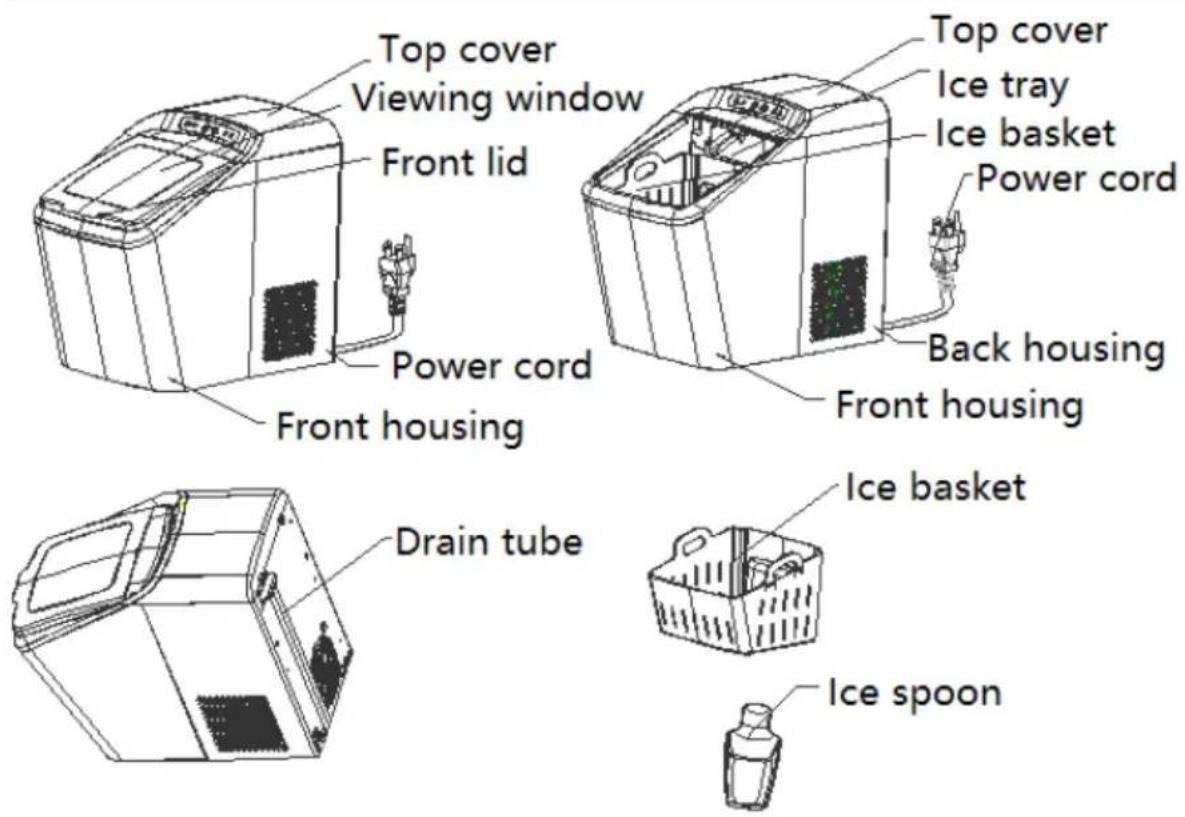
OPERATING INSTRUCTIONS
CONTROL PANEL
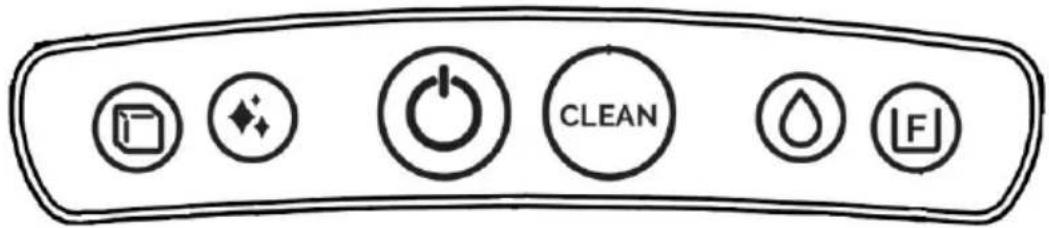
| Key/Indicator | Function | |
 | Start or stop the appliance. | |
 | “Clean” key. | |
 | The “Ice-making” indicator will light solidly when the appliance is making ice. | |
 | The “Clean” indicator will light solidly when the appliance is performing cleaning. | |
 | Water refill indication. The “No water” indicator will flash when the appliance needs to be refilled. The appliance will be refilled with water automatically if it is of water-refill function. | |
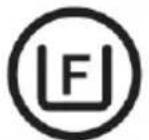 | The “Ice full” indicator will light solidly when the ice basket is full. | |
 lights solidly lights solidly  | Defrosting indication. The appliance is defrosting. | |
BEFORE FIRST USE
- Unpack the appliance, then check and make sure that all the accessories including ice basket and ice scoop etc. are complete. Please contact with the client service department if some accessories are missed.
- Please ensure the ice maker is level and on a stable table or platform to avoid malfunction.
- The incline angle of the ice maker cabinet should not exceed 45^ during transportation or use. Do not turn the ice maker upside down. Doing so could cause the compressor or refrigerating system to operate incorrectly. Please allow time for the fluids in the compressor to settle after the ice maker is moved or transported. Before using the ice maker for the first time, please wait for 2 hours after the unit has been leveled and positioned in the proper place.
- The appliance must be placed on a dry and level surface with sufficient ventilation, far from heat sources such as ovens, heaters and corrosive gases. Leave a 6 inch clearance on all sides of the ice maker for proper ventilation.
- Do not fill the water reservoir with hot water. This may damage the ice maker. It is best to fill the water reservoir with water of room temperature or lower.
- Do not use the appliance at a very cold environment (lower than 41 F).
- Clean the appliance by following the operation of "CLEANING AND MAINTENANCE" before operate.
USING YOUR ICE MAKER
-
Ensure that the drain plug at the back of ice maker is closed well.
-
Plug the ice maker into the wall outlet, the "③" indicator flashes.
NOTE: Please make the ice maker rest for 30 minutes before plug if it has been moved.
-
Open the front lid and remove the ice basket.
-
Fill the water reservoir with drinking water.
NOTE: Do not fill above the MAX water level mark.
-
Replace the ice basket and close the front lid.
-
Press the “☐” key and the “☐” indicator lights solidly.
-
The ice-making cycle will last approximately 20-30 minutes, depending on the ambient temperature and water temperature.
-
The ice-making assembly is equipped inside of appliance, and the ice-making assembly will keep producing ice when the water is pumped into it. When the ice forms in the ice-making assembly, the ice cubes will be transferred into the ice tray and then the ice cubes will drop into the ice basket. And the above action will be repeated until the ice basket is full.
-
The “☐” indicator will light up when the ice basket is full and then the ice maker will stop the ice-making cycle automatically. Open the front lid and gently remove the ice from the ice basket with the ice scoop. And then replace the ice basket and close the front lid, then the ice maker will restart its ice-making function automatically. If the ice is not removed, after about 8 hours, the appliance will automatically work again,
alternatively, you can press “ ” key to restart the appliance.
- The “☐” indicator will flash when the water reservoir is lack of water.
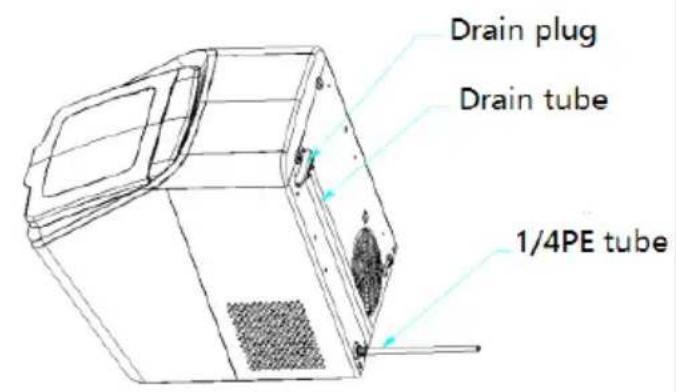
(a) If the appliance is connected with external water source by the 1/4PE tube shown in the section of “CLEANING AND MAINTENANCE” (see Fig.1), the water reservoir will be refilled with water automatically and the appliance will restart the ice-making cycle; alternatively, the user can remove the ice basket and refill the water reservoir with water to
“MAX” mark manually, and then the appliance will restart the ice-making cycle automatically. Please remember to close the front lid after refilling water manually avoid overflow.
(b) If the appliance is not connected with external water source, firstly remove the ice basket and then fill the water reservoir with water manually. After the water reservoir is refilled with water, please close the front lid, then the appliance will restart the ice-making cycle automatically.
- When you have got your desired amount of ice, stop the ice-making cycle
by pressing the “” key and unplug the unit from the wall outlet.
- Open the front lid and transfer the ice to a freezer.
- Allow the ice maker to reach room temperature.
- Suggest replacing the water every week. Please empty the water reservoir if the ice maker is not used for a long time.
- The ice maker can be connected with external water source by the 1/4PE tube shown in the section of "CLEANING AND MAINTENANCE" (see Fig.1) if you want to add the function of refilling water automatically.
INSTALLING THE AUTOMATIC WATER LINE
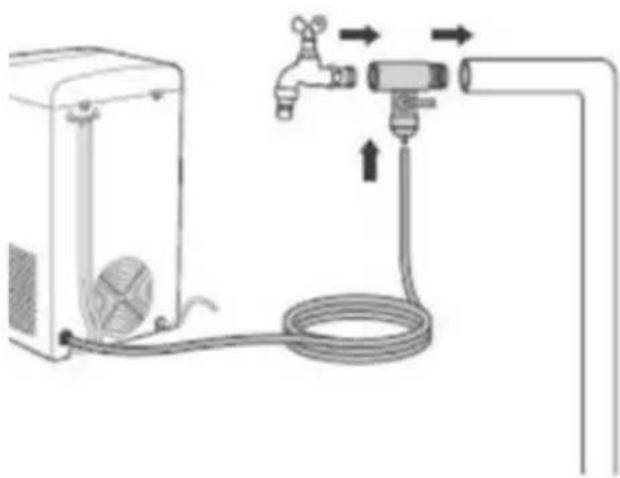
You can choose to add water automatically to your ice maker by connecting one end of the included hose to water output on your ice maker and the other end to a water supply system, such as your kitchen sink or water filtering system.
To connect or remove the water hose from your ice maker, see the images below.
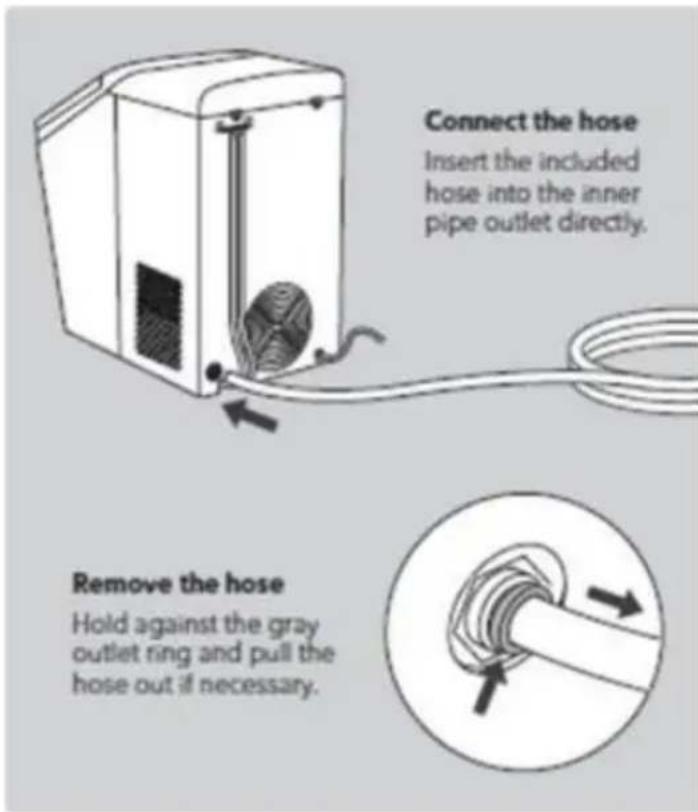
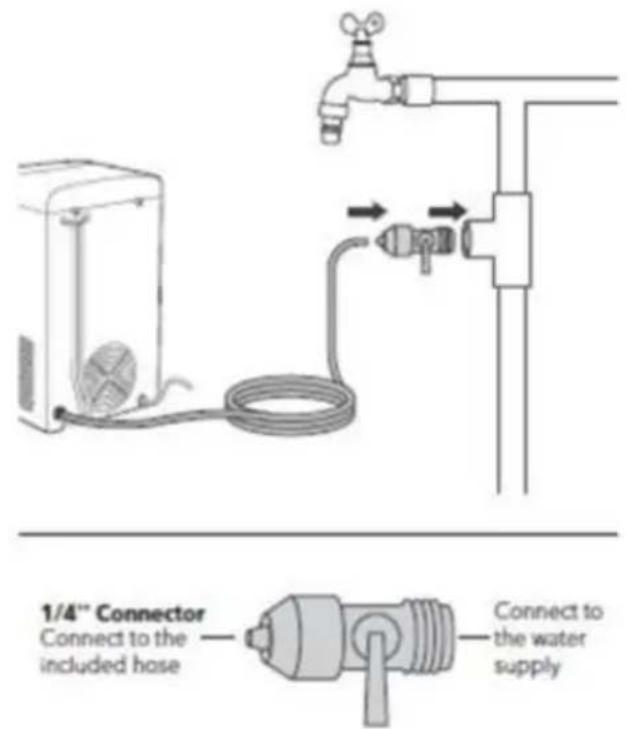
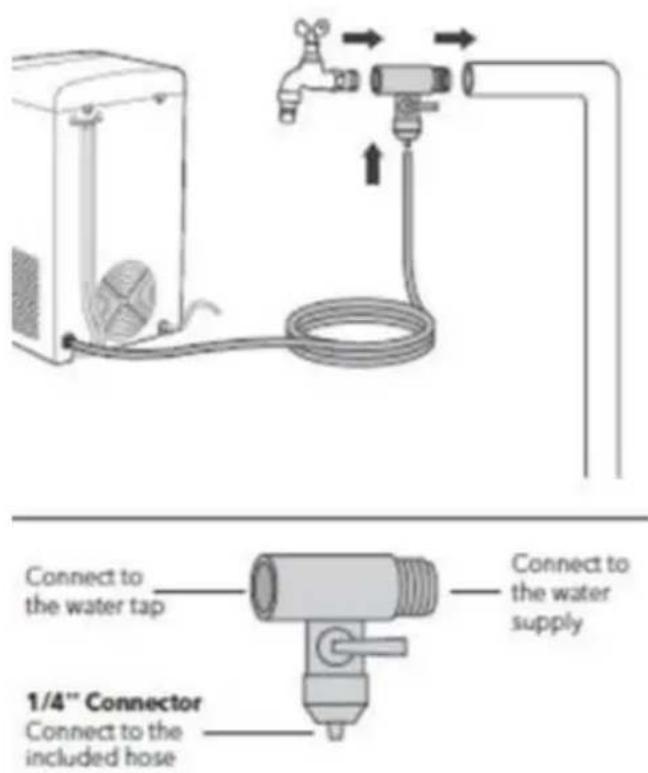
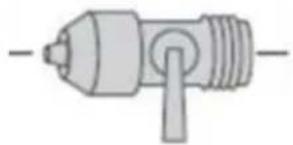
There are two recommended ways to attach the water supply system to a water source. An adapter (not included) may be required as per the type of water supply system in your home. See images below to see which connection works best for your home system.
Water Line Connection Option 1
Water Line Connection Option 2
CLEANING & MAINTENANCE
To keep your ice tasting fresh and your ice maker looking great, we recommend cleaning your ice maker at least once per week.
- Remove the ice basket, add water and detergent into the water reservoir,
then hold and press “ ” key for about 3 seconds, the “ ” indicator lights up and the appliance enters into the cleaning mode.

- After cleaning for 8 minutes, the appliance stops working and the “” indicator flashes.
- Remove the drain tube at the back of the appliance and place it at the dirty water outlet. Open the drain plug, and then the dirty water is drained from the drain tube until all the water inside the appliance is drained out.
- Close the drain plug and fill the water reservoir with water. And then press
“ ” key again, the “ ” indicator lights up and the appliance enters into the cleaning mode.
- Repeat the operation of step 3 after the detergent inside the appliance is removed.
- Clean the inside of appliance with a piece of soft cloth soaked with warm water and vinegar.
- Rinse the drain tube and place the drain plug at the fixing groove at the back of appliance.
- Wash the ice basket and ice scoop in warm soapy water. Rinse and dry.
- Clean the exterior of the ice maker with a soft damp cloth. Use a mild dishwashing soap, if necessary.
NOTE: Do not use organic solvent, boiled water, detergent, strong acid and strong alkali etc. for cleaning.
- Please empty the water reservoir and dry it for storage if the ice maker is not used for a long time.
TROUBLESHOOTING
| Problem | Possible Causes | Solution |
 flashes flashes | Be lack of water.The water screen at the bottom of water reservoir is blocked.Pump malfunction.There are foreign objects blocked the float of water reservoir. | Stop making ice, refill water and  then press “ to restart ice-making cycle.Remove the water screen at the bottom for cleaning.Send it to the authorized department for repair.Check the foreign objects and restart the appliance. then press “ to restart ice-making cycle.Remove the water screen at the bottom for cleaning.Send it to the authorized department for repair.Check the foreign objects and restart the appliance. |
 lights up lights up | Ice basket is full.Malfunction of infrared ray. | Remove the ice from ice basketand then press “  to restart the ice-making cycle.The sensor is damaged, please send it to the authorized department for repair. to restart the ice-making cycle.The sensor is damaged, please send it to the authorized department for repair. |
 lights solidly lights solidly flashes flashes | The ice-making assembly is defrosting. | No need to deal with it, the appliance will deal with it automatically, and it will return to normal operation after about 30-45 minutes. Alternatively, you can hold and press the ”  or 3 seconds, and then press the ” or 3 seconds, and then press the ”  again to restart the appliance after the cleaning procedure is finished. again to restart the appliance after the cleaning procedure is finished. |
| Poor ice-making result. The ice-making process is normal but the ice produced is broken, which lasts for more than 2 hours. | Poor heat dissipation.The water temperature is too high.The ambient temperature is too high.The ice-making system is abnormal. | Leave a 6 inch clearance on all sides of the ice maker for proper ventilation.Fill the water reservoir with water ranges between 46 F and 82 FOperate the ice maker at a environment with an ambient temperature between 50 F and 89 F.Call customer service. |
LIMITED MANUFACTURER'S WARRANTY
This appliance is covered by a limited manufacturer's warranty. For one year from the original date of purchase, the manufacturer will repair or replace any parts of this appliance that prove to be defective in materials and workmanship, provided the appliance has been used under normal operating conditions as intended by the manufacturer.
Warranty Terms:
During the first year, any components of this appliance found to be defective due to materials or workmanship will be repaired or replaced, at the manufacturer's discretion, at no charge to the original purchaser. The purchaser will be responsible for any removal or transportation costs.
Warranty Exclusions:
The warranty will not apply if damage is caused by any of the following:
- Power failure
- Damage in transit or when moving the appliance
- Improper power supply such as low voltage, defective household wiring or inadequate fuses
- Accident, alteration, misuse or abuse of the appliance such as using non-approved accessories, inadequate air circulation in the room or abnormal operating conditions (extreme temperatures)
- Use in commercial or industrial applications
- Fire, water damage, theft, war, riot, hostility or acts of God such as hurricanes, floods, etc.
- Use of force or damage caused by external influences
- Partially or completely dismantled appliances
- Excess wear and tear by the user
Obtaining Service:
When making a warranty claim, please have the original bill of purchase with the purchase date available. Once confirmed that your appliance is eligible for warranty service, all repairs will be performed by a Newair™ authorized repair facility. The purchaser will be responsible for any removal or transportation costs. Replacement parts and/or units will be new, re-manufactured or refurbished and is subject to the manufacturer's discretion. For technical support and warranty service, please email support@newairusa.com.
Un nom de confiance
Instagram.com/newairusa

YouTube.com/newairusa

Twitter.com/newairusa
LISEZ ET CONSERVEZ CES INSTRUCTIONS
TABLE DES MATIÈRES
Spécifications 21
natural_image
Diagram of a water tap system with a pump, hose, and outlet pipe (no text or labels)natural_image
Pure mechanical component diagram without any text, numbers, or symbolsnatural_image
Diagram of a gas pump connected to a control unit with tubing and valves (no text or labels)natural_image
Simple line drawing of a mechanical component with no text or symbolsEmail: support@newair.com
Instagram.com/newairusa

YouTube.com/newairusa

Twitter.com/newairusa
LEA Y GUARDE ESTAS INSTRUCCIONES
INDICE
Especificaciones 37
natural_image
Diagram of a water tap system with a pump, hose, and outlet pipe (no text or labels)Adaptador de ¼".
Conecte a la manguera incluida.
natural_image
Pure mechanical component diagram without any text, numbers, or symbolsWater Line Connection Option 2
natural_image
Diagram of a water heater connected to a hose and pump, with directional arrows indicating flow or movement (no text or symbols)natural_image
Pure mechanical component diagram without any text, numbers, or symbols


- lb. Countertop Nugget Ice Maker
- OWNER'S MANUAL
- A Name You Can Trust
- Count on Newair
- Contact Us
- Follow Us:
- READ AND SAVE THESE INSTRUCTIONS
- TABLE OF CONTENTS
- REGISTER YOUR PRODUCT ONLINE
- Register Your Newair Product Online Today!
- Service and Support
- Recall Notifications
- Special Promotions
- newair.com/register
- SAFETY INFORMATION & WARNINGS
- SAVE THESE INSTRUCTIONS HOUSEHOLD USE ONLY
- PARTS LIST
- OPERATING INSTRUCTIONS
- CONTROL PANEL
- BEFORE FIRST USE
- USING YOUR ICE MAKER
- INSTALLING THE AUTOMATIC WATER LINE
- CLEANING & MAINTENANCE
- TROUBLESHOOTING
- LIMITED MANUFACTURER'S WARRANTY
- Warranty Terms:
- Warranty Exclusions:
- Obtaining Service:
- Un nom de confiance
- LISEZ ET CONSERVEZ CES INSTRUCTIONS
- TABLE DES MATIÈRES
- LEA Y GUARDE ESTAS INSTRUCCIONES
- INDICE
- Water Line Connection Option 2
Brand : NewAir
Model : NIM026MS00
Category : Ice Maker