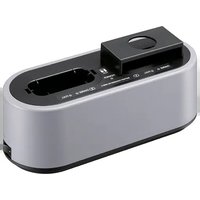
BC-5000-2 - Microphone TOA - Free user manual and instructions
Find the device manual for free BC-5000-2 TOA in PDF.


| Product Type | Battery charger for wireless microphones |
| Brand | TOA |
| Model | BC-5000-2 |
| Dimensions (W x H x D) | 238 x 83 x 98 mm (105 mm with mounting adapter) |
| Weight | 500 g (with mounting adapters) |
| Power Supply | 12 V DC, AC adapter AD-5000-2 (optional) |
| Power Consumption | 700 mA |
| Charging Time | Max. 3 hours |
| Compatible Battery Type | WB-2000 (Ni-MH) |
| Number of simultaneously rechargeable devices | 2 |
| Operating Temperature | 0 to 40 °C |
| Operating Humidity | 30 to 85 % RH |
| Finish | Housing: gray ABS resin; connector: black PPE resin |
| Indicators | Power, charging (red), full charge (green), flashing for fault |
| Compatible Devices | WM-5225, WM-5265, WM-5325, WT-5100 |
| Included Accessories | 2 mounting adapters |
| Optional | AC adapter AD-5000-2 |
| Cleaning | Dry cloth; clean the terminals with a dry cotton swab |
| Safety Instructions | Do not expose to water, use the specified voltage, disconnect in case of malfunction, do not open the housing |
| Maintenance | Turn off power before cleaning or if unused for more than 10 days |
Frequently Asked Questions - BC-5000-2 TOA
User questions about BC-5000-2 TOA
0 question about this device. Answer the ones you know or ask your own.
Ask a new question about this device
Download the instructions for your Microphone in PDF format for free! Find your manual BC-5000-2 - TOA and take your electronic device back in hand. On this page are published all the documents necessary for the use of your device. BC-5000-2 by TOA.
USER MANUAL BC-5000-2 TOA
BATTERY CHARGER BC-5000-2
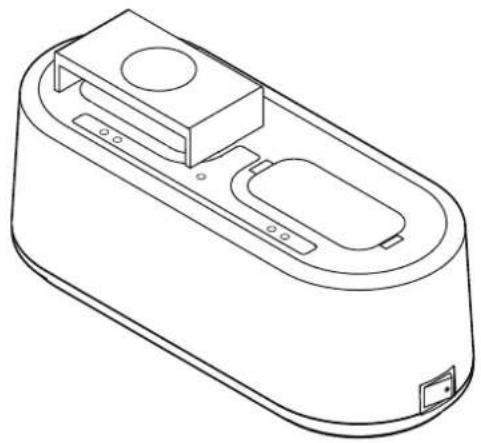
natural_image
Line drawing of a mechanical device casing with internal components and mounting holes (no text or symbols)TABLE OF CONTENTS
- SAFETY PRECAUTIONS ...... 2
- GENERAL DESCRIPTION ...... 3
- HANDLING PRECAUTIONS .... 3
-
NOMENCLATURE AND FUNCTIONS ..... 4
-
CHARGING .... 5
- TROUBLESHOOTING ..... 7
- SPECIFICATIONS 8
Accessories 8
1. SAFETY PRECAUTIONS
- Before installation or use, be sure to carefully read all the instructions in this section for correct and safe operation.
- Be sure to follow all the precautionary instructions in this section, which contain important warnings and/or cautions regarding safety.
• After reading, keep this manual handy for future reference.

WARNING
Indicates a potentially hazardous situation which, if mishandled, could result in death or serious personal injury.

CAUTION
Indicates a potentially hazardous situation which, if mishandled, could result in moderate or minor personal injury, and/or property damage.

WARNING
When Installing the Charger
- Do not expose the charger to rain or an environment where it may be splashed by water or other liquids, as doing so may result in fire or electric shock.
- Use the charger only with the voltage specified on the charger. Using a voltage higher than that which is specified may result in fire or electric shock.
- Avoid installing or mounting the charger in unstable locations, such as on a rickety table or a slanted surface. Doing so may result in the charger falling down and causing personal injury and/or property damage.
When the Charger is in Use
- Should the following irregularity be found during use, immediately switch off the power, disconnect the AC adapter's power supply plug from the AC outlet and contact your nearest TOA dealer. Make no further attempt to operate the charger in this condition as this may cause fire or electric shock.
- If you detect smoke or a strange smell coming from the charger
- If water or any metallic object gets into the charger
- If the charger falls, or the charger case breaks
- If the AC adapter's power supply cord is damaged (exposure of the core, disconnection, etc.)
- To prevent a fire or electric shock, never open nor remove the charger case as there are high voltage components inside the charger. Refer all servicing to your nearest TOA dealer.
- Do not place cups, bowls, or other containers of liquid or metallic objects on top of the charger. If they accidentally spill into the charger, this may cause a fire or electric shock.
- Do not insert nor drop metallic objects or flammable materials inside the battery charger or its rechargeable unit receptacle, as this may result in fire or electric shock.
- Do not touch a power supply plug during thunder and lightning, as this may result in electric shock.
- Stop charging if the batteries are not fully charged within 3 hours. Failure to do so may cause the batteries to fire, explode, leak, or heat.

CAUTION
When Installing the Charger
- When moving the charger, be sure to remove AC adapter's power supply plug from the wall outlet. Moving the charger with the power supply cord connected to the outlet may cause damage to the power supply cord, resulting in fire or electric shock.
- Avoid installing the charger in humid or dusty locations, in locations exposed to the direct sunlight, near the heaters, or in locations generating sooty smoke or steam as doing otherwise may result in fire or electric shock.
When the Charger is in Use
- Switch off the power, and unplug the AC adapter's power supply plug from the AC outlet for safety purposes when cleaning or leaving the charger unused for 10 days or more. Doing otherwise may cause a fire or electric shock.
- Use the optional AD-5000-2 AC Adapter dedicated for the charger. Note that the use of other adapter may cause a fire.
- Avoid charging units installed with rechargeable batteries other than the dedicated WB-2000 battery. Charging any other than the specified battery could result in fire or personal injury due to battery rupture.
FCC Compliance
This device complies with Part 15 of the FCC Rules. Operation is subject to the following two conditions:
(1) this device may not cause harmful interference, and
(2) this device must accept any interference received, including interference that may cause undesired operation.
Any modifications made to this device that are not approved by TOA Corporation may void the authority granted the user by the FCC to operate this equipment.
Note: This equipment has been tested and found to comply with the limits for a Class A digital device, pursuant to part 15 of the FCC Rules. These limits are designed to provide reasonable protection against harmful interference when the equipment is operated in a commercial environment. This equipment generates, uses, and can radiate radio frequency energy and, if not installed and used in accordance with the instruction manual, may cause harmful interference to radio communications. Operation of this equipment in a residential area is likely to cause harmful interference in which case the user will be required correct the interference at his own expense.
2. GENERAL DESCRIPTION
The TOA BC-5000-2 is a dedicated battery charger for the WM-5225 and WM-5265 Wireless Microphones, WM-5325 Wireless Transmitter, and WT-5100 Portable Receiver. It works with the optional AD-5000-2 AC Adapter.
The BC-5000-2 employs a quick charging system for nickel-metal hydride (Ni-MH) batteries, allowing up to 2 units to be fully charged within 3 hours.
3. HANDLING PRECAUTIONS
- Use the BC-5000-2 in locations where an ambient temperature ranges from 0 to 40^ (32 to 104^ ).
- When cleaning the case, be sure to first switch off the power, then wipe with a dry cloth. Never use benzene, thinner, alcohol or chemically processed towels, as these may damage the charger's components and parts.
- Clean the charging terminals on a regular basis using a dry cotton swab. Dirty terminals can cause poor electrical contact and cause batteries to be charged incorrectly.
4. NOMENCLATURE AND FUNCTIONS
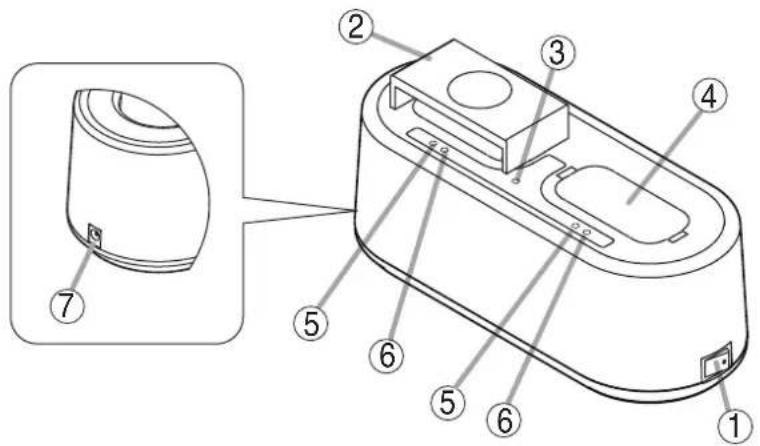
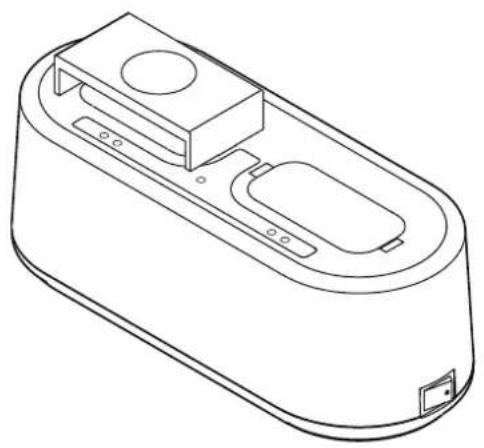
1. Power switch
To turn on the power, set this switch to the [●] position. To turn off the power, shift this switch back.
2. Mounting Adapter
Used when charging the WM-5225 or WM-5265 Wireless Microphone.
Remove this adapter when charging the WM-5325 Wireless Transmitter or WT-5100 Portable Receiver. (Refer to p. 5 "Charging.")
3. Power indicator
Lights when the power is switched on.
4. Rechargeable unit receptacle
Charging the WM-5225 or WM-5265 requires the mounting adapter to be attached in the receptacle. To charge the WM-5325 or WT-5100, insert it directly into the receptacle.
5. Charging indicator
Lights red continuously while charging is in progress.
6. Full-charge indicator
Lights green once the battery is fully charged.
7. Power input terminal
Connect the optional AD-5000-2 AC adapter to this terminal.
[Indicator status table]
| Charging indicator (red) | Full-charge indicator (green) | Status |
| Lit | Unlit | Charging in progress |
| Unlit | Lit | Charging completed |
| Flashing | Unlit | Outside the operating temperature range (refer to p. 7 "Troubleshooting.") |
| Both indicators light alternately. | Charging failure (refer to p. 7 "Troubleshooting.") | |
5. CHARGING

CAUTION
When charging, never load rechargeable batteries other than the specified WB-2000 battery in the unit to be charged. Charging any other than the WB-2000 battery may result in fire or personal injury due to battery rupture.
Notes
- Use the charger in locations where ambient temperature ranges from 0 to 40^ (32 to 104^ ).
- Be sure to charge the WB-2000 battery before use.
- Do not use the charger in locations subject to strong vibrations as poor electrical contact may result, preventing correct charging.
- Do not frequently insert and remove the unit from the charger during charging as this could degrade the WB-2000 battery performance.
- If the battery operating time is extremely short even when it has been fully charged, be sure to replace it with a new WB-2000 as the battery has reached the end of its life.
Tip: Under normal use condition, the battery can cycle through about 500 charges and discharges, after which it will usually need to be replaced.
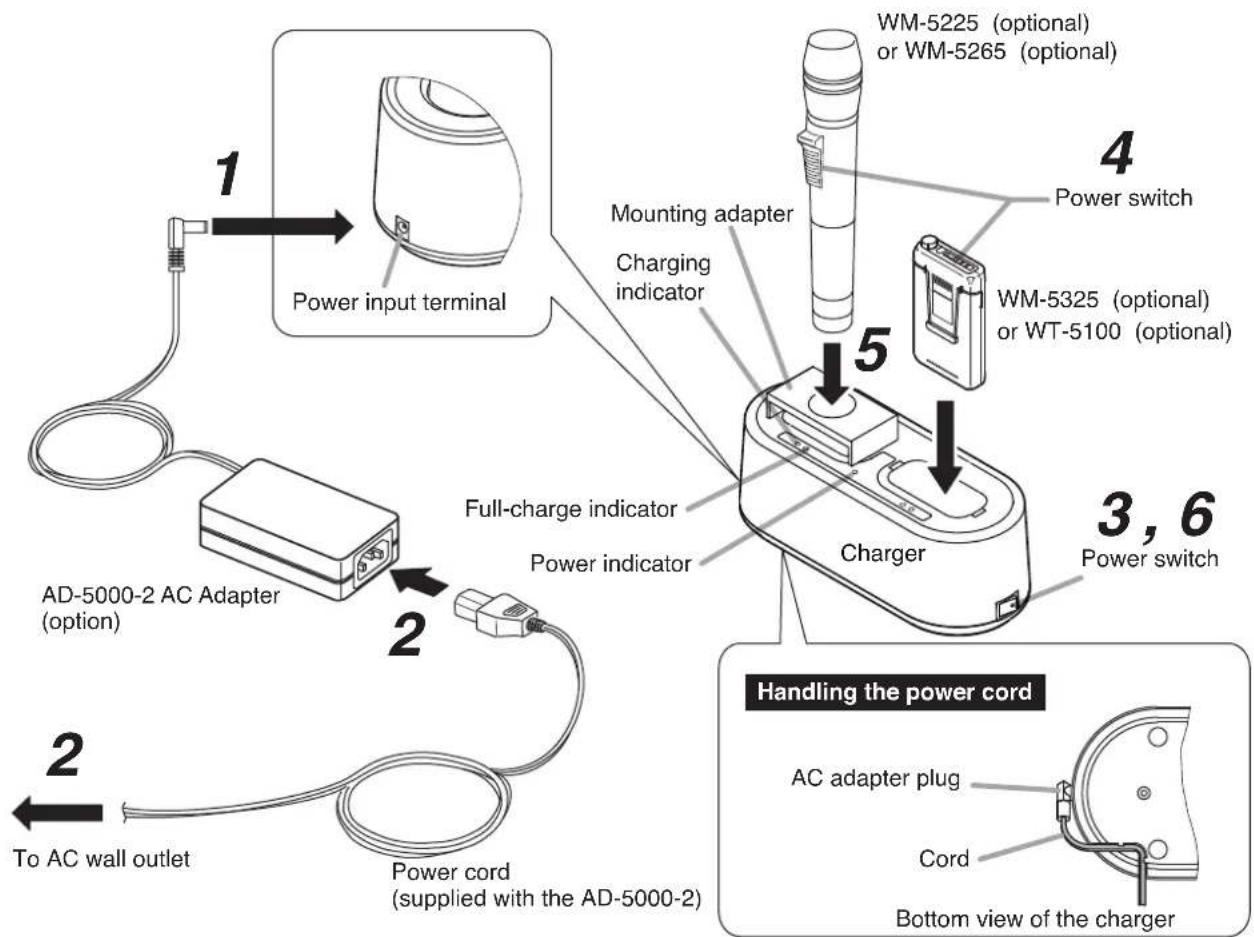
Step 1. Connect the optional AC adapter to the charger.
After connection, fit the cord into the charger's bottom slot to prevent the AC adapter plug accidentally slipping out of place.
Step 2. Connect the power cord to the AC adapter, then to an AC wall outlet.
Step 3. Set the charger's power switch to ON.
The power indicator will light.
Step 4. Turn off the power switch of the unit to be charged, then load the WB-2000 battery in the unit.
Note
The battery cannot be correctly charged if the power switch is ON.
Step 5. Insert the unit fully into the charger's rechargeable unit receptacle directly or with use of the mounting adapter.
[Inserting the WM-5225 or WM-5265]
Insert it into the hole in the mounting adapter.
[Inserting the WM-5325 or WT-5100]
Insert it directly into the charger's receptacle without using the adapter.
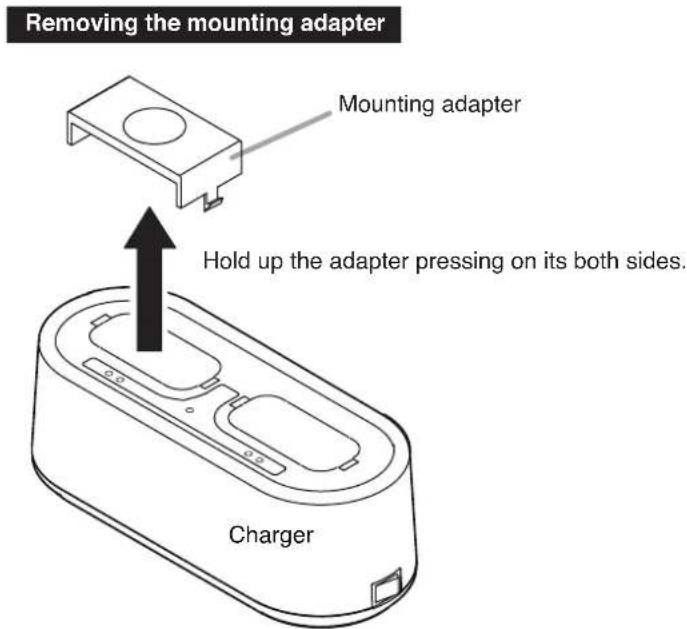
Charging takes about 3 hours, after which the full-charge indicator lights green.
Step 6. Turn off the charger's power after charging is complete.
Notes
- The fully-charged unit becomes warm, however this is not a failure.
- Hold the charger when detaching the unit from the charger.
6. TROUBLESHOOTING
| Symptom Possible cause Remedy | ||
| Power indicator does not light even if the power switch is turned on. | ·The AC adapter is not plugged into a working AC outlet, or is not plugged in correctly.·AC adapter plug is not connected to the charger. | ·Make sure the AC adapter is plugged in to a working AC wall outlet correctly.·Connect the plug to the charger's power input terminal. |
| Charging indicator (red) does not light even when the unit is inserted into the rechargeable unit receptacle. | ·The batteries used in the unit may not be dedicated WB-2000 batteries.·The unit may not be seated correctly in the rechargeable unit receptacle.[WM-5225 and WM-5265]·The mounting adapter may not be installed correctly. | ·Install the appropriate dedicated WB-2000 battery in the unit.·Make sure that the unit is inserted fully into charger as far as it will go.·Install the mounting adapter correctly. |
| Inserting the unit into the rechargeable unit receptacle causes the charging indicator (red) to flash. | ·The ambient temperature may exceed the permissible operating temperature range (0 to 40 °C, or 32 to 104 °F), preventing charging. | ·Perform charging within the operating temperature range (0 to 40 °C, or 32 to 104 °F). |
| Full-charge indicator (green) always lights soon. | ·The dedicated WB-2000 battery has probably reached the end of its life cycle (usually after about 500 charges and discharges). | ·Replace the WB-2000 battery with a new one. |
| Full-charge indicator does not light even 3 hours after charging has been started (maximum charging time: 3 hours). | ·The power switch of the unit being charged may be set to ON.·The battery may be at the end of its life. | ·Set the unit's power switch to OFF.·Replace the rechargeable battery with a new one. |
| Both the charging indicator (red) and the full-charge indicator (green) light alternately. | ·The unit may have been installed with a non-WB-2000 battery.·There may be foreign objects (such as metals) in the rechargeable unit receptacle.·The battery may be at the end of its life.·The power switch of the unit being charged may be set to ON. | ·Use a dedicated WB-2000 battery in the unit.·Remove such foreign objects.·Replace the WB-2000 battery with a new one.·Set the unit's power switch to OFF. |
7. SPECIFICATIONS
| Power Source | 12 V DC (Optional AC Adapter AD-5000-2 must be used.) |
| Current Consumption 700 mA | |
| Charging Time Max. 3 hours | |
| Rechargeable Battery Type WB-2000 (Ni-MH) | |
| Number of units to be 2 pieces charged simultaneously | |
| Operating Temperature 0 to 40 °C (32 to 104 °F) | |
| Operating Humidity 30 to 85% | RH |
| Finish Case: ABS resin, gray | Rechargeable unit receptacle section: PPE resin, black |
| Dimensions 238 (w) x 83 (h*) | x 98 (d) mm (9.37" x 3.27" x 3.86") |
| Weight 500 g or 1.1 lb (charger with the mounting adapters attached) | |
| AC adapter LI TONE ELECTRONICS CO., LTDAD-5000-2 (option) LTE 24E-S2-1INPUT 100 - 240 V ~ , 47 - 63 Hz, 1 AOUTPUT 12 V---, 2 A | |
Note: The design and specifications are subject to change without notice for improvement.
- Accessories
Mounting adapter 2
- Optional products
Rechargeable battery: WB-2000-2 (containing 2 pieces)
AC adapter: AD-5000-2 (For the usable adapter in Korea, please contact your TOA dealer)
* Height is 105 mm (4.13") when the mounting adapter is installed.
Traceability Information for Europe (EMC directive 2004/108/EC)
| Manufacturer:TOA Corporation7-2-1, Minatojima-Nakamachi, Chuo-ku, Kobe, Hyogo, Japan | Authorized representative:TOA Electronics Europe GmbHSuederstrasse 282, 20537 Hamburg, Germany |
BATTERIELADEGERÄT BC-5000-2
natural_image
Isometric line drawing of a device casing with internal components and mounting holes (no text or symbols)INHALTSVERZEICHNIS
1. Ein-/Ausschalter
natural_image
Line drawing of a mechanical device casing with internal components and mounting holes (no text or symbols)SOMMAIRE
- CONSIGNES DE SÉCURITÉ .... 18
- DESCRIPTION GÉNÉRALE ..... 19
- PRÉCAUTIONS RELATIVES À LA MANIPULATION .... 19
-
NOMENCLATURE ET FONCTIONS ..... 20
-
RECHARGE 21
- GUIDE DE DÉPANNAGE ...... 23
- SPÉCIFICATIONS ...... 24
Accessoires 24
Batterie rechargeable: WB-2000-2 (contient 2 batteries)
natural_image
Line drawing of a 3D mechanical component with internal compartments and mounting holes (no text or symbols)ÍNDICE
natural_image
Line drawing of a device casing with internal components and mounting holes (no text or symbols)目录
- 电源开关

- BATTERY CHARGER BC-5000-2
- TABLE OF CONTENTS
- SAFETY PRECAUTIONS
- WARNING
- CAUTION
- When Installing the Charger
- When the Charger is in Use
- FCC Compliance
- GENERAL DESCRIPTION
- HANDLING PRECAUTIONS
- NOMENCLATURE AND FUNCTIONS
- Power switch
- Mounting Adapter
- Power indicator
- Rechargeable unit receptacle
- Charging indicator
- Full-charge indicator
- Power input terminal
- CHARGING
- Notes
- Note
- TROUBLESHOOTING
- SPECIFICATIONS
- - Accessories
- - Optional products
- BATTERIELADEGERÄT BC-5000-2
- INHALTSVERZEICHNIS
- Ein-/Ausschalter
- SOMMAIRE
- ÍNDICE
- 目录
Brand : TOA
Model : BC-5000-2
Category : Microphone