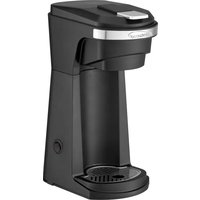
TS-1101BK - Coffee machine Brentwood - Free user manual and instructions
Find the device manual for free TS-1101BK Brentwood in PDF.


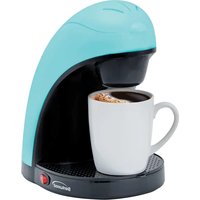
| Product Type | Single-serve coffee maker for pods and ground coffee |
| Brand | Brentwood |
| Model | TS-1101BK |
| Power Supply | 120 V ~ 60 Hz (polarized plug) |
| Power | 900 W (estimated) |
| Water Tank Capacity | 14 oz (420 ml) minimum |
| Compatibility | K-Cup pods and ground coffee (filter included) |
| Brewing Time | Approximately 3 minutes for 420 ml |
| Auto Shut-Off | Yes, after 5 beeps (standby) |
| Dimensions (L x W x H) | Approximately 30 x 20 x 25 cm |
| Weight | Approximately 2 kg |
| Materials | Plastic, stainless steel |
| Included Accessories | Pod holder, reusable coffee filter |
| Maintenance | Hand wash; do not put in dishwasher |
| Descaling | With white vinegar (see manual) |
| Spare Parts | No user-serviceable parts |
| Warranty | Refer to warranty policy (page 7 of manual) |
| Color | Black (BK) |
| Usage | Indoor, household use only |
Frequently Asked Questions - TS-1101BK Brentwood
User questions about TS-1101BK Brentwood
0 question about this device. Answer the ones you know or ask your own.
Ask a new question about this device
Download the instructions for your Coffee machine in PDF format for free! Find your manual TS-1101BK - Brentwood and take your electronic device back in hand. On this page are published all the documents necessary for the use of your device. TS-1101BK by Brentwood.
USER MANUAL TS-1101BK Brentwood
Brentwood® Appliances
© 2021 Brentwood Appliances, Inc.
Operating and Safety Instructions
FOR INDOOR HOUSEHOLD USE ONLY
When using this or any other electrical appliance, always follow these basic safety precautions, especially when children are present.

READ ALL INSTRUCTIONS BEFORE USE
⚠ WARNING-To reduce the risk of fire, electric shock, serious personal injury and property damage please note the following:
- This product is not intended for use by children. Keep the product out of reach of children and pets.
- Always ensure the product is unplugged from the electrical outlet and allow to cool before assembling, disassembling, relocating, or cleaning.
- Do not leave the product unattended while it is in use. Always unplug the product from the electrical outlet when not in use.
- Do not immerse the Base, Power Cord, or Plug of this product in or expose the Power Cord or Plug to water or other liquids.
- Do not touch hot surfaces. Use handles or knobs when handling product. Use protective oven mitts or gloves when removing the Lid or handling hot containers to avoid burns or personal injury.
- Take proper precautions to prevent burns, fire, or personal or property damage as this appliance generates heat and steam during use.
- Only use attachments and accessories recommended and sold by the Manufacturer.
- Do not place on or near a hot gas or electric burner, in a heated oven, or other heated surfaces.
- Use extreme caution when moving an appliance containing hot food, water, or other liquids.
- Use the product in a well-ventilated area. Keep at least 4-6 inches of space on all sides of the product to allow adequate air circulation.
- Use appliance on a table or other flat surface.
- Keep the product away from curtains, wall coverings, clothing, dishtowels, or other flammable materials.
- Do not plug or unplug the product from an outlet with a wet hand.
- This product is intended solely for non-commercial, household use in preparing food for human consumption.
- Do not use the product outdoors or for any other purpose.
- Do not operate the product empty.
-
Do not remove the cup from the machine until you hear the last of the 5 beeps.
-
Do not let cord hang over edge of table or counter where it may be tripped over or pulled. Do not allow cord to touch hot surfaces.
- Do not operate the product if it has a damaged or cut Power Cord or plug, if wires are exposed, if it malfunctions, if it is dropped or damaged, or if the Motor Housing is dropped in or exposed to water.
- This product has no user-serviceable parts. Do not attempt to examine or repair this product yourself. Please review the Warranty Policy on Page 7.
- Do not put any stress on the power cord where it connects to the product, as the power cord could fray and break.
SPECIAL INSTRUCTIONS:
A short power supply cord is provided to reduce the risk of becoming entangled in or tripping over a longer cord. An extension cord is not recommended for use with this product, but if one must be used:
- The marked electrical rating must be at least as great as that of the product.
- Arrange the extension cord so that it will not drape over the countertop or tabletop where it can be tripped over or pulled.
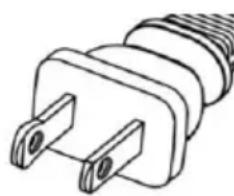
WARNING: This product is equipped with a polarized plug (one blade is wider than the other blade) to reduce the risk of electrical shock. This is a safety feature. The plug will fit into a polarized outlet only one way. If you are unable to insert the plug into the electrical outlet, try reversing the plug. If the
plug still does not fit, contact a qualified electrician. Never use the plug with an extension cord unless you can fully insert the plug into the extension cord. Do not alter the plug. Do not attempt to defeat the safety purpose of the polarized plug.
Before First Use
IMPORTANT: Please check all packaging material carefully before discarding as there may be accessory parts contained within the packaging material.
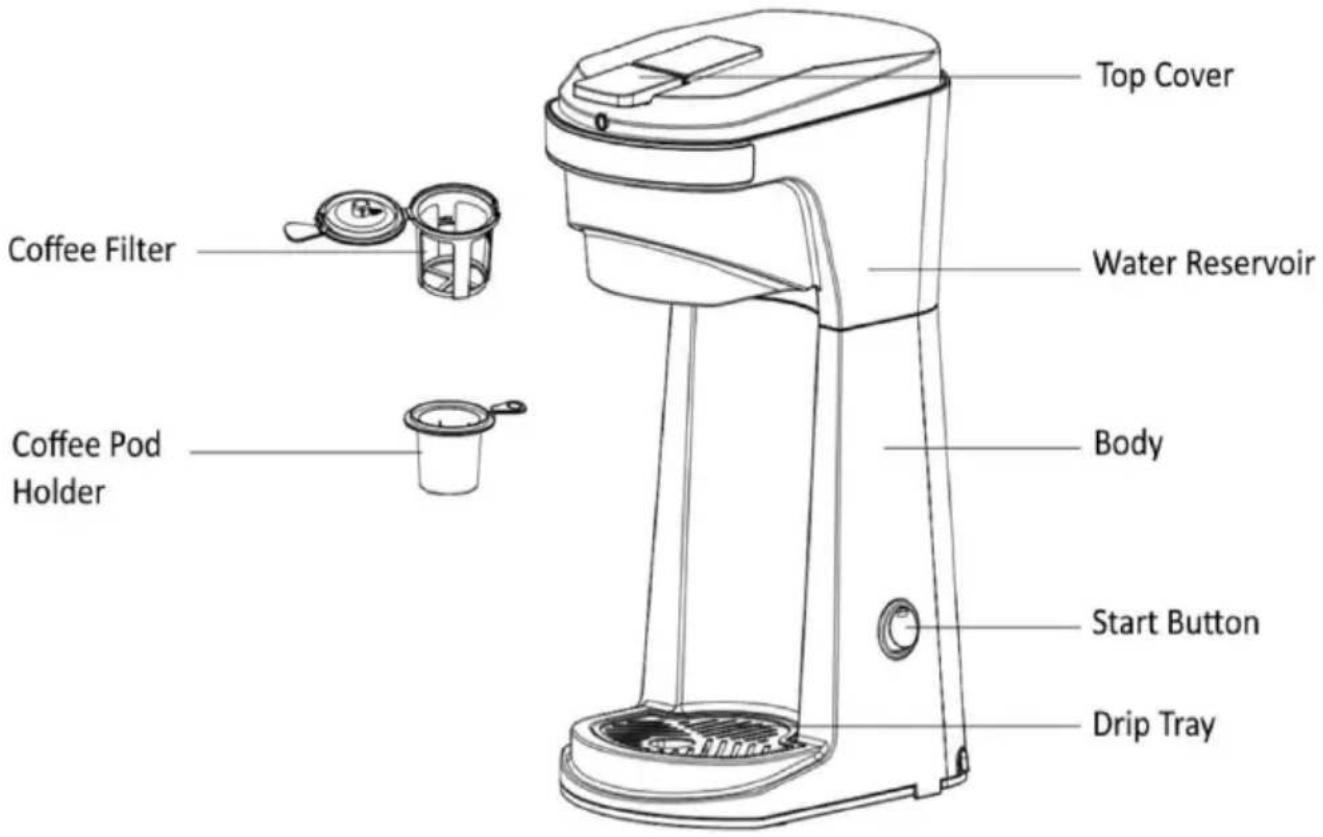
- Clean the water reservoir, top cover, pod holder, and coffee filter in warm soapy water thoroughly.
- We recommend running the appliance twice through before first use without coffee. This allows the dust or impurities to pass through.
WARNING: Do not immerse or place any part of the product in a dishwasher.
SAVE THESE INSTRUCTIONS FOR FUTURE REFERENCE
Parts:
Using Your Single Cup Coffee Maker:
Attention: During the first use the heating element undergoes a minor chemical reaction that may result in a slight odor and/or minor smoking. It quickly goes away.
WARNING: Avoid contact with hot surfaces.
- Gently move the Lid up to open the top cover and fill with a minimum of 14 oz of water.
CAUTION: Do not overfill the product or operate it when empty.
- Choose from the 'Coffee Pod Holder' or 'Coffee Filter' and place it into the chamber.
Coffee Pod Holder:
a. Put the 'Coffee Pod Holder' into the machine and select the brand you like and put the pod into the holder.
b. Press the pod into the 'Coffee Pod Holder' and gently press down. There is a needle in the bottom of the pod holder that will puncture the capsule.
Coffee Filter:
a. Put the 'Coffee Filter' into the machine.
b. Choose the desired amount of coffee grounds and place it into the Coffee Filter.
NOTE: The coffee grounds should not exceed the maximum 'MAX' amount indicated by the strainer.
Tips for brewing Coffee:
- You can adjust the ratio of coffee grounds to water according to your personal taste.
-
If fine coffee grounds are used with less water, the taste will be strong.
• If course coffee grounds are used with more water the taste will be light. -
Once basket is chosen and coffee is in the basket, close the 'Top Cover'.
- Place the machine on a stable counter, plug the power cord into a standard 120volt AC electrical outlet. You will hear a buzz, which indicates the machine is powered on.
- Place a cup on base directly below the water dispenser.
- Press the 'Start' button to turn on the machine.
a. After pressing the 'Start' button, the red light will light up.
b. A buzz will sound indicating the machine has started to brew.
c. Another buzz will sound indicating the brewing process is complete.
d. The machine will automatically reset itself for the next brew.
WARNING: Do not open the top cover of the machine to avoid scalding or other hazards while in operation mode.
- The whole brewing process takes approximately 3 minutes if using 14 oz of water. Once the brewing process is complete, the machine will beep five (5) times.
NOTE: Since the coffee will absorb a certain amount of water in the brewing process, the coffee amount will be slightly less than the water that was placed in the 'Water Reservoir'. - After the first cup has finished brewing, press the 'Start' button again to brew a second cup immediately after.
WARNING: If the Single Cup Coffee Maker is not completely cooled when you place cold water in for the second cup, steam may be ejected which may cause scalding. - For optimal coffee taste, it is best to drink your cup immediately after brewing.
- Always unplug the product from the electrical outlet when it is not in use or will be left unattended.
Tips for Great Tasting Coffee:
• Always use fresh cold water.
- For stronger or milder coffee, increase or decrease the amount of coffee grounds to suite your taste.
- Finer coffee grounds, such as Drip and Automatic Drip Coffeemaker coffee grounds, promote a full extraction of flavor and a rich full-bodied coffee experience.
- Store unused coffee grounds in a cool, dry place.
- For optimum coffee taste, buy whole coffee beans and finely grind them just before brewing.
- Do not reuse coffee grounds. This greatly reduces the coffee's flavor.
- Reheating coffee is not recommended as coffee is at its peak flavor immediately after brewing.
- A clean coffee maker is essential for making great tasting coffee. Clean regularly as specified in the ‘Care and Maintenance’ section.
- Prevent an oily buildup: A small amount of oil on the surface of brewed coffee is due to the release of oil from roasted coffee beans. Heavily roasted coffee beans release more oil than others. Regularly cleaning your Coffeemaker will prevent an oily buildup.
Cleaning Your Single Cup Coffee Maker:
WARNING: Always unplug the product when not in use and allow it to cool before cleaning or storing.
- Clean the machine funnel and water tank with a soft wet cloth.
- DO NOT immerse the wire, plug or device in water or any liquid.
- After each use, pour out the coffee grounds found in the net into the trash can and clean the detachable funnel parts.
NOTE: To avoid clogging, do not pour used grounds into the drain.
- Only hand washing in warm, soapy water is recommended. The coffee filter and pod basket should only be washed by hand.
- Wipe the exterior surface of the Coffeemaker with a soft, damp cloth. Do not use metal scouring pads or abrasive cleaners.
Descaling Your Carafe:
WARNING: Always unplug the product before any cleaning. Dry all parts after every use. Descale your carafe regularly to avoid tougher stains.
Descaling is the removal of mineral deposits from stainless steel. All water contains minerals including purified and filtered water. After your carafe's first use you may see the first signs of deposits which may be white to reddish brown in color. These stains are not rust nor are they toxic.
Note: Reheating coffee in your carafe may discolor or stain the surface of the carafe.
To descale your carafe, fill a carafe full of water, add a small amount of white vinegar, and boil. Unplug the carafe and allow the solution to sit for an hour. For darker stains leave overnight. This will remove most deposits that have built up from normal use. Rinse out solution, add fresh water, and run again. Allow to cool, follow with thorough cleaning, and dry before next use.
ONE YEAR LIMITED WARRANTY
Write down the following information about your appliance to better help you obtain assistance or service if you ever need it.
CUSTOMER RECORD
Date of Purchase ____ Store/Dealer ____
Model/Item No: ____
THIS WARRANTY APPLIES TO PRODUCTS PURCHASED AND USED IN THE CONTINENTAL U.S. AND CANADA ONLY. This is the only express warranty for this product and is in lieu of any other warranty or condition. This product is warranted to be free from defects in material and workmanship for a period of one (1) year from the date of original purchase. During this period, your exclusive remedy is repair or replacement of this product, at our option; however, you are responsible for all costs associated with returning the product to us and our returning a product or component under this warranty to you. If the product or component is no longer available, we will replace with a similar one of equal or greater value. This warranty does not cover glass, filters, wear from normal use, use not in conformity with the printed directions, or damage to the product resulting from accident, alteration, abuse, or misuse.
THIS WARRANTY EXTENDS ONLY TO THE ORIGINAL CONSUMER PURCHASER. KEEP THE ORIGINAL SALES RECEIPT, AS PROOF OF PURCHASE IS REQUIRED TO MAKE A WARRANTY CLAIM.
This warranty is void if the product is used for other than single-family household use or subjected to any voltage and waveform other than what is specified on the rating label (E.G., 120V\~60Hz). We exclude all claims for special, incidental, and consequential damages caused by breach of express or implied warranty. All liability is limited to the amount of the purchase price. Every implied warranty, including any statutory warranty or condition of merchantability or fitness for a particular purpose, is disclaimed except to the extent prohibited by law, in which case such warranty or condition is limited to the duration of this written warranty. This warranty gives you specific legal rights. You may have other legal rights that vary depending on where you live. Some states do not allow limitations on implied warranties or special, incidental, or consequential damages, so the foregoing limitations may not apply to you. To make a warranty claim do not return this appliance to the store.
TO OBTAIN WARRANTY SERVICE AND/OR TROUBLESHOOTING INFORMATION:
Call Customer Service at 1-888-903-0060 in the U.S.
Monday through Friday: 9:00am – 5:00pm PST.
U.S. Customers Please Email: warranty@brentwoodus.com
Canadian Customers Please Email: canada.warranty@brentwoodus.com
Go online at www.brentwoodus.com
© 2021 Brentwood Appliances, Inc.
- BRENTWOOD® APPLIANCES
- READ ALL INSTRUCTIONS BEFORE USE
- SPECIAL INSTRUCTIONS
- BEFORE FIRST USE
- SAVE THESE INSTRUCTIONS FOR FUTURE REFERENCE
- PARTS
- USING YOUR SINGLE CUP COFFEE MAKER
- COFFEE POD HOLDER
- COFFEE FILTER
- TIPS FOR BREWING COFFEE
- TIPS FOR GREAT TASTING COFFEE
- CLEANING YOUR SINGLE CUP COFFEE MAKER
- DESCALING YOUR CARAFE
- ONE YEAR LIMITED WARRANTY
- CUSTOMER RECORD
Brand : Brentwood
Model : TS-1101BK
Category : Coffee machine