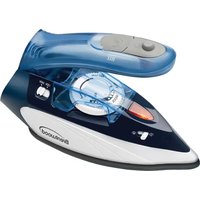
MPI-45 - Iron Brentwood - Free user manual and instructions
Find the device manual for free MPI-45 Brentwood in PDF.


| Product Type | Travel steam iron |
| Brand | Brentwood |
| Model | MPI-45 |
| Power Supply | Dual voltage (120 V / 240 V) with selector |
| Rated Power | Approximately 1000 W |
| Water Tank Capacity | Approximately 100 ml |
| Soleplate Material | Stainless steel (estimated) |
| Temperature Settings | 3 positions: low (synthetic), medium (silk/wool), high (cotton/linen) |
| Steam Function | Continuous steam and steam burst |
| Dry Ironing | Yes, with empty tank |
| Power Indicator | Red (heating) / green (ready) |
| Foldable Handle | Yes, with release button |
| Folded Dimensions (approx.) | 20 × 10 × 8 cm |
| Weight (approx.) | 0.5 kg |
| Power Cord | Standard length, non-detachable |
| Safety | Polarized plug, auto shut-off not specified |
| Cleaning | Wipe with a dry cloth; soleplate cleanable with water-vinegar solution |
| Maintenance | Empty tank after use; do not use descaler |
| Spare Parts and Repairability | No user-serviceable parts |
| Usage | Indoor domestic use only |
| Included Accessories | Measuring cup (estimated) |
Frequently Asked Questions - MPI-45 Brentwood
User questions about MPI-45 Brentwood
0 question about this device. Answer the ones you know or ask your own.
Ask a new question about this device
Download the instructions for your Iron in PDF format for free! Find your manual MPI-45 - Brentwood and take your electronic device back in hand. On this page are published all the documents necessary for the use of your device. MPI-45 by Brentwood.
USER MANUAL MPI-45 Brentwood
Brentwood® Appliances
© 2021 Brentwood Appliances, Inc.
natural_image
Close-up of a blue Brentwood air iron with visible control buttons and power ratings (no text beyond branding)Operating and Safety Instructions
FOR INDOOR HOUSEHOLD USE ONLY
When using this or any other electrical appliance, always follow these basic safety precautions, especially when children are present.

READ ALL INSTRUCTIONS BEFORE USE

WARNING-- To reduce the risk of fire, electric shock, serious personal injury, and property damage please note the following:
- This product is not intended for use by children. Keep the product out of the reach of children and pets. Extra caution is necessary when using this appliance near children.
- Always ensure the product is unplugged from the electrical outlet and allowed to cool before assembling, disassembling, relocating, or cleaning it.
- Do not leave the product unattended while it is in use. Always unplug the product from the electrical outlet when not in use.
- Do not immerse the Base, Power Cord, or Plug of this product in or expose the Power Cord or Plug to water or other liquids.
- Do not touch hot surfaces. Use handles or knobs when handling product.
- Take proper precautions to prevent burns, fire, or personal or property damage as this appliance generates heat and steam during use.
- Do not use attachments.
- Do not place on or near a hot gas or electric burner, in a heated oven, or other heated surfaces.
- Use the product in a well-ventilated area. Keep at least 4-6 inches of space on all sides of the product to allow adequate air circulation.
- Use appliance on a table or flat surface. Keep the product away from curtains, wall coverings, clothing, dishtowels, or other flammable materials.
- Do not plug or unplug the product from the electrical outlet with a wet hand.
- This product is intended solely for non-commercial, non-industrial, household use; do not use the product outdoors or for any other purpose.
- Do not let cord hang over edge of table or counter where it may be tripped over or pulled. Do not allow cord to touch hot surfaces.
- Do not operate the product if it has a damaged or cut Power Cord or plug, if wires are exposed, if it malfunctions, if it is dropped or damaged, or if the Motor Housing is dropped in or exposed to water.
- This product has no user-serviceable parts. Do not attempt to examine or repair this product yourself. Please review the Warranty Policy on Page 7.
- Do not put any stress on the power cord where it connects to the product, as the power cord could fray and break.
- The iron should always be turned to "MIN" or "0" before plugging or unplugging from outlet.
- Always disconnect Iron from electrical outlet when filling with water, emptying or when not in use.
- Burns can occur from touching hot metal parts, hot water, or hot steam. Use caution when you turn the Steam Iron upside down as there can still be hot water in the reservoir.
SPECIAL INSTRUCTIONS:
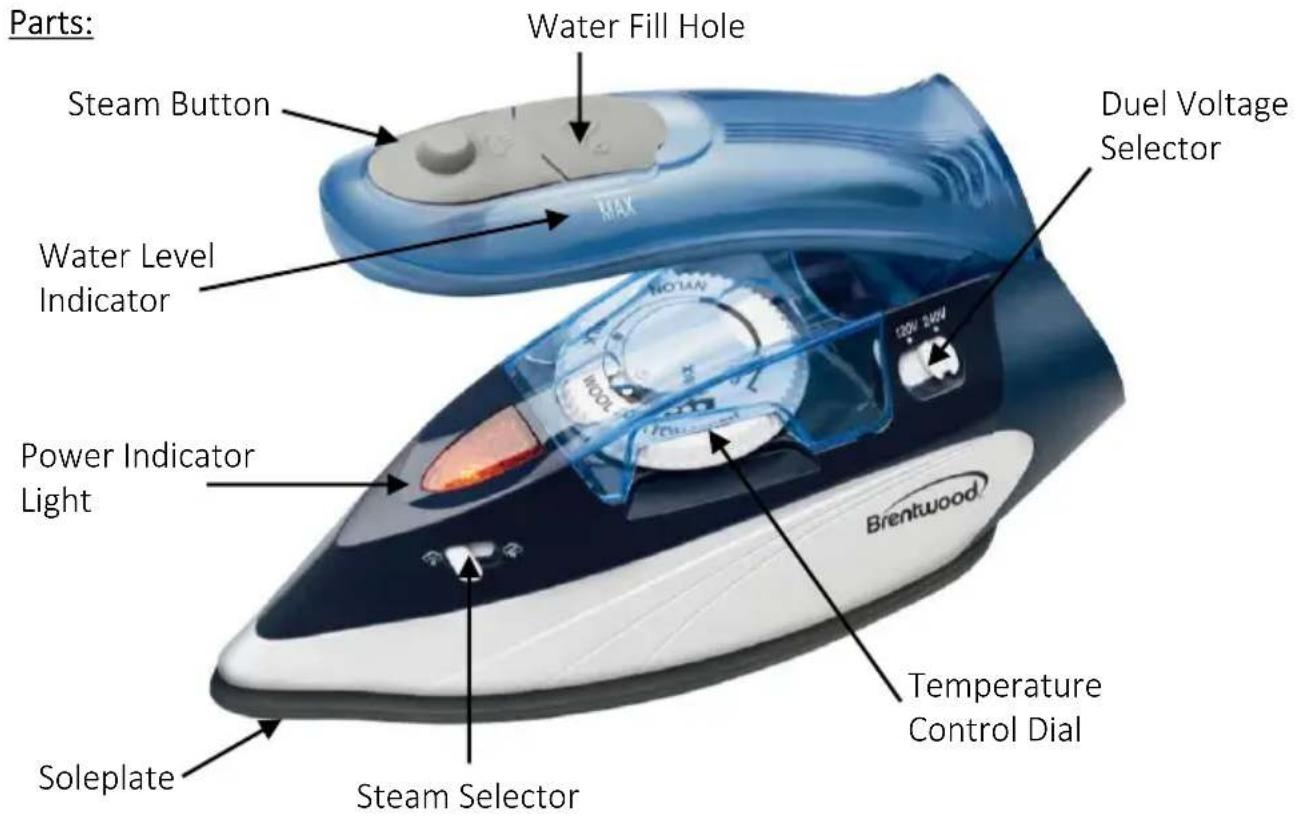
- With the Dual Voltage Selector, the iron can be set to different supply voltages. Make sure that the supply voltage corresponds with the voltage marked on the rating label.
- A short power supply cord is provided to reduce the risk of becoming entangled in or tripping over a longer cord. An extension cord is not recommended for use with this product, but if one must be used:
— The marked electrical rating must be at least as great as that of the product.
- If the product is of a 3-prong grounding type, the extension cord must be a grounding-type 3-wire cord.
- Arrange the extension cord so that it will not drape over the countertop or tabletop where it can be tripped over or pulled.
WARNING: This product is equipped with a polarized plug (one blade is wider than the other blade) to reduce the risk of electrical shock. This is a safety feature. The plug will fit into a polarized outlet only one way. If you are unable to insert the plug into the electrical outlet, try reversing the plug. If the plug still does not fit, contact a qualified electrician. Never use the plug with an extension cord unless you can fully insert the plug into the extension cord. Do not alter the plug. Do not attempt to defeat the safety purpose of the polarized plug.
SAVE THESE INSTRUCTIONS
FOR FUTURE REFERENCE
Before First Use
IMPORTANT: Please check all packaging material carefully before discarding as there may be accessory parts contained within the packaging material.
Clean the steam iron before using for the first time, according to the instructions given in the paragraph "Cleaning". This will result in the removal of possible dust particles from the soleplate and subsequently lessen the smell typically encountered when first switching on. Please ensure sufficient ventilation.
Attention: First use may cause a slight odor or small smoking upon heating, it is normal. This is a result of the heating element chemical reaction. It quickly goes away.
| GARMENT LABEL | FABRIC TYPE | THERMOSTAT REGULATION |
 | Synthetic | ●low temperature |
 | Silk - Wool | ●●medium temperature |
 | Cotton - Linen | ●●●high temperature |
 | Fabric should not be ironed | |
Foldable handle:
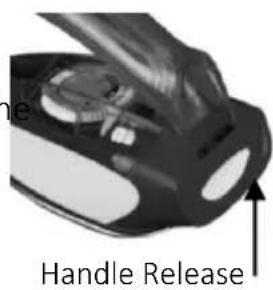
Before the iron is used, press the handle release button, and pull the handle upwards until it locks securely into the operating position. After use, the handle can be folded down again for space saving storage by pressing the release button.
Filling the Reservoir:
Fill the water reservoir before using the steam function. Remove the plug from the wall socket before filling the reservoir.
- Press the handle release and lock the handle in the operating position.
- Turn the steam selector to the position.
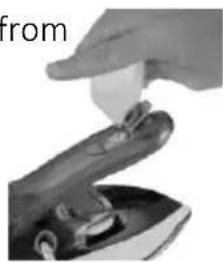
- Open the rubber lid on the water reservoir by lifting the side with the symbol ☐; do not lift the opposite side.
- Fill the empty water reservoir using the measuring cup provided. Do not fill past the MAX level. Close the water fill hole.
natural_image
Close-up of a hand holding a small object above a mechanical component (no visible text or symbols)Selecting the Temperature:
-
Put the iron on its Heel Rest. Put the plug in the socket.
-
Adjust the temperature control dial according to the international symbol on the garment label. Use the Fabric Guide on the Iron to also select a proper temperature setting. The power light indicates with a red light that the iron is heating up. Wait until the power light turns green before ironing.
-
Once you select a fabric type set the temperature dial to the appropriate setting for your fabric.
Using Your Travel Iron:
- Steam ironing requires high temperatures. The temperature level for steam ironing is indicated in the temperature control knob.
- After filling the reservoir with water, place the steam iron upright on its base stand and insert the plug into the wall socket.
- Set the temperature control knob to the required ironing temperature as indicated by the ironing symbols.
- During the heating-up proceed the indicator lamp will be on, the lamp will go out once the required ironing temperature is reached.
NOTE: Before ironing any fabrics, the soleplate should be cleaned by passing it over an old, clean cotton cloth, while using the steam jet function; this helps to flush out any dirt residues or lint particles trapped inside the openings in the soleplate.
- The steam function can now be switched on and off using the steam selector.
-
For dry ironing, the water reservoir may be empty. Should there be water left in the reservoir, the steam jet function may also be used when dry-ironing at higher temperature settings.
-
Place the steam iron upright on its base stand after use and remove the plug from the wall socket.
Steam:
- When the steam button 📄 is pressed, an additional hot steam jet is emitted from the soleplate, this function can be very useful when removing stubborn creases. The steam function may also be used with iron held vertically, to restore the surface of fabrics.
- For a sufficiently strong steam jet, the reservoir must be at least a quarter full.
Cleaning:
Note: before cleaning the iron in any way, make sure that the appliance plug is not connected to the socket.
- Move the temperature dial selector to OFF and unplug the iron. Allow it to cool completely before handling.
- If necessary, the unit may be wiped with a dry lint-free cloth. To avoid the risk of electric shock, do not clean the appliance with water and do not immerse it in water.
- Starch and other deposits on the exterior of the soleplate may be removed with a woolen clothe soaked in a vinegar-water solution.
- Do not use abrasives or harsh cleaning solutions. Do not put vinegar or other descales into the water reservoir.
NOTICE: Always unplug the product from the electrical outlet when it is not in use or will be left unattended.
-
Pour any remaining water out of the reservoir through the water fill hole and turn the steam selector to the position.
-
To avoid damage to the soleplate, store the steam iron in upright position on its base stand.
ONE YEAR LIMITED WARRANTY
Write down the following information about your appliance to better help you obtain assistance or service if you ever need it.
CUSTOMER RECORD
Date of Purchase ____ Store/Dealer ____
Model/Item No: ____
THIS WARRANTY APPLIES TO PRODUCTS PURCHASED AND USED IN THE CONTINENTAL U.S. AND CANADA ONLY. This is the only express warranty for this product and is in lieu of any other warranty or condition. This product is warranted to be free from defects in material and workmanship for a period of one (1) year from the date of original purchase. During this period, your exclusive remedy is repair or replacement of this product, at our option; however, you are responsible for all costs associated with returning the product to us and our returning a product or component under this warranty to you. If the product or component is no longer available, we will replace with a similar one of equal or greater value. This warranty does not cover glass, filters, wear from normal use, use not in conformity with the printed directions, or damage to the product resulting from accident, alteration, abuse, or misuse.
THIS WARRANTY EXTENDS ONLY TO THE ORIGINAL CONSUMER PURCHASER. KEEP THE ORIGINAL SALES RECEIPT, AS PROOF OF PURCHASE IS REQUIRED TO MAKE A WARRANTY CLAIM.
This warranty is void if the product is used for other than single-family household use or subjected to any voltage and waveform other than what is specified on the rating label (E.G., 120V\~60Hz). We exclude all claims for special, incidental, and consequential damages caused by breach of express or implied warranty. All liability is limited to the amount of the purchase price. Every implied warranty, including any statutory warranty or condition of merchantability or fitness for a particular purpose, is disclaimed except to the extent prohibited by law, in which case such warranty or condition is limited to the duration of this written warranty. This warranty gives you specific legal rights. You may have other legal rights that vary depending on where you live. Some states do not allow limitations on implied warranties or special, incidental, or consequential damages, so the foregoing limitations may not apply to you. To make a warranty claim do not return this appliance to the store.
TO OBTAIN WARRANTY SERVICE AND/OR TROUBLESHOOTING INFORMATION:
Call Customer Service at 1-888-903-0060 in the U.S.
Monday through Friday: 9:00 am – 5:00 pm PT
U.S. Customers Please Email: warranty@brentwoodus.com
Canadian Customers Please Email: canada.warranty@brentwoodus.com
Go online at www.brentwoodus.com
PRECAUCIONES IMPORTANTES

natural_image
Close-up of a black mechanical component with a white lid and arrow pointing to a feature (no visible text or symbols)natural_image
Close-up of a hand holding a small object above a mechanical component (no visible text or symbols)RECOMMANDATIONS ADDITIONNELLES:
natural_image
Close-up of a hand inserting a small object into a device (no visible text or symbols)© 2021 Brentwood Appliances, Inc.

- Brentwood® Appliances
- READ ALL INSTRUCTIONS BEFORE USE
- SPECIAL INSTRUCTIONS:
- SAVE THESE INSTRUCTIONS
- FOR FUTURE REFERENCE
- Before First Use
- Foldable handle:
- Filling the Reservoir:
- Selecting the Temperature:
- Using Your Travel Iron:
- Steam:
- Cleaning:
- ONE YEAR LIMITED WARRANTY
- CUSTOMER RECORD
- PRECAUCIONES IMPORTANTES
- RECOMMANDATIONS ADDITIONNELLES:
Brand : Brentwood
Model : MPI-45
Category : Iron