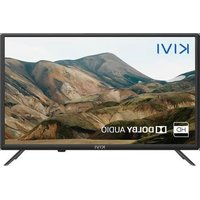
24H500LB - Television Kivi - Free user manual and instructions
Find the device manual for free 24H500LB Kivi in PDF.


| Product Type | LED Television |
| Brand | Kivi |
| Model | 24H500LB |
| Screen Size (Diagonal) | 24 inches (61 cm) |
| Screen Resolution | HD (1366 x 768 pixels) |
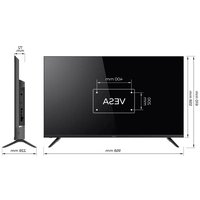
| Dimensions without Stand (W×H×D) | 550 × 330 × 65 mm |
| Net Weight | 3.5 kg |
| Power Consumption (Operating) | 30 W |
| Power Consumption (Standby) | < 0.5 W |
| Supply Voltage | 100-240 V ~ 50/60 Hz |
| HDMI Ports | 2 x HDMI 1.4a |
| USB Ports | 1 x USB 2.0 (500 mA) |
| Antenna Input | 75 ohms (DVB-T2/C) |
| Optical Audio Output | 1 x optical |
| Headphone Output | 1 x 3.5 mm |
| VESA Standard | 100 x 100 mm (M4 bolts) |
| Audio Power | 2 × 5 W |
| Wireless Connectivity | Wi-Fi 802.11 b/g/n, Bluetooth |
| Main Functions | Smart TV (Google TV), Dolby Audio, program guide, parental control, OTA update |
| Maintenance and Cleaning | Use a dry or slightly damp microfiber cloth; do not spray liquid directly on the screen. |
| Safety | Double electrical insulation; do not use if the cord or screen is damaged; unplug before cleaning. |
| Spare Parts and Repairability | Repairability index not provided; contact after-sales service via the website or QR code in the manual. |
Frequently Asked Questions - 24H500LB Kivi
User questions about 24H500LB Kivi
0 question about this device. Answer the ones you know or ask your own.
Ask a new question about this device
Download the instructions for your Television in PDF format for free! Find your manual 24H500LB - Kivi and take your electronic device back in hand. On this page are published all the documents necessary for the use of your device. 24H500LB by Kivi.
USER MANUAL 24H500LB Kivi
Hello there! It's me, your KIVI color LED-TV, and I will tell you how to use me safely.
If you still have any questions about my settings, functionality, or have any complaints or suggestions, please contact the support service.
To chat, scan the QR-code or call by phone numbers.
3 General information about me.
4 Attention!
5 Who am I? My features.
6-7 Remote control.
8 Connection ports.
9 When something goes wrong.
SPIS RTESCI

| PRODUCT NAME | KIVI COLOR LCD TV |
| Warranty period | 2 years |
| Operating temperature, °C | +15 – +35 |
| Relative humidity while storing,% | 45 – 75 |
| Temperature while storing, °C | +5 – +40 |
| Atmospheric pressure, KPA / mmHg | 86 – 106 / 650 – 800 |
| Relative humidity while operating,% | 55 – 70 |
| Electricity consumption in off mode | <1 W or missing |
Recommendation only for countries where EU directives apply. This device complies with the standards and meets the requirements of Directive 2014/53 / EU.
- Service life – the calendar period of use of products for their intended purpose, starting from commissioning, during which the manufacturer (importer/supplier-legal entity accepts the claims) guarantees safety, ensures the possibility of its use and is responsible for any defects caused by its fault.
** The manufacturing plant depends on the state of sale. Detailed information about the origin of the product in your region can be found on the label, packaging, or product.

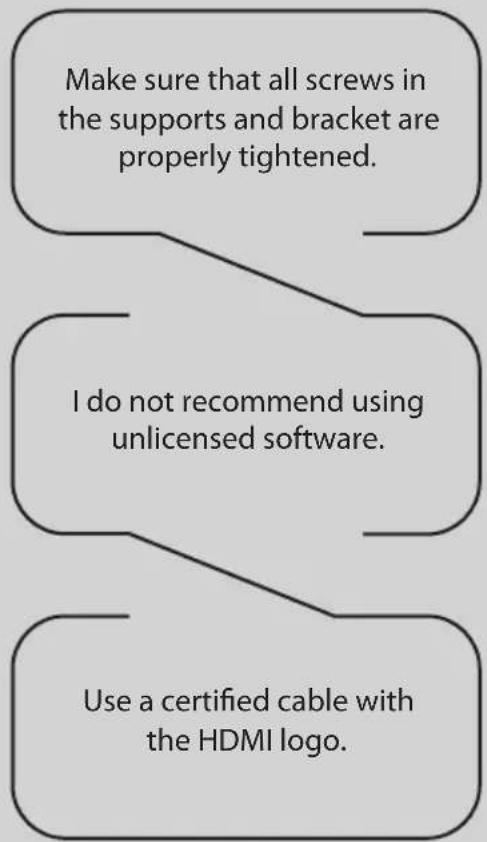
TO BE SAFE WITH ME:
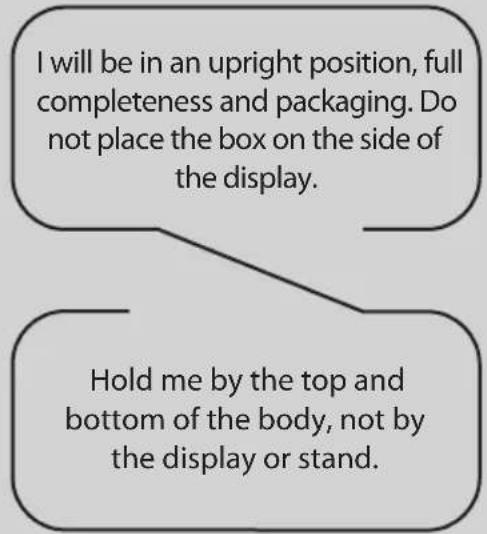
TO TRANSPORT ME:
kivismart.com

DON'TUSEMEIF:
- The power cord, plug, or screen is damaged.
I fallen myself or your favorite cat fallen on me.

TO USE ME EFFECTIVELY AND SAFELLY:
- Read and follow all instructions and precautions.
If your outlet doesn't fit, please, contact a specialist. - Please connect me to power supply using a voltage stabilizer or relay only.
TO KEEP ME CLEAN:
- Wipe me with a cloth designed for the care and maintenance of the LCD screens.
- Do not spray liquids directly on me.
- If you touch me with greasy or sticky hands, turn me off, apply screen cleaner to a microfiber cloth, and wipe me down.

Tiny black or colored spots can appear on my liquid crystal panel while in operation.
Depending on the viewing location, brightness, and color of the panel can change. And it is absolutely Okay.






This symbol indicates that I have double isolation between the mains voltage and dangerous parts for you.

Friends, unfortunately, I am not eternal. Therefore, at the end of my term, I shall be handed over to the receiving point of electrical and electronic equipment. For more detailed information about receiving and disposal points, please contact local municipal authorities or a household waste disposal company.
FEATURES
| Model | 32H750NB 32H750NW | 32F750NB 32F750NW | 40F750NB | 43U750NB 43U750NW | 50U750NB | 55U750NB 55U750NW 55U850NB | 65U740NB |
| Diagonal screen size, inches/cm | 32/81 32/81 | 40/102 43/109 | 50/127 55/140 | 65/165 | |||
| Resolution | HD 1366x768 | FHD 1920x1080 | UHD 3840x2160 | ||||
| USB 2.0 | 2 | 2 | |||||
| HDMI | 3 | 4 | |||||
| HDMI | HDMI 1.4a HDMI 2.1 | ||||||
| Wi-Fi | a/b/g/n/ac | ||||||
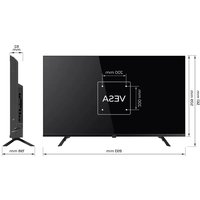
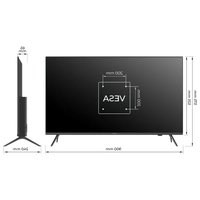
| VESA standard, mm | 200x100 200x200 400x200 | ||||||
| VESA bolts | M4 M4 M6 M6 M6 M6 M6 | ||||||
| Width, height, depth, mm | 720x425 x62 | 720x425 x62 | 901x511 x64 | 960x556 x64 | 1116x642 x61 | 1229x710 x63 | 1448x830 x61 |
| Dimensions with stand, mm | 720x465 x180 | 720x464 x204 | 901x574 x240 | 960x620 x240 | 1116x705 x240 | 1229x772 x260 | 1448x899 x300 |
| Net weight, kg | 4,2 4,2 6,4 7,4 | 10,5 13 | 17,3 | ||||
*Indicators of power supply, power consumption related to the operation of "Home" TV Mode, indicators mode "store" may differ upwards. **The complete set, appearance and specifications of the product may differ or may be changed by the manufacturer without prior notice
INPUT IMPEDANCE: 75Ω
For stable reception of digital TV channels, I recommend using an external antenna with an amplifier (the gain ratio of 30 dB or more).
NOTE:
The manufacturer, importer, or supplier are not responsible for damage to my components due to high voltage supply through the antenna port.

HIGH-DEFINITION MULTIMEDIA INTERFACE
The terms HDMI, HDMI High-definition Multimedia Interface, and the HDMI logo are trademarks or registered trademarks of HDMI and Microsoft Administrator, Inc.
Manufactured under DOLBY LABORATORIES license. The DOLBY, DOLBY AUDIO, and Double D symbols are trademarks of DOLBY and laboratories.
This product is manufactured, distributed, serviced and warranted exclusively by SHENZHEN MTC CO., LTD. "JVC" is a trademark of JVCKENWOOD Corporation, used by this company is under license. "Sound by JVC". Sound certificated by JVC.
REMOTE CONTROL (RC40) / POINTER (RC60)
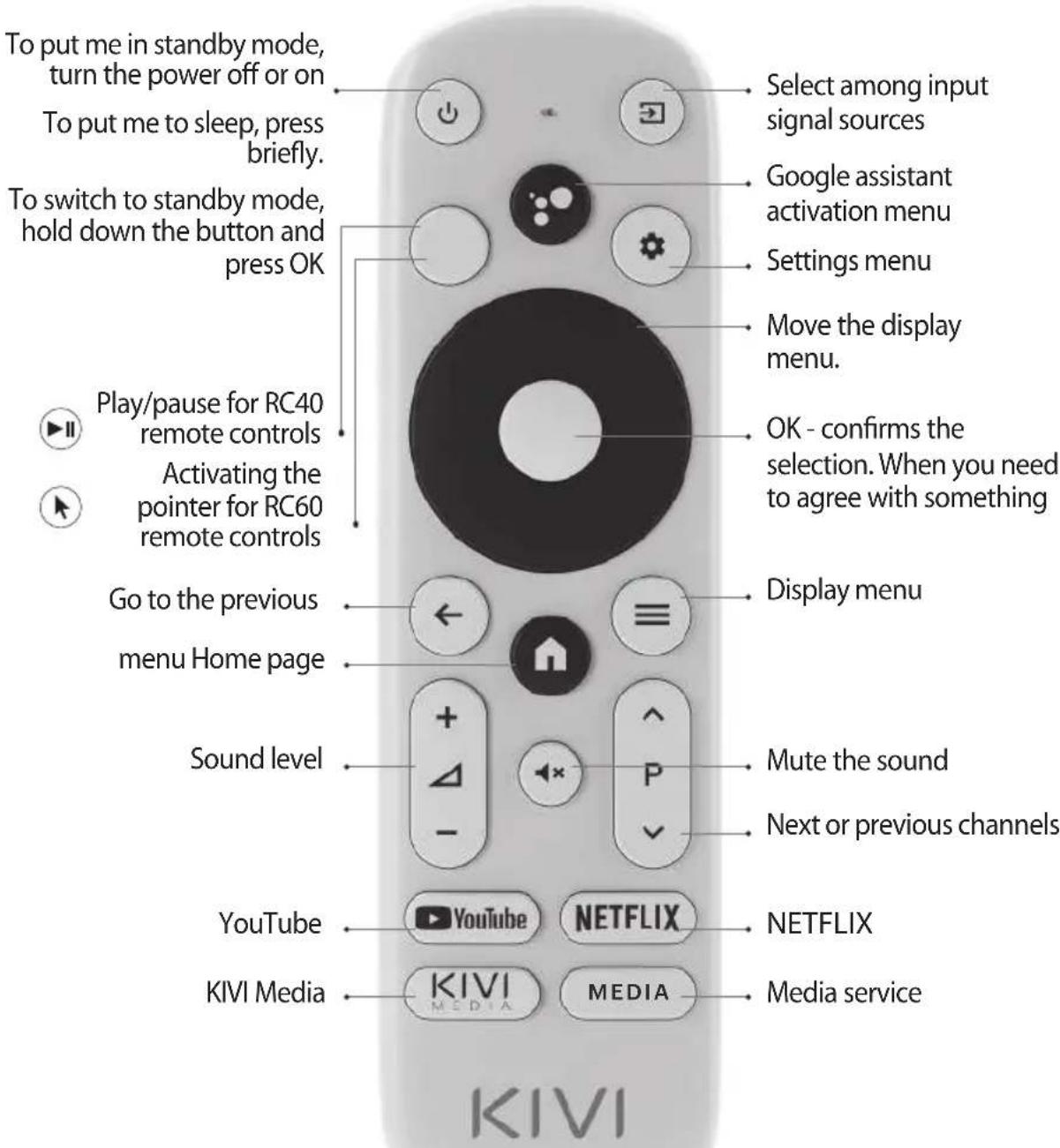
Assigning keys
NOTE:
1 The pointer control mode is completed with models 43U750NB, 43U750NW, 50U750NB, 55U750NB, 55U750NW, 50U850NB, 55U850NB, 65U850NB.
2 The voice search function is available in the RC40/60 remote controls.
3 The manufacturer may change The complete set and appearance may differ or may be changed by the manufacturer without prior notice.
4 Remote control has CE certification.

Remote control (RC) range — up to 10 meters..
To make it work - insert the alkaline batteries and point it at me.

Do not mix new batteries with old ones, and do not leave the remote control near a heat source.

If you don't use the remote control for more than one month, get the batteries out of there.
I HAVE TO APOLOGIZE FOR SOME INCONVENIENCES!
Unfortunately, the standard Google Gboard keyboard temporarily does not support the remote control-pointer.
THEREFORE:
Open Settings using the notification window that appears when you click on the pointer button on the remote control.
Connect the Wi-Fi, log in to Google Play, and install the necessary app for the pointer to work correctly.
After installing it, click on the pointer button on the remote contro
If you have already connected me to the Internet before - wait about 5-10 minutes, while the leanback app will appear in the general list of programs (the "+" icon in the main menu).
After that, press the pointer button on the remote control
IF ANYTHING:
When using a remote control pointer in applications, not all buttons and symbols are supported.
You can adjust the speed of the pointer by pressing the buttons simultaneously:
-
Speed increase - pointer button + right;
-
Speed reduction - pointer button + left.
Detailed instructions with images are also available on the website kivismart.com, in the "24/7 support" section
CONNECTING DEVICES
I am compatible with most devices for video and audio playback and can be connected to a Bluray, game console, stereo system, etc.
HD/FHD
MODELS
UHD
MODELS
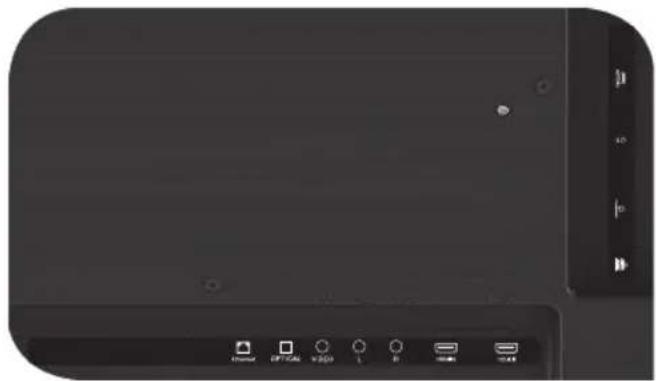
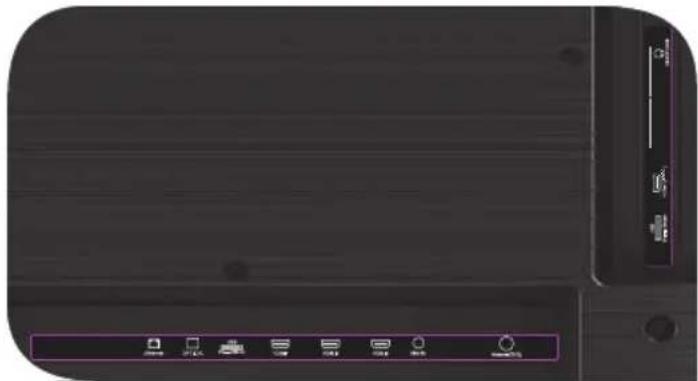
USB Input for USB devices (500mA)
HDMI HDMI input
Antenna Antenna connection port
CI CAM module connection port
Mini AV IN Composite audio/video input
VIDEO Composite video input
LAN Ethernet input
HEADPHONEHeadphone output (3.5 mm)
OPTICAL OUTOptical output
NOTE:
- All external devices should not be connected after you turn me off.
- The maximum load on the USB port should not exceed 0.5 A.
- The TV supports ARC, CEC. 2K supports HDMI 1.4 a, 4K supports HDMI 2.1.
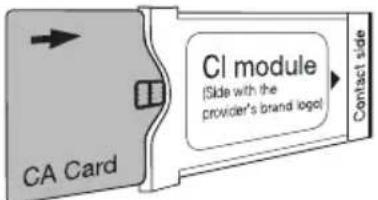
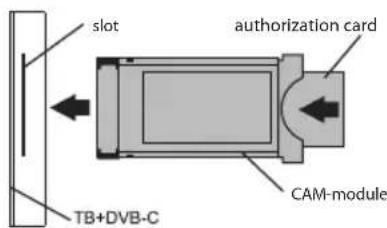
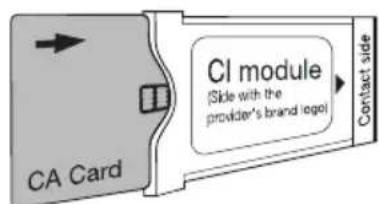
CONNECTING A CI CONDITIONAL ACCESS CARD
A CAM module with a CI conditional access card can be attached to a digital cable broadcasting service provider along with information for use.
The names of individual menu modes, the designations of some connectors and places of application, and the performance of individual ergonomic control functions may differ slightly from those described and depicted in this manual.
In addition to hardware-related malfunctions, if there are any non-standard operations, power me off for 30 seconds.
| Unstable or missing broadcast / cable TV signal | 1. I'm on the antenna, but I cannot find channels, and I broadcast channels with image distortion or audio interruptions. | 1. For stable reception of DVB-T2 (digital) and ATV (analog) signals, use an external antenna with an amplifier (gain 30 dB and more). Additional power to the antenna input is already transmitted and cannot be supplied via my USB ports. Point your antenna toward the nearest TV tower. If you are using a room antenna, raise it higher, rotate it around your own axle, and move it around the room. Make sure that you have selected an antenna in the settings ->Channel -> channel setup mode menu. Configure the channels manually. For a stable image and sound, the indicators shall be from 50% or higher. Check the integrity of the cable. |
| 2. I'm cable, but I don't find channels, and I broadcast channels with image distortion or audio interruptions. | 2. If you are using cable TV (DVB-C) or a common house antenna, I recommend connecting without a splitter. If possible, connect me to another antenna cable. Make sure that you have selected an antenna in the Settings -> Channel -> Channel setup mode menu. Configure the channels manually. Check the integrity of the cable. Use a signal amplifier. | |
| Sound is not played on external speakers | 1. Connecting speakers via Bluetooth | 1. Connect Bluetooth speakers via the Settings menu - Remote controls and accessories - Add a device. |
| 2. Connect speakers via HDMI | 2. Connect the speakers to me via the HDMI (ARC) Jack. In the Settings menu -> Sound -> Speakers — select "External audio system". In the Settings menu -> Device Settings -> Inputs -> HDMI EDID version - set the value to "EDID 1.4". In Settings menu -> Device Settings -> Sound -> digital output - select Auto, Skip, PCM, etc. | |
| 3. Connect speakers via AUX (3.5 mm headphone jack) | 3. Make sure that the audio cable is inserted all the way into the 3.5 jack. | |
| 4. Connecting speakers via optics | 4. Attach the speakers to the OPTICAL connector. In the Settings menu -> Device Settings -> Sound -> Digital output-> select Auto, Skip, PCM, etc. Use the VOL button on the remote control to turn down the sound volume until it is completely turned off. Use the remote control from the speakers to increase the sound to the desired level. |
ZEBY ZEMNA BYLO BEZPIECZNIE:
BY MNIE TRANSPORTOWAC:
MNIE JUZ NIE UZYWAC W PRZYPADKACH:
IMPEDANCJA WEJSCIOWA:75 OM
PENTRU CA SÄ FIU CURAT:

DA METPAHCNOPTNUPAT:
TpaBa da cBm n3npaBeH, HantbIHO o6OpyDbaH nOanKOBaH. He noCTabYte KyTna OCTpAnHa DnCnpe.
ДрьктemeВгорнataи ДолнaturaчacTHaКуТЯТа,aHe 3aДиСплЕИИNCTOnKATA.

HE MOFA DA CE N3N0JI3BAM BEUE:
-Поврень зхранвац кабел,шencel ninn ekpan
- Hamokpux ce, naHax uIN KOTKaTa Tn naHa Bbpxy MeH

3A DA ME I3IOL3BATE EΦEKTUBHO I 6E3OПАСНО:
- PpOueTe Te nCneBaiTe BCnUKN HcTpyKuNN npEpa3HmepKn;
- Ako KOHTaKTbT Bn He nacBa, CBbpXeTe ce C npoepnoHaJInc.
CbpxeMe KbM 3axpaHbHeTo cMo C NOMOHTa Ha CTa6nI3aTOp Ha HApexKeHneTo nn peIe.

3AДАББДАЧИСТ:
- N36bpyte Me c Kbpna, npedHa3NaueHa 3a rpnka 3a LCD ekpaH;
He npbckaai Te TeyHocTn DnpeKTHo BbpxMy MeH;
Ako CTe Me DoKoCHaHn C Ma3HN NIn JeNkABn Pbue,

B 3aBnCnMOCTOT
MRACTOTOHa
rIeHaHe,ApKocTtA
UBeTbT Ha nHaHeNa
MOXe Da ce
PpOMeHrT N NO
Bpeme Ha pa60Ta
MOraT Da Ce NoAByT
MaIKN NIN UBeTHN
ToUKn. He HanbIHo Hapei.



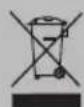



To3n CmB0N IOKa3Ba,Ye IMaM DBOHn HA 3ONaCLy MExdy MPeXBOTO HAnpeXeHne N AcTlTe, KOInTO ca ONaChn 3a Bac.

PnraTeH, 3a CbKaJIeHHe He CBm BeueH. 3aTOBa B Kpa H a EKcIIOaTcIOHHNc cX NtB0 Tp6Ba Da 6bda IpeaJeH Ha NyHKT 3a Cb6npaH He eNEKtpuuecko n ENEKToPOHH OobpydBaHc. 3a NoBeue INΦOpMaunr OTHOCHO NyKTOBeTe 3a Cb6puHa n3XBbPnHe, MOJ, CbbpKeTe Ce C MeCTHnTE OeUHcKn Bnactn mC BaWata KOMNaHn 3a 3xXBbPnHe Ha 6ntOBn OTnAbu.
XAPAKTEPNUKU
| Модаль | 32H750NB 32H750NW | 32F750NB 32F750NW | 40F750NB | 43U750NB | 43U750NW | 50U750NB | 55U750NB U750NW 55U850NB | 65U740NB |
| Размер на ekрANA Диагонално, Дюйм/см | 32/81 32 | 81 40/102 43 | 3/109 43/109 | 50/127 55/1 | 40 65/165 | |||
| Разшени | HD 1366x768 | FHD 1920x1080 | 3840x2160 | UHD | ||||
| USB 2.0 2 | 2 | |||||||
| HDMI | 3 | 4 | ||||||
| HDMI | HDMI 1.4a | HDMI 2.1 | ||||||
| Wi-Fi | a/b/g/n/ac | |||||||
| Стандар.T VESA, MM | 200x100 200x200 | 400x200 | ||||||
| ТулбOLTVESA | M4 | M4 | M6 | M6 | M6 | M6 | M6 | M6 |
| ШирINA, ВисочINA, MM | 720x425 x62 | 720x425 x62 | 901x511 x64 | 960x556 x64 | 960x556 x64 | 1116x642 x61 | 1229x710 x63 | 1448x830 x61 |
| Разmers CBSC STОЙа, MM | 720x465 x180 | 720x464 x204 | 901x574 x240 | 960x620 x240 | 960x620 x240 | 1116x705 x240 | 1229x772 x260 | 1448x899 x300 |
| Терло нeto, Кг | 4,2 | 4,2 | 6,4 | 7,4 | 7,4 | 10,5 | 13 | 17,3 |
*HnIkaTOpUte 3a MoUHcT, KOHCyMaCuaHa eNeKtpoeHeprna Ce OTHacr 3a pa6oTaTa B TeNeBn3NoHeh pexm "Y doma", INHnKaTopuTe B pexm "Mara3nH" morat da ce pa3nHabat harope.
**IbHnT KOMnEeK, BnHnHnT BnI TexHnuecknte XapaKTePncTnKn Ha npOdykTa MoKe Da ce pa3nnuabat nn Da 6bDaT npomeHeHn O T npOn3BODNTeA 6e3 npEni3BeCTne.
INHCTAIIPAIte MOrTA AHTEHA, KAKTO E IOKA3AHO IO-IOJU
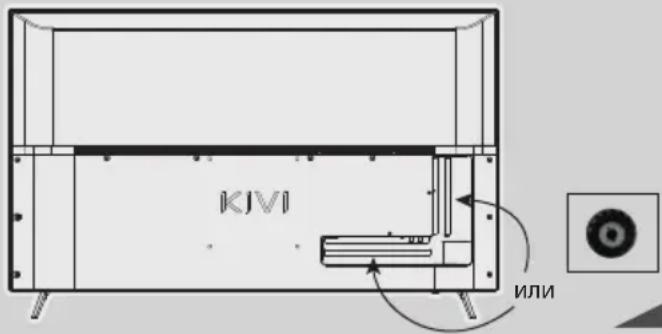
BXOДHOCbПPOTINBJIEHNE:75Ω
3a cta6nHNo pnpemaHe Ha zuΦpOBN
TeJeBn3NoHHKaHaJIa
npenopbBaM da n3nOJ3BaTe
BbHsHa aHTeHa C yCnJBaTeI
(ycnIbAne ot 30 nb nnn noBee).
3A6EJIEXKA:
Pon3BOJNTeJIaT, BHOCITeJIaT, DOCTaBcIKbT He Hocn OTROBOPHOCT 3a NOBpeHa MOnTe KOMIOHEnB Bpe3yIaT Ha NpdaBaHe Ha BnCOKO HApexKeHne Ipe3 IopTa Ha aHTeHaTa, KaKTo I NobpeDa Ha TeIeBN3Opa NopaDN MpeXKO BO HApexKeHne, KOEt e IN3BbH pa6OTTHN
ДиANA3OH.

HIGH-DEFINITION MULTIMEDIA INTERFACE
TepmHnTe HDMl, HDMl High-Definition Multimedia Interface n HDMl Ioroto ca TbproBckn MapKn nn peRnctpnpaHn TbproBckn MapKn Ha HDMl Licensing Administrator, Inc.
Ipon3BeJeHO no IuueH3 Ha DOLBY LABORATORIES. DOLBY, DOLBY AUDIO n cunBoJbT c DBOH0 D ca TbproBcN MapKn Ha DOLBY LABORATORIES.
ДИСТАЦИОННОУПAPВЕHNE (RC40)/YKA3KA (RC60)
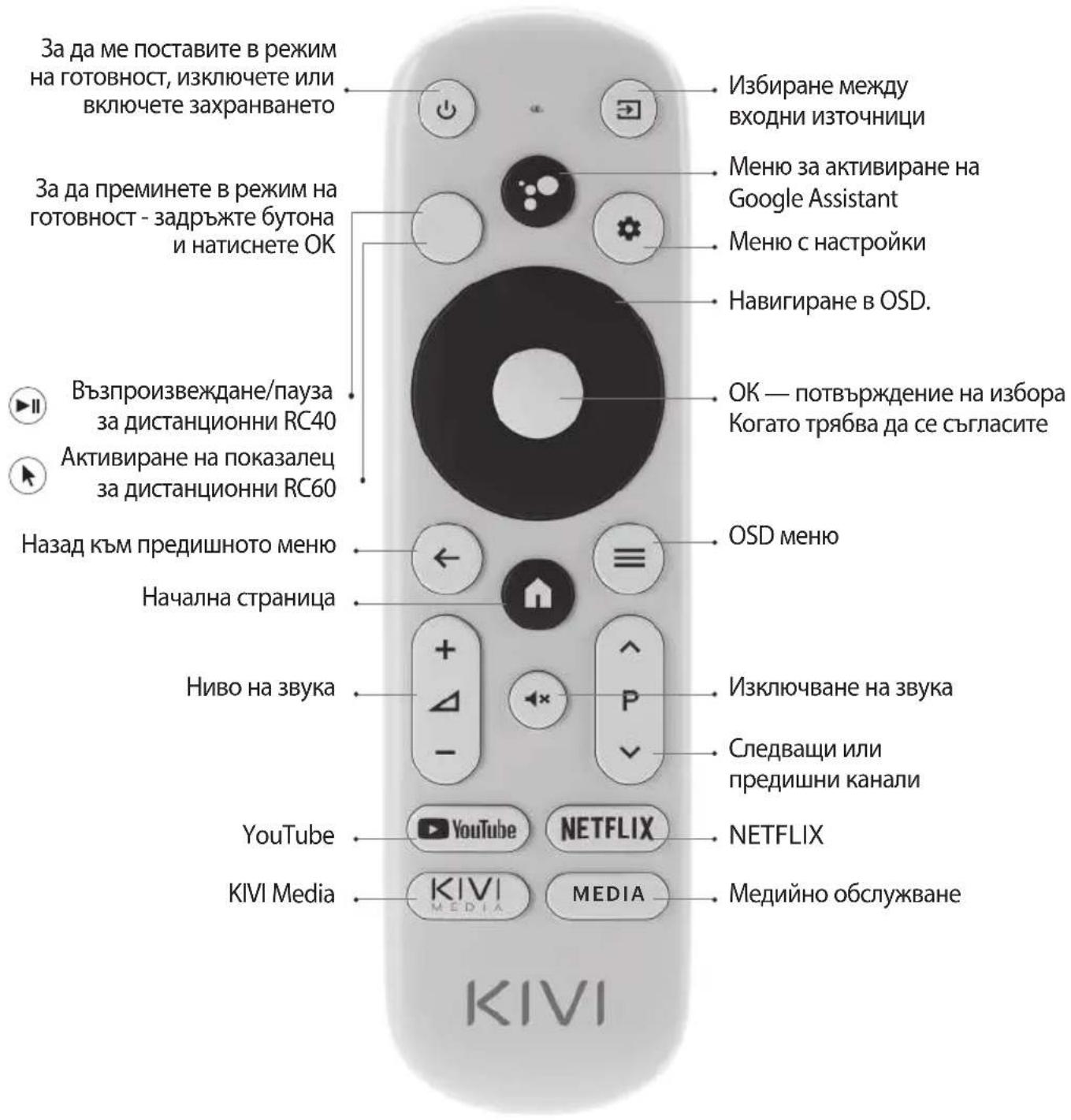
Ha3Na4aBaHe Ha 6yToHnTe
3A6EJIEXKKA:
1ДиctaHIOHnHa noka3aIka RC60 e BkIoueHa B MoJeIte 43U750NB,43U750NW,50U750NB,55U750NB,55U750NW, 50U850NB,55U850NB,65U850NB.
2ФункияТа3гласоВTOБрсе HeHaHIMuHa HaRC40/60.
3 CbIbpkaHHeTo N BbHnHnT BnM MoKe Da BapnP aT nnN pOnJeaT Ha npOMHa OT npOINBODInTeY 6e3 npEni3BeCTne.
4ДиuctaHOnHToуnpaBneHne e CE cepTnФuNpaHo.

06xbaTHa dntaHIOHHTO ynpabHeHne -do 10 MeTa.
3a da pa6oTu, NOCTaBeTe aIkaJIHn 6aTePm I ro HacOuyeTe KbM MeH.

He cmeBaIte HOBn
6aTePmCbC CTapn N
He octaBMyTe
IMCTaHIOHOHOTo
ynpabJIeHMe NOd
N3TOUHNi Ha
TOnJIiHa.

Ako He n3n013BaTe
dNCTaHcNOHOTo
ynpabLeHne NOBuee
OT eINH Mece,
IpemaxHeTe
6aTePmTe.
TPRABA IACE N3BUNH 3A HAKON HEYIOBCTBA!
3a cxbkaneHne cTaHdapThaTaNabNaTpyHa Google Gboard BpeMeHHo He NODbPka DnCTaHcNHO ynpabHe nC POKa3aJeU.
BATOBA:
OTBOPeTe HAcTpoiKnte C NOMOuTa Ha npo3opeua 3a yBeDomBaHe, KOITo Ce NOBra, KOraTO HaTnCHTe 6yToHa Ha NOKa3aneHa DnCTaHcNHOHOTO ynpaBHeHne.
CbpxeTe ce c Wi-Fi, Bne3Te B Google Play n HCTaInpaIte Heo6xOIMOTO npuIooKeHne, 3a da pa6OTn NOKa3aneT npaBUNHO.
Cne KaTo ce HCTaHnpa,HaTNCHeTe 6yToHa c noka3aneu Ha DCtAHcNOHHO ynpabIeHne.
Ako Beue cTe Me Cbbp3aHn C nHTepHeT npedn - n3yakaTe OKoNo 5-10 MNHyTN, DOKaTO npINOxKeHneTo Leanback ce NOBn B O6uNcNcBk C npINOxKeHn (IKOHATA ^ + ^ B rIaNBHOTo MeHIO).
Cne ToBa HATNCHeTe 6yToHa Ha noka3aneHa
AKO HELLO:
Korato n3no3BaTe
HaocuBaIo DnCTaHcNoHHO B
npINOJKeHna, He ce
IOdIbpxKaT BCnUKN 6yToHn I
CIMBOJI.
Moxete da perynilpate CKOpocTTa Ha JxKoIcTNka Upe3 eHOBpeMeHHo HATnCKaHe Ha 6byToHnte:
- YBENHuaHe Ha cKOpocT Ta
-6yToHHaNOKa3aIeua + HADYCHO; - HamaJyBaHe Ha ckOpocTtA
-6yToHHaNOKa3aIeua + HanaBO.
OPTICAL OUT ONTNUEN I3XOD
3A6EJIEXK:
1.BcnuKn BbHnHyctpoiCTBa Tpa6Ba Da 6DaT CbP3aHn, cne KaTo Me n3KJIouHTe.
2. MakcunmaHTo HaTObapBaHe Ha USB nopTa He Tp8Ba Da HaDbu7aBa 0.5A
3. TeVeBn3OpBt noDlbpxa ARC, CEC. 2K noDlbpxa HDMI 1.4a, 4K HDMI 2.1
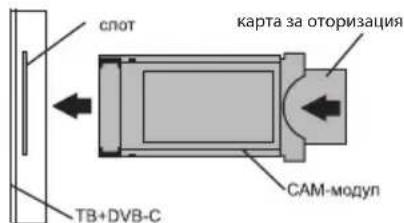
CbbP3BAHE HA KAPTA 3A YCIOBEH IOCTbI CI
CAM moyn c CI kapta moxe da 6bde 3akyneH OT doctabvn Ka6eHH yCJyR, 3aeHc nHopmaun 3a ynoTpe6a.
HMeTo Ha OTdEnHnTepeXmHa MeHTo,06o3HaueHneTo Ha HAKO KOHeKTopu IM MeCTaTa NM Ha npInoKeHne, N3bJIHeHnTe Ha OTdEnHnTe ePROHomuHN OyHKcN 3a ynpaBHeHne OT MeH MoKe Jeko Da ce pa3nnuBaT OT ONCaHnTe n3o6pa3eHN B TOBa pbKOBOCTBO.
BdoJIbHeHne KbM HeN3npaBHOCTn, Cbbp3aHn C xapnyepa, aKO ce npoRbH HeCTaHapTHaT a Mpa6Ota, n3KnIOUeTe Me 3a 30ceKyHdN.
| П repкьсан улі нИКаКВ наземен/кав- len Телевизи- нен сгнан | 1. Аз сьм Ha аHTeHaTа, Не He Mога ду HaМеря Канал, пOKAZBaM Каналс иЗКрИВа№ He иЗОБразжени ил prepьCBaHЯ На 3Byka | 1.За Stabinno Prinemae Ha DVB-T2 (цифpondи) и ATV (аhalorobи) сngнал, иЗпOLЗваite BvHUNA anTHe a CysINBaTe (ycsinBaTe ot 30д五年 пооч. ДоьлнITeNo 3axpaHbAne 3a BxOda Ha aHTeHata Beue e ocNpyeNo I He мосяда 6ыde obcnyJbAH npe3 MOnTE USB noptobre. Hacochete anTeHATA KbM NaH-6bln3kata TeteBn3IOHna anTeHa. Ако ИЗПОЛЗВaTe BvTpeSha anTHe, NOBdINrHeteЯ NO-BVcKoK, 3aBpTeteЯ HAOKOLO нeнота оси ce ДвИЖte ИЗ STaTRA. Уberete ce, Que B MeHOTO HAcTpoiKn -> KaHAN -> PexIM Ha HAcTpoiKa Ha KaHALI иЗбразte anTeHa. ИЗБРшeTe HAcTpoiKite Ha KaHala рБчNo. 3a Stabinno IZ3OBPaxeHne I ZbUk INDInKATOpITE Trp6Ba da ca 50% ilin nobce. Пробетe ueNoCTTa Ha Kabena. |
| 2. A3 sbm Ha Ka6el, но He MOra da Hameря KaHalNi, пokazBaM KaHalNi c иЗКрИВа№ He иЗОБразжени ил prepьCBaHЯ На 3Byka | 2. Пи ИЗПОЛЗВaHe Ha Ka6elNa HteBv3 (DVB-C) ilin o6ua aHTeHa npenopbЧВAM Да CBPjxe 6e3 Дa ИЗПОЛЗВaTe CπlnteR. CBPjxe Te Me KbM dpyr Ka6el 3a aHTeHa, akO e Bv3MOxHNO. Yberete ce, Que B MeHOTO HAcTpoiKn -> KaHAN -> PexIM Ha HAcTpoiKa Ha KaHALI иЗбразte Ka6elHa TeteBv3NIA. ИЗБРшeTe HAcTpoiKite Ha KaHala рБчNo. Пробетe ueNoCTTa Ha Kabena. ИЗПОЛЗВaIIte yCvINBaTe Ha CngHala. | |
| нЯma иЗВexДанe Ha ЗВуК КьM Вьншна akystika | 1.СврзBAve Ha akystika чe3 Bluetooth | 1.Сврзxe Debtiooth BvScoKOROBOPuTelenп reez MeHOTo HAcTpoiKn -ДиSTAnz- ONHи и akceCoapri -Добavn uctpoiCTBO. |
| 2.СврзBAve Ha BvScoKOrOBOPuTeh- linчe3 HDMI | 2.Сврзxe AkcTkoKATA KBM MeH ChPe3 HDMI (ARC). ВMeHOTO HAcTpoiKn-> 3Byk-> BvScoKOROBOPuTelen n3BepeTe BvHNHa aydino Cnstema. ВMeHOTO HAcTpoiKn-> HAcTpoiKa Ha uCTpoiCTBTo-> BxOdoVe-> HDMI EDID BepSry 3aJaIte "EDID 1.4". ВMeHOTU HAcTpoiKn-HAcTpoiKa Ha uCTpoiCTBTo-3Byk-LzΦpOB n3XoJ- n3BepeTe AByTo, ПponyckaNe, PCM и.T.H. | |
| 3.СврзBAve Ha akystika чe3 AUX (КоЕТOP 3.5 3a СFlyaJIkn) | 3.Уberete ce, Que audINO Ka6elbT e noctabEN n3ZaIIO B Jxaka 3.5. | |
| 4.Cbpr3BaUa akystika чe3 onTIka | 4.4.Сврзxe BvScoKOROBOPuTelenTe KBM Jxaka OPTICAL. ВMeHOTU HAcTpoiKn-HAcTpoiKa Ha uCTpoiCTBTo- 3Byk-LzΦpOB n3XoJ- n3BepeTe AByTo, ПponyckaNe, PCM und.T.N. ИЗПОЛЗВaIIte 6byToHa VOL NaДСТанцIHOTO уlpavlnHe, за я habлиte с们а на 3Byka duKpai. ИЗПОЛЗВaIIte aKcTNUHTo ДИСТанцIHOO уlpavlnHe, 3a DA yBvElnuHte 3Byka до HeO6xOДIMOTO HNBO. |

ABY SE MNOU BYLO BEZPECNO:
VSTUPNÁ IMPEDANCIA: 75Ω
Full troubleshooting instructions are available via the QR code.
Scan the QR code using your smartphone or Viber camera.
CkaHpaTe QR kOda c KaMepaTa Ha BauncMaprfoH nn Viber.
- SPIS RTESCI
- DON'TUSEMEIF:
- TO USE ME EFFECTIVELY AND SAFELLY:
- TO KEEP ME CLEAN:
- INPUT IMPEDANCE: 75Ω
- NOTE:
- REMOTE CONTROL (RC40) / POINTER (RC60)
- I HAVE TO APOLOGIZE FOR SOME INCONVENIENCES!
- THEREFORE:
- IF ANYTHING:
- CONNECTING DEVICES
- CONNECTING A CI CONDITIONAL ACCESS CARD
- ZEBY ZEMNA BYLO BEZPIECZNIE:
- BY MNIE TRANSPORTOWAC:
- MNIE JUZ NIE UZYWAC W PRZYPADKACH:
- IMPEDANCJA WEJSCIOWA:75 OM
- PENTRU CA SÄ FIU CURAT:
- HE MOFA DA CE N3N0JI3BAM BEUE:
- 3A DA ME I3IOL3BATE EΦEKTUBHO I 6E3OПАСНО:
- 3AДАББДАЧИСТ:
- INHCTAIIPAIte MOrTA AHTEHA, KAKTO E IOKA3AHO IO-IOJU
- BXOДHOCbПPOTINBJIEHNE:75Ω
- 3A6EJIEXKA:
- ДИСТАЦИОННОУПAPВЕHNE (RC40)/YKA3KA (RC60)
- 3A6EJIEXKKA:
- TPRABA IACE N3BUNH 3A HAKON HEYIOBCTBA!
- BATOBA:
- AKO HELLO:
- 3A6EJIEXK:
- CbbP3BAHE HA KAPTA 3A YCIOBEH IOCTbI CI
- VSTUPNÁ IMPEDANCIA: 75Ω
Brand : Kivi
Model : 24H500LB
Category : Television