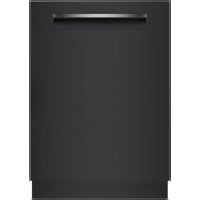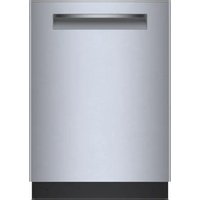
SHP78CF5N - Dishwasher BOSCH - Free user manual and instructions
Find the device manual for free SHP78CF5N BOSCH in PDF.


User questions about SHP78CF5N BOSCH
0 question about this device. Answer the ones you know or ask your own.
Ask a new question about this device
Download the instructions for your Dishwasher in PDF format for free! Find your manual SHP78CF5N - BOSCH and take your electronic device back in hand. On this page are published all the documents necessary for the use of your device. SHP78CF5N by BOSCH.
USER MANUAL SHP78CF5N BOSCH
bosch-home.com/us/mybosch
Dishwasher
800 series, 800 series Plus
[en-us, fr-ca] Quick Start and Safety Guide

HomeConnect
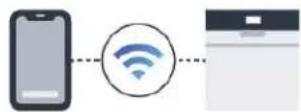
Connect
your
dishwasher
with Home
Connect
today!

Get the app

Download on the
App Store

GET IT ON
Google Play
Google Play and the Google Play
logs are trademarks of Google LLC
Apple and the Apple logo are
trademarks of Apple Inc.

Scan QR code
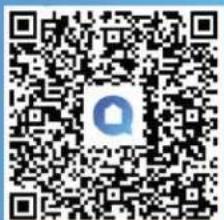
text_image
QR code image with a central logo, likely linking to a digital resource or website.
IMPORTANT SAFETY INSTRUCTIONS READ AND SAVE THESE INSTRUCTIONS
Read all instructions carefully before use. These precautions will reduce the risk of electrical shock, fire and injury to persons. When using kitchen appliances, basic safety precautions must be followed including those in the following pages.
1.1 Safety definitions
Here you can find explanations of the safety signal words used in this manual.
WARNING
This indicates that death or serious injuries may occur as a result of non-observance of this warning.
CAUTION
This indicates that minor or moderate injuries may occur as a result of non-observance of this warning.
NOTICE:
This indicates that damage to the appliance or property may occur as a result of non-compliance with this advisory.
Note: This alerts you to important information and/or tips.
1.2 General information
To reduce the risk of fire, electrical shock, or serious injury, observe the following.
- Read and understand all instructions before using the appliance.
- Keep the provided documents in a safe place for future reference or for the next owner.
- Do not connect the appliance if it has been damaged in transit.
■ Severe product damage and/or injury could result from the use of unqualified service technicians or non-original parts. All repairs must be performed by an authorized service provider using only original equipment factory replacement parts.
■ NSF/ANSI 184 Certified residential dishwashers are not intended for licensed food establishments.
1.3 Intended use
Only use this appliance:
■ for cleaning household dishware.
■ In private households and in enclosed spaces in a residential environment.
■ Up to an altitude of 13,100 ft (4000 m) above sea level.
1.4 Restrictive Use
This appliance is not intended for use by persons (including children) with reduced physical, sensory or mental capabilities, or lack of experience and knowledge, unless they have been given supervision or instruction concerning use of the appliance by a person responsible for their safety.
1.5 Grounding instructions
This appliance must be grounded to a metal, permanent wiring system or an equipment grounding conductor must be run with the circuit conductors and connected to the equipment grounding terminal or lead on the dishwasher. See the Installation Instructions included with this dishwasher for more information on electrical requirements.
WARNING
Improper connection of the equipment grounding conductor can result in risk of electric shock.
This appliance must be grounded. In the event of a malfunction or breakdown, grounding will reduce the risk of electric shock by providing a path of least resistance for electric current. This appliance is equipped with a cord having an equipment-grounding conductor. Check with a qualified electrician or authorized service representative if you are in doubt whether the appliance is properly grounded.
1.6 Safe use
Follow these safety instructions when using the appliance.
WARNING
To reduce the risk of serious injury, observe the following.
▶ Read all instructions before using this dishwasher.
▶ Use this dishwasher only for its intended function, which is the washing of household dishware and kitchenware rated as dishwasher safe.
▶ Only use detergents or rinsing agents recommended for use in a dishwasher, and keep them out of the reach of children.
- Do not abuse, sit or stand on the door or dish racks of the dishwasher.

IMPORTANT SAFETY INSTRUCTIONS READ AND SAVE THESE INSTRUCTIONS
WARNING
Under certain conditions, hydrogen gas may be produced in a hot water system that has not been used for two weeks or more. Hydrogen gas is explosive.
Before using a dishwasher that is connected to a hot water system that has been unused for two weeks or longer, turn on all hot water faucets and let the water flow from each for several minutes. This will release any accumulated hydrogen gas. As the gas is explosive, do not smoke or use an open flame during this time.
WARNING
To avoid risk of electric shock, observe the following.
▶ Only use the appliance in enclosed residential space according to the installation manual.
▶ Never expose the appliance to intense heat or humidity.
▶ Do not use any steam cleaners or high-pressure cleaners to clean this appliance. If not followed, excess moisture can accumulate.
WARNING
To avoid risk of injury, when loading items to be washed, observe the following.
- Locate sharp items so they are not likely to damage the door seal.
▶ Load knives and other sharp utensils with their handles up to reduce the risk of cut-type injuries. - Do not wash plastic items unless they are marked "dishwasher safe" or the equivalent. For plastic items not so marked, check the manufacturer's recommendations.
- Do not operate your dishwasher unless all enclosure panels are in place.
▶ Do not tamper with or override controls and interlocks.
WARNING
For safe care and operation of your appliance, observe the following.
▶ Follow the safety instructions and directions for use on the detergent and rinse aid product labels.
▶ Do not use harsh chemicals such as bleach-based products to clean your dishwasher. Some bleach-based products can damage your dishwasher and may present health hazards!
▶ Always use caution when opening the door during or following a wash cycle as hot water or steam may escape. Do not fully open the door until water noises have stopped and steam has subsided.
To avoid floor damage and possible mold growth, do not allow wet areas to remain around or under the dishwasher.
NOTICE:
Water and power shut off
It is highly recommended for the end user to become familiar with the procedure to shut off the incoming water supply and the procedure to shut off the incoming power supply. See the installation instructions or contact your installer for more information.
1.7 Risk to children
Follow these safety instructions if there are children in your home.
WARNING
To reduce risk of injury to children, observe the following.
▶ Do not allow children to play in or on the dishwasher.
When children become old enough to operate the appliance, it is the responsibility of the parents/legal guardians to ensure the children are instructed in safe practices by qualified persons.
Remove the dishwasher door to the washing compartment when removing an old dishwasher for service or discarding.
1.8 State of California Proposition 65 Warnings
This product may contain a chemical known to the State of California, which can cause cancer or reproductive harm. Therefore, the packaging of your product may bear the following label as required by California:
STATE OF CALIFORNIA PROPOSITION 65 WARNING:
WARNING
Cancer and Reproductive Harm - www.P65Warnings.ca.gov
Download the Home Connect® app to access the full Use and Care Manual or visit: www.bosch-home.com/us/service/get-support/owner-manuals. Type in the Model Number which begins with 'S' and can be found inside the dish-

text_image
washer door: Cust. Service (SERVICE CLIENTS): 1.880-044-2004 MODEL NUMBER: MUSEUM MODEL SPHPM78255N/01 FD01062302561 Made in the USA of US and impacted parts (Patterned and G.-G. in pactos G.-G. or impurities) LISTED LISTED MSF DSP1027832 Getting started
Tip: Connect your appliance to the Home Connect® app. You can conveniently adjust the settings and download additional cycles and options with the app.
2.1 Add Detergent
Use detergent tabs, fresh powdered detergent or liquid detergent. For quick cycles, use powdered or liquid detergent instead of tabs.
Tip: The dispenser lid should slide closed easily.
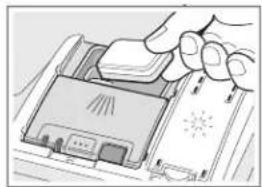
natural_image
Illustration of a hand holding a device with a screen and antenna (no text or symbols visible)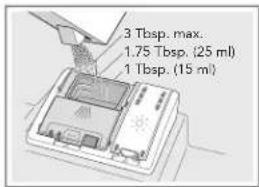
text_image
3 Tbsp. max. 1.75 Tbsp. (25 ml) 1 Tbsp. (15 ml)To close the cover, push until it clicks.
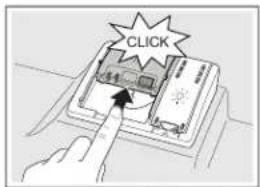
text_image
CLICK2.2 Add rinse aid
This dishwasher is designed to be used with rinse aid, which enhances drying results and shine.
Tip: Remove lid of the bottle for easier pouring and avoid the air vent.
NOTICE: The amount of rinse aid dispensed can be adjusted in the settings. Only change the setting if streaks remain on the dishes (lower the amount), or if dishes are not getting dry enough (increase the amount).
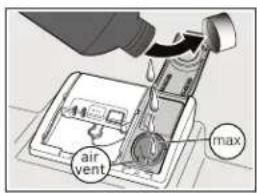
text_image
air vent max2.3 Start your dishwasher
-
Press the On/Off button with a short 1 second press.
-
Select a cycle and option if desired.
-
Press Start.
Note: All buttons have 'Touch' control and require only a short gentle touch.
Important: After pressing Start, the door must be shut within 4 seconds, otherwise the operation will be paused. If the door is open for more than 4 seconds, or there is any other cycle interruption, press the Start button again. This is to protect against unintentional operation, e.g. by children.
3 Tips
3.1 Loading tips
Scan the code with your smart phone to watch the video on the best practices for loading dishes and avoiding some common mistakes.
Scan here for loading tips
WARNING
- Load sharp items (knives, skewers, etc.) pointing down. Failure to do so may result in injury.
- To avoid risk of injury, always use caution when opening the door during or following a wash cycle as hot water or steam may escape. Do not fully open the door until water noises have stopped and steam has subsided.
3.2 Maintenance tips
-
Clean surfaces with damp cloth and mild soap. NOTICE: Do not use abrasives or bleach based cleaners. Do not use stainless steel cleaner on black stainless or anti-finger print surfaces.
-
Clean the filter 3-12 times a year, depending on usage.
Scan here for
how to clean
the filter
Scan here for
how to clean
the spray arms
- It is also recommended to run Machine Care program to keep the tub clean. It is accessible through the Home Connect® app.
3.2 Usage tips
- Use rinse aid.
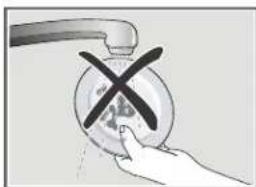
- Scrape food off, do not rinse.
- Using the Rackmatic ^® , adjust height of the upper rack for large items by pushing in on the side levers.
natural_image
Hand placing a black X mark on a circular object with a faucet handle (no text or symbols visible)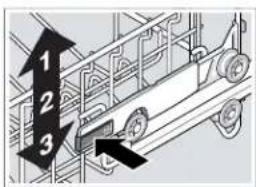
text_image
1 2 34 Cycles and Options
text_image
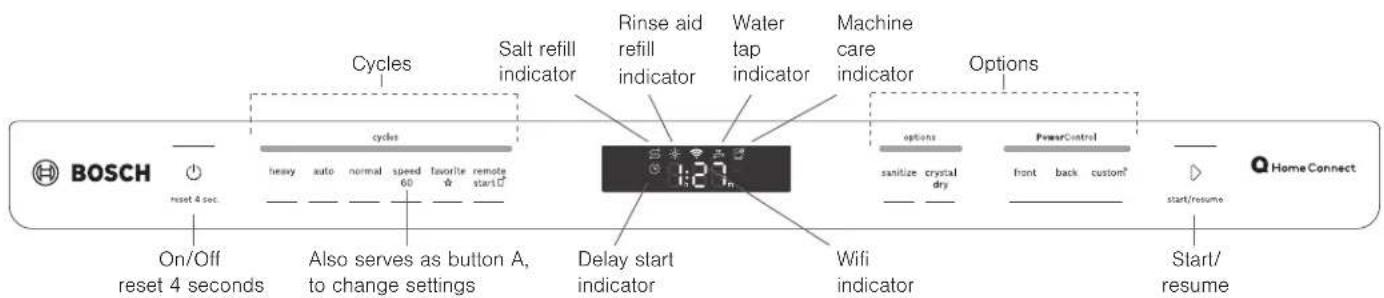
BOSCH reset 4 sec. On/Off reset 4 seconds Cycles Heavy auto normal speed 60 favorite remote start Also serves as button A, to change settings Salt refill indicator Rinse aid refill indicator Water tap indicator Machine care indicator Options sanitize crystal dry Front back custom² start/resume Q Home Connect Delay start indicator Wifi indicator Start/ resume| Cycles | Level of dirt | What it does Examples of dishes | |
| Heavy Baked-on/greasy | Cleans intensively, increases cycle length and temperature | Baked-on lasagna casserole | |
| Auto Not baked-on | Adjusts time and intensity automatically by soil sensing | Everyday load | |
| Normal Not baked-on | Cleans using less energy and water | Everyday load | |
| Speed60®Light, not dried on | Shortens cycle to 1 hour, includes drying | Everyday load | |
| Favorite At one touch, access a saved Cycle and Option combination. Set this up in the Home Connect app or press Favorite for 3 seconds and it stores the currently selected program/option combination. | |||
| Remote Start | Allows user to start the dishwasher remotely. See the Home Connect®app. | ||
| Rinse* Fresh, not dried on | Quick rinse, using less water than hand rinsing | Everyday load, to use between cycles | |
| Machine Care* | An intense program to clean the tub. Run without dishes. | ||
| Options | Level of dirt | What it does Examples | of dishes |
| Sanitize Any Increases cycle length and temperature for disinfection | Cutting boards, bottles | ||
| CrystalDry^TM | Any Provides outstanding drying results using innovative zeolite technology | Everyday load | |
| Power-Control: front or back | Heavy Intensely cleans the lower rack, either the front or back half. | Casserole dishes, pots, pans | |
| Power-Control: custom | Any | Using Home Connect ^TM , customize the cleaning intensity level of the 4 zones. | Everyday load |
| HalfLoad* | Light | Shortens cycle, for lightly soiled dishes. | Everyday dishes |
| Eco* | Any | Increases run time but reduces energy and water consumption | Any |
| Delay* | Any | Allows you to delay the start of the cycle up to 24 hours. | Any |
* Available through the Home Connect® app only, and depending on your model.
Tip: You can use the Home Connect ^® app to access additional cycles and options and save them. Additionally, you can use the Smart Cycle feature in Home connect app to help choose the best cycle and options for you.
Note: The Energy Guide label was based on the Normal cycle as follows: The unit was tested without any rinse aid (liquid) in the rinse aid dispenser. A single dose of detergent was inserted into the detergent dispenser, and no detergent was used in the prewash.
5 Settings
5.1 Available Settings
Below are some commonly used settings. To see all the settings refer to the full online manual or go to Dishwasher » Settings in the Home Connect app.
| Setting Factory | setting | Description |
| r-Rinse Aid r:00 - r:06 | r:05 Setting | to adjust the amount of rinse aid used in each cycle. |
| d-Intensive drying d:00 - d:01 | d:00/ off | Setting to increase drying ability for glasses or plastic.Increases cycle length and temperature. |
| b-End of cycle tone b:00 - b:03 | b:02 Setting | for the volume of the tone at the end of the cycle. |
| rE-Factory reset rE Restores | retores the factory | settings on the dish-washer. |
5.2 Adjusting the settings
- Press the power button.
- Hold down button A sec to access the settings menu.
- Press button A repeatedly to select the desired setting.
- Press Start to change the value of the setting.
- Press button A to save the setting.
Tip: The simplest way to change the settings is with the Home Connect ^® app.
6 Frequently Asked Questions
Q: Why is food remaining on dishes after I run the cycle?
- It is possible the dishes do not have adequate clearance between them for the water to reach effectively. Also, be sure nothing is blocking the spray arms and that the filter is clean. Select the Heavy cleaning cycle.
Q: Why does the cycle run a long time? - Sensors in the dishwasher automatically increase the cycle time to ensure a good wash when heavy soil is detected.
- Incoming water may not be hot enough and dishwasher has to heat it.
Q: Why is E:XX (X can be any number) displayed? - This is an error code. For example E:22 indicates there is water in the sump because the filter is blocked or needs cleaning. See the Use and Care Manual for a list of error codes or at this link:
https://www.bosch-home.com/us/owner-support/get-support/general-error-codes
natural_image
Illustration of a hand pressing down on a device component with no visible text or symbols
text_image
3 Tbsp. max. 1.75 Tbsp. (25 ml) 1 Tbsp. (15 ml)natural_image
Hand placing a black X mark on a circular object with a handle, against a plain background (no text or symbols)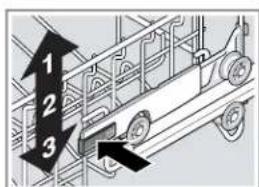
text_image
1 2 3Registoydor apyliagae to BojsohdttoenAzoqiliabenefits.
Thank you for being a Bosch customer!
Register your new device on MyBosch now and profit directly from: Simply create a MyBosch account, then register your appliance.
• Expert tips & tricks for your appliance
• Warranty of extension options accessories & parts
• Discounts for accessories & spare parts
Digital access manual and all appliance data at hand
- Easy access to Bosch Home Appliances Service (ent by mail after appliance registration)
Registered easy registration – also on mobile phones:
www.bosch-home.com/welcomer-support/mybosch
BOSCH
HOME APPLIANCES
SERVICE
Looking for help?
You'll find it here.
Experatt belvichefomyouaBoschlhemBasplianbesehtelpupithpryoblems
We are repaire froms Boschi expense instructions, cleaning tips,
Find out everything, about the many ways and Repairs can support you:
www.bosch-home.com/service
Contact data of all countries are listed in the attached service warranties and authorized Bosch servicers at:
directory www.bosch-home.com/us/owner-support/get-support
Contact us:
Please have your Model Number (E-Nr) ready when contacting us.
1-800-944-2904
www.bosch-home.com/us/owner-support/contact-us
BSH Home Appliances Corporation
1901 Main Street, Suite 600
Irvine, CA 92614
USA
www.bosch-home.com
1-800-944-2904
© 2022 BSH Home Appliances Corporation

9001831451_650A.US (020215) 650 A5
en-us, fr-ca