SourcePoint 8 - Speaker MoFi - Free user manual and instructions
Find the device manual for free SourcePoint 8 MoFi in PDF.


| Brand | MoFi |
| Model | SourcePoint 8 |
| Product Type | Bookshelf speaker, 2-way bass-reflex |
| Frequency Response | 47 Hz – 30 kHz |
| Nominal Impedance | 8 ohms (6.4 ohms minimum) |
| Sensitivity | 87 dB / 2.83 V / 1 m |
| Crossover Frequency | 1.6 kHz |
| Maximum Power Handling | 150 W |
| Tweeter | 1 x 25 mm soft dome with wide roll |
| Woofer | 1 x 200 mm paper cone |
| Configuration | Coaxial concentric 2-way |
| Dimensions (W x H x D) without grille | 290 x 456 x 320 mm |
| Dimensions (W x H x D) with grille | 290 x 456 x 335 mm |
| Weight | 12.7 kg |
| Front finish | Satin black |
| Cabinet finish | Real walnut or black ash |
| Connection terminals | 5 binding posts (bi-wiring possible) |
| Grille | Magnetic attachment, removable |
| Cleaning | Soft dry cloth, no chemicals |
| Operating temperature | Avoid direct light, humidity, heat sources |
| Positioning | Flat surface, avoid vibrations, stable supports |
| Recommended cable | Minimum 16 AWG |
Frequently Asked Questions - SourcePoint 8 MoFi
User questions about SourcePoint 8 MoFi
0 question about this device. Answer the ones you know or ask your own.
Ask a new question about this device
Download the instructions for your Speaker in PDF format for free! Find your manual SourcePoint 8 - MoFi and take your electronic device back in hand. On this page are published all the documents necessary for the use of your device. SourcePoint 8 by MoFi.
USER MANUAL SourcePoint 8 MoFi
Thank you for your purchase of the SourcePoint 8
My goal for the SourcePoint 8 was to take the technologies and sound character of the SourcePoint 10 and make them available in a smaller and more affordable package.
It retains the long-standing technologies that I am known for with new twists and concepts that further improve performance.
Throughout my career concentric drivers have consistently delivered what I wish to hear when reproducing music. My typical approach has been to use them in a three-way design. SourcePoint 10 was the first pure two-way concentric that I have designed in over 20 years. SourcePoint 8 is the second. This approach required newly developed drivers with large 8 or 10-inch cones to achieve a wide frequency response with maximum linearity and low distortion. Each part of the drivers from the twin-drive neodymium magnet structure to the paper pulp mixture were carefully selected through a two-year development period. The SourcePoint 8 is a near identical version of the SourcePoint 10, but in a smaller package, and has a performance that is very close to the SourcePoint 10.
I am very proud of the performance level that these speakers achieve.
Please follow the setup guidelines outlined in this manual, and then feel free to experiment to optimize your listening experience. I hope you will enjoy listening to it as much as I have enjoyed designing it.
Best wishes
Andrew Jones
Chief Loudspeaker Designer, MoFi Electronics
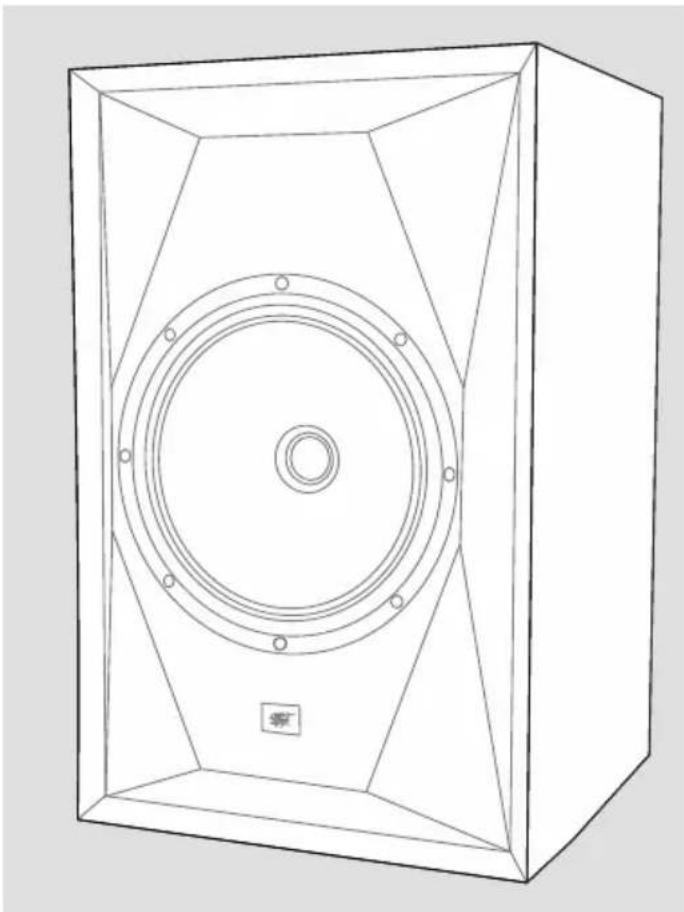
natural_image
Line drawing of a speaker chamber with concentric circular components and mounting holes (no text or symbols)General Safety and Installation
- Be sure to connect the speakers according to the instructions in this manual.
- Any time you directly handle the speakers, do not place your hand or fingers on the driver cone.
- Do not place the speakers in areas that may be in direct sunlight; have high humidity; are too hot or cold; or that block ventilation openings.
- Do not place the speakers near heat sources such as radiators, valves, stoves, or other heat-emitting apparatus (including amplifiers).
- To prevent overload, avoid playing the speakers at extreme volume levels for extended time periods, particularly if left unattended.
-
Clean the speakers with soft, smooth cloth or with a dust brush. Do not use scouring agents, alcohol, benzene, furniture polish, or other agents.
-
Do not install the speakers in a closed rack or in a closed cupboard.
- Continuous high volume may also cause severe damage to your hearing.
• Install the speakers on a level surface. - Do not place on furniture are prone to vibration.
- If the speakers are placed on a piece of furniture, place an anti-slip pad or mat under each speaker.
- Avoid placing anything on top of the speakers, especially products with rubber feet, which may damage the finish.
- WARNING: If you mount the speakers on stands, ensure they are stable to avoid the possibility of tipping over and causing potential damage or injury. Stability on carpeted surfaces can be increased by using spikes; do not use spikes on smooth hard floors. Avoid contact with the spike tips, which can be very sharp.
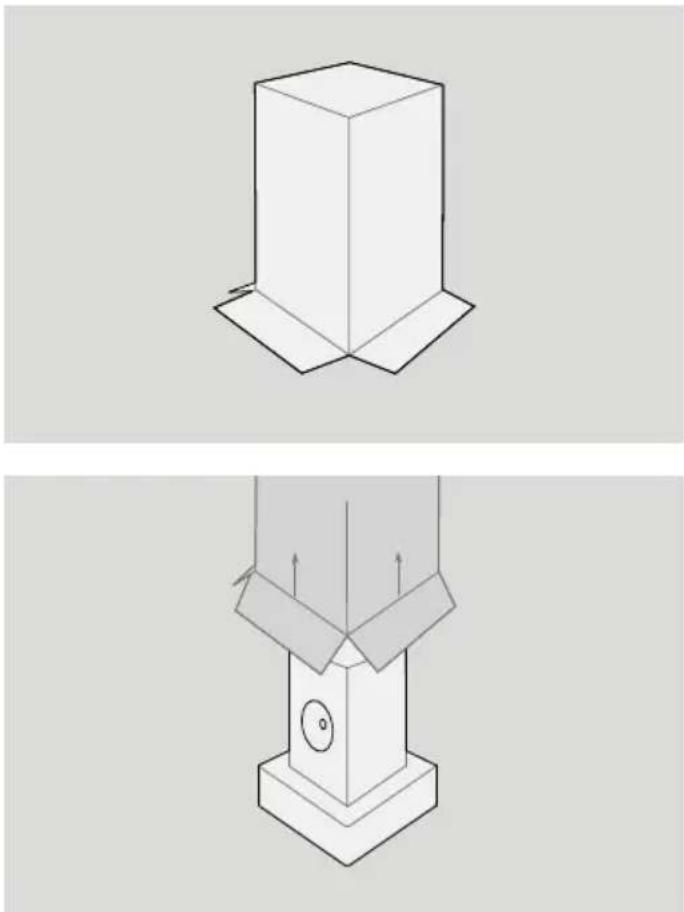
natural_image
Technical line drawing of a mechanical component with two views (top and side), no text or symbols present.Unboxing Your Speaker
To open the double-boxed package, carefully open the outer carton top flaps and fold them outward. Next open the inner carton flaps. Fold the flaps outward, flip the box upside-down, and slowly lift the carton to reveal the speaker. One of the pieces of packing foam will likely remain inside the box. The speaker will now be upside-down and contained within a white protective bag.
Carefully lift the speaker from the remaining packing foam and un-bag. Place the speaker on a smooth, clean surface.
Attaching the Grilles
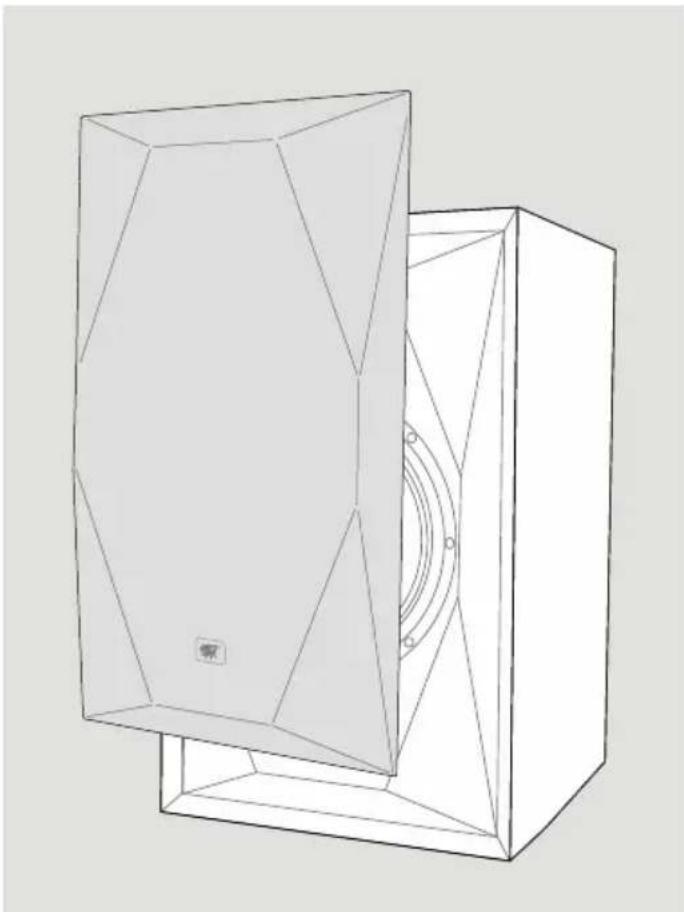
The grilles magnetically attach to the speakers. To affix, simply hold a grille by its edges and hold it up next to the front baffle. It will automatically pull itself to the baffle and self-locate. To remove it, hold the edges and pull it away from the baffle.
natural_image
Line drawing of a 3D geometric object with a central circular component and a rectangular base (no text or symbols)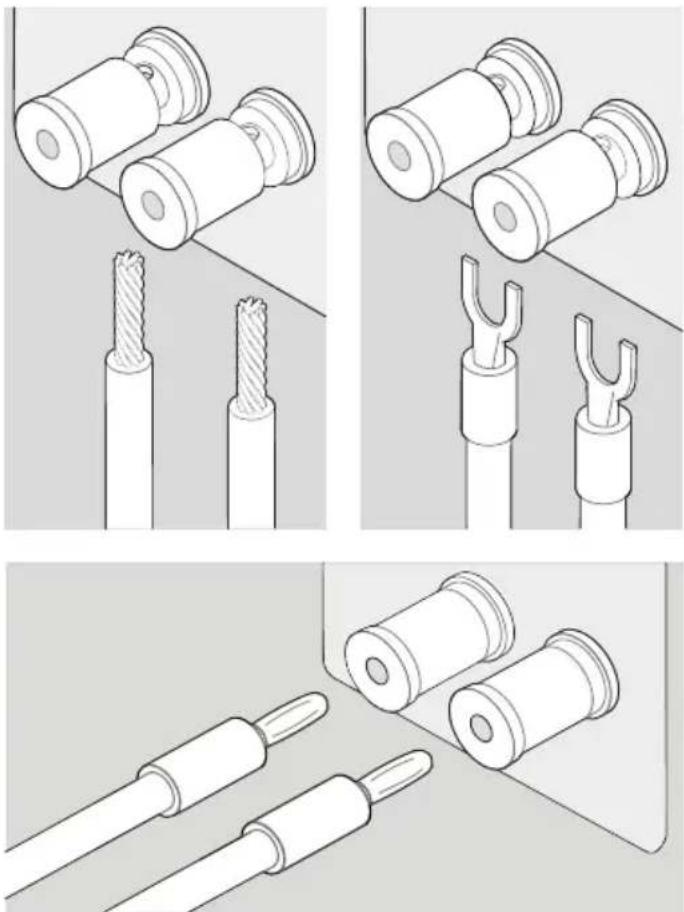
Connecting Your Speakers
Power off all partnering audio equipment before connecting the speakers.
Use speaker wire (minimum of 16-gauge) that is appropriate for the power level and quality of your system.
Ensure that you have correct wire polarity; most speaker cables are coded for ease of identification. Connect one end of the cable to the positive (red) terminal on the amplifier/receiver and the other end to the positive (red) terminal on the speaker. Follow the same instructions for the negative (black) side.
If using a bare wire connection (rather than spades or plugs), strip approximately 3/4" of the insulation from the ends of the cable, twist the bare strands clockwise, insert it into the binding post, and tighten the post. Check to see that no stray strands of wire bridge the gap between the terminals.
If using banana plugs make sure terminals are tight and nothing is loose to vibrate.
Speaker Placement
There is no golden rule for speaker placement, but following a few general guidelines will help optimize performance. Spend time experimenting with speaker placement, one of the most effective and affordable ways of maximizing the sound quality of these speakers.
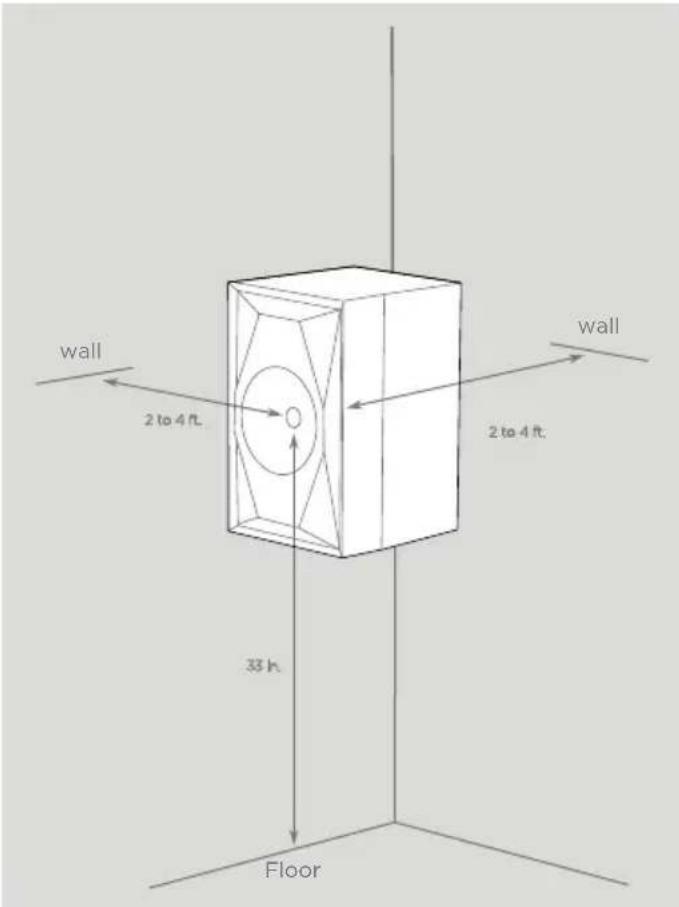
Start by placing the speakers approximately one to three feet away from boundaries such as walls and corners. Close proximity to a side or rear wall will enhance bass responsiveness, but if the speakers are positioned too near a boundary, it may sound excessive.
Experimentation is key. Move the speakers around while listening to your favorite tracks and listen for controlled, balanced bass at all frequencies. Focus on the bass relative to the mid-bass and low midrange. Also, listen to male and female vocals, and determine whether the voice is natural without sounding “chesty.”
text_image
wall 2 to 4 ft. wall 2 to 4 ft. 33 h. Floor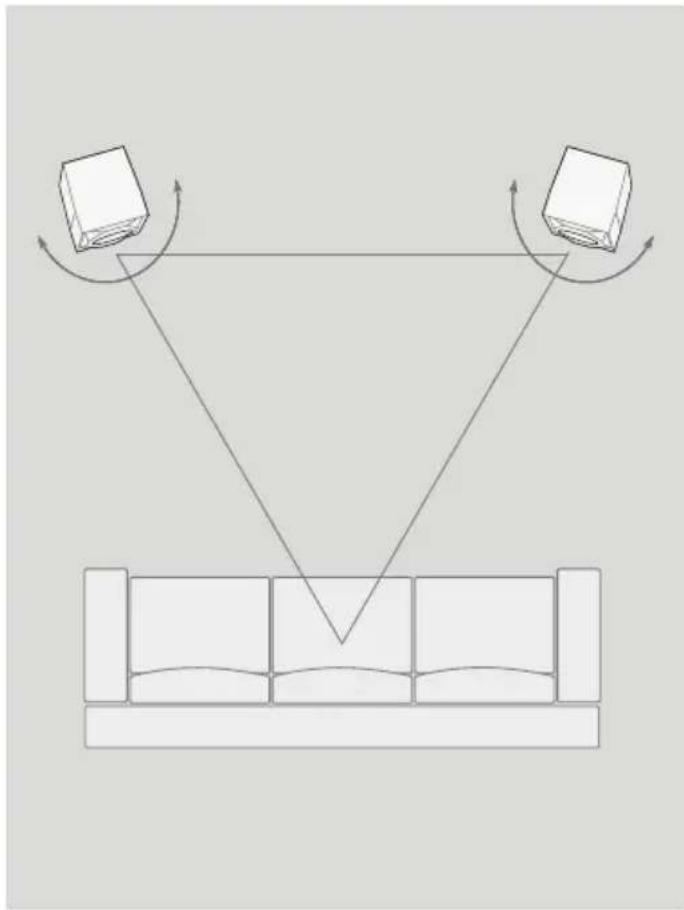
natural_image
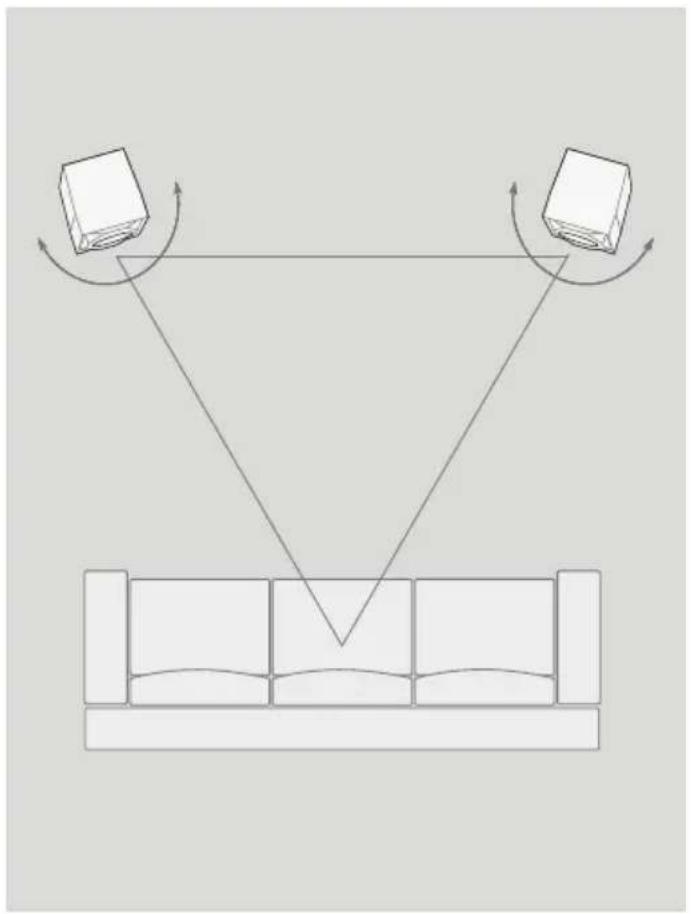
Diagram showing two books with rotating arrows above a sofa, no text or symbols presentOptimizing Stereo Imaging
Imaging is often overlooked when listening of stereo speakers. If correctly spaced and arranged with an optimal toe-in angle, these speakers can create a large involving soundstage while retaining focused imaging.
Start by placing the speakers so they form an equilateral triangle with the listener. Rotate each speaker so that it points towards the listener. With the concentric-driver utilized in these speakers, you may get best results by rotating the speaker so that their axes points slightly in front of or behind the listener. To determine which sounds best, cue up some music and listen to the size and scale of the sound field, and how focused center voices sound.
Also, try moving the speakers further apart, or closer together, and listen again for imaging. Be aware that as you move the speakers further apart, they will come closer to the side walls. You can compensate for potential sound by toeing in the speakers to a greater degree. After you try out different setups, choose the option that sounds the best to you. There is no right or wrong.
SourcePoint8
Frequency Range 47Hz - 30kHz
Nominal Impedance 8 Ohms, 6.4 Ohms minimum
Sensitivity 87dB/2.83V/1m
Crossover Frequency 1.6kHz
Max Power Input 150W
Tweeter 1.25" wide roll soft dome
Woofer 8" Paper Cone
System Configuration 2-way vented box, concentric driver
Cabinet Finish Satin black painted baffle / satin real wood Walnut or Black Ash veneer
Binding posts 5-way
Dimensions (W x H X D) 290 x 456 x 320 without grille
(11.4" x 18" x 12.6")
290 x 456 x 335 with grille
(11.4" x 18" x 13.2")
Weight
27.9lbs / 12.7kg
natural_image
Line drawing of a speaker chamber with concentric circular components and mounting holes (no text or symbols)natural_image
Technical line drawing of a mechanical component with two views (top and side), no text or symbols present.natural_image
Line drawing of a 3D geometric object with a central circular component and a rectangular base (no text or symbols)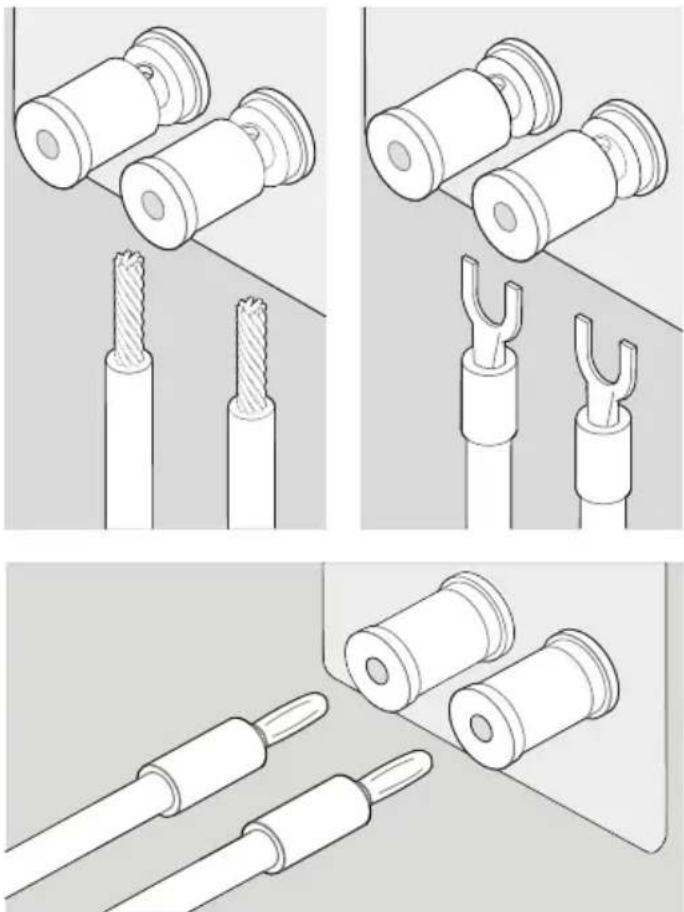
text_image
Mur .6m to 1.2m .6m to 1.2m Mur .8m Sol