BI WMWG 91485 EU - Washing machine WHIRLPOOL - Free user manual and instructions
Find the device manual for free BI WMWG 91485 EU WHIRLPOOL in PDF.



User questions about BI WMWG 91485 EU WHIRLPOOL
0 question about this device. Answer the ones you know or ask your own.
Ask a new question about this device
Download the instructions for your Washing machine in PDF format for free! Find your manual BI WMWG 91485 EU - WHIRLPOOL and take your electronic device back in hand. On this page are published all the documents necessary for the use of your device. BI WMWG 91485 EU by WHIRLPOOL.
USER MANUAL BI WMWG 91485 EU WHIRLPOOL
THANK YOU FOR BUYING A WHIRLPOOL PRODUCT.

In order to receive a more complete assistance, please register your appliance on www.whirlpool.eu/register
Before using the appliance carefully read the Safety Instruction.

Before using the machine, it is imperative that the transport bolts are removed. For more detailed instructions on how to remove them, see the Installation Guide.
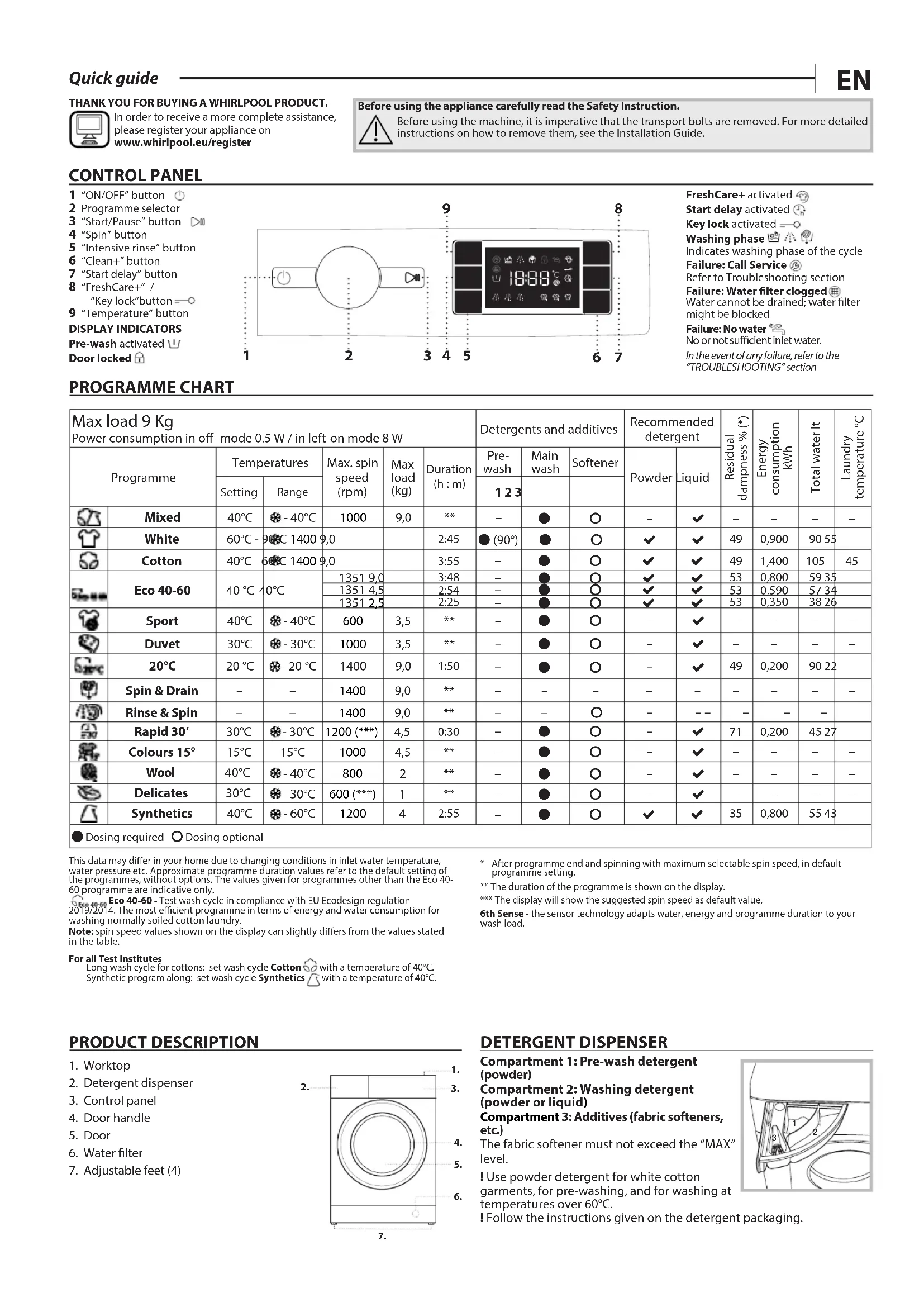
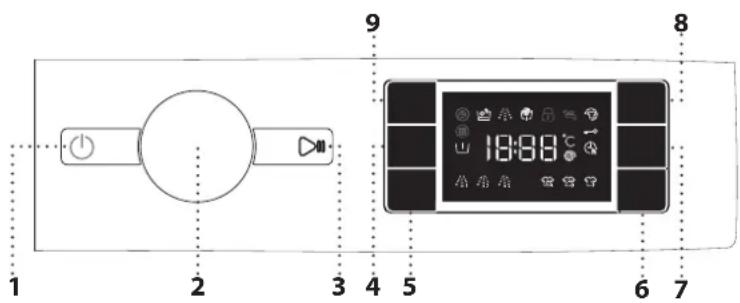
CONTROL PANEL
1 "ON/OFF" button
2 Programme selector
3 "Start/Pause" button
4 "Spin" button
5 "Intensive rinse" button
6 "Clean+" button
7 "Start delay" button
8 "FreshCare+" / "Key lock"button = ○
9 "Temperature" button
DISPLAY INDICATORS
Pre-wash activated ↙
Door locked
text_image
1 2 3 4 5 6 7 8 9 18:88°CFreshCare+ activated
Start delay activated ⏠
Key lock activated = ○
Washing phase

Indicates washing phase of the cycle
Failure: Call Service
Refer to Troubleshooting section
Failure: Water filter clogged
Water cannot be drained; water filter might be blocked
Failure: No water
No or not sufficient inlet water.
In the event of any failure, refer to the "TROUBLESHOOTING" section
PROGRAMME CHART
| Max load 9 KgPower consumption in off -mode 0.5 W / in left-on mode 8 W | Detergents and additives | Recommended detergent | Residual dampness (%)* | Energy consumption kWh | Total water lt | Laundry temperature °C | |||||||||
| Programme | Temperatures | Max. spin speed (rpm) | Max load (kg) | Duration (h : m) | Pre-wash | Main wash | Softener | Powder | Liquid | ||||||
| Setting | Range | 1 2 3 | |||||||||||||
| Mixed | 40°C | - 40°C | 1000 | 9,0 | ** | - | ● | ○ | - | √ | - | - | - | - | |
| White | 60°C - 9°C | C 1400 9,0 | 2:45 | ● (90°) | ● | ○ | √ | √ | 49 | 0,900 | 90 55 | ||||
| Cotton | 40°C - 6°C | C 1400 9,0 | 3:55 | - | ● | ○ | √ | √ | 49 | 1,400 | 105 | 45 | |||
| Eco 40-60 | 40°C | 40°C | 1351 9,0 | 3:48 | - | ● | ○ | √ | √ | 53 | 0,800 | 59 35 | |||
| 1351 4,5 | 2:54 | - | ● | ○ | √ | √ | 53 | 0,590 | 57 34 | ||||||
| 1351 2,5 | 2:25 | - | ● | ○ | √ | √ | 53 | 0,350 | 38 26 | ||||||
| Sport | 40°C | - 40°C | 600 | 3,5 | ** | - | ● | ○ | - | √ | - | - | - | - | |
| Duvet | 30°C | - 30°C | 1000 | 3,5 | ** | - | ● | ○ | - | √ | - | - | - | - | |
| 20°C | 20°C | - 20°C | 1400 | 9,0 | 1:50 | - | ● | ○ | - | √ | 49 | 0,200 | 90 22 | ||
| Spin & Drain | - | - | 1400 | 9,0 | ** | - | - | - | - | - | - | - | - | - | |
| Rinse & Spin | - | - | 1400 | 9,0 | ** | - | - | ○ | - | -- | - | - | - | ||
| Rapid 30' | 30°C | - 30°C | 1200 (***) | 4,5 | 0:30 | - | ● | ○ | - | √ | 71 | 0,200 | 45 27 | ||
| Colours 15° | 15°C | 15°C | 1000 | 4,5 | ** | - | ● | ○ | - | √ | - | - | - | - | |
| Wool | 40°C | - 40°C | 800 | 2 | ** | - | ● | ○ | - | √ | - | - | - | - | |
| Delicates | 30°C | - 30°C | 600 (***) | 1 | ** | - | ● | ○ | - | √ | - | - | - | - | |
| Synthetics | 40°C | - 60°C | 1200 | 4 | 2:55 | - | ● | ○ | √ | √ | 35 | 0,800 | 55 43 | ||
● Dosing required ○ Dosing optional
This data may differ in your home due to changing conditions in inlet water temperature, water pressure etc. Approximate programme duration values refer to the default setting of the programmes, without options. The values given for programmes other than the Eco 40-60 programme are indicative only.
Eco 40-60 Eco 40-60 - Test wash cycle in compliance with EU Ecodesign regulation 2019/2014. The most efficient programme in terms of energy and water consumption for washing normally soiled cotton laundry.
Note: spin speed values shown on the display can slightly differ from the values stated in the table.
For all Test Institutes
Long wash cycle for cottons: set wash cycle Cotton with a temperature of 40°C. Synthetic program along: set wash cycle Synthetics with a temperature of 40°C.
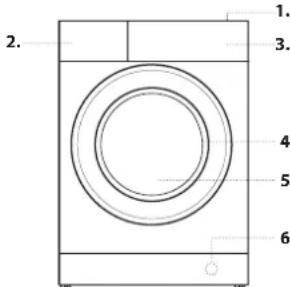
PRODUCT DESCRIPTION
- Worktop
- Detergent dispenser
- Control panel
- Door handle
- Door
- Water filter
- Adjustable feet (4)
text_image
1. 2. 3. 4. 5. 6.* After programme end and spinning with maximum selectable spin speed, in default programme setting.
** The duration of the programme is shown on the display.
*** The display will show the suggested spin speed as default value.
6th Sense - the sensor technology adapts water, energy and programme duration to your wash load.
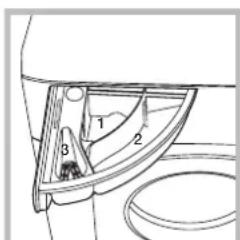
DETERGENT DISPENSER
Compartment 1: Pre-wash detergent (powder)
Compartment 2: Washing detergent (powder or liquid)
Compartment 3: Additives (fabric softeners, etc.)
The fabric softener must not exceed the "MAX" level.
! Use powder detergent for white cotton garments, for pre-washing, and for washing at temperatures over 60°C.
! Follow the instructions given on the detergent packaging.
text_image
Technical diagram of a mechanical component with numbered parts labeled 1, 2, and 3PROGRAMMES
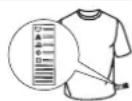
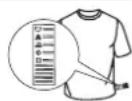
For choosing the appropriate programme for your kind of laundry, always respect the instructions on the care labels of the laundry. The value given in the tub symbol is the maximum temperature possible for washing the garment.
Mixed
For washing lightly to normally soiled resilient garments in cotton, linen, synthetic fibres and mixed fibres.
White
For washing normally to heavily soiled towels, underwear, table and bed linen, etc in resilient cotton and linen. Only when the temperature is selected at 90^ C the cycle is provided with a prewash phase before main washing phase. In this case it is recommended to add detergent both, in the prewash and main wash section.
Cotton
Normally to heavily soiled and robust cottons.
Eco 40-60 Eco 40-60
For washing normally soiled cotton garments declared to be washable at 40 °C or 60 °C , together in the same cycle. This is the standard cotton programme and the most efficient in terms of water and energy consumption.
! The cycle runs only at 40°C as per regulation.
Sport
For washing lightly soiled sports clothing (tracksuits, shorts, etc.). For best results, we recommend not exceeding the maximum load indicated in the "PROGRAMME CHART". We recommend using liquid detergent, and adding the amount suitable for half-load.
Duvet
Designed for washing eiderdown padded items such as double or single duvets, cushions and anoraks. It is recommended to load such padded items in the drum with the edges folded inwards and not to exceed 34 of the drum's volume. For optimal washing, we recommend using a liquid detergent.
20°C _20^
For washing lightly soiled cotton garments, at a temperature of 20 °C.
Spin & Drain
Spins the load then empties the water. For resilient garments. If you exclude the spin cycle, the machine will drain only
Rinse & Spin
Rinses and then spins. For resilient garments.
Rapid 30'
For washing lightly soiled garments quickly. This cycle lasts only 30 minutes, saving time and energy.
Colours 15°
This cycle helps protect colours by washing in cold water (15°C) and uses less energy to heat the water while still offering satisfactory wash results. Suitable for lightly soiled, unstained garments. This cycle offers wash results comparable to 40°C mixed at just 15°C
Wool
All wool garments can be washed using programme, "Wool" even those carrying the "hand-wash only" label. For best results, use special detergents and do not exceed max kg declaration of laundry.
Delicates
For washing particularly delicate garments. Preferably turn garments inside out before washing.
Synthetics
For washing soiled garments made from synthetic fibres (such as polyester, polyacrylic, viscose, etc.) or cotton/synthetic blends.
FIRST TIME USE
To remove any manufacturing debris select the "Cotton" programme at a temperature of 60^ C. Pour a small quantity of detergent powder into the main wash 2 compartment of the detergent dispenser (maximum 1/3 of the quantity the detergent manufacturer recommends for lightly soiled laundry). Start the programme without adding any laundry.
DAILY USE
Prepare your laundry according to the recommendations in the "HINTS AND TIPS" section. Load the laundry, close the door, open the water tap and press the "ON/OFF" button to switch the washing machine on, the "Start/Pause" button flashes. Turn the programme selector to the desired programme and select any option if needed. The temperature and spin speed can be changed by pressing the "Temperature" button or the "Spin" button. Pull out the detergent dispenser and add the detergent (and additives/softener) now. Observe the dosing recommendations on the detergent pack. Then close the detergent dispense.
STARTING CYCLE
Press the "Start/Pause" ▷ button.
The machine will lock the door (symbol on) and the drum will start to rotate; the door will be unlocked (symbol OFF) and then locked again (symbol on) as preparation phase of each washing cycle. The "Clicking" noise is part of the door locking mechanism. Water will enter the drum and start the washing phase once the door is locked.
PAUSE A RUNNING PROGRAMME
To pause the wash cycle, press the "Start/Pause" ▷; the indicator light will go off and the remaining time on display flash. To start the wash cycle from the point at which it was interrupted press the button again.
OPEN THE DOOR, IF REQUIRED
After starting a programme, the "Door locked" indicator lights up to show that the door can not be opened. As long as a wash programme is running, the door remains locked. To open the door while a programme is in progress, press the "Start/Pause" to pause the programme. Provided the water level and/or temperature is/are not too high, the "Door locked" indicator light goes off and you can open the door. For example to add or remove laundry. Press the "Start/Pause" button again to continue the programme.
PROGRAMME END
The "Door locked" indicator light goes off and the display shows "End". To switch off the washing machine after programme ends press the "ON/OFF" button, the lights goes off. If you do not press "ON/OFF" button, the washing machine will switch off automatically after about a 10 minutes. Close the water tap, open the door and unload the washing machine. Leave the door ajar to allow the drum to dry.
OPTIONS
! If the selected option is incompatible with the programme set, the incompatibility will be signalled by a buzzer (3 beeps) and the corresponding indicator light will flash.
! If the selected option is incompatible with another previously set option, only the most recent selection will remain active.
Clean+
Clean+ is an option working on 3 different levels (Intensive, Daily and Fast) that are specially designed to set the right washing action, depending on your cleaning needs:
Intensive 📋: this option is designed for high levels of dirtiness, removing most stubborn stains.
Daily 📋₂: this option is designed to remove everyday stains.
Fast 📋: this option is designed to remove lightly soiled stains.
Intensive rinse
By selecting this option, the efficiency of the rinse is increased and optimal detergent removal is guaranteed. It is particularly useful for sensitive skin. Press the button once, two or three times to select an additional 1 ⚡, 2 ⚡ or 3 ⚡ rinses after the standard cycle rinse and remove all traces of detergent. Press the button again to go back to the "Normal rinse" rinse type.
Start delay ⏻
To set the selected programme to start at a later time, press the button to set the desired delay time. Symbol lights on the display when this function is enabled. To cancel the delayed start, press the button again until the value "0" is shown on the display.
FreshCare+
This option enhances washing performance by generating steam to inhibit the proliferation of the main bad odour sources inside the machine. After steam phase, the washing machine will perform gentle tumbling through slow rotations of the drum. FreshCare+ option starts after the cycle ends for a maximum duration of 6h and you can interrupt at any time by pressing any button on control panel or turning the knob. (*) Wait around 5' before open the door.
Temperature
Every programme has a predefined temperature. If you want to change the temperature, press the "Temperature" button. The value appears on the display.
Spin
Every programme has a predefined spin speed. If you want to change the spin speed, press the "Spin" @ button. The value appears on the display.
Demo mode
To deactivate this function, switch the washing machine OFF. Than press and hold "Start/Pause" ▶ button, within 5 seconds press also "ON/OFF" ⏻ button and hold both buttons for 2 seconds.
KEY LOCK = ○
To lock the control panel, press and hold the "Key lock" button for approximately 3 seconds. The symbol will light up on the display to indicate that the control panel has been locked (with the exception of the "ON/OFF" button). This prevents unintentional changes to programmes, especially with children near the machine. To unlock the control panel, press and hold the "Key lock" button for approximately 3 seconds.
BLEACHING
If you wish to bleach the laundry, load the washing machine and set the "Rinse & Spin" programme.
Start the machine and wait for it to complete the first water filling cycle (roughly 2 minutes). Put the machine in pause mode by pressing the "Start/Pause" button, open the detergent drawer and pour the bleach (observe the recommended doses indicated on the package) into the main wash compartment where the partition was previously mounted. Restart the cycle by pressing the "Start/Pause" button. If desired, it is possible to add fabric softener into the appropriate compartment of the detergent drawer.
HINTS AND TIPS
Sort your laundry according to
Type of fabric/care label (cotton, mixed fibres, synthetics, wool, handwash items). Colour (separate coloured and white items, wash new coloured items separately). Delicates (wash small items – like nylon stockings – and items with hooks – like bras – in a cloth bag or pillow case with zip).
Empty all pockets
Objects like coins or lighters can damage your laundry as well as the drum.
Follow the dosage recommendation / additives
It optimizes the cleaning result, it avoids irritating residues of surplus detergent in your laundry and it saves money by avoiding waste of surplus detergent
Use low temperature and longer duration
The most efficient programmes in terms of energy consumption are generally those that perform at lower temperatures and longer duration.
Observe the load sizes
Load your washing machine up to the capacity indicated in the "PROGRAMME CHART" table to save water and energy.
Noise and remaining moisture content
They are influenced by the spinning speed: the higher the spinning speed in the spinning phase, the higher the noise and the lower the remaining moisture content.
CLEANING & MAINTENANCE
For any cleaning and maintenance, switch off and unplug the washing machine. Do not use flammable fluids to clean the washing machine. Clean and maintain your washing machine periodically (at least 4 times per year).
Cleaning the outside of the washing machine
Use a soft damp cloth to clean the outer parts of the washing machine. Do not use glass or general purpose cleaners, scouring powder or similar to clean the control panel – these substances might damage the printing.
Checking the water supply hose
Check the inlet hose regularly for brittleness and cracks. If damaged, replace it by a new hose available through our After-Sales Service or your specialist dealer.
Cleaning the water filter / draining residual water
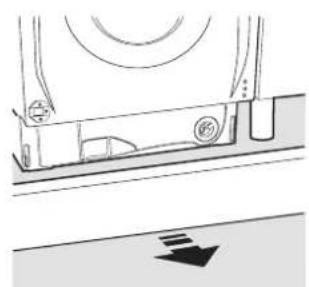
Switch off and unplug the washing machine, take out the kitchen plinth before cleaning the water filter or draining residual water.
The kitchen plinth must be mounted back all the time once the cleaning operation is over.
If you used a hot wash programme, wait until the water has cooled down before draining any water. Clean the water filter regularly, to avoid that the water cannot drain after the wash due to obstruction of the filter. If the water cannot drain, the display indicates that the water filter may be clogged.
-
Place a container close to the pump to collect any spillage.
-
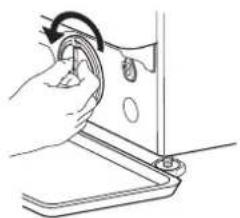
Remove, pulling it out, the "emergency drain hose" from the base of the washing machine.
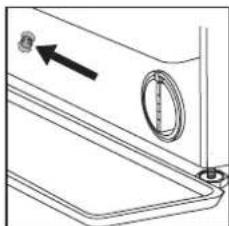
natural_image
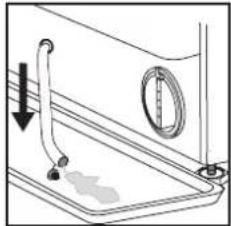
Technical line drawing of a mechanical component with an arrow indicating direction (no text or symbols)Remove the stopper of the "emergency drain hose" at the end of the hose and let the water flow into the container.
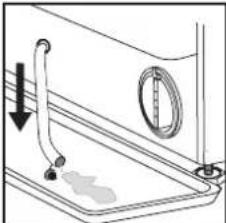
natural_image
Diagram of a kitchen sink with faucet and door, showing water level indicator (no text or symbols)- Turn the exhaust filter handle and pull it out of the housing. When the container of plinth is full with water, plug the stopper to the hose end, and reinsert the small hose in the washing machine's base. After, empty the container.
Afterwards firmly close the emergency drain hose with the stopper. 4. Remove filter: Lay a cotton cloth beneath the water filter, which can absorb a small amount of rest water. Then remove the water filter by turning it out anticlockwise.
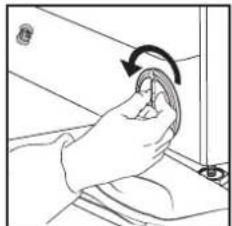
natural_image
Illustration of a hand holding a small object with an arrow indicating rotation (no text or symbols)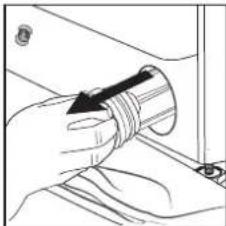
natural_image
Illustration of a hand holding a coiled tube with an arrow indicating direction (no text or symbols)-
Clean the water filter: remove residues in the filter and clean it under running water.
-
Insert the water filter: Reinsert the water filter again by turning it in clockwise direction. Make sure to turn it in as far as it goes; the filter handle must be in vertical position. To test water tightness of the water filter, you can pour about 1 liter of water into the detergent dispenser.
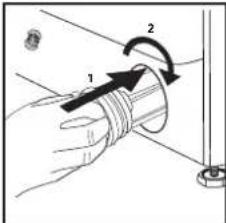
text_image
Diagram showing a hand holding a coiled tube with labeled parts and directional arrows indicating motion or force.Then reinstall the kitchen plinth.
TRANSPORT AND HANDLING
Never lift the washing machine by holding it at the worktop.
Pull out the mains plug, and close the water tap. Make sure that door and detergent dispenser are properly closed. Disconnect the inlet hose from the water tap, and remove the drain hose from your draining point. Remove all rest water from the hoses, and fix them so that they cannot get damaged during transport. Refit the transport bolts. Follow the instructions for removing the transport bolts in the INSTALLATION GUIDE in reverse order.
TROUBLESHOOTING
The washing machine may sometimes not work properly for certain reasons. Before calling the After-sales service, it is recommended to check to see if the problem can be easily resolved using the following list.
| Anomalies: Possible causes / Solution: | |
| The washing machine does not turn on. | · The plug is not inserted into the electrical outlet, or not enough to make contact.· There has been a power failure. |
| The wash cycle does not start. | · The door is not fully closed.· The “ON/OFF” button has not been pressed.· The “Start/Pause” button has not been pressed.· The water tap is not open.· A “Start delay” has been set. |
| The washing machine does not fill with water (the message “h2o” is shown on the display). “Beep” sound every 5 seconds. | · The water intake hose is not connected to the tap.· The hose is bent.· The water tap is not open.· The mains water supply has been shut off.· There is not enough pressure.· The “Start/Pause” button has not been pressed. |
| The washing machine loads and drains water continuously. | · The drain hose has not been installed at 65 to 100 cm from the ground.· The end of the drain hose is immersed in water.· The drain connector on the wall does not have an air vent.· If the problem persists after having performed these checks, close the water tap, shut off the washing machine, and call the After-sales service. If the dwelling is located on one of the uppermost floors of a building, a siphon effect can sometimes occur, thus causing the washing machine to load and drain water continuously. Special anti-siphon valves are available on the market to prevent these types of problems. |
| The washing machine does not drain or does not spin. | · The programme does not include the draining function: with certain programmes it must be activated manually.· The drain hose is bent.· The drain line is obstructed. |
| The washing machine vibrates excessively during the spin cycle. | · At the time of installation, the drum was not properly unblocked.· The washing machine is not level.· The washing machine is squeezed between furniture and the wall. |
| The washing machine leaks water. | · The water intake hose has not been tightened properly.· The detergent dispenser is clogged.· The drain hose has not been properly fastened. |
| The machine is locked and the display flashes, indicating an error code (e.g. F-01, F-.). | · Shut off the machine, disconnect the plug from the outlet, and wait about 1 minute before turning it back on.· If the problem persists, call the After-sales service. |
| Too much foam is formed. | · The detergent is not compatible with the washing machine (it must bear the wording “for washing machines”, “for hand washing and washing machines”, or something similar).· The dosage was excessive. |
| Door is locked, with or without failure indication, and the programme does not run. | · Door is locked in case of power breakdown. Programme will continue automatically as soon as the mains is available again.· Washing machine is in a standstill. Programme will continue automatically after the origin of the standstill does not persist anymore. |
Regulatory documentation, standard documentation, ordering spare parts and other product information can be found:
• Using the QR code in your appliance
- By visiting our website docs.whirlpool.eu/docs and parts-selfservice.whirlpool.com
- Alternatively, contact our After-sales Service (See phone number in the warranty booklet). When contacting our After-sales Service, please state the codes provided on your product's identification plate.
For User's Repair & Maintenance Information visit www.whirlpool.eu
You can find more information about your model online at https://eprel.ec.europa.eu/ which is the official EU EPREL product database. After selecting the Product Category, enter the Model Identifier of the product. The Model Identifier is made up of letters and numbers and can be found on the identification plate, as Mod. (see image on the right).
®/TM/© 2024 Whirlpool. Produced under license
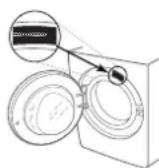
For any cleaning and maintenance, switch off and unplug the washing machine. Do not use flammable fluids to clean the washing machine.
CLEANING THE OUTSIDE OF THE WASHING MACHINE
Use a soft damp cloth to clean the outer parts of the washing machine.
Do not use glass or general purpose cleaners, scouring powder or similar to clean the control panel – these substances might damage the printing.
CHECKING THE WATER SUPPLY HOSE
Check the inlet hose regularly for brittleness and cracks. If damaged, replace it by a new hose available through our After-Sales Service or your specialist dealer. Depending on the hose type:
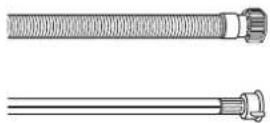
If the inlet hose has a transparent coating, periodically check if the colour intensifies locally. If yes, the hose may have a leak and should be replaced.
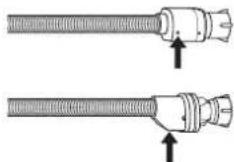
For water stop hoses: check the small safety valve inspection window (see arrow). If it is red, the water stop function was triggered, and the hose must be replaced by a new one. For unscrewing this hose, press the release button (if available) while unscrewing the hose.
CLEANING THE MESH FILTERS IN THE WATER SUPPLY HOSE
- Close water tap and unscrew the inlet hose.
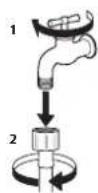
- Clean the mesh filter at the hose's end carefully with a fine brush.
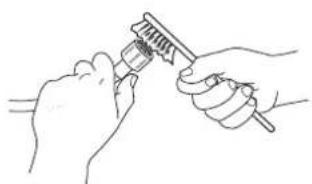
natural_image
Line drawing of two hands using a tool to apply a brush (no text or symbols present)- Now unscrew the inlet hose on the back of the washing machine by hand. Pull out the mesh filter from the valve on the back of the washing machine with pliers and carefully clean it.
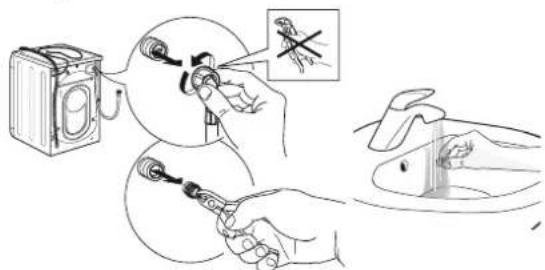
text_image
Diagram illustrating a medical procedure for using a device to adjust eye positions, with magnified inset showing the same eye position.- Insert the mesh filter again. Connect the inlet hose to water tap and washing machine again. Do not use a tool to connect the inlet hose. Open the water tap and check that all connections are tight.

text_image
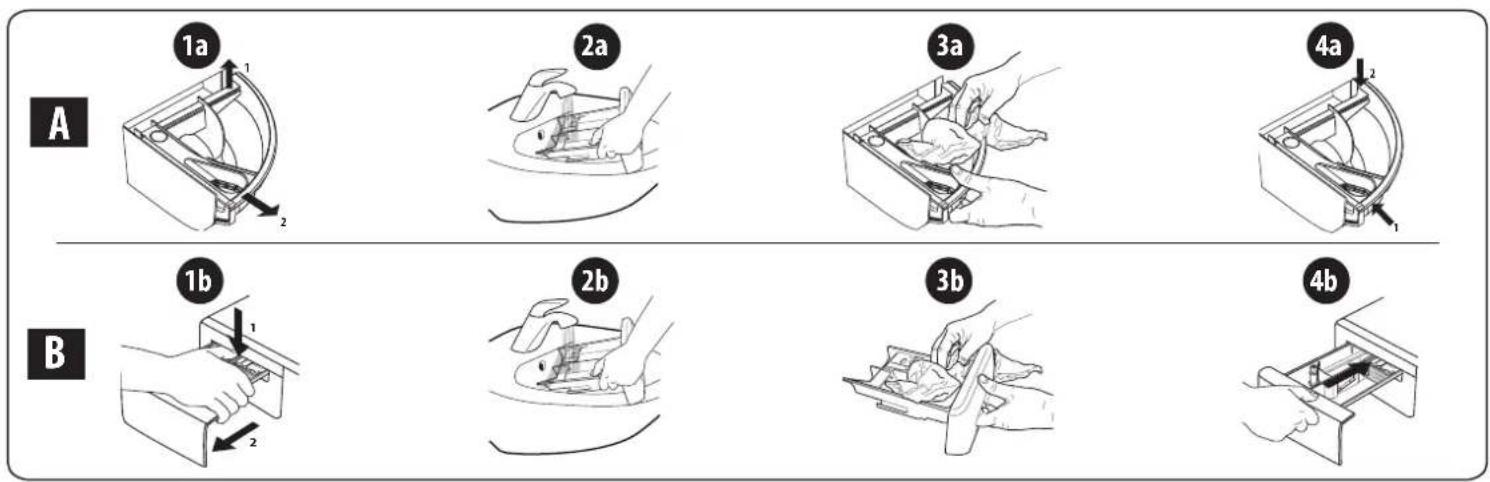
Diagram illustrating the installation steps of a water level sensor, showing components before and after installation.Remove the dispenser by raising it and pulling it out (see figure).
Wash it under running water; this operation should be repeated frequently.
CLEANING THE WATER FILTER / DRAINING RESIDUAL WATER
Switch off and unplug the washing machine before cleaning the water filter or draining residual water. If you used a hot wash programme, wait until the water has cooled down before draining any water.
Clean the water filter regularly every 3 months, to avoid that the water cannot drain after the wash due to obstruction of the filter. If the water cannot drain, the display indicates that the water filter may be clogged.
- Remove plinth.

natural_image
Pure mechanical component diagram without any text, numbers, or symbols- Container for the drained water: Place a low and wide container under the water filter in order to collect the residual water.
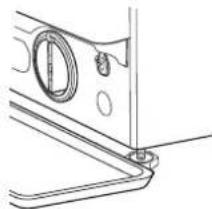
natural_image
Technical line drawing of a mechanical component with circular features and a central hole (no text or symbols)- Drain the water: Slowly turn the filter counter-clockwise until all the water has come out. Allow the water to flow out without removing the filter. Once the container is full, close the water filter by turning it clockwise. Empty the container. Repeat the procedure until all the water has been drained.
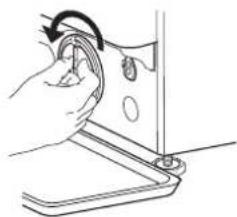
natural_image
Line drawing of a hand using a tool to press or adjust a component (no text or symbols visible)- Remove filter: Lay a cotton cloth beneath the water filter, which can absorb a small amount of rest water. Then remove the water filter by turning it out anticlockwise.
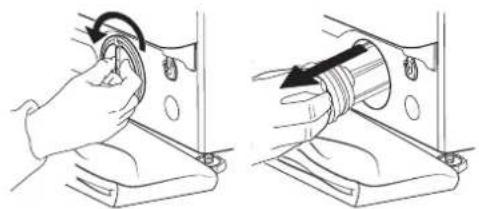
natural_image
Two-step diagram showing hand turning a circular component into a mechanical part, with no visible text or symbols.- Clean the water filter: remove residues in the filter and clean it under running water.
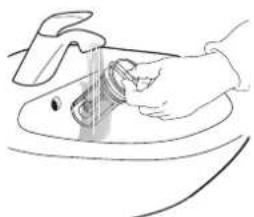
natural_image
Line drawing of a hand washing a sink with a tool (no text or symbols)- Insert the water filter and reinstall the plinth: Reinsert the water filter again by turning it in clockwise direction. Make sure to turn it in as far as it goes; the filter handle must be in vertical position. To test water tightness of the water filter, you can pour about 1 liter of water into the detergent dispenser. Then reinstall the plinth.
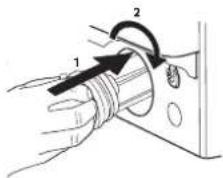
text_image
Diagram showing a hand holding a cable with two labeled components (1 and 2) indicating different parts of the device.Never lift the washing machine by holding it at the worktop.
- Pull out the mains plug, and close the water tap.
- Make sure that door and detergent dispenser are properly closed.
-
Disconnect the inlet hose from the water tap, and remove the drain hose from your draining point. Remove all rest water from the hoses, and fix them so that they cannot get damaged during transport.
-
Refit the transport bolts. Follow the instructions for removing the transport bolts in the "Installation Guide" in reverse order.
Important: Do not transport the washing machine without having fixed the transport bolts.
AFTER-SALES SERVICE
BEFORE CALLING THE AFTER-SALES SERVICE
- See if you can solve the problem by yourself with the help of the suggestions given in the TROUBLESHOOTING
IF AFTER THE ABOVE CHECKS THE FAULT STILL OCCURS, GET IN TOUCH WITH THE NEAREST AFTER-SALES SERVICE
To receive assistance, call the number shown on the warranty booklet.
When contacting our Client After sales service, always specify:
• a brief description of the fault;
- the type and exact model of the appliance;
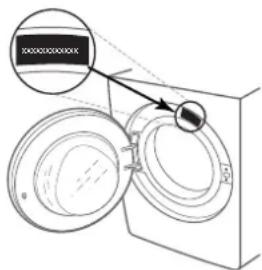
text_image
Diagram showing a device with two circular components and a magnified inset highlighting a labeled section.- Switch the appliance off and back on again to see if the fault persists.
- the service number (number after the word Service on the rating plate).
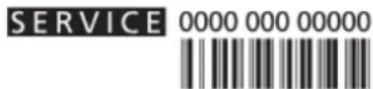
- your full address;
- your telephone number.
If any repairs are required, please contact an authorised after-sales service (to guarantee that original spare parts will be used and repairs carried out correctly).

БЛАГОДАРИМ ВИ ЗА ЗАКУПУВАНЕТО НА ПРОДУКТ НА WHIRLPOOL.
www.whirlpool.com/register
natural_image
Line drawing of a washing machine with concentric rings and a side panel (no text or symbols)text_image
Technical diagram of a mechanical component with numbered parts labeled 1, 2, and 3ПРОГРАМИ
For washing lightly to normally soiled resilient garments in cotton, linen, synthetic fibres and mixed fibres.
Бели
For washing normally to heavily soiled towels, underwear, table and bed linen, etc in resilient cotton and linen. Only when the temperature is selected at 90^ C the cycle is provided with a prewash phase before main washing phase. In this case it is recommended to add detergent both, in the prewash and main wash section.
Памук
Normally to heavily soiled and robust cottons.
Eco 40-60 Eco 40-60
natural_image
Technical line drawing of a door handle with a circular vent and arrow indicator (no text or symbols)natural_image
Diagram of a kitchen sink with a pipe and valve, showing a drop in liquid (no text or symbols)natural_image
Two-step illustration showing hand holding a circular object with a rotating arrow, next to a pipe fitting (no text or symbols)text_image
Diagram showing a hand holding a coiled pipe with two labeled arrows indicating rotation or movement, likely illustrating a mechanical or electrical process.natural_image
Line drawing of two hands using a tool to adjust or install a mechanical component (no text or symbols present)text_image
Diagram illustrating a medical procedure for using a device to adjust eye position, with magnified insets showing the same eye position.text_image
Diagram illustrating a medical procedure for catheter insertion, showing steps from device to tube insertion.natural_image
Technical line drawing of a mechanical component with a downward arrow indicating direction (no text or symbols)natural_image
Technical line drawing of a mechanical component with no visible text or symbolsnatural_image
Line drawing of a hand using a sewing machine to lift or adjust a component (no text or symbols present)natural_image
Two-step diagram showing hand turning a circular component into a mechanical part, with no text or symbols present.natural_image
Line drawing of hands cleaning a sink with a tool (no text or symbols)text_image
Diagram showing hand turning a component with labeled parts 1 and 2, indicating direction of movement or adjustment.text_image
XXXXXXXXXXX 1951text_image
Technical diagram of a mechanical component with numbered parts labeled 1, 2, and 3PROGRAMY
natural_image
Technical line drawing of a mechanical component with a knob and mounting base (no text or symbols)natural_image
Diagram of a kitchen sink with faucet and drain, showing liquid level and wall-mounted door (no text or symbols)natural_image
Illustration of a hand holding a circular object with an arrow indicating rotation (no text or symbols)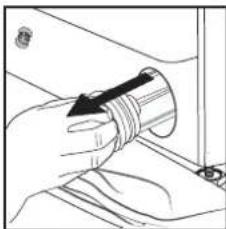
natural_image
Illustration of a hand holding a coiled pipe or tube, with no visible text or symbolstext_image
Diagram showing a hand holding a coiled pipe with two labeled arrows indicating direction of movement or force, and a separate vertical component.natural_image
Line drawing of two hands using a tool to apply a component (no text or symbols present)text_image
Diagram illustrating a procedure for using a device to adjust a mosquito, with an inset showing the same technique.text_image
Diagram illustrating a mechanical assembly process with labeled steps and component illustrationsnatural_image
Technical line drawing of a mechanical component with a downward arrow indicating a feature (no text or symbols present)natural_image
Technical line drawing of a mechanical component with circular features and a central shaft (no text or symbols)natural_image
Line drawing of a hand holding a small object near a device (no text or symbols)natural_image
Two-step diagram showing hand turning a cable or switch into a mechanical component (no text or symbols present)natural_image
Line drawing of hands washing a sink with a tool (no text or symbols)text_image
Diagram showing a device with two circular components and an arrow pointing to a labeled section, possibly indicating a measurement or annotation.DANKE, DASS SIE SICH FÜR EIN WHIRLPOOL PRODUKT ENTSCHIEDEN HABEN

text_image
Technical diagram of a mechanical component with numbered parts and directional arrows indicating assembly or flow.PROGRAMME
natural_image
Technical line drawing of a mechanical component with an arrow indicating direction (no text or symbols)natural_image
Diagram of a washing machine interior showing a valve, handle, and outlet (no text or symbols)natural_image
Two-step diagram showing hand cleaning a component with a circular arrow indicating rotation (no text or symbols)text_image
Diagram showing a hand holding a pipe with two labeled arrows indicating direction of movement or force, and a small bolt attached.natural_image
Two types of connectors with threaded ends and arrows indicating assembly or insertion (no text or symbols)natural_image
Line drawing of two hands using a tool to apply or install a component (no text or symbols present)text_image
Diagram illustrating a procedure for using an electronic device to adjust a component, with magnified insets showing the tool and detail.text_image
Diagram illustrating a mechanical assembly process with labeled steps 1 and 2, showing components like battery, switch, and valve.natural_image
Pure technical line drawing of a mechanical component with no text or symbolsnatural_image
Technical line drawing of a mechanical component with no visible text or symbolsnatural_image
Line drawing of a hand holding a small object, possibly a tool or device, with no visible text or symbols.natural_image
Two-step diagram showing hand turning a button on a mechanical component, with no text or symbols present.natural_image
Line drawing of hands washing a sink with a tool (no text or symbols)text_image
Diagram showing a hand holding a pipe with two labeled components, marked as 1 and 2, indicating a process or operation.text_image
Diagram showing a device with two circular components and an arrow pointing to a labeled section, possibly indicating a component or feature.natural_image
Line drawing of a washing machine with concentric circles and front panel (no text or symbols)1.
text_image
Technical diagram of a mechanical component with numbered parts labeled 1, 2, and 3ПРОГРАММАТА
natural_image
Technical line drawing of a mechanical component with an arrow indicating direction (no text or symbols)natural_image
Diagram of a kitchen sink with faucet and drain, showing water level indicator (no text or symbols)natural_image
Two-step illustration showing hand holding a circular object with a curved arrow indicating rotation (no text or symbols)text_image
Diagram showing a hand holding a coiled tube with two labeled arrows indicating rotation or movement, and a small cylindrical object on the right.natural_image
Line drawing of two hands using a tool to apply or install a component (no text or symbols present)text_image
Diagram illustrating a hand using a power switch to adjust the circuit, with an inset showing a disassembled component.text_image
Diagram illustrating a mechanical assembly process with labeled parts and directional arrows indicating steps.natural_image
Technical line drawing of a mechanical component with a downward arrow indicating motion (no text or symbols)natural_image
Technical line drawing of a mechanical component with circular features and a central pin (no text or symbols)natural_image
Line drawing of a hand using a sewing machine to adjust or install a component (no text or symbols visible)natural_image
Two-step diagram showing hand turning a circular component into a mechanical part, with no visible text or symbols.natural_image
Line drawing of hands washing a sink with a tool (no text or symbols)text_image
KONKON KONKON 2017text_image
Technical diagram of a mechanical component with numbered parts labeled 1, 2, and 3PROGRAMAS
natural_image
Technical line drawing of a mechanical component with a bolt and circular feature (no text or symbols)natural_image
Diagram of a kitchen sink with faucet and drain, showing water level (no text or symbols)natural_image
Illustration of a hand holding a curved object with an arrow indicating rotation (no text or symbols)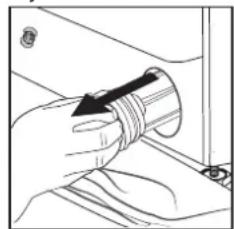
natural_image
Illustration of a hand holding a cylindrical object with an arrow indicating direction (no text or symbols)text_image
Diagram showing a hand holding a coiled tube with two labeled arrows indicating rotation or movement, likely illustrating a mechanical or electrical process.natural_image
Technical line drawing of a mechanical component with a downward arrow indicating direction (no text or symbols)natural_image
Technical line drawing of a mechanical component with no visible text or symbolsnatural_image
Line drawing of a hand using a sewing machine to lift a component (no text or symbols)natural_image
Two-step diagram showing hand operating a mechanical component with a circular arrow indicating rotation (no text or symbols)natural_image
Line drawing of a hand washing a small object on a surface (no text or symbols)text_image
Diagram showing a hand holding a cable with labeled parts and directional arrows indicating motion or force.text_image
Technical diagram showing a magnified view of two circular components with an arrow pointing to one, labeled in Chinese.MERCI D'AVOIR CHOISI UN PRODUIT WHIRLPOOL
text_image
Technical diagram of a mechanical component with numbered parts labeled 1, 2, and 3PROGRAMMES
natural_image
Technical line drawing of a mechanical component with a circular feature and an arrow indicating direction (no text or symbols)natural_image
Diagram of a washing machine interior showing a valve, drain, and outlet (no text or symbols)natural_image
Two-step diagram showing hands performing a circular tool manipulation operation, with no visible text or symbols.text_image
Diagram showing a hand holding a pipe with two labeled arrows indicating direction of movement or force, and a small bolt attached.Puis réinstaller la plinthe de cuisine.
SYSTÈME D'ÉQUILIBRAGE DE CHARGE
natural_image
Line drawing of two hands using a tool to apply or install a component (no text or symbols present)text_image
Diagram illustrating a procedure for using a device to adjust a tool, with an inset showing a magnified view of the tool.text_image
Diagram illustrating a mechanical assembly process with labeled steps 1 and 2, showing tool application and component insertion.natural_image
Technical line drawing of a mechanical component with no visible text or symbolsnatural_image
Technical line drawing of a mechanical component with mounting bracket (no text or symbols)natural_image
Line drawing of a hand operating a sewing machine with a curved arrow indicating rotation (no text or symbols)natural_image
Two-step diagram showing hand turning a circular component into a mechanical component (no text or symbols)natural_image
Line drawing of hands washing a cup with a spoon (no text or symbols)text_image
Diagram showing a hand holding a coiled cable with labeled parts 1 and 2, indicating a mechanical or electrical component.text_image
Technical diagram showing a mechanical component with labeled parts and an arrow pointing to a section detail.text_image
Technical diagram of a mechanical component with numbered parts labeled 1, 2, and 3PROGRAMOK
natural_image
Line drawing of a garment collar with a knob and arrow indicating direction (no text or symbols)natural_image
Diagram of a kitchen sink with faucet and drain, showing water level (no text or symbols)natural_image
Two-step illustration showing hands using a tool to lift a circular component, with no visible text or symbols.text_image
Diagram showing a hand holding a coiled tube with labeled parts and directional arrows indicating motion or force.natural_image
Line drawing of two hands using a tool to apply or install a component (no text or symbols present)text_image
Diagram illustrating a procedure for using a device to adjust a tool, with magnified views showing the tool's tip and insertion.text_image
Diagram illustrating a mechanical assembly process with labeled steps and component illustrationsnatural_image
Technical line drawing of a mechanical component with a downward arrow indicating direction (no text or symbols)natural_image
Technical line drawing of a mechanical component with no visible text or symbolsnatural_image
Line drawing of a hand using a sewing machine to adjust a component (no text or symbols)natural_image
Two-step diagram showing hand turning a circular component into a mechanical part, with no visible text or symbols.natural_image
Line drawing of hands cleaning a sink with a tool (no text or symbols)text_image
Diagram showing a hand holding a coiled cable with two labeled components (1 and 2) and a curved arrow indicating rotation.text_image
Technical diagram showing a magnified view of circular components with annotations and labels in Chinese"GUIDA ALLA RICERCA GUASTI"
TABELLA PROGRAMMI
| Carico max 9 kgConsumo di energia in modalità Off : 0,5 W / in modalità standby: 8,0 W | Detersivi e additivi | Detersivo consi-gliato | Umiditàresidua % (*) | Consumo energiakWh | Acqua totale lt | Temperaturabcucato °C | |||||||||
| Programma | Temperature | Velocitàcentrifugamax. (giri/min) | Caricomax. (kg) | Durata(h : m) | Prelavaggio | Lavaggioprincipale | Ammor-bidente | In pol-vere | Liquido | ||||||
| Imposta-zione | Intervallo | ||||||||||||||
| Misti | 40°C | - 40°C | 1000 | 9,0 | ** | - | ● | ○ | - | √ | - | - | - | - | |
| Bianchi | 60°C | - 90°C | 1400 | 9,0 | 2:45 | ● (90°) | ● | ○ | √ | √ | 49 | 0,900 | 90 | 55 | |
| Cotone | 40°C | - 60°C | 1400 | 9,0 | 3:55 | - | ●○ | √ | √ | 49 | 1,400 | 105 | 45 | ||
| Eco 40-60 | 40°C | 40°C | 1351 | 9,0 | 3:48 | - | ●○ | √ | √ | 53 | 0,800 | 59 | 35 | ||
| 1351 | 4,5 | 2:54 | - | ●○ | √ | √ | 53 | 0,590 | 57 | 34 | |||||
| 1351 | 2,5 | 2:25 | - | ●○ | √ | √ | 53 | 0,350 | 38 | 26 | |||||
| Sport | 40°C | - 40°C | 600 | 3,5 | ** | - | ● | ○ | - | √ | - | - | - | - | |
| Piumoni | 30°C | - 30°C | 1000 | 3,5 | ** | - | ● | ○ | - | √ | - | - | - | - | |
| 20°C | 20°C | - 20°C | 1400 | 9,0 | 1:50 | - | ● | ○ | - | √ | 49 | 0,200 | 90 | 22 | |
| Centrifuga & Scarico | - | - | 1400 | 9,0 | ** | - | - | - | - | - | - | - | - | - | |
| Risciacquo &Centrifuga | - | - | 1400 | 9,0 | ** | - | - | ○ | - | - | - | - | - | - | |
| Rapido 30' | 30°C | - 30°C | 1200 (***) | 4,5 | 0:30 | - | ● | ○ | - | √ | 71 | 0,200 | 45 | 27 | |
| Colours 15° | 15°C | 15°C | 1000 | 4,5 | ** | - | ● | ○ | - | √ | - | - | - | - | |
| Lana | 40°C | - 40°C | 800 | 2 | ** | - | ● | ○ | - | √ | - | - | - | - | |
| Delicati | 30°C | - 30°C | 600 (***) | 1 | ** | - | ● | ○ | - | √ | - | - | - | - | |
| Sintetici | 40°C | - 60°C | 1200 | 4 | 2:55 | - | ●○ | √ | √ | 35 | 0,800 | 55 | 43 | ||
text_image
Technical diagram of a mechanical component with numbered parts labeled 1, 2, and 3PROGRAMMI
natural_image
Technical line drawing of a door handle with a circular dial and an arrow pointing to the left side (no text or symbols)natural_image
Diagram of a kitchen sink with a pipe and outlet, showing a drop and outlet (no text or symbols)natural_image
Illustration of a hand holding a curved object with an arrow indicating rotation (no text or symbols)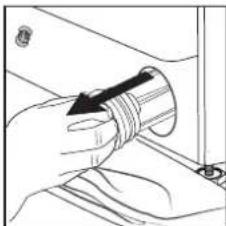
natural_image
Illustration of a hand holding a coiled cable or pipe, with no visible text or symbolstext_image
Diagram showing a hand holding a coiled tube with two labeled arrows indicating rotation or movement, likely illustrating a mechanical or electrical process.GUIDA ALLA RICERCA GUASTI
natural_image
Line drawing of two hands using a tool to apply or install a component (no text or symbols present)text_image
Diagram illustrating a procedure for using a device to adjust or install a component, with magnified insets showing the tool and magnified view.text_image
Diagram illustrating a medical procedure for catheter insertion, showing steps from device to sink with labeled parts.natural_image
Technical line drawing of a mechanical component with a downward arrow indicating direction (no text or symbols)natural_image
Technical line drawing of a mechanical component with no visible text or symbolsnatural_image
Line drawing of a hand using a sewing machine to lift a component (no text or symbols)natural_image
Two-step diagram showing hand turning a cable or switch into a mechanical component (no text or symbols)natural_image
Line drawing of hands cleaning a sink with a tool (no text or symbols)text_image
Diagram showing a hand holding a coiled cable with labeled parts and directional arrows indicating motion or force.text_image
xxxxxxxxxxxtext_image
Technical diagram of a mechanical component with numbered parts labeled 1, 2, and 3PROGRAMMA'S
natural_image
Technical line drawing of a door handle with a circular dial and an arrow indicating direction (no text or symbols)natural_image
Simple line drawing of a kitchen sink with a valve and lid, no text or symbols presentnatural_image
Illustration of a hand holding a circular object with an arrow indicating rotation (no text or symbols)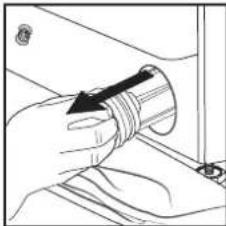
natural_image
Line drawing of a hand holding a coiled cable or pipe, with no visible text or symbolstext_image
Diagram showing a hand holding a coiled tube with labeled parts 1 and 2, indicating a mechanical or electrical component.TRANSPORT EN VERPLAATSING
natural_image
Line drawing of two hands using a tool to apply a small object (no text or symbols present)text_image
Diagram illustrating a procedure for using a device to adjust a cartoon character, with an inset showing a hand holding a spider near the camera.text_image
Diagram illustrating a mechanical assembly process with labeled steps and component illustrationsnatural_image
Technical line drawing of a mechanical component with no visible text or symbolsnatural_image
Technical line drawing of a mechanical component with mounting holes and a circular feature (no text or symbols)natural_image
Line drawing of a hand using a sewing machine to lift a small object (no text or symbols)natural_image
Two-step diagram showing hand turning a circular component into a mechanical component, with no visible text or symbols.natural_image
Line drawing of hands washing a small object on a surface (no text or symbols)text_image
Diagram showing a hand holding a cable with labeled parts and directional arrows indicating motion or force.text_image
Technical diagram showing a device with labeled components and an arrow pointing to a highlighted section.text_image
Technical diagram of a mechanical component with numbered parts labeled 1, 2, and 3PROGRAMY
natural_image
Diagram of a garment collar with a circular sleeve and arrow indicator (no text or symbols)natural_image
Diagram of a kitchen sink with faucet and drain, showing water level (no text or symbols)natural_image
Illustration of a hand holding a circular object with an arrow indicating rotation (no text or symbols)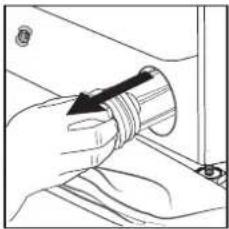
natural_image
Hand holding a coiled cable or pipe, no visible text or symbolstext_image
Diagram showing a hand holding a coiled tube with two labeled arrows indicating direction of movement or force, and a separate cylindrical component.natural_image
Line drawing of two hands using a tool to apply or install a component (no text or symbols present)text_image
Illustration showing a hand using a device to clean insect eye, with an inset showing a close-up of the eye and a mouth.text_image
Diagram illustrating a mechanical assembly process with labeled steps 1 and 2, showing components like battery, switch, and valve.natural_image
Technical line drawing of a mechanical component with a downward arrow indicating motion (no text or symbols)natural_image
Technical line drawing of a mechanical component with circular features and a vertical rod (no text or symbols)natural_image
Line drawing of a hand holding a circular object with a ring, partially enclosed in a rectangular frame (no text or symbols)natural_image
Two-step diagram showing hand turning a cable or switch into a mechanical component (no text or symbols)natural_image
Line drawing of a hand washing a sink with a tool (no text or symbols)text_image
Diagram showing a hand holding a coiled cable with labeled parts 1 and 2, indicating a mechanical or electrical component.text_image
KONKONKONKKGAVETA DO DETERGENTE
text_image
Technical diagram of a mechanical component with numbered parts labeled 1, 2, and 3PROGRAMAS
natural_image
Technical line drawing of a mechanical component with a circular feature and an arrow indicating direction (no text or symbols)natural_image
Diagram of a kitchen sink with faucet and drain, showing water level (no text or symbols)natural_image
Illustration of a person holding a towel with a circular arrow indicating rotation (no text or symbols)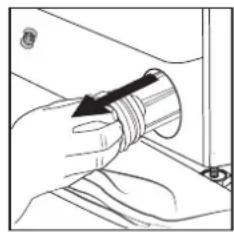
natural_image
Hand holding a cylindrical object with an arrow pointing to it, no visible text or symbolstext_image
Diagram showing a hand holding a coiled tube with labeled parts and directional arrows indicating motion or force.natural_image
Two mechanical connectors with threaded ends and arrows indicating assembly or movement (no text or symbols)natural_image
Line drawing of two hands using a tool to apply a brush (no text or symbols present)text_image
Diagram illustrating a medical procedure for using a device to adjust eye position, with magnified inset showing the same step.text_image
Diagram illustrating a mechanical assembly process with labeled steps and component illustrations- Retire o painel inferior.
natural_image
Technical diagram of a mechanical component with a downward arrow indicating direction (no text or symbols)natural_image
Technical line drawing of a mechanical component with no visible text or symbolsnatural_image
Line drawing of a hand using a sewing machine to adjust a component (no text or symbols)natural_image
Two-step diagram showing hand turning a circular component into a mechanical component, with no visible text or symbols.natural_image
Line drawing of hands washing a sink with a tool (no text or symbols)text_image
Diagram showing a device with two circular components and a magnified inset highlighting a labeled section.natural_image
Line drawing of a washing machine with concentric circles and base (no text or symbols)7.
text_image
Technical diagram of a mechanical component with numbered parts, likely a valve or pump assembly.PROGRAMY
Aby ste vybrali vhodný program pre svoju bielizeň, vždy sa riadte pokynmi na štítku bielizne. Hodnota uvedená vo vaničke je maximálna možná teplota na pranie odevov.
Zmieš. bielizeň
natural_image
Technical line drawing of a mechanical component with an arrow indicating direction (no text or symbols)Vytiahnite zastavovaciu zátku „hadice núdzového odtekania“ z konca hadice a nechajte vytiect vodu do nádoby.
natural_image
Diagram of a kitchen sink with faucet and drain, showing water level indicator (no text or symbols)natural_image
Illustration of a hand holding a small object with an arrow indicating rotation (no text or symbols)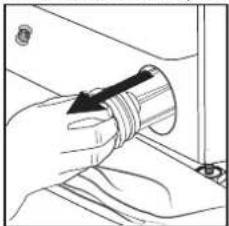
natural_image
Illustration of a hand holding a coiled tube with a black arrow indicating direction (no text or symbols)text_image
Diagram showing a hand holding a coiled tube with two labeled arrows indicating rotation or movement, and a separate cylindrical component.natural_image
Line drawing of two hands using a tool to apply a brush (no text or symbols present)text_image
Illustration showing a hand using a power tool to clean a device, with an inset showing a mosquito biting it.text_image
Diagram illustrating the installation steps of a water tap, showing components before and after installation.natural_image
Technical line drawing of a mechanical component with a downward arrow indicating motion (no text or symbols)natural_image
Technical line drawing of a mechanical component with mounting holes and a circular feature (no text or symbols)- Vypustite vodu: pomaly otáčajte filtrom proti smeru hodinových ručičiek, kým nevytečie všetka voda. Nechajte vodu vytiect bez toho, aby ste vybrali filter. Ked'je nádoba plná, zatvorte vodný filter otočením v smere hodinových ručičiek. Vyprázdnite nádobu. Postup opakujte, kým nevytečie všetka voda.