DPA080UB1GDB - Air-conditioner DANBY - Free user manual and instructions
Find the device manual for free DPA080UB1GDB DANBY in PDF.


User questions about DPA080UB1GDB DANBY
0 question about this device. Answer the ones you know or ask your own.
Ask a new question about this device
Download the instructions for your Air-conditioner in PDF format for free! Find your manual DPA080UB1GDB - DANBY and take your electronic device back in hand. On this page are published all the documents necessary for the use of your device. DPA080UB1GDB by DANBY.
USER MANUAL DPA080UB1GDB DANBY
natural_image
White hand symbol inside a black octagonal frame (no text or numbers)
natural_image
Gray circular icon with a white telephone handset and signal waves (no text or symbols)1-800-263-2629 (1-800-26-DANBY)
DO NOT RETURN THIS UNIT TO THE RETAILER WITHOUT FURTHER INSTRUCTIONS
Dear valued customer, we hope your Danby product purchase fulfills all your requirements. Your satisfaction is our priority! Please contact us at our toll free consumer service number for any inquiries you may have about your new unit.
NE PAS RETOURNER CET APPAREIL CHEZ LE DÉTAILLANT SANS CONSIGNES SUPPLÉMENTAIRES
This product is factory equipped with a power supply cord that has a three-pronged grounded plug. It must be plugged into a mating grounding type receptacle in accordance with the National Electrical Code and applicable local codes and ordinances. If the circuit does not have a grounding type receptacle, it is the responsibility and obligation of the customer to exchange the existing receptacle in accordance with the National Electrical Code and applicable local codes and ordinances. The third ground prong should not, under any circumstances, be cut or removed. Never use the cord, the plug or the appliance when they show any sign of damage. Do not use your appliance with an extension cord unless it has been checked and tested by a qualified electrician or electrical supplier.

IMPORTANT - MÉTHODE POUR LA MISE À LA TERRE
Owner's Use and Care Guide 1-16
- Welcome
- Important Safety Information
- Features
- Installation Instructions
• Operation Instructions
• Care and Maintenance - Troubleshooting
- Warranty
CLIMATISEUR PORTATIF
Read and follow all safety rules and operating instructions before first use of this product.

AVERTISSEMENT :
Improper connection of the grounding plug can result in risk of fire, electric shock and/or injury to persons associated with the appliance. Check with a qualified service representative if in doubt that the appliance is properly grounded.

AVERTISSEMENT
natural_image
Line drawing of a portable air conditioner unit (no text or symbols)Thank you for choosing Danby
We know you're excited. We are too! However, the more familiar you are with your new appliance, the better experience you will have. We therefore strongly suggest that you read this Owner's Manual before plugging in your new appliance. It contains important operational information that will help you make full use of the technical features available in your Danby appliance. The manual also contains information designed to enhance operating reliability and safety, as well as tips to maintaining your new appliance so that it brings you happiness for years to come.
Please visit www.danby.com to access self-service tools, FAQs and more. Should you need additional assistance, please call 1-800-26-DANBY (1-800-263-2629).
Note: You will need the below information to obtain service under warranty. To receive service, you must provide the original receipt.
Model Number: ____
Serial Number: ____
Date of Purchase: ____
NEED HELP?
Before you call for service, here are a few things you can do to help us serve you better:
Read this Owner's Manual:
It contains instructions to help you use and maintain your appliance properly.
If you received a damaged appliance:
Immediately contact the retailer (or builder) that sold you the appliance.
Save time and money:
Check the Troubleshooting section at the end of the guide before calling. This section helps you solve common problems that may occur.
If you do need service, you can relax, knowing help is only a phone call away.

natural_image
Simple black-and-white icon of a telephone handset inside a circle (no text or symbols)1-800-26-Danby
(1-800-263-2629)
To prevent injury to the user or other people and property damage, the following instructions must be followed. Incorrect operation resulting from ignoring these instructions may cause harm or damage.
SAFETY PRECAUTIONS
ALWAYS DO THIS
Your air conditioner should be used in such a way that it is protected from moisture. e.g. condensation, splashed water, etc. Do not place or store your air conditioner where it can fall or be pulled into water or any other liquid. Unplug unit immediately if this occurs.
√ Always transport your air conditioner in a vertical position and place on a stable, level surface during use. If the unit is transported laying on its side it should be stood up and left unplugged for 6 hours.
√ Turn off the unit when not in use.
√ Always contact a qualified person to perform repairs. If the power cord is damaged it must be repaired by a qualified technician.
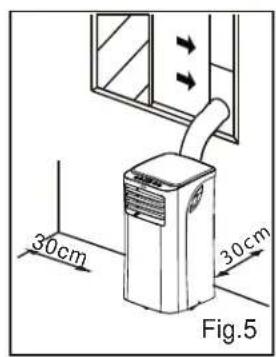
√ Keep the unit away from walls, furniture and curtains with a clearance of at least 30 cm all around.
√ If the air conditioner is knocked over during use, turn off the unit and unplug it immediately.
√ Always use the switch on the control panel to turn the unit on or off.
√ Portable air conditioners exhaust large amounts of room air. Always ensure an adequate supply of make-up air to operate efficiently.
NEVER DO THIS
Do not operate your air conditioner in a wet room such as a bathroom or laundry room.
Do not touch the unit with wet or damp hands.
Do not press the buttons on the control panel with anything other than your fingers.
Do not remove any fixed components. Never use this appliance if it is not working properly, or if it has been dropped or damaged.
✗ Never use the plug to start and stop the unit.
Do not cover or obstruct the inlet or outlet grilles.
Do not use hazardous chemicals to clean or come into contact with the unit. Do not use the unit in the presence of inflammable substances or vapour such as alcohol, insecticides, gasoline, etc.
Do not allow children to operate the unit unsupervised.
Do not use this product for functions other than those described in this instruction manual.

Important Safety Information READ AND FOLLOW ALL SAFETY INSTRUCTIONS
To prevent injury to the user or other people and property damage, the following instructions must be followed. Incorrect operation resulting from ignoring these instructions may cause harm or damage.
ENERGY SAVING TIPS
- Use the unit in the recommended room size.
- Locate the unit where furniture cannot obstruct the air flow.
- Keep blinds/curtains closed during the sunniest part of the day.
- Keep the filters clean.
- Keep doors and windows closed to keep cool air in and warm air out (cooling mode)
OPERATING CONDITIONS
The air conditioner must be operated within the temperature range indicated below:
| MODE ROOM TEMPERATURE | |
| COOL 17°C-35°C (62°F-95°F) | |
| DRY 13°C-35°C (55°F-95°F) | |
Note: Performance may be reduced outside of these operating temperatures.
TOOLS FOR WINDOW KIT INSTALLATION
- Screwdriver (medium size, Phillips)
- Tape measure or ruler
- Knife or scissors
- Saw (In the event that the window kit needs to be cut down in size because the window is too narrow for direct installation). See www.danby.com for general instruction guide

Identifying Parts
ELECTRICAL INFORMATION

WARNING
- Do not store or use gasoline or other flammable vapours and liquids in the vicinity of this or any other appliance.
- Avoid fire hazard or electric shock. Do not use an extension cord or an adaptor plug. Do not remove any prong from the power cord.

WARNING
- Be sure the electrical supply is adequate for the model you have chosen. This information can be found on the serial plate, which is located on the side of the cabinet and behind the grille.
- Be sure the air conditioner is properly grounded. To minimize shock and fire hazards, proper grounding is important. The power cord is equipped with a three-prong grounding plug for protection against shock hazards.
- Your air conditioner must be used in a properly grounded wall receptacle. If the wall receptacle you intend to use is not adequately grounded or protected by a time delay fuse or circuit breaker, have a qualified electrician install the proper receptacle.
- Ensure the receptacle remains accessible after the unit is installed.
ACCESSORIES
| PARTS PART NAME QUANTITY | ||
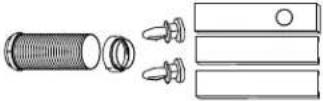 | Exhaust hose (supplied), adapter B and Window Slider Kit and pins* | 1 set |
 | Foam seal * 6 pcs | |
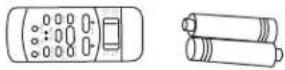 | Remote Controller and Battery(For remote control models only) | 1 set |
 | Drain hose 1 pc | |
- Ensure that all the accessories are included in the package and refer to the installation instructions for their usage. Note: All the illustrations in this manual are for explanatory purposes only. Your air conditioner may be slightly different.
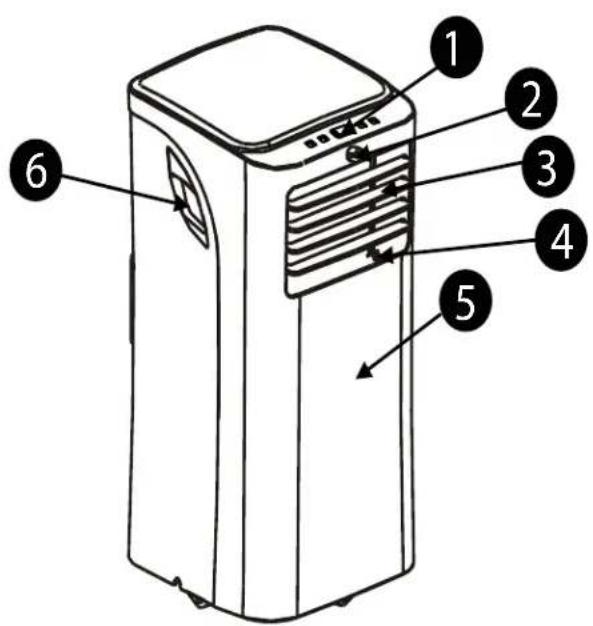
UNIT STRUCTURE
text_image
Diagram of a portable air conditioner unit with numbered parts labeled 1 through 6① Control Panel
② Remote Signal Receptor
③ Horizontal Louver Blade
4 Vertical Louver Blade
⑤ Front Panel
⑥ Carrying Handle (both sides)

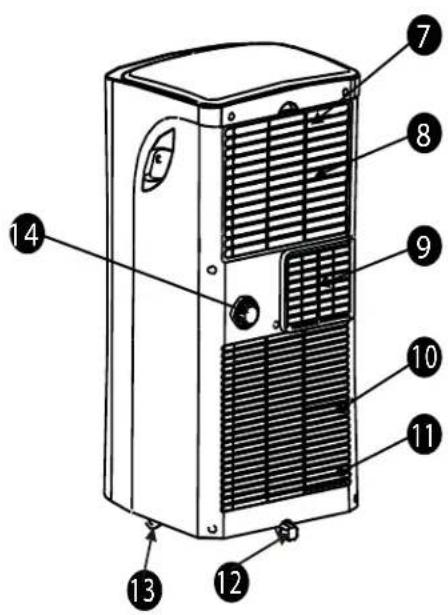
Identifying Parts
text_image
Technical diagram of a multi-chamber air conditioner unit with numbered labels pointing to components.⑦ Upper Air Filter (behind the grill)
⑧ Air Intake
⑨ Air Outlet
10 Lower Air Filter (behind the grill)
11 Air Intake
12 Bottom Tray Drain Outlet
13 Castor
14 Drain Outlet

Features
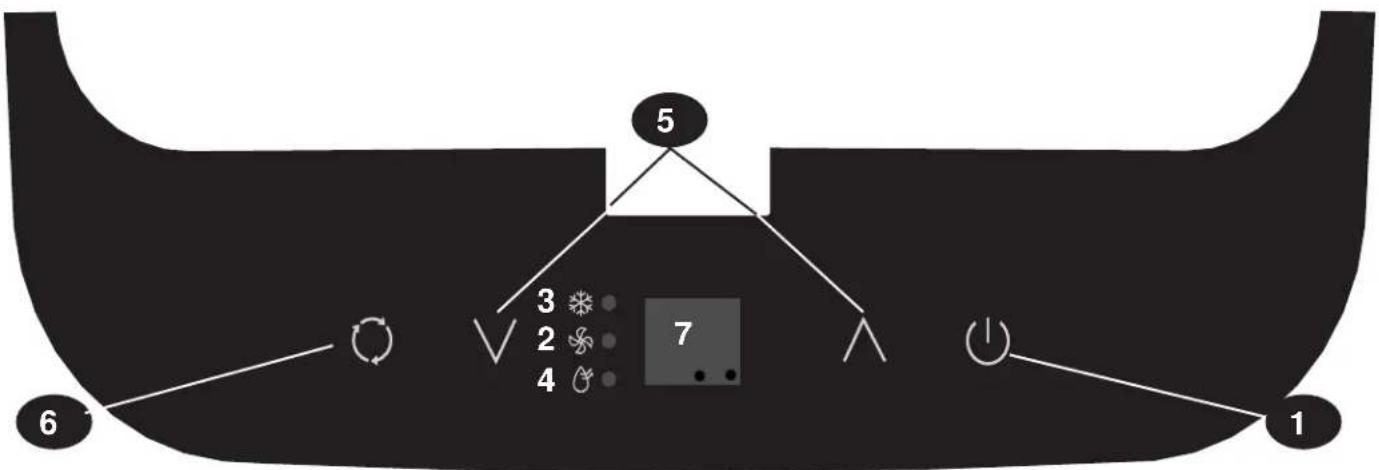
ELECTRONIC CONTROL INSTRUCTIONS
Before you begin, thoroughly familiarize yourself with the control panel and remote control and all its functions. Select the functions you desire based on the associated symbol.
The unit can be controlled by the control panel alone or with the remote control.
Note: This manual does not include Remote control Operation. See the Remote control Instructions packed with the unit for this information.
text_image
5 3 2 7 4 6 1ELECTRONIC CONTROL INSTRUCTIONS
1 POWER button
Turns power on/off.
② FAN Indicator
③ COOL Indicator
4 DRY Indicator
⑤ UP and DOWN buttons
Used to adjust (increase / decrease) temperature settings (1°C/1°F increments) in a range of 17°C (62°F) to 30°C (86°F). The control is capable of displaying temperature in degrees Fahrenheit or degrees Celsius. To convert from one to the other, press and hold the Up and Down buttons at the same time for 3 seconds.
MODE select button
⑥ Selects the appropriate operating mode. Each time you press the button, a mode is selected in a sequence that goes from COOL, FAN and DRY. The mode indicator light illuminates depending on the mode settings.
LED DISPLAY
⑦ Shows the set temperature in °C or °F and the Auto-timer settings. While on DRY and FAN modes, it shows the room temperature.
Error codes:
E1 - Room temperature sensor error -Unplug the unit and plug it back in. If error repeats, call for service.
E2 - Evaporator temperature sensor error- Unplug the unit and plug it back in. If error repeats, call for service.
E4 - Display panel communication error - Unplug the unit and plug it back in. If error repeats call for service.
P1 - Bottom tray is full - Connect the drain hose and drain the collected water away. If error repeats, call for service.
text_image
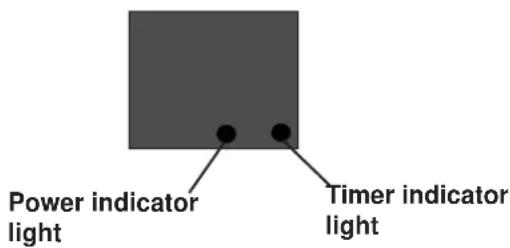
Power indicator light Timer indicator lightOPERATING MODES
COOL mode
- Press the "MODE" button until the "COOL" indicator light comes on.
- Press the UP or DOWN arrow buttons to select your desired room temperature. The temperature can be set within a range of 17^ C- 30^ C / 62^ F- 86^ F.
- Press the "FAN SPEED" button to choose the fan speed (remote control only).
DRY mode
-Press the "MODE" button until the "DRY" indicator light comes on.
-Under this mode, you cannot select a fan speed or adjust the temperature. The fan motor operates at LOW speed.
-Keep windows and doors closed for the best dehumidifying effect.
-Do not use the window hose under this mode.
AUTO mode (Remote control only)
- When you set the air conditioner in AUTO mode, it will automatically select cooling, or fan only operation depending on what temperature you have selected and the room temperature.
- The air conditioner will adjust the room temperature automatically to the temperature point set by you.
- Under AUTO mode, you cannot select the fan speed.
FAN operation
- Press the "MODE" button until the "FAN" indicator light comes on.
- (Remote control only) Press the "FAN SPEED" button to choose the fan speed (1 time for LOW, 2 times for HIGH, 3 times for AUTO-FAN).
- The temperature cannot be adjusted.
- Do not use the window hose in this mode.
TIMER operation (Remote control only)
- To initiate the "Auto-stop" program: When the unit is on, press the Timer button, the TIMER OFF indicator light will illuminate.
- To initiate the "Auto-start" program: When the unit is off, press the Timer button, the TIMER ON indicator light will illuminate.
- Press or hold the "UP" or "DOWN" buttons to change the Auto-time by 0.5 hour increments, up to 10 hours, then by 1 hour increments up to 24 hours. The control will count down the time remaining until the unit starts.
- The selected time will register in 5 seconds and the system will automatically revert back to display the previous temperature setting.
- Turning the unit ON or OFF at any time or adjusting the timer setting to 0.0 will cancel the Auto Start/Stop timed program.
- When a malfunction (E1, E2, E4 or P1) occurs, the Auto Start/Stop timed program will also be cancelled.
POWER OUTAGE
In the case of a power outage or interruption, the unit will automatically re-start with the default settings after the power is restored.
Wait 3 minutes before resuming operation
After the unit has stopped, it cannot operate for the first 3 minutes. This is to protect the unit. Operation will automatically start after 3 minutes.
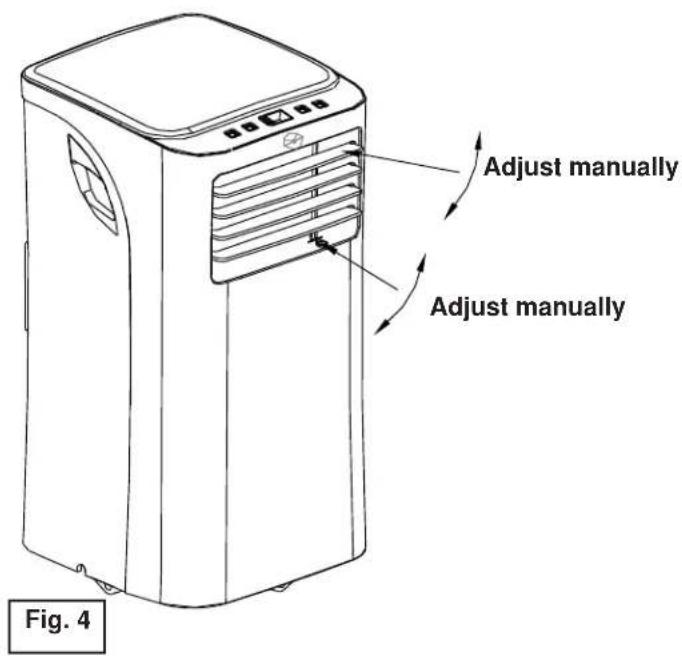
AIR FLOW DIRECTION ADJUSTMENT
Adjust the air flow direction manually (fig. 4):
-The louver can be set to the desired position manually.
-Do not place any heavy objects or other loads on the louver, doing so will cause damage to the unit.
-Ensure the louver is fully opened under heating operation.
text_image
Adjust manually Adjust manually Fig. 4
Installation Instructions
LOCATION
- The air conditioner should be placed on a firm foundation to minimize noise and vibration. For safe and secure positioning, place the unit on a smooth, level floor strong enough to support the unit.
- The unit has casters to aid placement, but it should only be rolled on smooth, flat surfaces. Use caution when rolling on carpeted surfaces. Use caution and protect floors when rolling over wood floors. Do not attempt to roll the unit over objects.
- The unit must be placed within reach of a properly rated grounded socket.
- Never place any obstacles around the air inlet or outlet of the unit.
- Allow at least 30 cm of space away from the wall for efficient air conditioning.
WINDOW SLIDER KIT INSTALLATION
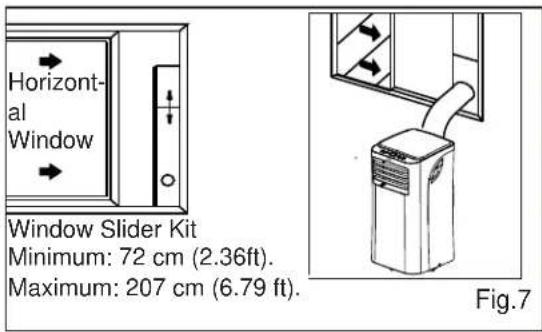
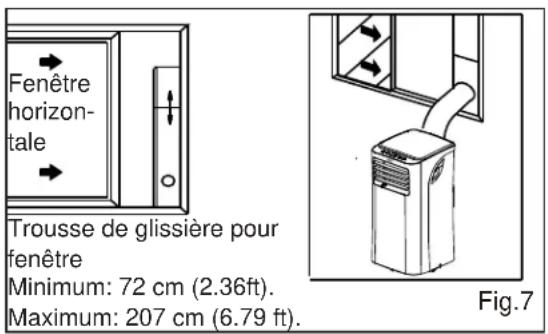
Your window slider kit has been designed to fit most standard vertical and horizontal window applications, however, it may be necessary for you to modify some aspects of the installation procedures for certain types of windows. Please refer to Fig. 6 and Fig. 7 for minimum and maximum window openings. The window slider kit can be fastened with a screw or pin (see Fig. 8).
NOTE: If the window opening is less than the mentioned minimum length of the window slider kit, cut the end without the hole in it short enough to fit in the window opening. Never cut out the hole in window slider kit (visit www.danby.com for general instruction videos).
text_image
30cm 30cm Fig.5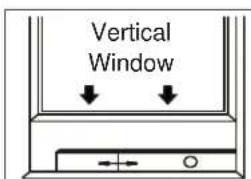
text_image
Vertical Window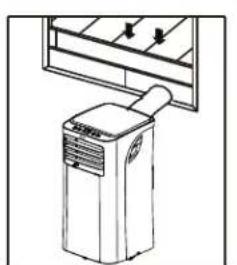
natural_image
Line drawing of an air conditioner unit with cooling fan and ventilation slots (no text or symbols)Window Slider Kit
Minimum: 72 cm (2.36ft).
Maximum: 207 cm (6.79 ft).
Fig.6
text_image
Horizontal Window Window Slider Kit Minimum: 72 cm (2.36ft). Maximum: 207 cm (6.79 ft). Fig.7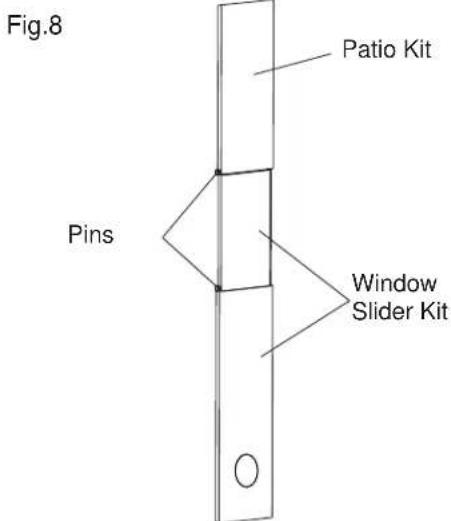
text_image
Fig.8 Patio Kit Pins Window Slider Kit
Installation Instructions
INSTALLATION IN A DOUBLE-HUNG SASH WINDOW
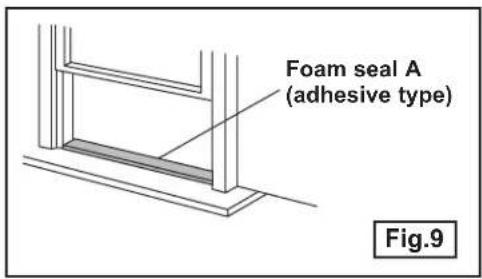
- Measure the adhesive foam seal to fit the windowsill. Then cut the foam seal to the proper length and attach it to the windowsill. Fig.9
- Adjust the length of the window slider kit to fit the width of the window.
Shorten the adjustable window kit to fit the width of the window if less than 28.3 inches. Open the window sash and place the window slider kit on the windowsill. Fig.10 - Cut the foam seal (adhesive type) to the proper length and attach it on the top of the window. Shown in Fig.11
- Close the window sash securely against the window.
- Cut the foam seal to an appropriate length and seal the open gap between the top window sash and outer window sash. Shown in Fig.12.
text_image
Foam seal A (adhesive type) Fig.9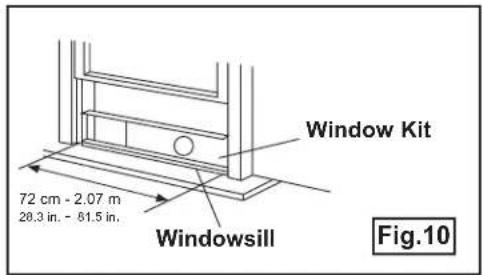
text_image
Window Kit 72 cm - 2.07 m 28.3 in. - 81.5 in. Windowsill Fig.10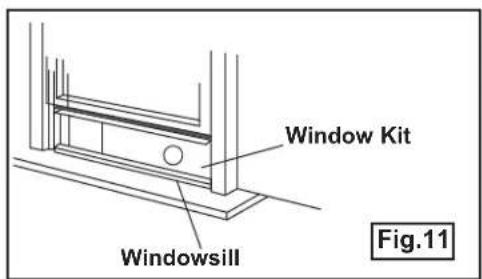
text_image
Window Kit Windowsill Fig.11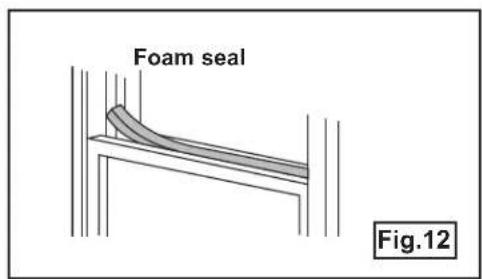
text_image
Foam seal Fig.12
Installation Instructions
INSTALLATION IN A SLIDING SASH WINDOW
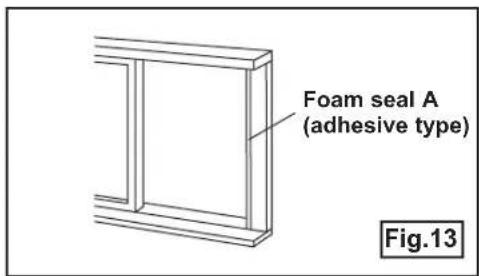
- Measure the adhesive foam seal to fit the windowsill. Cut the foam seal (adhesive type) to the proper length and attach it to the window frame. See fig. 13.
- Adjust the length of the window slider kit according to the height of the window, shorten the adjustable window kit if the height of the window slider is less than 28.3 inches. Open the window sash and place the window slider kit on the windowsill. See fig. 14.
- Cut the foam seal (adhesive type) to the proper length and attach it to the top of the window. Shown in fig. 15.
- Close the sliding sash securely against the window.
- Cut the foam seal to an appropriate length and seal the open gap between the top window sash and outer window sash. Shown in fig. 16.
text_image
Foam seal A (adhesive type) Fig.13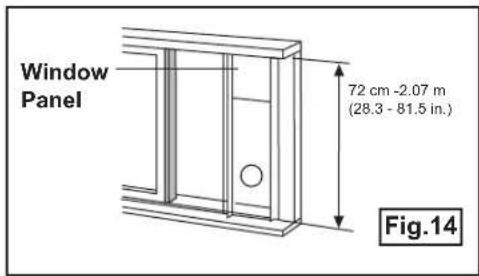
text_image
Window Panel 72 cm -2.07 m (28.3 - 81.5 in.) Fig.14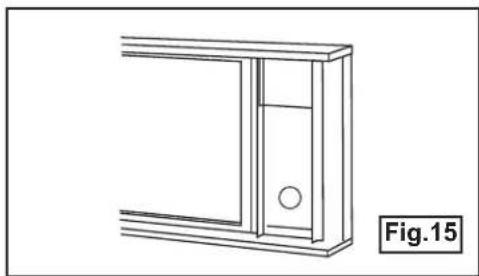
natural_image
Technical line drawing of a mechanical bracket or panel with a circular hole, labeled Fig.15 (no text or symbols on the diagram itself)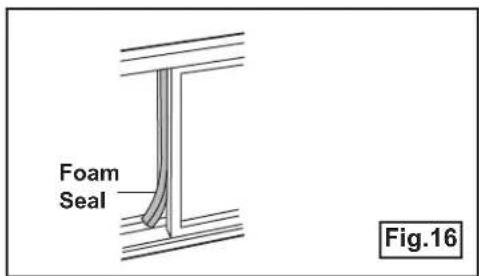
text_image
Foam Seal Fig.16
Installation Instructions
EXHAUST HOSE INSTALLATION
The exhaust hose and adaptor must be installed or removed in accordance with the usage mode.
| COOL or AUTO mode Install | |
| FAN or DEHUMIDIFY mode Remove |
-
Install the window exhaust adaptor onto the exhaust hose as shown in Fig. 18. Refer to the previous pages for window kit installation.
-
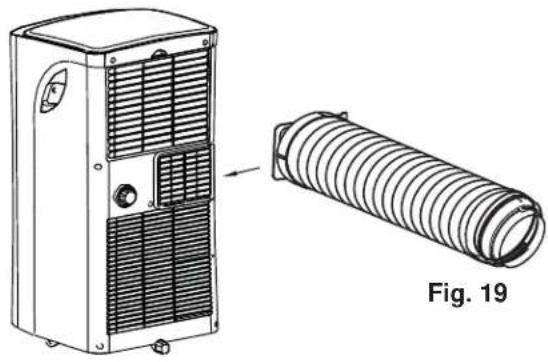
Insert the exhaust hose into the rear air outlet opening along the arrow direction (see fig. 19).
- The hose can be compressed or extended moderately according to the installation requirement, but it is desirable to keep the hose length to a minimum.
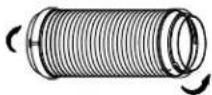
Fig. 18

IMPORTANT
DO NOT OVER BEND THE HOSE
natural_image
Technical line drawing of a portable air conditioner unit and its corresponding cylindrical tube assembly (no text or symbols)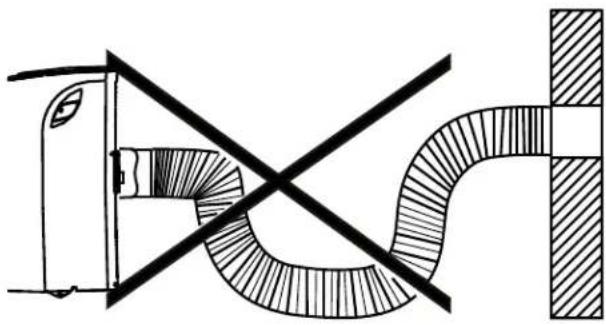
natural_image
Pure technical diagram of a pipe connection with no text, numbers, or symbolsWATER DRAINAGE
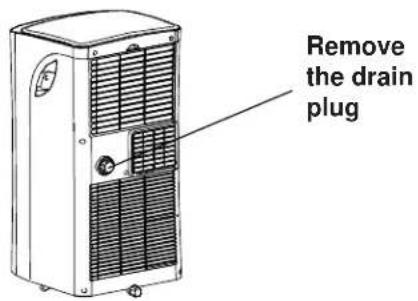
- During dehumidifying modes, remove the upper drain plug from the back of the unit, install the drain connector (5/8 in. universal female connector) with 3/4 in. hose (not included). For the models without a drain connector, just attach the drain hose to the hole. Place the open end of the hose directly over the drain area in your basement floor. Please refer to Fig. 22.
NOTE: Make sure the hose is secure so there are no leaks. Direct the hose toward the drain, making sure that there are no kinks that will stop the water from flowing. Place the end of the hose into the drain and make sure the end of the hose is down to let the water flow smoothly (see Fig. 22). Never raise it.
- When the water level of the bottom tray reaches a predetermined level, the air conditioning/dehumidification process will immediately stop, however, the fan motor will continue to operate (this is normal). Carefully move the unit to a drain location, remove the bottom drain plug and let the water drain away.
NOTE: When operating or draining water, always protect carpeting or floors from possible water spillage.
NOTE: Be sure to reinstall the bottom drain plug before using the unit.
Fig. 22
text_image
Remove the drain plug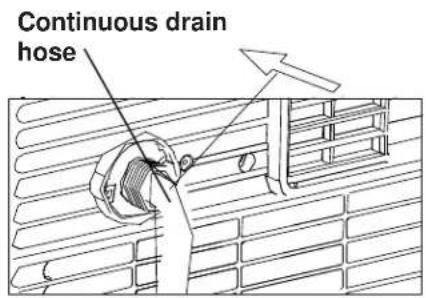
text_image
Continuous drain hose
text_image
Bottom drain plug
IMPORTANT
- Be sure to unplug the unit before cleaning or servicing.
- Do not use gasoline, paint thinner or other chemicals to clean the unit.
- Do not wash the unit directly under a tap or using a hose. It may cause electrical damage.
- If the power cord is damaged, contact the service depot immediately.
AIR FILTER
Clean the air filter at least once every two weeks. Accumulation of dust will hinder fan operation.
REMOVAL
Lift the upper fl iter out in the direction of the arrow (Fig. 25).
CLEANING
- Wash the air filter by submerging it gently in warm water (about 40^ C / 104^ F) with a neutral detergent.
- Rinse the fi Iter and let it dry.
REINSTALL
Install the upper air filter after cleaning, (see Fig. 26). *Filters should dry before installing*
UNIT ENCLOSURE
Use a lint-free cloth soaked with neutral detergent to clean the unit enclosure, be sure to wring the cloth of excess water. Finish by wiping with a clean dry cloth.
LONG-TERM STORAGE
- Remove the rubber plug at the back of the unit and attach a hose to the drain outlet. Place the open end of the hose directly over the drain area in your basement floor.
- Remove the plug from the bottom drain outlet, this means that all the water in the bottom drain tray will drain out.
- Keep the appliance running on FAN mode for half a day in a warm room to dry the appliance inside and prevent mold formation.
- Turn off the appliance and unplug it, wrap the cord and bundle it with tape.
- Remove the batteries from the remote controller.
- Clean the air filter and reinstall it.
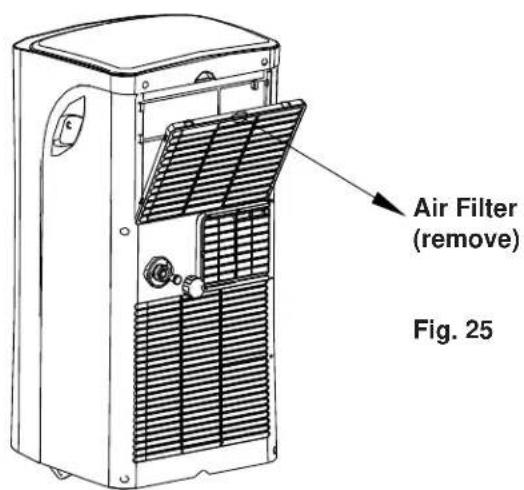
text_image
Air Filter (remove) Fig. 25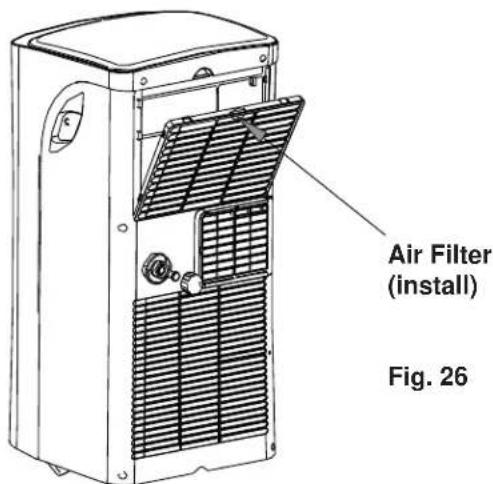
text_image
Air Filter (install) Fig. 26Occasionally, a minor problem may arise, and a service call may not be necessary- use this troubleshooting guide for a possible solution. If the unit continues to operate improperly, call an authorized service depot or Danby's Toll Free Number for assistance.
Tel: 1-800-26-Danby ^® (1-800-263-2629)
| PROBLEM POSSIBLE CAUSE SOLUTION | ||
| Unit does not start when pressing on/off button | P1 appears in the display windowRoom temperature is lower than the set temperature. (Cooling mode) | Drain the water in the bottom trayReset the temperature |
| Not cool enough• The windows or doors in the room are not closedThere are heat sources inside the roomExhaust air hose is not connected or blockedTemperature setting is too highAir fi Iter is blocked by dust | Make sure all the windows and doors are closedRemove the heat sources if possibleConnect the hose and make sure it can function properlyDecrease the set temperatureClean the air fi Iter | |
| Noisy or vibration• The ground is not level or not fi at enough | Place the unit on a fi at, level ground if possible | |
| Gurgling sound• The sound comes from the fl owing of the refrigerant inside the air conditioner | It is normal | |
DISPOSAL
Check for local regulatory compliance regarding the approved and safe disposal of this appliance.
LIMITED IN-HOME APPLIANCE WARRANTY
This quality product is warranted to be free from manufacturer's defects in material and workmanship, provided that the unit is used under the normal operating conditions intended by the manufacturer.
This warranty is available only to the person to whom the unit was originally sold by Danby Products Limited (Canada) or Danby Products Inc. (U.S.A.) (hereafter "Danby") or by an authorized distributor of Danby, and is non-transferable.
TERMS OF WARRANTY
Plastic parts, are warranted for thirty (30) days only from purchase date, with no extensions provided.
| First year | During the first twelve (12) months, any functional parts of this product found to be defective, will be repaired or replaced, at warrantor's option, at no charge to the ORIGINAL purchaser. |
| To obtain service | Danby reserves the right to limit the boundaries of “In Home Service” to the proximity of an Authorized Service Depot. Any appliance requiring service outside the limited boundaries of “In Home Service”, it will be the consumer's responsibility to transport the appliance (at their own expense) to the original retailer (point of purchase) or a service depot for repair. See “Boundaries of In Home Service” below. Contact your dealer from whom your unit was purchased, or contact your nearest authorized Danby service depot, where service must be performed by a qualified service technician. If service is performed on the units by anyone other than an authorized service depot, or the unit is used for commercial application, all obligations of Danby under this warranty shall be void. |
| Boundaries of in-home service | If the appliance is installed in a location that is 100 kilometres (62 miles) or more from the nearest service centre your unit must be delivered to the nearest authorized Danby Service Depot, as service must only be performed by a technician qualified and certified for warranty service by Danby. Transportation charges to and from the service location are not protected by this warranty and are the responsibility of the purchaser. |
Nothing within this warranty shall imply that Danby will be responsible or liable for any spoilage or damage to food or other contents of this appliance, whether due to any defect of the appliance, or its use, whether proper or improper.
EXCLUSIONS
Save as herein provided, by Danby, there are no other warranties, conditions, representations or guarantees, express or implied, made or intended by Danby or its authorized distributors and all other warranties, conditions, representations or guarantees, including any warranties, conditions, representations or guarantees under any Sale of Goods Act or like legislation or statute is hereby expressly excluded. Save as herein provided, Danby shall not be responsible for any damages to persons or property, including the unit itself, howsoever caused or any consequential damages arising from the malfunction of the unit and by the purchase of the unit, the purchaser does hereby agree to indemnify and hold harmless Danby from any claim for damages to persons or property caused by the unit.
GENERAL PROVISIONS
No warranty or insurance herein contained or set out shall apply when damage or repair is caused by any of the following:
1) Power failure.
2) Damage in transit or when moving the appliance.
3) Improper power supply such as low voltage, defective house wiring or inadequate fuses.
4) Accident, alteration, abuse or misuse of the appliance such as inadequate air circulation in the room or abnormal operating conditions (extremely high or low room temperature).
5) Use for commercial or industrial purposes (i.e., If the appliance is not installed in a domestic residence).
6) Fire, water damage, theft, war, riot, hostility, acts of God such as hurricanes, floods etc.
7) Service calls resulting in customer education.
8) Improper Installation (i.e., building-in of a free standing appliance or using an appliance outdoors that is not approved for outdoor application). Proof of purchase date will be required for warranty claims; so, please retain bills of sale. In the event warranty service is required, present this document to our AUTHORIZED SERVICE DEPOT.
Warranty Service
In-home
Danby Products Limited
PO Box 1778, Guelph, Ontario, Canada N1H 6Z9
Telephone: (519) 837-0920 FAX: (519) 837-0449
1-800-263-2629
07/14
Danby Products Inc.
PO Box 669, Findlay, Ohio, U.S.A. 45840
Telephone: (419) 425-8627 FAX: (419) 425-8629
text_image
Diagram of a portable air conditioner unit with numbered parts labeled 1 through 6text_image
Technical diagram of a multi-chamber air conditioner unit with numbered labels pointing to components.text_image
30cm 30cm Fig.5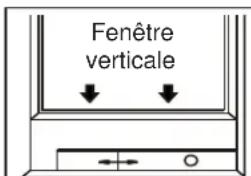
natural_image
Line drawing of a portable air conditioner unit with airflow direction indicators (no text or symbols)Fig.6
natural_image
Technical line drawing of a cabinet or enclosure with a circular opening and side panel (no text or symbols)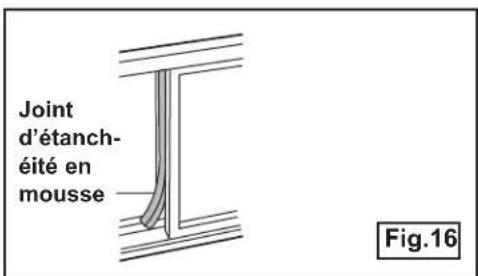
natural_image
Technical line drawing of a portable air conditioner unit next to a coiled hose component, labeled Fig. 19 (no text or symbols on the diagram itself)
natural_image
Pure technical diagram showing a pipe connection with no text, numbers, or symbolsnatural_image
Technical line drawing of mechanical components including a clamp, bracket, and housing (no text or symbols)Danby Products Limited
PO Box 1778, Guelph, Ontario, Canada N1H 6Z9
All repair parts are available for purchase or special order when you visit your nearest service depot. To request service and/or the location of the service depot nearest you, call the TOLL FREE number.
When requesting service or ordering parts, always provide the following information:
- Product Type
- Model Number
- Part Number
- Part Description