P302I23NV - Cooker BERTAZZONI - Free user manual and instructions
Find the device manual for free P302I23NV BERTAZZONI in PDF.


| Product type | Induction cooktop |
| Brand | Bertazzoni |
| Model | P302I23NV |
| Number of cooking zones | 2 zones |
| Installed electrical power | 3500 W |
| Supply voltage | 220-240 V~ 50/60 Hz |
| Product dimensions (W x D x H) | 300 x 520 x 60 mm |
| Cutout dimensions (W x D) | 265 x 495 mm |
| Maximum power per zone (front/rear) | 1200/1500 W (Boost 1500/2300 W) |
| Boost function | Yes, activation by dedicated key (max 5 min duration) |
| Timer function | Yes, up to 99 minutes, with automatic shut-off or alarm |
| Child lock | Yes, control lock (display shows Lo) |
| Automatic safety shut-off | Yes, according to power level (240 min for levels 1-3, up to 90 min for level 9) |
| Pan detection | Automatic, shut-off after 1 min without suitable pan |
| Overheat protection | Yes, internal temperature sensor |
| Surface material | Glass ceramic |
| Control type | Touch controls (slider + keys) |
| Electrical connection | Single-phase, requires omnipolar circuit breaker with 3 mm opening |
| Cleaning | Smooth surface, mild cleaner and damp cloth (no steam cleaner) |
| Maximum power adjustment (optional) | 1.5 kW / 2.8 kW / 3.5 kW (adjustable by a technician) |
Frequently Asked Questions - P302I23NV BERTAZZONI
User questions about P302I23NV BERTAZZONI
0 question about this device. Answer the ones you know or ask your own.
Ask a new question about this device
Download the instructions for your Cooker in PDF format for free! Find your manual P302I23NV - BERTAZZONI and take your electronic device back in hand. On this page are published all the documents necessary for the use of your device. P302I23NV by BERTAZZONI.
USER MANUAL P302I23NV BERTAZZONI
| BERTAZZONIISTRUZIONI PER L’INSTALLAZIONE, ED USOPIANI A INDUZIONE |
| BERTAZZONIINSTALLATION AND USE INSTRUCTIONSINDUCTION COOKTOPS |
| BERTAZZONIMANUEL D’INSTALLATION ET D’UTILISATIONPLAQUES DE CUISSON À INDUCTION |
| BERTAZZONIAANWIJZINGEN VOOR DE INSTALLATIE EN HET GEBRUIKINDUCTIEKOOKPLATEN |
| BERTAZZONIINSTALLATIONS- OCH BRUKSANVISNINGARINDUKTIONSHÄLLAR |
| BERTAZZONIINSTALLATIONS- OG BETJENINGSVEJLEDNINGINDUKTIONSKOGEPLADER |
| BERTAZZONIOΔΗΓΙΕΣ ΕΓΚΑΤΑΣΤΑΣΗΣ ΚΑΙ ΧΡΗΣΗΣΕΠΑΓΩΓΙΚΕΣ ΕΣΤΙΕΣ |

P302I23NV
natural_image
Pure electrical circuit lines without any symbolsPannello comandi
natural_image
Diagram of a steam locomotive with wheels and air flow indicators (no text or symbols)pentola di acciaio
natural_image
Three identical cooking pots with crossed-out X marks, no text or symbols presentnatural_image
Four identical illustrations of a cooking pot with crossed-out handles, shown in different orientations (no text or symbols)natural_image
Line drawing of a cooking pot on a stand (no text or symbols)| L (mm) | W (mm) | H (mm) | D (mm) | A (mm) | B (mm) | X (mm) |
| 300 | 520 | 60 | 55 | 265 | 495 | 50 min. |
fig. 1
natural_image
Diagram of a layered electronic component with a labeled pin [01] and a circular connector (no text or symbols on the component itself)01
[04] ×1
natural_image
Symbol of a trash bin with crossed lines indicating no waste or discharge, and a solid black rectangle below (no text or labels)Your safety is important to us. Please read this information before using your cooktop.
- The appliance must not be used by persons (including children) with reduced physical, sensory or mental capabilities, or lack of experience and knowledge, unless they have been given supervision or instruction. Make sure that children do not to play with the appliance.
- Warning: Hob surfaces made of glass-ceramic or similar materials protect the live parts, so switch off the appliance to avoid the possibility of electric shock if the surface is cracked.
• Warning: Do not use a steam cleaner.
- Do not place metal objects such as knives, forks, spoons and lids on the hob surface since they may become hot
- After use, switch off the hob element with its control and do not rely on the pan detector.
- The appliance is not intended to be operated by means of an external timer or separate remote-control system.
- Fire hazard: Do not store items on the cooking surfaces.
- CAUTION: The cooking process has to be supervised. A short term cooking process has to be supervised continuously.
- WARNING: Cooking with fat or oil on an unattended hob can be dangerous and may result in fire.
- If the power cable is damaged, it must be replaced by the manufacturer, its service agent or other similarly qualified persons in order to avoid a hazard.
- This appliance can be used by children aged from 8 years and above and persons with reduced physical, sensory or mental capabilities or lack of experience and knowledge if they have been given supervision or instruction concerning use of the appliance in a safe way and understand the hazards involved. Children must not play with the appliance. Children may not carry out cleaning and user maintenance without supervision.
- WARNING: The appliance and its accessible parts become hot during use.
- Take care to avoid touching the heating elements.
- Keep children less than 8 years of age away unless continuously supervised.
- WARNING: Cooking with fat or oil on an unattended hob can be dangerous and may result in fire.
- NEVER try to extinguish a fire with water, but switch off the appliance and then cover the flames e.g. with a lid or a fire blanket.
- CAUTION: The cooking process has to be supervised. A short term cooking process has to be supervised continuously.
- WARNING: Fire hazard: do not store items on the cooking surfaces.
- WARNING: Use only hob guards designed by the cooking appliance manufacturer or indicated as being suitable in the appliance manufacturer's instructions for use, or hob guards incorporated into the appliance. The use of inappropriate guards can cause accidents.
- The power cable must be inaccessible after installation.
Congratulations on the purchase of your new Induction Hob.
We recommend that you spend some time to read this Instruction / Installation Manual in order to fully understand how to install it correctly and operate it.
For installation, please read the installation section.
Read all the safety instructions carefully before use and keep this Instruction / Installation Manual for future reference.
Product Overview
Top View
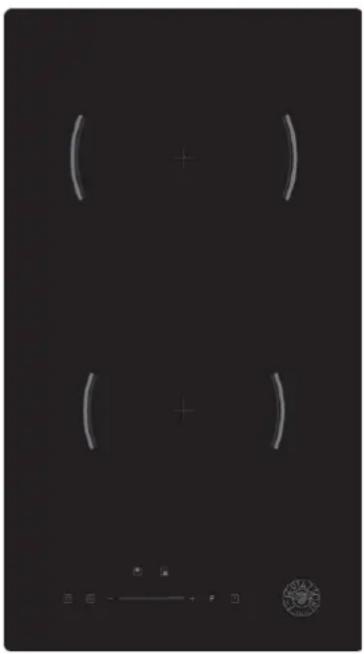
natural_image
Pure electrical circuit lines without any symbolsUser interface
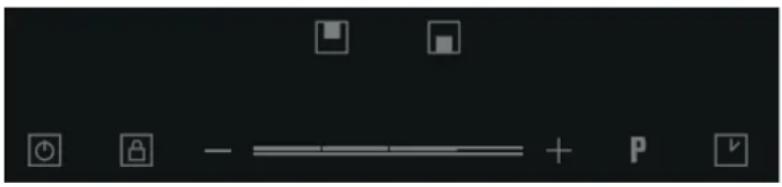
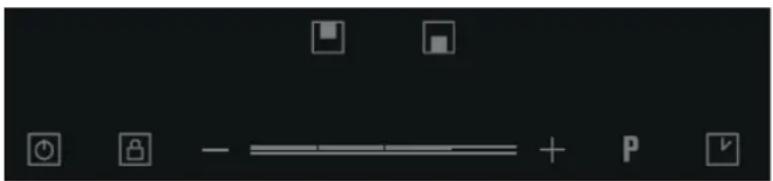
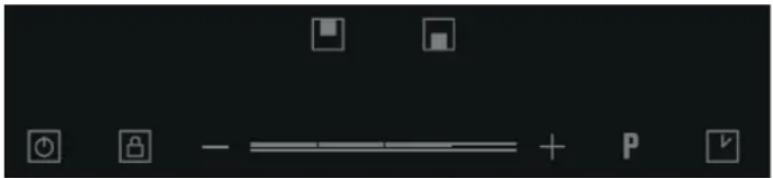
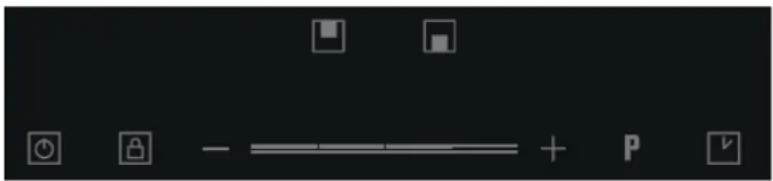
| Reference | Description |
A  | Zone select keys |
B  | Child lock key |
| C [04DT] | ON/OFF key |
| D Power/Timer adjustment slider[408W] | |
| E [30XD] | Boost control key |
F  | Timer key |
Heating Zone Power
| Heating Zone | Max. Power (220–240V - 50/60Hz) |
| [C822] | 1200/1500W (Booster) |
 | 1800/2300W (Booster) |
| Total Rating Power | 3500W |
A Word on Induction Cooking
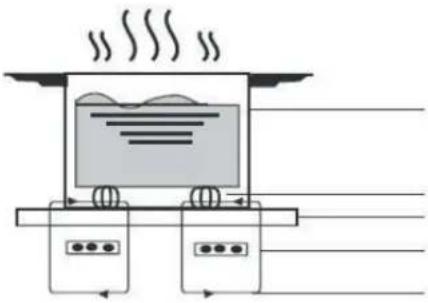
Induction cooking is a safe, advanced, efficient, and economical cooking technology. It works by using electromagnetic vibrations to generate heat directly in the pan, rather than indirectly through heating the glass surface. The glass only becomes hot because the pan eventually warms it up.
natural_image
Simple line drawing of a steam machine with cooling fans and heat dissipation lines (no text or symbols)iron pot
magnetic circuit ceramic glass plate induction coil induced currents
Before using your New Induction Hob
- Read this guide, taking special note of the 'Safety Warnings' section.
- Remove any protective film that may still be on your induction hob.
Using the Touch Controls
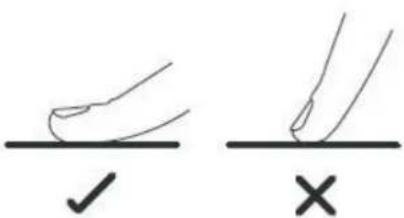
- The controls respond to touch, so you don't need to apply any pressure.
- Use the ball of your finger, not its tip.
- You will hear a beep each time a touch is registered.
- Make sure the controls are always clean and dry, and that there are no objects (e.g. a utensil or cloth) covering them. Even a thin film of water may make the controls difficult to operate.
Choosing the right Cookware

Only use cookware with a base suitable for induction cooking. Look for the induction symbol on the packaging or on the bottom of the pan.
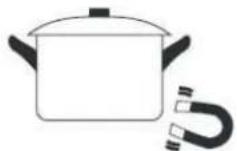
- You can check whether your cookware is suitable by carrying out a magnet test. Move a magnet towards the base of the pan. If it is attracted, the pan is suitable for induction.
• If you do not have a magnet:
-
Put some water in the pan you want to check.
-
If U does not flash on the display and the water is heating, the pan is suitable.
- Cookware made from the following materials is unsuitable: pure stainless steel, aluminium or copper without a magnetic base, glass, wood, porcelain, ceramic, and earthenware.
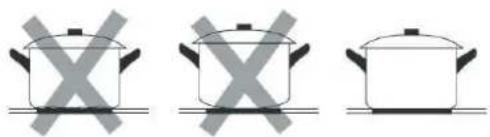
Do not use cookware with jagged edges or a curved base.
natural_image
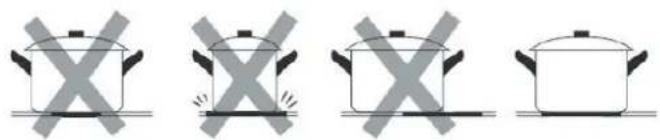
Three identical cooking pots with crossed-out X marks, no text or symbols presentMake sure that the base of your pan is smooth, sits flat against the glass, and is the same size as the cooking zone. Use pans with diameters as large as the graphic on the selected zone. A slightly wider pan will use energy most efficiently. Efficiency may be less than expected if you use a smaller pan. The hob may not detect a pan smaller than 140 mm. Always centre your pan on the cooking zone.
natural_image
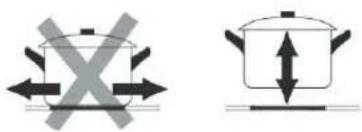
Four identical cooking pots with crossed-out X marks, shown in sequence (no text or symbols)Always lift pans off the induction hob - do not slide them as they may scratch the glass.
Using your Induction Hob
To start cooking
- Touch the ON/OFF key (C) for 3 seconds.
After power on, the buzzer beeps once; all displays show " - " to indicate that the induction hob has entered standby mode.
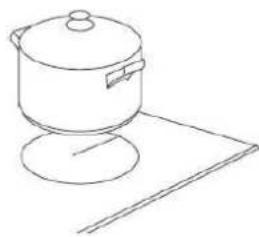
- Place a suitable pan on the cooking zone that you wish to use.
- Make sure the bottom of the pan and the surface of the cooking zone are clean and dry.
natural_image
Line drawing of a cooking pot on a stand (no text or symbols)-
Press the zone select key (A) for the heating zone with the pan on it. The selected O symbol will remain fully lit.
-
Adjust the heat setting by touching the slider control (D).
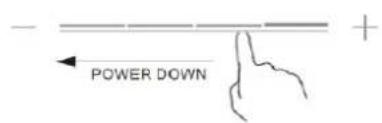
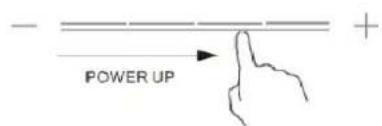
- If you do not choose a heat setting within 1 minute, the induction hob will automatically switch off. In this case, you will need to start again at step 1.
• You can modify the heat setting at any time during cooking.
If the display flashes

alternately with the heat setting
This means that:
- you have not placed a pan on the correct cooking zone or,
- the pan you are using is not suitable for induction cooking or,
- the pan is too small or not properly centred on the cooking zone.
No heating takes place unless there is a suitable pan on the cooking zone. The display will automatically turn off after 1 minute if no suitable pan is placed on it.
When you have finished cooking
- Touching the relevant zone select key (A) that you wish to switch off.
- Press the slider control (D) at the "O" level,
- Beware of hot surfaces
H" will show which cooking zone is hot to the touch. It will disappear when the surface has cooled down to a safe temperature. You can save energy by using a hotplate that is still hot if you want to heat more pans.
Using the Boost function
Activating the boost function
- Select the heating zone by Touch the zone select key (A) to select the heating zone.
- Touch the boost control key (E); the zone indicator will show "P." and the power will reach Max.
Cancelling the Boost function
- Touch the relevant zone select key (A) that you wish to cancel.
- Touch the slider control (D) to cancel the Boost function; the cooking zone will then revert to level 9.
- This function can work in any cooking zone.
- The cooking zone returns to level 9 after 5 minutes.
Using the Child Lock Function
- You can lock the controls to prevent unintentional use (for example, children accidentally turning the cooking zones on).
- When the controls are locked, all controls except the OFF control are disabled.
To lock the controls
Touch the keylock control (B) for 3 seconds. The timer indicator will show "Lo"
To unlock the controls
- Make sure the Induction hob is turned on.
- Touch and hold the keylock control (B) for a while
- You can now start using your Induction hob.

When the hob is in lock mode, all controls are disabled except OFF. You can always turn the hob off with the OFF control in an emergency, but you must unlock the hob before any further operations
Over-Temperature Protection
A temperature sensor has been installed to monitor the temperature inside the Induction hob. When an excessive temperature is detected, the Induction hob will stop operation automatically.
Detection of Small Articles
When an unsuitable size or non-magnetic pan (e.g. aluminium), or some other small item (e.g. knife, fork, key) has been left on the hob, the hob automatically goes into standby in 1 minute. The fan will continue cooling the induction hob for a further 1 minute.
Auto Shutdown Protection
Auto shutdown is a safety function to protect your induction hob. It shuts down automatically if you ever forget to turn off your hob. The default working times for various power levels are shown in the below table:
| Power level | 1~3 | 4~6 | 7~8 | 9 |
| Default working time (min) | 240 | 180 | 120 | 90 |
When the pan is removed, the induction hob stops heating immediately and the hob will automatically switch off after 2 minutes.

People with a heart pacemaker should consult their doctor before using this unit.
Auto Pan Detect
This function automatically detects where the pot or pan is located. The bridge functions is activated automatically, depending on the size of the pot or pan. You just need to power up with the slider.
Using the Timer
You can use the timer in two different ways:
- You can use it as a minute minder. In this case, the timer will not turn any cooking zone off when the set time is up.
- You can set it to turn one cooking zone off when set time is up.
• You can set the timer for up to 99 minutes.
Using the Timer as a Minute Minder
Without selecting a cooking zone
- Make sure the cooktop is turned on.
Note: you can use the minute minder even without selecting a cooking zone. -
Touch the Timer key (F). The minder indicator will start flashing "10", and you can set the timer at this point.
-
Use the "+" or "-" keys to set the time from 1 to 99 minutes.
Hint: Touch the "-" or "+" timer keys once to decrease or increase by 1 minute.
Touch and hold the "-" or "+" timer keys to decrease or increase by 10 minutes.
Touching "-" and "+" together cancels the timer, and the timer indicator will turn off.
- When the time is set, it will begin to count down immediately. The display will show the remaining time.
Note: the minute minder only works in the normal mode.
Setting the timer to turn one or more cooking zones off If the timer is set on one zone:
- Touch the zone select key (A) to select the cooking zone.
- Press the Timer key (F); the minder indicator will start flashing "10" and you can set the timer at this point.
-
Use the "+" or "-" keys to set the time from 1 to 99 minutes.
Hint: Touch the "-" or "+" timer keys once to decrease or increase by 1 minute. Touch and hold the "-" or "+" timer keys to decrease or increase by 10 minutes. Touching "-" and "+" together cancels the timer, and the timer indicator will turn off. -
When the time is set, it will begin to count down immediately. The display will show the remaining time and the timer indicator will flash for 5 seconds.
NOTE: The red dot next to the power level indicator will light to indicate that zone is selected.

- When the cooking timer has elapsed, the corresponding cooking zone will switch off automatically.
Other cooking zones will keep operating if they were turned on previously.
- When simultaneously using "the timer as an alarm" and "the timer to switch off the zones", the display will show the remaining alarm time as its first priority. Press the cooking zone to show the remaining time of the switch-off timer.
Power Limitation Adjustment Instruction (1.5kW / 2.8kW / 3.5kW)
ATTENTION! : Only the authorized service representative may make this adjustment!
Make sure the hob is switched off. The required power level can be set by carrying out the following steps within 60 seconds:
| Step | Control Panel Operation | Display |
| 1 | 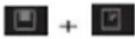 When the hob is turned off, press the zone select key and timer key When the hob is turned off, press the zone select key and timer key | 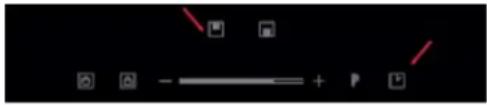 |
| 2 | The LED will show |  |
| 3 | Press the zone select key to choose the power limitation. | Select 1.5/2.8/3.5kW alternative |
| 4 | 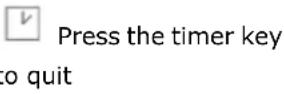 | Quit setting |
Failure Display and Inspection
If a fault occurs, the induction hob will enter the protection state automatically and display the corresponding error codes:
| Error Message | Possible Cause | What to do |
| U | No pan or pan unsuitable; | Replace the pan: |
| ER03 | Water or pan on the glass over the control | Clean the user interface |
| Fi | The connection between the display board and the mainboard has failed | 1. Connection cable not plugged in properly or defective;2. Replace the coil sensor if the connection cable is Ok;3. Replace the mainboard or power if the coil sensor is OK. |
| F3E | Coil temperature sensor failure. (in the cooking zone for which the indicator is showing "E") | Replace the coil sensor |
| F4E | Mainboard temperature sensor failure. (in the cooking zone for which the indicator is showing "E") | Replace the mainboard |
| EIE | Temperature sensor of the ceramic glass plate is high | Please restart after the induction hob has cooled down. |
| E2 E | Temperature sensor of the IGBT is high | Please restart after the induction hob has cooled down. |
| E3 E | Abnormal supply voltage (too high) | Please check that the power supply is normal;Power on when the power supply is normal. |
| E4 E | Abnormal supply voltage (too low) | Please check that the power supply is normal;Power on when the power supply is normal. |
| E5 E | Temperature sensor failure (in the cooking zone for which the indicator is showing "E") | Connection cable not plugged in properly or defective assembly; |
The above are causes and solutions of the most common failures.
Do not disassemble the unit by yourself to avoid any hazards and damage to the induction hob, and please contact the supplier.
Technical Specifications
| Cooking Zones | 2 Zones |
| Supply Voltage | 220–240V~ |
| Installed Electric Power | 3500W |
| Product Size LxWxH (mm) | 300x520x60 |
| Building-in Dimensions AxB (mm) | 265x495 |
Weight and Dimensions are approximate. We continually strive to improve our products, so we may change specifications and designs without prior notice.
Installation
Choosing installation equipment
Cut out the work surface according to the sizes shown in the drawing.
Leave a space of at least 5 cm around the hole for the purpose of installation and use.
Make sure the work surface is at least 30 mm thick. Please select a heat-resistant work surface material to avoid extensive deformation due to the heat radiated by the hotplate.
As shown below:
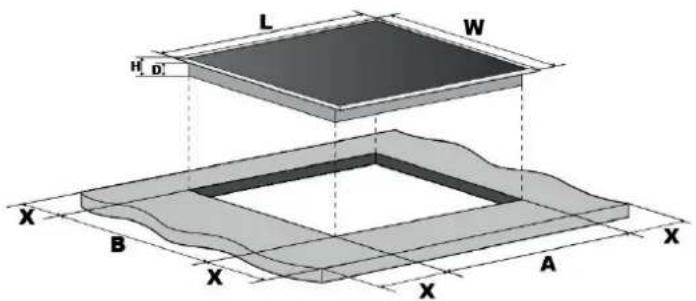
| L(mm) | W(mm) | H(mm) | D(mm) | A(mm) | B(mm) | X(mm) |
| 300 | 520 | 60 | 55 | 265 | 495 | 50 min. |
fig. 1
natural_image
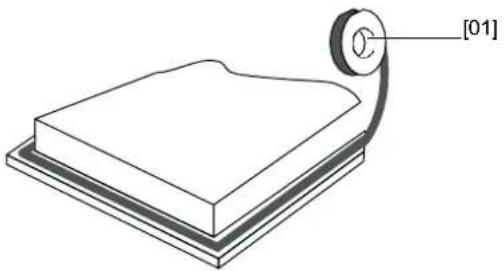
Diagram of a 3D object with a circular component labeled [01] attached to its top surface (no text or symbols on the object itself)01
[04] ×1
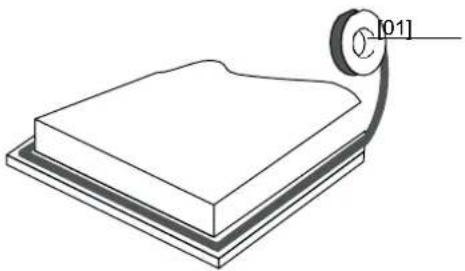
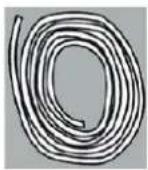
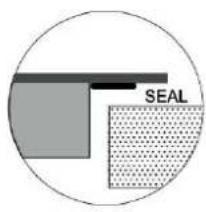
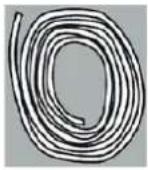
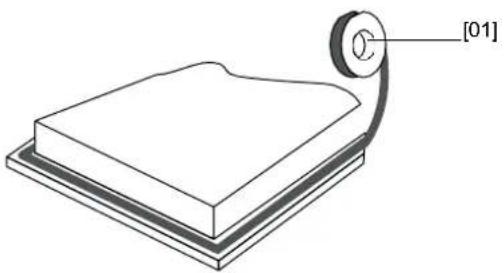
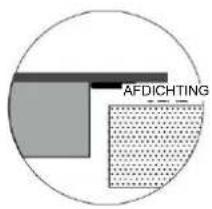
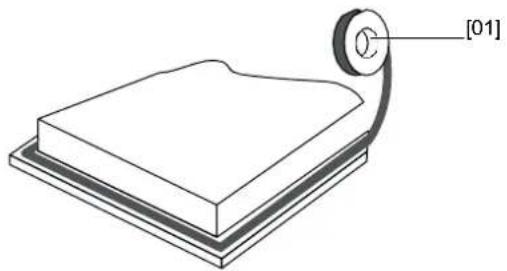
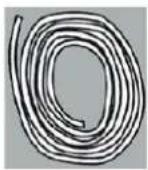
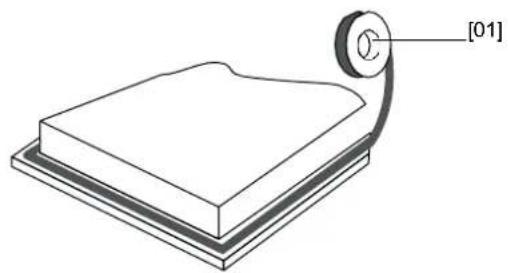
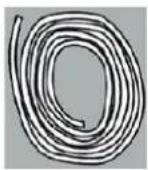
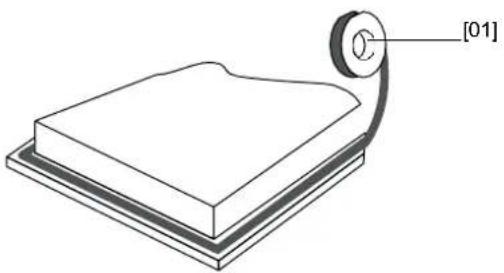
Stretch out the supplied seal along the bottom edge of the hob, ensuring the ends overlap.
02
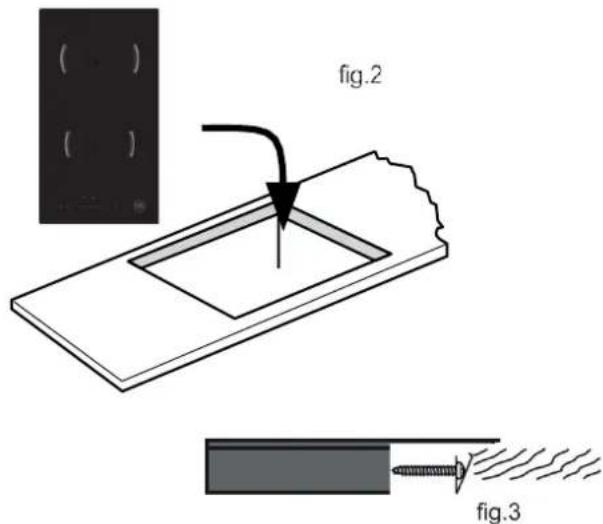
Do not use adhesive to fix the hob into the worktop.
Once the seal is fitted, position the hob into the cut-out in the worktop. Apply gentle downwards pressure on the hob to push it into the worktop and ensure a good seal around the outer edge (fig. 3)
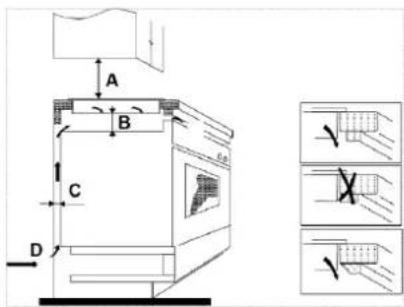
Under all circumstances, make sure the induction hob is well ventilated and that the air inlet and outlet are not blocked. Ensure the induction hob is in good working condition as shown below.

Note: Leave a safety distance of at least 700 mm between the hotplate and the cupboard above the hotplate.
If over the hob a hood is installed, keep as reference the distance indicated into the hood user manual.
Before installing the hob, make sure that
- the work surface is square and level, and no structural members interfere with the space requirements
- the work surface is made of heat-resistant material
- if the hob is installed above an oven, the oven has a built-in cooling fan
- the installation will comply with all clearance requirements and applicable standards and regulations
- a suitable isolating switch providing full disconnection from the mains power supply is incorporated into the permanent wiring, and is installed and positioned in accordance with the local wiring rules and regulations.
The isolating switch must be of an approved type and provide a 3 mm contact separation (air gap) on all poles (or all active [phase] conductors if the local wiring rules allow for this variation of the requirements)
- the customer will be able to access the isolating switch easily with the hob installed
- you consult local building authorities and by-laws if in doubt regarding installation
- you use heat-resistant finishes that are easy to clean (such as ceramic tiles) for the wall surfaces surrounding the hob.
After installing the hob, make sure that
- the power supply cable is not accessible through cupboard doors or drawers
- there is adequate flow of fresh air from outside the cabinetry to the base of the hob
- if the hob is installed above a drawer or cupboard space, a thermal protection barrier is installed below the base of the hob
- the customer can easily access the isolating switch
Cautions
- Only qualified personnel or technicians may install the induction hotplate. Our professionals at your service. Please never carry out the operation by yourself.
- Do not install the hob directly above a dishwasher, fridge, freezer, washing machine or clothes dryer, as the humidity may damage the hob electronics
- Install the induction hotplate in such a way as to ensure good heat radiation to enhance its reliability.
- The wall and induced heating zone above the table surface must be heat resistant.
- To avoid any damage, the sandwich layer and adhesive must be heat resistant.
Connecting the hob to the mains power supply

Only a suitably qualified person may connect this hob to the mains power supply. Before connecting the hob to the mains power supply, check that:
- the domestic wiring system is suitable for the power drawn by the hob.
- the voltage matches the value given in the rating plate
- the power supply cable sections can withstand the load specified on the rating plate. When connecting the hob to the mains power supply, do not use adapters, reducers or branching devices as they can cause overheating and fire.
The power supply cable must not touch any hot parts and must be positioned to ensure that its temperature will not exceed 75^ C at any point.

Check with an electrician whether the domestic wiring system is suitable without alterations. Only a qualified electrician may make any alterations.
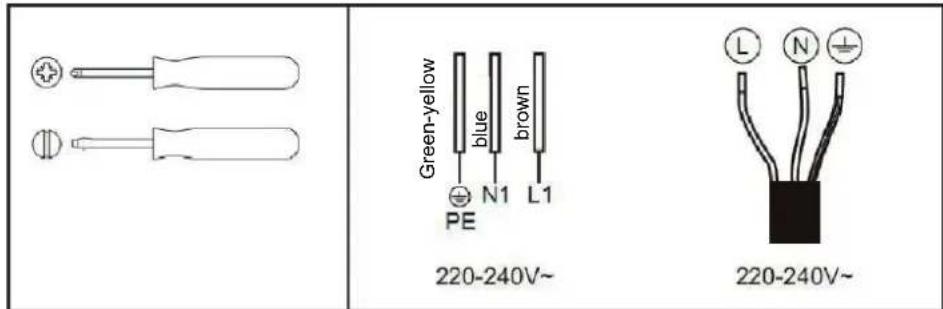
- If the cable is damaged or needs to be replaced, this must be carried out the by after-sale agent with dedicated tools to avoid any accidents.
- If the appliance is being connected directly to the mains, install an omnipolar circuit-breaker with a minimum opening of 3mm between contacts.
- The installer must ensure that the correct electrical connection has been made and that it is compliant with safety regulations.
• The cable must not be bent or compressed. - The cable must be checked regularly. Only authorised technicians may replace it.
natural_image
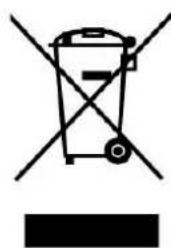
Symbol of a trash bin crossed with diagonal lines, no text or numbers presentDISPOSAL: Do not dispose of this product as unsorted municipal waste. Such waste must be collected separately for special treatment.
This appliance is labelled in compliance with European Directive 2002/96/EC on Waste Electrical and Electronic Equipment (WEEE). By ensuring that this appliance is disposed of correctly, you will help prevent any possible damage to the environment and to human health that might otherwise occur if it were disposed of inappropriately.
The symbol on the product indicates that it may not be treated as normal household waste. It should be taken to a collection point for recycling of electrical and electronic goods.
This appliance requires specialist waste disposal. For further information regarding treatment, recovery and recycling of this product, please contact your local council, your household waste disposal service, or the shop where you purchased it.
For more detailed information about treatment, recovery and recycling of this product, please contact your local council, your household waste disposal service or the shop where you purchased it.
natural_image
Pure electrical circuit lines without any symbolsnatural_image
Simple line drawing of a steam locomotive with wheels and exhaust lines, no text or symbols presentrécipient en fer
natural_image
Three identical cooking pots with crossed-out X marks, no text or symbols presentnatural_image
Four identical cooking pots with crossed-out X marks, shown in sequence (no text or symbols)natural_image
Line drawing of a cooking pot on a stand (no text or symbols)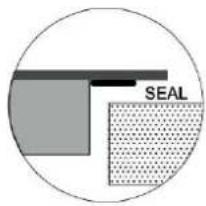
| L (mm) | I (mm) | H (mm) | P (mm) | A (mm) | B (mm) | X (mm) |
| 300 | 520 | 60 | 55 | 265 | 495 | 50 min. |
fig. 1
natural_image
Diagram of a layered electronic component with a labeled section [01] and a circular component (no text or symbols beyond label)01
[04] ×1
natural_image
Pure electrical circuit lines without any symbolsGebruikersinterface
natural_image
Diagram of a steam locomotive with wheels and motion indicators (no text or symbols)ijzeren pan
natural_image
Three identical cooking pots with crossed-out X marks, placed on a flat surface (no text or symbols)natural_image
Four identical cooking pots with crossed-out handles, shown in sequence (no text or symbols)natural_image
Line drawing of a cooking pot on a stand (no text or symbols)
| L (mm) | B (mm) | H(mm) | D(mm) | A(mm) | B(mm) | X(mm) |
| 300 | 520 | 60 | 55 | 265 | 495 | 50 min. |
afb. 1
natural_image
Diagram of a layered electronic component with a labeled section [01] (no text or symbols on the diagram itself)01
[04] ×1
natural_image
Symbol of a trash bin with crossed lines indicating no waste or discharge (no text or labels)natural_image
Pure electrical circuit lines without any symbolsAnvändargränssnitt

| Referens | Beskrivning |
| A[2XW7] | Zonväljarknappar |
| B[0XWD] | Barnlåsknapp |
C | Strömbrytare (På/Av) |
| D Effekt/Timer - skjutreglage för justering[600K] | |
| E[1XCC2] | Boost-knapp |
F | Timer-knapp |
Värmezoneffekt
| Värmezon | Max. effekt (220–240 V, 50/60 Hz) |
| [SXCX] | 1200/1500 W (Booster) |
 | 1800/2300 W (Booster) |
| Total nominell effekt | 3500W |
natural_image
Simple line drawing of a steaming machine with heat dissipation, no text or symbols presentjärnkastrull
magnetisk krets
keramisk glasplatta
induktionsspole
Välja rätt kokkärl

natural_image
Three identical cooking pots with crossed-out X marks, no text or symbols presentnatural_image
Four identical cooking pots with crossed-out handles, shown in sequence (no text or symbols)natural_image
Two simple line drawings of a cooking pot with crossed arrows indicating pressure or movement (no text or symbols)natural_image
Line drawing of a cooking pot on a stand with a lid, no text or symbols present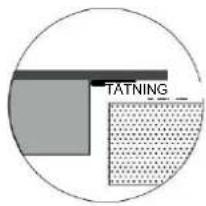
| L (mm) | B (mm) | H (mm) | D (mm) | A (mm) | B (mm) | X (mm) |
| 300 | 520 | 60 | 55 | 265 | 495 | 50 min. |
Figur 1
natural_image
Diagram of a layered electronic component with a circular component labeled [01] attached (no text or symbols beyond label)01
[04] ×1
natural_image
Symbol of a trash bin with crossed lines indicating no waste or discharge, and a solid black rectangle below (no text or labels)natural_image
Pure electrical circuit lines without any symbolsBetjeningsflade
natural_image
Simple line drawing of a steam machine with cooling fans and heat dissipation lines (no text or symbols)støbejernsgryde
natural_image
Three identical cooking pots with crossed-out X marks, no text or symbols presentnatural_image
Four identical cooking pots with crossed-out X marks, arranged horizontally (no text or symbols)natural_image
Line drawing of a cooking pot on a stand (no text or symbols)| L (mm) | B (mm) | H (mm) | D (mm) | A (mm) | B (mm) | X (mm) |
| 300 | 520 | 60 | 55 | 265 | 495 | 50 min. |
fig. 1
natural_image
Diagram of a layered electronic component with a labeled section [01] and a circular component (no text or symbols beyond label)01
[04] ×1
natural_image
Symbol of a trash bin with crossed lines indicating no waste or discharge, and a solid black rectangle below (no text or labels)natural_image
Pure electrical circuit lines without any symbolsnatural_image
Diagram of a steam machine with cooling unit and two control panels (no text or symbols)χαλύβδινη κατσαρόλα
natural_image
Simple line drawing of a cooking pot with a U-shaped magnet partially inserted (no text or symbols)natural_image
Three identical cooking pots with crossed X marks on their bases, no text or symbols presentnatural_image
Four identical cooking pots with crossed-out X marks, shown in a row (no text or symbols)natural_image
Line drawing of a cooking pot on a stand (no text or symbols)natural_image
3D diagram of a mechanical component with a labeled part [01] and a curved cable (no text or symbols on the object itself)
natural_image
Schematic illustration of a coiled wire or filament (no text or symbols)[04] ×1
natural_image
Simple line drawing of a trash bin with crossed lines indicating no waste or discharge (no text or symbols)- Product Overview
- Top View
- User interface
- A Word on Induction Cooking
- Before using your New Induction Hob
- Using the Touch Controls
- Choosing the right Cookware
- Using your Induction Hob
- To start cooking
- If the display flashes
- alternately with the heat setting
- When you have finished cooking
- Using the Boost function
- Activating the boost function
- Cancelling the Boost function
- Using the Child Lock Function
- To lock the controls
- To unlock the controls
- Over-Temperature Protection
- Detection of Small Articles
- Auto Shutdown Protection
- Auto Pan Detect
- Using the Timer
- Using the Timer as a Minute Minder
- Without selecting a cooking zone
- Setting the timer to turn one or more cooking zones off If the timer is set on one zone:
- Power Limitation Adjustment Instruction (1.5kW / 2.8kW / 3.5kW)
- ATTENTION! : Only the authorized service representative may make this adjustment!
- Failure Display and Inspection
- Technical Specifications
- Installation
- Choosing installation equipment
- Before installing the hob, make sure that
- After installing the hob, make sure that
- Cautions
- Connecting the hob to the mains power supply
- Gebruikersinterface
- Användargränssnitt
- Värmezoneffekt
- Välja rätt kokkärl
- Betjeningsflade
Brand : BERTAZZONI
Model : P302I23NV
Category : Cooker