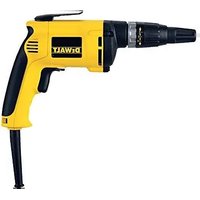
DW274 - Screwdriver DEWALT - Free user manual and instructions
Find the device manual for free DW274 DEWALT in PDF.


| Product type | Drywall screw gun |
| Brand | DeWalt |
| Model | DW274K / DW274KN |
| Voltage | 230 V |
| Power consumption | 540 W |
| No-load speed | 4000 rpm |
| Bit holder | 1/4" hex |
| Weight | 1.4 kg |
| Clutch device | Depth-sensitive (DW274K) / Quiet depth-sensitive (DW274KN) |
| Depth adjustment | Adjustment collar with depth stop |
| Pressure-sensitive clutch system | Yes (shaft rotates only under pressure) |
| Rotational direction | Reversible (left/right selector) |
| Variable speed trigger | Yes (variable speed trigger) |
| Continuous operation lock | Yes (locking button) |
| Cable type | With plug, double insulation class II |
| Sound pressure level | 74 dB(A) |
| Sound power level | 83 dB(A) |
| Vibration | < 2.5 m/s² |
| Package contents | Screw gun, carrying case (K model), manual, exploded drawing |
| Warranty | 1 year (manufacturing defect) + 30 days satisfaction + 1 year free maintenance |
| Maintenance | Clean air vents, blow dust from clutch housing with compressed air |
Frequently Asked Questions - DW274 DEWALT
User questions about DW274 DEWALT
0 question about this device. Answer the ones you know or ask your own.
Ask a new question about this device
Download the instructions for your Screwdriver in PDF format for free! Find your manual DW274 - DEWALT and take your electronic device back in hand. On this page are published all the documents necessary for the use of your device. DW274 by DEWALT.
USER MANUAL DW274 DEWALT
C
natural_image
Technical line drawing of a cylindrical mechanical component with internal channels and directional arrows (no text or symbols)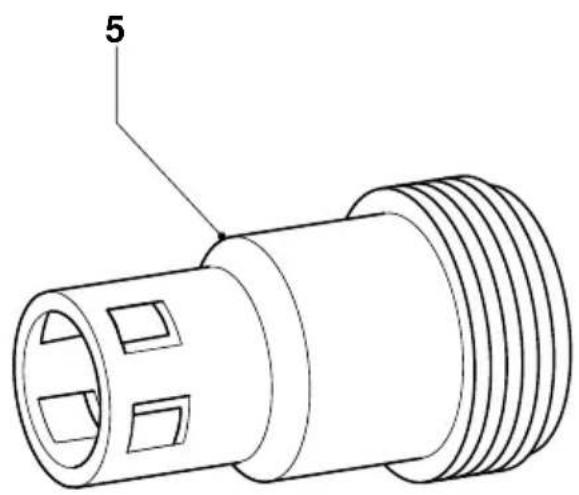
D
natural_image
Line drawing of a mechanical component with a numbered label '3' pointing to a curved feature (no text or symbols beyond the number)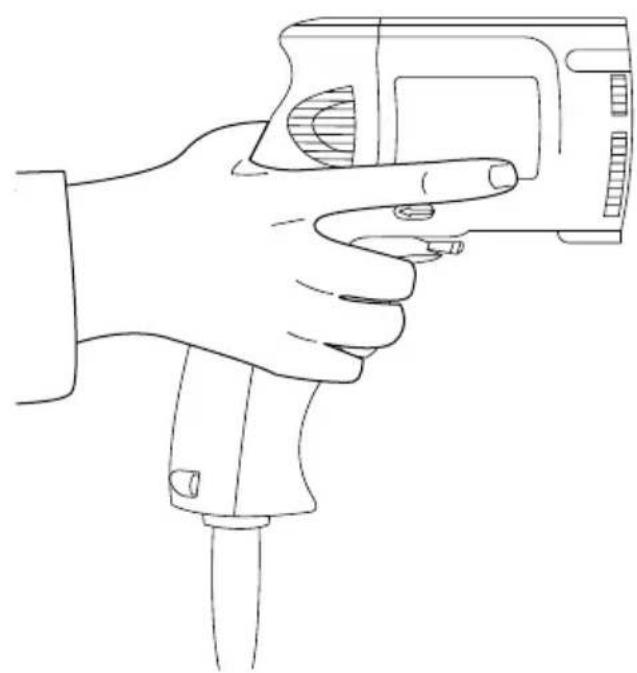
natural_image
Line drawing of a hand holding a handheld device (no text or symbols)E
F
SKRUETRÆKKER DW253/DW263K/ DW268K/DW269K/DW274K/DW274KN
Tillykke!
You have chosen a DEWALT Power Tool. Years of experience, thorough product development and innovation make DEWALT one of the most reliable partners for professional Power Tool users.
Table of contents
| Technical data en - 1 |
| EC-Declaration of conformity en - 2 |
| Safety instructions en - 2 |
| Package contents en - 3 |
| Description en - 3 |
| Electrical safety en - 4 |
| Mains plug replacement (U.K. & Ireland only) en - 4 |
| Using an extension cable en - 4 |
| Assembly and adjustment en - 4 |
| Instructions for use en - 5 |
| Maintenance en - 6 |
| Guarantee en - 6 |
Technical data
| DW253 DW263K DW268K DW269K DW274K DW274KN | |||||||
| Voltage | V | 230 | 230 | 230 | 230 | 230 | 230 |
| (U.K. & Ireland only) | V | 230/115 | 230/115 | 230/115 | 230/115 | 230/115 | 230/115 |
| Power input | W | 540/685 | 540/685 | 540/685 | 540/685 | 540/685 | 540/685 |
| No load speed | min^-1 | 850 | 2,500 | 2,500 | 1,000 | 4,000 | 4,000 |
| Bit holder | 1/4" hex. | 1/4" hex. | 1/4" hex. | 1/4" hex. | 1/4" hex. | 1/4" hex. | |
| Clutching method | - | depth sensitive | Versa clutch | Versa clutch | depth sensitive | silent, depth sensitive | |
| Weight | kg | 1.3 | 1.4 | 1.4 | 1.4 | 1.4 | 1.4 |
| Fuses: | |||||||
| Europe | 230 V tools | 10 Amperes, mains | |||||
| U.K. & Ireland | 230 V tools | 13 Amperes, in plugs | |||||
The following symbols are used throughout this manual:

Denotes risk of personal injury, loss of life or damage to the tool in case of non-observance of the instructions in this manual.

Denotes risk of electric shock.
EC-Declaration of conformity
CE
DW253/DW263K/DW268K/DW269K/DW274K/DW274KN
DEWALT declares that these Power Tools have been designed in compliance with: 89/392/EEC, 89/336/EEC, 73/23/EEC, EN 50144, EN 55104 / EN 55014-2, EN 55014, EN 61000-3-2 & EN 61000-3-3.
For more information, please contact DEWALT at the address below, or refer to the back of the manual.
Level of sound pressure according to 86/188/EEC & 89/392/EEC, measured according to EN 50144:
| DW253 DW263K DW268K | |
| DW269K DW274K DW274KN | |
| L_pA (sound pressure) dB(A)* 74 74 74 | |
| L_WA (acoustic power) dB(A) 83 83 83 | |
* at the operator's ear

Take appropriate measures for the protection of hearing if the sound pressure of 85 dB(A) is exceeded.
Weighted root mean square acceleration value according to EN 50144:
| DW253 DW263K DW268K | |
| DW269K DW274K DW274KN | |
| < 2.5 m/s ^2 < 2.5 m/s ^2 < 2.5 m/s ^2 |
Director Engineering and Product Development Horst Großmann
X. fopmann
When using Power Tools, always observe the safety regulations applicable in your country to reduce the risk of fire, electric shock and personal injury. Read the following safety instructions before attempting to operate this product. Keep these instructions in a safe place!
General
1 Keep work area clean Cluttered areas and benches can cause accidents.
2 Consider work area environment
Do not expose Power Tools to humidity. Keep work area well lit. Do not use Power Tools in the presence of flammable liquids or gases.
3 Guard against electric shock
Prevent body contact with earthed surfaces (e.g. pipes, radiators, cookers and refrigerators). For use under extreme conditions (e.g. high humidity, when metal swarf is being produced, etc.) electric safety can be improved by inserting an isolating transformer or a (FI) earth-leakage circuit-breaker.
4 Keep children away
Do not let children come into contact with the tool or extension cord. Supervision is required for those under 16 years of age.
5 Extension cords for outdoor use
When the tool is used outdoors, always use extension cords intended for outdoor use and marked accordingly.
6 Store idle tools
When not in use, Power Tools must be stored in a dry place and locked up securely, out of reach of children.
7 Dress properly
Do not wear loose clothing or jewellery. They can be caught in moving parts. Preferably wear rubber gloves and non-slip footwear when working outdoors. Wear protective hair covering to keep long hair out of the way.
8 Wear safety goggles
Also use a face or dust mask in case the operations produce dust or flying particles.
9 Beware of maximum sound pressure
Take appropriate measures for the protection of hearing if the sound pressure of 85 dB(A) is exceeded.
10 Secure workpiece
Use clamps or a vice to hold the workpiece. It is safer and it frees both hands to operate the tool.
11 Do not overreach
Keep proper footing and balance at all times.
12 Avoid unintentional starting
Do not carry the plugged-in tool with a finger on the switch. Be sure that the switch is released when plugging in.
13 Stay alert
Watch what you are doing. Use common sense. Do not operate the tool when you are tired.
14 Disconnect tool
Shut off power and wait for the tool to come to a complete standstill before leaving it unattended. Unplug the tool when not in use, before servicing or changing accessories.
15 Remove adjusting keys and wrenches
Always check that adjusting keys and wrenches are removed from the tool before operating the tool.
16 Use appropriate tool
The intended use is described in this instruction manual. Do not force small tools or attachments to do the job of a heavy-duty tool. The tool will do the job better and safer at the rate for which it was intended.
Warning! The use of any accessory or attachment or performance of any operation with this tool, other than those recommended in this instruction manual may present a risk of personal injury.
17 Do not abuse cord
Never carry the tool by its cord or pull it to disconnect from the socket. Keep the cord away from heat, oil and sharp edges.
18 Maintain tools with care
Keep the tools in good condition and clean for better and safer performance. Follow the instructions for maintenance and changing accessories. Inspect the tool cords at regular intervals and, if damaged, have them repaired by an authorized DEWALT repair agent. Inspect the extension cords periodically and replace them if damaged. Keep all controls dry, clean and free from oil and grease.
19 Check for damaged parts
Before using the tool, carefully check it for damage to ensure that it will operate properly and perform its intended function.
Check for misalignment and seizure of moving parts, breakage of parts and any other conditions that may affect its operation. Have damaged guards or other defective parts repaired or replaced as instructed.
Do not use the tool if the switch is defective. Have the switch replaced by an authorized DEWALT repair agent.
20 Have your tool repaired by an authorized DEWALT repair agent
This Power Tool is in accordance with the relevant safety regulations. To avoid danger, electric appliances must only be repaired by qualified technicians.
Package contents
The package contains:
1 Heavy duty pistol grip screwdriver DW263K or
1 Heavy duty universal screwdriver DW253/DW268K/DW269K or
1 Heavy duty drywall screwdriver DW274K/DW274KN
1 Kitbox (K-models only)
1 Instruction manual
1 Exploded drawing
- Check for damage to the tool, parts or accessories which may have occurred during transport.
- Take the time to thoroughly read and understand this manual prior to operation.
Description (fig. A)
Your DW263K screwdriver has been designed for professional screwdriving applications and for use as a nutsetter.
Your DW253/DW268K/DW269K universal screwdriver has been designed for professional applications.
Your DW274K/DW274KN drywall screwdriver has been designed for driving drywall fasteners through drywall board into timber or metal framing studs.
1 Variable speed switch
2 Lock-on button
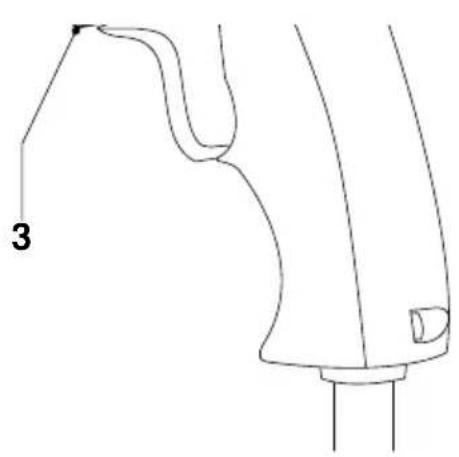
3 Forward/reverse slider
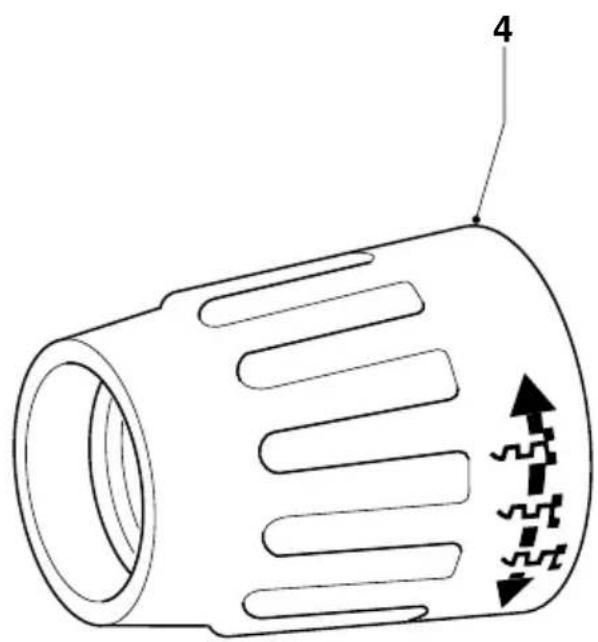
4 Depth adjustment collar
5 Depth locator (DW263K/DW274K/DW274KN)
5 Ball retainer (DW268K/DW269K)
6 Belt clip
Dead spindle drive clutch
This screwdriver is equipped with a dead spindle feature; the spindle does not turn until the fastener is pressed into the workpiece. This enables fasteners to be placed onto the drive accessory of a running screwdriver.
Electrical safety
The electric motor has been designed for one voltage only. Always check that the power supply corresponds to the voltage on the rating plate.

Your DeWALT tool is double insulated in accordance with EN 50144; therefore no earth wire is required.
Mains plug replacement (U.K. & Ireland only)
- Should your mains plug need replacing and you are competent to do this, proceed as instructed below. If you are in doubt, contact an authorized DEWALT repair agent or a qualified electrician.
- Disconnect the plug from the supply.
- Cut off the plug and dispose of it safely; a plug with bared copper conductors is dangerous if engaged in a live socket outlet.
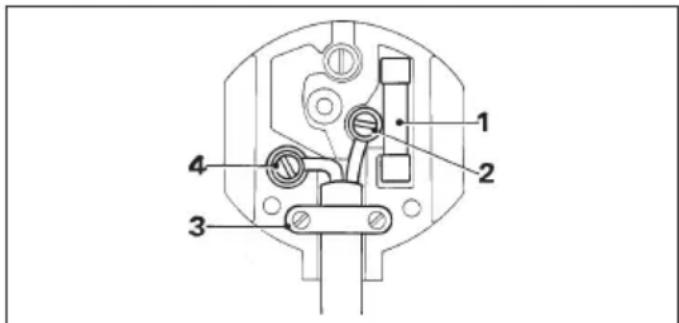
- Only fit 13 Amperes BS1363A approved plugs fitted with the correctly rated fuse (1).
- The cable wire colours, or a letter, will be marked at the connection points of most good quality plugs. Attach the wires to their respective points in the plug (see below). Brown is for Live (L) (2) and Blue is for Neutral (N) (4).
- Before replacing the top cover of the mains plug ensure that the cable restraint (3) is holding the outer sheath of the cable firmly and that the two leads are correctly fixed at the terminal screws.

Never use a light socket.
Never connect the live (L) or neutral (N) wires to the earth pin marked E or 12
For 115 V units with a power rating exceeding 1500 W, we recommend to fit a plug to BS4343 standard.
Using an extension cable
If an extension cable is required, use an approved extension cable suitable for the power input of this tool (see technical data). The minimum conductor size is 1.5 mm^2 . When using a cable reel, always unwind the cable completely.
Also refer to the table below.
| Conductor size (mm2) Cable rating (Amperes) | ||||||||
| 0.75 6 | ||||||||
| 1.00 10 | ||||||||
| 1.50 15 | ||||||||
| 2.50 20 | ||||||||
| 4.00 25 | ||||||||
| Cable length (m) | ||||||||
| 7.5 15 25 30 45 60 | ||||||||
| Voltage Amperes Cable rating (Amperes) | ||||||||
| 115 | 0 - | 2.0 | 6 | 6 | 6 | 6 | 6 | 10 |
| 2.1 - | 3.4 | 6 6 | 6 6 | 15 15 | ||||
| 3.5 - | 5.0 | 6 6 | 10 15 | 20 20 | ||||
| 5.1 - | 7.0 | 10 10 | 15 20 | 20 25 | ||||
| 7.1 - | 12.0 | 15 15 | 20 25 | 25 | - | |||
| 12.1 - | 20.0 | 20 | 20 | 25 | - | - | - | |
| 230 | 0 - | 2.0 | 6 | 6 | 6 | 6 | 6 | 6 |
| 2.1 - | 3.4 | 6 | 6 | 6 | 6 | 6 | 6 | |
| 3.5 - | 5.0 | 6 6 | 6 6 | 10 15 | ||||
| 5.1 - | 7.0 | 10 10 | 10 10 | 15 15 | ||||
| 7.1 - | 12.0 | 15 15 | 15 15 | 20 20 | ||||
| 12.1 - | 20.0 | 20 20 | 20 20 | 25 | - | |||
Assembly and adjustment

Prior to assembly and adjustment always unplug the tool.
Fitting and removing 1/4" hex. drive accessories
Your DEWALT Screwdriver has a 1/4" hexagonal drive system. The drive accessory is retained in the holder by a ball and a spring which engages in a groove in the accessory shank.
DW263K/DW274K/DW274KN (fig. B)
- Remove the collar (4) by pulling it forward.
-
Select the required accessory (both models) and matching depth locator (5) when using a nutsetter (DW263).
-
To insert the accessory (e.g. a bit holder or nutsetter) (7) push it into the holder (8) until it snaps in place. Tap it lightly if required.
- To remove the accessory pull it out of the holder using a pair of pliers.
- Reinstall the collar (4) by aligning the ribs (9) on the inside of the collar (4) with the grooves (10) in the clutch housing and snap the collar in place.
DW268K/DW269K (fig. A)
- Pull the ball retainer (5) to the front and hold it.
- Insert the accessory.
- Release the ball retainer.
Replacing the bit tip (fig. B)
- Simply pull out the bit tip (11). A pair of pliers may be required.
DW263K/DW274K/DW274KN -
Setting the driving depth (fig. C)
The depth sensitive feature offers the following advantages:
- the selected driving depth is repeatable for structural integrity
- screws with sealing washers are driven correctly so that no leaks occur
The driving depth is determined by the position of the depth locator (5) in relation to the bit or socket. The symbols on the collar indicate how to set the driving depth.
- Turn the collar clockwise to increase the driving depth.
- Turn the collar counterclockwise to decrease the driving depth.
DW263K - When using a nutsetter
- For screws with sealing washers, turn the adjustment collar until the end of the nutsetter is flush with the end of the depth locator.
- If required, turn the collar until the nutsetter is recessed approximately 2 mm into the depth locator.
- Also refer to the screw manufacturer's specifications for the proper sealing washer settings in different applications.
-
Drive a screw into a waste piece and check the distance between the washer and the material.
-
Turn the collar (4) counterclockwise or clockwise to decrease or increase the driving depth as required.
- Drive another screw and readjust the collar (4) until the desired setting is achieved.
DW263K - Replacing the depth locator (fig. D)
This model is supplied with two depth locators (5) to accommodate different bits, holders, sockets and adaptors.
- Pull the collar assembly off the tool.
- Hold the depth locator (5) and unscrew the collar (4).
- Replace the depth locator (5).
- To reassemble, proceed in reverse order.
DW268K/DW269K - Setting the torque (fig. A)
This model allows setting the torque for a wide range of screws.
- To increase the torque, turn the torque adjustment collar (4) counterclockwise.
- To decrease the torque, turn the torque adjustment collar (4) clockwise.
- Drive a screw into a waste piece and check if the screw is properly fastened.
- If the clutch ratchets unexpectedly (for example when a wood knot is encountered), simply increase the pressure on the tool.
Setting the direction of rotation (fig. E)
- Select forward or reverse rotation using the forward/reverse switch (3) (see arrows on tool).

Always wait until the motor has come to a complete standstill before changing the direction of rotation.
Instructions for use

Always observe the safety instructions and applicable regulations.
Screwdriving or nutsetting (fig. A)
- Select the appropriate bit for the screw (or nut) to be driven.
- Select forward or reverse rotation as described above.
-
For nutsetting (DW263K) always use the correct depth locator (5).
-
To run the tool, press the variable speed switch (1). The pressure exerted on the variable speed switch determines the tool speed.
- If necessary, press the lock-on button (2) for continuous operation and release the variable speed switch. The lock-on button works only in fullspeed, forward and reverse rotation.
- To stop the tool, release the switch.
- To stop the tool in continuous operation, press the switch briefly and release it. Always switch OFF the tool when work is finished and before unplugging.
Holding the tool (fig. F)
- For best results, hold the screwdriver with the hand directly in line with the fastener and press the variable speed switch with the last one or two fingers of the hand, as shown. This reduces the chance of the screw slipping from the drive accessory when pressure is applied.
- To drive the screw, place it on the bit or into the socket, press the variable speed switch and push the screw into the workpiece with a smooth, continuous motion. When the screw is seated, a buzzing sound will come from the front of the tool to indicate that the clutch has disengaged.
Various types of 1/4" hex. bits, holders, sockets and adaptors are available as an option.
Consult your dealer for further information on the appropriate accessories.
Maintenance
Your DEWALT Power Tool has been designed to operate over a long period of time with a minimum of maintenance. Continuous satisfactory operation depends upon proper tool care and regular cleaning.

Lubrication
Your Power Tool requires no additional lubrication.

Cleaning
Keep the ventilation slots clear and regularly clean the housing with a soft cloth.
DW274K/DW274KN
- Regularly remove drywall dust from the clutch housing using compressed air. To do so, remove the depth locator and adjustment collar.

Unwanted tools and the environment
Take your tool to an authorized DEWALT repair agent where it will be disposed of in an environmentally safe way.
GUARANTEE
• 30 DAY NO RISK SATISFACTION GUARANTEE •
If you are not completely satisfied with the performance of your DeWALT tool, simply return it within 30 days, complete as purchased, to the point of purchase, for a full refund or exchange. Proof of purchase must be produced.
- ONE YEAR FREE SERVICE CONTRACT
If you need maintenance or service for your DeWALT tool, in the 12 months following purchase, it will be undertaken free of charge at an authorized DeWALT repair agent. Proof of purchase must be produced. Includes labour and spare parts for Power Tools. Excludes accessories.
• ONE YEAR FULL WARRANTY •
If your DEWALT product becomes defective due to faulty materials or workmanship within 12 months from the date of purchase, we guarantee to replace all defective parts free of charge or, at our discretion, replace the unit free of charge provided that:
- The product has not been misused.
• Repairs have not been attempted by unauthorized persons. - Proof of purchase date is produced. This guarantee is offered as an extra benefit and is additional to consumers statutory rights.
For the location of your nearest authorized DEWALT repair agent, please use the appropriate telephone number on the back of this manual.
ATORNILLADOR DW253/DW263K/DW268K/DW269K/DW274K/DW274KN
¡Enhorabuena!
Director Engineering and Product Development Horst Großmann
X. fopsmann
L'emballage contient:
Director Engineering and Product Development Horst Großmann
X. fopsmann
DEWALT, Richard-Klinger-Straße 40, D-65510, Idstein, Duitsland
Director Engineering and Product Development Horst Großmann
X. fopmann
DEWALT, Richard-Klinger-Straße 40, D-65510, Idstein, Tyskland
Sikkerhetsforskrifter
Director Engineering and Product Development Horst Großmann
X. fopsmann
DEWALT, Richard-Klinger-Straße 40, D-65510, Idstein, Alemanha
15 Tire as chaves de aperto
Colocar as pontas de aparafusar de 1/4" hex.
Director Engineering and Product Development Horst Großmann
X. fopmann
Director Engineering and Product Development Horst Großmann
X. fopman
DEWALT, Richard-Klinger-Straße 40, D-65510, Idstein, Tyskland
Säkerhetsinstruktioner


- SKRUETRÆKKER DW253/DW263K/ DW268K/DW269K/DW274K/DW274KN
- Tillykke!
- EC-Declaration of conformity
- CE
- DW253/DW263K/DW268K/DW269K/DW274K/DW274KN
- General
- Consider work area environment
- Guard against electric shock
- Keep children away
- Extension cords for outdoor use
- Store idle tools
- Dress properly
- Wear safety goggles
- Beware of maximum sound pressure
- Secure workpiece
- Do not overreach
- Avoid unintentional starting
- Stay alert
- Disconnect tool
- Remove adjusting keys and wrenches
- Use appropriate tool
- Do not abuse cord
- Maintain tools with care
- Check for damaged parts
- Have your tool repaired by an authorized DEWALT repair agent
- Package contents
- Description (fig. A)
- Dead spindle drive clutch
- Electrical safety
- Mains plug replacement (U.K. & Ireland only)
- Using an extension cable
- Assembly and adjustment
- Fitting and removing 1/4" hex. drive accessories
- DW263K/DW274K/DW274KN (fig. B)
- DW268K/DW269K (fig. A)
- Replacing the bit tip (fig. B)
- DW263K/DW274K/DW274KN -
- Setting the driving depth (fig. C)
- DW263K - When using a nutsetter
- DW263K - Replacing the depth locator (fig. D)
- DW268K/DW269K - Setting the torque (fig. A)
- Setting the direction of rotation (fig. E)
- Instructions for use
- Screwdriving or nutsetting (fig. A)
- Holding the tool (fig. F)
- Maintenance
- Lubrication
- Cleaning
- DW274K/DW274KN
- Unwanted tools and the environment
- GUARANTEE
- • 30 DAY NO RISK SATISFACTION GUARANTEE •
- - ONE YEAR FREE SERVICE CONTRACT
- • ONE YEAR FULL WARRANTY •
- ATORNILLADOR DW253/DW263K/DW268K/DW269K/DW274K/DW274KN
- ¡Enhorabuena!
- L'emballage contient:
- Sikkerhetsforskrifter
- Tire as chaves de aperto
- Colocar as pontas de aparafusar de 1/4" hex.
- Säkerhetsinstruktioner
Brand : DEWALT
Model : DW274
Category : Screwdriver