PERIBOARD-805 - Keyboard Perixx - Free user manual and instructions
Find the device manual for free PERIBOARD-805 Perixx in PDF.


| Product Type | Bluetooth Wireless Keyboard |
| Brand | Perixx |
| Model | PERIBOARD-805 |
| Interface | Bluetooth 5.1 |
| Number of Keys | 78 |
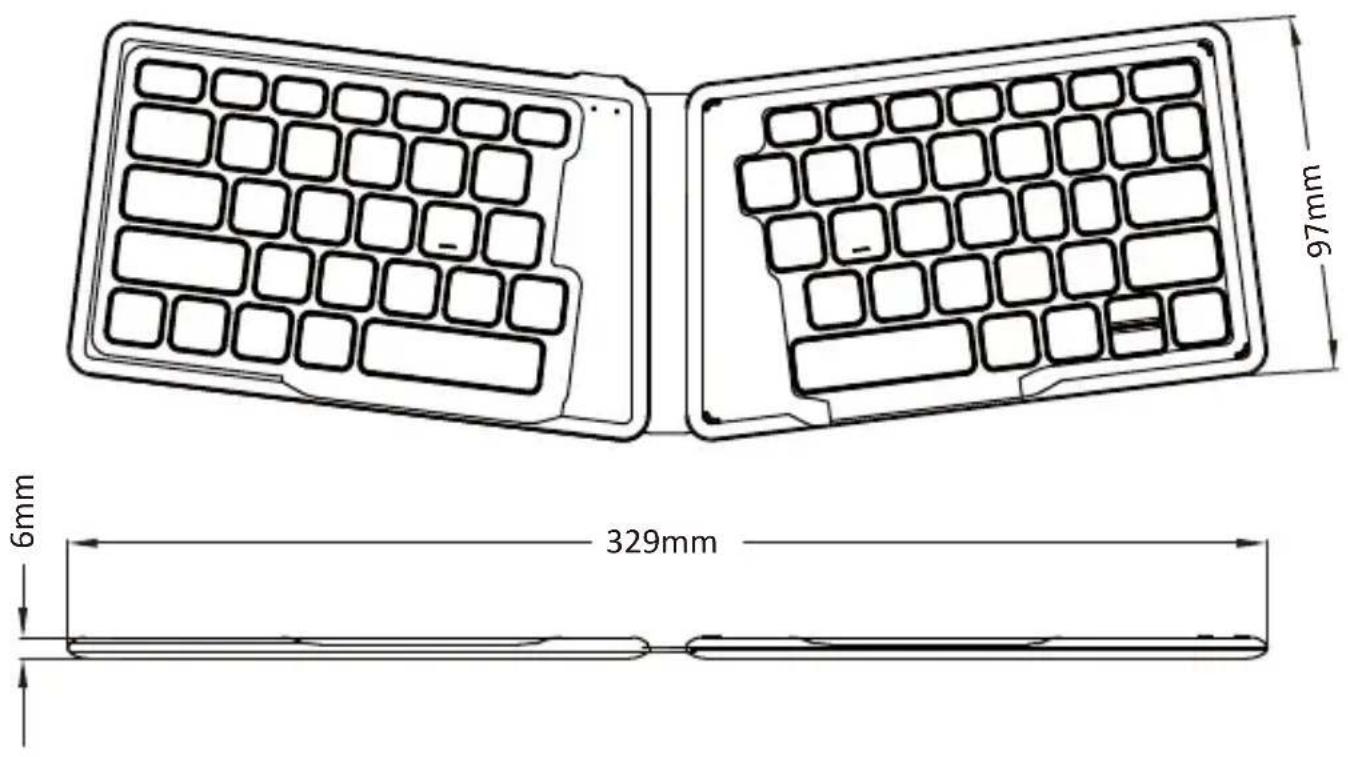
| Dimensions (L × W × H) | 329 × 97 × 6 mm |
| Weight | 141 g |
| Key Type | Scissor Structure |
| Actuation Distance | 1.4 ± 0.3 mm |
| Total Travel | 1.9 ± 0.3 mm |
| Material | ABS |
| Power Supply | Built-in rechargeable lithium battery (0.407 Wh) |
| Battery Life | Rechargeable via USB (not specified) |
| System Compatibility | Windows 7 or later, Android, iOS |
| Main Functions | Multimedia keys, keyboard shortcuts, switching between 3 Bluetooth devices |
| Maintenance | Clean with a dry cloth or brush |
| Safety | Do not expose to liquids, do not disassemble, max ambient temperature 40°C |
| Spare parts and repairability | No detachable parts; built-in battery not user-replaceable |
| General Information | LED indicators for Caps Lock and battery status; 3 million keystroke durability |
Frequently Asked Questions - PERIBOARD-805 Perixx
User questions about PERIBOARD-805 Perixx
0 question about this device. Answer the ones you know or ask your own.
Ask a new question about this device
Download the instructions for your Keyboard in PDF format for free! Find your manual PERIBOARD-805 - Perixx and take your electronic device back in hand. On this page are published all the documents necessary for the use of your device. PERIBOARD-805 by Perixx.
USER MANUAL PERIBOARD-805 Perixx
natural_image
Two black foldable keyboard designs, one open and one closed, with no visible text or symbols on keys.-User Manual -Bedienungsanleitung -manual de instrucciones -Mode D'Emploi -Manuale Utente -利用者マニュアル -产品说明书 -使用手册
VALUE CREATOR
Product Illustration
text_image
6mm 329mm 97mm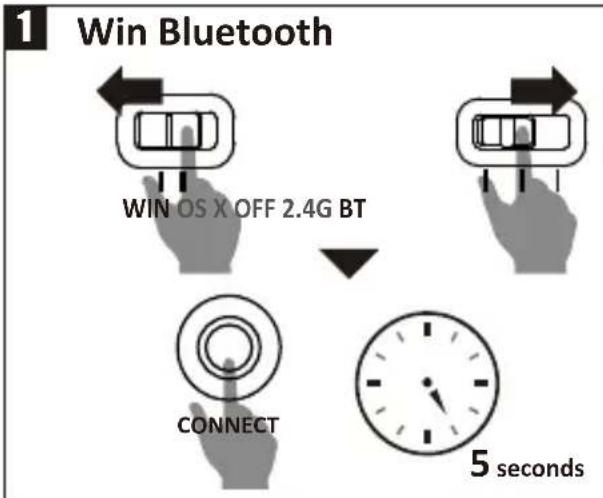
flowchart
graph TD
    A["Win Bluetooth"] --> B["WIN OS X OFF 2.4G BT"]
    B --> C["CONNECT"]
    C --> D["5 seconds"]
text_image
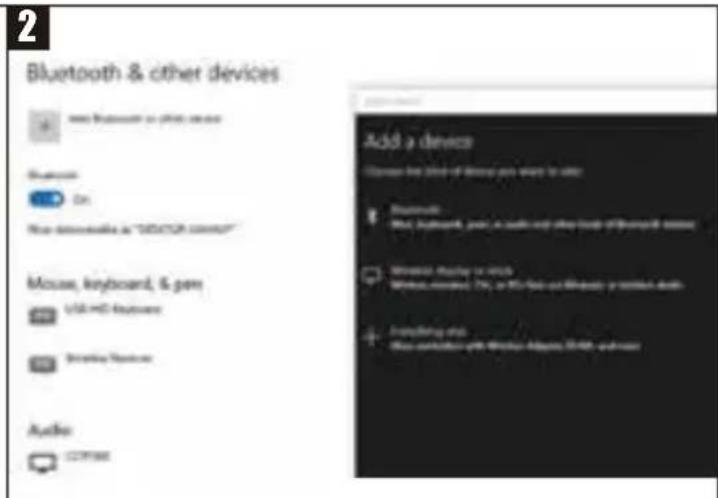
2 Bluetooth & other devices Add a device Browse the third of devices you want to use: Bluetooth USB Interface, just a music and play mode of Bluetooth devices Wireless Audio or WiFi Without noise: 7% or 10% free and wireless protection apps Anything else Show variation with Windows Altium, WiFi, and more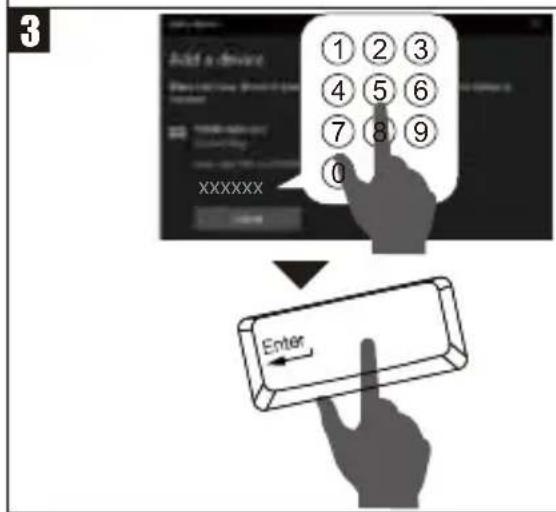
text_image
3 Add a device XXXXXX Enter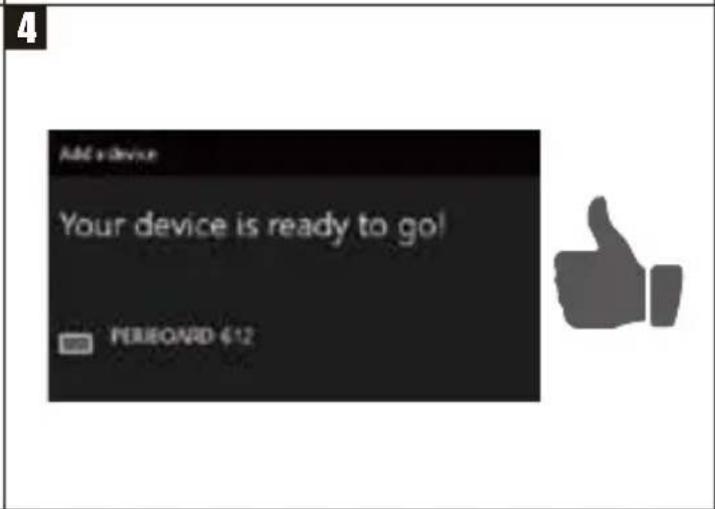
text_image
Add a device Your device is ready to go! PERIONRD €12EN If the Bluetooth pairing failed, remove PERIBOARD-805 ergo from the list of paired devices and redo from Step-1
DE Wenn die Bluetoothkopplung scheitert, entfernen Sie bitte PERIBOARD-805 ergo aus der Liste der gekoppelten Geräte und wiederholen Sie den Kopplungsprozess ab Schritt 1.
FR Si le jumelage Bluetooth échoue, veuillez supprimer le PERIBOARD-805 ergo de la liste d'appareils jumelés et recommencez à l'étape 1
ES Si el emparejamiento de Bluetooth falla, elimine el PERIBOARD-805 ergo de la lista de dispositivos emparejados e incie desde el Paso 1.
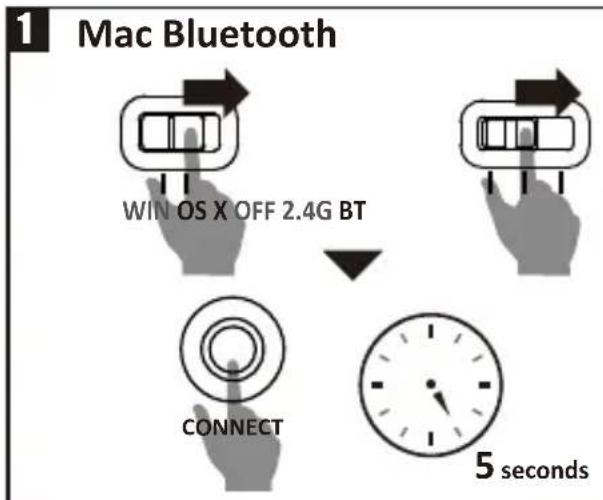
flowchart
graph TD
    A["Mac Bluetooth"] --> B["Windows X OFF 2.4G BT"]
    B --> C["Connect"]
    C --> D["5 seconds"]
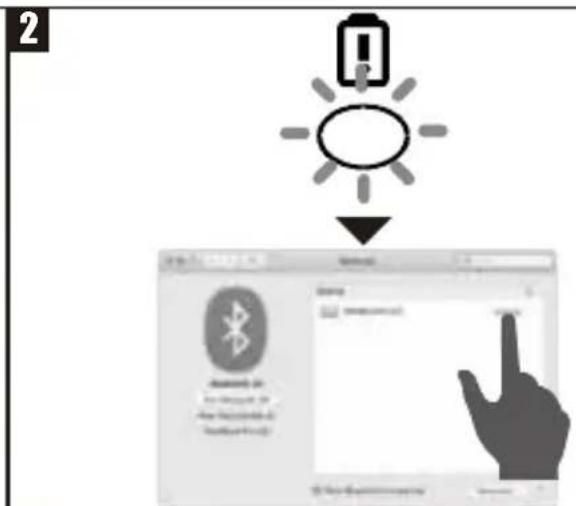
text_image
2 Bluetooth 10 My Computer (M) My Computer (M) My Computer (M)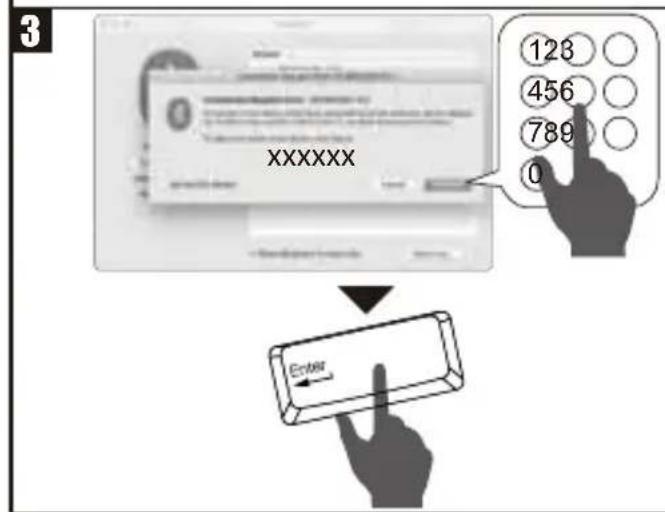
text_image
XXXXXX 128 456 789 0 Enter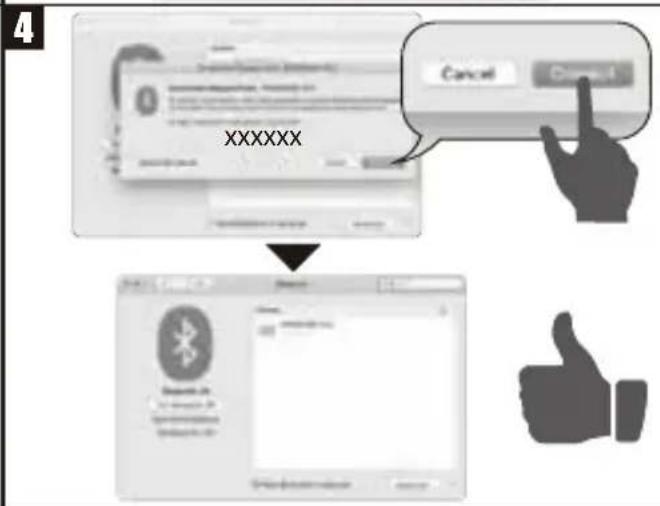
text_image
XXXXXX Cancel CancelEN How to connect PB-805 ergo to three different devices.
EN How to switch PB-805 ergo to a different device
flowchart
graph LR
    A["Fn"] --> B["Shift"]
    B --> C["Delete"]
EN How to delete all the paired Bluetooth devices
This device complies with Part 15 of the FCC Rules. Operation is subject to the following two conditions:
(1) This device may not cause harmful interference, and (2) this device must accept any interference received, including interference that may cause undesired operation.
NOTE 1:
This equipment has been tested and found to comply with the limits for a Class B digital device, pursuant to part 15 of the FCC Rules. These limits are designed to provide reasonable protection against harmful interference in a residential installation. This equipment generates uses and can radiate radio frequency energy and, if not installed and used in accordance with the instructions, may cause harmful interference to radio communications. However, there is no guarantee that interference will not occur in a particular installation. If this equipment does cause harmful interference to radio or television reception, which can be determined by turning the equipment off and on, the user is encouraged to try to correct the interference by one or more of the following measures:
- Reorient or relocate the receiving antenna.
- Increase the separation between the equipment and receiver.
- Connect the equipment into an outlet on a circuit different from that to which the receiver is connected.
- Consult the dealer or an experienced radio/TV technician for help.
NOTE 2:
Any changes or modifications to this unit not expressly approved by the party responsible for compliance could void the user's authority to operate the equipment.
English(US/UK)
Caution
- The manufacturer and re-resellers are not responsible for any technical malfunctions, damage, or personal injury incurred by:
- Any attempt to dismantle, change or modify the product in any manner
- Malfunction or damage due to misuse or improper alteration or repair.
- Malfunction or damage caused by external influence such as falling
- Malfunction or damage is caused by a fire, salt, gas, earthquake, lightning, wind, water, or other natural calamities, or abnormal voltage.
- Malfunction or damage is caused by other devices connected to the products.
- Malfunction or damage is caused by high temperature, humid, greasy, dusty and hazardous environment.
- You are cautioned that changes or modifications not expressly approved by Perixx Computer GmbH could void your authority to operate the equipment.
- All brand names, trademarks and logos are the properties of their respective owners.
Please Note: Long-term repetitive use of any keyboard and mouse could cause injury to user. Perixx recommends users to avoid excessive use of this or any keyboard and mouse.
Important Safety Instructions
- Avoid Dropping. • Do not disassemble. • Do no expose to liquids. • This product is suitable for moderate climates only. • The maximum ambient temperature during use of this product must not exceed 40 degree. • Open flame sources, such as candles, must not be placed on this product. • Only use a dry cloth or brush to clean this product.
Specification
| Interface | Bluetooth 5.1 | Key number | 78 |
| Size | 329*97*6mm | Key Type | X type scissor key |
| Input Current | 3.0~4.2V / ≤ 3mA | Actuation distance | 1.4±0.3mm |
| Weight | 141g | Total travel distance | 1.9±0.3mm |
| Material | ABS | Durability | 3 million keypresses |
| OS requirement | Win 7 / above |
Information of the battery
| Battery composition | Lithium | Cells per battery | 1 |
| Battery type/size | 3.1*19.6*33.2 mm | Watt hours per battery | 0.407 |
| Number of batteries | 1 | Lithium content (grams) | 0.78 g |
| Battery weight (grams) | 3.1 g |
English(US/UK)
Multimedia keys
Fn + other function keys under Windows
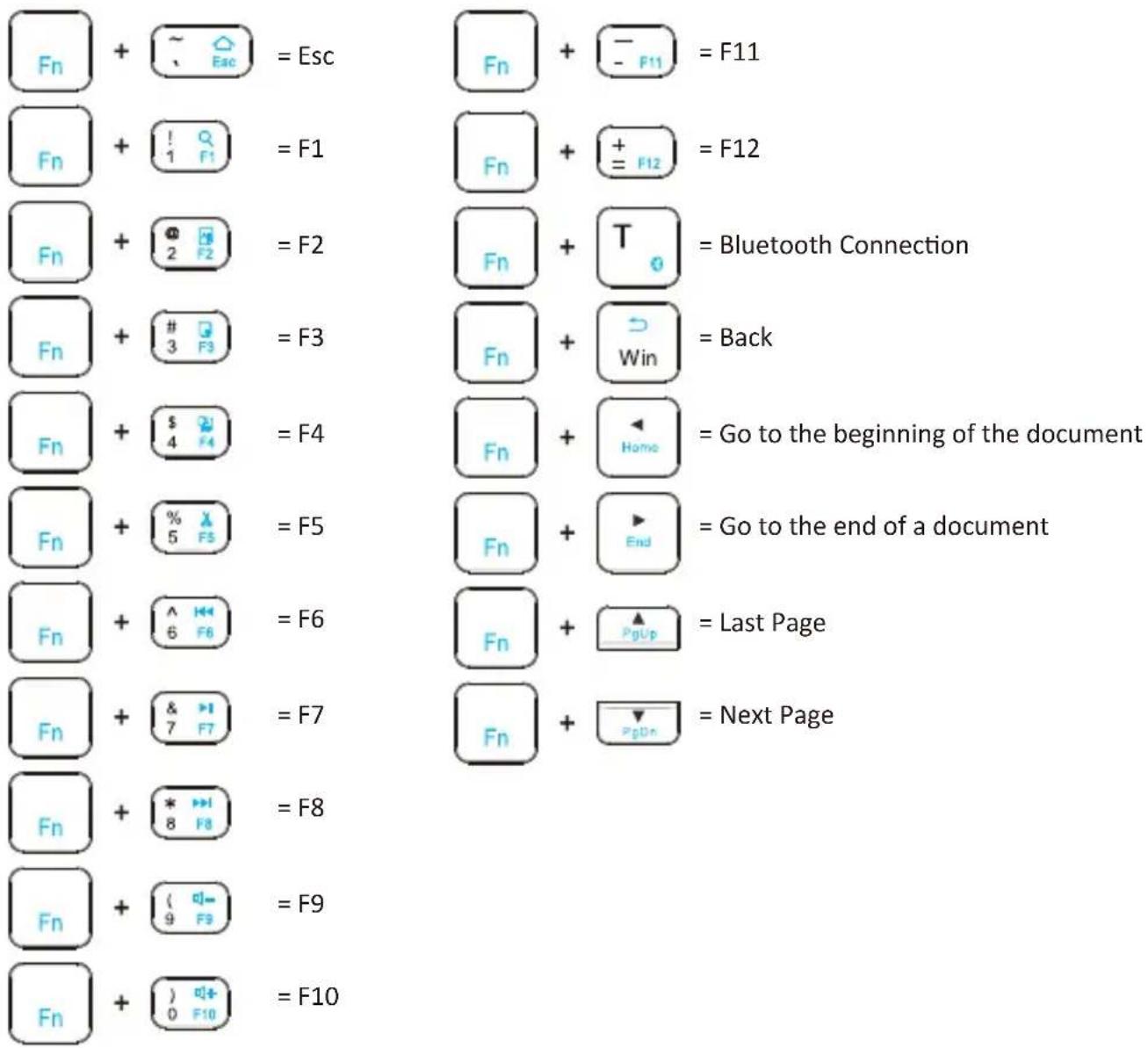
text_image
Fn + ~ Esc = Esc Fn + ! F1 = F1 Fn + 2 F2 = F2 Fn + # 3 F3 = F3 Fn + $ 4 F4 = F4 Fn + % 5 F5 = F5 Fn + ^ F6 = F6 Fn + & F7 = F7 Fn + * F8 = F8 Fn + ( F9 = F9 Fn + ) F10 = F10 Fn + - F11 = F11 Fn + + F12 = F12 Fn + T = Bluetooth Connection Fn + Win = Back Fn + Home = Go to the beginning of the document Fn + ▶ End = Go to the end of a document Fn + PgUp = Last Page Fn + PgDn = Next Page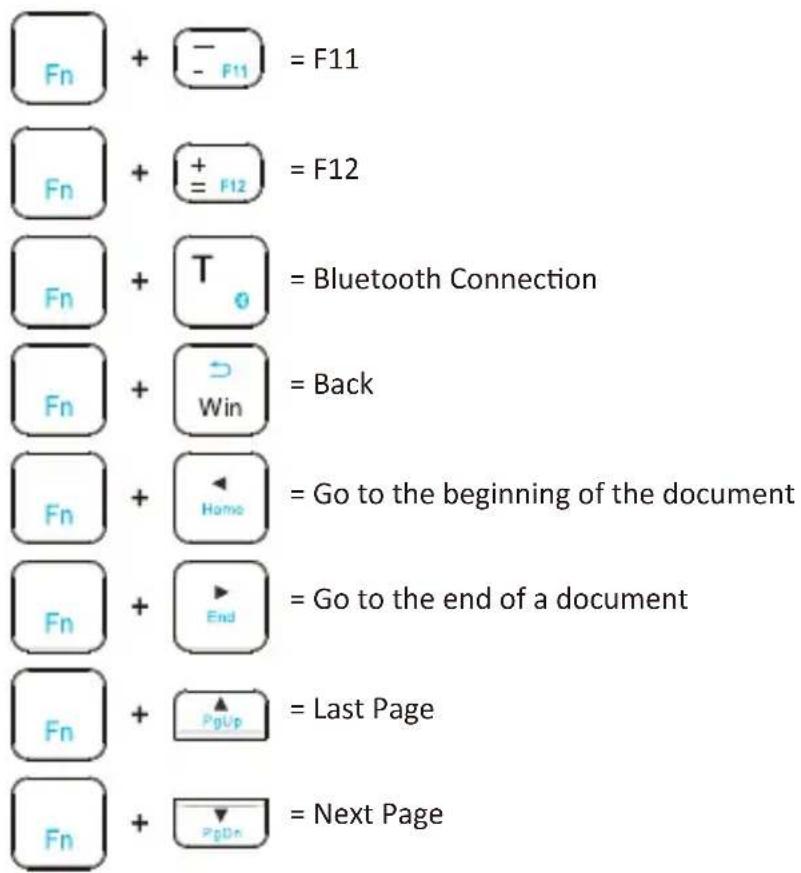
text_image
Fn + F11 = F11 Fn + F12 = F12 Fn + T = Bluetooth Connection Fn + Win = Back Fn + Home = Go to the beginning of the document Fn + End = Go to the end of a document Fn + PgUp = Last Page Fn + PgDn = Next PageEnglish(US/UK)
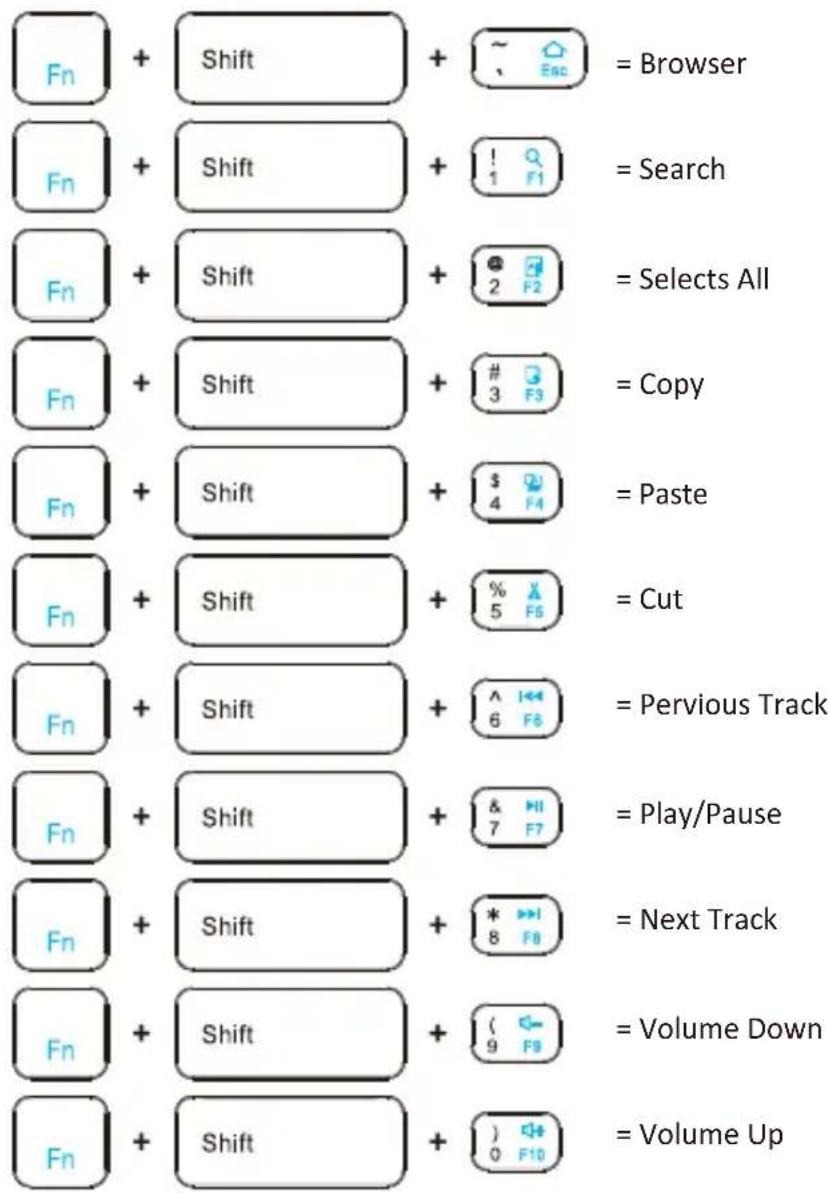
Fn + Shift + other function keys under Windows
text_image
Fn + Shift + Esc = Browser Fn + Shift + 1 F1 = Search Fn + Shift + 2 F2 = Selects All Fn + Shift + # 3 F3 = Copy Fn + Shift + $ 4 F4 = Paste Fn + Shift + % 5 F5 = Cut Fn + Shift + ^ 6 F6 = Pervious Track Fn + Shift + & 7 F7 = Play/Pause Fn + Shift + * 8 F8 = Next Track Fn + Shift + ( 9 F9 = Volume Down Fn + Shift + ) 0 F10 = Volume UpEnglish(US/UK)
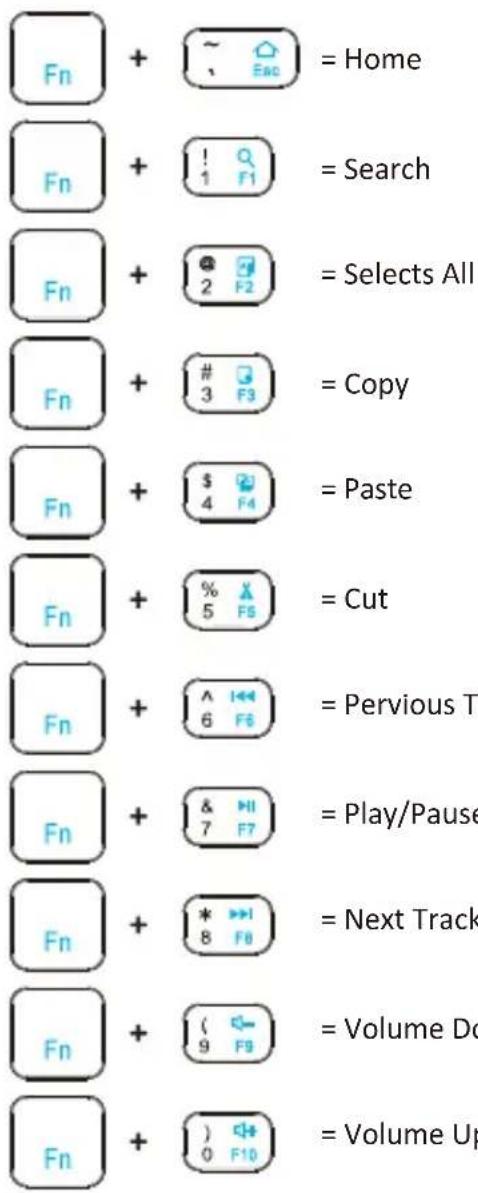
Fn + other function keys under Android
text_image
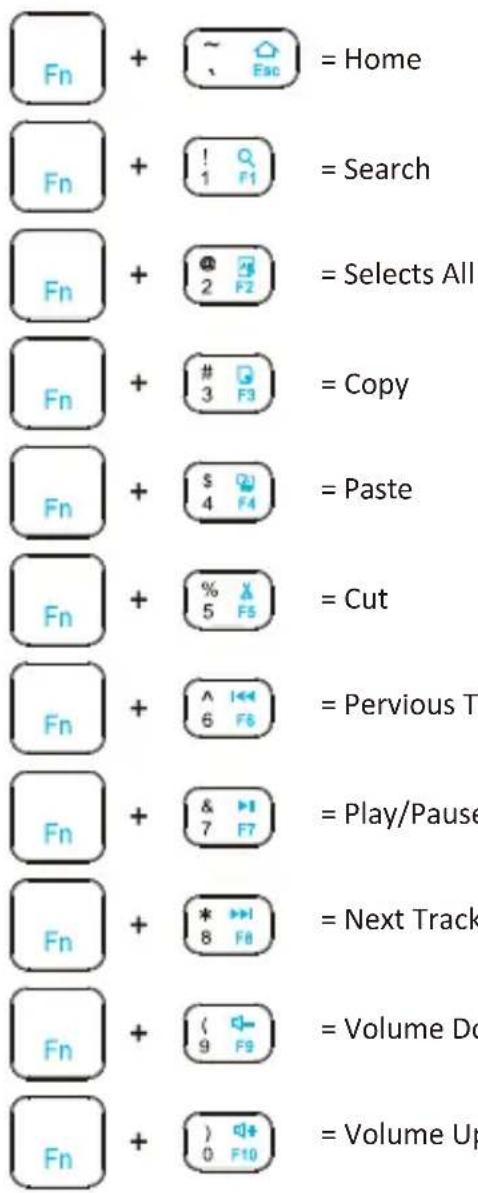
Fn + ~ Enc = Home Fn + ! F1 = Search Fn + @ 2 F2 = Selects All Fn + # 3 F3 = Copy Fn + $ 4 F4 = Paste Fn + % 5 F6 = Cut Fn + ^ 6 F6 = Pervious T Fn + & 7 F7 = Play/Pause Fn + * 8 F8 = Next Track Fn + ( 9 F9 = Volume Do Fn + ) 0 F10 = Volume Up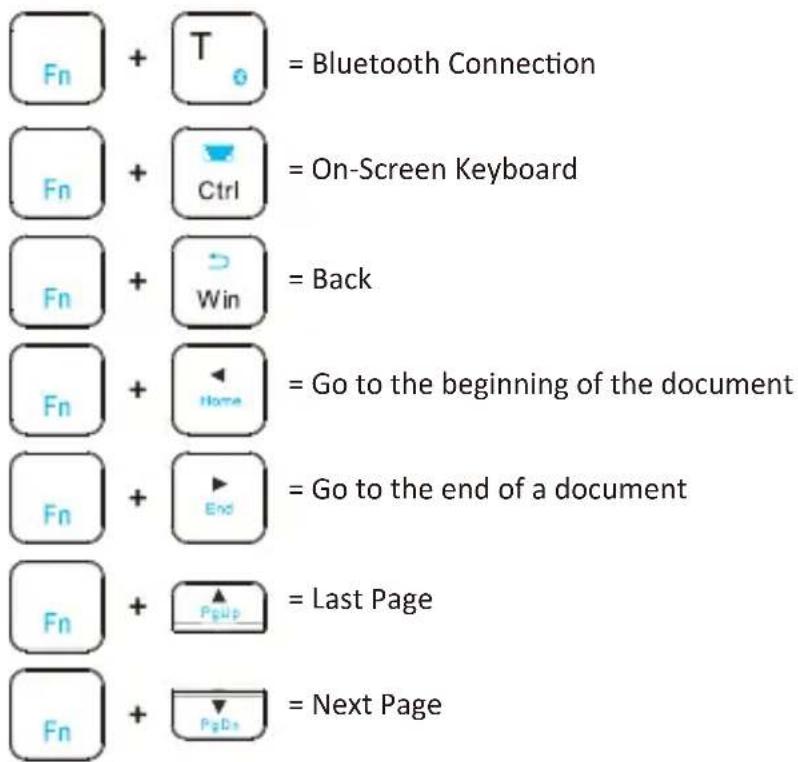
text_image
Fn + T = Bluetooth Connection Fn + Ctrl = On-Screen Keyboard Fn + Win = Back Fn + Home = Go to the beginning of the document Fn + End = Go to the end of a document Fn + Pgup = Last Page Fn + PgDs = Next PageEnglish(US/UK)
Fn + other function keys under IOS
text_image
Fn + ~ Esc = Home Fn + ! F1 = Search Fn + @ 2 F2 = Selects All Fn + # 3 F3 = Copy Fn + $ 4 F4 = Paste Fn + % 5 F5 = Cut Fn + ^ 6 F6 = Pervious T Fn + & 7 F7 = Play/Pause Fn + * 8 F8 = Next Track Fn + ( 9 F9 = Volume Do Fn + ) 0 F10 = Volume Up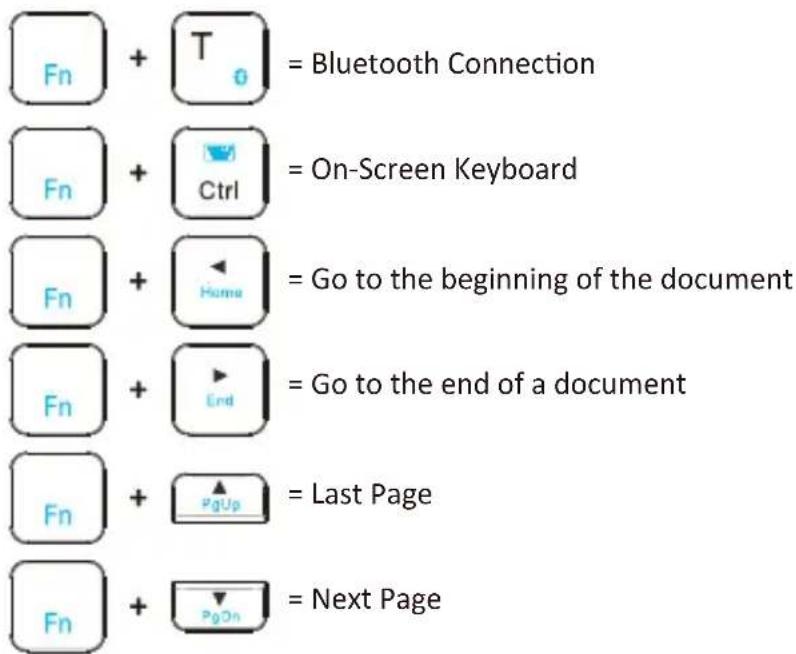
text_image
Fn + T = Bluetooth Connection Fn + Ctrl = On-Screen Keyboard Fn + Home = Go to the beginning of the document Fn + End = Go to the end of a document Fn + PgUp = Last Page Fn + PgOn = Next PageEnglish(US/UK)
text_image
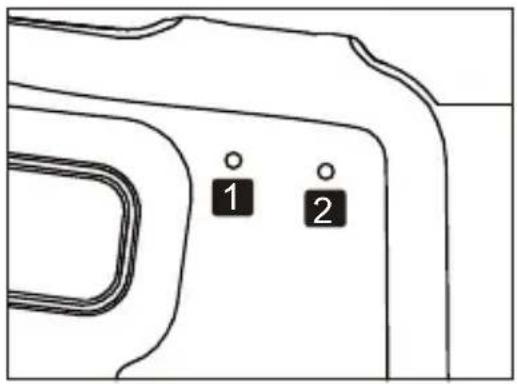
1 21 1^st LED Indicator Caps Lock Status: ON (Green light will stay on) Bluetooth Pairing Status: Start paring (Blinking blue light)
2 2^nd LED Indicator Power On/Off Status: ON (Green light will stay on for 10 seconds)
Power Status: Press Fn +
Red light (Blink once: 25%/ twice: 50%/ three times: 75%/ four times: 100%)
Low Voltage Status: Blinking red light
Charging Status: Red solid light
Deutsch (DE)
Bitte beachten Sie:
Specifications techniques
text_image
Fn + [1 Q r] = 検索
text_image
Fn + 2 F2 = 全て選択