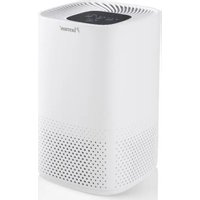
AIRP100UV - Air purifier BESTRON - Free user manual and instructions
Find the device manual for free AIRP100UV BESTRON in PDF.


| Product type | Air purifier |
| Brand | Bestron |
| Model | AIRP100UV |
| Filtration | 3-in-1 filter (microfilter, activated carbon, HEPA13) + UV filter |
| Fan speeds | 3 speeds + turbo mode |
| Timer | 2, 4, 8 hours |
| Sleep mode | Yes, with indicator lights off and silent ventilation |
| Filter replacement indicator | Yes, FILTER RESET indicator |
| 3-in-1 filter lifespan | Approximately 6 months |
| UV lamp lifespan | Approximately 20,000 hours |
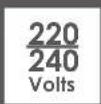
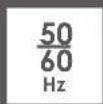
| Power supply | 220-240 V ~ 50 Hz |
| Minimum distance from walls | 30 cm |
| Warranty | 60 months |
| Cleaning | Soft dry cloth for the housing; vacuum cleaner for the filter |
| Use | Household use only |
Frequently Asked Questions - AIRP100UV BESTRON
User questions about AIRP100UV BESTRON
0 question about this device. Answer the ones you know or ask your own.
Ask a new question about this device
Download the instructions for your Air purifier in PDF format for free! Find your manual AIRP100UV - BESTRON and take your electronic device back in hand. On this page are published all the documents necessary for the use of your device. AIRP100UV by BESTRON.
USER MANUAL AIRP100UV BESTRON
natural_image
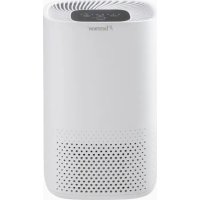
White BESTRON brand air purifier with perforated grille and control panel (no visible text or symbols on body)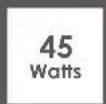

AIRP100UV INSTRUCTION MANUAL
DE
Bedienungsanleitung
EN
Instruction manual Instruktionsmanual
FR
Mode d'emploi
IT
R. Neyman Quality control
FUNKTION - Allgemein

TIMER-FUNKTION
FUNKTION - Filter
3-FACH-FILTER
DÉCLARATION DE CONFORMITÉ CE
R. Neyman
Contrôle qualité
WAT U MOET WETEN OVER DIT APPARAAT
R. Neyman
Quality control
WERKING - Algemeen
WERKING - Bedieningspaneel

ON/OFF EN FILTER RESET

TIMER FUNCTIE
Congratulations with the purchase of this Bestron product. These instructions tell you how the product works and how to use it. Read the instructions carefully before you start using the appliance. Only use the appliance in the manner described in the instructions. Keep these instructions in a safe place for future reference.
Defects:
If the appliance is defective, do not try to repair it yourself. Always have a qualified mechanic carry out any repairs.
Children:
- This appliance may be used by children over the age of 8 years old and persons with reduced physical, sensory or mental capabilities or lack of experience and know-how, but only if supervised or if they have been instructed on how to use the appliance safely and are aware of its potential dangers.
• Children are not allowed to clean and maintain the appliance, except if they are over the age of 8 years old and supervised. - Keep the appliance and the cable out of reach of children under the age of 8 years old.
- Keep an eye on children to ensure that they do not play with the appliance.
WHAT YOU SHOULD KNOW ABOUT ELECTRICAL APPLIANCES
- Check that the mains voltage corresponds with that shown on the rating plate of an electrical appliance before you use it.
• Always install electrical appliances on a stable and level surface where it cannot fall over. - Certain parts of an electrical appliance may become warm or sometimes hot. Do not touch them as you may burn yourself.
• Make sure your hands are dry when you touch an electrical appliance, a cord or a plug. - Electrical appliances must be able to lose their heat to avoid fire hazards. Therefore, make sure that the appliance has sufficient clearance around it and that it does not come into contact with flammable materials. Electrical appliances must never be covered.
• Make sure that electrical appliances, cords or plugs do not come into contact with water. -
Never immerse electrical appliances, cords or plugs in water or any other liquid.
-
Do not touch electrical appliances if they have fallen in the water. Immediately pull the plug out of the socket. Stop using the appliance.
• Make sure that electrical appliances, cords and plugs do not come into contact with heat sources, such as a hot hob or open fire. - Never let cords hang over the edge of the sink, a worktop or a table.
• Always remove plug from the socket when you are not using the electrical appliance. - Remove the plug from the socket by pulling the plug itself and not the cord.
- Regularly check if the cord of the electrical appliance is not damaged. Do not use the electrical appliance if the cord shows signs of damage. If the cord is damaged, it should be replaced by the manufacturer, a technical service provider or a person with an equivalent qualification, to avoid any danger.
- The appliance may not be switched on with the aid of an external time switch, or by a separate system with remote control.
WHAT YOU SHOULD KNOW ABOUT THIS APPLIANCE
- Place the machine in a flat and dry place and keep a distance of above 30cm between the machine and the surrounding objects or walls.
- Do not put any object into the air inlet and outlet of the air purifier. Keep the air inlet and outlet free from obstructions.
- Never use the appliance in damp or wet locations.
- Thoroughly clean the appliance after use (see Cleaning and Maintenance).
- Never use the appliance near an open window; rain coming through the window could come into contact with the appliance and cause a short circuit.
- Do not cover the appliance whilst it is in use.
- The machine should stay away from gasoline, flammable gas, stoves and other heat sources.
- Don't disassemble, overhaul and modify the machine arbitrarily, otherwise it will cause a machine malfunction or even bring harm to persons and properties. To avoid danger, if a machine failure occurs, ask the manufacturer or professionals to repair it.
- Do not place cups or other objects on the body to prevent water or other liquids from spilling into the air purifier.
ENVIRONMENT
- Dispose of packaging material such as plastic and cardboard boxes in the designated containers.
Do not dispose of this product as normal domestic waste at the end of its life, but hand it in at a collection point for the reuse of electric and electronic equipment. Look for the symbol on the product, the user instructions or the packaging showing the type of waste.
- The materials can be used as indicated. By helping us reuse and process the materials or otherwise recycle the old equipment, you will be making an important contribution towards the protection of the environment.
- Your municipality can tell you where to find the designated waste collection point in your neighbourhood.
CE DECLARATION OF CONFORMITY
This product meets the requirements of European guidelines.
R. Neyman Quality control
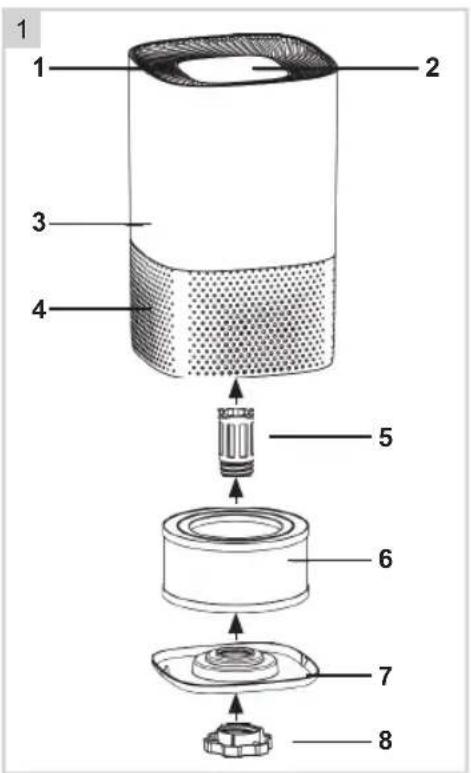
OPERATION - General
The device is intended for household use only, not for professional use.
- Air outlet
- Soft touch control panel
- Housing
- Air inlet
- UV filter
- 3-in-1 filter, Microfilter, Active Carbon filter, HEPA13 filter
- Lid
- Screw
OPERATION - Before first use
- Carefully remove your air purifier from the box and plastic packaging.
- Select a solid and flat surface that is level and place the air purifier there.
Note:
-
For proper airflow, place the unit at least 12 inches away from a wall or furniture.
• Make sure no grids are blocked. -
Before activating the unit, you must remove the filter from the device, remove the packaging and replace the filter in the device.
-
Insert the plug into a socket with the correct voltage.
OPERATION - Control panel

ON/OFF AND FILTER RESET
Press this button to turn on the product. Press this button again to turn off the device.
Press and hold the button for 3 to 5 seconds to turn off the RESET indicator after cleaning and/or replacing the filter. See also the chapter FILTERS.
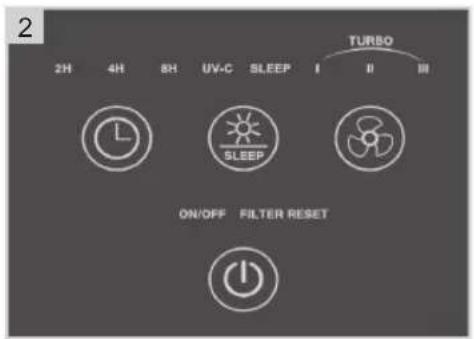

TIMER FUNCTION
Use this button to activate the timer function. The timer switches the appliance off after the set time.
Press once = The device switches off automatically after 2 hours. The indicator light will turn on. Press twice = The device switches off automatically after 4 hours. The indicator light will turn on. Press 3 times = The device switches off automatically after 8 hours. The indicator light will turn on. Press 4 times = The timer function is switched off again. The indicator light will turn off.

UV-LIGHT FILTER AND SLEEPMODE
Use this button to turn on SLEEP MODE. When SLEEP MODE is activated, the indicator light flashes 10 times before all indicator lights dim. The device will also go to the most silent ventilation mode. This way you can sleep more peacefully while the device continues to work.
Press once = The UV filter is switched on. The indicator light will turn on. Press twice = SLEEP MODE is switched on. The indicator light will turn on. Press 3 times = The UV filter is switched off. The operating control lamp will turn off. Press 4 times = SLEEP MODE is switched off. The operating control lamp will turn off.

FAN SPEED WITH TURBO FUNCTION
Use this button to control the fan speed and to activate the turbo function.
Press once = The fan blows at the lowest setting I. The indicator light comes on. Press twice = The fan blows at the middle setting II. The indicator light will turn on. Press 3 times = The fan blows at the highest setting III. The indicator light will turn on. Press 4 times = The fan blows in turbo mode. All three indicator lights come on. Press 5 times = The fan returns to the lowest setting. The indicator light will turn on.
OPERATION - Filters
3-WAY FILTER
This device is equipped with a 3-way filter that lasts about 6 months. When the FILTER RESET indicator comes on, it is time to replace the filter. Do this according to the following instructions.
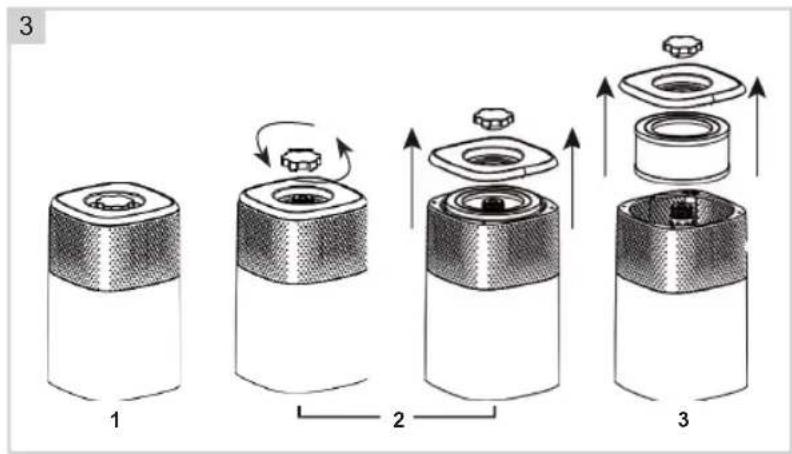
- Unplug the power cord and turn the unit over (see Figure 3-1). Place something soft under the device to prevent damage.
- Remove the cover by loosening the screw (see Figure 3-2).
- Take out the filter, clean it and reinstall it. Or install a completely new filter (see figure 3-3).
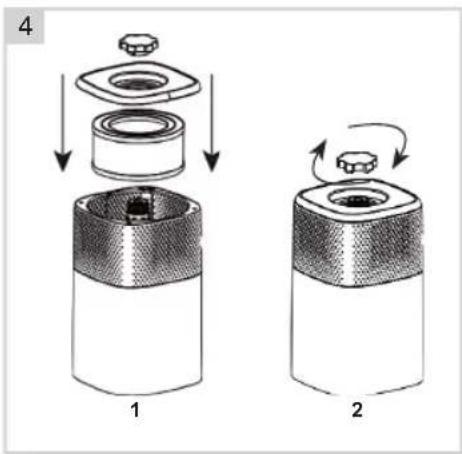
- Replace the cover and retighten the screw (see figure 4).
- Turn the device over again and plug it back in.
- Press and hold the power button for 3 to 5 seconds to reset the program system. The FILTER RESET indicator will switch off.
Tip:
Clean the combination filter with the small brush of your vacuum cleaner. This removes dust and dirt.
UV-Filter
This device is equipped with a UV-lamp with a lifespan of approx. 20,000 hours. We recommend that the lamp be replaced by a recognised installer.
CLEANING AND MAINTENANCE
The machine should be cleaned at least once every month by a clean, dry and soft cloth. More frequent cleaning may be required depending on environmental conditions.
NOTE:
- Do NOT stick any foreign objects or your fingers inside of the unit.
- Do NOT use gasoline, benzine, thinner, harsh cleaners, etc. on and/or in the unit while cleaning as they will damage the product.
• NEVER use alcohol or other solvents.
WARRANTY CONDITIONS
Bestron offers a 60-month warranty on this equipment against defects resulting from manufacturing and/or material errors, subject to the following conditions.
- No labour or material costs will be charged during this warranty period.
- Any repairs carried out under the warranty will not extend the warranty period.
- Faulty parts, or in the event of exchange, the faulty equipment itself, will automatically become the property of Bestron.
- The warranty is valid for the first buyer only and is non-transferable.
- The warranty is not valid for damage caused by:
- Accidents
- Improper use
- Wear and tear
- Neglect
- Faulty installation
- Connection to a different mains voltage than indicated on the type plate
• Unauthorised changes
• Repairs carried out by unqualified third parties - Use in violation with the applicable statutory, technical or safety standards
-
Careless transport without suitable packaging or other protection
-
Warranty cannot be claimed:
-
For damage during transport
-
If the serial number of the appliance is removed or changed
-
Items excluded from warranty are:
- Cords
- Lamps
- Glass parts
- The warranty does not entitle the purchaser to compensation for any damage other than replacement or repair of the faulty parts. Bestron cannot in any event be held liable for any indirect or consequential losses caused by or in relation to the equipment it has provided.
- Claims under a warranty may only be submitted to your (online) retailer or directly to the Bestron Service Department. Never send items without being asked to. We may refuse the parcel and you will be liable for the costs. Contact us first and we tell you how the appliance should be packaged and sent. Each claim under a warranty must be accompanied by the relevant receipt.
SERVICE
If an unexpected problem occurs, please contact the BESTRON service department:
www.bestron.com/service
COMPLIMENTI!

FUNZIONE TIMER
FILTRO UV E MODALITÀ SLEEP
R. Neyman Kvalitetskontroll
DRIFT - Allmänt
NEED HELP? CHAT WITH US! WHATSAPP CUSTOMER SERVICE

BESTRON.COM/WHATSAPP
- AIRP100UV INSTRUCTION MANUAL
- FUNKTION - Allgemein
- TIMER-FUNKTION
- FUNKTION - Filter
- 3-FACH-FILTER
- DÉCLARATION DE CONFORMITÉ CE
- WAT U MOET WETEN OVER DIT APPARAAT
- WERKING - Algemeen
- WERKING - Bedieningspaneel
- ON/OFF EN FILTER RESET
- TIMER FUNCTIE
- Defects:
- Children:
- WHAT YOU SHOULD KNOW ABOUT ELECTRICAL APPLIANCES
- WHAT YOU SHOULD KNOW ABOUT THIS APPLIANCE
- ENVIRONMENT
- CE DECLARATION OF CONFORMITY
- OPERATION - General
- OPERATION - Before first use
- Note:
- OPERATION - Control panel
- ON/OFF AND FILTER RESET
- TIMER FUNCTION
- UV-LIGHT FILTER AND SLEEPMODE
- FAN SPEED WITH TURBO FUNCTION
- OPERATION - Filters
- 3-WAY FILTER
- Tip:
- UV-Filter
- CLEANING AND MAINTENANCE
- WARRANTY CONDITIONS
- SERVICE
- COMPLIMENTI!
- FUNZIONE TIMER
- FILTRO UV E MODALITÀ SLEEP
- DRIFT - Allmänt
Brand : BESTRON
Model : AIRP100UV
Category : Air purifier