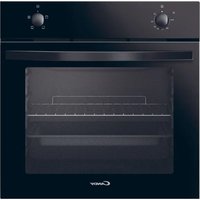
PCI30BCI642CBB - Oven CANDY - Free user manual and instructions
Find the device manual for free PCI30BCI642CBB CANDY in PDF.


| Product type | Built-in oven with induction hob |
| Brand | Candy |
| Model | PCI30BCI642CBB |
| Number of cooking zones (hob) | 4 induction zones |
| Power supply | 220-240 V ~ 50/60 Hz |
| Total installed power (hob) | 7200 W |
| Hob dimensions (W×D×H) | 590 × 520 × 58 mm |
| Built-in dimensions (hob) | 560 × 490 mm |
| Cooking modes (oven) | Natural convection, Bottom heating, Grill, Lighting |
| Temperature range (oven) | 50 °C to 250 °C (depending on mode) |
| Special functions (hob) | Boost, Pause, Timer, Control lock, Power management |
| Cleaning and maintenance | Manual cleaning with non-abrasive sponge; do not use steam cleaner |
| Safety | Child lock (child safety), Automatic shut-off, Residual heat indicator |
| Included accessories | Racks, trays, dripping pan |
| Electrical connection | Requires an all-pole circuit breaker with contact separation (3 mm) |
| Repairability index | Not communicated |
Frequently Asked Questions - PCI30BCI642CBB CANDY
User questions about PCI30BCI642CBB CANDY
0 question about this device. Answer the ones you know or ask your own.
Ask a new question about this device
Download the instructions for your Oven in PDF format for free! Find your manual PCI30BCI642CBB - CANDY and take your electronic device back in hand. On this page are published all the documents necessary for the use of your device. PCI30BCI642CBB by CANDY.
USER MANUAL PCI30BCI642CBB CANDY
natural_image
Four circular diagrams with center dots, arranged in a 2x2 grid on a white background (no text or symbols)Download hOn App
In the hOn App you’ll have access to several recipes and extra contents





SAFETY WARNINGS
PLEASE READ THE FOLLOWING INSTRUCTIONS CAREFULLY BEFORE USING THE APPLIANCE.
Installation
Electrical Shock Hazard
- Disconnect the appliance from the mains electricity supply before carrying out any work or maintenance on it.
- Connection to a good earth wiring system is essential and mandatory.
- Means for disconnection must be incorporated in the fixed wiring in accordance with the wiring rules.
• Alterations to the domestic wiring system must only be made by a qualified electrician. - Failure to follow this advice may result in electrical shock or death.
Cut Hazard
•Take care - panel edges are sharp.
- Failure to use caution could result in injury or cuts.
Important safety instructions
- Read these instructions carefully before installing or using this appliance.
- No combustible material or products should be placed on this appliance at any time.
- Please make this information available to the person responsible for installing the appliance as it could reduce your installation costs.
- In order to avoid a hazard, this appliance must be installed according to these instructions for installation.
- This appliance is to be properly installed and earthed only by a suitably qualified person.
- This appliance should be connected to a circuit which incorporates an isolating switch providing full disconnection from the power supply.
- WARNING: Use only hob guards designed by the manufacturer of the cooking appliance or indicated by the manufacturer of the appliance in the instructions for use as suitable or hob guards incorporated in the appliance. The use of inappropriate guards can cause accidents.
- Failure to install the appliance correctly could invalidate any warranty or liability claims.
- Regarding the details of installation, thanks to refer to the section
Operation and maintenance
Electrical Shock Hazard
- Do not cook on a broken or cracked cooktop. If the cooktop surface is break or crack, switch the appliance off immediately at the mains power supply (wall switch) and contact a qualified technician.
- Switch the cooktop off at the wall before cleaning or maintenance.
- Failure to follow this advice may result in electrical shock or death.
Health Hazard
- This appliance complies with electromagnetic safety standards.
Hot Surface Hazard
- During use, accessible parts of this appliance will become hot enough to cause burns.
- Do not let your body, clothing or any item other than suitable cookware contact the ceramic glass until the surface is cool.
- Metallic objects such as knives, forks, spoons and lids should not be placed on the hob surface since they can get hot.4
- Children less than 8 years of age shall be kept away unless continuously supervised.
- Handles of saucepans may be hot to touch. Check saucepan handles do not overhang other cooking zones that are on. Keep handles out of reach of children.
- Failure to follow this advice could result in burns and scalds.
Cut Hazard
- The razor-sharp blade of a cooktop scraper is exposed when the safety cover is retracted. Use with extreme care and always store safely and out of reach of children.
- Failure to use caution could result in injury or cuts.
Important safety instructions
- Never leave the appliance unattended when in use. Boilover causes smoking and greasy spillovers that may ignite.
- Never use your appliance as a work or storage surface.
- Never leave any objects or utensils on the appliance.
- Never use your appliance for warming or heating the room.
•After use, always turn off the cooking zones and the cooktop as described in this manual (i.e. by using the touch controls). Do not rely on the pan detection feature to turn off the cooking zones when You remove the pan.
- Do not allow children to play with the appliance or sit,
stand, or climb on it.
- Do not store items of interest to children in cabinets above the appliance. Children climbing on the cooktop could be seriously injured.
- Do not leave children alone or unattended in the area where the appliance is in use.
- Children or persons with a disability which limits their ability to use the appliance should have a responsible and competent person to instruct them in its use. The instructor should be satisfied that they can use the appliance without danger to themselves or their surroundings.
- Do not repair or replace any part of the appliance unless specifically recommended in the manual. All other servicing should be done by a qualified technician.
- Do not use a steam cleaner to clean your cooktop.
- Do not place or drop heavy objects on your cooktop.
- Do not stand on your cooktop.
- Do not use pans with jagged edges or drag pans across the glass surface as this can scratch the glass.
- Do not use scourers or any other harsh abrasive cleaning agents to clean your cooktop, as these can scratch the ceramic glass.
- If the supply cord is damaged, it must be replaced by the manufacturer, its service agent or similarly qualified persons in order to avoid a hazard.
- This appliance is intended to be used in a domestic household environment only! Commercial use of any kind is not covered under the manufacturer's warranty!
- WARNING: The appliance and its accessible parts become hot during use. Young children should be kept away.
- Care should be taken to avoid touching heating elements.
- Children less than 8 years of age shall be kept away unless continuously supervised.
- This appliance can be used by children aged from 8 years and above and persons with reduced physical, sensory or mental capabilities or lack of experience and knowledge if they have been given supervision or instruction concerning use of the appliance in a safe way and understand the hazards involved.
- Children shall not play with the appliance. Cleaning and user maintenance shall not be made by children without supervision.
- WARNING: Unattended cooking on a hob with fat or oil can be dangerous and may result in fire. NEVER try to extinguish a fire with water, but switch off the appliance and then cover flame e.g. with a lid or a fire blanket.
- WARNING: Danger of fire: do not store items on the cooking surfaces.
- WARNING: If the surface is cracked, switch off the appliance to avoid the possibility of electric shock, for hob surfaces of glass-ceramic or similar material which protect live parts.
•A steam cleaner is not to be used. - The appliance is not intended to be operated by means of an external timer or separate remote-control system.
- CAUTION: The cooking process has to be supervised. A short term cooking process has to be supervised
continuously.
- Power cord can't accessible after installation.
Product Overview
Top View
- 2300 W zone, boost to 3000 W
- 1200 W zone, boost to 1500 W
- 1800 W zone, boost to 2100 W
- 1200 W zone, boost to 1500 W
- Control panel
The Control Panel
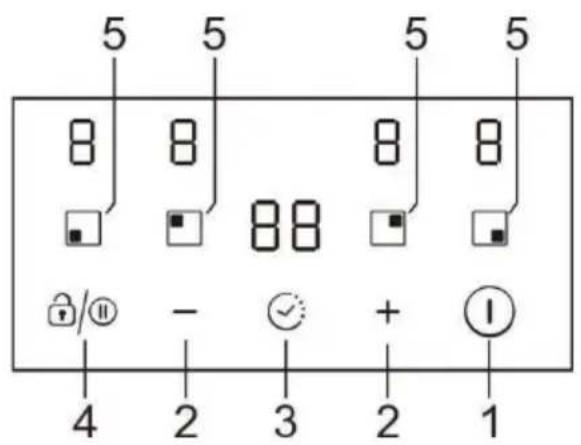
- ON/OFF control
- Power/Timer regulating key
- Timer control
- Pause/Keylock control
- Heating zone selection controls
Product Information
The ceramic/induction hob can meet different kinds of cuisine demands because of resistance wire heating, micro-computerized control and multi-power selection, really the optimal choice for modern families.
The hob centers on customers and adopts personalized design. The hob has safe and reliable performances, making your life comfortable and enabling to fully enjoy the
pleasure from life.
A Word on Induction Cooking
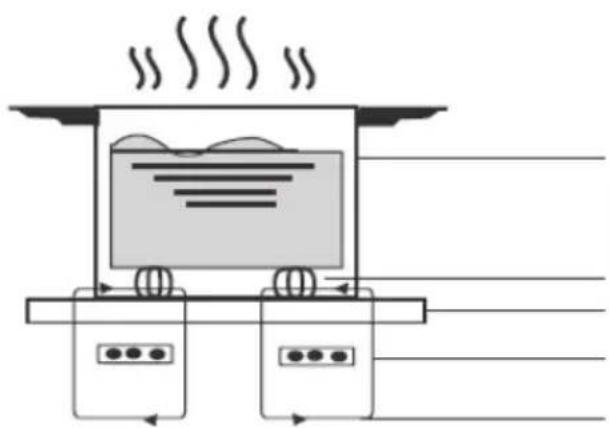
Induction cooking is a safe, advanced, efficient, and economical cooking technology. It works by electromagnetic vibrations generating heat directly in the pan, rather than indirectly through heating the glass surface. The glass becomes hot only because the pan eventually warms it up.
natural_image
Diagram of a steam machine with cooling unit and two control panels (no text or symbols)iron pot
magnetic circuit ceramic glass plate induction coil induced currents
Before using your New Induction Hob
- Read this guide, taking special note of the ‘Safety Warnings’ section.
- Remove any protective film that may still be on your Induction hob.
Using the Touch Controls
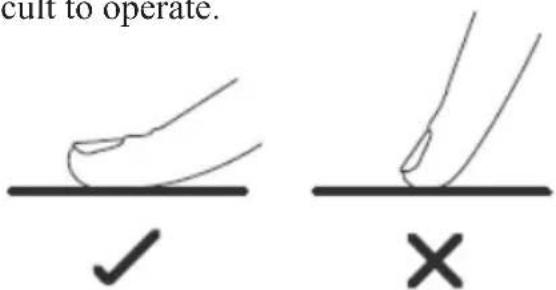
- The controls respond to touch, so you don't need to apply any pressure.
- Use the ball of your finger, not its tip.
- You will hear a beep each time a touch is registered.
• Make sure the controls are always clean, dry, and that there is no object (e.g. a utensil or a cloth) covering them. Even a thin film of water may make the controls difficult to operate.

- Only use cookware with a base suitable for induction cooking. Look for the induction symbol on the packaging or on the bottom of the pan.
- You can check whether your cookware is suitable by carrying out a magnet test. Move a magnet towards the base of the pan. If it is attracted, the pan is suitable for induction.
•If you do not have a magnet:
- Put some water in the pan you want to check.
- Follow the steps under 'To start cooking'.
- If U does not flash in the display and the water is heating, the pan is suitable.
•Cookware made by the following materials is not suitable: pure stainless steel, aluminum or copper without a magnetic base, glass, wood, porcelain, ceramic, and earthenware.
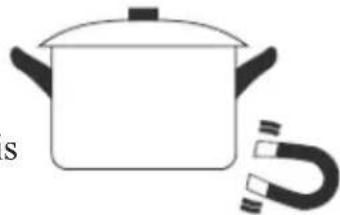
natural_image
Simple line drawing of a cooking pot with a U-shaped magnet attached (no text or symbols)| Size of burner (mm) | The minimum cookware (diameter /mm) |
| 160 | 120 |
| 180 | 140 |
| 210 | 160 |
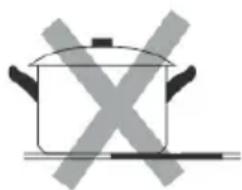
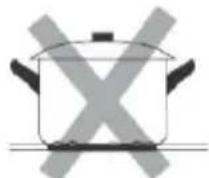
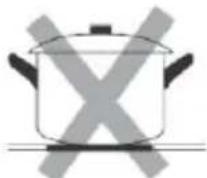
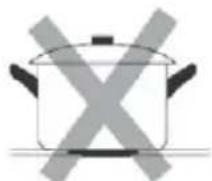
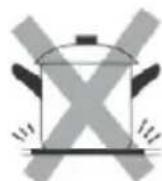
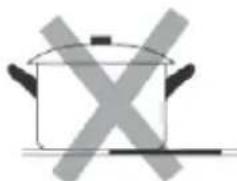
Do not use cookware with jagged edges or a curved base.
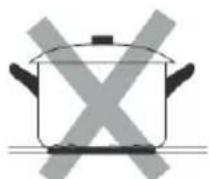
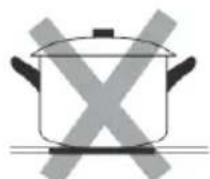
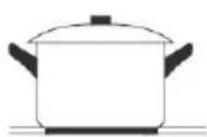
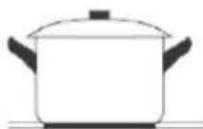
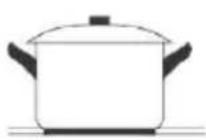
Make sure that the base of your pan is smooth, sits flat against the glass, and is the same size as the cooking zone. Always centre your pan on the cooking zone.
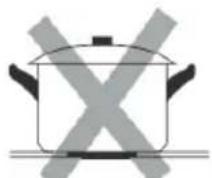
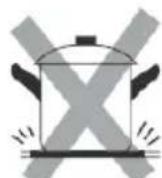
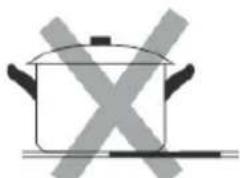
natural_image
Simple line drawing of a cooking pot with crossed-out X marks (no text or symbols)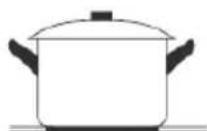
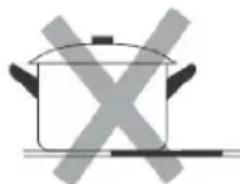
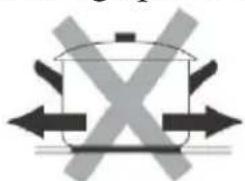
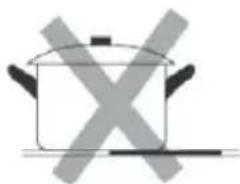
Always lift pans off the ceramic hob – do not slide, or they may scratch the glass.
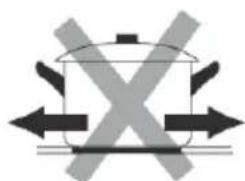
natural_image
Simple line drawing of a cooking pot with crossed arrows indicating pressure or resistance (no text or symbols)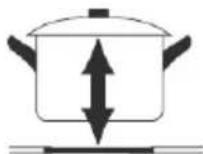
- Use pans whose diameter of the ferromagnetic area (base of the pan) is in the range of dimensions in the table below. (Table 1)
- If you use smaller pots, performance could be affected
- If you use pot with a diameter smaller than the one indicated in the table above, pots may not be detected
According to the dimension of the zone you can use pots of different diameters as picture below:
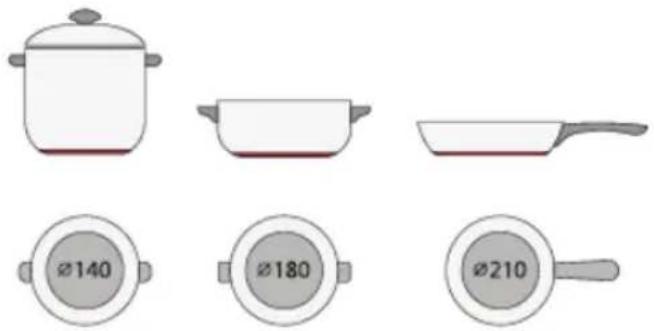
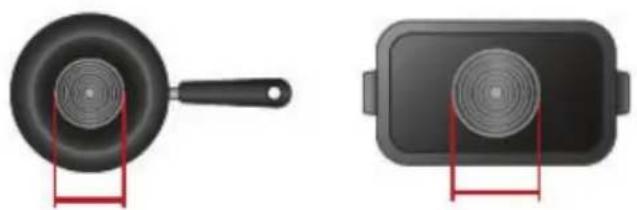
- If the ferromagnetic part covers only partially the base of the pan, only the ferromagnetic area will heat up, the rest of the base may not heat up a sufficient temperature for cooking.
natural_image
Two black cooking utensils: a pan with a lid and a rectangular plate with a speaker grille, both placed on red stands (no text or symbols visible)- If the ferromagnetic area is not homogeneous, but presents others material such as aluminum this may affect the heating up and the pan detection.
If the base of the pan is similar to the pictures below the pan could be not detected.
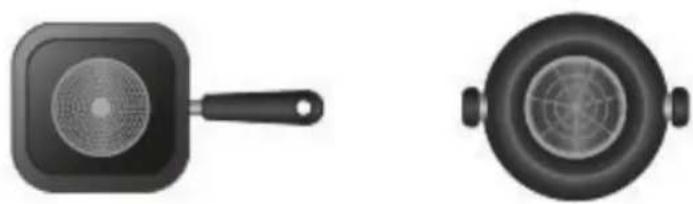
natural_image
Two black cooking pots, one with a side handle and the other with a circular lid (no text or symbols visible)Using your Induction Hob
To start cooking
•After power on, the buzzer beeps once, all the indicators light up for 1 second then go out, indicating that the hob has entered the state of standby mode.
-
Touch the ON/OFF switch. all the indicators show “-”
-
Place a suitable pan on the cooking zone that you wish to use. Make sure the bottom of the pan and the surface of the cooking zone are clean and dry.
-
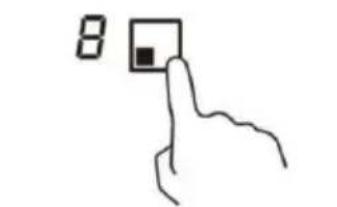
Touching the heating zone selection control, and an indicator next to the key will flash
-
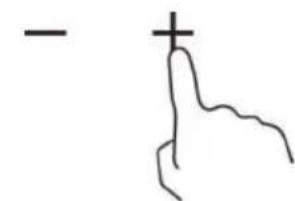
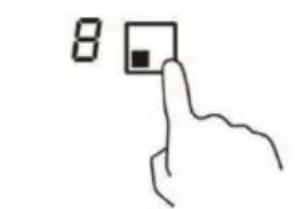
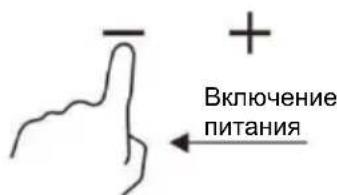
Select a heat setting by touching the “-” or “+” control.
- If you don't choose a heat setting within 1 minute, the Induction hob will automatically switch off. You will need to start again at step 1.
- You can modify the heat setting at any time during cooking.
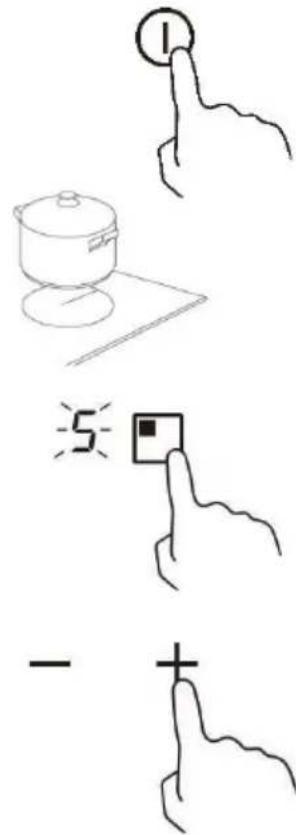
When you have finished cooking
-
Touching the heating zone selection that you wish to switch off
-
Turn the cooking zone off by scrolling down to "0".
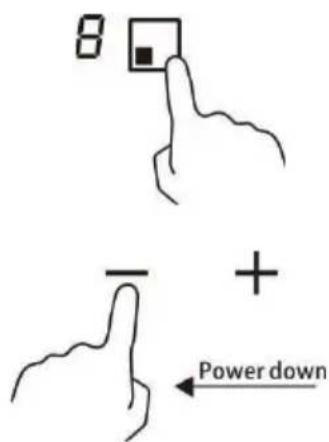
Make sure the display shows"0".
- Turn the whole cooktop off by touching the ON/OFF control.
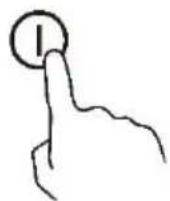
- Beware of hot surfaces
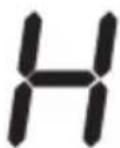
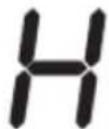
“H” will show which means cooking zone is too hot to touch. It will disappear when the surface has cooled down to a safe temperature. It can also be used as an energy saving function if you want to heat further pans, use the hotplate that is still hot.
Using the Power Management
It is possible to set a maximum power absorption level for the induction hob, choosing up to different power ranges.
Induction hobs are able to limit themselves automatically in order to work at lower power level, to avoid the risk of overloading.
To enter the power management function
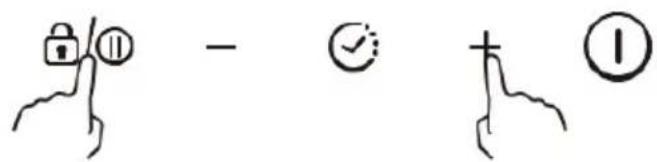
- Turn on the hob, then press at the same time the “+”(timer) and keylock. The time indicator will show “P5” which means power level 5. The default mode is on 7.2Kw.
To switch to another level
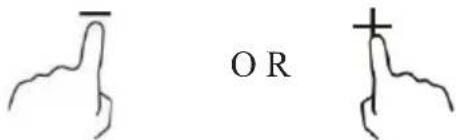
Press +/- from the timer. There are 5 power levels, from “P1” to “P5”. The timer indicator will show one of them.
“P1”: the maximum power is 2.5 Kw.
“P2”: the maximum power is 3.5 Kw.
“P3”: the maximum power is 4.5 Kw.
“P4”: the maximum power is 5.5 Kw.
“P5”: the maximum power is 7.2 Kw.
Confirmation and Exit Power Management Function
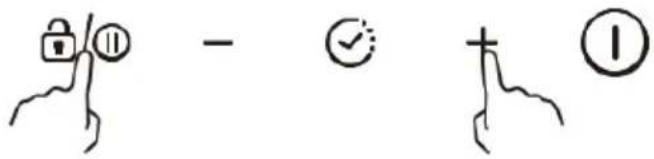
Press at the same time the “+”(timer) and keylock for confirmation, then the hob will be turned off.
Using Boost function
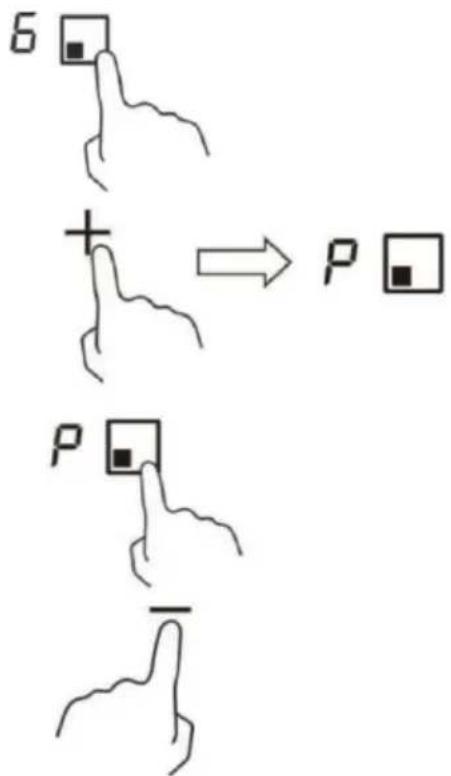
Activate the boost function
-
Select the zone with boost function (front left zone).
-
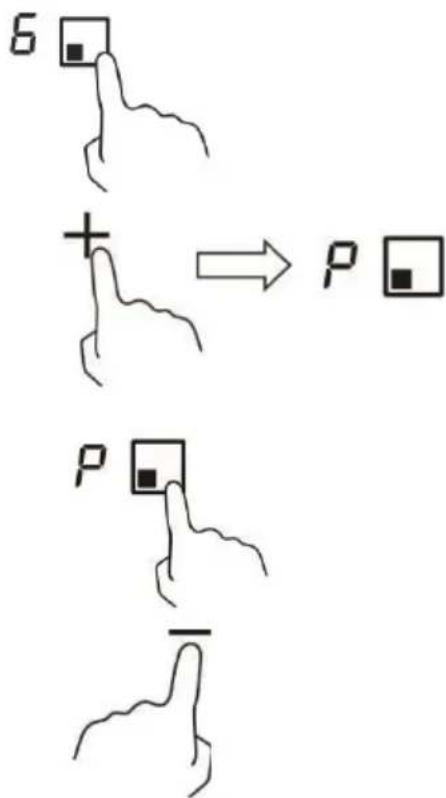
Touching the "plus" key until power level indication shows "P".
Cancel Boost function
-
Select the zone with boost function (front left zone).
-
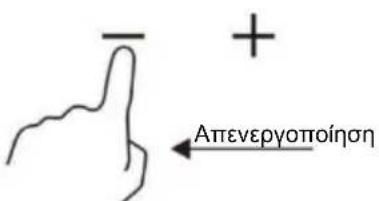
Touching the "minus" key to cancel the Boost function, and select the level you want to set.
- Boost function can only last for 5 minutes, after that the zone will go to level 9 automatically.
Using the Pause function
- Press the Pause control, /the heating zones stop working. All the zone indication show“||”
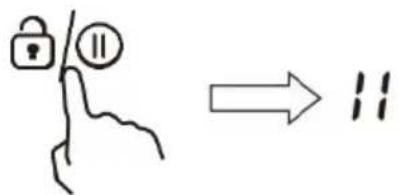
- Press the Pause control once again, all the heating zones will revert to its original setting.
• The function is available when one or more heating zones are working.
- If you don't cancel the stop working mode within 30 minutes, the induction cooktop will automatically switch off.
Locking the Controls
- You can lock the controls to prevent unintended use (for example children accidentally turning the cooking zones on).
- When the controls are locked, all the controls except the ON/OFF control are disabled.
To lock the controls
Touch the keylock 🔒/⑪ control for 2 seconds. The timer indicator will show "Lo".
To unlock the controls
- Make sure the hob is turned on.
- Touch and hold the keylock control for 2 seconds.
- You can now start using your hob.

When the hob is in lock mode, all the controls are disable except the ON/OFF, you can always turn the hob off with the ON/OFF control in an emergency, but you shall unlock the hob first in the next operation.
Residual Heat Warning
When the hob has been operating for some time, there will be some residual heat. The letter “H” appears to warn you to keep away from it.
Auto Shutdown
Safety feature of the hob is auto shut down. This occurs whenever you forget to switch off a cooking zone. The default shutdown times are shown in the table below:
| Power level | 1 | 2 | 3 | 4 | 5 | 6 | 7 | 8 | 9 |
| Default working timer (hour) | 8 | 8 | 8 | 4 | 4 | 4 | 2 | 2 | 2 |
Using the Timer
You can use the timer in two different ways:
- You can use it as a minute minder. In this case, the timer will not turn any cooking zone off when the set time is up.
• You can use it as cut-off timer to turn one or more cooking zones off after time is up.
• You can set the timer up to 99 minutes.
Using the Timer as a Minute Minder
- Make sure the cooktop is turned on. And zone selection key is not activated (zone indication ‘-’ is not blinking).
Note: you can set minute minder before or after cooking zone power setting finished.
-
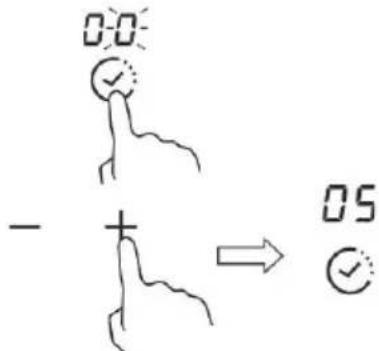
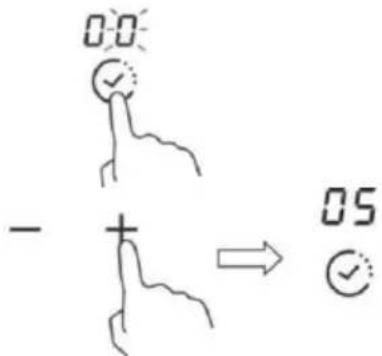
Touch timer key, "00" will show in the timer display and "0" will blink.
-
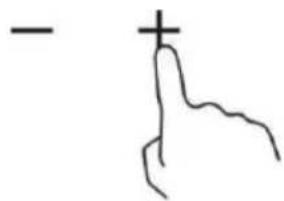
Set the time for between 1 to 99 minutes by touching the”-” or” +” control of the timer (e.g. 5)
-
Press the “+” once increases the time by one minute, Press the “-” once decrease the time by one minute. When the set time exceeds 99 minutes, it will automatically return to “00”, if the “-” and “+” keys are pressed simultaneously, the indicator will display “00”.
-
When the time is set, it will begin to count down immediately. The display will show the remaining time.
-
Buzzer will bips for 30 seconds and the timer indicator shows“--” when the setting time finished.
Timer Cancellation
After setting the time again, hold down the “Timer” key for 5 seconds, this will cancel the timer and the indicator will revert to “00”.
Using the timer to switch off one or more cooking zones
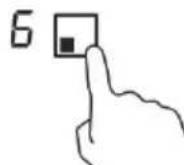
- Touching the heating zone selection control that you want to set the timer for.
-
Touch timer control, the “00” will show in the timer display. and the “0” fiashes.
-
Set the time for between 1 to 99 minutes by touching the”-” or”+” control of the timer (e.g. 5)
-
Press the “+” once increases the time by one minute, Press the “-” once decrease the time by one minute. When the set time exceeds 99 minutes, it will automatically return to “00”, if the “-” and “+” keys are pressed simultaneously, the indicator will display “00”.
-
When the time is set, it will begin to count down immediately. The display will show the remaining time.
NOTE: There will be a red dot in the right bottom corner of power level indication which indicating that zone is selected.
- When cooking timer expires, the corresponding cooking zone will switch off automatically.
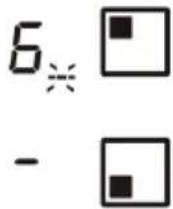
Note: Other cooking zones will keep operating if they are turned on previously.
If the timer is set on more than one zone:
- When you set timer for several cooking zones, red dots of the relevant cooking zones are indicated. The timer display shows the min. timer. The dot of the corresponding zone blinks.

- Once the countdown timer expires, the corresponding zone will switch off. Then it will show the new min. timer and the dot of corresponding zone will flash.
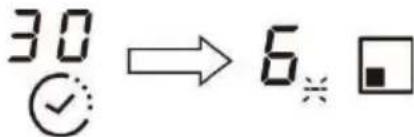
Note: Touch the heating zone selection control, the corresponding timer will be shown in the timer indicator.
Cooking Guidelines
Take care when frying as the oil and fat heat up very quickly, particularly if you're using Boost. At extremely high temperatures oil and fat will ignite spontaneously and this presents a serious fire risk.
Cooking Tips
- When food comes to the boil, reduce the power setting.
- Using a lid will reduce cooking times and save energy by retaining the heat.
- Minimise the amount of liquid or fat to reduce cooking times.
- Start cooking on a high setting and reduce the setting when the food has heated through.
Simmering, cooking rice
- Simmering occurs below boiling point, at around 85^ C, when bubbles are just rising occasionally to the surface of the cooking liquid. It is the key to delicious soups and tender stews because the flavours develop without overcooking the food. You should also cook egg-based and flourthickened sauces below boiling point.
- Some tasks, including cooking rice by the absorption method, may require a setting higher than the lowest setting to ensure the food is cooked properly in the time recommended.
Searing steak
To cook juicy flavoursome steaks:
- Stand the meat at room temperature for about 20 minutes before cooking.
- Heat up a heavy-based frying pan.
- Brush both sides of the steak with oil. Drizzle a small amount of oil into the hot pan and then lower the meat onto the hot pan.
- Turn the steak only once during cooking. The exact cooking time will depend on the thickness of the steak and how cooked you want it. Times may vary from about 2 – 8 minutes per side. Press the steak to gauge how cooked it is – the firmer it feels the more ‘well done’ it will be.
- Leave the steak to rest on a warm plate for a few minutes to allow it to relax and become tender before serving.
For stir-frying
- Choose a ceramic compatible flat-based wok or a large frying pan.
- Have all the ingredients and equipment ready. Stir-frying should be quick. If cooking large quantities, cook the food in several smaller batches.
- Preheat the pan briefly and add two tablespoons of oil.
-
Cook any meat first, put it aside and keep warm.
-
Stir-fry the vegetables. When they are hot but still crisp, turn the cooking zone to a lower setting, return the meat to the pan and add your sauce.
- Stir the ingredients gently to make sure they are heated through.
- Serve immediately.
Heat Settings
| Heat setting | Suitability |
| 1 - 2 | ·delicate warming for small amounts of food·melting chocolate, butter, and foods that burn quickly·gentle simmering·slow warming |
| 3 - 4 | ·reheating·rapid simmering·cooking rice |
| 5 - 6 | ·pancakes |
| 7 - 8 | ·sauteing·cooking pasta |
| 9 | ·stir-frying·searing·bringing soup to the boil·boiling water |
Care and Cleaning
| What? | How? | Important! |
| Everyday soiling on glass (fingerprints, marks, stains left by food or non-sugary spillovers on the glass) | 1. Switch the power to the cooktop off.2. Apply a cooktop cleaner while the glass is still warm (but not hot!)3. Rinse and wipe dry with a clean cloth or paper towel.4. Switch the power to the cooktop back on. | ·When the power to the cooktop is switched off, there will be no ‘hot surface’ indication but the cooking zone may still be hot! Take extreme care.·Heavy-duty scourers, some nylon scourers and harsh/abrasive cleaning agents may scratch the glass. Al ways read the label to check if your cleaner or scourer is suitable.·Never leave cleaning residue on the cooktop: the glass may become stained. |
| Boilovers, melts, and hot sugary spills on the glass | Remove these immediately with a fish slice, palette knife or razor blade scraper suitable for ceramic glass cooktops, but beware of hot cooking zone surfaces:1. Switch the power to the cooktop off at the wall.2. Hold the blade or utensil at a 30° angle and scrape the soiling or spill to a cool area of the cooktop.3. Clean the soiling or spill up with a dish cloth or paper towel.4. Follow steps 2 to 4 for ‘Everyday soiling on glass’ above. | ·Remove stains left by melts and sugary food or spillovers as soon as possible. If left to cool on the glass, they may be difficult to remove or even permanently damage the glass surface.·Cut hazard: when the safety cover is retracted, the blade in a scraper is razor-sharp. Use with extreme care and always store safely and out of reach of children. |
| Spillovers on the touch controls | 1. Switch the power to the cooktop off.2. Soak up the spill3. Wipe the touch control area with a clean damp sponge or cloth.4. Wipe the area completely dry with a paper towel.5. Switch the power to the cooktop back on. | ·The cooktop may beep and turn itself off, and the touch controls may not function while there is liquid on them. Make sure you wipe the touch control area dry before turning the cooktop back on. |
Hints and Tips
| Problem | Possible causes | What to do |
| The cooktop cannot Be turned on. | No power. | Make sure the cooktop is connected to the power supply and that it is switched on.Check whether there is a power outage in your home or area. If you've checked everything and the problem persists, call a qualified technician. |
| The touch controls are unresponsive. | The controls are locked. | Unlock the controls. See section ‘Using your ceramic cooktop’ for instructions. |
| The touch controls are difficult to operate. | There may be a slight film of water over the controls or you may be using the tip of your finger when touching the controls. | Make sure the touch control area is dry and use the ball of your finger when touching the controls. |
| The glass is being scratched. | Rough-edged cookware.Unsuitable, abrasive scourer or cleaning products being used. | Use cookware with flat and smooth bases. See ‘Choosing the right cookware’.See ‘Care and cleaning’. |
| Some pans make crackling or clicking noises. | This may be caused by the construction of your cookware (layers of different metals vibrating differently). | This is normal for cookware and does not indicate a fault. |
| The induction hob makes a low humming noise when used on a high heat setting. | This is caused by the technology of induction cooking. | This is normal, but the noise should quieten down or disappear completely when you decrease the heat setting. |
| Fan noise coming from the induction hob. | A cooling fan built into your induction hob has come on to prevent the electronics from overheating. It may continue to run even after you’ve turned the induction hob off. | This is normal and needs no action.Do not switch the power to the induction hob off at the wall while the fan is running. |
| Pans do not become hot and appears in the display. | The induction hob cannot detect the pan because it is not suitable for induction cooking.The induction hob cannot detect the pan because it is too small for the cooking zone or not properly centered on it. | Use cookware suitable for induction cooking. See section ‘Choosing the right cookware’.Centre the pan and make sure that its base matches the size of the cooking zone. |
| The induction hob or a cooking zone has turned itself off unexpectedly, a tone sounds and an error code is displayed (typically alternating with one or two digits in the cooking timer display). | Technical fault. | Please note down the error letters and numbers, switch the power to the induction hob off at the wall, and contact a qualified technician. |
Failure Display and Inspection
If an abnormality comes up, the induction hob will enter the protective state automatically and display corresponding protective codes:
| Problem | Possible causes | What to do |
| E4/E5 | Temperature sensor failure | Please contact the supplier. |
| E7/E8 | Temperature sensor of the IGBT failure. | Please contact the supplier. |
| E2/E3 | Abnormal supply voltage | Please inspect whether power supply is normal. Power on after the power supply is normal. |
| E6/E9 | Bad induction hob heat radiation | Please restart after the induction hob cools down. |
The above are the judgment and inspection of common failures.
Please do not disassemble the unit by yourself to avoid any dangers and damages to the induction hob.
Technical Specification
| Induction Hob | CI642CBB/1 |
| Cooking Zones | 4 Zones |
| Supply Voltage | 220-240V~ 50/60Hz |
| Installed Electric Power | 7200W |
| Product Size D×W×H(mm) | 590×520×58 |
| Building-in Dimensions A×B (mm) | 560×490 |
Weight and Dimensions are approximate. Because we continually strive to improve our products we may change specifications and designs without prior notice.
Installation
Selection of installation equipment
- Cut out the work surface according to the sizes shown in the drawing.
- For the purpose of installation and use, a minimum of 50mm space shall be preserved around the hole.
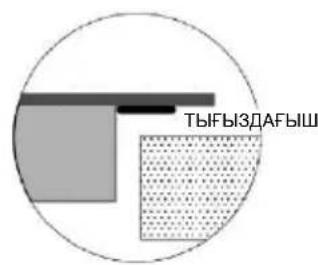
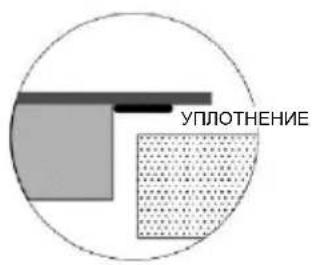
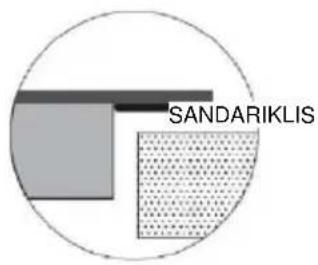
- Be sure the thickness of the work surface is at least 30mm. Please select heat-resistant work surface material to avoid larger deformation caused by the heat radiation from the hotplate. As shown below:
Warning: The work surface material must use the impregnated wood or other insulation material.
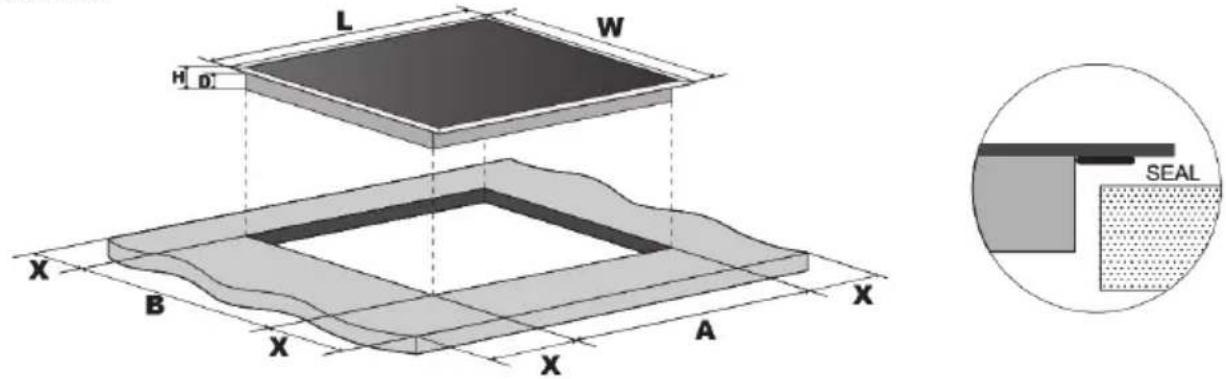
| L(mm) W(mm) H(mm) D(mm) A(mm) B(mm) X(mm) | |||||||||
| CI642CBB/1 590 | 520 | 58 | 54 | 560 | 490 | 50 mini | |||
Under any circumstances, make sure the hob is well ventilated and the air inlet and outlet are not blocked. Ensure the hob is in good work state. As shown below Note: The safety distance between the hotplate and the cupboard above the hotplate should be at least 760mm.
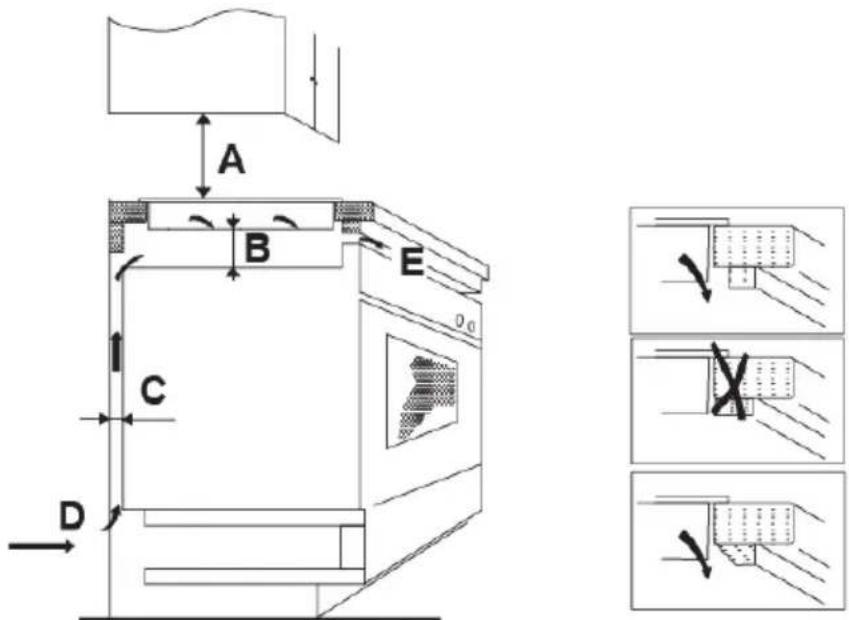
Before you install the hob, make sure that
- the work surface is square and level, and no structural members interfere with space requirements.
•the work surface is made of a heat-resistant material. - if the hob is installed above an oven, the oven has a built-in cooling fan.
- the installation will comply with all clearance requirements and applicable standards and regulations.
- a suitable isolating switch providing full disconnection from the mains power supply is incorporated in the permanent wiring, mounted and positioned to comply with the local wiring rules and regulations.
- The isolating switch must be of an approved type and provide a 3mm air gap contact separation in all poles (or in all active [phase] conductors if the local wiring rules allow for this variation of the requirements).
• the isolating switch will be easily accessible to the customer with the hob installed - you consult local building authorities and by-laws if in doubt regarding installation
- you use heat-resistant and easy-to-clean finishes (such as ceramic tiles) for the wall surfaces surrounding the hob.
When you have installed the hob, make sure that
- The power supply cable is not accessible through cupboard doors or drawers.
• There is adequate flow of air from outside the cabinetry to the base of the hob. - If the hob is installed above a drawer or cupboard space, a thermal protection barrier is installed below the base of the hob.
•The isolating switch is easily accessible by the customer.
Before locating the fixing brackets
The unit should be placed on a stable, smooth surface (use the packaging). Do not apply force onto the controls protruding from the hob.
Locating the fixing brackets
- The unit should be placed on a stable, smooth surface (use the packaging). Do not apply force onto the controls protruding from the hob.
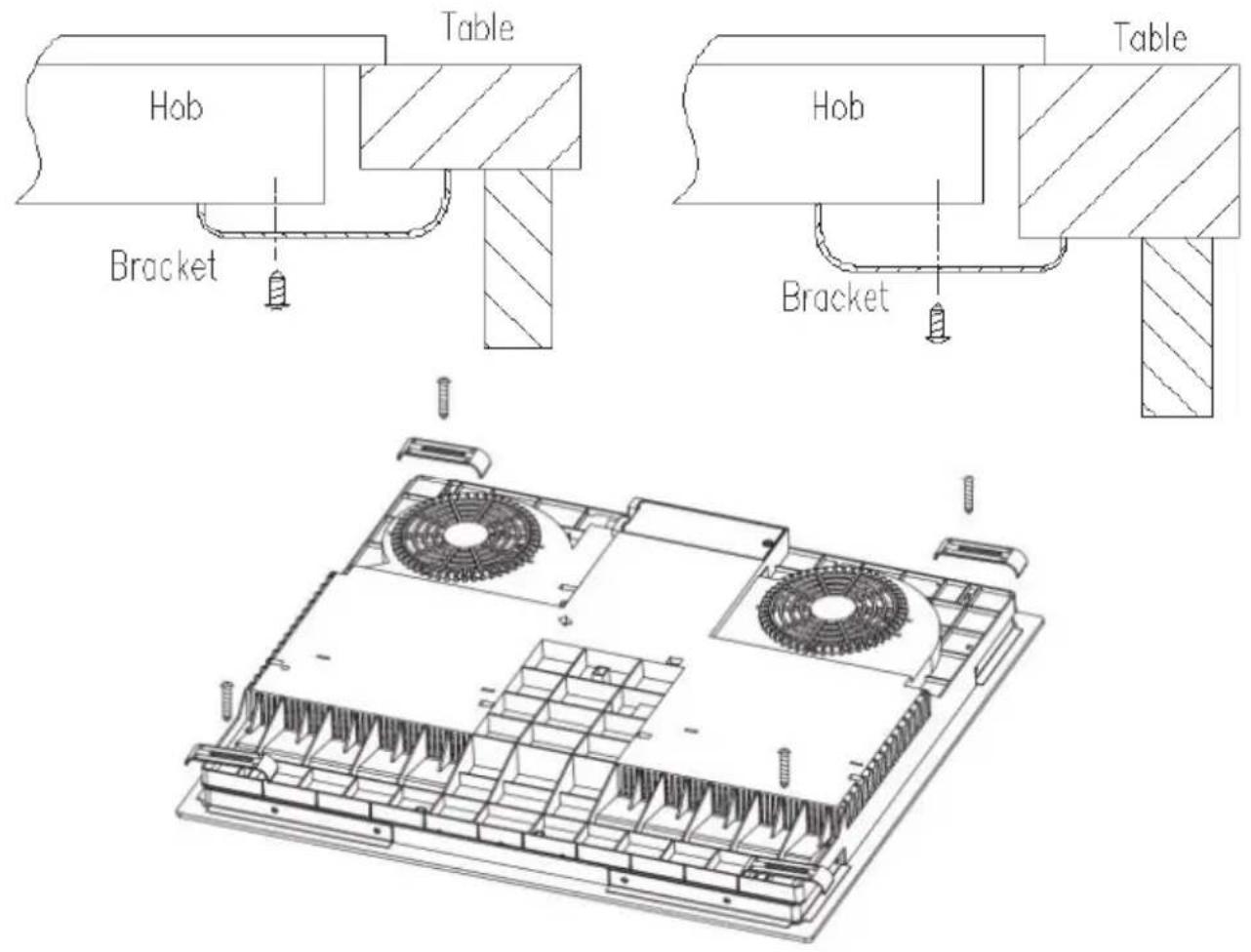
- Fix the hob on the work surface by screw four brackets on the bottom of hob (see picture) after installation.
- Adjust the bracket position to suit for different work surface's thickness.
Cautions
- The hob must be installed by qualified personnel or technicians. We have professionals at your service. Please never conduct the operation by yourself.
- The hob shall not be mounted to cooling equipment, dishwashers and rotary dryers.
- The hob shall be installed such that better heat radiation can be ensured to enhance its reliability.
- The wall and induced heating zone above the work surface shall withstand heat.
- To avoid any damage, the sandwich layer and adhesive must be resistant to heat.
• A steam cleaner is not to be used. - This ceramic can be connected only to a supply with system impedance no more than 0.427 ohm. In case necessary, please consult your supply authority for system impedance information.
Connecting the hob to the mains power supply
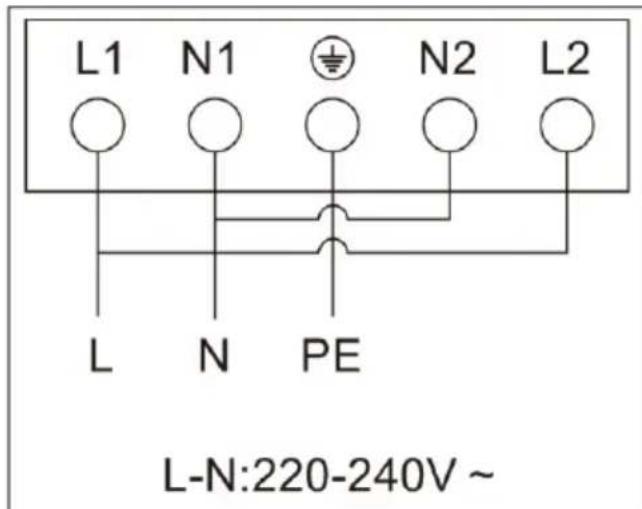
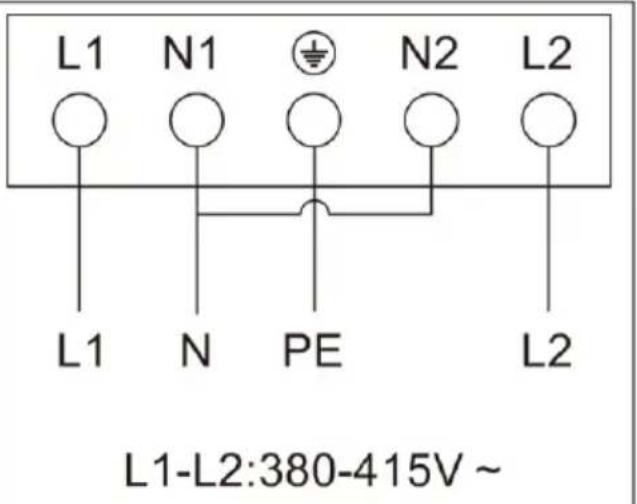
The power supply should be connected in compliance with the relevant standard, or a single-pole circuit breaker. The method of connection is shown below.
- If the cable is damaged or needs replacing, this should be done by an after-sales technician using the proper tools, so as to avoid any accidents.
- If the appliance is being connected directly to the mains supply, an omnipolar circuit breaker must be installed with a minimum gap of 3mm between the contacts.
- The installer must ensure that the correct electrical connection has been made and that it complies with safety regulations.
• The cable must not be bent or compressed. - The cable must be checked regularly and only replaced by a proper qualified person.
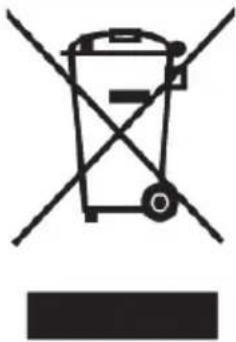 | This appliance is labeled in compliance with European directive 2012/19/EU for Waste Electrical and Electronic Equipment (WEEE). By ensuring that this appliance is disposed of correctly, you will help prevent any possible damage to the environment and to human health, which might otherwise be caused if it were disposed of in the wrong way.The symbol on the product indicates that it may not be treated as normal household waste. It should be taken to a collection point for the recycling of electrical and electronic goods.This appliance requires specialist waste disposal. For further information regarding the treatment, recover and recycling of this product please contact your local council, your household waste disposal service, or the shop where you purchased it.For more detailed information about treatment, recovery and recycling of this product, please contact your local city office, your household waste disposal service or the shop where you purchased the product. |
| DISPOSAL: Do not dispose this product as unsorted municipal waste. Collection of such waste separately for special treatment is necessary. |
natural_image
Diagram of a steam locomotive with wheels and motion indicators, no text or symbols presentcacerola de hierro

natural_image
Simple line drawing of a cooking pot with a U-shaped tube attached (no text or symbols)natural_image
Three identical cooking pots with crossed X marks, no text or symbols presentnatural_image
Four identical cooking pots with crossed X marks, shown in sequence (no text or symbols)natural_image
Two cooking pots with crossed arrows indicating heating or cooling (no text or symbols)natural_image
Two kitchen utensils: a black pan with a handle and a black rectangular plate with a circular vent, both placed on red stands (no text or symbols visible)natural_image
Two black cooking pots, one with a side handle and the other with a circular lid (no text or symbols visible)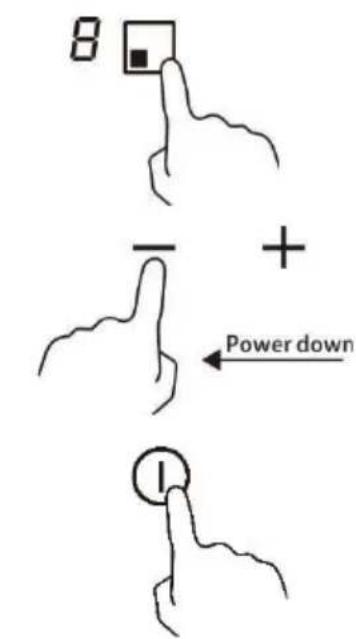
natural_image
Two abstract line drawings resembling stylized hands or curves, with no text or symbols present.| L(mm) | W(mm) | H(mm) | D (mm) | A(mm) | B(mm) | X(mm) | |
| CI642CBB/1 | 590 | 520 | 58 | 54 | 560 | 490 | 50 mini |
natural_image
Technical line drawing of a computer motherboard with fans and screw holes (no text or symbols)Precauciones
natural_image
Symbol of a trash bin crossed with diagonal lines, no text or numbers presentELIMINACIÓN:
natural_image
Diagram of a machine with steam rising, showing motion lines and control buttons (no text or symbols)marmite en fer

natural_image
Simple line drawing of a cooking pot with a curved handle (no text or symbols)natural_image
Simple line drawing of a cooking pot with crossed-out X marks (no text or symbols)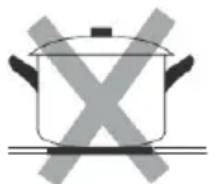
natural_image
Simple line drawing of a cooking pot with crossed X marks (no text or symbols)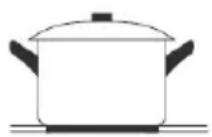
natural_image
Simple line drawing of a cooking pot with crossed-out X symbol (no text or labels)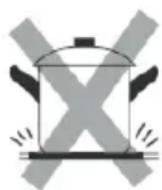
natural_image
Simple line drawing of a cooking pot with crossed-out X symbol (no text or labels)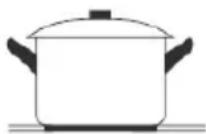
natural_image
Simple line drawing of a cooking pot with crossed arrows indicating pressure or heat (no text or symbols)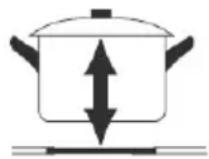
natural_image
Two black cooking utensils: a pan with a handle and a rectangular plate with a circular lid, both placed on red stands (no text or symbols visible)natural_image
Two kitchen utensils: a square pan with a side fan and a circular pan with a mesh grille (no text or symbols)- Faites attention aux surfaces chaudes
| L(mm) | W(mm) | H(mm) | D(mm) | A(mm) | B(mm) | X(mm) | |
| CI642CBB/1 | 590 | 520 | 58 | 54 | 560 | 490 | 50 mini |
natural_image
Technical line drawing of a multi-chamber electronic device with cooling fans and mounting hardware (no text or symbols)Mises en garde
natural_image
Two hand-drawn diagrams showing a shoe being checked and crossed, with checkmark and cross symbols (no text or labels)
natural_image
Simple line drawing of a cooking pot with a U-shaped tube attached to its side (no text or symbols)natural_image
Three identical cooking pots with crossed X marks, no text or symbols presentnatural_image
Four identical cooking pots with crossed-out X marks, no text or symbols presentnatural_image
Two kitchen utensils: a black pan with a handle and a red stand, shown from different angles (no text or symbols)natural_image
Two black cooking pots, one with a side handle and the other with a circular lid (no text or symbols visible)| L (mm) | W (mm) | H (mm) | D (mm) | A (mm) | B (mm) | X (mm) | |
| CI642CBB/1 | 590 | 520 | 58 | 54 | 560 | 490 | Min 50 |
natural_image
Technical line drawing of a computer motherboard with fans and screw holes (no text or symbols)Precauzioni
natural_image
Symbol of a trash bin crossed with diagonal lines, no text or numbers presentnatural_image
Diagram of a steam locomotive with wheels and exhaust lines, no text or symbols presentpanela de ferro
natural_image
Simple line drawing of a cooking pot with a curved tube attached (no text or symbols)natural_image
Three identical cooking pots with crossed-out X marks, no text or symbols presentnatural_image
Four identical cooking pots with crossed-out X symbols, shown in a row (no text or labels)natural_image
Two cooking pots with crossed arrows indicating opposing directions (no text or symbols)natural_image
Two kitchen utensils: a pan with a lid and a rectangular plate with a speaker grille (no text or symbols visible)natural_image
Two kitchen cookware illustrations: a square pan with a side handle and a circular pan with a mesh pattern (no text or symbols)Usar a função Boost
| C (mm) | L (mm) | A (mm) | D (mm) | A (mm) | B (mm) | X (mm) | |
| CI642CBB/1 | 590 | 520 | 58 | 54 | 560 | 490 | 50 mini |
| A (mm) | B (mm) | C (mm) | D | E |
| 760 | 50 mini | 20 mini | Entrada de ar | Saída de ar 5 mm |
natural_image
Diagram of a steam locomotive with wheels and motion indicators, no text or symbols presentvasedény
natural_image
Simple line drawing of a cooking pot with a curved tube attached to its side (no text or symbols)natural_image
Three identical cooking pots with crossed-out X marks, no text or symbols presentnatural_image
Four identical cooking pots with crossed-out X marks, shown in sequence (no text or symbols)natural_image
Two cooking pots with crossed arrows indicating opposing pressure directions (no text or symbols)natural_image
Two kitchen utensils: a black pan with a lid and a rectangular plate with a circular lid, both shown with red stand brackets (no text or symbols)natural_image
Two kitchen cookware items: a square pan with a circular lid and a circular pan with a mesh pattern (no text or symbols visible)
| H (mm) | SZ (mm) | M (mm) | D (mm) | A (mm) | B (mm) | X (mm) | |
| CI642CBB/1 | 590 | 520 | 58 | 54 | 560 | 490 | 50 mini |
natural_image
Diagram of a steam locomotive with wheels and motion indicators, no text or symbols presentżelazny garnek
natural_image
Simple line drawing of a cooking pot with a curved tube attached (no text or symbols)natural_image
Three identical cooking pots with crossed-out X marks, no text or symbols presentnatural_image
Four identical cooking pots with crossed-out X marks, shown in sequence (no text or symbols)natural_image
Two cooking pots with crossed arrows indicating heating or cooling conditions (no text or symbols)natural_image
Two kitchen utensils: a black frying pan with a side view and a black rectangular plate with a side view, both supported by red standers (no text or symbols visible)natural_image
Two kitchen cookware items: a square pan with a mesh fan and a circular pan with a mesh grille (no text or symbols)
| L (mm) | H (mm) | W (mm) | D (mm) | A (mm) | B (mm) | X (mm) | |
| CI642CBB/1 | 590 | 520 | 58 | 54 | 560 | 490 | 50 mini |
natural_image
Diagram of a coal cart with steam rising above it, showing motion lines and battery cells (no text or symbols)σιδερένια κατσαρόλα
natural_image
Simple line drawing of a cooking pot with a U-shaped tube attached (no text or symbols)natural_image
Simple line drawing of a cooking pot with crossed-out X marks (no text or symbols)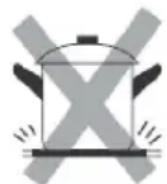
natural_image
Simple line drawing of a cooking pot with crossed-out X marks (no text or symbols)
natural_image
Pure diagram of crossed arrows and a container with cross symbol, no text or labels present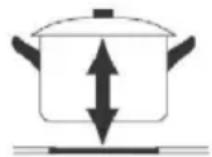
• X
natural_image
Two kitchen utensils: a black pan with a lid and a rectangular plate with a speaker grille (no text or symbols)natural_image
Two black cooking pots with visible internal patterns, shown from top and side views (no text or symbols)natural_image
Simple line drawing of a cooking pot and a finger pointing at a circular icon (no text or symbols)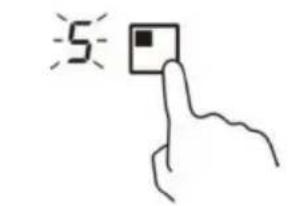
chemical
Two chemical structures labeled H, showing different organic or functional groups
natural_image
Diagram of a conveyor belt system with steam rising, showing two wheels and a central cart (no text or symbols)темір кастрөл
Ыдыс-аякты дурыс тандау

natural_image
Simple line drawing of a cooking pot with a U-shaped tube attached to its side (no text or symbols)| Жанарғы өлшемі (мм) | Ең кішкентай ыдыс (диаметрі/мм) |
| 160 | 120 |
| 180 | 140 |
| 210 | 160 |
natural_image
Three identical cooking pots with crossed-out X marks, no text or symbols presentnatural_image
Four identical cooking pots with crossed-out X symbols, no text or labels presentnatural_image
Two cooking pots with directional arrows indicating heating or cooling (no text or symbols)natural_image
Two black cooking utensils: a pan with a handle and a rectangular plate with a speaker grille (no text or symbols)natural_image
Two kitchen utensils: a square pan with a side handle and a circular pan with a radial grille (no text or symbols)natural_image
Simple line drawing of a cooking pot and a finger pointing at a circular icon (no text or symbols)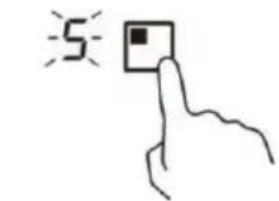
LN:220-240V \~
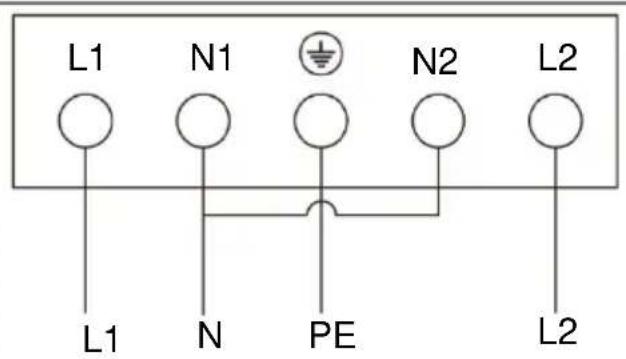
L1-L2:380-415V \~
natural_image
Symbol of a trash bin crossed with no text or numbers, representing waste sorting or disposal (no text present)natural_image
Diagram of a conveyor belt system with steam rising, showing motion arrows and components (no text or symbols)железная емкость
natural_image
Two hand-drawn diagrams showing a shoe being checked and crossed, with checkmark and cross symbols (no text or labels)natural_image
Simple line drawing of a cooking pot with a U-shaped tube attached to its side (no text or symbols)natural_image
Three identical cooking pots with crossed-out X marks, no text or symbols presentnatural_image
Four identical cooking pots with crossed-out X marks, no text or symbols presentnatural_image
Two cooking pots with crossed arrows indicating opposing directions (no text or symbols)natural_image
Two kitchen utensils: a black pan with a lid and a rectangular plate with a speaker grille (no text or symbols visible)natural_image
Two kitchen utensils: a square pan with a side handle and a circular pan with a lid (no text or symbols visible)natural_image
Simple line drawing of a cooking pot and a finger pointing at a circular icon (no text or symbols)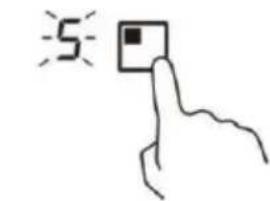
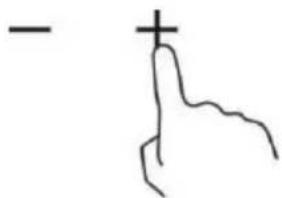
L1-L2:380-415 B \~
natural_image
Diagram of a conveyor belt system with steam rising, showing motion arrows and control buttons (no text or symbols)litinový hrnec
natural_image
Two hand-drawn diagrams showing a shoe on a checkmark and a pair of hands on a cross, with no text or symbols present.natural_image
Simple line drawing of a cooking pot with a U-shaped tube attached to its side (no text or symbols)natural_image
Three identical cooking pots with crossed X marks, no text or symbols presentnatural_image
Four identical cooking pots with crossed-out X marks, no text or symbols presentnatural_image
Two cooking pots with crossed arrows indicating heating or resistance, no text or symbols presentnatural_image
Two kitchen utensils: a black pan with a lid and a rectangular plate with a circular vent, both shown with red stand brackets (no text or symbols)natural_image
Two kitchen utensils: a square pan with a mesh fan and a circular pan with a mesh grille (no text or symbols)
| L (mm) | W (mm) | H (mm) | D (mm) | A (mm) | B (mm) | X (mm) | |
| CI642CBB/1 | 590 | 520 | 58 | 54 | 560 | 490 | min. 50 |
| A (mm) | B (mm) | C (mm) | D | E |
| 760 | min. 50 | min. 20 | Přívod vzduchu | Výstup vzduchu 5 mm |
natural_image
Symbol of a trash bin crossed with a diagonal line, no text or numbers presentnatural_image
Diagram of a conveyor belt system with steam rising, showing motion lines and control panels (no text or symbols)železný hrniec
natural_image
Two hand-drawn diagrams showing a checkmark and an X symbol on a line, no text or labels present.natural_image
Simple line drawing of a cooking pot with a U-shaped tube attached to its side (no text or symbols)| Vel’kost’ horáka (mm) | Minimálny kuchynský riad (priemer /mm) |
| 160 | 120 |
| 180 | 140 |
| 210 | 160 |
natural_image
Three identical cooking pots with crossed X marks, no text or symbols presentnatural_image
Four identical cooking pots with crossed-out X marks, no text or symbols presentnatural_image
Two cooking pots with crossed arrows indicating heating or cooling (no text or symbols)natural_image
Two kitchen utensils: a black pan with a lid and a rectangular plate with a circular vent, both shown without any text or symbols.natural_image
Two kitchen utensils: a square pan with a mesh fan and a circular pan with a mesh grille (no text or symbols)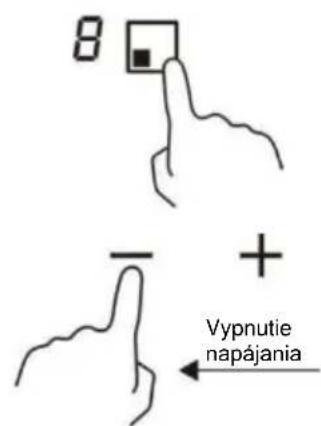
| D(mm) | Š(mm) | V(mm) | H(mm) | A (mm) | B (mm) | X (mm) | |
| CI642CBB/1 | 590 | 520 | 58 | 54 | 560 | 490 | 50 mini |
natural_image
Symbol of a trash bin crossed with two crossed lines, no text or numbers presentnatural_image
Diagram of a machine with steam rising, showing motion lines and control panel (no text or symbols)željezni lonac
magnetski krug ploča od staklene keramike indukcijska zavojnica inducirane struje
Prije uporabe nove indukcijske ploče za kuhanje
- Pročitajte ove smjernice i posebno obratite pozornost na odjeljak „Sigurnosna upozorenja”.
- Potpuno uklonite zaštitni film koji se može još nalaziti na indukcijskoj ploči za kuhanje.
natural_image
Simple line drawing of a cooking pot with a U-shaped tube attached (no text or symbols)| Veličina plamenika (mm) | Minimalno posuđe (promjer/mm) |
| 160 | 120 |
| 180 | 140 |
| 210 | 160 |
Ne upotrebljavajte posuđe za kuhanje s nazubljenim rubovima ili zakrivljenom dnom.
Pobrinite se da je baza vaše posude glatka, da se postavlja ravno uz staklo i da je jednake veličine kao zona za kuhanje. Postavite posudu u središte zone za kuhanje.
natural_image
Simple line drawing of a cooking pot with crossed-out X mark (no text or symbols)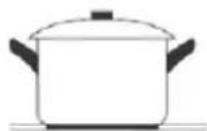
Uvijek podignite posude s keramičke ploče za kuhanje – ne vucite ih njima jer tako možete ogrepsti staklo.
natural_image
Diagram of a tank with crossed arrows indicating pressure or discharge (no text or symbols)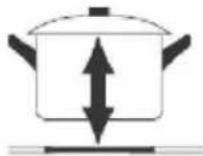
natural_image
Two kitchen utensils: a pan with a lid and a rectangular pot with a circular vent (no text or symbols)natural_image
Two black cooking panes shown from top and side views, no text or symbols present.Uporaba indukcijske ploče za kuhanje
Upotreba funkcije za povećanje snage
Uključite funkciju za povećanje snage
- Odaberite zonu s funkcijom povećanja snage (prednja lijeva zona).
- Dodirnite tipku "plus" - dok indikator razine snage ne prikaže "P".
Otkazivanje funkcije za povećanje snage
- Odaberite zonu s funkcijom povećanja snage (prednja lijeva zona).
- Dodirnite tipku „minus“ — za otkazivanje funkcije za povećanje snage i odaberite razinu koju želite podesiti.
- Funkcija povećanja snage može trajati samo 5 minuta, nakon tog vremena će se zona automatski prebaciti na razinu 9.
©
Uporaba vremenskog programatora
Vremenski programator možete upotrebljavati na dva različita načina:
- Možete ga upotrebljavati kao tajmer. U tom se slučaju nijedna zona za kuhanje ne isključuje vremenskim programatorom kada istekne zadano vrijeme.
- Možete ga koristiti kao graničnik za isključenje jednog ili više zona za kuhanje nakon isteka vremena.
- Možete postaviti vremenski programator na do 99 minuta.
Uporaba vremenskog programatora kao tajmera
- Pobrinite se da površina za kuhanje bude uključena. A tipka za odabir zone nije aktivirana (indikator zone ‘-’ ne trepće).
Napomena: možete podesiti minutni podsjetnik prije ili nakon završetka podešavanja snage zone za kuhanje.
-
Dodirna tipka vremenskog programatora, "00" će se prikazivati na zaslonu vremenskog programatora i treptat će "0".
-
Podesite vrijeme između 1 i 99 minuta dodirom na tipke "-" ili "+" vremenskog programatora (npr. 5)
| L (mm) | Š (mm) | V (mm) | D (mm) | A (mm) | B (mm) | X (mm) | |
| CI642CBB/1 | 590 | 520 | 58 | 54 | 560 | 490 | 50 mini |
ZBRINJAVANJE: Ne zbrinjavajte ovaj proizvod kao nerazvrstani komunalni otpad. Treba obaviti odvojeno prikupljanje takvog otpada radi posebne obrade.
Ovaj uređaj označen je u skladu s europskom Direktivom 2012/19/EZ o otpadnoj električnoj i elektroničkoj opremi (OEEO). Ako osigurate propisno zbrinjavanje ovoga uređaja, pomažete u sprječavanju moguće štete po ljudski okoliš i zdravlje koja može nastati ako se proizvod ne zbrine na ispravan način.
Oznakom na proizvodu ukazuje se da se s proizvodom ne smije postupati kao s običnim otpadom u domaćinstvu. Treba ga odnijeti na sabirno mjesto za recikliranje električne i elektroničke robe.
Za ovaj uređaj treba obaviti posebno zbrinjavanje otpada. Radi dodatnih informacija o obradi, oporavku i recikliranju ovoga proizvoda, obratite se svom lokalnom vijeću, službi za zbrinjavanje otpada u domaćinstvu ili trgovini u kojoj ste ga kupili.
Radi dodatnih informacija o obradi, oporavku i recikliranju ovoga proizvoda, obratite se uredu lokalnog vijeća, službi za zbrinjavanje otpada u domaćinstvu ili trgovini u kojoj ste kupili proizvod.
DROŠĪBAS BRĪDINĀJUMI
PIRMS IERİCES LIETOŠANAS, LÜDZU, RÜPİGI IZLASIET ŠOS NORĀDĪJUMUS.
Uzstādīšana
natural_image
Diagram of a conveyor belt system with steam rising, showing motion arrows and control buttons (no text or symbols)dzelzs katls
natural_image
Two hand-drawn diagrams showing correct and incorrect states (no text or symbols)natural_image
Simple line drawing of a cooking pot with a U-shaped tube attached to its side (no text or symbols)natural_image
Simple line drawing of a cooking pot with crossed-out X mark (no text or symbols)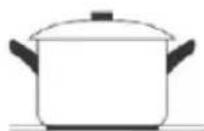
natural_image
Symbolic illustration of a tank with crossed arrows indicating pressure or flow (no text or labels)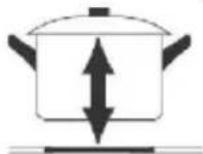
natural_image
Two kitchen utensils: a black pan with a handle and a rectangular plate with a circular vent (no text or symbols)natural_image
Two black cooking panes shown from top and side views, no text or symbols present.| G (mm) | P (mm) | A (mm) | Dz (mm) | A (mm) | B (mm) | X (mm) | |
| CI642CBB/1 | 590 | 520 | 58 | 54 | 560 | 490 | 50 mini |
| A (mm) | B (mm) | C (mm) | Dz | E |
| 760 | 50 mini | 20 mini | Gaisa ieplūde | Gaisa izeja 5 mm |
natural_image
Symbol of a trash bin crossed with two crossed lines and a black rectangle below (no text or labels)ENNE SEADME KASUTAMIST LUGEGE JÄRGMISED JUHISED HOOLIKALT LÄBI.
Paigaldamine
Elektrilöögi oht
Olulised ohutusjuhised
Olulised ohutusjuhised
natural_image
Diagram of a conveyor belt system with steam rising, showing motion arrows and control panels (no text or symbols)raudpott
natural_image
Two hand-drawn diagrams showing a checkmark and a cross on a horizontal line, no text or symbols present.natural_image
Simple line drawing of a cooking pot with a curved handle (no text or symbols)natural_image
Simple line drawing of a cooking pot with crossed-out X mark (no text or symbols)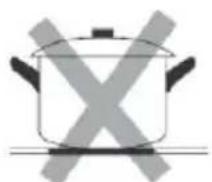
natural_image
Simple line drawing of a cooking pot with crossed-out X symbol (no text or labels)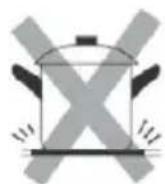
natural_image
Simple line drawing of a cooking pot with a crossed-out X symbol (no text or labels)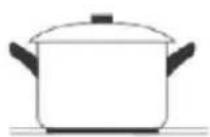
natural_image
Symbolic illustration of a tank with crossed arrows indicating pressure or flow (no text or labels)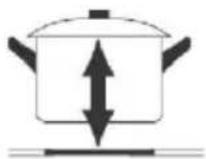
natural_image
Two kitchen utensils: a black pan with a handle and a rectangular plate with a circular vent (no text or symbols)natural_image
Two black cooking panes shown from top and side views, no text or symbols visible.Teisele tasemele lülitamine
natural_image
Simple line drawing of a cooking pot with a handle (no text or symbols)| Degiklio dydis (mm) | Minimalus maisto ruošos indas (skersmuo, mm) |
| 160 | 120 |
| 180 | 140 |
| 210 | 160 |
natural_image
Simple line drawing of a cooking pot with crossed-out kitchen panes (no text or symbols)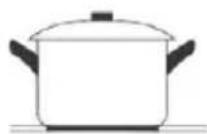
natural_image
Symbolic illustration of a tank with crossed arrows indicating pressure or discharge (no text or labels)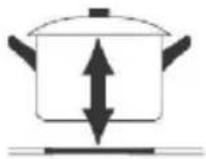
natural_image
Two kitchen utensils: a black pan with a lid and a rectangular plate with a circular vent, both shown with red stand brackets (no text or symbols)natural_image
Two kitchen utensils: a square pan with a circular fan and a circular pan with a mesh grille (no text or symbols)Jei norite perjungti i kita lygi
| I (mm) | P (mm) | A (mm) | G (mm) | A (mm) | B (mm) | X (mm) | |
| CI642CBB/1 | 590 | 520 | 58 | 54 | 560 | 490 | Min. 50 |
| A (mm) | B (mm) | C (mm) | D | E |
| 760 | Min. 50 | Min. 20 | Oro jleidimas | Oro išleidimas 5 mm |
Prieš montuodami kaitlente, isitikinkite, kad:
natural_image
Simple calendar icon with two dots above and a blank grid containing three diagonal lines (no text or symbols)ПРИНАДЛЕЖНОСТИ
natural_image
Line drawing of a rectangular plastic container with side flanges (no text or symbols)natural_image
Line drawing of a rectangular metal tray with vertical slats and a handle (no text or symbols)natural_image
Line drawing of a multi-tiered ladder structure with no text or symbolsnatural_image
Top-down diagram of a square room with a central oval and four side circular elements, no text or symbols present.ЗАМЕНА ЛАМПОЧКИ
natural_image
Simple line drawing of a trash bin with crossed lines indicating no waste or restriction (no text or symbols)КЕРЕК-ЖАРАКТАР
Тамшы науасы
natural_image
Line drawing of a rectangular plastic container with mounting holes and a recessed opening (no text or symbols)natural_image
Line drawing of a rectangular metal tray with vertical slats and a handle (no text or symbols)natural_image
Line drawing of a multi-tiered rack or shelf structure with curved supports (no text or symbols)natural_image
Top-down diagram of a square room with a central circular pattern and directional arrows, no text or symbols present.natural_image
Symbol of a trash bin crossed with two crossed lines, no text or labels presentПРИЛАДДЯ
natural_image
Line drawing of a rectangular container with side holes and a recessed opening (no text or symbols)natural_image
Line drawing of a rectangular metal tray with vertical slats and a handle (no text or symbols)natural_image
Technical line drawing of a multi-tiered ladder structure (no text or symbols)natural_image
Top-down diagram of a square appliance with internal fan and circular vent, no text or symbols presentЗАМИНА ЛАМПИ
natural_image
Symbol of a trash bin with crossed lines indicating no waste or restriction, and a solid black rectangle below (no text or labels)natural_image
Simple calendar icon with two dots above and a blank grid containing three diagonal lines (no text or symbols)| User Instructions | EN | 2 |
| OVENS | ||
| Mode d'emploi | FR | 13 |
| FOURS | ||
| Istruzioni per l'uso | IT | 24 |
| FORNI | ||
| Bedienungsanleitung | DE | 35 |
| ÖFEN | ||
| Instrucciones de uso | ES | 46 |
| HORNOS | ||
| Handleiding | NL | 57 |
| OVENS | ||
| Instruções para o utilizador | PT | 68 |
| FORNOS |
2 Safety Indications
7 General Instructions
9 Product description
10 Display description
10 Cooking Modes
11 General notes on cleaning
11 Maintenance
12 Troubleshooting
79 Installation
Safety Indications
- During cooking, moisture may condense inside the oven cavity or on the glass of the door. This is a normal condition. To reduce this effect, wait 10-15 minutes after turning on the power before putting food inside the oven. In any case, the condensation disappears when the oven reaches the cooking temperature.
- Cook the vegetables in a container with a lid instead of an open tray.
- Avoid leaving food inside the oven after cooking for more than 15/20 minutes.
- WARNING: the appliance and accessible parts become hot during use. Be careful not to touch any hot parts.
-
WARNING: the accessible parts can become hot when the oven is in use. Young children should be kept at a safe distance.
-
WARNING: ensure that the appliance is switched off before replacing the bulb, to avoid the possibility of electric shocks.
- Disconnect the appliance from the mains electricity supply before carrying out any work or maintenance.
- WARNING: in order to avoid any danger caused by the accidental resetting of the thermal interruption device, the appliance should not be powered by an external switching device, such as a timer, or be connected to a circuit that is regularly switched on and off.
- Children under 8 should be kept at a safe distance from the appliance if not continuously supervised.
• Children should not play with the appliance. - The appliance can be used by those aged 8 or over and by those with limited physical, sensorial or mental capacities, without experience or knowledge of the product, only if supervised or provided with instruction as to the operation of the appliance, in a safe way with awareness of the possible risks.
- Cleaning and maintenance should not be carried out by unsupervised children.
- Do not use rough or abrasive materials or sharp metal scrapers to clean the oven door glasses, as they can scratch the surface and cause the glass to shatter.
- The oven must be switched off before removing the removable parts. After cleaning, reassemble them according the instructions.
- Only use the meat probe recommended for this oven.
- Do not use a steam cleaner or high pressure spray for cleaning operations.
- IF THE OVEN IS PROVIDED BY THE MANUFACTURER WITHOUT PLUG:THE APPLIANCE MUST NOT BE CONNECTED TO THE POWER SOURCE USING PLUG OR SOCKETS, BUT MUST BE DIRECTLY CONNECTED TO THE SUPPLY MAINS. The connection to the power source must be carried out by a suitably qualified professional. In order to have an installation compliant
to the current safety legislation the oven must be connected only placing an omnipolar breaker, with contact separation compliant to the requirements for overvoltage category III, between the appliance and the power source. The omnipolar breaker must bear the maximum connected load and must be in line with current legislation. The yellow-green earth cable should not be interrupted by the breaker. The omnipolar breaker used for the connection must be easily accessible when the appliance is installed. The connection to the power source must be carried out by a suitably qualified professional considering the polarity of the oven and of the power source. The disconnection must be achieved incorporating a switch in the fixed wiring in accordance with the wiring rules
- IF THE OVEN IS PROVIDED BY THE MANUFACTURER WITH PLUG: The socket must be suitable for the load indicated on the tag and must have ground contact connected and in operation. The earth conductor is yellow-green in colour. This operation should be carried out by a suitably qualified professional. In case of incompatibility between the socket and the appliance plug, ask a qualified electrician to substitute the socket with another suitable type. The plug and the socket must be conformed to the current norms of the installation country. Connection to the power source can also be made by placing an omnipolar breaker, with contact separation compliant to the requirements for overvoltage category III, between the appliance and the power source that can bear the maximum connected load and that is in line with current legislation. The yellow-green earth cable should not be interrupted by the breaker. The socket or omnipolar breaker used for the connection should be easily accessible when the appliance is installed. The disconnection may be achieved by having the plug accessible or by incorporating a switch in the fixed wiring in accordance with the wiring rules. If the oven is with electromechanic control of temperature can be used:- Connect a plug to the supply cable that is able to bear
the voltage, current and load indicated on the tag and having the earth contact. The socket must be suitable for the load indicated on the tag and must have ground contact connected and in operation. The earth conductor is yellow-green in colour. This operation should be carried out by a suitably qualified professional. In case of incompatibility between the socket and the appliance plug, ask a qualified electrician to substitute the socket with another suitable type. The plug and the socket must be conformed to the current norms of the installation country. Connection to the power source can also be made by placing an omnipolar breaker, with contact separation compliant to the requirements for overvoltage category III, between the appliance and the power source that can bear the maximum connected load and that is in line with current legislation. The yellow-green earth cable should not be interrupted by the breaker. The socket or omnipolar breaker used for the connection should be easily accessible when the appliance is installed. The disconnection may be achieved by having the plug accessible or by incorporating a switch in the fixed wiring in accordance with the wiring rules.
- If the power cable is damaged, it should be substituted with a cable or special bundle available from the manufacturer or by contacting the customer service department. The type of power cable must be H05V2V2-F. This operation should be carried out by a suitably qualified professional. The earth conductor (yellow-green) must be approximately 10 mm longer than the other conductors. For any repairs, refer only to the Customer Care Department and request the use of original spare parts.
- Failure to comply with the above can compromise the safety of the appliance and invalidate the guarantee.
- Any excess of spilled material should be removed before cleaning.
- A long power supply failure during an occurring cooking phase may cause a malfunction of the monitor. In this case contact
customer service.
- The appliance must not be installed behind a decorative door in order to avoid overheating.
- When you place the shelf inside, make sure that the stop is directed upwards and in the back of the cavity. The shelf must be inserted completely into the cavity.
- When inserting the grid tray pay attention that the anti-slide edge is positioned rearwards and upwards.
- WARNING: Do not line the oven walls with aluminium foil or single-use protection available from stores. Aluminium foil or any other protection, in direct contact with the hot enamel, risk melting and deteriorating the enamel of the insides.
- WARNING: Never remove the oven door seal.
- CAUTION: Do not refill the cavity bottom with water during cooking or when the oven is hot.
- No additional operation/setting is required in order to operate the appliance at the rated frequencies.
- The oven can be located high in a column or under a worktop. Before fixing, you must ensure good ventilation in the oven space to allow proper circulation of the fresh air required for cooling and protecting the internal parts. Make the openings specified on last page according to the type of fitting.
- For a correct use of the oven it is advisable not to put the food in direct contact with the racks and trays, but to use oven papers and / or special containers.
General Instructions
We thank you for choosing one of our products. For the best results with your oven, you should read this manual carefully and retain it for future reference. Before installing the oven, take note of the serial number so that you can give it to customer service staff if any repairs are required. Having removed the oven from its packaging, check that it has not been damaged during transportation. If you have doubts, do not use the oven and refer to a qualified technician for advice. Keep all of the packaging material (plastic bags, polystyrene, nails) out of the reach of children. When the oven is switched on for the first time, strong smelling smoke can develop, which is caused by the glue on the insulation panels surrounding the oven heating for the first time. This is absolutely normal and, if it occurs, you should wait for the smoke to dissipate before putting food in the oven. The manufacturer accepts no responsibility in cases where the instructions contained in this document are not observed.
NOTE: the oven functions, properties and accessories cited in this manual will vary, depending on the model you have purchased.
Safety Indications
Only use the oven for its intended purpose, that is only for the cooking of foods; any other use, for example as a heat source, is considered improper and therefore dangerous. The manufacturer cannot be held responsible for any damage resulting from improper, incorrect or unreasonable usage.
The use of any electrical appliance implies the observance of some fundamental rules:
- do not pull on the power cable to disconnect the plug from the socket;
- do not touch the appliance with wet or damp hands or feet;
- in general the use of adaptors, multiple sockets and extension cables is not recommended;
- in case of malfunction and/or poor operation, switch off the appliance and do not tamper with it.
Electrical Safety
ENSURE THAT AN ELECTRICIAN OR QUALIFIED TECHNICIAN MAKES THE ELECTRICAL CONNECTIONS. The power supply to which the oven is connected must conform with the laws in force in the country of installation. The manufacturer accepts no responsibility for any damage caused by the failure to observe these instructions. The oven must be connected to an electrical supply with an earthed wall outlet or a disconnector with multiple poles, depending on the laws in force in the country of installation. The electrical supply should be protected with suitable fuses and the cables used must have a transverse section that can ensure correct supply to the oven.
CONNECTION
The oven is supplied with a power cable that should only be connected to an electrical supply with 220-240 Vac power between the phases or between the phase and neutral. Before the oven is connected to the electrical supply, it is important to check:
- power voltage indicated on the gauge;
- the setting of the disconnector.
The grounding wire connected to the oven's earth terminal must be connected to the earth terminal of the power supply.
WARNING
Before connecting the oven to the power supply, ask a qualified electrician to check the continuity of the power supply's earth terminal. The manufacturer accepts no responsibility for any accidents or other problems caused by failure to connect the oven to the earth terminal or by an earth connection that has defective continuity.
NOTE: as the oven could require maintenance work, it is advisable to keep another wall socket available so that the oven can be connected to this if it is removed from the space in which it is installed. The power cable must only be substituted by technical service staff or by technicians with equivalent qualifications.
A low light around the central main switch could be present when the oven is off. This is a normal behavior. I can be removed just turning the plug upside down or swapping the supply terminals.
Recommendations
After each use of the oven, a minimum of cleaning will help keep the oven perfectly clean.
Do not line the oven walls with aluminium foil or single-use protection available from stores. Aluminium foil or any other protection, in direct contact with the hot enamel, risks melting and deteriorating the enamel of the insides. In order to prevent excessive dirtying of your oven and the resulting strong smokey smells, we recommend not using the oven at very high temperature. It is better to extend the cooking time and lower the temperature a little. In addition to the accessories supplied with the oven, we advise you only use dishes and baking moulds resistant to very high temperatures.
Installation
The manufacturers have no obligation to carry this out. If the assistance of the manufacturer is required to rectify faults arising from incorrect installation, this assistance is not covered by the guarantee. The installation instructions for professionally qualified personnel must be followed. Incorrect installation may cause harm or injury to people, animals or belongings. The manufacturer cannot be held responsible for such harm or injury.
The oven can be located high in a column or under a worktop. Before fixing, you must ensure good ventilation in the oven space to allow proper circulation of the fresh air required for cooling and protecting the internal parts. Make the openings specified on last page according to the type of fitting.
Product description
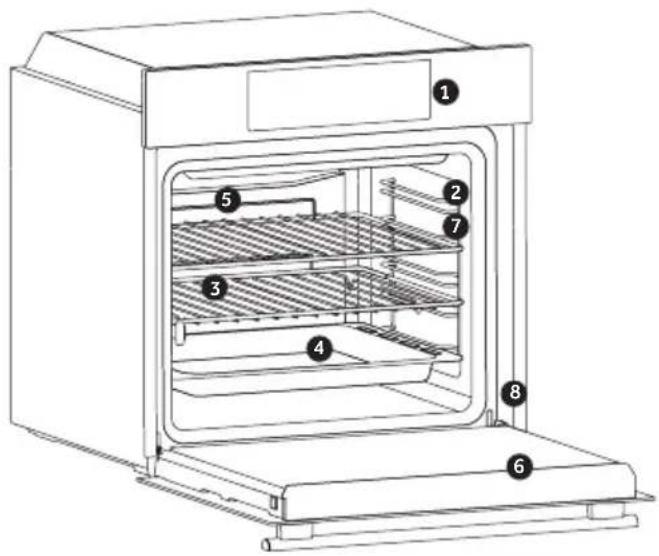
ACCESSORIES
- Control panel
- Shelf positions (lateral wire grid if included)
- Grids
- Trays
- Fan (if present)
- Oven door
-
Lateral wire grids (if present: only for flat cavity)
-
Serial number
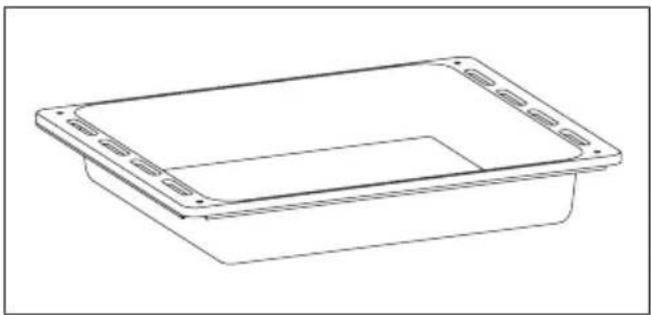
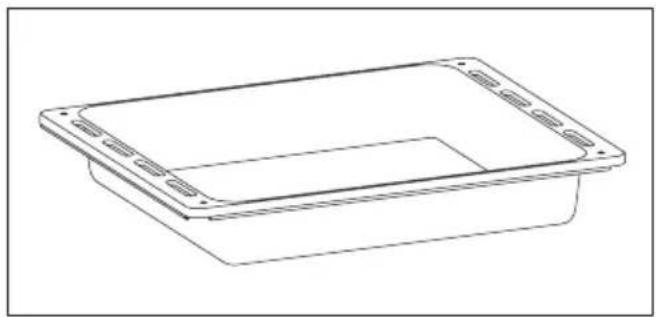
Drip tray
natural_image
Line drawing of a rectangular container with side slots and a recessed opening (no text or symbols)Collects residues that drip when cooking food on the grills.
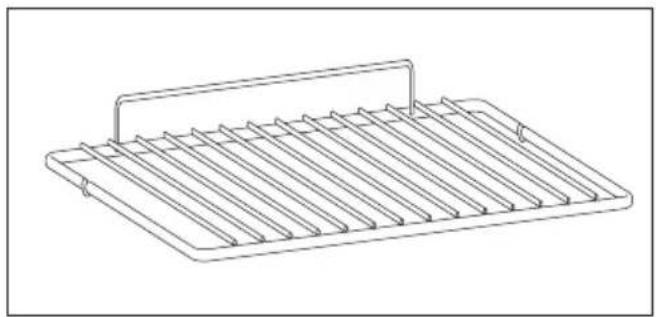
Metal grid
natural_image
Line drawing of a rectangular metal tray with vertical slats and a handle (no text or symbols)Holds baking trays and plates.
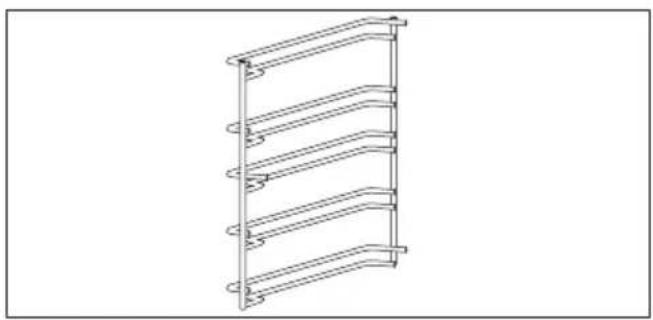
Lateral wire grids (only if present)
natural_image
Line drawing of a multi-tiered ladder structure with no text or symbolsLocated on both sides of the oven cavity, holds metal grills and drip pans.
First Use
PRELIMINARY CLEANING; Clean the oven before using for the first time. Wipe over external surfaces with a damp soft cloth. Wash all accessories and wipe inside the oven with a solution of hot water and washing up liquid. Set the empty oven to the maximum temperature and leave on for about 1 hour, this will remove any lingering smells of newness.
Display description
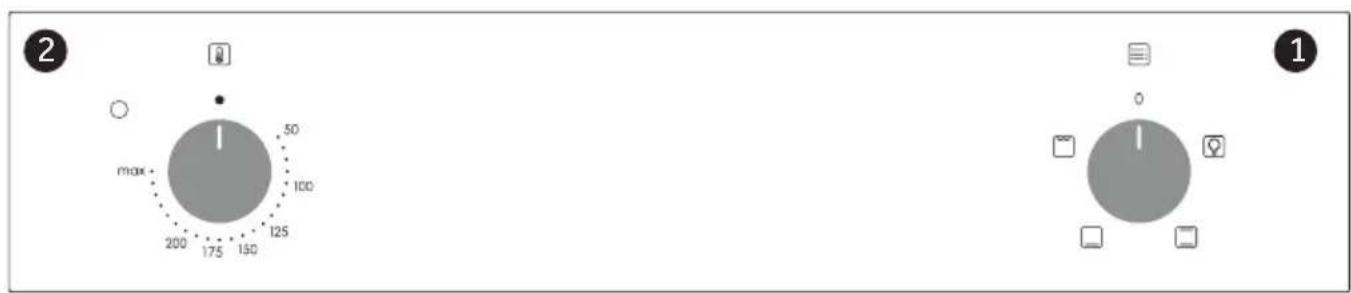
- Function selector knob
- Thermostat selector knob
Cooking Modes
| Symbol | T°C default | T°C range | Function |
 | LAMP: Turns on the oven light. | ||
 | 220 50 ÷ MAX | * CONVENTIONAL : Both top and bottom heating elements are used. Preheat the oven for about ten minutes. This method is ideal for all traditional roasting and baking. For seizing red meats, roast beef, leg of lamb, game, bread, foil wrapped food (papillotes), flaky pastry. Place the food and its dish on a shelf in mid position. | |
 | 210 50 ÷ MAX | BOTTOM HEATING: Using the lower element. Ideal for cooking all pastry based dishes. Use this for flans, quiches, tarts, pate and any cooking that needs more heat from below. | |
 | 230 50 ÷ MAX | GRILL: use the grill with the door closed.The top heating element is used alone and you can adjust the temperature. Five minutes preheating is required to get the elements red-hot.Success is guaranteed for grills, kebabs and gratin dishes. White meats should be put at a distance from the grill; the cooking time is longer, but the meat will be tastier. You can put red meats and fish fillets on the shelf with the drip tray underneath. | |
General notes on cleaning
The lifecycle of the appliance can be extended through regular cleaning. Wait for the oven to cool before carrying out manual cleaning operations. Never use abrasive detergents, steel wool or sharp objects for cleaning, so as to not irreparably damage the enamelled parts. Use only water, soap or bleach-based detergents (ammonia).
GLASS PARTS
It is advisable to clean the glass window with absorbent kitchen towel after every use of the oven. To remove more obstinate stains, you can use a detergent-soaked sponge, well wrung out, and then rinse with water.
OVEN WINDOW SEAL
If dirty, the seal can be cleaned with a slightly
damp sponge.
ACCESSORIES
Clean accessories with a wet, soapy sponge before rinsing and drying them: avoid using abrasive detergents.
DRIP PAN
After using the grill, remove the pan from the oven. Pour the hot fat into a container and wash the pan in hot water, using a sponge and washing-up liquid.
If greasy residues remain, immerse the pan in water and detergent. Alternatively, you can wash the pan in the dishwasher or use a commercial oven detergent. Never put a dirty pan back into the oven.
Maintenance
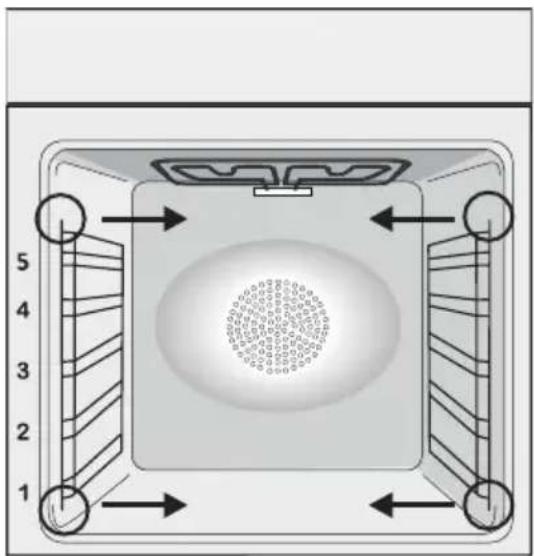
REMOVAL AND CLEANING OF THE SIDE RACKS
- Remove the wire racks by pulling them in the direction of the arrows (see below)
- To clean the wire racks either put them in the dishwasher or use a wet sponge, ensuring that they are dried afterwards.
- After the cleaning process install the wire racks in reverse order."
natural_image
Top-down diagram of a square room with numbered walls and central circular pattern (no text or symbols)CHANGING THE BULB
- Disconnect the oven from the mains supply.
- Undo the glass cover, unscrew the bulb and replace it with a new bulb of the same type.
- Once the defective bulb is replaced, replace the glass cover.
This product contains one or more light sources of energy efficiency class G (Lamp) /F (10 Led).
Waste management and environmental protection
natural_image
Symbol of a trash bin crossed with two crossed lines, no text or labels presentThis appliance is labelled in accordance with European Directive 2012/19/EU regarding electric and electronic appliances (WEEE). The WEEE contain both polluting substances (that can have a negative effect on the environment) and base elements (that can be reused). It is important that WEEE undergo specific treatments to correctly remove and dispose of the pollutants and recover all the materials. Individuals can play an important role in ensuring that the WEEE do not become an environmental problem; it is essential to follow a few basic rules:
- the WEEE should not be treated as domestic waste;
- the WEEE should be taken to dedicated collection areas managed by the town council or a registered company.
In many countries, domestic collections may be available for large WEEEs. When you buy a new appliance, the old one can be returned to the vendor who must accept it free of charge as a one-off, as long as the appliance is of an equivalent type and has the same functions as the purchased appliance.
SAVING AND RESPECTING THE ENVIRONMENT
Where possible, avoid pre-heating the oven and always try to fill it. Open the oven door as infrequently as possible, because heat from the cavity disperses every time it is opened. For a significant energy saving, switch off the oven between 5 and 10 minutes before the planned end of the cooking time, and use the residual heat that the oven continues to generate. Keep the seals clean and in order, to avoid any heat dispersal outside of the cavity. If you have an electric contract with an hourly tariff, the “delayed cooking” programme makes energy saving more simple, moving the cooking process to start at the reduced tariff time slot.
Troubleshooting
| Problem Possible cause Solution | ||
| the oven does not heat up | The clock is not set Set the clock | |
| The oven does not heat up | A cooking function and temperature has not been set | Ensure that the necessary settings are correct |
| No reaction of the touch user interface | Steam and condensation on the user interface panel | Clean with a microfiber cloth the user interface panel to remove the condensation layer |
ACCESSOIRES
natural_image
Line drawing of a rectangular container with side slots and a recessed top (no text or symbols)natural_image
Line drawing of a multi-tiered ladder structure with curved supports (no text or symbols)natural_image
Line drawing of a rectangular metal tray with vertical slats and a handle (no text or symbols)natural_image
Top-down diagram of a square appliance with numbered corners and internal structure (no text or symbols)REEMPLACEMENT DE L'AMPOULE
natural_image
Symbol of a trash bin crossed with two crossed lines and a solid black rectangle below (no text or labels)Dépannage
ACCESSORI
natural_image
Line drawing of a rectangular container with side flanges and a recessed top (no text or symbols)natural_image
Line drawing of a multi-tiered ladder structure with curved bracing (no text or symbols)natural_image
Line drawing of a rectangular metal tray with vertical slats and a handle (no text or symbols)natural_image
Top-down diagram of a square appliance with internal fan and circular vent, no text or symbols presentnatural_image
Simple line drawing of a trash bin with crossed lines and a solid black rectangle below (no text or symbols)ZUBEHÖR
natural_image
Line drawing of a rectangular container with side flanges and a central slot (no text or symbols)natural_image
Line drawing of a rectangular metal tray with vertical slats and a handle (no text or symbols)natural_image
Line drawing of a multi-tiered ladder structure with curved supports (no text or symbols)natural_image
Simple diagram with a central circle and surrounding icons (no text or labels)1
natural_image
Top-down diagram of a square room with numbered walls and central circular pattern (no text or symbols)WECHSELN DER GLÜHBIRNE
natural_image
Symbol of a trash bin crossed with two crossed lines, no text or labels presentACCESORIOS
Bandeja de goteo
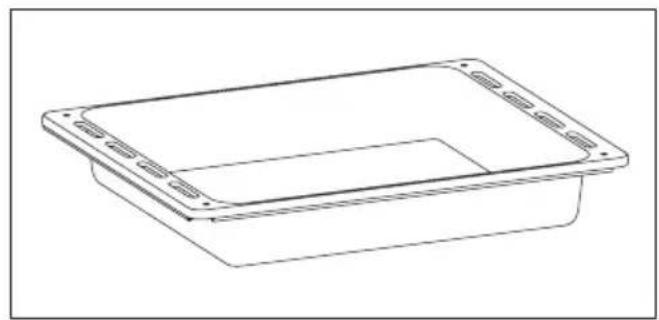
natural_image
Line drawing of a rectangular container with side flanges and a recessed opening (no text or symbols)natural_image
Line drawing of a multi-tiered ladder structure with no text or symbolsnatural_image
Line drawing of a metal rack with multiple slats and a handle (no text or symbols)natural_image
Top-down diagram of a square room with numbered walls and decorative elements, no text or symbols present.natural_image
Symbol of a trash bin crossed with two crossed lines, no text or labels presentACCESSOIRES
natural_image
Line drawing of a rectangular container with side flanges and a recessed top (no text or symbols)natural_image
Line drawing of a rectangular metal tray with vertical slats and a handle (no text or symbols)natural_image
Line drawing of a multi-tiered shelf structure with curved supports (no text or symbols)natural_image
Top-down diagram of a square appliance with internal fan and circular vent, no text or symbols presentHET LAMPJE VERVANGEN
natural_image
Symbol of a trash bin crossed with two crossed lines, no text or labels presentACESSÓRIOS
natural_image
Line drawing of a rectangular plastic container with mounting holes (no text or symbols)natural_image
Line drawing of a multi-tiered ladder structure (no text or symbols)natural_image
Line drawing of a rectangular metal tray with vertical slats and a handle (no text or symbols)natural_image
Top-down diagram of a square room with circular pattern on the wall and numbered arrows indicating directions (no text or symbols)SUBSTITUIR A LÂMPADA
natural_image
Symbol of a trash bin crossed with two crossed lines, no text or labels presentnatural_image
Simple calendar icon with two dots on top and two diagonal lines inside a blank frame (no text or symbols)| Instrukcje użytkownikaPIEKARNIKI | PL | 2 |
| Pokyny pro uživateleTROUBY | CZ | 13 |
| Navodila za uporabnikaPEČICE | SL | 24 |
| Návod na použitieRÚRA NA PEČENIE | SK | 35 |
| Инструкции за потребителяФУРНИ | BG | 46 |
| Upute za korisnikeРЕĆNICE | HR | 57 |
| Однгієх хрніснзФОУРНЕЗ | GR | 68 |
| Uputstvo za korisnikaRERNE | SR | 80 |
| Instrucțiuni de utilizareCUPTOARE | 91 O |
natural_image
Line drawing of a rectangular plastic container with mounting holes and a central slot (no text or symbols)natural_image
Line drawing of a multi-tiered ladder structure (no text or symbols)natural_image
Line drawing of a rectangular metal tray with vertical slats and a handle (no text or symbols)natural_image
Top-down diagram of a square appliance with internal components and directional arrows, no text or symbols present.WYMIANA ŻARÓWKI
natural_image
Symbol of a trash bin crossed with two crossed lines, no text or labels presentPŘÍSLUŠENSTVÍ
Odkapávací plech
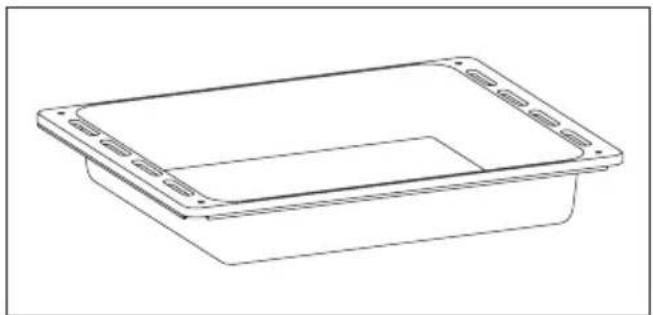
natural_image
Line drawing of a rectangular container with side flanges and a central slot (no text or symbols)natural_image
Line drawing of a multi-tiered ladder structure with curved bracing (no text or symbols)natural_image
Line drawing of a rectangular metal tray with vertical slats and a handle (no text or symbols)natural_image
Diagram of a square appliance with internal components and numbered arrows indicating flow or placement (no text or symbols)VÝMĚNA ŽÁROVKY
natural_image
Symbol of a trash bin crossed with two crossed lines, no text or labels presentDodatna oprema
natural_image
Line drawing of a rectangular container with side flanges and a recessed top (no text or symbols)natural_image
Line drawing of a multi-tiered ladder structure with curved bracing (no text or symbols)natural_image
Line drawing of a rectangular metal tray with vertical slats and a handle (no text or symbols)natural_image
Top-down diagram of a square appliance with internal fan and circular vent, no text or symbols presentZAMENJAVA ŽARNICE
- Pečico izključite iz napajanja.
- Odvijte stekleni pokrov, odvijte žarnico in jo nadomestite z novo žarnico istega tipa.
- Ko ste pokvarjeno žarnico zamenjali, znova namestite stekleni pokrov.
natural_image
Symbol of a trash bin crossed with two crossed lines, no text or labels presentnatural_image
Line drawing of a rectangular plastic container with mounting holes (no text or symbols)natural_image
Line drawing of a multi-tiered ladder structure with curved supports (no text or symbols)natural_image
Line drawing of a rectangular metal tray with vertical slats and a handle (no text or symbols)Drží plechy a podnosy na pečenie.
Prvé použitie
PREDČISTENIE
natural_image
Top-down diagram of a square room with circular vent and directional arrows indicating flow or placement (no text or symbols)ZMENA ŽIAROVKY
natural_image
Symbol of a trash bin crossed with two crossed lines, no text or labels presentПРИНАДЛЕЖНОСТИ
natural_image
Line drawing of a rectangular container with side flanges and a recessed opening (no text or symbols)natural_image
Line drawing of a rectangular metal tray with vertical slats and a handle (no text or symbols)natural_image
Line drawing of a multi-tiered rack or shelf structure with curved supports (no text or symbols)natural_image
Top-down diagram of a square room with numbered walls and central circular pattern (no text or symbols)СМЯНА НА КРУШКАТА
natural_image
Simple line drawing of a trash bin with crossed lines and a solid black rectangle below (no text or symbols)PRIBOR
Plitica za prikupljanje sokova
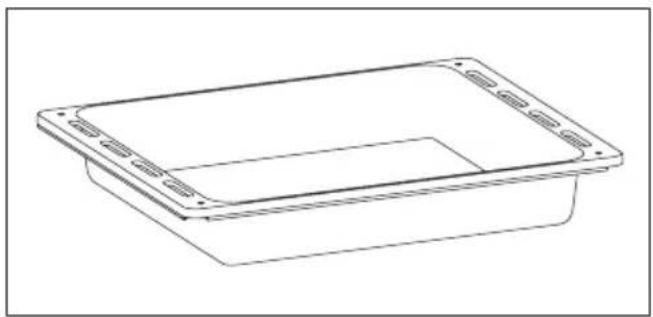
natural_image
Line drawing of a rectangular container with mounting holes and a central slot (no text or symbols)natural_image
Line drawing of a multi-tiered ladder structure with no text or symbolsSmještene su s obje strane pećnice, drže metalne rešetke i plitice za prikupljanje sokova.
- Upravljačka ploča
- Položaji polica (bočna žičana rešetka ako je uključena)
- Rešetke
- Plitice
- Ventilator (ako postoji)
- Vrata pećnice
-
Bočne žičane rešetke (ako postoje: samo za ravnu šupljinu)
-
Serijski broj
Metalna rešetka
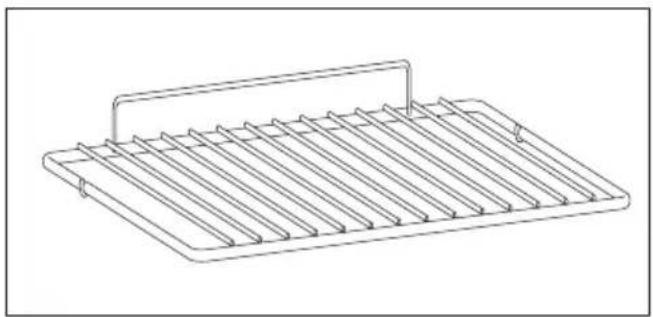
natural_image
Line drawing of a rectangular metal tray with vertical slats and a handle (no text or symbols)Drži posude za pečenje i plitice.
PRETHODNO ČIŠĆENJE
natural_image
Top-down diagram of a square room with numbered walls and central circular pattern (no text or symbols)ZAMJENA ŽARULJICE IZ SVJETILJKE
natural_image
Symbol of a trash bin crossed with two crossed lines, no text or labels presentOvaj uređaj je označen u skladu s Europskom direktivom 2012/19 / EU o otpadu električne i elektroničke opreme (WEEE). Otpadna električna i elektronička oprema sadrži i štetne tvari (koje mogu izazvati negativne posljedice za okoliš) i osnovne komponente (koje se mogu ponovno koristiti). Važno je da otpadna električna i elektronička oprema bude podvrgnuta posebnim tretmanima, kako bi se uklonili i pravilno odložili svi zagađivači i povratili i reciklirali svi materijali. Pojedinci mogu igrati važnu ulogu u osigu-ravanju da otpadna električna i elektronička oprema ne postane ekološki problem; bitno je slijediti neka osnovna pravila:
Αξεσουάρ
Δοχείο συλλογής
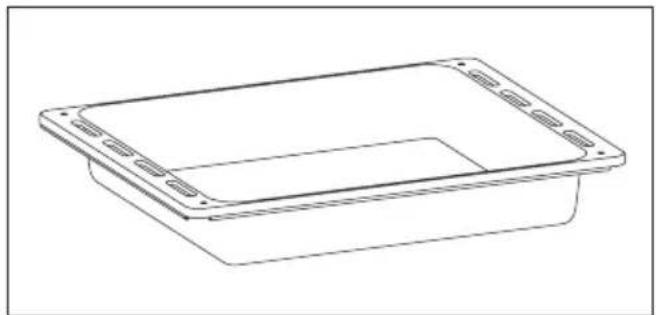
natural_image
Line drawing of a rectangular plastic container with mounting holes (no text or symbols)natural_image
Line drawing of a multi-tiered ladder structure with curved supports (no text or symbols)natural_image
Line drawing of a rectangular metal tray with vertical slats and a handle (no text or symbols)natural_image
Top-down diagram of a square room with numbered walls and central circular pattern (no text or symbols)natural_image
Symbol of a trash bin crossed with two crossed lines, no text or labels presentDODACI
- Upravljačka ploča
- Položaji polica (bočna žičana mreža ako je uključena)
- Mreže
- Pladnjevi
- Ventilator (ako postoji)
- Vrata pećnice
-
Bočne žičane rešetke (ako postoje: samo za ravnu šupljinu)
-
Serijski broj
Drip pan
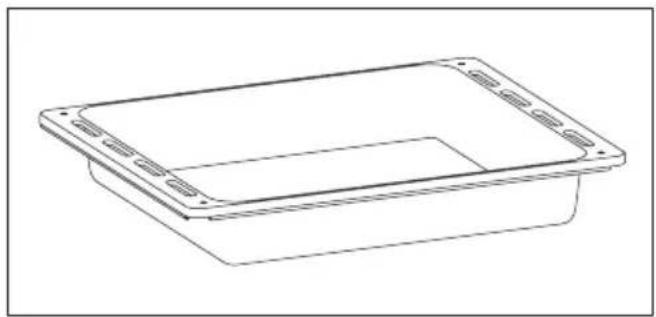
natural_image
Line drawing of a rectangular container with side slots and a recessed opening (no text or symbols)Collects residues that drip when cooking food on the grills.
Metalna rešetka
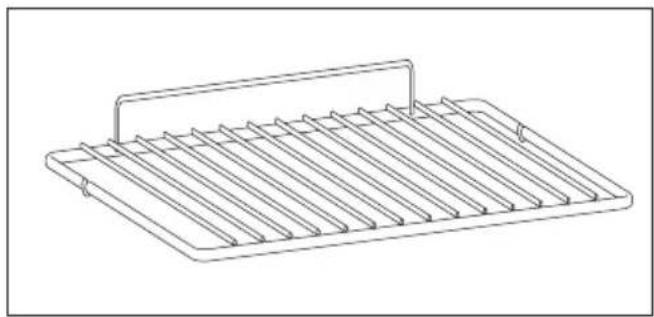
natural_image
Line drawing of a metal rack with multiple slats and a handle (no text or symbols)Holds baking trays and plates.
natural_image
Line drawing of a multi-tiered ladder structure with no text or symbolsLocated on both sides of the oven cavity, holds metal grills and drip pans.
Prva upotreba
PRELIMINARNO ČIŠĆENJE; Očistite rernu pre prve upotrebe. Prebrišite spoljašnje površine sa vlažnom mekom krpom. Operite sve dodatke i prebrišite unutrašnjost rerne rastvorom vode i malo deterdženta za ručno pranje sudova, a potom isperite. Potom uključite rernu na maksimalnu temperaturu i ostavite da radi oko sat vremena, kako bi se sagoreli industrijski ostaci.
Opis komandne table

- Gumb za odabir funkcije
- Gumb za odabir termostata
Programi pečenja
| Selektor funkcija | T°C prepo- ručena | T°C opseg | Funkcija |
 | SVETLO: Uključuje svetlo unutar rerne. | ||
 | 220 50 ÷ MAX | * KONVEKCIJA: Koriste se oba grejača. Ovaj način je idealan za sva tradi- cionalna pečenja i kuvanja crvenog mesa, govedine, jagnjetine, divljači, hleba ili hrane umotane u foliju. | |
 | 210 50 ÷ MAX | DONJE GRIJANJE: Pomoću donjeg elementa. Idealno za kuhanje svih jela od tijesta. Koristite ovo za flans, quiches, torte, paštete i bilo koje kuhanje koje zahtijeva više topline odozdo. | |
 | 230 50 ÷ MAX | GRIL: Koristi se gornji grejač. Uspeh je zagarantovan za razne vrste mesa, ražnjiće, čevapčiće, kobasice i sl. Gril treba unapred zagrejati na 5 minuta da se postigne visoka temperatura. Belo meso treba uvek biti postavljeno malo dalje od grejača grila, vreme kuvanja je malo duže, ali meso će biti sočnije.Crveno meso i ribu možete postaviti na policu, a ispod stavite pleh za sakupljanje masti. | |
Generalne napomene o čišćenju
Životni vek aparata može biti produžen regularnim čišćenjem. Sačekajte da se rerna ohladni pre nego što krenete sa ručnim čišćen - jem. Nikada nemojte koristiti abrazivne deterdžente, metalnu vunu, oštre predmete za čišćenje kako ne bi oštetili emajlirane delove. Koristite samo vodu, deterdžent ili preparate na bazi hlora (ili amonijaka).
STAKLENI DELOVI
Preporučujemo da staklo rerne očistite sa de -belom kućnom krpom nakon svakog korišćenja rerne. Kako bi uklonili skorelije fleke, možete koristiti sunder natopljen deterdžentom (do -bro isceđen), a potom isprati vodom..
GUMA RERNE
natural_image
Top-down diagram of a square room with circular pattern on the wall and numbered arrows indicating directions (no text or symbols)ZAMENA SIJALICA
- Isključite rernu iz struje.
- Odšrafite stakleni poklopac, a potom i sijalicu. Stavite novu sijalicu i zašrafite.
- Nakon postavljanja nove sijalice, zavrnite stakleni poklopac.
natural_image
Symbol of a trash bin with crossed lines indicating no waste or restriction, and a solid black rectangle below (no text or labels)Ovaj aparat je označen u saglasnosti sa evropskom Direktivom 2012/19/EU u vezi sa otpadom električnih aparata (WEEE). WEEE sadrži zagađujuće substance (koje mogu imati negativan uticaj na životnu sredinu), kao i bazne elemente (koji mogu biti ponovo iskorišćeni). Važno je da WEEE otpad prođe specifičan tretman kako bi na pravi način isključili zagađivače i povratili korisne materijale. Svaki pojedinac može odigrati izuzetno
važnu ulogu u obezbeđenju da WEEE ne postane problem životne sredine. Neophodno je poštovati osnovna pravila:
- WEEE se ne može smatrati komunalnim otpadom;
- WEEE mora biti odnet na odgovarajuća sabirna mesta koja kontrolišu ustanove za reciklažu. U mnogim zemljama, moguće je organizovati odnošenje ovakvog otpada direktno sa kućne adrese. Kada kupite novi aparat, kod pojedinih prodavaca stari možete organizovati da Vambude odnesen, sve dok je iste vrste kao i novi aparat koji je kupljen.
ČUVANJE I POŠTOVANJE ŽIVOTNE SREDI- NE
Gde je moguće, izbegavajte pre-grejanje rerne i uvek pokušavajte da je napunite što više. Otvarajte vrata rerne što je ređe moguće, zato što velika količina toplote izlazi pri svakom otvaranju. avoid preheating the oven and always try to fill it. Open the oven door as infrequently as possible, because heat from the cavity disperses every time it is opened. Za značajnu uštedu energije, isključite rernu 5 ili 10 minuta pre nego što planirate da završite vreme pečenja, čime ćete iskoristiti preostalu toplotu koju rerna nastavlja da generiše. Držite sve gume čiste i na svom mestu, kako bi izbegli bilo kakvo gubljenje toplote i energije.
Troubleshooting
| Problem Mogući Razlog Rešenje | ||
| Rerna ne greje Sat nije podešen. Podesite tačno vreme. | ||
| Rerna ne greje Zaštita ekrana je aktivna. Deaktivirajte blokadu. | ||
| Rerna ne greje | Funkcija ili temperatura nisu dobro podešene. | Pobrinite se da je rerna pravilno podešena. |
ACCESORII
Tavă de scurgere
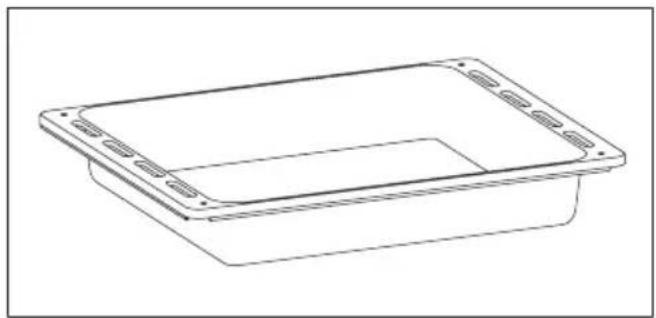
natural_image
Line drawing of a rectangular container with side flanges and a recessed top (no text or symbols)natural_image
Line drawing of a multi-tiered ladder structure with curved bracing (no text or symbols)natural_image
Line drawing of a rectangular metal tray with vertical slats and a handle (no text or symbols)natural_image
Top-down diagram of a square room with numbered walls and central circular pattern (no text or symbols)SCHIMBAREA BECULUI
natural_image
Symbol of a trash bin crossed with two crossed lines and a solid black rectangle below (no text or labels)natural_image
Simple line drawing of a calendar with two dots above it, no text or symbols presentORKAITÉ
CEPEŠKRĀSNIS
AHJUD
2
13
24
Naudojimo instrukcija
Lietošanas instrukcija
Kasutusjuhend
Turinys
REIKMENYS
natural_image
Line drawing of a rectangular plastic container with side flanges and a recessed opening (no text or symbols)natural_image
Line drawing of a rectangular metal tray with vertical slats and a handle (no text or symbols)natural_image
Line drawing of a multi-tiered rack or shelf structure with curved bands (no text or symbols)natural_image
Gray circular icon with five small icons surrounding it, no text or symbols present.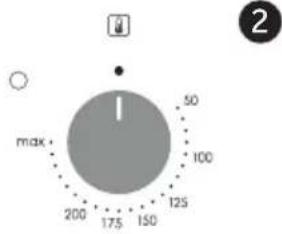
- Funkciju selektoriaus rankenėlė
- Termostato rankenèlè
Gaminimo režimai
natural_image
Top-down diagram of a square room with a central circular pattern and numbered arrows indicating directional flow (no text or symbols)LEMPUTÈS PAKEITIMAS
natural_image
Symbol of a trash bin crossed with two crossed lines and a solid black rectangle below (no text or labels)PIEDERUMI
natural_image
Line drawing of a rectangular plastic container with mounting holes (no text or symbols)natural_image
Line drawing of a rectangular metal tray with vertical slats and a handle (no text or symbols)natural_image
Line drawing of a multi-tiered ladder structure with curved bracing (no text or symbols)natural_image
Top-down diagram of a square appliance with internal components and numbered labels (1-5), no readable text or symbols.SPULDZES NOMAINA
natural_image
Symbol of a trash bin crossed with two crossed lines and a solid black rectangle below (no text or labels)TARVIKUD
natural_image
Line drawing of a rectangular plastic container with mounting flanges (no text or symbols)Metallrest
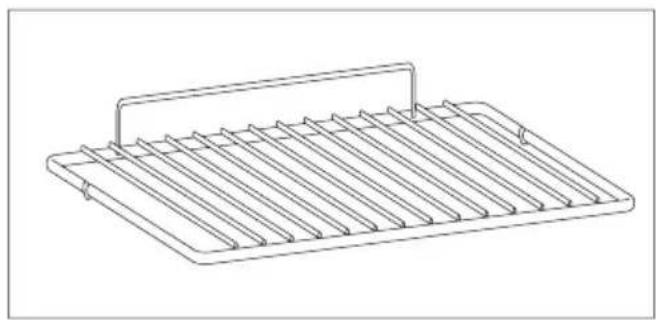
natural_image
Line drawing of a rectangular metal tray with vertical slats and a handle (no text or symbols)natural_image
Line drawing of a multi-tiered ladder structure with curved bracing (no text or symbols)natural_image
Simple diagram with a central circle and surrounding icons (no text or labels)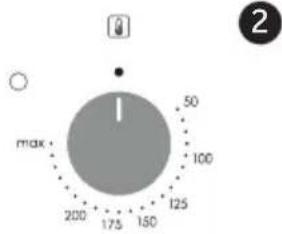
natural_image
Top-down diagram of a square appliance with internal components and directional arrows indicating flow or movement (no text or symbols)VALGUSTUSPIRNI VAHETAMINE
natural_image
Symbol of a trash bin crossed with two crossed lines, no text or labels present- Download hOn App
- SAFETY WARNINGS
- PLEASE READ THE FOLLOWING INSTRUCTIONS CAREFULLY BEFORE USING THE APPLIANCE.
- Installation
- Electrical Shock Hazard
- Cut Hazard
- Important safety instructions
- Operation and maintenance
- Health Hazard
- Hot Surface Hazard
- Product Overview
- Top View
- Product Information
- A Word on Induction Cooking
- Before using your New Induction Hob
- Using the Touch Controls
- Using your Induction Hob
- To start cooking
- When you have finished cooking
- Using the Power Management
- To enter the power management function
- To switch to another level
- Confirmation and Exit Power Management Function
- Using Boost function
- Activate the boost function
- Cancel Boost function
- Using the Pause function
- Locking the Controls
- To lock the controls
- To unlock the controls
- Residual Heat Warning
- Auto Shutdown
- Using the Timer
- Using the Timer as a Minute Minder
- Timer Cancellation
- Using the timer to switch off one or more cooking zones
- If the timer is set on more than one zone:
- Cooking Guidelines
- Cooking Tips
- Simmering, cooking rice
- Searing steak
- For stir-frying
- Failure Display and Inspection
- Technical Specification
- Selection of installation equipment
- Before you install the hob, make sure that
- When you have installed the hob, make sure that
- Before locating the fixing brackets
- Locating the fixing brackets
- Cautions
- Connecting the hob to the mains power supply
- Precauciones
- ELIMINACIÓN:
- Mises en garde
- Precauzioni
- Usar a função Boost
- Ыдыс-аякты дурыс тандау
- Prije uporabe nove indukcijske ploče za kuhanje
- Uporaba indukcijske ploče za kuhanje
- Upotreba funkcije za povećanje snage
- Uključite funkciju za povećanje snage
- Otkazivanje funkcije za povećanje snage
- Uporaba vremenskog programatora
- Uporaba vremenskog programatora kao tajmera
- DROŠĪBAS BRĪDINĀJUMI
- PIRMS IERİCES LIETOŠANAS, LÜDZU, RÜPİGI IZLASIET ŠOS NORĀDĪJUMUS.
- Uzstādīšana
- ENNE SEADME KASUTAMIST LUGEGE JÄRGMISED JUHISED HOOLIKALT LÄBI.
- Paigaldamine
- Elektrilöögi oht
- Olulised ohutusjuhised
- Teisele tasemele lülitamine
- Jei norite perjungti i kita lygi
- Prieš montuodami kaitlente, isitikinkite, kad:
- ЗАМЕНА ЛАМПОЧКИ
- КЕРЕК-ЖАРАКТАР
- ЗАМИНА ЛАМПИ
- Safety Indications
- General Instructions
- Electrical Safety
- CONNECTION
- WARNING
- Recommendations
- Product description
- First Use
- Display description
- General notes on cleaning
- GLASS PARTS
- OVEN WINDOW SEAL
- ACCESSORIES
- DRIP PAN
- Maintenance
- REMOVAL AND CLEANING OF THE SIDE RACKS
- CHANGING THE BULB
- Waste management and environmental protection
- SAVING AND RESPECTING THE ENVIRONMENT
- ACCESSOIRES
- REEMPLACEMENT DE L'AMPOULE
- ACCESSORI
- WECHSELN DER GLÜHBIRNE
- HET LAMPJE VERVANGEN
- SUBSTITUIR A LÂMPADA
- WYMIANA ŻARÓWKI
- VÝMĚNA ŽÁROVKY
- ZAMENJAVA ŽARNICE
- Prvé použitie
- PREDČISTENIE
- ZMENA ŽIAROVKY
- СМЯНА НА КРУШКАТА
- PRETHODNO ČIŠĆENJE
- ZAMJENA ŽARULJICE IZ SVJETILJKE
- Prva upotreba
- Opis komandne table
- Generalne napomene o čišćenju
- STAKLENI DELOVI
- GUMA RERNE
- ZAMENA SIJALICA
- ČUVANJE I POŠTOVANJE ŽIVOTNE SREDI- NE
- ACCESORII
- SCHIMBAREA BECULUI
- Naudojimo instrukcija
- Lietošanas instrukcija
- Kasutusjuhend
- Turinys
- Gaminimo režimai
- LEMPUTÈS PAKEITIMAS
- SPULDZES NOMAINA
- VALGUSTUSPIRNI VAHETAMINE
Brand : CANDY
Model : PCI30BCI642CBB
Category : Oven