ATX20K5V1B - Air Conditioning DAIKIN - Free user manual and instructions
Find the device manual for free ATX20K5V1B DAIKIN in PDF.


User questions about ATX20K5V1B DAIKIN
0 question about this device. Answer the ones you know or ask your own.
Ask a new question about this device
Download the instructions for your Air Conditioning in PDF format for free! Find your manual ATX20K5V1B - DAIKIN and take your electronic device back in hand. On this page are published all the documents necessary for the use of your device. ATX20K5V1B by DAIKIN.
USER MANUAL ATX20K5V1B DAIKIN
DAIKIN ROOM AIR CONDITIONER
OPERATION MANUAL
natural_image
Simple line drawing of a rectangular container with side supports (no text or symbols)
text_image
Siesta® INVERTEREnjoy year-round comfort.
MODELS
R410A
ATX20K2V1B
ATX25K2V1B
ATX35K2V1B
ATX20K5V1B
ATX25K5V1B
ATX35K5V1B
R32
ATXP20K2V1B
ATXP25K2V1B
ATXP35K2V1B
ATXP20K3V1B
ATXP25K3V1B
ATXP35K3V1B
Features
Enhanced comfort and energy savings savings
E
COMFORT AIRFLOW
The airflow direction is upward while in COOL operation, and downward while in HEAT operation. This function prevents cold or warm air from blowing directly on your body. ▶Page 13

ECONO
This function enables efficient operation by limiting the maximum power consumption. It is useful when using the air conditioner and other electrical devices simultaneously on a shared electrical circuit. ▶Page 14
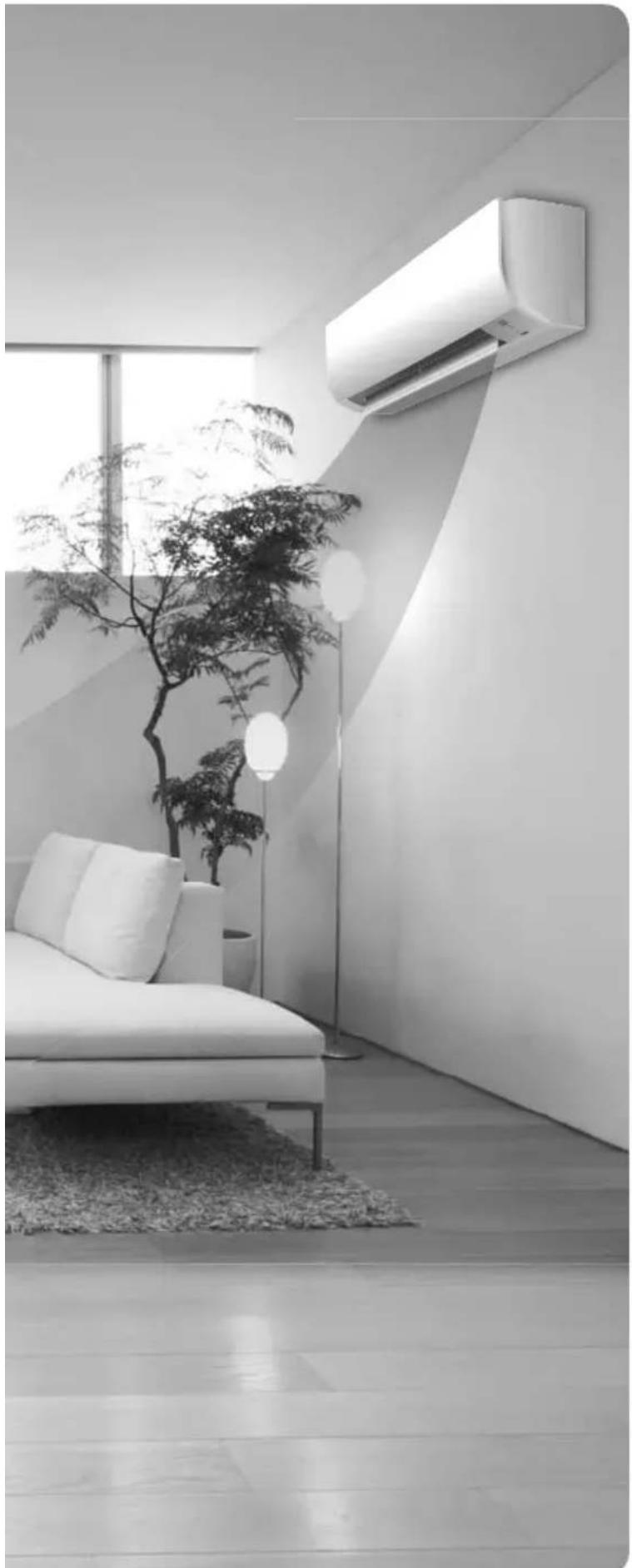
natural_image
Modern minimalist living room interior with white sofa, wall-mounted air conditioner unit, and potted tree (no text or symbols)Contents
Read Before Operation
Safety Precautions ...... 3
Names of Parts 5
Preparation Before Operation......8
Basic Operation

Adjusting the Airflow Rate...... 11

Adjusting the Airflow Direction ..... 12
Useful Functions

COMFORT AIRFLOW Operation .....13

POWERFUL Operation 13

ECONO Operation 14
TIMER Operation

ON/OFF TIMER Operation ....15
Multi Connection
Note for Multi System 17
Care
Care and Cleaning....19
When the Need Arises
FAQ 23
Troubleshooting 24
The English text is the original instruction. Other languages are translations of the original instructions.
Safety Precautions

Read the precautions in this manual carefully before operating the unit.

ATXP models are filled with R32 refrigerant.
- Keep this manual where the operator can easily find it.
- Read the precautions in this manual carefully before operating the unit.
- This appliance is intended to be used by expert or trained users in shops, in light industry and on farms, or for commercial and household use by lay persons.
• Sound pressure level is less than 70 dB (A). - The precautions described herein are classified as WARNING and CAUTION. They both contain important information regarding safety. Be sure to observe all precautions without fail.

WARNING
Failure to follow these instructions properly may result in personal injury or loss of life.

CAUTION
Failure to observe these instructions properly may result in property damage or personal injury, which may be serious depending on the circumstances.

Never attempt.

Be sure to follow the instructions.

Be sure to establish an earth connection.
• After reading, keep this manual in a convenient place so that you can refer to it whenever necessary. If the equipment is transferred to a new user, be sure also to hand over the manual.

WARNING

- The appliance must be stored in a room without continuously operating ignition sources (for example: open flames, an operating gas appliance or an operating electric heater).
- In order to avoid fire, explosion or injury, do not operate the unit when harmful gases (e.g. flammable or corrosive) are detected near the unit.
- Be aware that prolonged, direct exposure to cool or warm air from the air conditioner, or to air that is too cool or too warm can be harmful to your physical condition and health.
- Do not place objects, including rods, your fingers, etc., in the air inlet or outlet. Product damage or personal injury may result due to contact with the air conditioner's high-speed fan blades.
- Do not attempt to repair, dismantle, reinstall or modify the air conditioner yourself as this may result in water leakage, electric shocks or fire hazards.
- Do not use flammable spray near the air conditioner, or otherwise fire may result.
- Do not use refrigerant other than the one indicated on the outdoor unit (R410A/R32) when installing, moving or repairing. Using other refrigerants may cause trouble or damage to the unit, and personal injury.
- To avoid electric shocks, do not operate with wet hands.
- Do not wash the air conditioner with water, as this may result in electric shocks or fire.
- Do not place water containers (vases etc.) above the unit, as this may result in electric shocks or fire hazards.

- Beware of fire in case of refrigerant leakage. If the air conditioner is not operating correctly, i.e. not generating cool or warm air, refrigerant leakage could be the cause. Consult your dealer for assistance. The refrigerant within the air conditioner is safe and normally does not leak.
However, in the event of a leakage, contact with a naked burner, heater or cooker may result in generation of noxious gas. Do not longer use the air conditioner until a qualified service person confirms that the leakage has been repaired.
- Do not attempt to install or repair the air conditioner yourself. Improper workmanship may result in water leakage, electric shocks or fire hazards. Please contact your local dealer or qualified personnel for installation and maintenance work.
- When the air conditioner is malfunctioning (giving off a burning odour, etc.) turn off power to the unit and contact your local dealer. Continued operation under such circumstances may result in a failure, electric shocks or fire hazards.
- Be sure to install an earth leakage breaker. Failure to install the earth leakage breaker may result in electric shocks or fire.

- Be sure to earth the unit. Do not earth the unit to a utility pipe, lightning conductor or telephone earth lead. Imperfect earthing may result in electric shocks.

CAUTION
- Do not use the air conditioner for purposes other than those for which it is intended. Do not use the air conditioner for cooling precision instruments, food, plants, animals or works of art as this may adversely affect the performance, quality and/or longevity of the object concerned.
Safety Precautions

- Do not expose plants or animals directly to airflow from the unit as this may cause adverse effects.
- Do not place appliances that produce naked flames in places exposed to the airflow from the unit as this may impair combustion of the burner.
- Do not block air inlets nor outlets. Impaired airflow may result in insufficient performance or trouble.
- Do not sit on the outdoor unit, put things on the unit, or pull the unit. Doing so may cause accidents, such as falling or toppling down, thus resulting in injury, product malfunctioning, or product damage.
- Do not place objects that are susceptible to moisture directly beneath the indoor or outdoor units. Under certain conditions, condensation on the main unit or refrigerant pipes, air filter dirt or drain blockage may cause dripping, resulting in fouling or failure of the object concerned.
- After prolonged use, check the unit stand and its mounts for damage. If they are left in a damaged condition, the unit may fall and cause injury.
- To avoid injury, do not touch the air inlet or aluminium fins of the indoor or outdoor units.
- The appliance is not intended for use by unattended young children or infirm persons. Impairment of bodily functions and harm to health may result.
- This appliance can be used by children aged from 8 years and above and persons with reduced physical, sensory or mental capabilities or lack of experience and knowledge if they have been given supervision or instruction concerning use of the appliance in a safe way and understand the hazards involved.
- Children shall not play with the appliance.
- Cleaning and user maintenance shall not be made by children without supervision.
- Avoid impacts to the indoor and outdoor units, or otherwise product damage may result.
- Do not place flammable items, such as spray cans, within 1m of the air outlet.
The spray cans may explode as a result of hot air from the indoor or outdoor units.
- Be careful not to let pets urinate on the air conditioner. Urination on the air conditioner may result in electric shocks or fire.
- Do not wash the air conditioner with water, as this may result in electric shocks or fire.
- Do not place water containers (vases etc.) above the unit, as this may result in electric shocks or fire hazards.

- To avoid oxygen depletion, ensure that the room is adequately ventilated if equipment such as a burner is used together with the air conditioner.
- Before cleaning, be sure to stop unit operation, turn off the circuit breaker or remove the power cord. Otherwise, an electric shock and injury may result.
- Only connect the air conditioner to the specified power supply circuit. Power supplies other than the one specified may result in electric shocks, overheating and fi res.
- Arrange the drain hose to ensure smooth drainage. Imperfect drainage may cause wetting of the building, furniture etc.
- Do not place objects in direct proximity of the outdoor unit and do not let leaves and other debris accumulate around the unit. Leaves are a hotbed for small animals which can enter the unit. Once in the unit, such animals can cause malfunctions, smoke or fire when making contact with electrical parts.
- Do not place objects around the indoor unit.
Doing so may have an adverse influence on the performance, product quality, and life of the air conditioner.
- Keep out of children's reach to ensure that they do not play with the appliance.
Installation site.
■ To install the air conditioner in the following types of environments, consult the dealer.
- Places with an oily environment or where steam or soot occurs.
- Salty environment such as coastal areas.
- Places where sulfi de gas occurs such as hot springs.
- Places where snow may block the outdoor unit.
■ Be sure to follow the instructions below.
- The indoor unit is at least 1m away from any television or radio set (unit may cause interference with the picture or sound).
- The drain from the outdoor unit must be discharged to a place of good drainage.
Consider nuisance to your neighbours from noises.
■ For installation, choose a place as described below.
- A place solid enough to bear the weight of the unit which does not amplify the operation noise or vibration.
- A place from where the air discharged from the outdoor unit or the operation noise will not annoy your neighbours.
Electrical work.
- For power supply, be sure to use a separate power circuit dedicated to the air conditioner.
System relocation.
- Relocating the air conditioner requires specialized knowledge and skills. Please consult the dealer if relocation is necessary for moving or remodeling.
Names of Parts
Indoor Unit
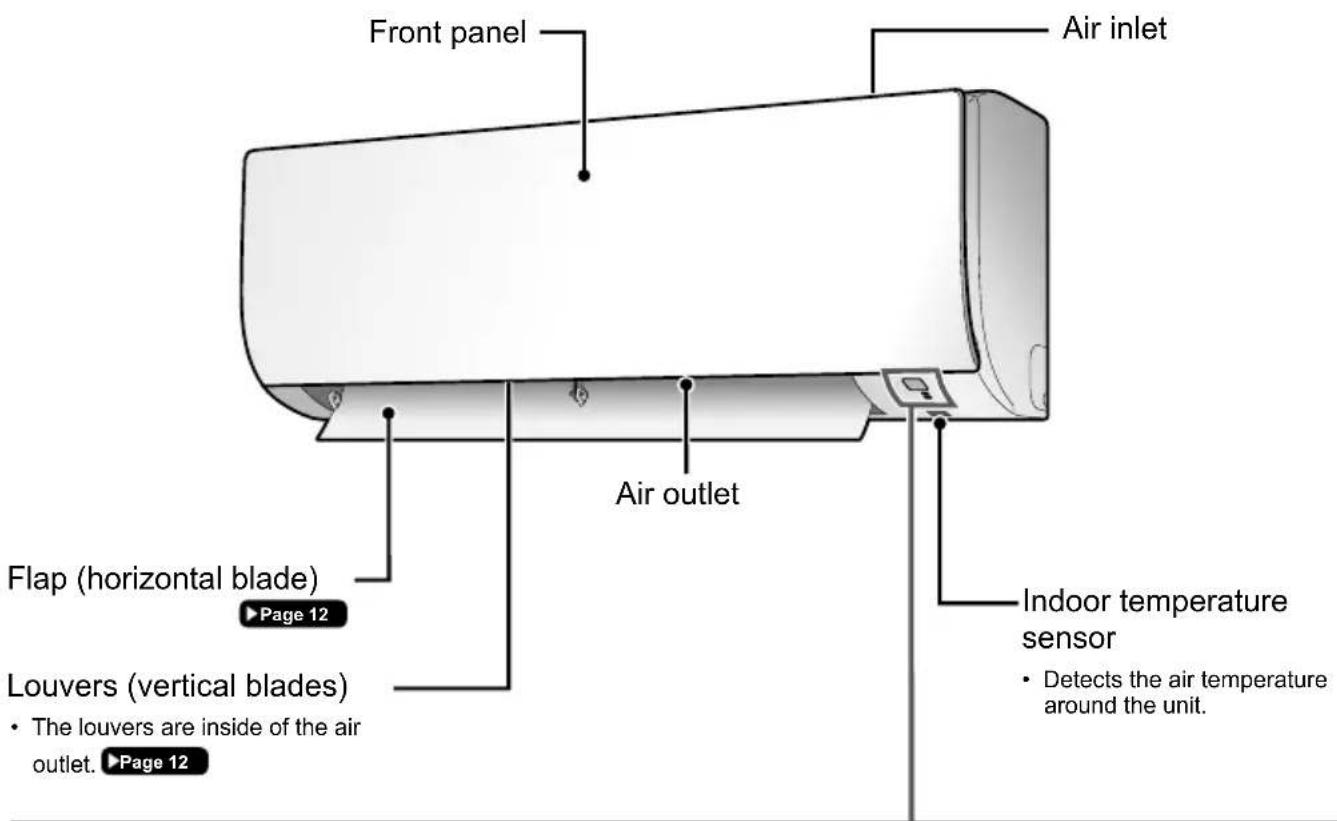
text_image
Front panel Air inlet Air outlet Flap (horizontal blade) Page 12 Louvers (vertical blades) • The louvers are inside of the air outlet. ▶Page 12 Indoor temperature sensor • Detects the air temperature around the unit.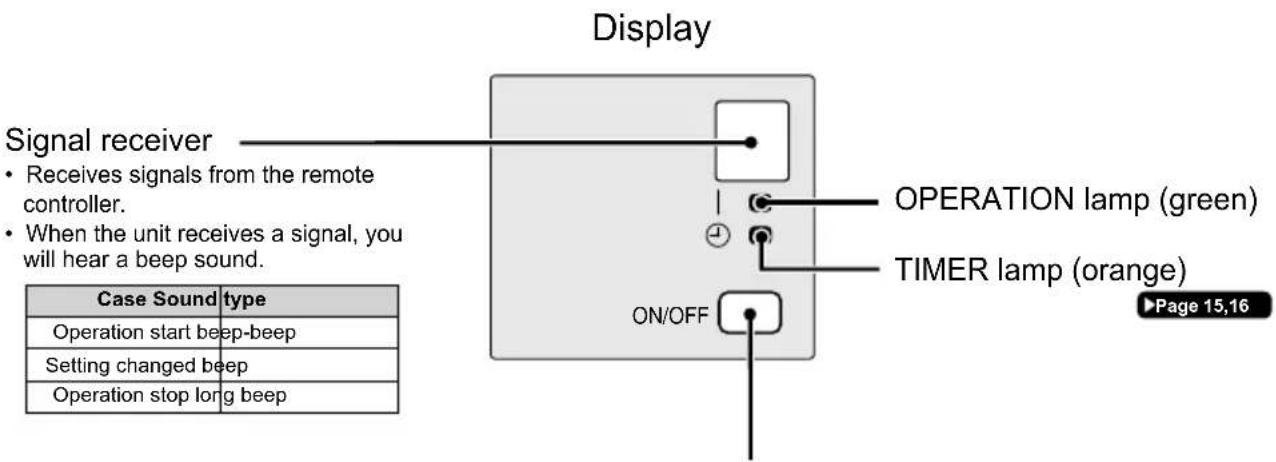
text_image
Display Signal receiver • Receives signals from the remote controller. • When the unit receives a signal, you will hear a beep sound. ON/OFF OPERATION lamp (green) TIMER lamp (orange) Page 15,16 Case Sound type Operation start beep-beep Setting changed beep Operation stop long beepIndoor unit ON/OFF switch
- Press this switch once to start operation.
Press once again to stop it.
- For the operation mode setting, refer to the following table.
| Mode Temperature setting Airflow rate | |
| AUTO 25°C AUTO | |
- This switch can be used when the remote controller is missing.
Names of Parts
■ Open the front panel
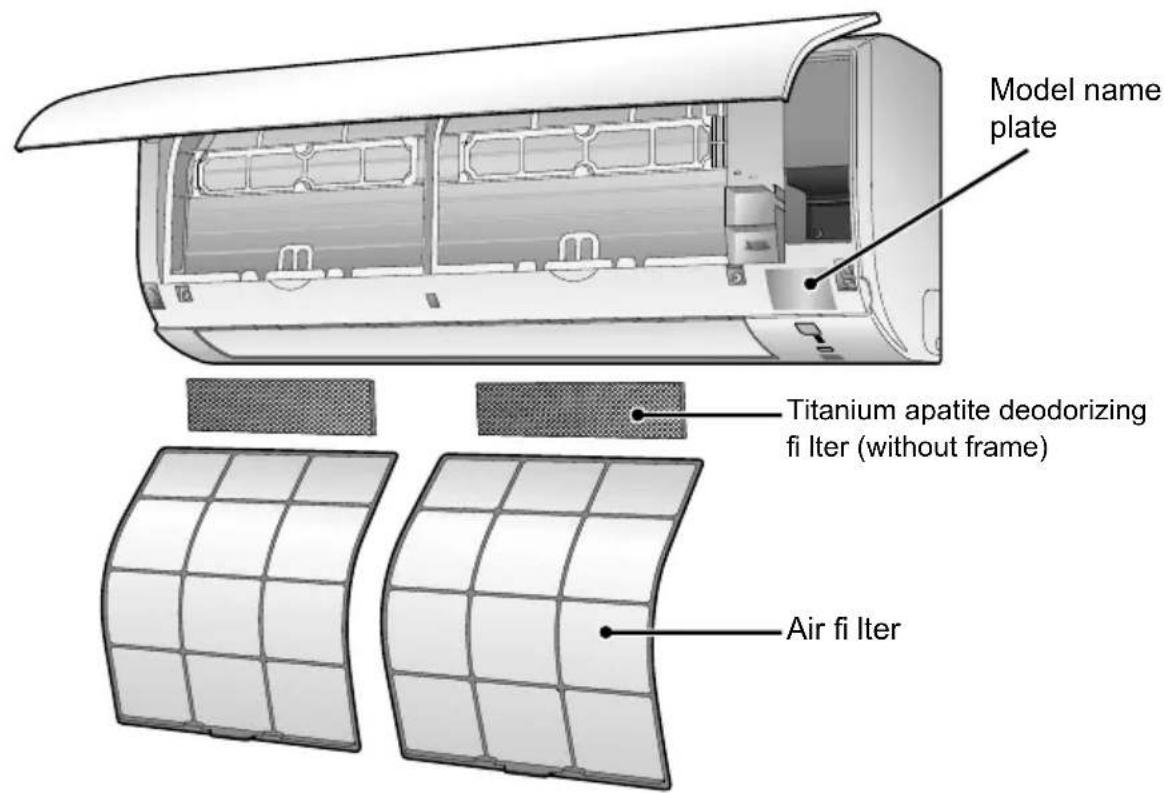
text_image
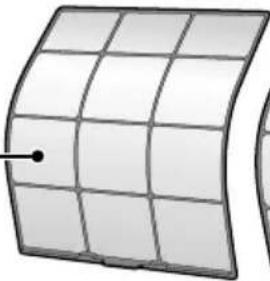
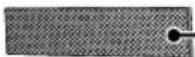
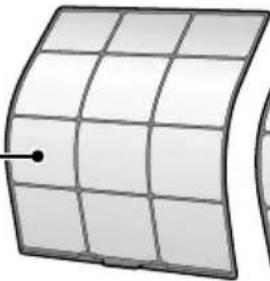
Model name plate Titanium apatite deodorizing fi Iter (without frame) Air fi IterOutdoor Unit
- The appearance of the outdoor unit may differ between different models.
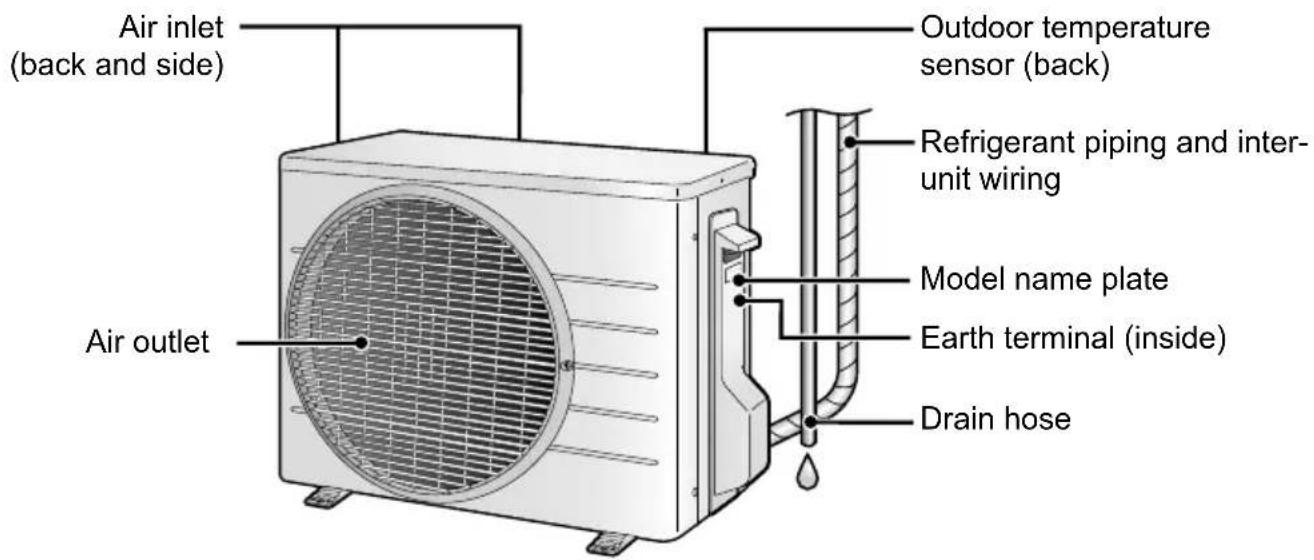
text_image
Air inlet (back and side) Outdoor temperature sensor (back) Refrigerant piping and inter- unit wiring Model name plate Earth terminal (inside) Drain hose Air outletNames of Parts
Remote Controller
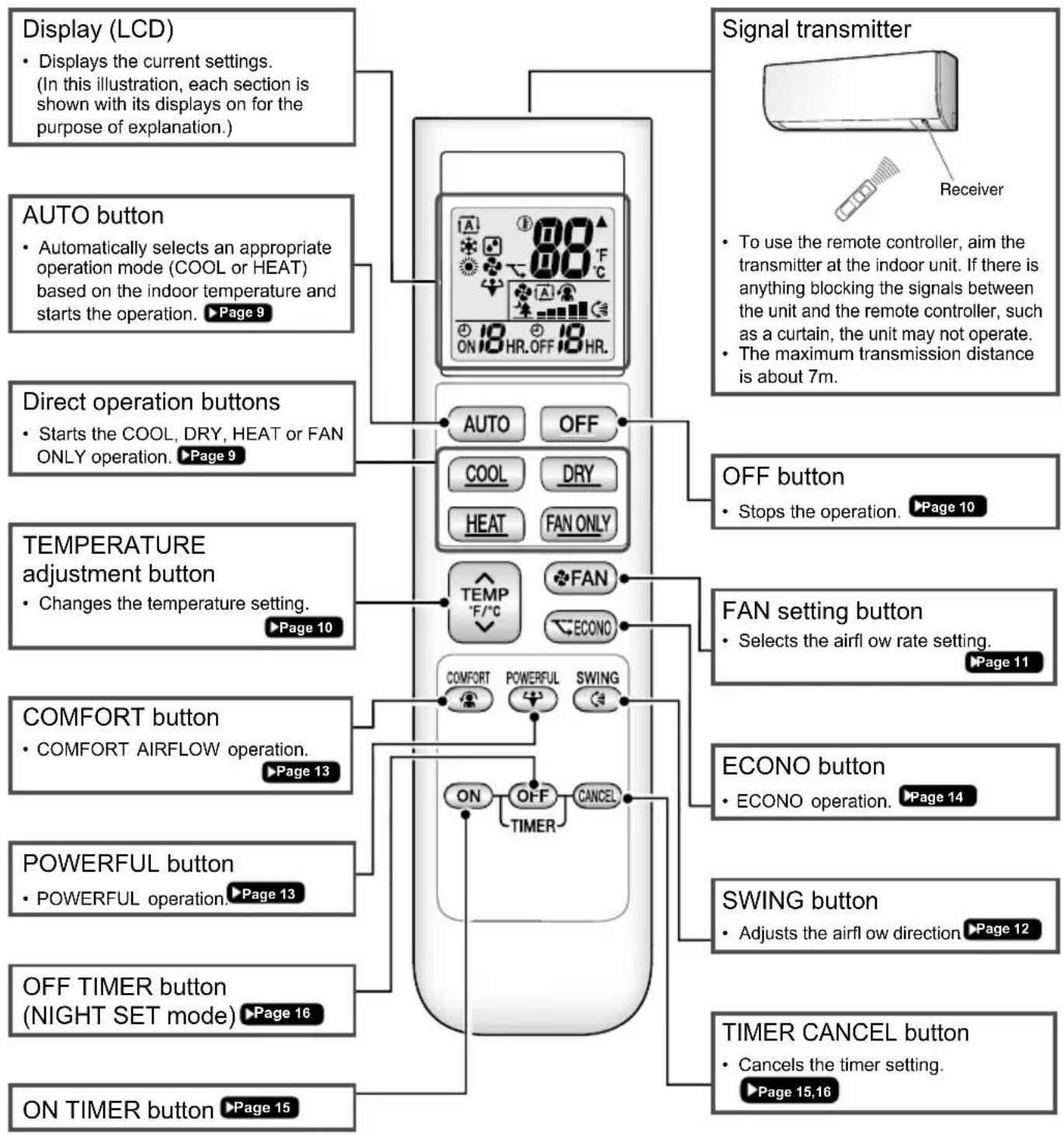
flowchart
graph TD
    A["Display (LCD)"] --> B["Display the current settings. (In this illustration, each section is shown with its displays on for the purpose of explanation.)"]
    C["AUTO button"] --> D["Automatically selects an appropriate operation mode (COOL or HEAT) based on the indoor temperature and starts the operation. ▶Page 9"]
    E["Direct operation buttons"] --> F["Starts the COOL, DRY, HEAT or FAN ONLY operation. ▶Page 9"]
    G["TEMPERATURE adjustment button"] --> H["Changes the temperature setting. ▶Page 10"]
    I["COMFORT button"] --> J["COMFORT AIRFLOW operation. ▶Page 13"]
    K["POWERFUL button"] --> L["POWERFUL operation. ▶Page 13"]
    M["OFF TIMER button (NIGHT SET mode) ▶Page 16"]
    N["ON TIMER button ▶Page 15"]

    O["Signal transmitter"] --> P["Receiver"]
    Q["Signal transmitter"] --> R["To use the remote controller, aim the transmitter at the indoor unit. If there is anything blocking the signals between the unit and the remote controller, such as a curtain, the unit may not operate. The maximum transmission distance is about 7m."]
    S["Signal transmitter"] --> T["To use the remote controller, aim the transmitter at the indoor unit. If there is anything blocking the signals between the unit and the remote controller, such as a curtain, the unit may not operate. The maximum transmission distance is about 7m."]
    U["Signal transmitter"] --> V["To use the remote controller, aim the transmitter at the indoor unit. If there is anything blocking the signals between the unit and the remote controller, such as a curtain, the unit may not operate. The maximum transmission distance is about 7m."]
    W["Signal transmitter"] --> X["To use the remote controller, aim the transmitter at the indoor unit. If there is anything blocking the signals between the unit and the remote controller, such as a curtain, the unit may not operate. The maximum transmission distance is about 7m."]
    Y["Signal transmitter"] --> Z["To use the remote controller, aim the transmitter at the indoor unit. If there is anything blocking the signals between the unit and the remote controller, such as a curtain, the unit may not operate. The maximum transmission distance is about 7m."]
    AA["Signal transmitter"] --> AB["To use the remote controller, aim the transmitter at the indoor unit. If there is anything blocking the signals between the unit and the remote controller, such as a curtain, the unit may not operate. The maximum transmission distance is about 7m."]
    AC["Signal transmitter"] --> AD["To use the remote controller, aim the transmitter at the indoor unit. If there is anything blocking the signals between the unit and the remote controller, such as a curtain, the unit may not operate. The maximum transmission distance is about 7m."]
    AE["Signal transmitter"] --> AF["To use the remote controller, aim the transmitter at the indoor unit. If there is anything blocking the signals between the unit and the remote controller, such as a curtain, the unit may not operate. The maximum transmission distance is about 7m."]
    AG["Signal transmitter"] --> AH["To use the remote controller, aim the transmitter at the indoor unit. If there is anything blocking the signals between the unit and the remote controller, such as a curtain, the unit may not operate. The maximum transmission distance is about 7m."]
    AI["Signal transmitter"] --> AJ["To use the remote controller, aim the transmitter at the indoor unit. If there is anything blocking the signals between the unit and the remote controller, such as a curtain, the unit may not operate. The maximum transmission distance is about 7m."]
    AK["Signal transmitter"] --> AL["To use the remote controller, aim the transmitter at the indoor unit. If there is anything blocking the signals between the unit and the remote controller, such as a curtain, the unit may not operate. The maximum transmission distance is about 7m."]
    AM["Signal transmitter"] --> AN["To use the remote controller, aim the transmitter at the indoor unit. If there is anything blocking the signals between the unit and the remote controller, such as a curtain, the unit may not operate. The maximum transmission distance is about 7m."]
    AO["Signal transmitter"] --> AP["To use the remote controller, aim the transmitter at the indoor unit. If there is anything blocking the signals between the unit and the remote controller, such as a curtain, the unit may not operate. The maximum transmission distance is about 7m."]
    AQ["Signal transmitter"] --> AR["To use the remote controller, aim the transmitter at the indoor unit. If there is anything blocking the signals between the unit and the remote controller, such as a curtain, the unit may not operate. The maximum transmission distance is about 7m."]
    AS["Signal transmitter"] --> AT["To use the remote controller, aim the transmitter at the indoor unit. If there is anything blocking the signals between the unit and the remote controller, such as a curtain, the unit may not operate. The maximum transmission distance is about 7m."]
    AU["Signal transmitter"] --> AV["To use the remote controller, aim the transmitter at the indoor unit. If there is anything blocking the signals between the unit and the remote controller, such as a curtain, the unit may not operate. The maximum transmission distance is about 7m."]
    AW["Signal transmitter"] --> AX["To use the remote controller, aim the transmitter at the indoor unit. If there is anything blocking the signals between the unit and the remote controller, such as a curtain, the unit may not operate. The maximum transmission distance is about 7m."]
    AX --> AY["Signal transmitter"]
    AX --> AZ["Signal transmitter"]
    BA["Signal transmitter"] --> BB["Signal transmitter"]
    BC["FROMERATURE Adjustment Button"] --> BD["FROMERATURE Adjustment Button"]
    BE["FROMERATURE Adjustment Button"] --> BF["FROMERATURE Adjustment Button"]
    BG["FROMERATURE Adjustment Button"] --> BH["FROMERATURE Adjustment Button"]
    BI["FROMERATURE Adjustment Button"] --> BJ["FROMERATURE Adjustment Button"]
    BK["FROMERATURE Adjustment Button"] --> BL["FROMERATURE Adjustment Button"]
    BM["FROMERATURE Adjustment Button"] --> BN["FROMERATURE Adjustment Button"]
    BO["FROMERATURE Adjustment Button"] --> BP["FROMERATURE Adjustment Button"]
    BQ["FROMERATURE Adjustment Button"] --> BR["FROMERATURE Adjustment Button"]
    BS["FROMERATURE Adjustment Button"] --> BT["FROMERATURE Adjustment Button"]
    BU["FROMERATURE Adjustment Button"] --> BV["FROMERATURE Adjustment Button"]
    BW["FROMERATURE Adjustment Button"] --> BX["FROMERATURE Adjustment Button"]
    BY["FROMERATURE Adjustment Button"] --> BZ["FROMERATURE Adjustment Button"]
    CA["FROMERATURE Adjustment Button"] --> CB["FROMERATURE Adjustment Button"]
    CC["FROMERATURE Adjustment Button"] --> CD["FROMERATURE Adjustment Button"]
    DD["FROMERATURE Adjustment Button"] --> DE["FROMERATURE Adjustment Button"]
    BEQ["FROMERATURE Adjustment Button"] --> BEQ["FROMERATURE Adjustment Button"]
    BFQ["FROMERATURE Adjustment Button"] --> BFQ["FROMERATURE Adjustment Button"]
    BGQ["FROMERATURE Adjustment Button"] --> BHQ["FROMERATURE Adjustment Button"]
    BHQ --> BIQ["FROMERATURE Adjustment Button"]
    BIQ --> BJQ["FROMERATURE Adjustment Button"]
    BKQ["FROMERATURE Adjustment Button"] --> BKQ["FROMERATURE Adjustment Button"]
    BLQ["FROMERATURE Adjustment Button"] --> BLQ["FROMERATURE Adjustment Button"]
    BNQ["FROMERATURE Adjustment Button"] --> BNQ["FROMERATURE Adjustment Button"]
    BQG["FROMERATURE Adjustment Button"] --> BQG["FROMERATURE Adjustment Button"]
    BNQ --> BQG["FROMERATURE Adjustment Button"]
    BQX["FROMERATURE Adjustment Button"] --> BQX["FROMERATURE Adjustment Button"]
Preparation Before Operation
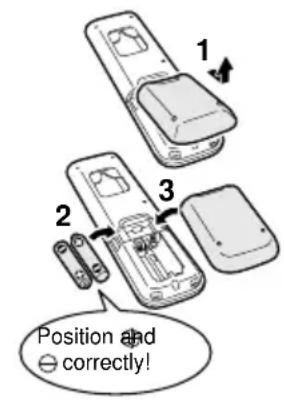
text_image
1 2 3 Position and correctly!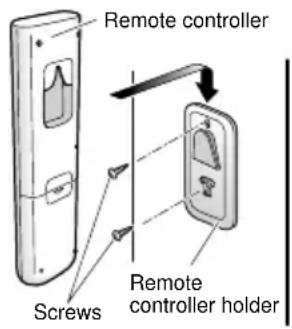
text_image
Remote controller Screws Remote controller holder
To insert the batteries
- Remove the back cover by sliding and then slightly lifting it.
- Insert 2 dry batteries AAA.LR03 (alkaline).
- Replace the back cover.
Tofi x the remote controller holder to a wall
- Choose a place where the signals reach the unit.
- Attach the holder to a wall, a pillar, or similar location with the screws supplied with the holder.
- Hang the remote controller on the remote controller holder.
Fahrenheit/Celsius display switch
Press and (TIMER button)
simultaneously for about 5 seconds.
- The temperature will be displayed in Celsius when it is presently displayed in Fahrenheit, and vice versa.
- The switch operation is only possible when the temperature is being displayed.
Turn on the circuit breaker
- After the power is turned on, the flap of the indoor unit opens and closes once to set the reference position.
NOTE
Notes on batteries
- When replacing the batteries, use batteries of the same type, and replace both old batteries together.
- The batteries will last for about 1 year. If the remote controller display begins to fade and the possible transmission range becomes shorter within a year, however, replace both batteries with new, size AAA.LR03 (alkaline).
- The batteries supplied with the remote controller are for initial operation. The batteries may run out in less than 1 year.
Note on remote controller
- Do not drop the remote controller. Do not get it wet.
The air conditioner operates with the operation mode of your choice.
To start operation
AUTO operation
• To automatically select an appropriate temperature and operation mode.
Press AUTO
COOL operation
• To lower the temperature.
Press COOL
DRY operation
• To lower the humidity.
Press DRY
HEAT operation
• To raise the temperature.
Press HEAT
FAN ONLY operation
• To circulate air in the room.
Press FAN ONLY
• The OPERATION lamp lights green.
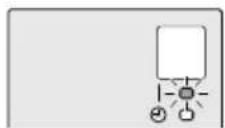
Display
NOTE
Notes on AUTO operation
- In AUTO operation, the system selects an appropriate operation mode (COOL or HEAT) based on the indoor temperature and starts the operation.
- The system automatically reselects setting at a regular interval to bring the indoor temperature to the user-setting level.
Note on DRY operation
- Eliminates humidity while maintaining the indoor temperature as much as possible. It automatically controls temperature and airflow rate, so manual adjustment of these functions is unavailable.
• The OPERATION lamp goes off.
To change the temperature setting

Press
- Press to raise the temperature and press to lower the temperature.
| COOL operation HEAT operation AUTO operation DRY or FAN ONLY operation | |||
| 18 – 32°C 10 – | 30°C 18 – 30°C | The temperature setting cannot be changed. | |
Tips for saving energy
Keeping the temperature setting at a moderate level helps save energy.
- Recommended temperature setting
- For cooling: 26 - 28°C
- For heating: 20 - 24°C
Cover windows with a blind or a curtain.
- Blocking sunlight and air from outdoors increases the cooling (heating) effect.
Keep the air fi Iters clean.
• Clogged air filters cause inefficient operation and waste energy. Clean them once every 2 weeks. ▶Page 20

natural_image
Stylized plant branch illustration with leaves and stems, rendered in grayscale geometric shapes (no text or symbols)If you are not going to use the air conditioner for a long period, for example in spring or autumn, turn off the circuit breaker.
- The air conditioner always consumes a small amount of electricity even while it is not operating.

Adjusting the Airflow Rate
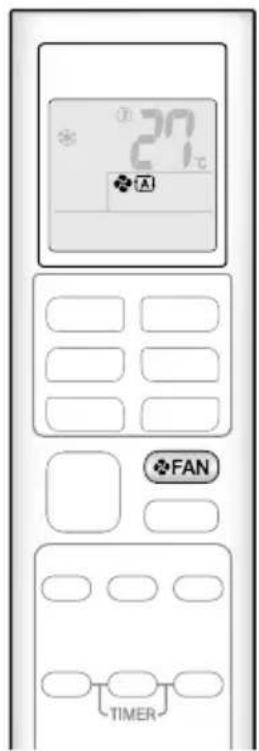
text_image
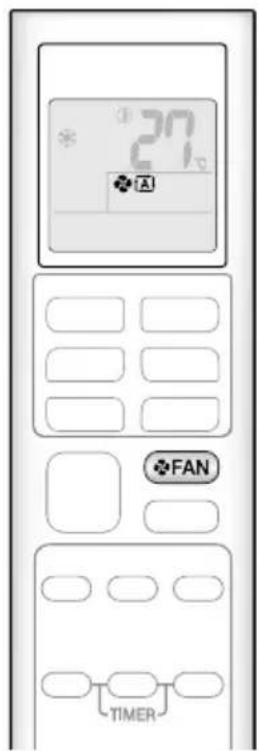
27°C A FAN TIMERYou can adjust the airflow rate to increase your comfort.
To adjust the airflow rate setting
Press FAN
• Each pressing of changes the airflow rate setting in sequence.

flowchart
graph LR
    A["AUTO Indoor unit quiet"] --> B["..."]
    B --> C["Airflow rate 1-5 (Low to High)"]
    C --> D["..."]
    D --> E["Airflow rate 1-5 (Low to High)"]
- When the airflow is set to “▲”, quiet operation starts and noise from the indoor unit will become quieter.
- In the quiet operation mode, the airflow rate is set to a weak level.
| AUTO, COOL, HEAT and FAN ONLY operation DRY | operation |
| The airflow rate setting cannot be changed. |
NOTE
Note on airflow rate setting
- At smaller airflow rates, the cooling (heating) effect is also smaller.
Adjusting the Airflow Direction
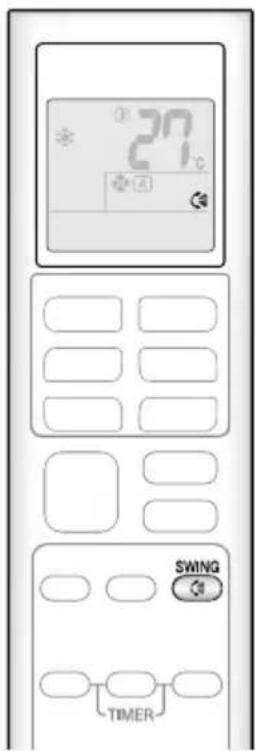
text_image
27°C SWING TIMERYou can adjust the airflow direction to increase your comfort.

CAUTION
• Always use a remote controller to adjust the angles of the flap. Moving the flap forcibly by hand may cause a malfunction.
- Be careful when adjusting the louvers. Inside the air outlet, a fan is rotating at a high speed.
To start auto swing
Up and down airflow direction

- " C is displayed on the LCD.
• The fl ap (horizontal blade) will begin to swing.

natural_image
Diagram showing a curved arrow pointing to a device with a circular icon and directional arrows (no text or symbols)To set the flap at the desired position
- This function is effective while the flap is in auto swing mode.
- Press SWING when the flap reaches the desired position.
• “C disappears from the LCD.
To adjust the louvers at desired position
Hold the knobs and move the louvers (vertical blades).
There is a knob in 2 places.
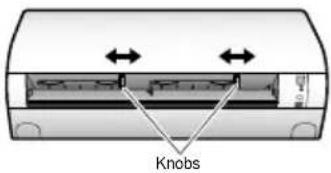
text_image
KnobsNOTE
Notes on airflow direction setting
- The movable range of the flap varies according to the operation mode.
- The flap will stop at the upper position when the airflow rate is changed to low during the up and down swing setting.
Movable range of the flap
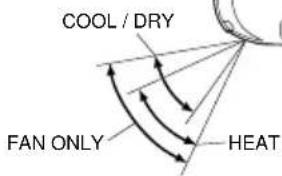
text_image
COOL / DRY FAN ONLY HEAT
COMFORT AIRFLOW Operation
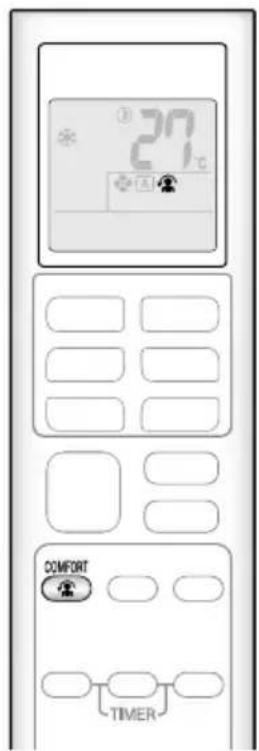
text_image
20℃ COMFORT TIMERThe air direction and flow rate are adjusted so that the air will not blow directly at people in the room.
To start COMFORT AIRFLOW operation
Press

- “ 🍴” is displayed on the LCD.
| COOL and DRY operation HEAT operation | |
| Flap direction | Goes up Goes down |
| Airflow rate | AUTO |
- Not available in FAN ONLY mode.
To cancel COMFORT AIRFLOW operation
Press

• “ 🍴 disappears from the LCD.
- The flap will return to the memory position from before COMFORT AIRFLOW operation.

POWERFUL Operation
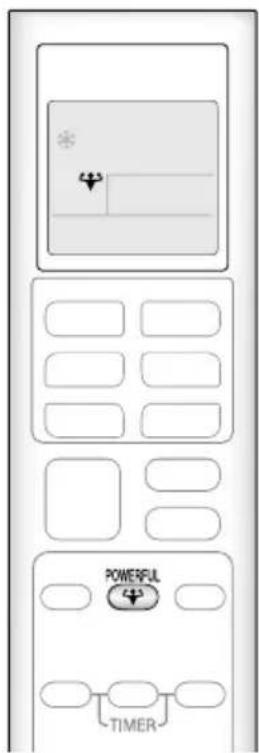
text_image
POWERFUL TIMERPOWERFUL operation quickly maximizes the cooling (heating) effect in any operation mode. In this mode, the air conditioner operates at maximum capacity.
To start POWERFUL operation
Press

- “” is displayed on the LCD.
- POWERFUL operation ends in 20 minutes. Then the system automatically operates again with the previous settings which were used before POWERFUL operation.
To cancel POWERFUL operation
Press

• “ disappears from the LCD.

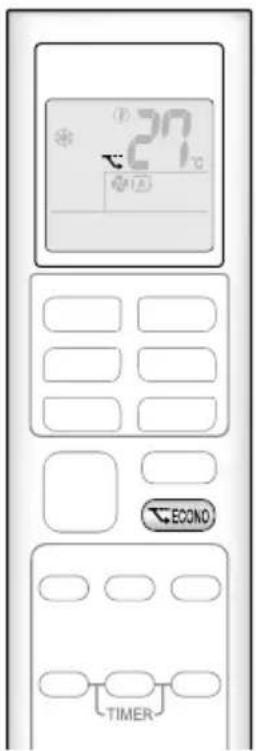
ECONO Operation
text_image
27°C ECONO TIMERECONO operation enables efficient operation by limiting the maximum power consumption.
This function is useful to prevent the circuit breaker from tripping when the unit operates alongside other appliances on the same circuit.
To start ECONO operation

Press
- “ ” is displayed on the LCD.
- Not available in FAN ONLY mode.
To cancel ECONO operation

Press again.
• “ √” disappears from the LCD.
NOTE
Note on COMFORT AIRFLOW operation
- If the up and down airflow direction is selected, the COMFORT AIRFLOW operation will be cancelled.
Notes on POWERFUL operation
- Pressing causes the settings to be cancelled, and " " disappears from the LCD.
- POWERFUL operation will not increase the capacity of the air conditioner if the air conditioner is already in operation with its maximum capacity demonstrated.
- In COOL, HEAT and AUTO operation
To maximize the cooling (heating) effect, the capacity of outdoor unit increases and the airflow rate becomes fixed at the maximum setting. The temperature setting cannot be changed.
- In DRY operation
The temperature setting is lowered by 2.5^ C and the airflow rate is slightly increased.
- In FAN ONLY operation
The airflow rate is fixed at the maximum setting.
Notes on ECONO operation
- Pressing causes the settings to be cancelled, and " " disappears from the LCD.
- If the power consumption level is already low, switching to ECONO operation will not reduce the power consumption.
Some useful functions can be used together.
| COMFORT AIRFLOW + ECONO Available | |
| POWERFUL + COMFORT AIRFLOW Not available* | |
| POWERFUL + ECONO Not available* | |
*Priority is given to the function of whichever button is pressed last.

ON/OFF TIMER Operation
text_image
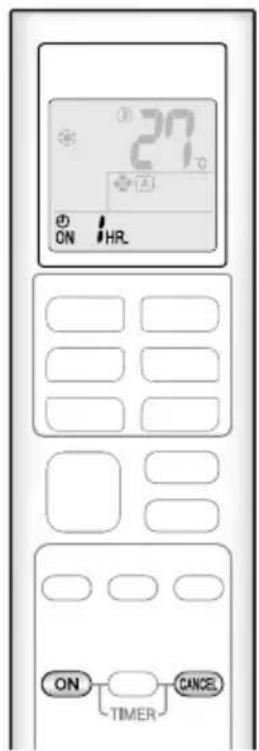
27°C ON HR ON TIMER CANCELTimer functions are useful for automatically switching the air conditioner on or off at night or in the morning. You can also use the ON TIMER and OFF TIMER together.
To use ON TIMER operation

Press
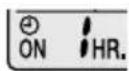
“ON” is displayed on the LCD.
• Each pressing of ON advances the time setting by 1 hour. The time can be set between 1 and 12 hours.
• The TIMER lamp lights orange.
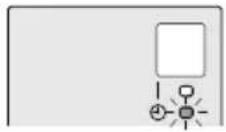
Display
To cancel ON TIMER operation

Press

- “ON” disappears from the LCD.
• The TIMER lamp goes off.
NOTE
In the following cases, set the timer again.
• After the circuit breaker has turned off.
• After a power failure.
• After replacing the batteries in the remote controller.
ON/OFF TIMER Operation
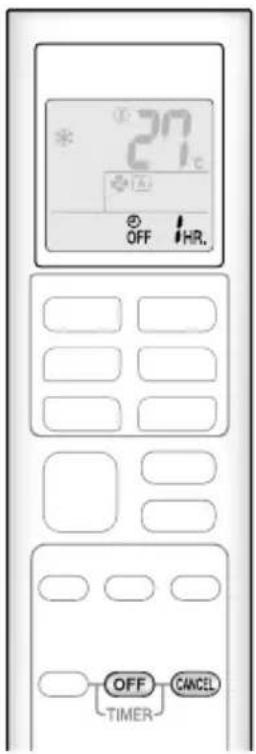
text_image
27°C OFF HR. OFF CANCEL TIMERTo use OFF TIMER operation

Press

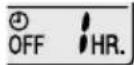
“OFF” is displayed on the LCD.
• Each pressing of OFF advances the time setting by 1 hour. The time can be set between 1 and 12 hours.
• The TIMER lamp lights orange.
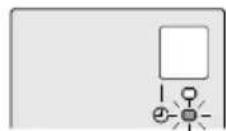
Display
To cancel OFF TIMER operation

Press

- “OFF” disappears from the LCD.
• The TIMER lamp goes off.
To combine ON TIMER and OFF TIMER operation
- A sample setting for combining the 2 timers is shown below.
- “ON” and “OFF” are displayed on the LCD.
[Example]
![DAIKIN ATX20K5V1B - [Example] - 1](/content/2026/04/666916/images/2c21b69213ac29f0f6cbe4127d909270effbfb17fa18510d95a8ca93129df4d9.jpg)
When setting while the unit is operating
- Stops the unit 1 hour later and starts it 7 hours after that.
![DAIKIN ATX20K5V1B - [Example] - 2](/content/2026/04/666916/images/2e86db4288be10747fb993e0843ea788c9432defb3a07585439dd27f6cd028f2.jpg)
When setting while the unit is stopped
- Starts the unit 2 hours later and stops it 3 hours after that.
NOTE
NIGHT SET mode
- When the OFF TIMER is set, the air conditioner automatically adjusts the temperature setting (0.5°C up in COOL, 2.0°C down in HEAT) to prevent excessive cooling (heating) during sleeping hours.
Note for Multi System
Multi system has one outdoor unit connected to multiple indoor units.
■ Selecting the operation mode
With the priority room setting present but inactive or not present.
When more than one indoor unit is operating, priority is given to the first unit that was turned on.
In this case, set the units that are turned on later to the same operation mode as the first unit.
Otherwise, they will enter the standby state, and the OPERATION lamp will flash: this does not indicate malfunction.
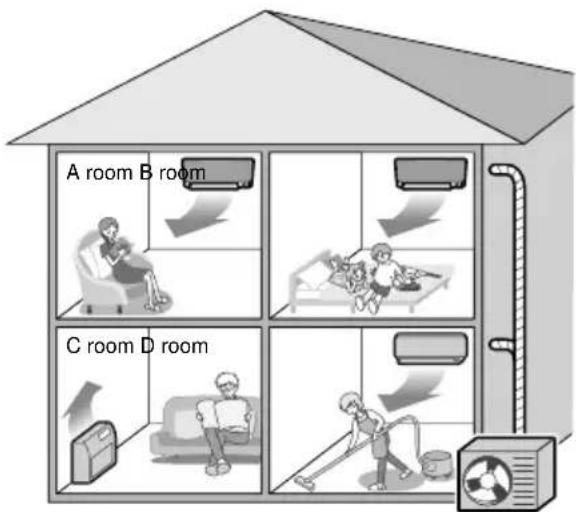
natural_image
Stylized plant branch illustration with leaves and stems, set against a geometric gray background (no text or symbols)Seite 20
natural_image
Simple diagram showing a circular icon with rotation arrow and a server tower (no text or symbols)natural_image
Cross-sectional diagram of an air conditioner unit showing internal compartments and ventilation slots (no text or labels)
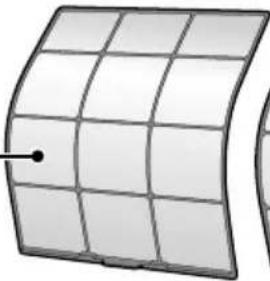
natural_image
Illustration of a curved grid surface with a small dot at the center (no text or symbols)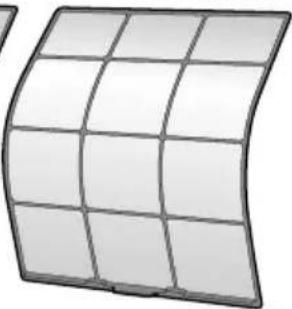
natural_image
Curved grid pattern resembling a solar panel or flexible circuit board (no text or symbols)Luftfi Iter
natural_image
Illustration of a kettle, a brush, and a bottle (no text or symbols)natural_image
Diagram of a car air conditioner unit showing airflow direction and ventilation slots (no text or symbols)natural_image
Illustration of hands holding a grid-based object with scissors, no text or symbols presentnatural_image
Simple line drawing of a basin with a rectangular object on top (no text or symbols)natural_image
Illustration of a car air conditioner unit with three black arrows indicating airflow direction (no text or symbols)natural_image
Cross-sectional diagram of an air conditioner unit showing internal compartments and airflow direction arrows (no text or labels)natural_image
Simple line drawing of a bowl with a textured handle and a mesh inside (no text or symbols)natural_image
Illustration of a hand inserting a mesh into a device (no text or symbols visible)natural_image
Line drawing of a rectangular air conditioner unit with a handle, shown in perspective view (no text or symbols)natural_image
Illustration of a large air conditioning unit with a circular vent and side-mounted buttons (no text or symbols visible)COURANT D'AIR CONFORTABLE
natural_image
Modern minimalist living room interior with white sofa, wall-mounted air conditioner unit, and potted tree (no text or symbols)Table des matières
Mode COURANT D'AIR CONFORTABLE 13

Mode PUISSANT 13

Mode ÉCONO 14
Mode MINUTERIE

Raccordement multiple
natural_image
Stylized grayscale illustration of a plant with leaves and stems, no text or symbols presentnatural_image
Diagram showing a curved arrow pointing to a circular icon with a rotation arrow, next to a stylized computer monitor (no text or symbols)Mode COURANT D'AIR CONFORTABLE
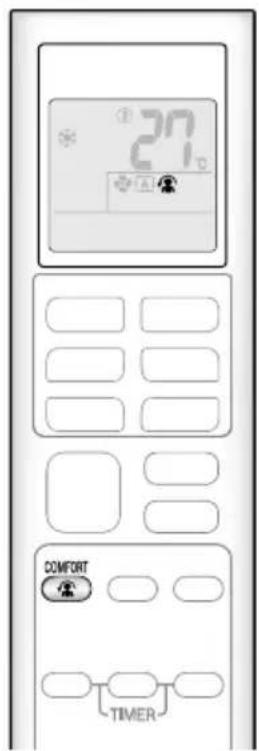
text_image
27 COMFORT TIMERnatural_image
Cross-sectional diagram of an air conditioner unit showing internal compartments and ventilation slots (no text or labels)
natural_image
Illustration of a curved grid structure with a small dot at the center (no text or symbols)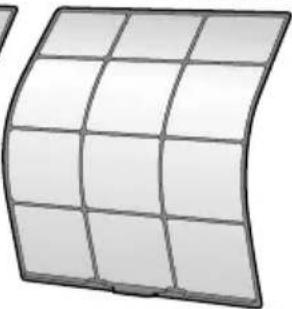
natural_image
Curved grid pattern resembling a solar panel or flexible circuit board (no text or symbols)Filtre à air
natural_image
Illustration of a kettle, a container, and a bottle (no text or symbols)natural_image
Diagram of an air conditioner unit showing airflow direction and component layout (no text or symbols)natural_image
Illustration of hands holding a grid-based tablet with a pen, no text or symbols presentnatural_image
Simple line drawing of a bowl with a square dish on top (no text or symbols)natural_image
Diagram of a car air conditioner with three black arrows indicating airflow direction (no text or symbols)natural_image
Diagram of an air conditioner unit showing airflow direction arrows (no text or symbols)natural_image
Simple line drawing of a bowl with a stirring rod (no text or symbols)natural_image
Illustration of a hand inserting a mesh into a device (no text or symbols visible)natural_image
Line drawing of a rectangular air conditioner unit with a diagonal line extending from its side (no text or symbols)natural_image
Illustration of a large air conditioning unit with a circular vent and mesh grille (no text or symbols)Dépannage
natural_image
Modern minimalist living room interior with white sofa, large wall-mounted air conditioner unit, and potted tree (no text or symbols visible)Inhoud
natural_image
Stylized illustration of a plant with leaves and stems, rendered in grayscale geometric shapes (no text or symbols)natural_image
Diagram showing a curved arrow pointing to a circular icon with a rotation arrow, next to a mechanical component (no text or symbols)De klep in de gewenste stand instellen
flowchart
graph TD
    subgraph Kamer_A
        A["Person in chair"] --> B["Receiving air"]
    end
    subgraph Kamer_B
        B --> C["Receiving air"]
    end
    subgraph Kamer_C
        C --> D["Receiving air"]
    end
    subgraph Kamer_D
        D --> E["Receiving air"]
    end
    F["House with air conditioner"] --> G["Receiving air"]
    style Kamer_A fill:#f9f,stroke:#333
    style Kamer_B fill:#ccf,stroke:#333
    style Kamer_C fill:#cfc,stroke:#333
    style Kamer_D fill:#fcc,stroke:#333
Buitenunit
OPMERKING
natural_image
Cross-sectional diagram of an air conditioner unit showing internal compartments and ventilation slots (no text or labels)

natural_image
Illustration of a curved grid surface with a small dot at the center (no text or symbols)
natural_image
Curved grid panel with 12 cells, no text or symbols visibleLuchtfi Iter
• Zuig de fi lter schoon of was hem.
natural_image
Illustration of a kettle, a container, and a bottle (no text or symbols)Zorg en reiniging
Luchtfi Iter
natural_image
Diagram of a car air conditioner unit showing airflow direction and ventilation slots (no text or symbols)2. Neem de luchtfi Iters eruit.
natural_image
Illustration of hands holding a grid-based panel with a tool, no text or symbols presentnatural_image
Simple line drawing of a basin with a rectangular object on top (no text or symbols)natural_image
Illustration of a car with three arrows indicating airflow or movement (no text or symbols)natural_image
Diagram of an air conditioner unit showing internal compartments and airflow direction arrows (no text or labels)natural_image
Simple line drawing of a bowl with a textured handle and a spoon inside (no text or symbols)natural_image
Illustration of a hand inserting a mesh into a car air vent (no text or symbols visible)■ In standen KOELEN of DROGEN
natural_image
Illustration of a large air conditioning unit with a circular vent and side-mounted buttons (no text or symbols visible)Storingen opsporen en oplossen
natural_image
Modern minimalist living room interior with white sofa, large wall-mounted air conditioner unit, and potted tree (no text or symbols)Contenidos
Leer antes de utilizar
natural_image
Stylized plant branch illustration with leaves and stem, set against geometric gray background (no text or symbols)
Ajuste del caudal de aire
text_image
27°C A FAN TIMERnatural_image
Diagram showing a curved arrow labeled '顺' pointing toward a device icon with a circular arrow, no text or symbols present.natural_image
Cross-sectional diagram of an air conditioner unit showing internal compartments and ventilation slots (no text or labels)
natural_image
Illustration of a curved grid surface with a small dot at the center (no text or symbols)
natural_image
Curved grid panel with grid lines, no text or symbols visibleFiltro de aire
natural_image
Illustration of a kettle, a brush, and a bottle (no text or symbols)Cuidados y limpieza
■ Filtro de aire
natural_image
Diagram of an air conditioner unit showing airflow direction and window layout (no text or symbols)2. Extraiga los fi Itros de aire.
natural_image
Illustration of hands holding a grid-based tablet with scissors, no text or symbols presentnatural_image
Simple line drawing of a basin with a rectangular object on top (no text or symbols)natural_image
Illustration of a car air conditioner unit with three black arrows indicating airflow direction (no text or symbols)natural_image
Cross-sectional diagram of an air conditioner unit showing internal compartments and airflow direction arrows (no text or labels)natural_image
Simple line drawing of a bowl with a spoon inside, no text or symbols presentnatural_image
Illustration of a hand inserting a mesh into a car air vent (no text or symbols visible)natural_image
Line drawing of a wall-mounted air conditioner unit with a handle and cooling element (no text or symbols)natural_image
Illustration of a large air conditioner unit with mesh grille and side-mounted cooling unit (no text or symbols)natural_image
Modern minimalist living room interior with white sofa, large wall-mounted air conditioner unit, and potted plant (no text or symbols)natural_image
Stylized illustration of a plant branch with leaves and stems, rendered in grayscale geometric shapes (no text or symbols)Coprire le fi nestre con le veneziane o con le tende.
natural_image
Simple diagram showing a circular icon with a curved arrow pointing to a server unit (no text or symbols)natural_image
Illustration of a kettle, a brush, and a bottle (no text or symbols)Cura e Pulizia
■ Filtro aria
natural_image
Diagram of a car air conditioner unit showing airflow direction and window layout (no text or symbols)2. Estrarre i fi ltri aria.
natural_image
Illustration of hands holding a grid-based panel with a tool, no text or symbols presentnatural_image
Simple line drawing of a basin with a rectangular object partially submerged in water (no text or symbols)4. Rimontare i fi ltri.
natural_image
Illustration of a car air conditioner with three black arrows indicating airflow direction (no text or symbols)natural_image
Cross-sectional diagram of an air conditioner unit showing internal compartments and ventilation ducts (no text or labels)natural_image
Simple line drawing of a bowl with a spoon inside, no text or symbols presentnatural_image
Illustration of a hand inserting a mesh into a device (no text or symbols visible)natural_image
Line drawing of a wall-mounted air conditioner unit with a handle, shown in perspective view (no text or symbols)natural_image
Illustration of a large air conditioner unit with mesh grille and side-mounted control panel (no text or symbols)natural_image
Modern minimalist living room interior with white sofa, large wall-mounted air conditioner unit, and potted plant (no text or symbols)Περιεχόμενα
natural_image
Stylized plant branch illustration with leaves and stem, rendered in grayscale geometric shapes (no text or symbols)natural_image
Simple diagram showing a circular icon with a curved arrow pointing to a server unit (no text or symbols)natural_image
Cross-sectional diagram of an air conditioner unit showing internal compartments and ventilation slots (no text or labels)
natural_image
Illustration of a curved grid surface with a small dot at the center (no text or symbols)
natural_image
Curved grid pattern with no text or symbolsΦίλτρο αέρα
natural_image
Illustration of a kettle, a bottle, and a brush (no text or symbols)natural_image
Diagram of a car air conditioner unit showing airflow direction and window structure (no text or symbols)natural_image
Illustration of hands holding a grid-based object with scissors, no text or symbols presentnatural_image
Simple line drawing of a basin with a rectangular object floating on the top (no text or symbols)natural_image
Illustration of a rectangular air conditioner unit with three black arrows indicating airflow or movement (no text or symbols)natural_image
Diagram of an air conditioner unit showing airflow direction arrows (no text or labels)natural_image
Simple line drawing of a bowl with a textured handle inside (no text or symbols)natural_image
Illustration of a hand inserting a mesh into a device (no text or symbols visible)natural_image
Line drawing of a rectangular air conditioner unit with a flat panel and a side clip, shown without any text or symbols.natural_image
Illustration of a large air conditioner unit with mesh grille and side-mounted cooling unit (no text or symbols)natural_image
Modern minimalist living room interior with white sofa, wall-mounted air conditioner unit, and potted plant (no text or symbols)Índice
Ler Antes de Utilizar
natural_image
Stylized plant branch illustration with leaves and stems, rendered in grayscale geometric shapes (no text or symbols)Mantenha os fi Itros de ar limpos.
natural_image
Simple diagram showing a curved arrow labeled '顺' pointing right, with a small icon on the left (no text or symbols)flowchart
graph TD
    A["Divisão A"] --> B["House with a person relaxing"]
    B --> C["House with a child in bed"]
    C --> D["House with a man sweeping the room"]
    D --> E["House with a fan cleaning machine"]
    style A fill:#f9f,stroke:#333
    style B fill:#ccf,stroke:#333
    style C fill:#cfc,stroke:#333
    style D fill:#fcc,stroke:#333
Unidade de exterior
NOTA
natural_image
Cross-sectional diagram of an air conditioner unit showing internal compartments and ventilation slots (no text or labels)
natural_image
Illustration of a curved grid surface with a small dot at the center (no text or symbols)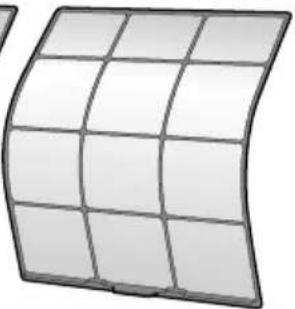
natural_image
Curved grid panel with grid lines, no text or symbols visibleFiltro de ar
- Aspire o pó ou lave o fi ltro.
A cada 2 semanas
Página 20
natural_image
Illustration of a kettle, a brush, and a bottle (no text or symbols)Cuidados e Limpeza
■ Filtro de ar
1. Abra o painel frontal.
natural_image
Diagram of a car air conditioner unit showing airflow direction and window layout (no text or symbols)2. Extraia os fi Itros de ar.
natural_image
Illustration of hands holding a grid-based tablet with a pen, no text or symbols presentnatural_image
Simple line drawing of a bowl with a square dish on top (no text or symbols)natural_image
Illustration of a rectangular air conditioner with three black arrows indicating airflow or cooling direction (no text or symbols)natural_image
Cross-sectional diagram of an air conditioner unit showing internal compartments and airflow direction arrows (no text or labels)- Limpe ou substitua os fi Itros desodorizantes de apatite de titânio.
[Limpeza]
natural_image
Simple line drawing of a bowl with a textured handle and a spoon (no text or symbols)natural_image
Illustration of a hand inserting a mesh into a car air vent (no text or symbols visible)natural_image
Line drawing of a wall-mounted air conditioner unit with a handle and ventilation slots (no text or symbols)São detectados sons diferentes.
natural_image
Illustration of a large air conditioner unit with mesh grille and side-mounted cooling unit (no text or symbols)natural_image
Modern minimalist living room interior with white sofa, wall-mounted air conditioner unit, and potted tree (no text or symbols)Содержание
natural_image
Stylized plant branch illustration with leaves and stems, set against a geometric gray background (no text or symbols)natural_image
Diagram showing a device emitting a curved arrow, with no visible text or symbolsflowchart
graph TD
    A["House with Room A"] --> B["Indoor Area 1: House with Lighting"]
    B --> C["Indoor Area 2: Room 1, Room 2, Room 3, Room 4"]
    C --> D["Indoor Area 3: Room 1, Room 2, Room 3, Room 4"]
    D --> E["Indoor Area 4: Room 1, Room 2, Room 3, Room 4"]
    style A fill:#f9f,stroke:#333
    style B fill:#ccf,stroke:#333
    style C fill:#cfc,stroke:#333
    style D fill:#fcc,stroke:#333
Наружный агрегат
ПРИМЕЧАНИЕ
natural_image
Illustration of a kettle, a brush, and a bottle (no text or symbols)Уход и очистка
■ Воздушный фильтр
natural_image
Diagram of a car air conditioner unit showing airflow direction and ventilation slots (no text or symbols)natural_image
Illustration of hands holding a grid-based panel with a tool, no text or symbols presentnatural_image
Simple line drawing of a basin with a rectangular object on top (no text or symbols)natural_image
Illustration of a car with three arrows indicating airflow or movement (no text or symbols)natural_image
Diagram of an air conditioner unit showing airflow direction arrows (no text or symbols)natural_image
Simple line drawing of a bowl with a stirring rod inside (no text or symbols)natural_image
Illustration of a hand inserting a mesh into a car air vent (no text or symbols visible)natural_image
Line drawing of a wall-mounted air conditioner unit with a handle, shown in perspective view (no text or symbols)natural_image
Illustration of a rectangular air conditioner unit with mesh grille and side-mounted buttons (no text or symbols)natural_image
Modern minimalist living room interior with white sofa, large wall-mounted air conditioner unit, and potted tree (no text or symbols)İçindekiler
natural_image
Stylized plant branch illustration with leaves and stems, rendered in grayscale geometric shapes (no text or symbols)natural_image
Diagram showing a curved arrow pointing to a device with a circular icon and directional arrows (no text or symbols)natural_image
Cross-sectional diagram of an air conditioner unit showing internal compartments and ventilation slots (no text or labels)
natural_image
Illustration of a curved grid surface with a small dot at the center (no text or symbols)