MC-BU100 - Vacuum Cleaner PANASONIC - Free user manual and instructions
Find the device manual for free MC-BU100 PANASONIC in PDF.


User questions about MC-BU100 PANASONIC
0 question about this device. Answer the ones you know or ask your own.
Ask a new question about this device
Download the instructions for your Vacuum Cleaner in PDF format for free! Find your manual MC-BU100 - PANASONIC and take your electronic device back in hand. On this page are published all the documents necessary for the use of your device. MC-BU100 by PANASONIC.
USER MANUAL MC-BU100 PANASONIC
Operating Instructions
natural_image
Illustration of a white handheld vacuum cleaner with a handle and spout (no text or symbols visible)© 2015 Panasonic Appliances Company of America, Division of Panasonic Corporation of North America
Important Safety Instructions 7
Before Requesting Service 28
Household Warranty (For U.S.A. only) 34
Household Warranty / Garantie domestique 36
Garantía domestico (solo para Estados Unidos) 38
Commercial Warranty (For U.S.A. only) 40
Commercial Warranty / Garantie commercial 42
Please read IMPORTANT SAFETY INSTRUCTIONS on page 7 before use. Read and understand all instructions.
TO OUR VALUED CUSTOMER
We are very pleased to welcome you to the Panasonic family of products. Thank you for purchasing this product. Our intent is that you become one of our many satisfied customers.
Proper assembly and safe use of your vacuum cleaner are your responsibilities. The vacuum cleaner should be stored in a dry, indoor area. Read the Operating Instructions carefully for important use and safety information.
Special care is required when vacuuming certain types of carpet or floor covering. Always check the carpet or floor covering manufacturer's recommended cleaning instructions before vacuuming.
PLEASE PAY CLOSE ATTENTION TO ALL WARNING AND CAUTION STATEMENTS.
WARNING
WARNING statements are designed to alert you to the possibility of personal injury, loss of human life, and/or damage to the vacuum cleaner and/or personal property if the instructions given are not followed.
CAUTION
CAUTION statements are designed to alert you to the possibility of damage to the vacuum cleaner and/or personal property if the instructions given are not followed.
WARNING
TO AVOID ELECTRICAL SHOCK
Never vacuum damp or wet surfaces or liquids.
DO NOT store vacuum cleaner outdoors.
Replace worn or frayed power cord immediately.
Unplug from outlet when not in use and before servicing.
TO AVOID ACCIDENTS
- Except for hand-held vacuum cleaners, keep vacuum cleaner on floor - not chairs, tables, steps, stairs, etc.
- Store vacuum cleaner promptly after each use to prevent accidents such as tripping over power cord or vacuum cleaner.
- Use vacuum cleaner and accessories only in a manner intended by the manufacturer.
IMPORTANT SAFETY INSTRUCTIONS
When using your vacuum cleaner, basic precautions should always be followed, including the following:
Read all instructions in this manual before assembling or using your vacuum cleaner.

WARNING
To reduce the risk of fire, electrical shock, and injury:
- Use your vacuum cleaner only as described in this manual. Use only with Panasonic recommended attachments.
- Turn off before servicing or cleaning out the brush area.
- Do not handle charger, including charger plug and charger terminals, with wet hands.
- To reduce the risk of electrical shock - Do not use outdoors or on wet surfaces.
- Do not allow to be used as a toy. Close attention is necessary when used by or near children.
- Do not use with a damaged cord or plug. If vacuum cleaner is not working as it should, has been dropped, damaged, left outdoors, or dropped in water, return it to a Panasonic Service Center.
- Do not pull or carry by cord, use cord as a handle, close a door on cord, or pull cord around sharp edges or corners. Do not run vacuum cleaner over cord. Keep cord away from heated surfaces.
- Do not unplug by pulling on cord. To unplug, grasp the plug, not the cord.
- Do not handle plug or vacuum cleaner with wet hands.
- Do not put any objects into openings.
- Do not use with any opening blocked; keep free of dust, lint, hair, and anything that may reduce air flow.
- Keep hair, loose clothing, fingers, and all parts of body away from openings and moving parts.
- Use extra care when cleaning on stairs. Do not put StickVac on chairs, tables, etc. Keep on floor.
- Do not use vacuum cleaner to pick up flammable or combustible liquids (gasoline, cleaning fluid, perfumes, etc.), or use in areas where they may be present. The fumes from these substances can create a fire hazard or explosion.
- Do not pick up anything that is burning or smoking, such as cigarettes, matches, or hot ashes.
- Do not use vacuum cleaner without dust bin and/or filters in place.
- Do not charge the vacuum cleaner outdoors.
- Use only the charger supplied by the manufacturer to charge.
- Do not incinerate the vacuum cleaner, even if it is severely damaged. The battery can explode in a fire.
- You are responsible for making sure that your vacuum cleaner is not used by anyone who is unable to operate it properly.
SAVE THESE INSTRUCTIONS
NOTE: Before you plug in your Panasonic vacuum cleaner, make sure that the voltage indicated on the rating plate located at the back of the vacuum cleaner is the same as your local electrical supply.
➢ DO NOT plug in until assembly is complete.
➢ Remove handle screw from handle.
➢ Tuck the wire inside the vacuum cleaner and insert handle into the vacuum cleaner. DO NOT PINCH WIRE.
➢ Insert handle screw.
Insérer la vis.
▶ Tighten handle screw.
Serrer la vis.
- DO NOT overtighten. Overtightening could strip the screw holes.
- DO NOT operate the vacuum cleaner without the screw in place.

ATTENTION
➢ Insert floor nozzle into vacuum cleaner body until it snaps in place.
➢ Insert crevice tool and dusting brush into slot on the charging stand as shown.
The battery is not charged fully at time of purchase. The battery needs to be charged completely prior to first use.
Align the arrows and insert the plug into the port on the bottom of the charging stand.
➢ Insert the cord into the slot in the charging stand.
➢ Plug charging adapter into 120 volt outlet.
If vacuum cleaner has not been used for 6 months, the use time after full charge will be reduced. Use time will return to normal after 2-3 full use/charging cycles.
- It is normal for the charging adapter and HandVac to become warm during charging.
- If the vacuum cleaner is removed from charging stand and used prior to full charge the use time will be shorter than when fully charged.
- Usage time will vary depending on the state of the battery and/or temperature.
natural_image
Diagram showing two views of a vacuum cleaner's base with a right-hand rule for change (no text or symbols present)Remove vacuum cleaner from charging stand.
➢ Press the StickVac power button to turn on vacuum cleaner.
The power level is changed by pressing the power button.
natural_image
Diagram showing a vacuum cleaner's base being adjusted to shift its air gap (no text or symbols present)After use, place StickVac into charging stand.
natural_image
Illustration of a human leg with arrows indicating force or movement, no text or symbols present➢ Press the HandVac release buttons on the sides of the StickVac.
natural_image
Four identical grayscale images of a handbag with a handle, arranged in a 2x2 grid (no text or symbols)➢ Tools can be attached to the HandVac as needed.
natural_image
Illustration of a hand holding a small object with arrows indicating motion or assembly (no text or symbols)The dusting brush may also be placed on the end of the crevice tool.
To turn HandVac on or off, press the on/off switch.
- The HandVac has one power level (HIGH).
text_image
Diagram of a medical device with labeled parts and directional arrows indicating movement or positioning.Remaining battery level can be checked using the following steps.
➢ Remove the vacuum cleaner from the charging stand.
➢ Turn on vacuum cleaner.
If battery status indicator is on (solid) then battery power level is OK.
If battery status indicator is blinking the battery needs to be charged before further use.
The overload protector stops the nozzle motor when the brush jams and prevents belt breakage.
➢ Clean jammed area.
➢ Turn off vacuum cleaner for approximately 10 seconds, and then turn back on.
Performing the tasks in the following sections will keep your new Panasonic vacuum cleaner operating at peak performance levels and will ensure these high levels for years to come. Check the BEFORE REQUESTING SERVICE section in this manual for recommendations on performing some of these tasks to help solve various problems that may occur.
➢ Empty the dust bin frequently and clean the filters.
natural_image
Illustration of a hand holding a handheld device with a black arrow indicating the process (no text or symbols present)➢ Remove HandVac from StickVac.
➢ Press the dust cup release button and remove dust cup from vacuum cleaner.
➢ Remove filter by lifting at slot.
Retirer le filtre en le soulevant à la fente. Remueva el filtro levantando de la ranura.
➢ Remove dirt and debris from filter by tapping on a firm surface or brushing gently with a dry cloth.
Cleaning Dust Cup and Filters
➢ Remove dust cup from HandVac.
➢ Empty dust bin into trash container.
The dust cup can be wiped off with a tissue or soft cloth.
natural_image
Illustration of two hands exchanging a device with a circular component (no text or symbols visible)Remove the filter.
Retirer le filtre.
Remueva el filtro
text_image
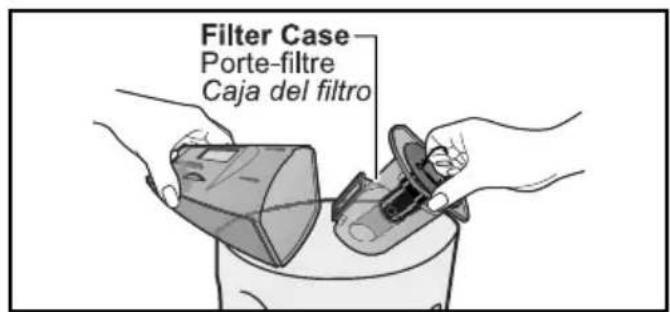
Filter Case Porte-filtre Caja del filtroRemove filter case.
natural_image
Illustration of hands holding a device with a lock and directional arrow, no text or symbols presentTo remove mesh filter, rotate to unlock and lift out.
To reinstall, reverse order of removal.
text_image
Diagram showing five different types of cleaning or inspection items with checkmarks and X symbols, likely for product inspection or repair.The dust cup, mesh filter, and filter may be washed. If necessary, rinse with cold water only.
DO NOT wash filter case.
NE JAMAIS laver le porte-filtre. No lave el soporte del filtro
➢ DO NOT use detergent or soap.
NE JAMAIS utiliser de détergent ou de savon. NO use ningún detergente o jabón.
➢ DO NOT wash in the dishwasher.
Allow parts to dry 24 hours before putting back into vacuum cleaner. DO NOT install damp.
Remove dust cup from HandVac.
➢ Remove pre-filter as shown.
➢ Remove dirt and debris from pre-filter by tapping on a firm surface or brushing gently with a dry cloth.
To reinstall pre-filter, align slots in filter with tabs on HandVac.
text_image
Diagram illustrating the process of cleaning a vacuum cleaner with labeled components and water droplets indicating inspection.ELECTRICAL CONTACTS
CONTACTS ÉLECTRIQUES
CONTACTOS ELÉTRICOS
DO NOT clean with water.
If necessary, wipe with a tissue or soft dry cloth.
➢ DO NOT clean with water.
If necessary, wipe with a tissue or soft dry cloth.
natural_image
Line drawing of a hand holding a tool against a plain background (no text or symbols)BODY
BOÎTIER
CUERPO
Wipe gently with a damp cloth.
natural_image
Technical illustration of a mechanical component with cross-sectional view and close-up detail (no text or symbols)Check the areas marked in the illustrations and remove any debris. Vérifier les zones indiquées sur les illustrations et retirer tout débris. Revise las áreas marcadas en las ilustraciones y quite cualquier escombro.
Cut off any hair, thread, string, carpet pile, and lint entangled around agitator with a pair of scissors. Couper tous cheveux, fil, corde, fibre ou peluche enroulés autour de l'agitateur avec une paire de ciseaux. Corte con unas tijeras cabello, hilo, cuerda, el pelo de alfombra, y pelusa envueltos en el agitador.
Cleaning Agitator
Nettoyage de l'agitateur / Limpieza del agitador
text_image
Diagram of a device's internal components with numbered labels indicating parts of each part.To remove the agitator cover and agitator:
① Turn the latch located on the agitator cover to the unlock position. Remove agitator cover.
② Press the shutter down.
③ Lift the agitator end cap out and remove belt.
natural_image
Mechanical assembly diagram showing a component with internal structure and a threaded rod, no text or symbols present➢ Remove any dirt or debris in the belt path and agitator areas.
text_image
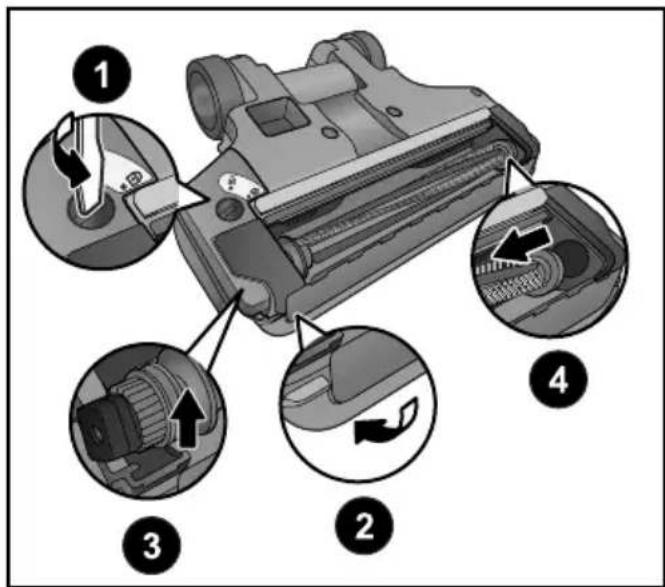
Diagram of a mechanical device with numbered parts and labeled parts, showing internal components and directional arrows.To install agitator cover and agitator:
① Reinstall agitator into nozzle as shown.
② Press the shutter down.
③ Reinstall belt onto belt pulley and press agitator end cap into place in nozzle.
④ Place cover onto nozzle and secure by rotating the latch to the LOCK position.
Electrical Shock or Personal Injury Hazard
Disconnect the electrical supply before servicing or cleaning the vacuum cleaner. Failure to do so could result in electrical shock or personal injury from vacuum cleaner suddenly starting.
Review this chart to find do-it-yourself solutions for minor performance problems. Any service needed, other than those described in these Operating Instructions, should be performed by an authorized service representative.
| PROBLEM POSSIBLE CAUSE | POSSIBLE SOLUTION | |
| Vacuum Cleaner 1. ON/OFF button not turned on. 1. Push won’t run. 2. Battery is dead. 2. Charge Battery | ON/OFF button to on. | |
| Poor job of dirt 1. Full or clogged dust bin. 1. Empty dust bin. pick-up. 2. Dirty filters. 2. Change/clean filters. 3. Clogged nozzle or dust bin. 3. Clean nozzle or dust bin. 4. Overload protector activated. 4. Turn off for 10 seconds, and then turn back on. 5. Worn agitator. 5. Replace agitator. | ||
| Agitator not turning. | 1. Overload protector activated. 1. Turn off for 10 seconds, and then turn back on. 2. Belt/agitator not installed 2. Check belt and/or agitator. properly. | |

AVERTISSEMENT
Before disposing of the appliance, remove the dust bag (some models), and all filters, and dispose them with normal waste. Most materials have been marked with material identifiers to assist in the recycling of this product.
DO NOT discard batteries with your regular trash. Dispose of batteries in an environmentally safe manner. To preserve natural resources, please recycle or dispose of expired battery pack properly. Consult your local waste authority for information regarding available recycling and/or disposal options. To find a disposal location nearest you, call 1-800-822-8837.
Packaging:
Make sure that any package, for example, plastic bags, are kept out of the reach of children to avoid risk of suffocation. The packaging used to protect the appliance from damage during transportation is all recyclable. For information, contact your local authority.
Aspirateur :
Household Warranty (Only For U.S.A.)
Panasonic Products Limited Warranty
Limited Warranty Coverage (For USA Only)
If your product does not work properly because of a defect in materials or workmanship, Panasonic Consumer Electronics Corporation (referred to as “the warrantor”) will, for the length of the period indicated on the chart below, which starts with the date of original purchase (“warranty period”), at its option either (a) repair your product with new or refurbished parts, (b) replace it with a new or a refurbished equivalent value product, or (c) refund your purchase price. The decision to repair, replace or refund will be made by the warrantor.
| Product or Part Name Parts Labor Motor | |||
| Vacuum Cleaner 1 year 1 year 1 | year | ||
During the “Labor” warranty period there will be no charge for labor. During the “Parts” warranty period, there will be no charge for parts.
This warranty only applies to products purchased and serviced in the United States. This warranty is extended only to the original purchaser of a new product which was not sold "as is".
Carry-In or Mail in Service:
To find a service center please visit: http://shop.panasonic.com/support
When shipping the unit, carefully pack and send it in the original (or supplied) carton. Include a letter detailing the complaint along with the bill of sales and provide a daytime phone number where you can be reached. A valid registered receipt is required under the Limited Warranty.
When shipping Lithium Ion batteries please visit our web site at http://shop.panasonic.com/support as Panasonic is committed to providing the most up to date information.
IF REPAIR IS NEEDED DURING THE WARRANTY PERIOD, THE PURCHASER WILL BE REQUIRED TO FURNISH A SALES RECEIPT/PROOF OF PURCHASE INDICATING DATE OF PURCHASE, AMOUNT PAID AND PLACE OF PURCHASE. CUSTOMER WILL BE CHARGED FOR THE REPAIR OF ANY UNIT RECEIVED WITHOUT SUCH PROOF OF PURCHASE.
Limited Warranty Limits And Exclusions
This warranty ONLY COVERS failures due to defects in materials or workmanship, and DOES NOT COVER glass, plastic parts, temperature probes (if included) and normal wear and tear or cosmetic damage. The warranty ALSO DOES NOT COVER damages which occurred in shipment, or failures which are caused by products not supplied by the warrantor, or failures which result from accidents, misuse, abuse, neglect, bug infestation, mishandling, misapplication, alteration, faulty installation, set-up adjustments, maladjustment of consumer controls, improper maintenance, power line surge, lightning damage, modification, or commercial use (such as in a hotel, office, restaurant, or other business), rental use of the product, service by anyone other than a Factory Service center or other Authorized Servicer, or damage that is attributable to acts of God.
THERE ARE NO EXPRESS WARRANTIES EXCEPT AS LISTED UNDER “LIMITED WARRANTY COVERAGE”.
THE WARRANTOR IS NOT LIABLE FOR INCIDENTAL OR CONSEQUENTIAL DAMAGES RESULTING FROM THE USE OF THIS PRODUCT, OR ARISING OUT OF ANY BREACH OF THIS WARRANTY. (As examples, this excludes damages for lost time, travel to and from the servicer, loss of or damage to media or images, data or other memory or recorded content. The items listed are not exclusive, but for illustration only.)
ALL EXPRESS AND IMPLIED WARRANTIES, INCLUDING THE WARRANTY OF MERCHANTABILITY, ARE LIMITED TO THE PERIOD OF THE LIMITED WARRANTY.
Some states do not allow the exclusion or limitation of incidental or consequential damages, or limitations on how long an implied warranty lasts, so the exclusions may not apply to you.
This warranty gives you specific legal rights and you may also have other rights which vary from state to state. If a problem with this product develops during or after the warranty period, you may contact your dealer or Service Center. If the problem is not handled to your satisfaction, then write to:
Consumer Affairs Department
Panasonic Consumer Marketing Company
661 Independence Pkwy
Chesapeake, VA 23320
PARTS AND SERVICE, WHICH ARE NOT COVERED BY THIS LIMITED WARRANTY, ARE YOUR RESPONSIBILITY.
Shop
Accessories!
for all your Panasonic gear
Go to
http://shop.panasonic.com/support
Get everything you need to get the most out of your Panasonic products
Accessories & Parts for your Camera,
Phone, A/V products, TV, Computers &
Networking, Personal Care, Home
Appliances, Headphones, Batteries, Backup
Chargers & more...
Customer Services Directory
For Product Information, Operating
Assistance, Parts, Owner's Manuals, Dealer
and Service info go to
http://shop.panasonic.com/support
For the hearing or speech impaired
TTY: 1 877 833 8855
HOUSEHOLD WARRANTY
Panasonic Canada Inc.
5770, Ambler Drive, Mississauga (Ontario) L4W 2T3
PANASONIC PRODUCT – LIMITED WARRANTY
EXCHANGE PROGRAM
Panasonic Canada Inc. warrants this product to be free from defects in material and workmanship under normal use and for a period as stated below from the date of original purchase agrees to, at its option either (a) repair your product with new or refurbished parts, (b) replace it with a new or a refurbished equivalent value product, or (c) refund your purchase price. The decision to repair, replace or refund will be made by Panasonic Canada Inc.
Vacuum Cleaner
One (1) year
This warranty is given only to the original purchaser, or the person for whom it was purchased as a gift, of a Panasonic brand product mentioned above sold by an authorized Panasonic dealer in Canada and purchased and used in Canada, which product was not sold "as is", and which product was delivered to you in new condition in the original packaging.
IN ORDER TO BE ELIGIBLE TO RECEIVE WARRANTY SERVICE HEREUNDER, A PURCHASE RECEIPT OR OTHER PROOF OF DATE OF ORIGINAL PURCHASE, SHOWING AMOUNT PAID AND PLACE OF PURCHASE IS REQUIRED
LIMITATIONS AND EXCLUSIONS
This warranty ONLY COVERS failures due to defects in materials or workmanship, and DOES NOT COVER normal wear and tear or cosmetic damage. The warranty ALSO DOES NOT COVER damages which occurred in shipment, or failures which are caused by products not supplied by Panasonic Canada Inc., or failures which result from accidents, misuse, abuse, neglect, mishandling, misapplication, alteration, faulty installation, set-up adjustments, misadjustment of consumer controls, improper maintenance, power line surge, lightning damage, modification, introduction of sand, humidity or liquids, commercial use such as hotel, office, restaurant, or other business or rental use of the product, or service by anyone other than a Authorized Servicer, or damage that is attributable to acts of God.
Parts such as disposable dust bags, filters, belts, light bulbs and agitator brushes are not covered by this warranty.
THIS EXPRESS, LIMITED WARRANTY IS IN LIEU OF ALL OTHER WARRANTIES, EXPRESS OR IMPLIED, INCLUDING ANY IMPLIED WARRANTIES OF MERCHANTABILITY AND FITNESS FOR A PARTICULAR PURPOSE. IN NO EVENT WILL PANASONIC CANADA INC. BE LIABLE FOR ANY SPECIAL, INDIRECT OR CONSEQUENTIAL DAMAGES RESULTING FROM THE USE OF THIS PRODUCT OR ARISING OUT OF ANY BREACH OF ANY EXPRESS OR IMPLIED WARRANTY. (As examples, this warranty excludes damages for lost time, travel to and from the Authorized Servicer, loss of or damage to media or images, data or other memory or recorded content. This list of items is not exhaustive, but for illustration only.)
In certain instances, some jurisdictions do not allow the exclusion or limitation of incidental or consequential damages, or the exclusion of implied warranties, so the above limitations and exclusions may not be applicable. This warranty gives you specific legal rights and you may have other rights which vary depending on your province or territory.
CONTACT INFORMATION
For product information and operation assistance, please contact our Support page: www.panasonic.ca/english/support
For defective product exchange within the warranty period, please contact the original dealer.
GARANTIE DOMESTIQUE
Panasonic Canada Inc.
5770, Ambler Drive, Mississauga (Ontario) L4W 2T3
PRODUIT PANASONIC - GARANTIE LIMITÉE
PROGRAMME D'ÉCHANGE
Consumer Affairs Department
Panasonic Consumer Marketing Company
661 Independence Pkwy
Chesapeake, VA 23320
PARTES Y SERVICIOS QUE NO ESTAN CUBIERTO POR ESTA GARANTIA LIMITADA, SON SU RESPONSABILIDAD.
Panasonic Products Limited Warranty
Limited Warranty Coverage (For USA Only)
If your product does not work properly because of a defect in materials or workmanship, Panasonic Consumer Electronics Corporation (referred to as “the warrantor”) will, for the length of the period indicated on the chart below, which starts with the date of original purchase (“warranty period”), at its option either (a) repair your product with new or refurbished parts, (b) replace it with a new or a refurbished equivalent value product, or (c) refund your purchase price. The decision to repair, replace or refund will be made by the warrantor.
| Product or Part Name Labor Parts | ||
| Commercial Vacuum Cleaner 90 days 90 days |
During the “Labor” warranty period there will be no charge for labor. During the “Parts” warranty period, there will be no charge for parts. This Limited Warranty Excludes both Labor and Parts for the following items which require normal replacement: Disposable Dust Bag, Filters, Belts, Light Bulbs, Agitator Brushes and Batteries (if supplied).
This warranty only applies to products purchased and serviced in the United States. This warranty is extended only to the original purchaser of a new product which was not sold “as is”.
Carry-In or Mail in Service:
To find a service center please visit: http://shop.panasonic.com/support
When shipping the unit, carefully pack and send it in the original (or supplied) carton. Include a letter detailing the complaint along with the bill of sales and provide a daytime phone number where you can be reached. A valid registered receipt is required under the Limited Warranty.
When shipping Lithium Ion batteries please visit our web site at http://shop.panasonic.com/support as Panasonic is committed to providing the most up to date information.
IF REPAIR IS NEEDED DURING THE WARRANTY PERIOD, THE PURCHASER WILL BE REQUIRED TO FURNISH A SALES RECEIPT/PROOF OF PURCHASE INDICATING DATE OF PURCHASE, AMOUNT PAID AND PLACE OF PURCHASE. CUSTOMER WILL BE CHARGED FOR THE REPAIR OF ANY UNIT RECEIVED WITHOUT SUCH PROOF OF PURCHASE.
Limited Warranty Limits And Exclusions
This warranty ONLY COVERS failures due to defects in materials or workmanship, and DOES NOT COVER glass, plastic parts, temperature probes (if included) and normal wear and tear or cosmetic damage. The warranty ALSO DOES NOT COVER damages which occurred in shipment, or failures which are caused by products not supplied by the warrantor, or failures which result from accidents, misuse, abuse, neglect, bug infestation, mishandling, misapplication, alteration, faulty installation, set-up adjustments, maladjustment of consumer controls, improper maintenance, power line surge, lightning damage, modification, rental use of the product, service by anyone other than a Factory Service center or other Authorized Servicer, or damage that is attributable to acts of God.
THERE ARE NO EXPRESS WARRANTIES EXCEPT AS LISTED UNDER “LIMITED WARRANTY COVERAGE”.
THE WARRANTOR IS NOT LIABLE FOR INCIDENTAL OR CONSEQUENTIAL DAMAGES RESULTING FROM THE USE OF THIS PRODUCT, OR ARISING OUT OF ANY BREACH OF THIS WARRANTY. (As examples, this excludes damages for lost time, travel to and from the servicer, loss of or damage to media or images, data or other memory or recorded content. The items listed are not exclusive, but for illustration only.)
ALL EXPRESS AND IMPLIED WARRANTIES, INCLUDING THE WARRANTY OF MERCHANTABILITY, ARE LIMITED TO THE PERIOD OF THE LIMITED WARRANTY.
Some states do not allow the exclusion or limitation of incidental or consequential damages, or limitations on how long an implied warranty lasts, so the exclusions may not apply to you.
This warranty gives you specific legal rights and you may also have other rights which vary from state to state. If a problem with this product develops during or after the warranty period, you may contact your dealer or Service Center. If the problem is not handled to your satisfaction, then write to:
Consumer Affairs Department
Panasonic Consumer Marketing Company
661 Independence Pkwy
Chesapeake, VA 23320
PARTS AND SERVICE, WHICH ARE NOT COVERED BY THIS LIMITED WARRANTY, ARE YOUR RESPONSIBILITY.
Shop
Accessories!
for all your Panasonic gear
Go to
http://shop.panasonic.com/support
Get everything you need to get the most out of your Panasonic products
Accessories & Parts for your Camera,
Phone, A/V products, TV, Computers &
Networking, Personal Care, Home
Appliances, Headphones, Batteries, Backup
Chargers & more...
Customer Services Directory
For Product Information, Operating
Assistance, Parts, Owner's Manuals, Dealer
and Service info go to
http://shop.panasonic.com/support
For the hearing or speech impaired
TTY: 1 877 833 8855
COMMERCIAL WARRANTY
Panasonic Canada Inc.
5770, Ambler Drive, Mississauga (Ontario) L4W 2T3
PANASONIC PRODUCT - LIMITED WARRANTY
Panasonic Canada Inc. warrants this product to be free from defects in material and workmanship under normal use and for a period as stated below from the date of original purchase agrees to, at its option either (a) repair your product with new or refurbished parts, (b) replace it with a new or a refurbished equivalent value product, or (c) refund your purchase price. The decision to repair, replace or refund will be made by Panasonic Canada Inc.
Commercial Vacuum Cleaner Ninety (90) days parts and labour
This warranty is given only to the original purchaser, or the person for whom it was purchased as a gift, of a Panasonic brand product mentioned above sold by an authorized Panasonic dealer in Canada and purchased and used in Canada, which product was not sold “as is”, and which product was delivered to you in new condition in the original packaging.
IN ORDER TO BE ELIGIBLE TO RECEIVE WARRANTY SERVICE HEREUNDER, A PURCHASE RECEIPT OR OTHER PROOF OF DATE OF ORIGINAL PURCHASE, SHOWING AMOUNT PAID AND PLACE OF PURCHASE IS REQUIRED
LIMITATIONS AND EXCLUSIONS
This warranty ONLY COVERS failures due to defects in materials or workmanship, and DOES NOT COVER normal wear and tear or cosmetic damage. The warranty ALSO DOES NOT COVER damages which occurred in shipment, or failures which are caused by products not supplied by Panasonic Canada Inc., or failures which result from accidents, misuse, abuse, neglect, mishandling, misapplication, alteration, faulty installation, set-up adjustments, misadjustment of consumer controls, improper maintenance, power line surge, lightning damage, modification, introduction of sand, humidity or liquids, or service by anyone other than a Authorized Servicer, or damage that is attributable to acts of God.
Parts such as disposable dust bags, filters, belts, light bulbs and agitator brushes are not covered by this warranty.
THIS EXPRESS, LIMITED WARRANTY IS IN LIEU OF ALL OTHER WARRANTIES, EXPRESS OR IMPLIED, INCLUDING ANY IMPLIED WARRANTIES OF MERCHANTABILITY AND FITNESS FOR A PARTICULAR PURPOSE. IN NO EVENT WILL PANASONIC CANADA INC. BE LIABLE FOR ANY SPECIAL, INDIRECT OR CONSEQUENTIAL DAMAGES RESULTING FROM THE USE OF THIS PRODUCT OR ARISING OUT OF ANY BREACH OF ANY EXPRESS OR IMPLIED WARRANTY. (As examples, this warranty excludes damages for lost time, travel to and from the Authorized Servicer, loss of or damage to media or images, data or other memory or recorded content. This list of items is not exhaustive, but for illustration only.)
In certain instances, some jurisdictions do not allow the exclusion or limitation of incidental or consequential damages, or the exclusion of implied warranties, so the above limitations and exclusions may not be applicable. This warranty gives you specific legal rights and you may have other rights which vary depending on your province or territory.
WARRANTY SERVICE
For product operation and information assistance, please visit our Support page:
www.panasonic.ca/english/support
PRODUCT REPAIRS
Please locate your nearest Authorized Servicentre.
Link: panasonic.ca/english/support/servicentrelocator
IF YOU SHIP THE PRODUCT TO A SERVICENTRE
Carefully pack and send prepaid, adequately insured and preferably in the original carton.
Include details of the defect claimed, and proof of date of original purchase.
GARANTIE COMMERCIAL
Panasonic Canada Inc.
5770, Ambler Drive, Mississauga (Ontario) L4W 2T3
PRODUIT PANASONIC - GARANTIE LIMITÉE
Consumer Affairs Department
Panasonic Consumer Marketing Company
661 Independence Pkwy
Chesapeake, VA 23320
PARTES Y SERVICIOS QUE NO ESTAN CUBIERTO POR ESTA GARANTIA LIMITADA, SON SU RESPONSABILIDAD.
If your Panasonic Vacuum Cleaner needs service, look in the yellow pages of the telephone book under HOME APPLIANCE SERVICE for your nearest Panasonic Corporation of North America authorized service center, or call, 1-800-211-PANA (7262) toll free to find a convenient servicenter. DO NOT send the product to the Executive or Regional Sales offices. They are NOT equipped to make repairs.
If you ship the product
Carefully pack and send it prepaid, adequately insured and preferably in the original carton. Attach a postage-paid letter to the outside of the carton, which contains a description of your complaint. DO NOT send the product to the Executive or Regional Sales Offices. They are NOT equipped to make repairs.
PANASONIC CORPORATION OF NORTH AMERICA
Two Riverfront Plaza
Newark, NJ 07102
World Wide Web Address
http://www.panasonic.com/repair
What to do when service is needed / Service après-vente (Canada)
Canada
For product information and operation assistance, please contact our Support page: www.panasonic.ca/english/support
Two Riverfront Plaza
Newark, NJ 07102
World Wide Web Address
http://www.panasonic.com/repair