Prime C2 Pro - Flashlight ArmyTek - Free user manual and instructions
Find the device manual for free Prime C2 Pro ArmyTek in PDF.


| Product type | Flashlight |
| Brand | ArmyTek |
| Model | Prime C2 Pro |
| LED / Optics | Cree XHP50.2 / TIR lens |
| Maximum luminous flux | 2400 lumens |
| Beam distance | 123 m |
| Power supply | 1x Li-Ion 18650 battery (max 70 mm, 10 A discharge) |
| Dimensions (length x body diameter x head diameter) | 117.7 mm x 20.5 mm x 25.4 mm |
| Weight (without/with battery) | 68 g / 118 g |
| Water and dust resistance | IP68, immersion up to 10 m for 2 h |
| Impact resistance | Drop up to 10 m |
| Main modes | Turbo (3 levels), Base (3 levels), Firefly (3 levels), Strobe (3 levels) |
| Brightness stabilization | Full (constant light) |
| Overheating protection | Active above +58 °C (progressive brightness reduction) |
| Multicolor indicator | Temperature, charge level, operating status (deactivatable) |
| Magnetic charger | Included, with LED indicator (green, orange, red) |
| Included battery | 18650 Li-Ion 3500 mAh |
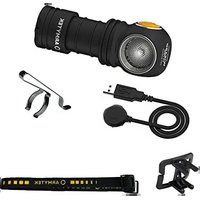
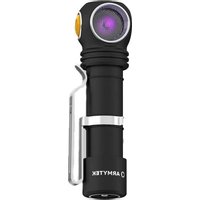
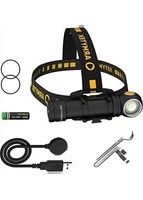
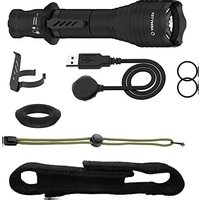
| Package contents | Flashlight, battery, magnetic USB charger, clip, holster, 2 spare O-rings, manual |
| Warranty | 10 years (except batteries, chargers, switches: 2 years) |
| Maintenance and cleaning | Clean threads and O-rings 1-2 times per year, silicone grease type Nyogel 760G |
| Storage | Remove battery if storing for extended period |
| Safety | Lock by unscrewing tail cap (1/4 turn) |
| Spare parts and repairability | Spare O-rings provided |
Frequently Asked Questions - Prime C2 Pro ArmyTek
User questions about Prime C2 Pro ArmyTek
0 question about this device. Answer the ones you know or ask your own.
Ask a new question about this device
Download the instructions for your Flashlight in PDF format for free! Find your manual Prime C2 Pro - ArmyTek and take your electronic device back in hand. On this page are published all the documents necessary for the use of your device. Prime C2 Pro by ArmyTek.
USER MANUAL Prime C2 Pro ArmyTek
natural_image
Technical line drawing of a cylindrical mechanical component with flanged ends and internal threading (no text or symbols)2 ENG USER MANUAL
6
GER
BENUTZERANLEITUNG
10 FRA MANUEL D'UTILISATEUR
Thank you for choosing the products of Armytek.
Please read this manual carefully before using the flashlight.
Specifications
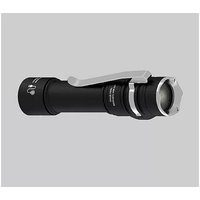
Every Day Carry light: compact design, convenient side button, special matt anti-abrasive finish without rough knurling. Durable nylon holster, strong built-in tail magnet and robust removable steel clip
Bicycle light: body made from durable and lightweight aircraft-grade aluminium, improved shock resistance, new springs for better battery and driver protection. Constant light without flickering, optional quick-release mount
- Powerful electronics provides impressive light output of 2400 lumens and record 6.5 months in Firefly mode. Constant brightness even at low ambient temperatures and not fully charged battery
- Multicolor temperature, battery level and state indication with the ability to turn off the latter
- Convenient wide beam of fully upgraded optical system, TIR-lense is protected from scratches by tempered glass with anti-reflective coating
- Innovative technology allows using any 18650 Li-Ion batteries with 10A discharge current and provides full protection against short circuit even in case of contact between magnetic connector and metal objects
• Active real-time temperature control to prevent overheating above +58 °C
- Total protection from water, dirt and dust in accordance with IP68 standard — flashlight continues to work even at 10 meters depth. Withstands fallings from up to 10 meters
- Robust and water resistant magnetic connector
Model Prime C2 Pro (White)
| LED/Optics Cree XHP50.2/TIR |
| Brightness stabilization type FULL (constant light) |
Light output 2400 lm
| Peak beam intensity | 3800 cd |
Hotspot: Spill 70°:120°
Beam distance 123 m
| Modes, light output and runtimes (measured with 18650 Li-lon 3500 mAh battery until the light output drops to 10% of the initial value) | Turbo3 2400 lm/2 h 48 min (610 lm after 30 sec) | |
| Turbo2 1710 lm/2 h 48 min (610 lm after 1 min 30 sec) | ||
| Turbo1 815 lm/2 h 44 min (610 lm after 22 min) | ||
| Main3 350 lm/5 h 20 min | ||
| Main2 150 lm/12 h 30 min | ||
| Main1 | 40 lm/40 h 30 min | |
| Firefly3 | 5 lm/12 d | |
| Firefly2 | 1 lm/40 d | |
| Firefly1 | 0.15 lm/200 d | |
| Strobe3 | 2400 lm/10 Hz/5 h 45 min (610 lm after 2 min) | |
| Strobe2 | 2400 lm/1 Hz/12 h (610 lm after 10 min) | |
| Strobe1 | 150 lm/1 Hz/55 h | |
| Power source | 1x18650 Li-lon | |
| Length/Body diameter/Head diameter | 117.7 mm/20.5 mm/25.4 mm | |
| Weight without/with battery | 68 g/118 g | |
| Submersion and Impact resistance | IP68, 10 m for 2 h. Height up to 10 m | |
Light output for flashlights with Warm light is about 7% less, beam distance is about 3% less.
All the above specifications are test results based on ANSI/NEMA FL1-2009 Standard. The tests are performed using the battery included in the set.
The data may vary due to environment, heat dissipation and other factors.
Set description
Flashlight, 18650 Li-Ion 3500 mAh battery, magnetic USB charger, clip, holster, 2 spare O-rings, user manual.
The producer reserves the right to change the package at his own discretion without modifying this manual. Specifications are subject to change without notice.
Initial Service
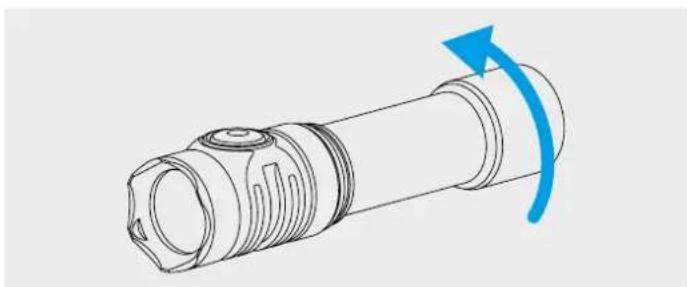
TO SET/REPLACE BATTERY
natural_image
Technical line drawing of a mechanical component with a blue curved arrow indicating rotation (no text or symbols)- Unscrew the tailcap.
- Place the battery with the positive contact (+) facing the head of the flashlight.
- Adjust the tailcap and tighten it as far as it can go.
The flashlight is ready for operation.
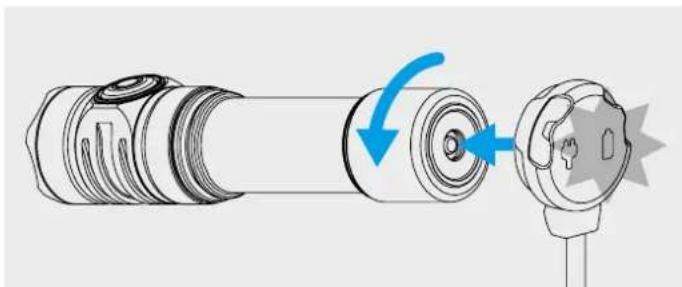
HOW TO CONNECT THE MAGNETIC CHARGER
natural_image
Diagram showing a cylindrical connector being inserted into a socket, with blue arrows indicating the process (no text or symbols present)Unscrew the tailcap for 1/4 of a circle and adjust the magnetic charger to the tailcap.
CHARGER COLOR INDICATION
Charger not plugged in:
- Green – device is in waiting mode.
Charger plugged in:
- Green blinking – evaluation of battery voltage.
-
Red blinking – unscrew the tailcap for 1/4 for charging.
-
Orange blinking — USB power source voltage is too low for correct continuation of charging or bad contact between charger and battery. Clean the tailcap and the threads of the flashlight parts, use a different power source.
- Red – charging with rated charging current is going on.
- Orange – USB power source voltage is too low, charging current may be reduced.
- Green — charging is finished.
Operation
Before use: Tighten the tailcap as far as it can go.
GENERAL TYPE
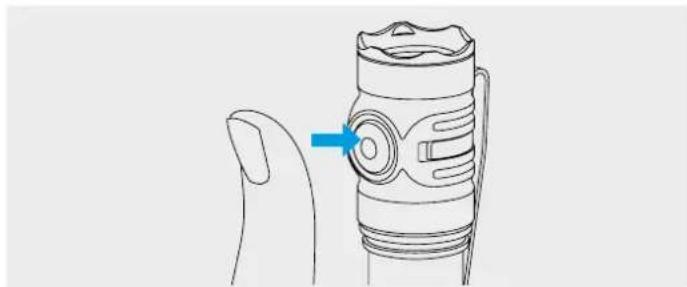
Modes: Firefly1, Firefly2, Main modes, Turbo mode (last used in Advanced, Turbo2 by default).
natural_image
Line drawing of a hand holding a flashlight with a blue arrow pointing to the button (no text or symbols present)In OFF state
1 click: To turn on the last used mode.
Press and hold: To start cycling through Firefly modes. Release to select. Keeping button pressed will start cycling through Main modes.
In ON state
1 click: To turn off the flashlight.
Press and hold: To start cycling through Main modes from any mode. In Firefly1 cycling through Main modes starts after cycling through Firefly modes. Release to select.
2 clicks: To turn on Turbo mode from any mode. The second double click brings back last used mode.
ADVANCED TYPE
To switch between types of operation unscrew the tailcap to 1/4 while the flashlight is off, press the button and tighten the tailcap while keeping the button pressed.
Sections of modes:
[1] - Firefly modes, [2] - Main modes, [3] - Turbo modes, [4] - Strobe modes
In OFF state:
1 click: To turn on the last used mode.
Press and hold: To turn on Firefly1 mode [Section 1]. Keeping button pressed will start cycling through modes: Firefly1 - Firefly2 - Firefly3 - Main1 - Main2 - Main3 - Turbo1.
In ON state:
1 click: To turn off the flashlight.
Press and hold: To start cycling through the modes of relevant Section.
The same in OFF & ON states:
2 clicks: To turn on Main mode [Section 2]. Another double click will switch between chosen modes in [Section 1] and [Section 2].
3 clicks: To turn on Turbo mode [Section 3].
4 clicks: To turn on Strobe mode [Section 4].
Automemorizing. After switching off the last used mode is memorized for quick access at next switching on.
Safe high brightness modes. Turbo modes give maximum brightness until the temperature of the flashlight and discharge current of the battery don't exceed critical values.
Digital Light Stabilization & Safe Soft-Start System allows to increase runtime, get longer lifetime of rechargeable battery and protect it from overdischarge or overheating.
Active temperature control. When the temperature of the flashlight becomes close to +58 °C, brightness decreases to safe value, allowing the flashlight to avoid overheating for a long period of time. In conditions of good air-cooling the flashlight delivers light without stepping down.
Warning indication shows the battery level and the temperature inside the flashlight.
Low battery level. When battery level is approximately <25% , the color LED will show the warning level by flashing orange once in 2 seconds. With further voltage reduction brightness will start to decrease in steps for safety of the battery and user. If brightness of the mode (except Firefly modes and Main1) is approximately <25% from nominal value, the main LED will flash 2 times. Critical battery level approximately <10% is indicated by flashing red once a second.
High temperature. When the temperature increases to the warning level, the color LED flashes orange 3 times once in 2 seconds. At critical level it flashes red 3 times once in 1 second. Brightness starts to reduce to safe level.
Lock-out function. Unscrew the tailcap to 1/4 for the protection from accidental switching on. State Indication will be turned off.
Multicolor State Indication. Short flashes every 4 seconds show the battery level even in OFF state (until battery level becomes lower than the critical one). The indication also helps to find the flashlight in the dark.
Switching Multicolor State Indication ON/OFF (Wizard C2 Pro). The indication is switched off by default in Firefly modes (disabled after 10 seconds of operation) and in OFF state. To turn it on/off, unscrew the tailcap to 1/4 while the flashlight is off, press the button and keeping the button pressed tighten and unscrew the tailcap again. The settings will be memorized even when battery is changed. Ultra-low current consumption allows color indication to work for maximum period of time.
!Warnings
For stable operation of the flashlight we recommend branded 18650 Li-Ion batteries no more than 70 mm long with at least 10A discharge current.
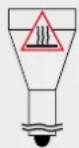
The flashlight can get hot in Turbo modes, Strobe2 and Strobe3 quickly and discharge the battery with high current. Don't leave it without your attention as very bright light might heat objects and cause fire. It is forbidden to charge the battery inside the flashlight when the ambient temperature is below 0 °C.
- Always follow the instructions from this manual and recommendations on battery usage.
- Apply only the recommended power sources.
- Do not reverse battery polarity.
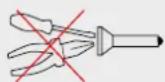
- Do not modify or recast the flashlight and its components as it will deprive you of the warranty.
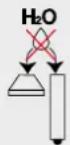
- Do not allow water or any other liquid to leak into the flashlight.
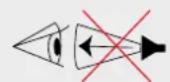
- Do not aim a switched-on flashlight at people's or animals' eyes — it can cause temporary blindness.
- Do not allow children to use the flashlight without your assistance.
The producer will not be liable for any harm done to the user if it was caused by improper use of the product.
Care and Storage
It is recommended to clean the threads and O-rings off dirt and old grease once or twice per year. Remember that reliable protection from water and dust cannot be provided by worn out sealing. The fouling as well as lack of lubricant cause fast wear-out of threads and sealing rings.
To clean the threads do the following:
- Unscrew the tailcap and remove the sealing ring carefully with a toothpick (do not use sharp metal things as they can damage the ring).
-
Wipe the sealing ring thoroughly with a soft cloth (or tissue). Do not use solvents. If the sealing ring is worn out or damaged replace it by a new one.
-
Clean the metal threads with a brush using ethanol. Be careful not to allow the applied liquid to get inside the flashlight or tailcap as it can cause fails in functionality of the flashlight.
After cleaning lubricate the thread and the sealing ring with polyalphaolefin-based silica grease, e.g. Nyogel 760G. The application of other types of grease is unacceptable. In case of active operation and exploitation in dusty environments, it is recommended to perform cleaning and lubricating of the parts as often as required.
WE DO NOT RECOMMEND to leave power sources inside the flashlight for a long storage period, as batteries (especially non-rechargeable) can leak for various reasons and damage the inner parts of the flashlight. If you want to keep your flashlight in a stand-by state with batteries in, previously install new and high-quality batteries, store the flashlight in acceptable for batteries operational temperature and revise the batteries' state at least once a month. If you have noticed any signs of defects, withdraw the batteries from the flashlight and dispose of them.
Warranty and Service
Armytek provides free warranty repairs for 10 years (excluding batteries, chargers, switches and connectors, which have 2-year warranty) from the date of purchase if there is a document confirming the purchase. The warranty does not extend to damage during:
- Improper usage.
- Attempts to modify or repair the flashlight by nonqualified specialists.
- Application in chlorinated, contaminated liquids or sea water.
- Immersion into liquids in case of broken leakproofness.
- Exposure to high temperatures and chemicals, including the liquids from defected batteries.
- Usage of low-quality batteries.
Armytek
Germany, 10551 Berlin, Jonasstraße 6
+1 (206) 785-9574, service@armytek.com
www.armytek.com
natural_image
Technical line drawing of a mechanical component with a blue curved arrow indicating rotation (no text or symbols)natural_image
Diagram of a mechanical component with a blue arrow indicating rotation or assembly (no text or symbols present)natural_image
Line drawing of a flashlight with a blue arrow pointing to the handle (no text or symbols)natural_image
Technical line drawing of a cylindrical mechanical component with a blue curved arrow indicating rotation (no text or symbols)natural_image
Diagram showing a mechanical component with a blue arrow indicating rotation or change, no text or symbols present.natural_image
Line drawing of a device with a blue arrow pointing to a circular component, no text or symbols presentEtat éteint:
Section des modes: [1] – Lucioles, [2] – Modes de Base, [3] – Modes Turbo, [4] – Stroboscopes
Etat éteint:
natural_image
Technical line drawing of a mechanical component with a blue curved arrow indicating rotation (no text or symbols)natural_image
Diagram showing a cylindrical device with internal components and a separate connector with a blue arrow indicating rotation (no text or symbols)natural_image
Line drawing of a mechanical device with a blue arrow pointing to a circular component (no text or symbols)Malli Prime C2 Pro (White)
LED/Optiikka Cree XHP50.2/TIR
117.7 mm/20.5 mm/25.4 mm
68 g/118 g