WDF341PAPM - Dishwasher WHIRLPOOL - Free user manual and instructions
Find the device manual for free WDF341PAPM WHIRLPOOL in PDF.


User questions about WDF341PAPM WHIRLPOOL
0 question about this device. Answer the ones you know or ask your own.
Ask a new question about this device
Download the instructions for your Dishwasher in PDF format for free! Find your manual WDF341PAPM - WHIRLPOOL and take your electronic device back in hand. On this page are published all the documents necessary for the use of your device. WDF341PAPM by WHIRLPOOL.
USER MANUAL WDF341PAPM WHIRLPOOL
User-Maintenance Instructions 4
INSTALLATION REQUIREMENTS....5
Tools and Parts 5
Location Requirements 7
Cabinet Opening Dimensions 7
Drain Requirements 7
Water Supply Requirements....8
Electrical Requirements 8
INSTALLATION INSTRUCTIONS 8
Before You Begin....9
Prepare Cabinet Opening - New Utilities....9
Install Optional Moisture Barrier (Recommended for Wood Countertops)....9
Electrical Connection 10
Prepare Dishwasher 10
Remove Access Panel 11
Connect Water Line to Fill Valve.... 12
Connect Fill Hose to Fill Valve.... 13
Drain Hose Connection 13
Power Cord Connection 13
Install Door Handle (on some models)
Place Dishwasher in Cabinet 16
Choose Anchor Attachment Method.... 17
Final Installation Check 17
Secure Dishwasher in Cabinet Opening.... 19
Direct Wire Connection 19
Connect Water Line to House Shutoff Valve......
Connect Drain Hose 21
Complete Installation 23
Install Access Panel 24
Check Operation 24
If Dishwasher Does Not Operate 25
Additional Tips.... 25
SÉCURITÉ DU LAVE-VAISSELLE 26
Your safety and the safety of others are very important.
We have provided many important safety messages in this manual and on your appliance. Always read and obey all s. messages.

This is the safety alert symbol.
This symbol alerts you to potential hazards that can kill or hurt you and others.
All safety messages will follow the safety alert symbol and either the word "DANGER" or "WARNING." The words mean:
DANGER
WARNING
You can be killed or seriously injured if you don't immediately follow instructions.
You can be killed or seriously injured if you don't follow instructions.
All safety messages will tell you what the potential hazard is, tell you how to reduce the chance of injury, and tell you what can happen if the instructions are not followed.
IMPORTANT SAFETY INSTRUCTIONS
WARNING: When using your dishwasher, follow basic precautions, including the following:
-
Read all instructions before using the dishwasher.
■ Use the dishwasher only for its intended function.
■ Use only detergents or wetting agents recommended for use in a dishwasher and keep them out the reach of children.
■ When loading items to be washed: -
Locate sharp items so that they are not likely to dan the door seal; and
- Load sharp knives with the handles up to reduce the risk of cut-type injuries.
■ Do not wash plastic items unless they are marked "dishwasher safe" or the equivalent. For plastic items not marked, check the manufacturer's recommendations.
■ Do not touch the heating element during or immediately after use.
■ Do not operate your dishwasher unless all enclosure panels are properly in place.
■ Do not tamper with controls.
■ Do not abuse, sit on, or stand on the door or dish racks the dishwasher.
■ To reduce the risk of injury, do not allow children to play or on a dishwasher.
■ Under certain conditions, hydrogen gas may be produced in a hot-water system that has not been used for two weeks or more. HYDROGEN GAS IS EXPLOSIVE. If the hot-water system has not been used for such a period, before using the dishwasher, turn on all hot-water faucets and let the water flow from each for several minutes. This will release any accumulated hydrogen gas. As the gas is not flammable, do not smoke or use an open flame during this time.
■ Remove the door to the washing compartment when removing an old dishwasher from service or discarding it.
■ Do not use replacement parts that have not been recommended by the manufacturer (e.g. parts made at home using a 3D printer).
SAVE THESE INSTRUCTIONS
GROUNDING INSTRUCTIONS
☐ For a grounded, cord-connected dishwasher:
Check with a qualified electrician or service representative if
The dishwasher must be grounded. In the event of a malfunction or breakdown, grounding will reduce the risk of electric shock by providing a path of least resistance for electric current. The dishwasher is equipped with a cord
u are in doubt whether the dishwasher is properly grounded.
having an equipment-grounding conductor and a grounding For a permanently connected dishwasher:
plug. The plug must be plugged into an appropriate outlet of the dishwasher must be connected to a grounded metal, that is installed and grounded in accordance with all longer permanent wiring system, or an equipment-grounding codes and ordinance. conductor must be run with the circuit conductors and
WARNING: Improper connection of the equipment-grounding conductor can result in a risk of electric shock.
SAVE THESE INSTRUCTIONS
WARNING

Tip Over Hazard
Do not use dishwasher until completely installed.
Do not push down on open door.
Doing so can result in serious injury or cuts.
DISHWASHER MAINTENANCE AND CARE
User-Maintenance Instructions
Cleaning the Exterior
Clean the exterior of the dishwasher with only a soft, damp cloth and mild detergent. If your dishwasher has a stainless steel exterior, it may have a coating that is resistant to fingerprints. Avoid using abrasive cleaning products on the exterior of the dishwasher.
Cleaning and Maintaining the Interior
Many detergents may leave white spots or a white residue on dishware and on the interior of the dishwasher. Over time this residue can become unsightly and could affect dishwasher performance. Use of a dishwasher cleaning product such as affresh® ^† Dishwasher Cleaner can help to remove the residue. Monthly use of affresh® Dishwasher Cleaner is recommended to help maintain the dishwasher. Follow package directions.
Another method to remove white residue is to use a vinegar rinse. However, vinegar is an acid and using it too often could damage your dishwasher.
Place (do not pour) 2 cups (500 mL) of white vinegar in a glass or dishwasher-safe measuring cup on the bottom rack. Run the dishwasher through a complete washing cycle using an air-dry or an energy-saving dry option. Do not use detergent. Vinegar will mix with the wash water.
NOTE: We recommend the use of high-quality, premeasured detergent tablets or packs and the use of rinse aid for dishwasher cleaning and daily care.
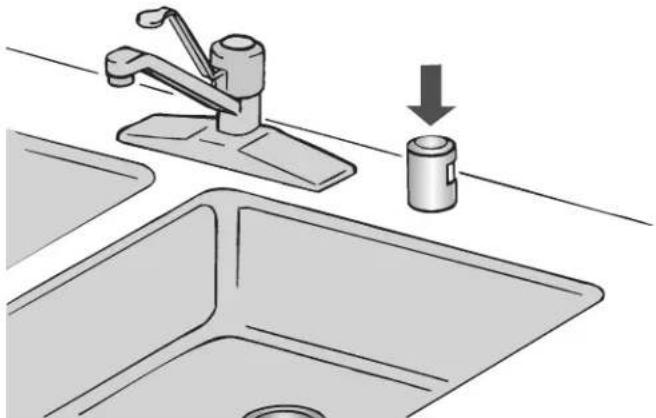
If you have a drain air gap, check and clean it if the dishwasher is not draining well.
natural_image
Illustration of a kitchen sink with a faucet and a cylindrical sink, showing a downward arrow indicating a drop (no text or symbols present)To Reduce Risk of Property Damage During Vacation or Extended Time Without Use
■ If the dishwasher will not be used during the summer turn off the water and power supply to the dishwasher.
■ Make sure the water supply lines are protected against freezing conditions. Ice formations in the supply lines can increase water pressure and cause damage to your dishwasher or home. Damage from freezing is not covered by the warranty.
■ When storing your dishwasher in the winter, avoid water damage by having your dishwasher winterized by authorized service personnel.
Cleaning the Filters
It is very easy to remove and maintain the filters. The chart shows the recommended cleaning frequency.
| Recommended Time Interval to Clean Your Filter | |||
| Number of loads per week | If you only scrape before loading* | If you scrape and rinse before loading | If you wash before loading |
| 8–12 Every two months | Every four months | Once per year | |
| 4–7 Every two months | Once per year | Once per year | |
| 1–3 Twice per year | Once per year | Once per year | |
*Manufacturer's recommendation: This practice will conserve the water and energy that you would have used to prepare your dishes. This will also save you time and effort.
Very Hard Water
If you have hard water (above 15 grains), clean your filter at once per month. Building up of white residue on your dishwash indicates hard water. For tips on removing spots and stains, see the online "Troubleshooting" section.
NOTE: Online references can be found in the Quick Start Guid
Filter Removal Instructions
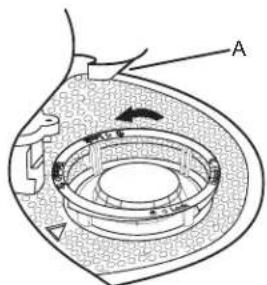
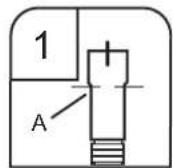
- Turn the upper filter assembly 1/4 turn counterclockwise and lift out.
- Separate the upper filter assembly by gently pulling apart.
- Clean the filters as shown.
text_image
Diagram of a mechanical or fluidic device with labeled components A and directional arrows indicating flow or movement.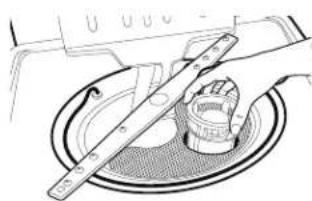
natural_image
Technical line drawing of a mechanical assembly with a tool interacting with a circular component (no text or symbols)A. Locating tab
Cleaning Instructions
IMPORTANT: Do not use wire brush, scouring pad, etc., as the may damage the filters.
Rinse filter under running water until most soils are removed. If you have hard-to-remove soils or calcium deposits from hard water, a soft brush may be required.
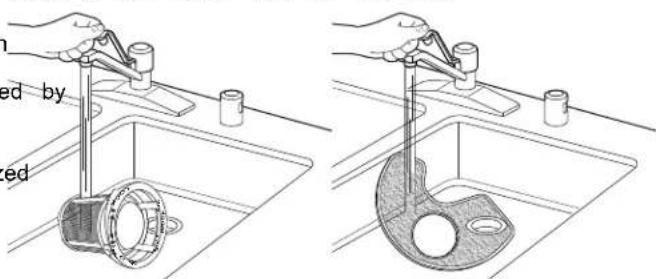
text_image
ed by ed†affresh ^® is a registered trademark of Whirlpool, U.S.A.
INSTALLATION REQUIREMENTS
Tools and Parts
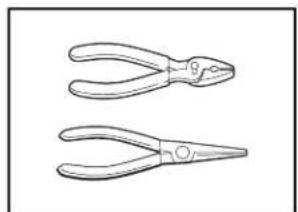
Gather the recommended tools and parts before starting installation. Read and follow the instructions provided with tools listed here.
Tools Needed:
natural_image
Line drawing of two pair of pliers with no text or symbols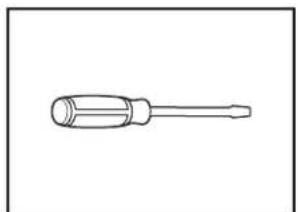
natural_image
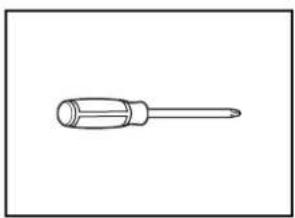
Line drawing of a screwdriver with a cylindrical head and threaded shaft (no text or symbols)Pliers Flat-blade screwdriver
natural_image
Simple line drawing of a screwdriver (no text or symbols)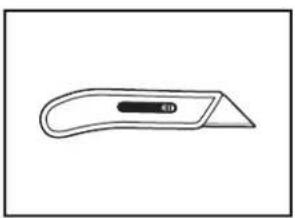
natural_image
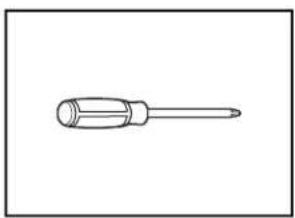
Simple line drawing of a flat tool with a handle and central button (no text or symbols)Phillips screwdriver Utility knife
natural_image
Simple line drawing of a screwdriver with a cylindrical head and shaft (no text or symbols)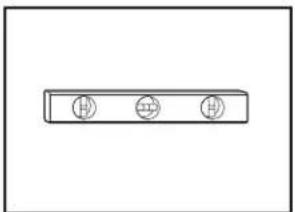
natural_image
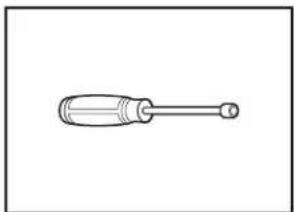
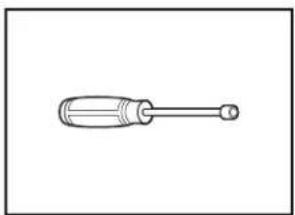
Simple line drawing of a rectangular object with three circular holes, no text or symbols present.5/16" (8 mm) and 1/4" Small level (6.35 mm) nut drivers or hex sockets
natural_image
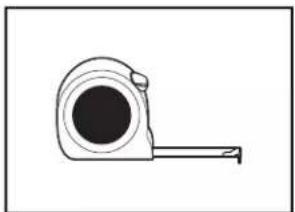
Simple line drawing of a tape measure (no text or symbols)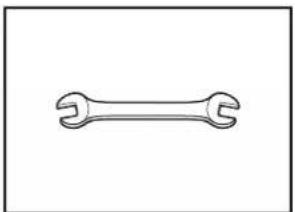
natural_image
Simple line drawing of a double-ended wrench (no text or symbols)Measuring tape or ruler 5/8" (16 mm) open-end wrench
natural_image
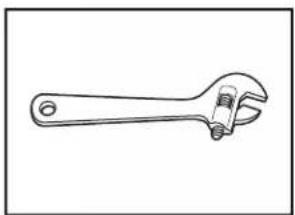
Line drawing of an adjustable wrench with a screw and handle (no text or symbols)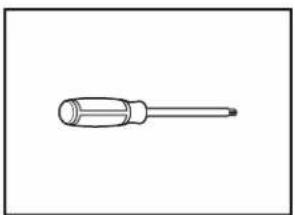
natural_image
Simple line drawing of a screwdriver (no text or symbols)10" (254 mm) adjustable wrench that opens to 1 (29 mm)
Torx ^® T20 ^® and, if installing custom front panels, Torx T15 ^® +screwdrivers
Other Useful Items You May Need:
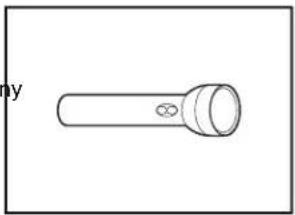
natural_image
Simple line drawing of a flashlight with a bulb and handle (no text or symbols)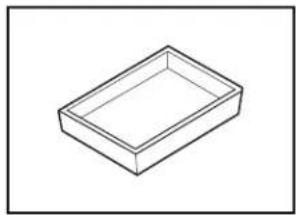
natural_image
Simple line drawing of a rectangular tray or container (no text or symbols)Flashlight Shallow pan
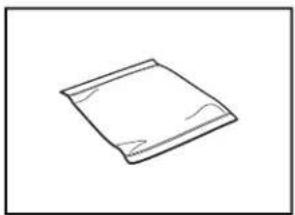
natural_image
Simple line drawing of a folded paper or plastic sheet (no text or symbols)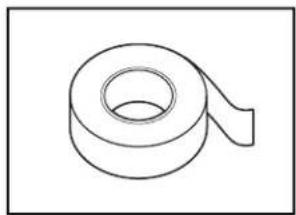
natural_image
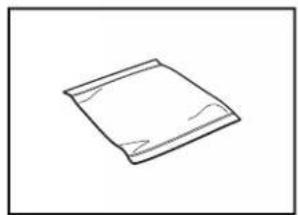
Simple line drawing of a rolled-up adhesive tape (no text or symbols)Bath towel Masking or duct tape
Parts Supplied
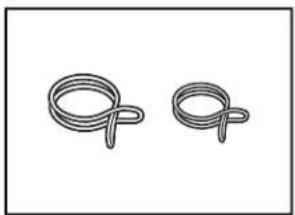
natural_image
Two coiled wire loops, no text or symbols present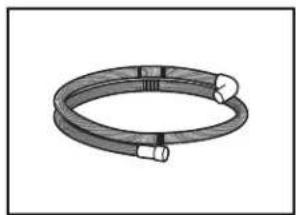
natural_image
Illustration of a coiled cable or hose with two connectors (no text or symbols)Drain hose clamps (2) Drain hose (1 large/red and 1 small/green)
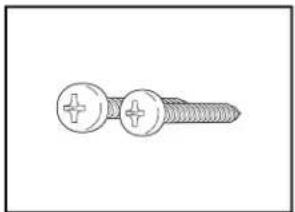
natural_image
Illustration of a screw with two circular fasteners and two plus signs (no text or symbols)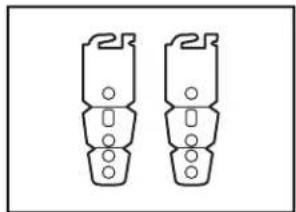
natural_image
Two identical mechanical component diagrams with mounting holes, no text or symbols present10 x 1/2" (12.7 mm)
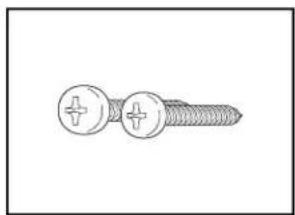
Phillips-head screws (2)
Make sure all these parts are included in the literature package
natural_image
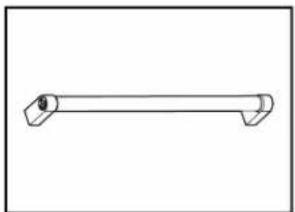
Simple line drawing of a horizontal pipe or lever (no text or symbols)Door handle (on some models)
Optional Accessory Parts Available:
natural_image
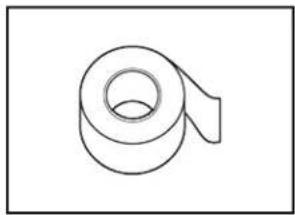
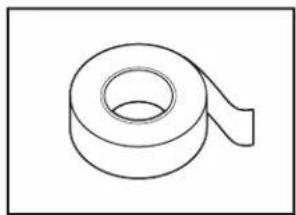
Simple line drawing of a rolled-up adhesive tape (no text or symbols)Moisture Barrier Tape
NOTE: Moisture barrier tape is recommended if installing a dishwasher under a wooden countertop.
Additional Parts Needed (not provided):
natural_image
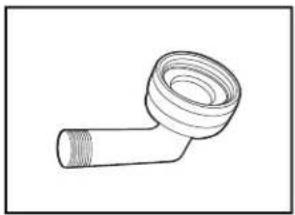
Line drawing of a pipe fitting with a coiled tube (no text or symbols)3/8" (9.5 mm) Compression x 3/4" (19 mm) Hose Fitting with rubber seal and 90° elbow (required to properly connect household water line to the dishwasher)
natural_image
Simple geometric diagram with two concentric squares (no text or symbols)Side Panel Kit
For enclosing the side of the dishwasher when installing it at the end of your cabinetry (Whirlpool part number varies with color.)
natural_image
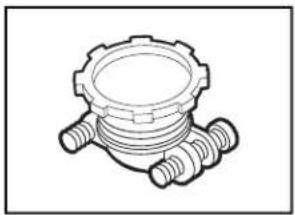
Technical line drawing of a mechanical component with threaded ends and a central housing (no text or symbols)Household Wiring (Metallic) Strain Relief to fit 7/8" (22 mm) hole (required to properly secure household wiring to the dishwasher terminal box) NOTE: Use only: Straight: Whirlpool Part Number 4317824, 90°; Whirlpool Part Number W10278923RP
Call us at our toll-free number or visit our website listed on the Quick Start Guide for optional accessory part information.
First-Time Installations
Check local codes. Check existing electrical supply. See the "Electrical Requirements" section. It is recommended that electrical connections be made by a licensed electrical instal
Additional Tools Needed:
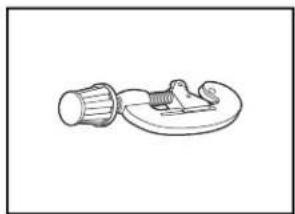
natural_image
Simple line drawing of a mechanical component with a cylindrical shaft and flanged base (no text or symbols)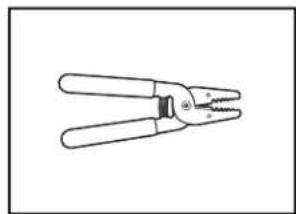
natural_image
Line drawing of a pair of pliers with metal handles and threaded end (no text or symbols)Small tubing cutter Wire strippers
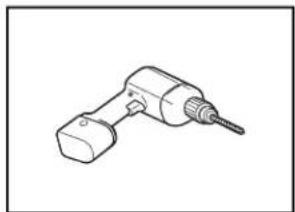
natural_image
Line drawing of a handheld electric drill bit (no text or symbols)With 1/2" (12.7 mm), 3/4" (19 mm), and/2"1 (38.1 mm) hole saw bits
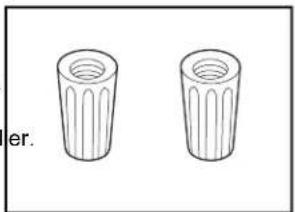
natural_image
Two identical cylindrical objects with ribbed tops, labeled 'er.' (no text or symbols on the objects themselves)Twist-On Wire Connectors NOTES:
- Confirm proper size for connecting your gauge of household wiring to the 16-gauge wiring in the dishwasher. - Use only: Straight: Whirlpool Part Number 4317824, 90°: Whirlpool Part Number W10278923RP
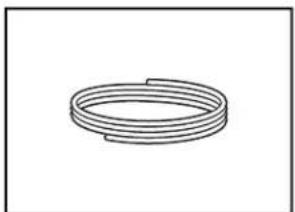
natural_image
Simple line drawing of a coiled spring or rope (no text or symbols)Copper Tubing (3/8" [9.5 mm] O.D. suggested) or Flexible Braided Water Supply Line Kit.
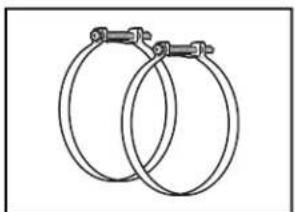
natural_image
Two interlocked metal rings with metal clips attached (no text or symbols)Screw-Type Clamps 1 ^1/2 "– 2" (38 mm – 50 mm) (3 maximum)
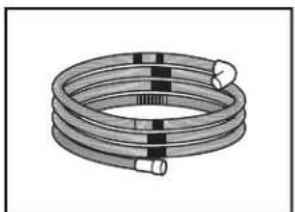
natural_image
Illustration of a coiled cable or hose with two connectors (no text or symbols)Optional – Longer Drain Hose Maximum length 12 ft (3.7 m)
NOTE: Must meet AHAM/IAPMO test standards, fit 1" (25 mm) drain connection, and be resistant to heat and detergent.
NOTE: Be sure to purchase only Whirlpool factory-certified parts and accessories for your appliance. Your installation may require additional parts. To order, refer to the contact information referenced in your Quick Start Guide.
NOTE: If using a flexible braided hose, replace inlet hose 5 years to reduce the risk of hose failure. Record hose or replacement dates on the hose for future reference.
For Direct Wire For Power Cord
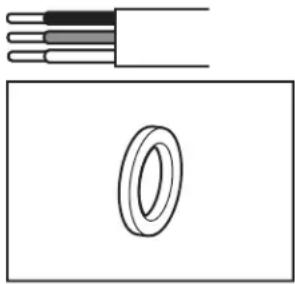
natural_image
Diagram showing a cable with three bands above and a circular ring inside, enclosed in a rectangle (no text or symbols)Cabinet Grommet
For _2 " (38 mm) hole in cabinet
NOTE: Required for metal cabinets
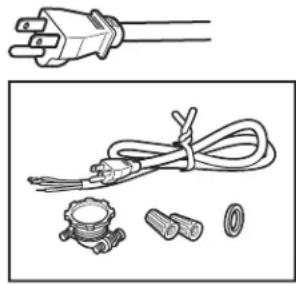
natural_image
Illustration of a power plug, coiled cable, and small accessories (no text or symbols)Power Cord Kit
Kit typically includes power cord, metallic strain relief, grommet, and twist-on wire connectors (Straight: Whirlpool Part Number 4317824, 90°: Whirlpool Part Number W10278923RP). For proper installation, refer to the installation instructions provided with the kit.
NOTE: Be sure to purchase only Whirlpool factory-certified parts and accessories for your appliance. Your installation may require additional parts. To order, refer to the contact information referenced in your Quick Start Guide.
Location Requirements
Dishwasher must be fully enclosed (top, sides, back, and upon installation. A side panel kit is available from your installing your dishwasher at the end of your cabinetry.
An optional moisture barrier accessory is also available for installing underneath a wooden countertop.
Check location where dishwasher will be installed. The location must provide:
■ Convenient access for loading and unloading dishes. Corner locations require a 2" (51 mm) minimum clearance between the side of the dishwasher door and the wall or cabinet.
■ Easy access to water, electricity, and drain:
• Grounded electrical supply is required.
- This dishwasher has a water-heating feature and also requires a connection to a hot water supply line.
- Make sure pipes, wires, and drain hose are within the shaded area shown in the "Cabinet Opening Dimensions" section.
- Do not run drain lines, water lines, or electrical wiring ■v they can interfere with or contact dishwasher motor or l
- Shelter dishwasher and water lines leading to dishwasher against freezing. Damage from freezing is not covered by the warranty.
NOTE: If dishwasher will be left unused for a period of time or in a location where it may be subject to freezing, have it winterized by authorized service personnel.
- If installed in new construction, flush the water supply li debris before connecting it to the fill valve. If it is not flushed, debris from the water supply could plug the fill valve screen.
■ A square opening for proper operation and appearance.
■ The cabinet front to be perpendicular to floor.
Ate level floor.
Helpful Hint: If floor at front of opening is not level with floor rear of opening, shims may be used to level dishwasher.
NOTE: To avoid shifting during dishwasher operation, shims must be securely attached to the floor.
■ The location where the dishwasher will be installed must provide clearance between motor and flooring. Motor should not touch the floor.
■ Do not install dishwasher over carpeted flooring.
Cabinet Opening Dimensions
Clearances
Check that all surfaces have no protrusions that would prohibit dishwasher installation.
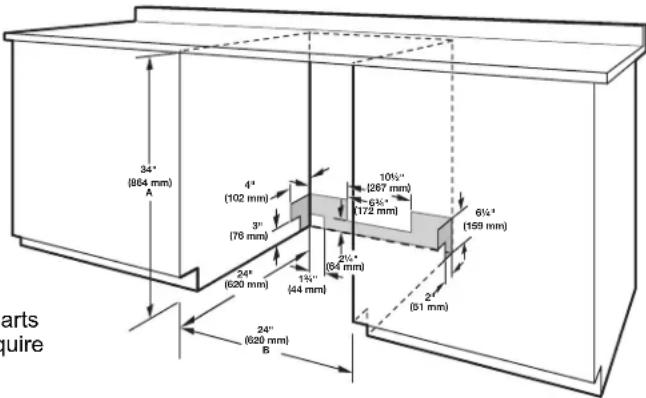
text_image
arts quire 34" (864 mm) A 4" (102 mm) 3" (76 mm) 24" (620 mm) 24" (620 mm) B 1½" (44 mm) 10½" (267 mm) 6½" (172 mm) 6½" (159 mm) 2½" (64 mm) 2" (61 mm)A. Measured from the lowest point on the underside of the countertop. May be reduced to 12 " (851 mm) by removing the wheels and perforated area of insulation (blanket) on dishwasher.
Bor Minimum, measured from narrowest point of opening.
eolar for NOTE: Shaded areas of cabinet walls show where utility connections may be installed.
Drain Requirements
A new drain hose is supplied with your dishwasher. If drain hose is not long enough, use a new drain hose with a maximum length of 12 ft (3.7 m) that meets all current AHAM/IAPMO test standards, is resistant to heat and detergent, and fits the 1" (25 mm) drain connector of the dishwasher.
NOTE: Do not connect multiple drain hoses together.
■ Make sure to connect drain hose to waste tee or disposer inlet above drain trap in house plumbing and 20" (508 mm) minimum above the floor. It is recommended that the drain hose either be looped up and securely fastened to the underside of the counter or be connected to an air gap.
■what are sure to use an air gap if the drain hose is connected to a leg use plumbing lower than 20" (508 mm) above subfloor or
her floor.
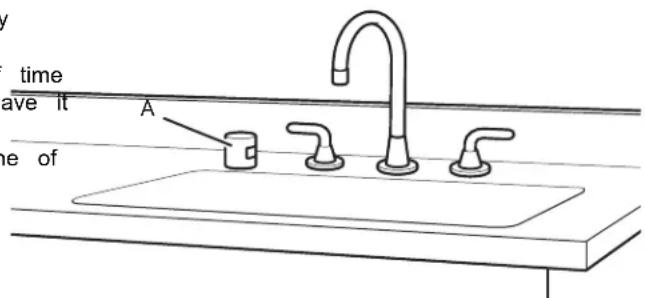
text_image
time have it A the ofA. Air gap
■ If required, the air gap should be installed in accordance. If Connecting Dishwasher with a Power Cord:
the air gap installation instructions. When you are connecting
the air gap, a rubber hose (not provided) will be needed
connect to the waste tee or disposer inlet.
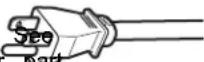
tose a UL-listed power cord kit
marked for use with dishwasher.
the "Tools and Parts" section for part
details.
■ Use 1/2" (12.7 mm) minimum I.D. drain line fittings.
Water Supply Requirements
■ Plug into a grounded 3-prong outlet.
Outlet must meet all local codes and
res ordinances.
■ This dishwasher has a water heating feature and also requires a connection to a hot water supply line.
■ A hot water line with 20 psi to 120 psi (138 kPa to 827 kPa) water pressure can be verified by a licensed plumber.
■ 120°F (49°C) water at dishwasher
■ 3/8" (9.5 mm) O.D. copper tubing with compression fitting flexible braided water supply line
NOTE: 1/2" (12.7 mm) minimum plastic tubing is not recommended.
■ A 90° elbow with 3/4" (19 mm) hose connection with washer
■ Do not solder within 6" (152 mm) of the water inlet valve
If installed in new construction, make sure the house w supply lines have been flushed prior to connecting the dishwasher to remove any debris that may exist in the line.
NOTE: If replacing an existing dishwasher, it is recommende install a new water line and drain hose (supplied) with the dishwasher.
Electrical Requirements
Be sure that the electrical connection and wire size are adequate and in conformance with the National Electrical Code, ANSI/NFPA 70 – latest edition, and all local codes and ordinances.
For a fee, a copy of the above code standards can be of from:
National Fire Protection Association
1 Batterymarch Park
Quincy, MA 02169-7471
You Must Have:
■ 120 V, 60 Hz, AC-only, 15 A or 20 A, fused electrical
■ Copper wire only.
■ A maximum of 2 field wiring supply conductors (12 AWG largest size) plus 1 grounding conductor are permitted in terminal box.
We Recommend:
■ A time-delay fuse or circuit breaker.
Circuit Requirement:
■ The dishwasher may be installed on the same circuit as garbage disposal providing that the branch circuit cannot exceed rated circuit load and must comply with all gover codes and regulations such as but not limited to National Electrical Code, ANSI/NFPA 70 - latest edition.
■ No electrical connections other than the dishwasher power and ground connections can be made inside of the dishy terminal box.
IforConnecting Dishwasher with Direct Wiring:
■ Use flexible, armored, or nonmetallic
sheathed copper wire with grounding wire that meets the wiring
bber requirements for your home and local codes and ordinances.
■ Use a UL-listed/CSA-approved metallic strain relief.
INSTALLATION INSTRUCTIONS supply
WARNING
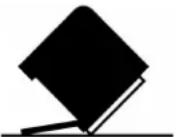
Tip Over Hazard
Do not use dishwasher until completely installed.
Do not push down on open door.
Doing so can result in serious injury or cuts.
You Need To:
■ Slowly open dishwasher door while someone grasps the rear of the dishwasher. Remove shipping materials and drain hose the close dishwasher door until latched.
NOTE: Each dishwasher is tested at the factory and may contain some residual water in the tub as a result of the t
■ Observe all governing codes and ordinances.
■ Install this dishwasher as specified in these instructions.
■a Installation should be performed by a qualified service technician.
The dishwasher must be installed to meet all electrical and plumbing national and local codes and ordinances.
■ Care shall be exercised when the appliance is installed or removed to reduce the likelihood of damage to the power cord.
WARNING: To reduce the risk of electric shock, fire, or injury persons, the installer must ensure that the dishwasher is completely enclosed at the time of installation.
Before You Begin
WARNING

Electrical Shock Hazard
Disconnect electrical power at the fuse box or circuit breaker box before installing appliance.
Failure to do so can result in death or electrical shock.
1. Disconnect power
Disconnect electrical power at the fuse box or circuit break box before installing dishwasher.
2. Shut off water supply
Shut off water supply to the dishwasher.
Prepare Cabinet Opening – New Utilities
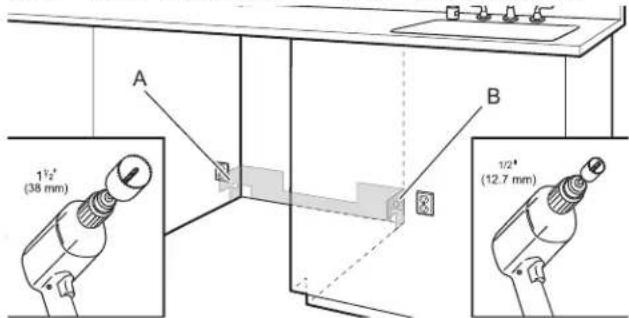
3. Drill hole locations - new construction
text_image
1½" (38 mm) 1½" (12.7 mm)A. Optional location
B. Preferred location
The power-supply receptacle for the appliance shall be
installed in a cabinet or on a wall adjacent to the make sure the area under the cabinet is clean and dry for undercounter space in which the appliance is to be installed. Installation of the moisture barrier. Remove the backing of the
NOTE: Refer to the "Cabinet Opening Dimensions" section moisture barrier and apply to underside of the countertop along the front edge of the counter.
for the correct hole placement and dimensions of the shaded area. NOTE: Install wood shims if side anchoring and the gap between
Drill a ^1/4 " (38 mm) drain hole in the side or rear of cabinet depending on the location of the drain hose routing and drain hose connection location.
Drill a 1/2" (12.7 mm) water supply hose hole in the side or
rear of cabinet, depending on location of water supply routing and connection location.
Drill a ^1/2 " (38 mm) electrical conduit hole in the right-hand side or rear of the cabinet.
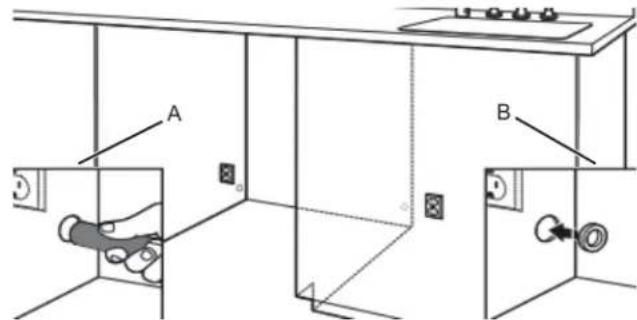
4. Sand holes smooth
text_image
Technical diagram showing two labeled components A and B with internal wiring and electrical connections, likely illustrating a safety or electrical system setup.A. Wood cabinet
B. Metal cabinet
Wood cabinet: Sand the hole until smooth.
Metal cabinet: Cover edges of hole with grommet included with power cord kit. See the "Tools and Parts" section for details.
Helpful Tip: Wiring the dishwasher will be easier if you roll the cable into the cabinet opening from the right-hand side.
Install Optional Moisture Barrier (Recommended for Wood Countertops)
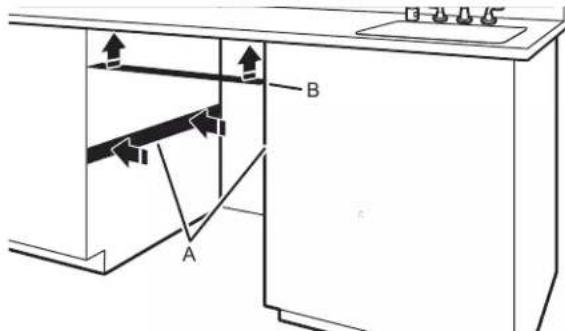
Moisture barrier/Wood shims
text_image
Diagram of a kitchen interior showing labeled components A and B with directional arrows indicating movement or flow.A. Install wood shims
B. Moisture barrier
Make sure the area under the cabinet is clean and dry for installation of the moisture barrier. Remove the backing of the
moisture barrier and apply to underside of the countertop along on the front edge of the counter.
NOTE: Install wood shims if side anchoring and the gap between sides of the dishwasher are greater than 1/2" (12.7 mm) on e cabinet. Side or are greater than the length of the anchor screws.
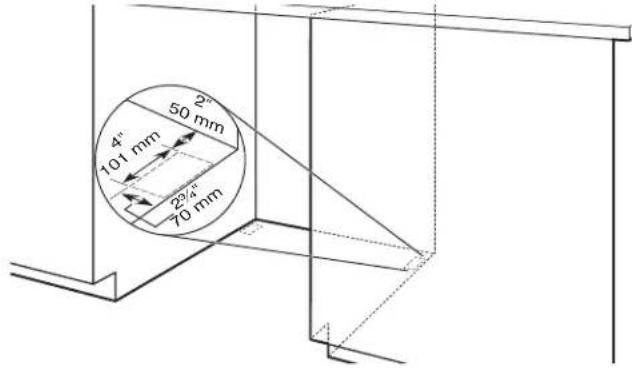
- Built-up floors - add shims as needed
text_image
2" 50 mm 4" 101 mm 2½" 70 mmBuilt-up floors: If the kitchen floor is higher than the ca opening's floor—for example, the kitchen floor tile does it extend into the cabinet opening—add shims, as needed, the area shown to bring the dishwasher up to 34" (864 below the countertop.
NOTE: Shims must be securely attached to floor to avoid movement when the dishwasher is in use.
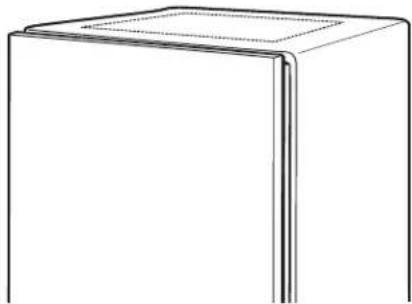
- If installing into a1/233 (851 mm) opening
natural_image
Simple line drawing of a 3D rectangular block with a flat top and vertical side (no text or symbols)Cut insulation blanket along perforation for cabinet opening height of 8 ^2 " (851 mm). For other cabinet opening heights, do not cut the insulation blanket.
Electrical Connection
- For Direct Wire, begin with step 7
- For Power Cord, wait until step 22
-
For Factory Installed Power Cord, begin with Step 29
-
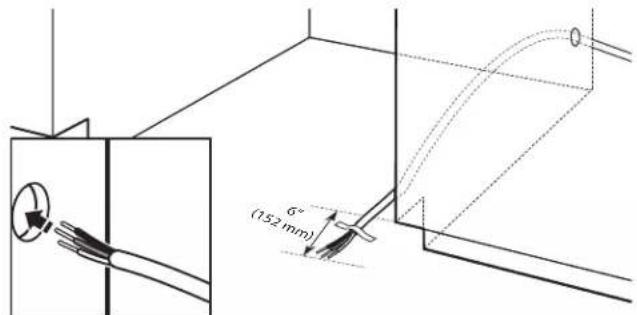
Direct wire - route cable
text_image
6° (152 mm)If installing with direct wire, route the cable as shown.
Route cable from power supply through cabinet hole. (Cable must extend to the right-front side of cabinet opening.) Tape cable to the floor in area shown. This will prohibit cable from moving when dishwasher is moved into cabinet opening.
NOTE: If removing a previous dishwasher with a power cord, you will need to transfer the power cord to the new dishwasher.
Prepare Dishwasher
WARNING
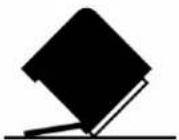
Tip Over Hazard
Do not use dishwasher until completely installed. Do not push down on open door.
doing so can result in serious injury or cuts.
WARNING
Excessive Weight Hazard
Use two or more people to move and install or uninstall appliance.
Failure to do so can result in back or other injury.
- Put dishwasher on its back
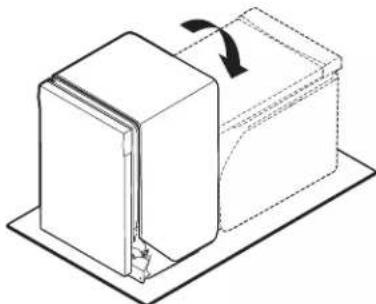
natural_image
Diagram of a mechanical device with a rotating arrow indicating rotation (no text or symbols)Helpful Tip: Place cardboard under dishwasher until installed in cabinet opening to avoid damaging floor covering.
Using 2 or more people, grasp sides of dishwasher door frame and place the dishwasher on its back.
Do not use the door panel as a worktable without first covering it with a towel to avoid scratching the door panel.
NOTE: On some models, once the dishwasher is on its ba pull on the door handle to remove it from the access pan
Remove Access Panel
- For Plastic Access Panels, go to step 9
- For Metal Access Panels, go to step 10
9. Plastic panel
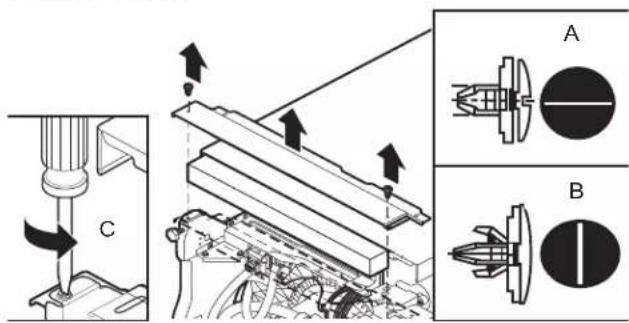
text_image
Technical diagram showing mechanical assembly with labeled components A and B, including directional arrows and component details.A. Unlocked
C. 1/4 turn
B. locked
Using a flat-blade screwdriver, turn the plastic fasteners 1/4 turn counterclockwise to unlock them. Go to step 12.
10. Metal panel
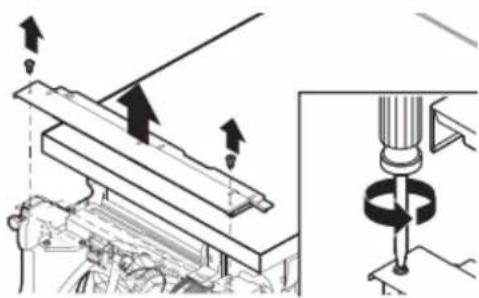
natural_image
Technical diagram showing mechanical assembly with arrows indicating motion and a magnified view of a drill bit (no text or symbols present)Using a 1/4" (6.35 mm) nut driver or Phillips screwdriver, remove 2 screws attaching access panel to dishwasher.
11. Measure cabinet opening
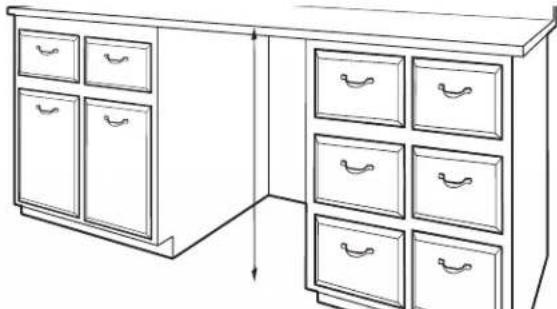
natural_image
Line drawing of a cabinet with multiple drawers, no text or symbols presentMeasure height of cabinet opening from underside of countertop to floor where dishwasher will be installed. Be sure to measure the lowest point on the underside of the countertop and the highest point on the floor.
| Dishwasher Height Adjustment Chart | ||
| Cabinet-opening height | Front legs height A | Rear legs height B |
| 33 12 " (851 mm) | 3/8" (9.8 mm) | Remove legs and spacers. |
| 34" (864 mm) 7 | /8" (22 mm) 1" | (25.4 mm) |
| 34 12 " (876 mm) | 1 18 " (28.8 mm) | 1 14 " (31.3 mm) |
Front legs - A
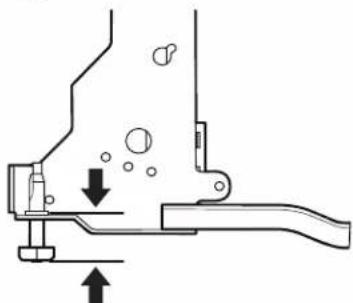
natural_image
Mechanical assembly diagram showing a lever mechanism with arrows indicating motion (no text or symbols)Rear legs - B
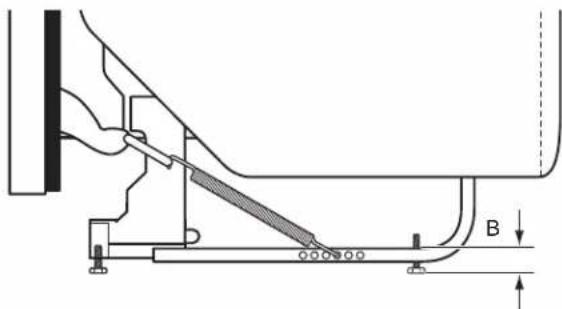
natural_image
Technical diagram of a mechanical assembly with labeled component B (no text or symbols present)Adjust both front and back leveling legs to the same height NOTE: If the minimum cabinet opening height is less than 33718 " (860 mm), the rear leveling legs and spacers can be removed for additional clearance. This will allow the dishwasher to fit into 112 " (3851 mm) high cabinet opening, but the dishwasher will be more difficult to move. (Measurements are approximate. Rear and front leveling legs are preset at the factory/ _2 for[836 mm].)
- Adjust leveling legs
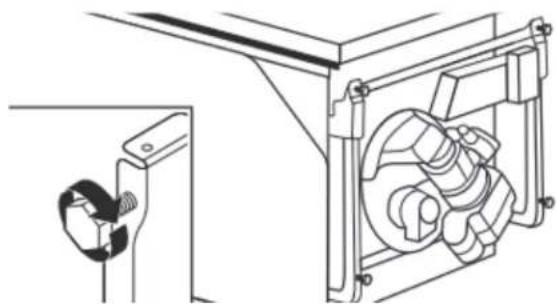
natural_image
Technical line drawing of a mechanical assembly with a bracket and housing (no text or symbols)Refer to the "Dishwasher Height Adjustment Chart" for height of leveling legs needed for your cabinet opening.
- Remove plastic rail cover
text_image
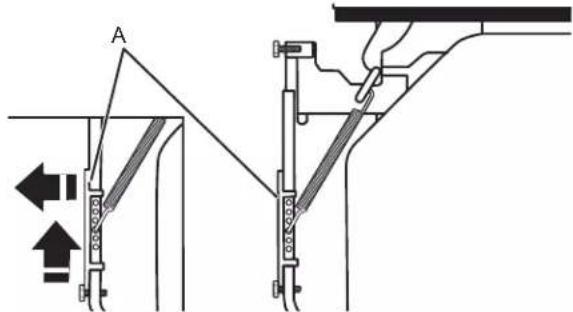
AA. Plastic rail cover
Remove and discard the plastic rail cover on each side of the dishwasher frame. To remove the plastic rail cover, push upward and back to unsnap it from the dishwasher frame.
- Slide nut and ferrule onto tubing (copper tubing only)
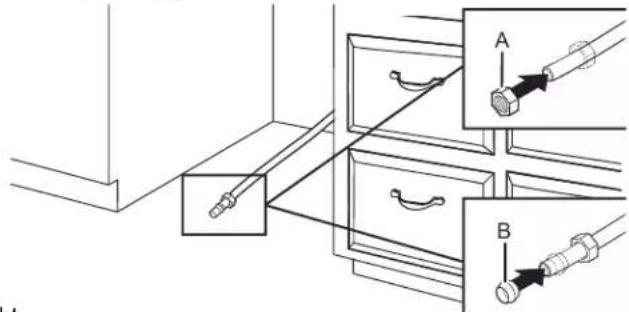
text_image
Technical diagram showing mechanical assembly with labeled parts A and B, including directional arrows and component placements.A. Nut
B. Ferrule
Copper tubing only: Put the tubing into the 90° elbow fitt as far as it will go. (The copper tubing bends and kinks easily.) Slide the nut and ferrule forward and start the nut onto the elbow threads.
NOTE: To avoid vibration during operation, route the water supply line so that it does not touch the dishwasher base, frame, or motor. Go to step 18.
- Flexible line
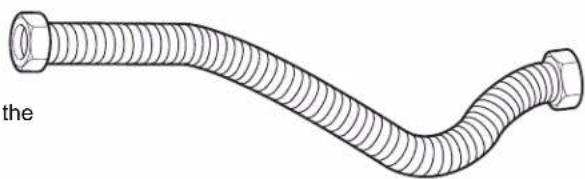
natural_image
Line drawing of a flexible hose with threaded ends and hexagonal connectors (no text or symbols)Connect Water Line to Fill Valve
- For Copper Line, begin with step 14
-
For Flexible Line, begin with step 16
-
Copper water line
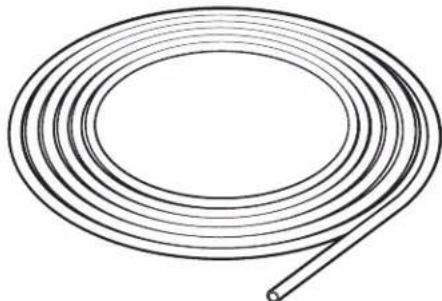
natural_image
Simple line drawing of a coiled cable or wire with no text or symbolsIf using copper tubing, measure overall length of copper tubing required to reach the water supply, cut to length, attach with compression fittings.
Flexible braided line: Confirm the flexible braided line is long enough.
- Add 90° elbow fitting to the water supply line
natural_image
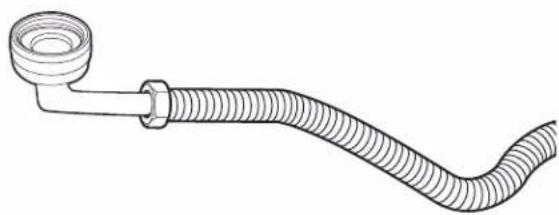
Line drawing of a flexible hose with a flanged end and bulbous cap (no text or symbols)Get 3/8" (9.5 mm) compression x 3/4" (19 mm) hose fitting with 90° elbow. See the "Tools and Parts" section at the of the guide for part details and order. Connect the 3/8" (9.5 mm) compression fitting of the 90° elbow fitting to the water supply line. Attach so the 3/4" (19 mm) connection facing upward as shown above.
Connect Fill Hose to Fill Valve
18. Tighten 90° elbow fitting to valve
natural_image
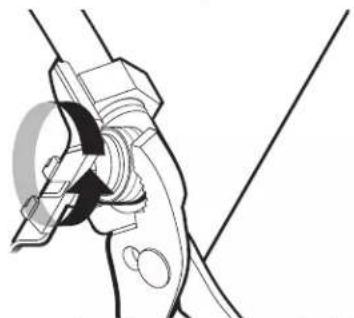
Technical line drawing of a mechanical clamp or clamp assembly (no text or symbols)Be sure rubber washer is properly seated in fitting. Slide the 3/4" (19 mm) fitting of the 90° elbow up to the valve and hand-tighten to avoid cross-threading. Hand-tighten until the coupling is tight. Using pliers, check the tightness of the coupling. An additional 1/4 to 1/2 turn may be required to seal the rubber gasket. Route fill hose out the rear left side unit.
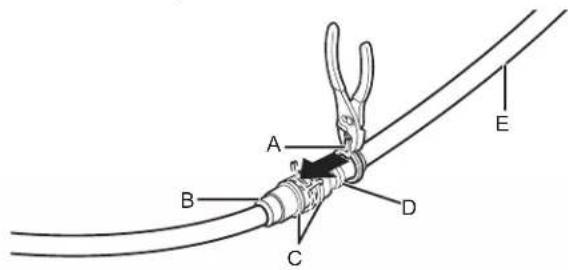
20. Slide clamp onto connector
text_image
A B C D EA. Small clamp D. Drain hose stop
B. Rubber drain E. Drain hose hose connector
C. Stop
NOTES:
■ Do not use PTFE plumber's tape with compression fittings.
■ Do not overtighten. Damage to the coupling can result.
Drain Hose Connection
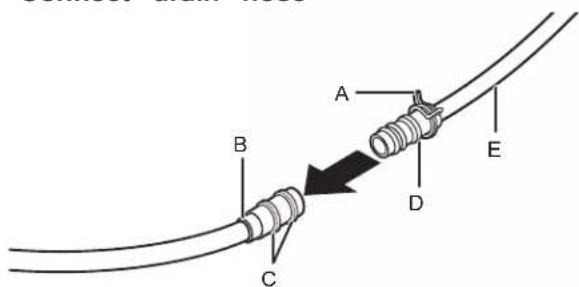
19. Connect drain hose
text_image
A B C D EA. Small clamp D. Drain hose stop
B. Rubber drain E. Drain hose
hose
connector
C. Stop
21. Hose clamp final position
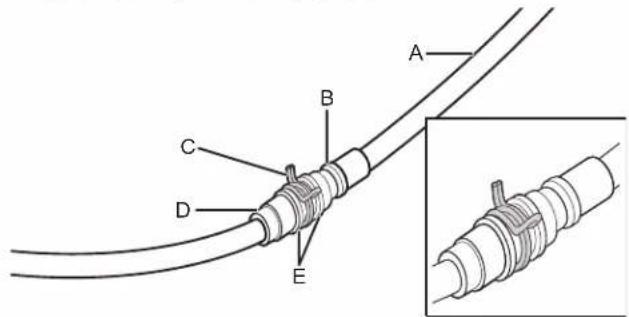
text_image
A B C D EA. Drain hose D. Rubber drain hose
B. Drain hose connector
stop E. Stop
C. Small clamp
NOTE: Route drain hose out the rear of the dishwasher.
Power Cord Connection
NOTE: If removing a previous dishwasher with a power cord, y will need to transfer the power cord to the new dishwasher.
22. Remove terminal box cover
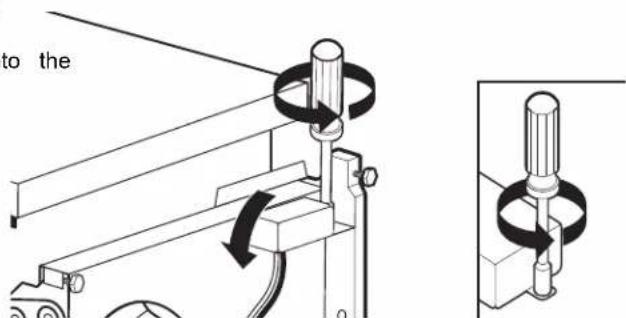
text_image
to theUsing a 1/4" hex-head socket, nut driver, Torx screwdriver, remove terminal box cover. Retain for later use
23. Install strain relief
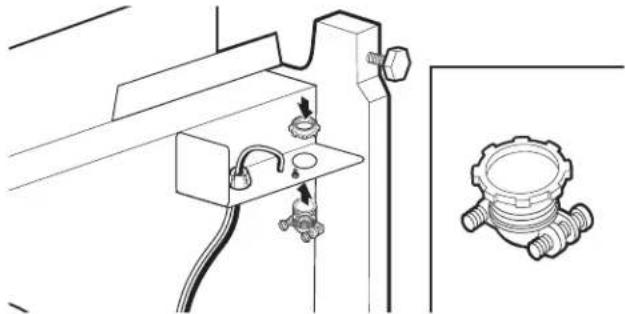
natural_image
Technical line drawing of a mechanical assembly with no visible text or symbolsInstall the metallic strain relief provided in this kit (Strain Whirlpool Part Number 4317824, 90°: Whirlpool Part Nur W10278923RP). Make sure screw heads are facing to t left when tightening conduit nut. Strain relief is provided the power cord kit.
WARNING

Electrical Shock Hazard
Electrically ground appliance.
Connect ground wire to green ground connector in terminal box.
Do not use an extension cord.
Failure to follow these instructions can result in death, fire, or electrical shock.
24. Power cord - route cord into terminal box
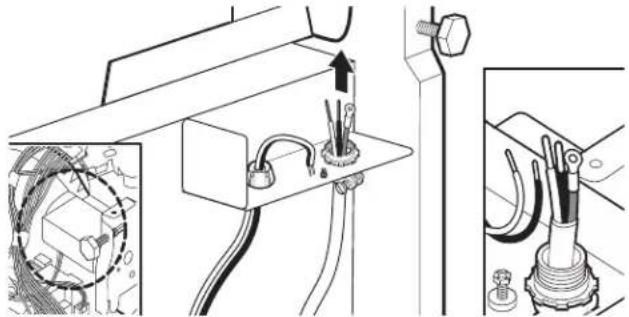
natural_image
Technical diagram showing electrical wiring connections with a magnified inset of a component detail (no text or symbols)Route cord so that it does not touch dishwasher motor or lower part of dishwasher tub. Pull cord through strain relief in terminal box.
25. Power cord - connect ground wire
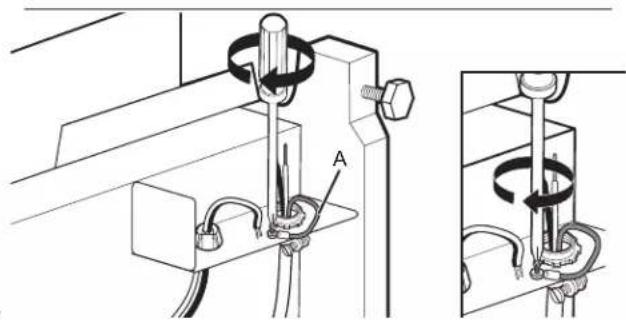
natural_image
Technical diagram of a mechanical assembly with labeled component A, showing no readable text or symbolsA. Ground wire
Remove the ground connector screw and place it through 1
NOTE: A maximum of 2 power cord supply conductors (12 ring terminal of the green ground wire of power cord. AWG largest size) plus 1 grounding conductor are permitted Reattach and tighten the ground connector screw in the terminal box.
26. Power cord - connect remaining wires
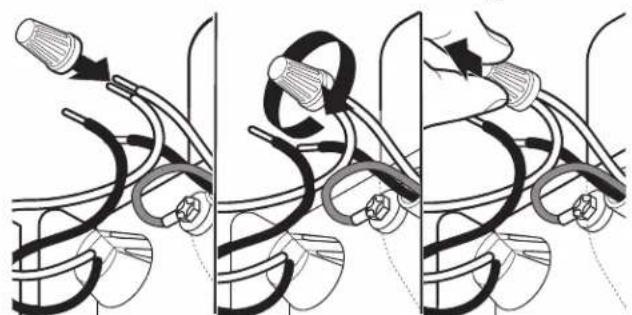
natural_image
Three-panel illustration showing a hand holding a tool with curved wires and a bulb, no text or symbols present.Select twist-on wire connectors of the proper size provided this kit (Straight: Whirlpool Part Number 4317824, 90°: Whirlpool Part Number W10278923RP). Connect wires, black to black and white to white, using the twist-on wire connectors.
NOTE: Do not pre-twist stranded wire. Twist on wire connector. Gently tug on wires to be sure both are secure
Wiring configuration
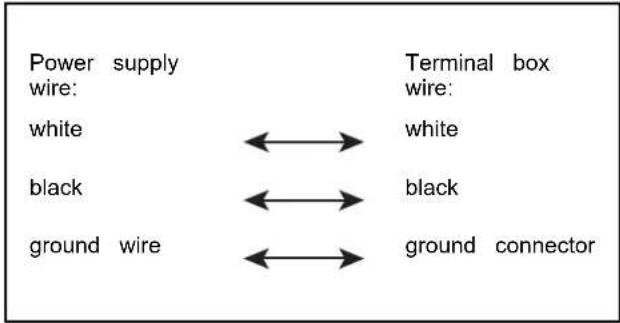
flowchart
graph LR
    A["Power supply wire: white"] <--> B["Terminal box wire: white"]
    C["black"] <--> D["black"]
    E["ground wire"] <--> F["ground connector"]
27. Power cord - secure cord in strain relief
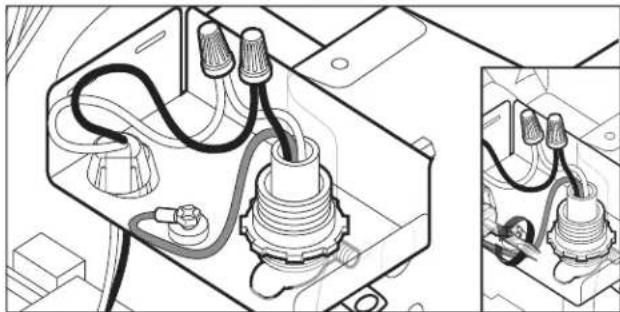
natural_image
Technical line drawing of an electrical component with wiring and connectors, shown in two views (no text or symbols)Tighten strain relief screws to secure cord.
28. Power cord - reinstall terminal box cover and wires
natural_image
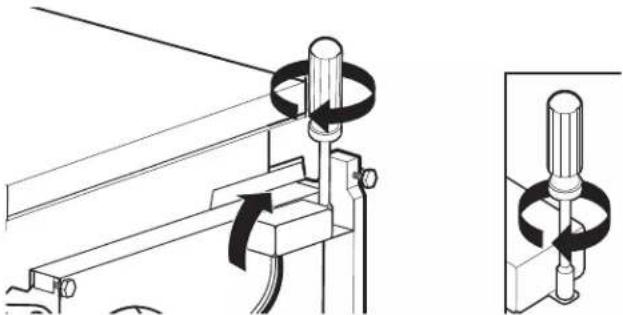
Technical line drawing of a mechanical clamp or bracket assembly with a close-up inset showing the same component (no text or symbols present)Place wires inside terminal box. Insert tabs on left side cover. Make sure wires are tucked inside the box and pinched by the cover. Use a 1/4" hex-head socket, nut or ToxT20® screwdriver, and the screw removed in step to secure the terminal box cover.
If power cord supplied model, remove the first tie strap closest to the plug to maximize the cord length. Do not remove any other tie straps.
NOTE: Route power cord out the rear of the dishwasher. not plug cord into an outlet until instructed to do so.
29. Factory Installed Power Cord (on some models)
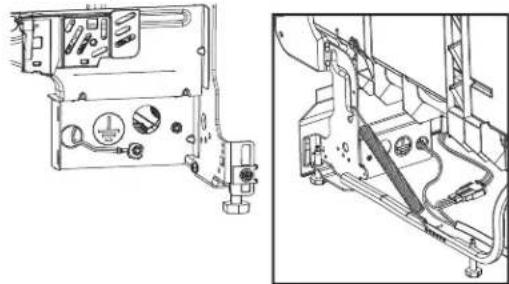
natural_image
Technical line drawing of a mechanical assembly with no visible text or symbolsSelect products include a factory installed power cord. For these products, no wiring during install is required. A grou wire to chassis connection is made inside the existing terminal box, and the normal terminal box cover is not included.
No connection or modification of wiring in that junction box required for these factory power cord models.
Install Door Handle (on some models)
text_image
Technical diagram showing a mechanical setup with labeled components A, B, C, D and an inset circular component with angular notation.A. Setscrew (in bottom of handle)
C. Handle
D. Mounting stud
B. Hex key
of IMPORTANT: Do not scratch the front panel during this not procedure. If door panel has a protective film, peel film ba driver past the point of the handle studs before installing handle. 22 Handle is easiest to install while unit is on its back.
Remove the door handle and hex key from the packaging. Setscrews are already installed in the handle. Place handle on mounting studs with the setscrews facing down. Push the door handle tightly against the door. Insert the short end of the hex key into the setscrews. Tighten the setscrews 1/4 to turn past snug.
Retain hex key with Owner's Manual.
Place Dishwasher in Cabinet
WARNING
Excessive Weight Hazard
Use two or more people to move and install or uninstall appliance.
Failure to do so can result in back or other injury.
31. Stand dishwasher upright
natural_image
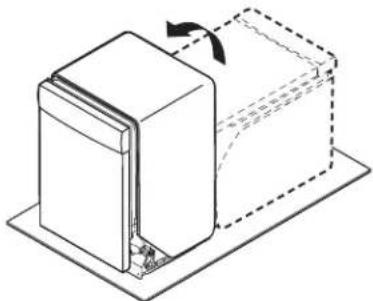
Diagram of a mechanical component with an arrow indicating rotation, shown in 3D perspective (no text or symbols)Using 2 or more people, stand the dishwasher up.
NOTE: Do not install kick plate until instructed to do so.
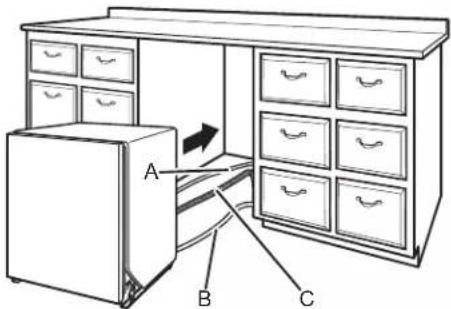
IMPORTANT: If wheels were removed, cover the floor when moving the dishwasher. Slowly move dishwasher completely into cabinet opening. Do not kink or pinch water line, drain hose, power cord, or direct wire between dishwasher and cabinet. Remove cardboard from under dishwasher.
It is all right if dishwasher fits tightly into cabinet opening. not remove insulation blanket—the blanket reduces the sound level.
NOTE: Route water supply, drain hose, and power cord out the rear of the dishwasher.
32. Move dishwasher close to cabinet opening
text_image
Diagram of a cabinet with drawers, showing labeled parts A, B, and C for folding or storage.A. Water line B. Cable
C. Drain hose
33. Route power cord.
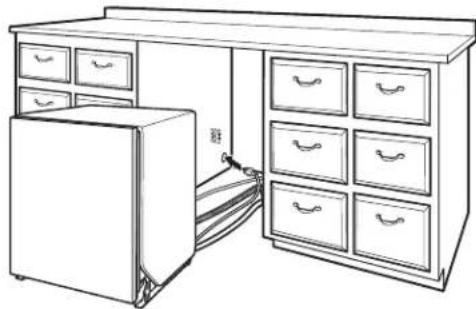
natural_image
Line drawing of a simple kitchen cabinet with drawers and a refrigerator (no text or symbols)If using a power cord, make sure to route end through the cutout before sliding dishwasher into cabinet opening.
34. Secure installation blanket
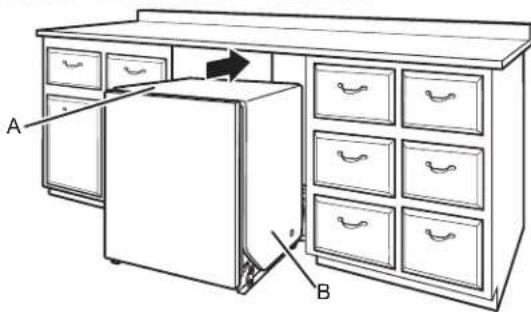
text_image
Diagram of a refrigerator with labeled parts A and B, showing front/rear view and internal compartments.A. Insulation blanket
B. Secure blanket
NOTE: Make sure insulation blanket is secured at both left and right rear corners before pushing into cabinet opening keep the blanket from bunching up in a tight-fitting cabinet.
35. Move dishwasher all but 6" (152 mm) into cabinet opening
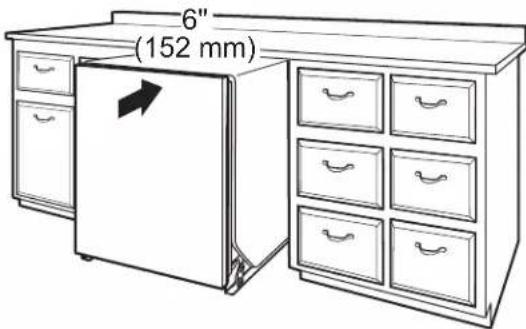
text_image
6" (152 mm)NOTE: Leave unit about 6" (152 mm) out from cabinet in order to install anchor brackets and adjust door tension if needed.
Route the utilities through the holes in the cabinet and pull the slack out at the same time as the dishwasher is pushed into the cabinet.
- Pull slack from utilities
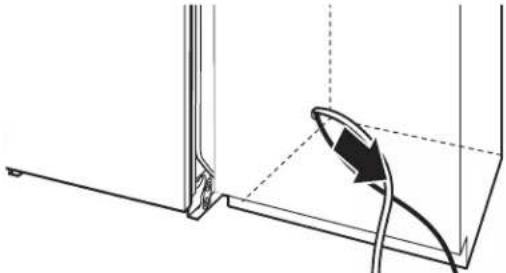
natural_image
Technical line drawing of a mechanical assembly with a curved arrow indicating direction (no text or symbols)NOTE: Pull slack out of utilities at the same time the dishwasher is pushed into the cabinet opening to avoid any kinks.
Side Attachment:
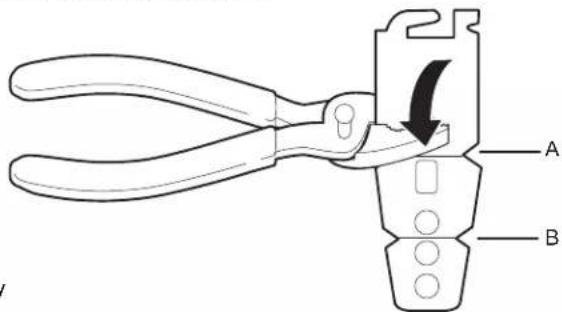
38. Break end of bracket
text_image
Diagram of a pliers tool with labeled parts A and B, showing a directional arrow indicating movement or adjustment.A. Scored line for stainless steel tub models
B. Scored line for plastic tub models
Break off the end of the bracket along the scored line us
Choose Anchor Attachment Method
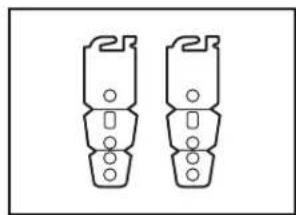
IMPORTANT: The dishwasher must be secured to the cabinet as breakers. one of the final steps. Prepare the dishwasher for this by attaching the 2 brackets found in the parts bag to the dishwasher. 39 Inst
- For countertops that are wood, laminate, or another similar surface, use Countertop Attachment: go to step 37
- For countertops that are marble, granite, or another hard surface, use Side Attachment: go to step 38
NOTE: If the gap between the top of the door and the underside of the countertop is tight (less than 1/4" [6.35 mm]), we suggest using Side Attachment to keep from scratching the User Interface or console with the anchor screws.
Countertop Attachment:
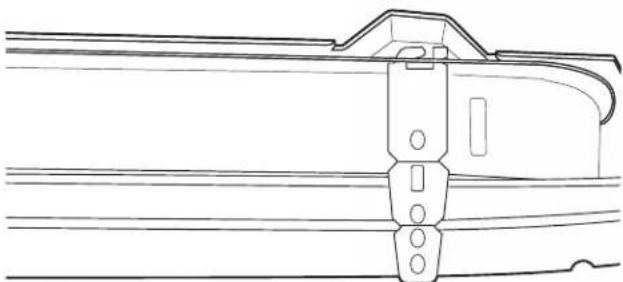
- Insert bracket
natural_image
Technical line drawing of a mechanical component or bracket assembly (no text or symbols)NOTE: Tabs must point to the right.
Remove the brackets from the package and insert into the open slots on the left- and right-hand top of the dishwasher collar as shown. Go to step 42.
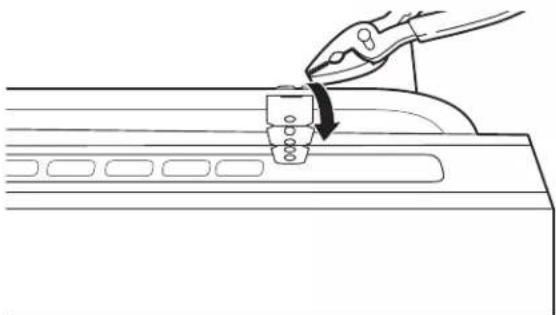
Bend tab
natural_image
Line drawing of a hand using pliers to press or install a component on a device (no text or symbols)Using pliers, bend/twist tab to lock the brackets in place.
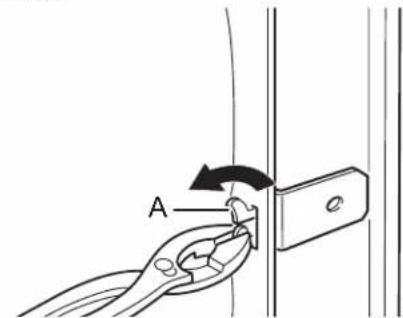
bracket
text_image
AA. Bend tabs
Push bracket into slot on the side of dishwasher and bench tab in toward the side of the dishwasher so that it keeps bracket in place. Repeat this step for the other side of the dishwasher.
NOTE: Install wood shims to the inside of the cabinets if gap between the sides of the cabinet and the sides of the dishwasher are greater than 1/2" (13 mm) on each side.
NOTE: Do not attach the dishwasher. This will be done la
Final Installation Check
the 40. Open and close door
natural_image
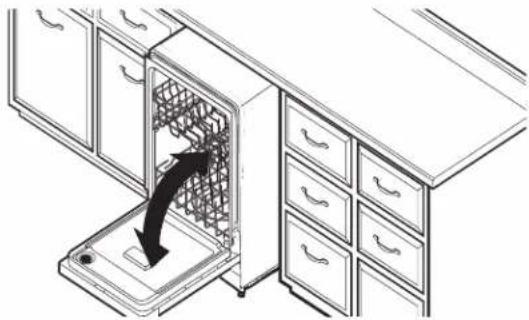
Line drawing of a kitchen appliance with a drawer and drawer stack, showing a black arrow indicating a process or operation (no text or symbols present)- Closes too quickly - decrease spring tension. Check for plumb and adjust legs if needed
text_image
Diagram illustrating a mechanical assembly or cleaning process with labeled components and directional arrows indicating movement.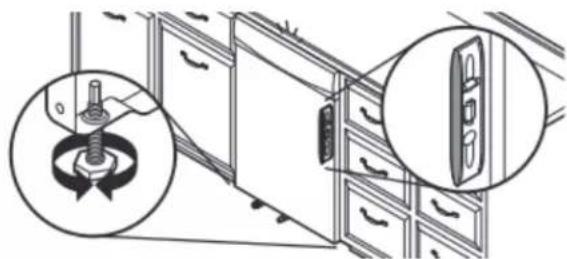
natural_image
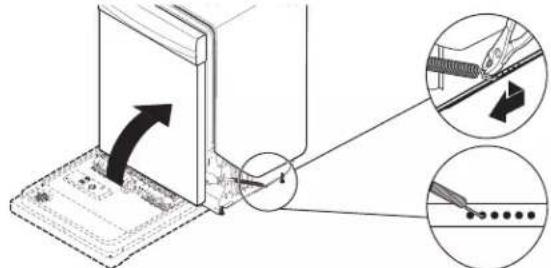
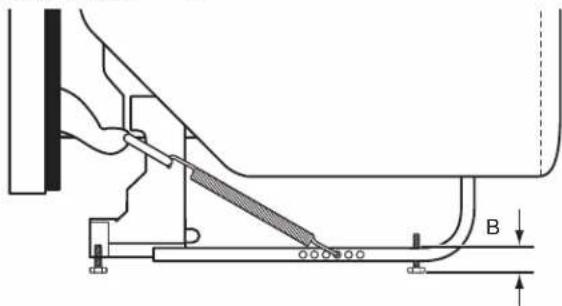
Diagram showing a kitchen appliance with a rotating tool and a close-up view of the interior (no text or symbols)If the door closes too quickly, decrease the spring tension moving the spring end toward the front of the dishwasher.
NOTE: Springs should be in the same notches on left and right sides.
- Closes too quickly - decrease spring tension
text_image
Diagram illustrating cable installation process with labeled components and directional arrowsby Check that leveling legs are firmly against the floor. Close and latch the door and place level against the front panel. Check that dishwasher is centered from front to back in the opening. If needed, adjust leveling leg until dishwasher is plumb. Repeat for other side of dishwasher.
Helpful Tip: Push up on front of dishwasher to raise dishwasher off the ground to adjust front legs. With some installations, it may be easier to adjust the front leg using 3/16" hex head socket or adjustable wrench. If the gap between the top of the door and the underside of the countertop is tight (less than 1/4" [6 mm]), we suggest sid anchoring to keep from scratching the control panel or console.
Level legs
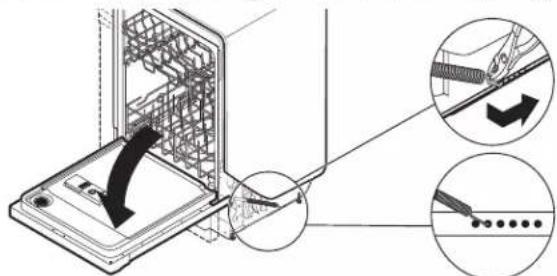
If the door falls open, increase the spring tension by moving the spring end toward the back of the dishwasher.
NOTE: Springs should be in the same notches on left and right sides.
- Align front of dishwasher with front of cabinet doors
natural_image
Line drawing of a kitchen drawer with drawers and a scroll rack (no text or symbols)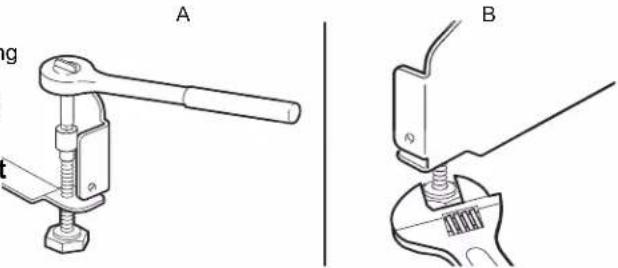
text_image
A BA. Preferred method
B. Optional method
- Check level side to side and adjust legs if needed
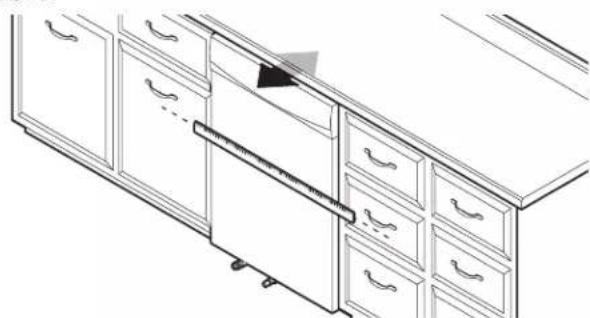
Align front of dishwasher door panel with front of cabinet doors. You may need to adjust alignment to be even with your cabinets.
natural_image
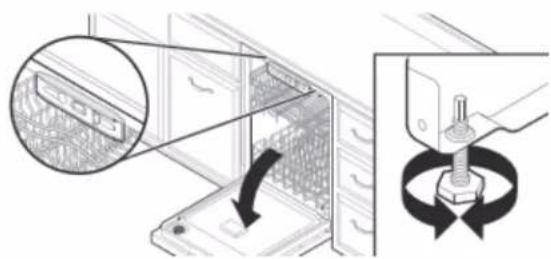
Diagram showing a device with a magnified inset of a component, no text or symbols presentPlace level against top-front opening of tub. Check that dishwasher is level from side to side. If dishwasher is not level, adjust front legs up or down until dishwasher is level
Secure Dishwasher in Cabinet Opening
46. Double-check dishwasher alignment in cabinet opening
natural_image
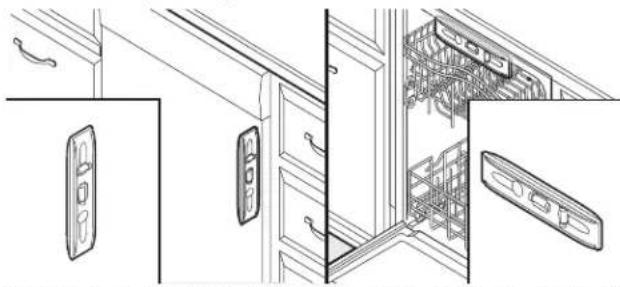
Line drawing of a cabinet interior with door, drawer, and shelf (no text or symbols)Check that dishwasher is still level front to back and side side in the cabinet opening.
Open dishwasher door and place towel over pump assembly and spray arm of dishwasher. For some models, you may have to remove lower dish rack. This will keep screws from falling into pump area when you are securing dishwasher to countertop or cabinet.
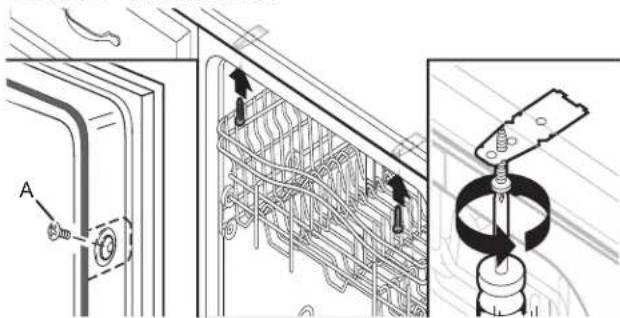
47. Secure dishwasher
text_image
Technical diagram showing mechanical assembly with labeled component A and a spring mechanism diagramA. Screw to side cabinet
Open dishwasher door to prepare for securing the dishwasher to the countertop or side cabinet.
NOTES:
■ The dishwasher must be secured to keep it from shifting when the door is opened or closed.
■ Do not drop screws into bottom of dishwasher.
- Locate brackets installed in the "Choose Anchor Attachment Method" section, either on top or on the of the dishwasher.
■ If countertop anchoring: Secure dishwasher to the countertop with two #10 x 1/2" Phillips-head screws (included).
■ If side anchoring: Drill pilot holes in cabinet to avoid splitting the wood. Secure dishwasher to cabinet with two #10 x 1/2" Phillips-head screws (included). Remove upper rack for easier access.
natural_image
Diagram showing a hand holding a screw with a magnified inset illustrating the process (no text or symbols present)IMPORTANT: Check that top of door does not contact screws, brackets, or countertop. If it does, adjust leveling legs or use the side attachment option.
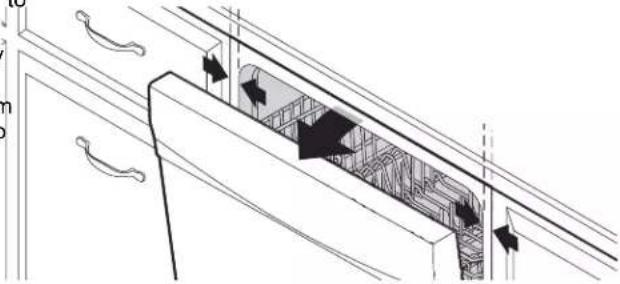
49. Check inner spacing
natural_image
Architectural diagram of a cabinet with doorways and doorwork, showing structural elements (no text or labels)Open door and check that space between dishwasher cabinet opening and tub is equal on both sides. If spacing not equal, loosen bracket screws and shift tub. Tighten bracket screws.
Direct Wire Connection
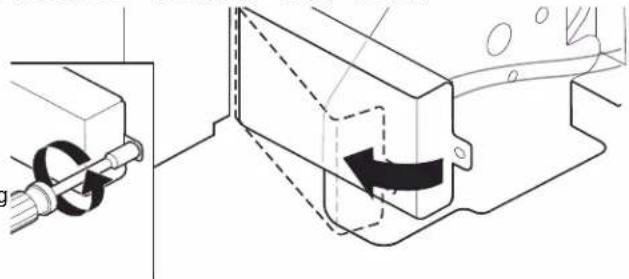
50. Remove terminal box cover
natural_image
Technical diagram showing mechanical assembly with pipe connection and directional arrow (no text or symbols)siddssing a 1/4" hex-head socket, nut driver, T20 Torx screwdriver, remove terminal box cover. Retain for later use
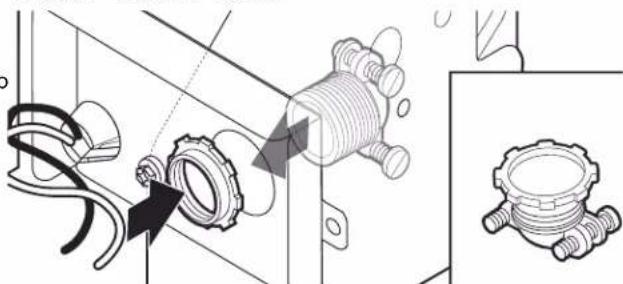
51. Install strain relief
natural_image
Technical illustration of a mechanical assembly with no visible text or symbolsInstall a UL-listed/CSA-approved metallic strain relief.
52. Route cable into terminal box
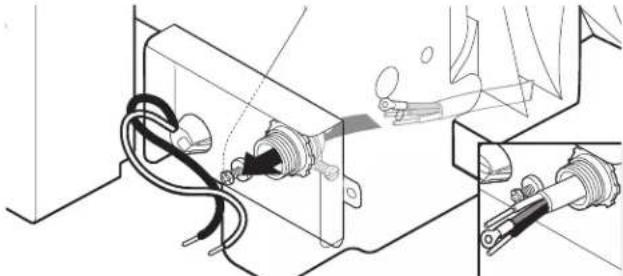
natural_image
Technical line drawing of a mechanical device with wires and connectors, showing internal components and a close-up inset (no text or symbols)Route cable so that it does not touch dishwasher motor or lower part of dishwasher tub. Pull cable through UL-listed/CSA-approved strain relief in terminal box. Strain relief is not supplied with the dishwasher. Owner must purchase a 7/8" (22 mm) screw-in type strain relief.
Select UL-listed/CSA-approved twist-on wire connectors (not included) rated to connect your household wiring to 16-gauge dishwasher wiring.
54. Direct wire - connect remaining wires
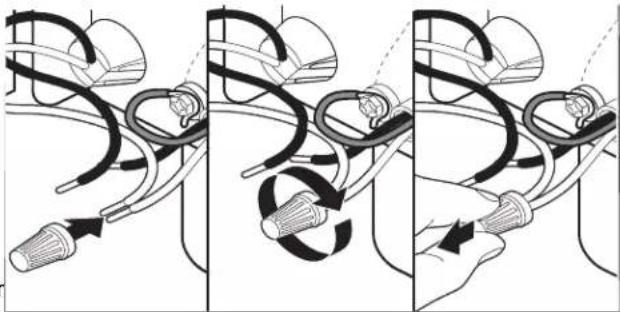
natural_image
Three-panel illustration showing a hand holding a medical device connected to a cable, with no visible text or symbols.Select UL-listed/CSA-approved twist-on wire connectors of the proper size. Connect wires, black to black and white to white, using the twist-on wire connectors.
NOTE: Do not pre-twist stranded wire. Twist on wire connector. Gently tug on wires to be sure both are secure
Wiring configuration
WARNING

Electrical Shock Hazard
Electrically ground appliance.
Connect ground wire to green ground connector in terminal box.
Do not use an extension cord.
Failure to follow these instructions can result in death, fire, or electrical shock.
53. Direct wire - connect ground wire
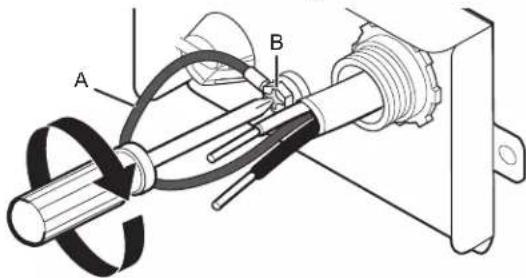
text_image
Technical diagram of a mechanical assembly with labeled parts A and B, showing components like a rotating shaft and threaded fastener.A. Ground wire
B. Ground screw
Form bare ground wire into a U-shaped hook. Wrap ground wire hook clockwise around the ground connector screw and under the washer. Securely tighten ground connector screw.
Power supply
wire:
white
black
ground wire
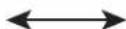
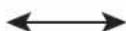
Terminal box
wire:
white
black
ground connector
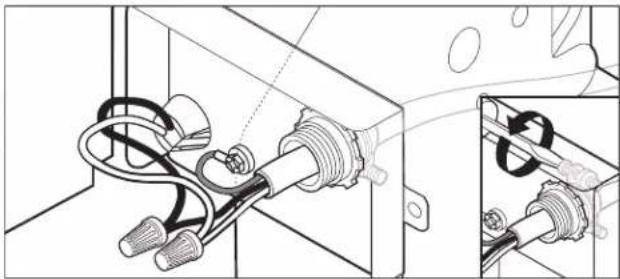
55. Direct wire - secure cable in strain relief
natural_image
Technical line drawing of a mechanical assembly with coiled components and connectors (no text or symbols)Tighten strain relief screws to secure cable.
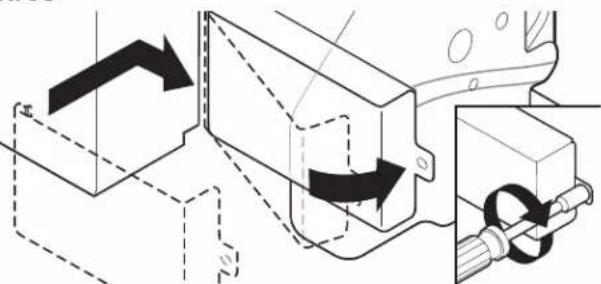
56. Direct wire - reinstall terminal box cover and wires
natural_image
Technical diagram showing mechanical assembly with directional arrows and components (no text or symbols)Place wires inside terminal box. Insert tabs on left side of cover. Make sure wires are tucked inside box. Close cover ensuring wires are not pinched. Use 1/4" nut driver or Tor T20® screwdriver and previously removed screw to secure cover.
Connect Water Line to House Shutoff Valve
Option A: Waste disposer - no air gap
NOTE: If using a flexible braided hose, replace inlet hose after 5 years to reduce the risk of hose failure. Record hose installation or replacement dates on the hose for future reference
57. Attach water supply line
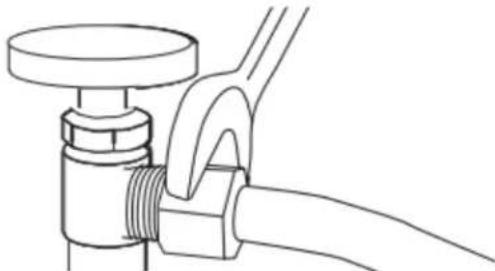
natural_image
Line drawing of a pipe fitting with a flanged handle and valve (no text or symbols)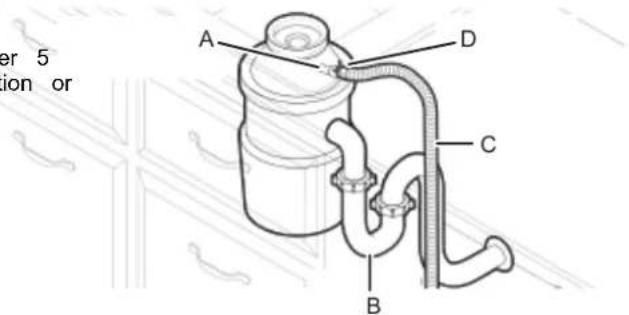
text_image
er 5 ion or A D C BA. Disposer inlet
C. Drain hose
B. Drain trap
D. Large drain hose clamp
Attach the water supply line (copper tubing or flexible line) to the hot water line using a connection configur that is in compliance with local codes and ordinances. water supply to the dishwasher should have a manual valve located under the sink.
Helpful Tip: Remove disposer knockout plug. braided
Connect Drain Hose
58. Connect drain hose
Connect drain hose to waste tee or waste disposer u of the following options:
■ Option A: Waste disposer – no air gap
■ Option B: No waste disposer – no air gap
■ Option C: Waste disposer – with air gap
■ Option D: No waste disposer – with air gap
IMPORTANT: The drain hose connection of the disposer waste tee must be made before the drain trap and at 20" (508 mm) above the floor where the dishwasher w installed.
Helpful Tip: To reduce vibration of the hose, keep the away from the floor.
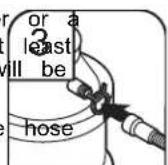
- Using a hammer and screwdriver, knock plug into disposer.
- Use needle-nose pliers to remove plug.
- Attach drain hose to disposer inlet with large drain hose clamp (provided). Use pliers to squeeze clamp open and move into position.
Option B: No waste disposer - no air gap
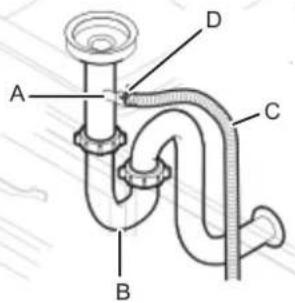
text_image
A B C DA. Waste tee
C. Drain hose
B. Drain trap
D. Large drain hose clamp
Option C: Waste disposer - with air gap
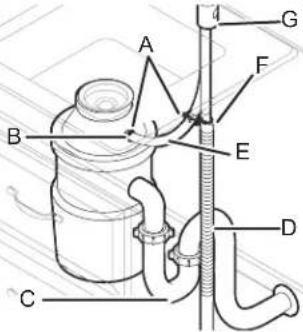
text_image
Technical diagram of a mechanical device with labeled parts A through G, showing connections between components.A. Screw-type clamps
E. Rubber hose connector
B. Disposer inlet
F. Large drain hose clamp
C. Drain trap
G. Air gap
D. Drain hose
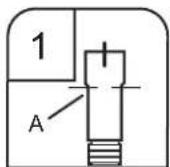
- Fit rubber end (A) of drain hose to waste tee and cut if needed.
NOTE: Do not cut ribbed section.
Helpful Tip: Remove disposer knockout plug.
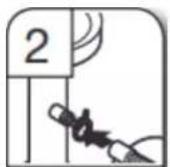
- Attach rubber end of drain hose to waste tee with a large drain hose cl (provided). Use pliers to squeeze clam open and move into position. If the drain hose was cut, use "ato1 2" (38 mm to 50 mm) screw-type clamp (not provided).
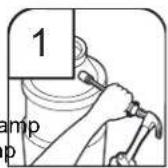
- Using a hammer and screwdriver, knock plug into disposer.
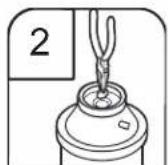
- Use needle-nose pliers to remove plug.
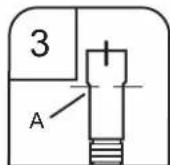
- Connect rubber end (A) of drain hose to air gap and cut if needed. NOTE: Do not cut ribbed section.
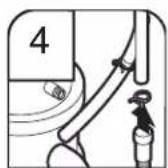
- Attach drain hose to air gap with large drain hose clamp (provided). Use pliers to squeeze clamp open and move into position. If the drain hose was cut, use a 11/2" to 2" (38 mm to 50 mm) screw-type clamp (not provided).
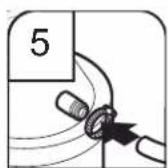
- Use a rubber hose (not provided) with screw-type clamps (not provided) to connect from air gap to disposer inlet.
Option D: No waste disposer - with air gap
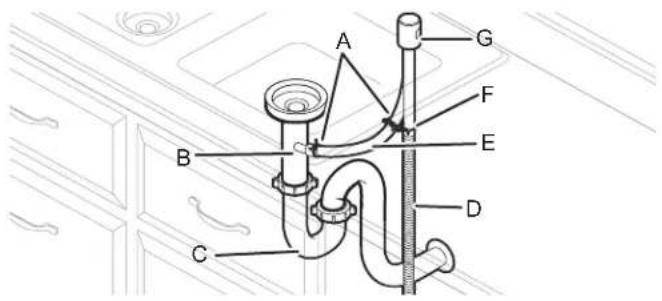
text_image
A G F B E D CA. Screw-type clamps
B. Waste tee
C. Drain trap
D. Drain hose
E. Rubber hose connector
F. Large drain hose clamp
G. Air gap
- Connect rubber end (A) of drain hose air gap and cut if needed.
NOTE: Do not cut ribbed section.
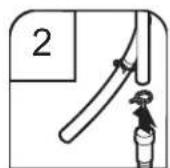
- Attach drain hose to air gap with large drain hose clamp (provided). Use pliers to squeeze clamp open and move into position. If the drain hose was cut, use a 1½" to 2" (38 mm to 50 mm) screw-type clamp (not provided).
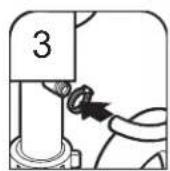
- Use a rubber hose (not provided) with screw-type clamps (not provided) to connect from waste tee to air gap.
Complete Installation
Check that the power supply wire or cord does not touch dishwasher motor or the lower part of the dishwasher tub.
WARNING

Electrical Shock Hazard
Plug into a grounded 3 prong outlet.
Do not remove ground prong.
Do not use an adapter.
Do not use an extension cord.
Failure to follow these instructions can result in death, fire, or electrical shock.
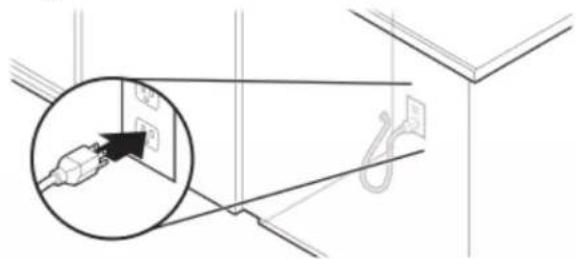
58. Power supply cord - Plug into a grounded 3 prong outlet
natural_image
Technical diagram showing a cable installation detail with an inset close-up of the cable being inserted (no text or symbols present)Plug into a grounded 3-prong outlet.
59. Reconnect power
Reconnect electrical power at the fuse box or circuit breake box.
NOTE: With the access panel off, start the dishwasher and allow it to complete the shortest wash cycle. After the first 2 minutes, unlatch door, wait 5 seconds, and then open dc Check that there is water in the bottom of the dishwasher Check that dishwasher is working properly
Install Access Panel
- For Plastic, begin with step 61
- For Metal, begin with step 64
Plastic Panel:
- Reinstall access panel and fasteners
natural_image
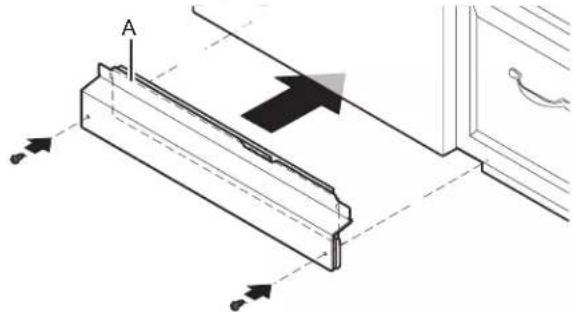
Technical diagram of a mechanical assembly with directional arrows and labeled component A (no text or symbols beyond labels)A. Insulation (on some models)
Place the plastic access panel against the dishwasher leg. Make sure insulation does not interfere with the float assembly.
- Check access panel edge
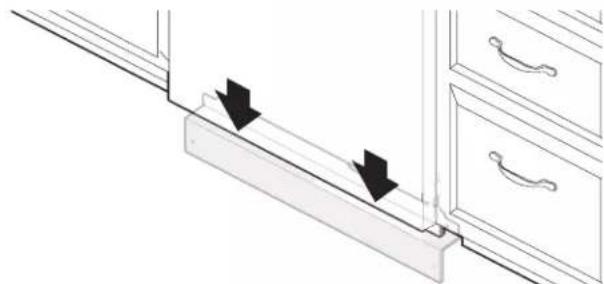
natural_image
Diagram showing two arrows pointing downward on a wooden shelf with drawers (no text or symbols)Check that the lower edge of the access panel touches floor. Adjust if necessary.
- Tighten fasteners

text_image
Technical diagram showing mechanical assembly with labeled components A and B, including a directional arrow labeled C.A. Unlocked
C. 1/4 turn
B. Locked
Metal Panel:
- Reinstall access panels
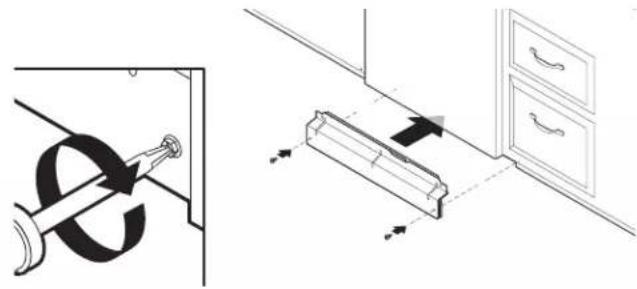
natural_image
Diagram showing a door lock mechanism and a cabinet with directional arrows, no text or symbols present.Place the panel against dishwasher legs. Using a Phillips screwdriver or 1/4" nut driver, reinstall the screws through t holes in the access panel.
- Check lower panel edge
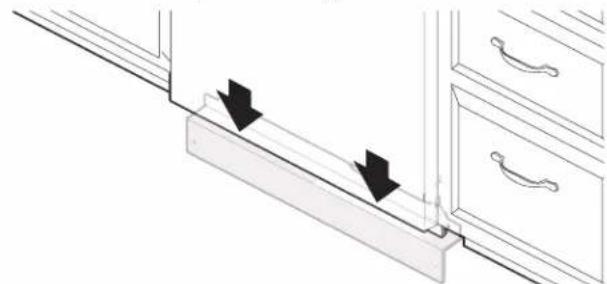
natural_image
Diagram showing a door handle with two arrows indicating direction, placed on a cabinet (no text or symbols present)Check that the lower edge of the access panel touches the floor. Adjust if necessary.
- Tighten screws
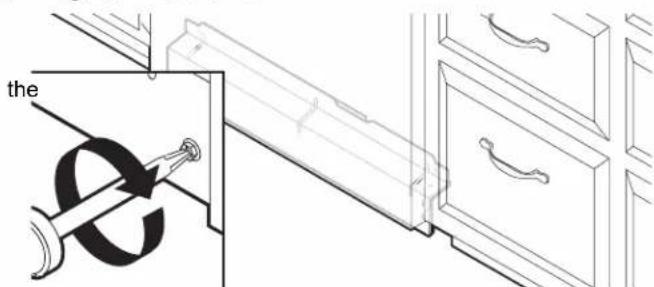
text_image
theTighten access panel screws.
Check Operation
- Read the dishwasher Quick Start Guide that came with your dishwasher.
■ Check that all parts have been installed and no steps were skipped. Check that you have all tools used.
If the dishwasher is not working properly, disconnect power or unplug dishwasher and refer to the "If Dishwasher Does Not Operate" section.
Using a flat-blade screwdriver, turn the fasteners 1/4 turn clockwise to lock into place. The fastener slot will be straight up and down when properly locked. Go to step 66.
If Dishwasher Does Not Operate
First try the solutions suggested here to possibly avoid the a service call.
■ Has the circuit breaker tripped or the house fuse blown?
■ Is the door closed tightly and latched?
■ Has the cycle been set correctly to start the dishwasher
■ Is the water turned on?
If none of these possible solutions work, refer to the conta information referenced in your Quick Start Guide.
Additional Tips
Expect longer wash times. Your new dishwasher will average 2–5 hours per load but use nearly 40% less energy than models. Designed with a low-wattage, low-energy-consumption motor, your dishwasher washes longer to ensure exceptional cleaning. Certain models are equipped with an optical water sensor, so the first cycle will run longer to calibrate the o sensor. Selecting certain options could increase cycle time p 3.5 hours.
Rinse aid is necessary for good drying results:
This dishwasher is designed to be used with rinse aid for good drying performance and controlling hard-water-deposit buildup.
Energy-efficient dishwashers use less water and energy, so they depend on the water sheeting action of rinse aid for good dry performance.
*Start/Resume light may flash:
When pressing Start/Resume, you must make sure the door isacted within 4 seconds. If you do not close the door within 4 seconds, the Start/Resume light will flash until you press it again. (You must also do this when adding a dish during the middle of a cycle.)
Front Status Light:
For dishwashers that have a status light on the front of the d this light will turn ON when a cycle is started and will remain until the end of the cycle (this includes through the dry portion the cycle) or the cycle is canceled. This front status light will off when the cycle is complete or canceled.
ptical
past
[Non-Text]
SÉCURITÉ DU LAVE-VAISSELLE
natural_image
Illustration of a kitchen sink with a faucet and a cylindrical sink, showing a downward arrow indicating a drop (no text or symbols present)text_image
Technical diagram showing mechanical assembly with labeled component A and a close-up view of a circular component with a tool.natural_image
Simple line drawing of a double-ended wrench (no text or symbols)natural_image
Two-step diagram showing hand cleaning a mechanical component in a sink, with no text or symbols present.EXIGENCES D'INSTALLATION
Outils et pièces
natural_image
Line drawing of two pair of pliers (no text or symbols)natural_image
Line drawing of a screwdriver with a cylindrical head and threaded shaft (no text or symbols)1
natural_image
Simple line drawing of a screwdriver (no text or symbols)natural_image
Simple line drawing of a flat tool with a handle and central button (no text or symbols)Couteau utilitaire
natural_image
Simple line drawing of a screwdriver with a cylindrical head and shaft (no text or symbols)natural_image
Simple line drawing of a rectangular object with three circular holes, no text or symbols present.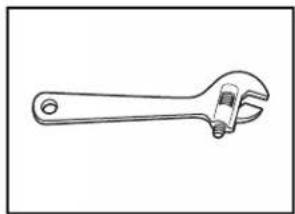
natural_image
Line drawing of an adjustable wrench with a handle and screw (no text or symbols)natural_image
Simple line drawing of a screwdriver (no text or symbols)natural_image
Simple line drawing of a flashlight with a bulb and handle (no text or symbols)natural_image
Simple line drawing of a rectangular tray or container (no text or symbols)profond
natural_image
Simple line drawing of a folded paper or document (no text or symbols)Serviette de bain Ruban
natural_image
Simple line drawing of a rolled-up adhesive tape (no text or symbols)natural_image
Two coiled rope or wire loops, no text or symbols presentnatural_image
Illustration of a coiled cable or hose with two connectors (no text or symbols)Tuyau d'évacuation
natural_image
Illustration of a screw with two metal fasteners (no text or symbols)Tournevis cruciforme no 10 x 1/2 po (12,7 mm) (2)
natural_image
Two identical mechanical component diagrams with mounting holes and mounting holes (no text or symbols)natural_image
Simple line drawing of a horizontal bar with rounded ends and a small circular end (no text or symbols)natural_image
Simple line drawing of a rolled-up adhesive tape (no text or symbols)
natural_image
Simple geometric diagram with two nested squares (no text or symbols)natural_image
Simple line drawing of a mechanical component with a cylindrical shaft and flanged base (no text or symbols)natural_image
Line drawing of a pair of pliers with a screwdriver handle (no text or symbols)nuder
natural_image
Line drawing of a handheld electric drill bit (no text or symbols)natural_image
Line drawing of a pipe fitting with a flanged end (no text or symbols)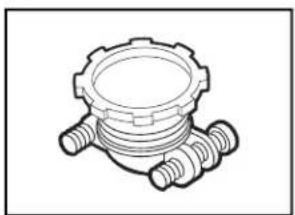
natural_image
Technical line drawing of a mechanical component with threaded ends and a central circular feature (no text or symbols)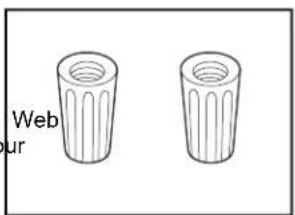
text_image
Web urnatural_image
Simple line drawing of a coiled spring or rope (no text or symbols)natural_image
Two interlocked rings with metal clips attached (no text or symbols)natural_image
Illustration of a coiled industrial pipe with black bands and two ends (no text or symbols)natural_image
Diagram showing a rectangular box with three parallel wires above and a circular ring below, no text or symbols present.Œillet pour armoire
natural_image
Illustration of a power plug, cord, and small components (no text or symbols)National Fire Protection Association
1 Batterymarch Park
Quincy, MA 02169-7471
Il vous faut :
text_image
Technical diagram of a kitchen appliance with labeled parts A and B, showing internal structure and directional arrows.text_image
Technical diagram showing two labeled components A and B with internal electrical connections and a hand holding a device.natural_image
Simple line drawing of a 3D rectangular block with a flat top and vertical side (no text or symbols)text_image
Technical diagram showing cable installation with magnified detail and dimension annotationsnatural_image
Diagram of a mechanical device with a rectangular block and a curved component, showing no text or symbols.text_image
Technical diagram showing mechanical assembly with labeled components A and B, including a tool and directional arrows indicating motion or force.natural_image
Mechanical assembly diagram showing a cutting tool and workpiece with directional arrows (no text or labels)natural_image
Line drawing of a cabinet with multiple drawers and drawers, no text or symbols presentnatural_image
Mechanical assembly diagram showing a lever mechanism with arrows indicating motion (no text or symbols)Pieds arrière - B
natural_image
Technical diagram of a mechanical assembly with labeled component B (no text or symbols present)natural_image
Technical line drawing of a mechanical assembly with a bracket and housing (no text or symbols)text_image
Technical diagram showing mechanical assembly with labeled parts A and B, including directional arrows and component placements.A. Écrou
B. Virole
text_image
Technical diagram showing mechanical assembly with labeled components and directional arrows indicating movement or forcenatural_image
Line drawing of a flexible hose with threaded ends and hexagonal connectors (no text or symbols)natural_image
Simple line drawing of a coiled cable or wire with no text or symbolsnatural_image
Line drawing of a flexible hose with a flanged end and bulbous cap (no text or symbols)natural_image
Technical line drawing of a mechanical clamp or bracket assembly (no text or symbols)natural_image
Mechanical assembly diagram showing a rotating lever mechanism with no text or symbolsnatural_image
Technical line drawing of a mechanical assembly with no visible text or symbolsnatural_image
Technical diagram showing electrical connections and components (no text or symbols)natural_image
Technical line drawing of a mechanical assembly with labeled component A, showing no text or symbolsnatural_image
Three-panel illustration showing a hand holding a connector with cable, illustrating the process of connecting and connecting (no text or symbols)natural_image
Technical line drawing of an electrical component with wires and connectors, shown in two views (no text or symbols)natural_image
Technical line drawing of a mechanical clamp or bracket assembly with a close-up inset showing the same component (no text or symbols present)natural_image
Technical line drawing of a mechanical assembly with no visible text or symbolstext_image
Technical diagram showing a mechanical assembly with labeled components A, B, C, D and an inset circular view of a rotating component.natural_image
Diagram of a mechanical or electrical component with a rotating arrow and dashed outline, no visible text or symbolsnatural_image
Line drawing of a simple kitchen cabinet with drawers and a refrigerator (no text or symbols)text_image
Diagram of a refrigerator with labeled parts A and B, showing internal compartments and a refrigerator unit.natural_image
Technical line drawing of a mechanical assembly with a curved component and dashed lines indicating hidden edges (no text or symbols)natural_image
Technical line drawing of a mechanical component or bracket assembly (no text or symbols)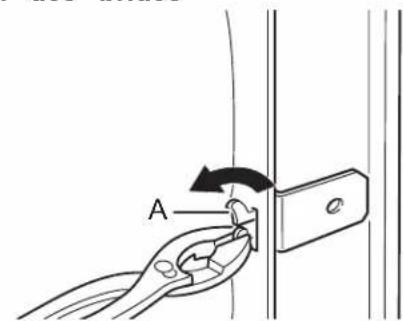
text_image
Anatural_image
Line drawing of a hand using a pliers to press down a component on a device (no text or symbols)natural_image
Line drawing of a kitchen appliance with a hand inserting into a rack (no text or symbols)text_image
Diagram illustrating a mechanical assembly with labeled parts and directional arrows indicating motion or forcenatural_image
Line drawing of a kitchen appliance with a screwdriver and drawer, showing internal components (no text or symbols)text_image
Diagram illustrating cable installation process with labeled components and directional arrowsnatural_image
Technical line drawing of a mechanical clamp assembly (A) and a tool holder (B), both without any text or symbols.natural_image
Line drawing of a kitchen drawer with drawers and a scroll rack (no text or symbols)natural_image
Diagram showing a device being inserted into a rack, with a magnified inset highlighting the internal structure (no text or symbols present)natural_image
Line drawing of a cabinet interior with door, drawer, and rack (no text or symbols)text_image
Technical diagram showing mechanical assembly with labeled component A and a spring-loaded componentnatural_image
Technical diagram showing a mechanical assembly with a magnified inset of a component (no text or symbols present)natural_image
Architectural diagram showing door frame structure with arrows indicating direction (no text or symbols)text_image
Technical diagram showing mechanical assembly with labeled components and directional arrows indicating motion or movement.natural_image
Technical illustration of a mechanical assembly with pipe fittings and a valve mechanism (no text or symbols)natural_image
Technical line drawing of a mechanical device with wires and connectors, showing internal components (no text or symbols)text_image
Technical diagram of a mechanical assembly with labeled components A and B, showing internal components and wiring.natural_image
Three-panel illustration showing a hand holding a device with coiled cables and connectors, no text or symbols present.natural_image
Technical line drawing of a mechanical assembly with coiled components and a close-up inset showing detail (no text or symbols)natural_image
Technical diagram showing mechanical assembly with arrows indicating motion (no text or symbols)natural_image
Line drawing of a pipe fitting with a flanged handle and valve (no text or symbols)text_image
Technical diagram of a mechanical device with labeled parts A through GA. Bride à vis
text_image
A G F B E D CA. Bride à vis