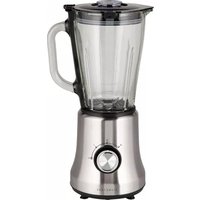
BL502IX - Blender SIGNATURE - Free user manual and instructions
Find the device manual for free BL502IX SIGNATURE in PDF.


Pick your language and provide your email: we'll send you a specifically translated version.
| Product type | Blender |
| Brand | Signature |
| Model | BL502IX |
| Power supply | 220-240 V ~ 50-60 Hz |
| Power | 800 W |
| Maximum capacity | 1.5 L |
| Bowl material | Glass |
| Number of speeds | 4 (P, 0, 1, 2) |
| Pulse function | Yes (position P) |
| Max continuous operating time | 3 minutes |
| Minimum rest time | 1 minute |
| Included accessories | Glass bowl, lid, measuring cup |
| Cleaning the bowl and lid | Washable with soapy water |
| Cleaning the motor unit | Wipe with a damp cloth (do not immerse) |
| Safety | Sharp blades, do not use without lid, unplug before cleaning |
| After-sales service | Contact the BUT store: 09 78 97 97 97 |
| Warranty | 2 years (legal warranty of conformity) |
Frequently Asked Questions - BL502IX SIGNATURE
How to use the Signature BL502IX blender?
Place the motor unit on a stable surface. Place the glass bowl directly on the motor unit (no locking required). Add diced food, then water if necessary (do not exceed 1.5 L). Put the lid on and turn to lock. Plug in the appliance, then turn the selector to the desired position: P for pulse action, 1 or 2 for continuous speed. Do not exceed 3 minutes of continuous operation, and let it cool for 1 minute between cycles.
Can I blend hot liquids in the blender?
No, it is forbidden to pour boiling liquids into the glass bowl. Hot liquids can cause sudden ejection and cause injury. Let liquids cool to room temperature before blending.
How to clean the blender?
For easy cleaning, rinse immediately after use. Pour warm soapy water into the bowl, then activate the P (pulse) function for a few seconds. Remove the bowl, rinse it under running water along with the lid. Wipe the motor unit with a damp cloth. Never immerse the motor unit in water.
What to do if the blender does not start?
Check that the bowl is correctly placed on the motor unit and that the lid is properly locked. Make sure the speed selector is not on position 0 (off). Check the power outlet and that the cord is not damaged. If the problem persists, contact BUT after-sales service at 09 78 97 97 97.
Can I blend very hard foods like ice cubes or frozen fruits?
The appliance is not designed for blending hard and dry substances. Ice cubes or frozen foods may dull the blades. It is advisable to cut food into small pieces and add a little water to facilitate blending. For very hard preparations, use a more powerful appliance.
Is the glass bowl dishwasher safe?
The instructions do not explicitly state whether the glass bowl is dishwasher safe. To preserve the glass properties and sealing, it is recommended to wash it by hand with soapy water.
What is the maximum capacity of the blender?
The maximum capacity is 1.5 liters. Do not fill the bowl beyond this limit. For liquid preparations, do not exceed the 1.5 L mark to avoid overflow.
How long can I use the blender continuously?
The continuous operating time must not exceed 3 minutes. After each cycle, let the appliance cool for at least 1 minute before using it again. This prevents motor overheating.
How to change speed during use?
To change speed, simply turn the selector to the desired position (1 or 2) without having to hold the button. Position P requires holding the selector down for pulse action; release to return to the stop position.
What are the after-sales service numbers?
For any questions or repairs, contact the BUT store at 09 78 97 97 97 (local call cost), Monday to Friday from 9 am to 7 pm and Saturday from 9 am to 6 pm. The appliance benefits from a 2-year legal warranty of conformity.
User questions about BL502IX SIGNATURE
0 question about this device. Answer the ones you know or ask your own.
Ask a new question about this device
No questions yet. Be the first to ask one.
Download the instructions for your Blender in PDF format for free! Find your manual BL502IX - SIGNATURE and take your electronic device back in hand. On this page are published all the documents necessary for the use of your device. BL502IX by SIGNATURE.
USER MANUAL BL502IX SIGNATURE
natural_image
Exterior view of a modern kitchen blender with clear glass and black handle (no text or symbols visible)
Manual assistant
Powered by Anthropic
Waiting for your message
Product information
Brand : SIGNATURE
Model : BL502IX
Category : Blender