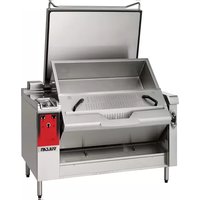
VPP40 - Saucepan Vulcan - Free user manual and instructions
Find the device manual for free VPP40 Vulcan in PDF.


| Product Type | Electric professional braising pan (stock pot/skillet) |
| Brand | Vulcan |
| Model | VPP40 (Precipan™ Electric) |
| Tank capacity | 100 L (5 gal) or 150 L (10 gal) depending on version |
| Electrical supply | 230 V / 400 V three-phase, 50/60 Hz |
| Power | Up to 4650 W per heating element (multiple zones) |
| Temperature range (skillet mode) | 0 °C to 250 °C (default 180 °C) |
| Temperature range (stock pot mode) | 0 °C to 100 °C (default 100 °C) |
| Cooking modes | Skillet (griddle), Stock pot (braising pan), Multi-zone, Auto (programmed recipes) |
| Special features | Core cooking with probe, basket lifting, tank tilting, automatic filling/draining, semi-automatic cleaning cycle |
| Control screen | Color touch screen with encoder button, automatic lock, HACCP menu |
| Connectivity | USB port for data export (HACCP, recipes, consumption) |
| Tank material | Stainless steel |
| Included accessories | Retractable shower head, core probe (2 types), omelette spatula, basket lifting arm (optional) |
| Maintenance and cleaning | Integrated semi-automatic cleaning cycle; manual cleaning recommended; do not use high-pressure jets or products above 60 °C |
| Safety | Automatic shutdown in case of overheating (bath probe >130 °C, tank bottom >205 °C), screen lock, USB/probe connector protection |
| Spare parts and repairability | Full list available: FastPAD 2 screen, electronic boards, actuators, heating elements, contactors, probes, gaskets, fuses |
| Warranty | 1 year (subject to periodic maintenance by approved technician) |
| Usage | Professional use only (restaurants, cafeterias, hospitals) |
Frequently Asked Questions - VPP40 Vulcan
User questions about VPP40 Vulcan
0 question about this device. Answer the ones you know or ask your own.
Ask a new question about this device
Download the instructions for your Saucepan in PDF format for free! Find your manual VPP40 - Vulcan and take your electronic device back in hand. On this page are published all the documents necessary for the use of your device. VPP40 by Vulcan.
USER MANUAL VPP40 Vulcan
natural_image
Model VPP40 electric oven with open lid and red VULCAN branding (no visible text or symbols on the device itself)with Strainer and Basket Accessories

natural_image
Model VPP40 with Strainer Accessory electric cooker (no visible text or symbols on device body)TECHNICAL SERVICE AND PARTS ASSISTANCE - US: 1-800-814-2028 | CANADA: 1-800-444-4764
Vulcan is a division of ITW Food Equipment Group | 3600 North Point Blvd., Baltimore, MD 21222
COMPOSITION DES APPAREILS / COMPOSITION OF THE APPLIANCES

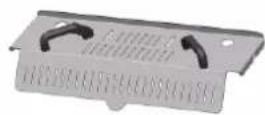
Trémie / Strainer plate

Support panier GN1/1 (Claie) / GN1/1 basket support (grill)

Panier GN1/1 / GN1/1 Basket
A division of ITW Food Equipment Group LLC
P.O. Box 696
Louisville, KY 40201
CONSEILS PRATIQUES D'UTILISATION / PRACTICAL HINTS FOR USE
LIMITES D'UTILISATION / USABLE LIMITS
Capacité cuve / Tank capacity:
 |  | |||
| Sauteuse / PlanchaBratt pan / Plancha | Marmite / braisièreBoiling / braising pan | |||
| Mode / Mode | ||||
| Capacité cuves / Tank capacit | 100L | 150L | 100L | 150L |
| Dimensions cuve (mm)* | 693 × 629 × 270 (100L) / 993 × 629 × 270 (150L) | |||
| Tank dimensions (inch)* | 27.3 × 24.7 × 10.6 (100L) / 39.1 × 24.7 × 10.6 (150L) | |||
| Surface utile | 44 dm^2 | 62 dm^2 | - | |
| Usable surface | 682 in^2 | 961 in^2 | ||
| Capacité nominale | 105L | 151L | 105L | 151L |
| Nominal capacity | 28 gal | 40 gal | 28 gal | 40 gal |
| Capacité minimum | - | 20L | 30L | |
| Minimum capacity | 5 gal | 10 gal | ||
| Capacité maximum | - | 105L | 151L | |
| Maximum capacity | 28 gal | 40 gal | ||
| Dimensions panier GN1/1* | - | 306 × 550 × 151 mm 12.8 × 20.9 × 8 inch | ||
| GN1/1 Basket dimensions* | ||||
| Capacité panier GN1/1** | - | 15 / 8 kg | ||
| GN1/1 Basket capacity** | 33 / 17.5 lb | |||
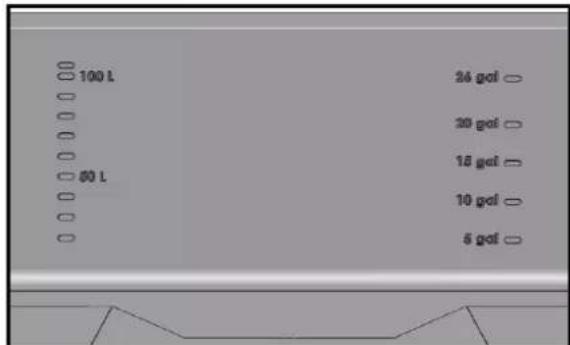
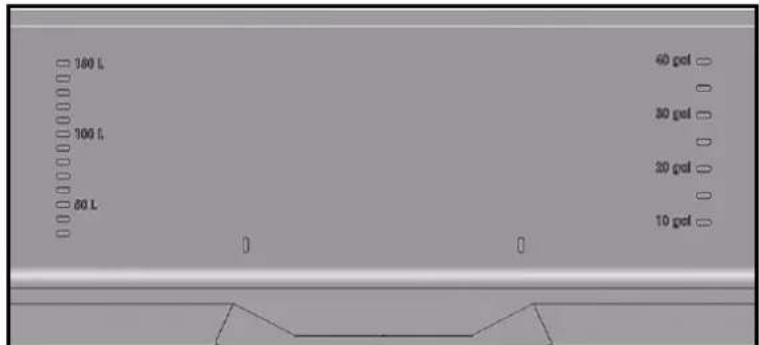
Attention: For your safety and that of your equipment, always respect the minimum, nominal and maximum fill levels indicated on the rear of the tank.
Correspondance graduation (en litres) des cuves / Corresponding graduations in the tanks
Braisière 100 litres / 100 litre braising pan
bar
| Category | Value | |---|---| | 100 L | 26 gof | | 80 L | 30 gof | | 50 L | 15 gof | | 10 gof | 10 gof | | 5 gof | 5 gof |Braisière 150 litres / 150 litre braising pan
To ensure the guarantee on this equipment, you should comply with the MANUFACTURER'S INSTRUCTIONS in this manual. However, if you cannot undertake the required maintenance operations, our installation and service network is available to provide you with a personalized contract.
- WARNING -
- The product delivered to you complies with current standards. If any modifications are made the manufacturer cannot accept any responsibility whatsoever. The manufacturer cannot be held responsible in the event of inappropriate use of the equipment.
● This equipment is intended for use by suitably trained professionals.
- Read all the documentation before user.
- Keep your documents for future reference.
• Translation of the original manual
1 GENERAL
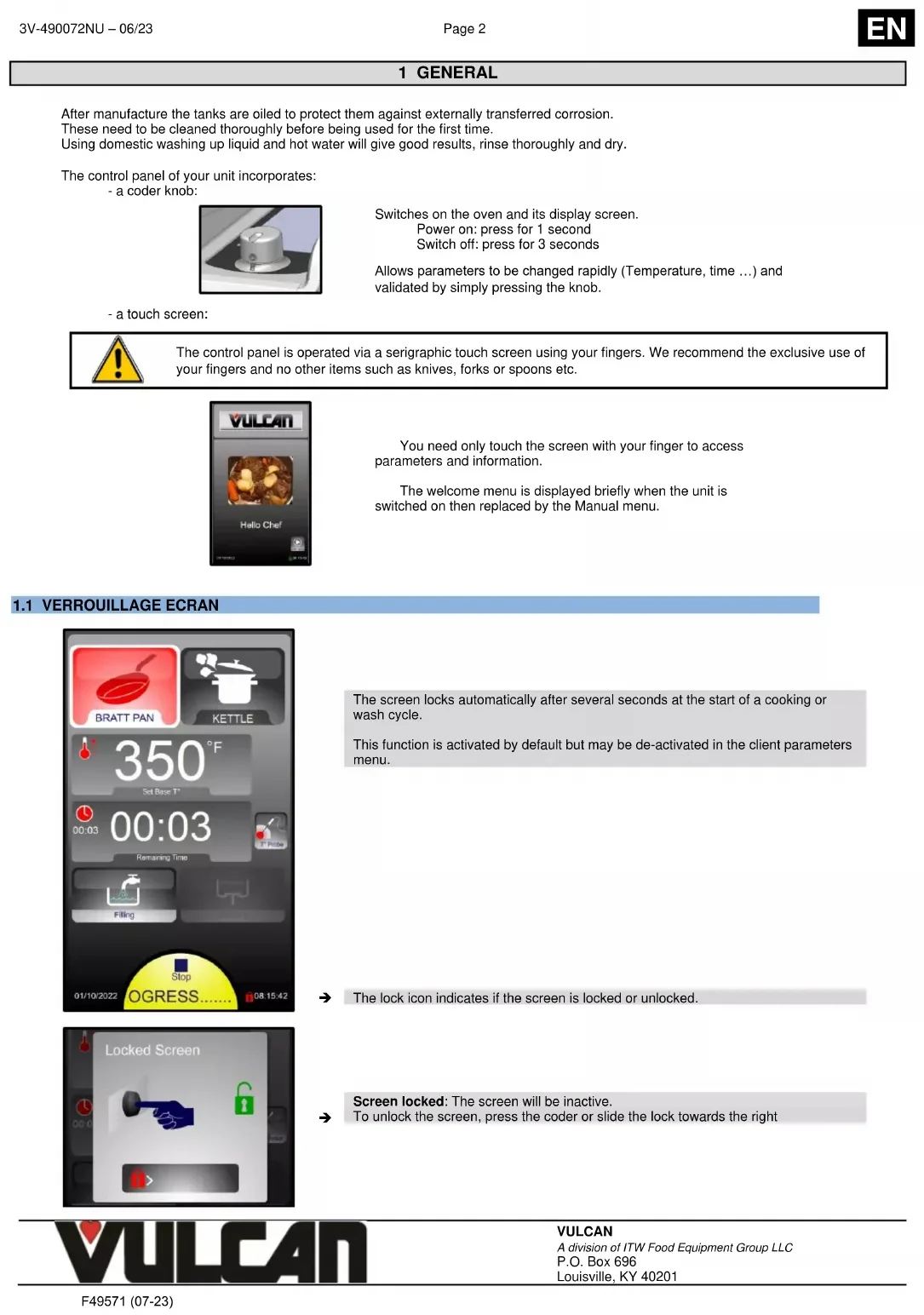
After manufacture the tanks are oiled to protect them against externally transferred corrosion. These need to be cleaned thoroughly before being used for the first time. Using domestic washing up liquid and hot water will give good results, rinse thoroughly and dry.
The control panel of your unit incorporates: - a coder knob:
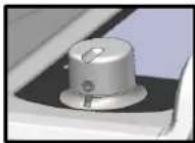
Switches on the oven and its display screen. Power on: press for 1 second Switch off: press for 3 seconds
Allows parameters to be changed rapidly (Temperature, time ...) and validated by simply pressing the knob.
- a touch screen:

The control panel is operated via a serigraphic touch screen using your fingers. We recommend the exclusive use of your fingers and no other items such as knives, forks or spoons etc.
You need only touch the screen with your finger to access parameters and information.
The welcome menu is displayed briefly when the unit is switched on then replaced by the Manual menu.
1.1 VERROUILLAGE ECRAN
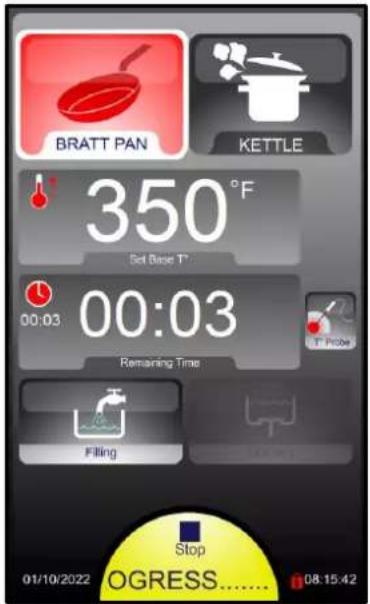
The screen locks automatically after several seconds at the start of a cooking or wash cycle.
This function is activated by default but may be de-activated in the client parameters menu.

→ The lock icon indicates if the screen is locked or unlocked.
Screen locked: The screen will be inactive. → To unlock the screen, press the coder or slide the lock towards the right

VULCAN
A division of ITW Food Equipment Group LLC
P.O. Box 696
Louisville, KY 40201
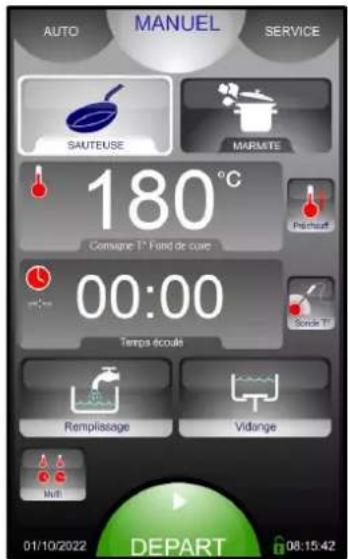
2 MANUAL MENU

→ 2 cooking modes: Bratt pan (Plancha) / Kettle (Braising pan)
→ Display of the actual temperature and the set temperature (by default: Set)
→ Select preheating before cooking
→ Display of Time / Core temperature
→ Water filling / Drain the tank
→ Multi zone heating with timer
→ Date and time
Locking the screen whilst cleaning it

2.1 BRATT PAN (PLANCHA) MODE
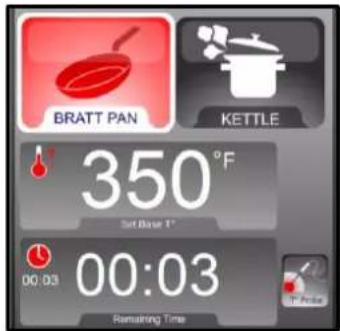
for pan work (Browning, sautéing, shallow frying....)
The temperature display indicates the temperature of the tank base. The default set temperature is 350^ F
The temperature can be adjusted from 32 to 482°F.
Select a cooking / marking temperature from 32 to 482°F.
Put a small amount of cooking fat in the tank
Put the product in
Scrape the base with a spatula between cooking batches.
Add fat as necessary.
Examples of Products / Temperatures

Steaks / Marking
Fish
338°F
410°F

Crepes / pancakes
Shallow frying (5mm)
338°F
350^

Eggs
338°F
2.2 KETTLE (BRAISING PAN) MODE

Allows braising, cooking in water (Poaching, sous vide, cook chill regeneration, blanching...)
The temperature display indicates the set temperature in the tank. By default, it indicates a set temperature of 210^ F
The temperature can be adjusted from 32 to 210^ . It is possible to adjust the « delicacy » of the cooking by pressing Boiling Pan mode again.
Select a cooking temperature from 32 to 210°F.
Fill the tank with water if required (if cooking as in a bain marie, heat the water to maximum temperature then check the water level)

VULCAN
A division of ITW Food Equipment Group LLC
P.O. Box 696
Louisville, KY 40201

Put the product in
When you are at simmering temperature you can adjust the « delicacy » of the cooking by pressing the Boiling pan button again. « NON-DELICATE » is the default.
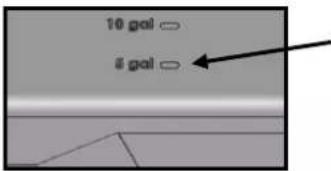
Minimum liquid level in Kettle pan mode:
First marking in the tank
Examples of Products / Temperatures

Overnight cooking / Braising
Reheating
149/167°F
149°F
2.3 WARNING MESSAGES - USER ERRORS
| Pop-up | When ? | Why ? | Doing |
| Start cooking in Bratt pan or boiling pan mode while the pan contains hot grease | The bath probe detects too high a temperature (above 100°C) | Validate the action and drain the grease by respecting the safe handling of hot grease and the current environmental standards | |
| You are requesting tank tilting during cooking | Any action on the tank tilting interrupts the cooking in progress | Validate the action and tilt or not tilt the tank | |
| You activate Tank emptying | The bath probe detects too high a temperature (above 100°C) (suspicion of grease in the tank) | Validate or not the action by respecting the current environmental standards | |
| You activate Tank emptying | Check that the liquid can be drained into the drainage network | Validate or not the action by respecting the current environmental standards | |
| Request for tank tilting during the wash cycle | Any action on the tank tilt interrupts the current wash cycle | Validate the action and tilt or not tilt the tank | |
| Start of the cleaning cycle | The tank isn't in the down position. | Put the tank in the low position to start the wash cycle | |
| Using the basket lifting function in boiling pan | The tank isn't in the down position. | Validate and put the tank in the low position before repeating the basket lifting request | |
 | Using the basket lifting function in boiling pan | The lid isn't in the high position. | Validate and fully open the lid in the high position before repeating the basket lifting request |
 | Selecting the command for tilt the tank to the high position | The bath probe detects too high a temperature (above 100°C) (suspicion of grease in the tank) | Validate or not the action by respecting the safe handling of hot grease |
3 MULTI ZONE MENU

Multi zone menu
Allows operation in the cooking mode selected over:
- 2 or 3 zones with each having a programmable temperature and time
- 6 zones with a programmed temperature for each and a single programmable time
BRATT PAN mode

Tank divides into 3 zones:
3 programmable temperatures
3 programmable times
KETTLE mode

Tank divides into 6 zones:
1 programmable temperature
6 programmable times
Note: The colour of the semi circles next to the zones reflects the state of the timer.
- No set time: Colour grey
- Timer waiting to start: Colour green
- Timing taking place: Colour yellow
- Timing over Colour red
4 AUTO MENU
4.1 AUTOMATIC / PROGRAMMED RECIPES

→ Favourite recipes
Pre-programmed recipes (76 roughly)
Clients recipes (capacity of 130 recipes in total, each with 6 cycles)
By default, recipes are displayed as images in alphabetical order. They can be displayed via 6 principal families with direct access to the recipes (in the same way as factory recipes)
→ Water filling / Drain the tank
→ Display tools : Recipes can be edited Copied Created Modified Deleted ← Detailed display Recipe displayed by list or photos
To add a favourite recipe: select a recipe from the factory or clients list, then press a free space for 3 seconds
4.2 FAVOURITE RECIPE
To add a favourite recipe:
- Select a recipe from the factory or clients list
- Then press a free space in « My Favourites » for 3 seconds

→ Free space
→ Delete a favourite recipe
4.3 TYPE OF DISPLAY
Standard display (phase by phase)

Detailed display (all phases)

2 criteria allow the recipe to be adapted to the clients taste (e.g.: +/- browned, blue, or well done) without the need to create a new recipe ... or to know what to modify (Time, Temperature, which phase ...)
5 EXAMPLES OF CAPACITIES AND COOKING TIMES
| PRODUCT | Hourly Production | Production per pass | ||||||
| Loadper pass | Number of Portionsper pass | Durationper pass | ||||||
| Precipan 100 | Precipan 150 | Precipan 100 | Precipan 150 | Precipan 100 | Precipan 150 | |||
| Meats | Goulash/Bourguignon(cooked traditionally) | 44 lb | 62 lb | 110 lb | 154 lb | 250 | 350 | 2h 30' |
| Brown with 3 cycles of 8' (Bratt pan 392°F) - Sweat the garnish and likewise the rest of the preparation – Add liquid, bring to the boil (Boiling pan 112°F) – Cook with the lid closed 2h (Boiling pan 208°F on delicate level 2).Precipan advice: play with the two or three heating zones (depending on the model). | ||||||||
| Goulash /Bourguignon(cooked overnight) | - | - | 110 lb | 154 lb | 250 | 350 | 11h 00 | |
| Brown with 3 cycles of 8' (Bratt pan 392°F) - Sweat the garnish and likewise the rest of the preparation – Add liquid, bring to the boil (Boiling pan 112°F) – Cook with the lid closed minimum 5h (Boiling pan 185°F on delicate level 3). | ||||||||
| Duck breast | 150 pieces | 240 pieces | 25 pieces | 40 pieces | 25 | 40 | 10' Cycle | |
| Fry for 4 minutes per side (Bratt pan 338/356°F)Precipan advice: play with the two or three heating zones (depending on the model) for holding temperature | ||||||||
| Steak burgers fresh | 240 pieces | 360 pieces | 40 pieces | 60 pieces | 40 | 60 | 10' Cycle | |
| Fry for 3.5 minutes per side (Bratt pan 338/356°F) | ||||||||
| Pork chops | 175 pieces | 275 pieces | 35 pieces | 55 pieces | 35 | 55 | 12' Cycle | |
| Fry for 4 minutes per side (Bratt pan 338/356°F)Precipan advice: play with the two or three heating zones (depending on the model) for holding temperature | ||||||||
| Fish | Breaded frozen fish | 240 pieces | 360 pieces | 60 pieces | 90 pieces | 30 | 45 | 15' Cycle |
| Fat, Fry for 3 minutes per side (Bratt pan 356°F) | ||||||||
| Fresh salmon escallops | 120 pieces | 180 pieces | 30 pieces | 45 pieces | 30 | 45 | 15' Cycle | |
| Align the pieces in hot cooking fat (Bratt pan 392°F), 5' per side – Last phase with the lid closed. | ||||||||
| Various | Omelette | 270 eggs | 390 eggs | 45 eggs | 65 eggs | 15 | 22 | 10' Cycle |
| Form (Bratt pan 320°F) – Cook for 5' and roll. | ||||||||
| Potage | 32 gal | 48 gal | 21 gal | 32 gal | 480 | 720 | 40' | |
| Poach, cook, mix (Boiling pan 112°F). | ||||||||
| Potatoes | Boiled potatoes | 150 lb | 216 lb | 99 lb | 143 lb | 225 | 325 | 40' |
| Start with cold water (Boiling pan 112°F). Cook with the lid closed. Note = Core T° 194°F. Advice: Cook in Boiling pan mode with the lid open (Non delicate product level 4) accelerates cooking (but uses more energy) | ||||||||
| Frozen Sauté potatoes | 84 lb | 117 lb | 27.5 lb | 38.5 lb | 63 | 88 | 20' Cycle | |
| Put the potatoes in hot cooking fat (Bratt pan 338/356°F) 15 to 18' – Stir as little as possible. | ||||||||
| Vegetables | Frozen sliced Vichy carrots | 84 lb | 117 lb | 27.5 lb | 38.5 lb | 63 | 88 | 20' Cycle |
| Brown slightly (Bratt pan 338/356°F) - Add liquid - Cook with the lid closed, 15 to 18'. | ||||||||
| Dry vegetables | 90 lb | 137 lb | 53 lb | 79 lb | 120 | 180 | 35' | |
| Bring to the boil (Boiling pan 112°F) then cook slowly with the lid closed. | ||||||||
| Frozen green beans | 84 lb | 117 lb | 27.5 lb | 38.5 lb | 63 | 88 | 20' Cycle | |
| Boil the required amount of water (Boiling pan 112°F) season – Add the green beans – Cook for 15' eventually lowering the power to level 2 as soon as they start to simmer – Switch the heat off at the end of the cooking cycle – Open the drain and add cold water - stir. | ||||||||
| Frozen Ratatouille | 81 lb | 115 lb | 55 lb | 82.5 lb | 125 | 188 | 50' | |
| Brown slightly (Bratt pan 338°F) - Cook with the lid closed (Boiling kettle 112°F delicate level 3), 40min | ||||||||
| Fresh vegetableRatatouille | 42 lb | 57 lb | 27.5 lb | 38.5 lb | 63 | 88 | 40' | |
| Brown slightly (Bratt pan 338°F) - Add liquid - Cook with the lid closed (Boiling kettle 112°F delicate level 2), 25min | ||||||||
| Pasta | Egg pasta (Penne without a basket) | 88 lb | 132 lb | 44 lb | 66 lb | 200 | 300 | 30' Cycle |
| Boil the required amount of water (Boiling pan 112°F) then salt – Add the pasta, stir – Cook for 10' eventually lowering the power to level 2 as soon as they start to simmer – Switch the heat off at the end of the cooking cycle – Open the drain and add cold water - stir.Precipan advice: for « Egg Pasta »): Cook at 181°F for 12 minutes, drain without cooling (less water wasted). | ||||||||
| Egg pasta (Penne with a basket) | 88 lb | 132 lb | 17.5 lb | 26.5 lb | 80 | 120 | 12' Cycle | |
| Boil the required amount of water (Boiling pan 112°F not delocate) then salt – Load the baskets with 3.3 lb of dry products maximum - Cook for 8' (Boiling pan 112°F power level 2) | ||||||||
| Desserts | Semolina cake | 19 gal | 29 gal | 16 gal | 24 gal | 300 | 450 | 50' Cycle |
| Heat the milk in Boiling pan mode 208°F (Delicate products Level 1 selected automatically) – Add the sugar and semolina – Cook in Boiling pan mode 194°F (Delicate products Level 1 selected automatically) for 30 mins, with the lid closed. | ||||||||
| Rice pudding | 7 gal | 10 gal | 16 gal | 24 gal | 300 | 450 | 2h 20' Cycle | |
| Heat the milk in Boiling pan mode 208°F (Delicate products Level 1 selected automatically) - Add the sugar and rice - Cook in Boiling pan mode 194°F (Delicate products Level 1 selected automatically) for 1h30 to 2h00, with the lid closed. | ||||||||
5.1 CREATING A RECIPE


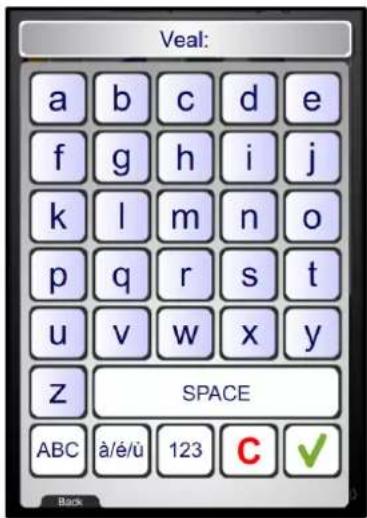

→ Select "My Recipes" (library capacity: maxi 100 recipes)
→ Select « Disp. tools » icon
→ Select « New » icon
Enter the name of the recipe: The more precise your name, the easier it will be to find your recipe
→ Validate
→ Pressing the name zone allows you to modify the name and / or select the family of the recipe (Meat, Fish, Vegetables, Pastry, Various and Banquet)
→ Create the cycle or cycles by adding the various cooking information (cooking mode, temperature, time, ventilation speed, Oura valve...).
→ Possibility to add a photo from the « Photos library »
→ If necessary, Add, Insert or Delete additional cooking cycles (capacity of 6 cycles maximum including preheating)
→ Save a recipe
6 TOOL BOX MENU

→ Semi-automatic cleaning includes filling with water and the procedure
Operating mode Data exchange (HACCP, Photos, Recipes, Manual, Consumption levels (Energy, water ...), Profiles) Client settings (Adaptable) Installation parameters Technical / After sales
→ Maintenance information
6.1 PASSWORD
Allows the client access to:
- Data exchange
- Client parameters

0000: Changeable PIN Code
CHEF: Password « permanent » (Upper or lower case)
For a personalised code in text format, it is possible to switch the keypad to and from alpha numeric
6.2 DATA EXCHANGE
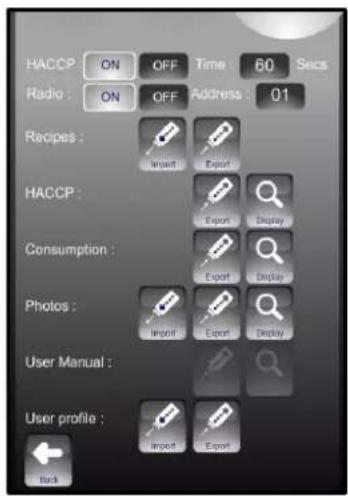
→ HACCP ON/OFF: Records HACCP data (for approx. 1 year) and frequency of data capture
→ Appliance identifier: individual for each appliance if there are several appliances on site.
→ USB (or Radio) information exchange viewable on the appliance Warning: A FastPAD USB stick should be used for data exchange consumptions, recipes, HACCP, photos, or update... Using a USB stick that is not recognized can lead to crashes or bugs.
6.3 CLIENT PARAMETERS

Choice of default mode displayed when first started
→ Adjust the screen brightness and end of cycle buzzer volume
Activation and adjustment of the automatic pre-heat when the appliance is switched on.
Display Recipes by family (yes) or in alphabetical order (no) By default: No
Activation of Screen standby after the required time. Active outside the current cycle. By default: Yes
→ Country and temperature unit selection
→ Fill in the costs for energy and other products to calculate consumption. First press activates the cost area. The value can be change slowly with the knob. Second press displays the keyboard to enter a value directly.
→ After being exported to USB stick HACCP data prior to this number of weeks is deleted.
→ Automatic screen locking
→ Software reset (Attention: All recorded information is erased from memory: HACCP data....)
6.4 PREVENTIVE MAINTENANCE
This message appears only when the appliance preventive maintenance is required (if the counter has been set in Installation parameter). The customer will be automatically informed when service is needed. The service counter is a calculated function of the frequency of use and of the number of hours between 2 services.
These values must be entered by the technician when installing the appliance and must be verified after every maintenance operation.

→
Warning message This message appears every time the appliance is switched on if the use time programmed in the preventive maintenance counter is reached.
Notify the maintenance department for an intervention as soon as possible If the number of days falls to 0 or below, the message will be displayed in red and indicates how many days past the scheduled maintenance date the appliance is.

VULCAN
A division of ITW Food Equipment Group LLC
P.O. Box 696
Louisville, KY 40201
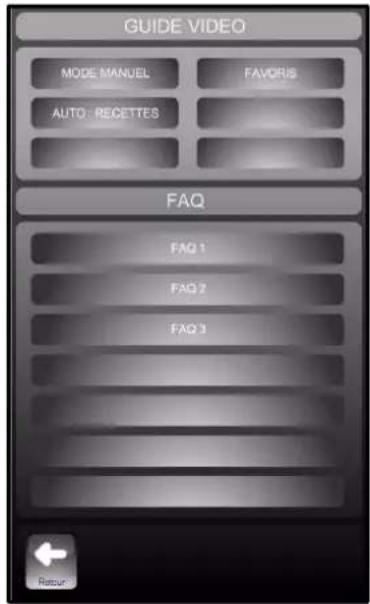
6.5 QUICK GUIDE

→ Graphic demonstration and or animated of the main menus
→ Information and « tips and advice » most used
7 WATER FILL MENU

Attention:
For your safety it is impossible to use this water supply button:
- in all modes if the tank temperature probe registers over 266°F.
- Lid closed and locked

Cold water supply (by default)
Allows for filling and cleaning of the tank
Briefly touching this button displays the water fill menu.
A longer press (over a second) allows water filling without displaying the menu. A second long press stops the water fill
→ Set the volume of water and press the "START" button
Pressing START without having selected a volume starts a manual fill without an automatic stop (the counter shows how much water has gone into the tank)
Or
→ Select a pre-programmed capacity and press the "START" button
→ Bar graph to select the type of water by moving the tap icon but only if the unit is connected to hot and cold water and the 'Hot water' option has been validated in the Installation parameters menu
3 positions: Hot water / Hot + Cold water / Cold water
8 DRAIN MENU

Allows the tank to be drained via the drain outlet
Briefly touching this button allows the drain to open
A second press closes it
The drain outlet closes automatically after 4 minutes if the screen is not touched again.
9 TANK TILT
Attention:

It is not possible to tilt the tank if:
- the cover is not in the open position
- the basket lift bar (optional) is fitted to the unit.
- in all modes if the tank temperature probe registers over 266°F.
Using the tilt whilst cooking automatically stops the cooking cycle
It is impossible to start cooking if the tank is not fully lowered (horizontal)
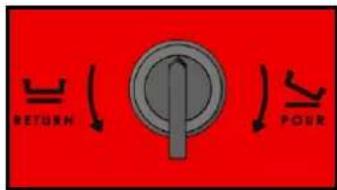
Allows the tank to be tilted to drain
Turn and hold the knob to the selected position to tilt or raise the tank. The tilting will be stopped as soon as the button is released.
The knob returns automatically to its initial position
→ Turn the button clockwise and maintain its position to tilt the tank in emptying position
→ Turn the button anti-clockwise and maintain its position to tilt the tank in the low tank position

The tilting screen is displayed and indicates the tilting direction of the tank. The color indicates the tilting status:
- White symbol: tilting direction not affected
- Green symbol: direction of tilting selected in progress (in this example: tilting of the tank in emptying position). The symbol flashes during the tank tilting and then remains fixed
- Red symbol: tilting direction selected not authorized
- White symbol: tilting direction not affected - Green symbol: direction of tilting selected in progress (in this example: tilting of the tank in emptying position). The symbol flashes during the tank tilting and then remains fixed - Red symbol: tilting direction selected not authorized

VULCAN
A division of ITW Food Equipment Group LLC
P.O. Box 696
Louisville, KY 40201
10 CLEANING MENU
10.1 Manual cleaning at the end of service (Assisted)
- Start the appliance.
- Wait a few seconds for the welcome screen to clear.
- Check that the drain outlet is closed
- Ensure the tank is lowered (horizontal)
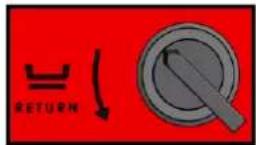
→ "Tilting the tank"
- Press the Service tab then the touch button:

→ "START" will commence a cleaning cycle.
- The screen indicates the phases included in the cycle as well as information on the quantity of chemicals to use (detergent to be put into the tank) and running time.
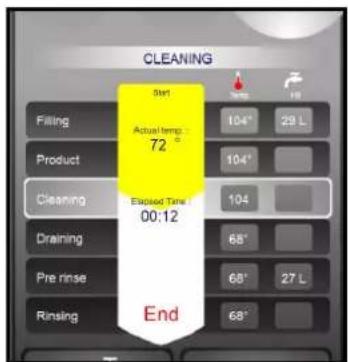

| VBPT10E | VBPT15E | |
| Cleaning | ||
| Water volume (gal) | 8 | 12 |
| Detergent (fl oz) | 2 to 3.5 | 3.5 to 5 |
| Rinsing | ||
| Water volume (gal) | 7 | 10 |
- When cleaning is finished the screen displays:


Rinse the tank with the spray hose then press "YES" when finished.
- Then press the button to return to the Toolbox menu


"END" finishes the cycle.
10.2 MANUAL CLEANING AT THE END OF SERVICE (or between 2 different types of cooking)
- Start the appliance.
- Wait a few seconds for the welcome screen to clear.
- Check that the drain outlet is closed


- Fill the tank with a few centimetres of water
- Add as required a degreasing agent (after cooking with fat...) or a descaler (after cooking using water ...)

- Heat the water to around 130°F to activate the product
- Clean the base using a spatula suitable for high temperatures or a special stainless scourer. Clean the cooktop regularly as it is important to avoid repeated incrustation of dirt

→ Activate the water feed

→ Open the drain outlet

→ Stop the water feed

→ Tilt the tank into the drain position
- Finish the rinse with the spray hose
- Dry with paper towel
Note: It is strongly advisable to dry the base of the tank. Stagnant water mixed with cleaning products or chlorine, even diluted, can in the long term, cause irreversible corrosion to the tank base
10.3 RAPID CLEANING OF TANK
- Start the appliance.
- Wait a few seconds for the welcome screen to clear.
- Check that the drain outlet is closed

→ Activate the water feed

→ Open the drain outlet
- Clean the base using a spatula suitable for high temperatures or a special stainless scourer. Clean the cooktop regularly as it is important to avoid repeated incrustation of dirt

→ Stop the water feed

→ Tilt the tank into the drain position
- Finish the rinse with the spray hose
10.4 RETRACTABLE SPRAY HOSE

Attention:
For your safety the hose cannot be used:
- in any mode if the tank probe detects a temperature over 266°F.
natural_image
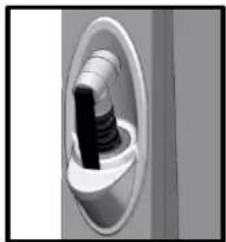
Close-up of a mechanical component with a cylindrical shaft inserted into a circular opening (no visible text or symbols)- The spray hose reel is fitted with a hose lock in the "out" position, so that permanent traction is not required.
- As the hose is unwound, you can hear a "click" every time the reel is turned halfway round.
- To lock the hose, release the traction as the click is heard.
- To wind it back in release the traction whilst there is no click audible (Between clicks)
- Use:
- Press the lever on the spray head.
Note: When the unit is in standby mode there is no water supply to the hose
NOTE: The spray hose can be locked in the open position: Turn the lever a quarter turn to keep water flowing.
11 GUIDANCE AND INFO ABOUT THE CONTROL SCREEN
How do you create a waiting phase in a programme?
Entering a set temperature of 32^ F starts a waiting phase where nothing happens (no heating).
How do you create a temperature hold phase?
In Auto mode selecting a time of 99h00 is interpreted as a holding phase (no cooking) in the mode and temperature selected.
How do you view the cooking phases in a recorded or programmed recipe?
It is possible to view the phases of a recipe by pressing the detail button « ? ».
How do you adjust the cooking during a factory recipe?
For factory recipes the colouration and degree of cooking can be adjusted even after the cooking cycle has started.
Can you illustrate the recipes?
In the client library: you can link a photo to a recipe and display just the recipes that have a photo. (Auto / Modifier / Photo)
Can you protect recorded recipes?
It is possible to lock access to modification / erase / copy recipes (client parameters).
How can you identify a copy from the original recipe?
A copied recipe is symbolised by a « * » before the name.
How can you change the name of a « client » recipe?
The name of a « client » recipe can be personalised: Modify /click on the name or family zone / Change the name or family.
Why can't I modify my recipes in auto mode?
Because « Modify » is de-activated in client parameters.
Can you preheat the unit automatically?
The automatic preheat function can be activated or deactivated when powered up (bratt pan preheat). The preheat temperature is equally programmable (client parameters).
How do you know the unit is up to temperature (is ready...)?

It is possible to activate Preheat function in manual mode. The Stop start button displays a bar graph: when the button is entirely green (an audible signal will sound) the working temperature has been reached.
Can you programme recipes in multi zone mode?

The programmes in the VULCAN recipe library named « Boiling pan 6 timers » and « Sous vide regen. 6 timers » allow you to trigger a specific time countdown for each zone with an audible alarm at the end of the countdown. The programme in the VULCAN recipe library named « Plancha high gradient» allow you to trigger a specific time countdown for each zone with an audible alarm at the end of the countdown.
At what interval should maintenance be planned?
A service message appears when necessary 10 days before maintenance is required.
How do you access client parameters?

Access to the « client parameters» menu is via a PIN code, by default « 0000 » this can be personalised DO NOT LOOSE THE NEW CODE!
Why can't I access installer and technician parameters?
Access to these parameters is by PIN code and reserved for the installation and after sales technicians.
Does the unit have a standby mode?
The unit has an automatic standby mode that can be personalised in client parameters, this puts the unit principal functions into stand by (blank screen).
Can the welcome message be personalised?
The logo and welcome message can be personalised in client parameters. One can change the message, the photo gallery allows you to select welcome Photo or Logo.
How do you recover HACCP data?

Can you access energy and consumption cost data ...?
In the menu for Service / Data exchange / consumption, daily consumption and monthly figures for the last 12 months are stored for water, electricity/gas detergent. A direct display in the desired currency is available if the corresponding costs are entered in "Client parameters".
What is « safe, limp » mode?
In the event of a failure of the facia panel electronics or display, it is possible to start the "safe" mode: Bratt pan mode at the preheating temperature (set in the client parameters or 350^ by default). When this "safe" cooking mode is started, actions on the front panel are not taken into account.
How do you start the « safe, limp » function?
Turn off and then turn on the braising pan again and then open and close the cover 3 times in less than 10s. It is also possible to reset the interface opening and closing the cover 6 times in less than 10 seconds.
How do you stop the « safe, limp » function?
Simply turn the power off.

VULCAN
A division of ITW Food Equipment Group LLC
P.O. Box 696
Louisville, KY 40201
Is there a shortcut to start the water filling process?
A long press on the fill button opens the water supply immediately (without going through the fill screen). In this case, the filling must be stopped manually. Similarly, a long press during filling will stop filling.
Is there a shortcut to start tilting the tank?
A long and held press, with movement of the finger down (to empty the tank) or up (to return the tank to the working position), allows it to be tilted as long as the pressure is maintained. The tilting will stop as soon as pressure is released.
How do you adjust the power for delicate products?
In boiling pan mode, pressing the boiling pan button again selects the fineness of cooking: "DELICATE", the softest cooking "NON-DELICATE", fastest cooking
How do you use the cleaning mode?
In the service mode, an assistance mode for manual washing is accessible by pressing the "START" button.
Can you programme recipes with basket lift?
The programs in the "VULCAN" recipe library marked with a green logo allow you to cook with basket lifting. They are only available (visible) if the unit is configured with the basket lifting option.
Why does my spray hose not work?
The display is probably in standby, or the unit has identified a risk of hot liquid (well temperature above 266°F).
12 CORE PROBE SOCKET / USB PORT
The core probe socket and USB port are fitted with silicone protective covers.
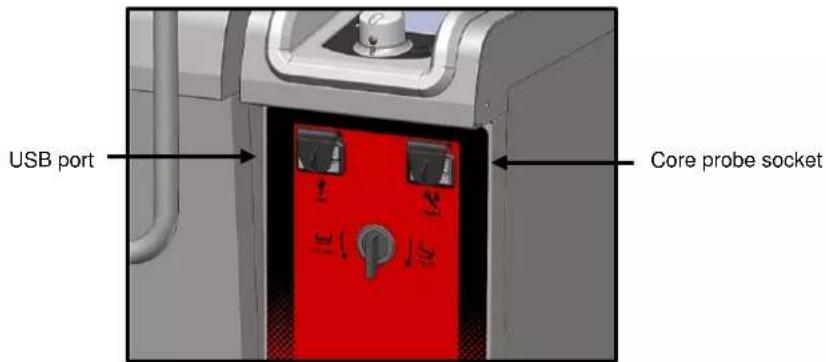

Warning!
◆ Always put the protective cover in place (lowered to protect connections) whenever sockets are not in use.
- Never "clean" connections with a water hose or a sponge. (If the silicone covers are used and put back in place after use, no maintenance is necessary).
The guarantee will not apply if these recommendations are not observed.
Note: For information on using a USB stick, refer to the "paragraph Exporting data"
13 BASKET LIFT
Fitting the basket lift arm

natural_image
Diagram of a kitchen sink with a handle and arrow indicating direction (no text or symbols)- Open the lid.
- Engage the arm on each side of the lid axis.
Using the basket lift

Attention: Respect the 17 lb maximum load for finished product per basket. Take into account the increase in weight of dry product as it cooks.
- Locate the basket lift arm.
- Fit the basket(s)

natural_image
3D rendering of a mechanical device with a grid basket and metal frame (no visible text or symbols)- Fit up to 2 or 3 GN 1/1 6 inch deep baskets (depending on the model).
- Select the cooking method (Boiling pan)
- Set a temperature
- Set the desired cooking time.

→ Allows adjustment of the immersion time for the baskets. The process is started by pressing the basket lift button.

The immersion time is displayed until the button is pressed then the remaining cooking time is displayed.
→ When the cooking time hits 0:
The baskets will lift automatically
- Set cooking time will be displayed again
Note: Pressing the 'Immersion' button without inputting a time starts a manual lift cycle when the 'lift' button is pressed (the counter indicates the time that the baskets have been immersed)
Note: The lift arm cannot be lowered if either of these two things has not been done:
- The lid must be in the fully open position.
- The tank must be lowered (horizontal).
Note: Using the baskets guarantees product quality, avoiding the need to manually unload the unit during which delicate products (petit pois...) can be spoiled.
14 MAINTENANCE
14.1 INFORMATION ABOUT STAINLESS STEELS
Stainless steel is a steel grade designed that a thin protective sheet is formed on the metallic surface, which protects it against corrosion (Oxide film resulting from the chemical reaction of oxygen on the metallic surface).
Anything hindering the formation of this sheet, or facilitating its partial destruction (Food residues, overflow of liquids, stagnant liquids...) reduces the resistance of stainless steel to corrosion.
Whilst the composition of stainless steel enables it to withstand some chemical aggression better than classical steels, you must not think that stainless steel is indestructible.
- 3 main factors contributing to corrosion should be watched for:
- The chemical environment in general:
* Different brines (Salt concentration, Sauerkraut...)
* Chlorides contained in particular in:
- cleaning products
- bleach.
- The temperature:
Any chemical environment is made considerably more aggressive to stainless steel as the temperature rises.
- The duration:
The longer the contact time between stainless steel and the chemicals, the more noticeable the consequences of corrosion will be.
The combination of these three factors may lead to the eventual destruction of parts of the equipment, even if they have been made in very high-quality stainless steel.
Note that when stainless steel becomes corroded, it is extremely rare that this is generated by the steel itself. Generally, cleaning products, which are not appropriate or are improperly used, lack of maintenance or extreme conditions of use are often found to be the cause of the damage.
WARNING!
The manufacturer will not be held responsible for cases of corrosion resulting from these conditions and the warranty will not apply.
A list of the most frequent causes follows, to allow you to better identify possible inappropriate use and to ensure the long service life of your equipment.
14.2 THE COMMONEST CAUSES OF CORROSION:
Floor cleaning
Floors are often cleaned with very aggressive products (prior to handover or during a kitchen deep clean). If the product is sprayed, without necessary precautions or suitable dilution, any splashes on the appliances may result in the corrosion of legs, bases and low level trims. Worse still, if the area is not properly ventilated after application, the vapour from these products may settle on the equipment and result in corrosion spreading to the entire surfaces.
Inappropriate cleaning product (Bleach, Acids, Soda)
If inappropriate products, such as bleach, acid, or soda dilutions, (all products which are not specifically designed for the maintenance of stainless steels) are used, irreversible etching of the stainless-steel surfaces can occur.
Cleaning product applied when the temperature is too high
All cleaning products are more aggressive at higher temperature. In principle the temperature of any surface must not exceed 60^ C or permanent staining (blackening) of the stainless steel will result.
Inadequate rinsing after cleaning
After cleaning the surfaces should all be rinsed thoroughly to remove any chemical residues. If this is not done the residue will continue to act over time with the risk of starting the corrosive process.
Worse still, if the affected surface is submitted to temperatures over 60^ C (inside of an oven, a tank or tank...), the impact will be greater, and corrosion will almost inevitably occur.
Stagnation of cleaning products
In the same way, all the areas that can trap chemicals, especially the channels, gutters, drainage manifolds, traps etc. must be subject to careful and plentiful rinsing. (Use a nylon brush to reinforce the action of rinsing with clean water).
Salt concentration
Salt, much in use in kitchens, is often found to be the origin of pitting that can even penetrate the stainless steel. Spillages on any surface should be cleaned up at once.
Particular case of cooking in boiling salted water:
Salting water in a tank or tank presents a major risk: never put cooking salt into the tank before the water and remember that salt can concentrating on the base of the tank. Salt should be added to the water and stirred until it dissolves, the risk is reduced using table salt which dissolves faster.
Intensive use with brine
Certain products, such as sauerkraut (acid juices), fish and sea food (presence of salt), and in general, all brines, must be subject to particular attention. In the case of occasional use there should be no problem if equipment is carefully and systematically cleaned after each use. In the case of intensive use, all the cooking equipment (ovens, boiling pans, even utensils) must be selected with a grade of stainless steel specifically adapted to use in such an environment

VULCAN
A division of ITW Food Equipment Group LLC
P.O. Box 696
Louisville, KY 40201
Too much chlorine in the mains water supply
Sometimes certain networks supply water containing chlorine at above normal levels. In this event it is not unusual to be faced with problems of corrosion, pay particular attention to bain-marie, water baths, and equipment left to soak overnight etc.
Cleaning aluminium or aluminium coated items
The presence of aluminium or items that are aluminium coated in a chlorine solution is a particularly powerful catalyst for damaging stainless steel. Do not leave fittings such as hood filters, aluminium trays or dishes soaking in tanks, tanks, pots, fryers etc. Just one night is sufficient to etch stainless steel at the point of contact with aluminium.
15 MAINTENANCE OF APPLIANCE
WARNING: Regular and thorough cleaning will ensure prolonged service life
♦ UNDER NO CIRCUMSTANCES SHOULD CLEANING CHEMICALS BE USED ON SURFACES THAT ARE OVER 140°F.
- The result will be serious discolouration and damage to the surfaces.
◆ Jet washers and hoses, high or low pressure should never be used for cleaning.
◆ The warranty will not cover resulting damage if the following guidance is ignored.
◆ The appliance must be isolated electrically during cleaning or maintenance and when replacing parts.
- Cleaning operations (except the inside of the tank) must be undertaken with the tank lowered (horizontal). This protects the heating elements and active parts from splashing.
15.1 CLEANING STAINLESS STEEL SURFACES
It is necessary to keep the metal surface perfectly clean by removing all dust, metallic particles and deposits of any nature that could damage the protective sheet as mentioned above.
To achieve this, it is sufficient to wash these surfaces with water and soap or any neutral, non-abrasive detergent product. RINSE CAREFULLY and wipe the surfaces dry. Never scrub stainless steel with wire, if necessary, use a non-stick scourer or similar and scrub in the same direction as the stainless steels polished finish.
15.2 MAINTENANCE OF INTERNAL SURFACES (TANK)
The general principle consists in not letting the following settle in certain places:
- Substances likely to become concentrated and so become corrosive.
- Settling of different minerals contained in water and likely to generate corrosion (walls) performance and life-duration (fan balancing, exchanger dissipation, ...) problems.
15.3 CLEANING THE LID GASKET
In order to remove traces of grease or food scraps that can damage the gasket, regular and manual cleaning of the lid gasket should be performed on the inner and outer faces.
Before cleaning, use water with soap or neutral and non-abrasive detergent with a sponge or a soft cloth to remove the grease from the lid gasket.
15.4 MATERIAL USED FOR COOKING CORROSIVE PRODUCTS (Sea fish, sauerkraut)
The materials used intensively and regularly for cooking corrosive products, such as sea fish, sauerkraut, ..., should be cleaned carefully and systematically after each use.
16 PREVENTATIVE MAINTENANCE
The appliance must be isolated electrically during cleaning or maintenance and when replacing parts.
| Subject | Daily | Weekly | Monthly | Every year (Or every 3000 h) | Recommendations |
| Clean external surfaces (including grills, solid tops, planchas, tanks and containers...) | x | Use the correct dose of cleaning product; Do not use abrasive products. | |||
| Cleaning the internal surfaces (Ovens, cupboards, undercounter units...) | x | Use the correct dose of cleaning product; rinse thoroughly; alert after sales if there are signs of rust | |||
| Visual check of the facia labels | x | Must not have deteriorated (Overheated, crack...) Do not douse with water if there is any deterioration of the facia labels; Alert the after sales service at the first signs of deterioration. | |||
| Cleaning the screen glass | x | Removes grease deposits | |||
| Cleaning the lid seal | x | Use the correct dose of cleaning product; rinse thoroughly, do not use abrasive products. | |||
| Cleaning the cooking system | x | Clean the pressure cooking system once a week by pressure cooking (pressure mode selected) without food or cleaning product with the minimum of water, for 5min. (see the procedure in « Pressure lid option ») | |||
| Visual check of the lid seal | x | If deteriorated alert the after sales service | |||
| Cleaning the drain outlet | x | Unscrew and / or remove the drain outlet – Clean the assembly – Check the state of the seals, if there is any deterioration contact after sales | |||
| Periodic maintenance by the after-sales service | x |
17 OPERATING FAULTS
Client error information: ixx
Green screen: Information on the cooking

Non-blocking message Touching the screen anywhere will clear the message
Red screen:
Cooking stopped (pause)

Blocking message Cooking stops
After sales error information: Exx
Red screen:
Cooking stopped (pause)

Blocking message Cooking stops
| Message on the screen | Consequences | What to do? |
| i28: Core probe: Faulty or missing when cooking starts | Cooking will not start | To start cooking connect the probe or replace it if necessary. Switch to timer mode if necessary. If the problem persists, call your after sales service |
| E30: Electronics overheating: (>158°F) | Cooking continues automatically at a temperature below 356°F | Installation problem: check the proximity of a heating unit to the right hand side.If the problem persists, call your after sales service |
| E32: Core probe: 2 sensors faulty | Cooking continues. | Replace the core probe as soon as possibleIf the problem persists, call your after sales service |
| i33: Core probe faulty or missing whilst cooking | Cooking stops | To continue cooking connect the probe or replace it if necessary. Switch to timer mode if necessary. If the problem persists, call your after sales service |
| i41: Lack of water detected: water is not flowing from the spout | Cooking continues.A cleaning cycle stops (Paused) or automatic filling | Check the water supply to the unit (Valve open, pressure...).If necessary, call your after sales service |
| E43: Leak detected | Cooking continues. | Turn the water supply off and call your after sales service |
| i49: USB stick full or missing | USB stick full or USB awaited | Clear the USB stick or connect another one.If the problem persists, call your after sales service |
| EFr: Tank probe overheated | Cooking stops | Switch the appliance off and call your after sales service |
| EFx: Tank base overheated (x = Number of the zone) | Cooking stops | Switch the appliance off and call your after sales service |
| ESx: Tank base probe short circuit or disconnected (x = Number of the zone) | Cooking stops | Switch the appliance off and call your after sales service |
| ESb: Tank base probe short circuit or disconnected | Cooking stops | Switch the appliance off and call your after sales service |
| ESA: Tank base overheated | Cooking stops | Switch the appliance off and call your after sales service |
| E72: Electronics at >185°F | Cooking stops | Installation problem: check the proximity of a heating unit to the right hand side.If the problem persists, call your after sales service |
| E90: Detection of tank tilt ram being blocked | If the tank can be returned to the horizontal position the unit can be used for cooking (without any movement of the tank) | Something is jammed under the tank preventing it from moving: Clear it if you can.If the problem persists, call your after sales service |
18 RECOMMENDED AND FRONT LINE SPARE PARTS
| Designation | Codes |
| FastPAD 2 Precipan interface assembly | 156817 |
| Electric ram after sales kit LA31 6000N 24V | 156823 |
| Electric ram after sales kit (ram + cable) LA23 2500N 24V | 156824 |
| Single solenoid 1 x 15 litres/min UL | 156864 |
| 3-way solenoid 3 x 15 litres/min UL | 156865 |
| Reed switch | 300676 |
| 230 V lever microswitch | 300678 |
| Three-pole 25A 230V 50/60 Hz contactor | 300697 |
| Three-pole 32A 230V 50/60 Hz contactor | 300698 |
| Three-pole 40A 230V 50/60 Hz contactor | 300699 |
| Three-pole 50A 230V 50/60 Hz contactor | 300700 |
| Tree-pole 80A 230V 50/60 HZ contactor | 300702 |
| Anti-interference relay | 300769 |
| Ultra-fast fuse 0.2A 250V 5 x 20 | 300787 |
| 5 x 20 fast fuse 1amp | 300789 |
| Contactor LC1D80P7 | 300798 |
| Block RC LA4DA2U | 300799 |
| Glass fuse 4A | 300801 |
| Snap Action Switching | 300804 |
| Manual resetting 320°C thermostat + nut | 301066 |
| Encapsulated PT100 probe | 301504 |
| Well base probe | 301506 |
| Armoured 4650-Watt element | 302278 |
| Armoured 4650-Watt element - 277V | 302294 |
| Axial fan | 304194 |
| lever microswitch | 306913 |
| Fuse 5x20 4A FSF | 306963 |
| Switching power supply | 308351 |
| 415 VA Transformer | 308499 |
| Fuse 3.15 Amps | 309407 |
| Inter card cable (2 metres long) | 309614 |
| Coder | 309632 |
| FastPAD 2 Screen | 309646 |
| FastPAD 2 Max UL relay connection | 309663 |
| FastPAD 2 Precipan power card | 309701 |
| Flow meter 100 G1/2 | 314388 |
| Retractable spray hose kit | 316187 |
| Transparent silicone tube | 366068 |
| Outlet seal | 366657 |
| Lid seal with cut-out | 366675 |
| Lid seal with cut-out | 366676 |
| Anti-parasite module | 407002 |
19 RECOMMENDATIONS
◆ These appliances are for professional use, only appropriately trained personnel should use them.
These appliances are intended to be used for commercial applications, for example in kitchens of restaurants, canteens, hospitals and in commercial enterprises such as bakeries, butcheries, etc., but not for continuous mass production of food.
These appliances must be installed with sufficient ventilation to prevent the formation of an excessive concentration of substances harmful for health within the premises in which they are installed.
Do not manually introduce cold water into a preheated tank that is empty. The interface provided for the water supply must be used
- Do not exceed the indicted maximum loadings.
- Only work with the tank lowered.
♦ Do not heat for long periods with the tank empty.
The electronic control incorporates a high limit safety at 400^ F. If the temperature exceeds this the unit will switch off and the error code EFr will be displayed. Isolate the unit and call a service engineer.
In the event of an error message consult the error message section and follow the advice given.
When moving a mobile cooking suite always take precautions to avoid it tipping over and check it is level before using it again.
- When cleaning high pressure jets or lances should never be used.
THE APPLICATION OF THE HOT CLEANING PRODUCT, ABOVE 140°F, IS STRICTLY PROHIBITED. The walls of the unit would be irreparably damaged (dark colour, almost black).
For long term reliability and safety, it is advisable to have the unit serviced twice a year by suitably qualified technicians.
The appliance must be isolated electrically during cleaning or maintenance and when replacing parts.
◆ The core probe socket and USB port are fitted with silicone protective covers.
- Always put the protective cover in place (lowered to protect connections) whenever the socket is not in use.
- Never "clean" connections with a water hose or a sponge. (If the silicone cover is used and put back in place after use, no maintenance is necessary).
The manufacturer certifies that the packaging meets the provision 94/62/CE (relating to packaging and packaging waste of 20.12.94) and requests that the final installer (or user) observes the rules relating to the removal of the packaging (recycling or reuse).
- “ According to article 6 of the decree of 20 July 2005 a marking giving the identity of the manufacturer and the market release date must appear on equipment after 13 August 2005. ”
« The Manufacturer has filled in the National Register. »
As per the legal provisions in force (article 21 & 22 of the decree 2005-829), the customer is responsible for the obligations relating to the elimination of electric and electronic waste, namely:
- he is to deal with selective treatment, reconditioning and destruction of residue arising from electric and electronic equipment, selectively collected in the installations meeting the technical requirements or in any other installation authorised for the purpose, in another member State of the European Union, or in another State so far, the transfer of these residues out of France is made according to the provisions of the Regulation of 1st February 1993 indicated above.
- he must make sure that all fluids of electric and electronic equipment are drained according to the requirements of the provisions.
- he must make sure that the information relating to the removal and treatment of these residues is forwarded to any further acquirer.
The warranty will not cover problems caused by failure to comply with these recommendations

Warning! Danger! Caution!
♦ Cooking equipment and their heated surfaces reach high temperatures. BE AWARE of the risk of burns when using them or handling accessories (grills, plates...).
When deglazing: BEWARE of spills and splashes.
The tank base can reach 482°F: BEWARE of the risk of burns. In particular when moving the lid or locking it (pressure lid) and or when tilting the tank.
When there is hot or boiling water in the tank: BEWARE of the risk of burns.
When using the core probe be aware that it can be very hot, always use suitable protection to avoid burns
When handling the drain plug, BEWARE it can be very hot. Use protection for removing the drain plug when it is hot
20 GUARANTEE
PLEASE NOTE THAT NO GUARANTEE IS UNCONDITIONAL
Our guarantee applies only for normal use. That is, with the strict observance of the recommendations given in our instructions for use and maintenance.
It will only be valid on condition that the periodical maintenance recommended has been carried out by factory trained engineers.
All appliances are, subject to the above limitations, normally guaranteed for a period of one year, from the date invoice. In the event of a breakdown due to a visible or hidden defect, our equipment will be repaired at our expense, including parts and labour costs.
To benefit from our guarantee, our appliances must not have been modified in any way or repaired using parts which are not genuine and approved for such use or where repairs have been undertaken by personnel who are not qualified, or factory trained.
In case of breakdown or failure we should be informed in writing at the earliest opportunity of the nature of the problem. In no circumstances should the defect be remedied by the user or a third party.
Regular service inspections and maintenance by our engineers are an essential condition for correct and reliable operation of our equipment. Such service and maintenance operations can and must only be carried out by our technicians, who are not only fully qualified but also trained to do so. They have the right tooling, original spare parts and are given regular training updates on the appliances. Periodic servicing is essential; it is carried out at a cost but guarantees reliable operation of our appliances
The timing of service and maintenance is relative to the conditions of use. In the event of heavy use certain operations will need to be carried out more frequently.
WARNING! Damage caused by connecting our appliances to a power supply which does not comply with the data plate (voltage, reversal of phase/neutral conductors...) or where phase order cannot be checked (this is important for three-phase motors, fan direction, electric rams...) will under no circumstances be covered by warranty.
For this reason, we advise against connecting appliances until the electrical and gas supplies can be checked and compared with details on the data plate.
A division of ITW Food Equipment Group LLC
P.O. Box 696
Louisville, KY 40201
22 MENU MANUEL
A division of ITW Food Equipment Group LLC
P.O. Box 696
Louisville, KY 40201

natural_image
Pure diagram of a mechanical or structural component with no visible text, numbers, or symbolsA division of ITW Food Equipment Group LLC
P.O. Box 696
Louisville, KY 40201
26.5 QUICK GUIDE
A division of ITW Food Equipment Group LLC
P.O. Box 696
Louisville, KY 40201
30 MENU NETTOYAGE
30.1 NETTOYAGE MANUEL EN FIN DE SERVICE (Assisté)
natural_image
Close-up of a mechanical component with a cylindrical shaft inserted into a circular housing (no visible text or symbols)A division of ITW Food Equipment Group LLC
P.O. Box 696
Louisville, KY 40201
natural_image
3D diagram of a mechanical device with arrows indicating force or movement, showing internal components and no readable text or symbols.natural_image
3D rendering of a mechanical device with a grid basket mounted on top, no visible text or symbolsA division of ITW Food Equipment Group LLC
P.O. Box 696
Louisville, KY 40201
Attention! Danger! Prudence!

- COMPOSITION DES APPAREILS / COMPOSITION OF THE APPLIANCES
- CONSEILS PRATIQUES D'UTILISATION / PRACTICAL HINTS FOR USE
- LIMITES D'UTILISATION / USABLE LIMITS
- - WARNING -
- GENERAL
- VERROUILLAGE ECRAN
- MANUAL MENU
- BRATT PAN (PLANCHA) MODE
- KETTLE (BRAISING PAN) MODE
- MULTI ZONE MENU
- Multi zone menu
- AUTO MENU
- AUTOMATIC / PROGRAMMED RECIPES
- FAVOURITE RECIPE
- TYPE OF DISPLAY
- CREATING A RECIPE
- TOOL BOX MENU
- PASSWORD
- DATA EXCHANGE
- CLIENT PARAMETERS
- PREVENTIVE MAINTENANCE
- QUICK GUIDE
- WATER FILL MENU
- Attention:
- Cold water supply (by default)
- DRAIN MENU
- TANK TILT
- VULCAN
- CLEANING MENU
- Manual cleaning at the end of service (Assisted)
- MANUAL CLEANING AT THE END OF SERVICE (or between 2 different types of cooking)
- RAPID CLEANING OF TANK
- RETRACTABLE SPRAY HOSE
- GUIDANCE AND INFO ABOUT THE CONTROL SCREEN
- How do you create a waiting phase in a programme?
- How do you create a temperature hold phase?
- How do you view the cooking phases in a recorded or programmed recipe?
- How do you adjust the cooking during a factory recipe?
- Can you illustrate the recipes?
- Can you protect recorded recipes?
- How can you identify a copy from the original recipe?
- How can you change the name of a « client » recipe?
- Why can't I modify my recipes in auto mode?
- Can you preheat the unit automatically?
- How do you know the unit is up to temperature (is ready...)?
- Can you programme recipes in multi zone mode?
- At what interval should maintenance be planned?
- How do you access client parameters?
- Why can't I access installer and technician parameters?
- Does the unit have a standby mode?
- Can the welcome message be personalised?
- How do you recover HACCP data?
- Can you access energy and consumption cost data ...?
- What is « safe, limp » mode?
- How do you start the « safe, limp » function?
- How do you stop the « safe, limp » function?
- Is there a shortcut to start the water filling process?
- Is there a shortcut to start tilting the tank?
- How do you adjust the power for delicate products?
- How do you use the cleaning mode?
- Can you programme recipes with basket lift?
- Why does my spray hose not work?
- CORE PROBE SOCKET / USB PORT
- Warning!
- BASKET LIFT
- Fitting the basket lift arm
- Using the basket lift
- MAINTENANCE
- INFORMATION ABOUT STAINLESS STEELS
- THE COMMONEST CAUSES OF CORROSION:
- Floor cleaning
- Inappropriate cleaning product (Bleach, Acids, Soda)
- Cleaning product applied when the temperature is too high
- Inadequate rinsing after cleaning
- Stagnation of cleaning products
- Salt concentration
- Intensive use with brine
- Too much chlorine in the mains water supply
- Cleaning aluminium or aluminium coated items
- MAINTENANCE OF APPLIANCE
- WARNING: Regular and thorough cleaning will ensure prolonged service life
- CLEANING STAINLESS STEEL SURFACES
- MAINTENANCE OF INTERNAL SURFACES (TANK)
- CLEANING THE LID GASKET
- MATERIAL USED FOR COOKING CORROSIVE PRODUCTS (Sea fish, sauerkraut)
- PREVENTATIVE MAINTENANCE
- OPERATING FAULTS
- RECOMMENDATIONS
- Warning! Danger! Caution!
- GUARANTEE
- PLEASE NOTE THAT NO GUARANTEE IS UNCONDITIONAL
- MENU MANUEL
- QUICK GUIDE
- MENU NETTOYAGE
- NETTOYAGE MANUEL EN FIN DE SERVICE (Assisté)
- Attention! Danger! Prudence!
Brand : Vulcan
Model : VPP40
Category : Saucepan