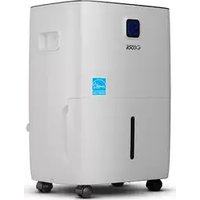
CCD50PJW - Dehumidifier Commercial Cool - Free user manual and instructions
Find the device manual for free CCD50PJW Commercial Cool in PDF.


| Product Type | Portable Dehumidifier |
| Brand | Commercial Cool |
| Model | CCD50PJW |
| Dehumidification Capacity | 50 pints/day (≈ 23.6 L/day) at 30°C and 80% RH |
| Power Supply | 115 V ~ 60 Hz |
| Refrigerant / charge | R32 / 150 g |
| Operating Temperature Range | 7 °C to 35 °C |
| Relative Humidity Range | 35% to 80% RH |
| Control Type | Electronic with display and touch panel |
| Main Functions | Dehumidification, built-in drain pump (P model), 24-hour timer, child lock, continuous mode, resettable filter |
| Fan Speeds | Low, Medium, High |
| Preset Modes | Sleep Zone (55% RH), Living Space (50% RH), Basement (45% RH), Continuous |
| Drain Type | Removable bucket (not specified) or continuous drain with included hose, pump up to 16 feet height |
| Bucket Capacity | Not specified in the manual (typical estimate ≈ 3.8 L) |
| Auto Shut-off | Yes, bucket full or continuous drain activated |
| Auto Restart | Yes, after power outage |
| Air Filter | Washable, clean every 2 weeks |
| Maintenance and Cleaning | Clean bucket with warm water, filter with clean water, housing with soft cloth and mild detergent |
| Safety | Grounded plug, overheating protection, child safety, auto shut-off when bucket full |
| Warranty Period | 1 year parts and labor (manufacturing defects) |
| Customer Service | 855-855-0294 (United States and Puerto Rico) or service@equitybrands.com |
Frequently Asked Questions - CCD50PJW Commercial Cool
User questions about CCD50PJW Commercial Cool
0 question about this device. Answer the ones you know or ask your own.
Ask a new question about this device
Download the instructions for your Dehumidifier in PDF format for free! Find your manual CCD50PJW - Commercial Cool and take your electronic device back in hand. On this page are published all the documents necessary for the use of your device. CCD50PJW by Commercial Cool.
USER MANUAL CCD50PJW Commercial Cool
natural_image
Line drawing of a compact air purifier with wheels and a door, no text or symbols presentCCD25JW, CCD35JW, CCD50JW, CCD50PJW
CONTENTS
SAFETY INFORMATION
Important Safety Instructions....3-4
Grounding Instructions....5
Use of Extension Cords with Dehumidifier....6
SET UP & USE
Parts & Features 7-8
Control Panel....9
Operation Instructions....10-11
Draining the Collected Water 12-15
CLEANING & CARE....16
TROUBLESHOOTING & WARRANTY
Before You Call For Service....17
Customer Service....17
Troubleshooting....18
Limited Warranty....19
PRODUCT REGISTRATION
Thank you for purchasing our COMMERCIAL COOL product.
This easy-to-use manual will guide you in getting the best use of your portable dehumidifier.
Remember to record the model and serial numbers. They are on a label on the rear.
Model number
Serial number
Date of purchase
Staple your receipt to your manual.
You will need it to obtain warranty service.
SAFETY INFORMATION

DANGER
DANGER - Immediate hazards which WILL result in severe personal injury or death

WARNING
WARNING - Hazards or unsafe practices which COULD result in severe personal injury or death

CAUTION
CAUTION - Hazards or unsafe practices which COULD result in minor personal injury
IMPORTANT SAFETY INSTRUCTIONS

WARNING
When using electrical appliances, basic safety precautions should be followed, including the following
-
To reduce risk of injury, read this guide before using the appliance.
-
Always place the unit on a level surface strong enough to support the unit with a full bucket of water.
-
Never use or store gasoline or other flammable vapor or liquid near this unit.
-
Minimum installation clearance: 11.8 inches around the unit and 17.7 inches above the unit. Do not block or cover air inlet or outlet grills.
-
The unit must be connected to a correctly grounded power supply.
-
Do not start or stop the unit by inserting or pulling out the power plug.
-
Do not use the unit in the immediate surroundings of a bath, a shower, swimming pool or clothes dryer.
-
Do not insert anything into the air outlet.
-
If the supply cord is damaged, it must be replaced by the manufacturer, its service agent or similar qualified person in order to avoid a hazard.
-
When cleaning or storing the unit, always turn the unit off and unplug the power cord.
-
Do not use outdoors. Intended for indoor use only, except for laundry rooms.
-
Place the dehumidifier in an area where the temperature will not fall below 41^ Fahrenheit. The coils can become covered with frost if the room temperature is too low, which may reduce performance.
-
The appliance shall be installed in accordance with national wiring regulations.
-
The appliance is not intended for use by persons (including children) with reduced physical, sensory or mental capabilities, or lack of experience and knowledge, unless they have been given supervision or instruction concerning the use of the appliance by a person responsible for their safety.
SAFETY INFORMATION
- Do not place the unit close to heat-generating devices or near flammable and dangerous materials.
- Do not insert fingers or any object into the intake or discharge ducts.
- Do not sit or stand on the unit.
- Discard water that has collected in the tank as required.
- Do not operate in a closed area such as inside a closet.
- Do not use near edible items, objects of art or scientific materials.
- Install drain piping at a downhill grade to make sure that condensed water can be drained continuously.
- If the power supply cord is damaged, it must be replaced by the manufacturer or a similarly qualified person in order to avoid a hazard.
- The appliance must be positioned so that the plug is accessible.
- The appliance cannot be used in public transportation.
- This appliance can be used by children aged from 8 years and above and persons with reduced physical, sensory or mental capabilities or lack of experience and knowledge if they have been given supervision or instruction concerning use of the appliance in a safe way and understand the hazards involved. Children shall not play with the appliance. Cleaning and user maintenance shall not be made by children without supervision.
- Children should be supervised to ensure that they do not play with the appliance.
- Appliances that are obviously damaged must not be operated.
SAVE THESE INSTRUCTIONS HOUSEHOLD USE ONLY
SAFETY INFORMATION
GROUNDING INSTRUCTIONS
ELECTRICAL REQUIREMENTS
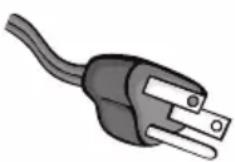
In the event of malfunction or breakdown, grounding provides a path of least resistance for electric current to reduce the risk of electric shock. The appliance must be connected to a cord having an equipment-grounding conductor and a grounding plug. The plug must be plugged into an appropriate outlet that is properly installed and grounded in accordance with all local codes and ordinances.
DANGER - Improper connection of the equipment grounding conductor can result in a risk of electric shock. The conductor with insulation having an outer surface that is green with or without yellow stripes is the equipment grounding conductor. If repair or replacement of the cord or plug is necessary, do not connect the equipment-grounding conductor to a live terminal. Check with a qualified electrician or service person if the grounding instructions are not completely understood, or if in doubt as to whether the appliance is properly grounded. Do not modify the plug connected to the appliance – if it will not fit the outlet, have a proper outlet installed by a qualified electrician.
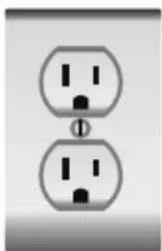
The appliance is for use on a nominal 120V circuit and should be connected to a grounding outlet that looks like the one illustrated to the right. The use of a temporary adaptor is not recommended.
natural_image
Two identical electrical socket symbols with internal terminals, no text or labels presentPOWER SUPPLY CORD
- Extreme care must be exercised with the use of an extension cord:
a) Use only a grounding type 3-wire extension cord that has a 3-blade grounding plug and a 3-slot receptacle that will accept the plug on the appliance.
b) The marked electrical rating of the cord set or extension cord must be equal to or greater than the electrical rating of the appliance. The longer cord should be arranged so that it will not drape over the counter top or table top where it can be pulled on by children or tripped over unintentionally.
NOTE: Neither COMMERCIAL COOL nor the dealer can accept any liability for damage to the product or personal injury resulting from failure to observe the electrical connection procedures.
SAFETY INFORMATION
USE OF EXTENSION CORDS WITH DEHUMIDIFIER
Only use a grounded extension cord that is rated at least 7.8 amps and has a third-wire ground. When a long extension cord is used to connect the dehumidifier, a voltage drop occurs. The longer the cord, the greater the voltage drop. This results in less voltage being supplied to the dehumidifier and increases the amount of current (amp) draw or reduces performance. A heavier cord with a larger wire size will reduce the voltage drop. Be sure to choose a cord that will supply enough voltage to operate the dehumidifier. The table below indicates appropriate gauge for extension cords.
| Minimum Gauge for Cord Sets | ||||||
| Ampere Rating | Volts | Total Length of Cord in Feet (meters) | ||||
| 120V 25 (7.6) | 50 (15.2) 100 | (30.5) 150 (45.7) | ||||
| 240V 50 (15.2) | 100 (30.5) | 200 (61.0) 300 | (91.4) | |||
| More than | Not more than | AWG | ||||
| 0 6 18 16 16 14 | ||||||
| 6 10 18 16 14 12 | ||||||
| 10 12 16 16 14 12 | ||||||
| 12 16 14 12 Not Recommended | ||||||

WARNING: Keep electrical cords in good condition. Do not use worn, bare, or frayed cords because they can cause electrical shock.

WARNING: Operating equipment at low voltage can cause it to overheat. Using an excessively long extension cord can cause the cord to overheat.
Technical Data
| Model CCD25JW | CCD35JW | CCD50JW | CCD50PJW | |
| Dehumidifying Capacity | 25 Pints/day | 35 Pints/day | 50 Pints/day | 50 Pints/day |
| Power Source | 115V~ 60Hz | 115V~ 60Hz | 115V~ 60Hz | 115V~ 60Hz |
| Refrigerant/charge | R32/90g | R32/150g | R32/150g | R32/150g |
These specifications are for reference only. For actual data, please refer to the rating label on the back of the unit.
The dehumidification capacity is rated at a room temperature of 86^ F ( 30^ C) with a relative humidity of 80%. The operational temperature is in the range of 44.6^ F ( 7^ C) to 95^ F ( 35^ C). If the room temperature is outside of this range, the unit will not operate normally.
SET UP & USE
PARTS & FEATURES
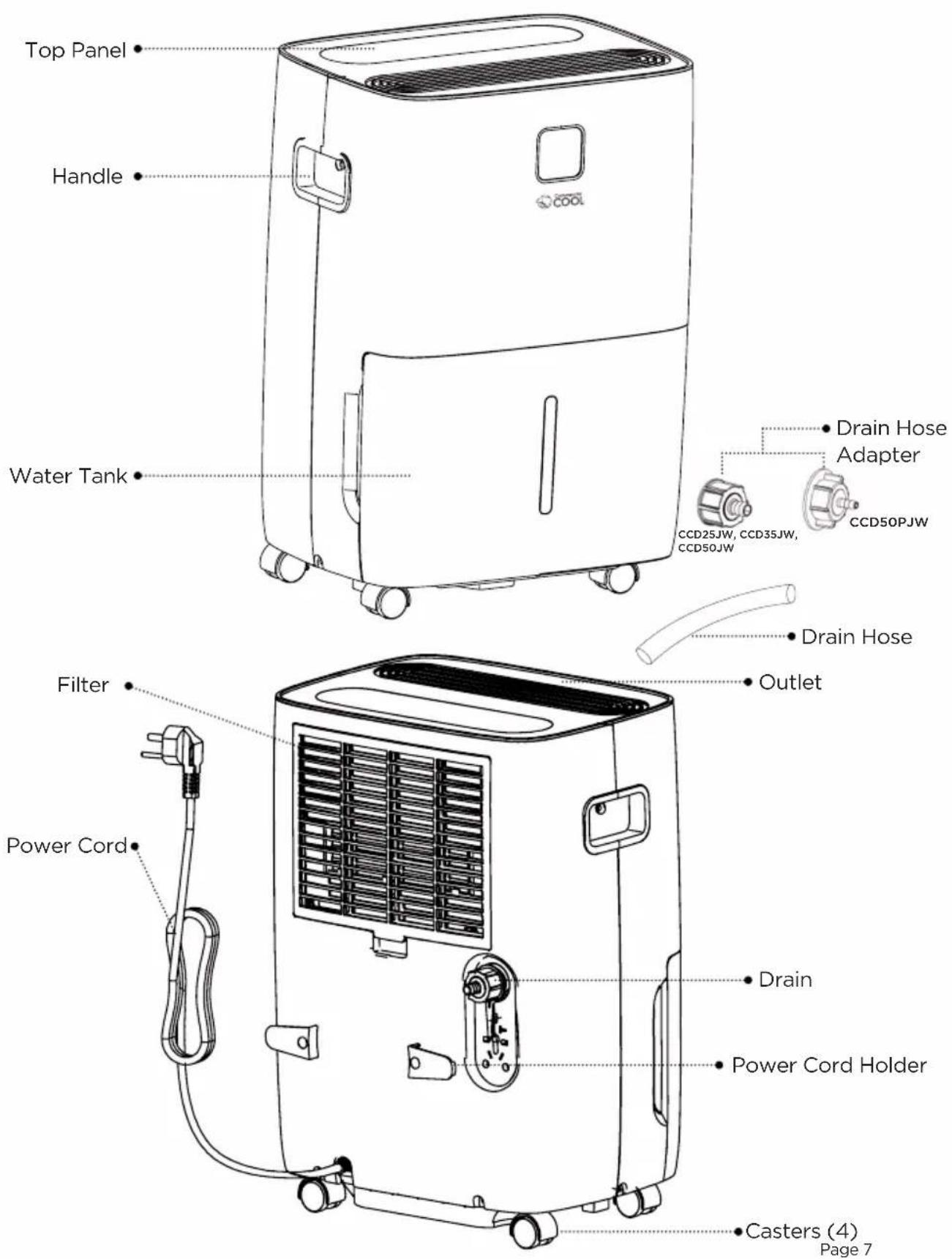
POSITIONING THE UNIT
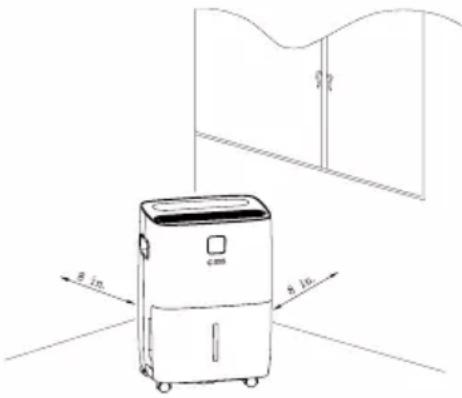
- Do not force casters to move over the carpet.
- Do not move the unit with water in the bucket. The unit may tip over and water may spill.
- Do not use outdoors.
- This dehumidifier is intended for indoor residential applications only. This dehumidifier should not be used for commercial or industrial applications.
- Place the dehumidifier on a smooth, level floor strong enough to support the unit with a full bucket of water.
- Allow at least 8 in. of air space on all sides of the unit for good air circulation (at least 16 in. of air space on air outlet).
- Place the unit in an area where the temperature will not fall below 41^(5^) . The coils can become covered with frost at temperatures below 41^(5^) , which may reduce performance.
- Place the unit away from the clothes dryer, heater or radiator.
- Use the unit to prevent moisture damage anywhere books or valuables are stored.
- The dehumidifier must be operated in an enclosed area to be most
effective. Close all doors, windows and other outside openings to the room.
WHEN USING THE UNIT
- When first using the dehumidifier, operate the unit continuously for 24 hours. Make sure the plastic cover on the continuous drain hose outlet is installed properly so there are no leaks.
- This unit is designed to operate with a working environment between 41°F/5°C and 90°F/32°C, and between 35% to 80% relative humidity.
- If the unit has been switched off and needs to be switched on again, allow approximately three minutes for the correct operation to resume.
- Do not connect the dehumidifier to a multiple socket outlet, which is also being used for other electrical appliances.
- Select a suitable location, making sure you have easy access to an electrical outlet into an electrical socket.
- Plug the unit into an electrical socket outlet.
- Make sure the water bucket is correctly fitted otherwise the unit will not operate properly.
NOTE: When the water in the bucket reaches a certain level, please be careful when moving the machine to avoid it falling and spilling.
SET UP & USE
CONTROL PANEL
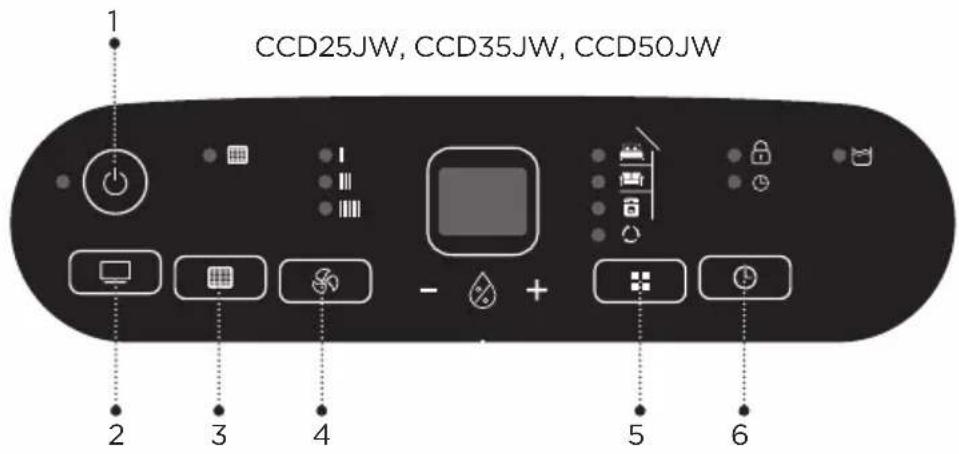
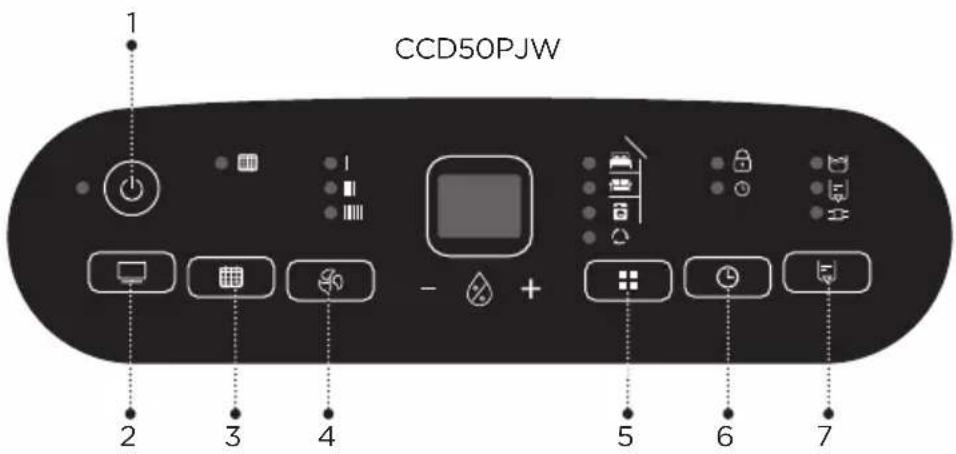
-
POWER 2. DISPLAY 3. FILTER 4. FAN SPEED 5.MODE 6.TIMER
-
PUMP (for Model CCD50PJW only)
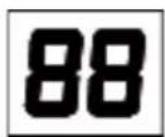
The indicator features 3 functions:
- When the unit is plugged in, it will indicate the room humidity level.
- When you set the humidity, it will indicate the humidity that you have selected.
- When you program the time for the unit to turn on and off, it will show the hours.
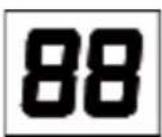
- When the environment humidity is lower than 20%, it will display "20".
- When the environment humidity is higher than 90%, it will display "90".
OPERATION INSTRUCTIONS
1. POWER
Power display is always on. In STANDBY mode, the display will turn on for 3s and turn off with only the POWER indicator light on. The default running operation is 50%RH on Low fan speed. When operating a PRESET mode, the machine will resume the previous operating function when switched off and on. During auto operation (four LED lights in Auto mode are off), the unit will automatically turn off and enter STANDBY mode. After resuming from STANDBY, the system will reset to the Auto mode 50% with low fan speed.
2. FAN SPEED
Press "FAN SPEED" button as follows:
When the fan speed needs to be adjusted, press the fan speed button to adjust the Low, Mid and High fan speed. When the corresponding indicator light is on, the current speed has been set.
3. "UP" and "DOWN"
Press "UP" and "DOWN" to enter the Auto dehumidification operation. The humidity is set to 35%--80%, with 5%RH added and decreased each time.
4. MODE
Press "MODE" to select the Preset Mode: Sleeping Area (55%), Living Space (50%), Basement (45%), Continuous switch the sequential cycle, and the corresponding mode indicator light is on.
5. TIMER
Press "Timer" button to set the timer up to 24 hours.
(1) In startup state, press the Timer button to set the startup function. The Timer light will be on, and the display will initially display 0.5. Press "UP" and "DOWN" to adjust the time. The timer indicator is on when the timer function is active. Press the Timer key again to cancel the timing function.
(2) In the shutdown state, press the Timer button to set the shutdown function. The display will show "0.5" on the control panel as default. At this point, press the "UP" and "DOWN" keys to adjust the timing time.
(3) The range of time is 0.5h-24h. Press "UP" and "DOWN" to adjust ±0.5h between 0.5h-10h, while ±1h between 10h-24h.
6. FILTER
Reset the "Filter" key:
After the dehumidifier starts up and runs for 250 hrs. the indicator light for cleaning the filter screen will be on. Refer to CLEANING & CARE section for Filter instructions. After filter has been cleaned, press the FILTER button to remove the indicator light and reset the timer.
7. PUMP (Only with model CCD50PJW)
Press the button to enter the PUMP function, the PUMP indicator light is on, press again, exit the function, and the PUMP indicator light is off; (Before starting the pump, it is necessary to install the pump detection device. At this time, the DRAIN TUBE CONNECTED light is on.)
SET UP & USE
OTHER FEATURES
Bucket Full Light
When the water collection bucket is full, the unit will shut off automatically, make a beeping noise and the BUCKET FULL indicator will light up. The dehumidifier will not run again until the bucket is emptied and properly placed back inside the unit.
Auto Shut-Off
The dehumidifier shuts off when the bucket is full, or when the bucket is removed or not replaced in the proper position. The fan motor will continue to run for 4 minutes.
Wait 3 minutes before resuming operation. This is to protect the unit. Operation will automatically start after 3 minutes.
Auto-Restart
If the unit turns off unexpectedly due to a power outage, it will restart with the previous function setting automatically when the power resumes.
Child Lock Feature
Press the Timer button for 3 seconds, the lock key function is turned on, the lock light is on, and the other keys are invalid after the lock key; Press the Timer button again for 3 seconds to cancel the lock button function.
Display
Backlit display on the front of the dehumidifier that shows the actual humidity level in the room to be easily seen from across the room, Press the "DISPLAY" button to turn the Mirage Display on and once again to turn the Mirage Display off.
SET UP & USE
DRAINING THE COLLECTED WATER
Option 1: Drain Tank
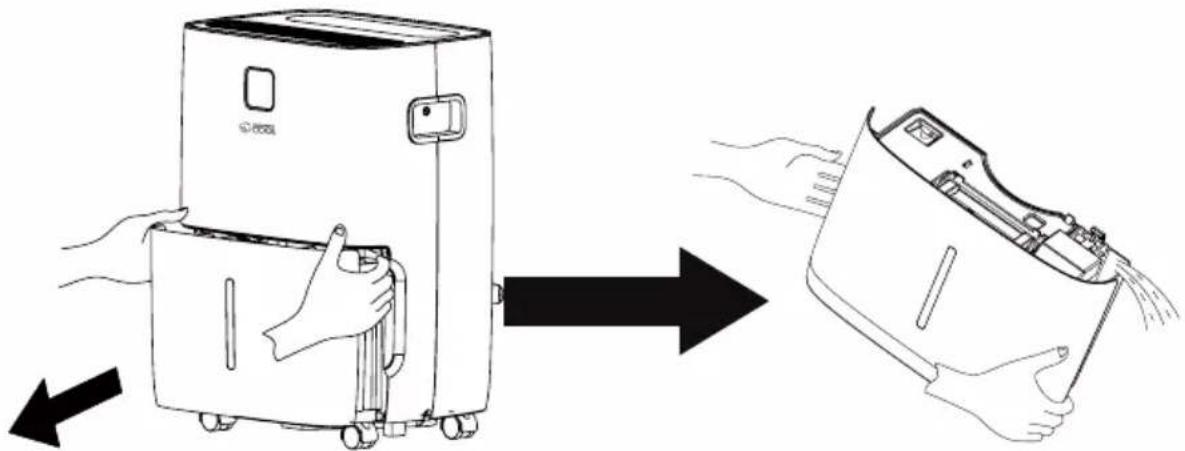
When the drainage tank is full, the tank full indicator light will turn on, the operation will stop automatically and the buzzer will sound to alert the user, that the water needs to be emptied from the drainage tank.
Emptying the Drainage Tank
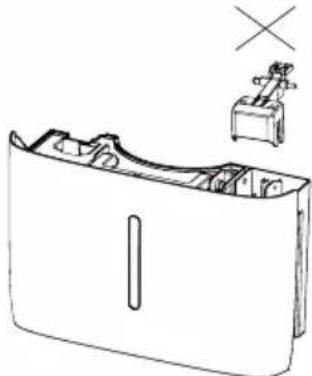
- Lightly press on the sides of the tank with both hands and pull the tank out gently.
- Discard the collected water.
NOTE:
- Do not remove the float from the water tank. The water full sensor will no longer be able to detect the water level correctly without the float and water may leak from the water tank.
natural_image
Line drawing of a device with a handle and a small object above it, no text or symbols present- If the drainage tank is dirty, wash it with cold or lukewarm water. Do not use detergent, scouring pads, chemically treated dust cloths, gasoline, benzene, thinner, or other solvents, as these can scratch and damage the tank and cause water leakage.
SET UP & USE
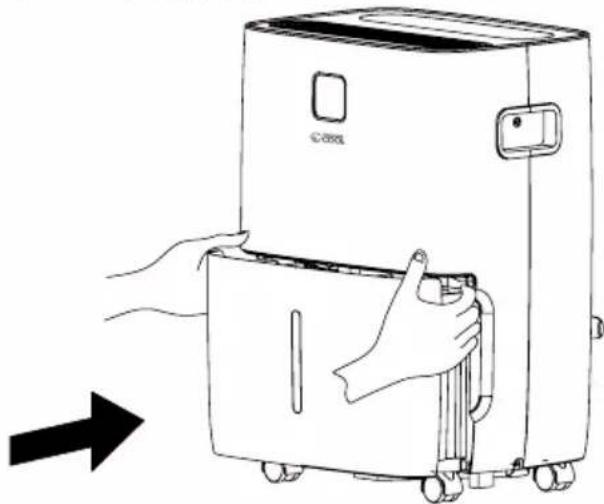
- When replacing the drainage tank, press the tank firmly into place with both hands. If the tank is not positioned properly, the "BUCKET FULL" sensor will be activated, and the dehumidifier will not operate.
natural_image
Line drawing of a hand opening a large refrigerator with wheels, showing the door and front panel (no text or symbols)IMPORTANT NOTES:
Placing the dehumidifier on an uneven surface or improper hose installation may result in water filling up the tank and cause the unit to shut off. Empty tank if shut-off occurs, then check dehumidifier location and hose for proper setup. The tank must be in place and securely seated for the dehumidifier to operate.
Option 2: Continuous drainage
Water can be automatically emptied by attaching the drain hose (included) to the drain port on the back of the dehumidifier. This will allow the unit to run continuously (depending on the selected humidity level) without having to empty the unit's water collection bucket. To install the included Drain Hose Kit, remove the drain cap on the back of the unit. Insert the included drain hose adapter and turn clockwise, Insert the Drain Hose onto the Drain Adapter.
Once securely installed, lead the drain hose to a nearby drain lower than the height of the drain plug. (Make sure there are no kinks or knots in the hose). Turn on the unit and press the MODE button until set to CONTINUOUS. This will allow the unit to run continuously (depending on the selected humidity level) without having to empty the water bucket.
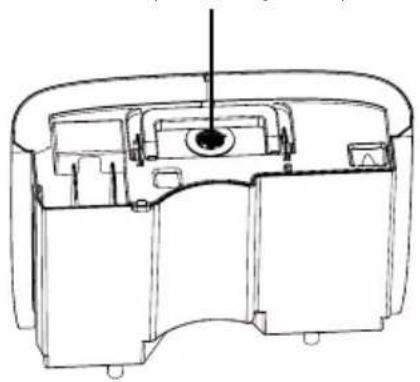
Drain Hose Adapter Storage Compartment
natural_image
Technical line drawing of a mechanical device interior (no text or symbols)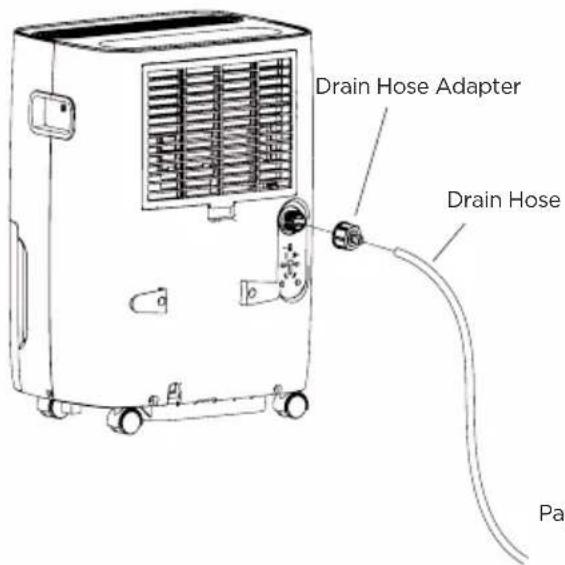
SET UP & USE
Pump draining (Pump model CCD50PJW only)
The internal pump allows the unit to operate without having to empty the bucket. To install the included Drain Hose Kit, remove the drain cap on the back of the unit.
Insert the included drain hose adapter and turn clockwise, Insert the Drain Hose onto the Drain Adapter.
Once securely installed, lead the drain hose to a nearby drain, sink or out of a window up to 16 ft height from the base of the unit. (Make sure there are no kinks or knots in the hose).
Turn on the unit and press the pump button to activate the internal pump. When the water tank is detected to be full of water, the pump automatically begins removing water and will stop after 90 seconds. The cycle will continue until the pump button is pressed again and deactivated. If the drain kit is not installed and the pump button is not activated, the pump will not work.
CAUTION: PUMP MODE WILL ONLY OPERATE WITH THE INCLUDED DRAIN HOSE AND DRAIN ADAPTER
NOTE: When the continuous draining feature is not being used, remove the drain hose from the outlet, and dry the water in the continuous drain hose outlet.
NOTE: The pump may make a loud noise when it starts to work for 3\~5 minutes. This is normal.
- Make sure the hose is secure so there are no leaks.
- Direct the hose toward the drain, making sure that there are no kinks that will stop the water flowing.
- Select the desired humidity setting and fan speed on the unit for pump draining to start.
SET UP & USE
NOTE: The pump operation light blinks every second when the pump is failing to operate. Please turn off the unit and plug the power cord out. Check the following things:
- Cleaning the filter of the pump. Remove the bucket from the unit, take down the pump and clean the filter of the pump.
• Empty the water of the bucket. - Reinstall the pump hose if it drops and reinstall the bucket properly. Turn on the unit.
NOTE: Do not use this operation when the temperature is equal to or less than 32^ F ( 0^ C), otherwise the water will freeze and will cause the water hose to be blocked and the unit will fail to operate. Make sure to empty the bucket once a week when using the pump draining feature. When the pump draining feature is not being used, remove the pump drain hose from the outlet.
- Press the pump drain hose outlet in and take the pump drain hose out from it. Make sure to not let the water in the pump hose drip to the floor.
CLEANING & CARE
CARE AND MAINTENANCE
Care and cleaning of the dehumidifier.

CAUTION - Turn the dehumidifier off and remove the plug from the wall outlet before cleaning.
CLEAN THE GRILL AND CASE
- Use water and a mild detergent. Do not use bleach or abrasives.
- Wipe clean with a soft damp cloth.
- The air intake and outlet grills get soiled easily, so use a vacuum attachment or brush to clean.
- Do not splash water directly onto the main unit. Doing so may cause an electrical shock, cause the insulation to deteriorate, or cause the unit to rust.
CLEAN THE BUCKET
- Every few weeks, clean the bucket to prevent growth of mold, mildew and bacteria. Partially fill the bucket with clean water. Swish it around in the bucket, empty and rinse.
NOTE: Do not use a dishwasher to clean the bucket. After clean, the bucket must be in place and securely seated for the dehumidifier to operate.
CLEAN THE AIR FILTER
- Remove the filter every two weeks based on normal operating conditions.
- To remove the filter, first open the inlet grill and then pull filter outwards.
- Wash the filter with clean water then dry.
- Re-install the filter, replace inlet grill smoothly.

CAUTION: DO NOT operate the dehumidifier without a filter because dirt and lint will clog it and reduce performance.
Unit should be turned off and unplugged to clean filter.
WHEN NOT USING THE UNIT FOR LONG TIME PERIODS
• After turning off the unit, wait one day before emptying the bucket.
- Clean the main unit, water bucket and air filter.
- Wrap the cord around the power cord holder.
- Cover the unit with a plastic bag.
- Store the unit upright in a dry, well-ventilated place.
TROUBLESHOOTING & WARRANTY
BEFORE YOU CALL FOR SERVICE
IF THE APPLIANCE FAILS TO OPERATE:
A) Check to make sure that the dehumidifier is plugged in securely. If it is not, remove the plug from the outlet, wait 10 seconds and plug it in again securely.
B) Check for a blown circuit fuse or a tripped main circuit breaker. If these seem to be operating properly, test the outlet with another appliance.
IF NONE OF THE ABOVE SOLVES THE PROBLEM, CONTACT A QUALIFIED TECHNICIAN. DO NOT TRY TO ADJUST OR REPAIR THE APPLIANCE YOURSELF.
IMPORTANT
DO NOT RETURN THIS PRODUCT TO THE STORE
If you have a problem with this product, please contact the COMMERCIAL COOL Customer Satisfaction Center at 855-855-0294 or service@equitybrands.com
DATED PROOF OF PURCHASE, MODEL # AND SERIAL # REQUIRED FOR WARRANTY SERVICE
TROUBLESHOOTING & WARRANTY
Troubleshoot your problem by using the chart below. If the dehumidifier still does not work properly, contact W Appliance Co. customer service center or the nearest authorized service center. Customers must never troubleshoot internal components.
Problem Possible Cause Solution
| The unit doesn't operate | Has the power cord been disconnected? | Plug the power cord into the outlet. |
| Is the tank full indication lamp blinking? (The tank is full or in a wrong position.) | Empty the water in the drainage tank and then reposition the tank. | |
| Is the temperature of the room above 95°F (35°C) or below 44.6°F (7°C)? | The protection device is activated and the unit cannot be started. | |
| The dehumidifying function doesn't work | Is the air filter clogged? | Clean the air filter as instructed under "Cleaning the dehumidifier". |
| Is the intake duct or discharge duct obstructed? | Remove the obstruction from the discharge duct or intake duct. | |
| No air is discharged | Is the air filter clogged? | Clean the air filter as instructed under "Cleaning the dehumidifier". |
| Operation is noisy | Is the unit tilted or unsteady? | Move the unit to a stable, sturdy location. |
| Is the air filter clogged? | Clean the air filter as instructed under "Cleaning the dehumidifier". | |
| "E1" Error Code | Abnormal exhaust pipe temperature sensor | There may be an issue with the exhaust pipe temperature sensor and related circuit. Contact Customer Service at 855-855-0294. |
| "E2" Error Code Coil temperature sensor abnormal | There may be an issue with the coil temperature sensor and related circuit. Contact Customer Service at 855-855-0294. | |
| "E3" Error Code Humidity sensor anomaly | There may be an issue with the PCB or the related circuit of the display panel. Contact Customer Service at 855-855-0294. | |
| "E4" Error Code Connecting line fault | There may be an issue with the display panel or the related circuit of the display panel. Contact Customer Service at 855-855-0294. | |
| "E5" Error Code Detection line fault | There may be a problem with the water pump or wiring. Contact Customer Service at 855-855-0294. | |
| "EH" Error Code Humidity sensor anomaly | There may be a problem with the humidity sensor related circuit. Contact Customer Service at 855-855-0294. | |
TROUBLESHOOTING & WARRANTY
LIMITED WARRANTY
Any repair, replacement, or warranty service, and all questions about this product should be directed to W Appliance Co. at 855-855-0294 from the USA or Puerto Rico.
W Appliance Co. warrants to the original purchaser that the product will be free from defects in material, parts and workmanship for the period designated for this product. The warranty commences the day the product is purchased and covers up to a period of 1 year (12 months) for labor/1 year (12 months) for parts (manufacturing defects only).
W Appliance Co. agrees that it will, at its option, replace the defective product with either a new or remanufactured unit equivalent to your original purchase during the warranty period.
Exclusions: This warranty does not apply to the below:
-
If the appearance or exterior of the product has been damaged or defaced, altered or modified in design or construction.
-
If the product original serial number has been altered or removed or cannot be readily determined.
-
If there is damaged due to power line surge, user damage to the AC power cord or connection to improper voltage source.
-
If damage is due to general misuse, accidents or acts of God.
-
If repair attempts are done by unauthorized service agents, use of parts other than genuine parts or parts obtained from persons other than authorized service companies.
-
On units that have been transferred from the original owner.
-
On products that have been purchased as refurbished, like new, second-hand, in a "As-Is" or "Final Sale" terms.
-
To products used in a commercial or rental setting.
-
To products used in settings other than ordinary household use or used other than in accordance with the provided instructions.
-
To damages for service calls for improper installations.
-
Transportation and shipping costs associated with the replacement of the unit.
-
Service calls to instruct you how to use your product.
-
Service calls to repair or replace the house fuse, reset the circuit breaker or correct the wiring in the house.
REPAIR OR REPLACEMENT AS PROVIDED UNDER THIS WARRANTY IS THE EXCLUSIVE REMEDY OF THE CUSTOMER; W Appliance Co.. SHALL NOT BE LIABLE FOR ANY INCIDENTAL OR CONSEQUENTIAL DAMAGES FOR BREACH OF ANY EXPRESS OR IMPLIED WARRANTY ON THIS PRODUCT, EXCEPT TO THE EXTENT PROHIBITED BY APPLICABLE LAW. ANY IMPLIED WARRANTY OF MERCHANTABILITY OF FITNESS FOR A PARTICULAR PURPOSE ON THIS PRODUCT IS LIMITED TO THE DURATION OF THE WARRANTY.
Some states do not allow the exclusion or limitations of incidental or consequential damages, or limitations on how long the warranty lasts. In these cases the above exclusions or limitations may not apply to you. This warranty gives you specific legal rights and you may also have other rights which vary from state to state.
Obtaining Service: To obtain service, product literature, supplies or accessories please call 855-855-0294 to create a ticket for exchange/repair. Please make sure to provide the date of purchase, model number and a brief description of the problem. Our customer service representative will contact you or send detailed return instructions.
W Appliance Co. does not warrant that the appliance will work properly in all environmental conditions, and makes no warranty and representation, either implied or expressed, with respect to the quality, performance, merchantability, or fitness for a particular purpose other than the purpose identified within this user's manual. W Appliance Co. has made every effort to ensure that this user's manual is accurate and disclaims liability for any inaccuracies or omissions that may have occurred. Information in this user's manual is subject to change without notice and does not represent a commitment on the part of W Appliance Co.. W Appliance Co. reserves the right to make improvements to this user's manual and/or to the products described in this user's manual at any time without notice. If you find information in this manual that is incorrect, misleading, or incomplete, please contact us at 855-855-0294.
W Appliance Co. 1356 Broadway New York, NY 10018
TABLE DES MATIÈRES
RENSEIGNEMENTS DE SÉCURITÉ
natural_image
Two identical electrical socket icons with internal circuit symbols, no text or labels presentALIMENTATION ÉLECTRIQUE
- ALIMENTATION 2. AFFICHAGE 3. FILTRE 4. VITESSE DU VENTILATEUR 5.MODE 6..MINUTERIE 7. POMPE (pour modèle CCD50PJW uniquement)
REMARQUE:
natural_image
Simple line drawing of a device inside a container with a small cross symbol above it (no text or labels)natural_image
Line drawing of a refrigerator with hands installing or adjusting the lid (no text or symbols)REMARQUES IMPORTANTES:
natural_image
Cross-sectional diagram of a mechanical device showing internal components and housing (no text or labels)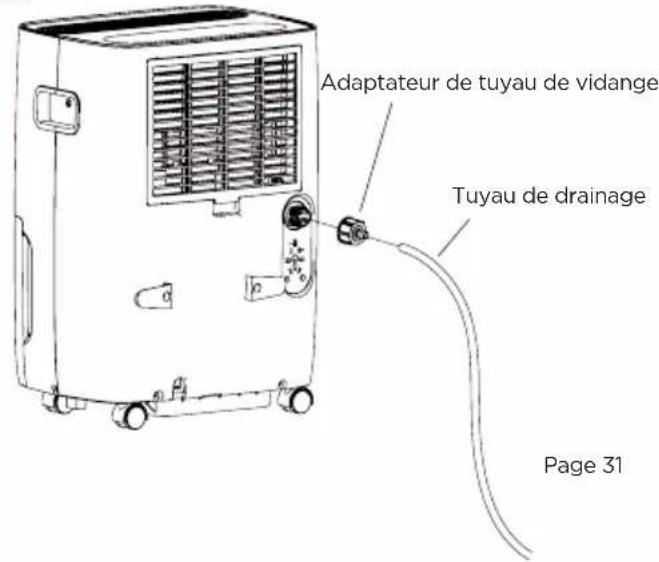
NE PAS RETOURNER CE PRODUIT AU MAGASIN
natural_image
Two identical electrical socket icons with internal circuit symbols, no text or labels presentCABLE DE CORRIENTE
natural_image
Line drawing showing a device being placed into a smaller appliance, with arrows indicating the process (no text or symbols present)NOTA:
natural_image
Line drawing of a device casing with internal components and a small inset showing a device (no text or symbols)natural_image
Line drawing of a hand opening a large refrigerator with wheels, showing the handle and side panel (no text or symbols)NOTAS IMPORTANTES:
This device complies with part 15 of the FCC rules. Operation is subject to the following two conditions: 1) This device may not cause harmful interference, and 2) This device must accept any interference received, including interference that may cause undesired operation. This equipment has been tested and found to comply with the limits for a Class B digital device, pursuant to Part 15 of the FCC rules. These limits are designed to provide reasonable protection against harmful interference in a residential installation. This equipment generates, uses and can radiate radio frequency energy and, if not installed and used in accordance with the instructions, may cause harmful interference to radio communications. However, there is no guarantee that the interference will not occur in a particular installation. If this equipment does cause harmful interference to radio or television reception, which can be determined by turning the equipment off and on, the user is encouraged to try to correct the interference by one or more of the following measures: a) Reorient or relocate the receiving antenna. b) Increase the separation between the equipment and the receiver. c) Connect the equipment into an outlet different from that which the receiver is connected. d) Consult the dealer or an experienced radio/TV technician for help.