RSG5KURS - Fridge SAMSUNG - Free user manual and instructions
Find the device manual for free RSG5KURS SAMSUNG in PDF.


| Product Type | Side-by-Side Refrigerator |
| Brand | Samsung |
| Model | RSG5KURS |
| Dimensions (W x D x H) with door | 912 x 737 x 1773 mm |
| Dimensions without door | 908 x 687 x 1740 mm |
| Power Supply | 220-240 V ~ 50 Hz |
| Freezer Temperature Range | -14°C to -25°C |
| Refrigerator Temperature Range | 1°C to 7°C |
| Special Functions | Power Freeze, Power Cool, Vacation, Child Lock, Ice Off |
| Water Dispenser | Yes, cold water |
| Ice Maker | Yes, produces ice cubes and crushed ice |
| Cool Select Zone | Drawer with modes Soft Freeze, Chill, Thaw, Quick Cool, Cool |
| Water Filter | Yes, replacement every 6 months (Samsung only) |
| Defrost | Automatic |
| Lighting | LED, with Lighting function for dispenser |
| Digital Display | Yes, temperatures and indicators |
| Door Alarm | Yes, after 2 minutes of opening |
| Climate Class | SN, N, ST, T (from +10°C to +43°C) |
| Refrigerant | R-600a or R-134a (depending on model) |
| Cleaning | Mild detergent, warm water, avoid benzene and solvents |
| Safety | Child lock, grounding, safety instructions |
| Spare Parts | Samsung water filter only, LED bulb not user replaceable |
| Leveling Feet | Yes, adjustable |
| Warranty | Consult dealer or Samsung |
Frequently Asked Questions - RSG5KURS SAMSUNG
User questions about RSG5KURS SAMSUNG
0 question about this device. Answer the ones you know or ask your own.
Ask a new question about this device
Download the instructions for your Fridge in PDF format for free! Find your manual RSG5KURS - SAMSUNG and take your electronic device back in hand. On this page are published all the documents necessary for the use of your device. RSG5KURS by SAMSUNG.
USER MANUAL RSG5KURS SAMSUNG
Refrigerator user manual

100%
Recycled Paper
This manual is made with 100% recycled paper.
English
imagine the possibilities
Thank you for purchasing a Samsung product.
Free Standing Appliance
safety information
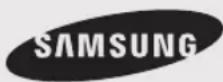
SAFETY INFORMATION

- Before operating the appliance, please read this manual thoroughly and retain it for your reference.
- Use this appliance only for its intended purpose as described in this instruction manual. This appliance is not intended for use by persons (including children) with reduced physical, sensory or mental capabilities, or lack of experience and knowledge, unless they have been given supervision or instruction concerning use of the appliance by a person responsible for their safety.
- This appliance can be used by children aged from 8 years and above and persons with reduced physical, sensory or mental capabilities or lack of experience and knowledge if they have been given supervision or instruction concerning use of the appliance in a safe way and understand the hazards involved. Children shall not play with the appliance. Cleaning and user maintenance shall not be made by children without supervision.
- Because these following operating instructions cover various models, the characteristics of your refrigerator may differ slightly from those described in this manual.
- Because these following operating instructions cover various models, the characteristics of your refrigerator may differ slightly from those described in this manual.

CAUTION/WARNING SYMBOLS USED
| WARNING | Indicates that a danger of death or serious injury exists. |
| CAUTION | Indicates that a risk of personal injury or material damage exists. |
OTHER SYMBOLS USED
 | Represents something you must NOT do. |
 | Represents something you must NOT disassemble. |
 | Represents something you must NOT touch. |
 | Represents something you must follow. |
 | Indicates that you must disconnect the power plug from the socket. |
 | Represents a ground is needed to prevent electric shock. |
 | It is recommended that this symbol be handled by service man. |
These warning signs are here to prevent injury to you and others. Please follow them explicitly. After reading this section, keep it in a safe place for future reference.
CE Notice
This product has been determined to be in compliance with the Low Voltage Directive (2006/95/EC), the Electromagnetic Compatibility Directive (2004/108/EC), RoHS Directive (2011/65/EU), Commission Delegated Regulation (EU) No 1060/2010 and the Eco-Design Directive(2009/125/EC) implemented by Regulation (EC) No 643/2009 of the European Union. (For products sold in European Countries only)
- This refrigerator must be properly installed and located in accordance with the manual before it is used.
- Use this appliance only for its intended purpose as described in this instruction manual.
• We strongly recommend that any servicing be performed by a qualified individual. - R-600a or R-134a can be used as a refrigerant. Check the compressor label on the rear of the appliance and the rating label inside the fridge to see which refrigerant is used for the refrigerator.

- In case of R-600a refrigerant, this gas is natural gas with high environmental compatibility that is, however, also combustible. When transporting and installing the appliance, care should be taken to ensure that no parts of the refrigerating circuit are damaged.
- Refrigerant squirting out of the pipes could ignite or cause an eye injury. If a leak is detected, avoid any naked flames or potential sources of ignition and air the room in which the appliance is standing for several minutes.

- In order to avoid the creation of a flammable gas-air mixture if a leak in the refrigerating circuit occurs, the size of the room in which the appliance may be sited depends on the amount of refrigerant used.
- Never start up an appliance showing any signs of damage. If in doubt, consult your dealer.
- The room must be 1m^3 in size for every 8 g of R-600a refrigerant inside the appliance.
- The amount of refrigerant in your particular appliance is shown on the identification plate inside the appliance.
- Please dispose of the packaging material for this product in an environmentally friendly manner.
- This appliance is not intended for use by persons (including children) with reduced physical, sensory or mental capabilities, or lack of experience and knowledge, unless they have been given supervision or instruction concerning use of the appliance by a person responsible for their safety.
- Children should be supervised to ensure that they do not play with the appliance.
02_ safety information
SEVERE WARNING SIGNS

- Do not install the refrigerator in a damp place or place where it may come in contact with water.
- Deteriorated insulation of electrical parts may cause an electric shock or fire.
- Do not place this refrigerator in direct sunlight or expose to the heat from stoves, room heaters or other appliance.
- Do not plug several appliances into the same power socket. The refrigerator should always be plugged into its own individual electrical which has a voltage rating that matched the rating plate.
- This provides the best performance and also prevents overloading house wiring circuits, which could cause a fire hazard from overheated wires.
- Make sure that the power plug is not squashed or damaged by the back of the refrigerator.
- Do not bend the power cord excessively or place heavy articles on it.
- This constitutes a fire hazard.
- Have the power cord repaired or replaced immediately by the manufacturer or its service agent if power cord has become frayed or damaged.
- Do not use a cord that shows cracks or abrasion damage along its length or at either end.
- If the power cord is damaged, have it replaced immediately by the manufacturer or its service agent.
- When moving the refrigerator, be careful not to roll over or damage the power cord.
- Do not insert the power plug with wet hands.
- Unplug the refrigerator before cleaning and making repairs.
- Do not use a wet or damp cloth when cleaning the plug.
- Remove any foreign matter or dust from the power plug pins.
Otherwise there is a risk of fire.
- If the refrigerator is disconnected from the power supply, you should wait for at least ten minutes before plugging it back.
- If the wall socket is loose, do not insert the power plug.
- There is a risk of electric shock or fire.
- The appliance must be positioned so that the plug is accessible after installation.

• The refrigerator must be grounded.
- You must ground the refrigerator to prevent any power leakages or electric shocks caused by current leakage from the refrigerator.

- Never use gas pipes, telephone lines or
other potential lightening rods as ground.
- Improper use of the ground plug can result in electric shock.
- Do not dissemble or repair the refrigerator by yourself.
- You run risk of causing a fire, malfunction and/or personal injury.
- If you smell pharmaceutical or smoke, pull out power plug immediately and contact your Samsung electronics service center.
- Keep ventilation opening in the appliance enclosure or mounting structure clear of obstruction.
- Do not use mechanical devices or any other means to accelerate the defrosting process, other than those recommended by the manufacturer.
- Do not damage the refrigerant circuit.
- Do not place or use electrical appliance inside the refrigerator/freezer, unless they are of a type recommended by the manufacturer.
- Before changing the interior light, unplug the appliance from the power supply.
- If you experience difficulty when changing the light, contact your service center.
- The appliance is not intended for use by persons (including children) with reduced physical, sensory or mental capabilities, or lack of experience and knowledge, unless they have been given supervision or instruction concerning use of the appliance by a person responsible for their safety.
- Children should be supervised to ensure that they do not play with the appliance.
- Do not let children hang on the door. If not, a serious injury may occur.
- Do not touch the inside walls of the freezer or products stored in the freezer with wet hands. - This may cause frostbite.
- If the refrigerator is not to be used for a long period of time, pull out the power plug.
- Deterioration in the power cord insulation may cause fire.
- Do not store articles on the top of the appliance.
- When you open or close the door, the articles may fall and cause personal injury and/or material damage.
CAUTION SIGNS

This product is intended only for the
storage of food in a domestic environment.
- Manufacturer's recommended storage times and expiry dates of frozen foods should be adhered to. Refer to relevant instructions
- Bottles should be stored tightly together so that they do not fall out.
- Do not place carbonated or fizzy drinks in the
safety information _03
freezer compartment
- Do not overfill the refrigerator with food.
- When you open the door, an item may fall out and cause personal injury or material damage.
- Do not put bottles or glass containers in the freezer.
- When the contents freeze, the glass may break and cause personal injury.
- Do not spray inflammable gas near the refrigerator.
- There is a risk of explosion or fire.
- Do not directly spray water inside or outside the refrigerator.
- There is a risk of fire or electric shock.
- Do not store volatile or flammable substances in the refrigerator.
- The storage of benzene, thinner, alcohol, ether, LP gas and other such products may cause explosions.
- If you have a long vacation planned, it is advisable to empty the appliance or use the vacation function.
- Do not store pharmaceuticals products, scientific materials or temperature-sensitive products in the refrigerator.
- Products that require strict temperature controls must not be stored in the refrigerator.
- Do not put a container filled with water on the refrigerator.
- If spilled, there is a risk of fire or electric shock.
- Do not apply strong shock or excessive force onto the surface of glass.
- Broken glass may result in a personal injury and/or property damage.
CAUTION SIGNS FOR CLEANING

- Never put fingers or other objects into the dispenser hole and ice chute.
- It may cause personal injury or material damage.
- Do not use a wet or damp cloth when cleaning the plug, remove any foreign material or dust from the power plug pins.
- Otherwise there is a risk of fire.
WARNING SIGNS FOR DISPOSAL
- When disposing of this or other refrigerators, remove the door/door seals, door latch so that small children or animals cannot become trapped inside.
- Leave the shelves in place so that children may not easily climb inside.
- R-600a or R-134a is used as a refrigerant. Check the compressor label on the rear of the appliance
04_ safety information
or the rating label inside the fridge to see which refrigerant is used for your refrigerator. When this product contains flammable gas (Refrigerant R-600a) contact your local authority in regard to safe disposal of this product.
- Cyclopentane is used as a insulation blowing gas. The gases in insulation material require special disposal procedure. Please contact your local authorities in regard to the environmentally safe disposal of this product. Ensure that none of the pipes on the back of the appliances are damaged prior to disposal. The pipes shall be broke in the open space.

- In the event of a power failure, call the local office of your Electricity Company and ask how long it is going to last.
- Most power failures that are corrected within an hour or two will not affect your refrigerator temperatures. However, you should minimize the number of door openings while the power is off.
- Should the power failure last more than 2 hours, remove all ice in the Ice Bucket.
- Should the power failure last more than 24 hours, remove all frozen food.
- Most power failures that are corrected within an hour or two will not affect your refrigerator temperatures. However, you should minimize the number of door openings while the power is off. - Should the power failure last more than 2 hours, remove all ice in the Ice Bucket. - Should the power failure last more than 24 hours, remove all frozen food.
For doors or lids fitted with locks and keys, the keys be kept out of the reach of children and not in the vicinity of the refrigerating appliance, in order to prevent children from being locked inside.
ADDITIONAL TIPS FOR PROPER USAGE

- Allow the appliance to stand for 2 hours after installation.
• To get best performance of product,
- Do not place foods too closely in front of the vents at the rear of the appliance as it can obstruct free air circulation in the freezer compartment.
- Wrap the food up properly or place it in airtight containers before put it into the fridge freezer
- Do not put any newly introduced food for freezing near to already frozen food.
- There is no need to disconnect the refrigerator from the power supply if you will be away for less than three weeks. But, remove all the food if you are going away for the three weeks or more. Unplug the refrigerator and clean it, rinse and dry.
- The appliance might not operate consistently (possibility of defrosting of contents or temperature becoming too warm in the frozen food compartment) when sited for an extended period of time below the cold end of the range of temperatures for which the refrigerating appliance is designed.
- Do not store food which goes bad easily at low
- Do not place foods too closely in front of the vents at the rear of the appliance as it can obstruct free air circulation in the freezer compartment. - Wrap the food up properly or place it in airtight containers before put it into the fridge freezer - Do not put any newly introduced food for freezing near to already frozen food. - There is no need to disconnect the refrigerator from the power supply if you will be away for less than three weeks. But, remove all the food if you are going away for the three weeks or more. Unplug the refrigerator and clean it, rinse and dry. - The appliance might not operate consistently (possibility of defrosting of contents or temperature becoming too warm in the frozen food compartment) when sited for an extended period of time below the cold end of the range of temperatures for which the refrigerating appliance is designed. - Do not store food which goes bad easily at low
temperature, such as bananas, melons.
- Place the ice tray at the originally provided position by manufacturer in order to achieve optimal ice-freezing.
- Your appliance is frost free, which means there is no need to manually defrost your appliance, as this will be carried out automatically.
- Temperature rising during the defrost can comply with ISO requirement. But if you want to prevent an undue rise in the temperature of the frozen food while defrosting the appliance, please wrap the frozen food in several layers of paper such as newspaper.
- Any increase in temperature of frozen food during defrosting can shorten its storage life.
- Contains fluorinated greenhouse gases covered by the Kyoto Protocol.
- Foam blown with fluorinated greenhouse gases.
Foam blown additive: Perfl uorohexane Global Warming Potential (GWP) = 9000
SAVING ENERGY TIPS
- Install the appliance in a cool, dry room with adequate ventilation. Ensure that it is not exposed to direct sunlight and never put it near a direct source of heat (radiator, for example).
- Never block any vents or grilles on the appliance.
-
Allow warm food to cool down before placing it in the appliance.
-
Put frozen food in the refrigerator to thaw. You can then use the low temperatures of the frozen products to cool food in the refrigerator.
- Do not keep the door of the appliance open for too long when putting food in or taking food out. The shorter time for which the door is open, the less ice will form in the freezer.
- Clean the rear of the refrigerator regularly. Dust increases energy consumption.
- Do not set temperature colder than necessary.
- Ensure sufficient air exhaust at the refrigerator base and at the back wall of the refrigerator. Do not cover air vent openings.
- Allow clearance to the right, left, back and top when installing. This will help reduce power consumption and keep your energy bills lower.
- For the most efficient use of energy, please keep the all inner fittings such as baskets, drawers, shelves on the position supplied by manufacturer.
This appliance is intended to be used in household and similar applications such as
- staff kitchen areas in shops, offices and other working environments;
- farm houses and by clients in hotels, motels and other residential type environments;
- bed and breakfast type environments;
- catering and similar non-retail applications.
contents
safety information _05
setting up your side-by-side refrigerator
GETTING READY TO INSTALL THE REFRIGERATOR
Congratulations on the purchase of your Samsung Side-By-Side Refrigerator. We hope you will enjoy the many state-of-the-art features and effi ciencies that this new appliance has to offer.
Selecting the best location for the refrigerator
- Select a location with easy access to the water supply.
- Select a location without direct exposure to sunlight.
- Select a location with level (or nearly level) flooring.
- Select a location with enough space for the refrigerator doors to open easily.
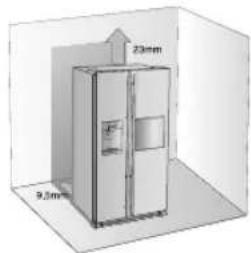
- Allow sufficient space to the right, left, back and top for air circulation.
- If your refrigerator is not level, the internal cooling system may not work correctly.
- Refer to drawing and dimensions below for overall space required for use.
- Please ensure that appliance can be moved freely in the event of maintenance & service.
text_image
23mm 9.3mm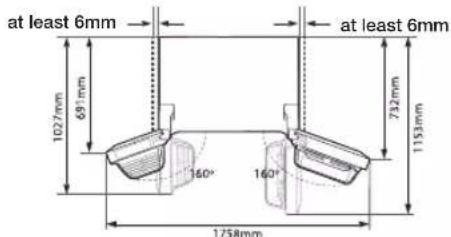
text_image
at least 6mm 1027mm 691mm 160° 1758mm 160° 732mm 1153mm at least 6mmWhen moving your refrigerator
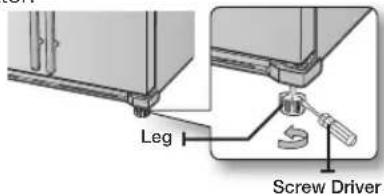
To prevent floor damage be sure the front levelling 06_ setting up
legs are in the up position (above the floor). Refer to 'Levelling the refrigerator' in the manual(at page 10).
To protect the fi nish of the fl ooring, place the protection sheet such as packing carton under the refrigerator.
text_image
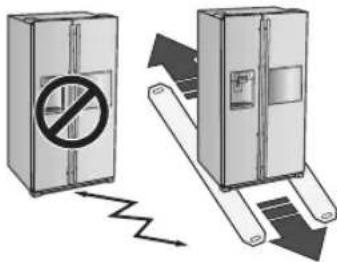
Leg Screw DriverWhen installing, servicing or cleaning behind CAUTION the refrigerator, be sure to pull the unit straight out and push back in straight after finishing.
text_image
Diagram illustrating a fire resistance mechanism with a no-smoking sign inside a refrigerator and a moving device on its side.First things fi rst! Make sure that you can easily move your refrigerator to its fi nal location by measuring doorways (both width and height), thresholds, ceilings, stairways, etc. The following chart details the exact height and depth.
| Model RSG5* RSG5*CRS | ||||
| Dimension(mm) | Width | Without Door 908 | 908 | |
| With Door 912 | 912 | |||
| Depth | Only Cabinet 600 | 600 | ||
| Without Handle 687 | 687 | |||
| With Handle 737 | 742 | |||
| Height | Without Door 1745 | 1745 | ||
| With Door | 1780 | |||

- Allow clearance to the right, left, back and top when installing. This will help reduce power consumption and keep your energy bills lower.
- Do not install the refrigerator where the temperature can drop below 10^ C.
- Make sure you disconnect the water supply line BEFORE removing the freezer door. See the next section on "Separating the Water Line" to avoid damage.
USING THE ICE MAKER
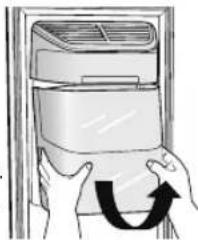
To Remove the Ice Bucket
- Hold the handle as shown in figure1.
- Slightly pull up the bottom part.
- Take out the ice bucket slowly.
natural_image
Illustration of hands installing or adjusting a wall-mounted air conditioner unit (no text or symbols visible)Figure1
To Refi t The Ice Bucket
- Assemble it in the reverse order of disassembly.
- Push the bucket in firmly until you hear a clicking sound.
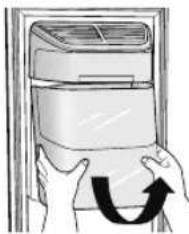
- When the bucket does not fit into its place, turn the gear handle on its back by 90 degrees and reinstall it again as shown in figure 2.
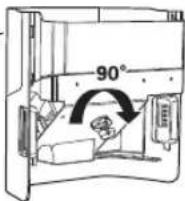
Figure2
Normal Operation
- Any sounds you hear when the ice maker dumps ice into the bucket are part of normal operation.
-
Not dispensing ice for long periods may cause ice clumps in the ice bucket. Remove the remaining ice and empty the bucket.
-
When ice does not come out,
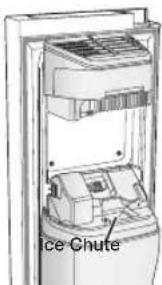
check for any ice stuck in the chute and remove it. - The first batch of ice cubes may be small due to air in the pipe after connection, any air will be purged during normal use.
text_image
Ice Chute
- When ICE OFF blinks on the display panel, reinsert the bucket and/or make sure it's installed properly.
- When the door is open, the ice and water dispenser do not work.
- If you close the door hard, it may cause water spilling over the ice maker.
- To prevent dropping the ice bucket, use both hands when removing it.
- To prevent injury, be sure to clean up any ice or water that may have dropped on the floor.
- Do not let the children hang on the ice dispenser or on the bucket. They may get hurt.
- Be sure not to put your hand or any object into the ice chute. It may cause personal injury or damage mechanical parts.
SETTING UP THE REFRIGERATOR DOORS
If your entrance won't allow the refrigerator to pass easily through it, you can remove the doors.
Removing the Front Leg Cover
First, open both the freezer and refrigerator doors, and then take off the front leg cover by turning the three screws counter-clockwise.
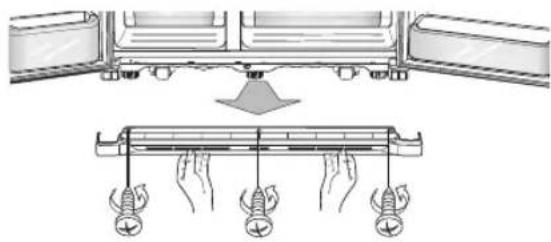
text_image
Diagram illustrating a mechanical assembly with labeled components and force application on a beam, showing hand positions and force indicators.Separating the Water Supply Line from the Refrigerator
- Remove two water lines (gray one is for ice and the other one is for water) by pressing the coupler ① and pulling the water line ② away.
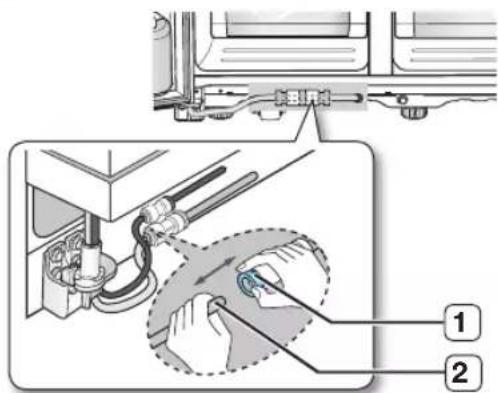
text_image
Technical diagram showing a mechanical assembly with labeled parts, including a zoomed-in detail view and numbered annotations.
Be careful that the water tube match same color.
Reattaching the Water Supply Line
- The Water Line must be fully inserted to the center of transparent coupler to prevent water leakage from the dispenser.
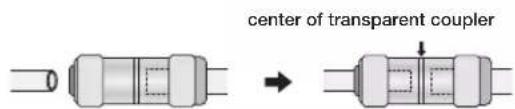
text_image
center of transparent coupler- Insert the 2 clips in the install pack and check that each clip holds the line firmly.
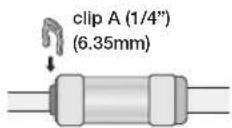

Do not cut the water line. Gently separate it from the coupler.
Removing the freezer door
A few things to mention fi rst.
• Make sure that you lift the door straight up so the hinges are not bent or broken.
- Be careful not to pinch the water tubing and wire harness on the door.
- Place doors on a protected surface to prevent scratching or damage.
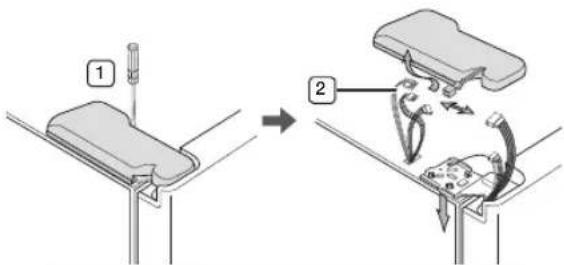
1. With the Freezer door closed, remove the upper hinge cover ① using a screwdriver, and then disconnect the wires by gently pulling them apart ②
text_image
Diagram illustrating a mechanical assembly or disassembly process with labeled steps 1 and 2, showing tool positioning and motion paths.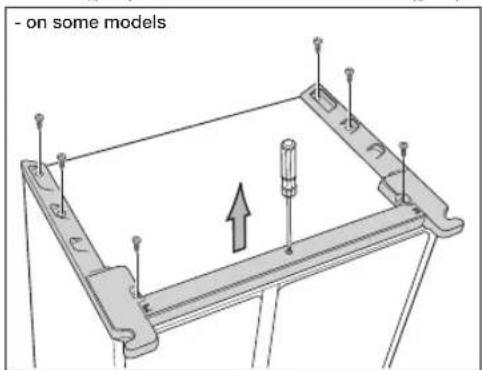
text_image
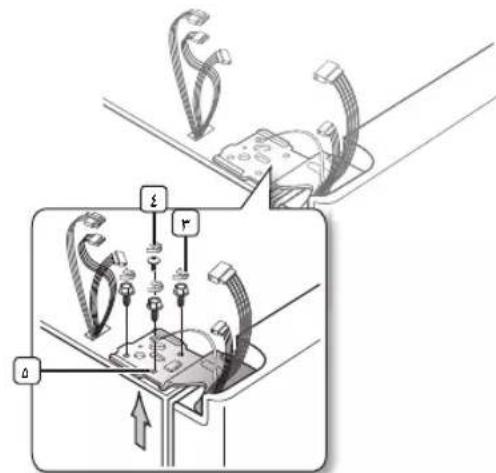
- on some models- Remove hinge screws 3 and the ground screw 4 by turning counter-clockwise, and take off the upper hinge 5. Be careful that the door does not fall on you as you are removing it.
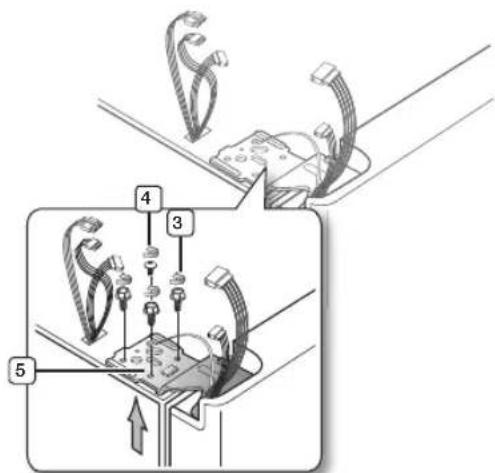
text_image
Technical diagram showing a mechanical assembly with numbered components and directional arrows indicating motion or assembly.
Be careful not to miss the parts of refrigerator.
- Next, remove the door from the lower hinge 6 by carefully lifting the door straight up 7.
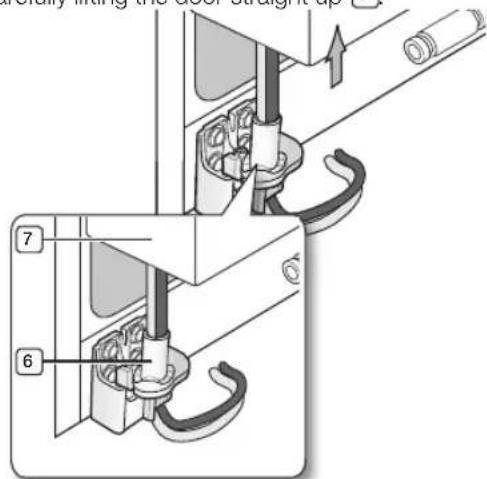
text_image
Technical diagram showing mechanical assembly with numbered components and directional arrows indicating motion or force
Be careful not to pinch the water tubing and wire harness on the door.
- Remove the lower hinge 8 from the bracket 9 by gently lifting the lower hinge upwards.
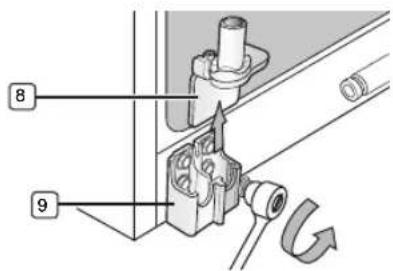
text_image
8 908_ setting up
Reattaching the freezer doors

To reattach the freezer doors, assemble parts in reverse order
Removing the Fridge Door
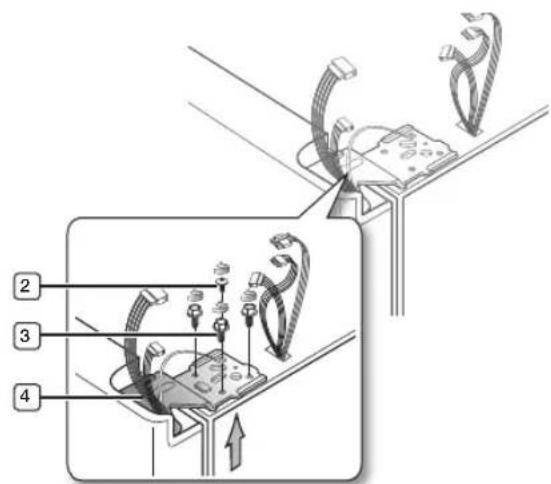
- With the door closed, remove the upper hinge cover ① using a screwdriver.
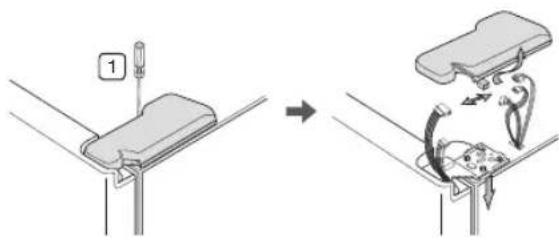
text_image
Diagram illustrating a mechanical assembly or disassembly process with labeled component '1' and directional arrows indicating motion.- Remove hinge screws ② and the ground screw ③ by turning counter-clockwise, and take off the upper hinge ④. Be careful that the door does not fall on you as you are removing it.
text_image
Diagram illustrating cable installation steps with numbered components and directional arrows
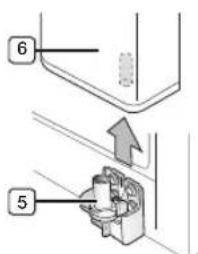
Be careful not to miss the parts of refrigerator.
- Remove the door from the lower hinge 5 by lifting the door straight up 6.
text_image
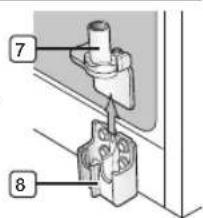
Technical diagram showing two labeled mechanical components with numbered parts and an upward arrow indicating motion or assembly.- Remove the lower hinge ⑦ from the bracket ⑧ by gently lifting the lower hinge upwards.
text_image
7 8Reattaching the Fridge door

To reattach the fridge doors, assemble parts in reverse order.
Now that the doors are back on the refrigerator, you want to make sure the refrigerator is level so that you can make final adjustments. If the refrigerator is not level, it will not be possible to get the doors perfectly even.

The front of the refrigerator is also adjustable.
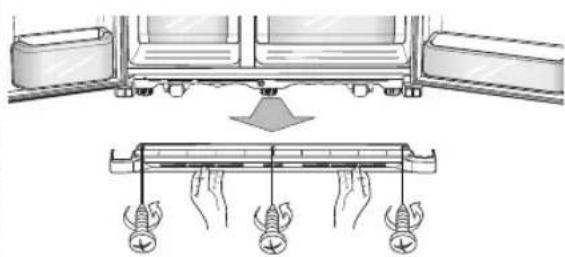
Before levelling the refrigerator, remove the front leg cover
Open both the freezer and fridge doors, and then take off the front leg cover by turning the three screws counter-clockwise.
natural_image
Diagram showing a mechanical assembly with a lever and a supporting bar, no text or symbols presentWhen the Freezer door is lower than the fridge
Insert a flat-blade screwdriver into a slot on the Leg, turn it clockwise or counter clockwise to level the freezer.
When the Freezer door is higher than the fridge
Insert a flat-blade screwdriver into a slot on the Leg, turn it clockwise or counter clockwise to level the fridge.
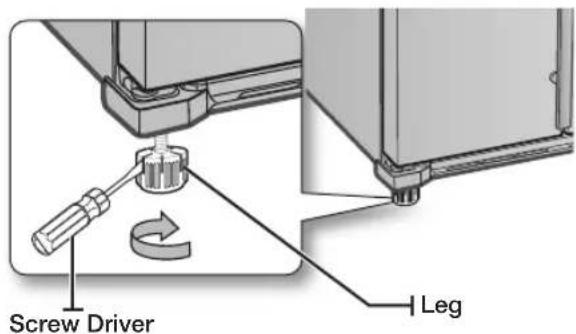
text_image
Screw Driver Leg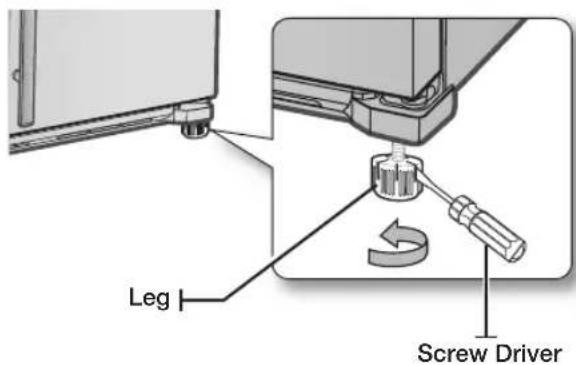
text_image
Leg Screw Driver
Refer to the next section for the best way to make very minor adjustments to the doors.
MAKING MINOR ADJUSTMENTS TO THE DOORS
Remember, a levelling refrigerator is necessary for getting the doors perfectly even. If you need help, review the previous section on levelling the refrigerator.
10_ setting up
When the door of the freezer is higher than the fridge
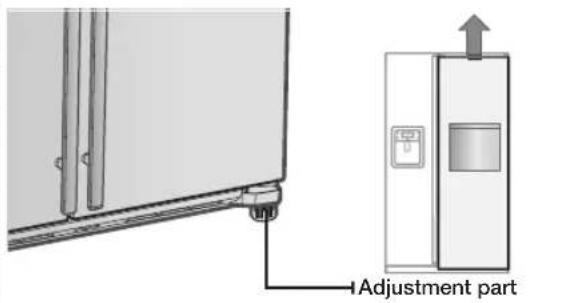
text_image
Adjustment partIn the case of the process to correct the imbalance is the same. Open the doors and adjust them, one at a time, as follows:
- Unscrew the nut ① from the lower hinge until it reaches the upper end of the bolt ②.
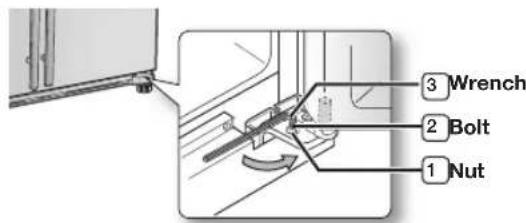
text_image
① Nut ② Bolt ③ Wrench
When you release the nut 1, make sure that you use the Allen wrench provided 3 to loosen the bolt 2 in a counter-clockwise direction. You should then be able to unscrew the nut 1 with your fingers.
- Adjust the height difference between the doors by turning the bolt ② clockwise or counter clockwise.

When you turn clockwise ↙, the door will move up.
- After adjusting the doors, turn the nut ① clockwise until it reaches the lower end of the bolt, then tighten the bolt again with the wrench ③ to fix the nut in place ①.

If you do not secure the nut firmly, the bolt may release.
CHECKING THE WATER DISPENSER LINE
A water dispenser is just one of the helpful features on your new Samsung refrigerator. To help promote better health, the Samsung water fi Iter removes unwanted particles from your water. However, it does not sterilize or destroy microorganisms. You will need to purchase a water purifying system to do that.
In order for the icemaker to operate properly, water pressure of 138 \~862 kPa is required. Under normal conditions, a 170 cc paper cup can be filled in 10 seconds.
If the refrigerator is installed in an area with low water pressure (below 138 kPa), you can install a booster pump to compensate for the low pressure.
Make sure the water storage tank inside the refrigerator is properly filled. To do this, press the water dispenser lever until the water runs from the water outlet.

Water Line installation Kits are included with unit. You can find it in freezer(or fridge) drawer.

The new hose-sets supplied with the appliance are to be used and that old hose-sets should not be reused.
Parts for water line Installation
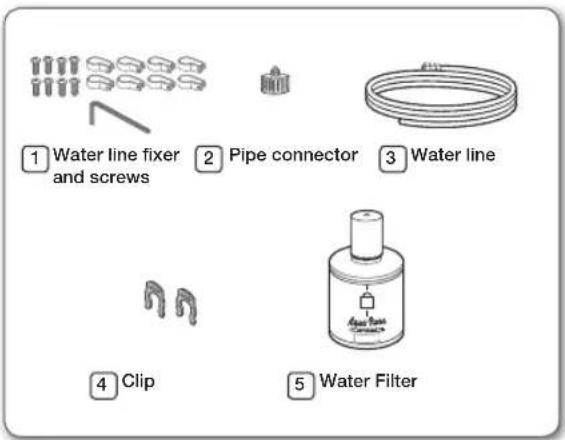
text_image
① Water line fixer and screws ② Pipe connector ③ Water line ④ Clip ⑤ Water FilterConnecting to the water supply line
- First, shut off the main water supply line.
- Locate the nearest cold, drinking water line.
- Follow the Water Line Installation Instructions in the installation kit.
CAUTION
The water line must be connected to the cold water pipe. If it is connected to the hot water pipe, it may cause the purifier to malfunction.
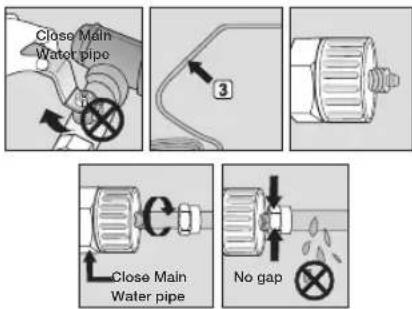
- After connecting the water supply to the water filter, turn your main water supply back on and Dispense about 3L to clear and prime the water filter.
INSTALLING THE WATER DISPENSER LINE
Connecting the water line to the refrigerator
- Remove the cap from water line on the unit and insert compression nut to the water line on the unit after disassembling from provided water line.
- Connect both water line from the unit and water line in the kit
- Tighten the compression nut onto the compression fitting. Be careful no gap between two items.
- Turn water on and check for any leakage.
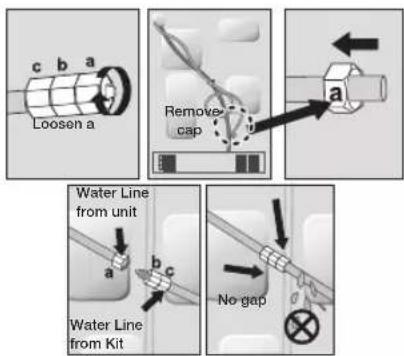
setting up _11 setting up _11

Only connect the water line to a drinkable water source.
If you have to repair or disassemble the water line, cut off 6.5mm of the plastic tubing to make sure you get a snug, leak-free connection.

Before being used, the leakage in these places should be examined
- Samsung Warranty does not cover WATER LINE INSTALLATION.
- It'll be done at customer's charge unless the retail price includes installation cost.
- Please contact Plumber or Authorized Installer for the installation if needed.
- If Water leakage occurs due to improper installation, Please contact installer.
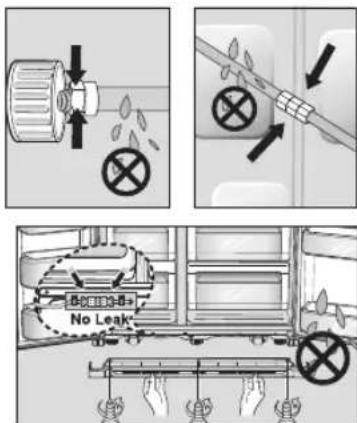
Removing any residual matter inside the water supply line after installing fi Iter.
- Turn ON the main water supply.
- Press the Water button and push the dispenser pad.
- Run water through the dispenser until the water runs clear (approx. 3L). This will clean the water supply system and remove air from the lines.
- Additional flushing may be required in some households.
- Open the refrigerator door and make sure there are no water leaks coming from the water filter.

A newly installed water filter cartridge may cause water to briefly spurt from the water dispenser. This is due to air getting into the line. It should pose no problem to operation.
12_ setting up
operating the SAMSUNG side-by-side refrigerator
text_image
Power Freeze -88°C 88°C Freezer Ice DP Lighting Pridge Child Lock Vacation(100℃) Lighting 4 2 3 Lighting 5 6 Ice Water 7 8| 1Power Freeze Button | Speeds up the time needed to freeze products in the freezer. This can be helpful if you need to quickly freeze items that spoil easily or if the temperature in the freezer has warmed dramatically (For example, if the door was left open). This Function must be activated before putting large stuff in freezer compartment at least 24 hours before. |
| 2Freezer Button | Press the Freezer button to set the freezer to your desired temperature. You can set the temperature between -14°C and -25°C. |
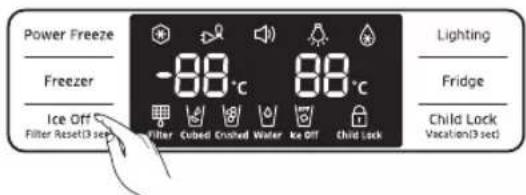
| 3Ice Off Button | Press the Ice Off button to turn the ice making function off.When Ice Off blinks on the display panel, reinsert the bucket and/or make sure it's installed properly.When you change the filter, press and hold this button for 3 seconds to reset the filter schedule. |
| 4Lighting Button | Press the Lighting button for the dispenser LED lamp to stay on. |
| 5Fridge Button | Press the Fridge button to set the fridge to your desired temperature.You can set temperature between 1°C ~ 7°C and Power cool.Power cool will be on the display after 1°C |
| 6Child Lock Button | By pressing this button, all buttons will be locked.The Ice button and the dispenser pad will not work either.To cancel this function, press this button again. |
| If you are going on vacation or business trip or you do not need to use the refrigerator, press and hold this button for 3 seconds. The temperature in the fridge will be around 15°C and the freezer will work normally. | |
| 7Ice Button | Press the Ice button to choose cubed or crushed ice. |
| 8Water Button | Press the Water button for water. |
USING THE DIGITAL DISPLAY
"Freezer Temp." indicates the current Freezer temperature.
"Fridge Temp." indicates the current Fridge temperature.
When not in use the Display will turn off, this is normal.
POWER FREEZE

This icon will light up when you activate the "Power Freeze" feature. "Power Freeze" is great for times when you need a lot of ice. When you have enough, just press the button again to cancel the "Power Freeze" mode.

When you use this function the energy consumption of the refrigerator will increase. Remember to turn it off when you don't need it and return the freezer to your original temperature setting.
VACATION
This icon will light up when you activate the "Vacation" feature.
If you are going on vacation or business trip or you do not need to use the refrigerator, press and hold the Child Lock button for 3 seconds. The temperature in the fridge will be around 15°C and the freezer will work normally. The refrigerator section should be emptied.
ALARM
This icon will light up all the time. The door alarm will sound if any door is open for more than 2 minutes. The beeping stops when you close the door. If you need to turn off the Alarm function, press the Lighting and Fridge buttons for 3 seconds at the same time.
LIGHTING

This icon will light up when you activate the "Lighting" feature. In this case, the dispenser light (under the display) will be on constantly. If you would like the dispenser light to come on only when using the dispenser, turn the "Lighting" feature off.
POWER COOL

This icon will light up when you activate the "Power Cool" feature.
For a quick fridge cool down, use "Power Cool". If you select "Power Cool", the inside temperature of the Fridge will decrease for about two and a half hours.
FILTER INDICATOR
When the fi Iter indicator light changes to red, it is time to change the fi Iter. Typically this happens about every 6 months.
The fi Iter Indicator will be Blue when you initially insert the water fi Iter.
The fi Iter Indicator will be purple when you have used your water fi Iter for 5 months.
The fi Iter Indicator will be Red when you have used your water fi Iter for 6 months.
After removing the old water filter and installing a new one (see page 19 for instructions on how to do this), reset the indicator status light by pressing the Ice off button for about 3 seconds.
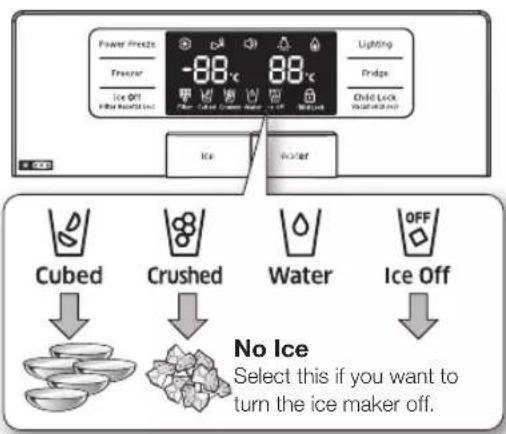
CUBED ICE
CRUSHED ICE

Enjoy cubed or crushed ice by selecting your preference from the digital control panel. The type light indicates the type of ice that is currently chosen.
WATER
This icon will light up when you activate the "Water" feature.
ICE OFF

This icon will light up when you activate the "Ice Off" feature. In this case, the ice will not be produced. When Ice Off blinks on the display panel, reinsert the bucket and/or make sure it's installed properly.
14\_ operating
CHILD LOCK
This icon will light up when you activate the Child Lock function by pressing Child Lock button.
Press this button again to reactivate. Use this function to prevent children from tampering with temperature and filter settings.
Canceling Exhibition Mode
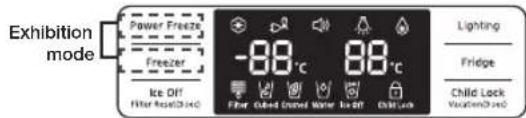
In case of Exhibition Mode, It seems working but doesn't make cool air. To cancel this mode, press the Power Freeze and Freezer buttons at the same time for 8 seconds until "Ding-dong" sounds.
text_image
Exhibition mode Power Freeze Freezer Ice Off Filter Resin/Dised -88°C 88°C Filter Closed Cover Name Is Off Child Lock Lighting Fridge Child Lock Vacation/DisedCONTROLLING THE TEMPERATURE
Basic Temperature of Freezer and Fridge
The basic and recommended temperature of Freezer and Fridge compartments are -20^/3^ .
If the temperature of Freezer and Fridge compartments are too high or low, adjust the temperature manually.
Controlling the Freezer temperature
The freezer temperature can be set between -14°C and -25°C to suit your particular needs. Press the Freezer button repeatedly until the desired temperature is shown in the temperature display. Keep in mind that foods like ice cream may melt at -16°C.
The temperature display will move sequentially from -14^ and -25^ . When the display reaches -14^ , it will begin again at -25^ .
Five seconds after the new temperature is set the display will again show the actual current freezer temperature. However, this number will change as the Freezer adjusts to the new temperature.
Controlling the Fridge temperature
The refrigerator temperature can be set between 7^ C and 1^ C to suit your particular needs. Press the Fridge button repeatedly until the desired temperature is shown in the temperature display.
The temperature control process for the Fridge works just like the Freezer process.
Press the Fridge button to set your desired temperature. After a few seconds, the Fridge will begin tracking towards the newly set temperature. This will be reflected in the digital display.
The temperature of the freezer or the refrigerator may rise from opening the doors too frequently, or if a large amount of warm or hot food is placed in either side.
This may cause the digital display to blink. Once the freezer and refrigerator return to their normal set temperatures the blinking will stop.
If the blinking continues, you may need to "reset" the refrigerator. Try unplugging the appliance, wait about 10 minutes and then plug back in.
USING THE ICE AND COLD WATER DISPENSER
text_image
Power Freeze Freezer Ice Off 88°C 88°C Lighting Pridge Child Lock Water Ice Cubed Crushed Water Ice Off No Ice Select this if you want to turn the ice maker off.When Ice Off blinks on the display panel, reinsert the bucket and/or make sure it's installed properly.
Using the Water Dispenser
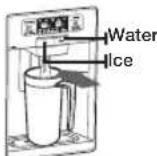
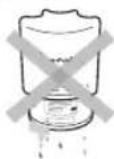
Press the Water button. Place your cup the water outlet and push gently against the dispenser pad. Make sure the glass is in line with the dispenser to prevent the water from splashing out.
To get cooler water
- The dispensed water is cool, not icy cold
- When you want colder water with ice, dispense ice to your drink glass first before filling it with water to prevent water from splashing out.
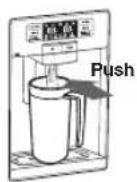
Using the Ice Dispenser
Press the ice button to select the type of ice you want.
Place your cup the ice outlet and push gently against the dispenser pad. Make sure the glass is in line with the dispenser to prevent the ice from bouncing out.
When Cubed Ice is selected after using the Crushed Ice feature, a small amount of residual crushed ice might be produced.

- Do not put your fingers, hands or any other unsuitable objects in the chute or ice-maker bucket.
- It may result in personal injury or material damage.
- Use only the ice maker provided with the refrigerator.
- The water supply to this refrigerator must only be installed/connected by a suitably qualified person and connect to a potable water supply only.
- In order to operate the ice maker properly, water pressure of 138 \~ 862 kPa is required.
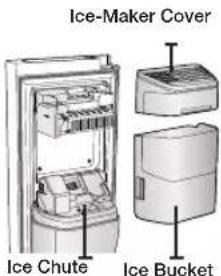
text_image
Ice-Maker Cover Ice Chute Ice Bucket
- If you have a long vacation or business trip and won't use water or ice dispensers, close the water valve.
- Otherwise, water leakage may occur.
- When you have not used the ice maker for a while, or you have opened the Freezer door frequently, the ice may stick together. If this has occurred, empty the ice container or break up the ice with a wood kitchen tool.
Do not use sharp items such as knives or forks.
- When the bucket is removed, there may still be some residual ice in the ice maker that will be produced.
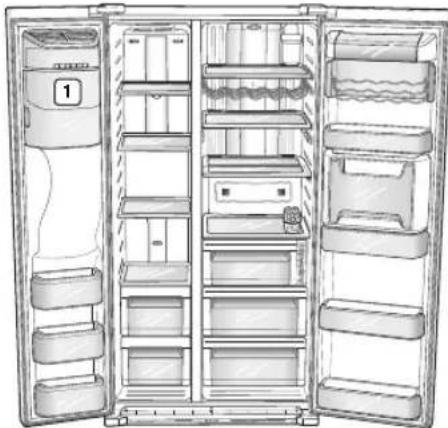
natural_image
Line drawing of an open refrigerator with shelves, doors, and a door number (no text or symbols)
For more space, you can store food with Guard FRE-UPP instead of the ice bucket (1). If you remove the ice bucket, ICE OFF will blink on the display panel.
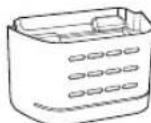
GUARD FRE-UPP
(Optional)

For RSG5P & RSG5U & RSG5M models,
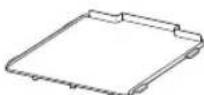
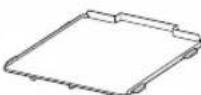
GUARD FRE-BOTTOM
(Optional)
To get more space, you can remove the freezer upper drawer since it does not affect thermal and mechanical characteristics.
For RSG5F & RSG5D models,
To get more space, you can remove the freezer upper and lower drawers since it does not affect thermal and mechanical characteristics. But, put the "Shelf Fre Bottom" on the bottom of the freezer compartment. A declared storage volume of frozen food storage compartment is calculated with the drawer(s) removed.

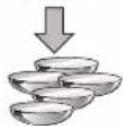
The door guards in the freezer of this model are the two star sections except the top guard, so the temperature in two star sections are slightly higher than other freezer compartment.
16_ operating
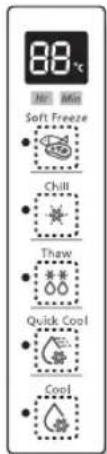
USING THE COOLSELECT ZONE™ DRAWER (OPTIONAL)
The CoolSelect Zone™ Drawer is designed to make your busy life just a little bit easier.
Soft Freeze
When "Soft Freeze" is selected on the CoolSelect Zone™ Drawer, the temperature on the drawer digital panel displays -5°C, regardless of the overall
temperature setting of the refrigerator. This feature helps keep meat and fi sh fresh for longer.
Chill
When "Chill" is selected, the temperature of the CoolSelect Zone™ Drawer is kept at -1°C, regardless of the overall temperature setting of the refrigerator. This feature also helps keep meat or fi sh fresh for longer.
text_image
88°C Soft Freeze Chill Thaw Quick Cool CoolThaw
When "Thaw" is selected, warm and cold air is alternately blown into the CoolSelect Zone™ Drawer. Depending on the weight of the frozen food, you can select a 4 hrs, 6 hrs, 10 hrs, and 12 hrs thawing time.
When "Thaw" ends, food is in a half-frozen state, making it easy to cut for cooking. In addition, when "Thaw" ends, the CoolSelect Zone™ Drawer returns to the original "Chill" condition. To cancel this function mid-cycle, just press any button besides
Thaw.
Here are the approximate thawing times of meat and fish by weight (and based on a 25.4mm (1in.) thickness). This chart represents the total weight of food in the CoolSelect Zone™ Drawer.
| THAW TIME WEIGHT |
| 4hours 363g (0.8lb) |
| 6hours 590g (1.3lb) |
| 10hours 771g (1.7lb) |
| 12hours 1000g (2.2lb) |
Quick Cool
You can use the "Quick Cool" operation with the CoolSelect Zone™ Drawer to quickly cool 1\~3 canned beverages in about an hour. When the "Quick Cool" process ends, the CoolSelect Zone™ Drawer automatically returns to the previously set temperature.
To cancel this operation, press the Quick Cool button again and the CoolSelect Zone™ Drawer returns to the previously set temperature.
Cool
When "Cool" is selected, the temperature in the CoolSelect Zone™ Drawer will be the same as the overall temperature setting of the refrigerator. The drawer digital panel shows the same temperature as that of the refrigerator display panel. Since the "Cool" function mimics the refrigerator temperature, you have extra general storage space.

Depending on the size and thickness of the meat or fish, thawing times may vary.

When "Thaw" is in operation, any items that you do not want affected should be moved out of the drawer.
REMOVING THE FREEZER/ FRIDGE ACCESSORIES
Cleaning and rearranging the interior of the freezer is a snap.
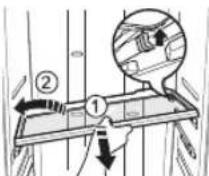
1. Shelves (Freezer/Fridge)
Remove the shelf by pulling the shelf out to the hole point as shown at the right figure. And then remove it by turning and lifting it up.
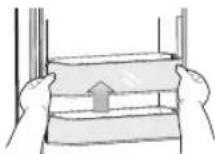
2. Door Bin
Remove the Door Bin by holding the door bin with both hands and then gently lift it up.
3. Drawer
Remove the Drawer by pulling it out and slightly lifting it up.
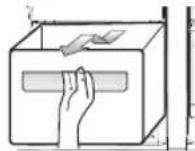
4. Ice Bucket (Freezer)
Remove the Icemaker Bucket by lifting up and pulling it out slowly.
- Grip the handle as shown in the figure
- Lift the low part slightly
• Take the ice bucket out slowly
natural_image
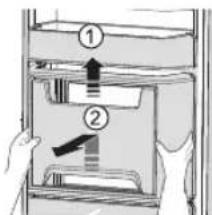
Illustration of hands holding a large air conditioner cover with a curved arrow indicating rotation (no text or symbols)5. Beverage Station (Fridge) (optional)
- Lift up the upper bin at the top of the fridge and pull it out.
• After pressing the cover wrapped with both hands, remove the beverage station cover by pulling toward up.
text_image
Diagram showing two labeled components of a storage or rack system with arrows indicating direction, likely illustrating a mechanical or electrical assembly.
Do not use excessive force when removing the cover.
Otherwise, the cover may break and cause injury.

Before removing any accessories, make sure that no food is in the way.
When possible, remove the food altogether to reduce the risk of accidents.
CLEANING THE REFRIGERATOR

Do not use Benzene, Thinner or Clorox™ for cleaning.
They may damage the surface of the appliance and can create a risk of fire.

Do not spray the refrigerator with water while it is plugged in, as it may cause an electric shock. Do not clean the refrigerator with benzene, thinner or car detergent for risk of fire.
CHANGING THE INTERIOR LIGHTS

Changing the LED Type Lighting

Do not disassemble or replace the LED type
CAUTION Lighting.
To change the LED Type Lighting contact Samsung service center or your authorized Samsung dealer.
CHANGING THE WATER FILTER

To reduce risk of water damage to your
WARNINGproperty DO NOT use generic brands of water filers in your SAMSUNG Refrigerator.
USE ONLY SAMSUNG BRAND WATER FILTERS.
SAMSUNG will not be legally responsible for any damage, including, but not limited to property damage caused by water leakage from use of a generic water filter.
SAMSUNG Refrigerators are designed to work ONLY WITH SAMSUNG Water Filter.
The "Filter Indicator" light lets you know when it is time to change your water filter cartridge.
To give you preparation time to get a new fi liter, the red light will come on just before the capacity of the current fi liter runs out. Changing the fi liter on time provides you with the freshest, cleanest water from your fridge.

-
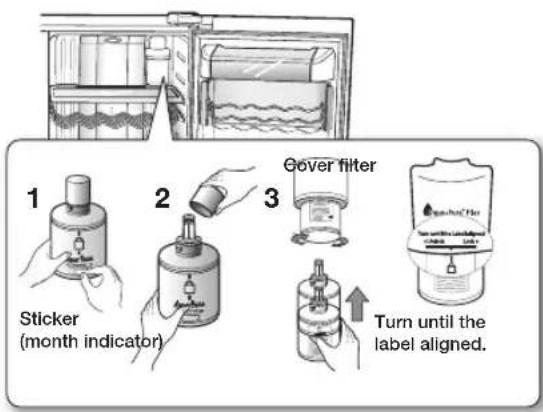
Remove the water filter from the box and put a month indicator sticker on the filter as shown. Place a sticker on the filter that dates six months in the future. For example, if you are replacing the water filter in March, put the "SEP" (September) sticker on the filter to remind you to replace in September. Normal filter life is about every 6 months.
-
Remove the new filter's protective cap and remove the old filter.
- Position and insert the new filter into the filter housing. Slowly turn the water filter clockwise to align with the printing mark on the cover, locking the filter in position. Make sure to align the water filter label mark with the center of cover filter printing as illustrated. Remember, do not over-tighten.
18
operating
text_image
1 Sticker (month indicator) 2 Gover filter 3 Turn until the label aligned.- Once you have completed this process, hold the Ice Off button simultaneously for 3 seconds to reset the filter schedule.
text_image
Power Freeze Freezer Ice Off Filter Reset(3 sec) -88°C Cubed Crushed Water Ice Off Child Lock Lighting Fridge Child Lock Vacation(3 sec)- Lastly, run about 3L of water through water dispenser and throw away. Make sure that water flows clearly again before drinking.
- See installing the water filter instructions page 11.
A newly installed water filter cartridge may cause water to briefly spurt from the water dispenser. This is due to air getting into the line. It should pose no problem to operation.
Ordering replacement fi Iters
To order more water filter cartridges, contact your authorized Samsung dealer.
USING THE DOORS
The refrigerator doors are equipped with a door opening and closing feature that ensures that the doors close all the way and are securely sealed.
After opening beyond a certain point, the door will "catch" and remain open. When the door is ajar ahead of the catch that allows it to stay open, it will close automatically.
troubleshooting
| PROBLEM SOLUTION | |
| The refrigerator does not work at all or it does not chill sufficiently. | Check that the power plug is properly connected.Is the temperature control on the display panel set to the correct temperature? Try setting it to a lower temperature.Is the refrigerator in direct sunlight or located too near a heat source?Is the back of the refrigerator too close to the wall and therefore keeping air from circulating? |
| The food in the fridge is frozen. | Is the temperature control on the display panel set to the correct temperature? Try setting it to a warmer temperature.Is the temperature in the room very low?Did you store the food with a high water content in the coldest part of the fridge? Try moving those items into the body of the fridge instead of keeping them in the CoolSelect ZoneTM drawer. |
| You hear unusual noises or sounds. | Check that the refrigerator is level and stable.Is the back of the refrigerator too close to the wall and therefore keeping air from circulating?Was anything dropped behind or under the refrigerator?A “ticking” sound is heard from inside the refrigerator. This is normal and occurs because various accessories are contracting or expanding in relation to the temperature of the refrigerator interior. |
| The front corners of the appliance are hot and condensation is occurring. | Some heat is normal as anti-condensators are installed in the front corners of the refrigerator to prevent condensation.Is the refrigerator door ajar? Condensation can occur when you leave the door open for a long time.Water condensation in the drawer may occur when storing vegetables and it will be removed naturally as time passes. |
| Ice is not dispensing. | Did you wait for 12 hours after installation of the water supply line before making ice?Is the water line connected and the shut-off valve open?Did you manually stop the ice making function? Make sure Ice is set to Cubed or Crushed.Is there any ice blocked within the ice maker bucket?Is the freezer temperature too warm? Try setting the freezer temperature lower. |
| You can hear water bubbling in the refrigerator. | This is normal. The bubbling comes from the refrigerant coolant liquid circulating through the refrigerator. |
| There is a bad smell in the refrigerator. | Has a food item spoiled?Make sure that strong smelling food (for example, fish) is wrapped so that it is airtight.Clean out your freezer periodically and throw away any spoiled or suspect food. |
| Frost forms on the walls of the freezer. | Is the air vent blocked? Remove any obstructions so air can circulate freely.Allow sufficient space between the foods stored for efficient air circulation.Is the freezer door closed properly? |
| Water dispenser is not functioning. | Is the water line connected and the shut-off valve open?Has the water supply line tubing been crushed or kinked?Make sure the tubing is free and clear of any obstruction.Is the water tank frozen because the refrigerator temperature is too low?Try selecting a warmer setting on the main display panel. |
troubleshooting _19
Ambient Room Temperature Limits
This refrigerator is designed to operate in ambient temperatures specified by its temperature class marked on the rating plate.
| Class Symbol | Ambient Temperature range (°C) | ||
| IEC 62552 (ISO 15502) ISO | 8561 | ||
| Extended Temperate SN +10 to +32 +10 to +32 | |||
| Temperate N +16 to +32 +16 to +32 | |||
| Subtropical ST +16 to +38 +18 to +38 | |||
| Tropical T +16 to +48 +18 to +43 | |||

Internal temperatures may be affected by such factors as the location of the fridge/freezer, ambient temperature and the frequency with which you open the door.
Adjust the temperature as required to compensate for these factors.
English
Correct Disposal of This Product
(Waste Electrical & Electronic Equipment)
(Applicable in countries with separate collection systems)
This marking on the product, accessories or literature indicates that the product and its electronic accessories (e.g. charger, headset, USB cable) should not be disposed of with other household waste at the end of their working life. To prevent possible harm to the environment or human health from uncontrolled waste disposal, please separate these items from other types of waste and recycle them responsibly to promote the sustainable reuse of material resources.
Household users should contact either the retailer where they purchased this product, or their local government office, for details of where and how they can take these items for environmentally safe recycling.
Business users should contact their supplier and check the terms and conditions of the purchase contract. This product and its electronic accessories should not be mixed with other commercial wastes for disposal.
SAMSUNG


Réfrigérateur
Mode d'emploi

100%
Recycled Paper
natural_image
3D diagram of a refrigerator with labeled dimensions (23mm height, 9.5mm width) and no visible text or symbols beyond measurement annotations.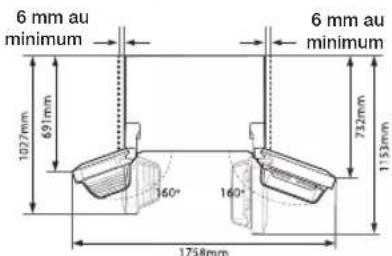
text_image
6 mm au minimum 1027mm 691mm 6 mm au minimum 732mm 1153mm 60° 160° 1758mmtext_image
Pied Tournevistext_image
Diagram illustrating a device with a prohibition symbol and a mechanical load, showing mechanical deformation.natural_image
Illustration of hands installing or adjusting a wall-mounted air conditioner unit (no text or symbols visible)Figure 1
text_image
Diagram illustrating a mechanical or electrical setup with labeled components and directional arrows indicating motion or force.text_image
Technical diagram showing a mechanical assembly with labeled parts, including a zoomed-in detail view and numbered annotations.
text_image
Diagram illustrating a mechanical assembly or disassembly process with labeled steps 1 and 2, showing tool positioning and motion arrows.text_image
Diagram illustrating cable installation steps with numbered components and directional arrows
text_image
Technical diagram showing mechanical assembly with numbered components and directional arrow indicating motion
text_image
Diagram illustrating a mechanical or electrical process with labeled component '1' and directional arrows indicating movement or transformation.text_image
Diagram illustrating a mechanical assembly or assembly process with numbered components and directional arrows indicating movement.natural_image
Diagram showing a mechanical assembly with a lever and a base, no text or symbols presenttext_image
Tournevis Pied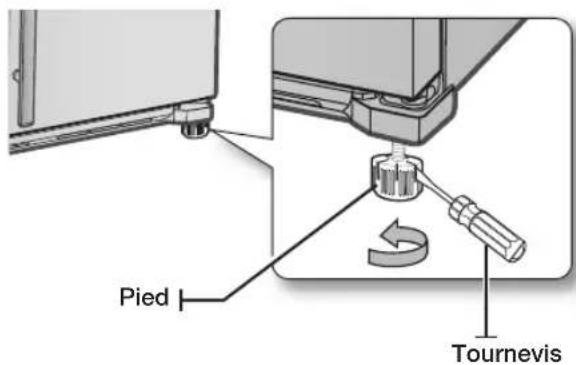
text_image
Pied Tournevis
text_image
Eau Glace12 installation
text_image
Power Freeze Freezer Ice Off Lighting Pridge Child Lock Water Lighting 4 5 6 3 7 Ice Water 8natural_image
Interior view of a refrigerator with open doors and shelves (no text or symbols visible)
natural_image
Illustration of hands holding a refrigerated appliance with a curved arrow indicating rotation (no text or symbols)text_image
Diagram showing two labeled steps of a mechanical or electrical component inside a storage cabinet, with hand and arrow indicating direction.
REEMPLACEMENT DES AMPOULES

text_image
Power Freeze Freezer Ice Off Filter Reset(3 sec) -88°C Filter Cubed Crushed Water Ice Off Child Lock Lighting Fridge Child Lock Vacation(3 sec)natural_image
Illustration of hands installing or adjusting a wall-mounted air conditioner unit (no text or symbols visible)- وعاء الشج (الفريز)
text_image
Diagram showing two labeled components (① and ②) of a mechanical or electrical assembly with directional arrows indicating movement or force.natural_image
Line drawing of an open refrigerator with multiple compartments and doors (no text or symbols)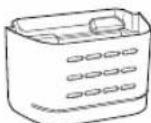
GUARD FRE-UPP
ال lbctbair
GUARD FRE-BOTTOM
ال EXPETARI
natural_image
Exploded view diagram of a refrigerator internal compartments and casing (no text or labels)text_image
Power Freeze Freezer Ice Diff (After Boiling) -88°C 88°C Lighting Fridge Child Lock Insulated Air Ice in a Star
Cubed

Crushed

Water

Ice Off


بدون ثلج
text_image
Power Freeze Freezer -88℃ 88℃ Ice Off Filter More(3 sec) Filter Cooled Cather Water Lighting Fridge Child Lock Vacation(10 sec)CRUSHED ICE, CUBED ICE
text_image
Power Freeze Freezer Ice Diff Lighting Fridge Child Lock Voucher/Cond -88°C 88°C I 2 0 1 Ice Water V A| الكيميات الكسرية في حضيرها الفر优质的 م嫁 15 Satisfaction على الأقل. |
| • لضسط الفروزيع على درجة الحراリアم. |
| • المزغوية. يكنست صبط درجة الحراリア多媒体 15-10-12-13-14-15-16-17-18-19-20-21-22-23-24-25-26-27-28-29-30-31-32-33-34-35-36-37-38-39-40-41-42-43-44-45-46-47-48-49-50-51-52-53-54-55-56-57-58-59-60-61-62-63-64-65-66-67-68-69-70-71-72-73-74-75-76-77-78-79-80-81-82-83-84-85-86-87-88-89-90-91-92-93-94-95-96-97-98-99-100-101-102-103-104-105-106-107-108-109-110-111-112-113-114-115-116-117-118-119-120-121-122-123-124-125-126-127-128-129-130-131-132-133-134-135-136-137-138-139-140-141-142-143-144-145-146-147-148-149-150-151-152-153-154-155-156-157-158-159-160-161-162-163-164-165-166-167-168-169-170-171-172-173-174-175-176-177-178-179-180-181-182-183-184-185-186-187-188-189-190-191-192-193-194-195-196-197-198-199-200-201-202-203-204-205-206-207-208-209-210-211-212-213-214-215-216-217-218-219-220-221-222-223-224-225-226-227-228-229-230-231-232-233-234-235-236-237-238-239-240-241-242-243-244-245-246-247-248-249-250-251-252-253-254-255-256-257-258-259-260-261-262-263-264-265-266-267-268-269-270-271-272-273-274-275-276-277-278-279-280-281-282-283-284-285-286-287-288-289-290-291-292-293-294-295-296-297-298-299-300-301-302-303-304-305-306-307-308-309-310-311-312-313-314-315-316-317-318-319-320-321-322-323-324-325-326-327-328-329-330-331-332-333-334-335-336-337-338-339-340-341-342-343-344-345-346-347-348-349-350-351-352-353-354-355-356-357-358-359-360-361-362-363-364-365-366-367-368-369-370-371-372-373-374-375-376-377-378-379-380-381-382-383-384-385-386-387-388-389-390-391-392-393-394-395-396-397-398-399-400-401-402-403-404-405-406-407-408-409-410-411-412-413-414-415-416-417-418-419-420-421-422-423-424-425-426-427-428-429-430-431-432-433-434-435-436-437-438-439-440-441-442-443-444-445-446-447-448-449-450-451-452-453-454-455-456-457-458-459-460-461-462-463-464-465-466-467-468-469-470-471-472-473-474-475-476-477-478-479-480-481-482-483-484-485-486-487-488-489-490-491-492-493-494-495-496-497-498-499-500-501-502-503-504-505-506-507-508-509-510-511-512-513-514-515-516-517-518-519-520-521-522-523-524-525-526-527-528-529-530-531-532-533-534-535-536-537-538-539-540-541-542-543-544-545-546-547-548-549-550-551-552-553-554-555-556-557-558-559-560-561-562-563-564-565-566-567-568-569-570-571-572-573-574-575-576-577-578-579-580-581-582-583-584-585-586-587-588-589-590-591-592-593-594-595-596-597-598-599-600-601-602-603-604-605-606-607-608-609-610-611-612-613-614-615-616-617-618-619-620-621-622-623-624-625-626-627-628-629-630-631-632-633-634-635-636-637-638-639-640-641-642-643-644-645-646-647-648-649-650-651-652-653-654-655-656-657-658-659-660-661-662-663-664-665-666-667-668-669-670-671-672-673-674-675-676-677-678-679-680-681-682-683-684-685-686-687-688-689-690-691-692-693-694-695-696-697-698-699-700-701-702-703-704-705-706-707-708-709-710-711-712-713-714-715-716-717-718-719-720-721-722-723-724-725-726-727-728-729-730-731-732-733-734-735-736-737-738-739-740-741-742-743-744-745-746-747-748-749-750-751-752-753-754-755-756-757-758-759-760-761-762-763-764-765-766-767-768-769-770-771-772-773-774-775-776-777-778-779-780-781-782-783-784-785-786-787-788-789-790-791-792-793-794-795-796-797-798-799-800-801-802-803-804-805-806-807-808-809-810-811-812-813-814-815-816-817-818-819-820-821-822-823-824-825-826-827-828-829-830-831-832-833-834-835-836-837-838-839-840-841-842-843-844-845-846-847-848-849-850-851-852-853-854-855-856-857-858-859-860-861-862-863-864-865-866-867-868-869-870-871-872-873-874-875-876-877-878-879-880-881-882-883-884-885-886-887-888-889-890-891-892-893-894-895-896-897-898-899-900-901-902-903-904-905-906-907-908-909-910-911-912-913-914-915-916-917-918-919-920-921-922-923-924-925-926-927-928-929-930-931-932-933-934-935-936-937-938-939-940-941-942-943-944-945-946-947-948-949-950-951-952-953-954-955-956-957-958-959-960-961-962-963-964-965-966-967-968-969-970-971-972-973-974-975-976-977-978-979-980-981-982-983-984-985-986-987-988-989-990-991-992-993-994-995-996-997-998-999-1000 |

زر التجEmbed القوي

زر الفريزر

زد ايغاف عمل الث lj

زر الإضاءة

زرالثلاثة

text_image
A11 A12 A13 ③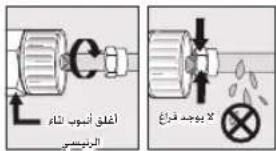
natural_image
Diagram showing a mechanical assembly with a lever and a supporting frame, no text or symbols presenttext_image
Diagram illustrating a mechanical or electrical setup transformation, showing a component being inserted into a housing with motion arrows.text_image
Technical diagram showing cable installation steps with labeled components and directional arrowstext_image
Technical diagram showing mechanical assembly with labeled parts and directional arrowالإعداد_٩.
text_image
Technical diagram showing cable installation steps with labeled components and directional arrowstext_image
Technical diagram showing mechanical assembly with labeled parts V and 1, including a directional arrow indicating movement or force.text_image
Diagram illustrating a mechanical or electrical process with labeled components and directional arrows indicating motion or movement.text_image
Diagram illustrating a mechanical assembly with labeled parts and a corresponding diagram showing hand positioning on a spring scale.text_image
Technical diagram showing a mechanical assembly with labeled parts and an inset view of a device connection.natural_image
Illustration of hands installing or adjusting a wall-mounted air conditioner unit (no text or symbols visible)شکل 1
لازالة وعاء الثالث
text_image
Diagram illustrating a prohibition symbol on a refrigerator with arrows indicating movement or collision, alongside a separate diagram showing a device with a switch.ل Strict قر Emergency Industry Privacy Policy Policy Policy Policy Policy Policy Policy Policy Policy Policy Policy Policy Policy Policy Policy Policy Policy Policy Policy Policy Policy Policy Policy Policy Policy Policy Policy Policy Policy Policy Policy Policy Policy Policy Policy Policy Policy Policy Policy Policy Policy Policy Policy Policy Policy Policy Policy Policy Policy Policy Policy Policy Policy Policy Policy Policy Policy Policy Policy Policy Policy Policy Policy Policy Policy Policy Policy Policy Policy Policy Policy Policy Policy Policy Policy Policy Policy Policy Policy Policy Policy Policy Policy Policy Policy Policy Policy Policy Policy Policy Policy Policy Policy Policy Policy Policy Policy Policy Policy Policy Strategy, 2018, 2019.