EKSA H1 - Earplug

H1 - Earplug EKSA - Free user manual and instructions

Find the device manual for free H1 EKSA in PDF.

📄 52 pages English EN Download 💬 AI Question 10 questions ⚙️ Specs
Notice EKSA H1 - page 6
Pick your language and provide your email: we'll send you a specifically translated version.
Product Type Wireless Bluetooth Headset
Brand EKSA
Model H1
Bluetooth Version V5.0
Wireless Range 30 m (99 ft)
Music Playback Time ≈57 hours (at 70% volume)
Talk Time ≈30 hours (at 70% volume)
Charging Time ≈1.5 hours
Speaker Diameter 40 mm
Impedance 32 Ω ±15%
Speaker Sensitivity 114 dB ±3 dB
Frequency Response 20 Hz - 20 kHz
Microphone Type ENC (Ambient Noise Cancellation)
Microphone Directivity Omnidirectional
Microphone Sensitivity -25 ±1 dB
Power Source Built-in rechargeable battery, USB-C charging (5V max)
Box Contents EKSA H1 Headset, Type-C charging cable, carrying pouch, user manual
Key Features Dual pairing, voice assistant, call control, microphone mute button
Care and Cleaning Wipe with a soft, dry cloth. Do not use chemicals.
Warranty Limited warranty (see EKSA website)

Frequently Asked Questions - H1 EKSA

How to turn the EKSA H1 headset on and off?
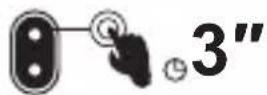
To turn on the headset, press and hold the multi-function button (MFB) for about 3 seconds. To turn it off, press and hold the same button again for 3 seconds.
How to pair the headset with a smartphone?
Turn on the headset (the Bluetooth indicator flashes red and blue). Enable Bluetooth on your smartphone and select "EKSA H1" from the device list. Once connected, the blue indicator flashes slowly.
What to do if the headset does not connect?
Make sure the headset and device are within 1 meter. Check that Bluetooth on your device is enabled. If necessary, reset the headset by pressing and holding the MFB button and the volume - button simultaneously for 6 seconds.
How to charge the headset and how long does it take?
Use the provided Type-C cable and a 5V power source. The charging time is about 1.5 hours. During charging, the charging indicator lights up.
What is the battery life?
Music playback time is about 57 hours at 70% volume, and talk time is about 30 hours.
How to use the dual pairing function?
First connect the headset to device A, then disable Bluetooth on device A (the headset enters pairing mode). Then connect device B to "EKSA H1". Finally, re-enable Bluetooth on device A to reconnect. Both devices are then connected simultaneously.
How to reset the headset to factory settings?
While connected or in pairing mode, press and hold the MFB button and the volume - button simultaneously for about 6 seconds. The blue and red indicators light up together for 1 second, indicating that the pairing information has been cleared.
How to answer or reject a call?
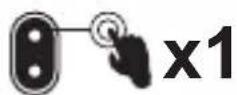
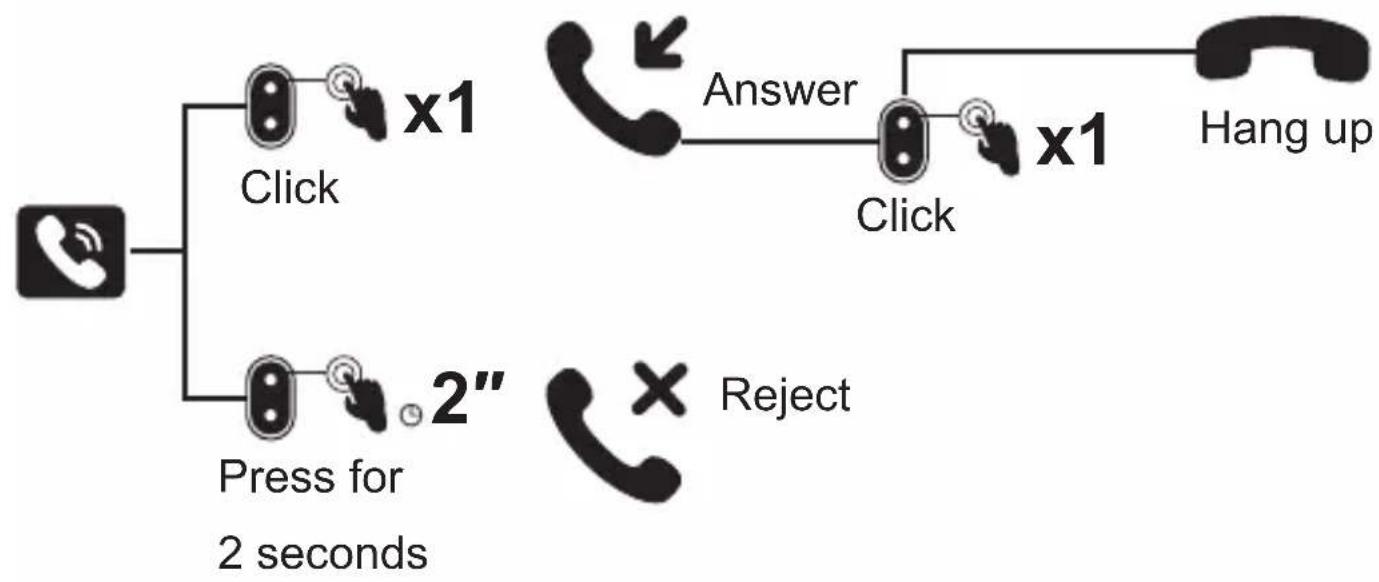
To answer, press the MFB button once. To reject, press and hold the MFB button for 2 seconds.
How to activate the voice assistant (Siri, Google Assistant)?
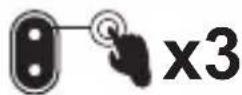
Press the MFB button three times quickly to activate your smartphone's voice assistant.
How to clean the headset?
Use a soft, dry cloth to wipe the headset. Do not use chemicals or water, as they may damage the components.

User questions about H1 EKSA

0 question about this device. Answer the ones you know or ask your own.

Ask a new question about this device

The email remains private: it is only used to notify you if someone responds to your question.

No questions yet. Be the first to ask one.

Download the instructions for your Earplug in PDF format for free! Find your manual H1 - EKSA and take your electronic device back in hand. On this page are published all the documents necessary for the use of your device. H1 by EKSA.

USER MANUAL H1 EKSA

natural_image Technical line drawing of a mechanical device with a lever and internal components (no text or symbols)

User Manual

English 1

日本語 9

Français 17

Deutsch 25

Español 33

italiano 41

EKSA H1 - italiano 41 - 1

Packing List

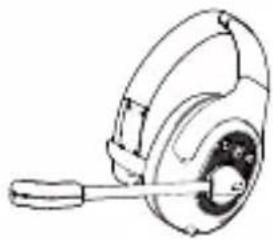
  1. EKSA H1 Headset
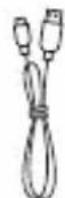
  2. Charging Cable
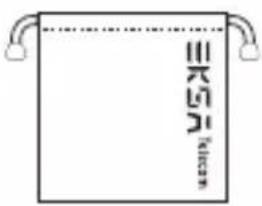
  3. Carry Pouch
  4. User Manual

EKSA H1 - Packing List - 1

natural_image Line drawing of a hard hat with a lever handle (no text or symbols)

124

EKSA H1 - Packing List - 2

KRG Telecom

3

EKSA H1 - Packing List - 4
C

EKSA H1 - Packing List - 5

natural_image Abstract icon with three vertical bars and circular dots, no text or symbols present

Specification

EKSA H1 - Specification - 1

natural_image Bluetooth symbol icon (no text or numbers present)

Bluetooth version: V5.0

Effective wireless range: 30 M/ 99ft
EKSA H1 - Specification - 2

natural_image Battery icon with lightning bolt symbol (no text or numbers)

Music time: ≈ 57 hours (70% volume)

Talk time: ≈ 30 hours (70% volume)

Charging time: ≈ 1.5 hours

EKSA H1 - Specification - 3

natural_image Simple line drawing of a mechanical component with a lever and circular body (no text or symbols)

Driver diameter: 40mm

Impedance: 32Ω±15%

Sensitivity: 114dB±3dB

Frequency: 20Hz\~20kHz
EKSA H1 - Specification - 4

natural_image Simple black-and-white icon of a microphone inside a rounded square frame (no text or symbols)

Diameter: 2.7x1.85mm

Sensitivity: -25±1dB

Frequency: 100Hz\~10KHz

Impedance: 2.2kΩ

Polar Pattern: Omnidirectional

MIC: ENC (Environment Noise Canceling)

EKSA H1 - Specification - 5

natural_image Icon of a gear inside a rounded square (no text or symbols)

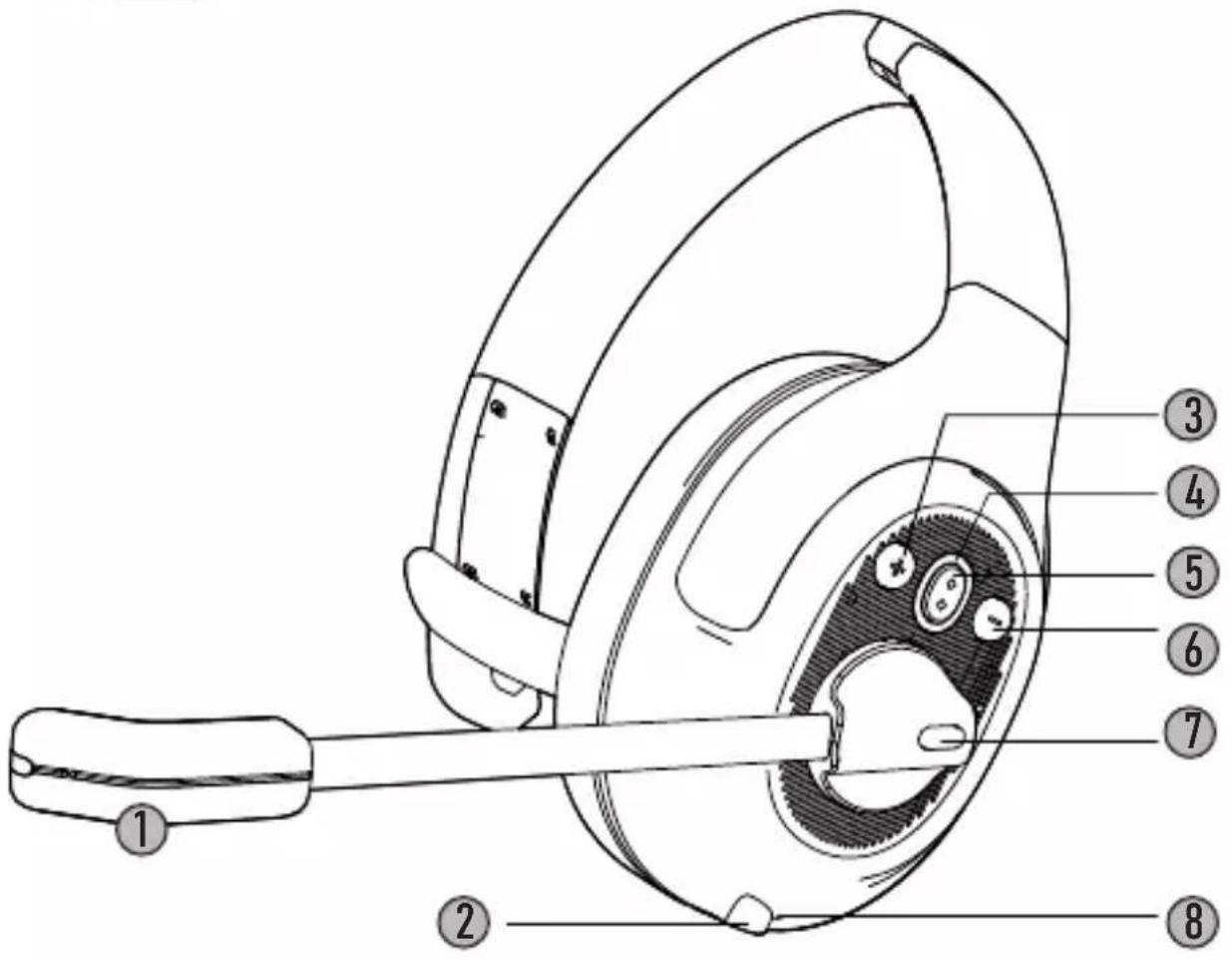
Product Oview

Technical diagram of a mechanical device with numbered parts labeled 1 through 8

① AI ENC microphone
② = Type-C charging port
③ + Volume+
④ 0 Bluetooth indicator
⑤ MFB (Multi-Function Button)
⑥ - Volume-
⑦ Mic Mute Button
8 • Charging indicator
EKSA H1 - Product Oview - 2

Operation Guide

EKSA H1 - Operation Guide - 1

Multi-Function Button:

EKSA H1 - Multi-Function Button: - 1

EKSA H1 - Multi-Function Button: - 2

Press for 3 seconds: Turn on/off

EKSA H1 - Multi-Function Button: - 3

EKSA H1 - Multi-Function Button: - 4

Click: Pause/Play

EKSA H1 - Multi-Function Button: - 5

EKSA H1 - Multi-Function Button: - 6

Triple Click: Voice Assistant/Siri

Voice assistant

+ / -

Volume Button:

EKSA H1 - Volume Button: - 1

EKSA H1 - Volume Button: - 2

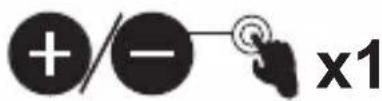
Click: Volume+/-

EKSA H1 - Volume Button: - 3

+/-2"

Press for 2 seconds to next/previous track
EKSA H1 - Volume Button: - 5

MIC Mute Button:

EKSA H1 - MIC Mute Button: - 1

x1

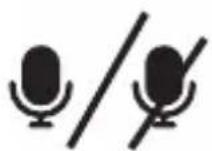
Click: MIC on/off

EKSA H1 - MIC Mute Button: - 3

natural_image Icon of a telephone handset and speech bubble on a black background (no text or symbols)

Call Functions

Call Handling:
EKSA H1 - Call Functions - 1

flowchart
graph TD
    A["Phone"] --> B["Click: x1"]
    A --> C["Press for 2 seconds: 2""]
    B --> D["Answer: x1"]
    C --> E["Reject: x1"]
    D --> F["Check: x1"]
    E --> G["Check: x1"]
    F --> H["Hang up"]
    G --> H

Redial:
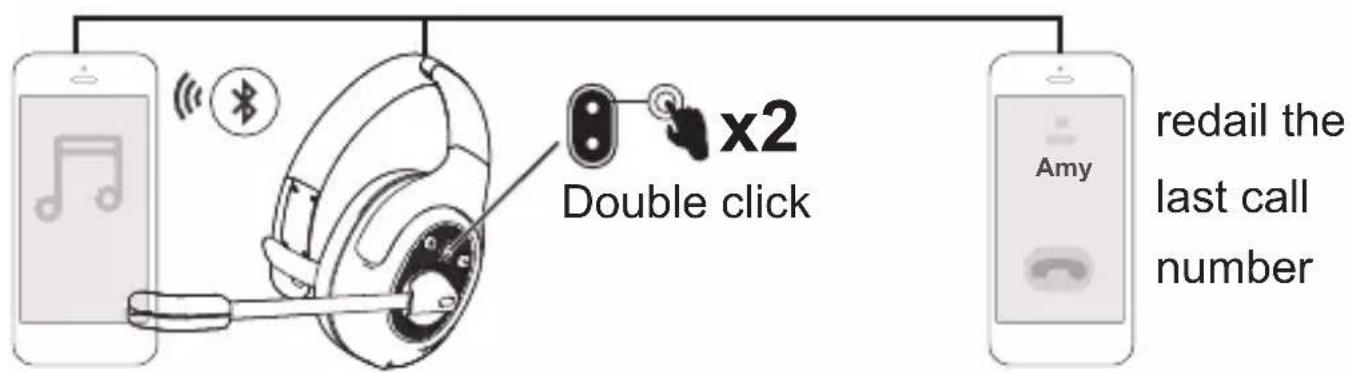
Double click x2 redail the last call number

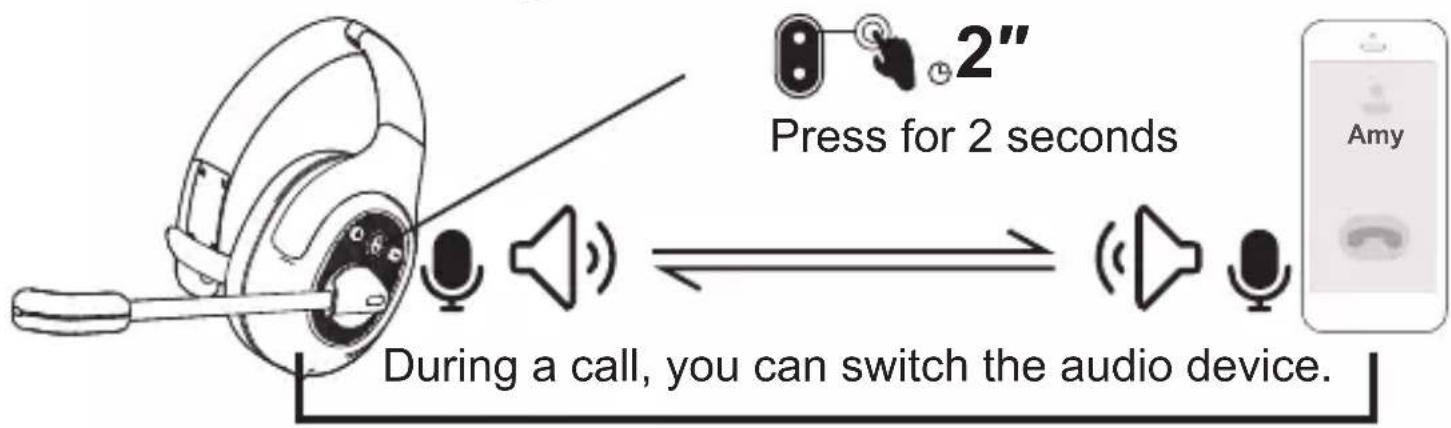
Audio switching:
Press for 2 seconds During a call, you can switch the audio device.

EKSA H1 - Call Functions - 4

Call Functions

EKSA H1 - Call Functions - 1
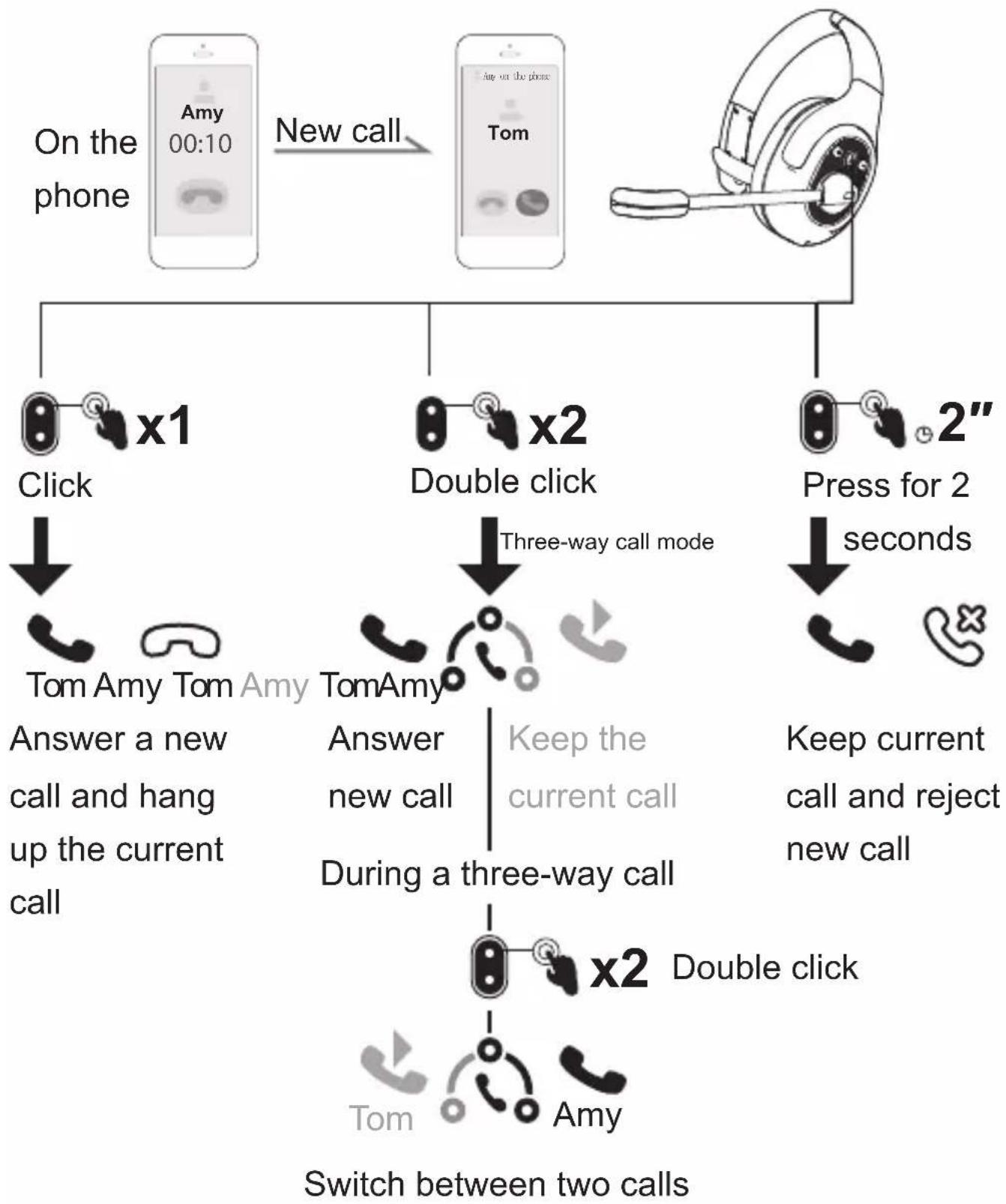
New call:

EKSA H1 - Call Functions - 2

flowchart
graph TD
    A["On the phone"] -->|New call| B["Tom"]
    B --> C["x1 Click"]
    B --> D["x2 Double click"]
    B --> E["x2 Press for 2 seconds"]
    C --> F["Tom Amy Tom"]
    D --> G["Tom Amy"]
    E --> H["Press for 2 seconds"]
    F --> I["Answer a new call and hang up the current call"]
    G --> J["Three-way call mode"]
    H --> K["Keep current call and reject new call"]
    I --> L["Three-way call"]
    J --> M["Three-way call"]
    K --> N["Three-way call"]
    L --> O["Three-way call"]
    M --> P["Three-way call"]
    N --> Q["Three-way call"]
    O --> R["Three-way call"]
    P --> S["Three-way call"]
    Q --> T["Three-way call"]
    R --> U["x2 Double click"]
    S --> V["x2 Double click"]
    T --> W["x2 Double click"]
    U --> X["Tom Amy"]
    V --> Y["Tom Amy"]
    W --> Z["Tom Amy"]
    X --> AA["Tom Amy"]
    Y --> AB["Tom Amy"]
    Z --> AC["Tom Amy"]
    AA --> AD["Tom Amy"]
    AB --> AE["Tom Amy"]
EKSA H1 - Call Functions - 3

Bluetooth Pairing

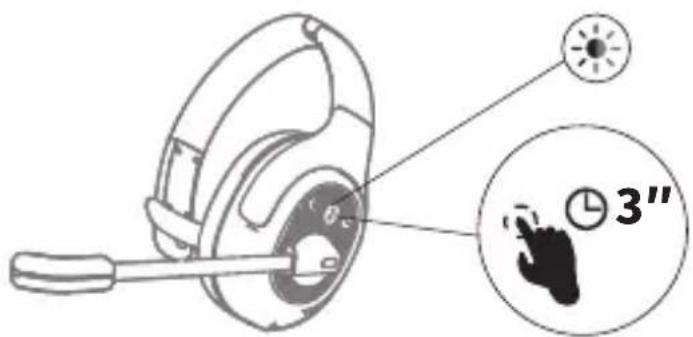
Diagram of a headset with a finger pointing to a 3-inch time indicator and a circular callout showing '3''

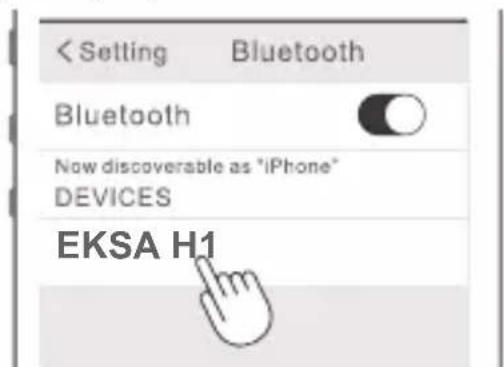
  1. Turn on the headset, the bluetooth indicator flashes alternately in red and blue, indicating that the headset is in pairing state.

  2. Turn on the Bluetooth of the device and select "EKSA H1". After successful connection, the LED flashes slowly in blue light, and you will hear the voice prompt "your headset is connected".
EKSA H1 - Bluetooth Pairing - 2

![](images/9f3c30630f5cded786c0b593fc2476d89fa129f1051c5fe4d5779e758ec24266.jpg)
natural_image Black triangular warning symbol with exclamation mark (no text or numbers)

Note:

1. When connecting the device, please keep the headset and the device within 1 meter. 2. If necessary, the PIN code is "0000". 3. If there is no connection with any device for 10 minutes, the headset will automatically shut down. 4. After the headset is turned on, it will automatically connect back to the last connected device. 3. When connecting to a new device, turn off the Bluetooth of the currently connected device and then confirm that the headset enters the Bluetooth pairing state. ![](images/006abe59cd94a7c3a89256195e3eda74d69669254ba8842c404eb3f0c74b7d2d.jpg) ![](images/f1d9380978461aaa56f596a82ffee1afdccf0536102479e97a80e926cf4159c0.jpg) ![](images/92d3aa59b2b78f720580593e60112605d3bafc6795189039029d970d343b7ae4.jpg) Device 1 Device 2 ![](images/3747a3a64503dc80b261f84c3cceddf4fac6bca463921a1e1713f7e1f6b19b3a.jpg)

Dual Pairing

1. After successfully connecting the headset to device A, turn off the Bluetooth of device A. The headset Bluetooth indicator flashes in red and blue alternately to enter the pairing state. Device A ![](images/1815580dc684400245cab5141cbc0e670d652cc21d3f5022c6f715ce09a6cf4c.jpg) ![](images/d0f7a6391b8f116611ff1f10ea363ed38d6573edb07386a8eae5b130f49aef37.jpg)
natural_image Technical line drawing of a mechanical device with a circular component and shaft (no text or symbols)
2. Turn on device B, search for and connect to EKSA H1. ![](images/a32c19225460dd3ceececf6c435370f92dacc9c6586dfdc5b37992210a1a3a50.jpg) D evice B ![](images/01fdcc21aee9091220e55af713802a8ec1c2eca8f3fb2aa7b955b6a78b9f7a09.jpg) D evice B ![](images/182fa1c4734e709c8f26316f4e9d09dac823f4a57e87ed9fb8e53a80a78fb367.jpg) 3. Turn on the Bluetooth A device to connect with EKSA H1. After connection, the EKSA H1 and the devices A and B are in the connected state simultaneously. Device A ![](images/ead58ad5f431b7c3381e8325a6b9fe43fac3ad9c6918bec522e07e103928be7c.jpg) ![](images/4ee91bc3d5a23d629bdb2409188aef6ab48ea0963996ea93762ee580662ccf91.jpg) ![](images/b1e95cbffd7ef918a77860047966dd6dc359b6ad9f4cca318b66fefac6cf68b3.jpg) ![](images/4c7aed37adc5ac22fc30282fb8608c661e38dbfe33331bcf3a414215f72ada69.jpg)
natural_image Abstract circular icon with two curved arrows inside a rounded square (no text or symbols)

Reset

![](images/5ed45bfc47cab15c24571e87247de5426f163635b5875a35c50530ea21acb153.jpg) Under connected/pairing state, press the "MFB" and the "volume-" for 6 seconds simultaneously until the LED lights up in blue and red simultaneously for 1 second, indicating the pairing information is cleared. ![](images/9196cffd1ec071e891cc3a82d88accfec3268b202dbbe2ddc046f45af6c687ea.jpg)
natural_image Battery icon with lightning bolt symbol (no text or numbers)

Charging

![](images/9a96717b712c0fe340762fe8e0becb0b537ffd8573ac725a271e1e3c94fbf8b8.jpg) 1. When battery is less than 10% , the headset will voice prompt "battery low" every 3 minutes, please charge it as soon as possible. 2. When EKSA H1 is not in use, please charge it at least one time every 2 months. 3. Please use the original charging cable for charging. Charging voltage can't exceed 5V. ![](images/f52f274870c54606deed590bbc71eae74c585f00e1fcedb8a4cb58d2f2d5618d.jpg)

パッケージ 内容

1. ヘッドセット本体 2. Type-C充電ケーブル 3. キャリーポーチ 4. 取扱説明書 ![](images/dfc081039627f6d2010724c7d8f5809c9a32acae142f74224b381ed9cd9c5331.jpg)
natural_image Line drawing of a hard hat with a lever handle (no text or symbols)
124 ![](images/7b1002d6ef05e61231e643962f1c6443599bcb5b708e879889fe1651d954540a.jpg) ○ ![](images/7a96240c8ba2104af2ef12f2faf1baf231504d227e3d5bdc06d77db9a162b33c.jpg) 3 ![](images/39a6984736082e9af98cdd0c0f041a235ffd4772ea0803c24b46f98c84224de0.jpg) ○ ![](images/96daa2871b0766f31c06fc7e35af445cbd0ee8fa4e5d7f52b0f65ac6dbc18a5a.jpg)
natural_image Abstract icon with three vertical white lines and three filled circles on a black background (no text or symbols)

仕様

![](images/a47c8a29413922d7a32f732e9e51a45048e4f5ec9cd26568097f8987441672de.jpg)
natural_image Bluetooth symbol icon (no text or numbers present)
Bluetooth V5.0 最大通信距離 約30m ![](images/7484e1698679e66fb143fc82b654584ec84ef79531e3a748b8bdddf769865a30.jpg)
natural_image Battery icon with lightning bolt symbol (no text or numbers)
音樂再生時間 約57時間(70%音量) 通話時間 約30時間(70%音量) 充電時間 約1.5H ![](images/de5efc962e5bd5bccf8d8fccfb1a109a2dc622a085c075dca658de06974fc7a3.jpg)
natural_image Simple line drawing of a mechanical component with a lever and circular head (no text or symbols)
スピーカーサイズ 40 mm インピーダンス 32Q±15% スピーカー感度 114dB±3dB 周波数特性 20Hz-20KHz ![](images/bcb53aa4c349cb61464854e0bb687cd431b2d4d9afc178e5ff58bc3d471c33d7.jpg)
natural_image Simple black-and-white icon of a microphone inside a rounded rectangle (no text or symbols)
寸法 2.7×1.85mm インピーダンス -25±1dB 周波数特性 100Hz-10KHz インピーダンス 2.2KQ 指向性 無(全)指向性 MIC ENC(環境ノイズキャンセリング) ![](images/4d967b3ea63a893662c182d6996daa5e5a42125b20545c817f429d903a0c9c88.jpg)

各部の名称

![](images/845ba41a36c73a8a46b7512bdc607b1583393d72ed9e5b146f712bc234720fa1.jpg) ① AI ENC マイク ② = Type-C充電ポート ③ + 音量+ ④ 0 ブルートウースインジケーター ⑤ MFB(マルチファンクションボタン) ⑥ - 音量一 ⑦ マイクミュートボタン ⑧ 充電インジケーター ![](images/3bd5463106c4d261fae62c354c3344f3851023029e184e88429c464987b7f4d7.jpg)

操作ガイド

マル チファンクションボタン:

![](images/a2d15a6b55af6c87b084848b33c3bb3f7e8cd4cbd740a9698301c23f162e6491.jpg) ![](images/a02fc48edb68635f3c9d47ded0bb92dcc954c0cf099996faeefbee6e5eacf76a.jpg) 3秒間長押し:電源を ON/OFF ![](images/0197139f7cbde8c7faae775e67c54d99548a20156fac1b922853dbf12d617211.jpg) ![](images/7aa35e9d36382e75012b24c8388048af1aa7c5402d41a190174dd96d43941144.jpg) 1回クリック:一時停止/再生 ![](images/37d9409476d87ba5716cbaaf3795f32d7fe3f843e8bbaf2fba268ae7c7af25b3.jpg) ![](images/c8becaef7879db240e6f7447244188f89a8b5b4097f0e971127ae39a430d4584.jpg) 3 回トリプ ルクリック: 音 声アシスタ ト / Siri を起動します 音 声アシスタント

+/-音量ボタン:

![](images/5c2faef961e777ea6bdb2c694d3496eba537968c0d7f724149e1780bbd351af5.jpg) ![](images/2c24bd5dabcc99642eb36e5a3a144f77dfbbbda9c5dae9c4e268b5a5e13774ae.jpg) x1 1回クリック:音量+/ー ![](images/781ef74aefe769718a26de9b693607b73524b2913a2b5fe2cc15bc55b132e293.jpg) ![](images/0e4e85585d28a73b0529b16f4ad7c9bcdcc662dcc35b2577be2ea805a5ce1f58.jpg) 2" 2秒間長押し:曲送り/曲戻し

MICミュートボタン:

![](images/4217393e381e5f783c835a4200db51dc6266d330551d1156bfebaf11f05d0620.jpg) ![](images/1db3f8d11a2854d67fcb24941959a5718d3c55c2eb45309a3cedcfe796f9c06a.jpg) 1 回クリック: マ イクミュート ON/OFF ![](images/45f86bd0a4c0a2cd82416ab6dc57b21f91877ca3ea4812a912cb94821ebc5b6f.jpg)
natural_image Icon of a telephone handset and a square button on a dark background (no text or symbols)

通話機能

通話管理: ![](images/686396bd7eb8b16340e71b8dafbf14d8a2dbcae62a05901832ee5b3e83be654d.jpg)
flowchart
graph TD
    A["手机"] --> B["x1"]
    A --> C["2秒間長押し"]
    B --> D["電話を受ける"]
    C --> E["通話を拒否する"]
    D --> F["x1"]
    E --> G["電話を切る"]
リダイヤル: ![](images/e2f1db604ef1244eb3b8b210b555a5dc52a053462d337a8b012a96bdac6a234e.jpg) オーディオスイッチング: ![](images/002c10f7a1e8a0f8f402ac1208f8798e06e1a0d26231cae1237f8fd9c5d4c923.jpg) ![](images/b0116d4f6ae8c0ebf94e9ade0c217f858499837a14757afda0cb3a11df065f3f.jpg)

通話機能

![](images/a75e229e4be65ee663da65103f9e72059b29e53780de90be39c62cea06065ef1.jpg) 新しい呼び出し: ![](images/ec7b810c433a6f910a049c60ba1c0a23ebfdb0b6b73f5bc83b4c4f103e6e34e0.jpg)
flowchart
graph TD
    A["通話中"] -->|新しい呼び出し| B[" Amy 00:10 "]
    A --> C[" Tom"]
    B --> D["x1"]
    C --> E["x2"]
    D --> F[" クリック "]
    E --> G[" ダブルクリック "]
    E --> H[" 2" 2秒間長押し "]
    F --> I["Tom Amy Tom Amy"]
    G --> J[" モード"]
    H --> K[" 三者通話中"]
    I --> L[" 新しい通話に応答し、進行中の通話を切断します "]
    J --> M[" 進行中の通話を続ける "]
    K --> N[" 通話を続行し、新しい通話を拒否します。 "]
    L --> O["x2 ダブルクリック "]
    M --> P[" タコットを切り替える "]
    N --> Q[" 通話を切り替える "]
    O --> R[" Tom Amy Tom Amy "]
    P --> S[" Amy"]
![](images/4cbfddcf5347f4c7c5e9d5bd3dbfee1cb35512529a06306908244d311dfca45f.jpg) x2 ダブルクリック ![](images/68faf18120a1da6a483aabfb74d3dc9effda534423eae649ba97583914ed49e7.jpg) ![](images/b6723716b4a0dd55a9fcdc5036109bac723b8bf0a0a006826fdbd80e0bc2078e.jpg)
natural_image Black square icon with a white Bluetooth symbol (no text or numbers)

Bluetoothペアリング

![](images/7dbb996bd692d259fc9cffbd68616bcdcde533eeac577b76236ef0de2b3ba1eb.jpg) 1. マルチファンクションボタンを3秒 以上押し続けます。LEDランプが赤 ⇔青交互に点滅し、ペアリングモードになります。 2. 携帯電話やパソコンなどから本製品が見つかると、デバイス名「EKSA H1」が検索画面上に表示されますので、ペアリング接続をクリックします。LEDランプが者のゆるやかな点滅に変わると、「your headset is connected」の音声を出て来て、ペアリングが完了です。 ![](images/cf64d2f1a7a72938346c9dfd8b5772735604f8fad84a2481a8728020b03fc677.jpg) ![](images/160c01bc878584e463fe3dc30f62444e3d9797b994d91e5c85b3e1197c0cccf6.jpg)
natural_image Black triangular warning symbol with exclamation mark (no text or numbers)
注意: 1. この手順を実行する時は、ヘッドホンがスマートフォンから1mの範囲内にあり、ヘッドセットでBluetoothRがアクティブになっていることを確認してください。 2. パスキーを要求された場合は0000を入力してください。 3.10分間どのデバイスにも接続されていない場合、ヘッドセットは自動的にシャットダウンします。 4. 次回接続するときは本機の電源をオンにして、登録済みの機器のBluetooth機能をオンにするだけで接続できます。 3. 新しいデバイスに接続するときは、接続されているデバイスのBluetoothをオフにしてから、ヘッドセットがBluetoothペアリング状態になっていることを確認てください。 ![](images/27b733cb49d7e20110c0ddf7e2829921096d8ae1787d9a9e5780f27a748b3d08.jpg) ![](images/89606f0e6e81779e2d96b675705b45ccc1f6072102702e32d4d7ca0e2b0deb4a.jpg) ![](images/d8572e32597a1cfe80c15e9f86dd5a84bdd635f100bb74866c46ace0805cee20.jpg) デバイス1 デバイス2 ![](images/ff14a79fe097d2db946ffd44a51953db5487311003a22e1e192960a33ea0d1e0.jpg)
natural_image Icon showing headphones connected to two smartphones (no text or symbols)

2台同時接続

1. ヘッドセットをデバイスAに接続したら、デバイスAのBluetoothをオフにします。 ヘッド セットの Bluetoothインジケーターが赤と青に交互に点滅して、ペアリン態になります。 ![](images/9857237e08e27fd3ed2ae5c7408ca3a3df2e6ba0d23205c05401e05ea2b8333a.jpg) ![](images/76652843dc9782e12071f3d774a3c4accacd7946bf2e076c4fb1326fad58a0c4.jpg)
natural_image Technical line drawing of a mechanical device with a dial indicator (no text or symbols)
2. デバイスBのBluetoothをONにします。EKSA H1を検索して接続します。 ![](images/3b525b30949198a53d103a81a3ef454a430e04cd2580f700d0c2ee43b688c5c3.jpg) デバイスB デバイスB 3. デバイスAのBluetoothをオンにして、EKSA H1に接続します。接続後、EKSA H1 バイスAおよびBは同時に接続状態になります。 ![](images/fe937a56bbe344e4f52d115e35f49a27f5e2ca7b068a89342a7bc33f8868fb93.jpg) ![](images/810cc0a8d62b7e6a0c5ec259b73966b20ec966010f2c2be17eb720a181f59702.jpg)
natural_image Abstract black-and-white circular icon with white arrows, no text or symbols present.

リセット

![](images/78e2f5341d9a55b6e46c8a922668d8d70e0d4f297087145ac6bee03fb9e3eeaf.jpg) Bluetoothインジケーターが 青と赤に同時に1秒間長く点 滅します。 接続/ペアリング状態で、「MFB」と「ボリューム-」を同時に6秒間長押しし、LEDと赤で同時に1秒間点灯します。これは、ペアリング情報がクリアされたことを意図しま。 ![](images/62a7629b91472f8551269f19bcdd1f6bb7ab9255621a92a55adec007e01a6e01.jpg)
natural_image Battery icon with lightning bolt symbol (no text or numbers)

充電する

![](images/9564c1e5c190ee6740a25473801dcf14e00d3de8d005312df50f2319c23c96c3.jpg) 1. バッテリーが10%未満の場合、ヘッドセットは三分間ごとに「battery low」の音声プロンプトを発します。できるだけ早く充電してください。 2. ヘッドセットを長期間使用しない場合は、2か月に1回ヘッドセットを充電してください。 3. 充電には付属のUSB充電ケーブルを充電してください。 ![](images/042c836f28933b570c7732fd55f9352e243da0f68ef1100c8a2523a3e078af29.jpg)

Contenu du Product

1. EKSA H1 Casque 2. Câble de Charge de Type C 3. Sac d'Emballage 4. Manuel d'Utilisation ![](images/34247c9226e2044a3ea23444dac13b20549c4e9b2a62b58de319e575ab34f705.jpg)
natural_image Illustration of a headboard with two connectors and a numbered label (124), no readable text or symbols present.
![](images/623d10eda700d9adc7663959e3f084a29cbc513e31e83247fc36a713abcfbce0.jpg) ![](images/7bbbf4dcfffe030a1f7745e673548d38f08a94a38937f62aa074637395005e54.jpg) ![](images/85b66fcd5a576b1b9ab4182715ec451435004d4016e0a6a6dc07e5fd772df98e.jpg)
natural_image Abstract icon with three vertical white lines and three solid white circles on a black background (no text or symbols)

Spécification

![](images/635ed3f4ea9b3376c26baff940acec6554d5c61a8a4c48299e9568c778dd5b02.jpg)
natural_image Bluetooth symbol icon (no text or numbers present)
Version Bluetooth: V5.0 Portée Sans Fil: 30 M/99ft ![](images/a670c483652811b5d806e3c4de82b621cdad4bd5465da38e660dfcf1b5089537.jpg)
natural_image Battery icon with lightning bolt symbol (no text or numbers)
Temps de musique: ≈ 57 heures (70% volume) Temps de Conversation: ≈ 30 heures (70% volume) Temps de Charge: 1.5 heures ![](images/753a52106178fb6addded3c3d7bcca67334cb7af72115d3fbc4c1d6c3900b204.jpg)
natural_image Simple line drawing of a mechanical component with a lever and circular head (no text or symbols)
Diamètre du haut-parleur: 40mm Impédance: 32Ω±15% Sensibilité: 114dB±3dB Fréquence: 20Hz\~20kHz ![](images/28f200db1fe2601b6583c87eeeeeb1e05bd67f20c5409223e962733a6b4ff424.jpg)
natural_image Simple black-and-white icon of a microphone inside a rounded rectangle (no text or symbols)
Diamètre: ø2.7x1.85mm Sensibilité: -25±1dB Fréquence: 100Hz\~10KHz Impédance: 2.2kΩ Direction: Omnidirectionnel Mic: ENC (Réduction du Bruit) ![](images/91ef429861c3f555f5c181a27464141bc9bf69da5ba6b5681775eae81be8b3f1.jpg)
natural_image Icon of a gear inside a rounded square (no text or symbols)

Aperçu

![](images/b67dbcd766d450bc29a3961d65f511d6ed2f08d4f80d03589409726113877f62.jpg) ① AI ENC microphone ② Port de Charge de Type-C ③ + Volume+ ④ 0 Voyant de bluetooth ⑤ MFB (Bouton multifonction) 6 - Volume- ⑦ Bouton de Sourdine d'MIC 8 • Voyant de charge ![](images/b2f3da4935df29d92793323f3d5737bde0267d7e0b42fca507430aee644e848e.jpg)

Guide d'Opération

![](images/9d3ff241795915d795558e7cab96609ccbab3fd11e27e09f25ba8188e2e7b273.jpg)

Bouton Multifonction:

![](images/dec8cba8ba9ea707f8d731aacea887b92e45f264b73514fbbeb18d8de97c6e23.jpg) ![](images/d65f702e7b5adbc7ee9a74240fdc195528d1a7bc9a554942ef531a61fa46305c.jpg) Appuyez longuement pendant 3 secondes: Allumer/Eteindre ![](images/b5afb632dca6b61d838138c4ec6948609204d468e17251b3329cd5225d2c0bbe.jpg) ![](images/5d0e402d90b51b385425fd53912fc93c04cbc8db440bf7d33987755c7f809c2d.jpg) Cliquer: Jouer/Pause ![](images/9b518cfc1d3d7d49400553724b05b7ac03668805ac14f4869d5ded4ca065705b.jpg) ![](images/ee1ee6e50de4b3b38f9bb94f5753395f08ed46a1f12f26e813d05d4f1b202e0b.jpg) SIRI: Cliquez trois fois de suite SIRI ![](images/7652c4d24e279676130fb153943a61e5a19b735494b7925ef1da3d9f3ee02c64.jpg)

Button Volume:

![](images/961abbfec3596c944013f4757ae621a7c35e2030d3f3c0b6fedc7aa0d10069d5.jpg) ![](images/f6771363e6662c374d4314ccaa3479450bd9b71bb87963da7b48f0c9244d2516.jpg) ![](images/329f75aaa53db8362b8784e7a03f4bde4975a3e8bb9ed2c8b9eb7adc448d59f7.jpg) x1 Cliquer: Volume+/- ![](images/657a9f9b9a6de71f6b6a4543e56aa2ec074d7e9a8529e3c38507e6ae901b4f2a.jpg) ![](images/379f1367d75ffda5fcfa2551f511dc7dbc5500febb59356e27e31cb6691ef55b.jpg) ![](images/2f4cc2230e0d5e53ddb577ecca8799af43ecb30d21a63f4ac21b6666f71286f1.jpg) 2" Appuyez longuement pendant 2 secondes: Piste suivante/Piste précédente ![](images/b114e8cf0f682338ab9a3b68b5e327c36b16c8e213f8135ec8754c28ecfbc8f0.jpg)

Bouton de Sourdine d'MIC:

![](images/51cb2e4363e26d46b2a33d1dd5780d63ead10623fb105f17a2db2fcc540f1cdf.jpg) ![](images/dbecb77576df3d1d643143dfe22e623cda293b72caac8bce3f088fcaa83bda26.jpg) x1 Cliquer: MIC Allumer/Couper ![](images/c6059de7633dee56aa1414a2f9b2ebe463ebadb86cac23be478f7314a782523b.jpg)
natural_image Icon of a telephone handset and a square button on a black background (no text or symbols)

Fonction d'Appel

Traitement des appels:

![](images/95399ad6a8f96e701fb1a06ddeb47d93fe85504c0dc907e774491509ae5dc2aa.jpg)
flowchart
graph TD
    A["Client"] --> B["x1 Cliquer"]
    A --> C["2" Appuyez pendant 2 secondes"]
    B --> D["répondre"]
    D --> E["x1 Cliquer"]
    E --> F["Raccrocher"]
    C --> G["× Rejeter"]

Rappeler:

![](images/e845724c870c95259f37970862f95a73faa4e8473e9b435284000ecc07d8c93b.jpg)

Commutation audio:

![](images/87ce29c61305f82af60409aa17dc4fb97ae6bc5aaa75d48c1f29ca25221456b4.jpg) ![](images/78a9e927aee61fcbe8f454782025f8502cb647c9c479e29eff6ecaf6ad6dcac1.jpg)

Fonction d'Appel

![](images/9ab8e2ded11004ab935f74f11083deedf03c3514068907b09f0cd794c6519647.jpg)

Nouvel appel:

![](images/51b761233f065ec0343928759a64262c2061c094ce1a703262491092139766f7.jpg)
flowchart
graph TD
    A["Au téléphone"] --> B["Nouvel appel"]
    B --> C["Tom"]
    C --> D["x1 Cliquer"]
    C --> E["x2 Double-Cliquer"]
    C --> F["x2 Appuyez pendant 2 seconds"]
    D --> G["Tom Amy Tom"]
    E --> H["Mode d'appel à trois"]
    F --> I["2 secondes"]
    G --> J["Répondre à un nouvel appel et raccrocher l'appel en cours"]
    H --> K["Répondre au nouvel appel"]
    I --> L["Garder l'appel en cours"]
    K --> M["Pendant la mode d'appel à trois"]
    L --> N["Garder l'appel en cours et rejeter le nouvel appel"]
![](images/459613002f6794f52bf207606758a68c00d56b4afeb845057c94cf279fc5189d.jpg) Double-Cliquer Basculer entre deux téléphones

Appariement Bluetooth

![](images/cb187331506f9fc44590b095e35176b3e6ab5a3a024388724bc730fa37141fde.jpg) 1. Allumez le casque, le voyant de Bluetooth du casque clignote alternativement en rouge et bleu, ce qui signifie que il est en paire. 2. Activez le Bluetooth de l'appareil et sélectionnez "EKSA H1". Après la connexion réussie, le voyant de Bluetooth clignote lentement en lumière bleue et vous entendrez l'invite vocale "your headset is connected". ![](images/0b3e9842ee4b870d06e2d67f2fb0908b5bd4858c896eba546957f8d589bd5ebe.jpg) ![](images/ab8ccb1425b46c3ff6e7ecd4496e126d455c371a1f68aca695d7c8564e0f4a95.jpg)
natural_image Black triangular warning symbol with exclamation mark (no text or numbers)
"Remarque: 1. Lors de la connexion de l'appareil, veuillez garder le casque et l'appareil à moins de 1 mètre. 2. Si nécessaire, le code PIN est ""0000"" 3. S'il n'y a aucune connexion avec un appareil pendant 10 minutes, le casque s'éteindra automatiquement. 4. Une fois le casque allumé, il se reconnectera automatiquement au dernier appareil connecté." 3. Lors de la connexion à un nouvel appareil, désactivez le Bluetooth de l'appareil actuellement connecté, puis confirmez que le casque passe à l'état de couplage Bluetooth. ![](images/569e323bd5fd809874e0a1597ee542629d070ca9a3270fa3341f324b84abf93d.jpg) ![](images/280e312f902b4dca9835acf5ca9b8b3b9665637d0e7fa488d0d0a475fb9bf044.jpg) ![](images/e80d82622054da734cfcbcd60f495f6e0d28d32d4b1f2ff7cdfc9489562d079d.jpg) Appareil 1 Appareil 2 ![](images/b97ac7afc8a870732c0c62f37aa7fa7aca0f28ca0344777d2a966bc6fb8175ae.jpg)

Deux Paires

1. Après avoir réussi à connecter le casque à l'appareil A, désactivez le Bluetooth de l'appareil A. L'indicateur Bluetooth du casque clignote alternative-ment en rouge et en bleu pour entrer dans l'état de couplage. Phone A ![](images/899c29abcf244ec11107d161acbb6ce21ea67a44e15d17747d31b90e55ad453a.jpg) ![](images/05ec7173f3ae1644321a66eae68e0325b5c1454eac17423b9cd37b83cc2389e6.jpg)
natural_image Technical line drawing of a mechanical device with a circular component and shaft (no text or symbols)
2. Allumez l'appareil B, recherchez et connectez-vous à EKSA H1. ![](images/8630b2a78456432ce8ef966207a79f82ddbf2d73fa33876afade2d88d9c0ba72.jpg) Phone B ![](images/d53e6575b3ee2e23a2d8a4159909a7be1f97b79299d1b4eeff02c045df65387e.jpg) Phone B ![](images/133ef9920616c0b43e913980f61bbc21d1003644b9a1cc6df960d4607102321f.jpg) 3. Allumez le périphérique Bluetooth A pour vous connecter avec EKSA H1. Après la connexion, EKSA H1 et les appareils A et B sont à l'état connecté simultanément. Phone A ![](images/eb8f4daa02042fc6e57e1a99da56abbfda7f24e4cff1b7528d1554b7b96d3faa.jpg) ![](images/e4fff28abe751fd85b64902193cc769beeace6ad454cf76aa41326a7af55e917.jpg)

Réinitialisation

![](images/84e96fe3efb80ad57b59dd4b09124cb89f745bfd499c83748e6f3ead27436636.jpg) Le voyant bluetooth bleu et rouge s'allume en même temps pendant 1 seconde. Dans l'état connecté/d'appariement, appuyez sur le "MFB" et le "volume-" pendant 6 secondes simultanément jusqu'à ce que le voyant s'allume en bleu et en rouge simultanément pendant 1 seconde, indiquant que les informations d'appariement sont effacées. ![](images/7db3e86419c2e61b1cfc0fce0308ef2f1089987582d7bc3882ab6d6867fa19fe.jpg)
natural_image Battery icon with lightning bolt symbol (no text or numbers)

Recharger

![](images/04228324d2aee12b7445043e20ea2ee50815cba7d9f065d843b4fb94c9f241d5.jpg) 1. Lorsque la batterie du casque est inférieure à 10%, le casque annonce "battery low" toutes les 3 minute, veuillez le charger dès que possible. 2. Si le casque n'est pas utilisé pendant une longue période, veuillez charger le casque une fois tous les deux mois. 3. Veuillez utiliser le câble de charge d'origine pour la charge. La tension de charge ne peut pas dépasser 5V. ![](images/00aa4b96f41372ab0a298975f95b96926e826112c98467b520e2266bc855c04d.jpg)

Packliste

1. EKSA H1 Kopfhörer 2. Ladekabel 3. Tragetasche 4. Benutzerhandbuch ![](images/3e18f634d152c23530203268166300779dc5fece97958d7d714e40743486b9fb.jpg)
natural_image Line drawing of a hard hat with a lever handle (no text or symbols)
124 ![](images/36c3a58aba4d0e1fc8f827264b8aa13cdf218c6f388f49cb3da8533d3521e5ab.jpg) ○ ![](images/41bcc309f5032b0c2c21b48cc8650fd2c331f81001df8b9eb4f6086fb81b3779.jpg) 3 ![](images/c94cf342e0ee72019304a636f3b92e01ee8c0d62419be6e667adcb0f60192ca8.jpg) C ![](images/0b09c2f7d0a25beaf8f75ef78b624f59db6489eb24159db8589d4058ee090a21.jpg)
natural_image Abstract icon with three vertical white lines and three filled circles on a black background (no text or symbols)

Spezifikation

![](images/3870135c9da73d4386c26ba18c7d8e8189c9bf66a4bb0721de7a56bd2fc86828.jpg)
natural_image Bluetooth symbol icon (no text or numbers present)
Bluetooth-Version: V5.0 Effektive Funkreichweite: 30 m/99ft ![](images/846ea1ae10f2f2f8ac887a9938e60aa22e44f9a8bf187460db8a573bf3bcff37.jpg)
natural_image Battery icon with lightning bolt symbol (no text or numbers)
Musikzeit: ≈ 57 Stunden (70% Lautstärke) Gesprächszeit: ≈ 30 Stunden (70% Lautstärke) Ladezeit: ≈ 1.5 Stunden ![](images/4ddccd0435b83adebcab532b07acdcf06dd978776468d5befbfadbee85804338.jpg)
natural_image Simple line drawing of a mechanical component with a lever and circular head (no text or symbols)
Treiberdurchmesser: 40mm Impedanz: 32Ω±15% Empfindlichkeit: 114dB±3dB Frequenz: 20Hz\~20kHz ![](images/060a50497eacbfeb8dd5001e0b1fafccd7a0241982ee419a40dce7fd0cc21ace.jpg)
natural_image Simple black-and-white icon of a microphone inside a rounded square frame (no text or symbols)
Durchmesser: ø2.7x1.85mm Empfindlichkeit: -25±1dB Frequenz: 100Hz\~10KHz Impedanz: 2.2 kΩ Ausrichtung: Omnidirektional Mikrofon: ENC (Environment Noise Canceling) ![](images/fadd24931161e37ab0721f1005a3600e2bc880596de4979c2e2caf97a02e2a55.jpg)
natural_image Icon of a gear inside a rounded square (no text or symbols)

Produkt Anzeige

![](images/42cfd2783ab6902ce693422a271f5f9ac641ee27e8a287ee1eb243d638bae66d.jpg) ① AI ENC-Mikrofon ② Typ-C-Ladeanschluss ③ + Lautstärke+ ④ 0 Bluetooth-Anzeige ⑤ MFB (Multi-Function Button) 6 - Lautstärke- ⑦ Mikrofon-Stummschalttaste 8 • Ladeanzeige ![](images/fbae659205a17bf9a8793d7f366ffb1e95074e51259ed8c9728f7ef53d0dbe89.jpg)

Bedienerführung

![](images/a07c87f6e8f5093d4b729ce7dc1f18a020bdd7fdaa3b21f5f6e33e7f9eb1219b.jpg)

MFB:

![](images/494cd6050ac175ffb7ffd67d610652b56a693b23bee89c3d7de2fa7a727c076b.jpg) ![](images/176e563cc9a79b62182b802e0e5282b1f9e61594ba01ef1a9870470a0f70469c.jpg) 3 Sekunden drücken: Ein/Aus ![](images/c95b516694e44811a801e0912a7ba5e90a2960b68b79b03920936985c8d4a7bb.jpg) ![](images/ef8e7b673ad3daf605e0bf4a420b40ffeef2d8891647bd1a4fc4354b2fba4fb7.jpg) Klicken: Pause/Spielen ![](images/e48bde4040f7dd37985174fc6390d27533529f39cb0a093984563ff9ceae4c91.jpg) ![](images/4fb2780219b94e6e8219853da8c08b8b95ae0408e1cd49e1400696a0eb842288.jpg) Dreifachklick: Sprachassistent/Siri Sprachassistent ![](images/568c3bad35142d91589ff12954b85a7f489a21c3471a2b49ba51ea5dcb77d2dd.jpg)

Lautstärke Taste:

![](images/de40ea7049f1cf6e7f84722e45587ec33ce6c680e3cf00890ba01d8a820b854d.jpg) ![](images/f690a45ad1cdd0794fc15dc0b6ebeead0205cb58c857a7876cd0f3cf725d6daa.jpg) ![](images/4e52fb56e8a8ba3813ff4354df69d1ab382c37137abfe19852abe627aa1beb7f.jpg) x1 Klicken: Lautstärke+/- ![](images/2f4864b78ff026dc3e7b04b9cf47454db69413cb7029a7666fd37dd6e03080dd.jpg) ![](images/8092dd8d165572032cf97b3703a0a1d2b023bd2d6181bdd088275e217265a1de.jpg) ![](images/1f7f2dfaa098fbbb433469eb7e4731979414b00a98aba207b3f978860545b120.jpg) 2" 2 Sekunden drücken: Nächster/Vorheriger Artikel ![](images/7f9788d757a023bfac735b049f1009b3a52b9273a6d368bb81316422e475cf74.jpg)

Mikrofon-Stummschalttaste

![](images/497b3cde1b7f0fff54f0bb322c16a0b452415e4bd6ff61a6a4b501e2c0390c82.jpg) ![](images/0ce3cdc1076ec7cd626d32e13822afb934614204a57acdd802d15988e445b7cc.jpg) x1 Klicken: Mikrofon Ein/Aus ![](images/aa8cd09447247304ca13a03e68723b83084c1b20aec15c3ef8a22d19d8d98111.jpg)
natural_image Icon of a telephone handset and a square button on a dark background (no text or symbols)

Anruffunktionen

Anrufbearbeitung: ![](images/c44de0e49512ed2344c6b8fc2ae231a20f5cd92c46b374cfeff2c94d42ac3bc3.jpg)
flowchart
graph TD
    A["Phone"] --> B["Klicken"]
    A --> C["2 Sekunden lang drücken"]
    B --> D["Antworten"]
    D --> E["Klicken"]
    E --> F["Auflegen"]
    C --> G["Ablehnen"]
Wahlwiederholung: ![](images/8803ca410e8587c6ab2486c6bfa81fe627cd148d4339433edd9900dbf0196980.jpg) Audioumschaltung: ![](images/bf1cf4657cb41472f18d639e32cf66c170d5a32a0b729abbdbb8d512473a7634.jpg) ![](images/317c2ce7eb7edfb7f7eb15beacf304f414e347b89b8c274eef9235a8397d59af.jpg)

Anruffunktionen

![](images/41eaeb8286ed69f47f0bcbf07aebaf445b84a6b5399046610f82af700f5a60bb.jpg) Neuer Anruf: ![](images/2c10812f89555a9cf8f904852a4f4a06141bea91c834692261dca2879e7b287e.jpg)
flowchart
graph TD
    A["Am Telefon"] -->|Neuer Anruf| B["Tom"]
    B --> C["Klicken"]
    B --> D["Doppelklick"]
    B --> E["2 Sekunden lang drücken"]
    C --> F["Tom Amy Tom"]
    D --> G["Drei-Wege-Anrufmodus"]
    E --> H["Aktuellen Anruf halten und neuen Anruf ablehnen"]
    F --> I["Einen neuen Anruf annehmen und den aktuellen Anruf"]
    G --> J["Neuen Anruf annehmen"]
    H --> K["Während eines Dreiergesprächs"]
![](images/f2de4c69850e6ee703c9b823dba39923bd6fd2bad4432f19e7bff0ed3e22fc96.jpg) Doppelklick Zwischen zwei Anrufen wechseln

Bluetooth-Kopplung

![](images/8b58b764fca475b52d0d74270c55348d9cb3da3671261d775ee1abe979b70065.jpg) 1. Das Headset einschalten, die Bluetooth-Anzeige blinkt abwechselnd rot und blau und zeigt damit an, dass sich das Headset im Pairing-Zustand befindet. 2. Das Bluetooth des Geräts einschalten und „EKSA H1“ wählen. Nach erfolgreicher Verbindung blinkt die LED langsam blau und Sie hören die Sprachansage „your headset is connected“. ![](images/930851dc68e2ef01def4ece9dc93b4da875d3e9759bdf4ad6011206de7b7a2c5.jpg) ![](images/a5d81dff502f5418b261aac07cfc9f125aafc1a2fcec98e02646ba8033cb02c0.jpg) ![](images/ace021d9063fb17e6d0b19cda8ea9b23ccc9d5236a1749d6381c689dccdaf853.jpg)
natural_image Black triangular warning symbol with exclamation mark (no text or numbers)
"Hinweis: 1. Halten Sie beim Anschließen des Geräts das Headset und das Gerät innerhalb von 1 Meter. 2. Bei Bedarf lautet der PIN-Code ""0000"" 3. Wenn 10 Minuten lang keine Verbindung zu einem Gerät besteht, wird das Headset automatisch heruntergefahren. 4. Nachdem das Headset eingeschaltet wurde, verbindet es sich automatisch wieder mit dem zuletzt verbundenen Gerät." 3. Wenn Sie eine Verbindung zu einem neuen Gerät herstellen, schalten Sie das Bluetooth des aktuell verbundenen Geräts aus und bestätigen Sie dann, dass das Headset in den Bluetooth-Kopplungsstatus wechselt. ![](images/ab998f4088503d433a74fc0867f9f04fee3e374200973485a4e48363c083e972.jpg) ![](images/decff0aabf04470c8c1f7f090adfdc3dc960ce41c4b691c12af5b00dc62dc375.jpg) ![](images/c56e5a4ddc99b712dfff7f64ce3ff7791dbed38696d695ac0ad205eb94eb5aac.jpg) Gerät 1 Gerät 2 ![](images/768114e5b51c10b0099b1d0b5b124d314990fd8911c9974927728f5b47b2742b.jpg)

Dual Pairing

1. Nach der erfolgreichen verbindung mit Gerät A, Bluetooth von Gerät A ausschalten. Die Bluetooth-Anzeige blinkt abwechselnd rot und blau, um in den Kopplungsstatus zu wechseln. Gerät A ![](images/3faeef0dbd0ecd92ffa84c5333d81f3c9befc46db69b879b45e454116a01a09a.jpg) ![](images/cccdbf876c74177ed5e84656113feb7589a870e7018c640aedee5ef582f304c8.jpg)
natural_image Technical line drawing of a mechanical device with a circular component and shaft (no text or symbols)
2. Bluetooth von Gerät B einschalten, nach EKSA H1 suchen und damit verbinden. ![](images/9fdbdfa89a7383494f5cce98da824ffe85035172dbda771636ed4bfa5448d155.jpg) Gerät B ![](images/163b8880cc75bf7b967808104b86fbed22b076fac8324aa5c7df82c6c8eff7c4.jpg) ![](images/f2449688fc18874b39fba387846a7a76d5b4552c303574e8cc7297aef1c24113.jpg) Gerät B ![](images/53ed5631a63e1042e97d9b37780e021559544c32765d92efba3edcf290b4ab00.jpg) 3. Bluetooth von Gerät A einschalten, um eine Verbindung mit dem EKSA H1 herzustellen. Nach dem Anschließen befinden sich der EKSA H1 und die Gerät A und B gleichzeitig im verbundenen Zustand. Gerät A ![](images/ab10836e5abb7a61fc89aafb64e3f06dfcd56d74ee72ea2ca7bce8ae734136f2.jpg) ![](images/11970b04e5f5158dc1d5b47d1d9b7adab82e6f6603d7735124920675bf0f0f8d.jpg) ![](images/ba79af49e9d8a29bd72f46d43edc341f823ee942164002cc9b8c52d0d8a0095a.jpg) ![](images/b169e00ae55e02a0a344f2e9143ebe3cab49a95240766e9dc842e0099ec56573.jpg)

Zurücksetzen

![](images/6d944ea691589c25e8e9ad4e26ad32977d60e0233e75f45e0c8d677cec1273d5.jpg) Im Verbindungs-/Pairing-Zustand gleichzeitig die "MFB" und die "Lautstärke-" für 6 Sekunden drücken, bis die LED gleichzeitig 1 Sekunde lang blau und rot aufleuchtet, um anzuzeigen, dass die Kopplungsinformationen gelöscht sind. ![](images/cdc74a2fb0be7480f165f637494d0a9dec840ded4436ee9acc93270e30a36ae7.jpg)
natural_image Battery icon with lightning bolt symbol (no text or numbers)

Aufladen

![](images/49c5ea9e2248933d337bba52614cf547e41aea7ca3787751a0c49b210bf0d407.jpg) 1. Wenn der Akku weniger als 10% beträgt, gibt das Headset alle 3 Minuten die Sprachansage "battery low" aus. Bitte laden Sie es so schnell wie möglich auf. 2. Wenn EKSA H1 nicht verwendet wird, laden Sie es bitte alle 2 Monate auf. 3. Bitte verwenden Sie zum Aufladen das Original-Ladekabel. Die Ladespannung darf 5V nicht überschreiten. ![](images/3db2a797aa90286150447df350f8c0a732d1d879a7f892fc91d2f9e95712bf60.jpg)

Lista de Empaque

1. Auriculares EKSA H1 2. Cable de Carga 3. Bolsa de Transporte 4. Manual de Usuario ![](images/e8811664a7a396cf54165874993ad2b6ce8fd6e05c1dfcfe4e445c2156798109.jpg)
natural_image Illustration of a hardcover with ear and connector, plus a close-up of a cable (no text or symbols)
![](images/78618360275bd8b9ae1bb6c89a62ee4955f0d3fbf82355dbb948263ae24f1e69.jpg) ![](images/429b1114787648eee7efaf87442f62f3a8e26ed89ddd4626f1336bf89ef09a4b.jpg) ![](images/3c9780dd2e3d3defde3d0cac541b38eb33cd3067a931cc6385a5d0ae3403f3a9.jpg)
natural_image Abstract icon of three vertical sliders with circular dots, no text or symbols present

Especificación

![](images/8318194399c10bcfb879ab6924f349790e0c07302c8b0df0ac565081056b93a8.jpg)
natural_image Bluetooth symbol icon (no text or numbers present)
Versión de Bluetooth: V5.0 Alcance inalámbrico efectivo: 30 M / 99 ft ![](images/ec27a9f5dc26792bfc5c71cc8b6599f312d6f667ee8db43f151893dc2b632b9c.jpg)
natural_image Battery icon with lightning bolt symbol (no text or numbers)
Tiempo de música: ≈ 57 horas (70% de volumen) Tiempo de conversación: ≈ 30 horas (70% volumen) Tiempo de carga: ≈ 1,5 horas ![](images/9e0ac968ffc0aa7c63141b241800505ebc9843306392040394e29a249310fa0c.jpg)
natural_image Simple line drawing of a mechanical component with a lever and circular body (no text or symbols)
Diámetro del Conductor: 40 mm Impedancia: 32Ω ± 15% Sensibilidad: 114dB ± 3dB Frecuencia: 20 Hz \~ 20 kHz ![](images/068007d266f331e2e99c29c9bc64ea80c44c1f6cdf0f2e3bbdcc4958d2e4c324.jpg)
natural_image Simple black-and-white icon of a microphone inside a rounded square frame (no text or symbols)
Diámetro: ø2.7x1.85mm Sensibilidad: -25 ± 1dB Frecuencia: 100 Hz \~ 10 KHz Impedancia: 2,2 kΩ Patrón Polar: Omnidireccional MIC: ENC (Cancelación de Ruido Ambiental) ![](images/e3323df9da5a52e41c473071f31f4b78df93d66d1a13b54817dc223f1d871095.jpg)
natural_image Icon of a gear inside a rounded square (no text or symbols)

Pantalla del Producto

![](images/e7bb8e5a2abfd01990da46a5eb5e1b5aa29e4e7b2d4c98cfe135da966948b614.jpg) ① Micrófono AI ENC ② Puerto de carga Tipo C ③ + Volumen + ④ 0 Indicador de bluetooth ⑤ MFB (Botón Multifunción) 6 - Volumen- ⑦ Botón de Silencio del Micrófono 8 Indicador de carga ![](images/d1000501a4a2650e01531ce71a673ce9fc384d4dfe665fe8d46433cf4c190186.jpg)

Manual de Operaciones

![](images/33dcc544ae3f149a96f8091f73da7f04482472b452e303912d6f665540e37104.jpg)

Botón multifunción:

![](images/5adbe95c95115bdc72edc942d5d3e7e8cb6eabcff7aed774103113fda695a22b.jpg) ![](images/503f506f33fbb906ab399618dd62d3c4e2cb84c9a8e692da8079baad6caff6aa.jpg) Presione durante 3 segundos: encender / apagar ![](images/c63009894958d7dde461af6e274da17ad5b5fba2c4e2fcbae65ef69f7f68a2ae.jpg) ![](images/5facbd677f2ba829e6414d2f18c8a17bdbade84a999b9d8ea39c3d352c0e74cc.jpg) Haga clic: Pausar / Reproducir ![](images/2efc607cff3e939429fa9ea3f59ed48b594bcecf4291d98a182eac9d52512dde.jpg) ![](images/473b1149a43d3628cf267046a8df2ae72528433d9ac0c98caa3db7b9f11f2347.jpg) Asistente de voz: triple clic para activar el asistente de voz / Siri SIRI ![](images/98a03da54761f42b5d86853973fe4c2337ab813248d67d3edf79db9dc7c8e347.jpg)

Botón de Volumen:

![](images/a2c7eb61ef901bf972e1f99c1e011114e5b30f88b889ab7c641aeb26ea024ea7.jpg) ![](images/77e20b859f66b5814bef45b6bb996d6ec840b7b7668f7cd5c954a0d5b7d6148d.jpg) ![](images/b262a9d09207653dc6583455b1665a06091d682aaf0ce9e5a1c3e06ae6879f4a.jpg) x1 Haga clic: Volumen +/- ![](images/6a25fcb934df52151d2fe9f84a336cd37e0adaa189e567f20ed2b5155dbf042c.jpg) ![](images/beabf1425ae7873a1aeaea228fcf49d5165bec5460bb6e92f3ca83873d3504ad.jpg) ![](images/9b008726f0ccf6a71ee131c272580af75e6aa46c695144f3bd6df02062fe3538.jpg) 2" Presione durante 2 segundos para ir a la pista anterior o siguiente. ![](images/1424fffa0094aef4f2b434eb4866e0d560b94afe985d8179ed44a26c148ee062.jpg)

Botón de Silencio del Micrófono:

![](images/2abb820910401745453f9b44fbf562bbd86e40d4ea31fb9715b3a2328a2bf9ee.jpg) ![](images/e50a947c9d84023e7b1b9d816cf48836a22028ec68d7e31d8c53794139402576.jpg) x1 Haga clic: MIC on / off ![](images/60ae94790d29d42d6be2e7a89889bd8ac0694040b1dae282320e9f4121e846c6.jpg)
natural_image Icon of a telephone handset and a square button on a dark background (no text or symbols)

Funciones de Llamada

Manejo de Llamadas: ![](images/69ae9730471d20c9e2213490599ab1afcac2e55c70af350ffe5696a6de780ab3.jpg)
flowchart
graph TD
    A["Phone"] --> B["x1 Hacer clic"]
    A --> C["Presione durante 2 segundos"]
    B --> D["Respuesta"]
    C --> E["Rechazar"]
    D --> F["Hacer clic"]
    E --> G["Rechazar"]
    F --> H["Colgar"]
Volver a marcar: ![](images/e519d2f247f54c805d054e86cac1b21b8fc743154206c90b95f9d3026789b66f.jpg) Conmutación de audio: ![](images/7c6bb154d9c970fea0ca2b729d7e59794865c5d7fa1786eaea7b8432d7eea68c.jpg) ![](images/4fadf64c233f9ec67189b0a977e535d524abc46f48f156b3f7990dbb93d7db8a.jpg)

Funciones de Llamada

![](images/29291905aeb5d50aa1bcdb35fc9296cf79388dcd1d6b28f192ac737631e1f7f9.jpg) Nueva llamada: ![](images/fd7947ed01ec570bd3234b315b86905891c142990e5f63cd4224e9e9189252ed.jpg)
flowchart
graph TD
    A["En una llamada"] --> B["Teléfono nuevo"]
    B --> C["Haga clic"]
    B --> D["Haga doble clic"]
    B --> E["Presione durante 2 segundos"]
    C --> F["Tom Amy Tom"]
    D --> G["Tom Amy"]
    E --> H["Mantener la llamada actual"]
    F --> I["Response una nueva llamada y cualga la llamada actual"]
    G --> J["Responder nueva llamada"]
    H --> K["Durante una llamada a tres bandas"]
![](images/750889042e111c92cdb9c12e3a42bf358566298bb945ee11577d63e169419508.jpg) Haga doble clic Cambiar entre dos llamadas

Emparejamiento Bluetooth

![](images/a5694b758014abfa983f19af98f1126688c465f164988513058dc627186a4ec9.jpg) 1. Encienda el auricular, el indicador de bluetooth parpadea alternativa-mente en rojo y azul, lo que indica que el auricular está en estado de emparejamiento. 2. Encienda el Bluetooth del dispositivo y seleccione "EKSA H1". Después de una conexión exitosa, el LED parpadea lentamente con luz azul y escuchará el mensaje de voz "your headset is connected". ![](images/d4c718d37126f26332df090fcfa88288506ba5af092cf900747a973d0950f3b8.jpg) ![](images/4e7d1bb7fdb8d6b785066cb8a4e6030d9b7bd3f44905718ca6fada6ec9646d4f.jpg)
natural_image Black triangular warning symbol with exclamation mark (no text or numbers)
"Nota: 1. Cuando conecte el dispositivo, mantenga el auricular y el dispositivo a 1 metro. 2. Si es necesario, el código PIN es "0000". 3. Si no hay conexión con ningún dispositivo durante 10 minutos, el auricular se apagará automáticamente. 4. Después de encender el auricular, se conectará automáticamente al último dispositivo conectado." 3. Cuando conecte un nuevo dispositivo, apague el Bluetooth del dispositivo actualmente conectado y luego confirme que el auricular ingresa al estado de emparejamiento de Bluetooth. ![](images/d6f976adc4cebd30a0269b8eddf7d9af1410361d1a218c5991dc1f480e25b432.jpg) ![](images/da0a49efe8974409eec5dce9949eb498596557ac3d26f1e34895e7f3c189547d.jpg) ![](images/e0b4047bcb4a3eb101a819446d305979750cf66daee96f6f922df5578133e5fd.jpg) Device 1 Device 2 ![](images/e89a69521eef3d96c3b4aa13eb0f6360de7bc4c831c9f8ca88983deb1934c016.jpg)

Emparejamiento Dual

1. Después de conectar correctamente el auricular al dispositivo A, apague el Bluetooth del dispositivo A. El indicador de Bluetooth del auricular parpadea en rojo y azul alternativamente para ingresar al estado de emparejamiento. Phone A ![](images/88bd2f08c78ff5ca83f1139cead0c24cce7c88958b6820195347c5cd4619b0b1.jpg) ![](images/644f7960f17466bada4792a2dd966cc4c4f2643549ee53787ea02127209338e2.jpg)
natural_image Technical line drawing of a mechanical device with a circular component and shaft (no text or symbols)
2. Encienda el dispositivo B, busque y conéctese a EKSA H1. ![](images/4e1e0280016bf31ad4ec08af359c505120f6c1aeefc9a5f00b4551507dc02245.jpg) Phone B ![](images/cb943d8ee72c801400d3e28157aafecf8a5355a9a308014e482acacd18e2f99e.jpg) Phone B ![](images/ca0bfbf42248f577b21a77b3e88fadba6c83d7a35094548faea2c851b7cab8ce.jpg) 3. Encienda el dispositivo Bluetooth A para conectarse con EKSA H1. Después de la conexión, el EKSA H1 y los dispositivos A y B están en el estado conectado simultáneamente. Phone A ![](images/6227acbec03106ae1d3b5695b77a11d7ff7ee0cba93566b5fedfff59f563e424.jpg) ![](images/52b09def2dee441f3ead60b440dbb6b0b57e67d43a9321db01f311a731131481.jpg)

Reiniciar

![](images/2ef4e925bdfa744ce1a45e8a590d34239e14a48136071c3f6d6ee4fff880b65f.jpg) El LED se ilumina en azul y rojo simultáneamente durante 1 segundo. En el estado de conexión / emparejamiento, mantenga presionado "MFB" y "Volumen -" al mismo tiempo durante 6 segundos, hasta que las luces LED azul y roja se enciendan durante 1 segundo al mismo tiempo, lo que indica que la información de emparejamiento se despejado. ![](images/d0a6f6fff69ded22d47f746a3a7075110f3d4c2b332d489b25c12b934d3f838f.jpg)
natural_image Battery icon with lightning bolt symbol (no text or numbers)

Cargando

![](images/0b575751a19d29bc5fe960f0b21f41dec4339fbf7908621626db037605296575.jpg) 1. Cuando la carga de la batería sea inferior al 10%, el auricular le indicará por voz "battery low" cada 3 segundos, cárguelo lo antes posible. 2. Cuando el EKSA H1 no esté en uso, cárguelo al menos una vez cada 2 meses. 3. Utilice el cable de carga original para cargar. El voltaje de carga no puede exceder los 5V. ![](images/ed6622249fce0211b9b5807dc16f434ec0ee93cc6df4b892cd43392325265899.jpg)

Lista dell'Imballaggio

1. EKSA Auricolare H1 2. Cavo di Ricarica 3. Borsa per Cuffia 4. Manuale dell'Utente ![](images/acd822d6543e35795337adc1ed6a6830c27a0a225a110f526cf448ea6dc77c49.jpg)
natural_image Line drawing of a hard hat with a lever handle (no text or symbols)
124 ![](images/3e22b16cc605c47e98452b4accd66b8750bad4f7d25d2507c14400f238c57bf6.jpg) ○ ![](images/79445dcbfe0369c829f001180461c89782b85edfc0a5d303b4d7bb584ca16dc9.jpg) 3 ![](images/1e2b9805e46677a2c69e1c5e5e4f7d769fdd95f421de1374477d1a3d371eab25.jpg) C ![](images/eb669e41bfce59f4f434d0e6674c87cb767945e07fbfa52613a7a9ec94fdc38c.jpg)
natural_image Abstract icon with three vertical bars and circular dots on a dark background (no text or symbols)

Specifiche

![](images/69a91e7939cf0ebf9b555296311e6b68d4ef0cdc34a00e5548e01821639bbb2e.jpg)
natural_image Bluetooth symbol icon (no text or numbers present)
Versione di Bluetooth: V5.0 Portata wireless effettiva: 30 M ![](images/137e242bfc8abe0c8f45d27359329cb428688e3460957f4af731f3b176b58b19.jpg)
natural_image Battery icon with lightning bolt symbol (no text or numbers)
Tempo di musica: ≈ 57 ore (volume 70%) Tempo di conversazione: ≈ 30 ore (volume 70%) Tempo di ricarica: 1,5 ore ![](images/c4b9ee0ae4541364bcb7b7bdbfabd8083334ace11f77eff967e8196ce62f21e4.jpg)
natural_image Simple line drawing of a mechanical component with a lever and circular head (no text or symbols)
Diametro dell'altoparlante: 40 mm Impedenza: 32Ω±15% Sensibilità: 114dB±3dB Frequenza: 20Hz\~20kHz ![](images/94227fb5f207099c203371c380a8206a2285aeaab6d7b7bb0601d864418da629.jpg)
natural_image Simple black-and-white icon of a microphone inside a rounded square frame (no text or symbols)
Diametro: ø2.7x1.85mm Sensibilità: -25±1dB Frequenza: 100Hz\~10KHz Impedenza: 2.2kΩ Direzione Polar: Omnidirezionale MIC: ENC (Cancellazione del Rumore Ambientale) ![](images/80d00977d06179baafe8a0380e52aa042069be8265f37eb76525f8f4a4f06531.jpg)

Esposizione del Prodotto

![](images/306fe80f948199e5e8a4587f98f12477352389ca97ae8b4a47c1956845a8ca26.jpg) ① Microfono con riduzione del rumore AI (ENC) ② = Porta di ricarica di Type-C ③ + Volume+ ④ 0 Indicatore di Bluetooth ⑤ MFB (Pulsante Multifunzione) ⑥ - Volume- ⑦ Pulsante di Disattivazione del Microfono ⑧ Indicatore di ricarica ![](images/c542acf616943f9caefe3b03f438b78d5645e054189eaeb82d44fd8ed3f52378.jpg)

Guida Operativa

![](images/8f97aebea638a5e8929ce278e69e78c3be69ecce00b69530bf2ef9be2a8c9cf1.jpg)

Pulsante Multifunzione:

![](images/dbfef43235078033769ed72f8f339f4d0b73bf916709d3fac00415144b6b9f8a.jpg) ![](images/b25c9d3f30c50bbbeef5fa218a47cc8ad532deab3b4db9bc960122c291dbf9c9.jpg) Premere a lungo per 3s: Accendere/Spegnere ![](images/8910a228ac6ed9cf11b423e4defb1c9f527fc905a8b311abbf185c7fdbd416e0.jpg) ![](images/4b45ea9b51d1cd2d30716deb42a919094f339499865dfdb7b47c5fef1a35506f.jpg) Fare un clic: Pausa/Riprodurre ![](images/f6c2efc8a07d569f771e0356e370352249dc175bfe324d4d022b263a7abc8b03.jpg) ![](images/0a864e0334e39f0aad00fba107bda7077200e9fec6216770a54455c6e6730212.jpg) Assistente vocale: Tre clic rapidi per attivare l'assistente vocale/Siri l'assistente vocale ![](images/4c94bcfce8195d460970fe53ca946e579496d957d3a5302a98b1683c262386f7.jpg)

Pulsante del Volume:

![](images/b694bd3c3b8a197a22cd1ef5102739ec3ec6ec4e2e19a29e83e7c8db99238d00.jpg) ![](images/00a23b2412699110191aaeb3e4ae268c26a24a2679fb25c131cc6383eb90087a.jpg) ![](images/ba3347875fd1a9e8ac2e0569d4b1430c7e81aaac0c28bec786163c2b2b684b6a.jpg) x1 Fare un clic: Volume+/- ![](images/28fca7726e8d08a9e9e8c998cb1600d2b5ae6bf65e877b007d396d2617d4c6b4.jpg) ![](images/81cb863399ed8a606fc50d155ea500af4bbca701153844c17d910c8b3725f7b6.jpg) ![](images/cc04fbe8d156400047bfe109c4524efe6ff3e787b86760221fae3bb4f7cbd7ca.jpg) 2" Premere a lungo per 2s per passare alla traccia successiva/precedente ![](images/7e0840f94a96fd886e58f9d09bdff2efeb9ceda253253317ab9502549ca8d725.jpg)

Pulsante di Disattivazione del Microfono:

![](images/f5d4ddeda4f76df9337b73cf72fc2c0006cfecf2d53b19be9448628d561561a2.jpg) ![](images/55f1753536eafe43fdea35b516e0f3c38b2c9809f100823f3180d042776b5c55.jpg) x1 Fare un clic: MIC acceso/spento ![](images/6bf289991cf9a83b77e499303505aac041faefc87016374dbe5934a2ce4a5415.jpg)

Funzioni di Chiamata

Gestione delle Chiamate: ![](images/9f310931e7e034511b2264017fd8428af2229fb10e7308c7dc5eab5132ca4009.jpg)
flowchart
graph TD
    A["Phone"] --> B["x1"]
    A --> C["2""]
    B --> D["Fare un clic"]
    C --> E["Premere a lungo per 2s"]
    D --> F["Rispondere al Telefono"]
    E --> G["Rifiutato di Rispondere alla"]
    F --> H["Fare un clic"]
    G --> I["Riagganciare il Telefono"]
Ricomposizione: ![](images/9f2ca7ada4d9d3818ec830c434b1eef9c74acabe5650c52b7af4bca9aaa0c7c8.jpg) Commutazione di audio: ![](images/cceec7fbe653c3697d1244c316a585a612bceb53dcce8d47475edcde19e64ae4.jpg) ![](images/2923df9ff51a46e4fc28f117de8f8dac55e1fbb05ac574b89f4b9e4a0b714e6d.jpg)

Funzioni di Chiamata

![](images/d1ee4cf425013e152e4e14824734070842f1d5831d69c37170a9a2b4dc61da93.jpg)

Nuova chiamata:

![](images/d74e52a7cde16eaa106b4a2416a224d849d437346afb7b4a23f3f4be42510607.jpg)
flowchart
graph TD
    A["Chiamata in corso"] -->|Nuova chiamata| B["Amy 00:10"]
    A --> C["Tom"]
    B --> D["Fare un clic"]
    C --> E["x2"]
    C --> F["Premere a lungo per 2s"]
    D --> G["Tom Amy Tom"]
    E --> H["Doppio click"]
    F --> I["2""]
    G --> J["Rispondere a una nuova chiamata e riagganciare la chiamata in corso"]
    H --> K["Modalità di chiamata a tre"]
    I --> L["Mantenere la chiamata in corso"]
    J --> M["Rispondere a una nuova chiamata"]
    K --> N["Mantenere la chiamata in corso e rifiutare la nuova chiamata"]
    L --> O["Durante una chiamata a tre"]
    M --> P["x2"]
    N --> Q["Doppio click"]
    O --> R["Tom Amy"]
    P --> S[" Amy"]
Passare da una chiamata all'altra ![](images/65d30ecaa5b42ad3b08eadf5d44302fe76d176dbbce53dfa42a347614f22ff09.jpg)
natural_image Black square icon with a white Bluetooth symbol (no text or numbers)

Associazione di Bluetooth

![](images/3cc17bb277a89056baa2b8ebaf120515867f266ebd5295ba16ef3a7e1da08d6a.jpg) 1. Accendere l'auricolare, l'indicatore di bluetooth lampeggia alternativamente in rosso e blu, indicando che l'auricolare è in stato di accoppiamento. 2. Attivare il Bluetooth del dispositivo e selezionare "EKSA H1". Dopo una connessione riuscita, l'indicatore di bluetooth lampeggia lentamente in luce blu e potrebbe sentire il messaggio vocale "Your headset is connected". ![](images/d079583d7177734503280af17a37e7289fe61eb3835cafb34edc0fbc116885c9.jpg) ![](images/e83be4bd22d025e234ba7a0b709ce230f1fa2b6e6d8ad9cfe3ed27634eb27c5d.jpg)
natural_image Black triangular warning symbol with exclamation mark (no text or numbers)

Nota:

1. Quando si collega il dispositivo, tenere l'auricolare e il dispositivo entro 1 metro. 2. Se necessario, il codice di PIN è "0000". 3. Se non c'è connessione con alcun dispositivo entro 10 minuti, l'auricolare si spegne automaticamente. 4. Dopo l'accensione, l'auricolare si riconnetterà automaticamente all'ultimo dispositivo connesso. 3. Quando ci si connette a un nuovo dispositivo, disattivare il Bluetooth del dispositivo attualmente connesso e poi confermare che l'auricolare entri nello stato di accoppiamento di Bluetooth. ![](images/90c3574ff11a71db3ec9316f00201593675863c2dd81e030d1b3a0a53f9f69c8.jpg) ![](images/827c7899367d139c8c95a25cdc069d49322c6e698537525e048e38205a135a4a.jpg) ![](images/51c4ee2b353fc1524ab8e222cd957a3ad88150f6461b71477f2392f69f50f813.jpg) Dispositivo 1 Dispositivo 2 ![](images/7f5d4fd0810c65acb772d309432b1f248e6b5665a4bd097094576b668097eb69.jpg)

Funzione Uno per Due

1. Dopo aver collegato correttamente l'auricolare al dispositivo A, disattivare il Bluetooth del dispositivo A. L'indicatore di Bluetooth dell'auricolare lampeggia alternativamente in rosso e blu per entrare nello stato di associazione. Phone A ![](images/16068fcda97e6656da6be7a0ca6ed3145188de0ef0940744bad6583ff6ce0320.jpg) ![](images/7c75bd605d86a1d77a6434cc77f439416ab4333038c65e4e8cf7fd0a95c0fe5a.jpg)
natural_image Technical line drawing of a mechanical device with a circular component and shaft (no text or symbols)
2. Accendere il dispositivo B, cercare e connettersi a EKSA H1. ![](images/e204c59d5200ce88a30a69fff061e3738b6bb40071ba10974bf1f99f417f20a3.jpg) Phone B ![](images/4d607e532d140c6cafd8dfb010a29c9ba5b31ab975d8e3f3fd241197da747c2e.jpg) Phone B ![](images/db5f725852500f576d30f9be0c7590be9cfcc326c38a20eef4f8f18fb000f292.jpg) 3. Accendere il Bluetooth del dispositivo A per connettersi con EKSA H1. Dopo la connessione, l'EKSA H1 ei dispositivi A e B sono nello stato connesso contemporaneamente. Phone A ![](images/3be4b0afbc8f92b0c54b684512d9026a130694cf72ea2ec8bf902fb738bcd138.jpg) ![](images/85415b7d4cfa34e0c998d0d1e130a33c83fafb135a19592510b3083132ba74cf.jpg)

Ripristina

![](images/be7f2138ac9875e66e990e111542b6f87000ec49d8ea7968e30d5173d3fe31cd.jpg) L'indicatore di Bluetooth lampeggia a lungo in blu e rosso contemporaneamente per 1s. In stato di connessione/associazione, premere contemporaneamente "MFB" e "volume-" per 6s finché l'indicatore di Bluetooth si lampeggia a lungo in blu e rosso contemporaneamente per 1s, che significa le informazioni di associazione sono state cancellate. ![](images/bd5c7fffd10edd67a9957179a5d00661df9153600b51f98853f8d895d36c3e75.jpg)
natural_image Battery icon with lightning bolt symbol (no text or numbers)

Ricarica

![](images/7138fa4cc1e5ba0ac72172ba4775f1d8a73f43a9bb3fc0afb17277578c111b23.jpg) 1. Quando la batteria è inferiore al 10%, l'auricolare emetterà un messaggio vocale "Battery low" per ogni 3s, si prega di ricaricarlo al più presto. 2. Se l'auricolare non viene utilizzato per un lungo periodo, si prega di ricaricare l'auricolare una volta ogni due mesi. 3. Utilizzare il cavo di ricarica originale per ricaricare. La tensione di uscita della testina di ricarica non può superare i 5V.

Limited Warranty/ Eingeschränkte Garantie 保証書 / Garantie limitée / Garantía limitada

Our friendly customer service team are ready and waiting to help. Here is how we can connect: Unser freundliches Kundenservice-Team ist bereit, Ihnen zu bedienen. So können Sie uns kontaktieren: 私たちのカスタマーサービスチームはいつでもお手伝いします。連絡先は次のとおり: Notre gentil service client est toujours à votre écoute. Vous pouvez nous contacter par une des manières suivantes : Nuestro amable equipo de atención al cliente está listo y esperando para ayudar: GLOBAL: +852 6940 4955 (Mon to Fri 9300 am-6630 ppm, UT CG+8-HKT) INDIA: +91-8929-369-620 (Mon to Fri 8ST 9930 am-5300 pm) GLOBAL: info@eksatelecom.net INDIA: support@eksa.co.in www.eksatelecom.com/pages/warranty

Telecom

Table of contents Click a title to access it
Manual assistant
Powered by Anthropic
Waiting for your message
Product information

Brand : EKSA

Model : H1

Category : Earplug