FS22 - Shaver Duronic - Free user manual and instructions
Find the device manual for free FS22 Duronic in PDF.

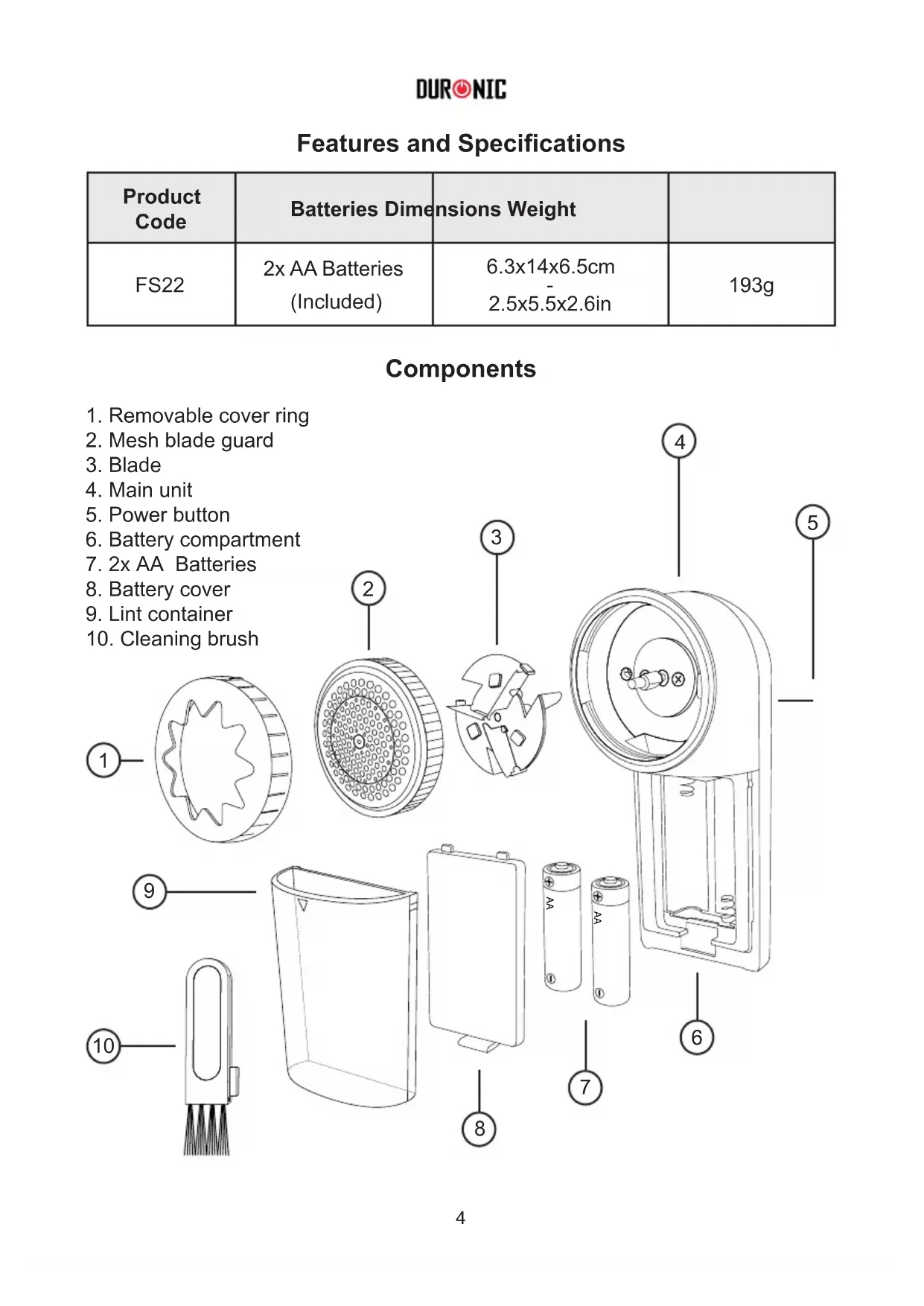


| Product Type | Fabric Lint Shaver |
| Brand | Duronic |
| Model | FS22 |
| Dimensions | 6.3 x 14 x 6.5 cm |
| Weight | 193 g |
| Power Source | 2 AA batteries (included) |
| Number of Speeds | 2 adjustable speeds |
| Lint Box Capacity | Emptying recommended at 80% full |
| Blade Material | Stainless steel (estimated) |
| Protection Type | Honeycomb grid with holes of different sizes |
| Maintenance | Clean with included brush; do not immerse |
| Safety | Automatic stop when removing protector? (Not specified) |
| Warranty | 1 year |
| Usage | Household only, on flat textiles |
| Color | Not specified (gray/black likely) |
Frequently Asked Questions - FS22 Duronic
User questions about FS22 Duronic
0 question about this device. Answer the ones you know or ask your own.
Ask a new question about this device
Download the instructions for your Shaver in PDF format for free! Find your manual FS22 - Duronic and take your electronic device back in hand. On this page are published all the documents necessary for the use of your device. FS22 by Duronic.
USER MANUAL FS22 Duronic
Creative Consumer Products
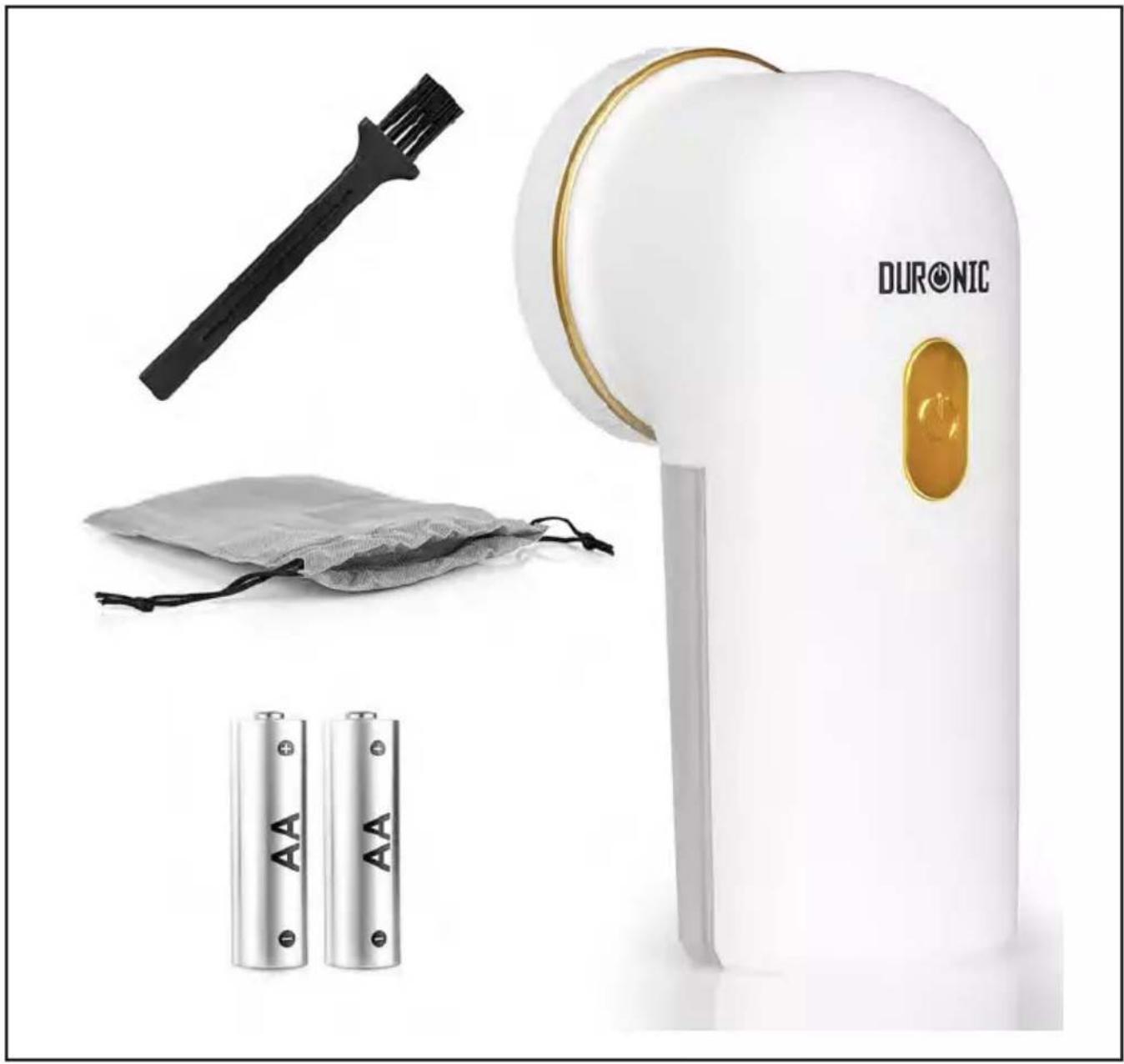
natural_image
Product display featuring a Duronic water heater, battery pack, and accessories (no text or symbols visible on main objects)FS22
FABRIC SHAVER
PLEASE READ ALL THE INSTRUCTIONS BEFORE USE

duronic.com

duronic

@duronicmedia

Duronic

@duronicmedia
Contents
English Manual 3
Features and Specifications
| Product Code | Batteries Dimensions Weight | ||
| FS22 | 2x AA Batteries (Included) | 6.3x14x6.5cm-2.5x5.5x2.6in | 193g |
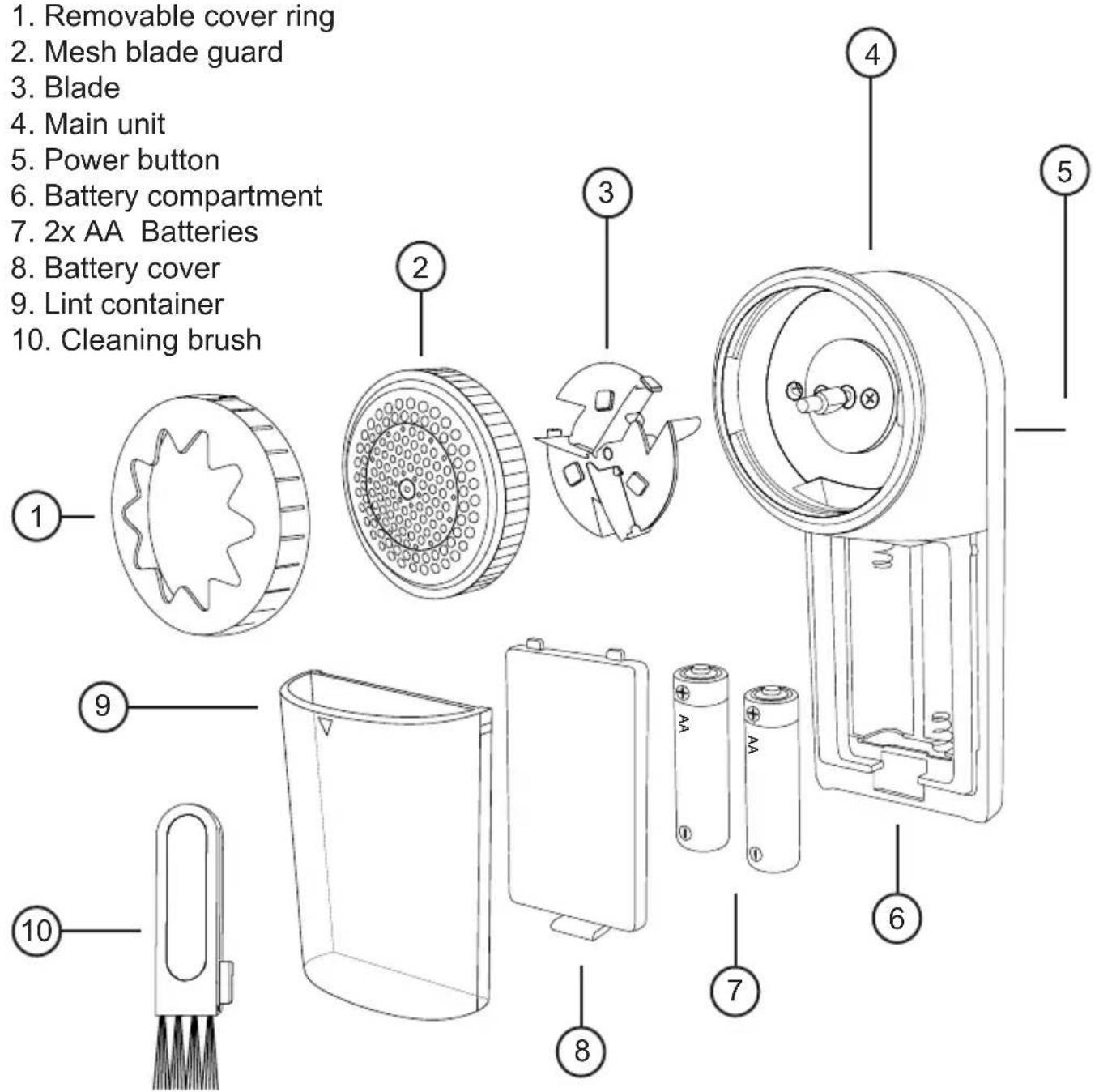
Components
text_image
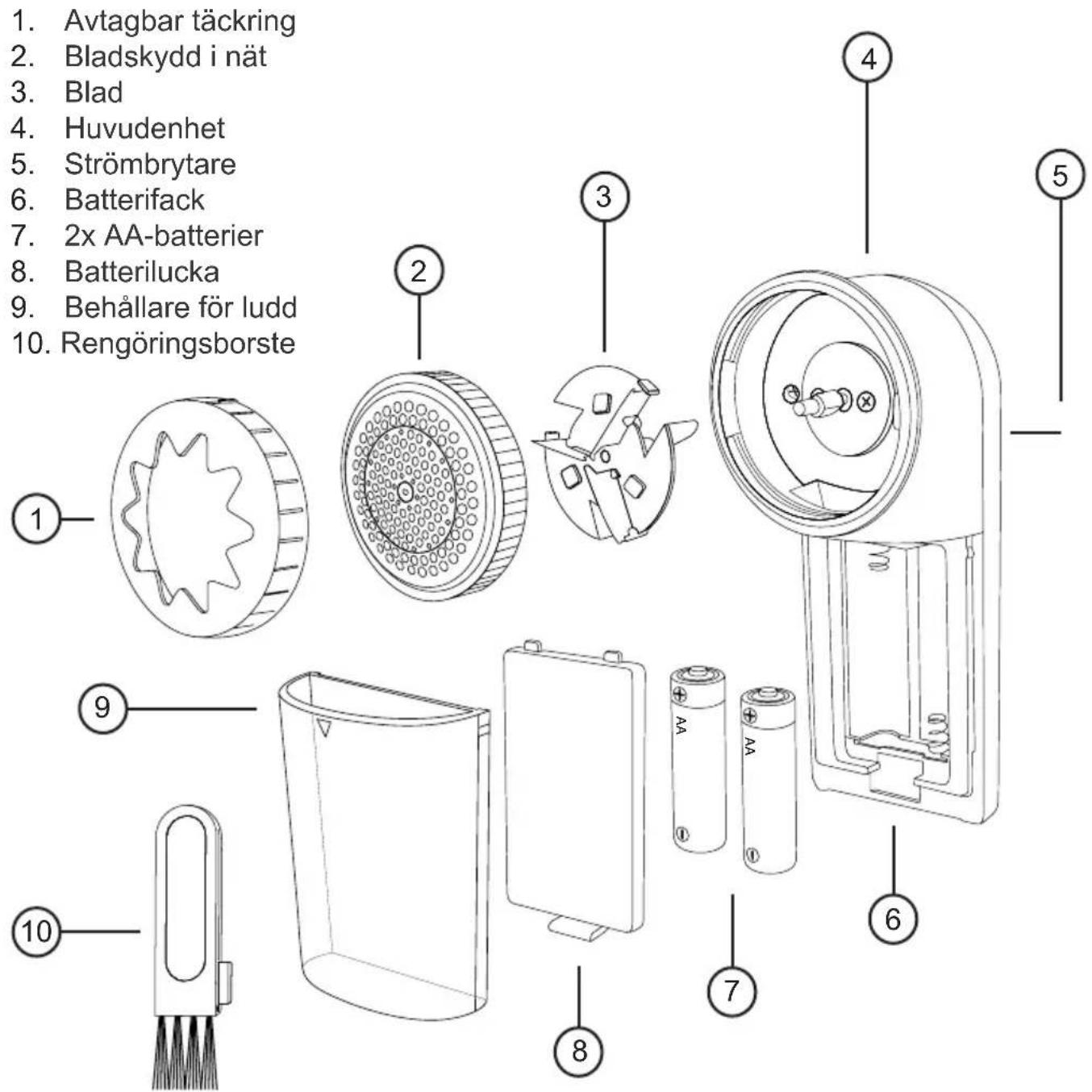
1. Removable cover ring 2. Mesh blade guard 3. Blade 4. Main unit 5. Power button 6. Battery compartment 7. 2x AA Batteries 8. Battery cover 9. Lint container 10. Cleaning brushDURONIC
Safety Information
PLEASE READ THIS MANUAL CAREFULLY AND RETAIN FOR FUTURE REFERENCE
- This appliance is for indoor/household use only. Do not use outdoors.
- This appliance is not designed for commercial or industrial use; it is for household use only.
- This appliance is not intended for use by persons (including children) with reduced physical, sensory or mental capabilities, or lack of experience and knowledge unless they have been given supervision or instruction concerning the use of the appliance by a person responsible for their safety.
- Children should be closely supervised at all times to ensure that they do not play with the appliance.
- Never try to replace the parts and repair the unit by yourself. Do not modify the appliance in any way that is not described in the instructions for use. The appliance contains live parts. Repairs may only be carried out by Duronic, using original spare parts and accessories.
- Do not use on wet clothes or fabrics.
- Place clothes on a flat surface before use. Using the fabric shaver on uneven surfaces may result in damaged clothes.
- Do not apply excessive pressure on the fabric shaver. Improper use may damage clothes or fabric.
- If you are uncertain whether the fabric is suitable for the fabric shaver, test it first on an area of fabric that is inconspicuous, for example, on the inside of the garment.
- Do not use the fabric shaver to shave hair, beards, or socks.
- Do not immerse the fabric shaver in water or any other liquid. Do not allow it to come into contact with any moisture.
- Do not open and remove the blade guard during use.
- Do not let pointed objects come into contact with the blades during use.
- Do not use the appliance on embroideries, zips, buttons and loose threads.
DURONIC
Safety Information (continued)
- Do not switch on the appliance when performing cleaning and maintenance.
• Exercise caution when cleaning around the blades as they are sharp and may cause injury.
• This product requires 2 x AA batteries. - Do not attempt to recharge non-rechargeable batteries.
- Different types of batteries should not be used together
- Do not use both new and used/discharged batteries at the same time.
- When inserting the batteries ensure they are inserted with the correct polarity.
- When the batteries are exhausted/discharged, remove them from the appliance and safely dispose of them.
- If the fabric shaver is to be stored away or left unused for a long period, the batteries should be removed.
- Do not discard spent batteries with household waste; discard to special battery collection containers.

CAUTION
- The blades are very sharp. Be extremely careful when removing the blades for cleaning purposes.
- Do not shave any clothes worn on the body, bodily injury or damage to the fabric shaver may occur.
- Do not use the fabric shaver without the blade guard.
- Never expose the batteries to direct sources of heat, e.g. direct sunlight, radiators, heaters, or fire.
- Explosion hazard! Do not disassemble, short circuit or throw the batteries into fire.
- Discharged batteries left in the fabric shaver for a period of time
may leak acid and damage the appliance.
- If you touch battery acid with your hands, rinse them under running water straight away. In the event of battery acid coming into contact with the eye, seek medical attention immediately. The battery acid may cause irritation or chemical burns.
- Keep the batteries away from children and pets. If a battery is swallowed, seek medical attention immediately without delay. Swallowing a battery can be fatal!
Introduction
Restore and revive your favourite clothes and textiles with the help of this fantastic fabric shaver. It's ideal for jumpers, coats, bedding, upholstery and so much more.
The Duronic FS22 fabric shaver allows you to remove any build-up of lint, bobbles or pills from textiles with just a simple glide action.
It has 2 speed settings that allow you to work as quickly or slowly as you like, and being battery powered means it can be used anywhere you like without the need to worry about a cable and having somewhere to plug into.
The honeycomb mesh guard features 3 different size holes that allows bobbles of all sizes to easily pass through while at the same time protecting your fabric from catching or snagging.
DURONIC
Before First Use
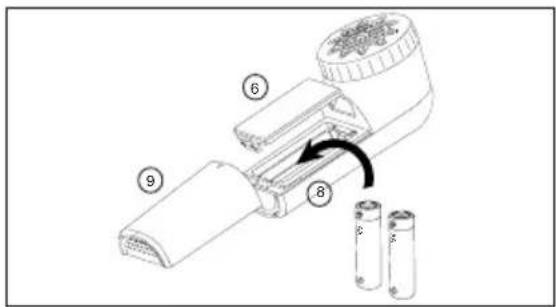
- Insert 2xAA batteries into the Battery Compartment(6) and attach the battery cover(8). Then slide the Lint Container(9) into place.
text_image
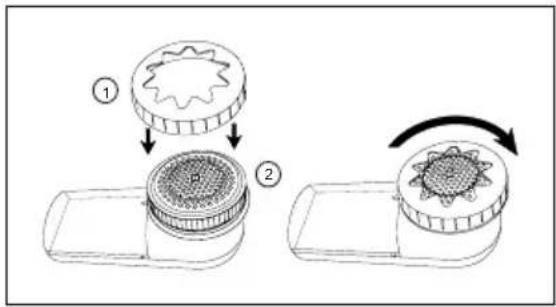
Diagram of a battery pack assembly with numbered parts and battery cell arrangement- Place the Cover Ring(1) onto the Mesh Guard(2), then twist and click into place.
Note:
the cover ring can be adjusted to different heights or removed for a closer shave.
text_image
Diagram illustrating a mechanical process with labeled steps and components, showing transformation from gear-like to circular component.How to Use
-
Place your fabric or item of clothing on a flat and level surface, ensuring it is laid flat. An ironing board or tabletop is ideal.
-
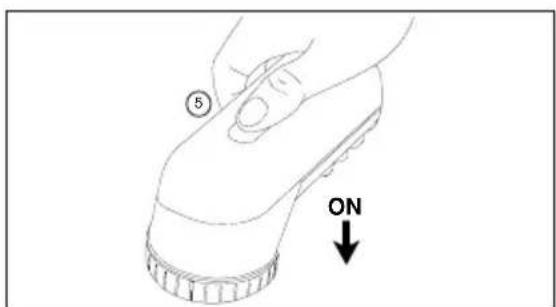
Turn on the fabric shaver. Press the Power Button(5) once for Speed 1, press twice for Speed 2.
text_image
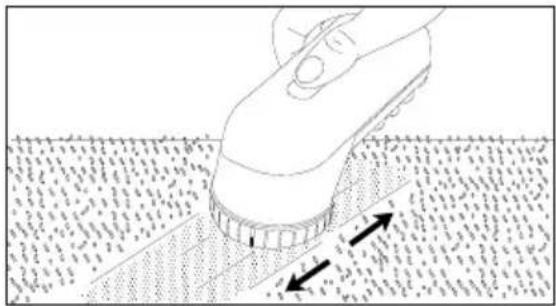
⑤ ON- Slide the fabric shaver over the surface of fabric in a forwards and backwards motion. For a closer shave, you can adjust or remove the cover ring.
natural_image
Diagram showing a hand using a power tool to press or install a component over a textured surface, with arrows indicating direction (no text or symbols present)- To turn the fabric shaver off, press the power button for the third time.
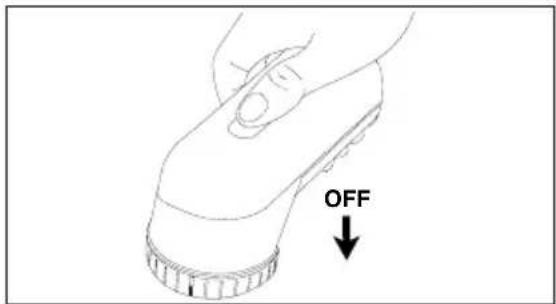
text_image
OFF- When the lint container is full, remove it from the main unit(4) and empty the contents of the container into a bin. Then re-attach the lint container back onto the main unit.
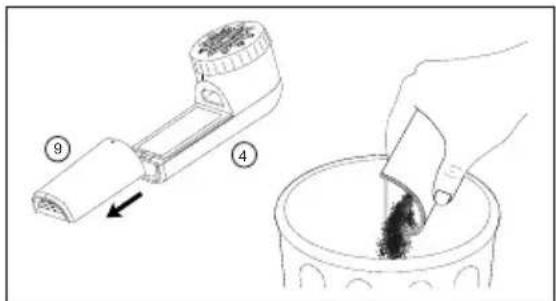
text_image
Diagram illustrating a chemical extraction process: step 9 of a device being inserted into a container with granular material.Cleaning and Maintenance
We recommend emptying the lint container when it is approximately 80% full.
If the body of the fabric shaver becomes dirty, simply clean it by wiping over it with a damp well-wrung cloth.
Do not immerse the fabric shaver in water or any other liquid. Do not allow it to come into contact with any moisture.
How to Clean
- Ensure that the fabric shaver is switched off.
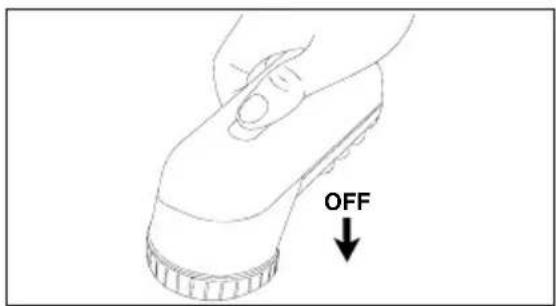
text_image
OFF- Remove the batteries and change for new batteries if needed.
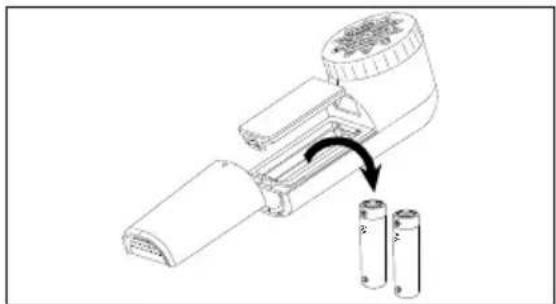
text_image
Diagram showing battery assembly with labeled components and directional arrow indicating rotation or movement- Remove the Cover Ring, Mesh Guard.
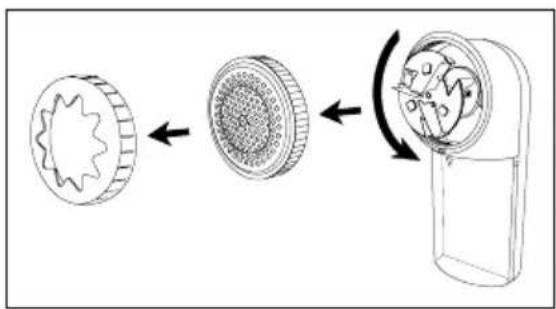
text_image
Diagram illustrating the process of a mechanical device with gear and rotor components, showing transformation from gear to motor.- Carefully remove the blade by lifting it out.
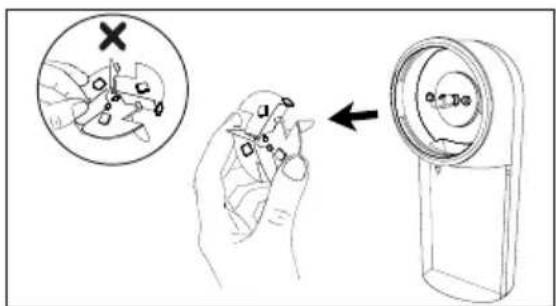
text_image
Diagram illustrating a hand holding a small object with a magnified view showing a cross symbol, alongside a device with a label 'a130'.- Use the Cleaning Brush (10) to clean out the mesh guard.
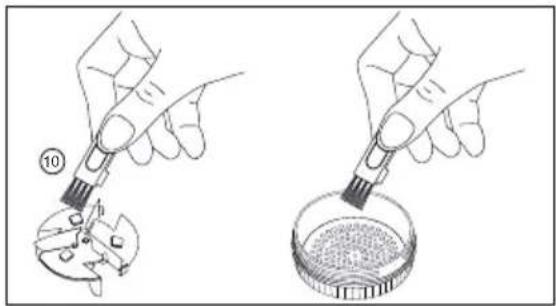
natural_image
Illustration of two hands using pipette to apply a sample into a petri dish (no text or symbols present)- Use the brush to clean inside of the fabric shaver too.
Then reassemble the fabric shaver back together.
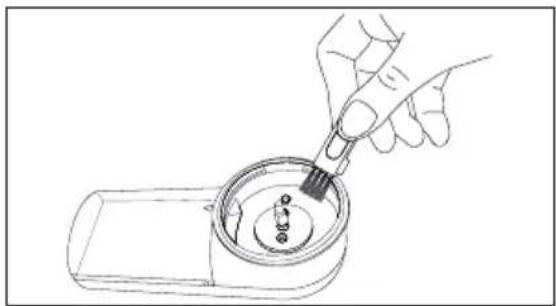
natural_image
Line drawing of a hand using a tool to clean or inspect a circular object with small components (no text or symbols)Troubleshooting
| Problem Possible Cause Solution | ||
| Blades do not turn when switched on | Blade guard is not fully fixed in plac | Twist and secure the blade guard in place |
| Battery is low Replace the batteries | ||
| Batteries are installed incorrectly/upside down | Remove the batteries and place them back into the battery compartment ensuring that their polarities are the correct way round | |
| Batteries are the wrong type | Ensure that you only use AA batteries | |
| Low Motor Speed | Low battery power Replace the batteries | |
| Lint container is full Empty the lint container | lint container | |
| Blade is obstructed by lint | Remove the cover ring and mesh guard and clean around the blade using the brush provided | |
| Efficiency is not how you would like it | The cover ring has not been adapted to the lint level | Rotate the cover ring to adjust the position |
| Motor speed is low | Check the batteries and if exhausted replace them with new batteries | |
| Check the lint container | ||
DURONIC
Warranty
1 Year Guarantee from Shine-Mart Ltd, Trademark owners of Duronic Products. NOTE: THESE STATEMENTS DO NOT AFFECT YOUR STATUTORY RIGHTS AS A CONSUMER
This product has been manufactured under the strictest or quality control procedures, and using the highest quality of materials, to ensure excellent performance and reliability. It will give very good and long lasting service, provided it is properly used and maintained. The product is guaranteed for 1 years from the date of original purchase. If any defect arises due to a faulty materials or poor workmanship, the faulty product must be returned to the original place of purchase. Refund or replacement is at the discretion of that company.
Duronic Products are offered with a 1 year guarantee under the following conditions:
- The product must be returned to the retailer with original proof of purchase.
- The product must be installed and used in accordance with the instruction's contained in this operating manual.
- It must be used only for domestic purposes.
- It does not cover wear and tear, malicious damage, misuse, neglect, inexpert repairs or consumable parts.
- Shine-Mart Ltd has no responsibilities for accidental or consequential loss or damage.
- Shine-Mart Ltd are not liable to carry out any type of servicing work, under the guarantee
- Valid in the UK only
This product is fitted with CE:1363 plug and fuse Imported by Shine-Mart Ltd, RM3 8SB
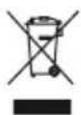
Information on waste Disposal for Consumers of Electrical & Electronic Equipment.
This mark on a product and/or accompanying documents indicates that when it is to be disposed of, it must be treated as Waste Electrical & Electronic Equipment, (WEEE).
Any WEEE marked products must not be mixed with general household waste, but kept separate for the treatment, recovery and recycling of the materials used.
For proper treatment, recovery and recycling; please take all WEEE marked waste to your Local Authority Civic waste site, where it will be accepted free of charge.
If customers dispose of Waste Electrical & Electronic Equipment correctly, they will be helping to save valuable resources and preventing any potential negative effects upon human health and the environment, of any hazardous materials that the waste may contain.
Follow Us





text_image
Diagram of a battery pack assembly with numbered parts and a rotation arrow indicating motion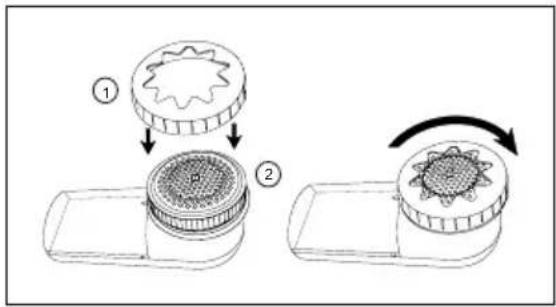
text_image
Diagram illustrating a mechanical process with labeled steps and components, showing transformation from gear-like to circular component.Utilisation
natural_image
Diagram of a hand using a tool to apply material to a surface, with arrows indicating direction (no text or symbols present)text_image
Diagram illustrating a chemical extraction process: adding granular material into a device and pouring into a container with dark powder.text_image
Diagram showing battery assembly with labeled components and directional arrow indicating processtext_image
Diagram illustrating the process of a mechanical device with gear and housing components, showing transformation from gear to housing.text_image
Diagram illustrating a medical procedure with labeled steps: injection, hand holding tool, and device insertion.natural_image
Illustration of two hands using pipette to apply a sample into a petri dish (no text or symbols present)natural_image
Line drawing of a hand using a tool to clean or inspect a circular object with small components (no text or symbols)Guide de dépannage
text_image
Diagram of a battery pack assembly with numbered parts and battery casing, showing internal components and rotation direction.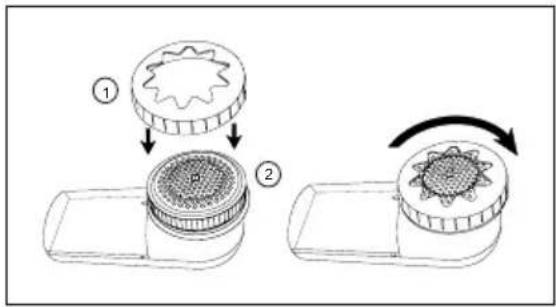
text_image
Diagram illustrating a mechanical process with labeled steps and components, showing transformation from gear-like to circular components.Handhabung
natural_image
Diagram showing a hand using a power tool to press or install a component on a textured surface, with arrows indicating movement direction (no text or symbols present)text_image
Diagram illustrating a chemical extraction process: adding granular material into a device and pouring into a container with visible particles.text_image
Diagram showing battery assembly with labeled components and directional arrow indicating rotation or movementtext_image
Diagram illustrating the process of a mechanical device with gear and housing components, showing transformation from gear to housing.text_image
Diagram illustrating a medical procedure with labeled steps: injection, hand positioning, and device insertion.natural_image
Illustration of two hands using pipette to apply a sample into a petri dish (no text or symbols present)natural_image
Line drawing of a hand using a tool to clean or inspect a circular object with small components (no text or symbols)Problemlösung
text_image
Diagram of a battery pack assembly with numbered parts and a rotation arrow indicating motion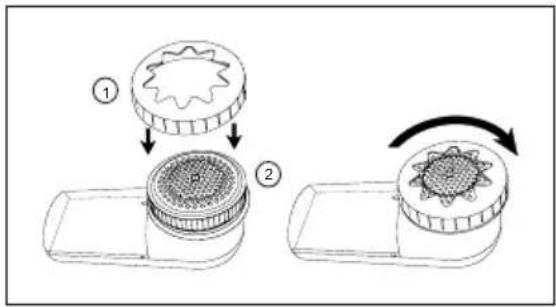
text_image
Diagram illustrating a mechanical process with labeled steps and components, showing transformation from gear-like to circular component.Modo de empleo
natural_image
Diagram of a hand using a power tool to press or install a component on a textured surface, with arrows indicating movement direction (no text or symbols present)text_image
Diagram illustrating a food preparation step: adding a vegetable into a container with a hand pouring contents.text_image
Diagram showing a battery assembly with labeled components and directional arrows indicating process flowtext_image
Diagram illustrating the process of a mechanical device with gear and housing components, showing transformation from gear to housing.text_image
Diagram illustrating a medical procedure involving a surgical tool and a device with a magnified view showing the tool's cross-section.natural_image
Illustration of two hands using pipette to apply a sample into a petri dish (no text or symbols present)natural_image
Line drawing of a hand using a tool to clean or inspect a circular object with small components (no text or symbols)text_image
Diagram of a battery pack assembly with numbered parts and a rotation arrow indicating motiontext_image
Diagram illustrating a mechanical process with labeled steps and components, showing transformation from gear-like to circular components.Uso conforme
natural_image
Diagram of a hand using a power tool to press or install a component on a textured surface, with arrows indicating movement direction (no text or symbols present)text_image
Diagram illustrating a chemical extraction process: adding granular material into a device and pouring into a container with visible particles.text_image
Diagram showing battery assembly with labeled components and directional arrow indicating processtext_image
Diagram illustrating the process of a mechanical device with gear and housing components, showing transformation from gear to motor.text_image
Diagram illustrating a hand holding a small object with a magnified view showing a crosshair and a device labeled 'a370'.natural_image
Illustration of two hands using pipette to apply a sample into a petri dish (no text or symbols present)natural_image
Line drawing of a hand using a tool to clean or inspect a circular object with small components (no text or symbols)text_image
Diagram of a battery pack assembly with numbered parts and a rotation arrow indicating motiontext_image
Diagram illustrating a mechanical process with labeled steps and components, showing transformation from gear-like to circular component.Jak używać
natural_image
Diagram showing a hand using a power tool to press or install a component on a textured surface, with arrows indicating direction (no text or symbols present)text_image
Diagram illustrating a chemical extraction process: adding granular material into a device and pouring into a container with visible particles.text_image
Diagram showing battery assembly with labeled components and directional arrow indicating processtext_image
Diagram illustrating the process of a mechanical device with gear and housing components, showing transformation from gear to motor.text_image
Diagram illustrating a hand holding a small object with a magnified view showing a crosshair and a device labeled 'a370'.natural_image
Illustration of two hands using pipette to apply a sample into a petri dish (no text or symbols present)natural_image
Line drawing of a hand using a tool to clean or inspect a circular object with small components (no text or symbols)text_image
Diagram of a battery pack assembly with numbered parts and battery cell arrangementtext_image
Diagram illustrating a mechanical process with labeled steps and components, showing transformation from gear-like to circular component.Not:
natural_image
Diagram showing a hand using a power tool to press or install a component over a textured surface, with arrows indicating direction (no text or symbols present)text_image
Diagram illustrating a chemical extraction process: adding granular material into a device and pouring into a container with visible particles.Temizlik ve Bakım
text_image
Diagram showing battery assembly with labeled components and directional arrow indicating rotation or movementtext_image
Diagram illustrating the process of a mechanical device with gear and housing components, showing transformation from gear to housing.text_image
Diagram illustrating a medical procedure with labeled steps: injection, hand positioning, and device insertion.natural_image
Illustration of two hands using pipette to apply a sample into a petri dish (no text or symbols present)natural_image
Line drawing of a hand using a tool to clean or inspect a circular object with small components (no text or symbols)Sorun Giderme
text_image
Diagram of a battery pack assembly with numbered parts and battery cell arrangement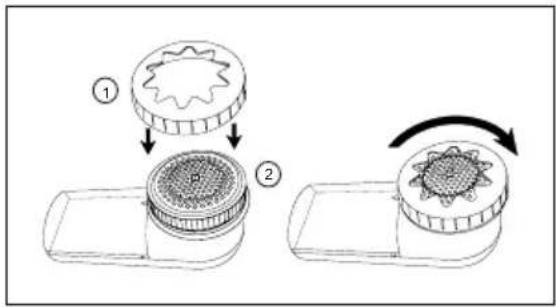
text_image
Diagram illustrating a mechanical process with labeled steps and components, showing transformation from gear-like to circular component.Hoe te gebruiken
natural_image
Diagram showing a hand using a power tool to press or install a component over a textured surface, with arrows indicating direction (no text or symbols present)text_image
Diagram illustrating a chemical extraction process: adding granular material into a device and pouring into a container with visible particles.text_image
Diagram showing battery assembly with labeled components and directional arrow indicating rotation or movementtext_image
Diagram illustrating the process of a mechanical device with gear and housing components, showing transformation from gear to housing.text_image
Diagram illustrating a medical procedure with labeled steps: injection, hand positioning, and device insertion.natural_image
Illustration of two hands using pipette to apply a sample into a petri dish (no text or symbols present)natural_image
Line drawing of a hand using a tool to clean or inspect a circular object with small components (no text or symbols)Troubleshooting
Features and Specifications
| Produkt Kod | Batterier Mått | Vikt | |
| FS22 | 2x AA-batterier(ingår) | 6.3x14x6.5cm-2.5x5.5x2.6in | 193g |
Komponenter
text_image
Diagram of a battery pack assembly with numbered parts and a rotation arrow indicating motiontext_image
Diagram illustrating a mechanical process with labeled steps and components, showing transformation from gear-like to circular component.Hur man använder
text_image
Diagram showing a battery assembly with labeled components and directional arrows indicating process flowtext_image
Diagram illustrating the process of a mechanical device with gear and rotor components, showing transformation from gear to motor.text_image
Diagram illustrating a hand holding a small object with a magnified view showing a mechanical component and a close-up of the object's cross.natural_image
Illustration of two hands using pipette to apply a sample into a petri dish (no text or symbols present)natural_image
Line drawing of a hand using a tool to clean or inspect a circular object with small components (no text or symbols)Felsökning