
MFP10 - Blender Duronic - Free user manual and instructions
Find the device manual for free MFP10 Duronic in PDF.


| Product type | 2-in-1 food processor and chopper |
| Model | MFP10 |
| Bowl capacity | 500 ml |
| Dimensions | 14 x 20 x 34 cm |
| Weight | Approximately 1.5 kg |
| Power | 400 W |
| Input voltage | 220-240 V ~ 50/60 Hz |
| Blade material | Stainless steel |
| Speeds | 2 speeds (I low, II high) + Pulse function |
| Main functions | Chop, slice, grate |
| Included accessories | Bowl, food processor lid, chopper lid, chopping blade, slicing/grating disc, plastic adapter, pusher |
| Safety | Bowl and lid locking, suction feet, automatic shut-off in case of overload |
| Maximum continuous use | 30 seconds, then rest for 3 minutes |
| Care and cleaning | Wipe the motor unit with a damp cloth; wash accessories in warm soapy water |
| Spare parts and repairability | Repairs exclusively by Duronic with original parts |
| Warranty | 1 year (Shine-Mart Ltd) |
| Intended use | Household use only |
Frequently Asked Questions - MFP10 Duronic
User questions about MFP10 Duronic
0 question about this device. Answer the ones you know or ask your own.
Ask a new question about this device
Download the instructions for your Blender in PDF format for free! Find your manual MFP10 - Duronic and take your electronic device back in hand. On this page are published all the documents necessary for the use of your device. MFP10 by Duronic.
USER MANUAL MFP10 Duronic
Creative Consumer Products
natural_image
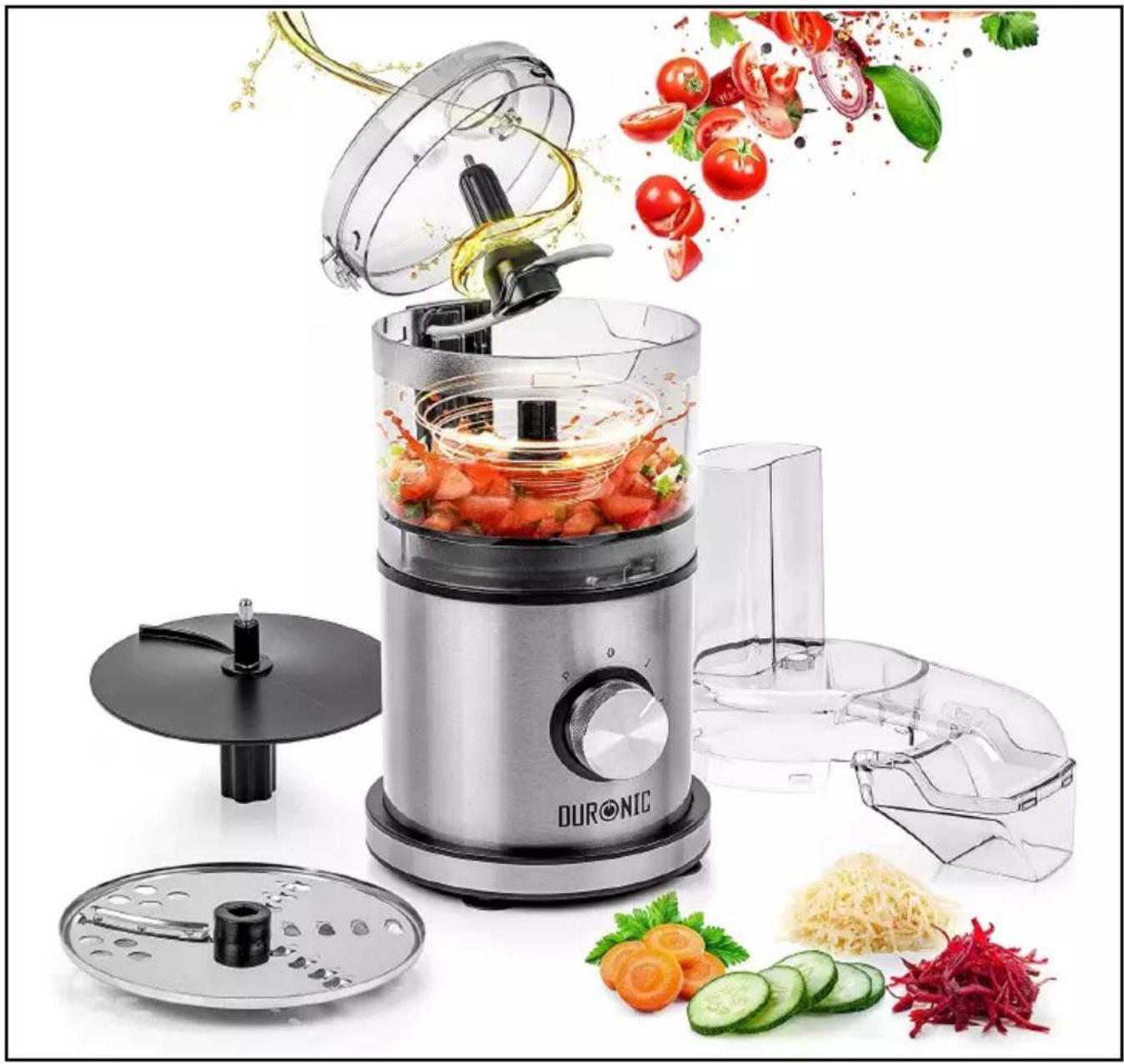
DURONIC kitchen appliance with fresh tomatoes being added, surrounded by fresh vegetables and kitchen utensils (no text or symbols visible on main components)MFP400
Mini Food Processor
PLEASE READ ALL THE INSTRUCTIONS BEFORE USE

duronic.com

duronic

@duronicmedia

Duronic

@duronicmedia
DURONIC
Contents
English Manual 5
Features and Specifications
| Model Number | Capacity | Dimensions | Power Voltage | |
| MFP400 500 | ml 14x20x34cm | 400W | 220-240V50-60Hz |
Components
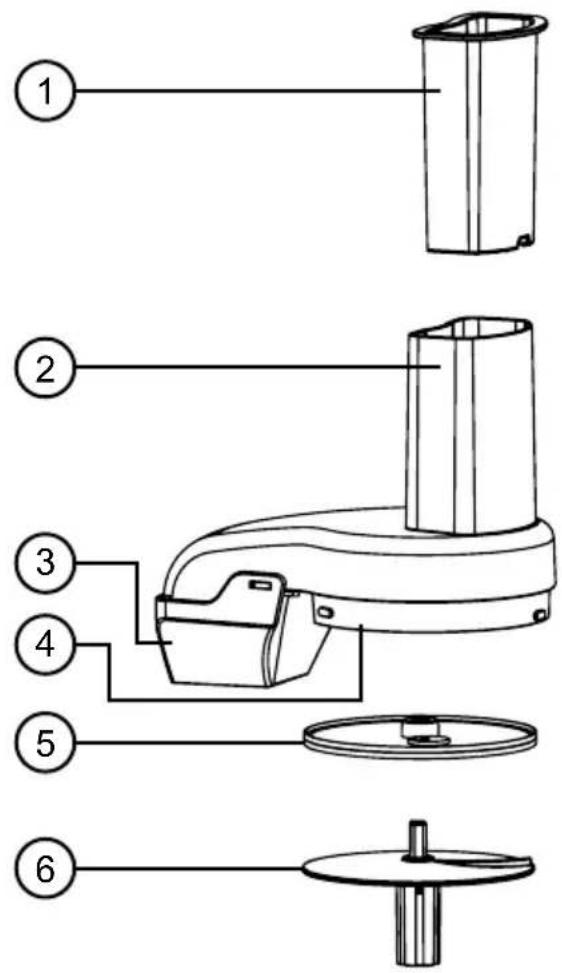
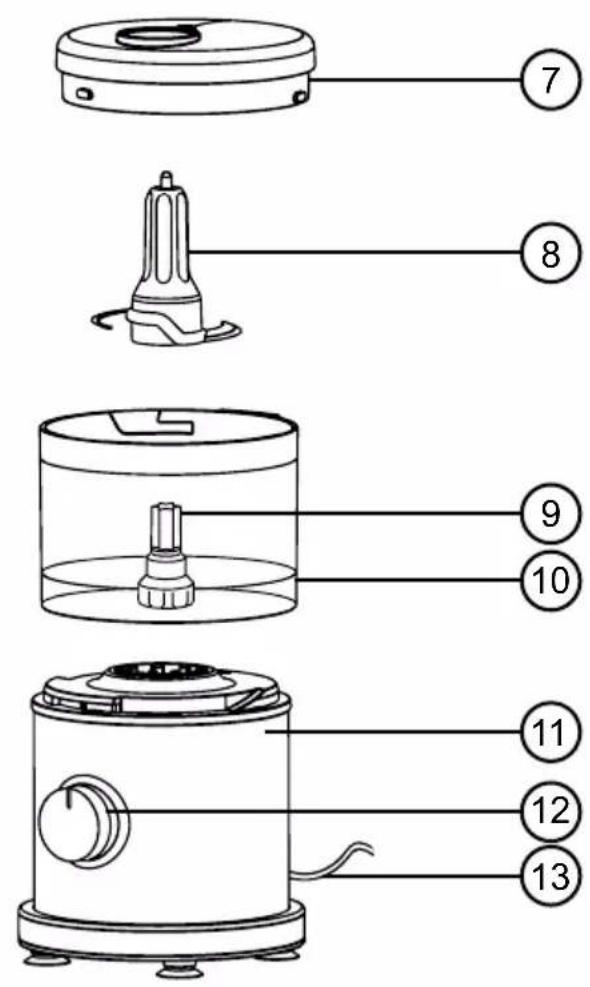
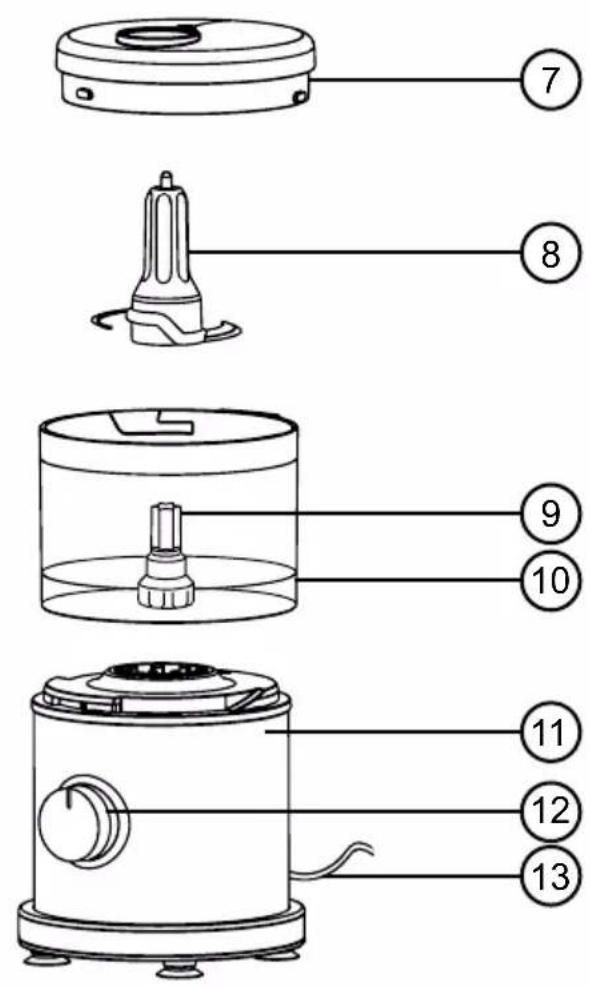
- Food pusher
- Food chute
- Food processor spout
- Food processor lid
- Stainless-steel shredding & slicing disk
- Plastic shredding & slicing adapter
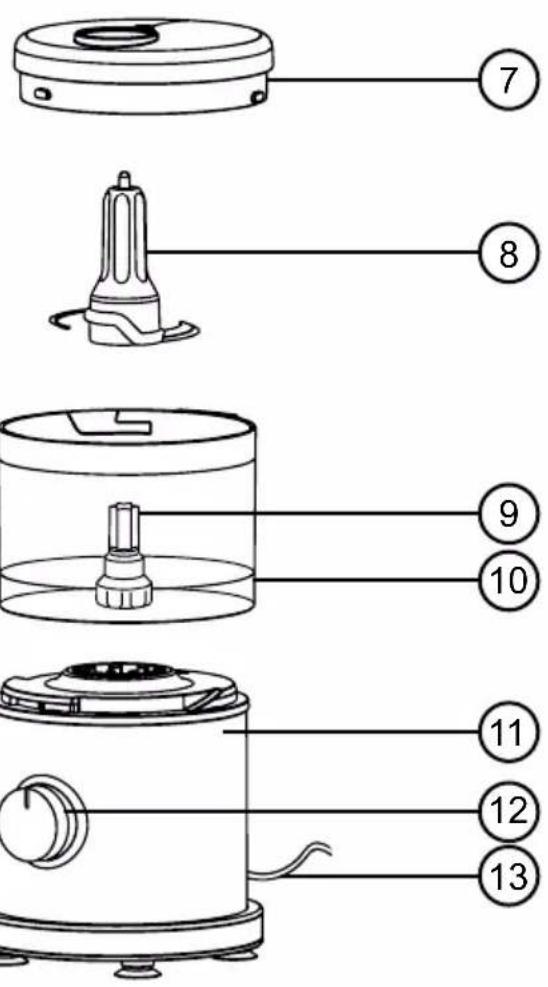
- Chopper lid
- Stainless-steel chopping blade
- Motor shaft
- Bowl
- Base / Motor unit
- Control dial
- Power cable
DURONIC
Safety Information
PLEASE READ THIS MANUAL CAREFULLY AND RETAIN FOR FUTURE REFERENCE
- This appliance is for indoor/household use only. Do not use outdoors.
- This appliance is not designed for commercial or industrial use; it is for household use only.
- This appliance is not intended for use by persons (including children) with reduced physical, sensory or mental capabilities, or lack of experience and knowledge unless they have been given supervision or instruction concerning the use of the appliance by a person responsible for their safety.
- Children should be closely supervised at all times to ensure that they do not play with the appliance.
- Only use the appliance out of the reach of children because there are sharp blades inside the bowl. Store the blade parts safely out of reach of children.
- Do not operate this appliance if the power cable or plug is damaged. If either is damaged, return it to Duronic for service or repair by a professional technician.
- Never try to replace the parts and repair the unit by yourself. Do not modify the appliance in any way that is not described in the instructions for use. The machine contains live parts. Repairs may only be carried out by Duronic, using original spare parts and accessories.
- If an extension lead/cable is needed to reach the appliance to a mains power socket that is too far away out of reach of the machine's accompanying cable, please ensure that:
- the marked electrical rating of the extension lead is at least as great as the electrical rating of the appliance.
- the extension lead is of the grounded type.
- no other appliance is plugged into the same extension lead.
- the extension cable is safely positioned to avoid it being pulled on by children or animals or being tripped over.
DURONIC
Safety Information (continued)
• Always operate the appliance on a dry, smooth, even and stable surface. Do not place the food processor on or next to a hot surface.
- Position the appliance and its power cable to the rear of the work surface, well out of reach of children.
- Disconnect the mains plug from the power socket if you are going to be absent for long periods.
- Never disconnect the plug by pulling on the power cable.
- Unplug from the mains plug outlet when not in use and before cleaning.
- This appliance is not intended to be operated using an external timer or separate remote-control system.
- Do not let the power cable hang over the edge of the table or counter, or touch hot surfaces.
- Do not use the appliance for anything other than blending or chopping food.
- Do not operate the food processor with wet hands.
• To clean, wipe the machine body with a well-wrung wet cloth. Do not submerge it in water or other liquids. Wash the cups and lids with warm water and soap. Dry properly before placing the cups back into the machine.
- Do not switch the appliance on if the bowl is empty or use the food processor for more than 30 seconds at a time as this will overheat the motor. After 30 seconds of use, allow the machine to cool down for 3 minutes.
- Be certain lid is securely locked in place before operating appliance.
- Never feed food into food chute by hand. Always use food pusher.
- Do not attempt to defeat the lid interlock mechanism.
• Make sure the blade or disc has come to a full stop before removing lid.
- Use caution when removing blade and disc from the bowl, when emptying the bowl, and when cleaning.
DURONIC
Safety Information (continued)
- Be sure to turn switch to OFF (O) position after each use. Always use the pusher to clear the food chute. When this method is not possible, turn the motor off and disassemble unit to remove the remaining food.
- The maximum rating of this unit is based on using the Chopping Blade. Using the Slicing/Shredding Disc may draw significantly less power.
Introduction
The MFP400 is a 2-in-1 kitchen appliance that is both a food processor and chopper.
To change between the two modes, simply choose which blades and which lids to use and add them to the top of the bowl.
The Food Processor
It has a long food chute which allows you to add a variety of ingredients into the bowl from above whilst a flat circular disk rotates and slices/grates the food into the bowl. This is perfect for slicing onions, celery, carrots and grating cheese.
The Chopper
This element is like a mini-blender; it has a sharp 2-part blade that is inserted into the bottom of the bowl and rotates to evenly chop and blend the ingredients in the bowl to your desired consistency. This is perfect for dicing veg into tiny pieces, pureeing food and also for making sauces.
DURONIC
Before First Use
How to Lock the Bowl
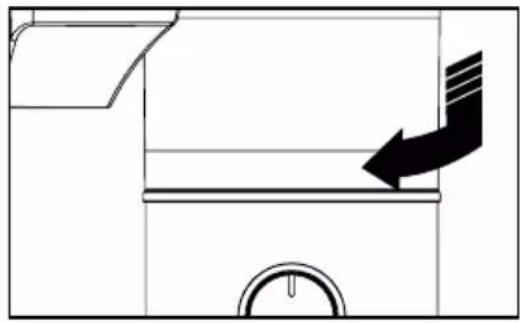
Align the Base Unit(11) and Bowl(10) as illustrated. Turn the bowl clockwise until it locks into place.
The bowl can lock onto the base in 3 different positions for the user's convenience.
NOTE: the food processor will not work unless the bowl is locked into position.
natural_image
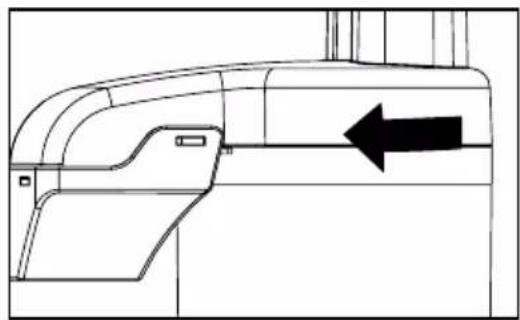
Diagram of a mechanical component with an arrow indicating direction, no text or symbols presentHow to Assemble and Lock the Lid
Align the Lid(4 or 7) as illustrated by placing a thumb on the lid and turning it clockwise. Four visual alignment markers are provided: one on the bowl, one on the handle and two on the bowl lid.
NOTE: the food processor will not work unless the lid is locked into position.
natural_image
Technical line drawing of a mechanical component with an arrow indicating direction (no text or symbols present)How to Operate the Control Dial
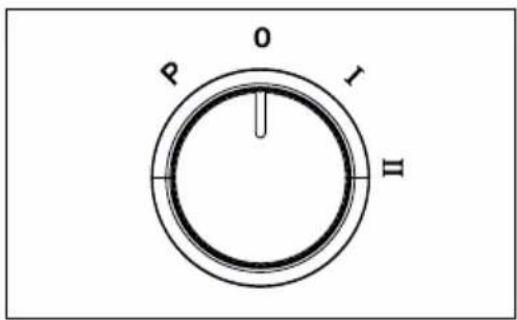
The Control Dial(12) is conveniently located on the front of the base. Rotate the dial clockwise to select a speed:
- I for low
- II for high
The processor will run continuously.
For instant on/off control use the PULSE button by rotating the dial counter-clockwise.
DURONIC
How to Use
Assembling and Using the Food Processor
-
Position the Main Unit(11) on a flat and stable surface. Check that the rubber feet are firmly in place on the surface to ensure that the appliance doesn't wobble during use.
-
Check that the Control Dial(12) is turned to OFF(O) and the machine is unplugged.
-
Lock the Bowl(10) onto Base Unit.
-
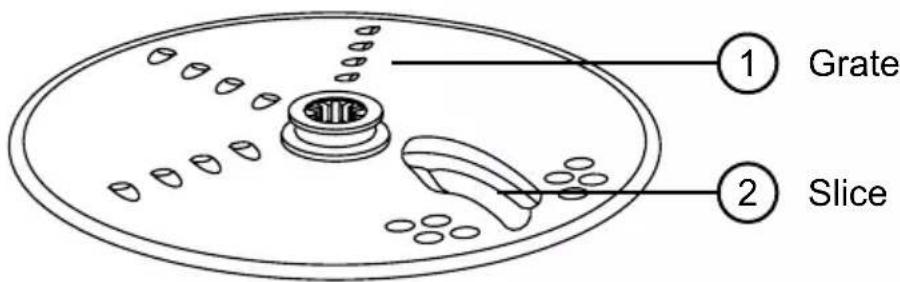
Place the Plastic Shredding and Slicing Disk(6) onto the motor shaft(9). Put slicer/grater disk(5) on top of the plastic disk with the desired side facing up ready for either slicing or grating.
-
Next, place Food Processor Lid(4) onto the bowl and have the Food Pusher(1) ready to use.
-
Place a bowl or container directly underneath the Food Processor Spout(7)
-
Plug in the main unit to a mains plug socket.
-
Place the ingredients into the Food Chute. To slice/grate large foods (such as a chunk of cabbage, green pepper or a whole tomato) you may need to slice it in half first so that it fits into the Food Processing Chute.
Tip: To slice vegetables into julienne style, slice them first, then remove from bowl and re-stack the vegetables. Then put them into food chute with the slices vertical. Slice again to make match-stick cut vegetables.
DURONIC
How to Use (continued)
- Insert Food Pusher into the Food Chute to guide the food through. Always use the Food Pusher to feed food into the chute. NEVER PUSH FOOD THROUGH THE CHUTE WITH YOUR HANDS.
- Use the Control Dial to select the speed. While pressing on Food Pusher, select between speeds 1 or 2, or for optimum slicing and grating, use the PULSE function.
- The sliced or grated food will travel through the Food Processor Spout and collect in the container placed below it.
- When food chute is empty, or once grating/slicing is complete, select OFF(O) or release the dial from the PULSE position. Wait until blade has stopped rotating before removing lid.
Tips:
To slice or shred cheese, select firm cheese like Cheddar, Monterey Jack, or Swiss. Place cheese in freezer for 30 minutes before processing.
The Shredding and Slicing Disc has a slicing blade on one side and grating teeth on the other. Place the disk onto Motor Shaft with desired cutting edge facing up.
Assembling and Using the Food Chopper
- Position the Main Unit(11) on a flat and stable surface. Check that the rubber feet are firmly in place on the surface to ensure that the appliance doesn't wobble during use.
- Check that the Control Dial(12) is turned to OFF(O) and the machine is unplugged.
- Lock the Bowl(10) onto Base Unit.
DURONIC
How to Use (continued)
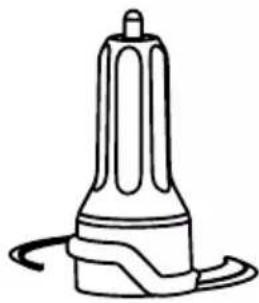
- Place the Chopping Blade(8) onto the motor shaft(9).
natural_image
Line drawing of a cylindrical device with a base and top, emitting smoke or liquid (no text or symbols)-
Plug in the main unit to a mains plug socket.
-
Place the ingredients into the Bowl. For a more uniform result, start with your food already cut or broken into similar sizes.
-
Next, place Chopper Lid(7) onto the bowl and lock it in place.
-
Use the Control Dial to select the speed. Select between speeds 1 or 2, or for optimum chopping, use the PULSE function.
-
When food is chopped to your liking, select OFF(O) or release the dial from the PULSE position. Wait until blade has stopped rotating before removing lid.
How to Release the Suction Cup Feet After Use
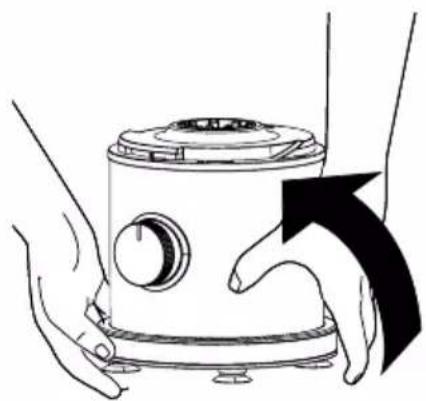
The suction cup feet on the bottom of your Food Processor are designed to keep the appliance stationary during use. Each time you position the machine on your countertop the suction pads will attach to it.
To remove the suction cups from the countertop, lift the base from the counter by placing your hands underneath it (as shown) and lift it to one side. One-by-one the suction cups will release.
natural_image
Illustration of hands operating a kitchen appliance with a black arrow indicating rotation (no text or symbols)DURONIC
Cleaning and Maintenance
Cleaning the Main Unit
Wipe the main motor unit with a well-wrung damp sponge and then dry with a dry cloth.
Cleaning the Attachments
Wash all of the attachments - the lids, blade, discs, food pusher - in warm, soapy water. To clean food thoroughly from the bowl and bowl lid/food chute, immerse it in warm, soapy water.
Rinse and dry all parts thoroughly. Ensure all parts are properly dry before re-assembling the appliance.
Storage
To store, place the bowl on to the base. Then place Chopping Blade on motor shaft and Slicer Disc on top of the Chopping Blade. Place a Lid on Bowl but do not lock.
NOTE: Do not store the machine with lid in the locked position; this may put strain on the interlock tab.

CAUTION:
Handle the attachments with care as the blades are sharp. Exercise caution when attaching, removing, cleaning and storing the attachments.
Troubleshooting
| Potential Problem | Probable Cause / Solution |
| The food processor does not operate on any speed or pulse. | Is the machine plugged in? Does the mains socket work ok?Are the bowl, lid and feed chute all locked in place? See section called ‘Before First Use’ |
| Food is not chopped, sliced or shredded uniformly. | Packing too much food in the feed chute, or pushing too hard on the feed pusher may cause the processed food to be irregularly sliced or shredded. |
| Unit stops and will not come back on. | Are the bowl and feed chute lid all locked in place? They may have moved slightly during processing.Is the mains plug socket still working? Check it by plugging in a working lamp or other appliance. You may have overloaded the circuit and blown a fuse or tripped the circuit breaker.Turn the food processor OFF, allow it to stand for 3 to 4 minutes, then turn back ON.If none of these suggestions correct the problem, DO NOT attempt to repair the unit. Contact the Duronic Customer Care Team for further assistance. |
| Unit has a burning smell. | There may be a residue left on the motor from the manufacturing process, causing a slight odour during initial use. This will go away.If a strong odour or any visible smoke appears, unplug the food processor IMMEDIATELY and contact the Duronic Customer Care Team. |
| Motor seems weak. | Are you using the recommended speed for the food you are processing?Are you using the recommended food size and quantity to be processed? |
DURONIC
Warranty
1 Year Guarantee from Shine-Mart Ltd, Trademark owners of Duronic Products. NOTE: THESE STATEMENTS DO NOT AFFECT YOUR STATUTORY RIGHTS AS A CONSUMER
This product has been manufactured under the strictest or quality control procedures, and using the highest quality of materials, to ensure excellent performance and reliability. It will give very good and long lasting service, provided it is properly used and maintained. The product is guaranteed for 1 years from the date of original purchase. If any defect arises due to a faulty materials or poor workmanship, the faulty product must be returned to the original place of purchase. Refund or replacement is at the discretion of that company.
Duronic Products are offered with a 1 year guarantee under the following conditions:
- The product must be returned to the retailer with original proof of purchase.
- The product must be installed and used in accordance with the instructions contained in this operating manual.
- It must be used only for domestic purposes.
- It does not cover wear and tear, malicious damage, misuse, neglect, inexpert repairs or consumable parts.
- Shine-Mart Ltd has no responsibilities for accidental or consequential loss or damage.
- Shine-Mart Ltd are not liable to carry out any type of servicing work, under the guarantee
- Valid in the UK only
This product is fitted with CE:1363 plug and fuse Imported by Shine-Mart Ltd, RM3 8SB

Information on waste Disposal for Consumers of Electrical & Electronic Equipment.
This mark on a product and/or accompanying documents indicates that when it is to be disposed of, it must be treated as Waste Electrical & Electronic Equipment, (WEEE).
Any WEEE marked products must not be mixed with general household waste, but kept separate for the treatment, recovery and recycling of the materials used.
For proper treatment, recovery and recycling; please take all WEEE marked waste to your Local Authority Civic waste site, where it will be accepted free of charge.
If customers dispose of Waste Electrical & Electronic Equipment correctly, they will be helping to save valuable resources and preventing any potential negative effects upon human health and the environment, of any hazardous materials that the waste may contain.
Follow Us





natural_image
Pure technical diagram showing a mechanical component with an arrow indicating direction (no text or symbols)natural_image
Technical line drawing of a mechanical component with an arrow indicating direction (no text or symbols present)natural_image
Line drawing of a cylindrical device with a base and top, resembling a lamp or detector (no text or symbols)natural_image
Illustration of hands operating a kitchen appliance with a black arrow indicating rotation (no text or symbols)DURONIC
natural_image
Pure technical diagram of a mechanical component with an arrow indicating direction (no text or symbols)natural_image
Technical line drawing of a mechanical component with an arrow indicating direction (no text or symbols present)natural_image
Line drawing of a cylindrical device with a base and top, emitting smoke or vapor (no text or symbols)natural_image
Illustration of hands operating a kitchen appliance with a black arrow indicating rotation (no text or symbols)DURONIC
Features and Specifications
natural_image
Diagram of a door with an arrow indicating direction, no text or symbols presentnatural_image
Technical line drawing of a mechanical component with an arrow indicating direction (no text or symbols present)natural_image
Line drawing of a cylindrical device with a base and top, resembling a lamp or detector (no text or symbols)natural_image
Illustration of hands operating a kitchen appliance with a black arrow indicating rotation (no text or symbols)DURONIC
natural_image
Diagram of a door with an arrow indicating airflow or direction (no text or symbols)natural_image
Technical line drawing of a mechanical component with an arrow indicating direction (no text or symbols present)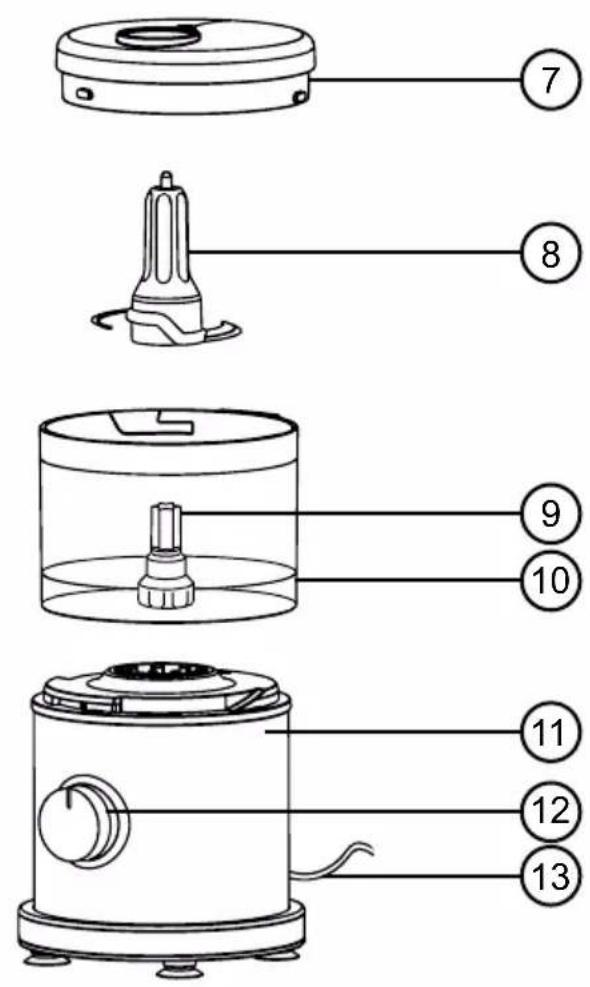
natural_image
Diagram of a mechanical component with an arrow indicating direction, no text or symbols presentnatural_image
Technical line drawing of a mechanical component with an arrow indicating direction (no text or symbols present)natural_image
Line drawing of a cylindrical device with a base and top, resembling a lamp or detector (no text or symbols)natural_image
Illustration of hands operating a kitchen appliance with a black arrow indicating rotation (no text or symbols)DURONIC

- Creative Consumer Products
- MFP400
- Mini Food Processor
- Contents
- Features and Specifications
- Components
- DURONIC
- Safety Information
- PLEASE READ THIS MANUAL CAREFULLY AND RETAIN FOR FUTURE REFERENCE
- Safety Information (continued)
- Introduction
- The Food Processor
- The Chopper
- Before First Use
- How to Lock the Bowl
- How to Assemble and Lock the Lid
- How to Operate the Control Dial
- How to Use
- Assembling and Using the Food Processor
- How to Use (continued)
- Tips:
- Assembling and Using the Food Chopper
- How to Release the Suction Cup Feet After Use
- Cleaning and Maintenance
- Cleaning the Main Unit
- Cleaning the Attachments
- Storage
- CAUTION:
- Troubleshooting
- Warranty
- Follow Us
Brand : Duronic
Model : MFP10
Category : Blender